Last month today: August on GCP

Last month on the Google Cloud Platform (GCP) blog, we dove into hardware, software, and the humans who make technology work. Here’s what topped our charts in August.Exploring the nuts and bolts of cloudGoogle already uses AMD’s EPYC processors for internal workloads, and last month we announced that they’re coming to the data centers that power Google Cloud products. Second-gen AMD EPYC processors will soon power our new virtual machines—the largest general-purpose VMs we’ve ever offered. There will be a range of sizes for these AMD VMs so you can choose accordingly, and can also configure them as custom machine types. Improvements like these can help you get more performance for the price for your workloads. One small button can make it easy for other developers to deploy your app to GCP using Cloud Run, our managed compute platform that lets you deploy containerized serverless apps. You can add the new Cloud Run Button to any source code repository that has a dockerfile or that can be built with Cloud Native Buildpacks. One click will package the app source code as a container image, push it to Google Container Registry, then deploy it on Cloud Run. Looking at the human side of technologyThis blog post offered a look at the tradeoffs that CIOs and CTOs have to make in their pursuit of business acceleration in a hybrid world, based on recent McKinsey research. While digital transformation and new tech capabilities are in high demand, leaders can avoid making tradeoffs by choosing technology wisely and making necessary operational changes too, including fostering a change mindset. There are tips here on embracing a DevOps model, using a flexible hybrid cloud model, and adopting open-source architectures to avoid common pitfalls.This year’s Accelerate State of DevOps Report is available now, and offers a look at the latest in DevOps, with tips for organizations at all stages of DevOps maturity. This year, data shows that the percentage of elite performers is at its highest ever, and that these elite performers are more likely to use cloud. The report found that most cloud users still aren’t getting all of its benefits, though. DevOps should be a team effort, too, with both organizational and team-level efforts important for success.How customers are developing with cloudGoogle Cloud customers are pushing innovation further to serve customers in lots of interesting ways. First up this month is Macy’s, which uses Google Cloud to help provide customers with great online and in-person experiences. The company is streamlining retail operations across its network with cloud, and uses GCP’s data warehousing and analytics to optimize all kinds of merchandise tasks at its new distribution center.We also heard this month from Itau Unibanco of Brazil, which developed a digital customer service tool to offer instant help to bank users. They use Google Cloud to build a Kubeflow-based CI/CD pipeline to deploy machine learning models and serve customers quickly and accurately. The post offers a look at their architecture and offers tips for replicating the pipeline.Last but not least, check out this story on how web developers are using Google Maps Platform and custom Street View imagery to offer virtual tours to the top of Zugspitze, the tallest mountain in Germany. Along with exploring APIs and deciding how to use the technology, the developers took a ton of 360° photos while hiking up and down parts of the 10,000-foot mountain. Take the tour yourself on their site.That’s a wrap for August! Stay tuned on the blog for all the latest.
Quelle: Google Cloud Platform

Kubernetes security audit: What GKE and Anthos users need to know

Kubernetes reached an important milestone recently: the publication of its first-ever security audit! Sponsored by the Cloud Native Computing Foundation (CNCF), this security audit reinforces what has been apparent to us for some time now: Kubernetes is a mature open-source project for organizations to use as their infrastructure foundation.While every audit will uncover something, this report only found a relatively small number of significant vulnerabilities that need to be addressed. “Despite many important findings, we did not see fundamental architectural design flaws, or critical vulnerabilities that should cause pause when adopting Kubernetes for high-security workloads or critical business functions,” said Aaron Small, Product Manager, Google Cloud and member of the Security Audit Working Group. Further, Kubernetes has an established vulnerability reporting, response, and disclosure process, which is staffed with senior developers who can triage and take action on issues.Performing this security audit was a big effort on behalf of the CNCF, which has a mandate to improve the security of its projects via its Best Practices Badge Program. To take Kubernetes through this first security audit, the Kubernetes Steering Committee formed a working group, developed an RFP, worked with vendors, reviewed and then finally published the report. You can get your hands on the full report on the Working Group’s GitHub page, or read the highlights in the CNCF blog post.Kubernetes security for GKE and Anthos usersClocking in at 241 pages, the final report is very thorough and interesting and we encourage you to read it. But what if you’re just interested in what this report means for Google Cloud’s managed platforms, Google Kubernetes Engine (GKE) and Anthos? If you’re not going to read the whole thing, here’s the gist of the report and takeaways for Google Cloud customers.GKE makes it easy for you to follow recommended configurationsThe report lays out a list of recommended actions for cluster administrators, including using RBAC, applying a Network Policy, and limiting access to logs which may contain sensitive information. The report also calls out Kubernetes’ default settings. In GKE, we’ve been actively changing these over time, including turning off ABAC and basic authentication by default, to make sure new clusters you create are more secure. To apply the recommended configurations in GKE, and see which have already been applied for you, check out the GKE hardening guide.It’s not all up to you The threat model assessed the security posture of eight major components, but because of the GKE shared responsibility model, you don’t have to worry about all of them. GKE is responsible for providing updates to vulnerabilities for the eight components listed in the report, while you as the user are responsible for upgrading nodes and configuration related to workloads. You don’t even need to upgrade nodes if you leave node auto-upgrade enabled. Kubernetes and GKE security are only going to keep getting betterWith more eyes on this shared, open source technology, more well-hidden bugs are likely to be found and remediated. The Kubernetes community dedicated significant time and resources to this audit, emphasizing that security is truly a top priority. With open audits like the one performed by the CNCF, it’s easier for researchers—or your team—to understand the real threats, and spend their time further researching or remediating the most complex issues. And when issues do arise, as we’ve seen multiple times with recent vulnerabilities, the upstream Kubernetes Product Security Committee is on top of it, quickly responding and providing fixes to the community. Finally, since GKE is an official distribution, we pick up patches as they become available in Kubernetes and make them available automatically for the control plane, master, and node. Masters are automatically upgraded and patched, and if you have node auto-upgrade enabled, your node patches will be automatically applied too. You can track the progress to address the vulnerabilities surfaced by this report in the issue dashboard.If you want to dig in deeper, check out the full report, available on GitHub. Thanks again to the Kubernetes Security Audit Working Group, the CNCF, Trail of Bits and Atredis Partners for the amazing work they did to complete this in-depth assessment! To learn more about trends in container security here at Google Cloud, be sure to follow our Exploring container security blog series.
Quelle: Google Cloud Platform

How to quickly solve machine learning forecasting problems using Pandas and BigQuery

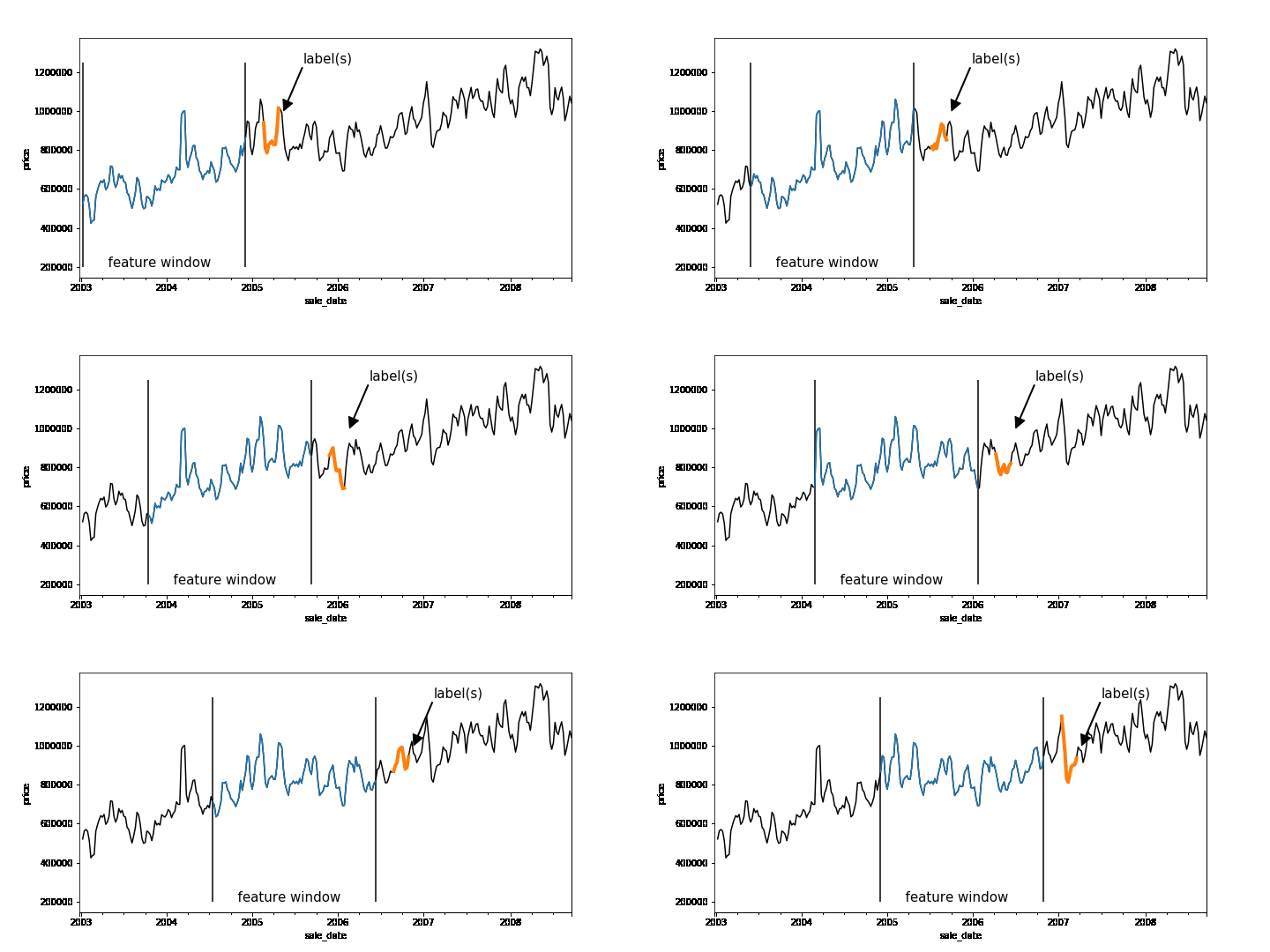
Time-series forecasting problems are ubiquitous throughout the business world. For example, you may want to predict the probability that some event will happen in the future or forecast how many units of a product you’ll sell over the next six months. Forecasting like this can be posed as a supervised machine learning problem. Like many machine learning problems, the most time-consuming part of forecasting can be setting up the problem, constructing the input, and feature engineering. Once you have created the features and labels that come out of this process, you are ready to train your model.A common approach to creating features and labels is to use a sliding window where the features are historical entries and the label(s) represent entries in the future. As any data-scientist that works with time-series knows, this sliding window approach can be tricky to get right.A sliding window on an example dataset. Each window represents a feature vector for the dataset and the label(s) is one or more points in the future.Below is a good workflow for tackling forecasting problems:1. Create features and labels on a subsample of data using Pandas and train an initial model locally2. Create features and labels on the full dataset using BigQuery3. Utilize BigQuery ML to build a scalable machine learning model4. (Advanced) Build a forecasting model using Recurrent Neural Networks in Keras and TensorFlowIn the rest of this blog, we’ll use an example to provide more detail into how to build a forecasting model using the above workflow. (The code is available on AI Hub)First, train locallyMachine learning is all about running experiments. The faster you can run experiments, the more quickly you can get feedback, and thus the faster you can get to a Minimum Viable Model (MVM). It’s beneficial, then, to first work on a subsample of your dataset and train locally before scaling out your model using the entire dataset.Let’s build a model to forecast the median housing price week-by-week for New York City. We spun up a Deep Learning VM on Cloud AI Platform and loaded our data from nyc.gov into BigQuery. Our dataset goes back to 2003, but for now let’s just use prices beginning 2011.Since our goal is to forecast future prices, let’s create sliding windows that accumulate historical prices (features) and a future price (label). Our source table contains date and median price:Here is the entire dataset plotted over time:To create our features, we’ll pick a historical window size—e.g., one year—that will be used to forecast the median home price in six months. To do this, we have implemented a reusable function based on Pandas that allows you to easily generate time-series features and labels. Feel free to use this function on your own dataset.After running create_rolling_features_label, a feature vector of length 52 (plus the date features) is created for each example, representing the features before the prediction date.This can be shown with a rolling window:The create_rolling_features_label function creates windows for the feature and label. In this case, the features consist of 52 weeks and the label consists of a week 6 months into the future.Once we have the features and labels, the next step is to create a training and test set. In time-series problems, it’s important to split them temporally so that you are not leaking future information that would not be available at test time into the trained model.The training set (blue) will consist of data where the label occurs before the split date (2015-12-30′), while the test set (green) consists of rows where the label is after this date.In practice, you may want to scale your data using z-normalization or detrend your data to reduce seasonality effects. It may help to utilize differencing, as well to remove trend information. Now that we have features and labels, this simply becomes a traditional supervised learning problem, and you can use your favorite ML library to train a model. Here is a simple example using sklearn:Scale our modelLet’s imagine we want to put our model into production and automatically run it every week, using batch jobs, to get a better idea of future sales.Let’s also imagine we may want to forecast a model day-by-day.Our data is stored in BigQuery, so let’s use the same logic that we used in Pandas to create features and labels, but instead run it at scale using BigQuery. We have developed a generalized Python function that creates a SQL string that lets you do this with BigQuery:We pass the table name that contains our data, the value name that we are interested in, the window size (which is the input sequence length), the horizon of how far ahead in time we skip between our features and our labels, and the labels_size (which is the output sequence length). Labels size is equal to 1 here because, for now, we are only modeling sequence-to-one—even though this data pipeline can handle sequence-to-sequence. Feel free to write your own sequence-to-sequence model to take full advantage of the data pipeline!We can then execute the SQL string scalable_time_series in BigQuery. A sample of the output shows that each row is a different sequence. For each sequence, we can see the time ranges of the features and the labels. For the features, the timespan is 52 weeks, which is the window_size, and for labels it is one day, which is the labels_size.Looking at the same sampled rows, we can see how the training data is laid out. We have a column for each timestep of the previous price, starting with the farthest back in time on the left  and moving forward. The last column is the label, the price one week ahead.Now we have our data, ready for training, in a BigQuery table. Let’s take advantage of BigQuery ML and build a forecasting model using SQL.Above we are creating a linear regression model using our 52 past price features and predicting our label price_ahead_1. This will create a BQML MODEL in our bqml_forecasting dataset.We can check how our model performed by calling TRAINING_INFO. This shows the training run index, iteration index, the training and eval loss at each iteration, the duration of the iteration, and the iteration’s learning rate. Our model is training well since the eval loss is continually getting smaller for each iteration.We can also do an evaluation of our trained model by calling EVALUATE. This will show common evaluation metrics that we can use to compare our model with other models to find the best choice among all of our options.Lastly, machine learning is all about prediction. The training is just a means to an end. We can get our predictions by using the above query, where we have prepended predicted_ to the name of our label.Now, let’s imagine that we want to run this model every week. We can easily create a batch job that is automatically executed using a scheduled query.Of course, if we want to build a more custom model, we can use TensorFlow or another machine library, while using this same data engineering approach to create our features and labels to be read into our custom machine learning model. This technique could possibly improve performance.To use an ML framework like TensorFlow, we’ll need to write the model code and also get our data in the right format to be read into our model. We can make a slight modification to the previous query we used for BigQuery ML so that the data will be amenable to the CSV file format. For this example, imagine you wanted to build a sequence-to-sequence model in TensorFlow that can handle variable length features. One approach to achieve this would be to aggregate all the features into a single column named med_sales_price_agg, separated by semicolons. The features (if we have more than just this feature in the future) and the label are all separated by a comma.We’ll execute the query in BigQuery and will make a table for train and eval. This will then get exported to CSV files in Cloud Storage. The diagram above is what one of the exported CSV files looks like—at least the header and the first line—with some comments added. Then when reading the data into our model using tf.data, we will specify the delimiter pattern shown above to correctly parse the data.Please check out our notebook on AI Hub for an end-to-end example showing how this would work in practice and how to submit a training job on Google Cloud AI Platform. For model serving, the model can deployed on AI Platform or it can be deployed directly in BigQuery. ConclusionThat’s it! The workflow we shared will allow you to automatically and quickly setup any time-series forecasting problem. Of course, this framework can also be adapted for a classification problem, like using a customer’s historical behavior to predict the probability of churn or to identify anomalous behavior over time. Regardless of the model you build, these approaches let you quickly build an initial model locally, then scale to the cloud using BigQuery.Learn more about BigQuery and AI Platform.
Quelle: Google Cloud Platform

New release of Cloud Storage Connector for Hadoop: Improving performance, throughput and more

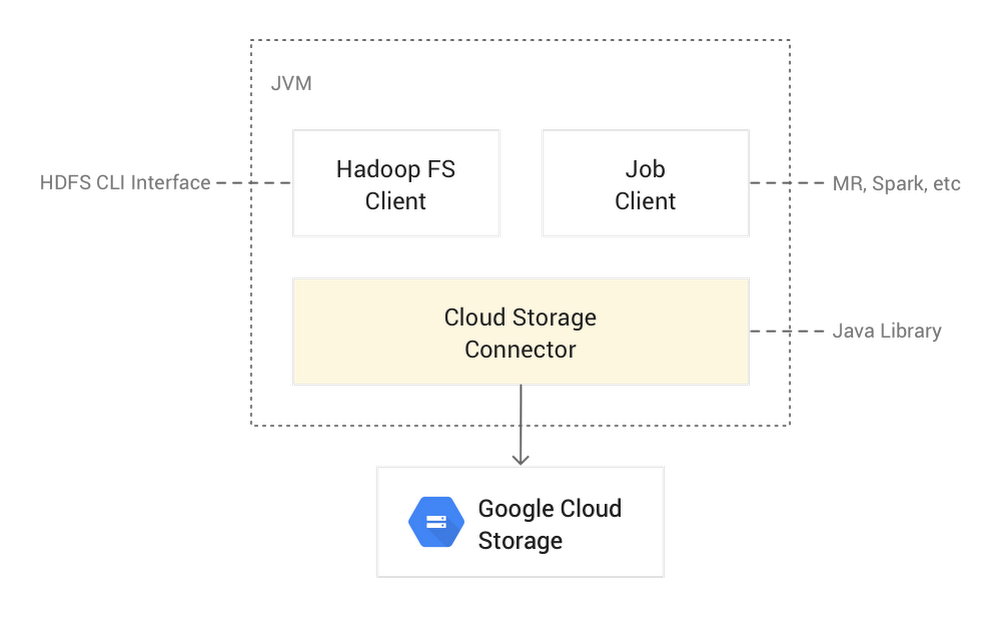
We’re pleased to announce a new version of the Cloud Storage Connector for Hadoop (also known as GCS Connector), which makes it even easier to substitute your Hadoop Distributed File System (HDFS) with Cloud Storage. This new release can give you increased throughput efficiency for columnar file formats such as Parquet and ORC, isolation for Cloud Storage directory modifications, and overall big data workload performance improvements, like lower latency, increased parallelization, and intelligent defaults.The Cloud Storage Connector is an open source Java client library that runs in Hadoop JVMs (like data nodes, mappers, reducers, Spark executors, and more) and allows your workloads to access Cloud Storage. The connector lets your big data open source software [such as Hadoop and Spark jobs, or the Hadoop Compatible File System (HCFS) CLI] read/write data directly to Cloud Storage, instead of to HDFS. Storing data in Cloud Storage has several benefits over HDFS: Significant cost reduction as compared to a long-running HDFS cluster with three replicas on persistent disks;Separation of storage from compute, allowing you to grow each layer independently;Persisting the storage even after Hadoop clusters are terminated;Sharing Cloud Storage buckets between ephemeral Hadoop clusters;No storage administration overhead, like managing upgrades and high availability for HDFS.The Cloud Storage Connector’s source code is completely open source and is supported by Google Cloud Platform (GCP). The connector comes pre-configured in Cloud Dataproc, GCP’s managed Hadoop and Spark offering. However, it is also easily installed and fully supported for use in other Hadoop distributions such as MapR, Cloudera, and Hortonworks. This makes it easy to migrate on-prem HDFS data to the cloud or burst workloads to GCP. The open source aspect of the Cloud Storage Connector allowed Twitter’s engineering team to closely collaborate with us on the design, implementation, and productionizing of the fadvise and cooperative locking features at petabyte scale. Cloud Storage Connector architectureHere’s a look at what the Cloud Storage Connector architecture looks like:Cloud Storage Connector is an open source Apache 2.0 implementation of an HCFS interface for Cloud Storage. Architecturally, it is composed of four major components:gcs—implementation of the Hadoop Distributed File System and input/output channelsutil-hadoop—common (authentication, authorization) Hadoop-related functionality shared with other Hadoop connectorsgcsio—high-level abstraction of Cloud Storage JSON APIutil—utility functions (error handling, HTTP transport configuration, etc.) used by gcs and gcsio componentsIn the following sections, we highlight a few of the major features in this new release of Cloud Storage Connector. For a full list of settings and how to use them, check out the newly published Configuration Properties and gcs-core-default.xml settings pages.Here are the key new features of the Cloud Storage Connector:Improved performance for Parquet and ORC columnar formatsAs part of Twitter’s migration of Hadoop to Google Cloud, in mid-2018 Twitter started testing big data SQL queries against columnar files in Cloud Storage at massive scale, against a 20+ PB dataset. Since the Cloud Storage Connector is open source, Twitter prototyped the use of range requests to read only the columns required by the query engine, which increased read efficiency. We incorporated that work into a more generalized fadvise feature. In previous versions of the Cloud Storage Connector, reads were optimized for MapReduce-style workloads, where all data in a file was processed sequentially. However, modern columnar file formats such as Parquet or ORC are designed to support predicate pushdown, allowing the big data engine to intelligently read only the chunks of the file (columns) that are needed to process the query. The Cloud Storage Connector now fully supports predicate pushdown, and only reads the bytes requested by the compute layer. This is done by introducing a technique known as fadvise. You may already be familiar with the fadvise feature in Linux. Fadvise allows applications to provide a hint to the Linux kernel with the intended I/O access pattern, indicating how it intends to read a file, whether for sequential scans or random seeks. This lets the kernel choose appropriate read-ahead and caching techniques to increase throughput or reduce latency.The new fadvise feature in Cloud Storage Connector implements a similar functionality and automatically detects (in default auto mode) whether the current big data application’s I/O access pattern is sequential or random.In the default auto mode, fadvise starts by assuming a sequential read pattern, but then switches to random mode upon detection of a backward seek or long forward seek. These seeks are performed by the position() method call and can change the current channel position backward or forward. Any backward seek triggers the mode change to random; however, a forward seek needs to be greater than 8 MB (configurable via fs.gs.inputstream.inplace.seek.limit). The read pattern transition (from sequential to random) in fadvise’s auto mode is stateless and gets reset for each new file read session.Fadvise can be configured via the gcs-core-default.xml file with the fs.gs.inputstream.fadvise parameter:AUTO (default), also called adaptive range reads—In this mode, the connector starts in SEQUENTIAL mode, but switches to RANDOM as soon as the first backward or forward read is detected that’s greater than fs.gs.inputstream.inplace.seek.limit bytes (8 MiB by default).RANDOM—The connector will send bounded range requests to Cloud Storage; Cloud Storage read-ahead will be disabled.SEQUENTIAL—The connector will send a single, unbounded streaming request to Cloud Storage to read an object from a specified position sequentially.In most use cases, the default setting of AUTO should be sufficient. It dynamically adjusts the mode for each file read. However, you can hard-set the mode.Ideal use cases for fadvise in RANDOM mode include:SQL (Spark SQL, Presto, Hive, etc.) queries into columnar file formats (Parquet, ORC, etc.) in Cloud StorageRandom lookups by a database system (HBase, Cassandra, etc.) to storage files (HFile, SSTables) in Cloud StorageIdeal use cases for fadvise in SEQUENTIAL mode include:Traditional MapReduce jobs that scan entire files sequentiallyDistCp file transfersCooperative locking: Isolation for Cloud Storage directory modificationsAnother major addition to Cloud Storage Connector is cooperative locking, which isolates directory modification operations performed through the Hadoop file system shell (hadoop fs command) and other HCFS API interfaces to Cloud Storage.Although Cloud Storage is strongly consistent at the object level, it does not natively support directory semantics. For example, what should happen if two users issue conflicting commands (delete vs. rename) to the same directory? In HDFS, such directory operations are atomic and consistent. So Joep Rottinghuis, leading the @TwitterHadoop team, worked with us to implement cooperative locking in Cloud Storage Connector. This feature prevents data inconsistencies during conflicting directory operations to Cloud Storage, facilitates recovery of any failed directory operations, and simplifies operational migration from HDFS to Cloud Storage.With cooperative locking, concurrent directory modifications that could interfere with each other, like a user deleting a directory while another user is trying to rename it, are safeguarded. Cooperative locking also supports recovery of failed directory modifications (where a JVM might have crashed mid-operation), via the FSCK command, which can resume or roll back the incomplete operation.With this cooperative locking feature, you can now perform isolated directory modification operations, using the hadoop fs commands as you normally would to move or delete a folder:To recover failed directory modification operations performed with enabled Cooperative Locking, use the included FSCK tool:This command will recover (roll back or roll forward) all failed directory modification operations, based on the operation log.The cooperative locking feature is intended to be used by human operators when modifying Cloud Storage directories through the hadoop fs interface. Since the underlying Cloud Storage system does not support locking, this feature should be used cautiously for use cases beyond directory modifications. (such as when a MapReduce or Spark job modifies a directory).Cooperative locking is disabled by default. To enable it, either set fs.gs.cooperative.locking.enable Hadoop property to true in core-site.xml:or specify it directly in your hadoop fs command:How cooperative locking worksHere’s what a directory move with cooperative locking looks like:Cooperative Locking is implemented via atomic lock acquisition in the lock file (_lock/all.lock) using Cloud Storage preconditions. Before each directory modification operation, the Cloud Storage Connector atomically acquires a lock in this bucket-wide lock file.Additional operational metadata is stored in *.lock and *.log files in the _lock directory at the root of the Cloud Storage bucket. Operational files (a list of files to modify) are stored in a per-operation *.log file and additional lock metadata in per-operation *.lock file. This per-operation lock file is used for lock renewal and checkpointing operation progress.The acquired lock will automatically expire if it is not periodically renewed by the client. The timeout interval can be modified via the fs.gs.cooperative.locking.expiration.timeout.ms setting.Cooperative locking supports isolation of directory modification operations only in the same Cloud Storage bucket, and does not support directory moves across buckets.Note: Cooperative locking is a Cloud Storage Connector feature, and it is not implemented by gsutil, Object Lifecycle Management or applications directly using the Cloud Storage API.General performance improvements to Cloud Storage ConnectorIn addition to the above features, there are many other performance improvements and optimizations in this Cloud Storage Connector release. For example:Directory modification parallelization, in addition to using batch request, the Cloud Storage Connector executes Cloud Storage batches in parallel, reducing the rename time for a directory with 32,000 files from 15 minutes to 1 minute, 30 seconds.Latency optimizations by decreasing the necessary Cloud Storage requests for high-level Hadoop file system operations.Concurrent glob algorithms (regular and flat glob) execution to yield the best performance for all use cases (deep and broad file trees).Repair implicit directories during delete and rename operations instead of list and glob operations, reducing latency of expensive list and glob operations, and eliminating the need for write permissions for read requests.Cloud Storage read consistencyto allow requests of the same Cloud Storage object version, preventing reading of different object versions and improving performance.You can upgrade to the new version of Cloud Storage Connector using the connectors initialization action for existing Cloud Dataproc versions. It will become standard starting in Cloud Dataproc version 2.0.Thanks to contributors to the design and development of the new release of Cloud Storage Connector, in no particular order: Joep Rottinghuis, Lohit Vijayarenu, Hao Luo and Yaliang Wang from the Twitter engineering team.
Quelle: Google Cloud Platform

Expanding your patent set with ML and BigQuery

Patents protect unique ideas and intellectual property. Patent landscaping is an analytical approach commonly used by corporations, patent offices, and academics to better understand the potential technical coverage of a large number of patents where manual review (i.e., actually reading the patents) is not feasible due to time or cost constraints. Luckily, patents contain rich information, including metadata (examiner-supplied classification codes, citations, dates, and information about the patent applicant), images, and thousands of words of descriptive text, which enable the use of more advanced methodological techniques to augment manual review.Patent landscaping techniques have improved as machine learning models have increased practitioners’ ability to analyze all this data. Here on Google’s Global Patents Team, we’ve developed a new patent landscaping methodology that uses Python and BigQuery on Google Cloud to allow you to easily access patent data and generate automated landscapes.There are some important concepts to know as you’re getting started with patent landscaping. Machine learning (ML) landscaping methods that use these sources of information generally fall into one of two categories:  Unsupervised: Given a portfolio of patents about which the user knows no prior information, then utilize an unsupervised algorithm to generate topic clusters to provide users a better high-level overview of what that portfolio contains.Supervised: Given a seed set of patents about which the user is confident covers a specific technology, then identify other patents among a given set that are likely to relate to the same technology. The focus of this post is on supervised patent landscaping, which tends to have more impact and be commonly used across industries, such as:Corporations that have highly curated seed sets of patents that they own and wish to identify patents with similar technical coverage owned by other entities. That may aid various strategic initiatives, including targeted acquisitions and cross-licensing discussions. Patent offices that regularly perform statistical analyses of filing trends in emerging technologies (like AI) for which the existing classification codes are not sufficiently nuanced. Academics who are interested in understanding how economic policy impacts patent filing trends in specific technology areas across industries. Whereas landscaping methods have historically relied on keyword searching and Boolean logic applied to the metadata, supervised landscaping methodologies are increasingly using advanced ML techniques to extract meaning from the actual full text of the patent, which contains far richer descriptive information than the metadata. Despite this recent progress, most supervised patent landscaping methodologies face at least one of these challenges:Lack of confidence scoring: Many approaches simply return a list of patents without indication of which are the most likely to actually be relevant to a specific technology space covered in the seed set. This means that a manual reviewer can’t prioritize the results for manual review, which is a common use of supervised landscapes. Speed: Many approaches that use more advanced machine learning techniques are extremely slow, making them difficult to use on-demand. Cost: Most existing tools are provided by for-profit companies that charge per analysis or as a recurring SaaS model, which is cost-prohibitive for many users. Transparency: Most available approaches are proprietary, so the user cannot actually review the code or have full visibility into the methodologies and data inputs. Lack of clustering: Many technology areas comprise multiple sub-categories that require a clustering routine to identify. Clustering the input set could formally group the sub-categories in a formulaic way that any downstream tasks could then make use of to more effectively rank and return results. Few (if any) existing approaches attempt to discern sub-categories within the seed set. The new patent landscaping methodology we’ve developed satisfies all of the common shortcomings listed above. This methodology uses Colab (Python) and GCP (BigQuery) to provide the following benefits:Fully transparent with all code and data publicly available, and provides confidence scoring of all resultsClusters patent data to capture variance within the seed setInexpensive, with sole costs incurring from GCP compute feeFast, hundreds or thousands of patents can be used as input with results returned in a few minutesRead on for a high-level overview of the methodology with code snippets. The complete code is found here, and can be reused and modified for your own ML and BigQuery projects. Finally, if you need an introduction to the Google Public Patents Datasets, a great overview is found here.Getting started with the patent landscaping methodology 1. Select a seed set and a patent representationGenerating a landscape first requires a seed set to be used as a starting point for the search. In order to produce a high-quality search, the input patents should themselves be closely related. More closely related seed sets tends to generate landscapes more tightly clustered around the same technical coverage, while a set of completely random patents will likely yield noisy and more uncertain results.The input set could span a Cooperative Patent Code (CPC), a technology, an assignee, an inventor, etc., or a specific list of patents covering some known technological area. In this walkthrough a term (word) is used to find a seed set. In the Google Patents Public Datasets, there is a “top terms” field available for all patents in the “google_patents_research.publications” table. The field contains 10 of the most important terms used in a patent. The terms can be unigrams (such as “aeroelastic,” “genotyping,” or “engine”) or bi-grams (such as “electrical circuit,” “background noise,” or “thermal conductivity”).With a seed set selected, you’ll next need a representation of a patent suitable to be passed through an algorithm. Rather than using the entire text of a patent or discrete features of a patent, it’s more consumable to use an embedding for each patent. Embeddings are a learned representation of a data input through some type of model, often with a neural network architecture. They reduce the dimensionality of an input set by mapping the most important features of the inputs to a vector of continuous numbers. A benefit of using embeddings is the ability to calculate distances between them, since several distance measures between vectors exist.You can find a set of patent embeddings in BigQuery. The patent embeddings were built using a machine learning model that predicted a patent’s CPC code from its text. Therefore, the learned embeddings are a vector of 64 continuous numbers intended to encode the information in a patent’s text. Distances between the embeddings can then be calculated and used as a measure of similarity between two patents. In the following example query (performed in BigQuery), we’ve selected a random set of U.S. patents (and collected their embeddings) granted after Jan. 1, 2005, with a top term of “neural network.”2. Organize the seed setWith the input set determined and the embedding representations retrieved, you have a few options for determining similarity to the seed set of patents.Let’s go through each of the options in more detail.1. Calculating an overall embedding point—centroid, medoid, etc.— for the entire input set and performing similarity to that value. Under this method, one metric is calculated to represent the entire input set. That means that the input set of embeddings, which could contain information on hundreds or thousands of patents, ends up pared down to a single point. There are drawbacks to any methodology that is dependent on one point. If the value itself is not well-selected, all results from the search will be poor. Furthermore, even if the point is well-selected, the search depends on only that one embedding point, meaning all search results may represent the same area of a topic, technology, etc.. By reducing the entire set of inputs to one point, you’ll lose significant information about the input set.2. Seed set x N similarity, e.g., calculating similarity to all patents in the input set to all other patents. Doing it this way means you apply the vector distance metric used between each patent in the input set and all other patents in existence. This method presents a few issues: Lack of tractability. Calculating similarity for (seed_set_size x all_patents) is an expensive solution in terms of time and compute. Outliers in the input set are treated as equals to highly representative patents.Dense areas around a single point could be overrepresented in the results.Reusing the input points for similarity may fail to expand the input space.3. Clustering the input set and performing similarity to a cluster. We recommend clustering as the preferred approach to this problem, as it will overcome many of the issues presented by the other two methods. Using clustering, information about the seed set will be condensed into multiple representative points, with no point being an exact replica of its input. With multiple representative points, you can capture various parts of the input technology, features, etc. 3. Cluster the seed setA couple of notes about the embeddings on BigQuery:The embeddings are a vector of 64 numbers, meaning that data is high-dimensional.As noted earlier, the embeddings were trained in a prediction task, not explicitly trained to capture the “distance” (difference) between patents.Based on the embedding training, the clustering algorithm needs to be able to effectively handle clusters of varying density. Since the embeddings were not trained to separate patents evenly, there will be areas of the embedding space that are more or less dense than others, yet represent similar information between documents.Furthermore, with high-dimensional data, distance measures can degrade rapidly. One possible approach to overcoming the dimensionality is to use a secondary metric to represent the notion of distance. Rather than using absolute distance values, it’s been shown that a ranking of data points from their distances (and removing the importance of the distance magnitudes) will produce more stable results with higher dimensional data. So our clustering algorithm should remove sole dependence on absolute distance.It’s also important that a clustering method be able to detect outliers. When providing a large set of input patents, you can expect that not all documents in the set will be reduced to a clear sub-grouping. When the clustering algorithm is unable to group data in a space, it should be capable of ignoring those documents and spaces. Several clustering algorithms exist (hierarchical, clique-based, hdbscan, etc.) that have the properties we require, any of which can be applied to this problem in place of the algorithm used here. In this application, we used the shared nearest neighbor (SNN) clustering method to determine the patent grouping. SNN is a clustering method that evaluates the neighbors for each point in a dataset and compares the neighbors shared between points to find clusters. SNN is a useful clustering algorithm for determining clusters of varying density. It is good for high-dimensional data, since the explicit distance value is not used in its calculation; rather, it uses a ranking of neighborhood density. The complete clustering code is available in the GitHub repo.For each cluster found, the SNN method determines a representative point for each cluster in order to perform a search against it. Two common approaches for representing geometric centers are centroids and medoids. The centroid simply takes the mean value from each of the 64 embedding dimensions. A medoid is the point in a cluster whose average dissimilarity to all objects in a cluster is minimized. In this walkthrough, we’re using the centroid method.Below you’ll see a Python code snippet of the clustering application and calculations of some cluster characteristics, along with a visualization of the clustering results. The dimensions in the visualization were reduced using TSNE, and outliers in the input set have grayed out. The results of the clustering can be seen by the like colors forming a cluster of patents:4. Perform a similarity searchOnce the cluster groups and their centers have been determined, you’ll need a measure of similarity between vectors. Several measures exist, and you can implement any preferred measure. In this example, we used cosine distances to find the similarity between two vectors.Using the cosine distance, the similarity between a cluster center is compared to all other patents using each of their embeddings. Distance values close to zero mean that the patent is very similar to the cluster point, whereas distances close to one are very far from the cluster point. You’ll see the resulting similarity calculations ordered for each cluster and get an upper bound number of assets.Below you’ll see a Python code snippet that iterates through each cluster. For each cluster, a query is performed in BigQuery that calculates the cosine distance between the cluster center and all other patents, and returns the most similar results to that cluster, like this:5. Apply confidence scoringThe previous step returns the most similar results to each cluster along with its cosine distance values. From here, the final step takes properties of the cluster and the distance measure from the similarity results to create a confidence level for each result. There are multiple ways to construct a confidence function, and each method may have benefits to certain datasets. In this walkthrough, we do the confidence scoring using a half squash function. The half squash function is formulated as follows:The function takes as input the cosine distance value found between a patent and a cluster center (x). Furthermore, the function requires two parameters that affect how the distances of the results are fit onto the confidence scale:A power variable, which defines the properties of the distribution showing the distance results—effectively the slope of the curve. In this version, a power of two is used.A half value, which represents the midpoint of the curve returned and defines the saturation on either side of the curve. In this implementation, each cluster uses its own half value. The half value for each cluster is formulated as follows:(mean distance of input patents in cluster + 2 * standard deviation of input cluster distances)The confidence scoring function effectively re-saturates the returned distance values to a scale between [0,1], with an exponentially decreasing value as the distance between a patent and the cluster center grows:Results from this patent landscaping methodologyApplying the confidence function for all of the similarity search results yields a distribution of patents by confidence score. At the highest levels of confidence, fewer results will appear. As you move down the confidence distribution, the number of results increases exponentially.Not all results returned are guaranteed to be high-quality; however, the higher the confidence level, the more likely a result is positive. Depending on the input set, the confidence levels will not necessarily begin at 99%. From the results above, using our “neural network” random patent set, the highest confidence results sit in the 60% to 70% range. From our own experimentation, the more tightly related the input set, the higher the confidence level in the results will be, since the clusters will be more compact.This walkthrough provides one method for expanding a set of patents to generate a landscape. Several changes or improvements can be made to the cluster algorithm, distance calculations and confidence functions to suit any dataset. Explore the patents dataset for yourself, and try out GitHub for the patent set expansion code too.
Quelle: Google Cloud Platform
Now in beta: Managed Service for Microsoft Active Directory (AD)

In April at Google Cloud Next ’19, we announced Managed Service for Microsoft Active Directory (AD) to help you manage AD-dependent workloads that run in the cloud, automate AD server maintenance and security configuration, and connect your on-premises AD domain to the cloud. Managed Service for Microsoft AD is now available in public beta. Simplifying Active Directory managementAs more AD-dependent apps and servers move to the cloud, IT and security teams face heightened challenges to meet latency and security goals, on top of the typical maintenance challenges of configuring and securing AD Domain Controllers. While you can deploy a fault-tolerant AD environment in GCP on your own, we believe there’s an easier way that gives you time to focus on more impactful projects.Managed Service for Microsoft AD is a highly available, hardened Google Cloud service that delivers the following benefits:Actual Microsoft AD. The service runs real Microsoft AD Domain Controllers, so you don’t have to worry about application compatibility. You can use standard Active Directory features such as Group Policy, and familiar administration tools such as Remote Server Administration Tools (RSAT), to manage the domain. Virtually maintenance-free. The service is highly available, automatically patched, configured with secure defaults, and protected by appropriate network firewall rules.Seamless multi-region deployment. You can deploy the service in a specific region to allow your apps and VMs in the same or other regions access the domain over a low-latency Virtual Private Cloud (VPC). As your infrastructure needs grow, you can simply expand the service to additional regions while continuing to use the same managed AD domain.Hybrid identity. You can connect your on-premises AD domain to Google Cloud or deploy a standalone domain for your cloud-based workloads.Managed Service for Microsoft AD admin experienceCustomers and partners have already been using Managed Service for Microsoft AD for their AD-dependent applications and VMs. Use cases include automatically “domain joining” new Windows VMs by integrating the service with Cloud DNS, hardening Windows VMs by applying Group Policy Objects (GPOs), and controlling Remote Desktop Protocol (RDP) access through GPOs. dunnhumby, a customer data science platform, has been evaluating the service over the last few months. “We have been helping customers to better understand their customers for over 30 years,” said Andrew Baird, Infrastructure Engineer, dunnhumby. “With Managed Service for Microsoft AD, we can now offload some of the AD management and security tasks, so we can focus on our main job—our customers.”Citrix has also been evaluating the service to reduce the management overhead for their services that run on GCP. “Citrix Virtual Apps and Desktops service orchestrates customer workloads which run on a managed fleet of “VDA” instances on GCP. For the AD-related operations of these Citrix products, we found infrastructure deployment was significantly simplified with Google Cloud’s managed services, especially Managed Service for Microsoft Active Directory,” said Harsh Gupta, Director Product Management, Citrix.Getting startedManaged Service for Microsoft AD is available in public beta. To get started, check out the product page to sign up for beta, read the documentation, and watch the latest webinar.
Quelle: Google Cloud Platform

The Speed Read with Quentin Hardy: Keep it simple

Editor’s note:The Speed Read is a column authored by Google Cloud’s Quentin Hardy, examining important themes and hot topics in cloud computing. It previously existed as an email newsletter. Today, we’re thrilled to welcome it to its new home on the Cloud blog.Some things in modern enterprise technology are a good deal harder to understand than they need to be. It is a great moment when we’re able to change that. Take cloud services, for example. Microservices and service meshes are cloud technologies that will be important in your business life, and they are not all that strange. In fact, the mere concept of them should be familiar. They are really, really powerful as simplifiers that make innovation at scale possible. Welcome to The Speed Read, “positive simplifier” edition. As with many things in business, the secret to understanding these cloud computing technologies and techniques lies in establishing how their rise relates to supply and demand, the most fundamental elements of any market. With business technology, it’s also good to search for ways that an expensive and cumbersome process is being automated to hasten the delivery of value.But what does this have to do with cloud services? At the first technology level, microservices are parts of a larger software application that can be decoupled from the whole and updated without having to break out and then redeploy the whole thing. Service meshes control how these parts interact, both with each other and other services. These complex tools exist with a single great business purpose in mind: to create reusable efficiency.Think of each microservice as a tool from a toolbox. At one time, tools were custom made, and were used to custom make machines. For the most part, these machines were relatively simple, because they were single devices, no two alike, and that limited the building and the fixing of them. Then with standardized measurement and industrial expansion, we got precision-made machine tools, capable of much more re-use and wider deployment. Those standardized machine tools were more complex than their predecessors. And they enabled a boom in standardized re-use, a simpler model overall.The same goes with microservices—the piece parts are often more complex, but overall the process allows for standardized reuse through the management of service meshes. The “tool” in this case is software that carries out a function—doing online payments, say, or creating security verifications. Extrapolating from this analogy, does the boom in microservices tell us that the computational equivalent of the Industrial Revolution is underway? Is this an indication of standardization that makes it vastly easier to create objects and experiences, revolutionizes cost models, and shifts industries and fortunes?Without getting too grandiose about it, yeah.You see it around you, in the creation of companies that come out of nowhere to invent and capture big markets, or in workforce transformations that allow work and product creation to be decoupled, much the way microservices are decouplings from larger applications. Since change is easier, you see it in the importance of data to determine how things are consumed, and in rapidly reconfiguring how things are made and what is offered. Perhaps most important for readers like you is that you see it in the way businesses are re-evaluating how they apportion and manage work. Nothing weird about that; we do it all the time.It is understandable how the complexity of tech generates anxiety among many of its most promising consumers. Typically a feature of business computing evolves from scarce and difficult knowledge. Its strength and utility makes it powerful, often faster than software developers can socialize it, or the general public can learn. Not that long ago, spreadsheets and email were weird too, for these reasons. To move ahead, though, it’s important to recognize big, meaningful changes, and abstract their meaning into something logical and familiar. At a granular level, microservices may be complex, but their function is very straightforward: standardize in order to clear space for innovation.
Quelle: Google Cloud Platform

How Worldline puts APIs at the heart of payments services

Editor’s note:Today we hear from Worldline, a financial services organization that creates and operates digital platforms handling billions of critical transactions between companies, partners, and customers every year. In this post, Wordline head of alliances and partnerships Michaël Petiot and head of API platform support Tanja Foing explain how APIs and API management enable this €2.3 billion enterprise to offer its services to partners in a wide variety of industries.Worldline is the European leader in the payment and transactional services industry, with activities organized around three axes: merchant services, financial services including equensWorldline, and mobility and e-transactional services. In order to be more agile, we’re undergoing a transformation in how we work internally and with our partners, putting APIs at the heart of how we’re connecting with everyone.Leveraging APIs for third-party collaborationLike most companies, Worldline collaborates more and more with third parties to deliver the products and services our customers expect. We want to move faster, and open up our platforms to partners who can develop new use cases in payments and customer engagement. To meet evolving technology, business, and regulatory demands for connecting our ecosystem of partners and developers, we needed a robust API platform. It was especially important to us that third parties could connect easily and securely to our platform. We chose Google Cloud’s Apigee API management platform as our company-wide standard. Initially, we leaned toward an open source tool, but Apigee won us over, thanks to its complete feature set, available right out of the box. The Apigee security and analytics features are particularly important to us because of our collaboration with banking and fintech customers and partners. Developing bespoke customer solutionsOur first three API use cases include: digital banking, connected cars, and an internal developer platform. Banks need their data to be properly categorized and highly secure, and Apigee gives us the tools to provide the right environment for them. Leveraging Apigee, our digital banking solution offers a dedicated developer portal for our customers in a separate environment. It has its own architecture to access back-end services as well. With functionality ranging from trusted authentication to contract completion, payments, and contact management, Worldline digital banking customers can tap into APIs to interact with us at every stage. An important trend in transport and logistics is the integration of real-time data with third parties. Our Connected Car offering is a white-label solution that provides APIs for a car manufacturer’s fleet of cars. This offering enables fleet owners to exchange data with their entire ecosystem. It also offers a relatively closed environment with a limited number of developers accessing it, and we expose these APIs via the Apigee gateway. We use Apigee analytics features to track how the APIs are used and how they’re performing, and then make changes as needed. Our third use case is internal; we’re building a developer portal in order to make APIs easier to access and quicker to deploy.Our partner ecosystem includes lessors, insurance companies, repair shops, logistics companies and end-users. Everyone benefits from advanced APIs for real-time secure exchanges, combined with open-exchange protocols such as the Remote Fleet Management Systems standard (used by truck manufacturers) in order to provide the best service to customers.We recently presented to the Worldline product management community how we can scale up to a large portfolio of API solutions using Apigee as an accelerator. the presentation was a success, and illustrates how we can leverage the platform as a tool for driving innovation throughout Worldline—and throughout our growing ecosystem of automotive and financial services customers
Quelle: Google Cloud Platform

Music to their ears: microservices on GKE, Preemptible VMs improved Musiio’s efficiency by 7000%

Editor’s note: Advanced AI startup Musiio, the first ever VC-funded music tech company in Singapore, needed more robust infrastructure for the data pipeline it uses to ingest and analyze new music. Moving to Google Kubernetes Engine gave them the reliability they needed; rearchitecting their application as a series of microservices running on Preemptible VMs gave them new levels of efficiency and helped to control their costs. Read on to hear how they did it.At Musiio we’ve built an AI that ‘listens’ to music tracks to recognize thousands of characteristics and features from them. This allows us to create highly accurate tags, allow users to search based on musical features, and automatically create personalized playlists. We do this by indexing, classifying and ultimately making searchable new music as it gets created—to the tune of about 40,000 tracks each day for one major streaming provider.But for this technology to work at scale, we first need to efficiently scan tens of millions of digital audio files, which represent terabytes upon terabytes of data. In Musiio’s early days, we built a container-based pipeline in the cloud orchestrated by Kubernetes, organized around a few relatively heavy services. This approach had multiple issues, including low throughput, poor reliability and high costs. Nor could we run our containers with a high node-CPU utilization for an extended period of time; the nodes would fail or time out and become unresponsive. That made it almost impossible to diagnose the problem or resume the task, so we’d have to restart the scans.Figure 1: Our initial platform architecture.As a part of reengineering our architecture, we decided to experiment with Google Kubernetes Engine (GKE) on Google Cloud Platform (GCP). We quickly discovered some important advantages that allowed us to improve performance and better manage our costs: GKE reliability: We were very impressed by GKE’s reliability, as we were able to run the nodes at >90% CPU load for hours without any issues. On our previous provider, the nodes could not take a high CPU load and would often become unreachable.Preemptible VMs and GPUs: GKE supports both Preemptible VMs and GPUs on preemptible instances. Preemptible VMs only last up to 24 hours but in exchange are up to 80% cheaper than regular compute instances; attached GPUs are also discounted. They can be reclaimed by GCP at any time during these 24 hours (along with any attached GPUs). However, reclaimed VMs do not disappear without warning. GCP sends a signal 30 seconds in advance, so your code has time to react. We wanted to take advantage of GKE’s improved performance and reliability, plus lower costs with preemptible resources. To do so, though, we needed to implement some simple changes to our architecture. Building a microservices-based pipelineTo start, we redesigned our architecture to use lightweight microservices, and to follow one of the most important principles of software engineering: keep it simple. Our goal was that no single step in our pipeline would take more than 15 seconds, and that we could automatically resume any job wherever it left off. To achieve this we mainly relied on three GCP services:Google Cloud Pub/Sub to manage the task queue,Google Cloud Storage to store the temporary intermediate results, taking advantage of its object lifecycle managementto do automatic cleanup, andGKE with preemptible nodes to run the code.Specifically, the new processing pipeline now consists of the following steps:New tasks are added through an exposed API-endpoint by the clients.The task is published to Cloud Pub/Sub and attached data is passed to a cloud storage bucket.The services pulls new tasks from the queue and reports success status.The final output is stored in a database and all intermediate data is discarded.Figure 2: Our new improved architecture.While there are more components in our new architecture, they are all much less complex. Communication is done through a queue where each step of the pipeline reports its success status. Each sub-step takes less than 10 seconds and can easily and quickly resume from the previous state and with no data loss. How do Preemptible VMs fit in this picture?Using preemptible resources might seem like an odd choice for a mission-critical service, but because of our microservices design, we were able to use Preemptible VMs and GPUs without losing data or having to write elaborate retry code. Using Cloud Pub/Sub (see 2. above) allows us to store the state of the job in the queue itself. If a service is notified that a node has been preempted, it finishes the current task (which, by design, is always shorter than the 30-second notification time), and simply stops pulling new tasks. Individual services don’t have to do anything else to manage potential interruptions. When the node is available again, services begin pulling tasks from the queue again, starting where they left off.This new design means that preemptible nodes can be added, taken away, or exchanged for regular nodes without causing any noticeable interruption.GKE’s Cluster Autoscaler also works very well with preemptible instances. By combining the auto scaling features (which automatically replaces nodes that have been reclaimed) with node labels, we were able to achieve an architecture with >99.9% availability that runs primarily on preemptible nodes. Finally… We did all this over the course of a month—one week for design, and three weeks for the implementation. Was it worth all this effort? Yes! With these changes, we increased our throughput from 100,000 to 7 million tracks per week—and at the same cost as before! This is a 7000% increase (!) in efficiency, and was a crucial step in making our business profitable. Our goal as a company is to be able to transform the way the music industry handles data and volume and make it efficient. With nearly 15 million songs being added to the global pool each year, access and accessibility are the new trend. Thanks to our new microservices architecture and the speed and reliability of Google Cloud, we are on our way to make this a reality. Learn more about GKE on the Google Cloud Platform website.
Quelle: Google Cloud Platform

Spot slow MySQL queries fast with Stackdriver Monitoring

When you’re serving customers online, speed is essential for a good experience. As the amount of data in a database grows, queries that used to be fast can slow down. For example, if a query has to scan every row because a table is missing an index, response times that were acceptable with a thousand rows can turn into multiple seconds of waiting once you have a million rows. If this query is executed every time a user loads your web page, their browsing experience will slow to a crawl, causing user frustration. Slow queries can also impact automated jobs, causing them to time out before completion. If there are too many of these slow queries executing at once, the database can even run out of connections, causing all new queries, slow or fast, to fail. The popular open-source databases MySQL and Google Cloud Platform’s fully managed version, Cloud SQL for MySQL, include a feature to log slow queries, letting you find the cause, then optimize for better performance. However, developers and database administrators typically only access this slow query log reactively, after users have seen the effects and escalated the performance degradation.With Stackdriver Logging and Monitoring, you can stay ahead of the curve for database performance with automatic alerts when query latency goes over the threshold, and a monitoring dashboard that lets you quickly pinpoint the specific queries causing the slowdown.Architecture for monitoring MySQL slow query logs with StackdriverTo get started, import MySQL’s slow query log into Stackdriver Logging. Once the logs are in Stackdriver, it’s straightforward to set up logs-based metrics that can both count the number of slow queries over time, which is useful for setting up appropriate alerts, and also provide breakdowns by slow SQL statement, allowing speedy troubleshooting. What’s more, this approach works equally well for managed databases in Cloud SQL for MySQL and for self-managed MySQL databases hosted on Compute Engine. For a step-by-step tutorial to set up slow query monitoring, check out Monitoring slow queries in MySQL with Stackdriver. For more ideas about what else you can accomplish with Stackdriver Logging, check out Design patterns for exporting Stackdriver Logging.
Quelle: Google Cloud Platform