Shrinking the impact of production incidents using SRE principles—CRE Life Lessons

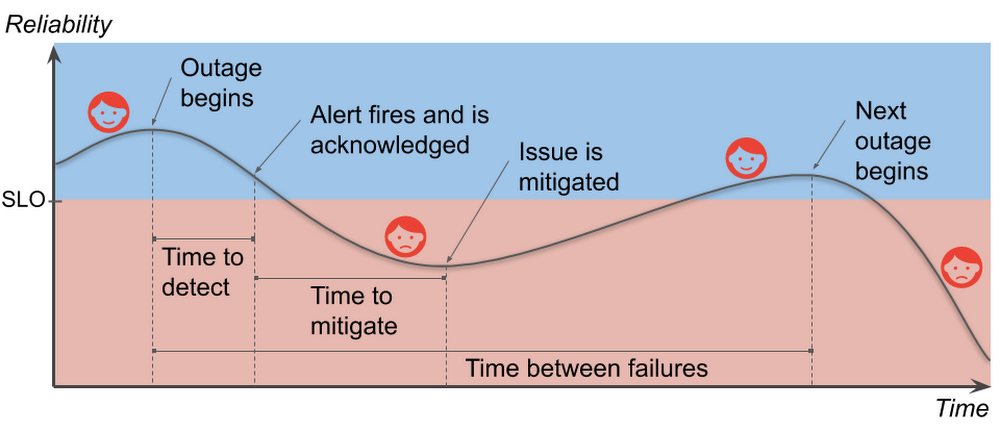
If you run any kind of internet service, you know that production incidents happen. No matter how much robustness you’ve engineered in your architecture, no matter how careful your release process, eventually the right combination of things go wrong and your customers can’t effectively use your service. You work hard to build a service that your users will love. You introduce new features to delight your current users and to attract new ones. However, when you deploy a new feature (or make any change, really), it increases the risk of an incident; that is, something user-visible goes wrong. Production incidents burn customer goodwill. If you want to grow your business, and keep your current users, you must find the right balance between reliability and feature velocity. The cool part is, though, that once you do find that balance, you’ll be poised to increase both reliability and feature velocity.In this post, we’ll break down the production incident cycle into phases and correlate each phase with its effect on your users. Then we’ll dive into how to minimize the cost of reliability engineering to keep both your users and your business happy. We’ll also discuss the Site Reliability Engineering (SRE) principles of setting reliability targets, measuring impact, and learning from failure so you can make data-driven decisions on which phase of the production incident cycle to target for improvements.Understanding the production incident cycleA production incident is something that affects the users of your service negatively enough that they notice and care. Your service and its environment are constantly changing. A flood of new users exploring your service (yay!) or infrastructure failures (boo!), for example, threaten the reliability of your service. Production incidents are a natural—if unwelcome—consequence of your changing environment. Let’s take a look at the production incident cycle and how it affects the happiness of your users:User happiness falls during a production incident and stabilizes when the service is reliable.Note that the time between failures for services includes the time for the failure itself. This differs from the traditional measure since modern services can fail in independent, overlapping ways. We want to avoid negative numbers in our analysis.Your service-level objective, or SLO, represents the level of reliability below which your service will make your users unhappy in some sense. Your goal is clear: Keep your users happy by sustaining service reliability above its SLO. Think about how this graph could change if the time to detect or the time to mitigate were shorter, or if the slope of the line during the incident were less steep, or if you had more time to recover between incidents. You would be in less danger of slipping into the red. If you reduce the duration, impact, and frequency of production incidents—shrinking them in various ways—it helps keep your users happy.Graphing user happiness vs. reliability vs. costIf keeping your reliability above your SLO will keep most of your users happy, how much higher than your SLO should you aim? The further below your SLO you go, of course, the unhappier your users become. The amazing thing, though, is that the further above the target level for your SLO you go, users will become increasingly indifferent to your reliability. You will still have incidents, and your users will notice them, but as long as your service is, on average, above its SLO, the incidents are happening infrequently enough that your users stay sufficiently satisfied. In other words, once you’re above your SLO, improving your reliability is not valuable to your users.The optimal SLO threshold keeps most users happy while minimizing engineering costs.Reliability is not cheap. There are costs not only in engineering hours, but also in lost opportunities. For example, your time to market may be delayed due to reliability requirements. Moreover, reliability costs tend to be exponential. This means it can be 100 times more expensive to run a service that is 10 times more reliable. Your SLO sets a minimum reliability requirement, something strictly less than 100%. If you’re too far above your SLO, though, it indicates that you are spending more on reliability than you need to. The good news is that you can spend your excess reliability (i.e., your error budget) on things that are more valuable than maintaining excess reliability that your users don’t notice. You could, for example, release more often, run stress tests against your production infrastructure and uncover hidden problems, or let your developers work on features instead of more reliability. Reliability above your SLO is only useful as a buffer to prevent your users from noticing your instability. Stabilize your reliability, and you can maximize the value you get out of your error budget.An unstable reliability curve prevents you from spending your error budget efficiently.Laying the foundation to shrink production incidentsWhen you’re thinking about best practices for improving phases of the production incident cycle, there are three SRE principles that particularly matter for this task. Keep these in mind as you think about reliability.1. Create and maintain SLOsWhen SREs talk about reliability, SLOs tend to come up a lot. They’re the basis for your error budgets and define the desired measurable reliability of your service. SLOs have an effect across the entire production incident cycle, since they determine how much effort you need to put into your preparations. Do your users only need a 90% SLO? Maybe your current “all at once” version rollout strategy is good enough. Need a 99.95% SLO? Then it might be time to invest in gradual rollouts and automatic rollbacks.SLOs closer to 100% take greater effort to maintain, so choose your target wisely.During an incident, your SLOs give you a basis for measuring impact. That is, they tell you when something is bad, and, more importantly, exactly how bad it is, in terms that your entire organization, from the people on call to the top-level executives, can understand.If you’d like help creating good SLOs, there is an excellent (and free, if you don’t need the official certification) video walkthrough on Coursera.2. Write postmortemsThink of production incidents as unplanned investments where all the costs are paid up front. You may pay in lost revenue. You may pay in lost productivity. You always pay in user goodwill. The returns on that investment are the lessons you learn about avoiding (or at least reducing the impact of) future production incidents. Postmortems are a mechanism for extracting those learned lessons. They record what happened and why it happened, and they identify specific areas to improve. It may take a day or more to write a good postmortem, but they capture the value of your unplanned investment instead of just letting it evaporate.Identifying both technical and non-technical causes of incidents is key to preventing recurrence.When should you write a postmortem? Write one whenever your SLO takes a significant hit. Your postmortems become your reliability feedback loop. Focus your development efforts on the incident cycle phases that have recurring problems. Sometimes you’ll have a near miss when your SLO could have taken a hit, but it didn’t because you got lucky for some reason. You’ll want to write one then, too. Some organizations prefer to have meetings to discuss incidents instead of collaborating on written postmortems. Whatever you do, though, be sure to leave some written record that you can later use to identify trends. Don’t leave your reliability to luck! As the SRE motto says: Hope is not a strategy. Postmortems are your best tool for turning hope into concrete action items.For really effective postmortems, those involved in the incident need to be able to trust that their honesty in describing what happened during the incident won’t be held against them. For that, you need the final key practice:3. Promote a blameless cultureA blameless culture recognizes that people will do what makes sense to them at the time. It’s taken as a given that later analysis will likely determine these actions were not optimal (or sometimes flat-out counterproductive). If a person’s actions initiated a production incident, or worsened an existing one, we should not blame the person. Rather we should seek to make improvements in the system to positively influence the person’s actions during the next emergency.A blameless culture means team members assume coworkers act with good intentions and seek technical solutions to human fallibility instead of demanding perfection from people.For example, suppose an engineer is paged in the middle of the night, acknowledges the page, and goes back to bed while a production incident develops. In the morning we could fire that engineer and assume the problem is solved now that there are only “competent” engineers on the team. But to do so would be to misunderstand the problem entirely: competence is not an intrinsic property of the engineer. Rather, it’s something that arises from the interaction between the person and the system that conditions them, and the system is the one we can change to durably affect future results. What kind of training are the on-call engineers given? Did the alert clearly convey the gravity of the incident? Was the engineer receiving more alerts than they could handle? These are the questions we should investigate in the postmortem. The answers to these questions are far more valuable than determining just that one person dropped the ball.A blameless culture is essential for people to be unafraid to reach out for help during an emergency and to be honest and open in the resulting postmortem. This makes the postmortem more useful as a learning tool. Without a blameless culture, incident response is far more stressful. Your first priority becomes protecting yourself and your coworkers from blame instead of helping your users. This could come out as a lack of diligence, too. Investigations may be shallow and inconclusive if specifics could get someone—maybe you—fired. This ultimately harms the users of your service.Blameless culture doesn’t happen overnight. If your organization does not already have a blameless culture, it can be quite a challenge to kick-start it. It requires significant support from all levels of management in order to succeed. But once a blameless culture has taken root, it becomes much easier to focus on identifying and fixing systemic problems.What’s next?If you haven’t already, start thinking about SLOs, postmortems, and blameless culture to discuss all of them with your coworkers. Think about what it would take to stabilize your reliability curve, and think about what your organization could do if you had that stability. And if you’re just getting started with SRE, learn more about developing your SRE journey.Many thanks to Nathan Bigelow, Matt Brown, Christine Cignoli, Jesús Climent Collado, David Ferguson, Gustavo Franco, Eric Harvieux, Adrian Hilton, Piotr Hołubowicz, Ib Lundgren, Kevin Mould, and Alec Warner for their contributions to this post.
Quelle: Google Cloud Platform

Developing supportability for a public cloud

The Google Cloud technical support team resolves customer support cases. We also spend a portion of our time improving the supportability of Google Cloud services so that we can solve your cases faster and also so that you have fewer cases in the first place. The challenges of improving supportability for the large, complex, fast-changing distributed system that underpins Google Cloud products have led us to develop several tools and best practices. Many challenges remain to be solved, of course, but we’ll share some of our progress in this post.Defining supportability. The term “supportability” is defined by Wikipedia as a synonym for serviceability: it’s the speed with which a problem in a product can be fixed. But we wanted to go further and redefine supportability in a way that encompasses the whole of the customer technical support experience, not just how quickly support cases can be resolved. Measuring supportability. As we set out, we wanted an objective way to measure supportability in order to evaluate our performance, like the SLOs used by our colleagues in site reliability engineering (SRE), to measure reliability. To do this, we initially relied on transactional surveys of customer satisfaction. These can give us good signals in cases where we’re exceeding customer expectations, or failing. But these surveys do not give us a good overall picture of our support quality. We have recently started making more use of customer effort score, a metric gleaned from customer surveys that helps show the effort required by customers to fix their problems. Research shows that effort score correlates well with what customers actually want from support: a low-friction way of getting their problems resolved.But this only considers customer effort, so it would incentivize us to just throw people or other resources at the problem, or even to push effort onto the Google Cloud product engineering teams. So we needed to include overall effort, leading to this way to measure supportability:Effort by customer, support and product teams to resolve customer support cases.One thing to note is that higher effort means lower supportability, but we find it more intuitive to measure effort than lack of effort.We currently use various metrics to measure the total effort, the main ones being:Customer effort score: customer perception of effort required to fix their problemsTotal resolution time: time from case open to case closeContact rate: cases created per user of the productBug rate: Proportion of cases escalated to the product engineering teamConsult rate: Proportion of cases escalated to a product specialist on the support teamWith some assumptions, we can normalize these metrics to make them comparable between products, then set targets.Supportability challenges. Troubleshooting problems in a large distributed system is considerably more challenging than it is for monolithic systems, for some key reasons:The production environment is constantly changing. Each product has many components, all of which have regular rollouts of new releases. In addition, each of these components may have multiple dependencies with their own rollout schedules.Customers are developers who may be running their code on our platform, if they are using a product like App Engine. We do not have visibility into the customer’s code and the scope of failure scenarios is much larger than it is for a product that presents a well-defined API.The host and network are both virtualized, so traditional troubleshooting tools like ping and traceroute are not effective.If you are supporting a monolithic system, you may be able to look up an error message in a knowledge base, then find potential solutions. Error messages in a distributed system may not be easy to find due to an architecture that uses high RPC (remote procedure call) fanout. In addition, the high scale in a large public cloud involving millions of operations per second for some APIs can make it hard to find relevant errors in the logs.Building a supportability practiceAs our team has evolved, we’ve created some practices that help lead to better support outcomes and would like to share some of them with you.Launch reviews. We have launched more than 100 products in the past few years, and each product has a steady stream of feature releases, resulting in multiple feature launches per day. Over these years, we’ve developed a system of communications among the teams involved. For each product, we assign a supportability program manager and a support engineer, known as the product engagement lead (PEL), to interface with each product engineering team and approve every launch of a significant customer-facing feature. Like SREs with their product readiness reviews, we follow a launch checklist that verifies we have the right support resources and processes in place for each stage of a product’s lifecycle: alpha, beta and generally available. Some critical checklist items include: internal knowledge base, training for support engineers, ensuring that bug triage processes meet our internal SLAs, access to troubleshooting tools, and configuring our case tracking tools to collect relevant reporting data. We also review deprecations to ensure that customers have an acceptable migration path and we have a plan to ensure that they are properly notified.Added educational tools. Our supportability efforts also focus on helping customers avoid the need to create a case. With one suite of products, more than 75% of support cases were “how to” questions. Engineers on our technical support team designed a system to point customers to relevant documentation as they were creating a case. This helped customers self-solve their issues, which is much less effort than creating a case. The same system helps us identify gaps in the documentation. We used A/B testing to measure the amount of case deflection and carefully monitored customer satisfaction to ensure that we did not cause frustration by making it harder for customers to create cases.Some cases can be solved without human intervention. For example, we found that customers creating P1 cases for one particular product often were experiencing outages caused by exceeding quotas. We built an automated process for checking incoming cases, and then handling them without human intervention for this and other types of known issues. Our robot case handler scores among the highest in the team in terms of satisfaction in transactional surveys.To help customers write more reliable applications, members of the support team helped found the Customer Reliability Engineering (CRE) team, which teaches customers the principles used by Google SREs. CREs provides “shared fate,” in which Google pagers go off when a customer’s application experiences an incident.Supportability at scale. One way to deal with complexity is for support engineers to specialize in handling as small a set of products as possible so that they can quickly ramp up their expertise. Sharding by product is a trade-off between coverage and expertise. Our support engineers may specialize in one or two products with high case volume, and multiple products with lower volume. As our case volume grows, we expect to be able to have narrower specializations. We maintain architecture diagrams for each product, so that our support engineers understand how the product is implemented. This knowledge helps them to identify the specific component that has failed and contact the SRE team responsible for that part of the product. We also maintain a set of playbooks for each product. Prescriptive playbooks provide steps to follow in a well-known process, such as a quota increase. These playbooks are potential candidates for automation. Diagnostic playbooks are troubleshooting steps for a category of problem, for example, if a customer’s App Engine application is slow. We try to have coverage for the most commonly occurring set of customer issues in our diagnostic playbooks. The Checklist Manifesto does a great job of describing the benefits of this type of playbook. We have found it particularly useful to focus on cases that take a long time to resolve. We hold weekly meetings for each product to review long-running cases. We are able to identify patterns that cause cases to take a long time, and we then try to come up with improvements in processes, training or documentation to prevent these problems. The future of supportability. Our supportability practices in Google Cloud were initially started by our program management team in an effort to introduce more rigor and measurement when evaluating the quality, cost and scalability of our support. As this practice evolves, we are now working on defining engineering principles and best practices. We see parallels with the SRE role, which emerged at Google because our systems were too large and complex to be managed reliably and cost-effectively with traditional system administration techniques. So SREs developed a new set of engineering practices around reliability. Similarly, our technical solutions engineers on the support team use their case-handling experience to drive supportability improvements. We continually look for ways to use our engineering skills and operational experience to build tools and systems to improve supportability. The growth in the cloud keeps us on our toes with new challenges. We know that we need to find innovative ways to deliver high-quality support at scale. It is an exciting time to be working on supportability and there are huge opportunities for us to have meaningful impact on our customers’ experience. We are currently expanding our team.Lilli Mulvaney, head of supportability programs, Google Cloud Platform, also contributed to this blog post.
Quelle: Google Cloud Platform

Announcing the general availability of 6 and 12 TB VMs for SAP HANA instances on Google Cloud Platform

Many of the world’s largest enterprises run their businesses on SAP. As these companies drive toward digital transformation and plan for the upgrade to S/4HANA, they are increasingly looking to the cloud to support their mission critical workloads. One of the main advantages of the cloud is its flexibility. Whether enterprises are undergoing substantial organic growth, expanding their portfolio, or contemplating a merger, they want the peace of mind that they have the room to grow and expand as needed. To help more enterprises scale and grow their SAP HANA workloads, today we’re expanding our support for larger SAP deployments through a new set of large-memory machine types. We’ve added two new machine types to our VM portfolio, enabling customers to deploy workloads that require up to 12 TB of memory in a single node (scale-up) configuration on Google Compute Engine. These VMs, built on the latest Intel Cascade Lake architecture, are certified by SAP for HANA and are generally available to customers starting today.  “Our 9TB of SAP data is growing about 1TB per year. Moving to a 12TB virtualized environment with the help of Google Cloud is going to provide us with a better platform for growth as we look to optimize and scale. It’s been a great partnership, I can’t stress enough the excitement I have for where we’re going to take this with Google in the future.” —Duy Trinh, SAP Center of Excellence, Cardinal HealthWhat 6 and 12 TB VMs on Google Cloud mean for SAP HANA customersGoogle Cloud’s unique all-VM approach gives SAP customers the true flexibility to scale up and scale down their SAP HANA workload, without financial penalty. It also simplifies the operational/procurement process, increasing IT’s agility as it serves its business teams.  Here’s more on what Google Cloud’s unique all-VM approach offers:Flexibility—Upfront sizing is notoriously difficult; you either oversize and waste money, or undersize and risk not meeting business needs. Google Clouds certified large VM sizes give you the headroom for future needs.Simplicity—It can take a lot of work to manage scale-out systems for upgrades, patching, performance, manual table placement, and more. With larger systems, you can simplify by consolidating into a single node. Implementation choice—Not all SAP workloads support scale-out deployments. For example, to avoid complexity, management and performance considerations, many businesses prefer to use larger (and fewer) nodes for analytics workloads. Larger certified VM sizes mean larger scale-up environments. Only Google Cloud offers these fully virtualized, without the constraints of  bare metal.Google Cloud’s all VM infrastructure is not just about scalability. It also improves uptime of SAP environments through our VM Live Migration. This allows for infrastructure updates and patching on the fly, without painful reboots or other patching events that result in application interruption—capabilities not available on bare metal implementations. Lastly, Google Cloud complements VM infrastructure for SAP customers with lightning speed network performance, sub-millisecond latencies and robust security.  To learn more about how we’re supporting SAP customers on Google Cloud, visit our SAP solutions page.  You can also join our  Cloud on Air webinar on September 5th and lear how Cardinal Health plans to deploy a 12TB SAP HANA instance on Google Cloud. Register here.
Quelle: Google Cloud Platform

How to integrate Dialogflow with Genesys PureEngage

For every  business, big or small, a contact center is the foundation for great customer experiences. Many enterprises across the globe already use Genesys PureEngage, a suite of cloud and premise services for enterprise-grade communications, collaboration, and contact center management for this purpose. Many of those businesses today would also like to integrate natural language-powered virtual agents into their existing Genesys Interaction flows, such as the kind offered by Contact Center AI, Google Cloud’s conversational AI technology designed specifically for contact centers. This article walks you step by step through how to integrate Dialogflow, a component of Contact Center AI and an end-to-end development suite for creating conversational interfaces, with Genesys Designer, a multi-channel design tool to build self-service automation and agent routing strategies. With this integration, you can use Dialogflow to create virtual agents that can perform specific tasks, and which can be invoked within the Genesys Designer. This integration is an example that shows the power of AI to extend an existing telephony and contact center infrastructure. How to integrate Google Dialogflow with Genesys DesignerIf you haven’t already, you’ll need to create a Google Cloud accounthere. In Dialogflow, create your agent with intents and entities. Navigate to Agent settings where you’ll find the Project ID and Service Account information. Click on the project ID to open the Google Cloud Console.Select IAM & admin, then IAM. Make sure the role assigned to the service account is “Dialogflow API Admin”. If it is set to “Dialogflow API Client”, change it to “Dialogflow API Admin”.In the pop-up, create the JSON key. It will download to your machine.From the JSON file, You will need the “private_key_id”, “private_key”, “client_email” and the “client_id” to enter in Genesys PureEngage. Here’s how the JSON key should look:Take “private_key_id”, “private_key”, “client_email” and the “client_id” and open Genesys Designer. Navigate to Bot Registry, then Google Dialogflow and open the Configuration tab to Configure Credentials obtained from the JSON file.That’s it! With this integration, you can now easily access the intents and entities from Dialogflow in the Genesys interface and use them to complement your contact center customer experiences.Genesys Designer creates a Bot block which allows developers to easily access the Dialogflow intents along with entities defined in each of those intents as shown in the picture below.Genesys Designers not only allows developers to capture Intents using Dialogflow but also serve those intents through multi-channel blocks as well as predefined modules. If a customer still needs to speak to an agent, Genesys Designer offers great routing capabilities like ability to route to last agent customer spoke to, or to a skill or even using Predictive Routing which pairs the callers with an agent to maximum specific business outcomes.Genesys Designer also offers very powerful analytics to allows businesses get insight into performance and health of the bots and overall experiences built by these two powerful technologies (Dialogflow and Genesys PureEngage).To learn more about Dialogflow,visit our website.
Quelle: Google Cloud Platform

New homepage and improved collaboration features for AI Hub

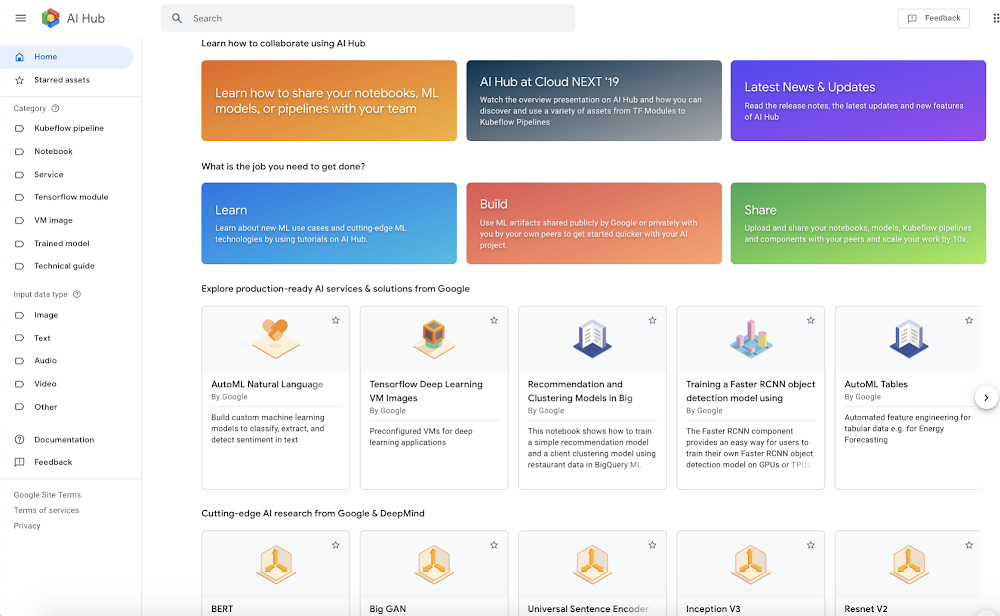
The AI ecosystem has been expanding at a rapid pace, and shows no signs of slowing down.  Customers told us about the challenges they faced managing their growing number of ML assets and preventing silos and redundant work and it  inspired us to develop AI Hub to help foster collaboration and reuse of assets like notebooks, trained models, and ML pipelines.In April, we announced the open beta of AI Hub, and we have been constantly working to improve it. Today, we’re happy to announce that we’re releasing a number of new and exciting features to make collaboration for data science and ML teams even easier, and to enable GCP users to build on each other’s work.“At Descartes Labs, we build models to predict how changes on the earth impact our customers, their supply chains, transportation, infrastructure and even the raw commodities feeding their businesses. With such a wide range of use cases and diverse customers, we have built a library of ML models, modeling pipelines and even tutorial notebooks for our team. We leverage AI Hub to make these modeling resources easily discoverable across various groups, business verticals and modeling techniques. Granular permissions allow us to lock down AI Hub assets to a small team or share publicly, as in the case of our geospatial ML platform tutorials. AI Hub provides discovery and security to meet the needs of a growing ML-focused organization.” – Tim Kelton, Co-Founder and Head of SRE, Security, and Cloud Operations at Descartes LabsNew AI Hub HomepageThe new AI Hub Homepage gives logged in users immediate access to the most popular and most recently shared private assets. It also features cutting-edge content to help you learn, build, and run ML even more quickly.Advanced sharing, permissions, and collaboration capabilitiesThis feature is no doubt near and dear to G Suite user’s hearts: AI Hub now lets you share notebooks, trained ML models, and Kubeflow pipelines in a flexible way with individual colleagues, entire groups, and even your entire company so they can learn from and build on your work.All it takes is simply adding individual collaborators or groups by their email addresses, and giving them editor or viewer permissions. ”Viewers” will still be able to fork the asset you share by downloading or opening a copy, but they won’t be able to edit or change the version shared on AI Hub.You can open this new sharing dialog by clicking on the “Share” button on the asset details page (below, first image) or the sharing icon next to your asset on the My Assets page (below, second image).Sharing public assets on AI Hub via social media Quickly copy and paste the URL of a public asset shared by Google or a Google partner so you can send it via mail or post it on social media to help others can discover the cutting edge AI you’re most interested in.New ML Taxonomy To help you find the right ML artifact for your project, you can now label and categorize assets during upload using a comprehensive list of Data Types, ML Techniques, and Use Cases.Asset favoritingAs the content on AI Hub grows and more users and organizations share their work, we want you to have more control over finding the assets that are relevant to you. You can now favorite the notebooks, models, and other assets you’re most passionate about, regardless of whether they are shared publicly by Google or privately with you by one of your peers.New contentWe also have new public content to discover and deploy, including content from partners and more than 70 new, cutting-edge assets from Google for you to build on. Here are some highlights:Partner ContentNVIDIA: Try the TensorRT-optimized BERT notebook. BERT is a popular model for natural language understanding, and this notebook demonstrates the Question Answering (QA) task. Pluto7: Try this Kubeflow Pipeline for time series forecasting for ubiquitous data using Tensorflow & conv1D. This fairly versatile asset can be used in business planning use-cases like inventory planning, revenue forecasting, and store traffic prediction. New ML assets from Google (20 Technical Guides/Solution Architectures)Energy Price Forecasting with AutoML Tables and Cloud AI Platform NotebooksTraining a XGBoost model using data from BigqueryOptical Character Recognition (OCR) data preparation using Cloud AutoML VisionThe What-If Tool Analyzing an Image ClassifierSemantic Similarity for Natural Language [AI Workshop Experiment]ConclusionSince releasing AI Hub, we’ve learned a lot about the challenges our first beta customers face bridging gaps and silos in ML projects. These new features are a direct result of these ongoing conversations and aim to make it easier to get started with any ML project by building on the great work of others.In the coming months we’ll continue this work, deepening the integration of AI Hub with existing ML development workflows, on and off GCP, to further improve collaboration within our growing field.To learn moreSign up for the AI Hub Newsletter to stay updated on the next exciting enhancements.Join the AI Hub User Community and ask any questions you have about new features, requirements and content asks.
Quelle: Google Cloud Platform

How Moorfields is using AutoML to enable clinicians to develop machine learning solutions

The democratization of AI and machine learning holds the promise for outcomes with enormous human benefit, and nowhere is this more apparent than in health and life sciences. One such example is Moorfields Eye Hospital NHS Foundation Trust, the leading provider of eye health services in the UK and a world-class centre of excellence for ophthalmic research and education.In 2016, Moorfields announced a five-year partnership with DeepMind Health to explore whether artificial intelligence (AI) technology could help clinicians improve patient care. Last year, as a result of this partnership, Moorfields announced a major milestone for the treatment of eye disease. Its AI system could quickly interpret eye scans from routine clinical practice for over 50 sight-threatening eye diseases—as accurately as world-leading expert doctors.Today, Moorfields has announced another new advancement, which has been published in The Lancet Digital Health. Using Google Cloud AutoML Vision, clinicians without prior experience in coding or deep learning were able to develop models to accurately detect common diseases from medical images.As Pearse Keane, Consultant Ophthalmologist at Moorfields Eye Hospital who led this project said:“At present, the development of AI systems requires highly specialised technical expertise. If this technology can be used more widely—in particular by healthcare professionals without computer programming experience—it will really speed up the development of these systems with the potential for significant patient benefits.’Although the ability to create classification models without deep understanding of AI is attractive, comparative performance against expertly-designed models is still limited to more simple classification tasks. Pearse adds: “The process needs refining and regulation, but our results show promise for the future expansion of AI in medical diagnosis.”Google Cloud AutoML is a set of products that allows users without ML expertise to develop and train high-quality machine learning models. By applying Google’s cutting-edge research in transfer learning and neural architecture search technology,  users can leverage the results of existing state-of-the-art ML models to build new ones with brand new data. Because the most complex part of the model–feature extraction–is pre-trained, classification in a new dataset is fast and accurate. The team at Moorfields was able to quickly train and evaluate five different models using Cloud Auto ML.The Moorfields team started by identifying five public open-source datasets that their researchers could use to test and train models. These included de-identified medical images from the fields of ophthalmology, radiology, and dermatology such as eye scans, chest x-rays and photos of skin lesions. After learning  how to use Cloud Auto ML Vision by reviewing ten hours of online documentation, two researchers assembled and reviewed data sets simultaneously. They then worked together to build the models. After the images were uploaded to Google Cloud, AutoML Vision was used to train each model for up to 24 hours. The resulting models were then compared to published results from deep learning studies. All of the models the researchers created except one performed as well as state-of-the-art deep learning algorithms. The research demonstrates the potential for clinicians without AI expertise to explore and develop technologies to transform patient care. Beyond allowing clinicians to build and test diagnostic models, AutoML can be used to train physicians in the basics of deep learning. While the focus of this research was not centered around interpretability, it is understood to be of critical importance for medical applications.AI continues to pave the way for advancements that improve lives on a global scale—from business to healthcare to education. Cloud AutoML has already been used by researchers to assess and track environmental change, by scientists to help monitor endangered species, and by The New York Times to digitize and preserve 100 years of history in its photo archive. We’re excited to see how businesses and organizations across the world apply AI to solve the problems that matter most.
Quelle: Google Cloud Platform

easyJet: Transforming how customers search for flights with the help of Google Cloud

With a growing fleet of 325 aircraft that cover more than 1,000 routes across 158 airports, easyJet is one of Europe’s most popular airlines. And easyJet serves an average of 90 million passengers each year, so a helpful mobile experience for its customers is a top priority.Travellers today are inherently mobile-first, so finding new ways to make it easier for them to search and book flights is key. To do exactly that, easyJet partnered with technology company Travelport to develop Speak Now, a new feature on easyJet’s mobile app that interprets voice searches to deliver accurate and relevant flight information to travelers.Powered by Dialogflow, Google Cloud’s natural language understanding tool for building conversational experiences, Speak Now lets customers ask questions to determine exactly what they’re looking for—from destinations, to dates and times, to airports they want to fly from. How do we create conversational experiences across devices and platforms for enterprises?It’s clear that the rise in voice search is changing the way we go about our daily lives.Twenty-seven percent% of the global online population already uses voice search on mobile, and the rapid adoption of this technology is reshaping entire industries. It’s no surprise that easyJet looked to adopt this technology to positively transform experiences for their customers.   Dialogflow, a core component of Google Cloud Contact Center AI, makes it easy to build accurate, flexible conversation interfaces that allow users to ask questions and accomplish tasks in everyday language. It understands the nuances of human language and translates end-user text or audio during a conversation to structured data that apps and services can understand. Daniel Young, Head of Digital Experience at easyJet commented: “We picked Dialogflow due to its strengths and ease with which a powerful conversational agent can be built. Speak Now is a great example of how we’re using cloud technologies and AI to make the experience of buying and managing travel continually better for everyone. This is the latest in a series of innovative features that will make booking travel as easy as it can possibly be, giving easyJet customers a helpful digital experience.”Consumers already rely on voice assistants to play their favorite music, add items to a shopping list, and order taxis, Speak Now is a great example of how voice assistants can now make the customer experience better and more intuitive for travel.To learn more about Dialogflow, visit our website. Speak Now will be available in English language at the end of September on iOS.
Quelle: Google Cloud Platform

Best practices for Cloud Storage cost optimization

Whether you’re part of a multi-billion dollar conglomerate trying to review sales from H1, or you’re just trying to upload a video of your cat playing the piano, you need somewhere for that data to reside. We often hear from our customers that they’re using Cloud Storage, the unified object store from Google Cloud Platform (GCP), as a medium for this type of general storage. Its robust API integration with our multitude of services makes it a natural starting point to outline some of our pro tips, based on what we as Technical Account Managers (TAMs) have seen in the field, working side by side with our customers. Part of our responsibility is to offer direction to our customers on making decisions that can reduce costs and help get the most out of their GCP investments. While storing an object in the cloud in itself is an easy task, making sure you have the soundest approach for the situation you are in requires a bit more forethought. One of the benefits of having a scalable, limitless storage service is that, much like an infinitely scalable attic in your house, there are going to be some boxes and items (or buckets and objects) that you really can’t justify holding onto. These items incur a cost over time, and whether you need them for business purposes or are just holding onto them on the off chance that they might someday be useful (like those wooden nunchucks you love), the first step is creating a practice around how to identify the usefulness of an object/bucket to your business. So let’s get the broom and dustpan, and get to work!Cleaning up your storage when you’re moving to cloudThere are multiple factors to consider when looking into cost optimization. The trick here is to ensure that there are no performance impacts and that we aren’t throwing out anything that may need to be retained for future purposes, whether that be compliance, legal, or simply business value purposes. With data emerging as a top business commodity, you’ll want to use appropriate storage classes in the near term as well as for longitudinal analysis. There are a multitude of storage classes to choose from, all with varying costs, durability, and resiliency. There are rarely one-size-fits-all approaches to anything when it comes to cloud architecture. However, there are some recurring themes we have noticed as we work alongside our customers. These lessons learned can apply to any environment, whether you’re storing images or building advanced machine learning models.The natural starting point is to first understand “What costs me money?” when using Cloud Storage. The pricing page is incredibly useful, but we’ll get into more detail in this post. When analyzing customer Cloud Storage use, we consider these needs:PerformanceRetentionAccess patternsThere can be many additional use cases with cost implications, but we’ll focus on recommendations around these themes. Here are more details on each.Retention considerations and tipsThe first thing to consider when looking at a data type is its retention period. Asking yourself questions like “Why is this object valuable?” and “For how long will this be valuable?” are critical to help determine the appropriate lifecycle policy. Setting a lifecycle policy lets you tag specific objects or buckets and creates an automatic rule that will delete or even transform storage classes for that particular object or bucket type. Think of this as your own personal butler that will systematically ensure that your attic is organized and clean—except instead of costing money, this butler is saving you money for these operations. We see customers use lifecycle policies in a multitude of ways with great success. A great application is for compliance in legal discovery. Depending on your industry and data type, there are certain laws that regulate the data type that needs to be retained and the period for which it must be retained. Using a Cloud Storage lifecycle policy, you can instantly tag an object for deletion once it has met the minimum threshold for legal compliance needs, ensuring you aren’t charged for retaining it longer than is needed and you don’t have to remember which data expires when. To make this simpler, Cloud Storage has a bucket lock feature to minimize the opportunity for accidental deletion. If you’re concerned with FINRA, SEC, and CFTC, this is a particularly useful feature. Bucket lock may also help you address certain healthcare industry retention regulations.Within Cloud Storage, you can also set policies to transform a storage type to a different class. This is particularly useful for data that will be accessed relatively frequently for a short period of time, but then won’t be needed for frequent access in the long term. You might want to retain these particular objects for a longer period of time for legal or security purposes, or even general long-term business value. A great way to put this in practice is within a lab environment. Once you complete an experiment, you likely want to analyze the results quite a bit in the near term, but in the long term won’t access that data very frequently. Having a policy set up to convert this storage to Nearline or Coldline storage classes after a month is a great way to save on its long-term data costs.Access pattern considerations and tipsThe ability to transform objects into lower-cost storage classes is a powerful tool, but one that must be used with caution. While long-term storage is cheaper to maintain for an object that is accessed at a lower frequency, there will be additional charges incurred if you suddenly need to frequently access the data or metadata that has been moved to a “colder” storage option. There are also cost implications when looking to remove that data from a particular storage class. For instance, there’s currently a minimum time of 30 days for an object to sit in Nearline storage. If you need to access that data with an increased frequency, you can make a copy in a regional storage class instead to avoid increased access charges. When considering the opportunities for cost savings in the long term, you should also think about whether your data will need to be accessed in the long term and how frequently it will need to be accessed if it does become valuable again. For example, if you are a CFO looking at a quarterly report on cloud expenses and only need to pull that information every three months, you might not need to worry about the increased charges accrued for the retrieval of that data, because it will still be cheaper than maintaining the storage in a regional bucket year round. Some retrieval costs on longer-term storage classes can be substantial and should be carefully reviewed when making storage class decisions. See the pricing page for the relative differences in cost.Performance considerations and tips“Where is this data going to be accessed from?” is a major question to consider when you’re considering performance and trying to establish the best storage class for your particular use case. Locality can directly influence how fast content is pushed to and retrieved from your selected storage location. For instance, a “hot object” with global utilization (such as a database that is accessed frequently, like your employee time-tracking application) would fit well in a multi-regional location, which enables an object to be stored in multiple locations. This can potentially bring the content closer to your end users as well as enhance your overall availability. Another example is a gaming application with a broad geo-distribution of users. This brings the content closer to the user for a better experience (less lag) and ensures that your last saved file is distributed across several locations, so you don’t lose your hard-earned loot in the event of a regional outage.One thing to keep in mind when considering this option is that storage in multi-regional locations allow for better performance and higher availability, but comes at a premium and could increase network egress charges, depending on your application’s design. During the application design phase, this is an important factor to consider. Another option when you’re thinking about performance is buckets in regional locations, a good choice if your region is relatively close to your end users. You can select a specific region that your data will reside in, and get guaranteed redundancy within that region. This location type is typically a safe bet when you have a team working in a particular area and accessing a dataset with relatively high frequency. This is the most commonly used storage location type that we see, as it handles most workloads’ needs quite well. It’s fast to access, redundant within the region, and affordable overall as an object store. Overall, for something as simple-sounding as a bucket, there are actually vast amounts of possibility, all with varying degrees of cost and performance implications. As you can see, there are many ways to fine-tune your own company’s storage needs to help save some space and some cash in a well thought-out, automated way. GCP provides many features to help ensure you are getting the most out of your GCP investment, with plenty more coming soon. Find more in these Next ‘19 sessions about optimizing your GCP costs.
Quelle: Google Cloud Platform

How Google Cloud’s AI has boosted Netmarble’s team collaboration, game development and consumer reach

In less than two decades, Netmarble has become one of the world’s largest mobile-gaming companies, with more than 35 titles available in 120 countries, and hit MMORPG games like Blade & Soul Revolution,  Lineage 2: Revolution and most recently, BTS World. We began collaborating with Netmarble in 2017, at first to aid them in migrating to Google Cloud Platform (GCP), but more recently to help them leverage cloud tools and services to solve business challenges faced by many companies in the gaming industry. Most recently, we’ve worked with Netmarble’s AI Center, which manages all of the company’s AI initiatives. By applying AI to their infrastructure and operations, they’ve seen a wide variety of benefits, from faster team collaboration, to more intuitive game development, to increased reach in various regions.In this blog post, we’ll share three examples of how Netmarble and its AI Center team have worked to infuse Cloud AI into all aspects of their business, improving development, game services and operations, marketing, and player experiences overall. ML for game services operation: churn factor analysis, churn prediction and in-game anomaly detectionFor gaming companies like Netmarble with a substantial online and mobile audience, it’s not just enough to attract players, they need to retain them as well. This makes understanding why players stop playing a game—what’s known as churn—critically important.Taking it a step further, Netmarble makes a churn prediction report, categorizing players by those who are likely to leave, who are likely to remain, and who should be managed. Based on this report, the Netmarble team can then decide each day what actions to take for each respective user group. “The churn report has been an invaluable resource, because we hadn’t previously had access to that type of information,” said Kim. “Our next goal will be to get even more nuanced with the report, in hopes to answer tough questions like how likely are we to lose a particular player? We’ll also want to look into what preventative measures we can take to retain users who have been categorized as ‘very likely’ to abandon a game.”One way to retain users is to continuously add new content, but this can have unintended consequences, such as increasing the number of bugs which the QA team must address. By applying machine learning for automated testing, Netmarble can quickly find any bugs—even after a high volume launch day.As games are successfully launched, millions of users will access the game, including many fraudulent users (such as hackers and bots, for example). That’s why Netmarble uses Google Cloud AI Platform to build ML models for fraudulent user detection. Learning the growth and consumption patterns of in-game users means anomalous behavior can be quickly identified, analyzed, and aggregated into a report for further assessment.ML in marketing: from multi-market promotions to managing ad fraudGame marketing can be complex, with many functions to think about, such as lead generation, digital communications and game launch promotions. Additionally, Netmarble must craft strategies and battle ad fraud not in one market alone, but in both Western and Asian markets. To address these challenges, Netmarble turned to BigQuery—a serverless, highly-scalable, and cost-effective cloud data warehouse—to build its Return On Advertising Spend (ROAS) prediction. This tool helps Netmarble predict when marketing expenses can be collected after spends in various regions. Its LTV prediction solution can evaluate the quality of users entered by cohort whom the marketer wants. In order to cope with a variety of ad fraud challenges, Netmarble set its AD Fraud Detection system to classify heterogeneous traffic through machine learning as well as through general rule-basis as part of its detection and mediation process. This way, the company can test new media and channels preventing invalid clicks and conversions. “In order to effectively reach the right audiences and make sure they have the best touchpoints with our games, we need to have very nuanced marketing procedures in place,” Duke Kim, SVP, Head of Netmarble’s AI Center, recently shared with us. “Google Cloud AI Platform gives us the agility and technological prowess to quickly and cost-efficiently build out internal solutions that best met these requirements.”ML in game development: AI agents, balance checks and animation Just as the types of games that Netmarble makes has evolved in the past 19 years, so has the way it approaches game development. Now, the team’s next big focus is to create an AI agent that will help provide the best game experience for each player. Through this agent, which will be released soon, Netmarble intends to deliver a customized experience with specific levels, tasks or challenges tailored to a player’s skill level, that will ultimately help increase retention. This agent will offer players personalized user experiences and check how the user perceives a particular game. It will even be able to play on the user’s behalf in the event of an issue like sudden internet disconnection.Netmarble is also looking to AI for voice and animation, which can be applied to in-game cut-scenes as well as using AI to animate the faces of its in-game non-player characters (NPCs). ML scripts prompt the NPC’s voice which then mimics mouse movements. “I never even dreamed of some of the functionalities that AI can now bring into a game,” Kim said. “We’ve only scratched the surface of AI’s benefits for games; I’m beyond excited about what lies ahead one, five and even ten years in the future. The best part is that Google’s Cloud AI technologies have been so easy to infuse into our games, typically only taking one month. I have no doubt we’ll be able to integrate the latest AI quickly, moving forward, with Google as a collaborative partner.”It’s been fantastic to have such a close-knit relationship with Netmarble and the entire AI Center team for the past three years. We look forward to helping them continue to reach business goals and customers in the years to come. To  learn more about game development on Google Cloud, visit our website, and to find our more about Deployed AI business use cases, read this latest blog.
Quelle: Google Cloud Platform

Build a dev workflow with Cloud Code on a Pixelbook

Can you use a Pixelbook for serious software development? Do you want a workflow that is simple, doesn’t slow you down, and is portable to other platforms? And do you need support for Google Cloud Platform SDK, Kubernetes and Docker? I switched to a Pixelbook for development, and I love it!Pixelbooks are slim, light, ergonomic, and provide great performance. Chrome OS is simple to use. It brings many advantages over traditional operating systems: frictionless updatesenhanced securityextended battery lifeAnd the most compelling feature for me: almost instant coming to life after sleep. This is great when hopping between meetings and on the road. A little about me – I’m a Developer Programs Engineer. I work on Google Cloud and contribute to many open source projects. I need to accomplish repeatable development tasks: working with Github, build, debug, deploy and observe. Running and testing the code on multiple platforms is also of high importance. I can assure you, the workflow below built on Pixelbook satisfies all the following:Simple, repeatable development workflow with emphasis on developer productivityPortable to other platforms (Linux, MacOS, Windows)—“create once, use everywhere”Support for Google Cloud Platform SDK, Github, Kubernetes and Docker.Let’s dive into how you can set up a development environment on Pixelbook that meets all those requirements using Cloud Code for Visual Studio Code, remote extensions, and several other handy tools. If you are new to the world of Chromebooks and switching from a PC, check out this post to get started.Step 1: Enable Linux apps on PixelbookLinux for Chromebooks (aka Crostini) is a project to let developers do everything they need locally on a Chromebook, with an emphasis on web and Android app development. It adds Linux support.  On your Pixelbook:1. Go to Settings (chrome://settings) in the built-in Chrome browser.2. Scroll down to the “Linux (Beta) ” section (see screenshot below).3. Click “Turn on” and follow the prompts. It may take up to 10 minutes depending on your Wi-Fi connection.4. At the end, a new Terminal window should automatically open to a shell within the container. We’re all set to continue to the next step – installing developer tools!Pin the terminal window to your program bar for convenience.Configure Pixelbook keyboard to respect Function keysFolks coming from Windows or MacOS backgrounds are used to using Function keys for development productivity. On Chrome OS, they are replaced by default to a group of shortcuts. However, we can bring them back:Navigate to chrome://settings. Now, pick “Device” on the left menu, then pick “keyboard”. Toggle “treat top-row keys as function keys”:Step 2: Install development toolsFor Kubernetes development on GCP, we need to install tools like Docker, Google Cloud SDK and kubectl. Pixelbook Linux is Debian Stretch, so we will install prerequisites for docker and gcloud using instructions for Debian Stretch distribution.Install and configure Google Cloud SDK (gcloud):Run these commands from gcloud Debian quickstart to install gcloud sdk:TroubleshootingYou might run into this error:Your keyrings are out of date. Run the following commands and try the Cloud SDK commands again:Add gcloud to PATHInstalling Docker CE for Linux:Follow these instructions.And then add your user to the docker group:NOTE: This allows running docker commands without sudo.Install kubectlInstalling Visual Studio CodeGo to VSCode linux install instructions page.Download the.deb package (64bit) from the link on the page.After the download is complete, install the deb file using “Install app with Linux (beta)”:TroubleshootingIf you don’t see “Install with Linux” as an option for the deb file, double check that you switched to the beta channel.Now let’s install a few extensions that I find helpful when working on a remote container using VS Code:Docker – managing docker images, autocompletion for docker files, and more.Remote Containers – use a docker container as a full-featured development environment. These two, along with Cloud Code, are key extensions in our solution.Step 3: Configuring Github accessConfigure github with SSH keyNow copy and past the key into Github.NOTE:If facing permissions error doing ssh-add, run sudo chown $USER .ssh and re-run all the steps for github setup again.Set the username and email of github:Step 4: Remote developmentNow that we have the tools installed and Github access configured, let’s configure our development workflow. In order to create a solution that is portable to other platforms, we will use remote containers extension. We will create a container that will be used to build, deploy and debug applications that we create. This is how it will work:We will open our codebase in a remote container. This will let VS Code think that it is open in isolated Linux environment, so everything we do (build, deploy, debug, file operations) will be interpreted as if we were working on a dedicated Linux VM with its own file system: every command we execute on VS Code will be sent for execution on our remote container. This way we achieve the goal of portability—remote Linux container can run on both MacOS and Windows just like we do it on Pixelbook with Chrome OS that supports Linux.Dev Container settings for each repoHere’s how to set up a dev container for an existing project. You can find the full source code in the Cloud Code templates repo. This Github repo includes templates for getting started with repeatable Kubernetes development in five programming languages—Node.js, Go, Java, Python and .NET. Each template includes configuration for debugging and deploying the template to Kubernetes cluster using Cloud Code for VS Code and IntelliJ. For simplicity, we work with a HelloWorld template that just serves “Hello World” message from a simple web server in a single container.To enable remote container development, we need to add a .devcontainer folder with two files:Dockerfile — defines container image that holds all developer tools we need installed in a remote development containerDevcontainer.json — Instructs VS Code Remote Tools extension how to run remote development container.Creating a container image for remote developmentOur remote container needs to have the SDK we use for development in the programming language of our choice. In addition, it needs tools that enable Cloud Code and Kubernetes workflows on Google Cloud. Therefore in the Dockerfile we install:Google Cloud SDKSkaffold — tool Cloud Code uses for handling the workflow for building, pushing and deploying apps in containersDocker CLIIn addition, container images are immutable. Every time we open the code in a remote container, we’ll get a clean state—no extra settings will be persisted between remote container reloads by default (kubernetes clusters to work with, gcloud project configuration, github ssh keys). To address that, we mount our host folders as drives in the container (see this part later in devcontainer.json) and copy its content to the folder in the container file system where dev tools expect to find these files. Example from Dockerfile of kubeconfig, gcloud and ssh keys sync between host and remote container:devcontainer.jsonThis file tells Remote Container extension which ports to expose in the container, how to mount drives, which extensions to install in the remote container, and more.A few notable configurations:runArgs contains command line arguments remote extension passes to docker when remote container is launched. This is where we set environment variables and mount external drives in a container. This helps to eliminate authorizations and specifies the kubernetes clusters we want to work with in Cloud Code.In the extensions section, we add a few VS Code extensions for enhanced productivity in the development container. These will be installed on a dev container but not on the host, so you can tailor this choice to the codebase you plan to work on in the dev container. In this case I am setting up for nodejs development.Cloud Code for VS Code — Google’s extension that helps to write, deploy and debug cloud-native applications quickly and easily. It allows deploying code to kubernetes and supports 5 programming languages.Npm support for VS CodeCode Spell CheckerMarkdownlint — Improves the quality of markdown files. Gitlens — Shows the history of code commits along with other relevant useful information.Output colorizer — Colors the output of various commands. Helpful when observing application logs and other info in the IDE.Vscode-icons — Changes icons to known file extensions for better visibility and discoverability of the files.Docker — Manages docker images, autocompletion for docker files and moreTSLint — Linting for typescript (optional)Bracket pair colorizer (optional)Npm intellisense (optional)ESLint Javascript (optional)Hello World in Dev Container on PixelbookLet’s try to build, debug and deploy the sample Hello World nodejs app on Pixelbook using the remote dev container setup we just created:Initialize gcloud by running gcloud init in a command line of your Pixelbook and following the steps. As part of our earlier setup, when we open the code in a remote container, Gcloud settings will be sync’ed into a dev container, so you won’t need to re-initialize every time.Connect to a GKE cluster using the command below. We will use it to deploy our app. This also can be done outside of the dev container and will be sync’ed using our earlier setup in .devsettings.Open the code in dev container: In VS Code command palette, type: Remote-Containers: Open Folder in Container… and select your code location. The code will open in dev container, pre-configured with all the toolset and ready to go!Build and deploy the code to GKE using Cloud Code: In VS Code Command Palette, type: Cloud Code: Deploy and follow the instructions. Cloud Code will build the code, package it into container image, push it into container registry, then deploy it into GKE cluster we initialized earlier—all from the dev container on a Pixelbook!Though slick and small, the Pixelbook might just fit your developer needs. With VS Code, Remote development extension, Docker, Kubernetes and Cloud Code you can lift your development setup to the next level, where there is no need to worry about machine-specific or platform-specific differences affecting your productivity. By sharing dev container setup on Github, developers that clone your code will be able to reopen it in a container (assuming they have the Remote – Containers extension installed).Once done, developers will get an isolated environment with all dependencies baked in — just start coding!If you have a Pixelbook — or if you don’t, and just want to try out Cloud Code — the Hello World app and all config files are available on GitHub. Let me know how it went and what your favorite setup for developer productivity is.Further readingSet up Linux (Beta) on your ChromebookChromebook Developer ToolboxGetting Started with Cloud Code for VS CodeCloud Code Templates RepoDeveloping inside a Container
Quelle: Google Cloud Platform