Accelerating industry transformation with the power of AI

AI is increasingly the new frontier in digital transformation and is well positioned to drive value and impact across all aspects of an organization when incorporated into workflows. We believe that enterprises that invest in building custom AI, as well as industry specific solutions, are better positioned to be global economic leaders of tomorrow.Our mission at Google Cloud is to provide organizations with the best infrastructure, platform, industry solutions and expertise to enable them to use new digital technologies and information to transform their businesses. Large scale data management, artificial intelligence, and machine learning are key components of our platform. Our work at Google Cloud in AI is focused in four primary areas: Our world class AI infrastructure, to train and execute machine learning models cost effectively and with the best performance and scalability.Our AI building blocks, where we continue to invest in further enhancing our foundational capabilities to understand images, voice, text, language, and video in fundamental ways. Our AI Platform, where we make it easy for developers and data scientists to label and prepare data, create models with AutoML, tune them and then manage their lifecycle. Finally, building on our AI infrastructure, building blocks and platform, we are making significant investments to deliver industry solutions to solve unique business problems in specific industries using our AI technology.  Google announced a landmark partnership with Mayo Clinic to positively transform patient and clinician experiences, to identify new ways of diagnosing diseases, conduct unparalleled clinical research, and find new modes of delivering patient care. The foundation for Mayo’s digital transformation is centered on the use of our cloud and our artificial intelligence capabilities for healthcare. Through these powerful technologies, we’ll enable Mayo Clinic to lay out a roadmap of cloud and AI-enabled solutions and will help them develop a bold, new digital strategy to advance the diagnosis and treatment of disease.Our work with Mayo Clinic is one example of us helping organizations use the power of cloud computing and AI to accelerate their business transformation. In AI specifically, we are focused on transforming six industries—healthcare, retail, financial services, media & entertainment, manufacturing, and the public sector—by building highly customized solutions and applying AI for their unique business needs. RetailGoogle Cloud is already partnering with retailers across the globe including Bed Bath and Beyond, Carrefour, Kohl’s, Loblaw, Macy’s, METRO, Ocado, Shopify, Target, The Home Depot, Ulta Beauty, and many more. These companies are leveraging Google Cloud technologies in areas like eCommerce hosting, data analytics, and machine learning in order to better serve their customers. We’ve built a suite of solutions that leverage Google Cloud’s AI and machine learning innovations to help retailers improve personalization and conversion. AI-powered demand forecasting enables retailers to predict which products need to be where, streamlining their supply chain and optimizing shelf space. Product Recommendations, powered by Google Cloud’s Recommendations AI, helps retailers automatically deliver hyper-personal recommendations, at scale. And Vision Product Search, which uses Cloud Vision AI technology, helps retailers create engaging new mobile experiences by integrating Google Lens-type capabilities. Financial ServicesFew industries grapple with the volume of information the financial services industry manages on a daily basis. Whether analyzing market shifts, protecting against fraud, money laundering and other financial crimes, or delivering personalized insurance plans, understanding data and quickly finding the right insights are critical to their success. We’ve spent a lot of time working with our financial services customers—Citi, Two Sigma, KeyBank and others–to help them stay competitive and compliant in rapidly changing global markets. For example, HSBC is exploring how AI can detect fraud faster and with greater accuracy. Many financial institutions are seeing how machine learning tools can help them add intelligence to customer experiences—from improved chatbots and intelligent case routing—without needing to build and train their own models, to document understanding for invoice and contract processing.Media & EntertainmentMedia & Entertainment companies have turned to Google Cloud AI solutions to deliver the content and immersive, personalized experiences consumers demand. AI is being deployed to do everything from help render graphics for movies, engage players in games, provide consumers with personalized content recommendations, and even streamline the production process. In addition, we are seeing strong demand for Contact Center AI, which streamlines the customer service experience for consumers with support-related questions, as well as empowers contact center agents with the right information to help them be more effective in their jobs. After digitizing their archives of photos, videos, articles, and information, The New York Times is leveraging Google Cloud AI to produce more powerful, immersive and interactive photo features. 20th Century Fox leveraged Google Cloud AI and ML to develop scripts and predict box office performance, in order to power long-term growth. And Bloomberg overcomes language barriers worldwide with our Translation API.ManufacturingWhether companies are building cars, computer chips or making great food and drink, manufacturers are turning to Google Cloud to help optimize the supply chain, manage factory operations and even visually inspect products. Customers use our Cloud AI offerings in manufacturing to improve the quality and speed with which they manufacture products and to protect the health and safety of people who work on the manufacturing shop floor. A great example is AB InBev, who is using AI to optimize the beer filtration process with much greater accuracy—reducing costs, increasing efficiencies, and perhaps most importantly for beer aficionados, ensuring taste. Kewpie, the Japanese foodmaker, is using machine learning to ensure the quality and safety of the ingredients that go into their food products. And an example of visual product inspection is LG CNS. They are using AutoML Vision Edge to create manufacturing intelligence solutions that detect defects in everything from LCD screens to optical films to automotive fabrics on the assembly line.Public SectorFrom federal government agencies like the National Institute of Health to states like Arizona, and local municipalities like New York City, public sector institutions are turning to Google Cloud for everything from collaboration tools to contact centers. The City of Memphis is a great example of how AI is being used in the public sector. To identify and fix potholes faster and detect patterns of urban blight, the City of Memphis collaborated with Google to apply AI and ML to some of its toughest public works and urban planning problems.These are just a few examples of the kinds of problems AI can help solve in the six industries we are focused on transforming with Google Cloud. We believe our solutions-driven approach will make it faster and easier for organizations to adopt AI-powered tools, as well as help them better appreciate the changes they need to make in their organizations to adopt them. By collaborating with leading organizations, we at Google also learn about specific needs and improve the quality of our technology and solutions. We are grateful to all our customers and partners who help us stretch the boundaries of our products and deliver new advances to important business needs.
Quelle: Google Cloud Platform


Archive media for the long term with preservation masters

Media and entertainment companies have plenty of storage needs, and have to make sure they’re storing the right data for the right period of time. Media archives are often thought of as repositories of readily available media to be accessed for various workflow needs in the near and immediate term, such as in editorial and post-production as well as for storing distribution masters. But long-term digital media preservation may not always be the highest priority for busy production companies and media archives. Arguably the most important role of a media archive is to provide preservation masters of the content that can be retained and accessed at any point in the future. When you’re working with media files in Google Cloud Platform (GCP), preservation is an important consideration. Digital media archives usually include a variety of file types, including moving image files, still images, binary files, and documents. Within the category of moving image files, there are hundreds of wrapper types, file types, and codecs. Although these media formats are readily available today and are easy to integrate into workflows, they are not necessarily designed for long-term preservation. Over the years, media types can change frequently and become obsolete (think of eight-track tapes, CDs or DLT backup tapes). Codecs have a shelf life, and moving image compression is constantly being refined. More popular formats are regularly updated and improved, but others get discontinued, making it very difficult or impossible to read the media files in the future. Additionally, some codecs require licenses that could create problems years down the line when the codec developer is no longer in business. For example, broadcast masters are often recorded with a visually lossless codec that works well through the workflow ecosystem, but that codec can become obsolete. If your archived media files are stored in a compressed form in an end-of-life codec, you may be able to find a way to read them. But, at worst, you’ll be paying to store a considerable amount of useless data on cloud storage and you will have lost the underlying media. So compressed video files and proxies are not appropriate for long-term storage.It’s important to consider ways to create preservation masters of your media that can withstand the test of time. We’ll explain here how to create preservation masters using GCP, specifically Cloud Storage, so that your archived media files will be accessible well into the future.It’s important to note that media asset management systems rely on proxy files for ease of search, for defining clips and for initiating transcodes among other tasks, such as machine learning (ML) and artificial intelligence (AI) analysis. Creating these files in a common format can make archive maintenance easier. These files are designed to represent a compressed version of the source media for efficient storage, retrieval and review, often at a lower resolution and quality than the originals. You should consider these as working media files, separate and distinct from archive or preservation master files. Recommended practice for creating media preservation mastersWithin a media archive, preservation masters should be stored in a format that can be retrieved and read easily at any point in the future. The recommended practice is to convert the preservation masters to frame sequences from the original source movie files from which all proxies were derived. The Academy of Motion Picture Arts & Sciences (AMPAS), the National Archives, and the Library of Congress all agree on this frame sequence approach. You can create file sequences from movie files with a variety of tools, such as FFMPEG, OpenDCP, or any number of transcoder solutions. (We’ll describe an example using FFMPEG later in this post.)Once you have these resulting frame sequences, store them in a format that mirrors the quality and resolution of the source material as closely as possible. You can then move these files to the longest-term Coldline storage in Cloud Storage for preservation. This also complies with motion picture industry requirements: a minimum of three copies of all media stored in geographically disparate locations. This provides for disaster recovery of media files, should physical data tape copies become damaged or lost. Coldline storage is ideal for what is often referred to as the “third copy”—the copy of last resort, should all other copies fail. The preservation master rarely, if ever, needs to be accessed in this scenario, since the mezzanine and proxy files of the media can be stored in Standard, Nearline and Coldline storage for any near-term use of the media. Over time, as new, higher-quality codecs become available, you can leverage the preservation masters to create new sets of proxies and mezzanine files using the new codecs and formats as needed.There are various formats available for storing image sequences that are appropriate for preservation masters. DPX is the most common format (originally developed by Kodak), while OpenEXR and JPEG 2000 are becoming more popular. Although some of these formats use compression, they are considered valid, high-quality archive formats by archivists around the world. Most archives have specifications on the preferred formats for particular applications. There is no one size fits all when it comes to frame formats for preservation, as it really depends on the source material and its specifications. For example, an old black-and-white newsreel is transferred from film to digital video with an aspect ratio of 1.33 to 1 at standard definition resolution. There’s no reason to archive this media with 16-bit color at HD resolution, as the information doesn’t exist in the source material, and archiving at a higher color depth and resolution only makes for larger file sizes with no improvement in the quality of the media itself.Creating media preservation masters at ingestAs part of the input pipeline of any cloud-based workflow, consider creating a preservation master file sequence at the same time the content is ingested into the system. With this parallel process, any proxies or mezzanine copies required by the workflows can be created at the same time as the master file, so you don’t have to move large amounts of data in and out of various storage classes. The preservation master can be moved to Coldline storage once all of the relevant file naming, metadata, fixity/digest entry, and formatting stages are complete. Here’s an example workflow:Create checksums of the source media files on local machineLog file names into the media asset management (MAM) systemLog source checksums into the MAMCopy the media files into Cloud StorageCompare checksums of the source files to the GCP copiesTranscode the source files into proxiesMezzanine format: Log mezzanine file names/locations into MAMProxies for ML/AI/search/MAM applications: Log proxy filenames/locations into MAMApply ML/AI APIs for metadata extractionLog metadata into MAMTransform source files into image sequencesImage: Use FFMPEGTIFF, DPX, OpenEXR or other archival formatsAudio: Use FFMPEGUncompressed WAV or other archival audio formatMove the image sequences and audio files into Coldline storageLog the file location paths into the MAMLog checksums into the MAM (derived from file headers)Create an image sequence using FFMPEGA number of tools for image manipulation can create archive-quality image sequences from movie files. FFMPEG is an open source tool used for a wide variety of media processing needs. Here’s a tutorial using FFMPEG to create an image sequence from a movie file (note that the particulars of your process may vary based on your company’s policies and other details).1. Download and install FFMPEG for your operating system on your local machine. You will use your local terminal or shell for these exercises.While FFMPEG is very extensive in its capabilities, for the purposes of this tutorial, you’ll only need to focus on a few simple commands. Check out the documentation for FFMPEG if you want to explore the tool further.Please note that your file storage footprint may increase when extracting image sequences. For example, when extracting files to a DPX sequence format with the test file below, the aggregate data footprint is 5.36 GB in size, while the equivalent JPEG 2000 (j2k) file is 60 MB for the entire sequence. Your own archive policies should dictate which extraction format is best for your preservation requirements. The bit depth and resolution of the source files will help in determining the best frame sequence format for your needs. 2. Download this ProRes video test file to use in the conversion. You’ll copy it to a new directory in a moment.3. Within your terminal/shell window, go to your home directory and create a new directory to store your image sequence.4. Locate the downloaded TestProRes4444.mov file and move it to the myTestSequence directory you created in step 3. 5. Run the following FFMPEG command in your terminal/shell from the myTestSequence directory:This command will read the TestProRes4444.mov file and convert it to a j2k sequence at the highest quality (specified by the -q:v 1 parameter). The ‘_%06d’ parameter just before the output file extension pads the image sequence numbers to six digits with leading zeros. You’ll want to adjust this to accommodate the number of frames you’ll be extracting (for example, an hour of video recorded at 30 frames per second contains 108,000 frames). Refer to the FFMPEG documentation for the full set of parameters for the JPEG 2000 format.6. List the files in your myTestSequence directory. You should see a list of files like these:7. Although this test file contains no audio, it’s possible to extract embedded audio files from your source movie using the following command:The -ab 192000 parameter determines the data rate for the extracted audio file. For all image sequence and audio settings, refer to your own internal best practices in determining the preservation file and audio formats, and all of the parameters for both that best satisfy your own archive media strategy. For further information on recommended formats, refer to the reading list below.By applying this best practice of converting compressed movie files into archival frame sequences and audio files, the media is much better suited to preservation for the long term. Learn more about archiving with Cloud Storage, and more about the preservation of digital media:The Digital Dilemma by the Academy of Motion Picture Arts and SciencesPreserving Digital Archive Materials from the National ArchivesInteroperable Master Format from SMPTE
Quelle: Google Cloud Platform

How Sainsbury’s is generating new insights into how the world eats

Retail will forever be an industry that must constantly reinvent itself in response to, and anticipation of, ever-changing consumer demands. Digital transformation is fueling these changes and we’ve previously spoken about how businesses including Ulta Beauty and Kohl’s are taking advantage of Google Cloud to put data at the center of what they do and deliver the best possible shopping experience and product offerings for their customers.Sainsbury’s, one of Britain’s best-known supermarkets, is another great example of a business transforming the way it engages with its customers with the cloud. With over 150 years of service, Sainsbury’s vision is to be the most trusted retailer, where people love to work and shop. It makes customers’ lives easier, by offering great quality and service at fair prices. The food industry and the way that customers shop is rapidly changing. From foodie hashtags on Instagram, to the latest cooking fads, customers want to stay connected to the latest trends and Sainsbury’s is empowering them do that. To help Sainsbury’s achieve this goal, its Commercial and Technology teams, in partnership with Accenture, are building cutting-edge machine learning solutions on Google Cloud Platform (GCP) to provide new insights on what customers want and the trends driving their eating habits.Sainsbury’s solution relies on data from multiple structured and unstructured sources. Using Google Cloud’s powerful cloud-based analytics tools to ingest, clean and classify that data, and a custom-built front-end interface for internal users to seamlessly navigate through a variety of filters and categories, Sainsbury’s is able to gain advanced insights in real time. As a result, Sainsbury’s has been able to develop predictive analytics models to spot trends and adjust inventory, providing shoppers with a better experience. Phil Jordan, Group CIO of Sainsbury’s believes this project will have a big impact. “The grocery market continues to change rapidly. We know our customers want high quality at great value and that finding innovative and distinctive products is increasingly important to them. With the help of Google Cloud Platform, we are generating new insights into how the world eats and lives, to help us stay ahead of market trends and provide an even better shopping experience for our customers.” This project is also a great example of the successes our customers have when they work with our partners. “We’re delighted to partner with Google Cloud to help the Sainsbury’s Commercial team apply predictive analytics to the identification of new and emerging trends in grocery,” says Adrian Bertschinger, Managing Director for Retail, Accenture. “The food sector is experiencing significant, rapid disruption, and this new, cloud-based insights platform will help Sainsbury’s identify trends much earlier and adapt their product assortment in a faster, more informed way—all for the benefit of customers.” Whatever the next food or shopping trend may be, Sainsbury’s is looking to the cloud to help them stay a step ahead. Learn more about retail solutions on Google Cloud.
Quelle: Google Cloud Platform

What’s the weather like? Using Colab to get more out of BigQuery

With the interest in data science exploding over the last decade, there’s a similar increase in the number of tools that can be used to perform data science-related tasks, like data wrangling, modeling, and visualization. While we all have our favorites—whether they be Python, R, SQL, spreadsheets, or others—many modern data science workflows and projects will generally involve more than one tool to get the job done. Whether you’re learning new skills or analyzing your company’s data, developing a solid workflow that integrates these tools together can help make you a more productive and versatile data scientist.In this post, we’ll highlight two effective tools for analyzing big data interactively:BigQuery, Google Cloud Platform’s highly scalable enterprise data warehouse (which includes public datasets to explore)Colab, a free, Python-based Jupyter notebook environment that runs entirely in the cloud and combines text, code, and outputs into a single documentAnd, perhaps more importantly, we’ll highlight ways to use BigQuery and Colab together to perform some common data science tasks. BigQuery is useful for storing and querying (using SQL) extremely large datasets. Python works well with BigQuery, with functionality to parametrize and write queries in different ways, as well as libraries for moving data sets back and forth between pandas data frames and BigQuery tables. And Colab specifically helps enhance BigQuery results with features like interactive forms, tables, and visualizations.To reduce the need for subject matter knowledge in our example here, we’ll use data from a familiar field: weather! Specifically, we’ll be using daily temperature readings from around the planet, found in the BigQuery public dataset “noaa_gsod,” to try to understand annual temperature movements at thousands of locations around the world.This Colab notebook (click “Open in playground” at top left once it opens) is the accompanying material for this post, containing all of our code and additional explanation. We’ll reference some of the code and outputs throughout this post, and we highly encourage you to run the notebook cell-by-cell while reading to see how it all works in real time.Before you get started, if you don’t already have a GCP project, there are two free options available:For BigQuery specifically, sign up for BigQuery sandbox (1 TB query, 10 GB storage capacity per month).If you want to experiment with multiple GCP products, activate the free trial ($300 credit for up to 12 months).Getting started: using interactivity to pick location and see daily temperatureThe first thing a data scientist often does is get familiar with a new dataset. In our case, let’s look at which locations we can get temperature data from within the stations table.Using the “%%bigquery” magic, we can write our SQL directly in a notebook cell—with SQL syntax highlighting—and have the results returned in a pandas data frame. In the example query below, we call in the stations table into the data frame “weather_stations.” (Much of the other code ensures that results are restricted to stations that have near-complete daily data for 2019 and have several years of history.)To explore the weather stations that were queried, use Colab’s interactive table feature, which is enabled by default with “%load_ext google.colab.data_table” in the setup. This allows sorting and filtering the table right in the notebook itself. For instance, to see how many weather stations there are in the U.S. state of Connecticut……you can see the five results right there. For reasonably sized data frames (up to tens of thousands of rows), interactive tables are a great way to do some on-the-fly data exploration quickly. There’s no need to filter the pandas data frame, write another query, or even export to Sheets—you can just manipulate the table right in front of you.Next, let’s explore the temperature data for a specific location (note that temperatures throughout are in Fahrenheit). Colab provides a convenient way to expose code parameters with forms. In our case, we set up station USAF—the unique identifier of a weather station—as a user-modifiable form defaulting to 745090 (Moffett Federal Airfield, close to Google headquarters in the Bay Area).We can then pass that USAF as a BigQuery parameter in another BigQuery cell (see the additional arguments in the top line of code), querying 2019 temperature data for only the station of interest.Now that there’s daily average, minimum, and maximum temperature data for this single station, let’s visualize it. Plotly is one library you can use to make nice interactive plots and has solid Jupyter notebook integration. Here, we used it to make a time series plot of daily data for our station of interest, using the fixed red-blue (warm-cool) color scale often associated with temperature.In the image, you can see a typical northern hemisphere weather pattern: cooler in the early part of the year, getting warmer from March to June, and then pretty warm to hot through the end of the data in September. In Colab, the plot is interactive, allowing you to select individual series, zoom in to specific ranges, and hover over to see the actual date and temperature values. It’s another example of how the notebook enables exploration right alongside code.Getting more temperature data using Python to write SQLWhile interesting, the 2019 temperature plot doesn’t tell us much about seasonal patterns or other larger trends over longer periods of time. The BigQuery NOAA dataset goes back to 1929, but not in one single table. Rather, each year has its own table named “gsod{year}” in that dataset. To get multiple years together in BigQuery, we can “UNION ALL” a set of similar subqueries, each pointing to the table for a single year, like this:This is repetitive to do by hand and annoying to have to recreate if the data range changes, for example. To avoid that, we’ll use the pattern of the subquery text to loop over our years of interest and create, in Python, the SQL query needed to get the data for multiple years together, like this:Plugging that table reference into the previous query to get daily temperature data gets results, and putting those through the plotting code shows daily temperature for nearly 15 years.For Moffett Airfield and most other locations, you can see that there’s a regular temperature pattern of cycling up and down each year—in other words, seasons! This is a cool plot to generate for various locations around the world, using the interactive form set up earlier in the Colab. For example, try USAF 825910 (Northeast Brazil) and 890090 (the South Pole) to see two really different temperature patterns.Fitting a sinusoidal model for temperature dataAfter seeing this very cyclical pattern, the next step a data scientist might take is creating a model for the temperature patterns at the location. This would give a smoothed estimate of average temperature, an estimate of the annual range in temperature, and more. This is another task where a language like Python with solid optimization/modeling libraries can help supplement what we are doing with BigQuery. An applicable curve to fit here is a sine wave, a mathematical function that describes a smooth periodic oscillation, such as temperature moving in consistent patterns across days over years. We’ll use scipy’s curve fit optimization method to estimate a sinusoidal model for the average daily temperature at a given location, as shown here:Once the model is fit, we can draw a curve of the estimated average temperature on top of our original plot of average temperature, like so for Moffett Airfield:Despite some extreme observations that stick out in early summer and winter, the curve appears to be a pretty good fit for estimating average temperature on a given date of the year.Using the model to see results at multiple locationsAfter running through the curve fits for a couple different stations, it looks like the model generally fits well and that the attributes of the individual curves (mean, amplitude, etc.) provide useful summary information about the longer-term temperature trends at that location. To see which places have similar temperature attributes, or find ones at the most extreme (hottest/coldest, most/least varying over the year), it would make sense to fit the model and store results for multiple weather stations together.That said, pulling in multiple years of daily data for several weather stations would result in tens of millions of rows in Python memory, which is often prohibitive. Instead, we can loop over stations, getting the data from BigQuery, fitting the sinusoidal model, and extracting and storing the summary stats one station at a time. This is another way to use BigQuery and Python together to let each tool do what it is individually good at, then combine the results.In the Colab, we fit curves to a random sample of stations (number specified by the user) and a few others selected specifically (because they are interesting), then print the resulting summary statistics in an interactive table. From there, we can sort by average temperature, highest/lowest range in annual temperature, or mean absolute error of the curve fit, and then pick out some locations to see the corresponding plots for.For example, you see here that USAF 242660, representing Verhojansk, Russia (a town near the Arctic Circle), has an estimated range in average temperature of more than 115 degrees—among the highest in our data set. That generates the corresponding plot:Holy amplitude! The temperature goes from the high 60s in July to nearly -50 in January, and keep in mind that that’s just the average—the min/max values are even more extreme.Contrast that with USAF 974060, representing Galela Gamarmalamu (a place in Indonesia very close to the equator), where the model-estimated temperature range is less than one degree.The average temperature there doesn’t really obey a cyclical pattern—it’s essentially around 80 degrees, no matter what time of the year it is.Writing analysis results back to BigQueryA final step in this Colab/Python and BigQuery journey is to take some of what we’ve created here and put it back into BigQuery. The summary statistics from curve fitting might be useful to have for other analyses, after all. To write out our pandas data frame results, we use the BigQuery client function “load_table_from_dataframe” with appropriate output dataset and table info.After this is done, our weather station temperature summary outputs are back in BigQuery…ready for use in the next data analysis!Weather datasets are a great way to explore and experiment. There are many more intricate models and interesting related outputs you could get from this dataset, let alone other real-world analyses on proprietary data.The combination of BigQuery, Python, and Colab can help you perform various data science tasks—data manipulation, exploration, modeling, prediction, and visualization—in an effective, interactive, and efficient manner.Play around with the accompanying notebookand start doing your own data analysis with BigQuery and Colab today!
Quelle: Google Cloud Platform

Extending Stackdriver Logging across clouds and providers with new BindPlane integration

With hybrid and multi-cloud approaches taking hold, it’s essential that you can see across all your sources of data. Stackdriver is Google Cloud’s monitoring and logging service, and we’re continually working to add more features and integrations so you can easily see how your systems are performing across platforms and providers, and get ahead of potential problems. We’re pleased to announce that you can now enhance Stackdriver logging with newly added log sources, including generic log sources. These new sources bring even more information into your environment, adding to the more than 150 metric sources available through Stackdriver, made possible by our partnership with BlueMedora and their BindPlane technology. This technology makes it possible for you to gather Stackdriver metrics across sources, from on-premises and hybrid cloud environments to other clouds and third-party software. All BindPlane metric and log collection functionality continues to be available at no additional cost to Stackdriver users. Using Stackdriver and BindPlane together brings an in-depth hybrid and multi-cloud view into one Stackdriver dashboard.If you’re using Stackdriver to monitor your Google Cloud Platform (GCP) resources, you can now extend your observability to include logs from environments like:Non-GCP Kubernetes, including Amazon EKS, Azure AKS, and Kubernetes running on-premSecurity-related services, including Active Directory and OktaMicrosoft services, including Windows Events, Microsoft SQL, and Windows DHCPDataOps technologies, including MongoDB, Couchbase, Oracle, and HadoopDevOps tooling like Gitlabs, Jenkins, and PuppetBindPlane Logs from Blue Medora let you consolidate all your log files into Stackdriver (check out the full list of log sources here). This new integration connects health and performance signals from a wide variety of sources. Once a log source is ingested into Stackdriver, you can view and search through the raw log data and create metrics from those log files. Those logs-based metrics can then be used in Stackdriver monitoring charts and alerting policies, with the ability to view logs and metrics side-by-side. Getting started with Stackdriver Logging and BindPlaneWe’re excited to offer the ability to bring logs into Stackdriver from a variety of different sources and the visibility this new functionality will be able to provide. Get all the details on logging with Stackdriver and BlueMedora in our solution guide. Whether you are running your workloads on-prem, multi-cloud, or hybrid, try Blue Medora’s BindPlane to integrate all your logging sources into Stackdriver for easy monitoring and troubleshooting.Check out BindPlane Logs: first-time setup for a detailed guide on configuring BindPlane Logs for the first time. After configuring BindPlane Logs sources, you’ll see logs flowing into Stackdriver. To view those logs, go to the Stackdriver Logging > Logs (Logs Viewer) page in your GCP Console. Once you’ve imported your logs, you can learn more about viewing logs in Stackdriver here.
Quelle: Google Cloud Platform

Optimize your Google Cloud environment with new AI-based recommenders

You want your Google Cloud environment to be as unique as your organization, configured for optimal security, cost and efficiency. We are excited to offer new recommenders for Google Cloud Platform (GCP) in beta, which automatically suggest ways to make your cloud deployment more secure and cost-effective, with maximum performance.Now in beta, the recommender family includes the Identity and Access Management (IAM) Recommender and the Compute Engine Rightsizing Recommender, with more to come. With IAM Recommender, you can automatically detect overly permissive access policies and receive suggested adjustments to them based on the access patterns of similar users in your organization.The Compute Engine Rightsizing Recommender helps you choose the optimal virtual machine size for your workload. You can use this recommender to help avoid provisioning machines that are too small or too large. How recommenders workOur recommenders use analytics and machine learning to automatically analyze your usage patterns and to determine if your Google Cloud resources and policies are optimally configured. For example, the Compute Engine Rightsizing Recommender analyzes CPU and memory utilization over the previous eight days to identify the optimal machine type for the workload.IAM recommendations are generated by analyzing the IAM permissions for each customer individually to create an overall model to recommend more secure IAM policies. The recommendations are custom tailored to your environment. For example, if a set of permissions hasn’t been used in 90 days, the IAM Recommender may recommend that you apply a less permissive role. Access recommendations todayYou can check out your IAM recommendations today by visiting the IAM page in the Cloud Console and view the policy bindings which can be optimized. You can learn more about how to access the IAM Recommender through the API by looking at the IAM Recommender documentation.The Compute Engine Rightsizing Recommender is available within the Compute Engine page in the Cloud Console and you can see which VMs can be optimized. Most notably with this beta you will be able to access recommendations programmatically through an API. To  learn more, take a look at the VM Rightsizing Recommender documentation.You can opt-out of these recommendations by going to the Recommendation section in the Security & Privacy navigation panel from the Cloud Console.
Quelle: Google Cloud Platform

Announcing updates to AutoML Vision Edge, AutoML Video, and Video Intelligence API

Whether businesses are using machine learning to perform predictive maintenance or create better retail shopping experiences, ML has the power to unlock value across a myriad of use cases. We’re constantly inspired by all the ways our customers use Google Cloud AI for image and video understanding—everything from eBay’s use of image search to improve their shopping experience, to AES leveraging AutoML Vision to accelerate a greener energy future and help make their employees safer. Today, we’re introducing a number of enhancements to our Vision AI portfolio to help even more customers take advantage of AI. AutoML Vision Edge now detects objectsPerforming machine learning on edge devices like connected sensors and cameras can help businesses do everything from detect anomalies faster to efficiently predict maintenance. But optimizing machine learning models to run on the edge can be challenging because these devices often grapple with latency and unreliable connectivity. In April, we announced AutoML Vision Edge to help businesses train, build and deploy ML models at the edge, beginning initially with image classification. Today, AutoML Vision Edge can now perform object detection as well as image classification—all directly on your edge device. Object detection is critical for use cases such as identifying pieces of an outfit in a shopping app, detecting defects on a fast-moving conveyor belt, or assessing inventory on a retail shelf. AutoML Vision Edge models are optimized to a small memory footprint and offer low latency while delivering high accuracy. AutoML Vision Edge supports a variety of hardware devices that use NVIDIA, ARM, or other chipsets, as well as Android and iOS operating systems. TRYON, an AI-enabled start-up specialized in designing and producing augmented reality software for jewelry e-commerce and retail stores, is using AutoML Vision Edge’s object tracking capabilities to power an augmented reality shopping experience. “At TRYON, we use augmented reality (AR) to create an experience where customers can try on jewelry before they make a purchase,” says Andrii Tsok, Co-founder, CTO at TRYON. “Customers can try on rings, bracelets and watches anytime and anywhere with their smartphones, so they can get a better idea of what the jewelry would look like. To deliver this service to customers and retailers, we need to create a custom AI model that works on the customer’s phone. We evaluated AutoML Vision Edge Object detection and were so impressed with the accuracy and the speed that we decided to include the object detection model in our first beta release. By integrating AutoML Vision Edge Object detection into our platform we expect to double our productivity by reducing the amount of resources and time for managing internal infrastructure.”TRYON’s AutoML Vision Edge powered AR shopping experienceAutoML Video now tracks objects and moreIn April, we launched AutoML Video Intelligence to make it easier for businesses to train custom models to identify video content according to their own defined labels. Today, we’ve brought object detection to AutoML Video, enabling it to track the movement of multiple objects between frames. This is an important component of a broad range of applications such as traffic management, sports analytics, robotic navigation, and more.Example: tracking traffic patternsVideo Intelligence API can now recognize logosThe Video Intelligence API offers pre-trained machine learning models that automatically recognize a vast number of objects, scenes, and actions in stored and streaming video. Now, the Video Intelligence API can also detect, track and recognize logos of popular businesses and organizations. With the ability to recognize over 100,000 logos, the Video Intelligence Logo Recognition feature is ideal for brand safety, ad placement, and sports sponsorship use cases.  These new improvements are available today. To learn more about our image products, visit our Vision website, and to learn more about our Video products, visit our Video Intelligence website. We’re excited to offer this new functionality and can’t wait to see how you will use it to infuse AI into your applications.
Quelle: Google Cloud Platform

Detect and respond to high-risk threats in your logs with Google Cloud

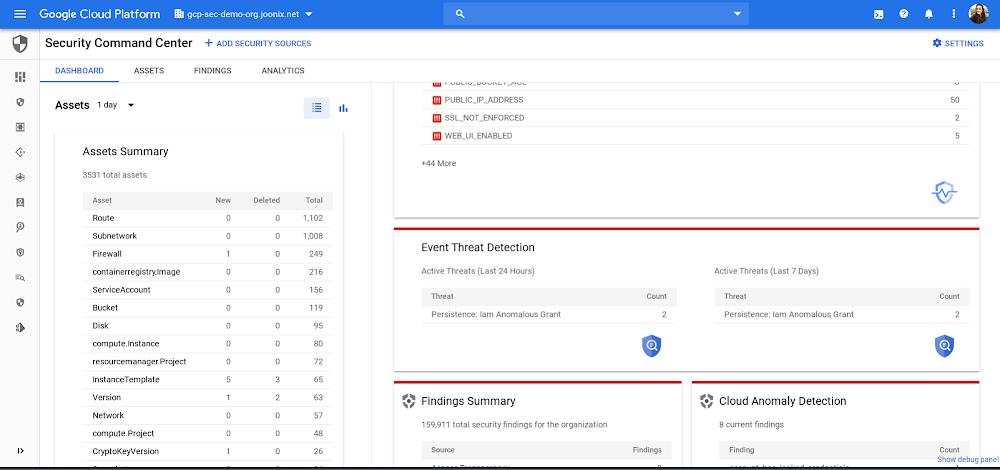
Editor’s Note: This the fourth blog and video in our six-part series on how to use Cloud Security Command Center. There are links to the three previous blogs and videos at the end of this post. Data breaches aren’t only getting more frequent, they’re getting more expensive. With regulatory and compliance fines, and business resources being allocated to remediation, the costs from a data breach can quickly add up. In fact, the average total cost of a data breach in the U.S. has risen to $3.92 million, 1.5% more expensive than in 2018, and 12% more expensive than five years ago, according to IBM.Today, we’re going to look at how Event Threat Detection can notify you of high-risk and costly threats in your logs and help you respond. Here’s a video—that’s also embedded at the end of this post—that will help you learn more about how it works.Enabling Event Threat DetectionOnce you’re onboard, Event Threat Detection will appear as a card on the Cloud Security Command Center (Cloud SCC) dashboard. Event Threat Detection works by consuming Cloud Audit, VPC flow, Cloud DNS, and Syslog via fluentd logs and analyzing them with our threat detection logic and Google’s threat intelligence. When it detects a threat, Event Threat Detection writes findings (results) to Cloud SCC and to a logging project. For this blog and video, we’ll focus on the ETD findings available in Cloud SCC.Detecting threats with Event Threat DetectionHere are the threats ETD can detect in your logs, and how they work:Brute force SSH: ETD detects the brute force of SSH by examining Linux Auth logs for repeated failures followed by success. Cryptomining: ETD detects coin mining malware by examining VPC logs for connections to known bad domains for mining pools and other log data.Cloud IAM abuse Malicious grants: ETD detects the addition of accounts from outside of your organization’s domain that are given Owner or Editor permission at the organization or project level.Malware: ETD detects Malware in a similar fashion to crypto mining, as it examines VPC logs for connections to known bad domains and other log data.Phishing: ETD detects Phishing by examining VPC logs for connections and other log data.Outgoing DDoS, port-scanning: ETD detects DDoS attacks originating inside your organization by looking at the sizes, types, and numbers of VPC flow logs. Outgoing DDoS is a common use of compromised instances and projects by attackers. Port scanning is a common indication of an attacker getting ready for lateral movement in a project. Responding to threats with Event Threat DetectionWhen a threat is detected, you can see when it happened—either in the last 24 hours or last 7 days—and how many times it was detected, via the count.When you click on a finding, you can see what the event was, when it occurred, and what source the data came from. This information saves time and lets you focus on remediation.To further investigate a threat detected by Event Threat Detection, you can send your logs to a SIEM. Because Event Threat Detection has already processed your logs, you can send only high value incidents to your SIEM, saving time and money. You can use a Splunk connector to export these logs. Splunk automatically sorts your key issues—you can see events and categories—so you can investigate further and follow the prescribed steps. To learn more about how Event Threat Detection can help you can detect threats in your logs, watch our video.Previous blogs in this series:5 steps to improve your cloud security posture with Cloud Security Command CenterCatch web app vulnerabilities before they hit production with Cloud Web Security Scanner3 steps to detect and remediate security anomalies with Google Cloud
Quelle: Google Cloud Platform

6 strategies for scaling your serverless applications

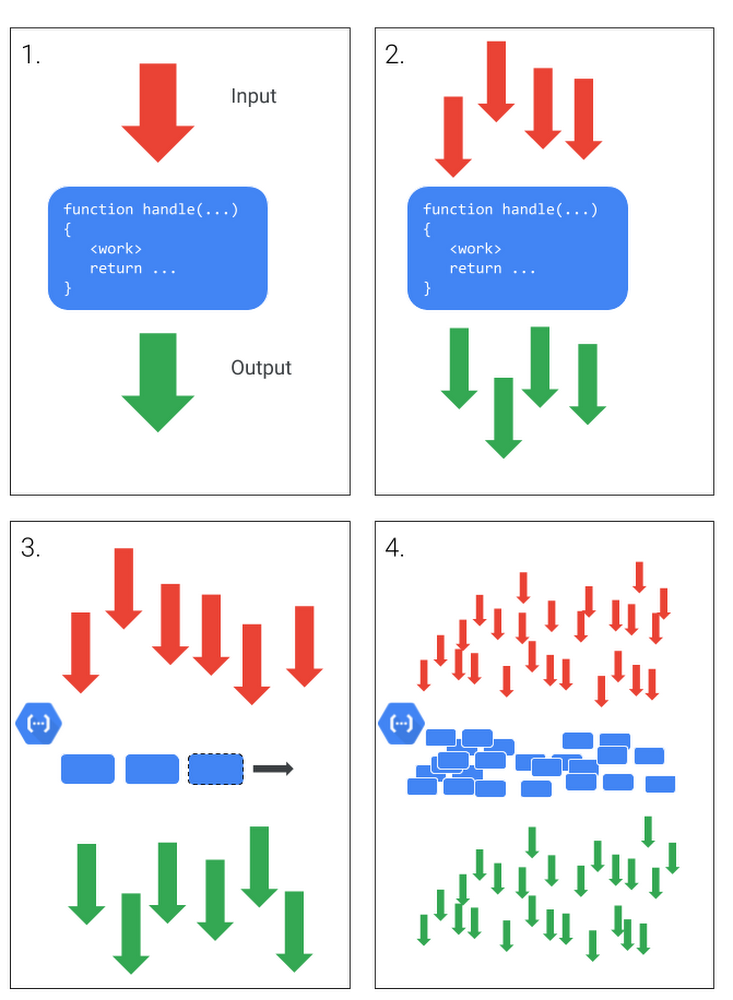
A core promise of a serverless compute platform like Cloud Functions is that you don’t need to worry about infrastructure: write your code, deploy it and watch your service scale automatically. It’s a beautiful thing. That works great when your whole stack auto-scales. But what if your service depends on an APIs or databases with rate or connection limits? A spike of traffic might cause your service to scale (yay!) and quickly overrun those limits (ouch!). In this post, we’ll show you features of Cloud Functions, Google Cloud’s event-driven serverless compute service, and products like Cloud Tasks that can help serverless services play nice with the rest of your stack.Serverless scaling basicsServerless scaling patternsLets review the basic way in which serverless functions scale as you take a function from your laptop to the cloud. At a basic level, a function takes input, and provides an output response. That function can be repeated with many inputs, providing many outputs.  A serverless platform like Cloud Functions manages elastic, horizontal scaling of function instances. Because Google Cloud can provide near-infinite scale, that can have consequences for other systems with which your serverless function interacts.Most scale-related problems are the result of limits on infrastructure resources and time. Not all things scale the same way, and not all serverless workloads have the same expected behaviors in terms of how they get work done. For example, whether or not the result of a function is returned to the caller or is only directed elsewhere, can change how you handle increasing scale in your function. Different situations may call for one or more different strategies to manage challenges scale can introduce.Luckily, you have lots of different tools and techniques at your disposal to help ensure that your serverless applications scale effectively. Let’s take a look. 1. Use Max Instances to manage connection limitsBecause serverless compute products like Cloud Functions and Cloud Run are stateless, many functions use a database like Cloud SQL for stateful data. But this database might only be able to handle 100 concurrent connections. Under modest load (e.g., fewer than 100 queries per second), this works fine. But a sudden spike can result in hundreds of concurrent connections from your functions, leading to degraded performance or outages. One way to mitigate this is to configure instance scaling limits on your functions. Cloud Functions offers the max instances setting. This feature limits how many concurrent instances of your function are running and attempting to establish database connections. So if your database can only handle 100 concurrent connections, you might set max instances to a lower value, say 75. Since each instance of a function can only handle a single request at a time, this effectively means that you can only handle 75 concurrent requests at any given time.  2. Use Cloud Tasks to limit the rate of work doneSometimes the limit you are worried about isn’t the number of concurrent connections, but the rate at which work is performed. For example, imagine you need to call an external API for which you have a limited per-minute quota. Cloud Tasks gives you options in managing the way in which work gets done. It allows you to perform the work outside of the serverless handler in one or more work queues. Cloud Tasks supports rate and concurrency limits, making sure that regardless of the rate work arrives, it is performed with rates applied. 3. Use stateful storage to defer results from long-running operationsSometimes you want your function to be capable of deferring the requested work until after you provide  an initial response. But you still want to make the result of the work available to the caller eventually. For example, it may not make sense to try to encode a large video file inside a serverless instance. You could use Cloud Tasks if the caller of your workload only needs to know that the request was submitted. But if you want the caller to be able to retrieve some status or eventual result, you need an additional stateful system to track the job. In Google APIs this pattern is referred to as a long-running operation. There are several ways you can achieve this with serverless infrastructure on Google Cloud, such as using a combination of Cloud Functions, Cloud Pub/Sub, and Firestore.4. Use Redis to rate limit usageSometimes you need to perform rate-limiting in the context of the HTTP request. This may be because you are performing per-user rate limits, or need to provide a back-pressure signal to the caller of your serverless workload. Because each serverless instance is stateless and has no knowledge of how many other instances may also be serving requests, you need a high-performance shared counter mechanism. Redis is a common choice for rate-limiting implementations. Read more about rate limiting and GCP, and see this tutorial for how to use serverless VPC access to reach a private Redis instance and perform rate limiting for serverless instances.5. Use Cloud Pub/Sub to process work in batchesWhen dealing with a large number of messages, you may not want to process every message individually. A common pattern is to wait until a sufficient number of messages have accumulated before handling all of them in one batch. Cloud Functions integrates seamlessly with Cloud Pub/Sub as a trigger source, but serverless workloads can also use Cloud Pub/Sub as a place to accumulate batches of work, as the service will store messages for up to seven days.Then, you can use Cloud Scheduler to handle these accumulated items on a regular schedule, triggering a function that processes all the accumulated messages in one batch run. You can also trigger the batch process more dynamically based on the number and age of accumulated messages. Check out this tutorial, which uses Cloud Pub/Sub, Stackdriver Alerting and Cloud Functions to process a batch of messages. 6. Use Cloud Run for heavily I/O-bound workOne of the more expensive components of many infrastructure products is compute cycles. This is reflected in the pricing of many managed services which include how many time-units of CPU you use. When your serverless workload is just waiting around for a remote API call it may make to return, or waiting for a file to read, these are moments where you are not using the CPU, but are still “occupying it” so will be billed.  Cloud Run, which lets your run fully managed serverless containers, allows your workload to specify how many concurrent requests it can handle. This can lead to significant increases in efficiency for I/O bound workloads. For example, if the work being done spends most of its time waiting for replies from slow remote API calls, Cloud Run supports up to 80 requests concurrently on the same serverless instance which shares the use of the same CPU allocation. Learn more about tuning this capability for your service.When to use which strategyAfter reading the above, it may be clear which strategy might help your current project. But if you are looking a little more guidance, here’s a handy flow-chart.click to enlargeOf course you might choose to use more than one strategy together if you are facing multiple challenges.Just let it scaleEven if you don’t have any scaling problems with your serverless workload, you may still be uneasy, especially if this is your first time building software in a serverless environment—what if you’re about to hit some limit, for example? Rest easy, the default limits for Google Cloud serverless infrastructure are high enough to accomodate most workloads without having to do anything. And if you do find yourself approaching those limits, we are happy to work with you to keep things running at any scale. When your serverless workload is doing something useful, more instances is a good thing!Serverless compute solutions like Cloud Functions and Cloud Run are a great way to build highly scalable applications—even ones that depend on external services. To get started, visit cloud.google.com/serverless to learn more.
Quelle: Google Cloud Platform

Data warehouse migration challenges and how to meet them

Editor’s note: This is the second in a series on modernizing your data warehouse. Find part 1 here.In the last blog post, we discussed why legacy data warehouses are not cutting it any more and why organizations are moving their data warehouses to cloud. We often hear that customers feel that migration is an uphill battle because the migration strategy was not deliberately considered. Migrating to a modern data warehouse from a legacy environment can require a massive up-front investment in time and resources. There’s a lot to think about before and during the process, so your organization has to take a strategic approach to streamline the process. At Google Cloud, we work with enterprises shifting data to our BigQuery data warehouse, and we’ve helped companies of all kinds successfully migrate to cloud. Here are some of the questions we frequently hear around migrating a data warehouse to the cloud:How do we minimize any migration risks or security challenges?How much will it cost?How do we migrate our data to the target data warehouse?How quickly will we see equal or better performance?These are big, important questions to ask—and have answered—when you’re starting your migration. Let’s take them in order.How do we minimize any migration risks or security challenges?It’s easy to consider an on-premises data warehouse secure because, well, it’s on-site and you can manage its data protection. But if scaling up an on-prem data warehouse is difficult, so is securing it as your business scales. We’ve built in multiple features to secure BigQuery. For enterprise users, Cloud Identity and Access Management (Cloud IAM) is key to setting appropriate role-based user access to data. You can also take advantage of SQL’s security views within BigQuery. And all BigQuery data is encrypted at rest and in transit. You can add the protection of customer-managed encryption keys to establish even stronger security measures. Using virtual private cloud (VPC) security controls can secure your migration path, since it helps reduce data exfiltration risks. How much will it cost?The cost of a cloud data warehouse has a different structure from what you’re likely used to with a legacy data warehouse. An on-prem system like Teradata may depend on your IT team paying every three years for the hardware, then paying for licenses for users who need to access the system. Capacity increases come at an additional cost outside of that hardware budget.With cloud, you’ve got a lot more options for cost and scale. Instead of a fixed set of costs, you’re now working on a price-utility gradient, where if you want to get more out of your data warehouse, you can spend more to do so immediately, or vice versa. With a cloud data warehouse like BigQuery, the model changes entirely. TCO becomes an important metric for customers when they’ve migrated to BigQuery (check out ESG’s report on that), and Google Cloud’s flexibility makes it easy to optimize costs.How do we migrate all of our data to the target data warehouse?This question encompasses both migrating your extract, transform, load (ETL) jobs and SAS/BI application workloads to the target data warehouse, as well as migrating all your queries, stored procedures, and other extract, load, transform (ELT) jobs.Actually getting all of a company’s data into the cloud can seem daunting at the outset of the migration journey. We know that most businesses have a lot of siloed data. That might be multiple data lakes set up over the years for various teams, or systems acquired through acquisition that handle just one or two crucial applications. You may be moving data from an on-prem or cloud data warehouse to BigQuery and type systems or representations don’t match up.One big step you can take to prepare for a successful migration is to do some workload and use case discovery. That might involve auditing which use cases exist today and whether those use cases are part of a bigger workload, as well as identifying which datasets, tables, and schemas underpin each use case. Use cases will vary by industry and by job role. So, for example, a retail pricing analyst may want to analyze past product price changes to calculate future pricing. Use cases may include the need to ingest data from a transactional database, transforming data into a single time series per product, storing the results in a data warehouse table, and more. After the preparation and discovery phase, you should assess the current state of your legacy environment to plan for your migration. This includes cataloging and prioritizing your use cases, auditing data to decide what will be moved and what won’t, and evaluating data formats across your organization to decide what you’ll need to convert or rewrite. Once that’s decided, choose your ingest and pipeline methods. All of these tasks take both technology and people management, and require some organizational consensus on what success will look like once the migration is complete. How quickly will we see equal or better performance?Managing a legacy data warehouse isn’t usually synonymous with speed. Performance often comes at the cost of capacity, so users can’t do the analysis they need till other queries have finished running. Reporting and other analytics functions may take hours or days, which is especially true for running large reports with a lot of data, like an end-of-quarter sales calculation. As the amount of data and number of users rapidly grows, performance begins to melt down and organizations often face disruptive outages.However, with a modern cloud data warehouse like BigQuery, compute and storage are decoupled, so you can scale immediately without facing capital infrastructure constraints.  BigQuery helps you modernize because it uses a familiar SQL interface, so users can run queries in seconds and share insights right away. Home Depotis an example of a customer that migrated their warehouse and reduced eight-hour workloads to five minutes. Moving to cloud may seem daunting, especially when you’re migrating an entrenched legacy system. But it brings the benefits of adopting technology that lets the business grow, rather than simply adopting a tool. It’s likely you’ve already seen that the business demand exists. Now it’s time to stop standing in the way of that demand and instead make way for growth.
Quelle: Google Cloud Platform