How to deploy a Windows container on Google Kubernetes Engine

Many people who run Windows containers want to use a container management platform like Kubernetes for resiliency and scalability. In a previous post, we showed you how to run an IIS site inside a Windows container deployed to Windows Server 2019 running on Compute Engine. That’s a good start, but you can now also run Windows containers on Google Kubernetes Engine (GKE). Support for Windows containers in Kubernetes was announced earlier in the year with version 1.14, followed by GKE announcement on the same. You can sign up for early access and start testing out Windows containers on GKE. In this blog post, let’s look at how to deploy that same Windows container to GKE. 1. Push your container image to Container RegistryIn the previous post, we created a container image locally. The first step is to push that image to Container Registry, so that you can later use it in your Kubernetes deployment.  To push images from a Windows VM to Container Registry, you need to:Ensure that the Container Registry API is enabled in your project.Configure Docker to point to Container Registry. This is explained in more detail here but it is usually done via the gcloud auth configure-docker command.Make sure that the VM has storage read/write access scope (storage-rw), as explained here. Once you have the right setup, it’s just a regular Docker push:2. Create a Kubernetes cluster with Windows nodesCreating a Kubernetes cluster in GKE with Windows nodes happens in two steps:Create a GKE cluster with version 1.14 or higher, with IP alias enabled and one Linux node.Add a Windows node pool to the GKE cluster.Here’s the command to create a GKE cluster with one Linux node and IP aliasing:Once you have the basic GKE cluster, you can go ahead and add a Windows pool for Windows nodes to it:Windows containers are resource intensive, so we chose n1-standard-2 as machine type. We’re also disabling automatic node upgrades. Windows container versions need to be compatible with the node OS version. To avoid unexpected workload disruption, it is recommended that you disable node auto-upgrade for Windows node pools. For Windows Server containers in GKE, you’re already licensed for underlying Windows host VMs—containers need no additional licensing.Now, your GKE cluster is ready and contains one Linux node and three Windows nodes:3. Run your Windows container as a pod on GKENow you’re ready to run your Windows container as a pod on GKE. Create an iis-site-windows.yaml file to describe your Kubernetes deployment:Note that you’re creating two pods with the image you pushed earlier to Container Registry. You’re also making sure that the pods are scheduled onto Windows nodes with the nodeSelector tag. Create the deployment:After a few minutes, you should see that the deployment was created and any running pods:4. Create a Kubernetes service To make pods accessible to the outside world, you need to create a Kubernetes service of type “LoadBalancer”:In a few minutes, you should see a new service with an external IP:And if you go to that external IP, you will see your app:This is very similar to the previous deployment to Compute Engine, with the big difference that Kubernetes is now managing the pods. If something goes wrong with the pod or one of its nodes, Kubernetes recreates and reschedules the pod for you—great for resiliency. Similarly, scaling pods is a single command in Kubernetes:If you want to try out these steps on your own, there’s also a codelab on this topic:And there you have it—how to run Windows containers on GKE. If you want to try out Windows Containers on GKE, sign up to get early access.
Quelle: Google Cloud Platform

PNB: Investing in Malaysia’s future with APIs

Editor’s note: Today we hear from Muzzaffar bin Othman, CTO at Permodalan Nasional Berhad (PNB) on how the company uses Google Cloud’s Apigee API Management Platform to create digital investment channels. Read on to learn how PNB is increasing financial inclusion by expanding investment opportunities for all Malaysians.Permodalan Nasional Berhad (PNB) is one of Malaysia’s largest investment institutions with more than RM300 billion ($71 milion) in assets under management. Through our wholly-owned company, Amanah Saham Nasional Berhad (ASNB), we manage 14 funds with a total value of RM235.74 billion ($56.34 million) as of Dec. 31, 2018. To expand the range of people who can invest and participate in the economy, our unit trust funds enable the public to invest as little as RM10 ($2.50) into any of our funds. With each investment, unit holders (a unit holder is an investor who holds securities of a trust) are able to participate in the local and international investment activities managed by PNB and ASNB. They also gain dividends from their investment at the end of the financial year for the funds that they invest in. Accelerating access to services with APIsAs chief technology officer for PNB, I lead the retail and asset management technology aspects of the business. My team and I manage the basic IT systems such as email and networks, but also the more exciting and complex IT infrastructures, including investment core systems and data analytics for the unit trust teams.  In January 2017 (prior to joining PNB), I observed unit holders waiting in a long line just to update their account balances following a dividend announcement. Unit holders had limited options then: they were required to visit an ASNB branch or one of our agent banks to complete the transaction. When PNB hired me three months later, I was determined to create a self-service balance checker that would reduce our unit holders’ waiting time. My team first built an application on an Android tablet that communicated to our backend via APIs. Then we constructed a kiosk around this and started our first self-service kiosk. We have built 120 kiosks across Malaysia in six months.While we made progress in creating new solutions for our unit holders, we were missing an API management framework to manage our APIs. After extensive market research, we decided on the Apigee API management platform as it was the most suitable platform to build our capabilities for developing and managing APIs. Apigee’s technical capabilities coupled with responsive support from Google Cloud were important factors. Being new to APIs, we value the quick and ready technical support made available to us.  In addition, the secure and flexible system that Apigee offers is critical to us because as a financial institution, security is of paramount importance.In July 2017, we migrated our retail core system from mainframe base to a modern, cloud-based  infrastructure. In August of the same year, a newly developed web portal provided our unit holders access to their accounts through their mobile devices for the first time. The customer response was very encouraging and uptake has been very high since then. The portal uses APIs to enable our 14 million unit holders to check balances, reinvest, edit their personal information, and access account statements. For now, the portal is only available to unit holders who pre-register via an in-person onboarding process. We are currently awaiting regulatory direction on electronic Know Your Customer (eKYC) rules that will impact digital onboarding before we can enable access to new unit holders via their  mobile devices.Creating new channels for financial inclusionTo date, our web portal and APIs have generated approximately RM2 billion (USD500 million) in annual investments. This equates to about five percent of our total yearly investments contributed via the digital platform. While this is encouraging progress, there is much more potential that we can tap into, including the collection and analysis of consumer behavior data. Moving forward, this valuable information will provide insights for us to improve customer experience and fine-tune our offerings. A typical bank integration typically takes six months at a high cost. Excluding the governance and compliance approval period, our key APIs can be consumed in under three months, at minimal cost. Banks that use APIs will find ours easy to work with. This simplifies our agent onboarding process. APIs enable us to innovate further by expanding our capabilities and reach. We are currently onboarding a few PNB agent banks and we look forward to the possibility to connect to fintech players in Malaysia, especially e-wallet solution providers. API simplify the communications between multiple systems and offer a world of possibilities for our business.
Quelle: Google Cloud Platform

Get your cloud migration journey off on the right foot with these three lessons

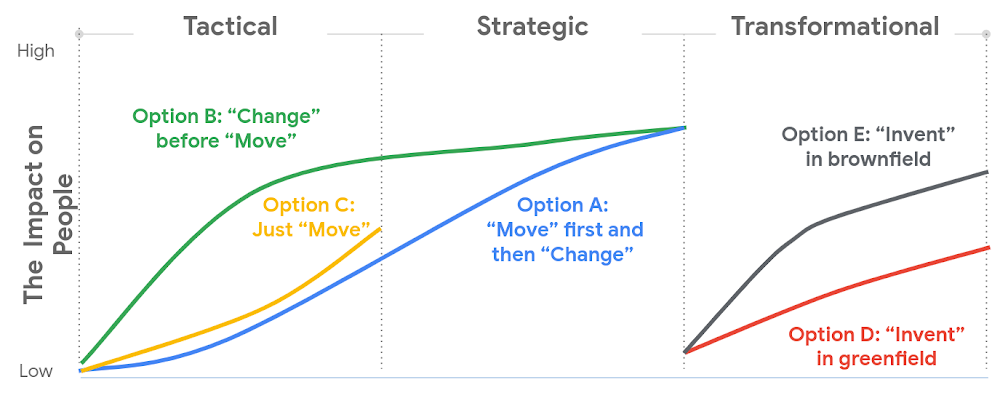
When moving to the cloud, many organizations concentrate their focus on the change in technology, and overlook an area just as complex: cultural change. At Google, we’ve spent years nurturing our culture and workforce to best operate in the cloud, and the Google Cloud Professional Services team leverages the lessons we’ve learned for the benefit of enterprise customers embarking on their own cloud journeys. While it can be tempting to believe in a universally ‘correct’ strategy for change management, there is no one-size-fits-all answer. Every organization will have its own unique considerations. But with that said, there are some core strategies we’ve found to be relevant and useful across a broad range of businesses. 1. Define your purpose for moving to CloudWhile pockets of cloud use and experimentation can evolve independently and in parallel across an organization, it’s important to make some deliberate decisions before starting a larger migration. At this stage, we recommend having a detailed answer to two key questions to ensure a successful cloud migration:Where do you want to go? (Or “What’s your cloud vision?”) How do you plan to get there?Start by having a conversation with leaders and those who will be key to the journey about how far you want to push your cloud vision. This alignment ensures everyone is on the same page—and will provide greater direction, allowing more deliberate action. 2. Find the change path which is right for you Whether a ‘lift and shift’ approach to the cloud is right for you, or a more transformative approach with a lot of re-architecting—the most important thing is to find the flavor of change which is appropriate to your context and level of ambition.This will both shape your key migration activities, but also the level of impact to be managed within your organization.  There are many ways to embark on a change journey for cloud migration (which one can find in the chart below). It is important to deeply understand the needs of your business and its people and determine what strategy makes the most sense.3. Learn from best practicesBased on the lessons we’ve learned along our own journey, and the work we’ve done with customers, there are a number of recommendations we can share that can make a cloud migration more successful. We go into these in more detail in our new whitepaper, but below you can find the ones we think are most relevant: Share the vision—and measure, measure, measure. Once you’ve crystallised your cloud vision with leadership and key stakeholders, share that vision widely. Set success goals and communicate them to hold yourself accountable.  Be clear about the capabilities you will need in the future—and where you’ll get them. For example, if your vision is to become a cloud-first, data and AI-led organization, ensuring you have the right data science skills and machine learning capabilities in your organization to achieve that vision becomes a critical step—be they home-grown or bought-in.Find the right balance between capabilities that should be under central control, and capabilities that should be decentralized, or agile. For example, should machine learning be something that sits centrally, or should it be spread across your organization? For every business, the solution will be a little different, and there’s no “one true answer.” There’ll be lots of different opinions about this, so the sooner the conversation starts, the better.  Start thinking about the needed tech and non-tech skills now, and how you’ll fill the gaps. Building the tech skills will take time, and not everyone will feel comfortable with the future picture of collaboration, innovation, and agility. To help businesses navigate their own cloud journeys, Google Cloud Professional Services has released a new whitepaper that can help guide organizations. “Managing Change in the Cloud” is closely aligned with the Google Cloud Adoption Framework and is a practical guide for organizations looking to maintain momentum in their cloud adoption. You can download the whitepaper here.
Quelle: Google Cloud Platform

Cloud Build brings advanced CI/CD capabilities to GitHub

If you use continuous integration (CI) or continuous delivery (CD) as part of your development environment, being able to configure and trigger builds based on different repo events is essential to creating git-based advanced CI/CD workflows and multi-environment rollouts. Customizing which builds to run on changes to branches, tags, and pull requests can speed up development, notify teammates when changes are ready to be merged, and deploy merged changes to different environments.Today, millions of developers collaborate on GitHub. To help make these developers more productive, we are excited to launch enhanced features to the Cloud Build GitHub App. Here is a list of the advanced capabilities you gain with Cloud Build’s new features. Trigger builds on specific pull request, branch, and tag eventsWhen integrating with GitHub via the app, you can now create build triggers to customize which builds to run on specific repo events. For example, you can set up build triggers to fire only on pull requests (PRs), pushes to master, or release tags. You can further specify different build configs to use for each trigger, letting you customize which build steps to run depending on the branch, tag, or PR the change was made to.You can further customize build triggers by configuring them to run, or not run, based on which files have changed. This lets you, for example, ignore a change to a README file, or only trigger a build when a file in a particular subdirectory has changed (as in a monorepo setup). Lastly, for PRs, an optional feature lets you require a comment on the PR to trigger a build, such that only repo owners and collaborators, and not external contributors, can invoke a build.If you already use the build trigger feature within Cloud Build, many of these options will look familiar. With this update, we are extending build triggers to support new capabilities, such as GitHub PR events, to developers who use GitHub and want more granular control to create advanced CI/CD pipelines with Cloud Build.View build status in GitHubIntegrating CI feedback into your developer tools is critical to maintaining your development flow. Builds triggered via the GitHub App automatically post status back to GitHub via the GitHub Checks API. The feedback is integrated directly into the GitHub developer workflow, reducing context switching. Updates posted to GitHub include build status, build duration, error messages, and a link to detailed build logs. With GitHub protected branches you can now easily use Cloud Build to gate merges on build status and re-run builds directly from the GitHub UI.Create and manage triggers programmaticallyAs the number of build triggers in your environment grows, creating and updating triggers from the UI can become time-consuming and hard to manage. With the Cloud Build GitHub App update, you can now configure build triggers via the Cloud Build API or Cloud SDK. Either inline in the API request or via a json or yaml file, you can programmatically create, update, and delete GitHub triggers to more easily manage build triggers across a large team or when automating the CI/CD setup for new repos.Create a local trigger.yaml file:Import the trigger via the CLI:With this integration between Cloud Build and GitHub, you now have an easy way to validate your pull requests early and often and set up more advanced git-based CI/CD workflows. The ability to create triggers in Google Cloud Console or programmatically via config files makes it easy to get started and automate your end-to-end developer workflows. To learn more, check out the documentation, or try this Codelab.
Quelle: Google Cloud Platform

Change Healthcare: Building an API marketplace for the healthcare industry

Today we hear from Gautam M. Shah, Vice President, API and Marketplaces at Change Healthcare, one of the largest independent healthcare technology companies in the United States. Change Healthcare provides data and analytics-driven solutions and services that address the three greatest needs in healthcare today: Reducing costs, achieving better outcomes, and creating a more interconnected healthcare system. Healthcare is a rapidly evolving industry. There is an urgent need to bridge gaps and connect multiple data sources, transactions, data owners and data users to improve all parts of the healthcare system. At Change Healthcare, we are rethinking and transforming how we approach our products and how we use APIs to achieve this goal. Taking a user-centered, outside-in approach, we identify, develop, and productize “quanta of value” within our portfolio (“quanta,” the plural of “quantum,” refers to small but crucial pockets of value). We connect and integrate those quanta into our own and our partners’ products to create a broader set of more impactful solutions. This approach to creating productized APIs enables us to bridge workflows and remove data silos. We bundle productized APIs to power solutions which open new possibilities for powering exceptional patient experiences, enhancing patient outcomes, and optimizing payer and provider workflows and efficiencies. To support this goal, we needed a way to support a large population of API producers, engage several segments of API consumers, and rethink how we bring API products to market at scale. We aren’t just delivering code; we’re creating and managing a broad product portfolio throughout its lifecycle. We take our APIs from planning, design, and operation through evolution and to retirement. Operating these products requires meeting the needs of many API producers, allowing for marketing and product enablement, supporting different distribution channels and pricing, and enabling rapid product and solution creation. We also have to do all of this while prioritizing security and requiring a minimum of added platform development or customization. In short, we need an enterprise marketplace enablement platform. We chose the Apigee API Management Platform because it allows us to do all this.Why Apigee?Change Healthcare is building a marketplace to advance API usage across the healthcare ecosystem. This marketplace, the API & Services Connection, is a destination where our internal users, customers, partners, and the healthcare ecosystem can readily discover, interact with, and consume our broad portfolio of clinical, financial, operational, and patient experience products and solutions in a secure, simple, and scalable manner.Using Google Cloud’s enterprise-class Apigee API Management Platform to power our marketplace allows us to support our entire organization with a standard set of tools, patterns, and processes. Using these common, and in some cases, pre-established, sets of security, performance, and operation standards frees our API producers from worrying about the mechanics of how to deploy their products, and allows them to focus on creating the best possible solutions. It also provides us with robust proxy development and management capabilities, allowing us to access and distribute existing APIs and assets, thereby eliminating the need for complex migrations.We empower our diverse mix of API producers by leveraging the full range of Apigee capabilities to automate engagement, integrate with different development methods, support visibility of products and pricing models, and measure usage, engagement, and adoption. By taking a “self-service first” approach, we allow our API producers to operate in line with their business processes and needs of the enterprise, while at the same time giving them the tools and metrics they need to create and optimize their products. We also use the Apigee bundling capabilities to allow our producers to easily create and productize API bundles, which are then used to develop solutions that incorporate leading-edge technologies to solve more complex problems. Our customer-facing marketplace makes the most of how Apigee supports distribution of APIs to multiple marketplaces, including a fully customizable developer portal. This capability gives us the ability to build private API user communities, create experiences for multiple customer segments, and distribute our APIs across multiple storefronts. Apigee lets us do all this while maintaining a common enterprise platform from which to control availability, monetization, and monitoring. In this way we can distribute our API assets internally and also allow our API producers to target how they want to manage their API products externally. Producers also benefit from rich engagement and usage data to better segment and target product availability, and pricing. Apigee also supports creating a more immersive and interactive experience for API consumers, enabling us to provide technical and marketing documentation, a sandbox, and connections to our product teams and other users.Fulfilling a bold visionAt Change Healthcare, we believe APIs are the present and the future. Today, our APIs power our products and enable us to serve the needs of the entire healthcare ecosystem. Looking forward, our APIs will power growth by enabling internal users to take advantage of valuable capabilities we’ve created, as well as make those capabilities easily available to external users. Armed with these productized APIs, our developers, customers, partners—ultimately all parts of the ecosystem—will be able to deliver new and innovative products that combine interoperable data, differentiated experiences, optimized workflows, and new technologies such as AI and blockchain.We’re just getting started with APIs! We’ve launched the first version of the API & Services Connection developer portal, and now have a standard method of engagement with our API producers and a place to drive internal visibility and external discovery. Our partnership with Apigee works well for us because we can demonstrate that we share the same goals internally and externally, and ultimately use the same set of tools to drive transformation. As our vision becomes a reality, we look forward to engaging not only more of our internal teams, but our partners and customers as well. Together we will use APIs to break down silos in healthcare, and ultimately create a more interoperable healthcare system for patients, providers, and payers. Learn more about API management on Google Cloud.
Quelle: Google Cloud Platform

Adopting cloud, with new inventions along the way, charges up HSBC

Editor’s note: We’re hearing today from HSBC, the huge global financial institution. They worked closely with Google Cloud engineers to move their legacy data warehouse to BigQuery, using custom-built tools and an automation-first approach that’s allowed them to make huge leaps in data analytics capabilities and ensure high-fidelity data.At HSBC, we serve 39 million customers, in-person and online, from consumers to businesses, in 66 countries. We maintain data centers in 21 countries, with more than 94,000 servers. With an on-premises infrastructure supporting our business, we kept running into capacity challenges, which really became an innovation blocker and ultimately a business constraint. Our teams wanted to do more with data to create better products and services, but the technology tools we had weren’t letting us grow and explore. And that data was growing continually. Just one of our data warehouses had grown 300% from 2014 to 2018.We had a huge amount of data, but what’s the point of having all that data if we couldn’t get insights and business value from it? We wanted to serve our customers flexibly, in the ways that work best for them. We knew moving to cloud would let us store and process more data, but as a global bank, we were moving complex systems that needed to also be secure. It was a team effort to create the project scope and strategy up front, and it paid off in the end. Our cloud migration now enables us to use an agile, DevOps mindset, so we can fail fast and deliver smaller workloads, with automation built in along the way. This migration also helped us eliminate technical debt and build a data platform that lets us focus on innovation, not managing infrastructure. Along the way, we invented new technology and built processes that we can use as we continue migrating.Planning for a cloud moveWe chose cloud migration because we knew we needed cloud capabilities for our business to really reach its digital potential. We picked Google Cloud, specifically BigQuery, because it’s super fast over small and large datasets, and because we could use both a SQL interface and Connected Sheets to interact with it. We had to move our data and its schema into the cloud—without having to manually manage every detail and miss the timelines we had set. Our data warehouse is huge, complex, and mission-critical, and didn’t easily lend itself to fit into existing reference architectures. We needed to plan ahead and automate to make sure the migration was efficient, and to ensure we could simplify data and processes along the way.The first legacy data warehouse we migrated had been built over a period of 15 years, with 30 years worth of data comprising millions of transactions and 180 TB of data. It ran 6,500 extract, transform, load (ETL) jobs and more than 2,500 reports, getting data from about 100 sources. Cloud migration choices usually involves either re-engineering or lift-and-shift, but we decided on a different strategy for ours: move and improve. This allowed us to take full advantage of BigQuery’s capabilities, including its capacity and elasticity, to help solve our essential problem of capacity constraints. Taking the first steps to cloudWe started creating our cloud strategy through a mapping exercise, which also helped start the change management process among internal teams. We chose architecture decision records as our migration approach, basing those on technical user journeys, which we mapped out using an agile board. User journeys included things like “change data capture,” “product event handling,” or “slowly changing dimensions.” These are typical data warehouse topics that have to be addressed when going through a migration, and we had others more specific to the financial services industry, too. For example, we needed to make sure the data warehouse would have a consistent, golden source of data at a specific point in time. We considered business impacts as well, so we prioritized initially moving archival and historical data to immediately take load off of the old system. We also worked to establish metrics early on and introduce new concepts, like managing queries and quotas rather than managing hardware, so that data warehouse users would be prepared for the shift to cloud.To simplify as we went, we examined what we currently had stored in our data warehouse to see what was used or unused. We worked with stakeholders to assess reports, and identified about 600-plus reports that weren’t being used that we could deprecate. We also examined how we could simplify our ETL jobs to remove the technical debt added by previous migrations, giving our production support teams a bit more sleep at night. We used a three-step migration strategy for our data: first, migrating schema to BigQuery; second, migrating the reporting load to BigQuery, adding metadata tagging and performing the reconciliation process; and third, moving historical data by converting all the SQL script into data into BigQuery-compliant scripts. Creating new tools for migration automationIn keeping with our automation mantra, we invented multiple accelerators to speed up migration. We developed these to meet the timelines we’d set, and to eliminate human error. The schema parser and data reconciliation tool helped us migrate our data layer onto BigQuery. SQL parser helped migrate the data access layer onto Google Cloud Platform (GCP) without having to individually migrate 3,500 SQL instances that don’t have data lineage or documentation. This helped us to prioritize workloads. And the data lineage tool identified components across layers to find dependencies. This was essential for finding and eliminating integration issues during the planning stage, and for identifying application owners during the migration. Finally, the data reconciliation tool reconciles any discrepancies between the data source and the cloud data target. Building a cloud futureWe used this first migration in our UK data center as a template, so we now have a tailored process and custom tools that we’re confident using going forward. Our careful approach has paid off for our teams and our customers. We’re enjoying better development and testing procedures. We’ve created an onboarding path for applications, we have a single source of truth in our data warehouse, and we use authorized views for secure data access. The flexibility and scalable capacity of BigQuery means that users can explore data without constraints and our customers get the information they need, faster. Learn more about BigQuery and about HSBC.
Quelle: Google Cloud Platform

From stamp machines to cloud services: The Pitney Bowes transformation

Editor’s note:James Fairweather, chief innovation officer at Pitney Bowes, has played a key role in modernizing the product offerings at this century-old global provider of innovative shipping solutions for businesses of all sizes. In today’s post, he discusses some key challenges the Pitney Bowes team overcame during its digital transformation, and some of the benefits it has enjoyed from building new digital competencies.Pitney Bowes will celebrate its 100th birthday in April 2020. Over the past century, we’ve enjoyed great success in markets associated with shipping and mailing. Yet, as with so many established and successful enterprises, we faced slowing growth in the markets that served us so well for so long. While package growth was accelerating, the mail market was declining, creating opportunities and challenges.To change our growth trajectory and “build a bridge” to Pitney Bowes’ second century, we needed to offer more value to our clients. We needed to move to growth markets, and that required new digital competencies. In 2015, we began a deliberate journey to transform our services, including shipping and location intelligence, for the digital world and make them available via the cloud. We learned a lot throughout this journey. In this post we’ll take a look at three things, in particular, that led to the success of this project—and will help future projects succeed, as well.Setting expectations and realistic milestonesOrganizations tend to undertake product development with a sense of optimism—and it’s often not particularly realistic. You set out thinking something will take a certain amount of time and that you will incur a specific cost, but estimates in technology and development may be optimistic, and costs almost always incrementally increase throughout the development process. With a digital transformation effort, there’s an additional challenge: You aren’t really heading to a well-defined destination, so the path your team takes can be even more ambiguous. Digital transformation doesn’t have an end state. It’s a process of constant evolution.For these reasons, and more, it’s important to set informed, realistic expectations—in schedule, in budget, in project scope. It’s also critical that you identify milestones along the way, and recognize and celebrate when you reach them.When you’re working on a massive, multi-year corporate transformation, after all, it can be hard to recognize that every little action you take each week, everything you win day-to-day, is a part of your progress, your change. So, it’s really important, as a leader, to bring consistency and execution discipline—and be able to point to the progress being made and celebrate accomplishments.We did our best to follow this advice during our digital transformation. Late 2015 was a critical time for Pitney Bowes as we laid out the technology strategy that would get us to the next century. We were aware of the potential hazards that could arise. You set the strategy, celebrate its publication as an accomplishment… and then nothing happens. To avoid this issue, we broke our strategy out into specific tactics supported by numerous smaller, interim goals. When we started putting big, green checkmarks next to each accomplished milestone, people started realizing that we were making real progress, and were serious about our execution.One key milestone, for example, was implementing an API management platform. This comprised several granular goals: Selecting a partner, training a subset of our 1,100 team members on the platform, and rolling out our first offering that was built on top of that capability. We knew that an API platform would be a key part of our digital transformation for three major reasons. First, we had acquired several companies, but their technologies were difficult to share for use cases across the organization. Every time a team needed to use our geocoding or geoprocessing capability, for example, they had to spin up a new environment. By building these capabilities as APIs across the organization, it made it easy to democratize their usage and speed up development. Secondly, we were running a big enterprise business system platform transformation program and wanted our product teams to be able to consume data from our back-end business systems. This meant that we needed a solid catalog of all these services, so new members of the team could easily find and use them.Finally, we had a couple of business units that wanted to go to market with APIs. They had a business strategy that entailed selling a service or value, with a vision to build a platform or ecosystem around these capabilities. An API platform (specifically, Google Cloud’s Apigee API management platform) is a huge accelerant in enabling all three of these objectives—it’s how you do this well.Reusability and the Commerce CloudThe Apigee platform and team helped us build a key offering that arose from our digital transformation: the Pitney Bowes Commerce Cloud. It’s a set of cloud-based solutions and APIs that are built on our assets and connect our new cloud solutions to our enterprise business systems, such as billing and package management.Today, we have close to 200 APIs delivered from the Commerce Cloud in the areas of location intelligence, shipping, and global ecommerce. The Commerce Cloud isn’t just a success as a customer-facing platform, however. We often talk about whether our development teams themselves have leveraged its services when developing new products. These discussions help us understand whether a product team has thought through the digital capabilities we’ve already built, assessed which capabilities fits into its roadmap, and adopted the right technology, capabilities, and practices to align with our corporate digital transformation strategy.Internal use of these shareable services shaves up to 70% off of our design cycles, because so many decisions are already made. Commerce Cloud adoption means you’ve gotten on the path internally, lowered the friction, and are aligned with the broader company digital transformation strategy. Measuring successWe’re proud of what we’ve accomplished so far at Pitney Bowes. But pride only takes you so far. To determine a project’s success, you need to be able to measure it. We do have some encouraging external measures: our percentage of revenue from new products climbed to roughly 20% of sales in 2018, compared to 5% back in 2012. And our Shipping APIs, which enable customers to integrate U.S. Postal Service capabilities into their own solutions, has gone from a standing start to an over $100 million business in a few years.On top of those external results, our business has transformed. We’re no longer just participating in a one-time sale of a product, software, or services; we’re participating in transactions every day that drive client outcomes. The more you can improve the quality and effectiveness of those services, the more you and your client enjoy the benefits of the commercial relationship. That’s a very big business model transformation for Pitney Bowes.We’ve also sped up our time to market and tightened our service-level agreements. But perhaps most importantly, we’ve developed and adopted a new set of internal processes and a mindset that helps us quickly adapt to changing market conditions. Again, digital transformation isn’t a destination. It’s really a set of processes that enable us to be nimble and keep building a bridge to Pitney Bowes’ future.For more on the Pitney Bowes transformation, check out these videos and this case study.
Quelle: Google Cloud Platform

Building ML models for everyone: understanding fairness in machine learning

Fairness in data, and machine learning algorithms is critical to building safe and responsible AI systems from the ground up by design. Both technical and business AI stakeholders are in constant pursuit of fairness to ensure they meaningfully address problems like AI bias. While accuracy is one metric for evaluating the accuracy of a machine learning model, fairness gives us a way to understand the practical implications of deploying the model in a real-world situation. Fairness is the process of understanding bias introduced by your data, and ensuring your model provides equitable predictions across all demographic groups. Rather than thinking of fairness as a separate initiative, it’s important to apply fairness analysis throughout your entire ML process, making sure to continuously reevaluate your models from the perspective of fairness and inclusion. This is especially important when AI is deployed in critical business processes, like credit application reviews and medical diagnosis, that affect a wide range of end users. For example, the following is a typical ML lifecycle:Below, in yellow, are some ways ML fairness can be applied at various stages of your model development:Instead of thinking of a deployed model as the end of the process, think of the steps outlined above as a cycle where you’re continually evaluating the fairness of your model, adding new training data, and re-training. Once the first version of your model is deployed, it’s best to gather feedback on how the model is performing and take steps to improve its fairness in the next iteration.In this blog we’ll focus on the first three fairness steps in the diagram above: identifying dataset imbalances, ensuring fair treatment of all groups, and setting prediction thresholds. To give you concrete methods for analyzing your models from a fairness perspective, we’ll use the What-if Tool on models deployed on AI Platform. We’ll specifically focus on the What-if Tool’s Fairness & Performance tab, which allows you to slice your data by individual features to see how your model behaves on different subsets.We’ll be using this housing dataset from Kaggle throughout this post to show you how to perform fairness analysis in the What-if Tool. As you can see in the preview below, it includes many pieces of data on a house (square feet, number of bedrooms, kitchen quality, etc.) along with its sale price. In this exercise, we’ll be predicting whether a house will sell for more or less than $160k.While the features here are specific to housing, the goal of this post is to help you think about how you can apply these concepts to your own dataset, which is especially important when the dataset deals with people. Identifying dataset imbalancesBefore you even start building a model, you can use the What-if Tool to better understand dataset imbalances and see where you might need to add more examples. With the following snippet, we’ll load the housing data as a Pandas DataFrame into the What-if Tool:When the visualization loads, navigate to the Features tab (note that we’ve done some pre-processing to turn categorical columns into Pandas dummy columns):Here are some things we want to be aware of in this dataset:This dataset is relatively small, with 1,460 total examples. It was originally intended as a regression problem, but nearly every regression problem can be converted to classification. To highlight more What-if Tool features, we turned it into a classification problem to predict whether a house is worth more or less than $160k.Since we’ve converted it to a classification problem, we purposely chose the $160k threshold to make the label classes as balanced as possible—there are 715 houses less than $160k and 745 worth more than $160k. Real world datasets are not always so balanced. The houses in this dataset are all in Ames, Iowa and the data was collected between 2006 and 2010. No matter what accuracy our model achieves, it wouldn’t be wise to try generating a prediction on a house in an entirely different metropolitan area, like New York City.Similar to the point above, the ”Neighborhood” column in this data is not entirely balanced—North Ames has the most houses (225) and College Circle is next with 150.There may also be missing data that could improve our model. For example, the original dataset includes data on a house’s basement type and size which we’ve left out of this analysis. Additionally, what if we had data on the previous residents of each house? It’s important to think about all possible data sources, even if it will require some feature engineering before feeding it into the model. It’s best to do this type of dataset analysis before you start training a model so you can optimize the dataset and be aware of potential bias and how to account for it. Once your dataset is ready, you can build and train your model and connect it to the What-if Tool for more in-depth fairness analysis.Connecting your AI Platform model to the What-if ToolWe’ll use XGBoost to build our model, and you can find the full code on GitHub and AI Hub. Training an XGBoost model and deploying it to AI Platform is simple:Now that we’ve got a deployed model, we can connect it to the What-if Tool:Running the code above should result in the following visualization:If you select Partial dependence plots on the top left, you can see how individual features impact the model’s prediction  for an individual data point (if you have one selected), or globally across all data points. In the global dependence plots here, we can see that the overall quality rating of a house had a significant effect on the model’s prediction (price increases as quality rating increases) but the number of bedrooms above ground did not:For the rest of this post we’ll focus on fairness metrics.Getting started with the Fairness tabOn the top left of the visualization, select the Performance & Fairness tab. This is what you’ll see first:There’s a lot going on! Let’s break down what we’re looking at before we add any configuration options. In the “Explore overall performance” section, we can see various metrics related to our model’s accuracy. By default the Threshold slider starts at 0.5. This means that our model will classify any prediction value above 0.5 as over $160k, and anything less than 0.5 will be classified as less than $160k. The threshold is something you need to determine after you’ve trained your model, and the What-if Tool can help you determine the best threshold value based on what you want to optimize for (more on that later). When you move the threshold slider you’ll notice that all of the metrics change:The confusion matrix tells us the percentage of correct predictions for each class (the four squares add up to 100%). ROC and Precision / Recall (PR) are also common metrics for model accuracy. We’ll get the best insights from this tab once we start slicing our data. Applying optimization strategies to data slicesIn the Configure section in the top left of the What-if Tool, select a feature from the Slice by dropdown. First, let’s look at “GarageType_Attchd”, which indicates whether the garage is attached to the house (0 for no, 1 for yes):Notice that houses with an attached garage have a higher likelihood that our model will value them at more than $160k. In this case the data has already been collected, but let’s imagine that we wanted our model to price houses with attached and unattached garages in the same way. In this example we care most about having the same percentage of positive classifications across classes, while still achieving the highest possible accuracy within that constraint. For this we should select Demographic parity from the Fairness section on the bottom left:You’ll notice that our threshold sliders and accuracy metrics change when we set this strategy:What do all these changes mean? If we don’t want the garage placement to influence our model’s price, we need to use different thresholds for houses depending on whether their garage is attached. With these updated thresholds, the model will predict the house to be worth over $160k when the prediction score is .99 or higher. Alternatively, a house without an attached garage should be classified as over $160k if the model predicts 0.52 or higher.If we instead use the “Equal opportunity” strategy, it will optimize for high accuracy predictions within the positive class and ensure an equal true positive rate across data slices. In other words, this will choose the thresholds that ensure houses that are likely worth over $160k are given a fair chance of being classified for that outcome by our model. The results here are quite different:Finally, the “Equal accuracy” strategy will optimize for accuracy across both classes (positive and negative). Again, the resulting thresholds are different from either of the outcomes above:We can do a similar slice analysis for other features, like neighborhood and house type, or we can do an intersectional analysis by slicing by two features at the same time. It’s also important to note that there are many definitions of the fairness constraints used in the What-if Tool; the ones you should use largely depend on the context of your model. TakeawaysWe used the housing dataset in our demo, but this could be applied to any type of classification task. What can we learn from doing this type of analysis? Let’s take a step back and think about what would have happened if we had not done a fairness analysis and deployed our model using a 0.5 classification threshold for all feature values. Due to biases in our training data, our model would be treating houses differently based on their location, age, size, and other features. Perhaps we want our model to behave this way for specific features (i.e. price bigger houses higher), but in other cases we’d like to adjust for this bias. Armed with the knowledge of how our model is making decisions, we can now tackle this bias by adding more balanced training data, adjusting our training loss function, or adjusting prediction thresholds to account for the type of fairness we want to work towards. Here are some more ML fairness resources that are worth checking out:ML Fairness section in the Google’s Machine Learning Crash CourseGoogle I/O talk on ML FairnessResponsible AI practicesInclusive ML GuideHuman-centered AI guidebookCode for the housing demo shown in this post in GitHub and AI HubIs there anything else you’d like to see covered on the topics of ML fairness or explainability? Let me know what you think on Twitter at @SRobTweets.
Quelle: Google Cloud Platform

Cost optimization best practices for BigQuery

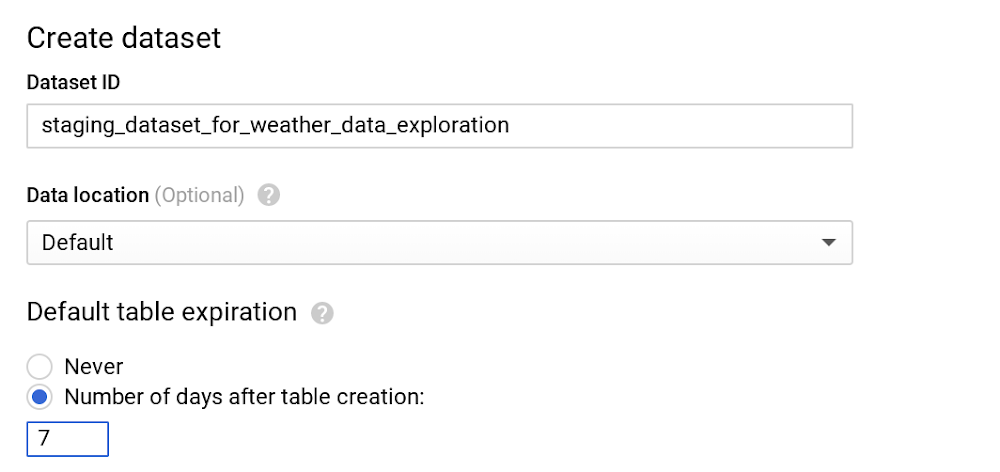
Running and managing data warehouses is often frustrating and time-consuming, especially now, where data is everywhere and is in everything we do. Scaling systems to meet hyper data growth has made it increasingly challenging to maintain daily operations. There’s also the additional hassle of upgrading your data warehouse with minimal downtime and supporting ML and AI initiatives to meet business needs. We hear from our customers that they choose BigQuery, Google Cloud’s serverless, enterprise data warehouse, so they can focus on analytics and be more productive instead of managing infrastructure. Once you’re using BigQuery, you’ll be able to run blazing fast queries, get real-time insights with streaming and start using advanced and predictive analytics. But that doesn’t mean there’s no room for further optimizations for your data housed in BigQuery. Since cost is one of the prominent drivers behind technology decisions in this cloud computing era, the natural follow-up questions we hear from our customers are about billing details and how to continually optimize costs. As TAMs (Technical Account Managers) here at Google Cloud, we’re often the first point of contact. We act as trusted advisors to help steer our customers in the right direction. We’ve put together this list of actions you can take to help you optimize your costs—and in turn, business outcomes—based on our experiences and product knowledge. One particular benefit of optimizing costs in BigQuery is that because of its serverless architecture, those optimizations also yield better performance, so you won’t have to make stressful tradeoffs of choosing performance over cost or vice versa.(Note that we’ll focus here on cost optimization on BigQuery. Check out our blog for cost optimizations on Cloud Storage.)Understanding the basics of pricing in BigQueryLet’s look at the pricing for BigQuery, then explore each billing subcategory to offer tips to reduce your BigQuery spending. For any location, the BigQuery pricing is broken down like this: StorageActive storageLong-term storageStreaming insertsQuery processingOn-demandFlat-rateBefore we dive deeper into each of those sections, here are the BigQuery operations that are free of charge in any location:Batch loading data into BigQueryAutomatic re-clustering (which requires no setup and maintenance)Exporting data operationDeleting table, views, partitions, functions and datasets Metadata operationsCached queriesQueries that result in errorStorage for first 10 GB of data per monthQuery data processed for first 1 TB of data per month (advantageous to users on on-demand pricing)Cost optimization techniques in BigQuery: storageOnce data is loaded into BigQuery, charges are based on the amount of data stored in your tables per second. Here are a few tips to optimize your BigQuery storage costs.1. Keep your data only as long as you need it. By default, data stored in BigQuery’s Capacitor columnar data format is already encrypted and compressed. Configure default table expiration on your dataset for temporary staging data that you don’t need to preserve.  For instance, in this example, we only need to query the staging weather dataset until the downstream job cleans the data and pushes it to a production dataset. Here, we can set seven days for the default table expiration.Note that if you’re updating the default table expiration for a dataset, it will only apply to the new tables created. Use DDL statement to alter your existing tables.BigQuery also offers the flexibility to provide different table expiration dates within the same dataset. So this table called new_york in the same dataset needs data retained for longer.As shown in the image above, new_york will retain its data for six months, and because we haven’t specified table expiration for california, its expiration will default to seven days.Pro tip: Similar to dataset-level and table-level, you can also set up expiration at the partition level. Check out our public documentation for default behaviors.  2. Be wary of how you edit your data. If your table or partition of a table has not been edited for 90 days, the price of the data stored in the table automatically drops by about 50%. There is no degradation of performance, durability, availability or any other functionality when a table or partition is considered for long-term storage. To get the most out of long-term storage, be mindful of any actions that edit your table data, such as streaming, copying, or loading data, including any DML or DDL actions. This will bring your data back to active storage and reset the 90-day timer. To avoid this, you can consider loading the new batch of data to a new table or a partition of a table if it makes sense for your use case. Pro tip: Querying the table data along with few other actions do not reset the 90-day timer and the pricing continues to be considered as long-term storage. In most cases, keeping the data in BigQuery is advantageous unless you are certain that the data in the table will be accessed at most once a year, like storing archives for legal or regulatory reasons. In that case, explore the option of exporting the table data into the Coldline class of a Cloud Storage bucket for even better pricing than BigQuery’s long-term storage.3. Avoid duplicate copies of data. BigQuery uses a federated data access model that allows you to query data directly from external data sources like Cloud Bigtable, Cloud Storage, Google Drive and Cloud SQL (now in beta!). This is useful for avoiding duplicate copies of data, thus reducing storage costs. It’s also helpful for reading data in one pass from an external source or accessing a small amount of frequently changed data that doesn’t need to be loaded in BigQuery every time it is changed. Pro tip: Choose this technique for the use cases where it makes the most sense. Typically, queries that run on external sources don’t perform as well compared to queries executed on same data stored on BigQuery, since data stored on BigQuery is in a columnar format that yields much better performance.   4. See whether you’re using the streaming insert to load your data.Check your last month’s BigQuery bill and see if you are charged for streaming inserts. If you are, ask yourself: “Do I need data to be immediately available (in a few seconds instead of hours) in BigQuery?” or “Am I using this data for any real-time use case once the data is available in BigQuery?” If either answer is no, then we recommend you to switch to batch loading data, as it is completely free.Pro tip: Use streaming inserts only if the data in BigQuery is consumed immediately by downstream consumers.5. Understand BigQuery’s backup and DR processes.If you’re paying extra to manually back up your BigQuery table to restore later, you don’t have to. BigQuery automatically manages backup and disaster recovery at the service level. Currently, it maintains a seven-day history of changes to your table, allowing you to query a point-in-time snapshot of your data. For example, to find the number of rows from a snapshot of a table one hour ago, use the following query:Find more examples in the documentation.  Pro tip: If the table is deleted, its history can only be restored for two days.Cost optimization techniques in BigQuery: query processingYou’ll likely query your BigQuery data for analytics and to satisfy business use cases like predictive analysis, real-time inventory management, or just as a single source of truth for your company’s financial data. On-demand pricing is what most users and businesses choose when starting with BigQuery. You are charged for the number of bytes processed, regardless of the data housed in BigQuery or external data sources involved. There are some ways you can reduce the number of bytes processed. Let’s go through the best practices to reduce the cost of running your queries, such as SQL commands, jobs, user-defined functions, and more.1. Only query the data you need. (We mean it!)BigQuery can provide incredible performance because it stores data as a columnar data structure. This means SELECT * is the most expensive way to query data. This is because it will perform a full query scan across every column present in the table(s), including the ones you might not need. (We know the guilty feeling that comes with adding up the number of times you’ve used SELECT * in the last month.)Let’s look at an example of how much data a query will process. Here we’re querying one of the public weather datasets available in BigQuery:As you can see, by selecting the necessary columns, we can reduce the bytes processed by about eight-fold, which is a quick way to optimize for cost. Also note that applying the LIMIT clause to your query doesn’t have an effect on cost.Pro tip: If you do need to explore the data and understand its semantics, you can always use the no-charge data preview option.Also remember you are charged for bytes processed in the first stage of query execution. Avoid creating a complex multistage query just to optimize for bytes processed in the intermediate stages, since there are no cost implications anyway (though you may achieve performance gains).  Pro tip: Filter your query as early and as often as you can to reduce cost and improve performance in BigQuery. 2. Set up controls for accidental human errors.The above query was on the magnitude of GB, a mishap that can cost you a few cents, which is acceptable for most businesses. However, when you have dataset tables that are in the magnitude of TBs or PBs and are accessed by multiple individuals, unknowingly querying all columns could result in a substantial query cost. In this case, use the maximum bytes billed setting to limit query cost. Going above the limit will cause the query to fail without incurring the cost of the query, as shown below.A customer once asked why custom control is so important. To put things into perspective, we used this example. Let’s say you have 10 TB of data in a U.S. (multi-regional) location, for which you are charged about $200 per month for storage. If 10 users sweep all the data using [SELECT * .. ] 10 times a month, your BigQuery bill is now about $5,000, because you are sweeping 1 PB of data per month. Applying thoughtful limits can help you prevent these types of accidental queries. Note that cancelling a running query may incur up to the full cost of the query as if it was allowed to complete.Pro Tip: Along with enabling cost control on a query level, you can apply similar logic to the user level and project level as well.3. Use caching intelligently.With few exceptions, caching can actually boost your query performance, and you won’t be charged for the results retrieved from the cached tables. By default, cache preference is turned on. Check them in your GCP console by clicking More -> Query settings on your query editor, as shown here.Also, keep in mind that caching is per user, per project. Let’s take a real-world example, where you have a Data Studio dashboard backed by BigQuery and accessed by hundreds or even thousands of users. This will show right away that there is a need for intelligently caching your queries across multiple users. Pro tip: To significantly increase the cache hit across multiple users, use a single service account to query BigQuery, or use community connectors, as shown in this Next ‘19 demo. 4. Partition your tables.Partitioning your tables, whenever possible, can help reduce the cost of processing queries as well as improve performance. Today, you can partition a table based on ingestion time, date, or any timestamp column. Let’s say you partition a sales table that contains data for the last 12 months. This results in smaller partitions containing data for each day, as shown below.Now, when you query to analyze sales data for the month of August, you only pay for data processed in those 31 partitions, not the entire table.One more benefit is that each partition is separately considered for long-term storage, as discussed earlier. Considering our above example, sales data is often loaded and modified for the last few months. So all the partitions that are not modified in the last 90 days are already saving you some storage costs. To really get the benefits of querying a partitioned table, you should filter the table using a partition column.Pro tip: While creating or updating partitioned table, you can enable “Require partition filter” which will force users to include a WHERE clause that specifies the partition column, or else the query will result in error.5. Further reduce sweeping your data using clustering.After partitioning, you can now cluster your table, which organizes your data based on the content for up to four columns. BigQuery then sorts the data based on the order of columns specified and organizes them into a block. When you use query filters using these columns, BigQuery intelligently only scans the relevant blocks using a process referred to as block pruning. For example, below, sales leadership needs a dashboard that displays relevant metrics for specific sales representatives. Enabling clustering order on sales_rep column is a good strategy, as it is going to be used often as a filter. As shown below, you can see that BigQuery only scans one partition (2019/09/01) and the two blocks where sales representatives Bob and Tom can be found. The rest of the blocks in that partition are pruned. This reduces the number of bytes processed and thus the associated querying cost.You can find much more here on clustering.Pro tip: Clustering is allowed only on partitioned data. You can always use partitioning based on ingestion data, or introduce a fake date or timestamp column to enable clustering on your table. Understanding flat-rate vs. on-demand pricingOnce your BigQuery monthly bill hits north of $10,000, check your BigQuery cost for processing queries to see if flat-rate pricing is more cost-effective. Flat-rate allows you to have a stable monthly cost for unlimited data processed by queries rather than paying the variable on-demand rate based on bytes processed. During enrollment, you can purchase query processing capacity, measured in BigQuery slots. As of this publication date, the minimum flat-rate pricing starts with 500 slots. A good starting point to decide how many slots to buy is to visualize your slot utilization for the last month using Stackdriver.Note: If your queries exceed flat-rate capacity, BigQuery will run proportionally more slowly until the slots become available. You might be tempted to think that you don’t have to worry about query optimizations with flat-rate at all. The reality is that it still impacts performance. The faster your query (job) executes, the more number of jobs you will be able to complete in the same amount of time with fixed slots. If you think about it, that’s cost optimization in itself!Buying too few slots can impact performance, while buying too many slots will introduce idle processing capacity, resulting in cost implications. In order to find your sweet spot, you can start with a monthly flat-rate plan, which allows more flexibility to downgrade or cancel after 30 days. Once you have a good enough ballpark estimate on the number of slots you need, switch to an annual flat-rate plan for further savings. Pro tip: You can always use a hybrid approach of on-demand rate and flat-rate pricing in your GCP Organization to maximize your overall savings.What’s nextWe hope you use BigQuery efficiently and get all the benefits of this modern data warehouse. Everything is fruitless if you don’t monitor the progress and visualize your success. Before you take any action, run a quick report of your BigQuery usage for the past month to get a quick pulse on the cost. Then you can prioritize cost optimization actions that you will take in the coming days or months and analyze how it affected different metrics using a Data Studio dashboard.Once the cost optimization actions are implemented, you should see a visible drop in your BigQuery bill (unless you’ve followed best practices since day one). In either case, celebrate your success! You deserve it.Learn more about how BigQuery works.Special thanks to James Fu, data engineer, for brainstorming and course correction, Tino Teresko, product manager, and Justin Lerma from professional services for their feedback.
Quelle: Google Cloud Platform

Atom bank accelerates transformation with Google Cloud

When building a radically different bank in an industry dominated by centuries-old institutions, you need to be both creative and nimble. For Atom bank, the UK’s first mobile-only bank, the secret to its success lies in its technology stack, which is now powered by Google Cloud.Since its launch three years ago, Atom bank has aimed to empower people to own their financial futures, with the desire to use the best technology to deliver an outstanding customer experience. Cloud hosting of banking software wasn’t an option when Atom bank was authorised in 2015 and when they launched, their IT infrastructure was managed by a third party in a data center. Within a year, however, Atom bank was bumping up against the limits of on-premise technology from both an operational and a business perspective. Regulatory guidance started to emerge and it was then, says Atom bank CTO Rana Bhattacharya, that they turned to Google Cloud.With on-premises-based data centers, it can take nearly three months to spin up a new service for customers. However, Atom bank wanted to inspire its digitally savvy customers with new apps and offerings at a frequent pace. So it made the decision to switch. Now, with Google Cloud, the bank can spin up as many new apps and services as it needs with fewer  lengthy delays and lower costs. Plus, when the bank no longer needs them, they can be decommissioned in an instant. “As a challenger bank, every penny counts,” says Bhattacharya. “We need to do more with less. That’s one reason why embracing the cloud helps us so much. This whole journey is really around removing obstacles, keeping costs low, and having more control and velocity around creating the right products, propositions and experiences for our customers.”Adopting Google Cloud offers more agility and scalability at a lower cost, says Bhattacharya. It allows Atom bank to be more responsive to the needs of customers, whether that be through new product and app features, or even entirely new products. More importantly, moving to Google Cloud  has enabled Atom bank to accelerate its transformation initiatives and roll out a completely new consumer-facing app. “Atom bank has always had the ambition to be built in the cloud, along with the intent to scale,” says Bhattacharya. “The speed of our growth and regulatory guidance resulted in us turning to Google Cloud.”“The types of products we offer today run very effectively on our current technologies but things have changed. To take advantage of the current innovation and build for future speed we’re replatforming the bank. By leveraging Google Cloud, it will allow us to be cloud native, building more SaaS and creating an architecture that is efficient and resilient.”At the end of the day, Google was more than just a cloud provider to Atom bank. It was a true transformation ally, offering engineering support that helped the bank overcome technical hurdles, and providing training and other services to bank employees. “We picked Google Cloud because we really wanted a partner, not just a provider,” says Bhattacharya. “We knew the cloud provider we chose would be very important to us, so we wanted to be sure we were important to that cloud provider, too. Fortunately, we found that in Google Cloud.”
Quelle: Google Cloud Platform