Knock, knock, who's there? It's Guidion, bringing timely service calls with APIs

Editor’s note: Today we hear from Aditya Bhargava, Solutions Architect and agile coach at Guidion, on how the company is using the Google Cloud’s Apigee API Management Platform to transform the Dutch solar panel and communications equipment installation landscape. Read more to learn how Guidion uses APIs to deliver technical services in and around the house, bringing happiness to seven customers every minute.  Guidion is a Dutch field service management company. We install consumer solar panels and broadband internet for our partners via a pool of about 2,000 freelance expert technicians. We provide our partners with a fully digitized, B2B cloud platform that we use to schedule and manage installations. The installation work we do isn’t the innovation—it’s way we deliver our services that’s the game changer.Streamlining the service economy with APIsMost people can think of more than one occasion when they needed a technical service like internet or cable television installed at their homes. This usually involves phoning the company to make the order, then waiting for a call back or an email or text message from the provider with the pre-ordained “installation window.” Often this painstaking process requires taking a day off to wait around for the technician to arrive. Customers don’t usually have a way to easily reschedule if the service window provided isn’t convenient. And they often don’t have ways to get updates on the day of the appointment about when–or if–the technician will arrive. This can obviously lead to frustration. Guidion has reimagined service delivery, putting our partners’ customers first with our on-demand installation platform. Once our partners notify us of an installation via our online platform, the customer is provided a link to schedule the installation at their convenience, and at a fixed appointment time that works best for them. Our technicians rely on the app to notify us of their availability, accept jobs, and if necessary, communicate directly with customers. Using Apigee to satisfy partner requirementsAbout four years ago, we migrated from our legacy system to use the Field Service Lightning and FinancialForce platforms from Salesforce to run our business. They do a great job for us, but we needed to find a way to adapt to how individual partners want to communicate with us without also migrating our legacy APIs. Since we already had existing, strong custom APIs that we didn’t want to adapt to the many partner-specific requirements, we started to look for a way to handle those kinds of translations while receiving the same API call via the same API proxy from different partners. We wanted to be able to handle the translations based on which partner is calling the API and then push the request back to Salesforce. That’s where the Apigee platform comes in. We were motivated to adopt an end-to-end API management platform because we didn’t want to have to develop a tool in-house to do SOAP-to-REST API translations (though we do offer REST endpoints that send requests to the same Salesforce custom APIs—partners can choose which route they take to integrate with our services). We chose Apigee to implement the SOAP endpoints, but also to enable us to do much more.Discovering out-of-the-box Apigee functionalityWith Apigee we have a standard way of having all our partners communicate with our Salesforce platform. The Apigee developer portal allows us to expose our endpoints and make partner onboarding very easy. We also we made a switch within Apigee that allows partners to make a choice about how they use our new system. We can either quickly and easily turn the request over to Salesforce to manage in their own REST API schema, or we can send it through Apigee as a pass-through endpoint which hands off to the old legacy system. Apigee also gives us the possibility of doing login monitoring, analytics, debugging, whitelisting, and certificate-based authentication. These are all functionalities that we got out of the box from Apigee, which we really appreciated. It meant that we didn’t have to invest any time in making or buying additional solutions.Our partners are large enterprises that need us to adapt to their requirements, so we need to keep all of the partner variations within the Salesforce platform. If we didn’t have Apigee, it would take us twice the time to implement partner-specific requirements, not to mention create a lot of additional resource-intensive maintenance. Cascading benefits to the businessAnother huge benefit stems from the fact that new partner onboarding is now handled by the business side rather than the technical side of Guidion. When a new partner or an existing partner needs a new service, the only thing our team members need to do is log in to Apigee as an operations administrator and fill in the key value map. Once the right information is in there, the partner is onboarded with no IT assistance required. Instead of waiting days for the IT team to get to it, the business is self-servicing partner able to react in real time to customer needs. In the past when we were using SOAP endpoints, integrations were considered a tough job. Not anymore. I think of Apigee as a restaurant. The menu is the Swagger documentation, then the waiter is the API that takes your order to the kitchen. The kitchen is the server that prepares your order and delivers it back to clients. Having Apigee makes our integrations as easy as eating out.To learn more about API management on Google Cloud, visit the Apigee page.
Quelle: Google Cloud Platform
Grafana and BigQuery: Together at last

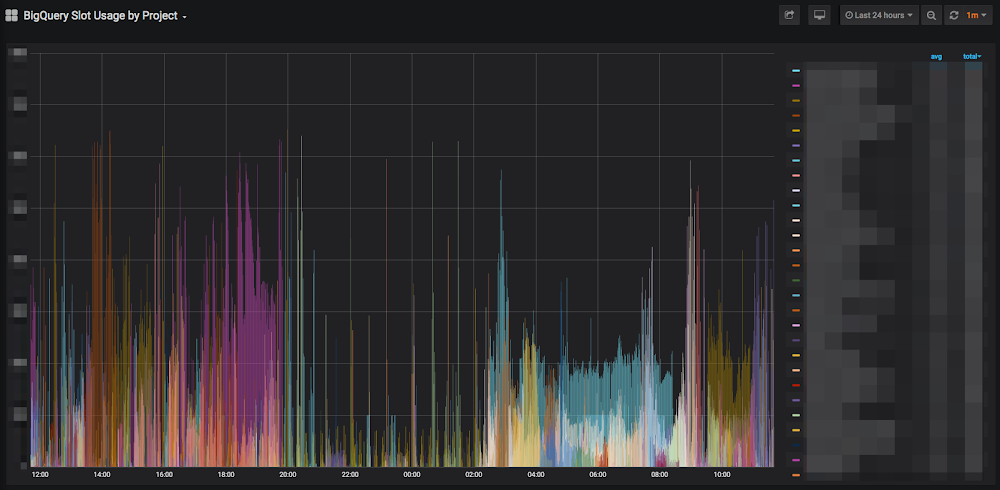
Editor’s note: We’re hearing today from DoiT International, a Google Cloud Premier and MSP partner, and two-time International Partner of the Year. They recently built a Grafana plugin for BigQuery, making it easier to visualize your data. Read on for details.At DoiT International, we see data problems of all shapes and sizes. From complexity analysis to large-scale system design, there are a variety of tools that can help solve our clients’ technology and analytical needs. But sometimes there’s a tool that seems so necessary that we create and share it ourselves.Which is why we built the Grafana plugin for BigQuery.We love BigQuery for its unparalleled capability to execute queries very fast over very large datasets, and often encourage our customers to use it. We also see how much our customers love using Grafana to visualize their time-series data for monitoring, alerts, analysis, or some combination thereof. The two seem like a natural match, yet until recently, there wasn’t a way to bring them together.Fortunately, Aviv Laufer, senior cloud engineer at DoiT International, found a way. Already familiar with the BigQuery API, he dug into the Grafana documentation and had a working prototype within a few weeks, and released a beta version shortly thereafter. After about a month, we’d solved the major bugs, become production-ready, and have been fielding feature requests from the community ever since.Monitoring big data operationsHundreds of companies are already taking advantage of the plugin so they can use both tools to their fullest extent. King, for instance, is using it to monitor the company’s big data operations. The mobile game developer, which famously brought the world Candy Crush Saga back in 2012, runs their data warehouse entirely in Google Cloud and uses BigQuery’s flat-rate subscription model. As King’s usage grew to support hundreds of projects, they were having trouble measuring slot utilization at the reservation or project level. They needed a better way to assess their usage patterns and query efficiency than scraping metrics from the Stackdriver API and consolidating those into yet another project to analyze with Grafana.Since King was already piloting an alpha of the flat-rate usage export into BigQuery, and was familiar with using Grafana with Stackdriver, the plugin let them tap into the best of both worlds. For example, the following short standard SQL query obtains slot usage by project:With the Grafana plugin, King was able to visualize the results of this query and get a clear picture of the activity across their more than 1,000 projects. Different projects use different amounts of slots, and the more dominant colors indicate which projects are using more slots than the others.Grafana visualization in dark modeAnother short query allows King to monitor their global slot usage. Below, they have a clear window into a 24-hour period:Grafana visualization in dark modeUsing the plugin to visualize BigQuery monitoring its own usage is just the beginning of how King may use the plugin in the future. King is now displaying BigQuery utilization on digital signage across all its offices to help the company interpret its usage data, ask new questions about it, and find ways to write queries (and manage its data warehouse) more efficiently. Visualizing billingAnother company benefiting from the one-two punch of BigQuery and Grafana is Travix, a global online travel company with operations in 39 countries. Travix is also a heavy user of BigQuery and Grafana, and when the plugin came out, they jumped on the opportunity to streamline their workflow.One of the critical areas Travix needs to monitor is SKUs. By exporting their billing information into BigQuery, Travix can analyze all their billing data. With a quick query and the Grafana plugin, Travix can see their top 10 GCP products and the associated costs on a given time frame.This lets them monitor how much they spend on Google Cloud and perform their own cost optimizations, and drill down into the costs of individual applications.Grafana visualization in light modeTravix is also using the plugin to measure their network traffic at 15-minute intervals. By defining events from Cloudflare logs as ingress and egress, they can see what their network traffic patterns are like, and monitor for any new trends or anomalies.Grafana visualization in light modeTravix also analyzes their access logs for slowly increasing response times, which would be invisible if looking at shorter periods of time. Using the Grafana pluginUsing BigQuery and Grafana together can apply to countless applications: dashboards analyzing logs, billing data, sales metrics, traffic analysis, tracking digital marketing campaigns, and probably many more we haven’t thought of yet. Getting started is as easy as downloading the plugin from the Grafana website, or cloning the open-source Github repository. We welcome your feedback on this plugin via Github, and we respond quickly to bugs and feature requests. We look forward to seeing what you can do!
Quelle: Google Cloud Platform

Improve your connectivity to Google Cloud with enhanced hybrid connectivity options

Whatever the requirement—from enterprise-readiness fundamentals like reliability, performance, and security, to innovations for enabling microservices architecture or hybrid and multi-cloud deployments—the Google Cloud networking portfolio has something to offer.  At NEXT ‘19 in San Francisco, we announced the betas for 100 Gbps Dedicated Interconnect as well as High Availability (HA) VPN. Today, we’re excited to announce that both are generally available. With HA VPN, you can connect your on-premises deployment to a Google Cloud Platform (GCP) Virtual Private Cloud (VPC) with an industry-leading SLA of 99.99%, catered for your mission-critical workloads. Follow these migration steps to easily create redundant VPNs from your classic VPN deployments.100 Gbps Dedicated Interconnect, meanwhile, provides 10X the capacity of our previous Interconnect offering, and can be combined into Link Aggregation Groups to bring massive amounts of bandwidth. With 100 Gbps Dedicated Interconnect, you can scale your connection capacity to meet your particular requirements.Google connects customers around the world to Google Cloud through service providers via Partner Interconnect. You can now find the optimum connectivity pathway to Google Cloud from any on-net building or data center worldwide on the new Cloud Pathfinder App for Google Cloud, provided by Cloudscene; learn more from their launch blog.Let’s connect100 Gbps Dedicated Interconnect, HA VPN, and Cloud Pathfinder for Google Cloud are just the latest examples of how you can connect your business to Google Cloud. Let us know how you plan to use these new networking features and what capabilities you’d like in the future. You can learn more about GCP’s cloud networking portfolio online and reach us at gcp-networking@google.com.
Quelle: Google Cloud Platform

Stay in control of your security with new product enhancements in Google Cloud

When it comes to securing your cloud infrastructure, there is no shortage of challenges. You want to retain the visibility and control you had on-premises, while taking advantage of all the benefits the cloud can provide. The adoption of cloud-based services, for example, makes it easier for your development teams to quickly build and push services into production. However, this can unintentionally create Shadow IT, where you don’t know what services are running and if they’re secure. Today, we’re excited to announce the beta of Security Health Analytics, a security product that integrates into Cloud Security Command Center (Cloud SCC). Security Health Analytics helps you identify misconfigurations and compliance violations in your Google Cloud Platform (GCP) resources and take action. In this blog, we’ll look at how Security Health Analytics can help you stay in control of your Google Cloud security, including a real-world example from a customer, AirAsia. Staying in control of security in Google Cloud: AirAsiaAirAsia is the largest low-cost carrier in Asia as measured by passengers, and serves more than 150 destinations across 23 markets. Skytrax has named it the world’s best low-cost airline for 11 years running. As a company with a reputation for getting customers where they need to go without breaking the bank, AirAsia has several security practices in place to ensure that their budget goes to keeping their customers’ travel costs low, and not to recovering from security breaches. AirAsia’s large IT operation requires the ability to provision virtual machines (VMs) and spawn containers in Google Kubernetes Engine (GKE). The company also uses App Engine to build applications in Google Cloud. They chose Google Cloud because it offers far more flexibility, agility, and cost-effectiveness than other computing methods. While running these critical workloads in Google Cloud, AirAsia uses Security Health Analytics to see if their resources are configured properly and compliant with CIS benchmarks. “Being able to go to the new Security Health Analytics dashboard eliminates the guesswork of what we have running and if it is secure,” says Muhammad Faeez Bin Azmi, Information Security and Automation Solution Architect. “Now anyone on our team, even non-security professionals, can go to this dashboard and see a list of the misconfigured assets and compliance violations across all of our GCP resources. We can also see the severity of misconfigurations, which helps us prioritize our response.”To see what this looks like, below is an example Security Health Analytics Vulnerabilities dashboard showing potential security issues—called findings. When you click on a finding, you get a step-by-step remediation plan for how to solve the particular issue, such as an open firewall (shown below) or overly privileged access to a storage bucket, and a link that takes you directly to the impacted resource.Faeez adds, “Security Health Analytics has really helped us reduce the amount of time we spend trying to figure out what’s wrong with our resources. It’s allowed us to use our time more effectively to identify and resolve more security issues than we could before.” New to Security Health Analytics is its support for CIS benchmarks. Security Health Analytics is now fully certified by the Center for Internet Security (CIS) to monitor Google Cloud Platform Foundation benchmarks—recommendations for keeping your GCP resources secure and compliant. For example, the screenshot below shows how Security Health Analytics actively monitors for assets that violate CIS recommendation 5.1 (securing public storage buckets), which can help you identify and remediate storage buckets that are accessible to the public and prevent a data breach before it occurs.If you’re new to GCP and want to give these features a try, start your free GCP trial, enable Cloud SCC, and then turn on Security Health Analytics. If you’re an existing customer, simply enable Security Health Analytics from Security Sources in Cloud SCC. For more information on Security Health Analytics, read our documentation.
Quelle: Google Cloud Platform

How the cloud can drive economic growth in APAC (and everywhere)

Public cloud adoption in the Asia Pacific (APAC) region continues to outstrip the pace of growth in North America and Europe, according to BCG’s “Ascent to the Cloud: How Six Key APAC Economies can Lift-off” report. BCG’s report examines the public cloud’s economic impact in six key APAC markets: Australia, India, Indonesia, Japan, Singapore, and South Korea. Although public cloud adoption in these markets are still emerging when compared to the U.S. and Western Europe, the growth rate is much faster (25% in APAC versus less than 20% in the U.S. and Western Europe) and there is great potential for further development. The Cloud is not just a digital transformation story; it’s also an economic one. BCG finds that cloud adoption is expected to contribute about $450 billion of GDP across the six markets between 2019 and 2023. The direct effects of the economic boost has the potential to produce approximately 425,000 jobs in the covered economies, and influence about 1.2 million additional jobs by second order effects of public cloud deployment in key industries that drive the economy. Greater acceleration of cloud adoption and a supportive policy environment could increase the contribution to $580 billion with 770,000 direct jobs created and as many as 2.1 million jobs influenced.As part of its research, BCG identified six key benefits APAC businesses are experiencing as they embrace the cloud—with broad applications for businesses worldwide. Here’s more on what BCG’s research found.1. The cloud enhances team productivityBecause the cloud creates a standardized environment with scalable back-end systems and functions, and it provides access to proven tools that the IT teams can use to develop systems, many businesses find that moving to the cloud results in improved IT efficiencies. This means they can focus more on high value tasks like customer targeting, content development, and bringing new products to market. Better collaboration tools such as G Suite create administrative and communication efficiencies, while advanced applications such as artificial intelligence or machine learning, enable faster, clearer insights that enhance the overall productivity of the organization.L&T Financial Services provides quick access to financial services for rural communities in India. It relies on G Suite to help staff work together efficiently. Employees can interact with each other in real time using Hangouts Meet, and the task of information sharing is more seamless and secure through Drive. BigQuery also helps L&T Financial Services generate behavior scorecards to track credit quality of its micro-loan customers.“Cloud is the technology that enables us to achieve scale and reach,” says Sunil Prabhune, Chief Executive-Rural Finance, and Group Head-Digital, IT and Analytics, L&T Financial Services. “Today there are countless data points available about rural consumers which enable us to personalize our products to serve them better. With access to faster compute power, we can also on-board consumers more efficiently. Our rural businesses have clocked a disbursement CAGR of 60% over the past three years.”2. The cloud can reduce time to marketThe public cloud allows users to take new products and services to market quickly, helping organizations develop a fail fast approach that alerts them to problems immediately and makes a fast turnaround possible when something needs to be fixed.The mobile game maker Netmarble, for example, uses advanced public cloud based tools including analytics and machine learning to support new game development, manage infrastructure, and infuse business intelligence throughout its operations. The company also uses productivity tools for real-time collaboration across front and back offices.“The public cloud aligns with our vision for innovation and is as committed as we are to building better player services with advanced artificial intelligence and reliable, scalable cloud infrastructure,” says Duke Kim, SVP, Head – Netmarble AI Revolution Center, Netmarble.3. A better security and compliance environment can be found in the cloudThe top public cloud providers spend billions of dollars every year on cyber security—far more than most businesses can spend on their own. As a result, security has increasingly become a key incentive to using the public cloud. Recognizing that gaining and maintaining trust would be key to customer and partner adoption of its new products and services, Bank Rakyat Indonesia (Bank BRI) decided to pursue ISO 27001 certification in 2018. In fact, it was the first bank in ASEAN (the Association of Southeast Asian Nations) to be certified as information security compliant. Now, fintechs, insurance companies, and financial institutions that lack the talent or the financial resources to do quality credit scoring and fraud detection on their own are turning to Bank BRI. They also package data through more than 50 monetized open APIs for more than 70 ecosystem partners wanting to do credit scoring, business assessments, and risk management.4. The cloud helps businesses launch new products and services faster and more efficientlyMany businesses find that the compute infrastructure they gain by moving to the cloud allows them to introduce new products or services, as well as the internationalization of new digital products and services. With the public cloud, they are better able to expand their business models. Australia Post recently expanded into parcel delivery and growing its digital business to include retail, travel, and financial services and solutions. Using BigQuery, Australia Post has visibility into every stage of the mail delivery process and reduced the time taken to perform analytics. Operations managers can now see what’s happening in sorting facilities in real time, helping to identify flow blockages almost instantly. Previously, these types of insights would only be available at the end of the day, but now they’re delivered within 15 seconds—that’s 300 times faster. “With near real-time data analytics, we can free up valuable resources, act quicker and provide better service to the millions of Australians that rely on us every day,” says Australia Post CIO John Cox.5. The cloud enables enhanced customer engagement and experiences For many businesses, moving to the cloud means access to advanced tools such as big data analytics and machine learning that can help them improve customer experiences. To win over new customers, many feel the need to excel over their competitors when it comes to engaging the clientele and offering a positive experience—and are turning to the cloud to do it.DeNA leverages public cloud-based ML to improve the experience for new players of its mobile game Gyakuten Othellonia. To help beginners learn how to play the complex game competitively, and most importantly, enjoy the game, DeNa used AI to create a deck recommendation system for beginners and a smart AI player that would match the gamer’s level of skill. “Using the public cloud, we have been able to leverage Google Cloud’s expertise in AI to build and serve several components in our game,” says Kenshin Yamada, Director of AI Dept, DeNA Co., Ltd. “The cloud’s open and serverless technologies also enabled us to host our AI models without worrying about scalability of infrastructure or portability of code.”6. The cloud can reduce costsThe cloud offers the potential for substantial and meaningful cost reductions when businesses embrace transforming their architecture and consolidating their IT management functions. As a result, many find they’re able to achieve cost efficiencies that result from operating with smaller, fully autonomous agile IT teams that are able to focus on business rather than on managing the IT infrastructure. Before moving to the cloud, AirAsia ran its IT apps and services in an on-premises infrastructure that required extensive maintenance that diverted technology team members away from projects that would add value to the business. In addition, the infrastructure could not scale quickly and cost effectively to support its data-first transformation to a digital airline. By moving to the cloud, AirAsia found the business agility it needed, as well as a 5% to 10% forecast reduction in operating costs. It’s now looking at adopting machine learning to drive further cost efficiencies through optimizing pricing for a range of services and predicting demand for items like additional baggage, seats, and meals.Building better businesses with the cloud in APAC—and beyondWith its scalable infrastructure and a flexible, pay-as-you-go delivery of computing services, the cloud has become an increasingly essential digital transformation driver for APAC. By embracing the public cloud, these businesses are finding they can fuel growth through increased productivity, enhanced customer experiences, decreased costs, and reduced time to market. Many organizations also find significant benefit in the public cloud’s ability to provide security at a scale that often surpasses what even large companies can afford. To learn more about BCG’s findings, download a copy of the report.
Quelle: Google Cloud Platform

Compute Engine or Kubernetes Engine? New trainings teach you the basics of architecting on Google Cloud

Google Cloud wants you to be able to use the cloud on your terms, and we provide a range of computing architectures to meet you where you are. In practice, this often means choosing between Compute Engine and Google Kubernetes Engine (GKE). But, which one will best serve your needs?If you’re used to managing virtual machines (VMs) in your on-premises environment or other clouds, and want a similar experience in Google Cloud, then Compute Engine is for you. It offers scale, performance, and value so you can easily launch large compute clusters on Google’s infrastructure. Compute Engine also lets you build predefined VMs or tailor custom machine types to your specific needs.If you’re working with containers, and need to coordinate more than one in your solution, then GKE—our managed, production-ready environment for deploying containerized applications—is your best choice. It uses our latest innovations in developer productivity, resource efficiency, automated operations, and open source flexibility to help you accelerate your time-to-production.Of course, your cloud architecture will look very different depending on whether you build it with VMs (Compute Engine) or containers (GKE). That’s why we now offer two architecting training paths, available on-demand or in a classroom setting:Architecting with Google Compute EngineArchitecting with Google Kubernetes EngineArchitecting with Google Compute Engine takes you from introductory to advanced concepts in five courses. You’ll learn all the basics of the Google Cloud Platform (GCP) console and how to create virtual machines using Compute Engine. Then, you’ll dive into core services, such as Identity and Access Management (IAM), database services, billing resources, and Stackdriver services. Next, you’ll gain an understanding of how to configure load balancers and autoscaling for VM instances. The course will teach you to automate the deployment of GCP services and leverage managed services for data processing, as well as how to design highly reliable and secure GCP deployments.Over four courses, Architecting with Google Kubernetes Engine teaches you the basics of the GCP console, and then goes deeper into deploying and managing containerized applications using GKE. You’ll learn all the tools of GKE networking, and how to give your Kubernetes workloads persistent storage, while gaining an understanding of security, logging, monitoring, GCP managed storage, and database services.Ready to learn more about architecting with GCP? Join us on Friday, October 25 at 9:00 AM PST for a special webinar, Architecting with Google Compute Engine: Building your cloud infrastructure. In this webinar, we’ll give you an overview of the different Compute Engine services and demonstrate some of those services in GCP. By attending the webinar, you’ll also get one month of access to this training on Coursera at no charge. Click here to register today.
Quelle: Google Cloud Platform

Best practices for password management, 2019 edition

It is hard to imagine life today without passwords. They come in many forms, from your email credentials to your debit card PIN number, and they’re all secrets you use to help prove your identity. But traditional password best practices are no match for today’s sophisticated, and often automated, cybersecurity threats. With the all-too-often news of massive data breaches, leaked passwords, and phishing attacks, internet users must adapt to protect their valuable information. While passwords are far from perfect, they aren’t going away in the foreseeable future. Google’s automatic protections prevent the vast majority of account takeover attacks—even when an attacker knows the username and password—but there are also measures that users and IT professionals can take to further enhance account security. In the spirit of October being National Cybersecurity Awareness Month, we’ve released two new whitepapers to help you navigate password security.Modern password security for users provides pragmatic and human-centric advice for end users to help improve your authentication security habits. We go in-depth with tips on improving the security of the passwords you use today, advice on how to answer security questions, and explanations of why certain practices should be avoided.Modern password security for system designers is the first paper’s technical counterpart, outlining the latest advice on password interfaces and data handling. It provides technical guidance on how to handle UTF-8 characters, advice on sessions, and best practices for building a secure authentication system that can stand up to modern threats.Our aim is to promote an open and secure internet where users are equipped to protect their personal information and online systems are designed to prevent credential loss, even if those systems are compromised. We hope these whitepapers—available in PDF form at the links above—help you in your quest to better protect your environment.
Quelle: Google Cloud Platform

S4 Agtech picks Google Cloud to transform agricultural risk management

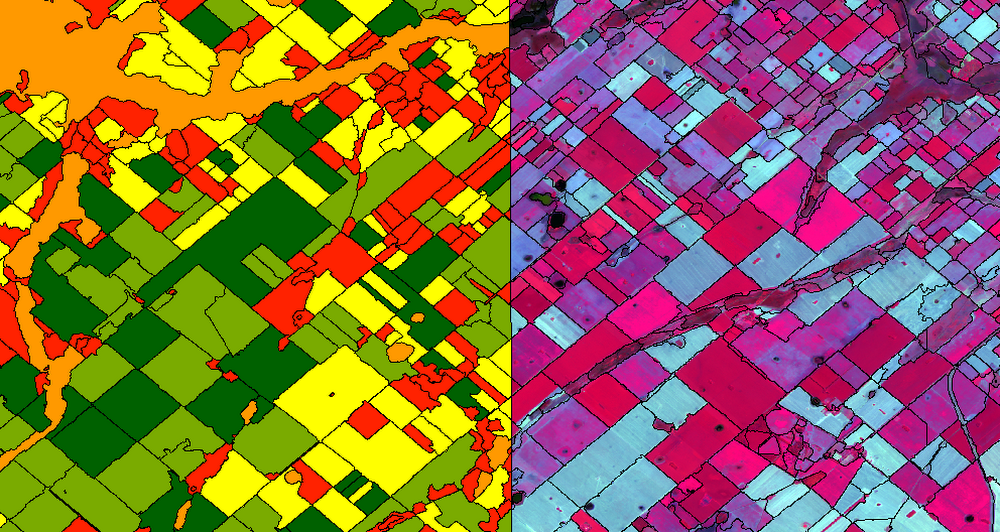
Editor’s note: Today we’re hearing from S4 Agtech, a risk management solutions company for agriculture that is based in Buenos Aires, Argentina; São Paulo, Brazil; and St. Louis, Missouri. S4 integrates multiple sources of agricultural data with its machine learning and other algorithms to determine agronomic and financial risk for farmers, seed developers, insurance and financial companies, traders and governments. With those tools, customers can make the best decisions for planting and planning, and transfer away climate risk to the financial markets. Read on for details on how the company is using Google Cloud Platform (GCP) to bring real-time data insights to users.Like countless other industries, farming is going digital and undergoing big changes—driven by access to more actionable information. The agriculture business can now gather and analyze georeferenced data from satellites, combined with data from IoT sensors in fields, crop rotation and yield histories, weather patterns, seed genotypes and soil composition to help increase the quantity and quality of crops. This is essential for businesses in the agriculture industry, but it’s also critical to address growing food shortages around the world. At S4, we create technology to de-risk crop production. We provide customers seeking agricultural risk management solutions with the tools to make better, data-driven decisions for their crop planning, based on machine learning and proprietary algorithms. We interpret plant evolution on a global scale with predictive modeling and analytics, and offer super-efficient risk-transferring solutions. Our multi-cloud platform includes a petabyte-scale database, an open source stack, and—after 50 proof-of-concept evaluations—BigQuery for our data warehouse and the Cloud SQL database service to handle OLTP queries to our PostgreSQL database. These PoCs included, among others, Microsoft Azure Data Lake Analytics, IBM Netezza, Postgres/PostGIS running on IBM bare-metal servers with SATA SSDs and on Google’s Compute Engine with NVMe disks, and on-premises memSQL, CitusData and Yandex ClickHouse. Weeding out risk in an uncertain marketAccording to recent research, climate extreme events like drought, heat waves, and heavy precipitation are responsible for 18-43% of global variation in crop yields for maize, spring wheat, rice, and soybeans. This is a clear trend for other crops as well. Such variation poses risks of food shortages as well as large financial risks to farmers, insurers, and regions dependent on successful crop yields. Also, it creates vast humanitarian difficulties.Our mission at S4 is to help de-risk crop production by matching the right data with analytics tools so farmers and other participants in the agricultural value chain can plan better, resulting in more reliable food supplies. In a nutshell, we create indices out of biological assets. These indices measure yield losses on crops that are caused by the effects of weather and other factors, which are then used as underlying assets for products, such as swap/derivative contracts and parametric insurance policies, to transfer risk to the financial markets. We enable insurers and lenders to buy and sell agricultural risks through the futures market. Also, our other products help farmers and seed and fertilizer companies provide customized genotype recommendations and fertilization requirements. This helps to optimize planting by geography, resources, and crop species, monitor phenological, pests and humidity evolution throughout the crop season, and estimate yields.Local communities benefit from S4’s technology, as the ability to manage weather risks allows farmers to stabilize their cash flows, invest more to produce more with fewer risks, and develop in a more sustainable manner.Growing data sources, reducing costs, accelerating performanceWith the volume of diverse data sources and analytical complexity both growing at a very fast pace, we decided that using a major cloud services provider with a broad roadmap and global partnerships would be beneficial to S4’s future evolution. At the same time, we wanted to bring our services to users faster and cut costs by consolidating our on-premises technology stack. When we started evaluating providers, our leading criteria included a powerful geospatial database and data analytics tools along with excellent support, all at a competitive price. GCP prevailed in nearly all criteria categories among the 50 companies we measured. Our previous platform architecture included a hybrid relational database that used Compute Engine for virtual machines and Cloud Storage for database backup. The RDBMS was slow. Maintaining our own data warehouse was complex and expensive. We wanted to use machine learning and neural networks, but couldn’t do so easily and affordably. The complexity of that system meant that products or services requiring small changes or additions to the data model translated to expensive expansions of infrastructure or project time. Also, agronomical or product teams couldn’t test these changes by themselves, always requiring the intervention on no small part of the IT team, which led to further delays.We added GCP services like BigQuery as S4’s cloud data warehouse and use BigQuery GIS for geospatial analysis, Cloud Dataflow for simplified stream and batch data processing, and Cloud SQL for queries to the S4 database platform, which have all made a huge impact on our services and bottom line. Database and analytics costs have decreased by 40% and customers are receiving our analytical results 25% faster. In addition, we’ve eliminated the time-consuming downloading of images, reducing storage and processing costs by 80%, because we no longer need expensive tools licenses, and have greatly reduced classification processing times.Our customers working in the agriculture industry are also benefiting from this infrastructure change. They are now able to speed up their data analytics using our GCP-based platform.”S4 products and technologies unlock the full potential of satellite imagery for crop prescriptions, monitoring and yield estimates,” says Nicolás Loria, Manager of Marketing Services, Southern Cone, Corteva Agriscience. “We’ve worked with S4 for the last three (and starting year number four) crop seasons as its team capabilities, data integration capacities, and analytics insights have allowed Corteva to perform an entire new solution. Thanks to S4’s customized 360° approach, fast response and delivery times, we have safely outsourced our remote crop analytic technical needs.”This image is one example of the detailed data we’re able to provide to our customers, so they can better map crop land and plan as efficiently as possible. The image on the left shows automatic crop classification methods, while the image on the right shows manual methods with operator-assisted supervision. The results we get from these automated classifications using Google Earth Engine and BigQuery GIS are much faster and less expensive to produce.. They correlate strongly to what actually happens in the field.Crop classification using satellite data. Yellow=soy; light green=fallow; dark green=corn; red=pastures; orange=non-cultivable areas.Also, this new architecture has allowed us to scale our models and databases with almost no limits, at a fraction of the cost vs. the previous models. We’ve saved a lot of time on executing processes and reduced work needed by our internal teams to do certain tasks, like preparing images, converting them, validating results, and more. Using Google Earth Engine has decreased the execution time of daily tasks anywhere from 50% to 90% of the previous time, going from an average time of 30 minutes to between four and 15 minutes, depending on the task.In addition to saving money and time, we are able to focus on innovation with the GCP performance and features we’re using. We’re able to seamlessly add satellite data to analytics using both public datasets and our own private data, and deliver GIS data management, analytics, crop classification and monitoring in real time. We can do semi-automatic crop classification and classification using spectral signatures with Google Earth Engine. Later this year, we’ll be using neural networks for pattern recognition and machine learning in new applications to improve crop yields and fine-tune risk models. And using GCP and Google Earth Engine infrastructure means we can run models for customers in South America and around the world, since Google Earth Engine has global satellite imagery available. We’ve heard from our customer Indigo Argentina that they’re able to bring customers data insights faster. “We are working with S4 in the development of two different applications for satellite crop monitoring and yield assessment,” says Carlos Becco, CEO, Indigo Argentina. “S4’s technology allowed us to manage and analyze multiple sources and layers of information in real time, letting us uncover valuable insights in Indigo’s own microbiome technologies, and at a very competitive cost.” Analytical products and app development thrive with GCPWith GCP, we are updating and improving algorithms that we built manually with machine learning processes to develop drought indices for upcoming crop seasons. Algorithms can recognize specific phases of crop phenology (e.g., bud burst, flowering, fruiting, leaf fall) and correlate them with photosynthetic activity, light, water, temperature, radiation, and plant genetics factors. Other analytical products like crop monitoring, pre-planting recommendations, financial scoring, and yield estimation can now do a lot more for users by offering multiple layers and datasets, faster image processing, and real-time access via APIs.We also replaced our bare-metal S4 app deployment with the App Engine serverless application platform. It provides tighter integration between the S4 platform and our BigQuery data warehouse for integration with marketplaces and third-party solutions. We get all of these Google Cloud features with all the benefits of managed cloud services, from multiversioning and security to automatic backups and high availability.At S4, we trust technology to decode plant growth and help protect farmers and their communities from climate change. With growing food shortages due to increasing populations and intensifying weather, data and analytics can have a huge impact in lowering financial risks and improving agricultural yields. It’s one sector where cloud, database, analytics, and other technologies are combining to improve business outcomes and affect the lives of billions of people. Learn more about S4’s work and learn more about data analytics on Google Cloud.
Quelle: Google Cloud Platform

AirAsia: adopting a modern identity solution with Google Cloud

At AirAsia, we operate a fleet of more than 270 aircraft across 23 markets, fly to more than 150 destinations and carry 100m guests each year. We’ve also been named the world’s best low-cost carrier for 11 years running. To accomplish all of this, we rely heavily on our 22,000 Allstars (employees). As AirAsia co-founder Tony Fernandes likes to say, “it has always been about the people.” In my role as CIO, it’s critical that I give our Allstars the tools and technology they need to get their jobs done, while at the same time ensuring that our company’s data is protected and secure. While this is challenging enough in normal circumstances, we’re also in the midst of rapidly moving from legacy on-premises technologies to the cloud. Google Cloud has been a critical partner for us in this journey.Identity challengesAirAsia, like many other enterprises, has relied on a legacy on-premises directory for many years. As our company has quickly grown and expanded to new markets and regions, we’ve had to manage multiple servers across a number of on-premises data centers and the public cloud, which has proved costly and time-consuming. Our Allstars, located all across Asia, need to easily access a number of legacy on-premises apps in addition to a growing number of SaaS apps. As a business, we also needed a more seamless integration between our HR system of record and our identity solution for user provisioning and lifecycle management. Solving these challenges with our existing on-premises directory was simply not feasible for us.In recent years, we partnered with Google Cloud to help drive our digital transformation, including moving dozens of workloads and apps to Google Cloud Platform (GCP), deploying G Suite as our collaboration and productivity solution for all of our employees, and replacing thousands of Windows laptops with fast and secure Chromebooks. We brought up our identity concerns with the Google Cloud team, and after a number of conversations, we decided to deploy Cloud Identity, Google’s  cloud-based identity and access management solution, to help address the identity challenges we were facing. Why Cloud Identity for AirAsia?We ended up choosing Cloud Identity for a few key reasons. Here at AirAsia, we are eager to move to the cloud as quickly as possible, and moving identity management to the cloud is a key enabler of this and our broader digital transformation. Managing identities from the cloud also enables us to have a single identity and set of credentials for each employee, which they can use to access all of the applications they need to be productive, both in the cloud and on-premises. In addition, deploying Cloud Identity is a key step towards enabling the BeyondCorp (or zero trust) security model, which we feel is the best approach to strengthen our security posture and fight modern threats. Cloud Identity also integrates seamlessly with our existing technologies, which includes not only Google Cloud products like GCP, G Suite, and Chrome OS, but also third party tools like Workday, Citrix, Papercut, and others. And finally, Cloud Identity offered us significant cost and resource savings. With Cloud Identity in place, our IT department can spend less time worrying about managing multiple on-premises directory servers and and can instead focus on delivering value to our Allstar employees.
Quelle: Google Cloud Platform

Protecting your GCP infrastructure at scale with Forseti Config Validator part two: Scanning for labels

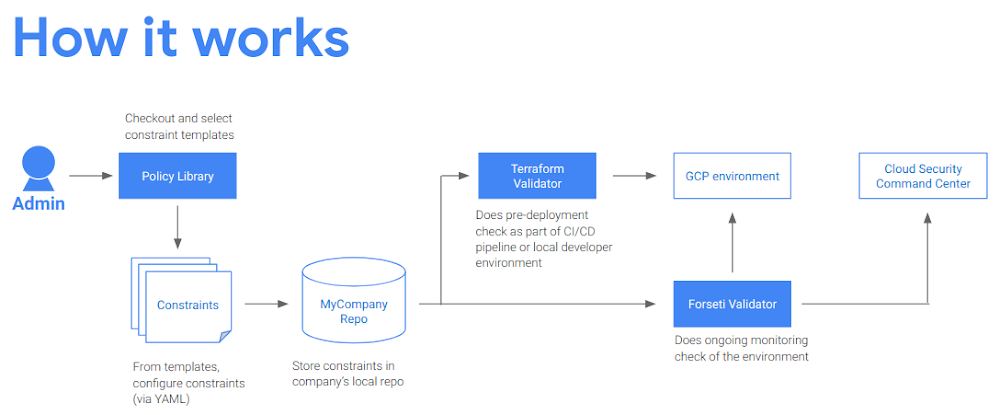
Welcome back to our series on best practices for managing and securing your Google Cloud infrastructure at scale. In a previous post, we talked about how to use the open-source tools  Forseti and Config Validator to scan for non-compliant tools in your environment. Today, we’ll go one step further and show you another best practice for security operations: the systematic use of labels. Labels are created using the Cloud Resource Manager API. There are a lot of ways using labels can help you, but the most common use cases are security, operations and billing. We recommend using labels to add metadata to your projects or resources to include useful information like: team, project owner, on-call rotation, data classification, cost center, and compliance requirements (e.g., PCI, HIPAA, etc.).To get the most out of labels, they have to be both reliable and accurate. In this article, we mostly cover the reliable part, but we also address some of the accuracy part as well, by showing you how to sanity-test the labels you create. Then, you’ll learn how to leverage example security policies (as constraint templates) to describe your security requirements in code, and use Forseti to look for resources that violate these constraints in your cloud environment. To do so, we’ll use the label_enforce template in this example, with the goal of helping you to build a central repository in which to keep your security policies as code (in the form of constraint files), and to use both Forseti and Terraform Validator to look for non-compliant resources.Defining your labelsDefining your labels is usually done before you deploy your project. Your organization may have some firm requirements about labeling that you must follow. For example, many companies have broad policies about labels and provide a custom list of required labels and a target location (e.g., when/where to apply them).  If you don’t have such a list, it is highly recommended that you get started writing your own. It could look something like this:Note: Labels created with the Google Cloud Resource Manager API have specific requirements. Check out the latest official documentation to learn more.In addition to the master list of labels, each application can add their own label requirements if they need more granularity. These requirements can vary depending on where in the organization your resources live. For example, many organizations have a set of rules for top-level folders (say shared-services, BU1 and BU2) and a different set of rules for others (like Marketing or Finance). It is quite common for organizations to have more than one set of requirements for their labels. You can enforce these various policies by building custom constraints from scratch or leveraging existing templates that are publicly available, either as-is, or as a starting point. (We’ll discuss how to write your own label templates in a follow-up article.)Forseti Config Validator constraints Forseti is Google’s sponsored open source project, and among many other things, it offers a set of predefined policies (constraint templates) for Config Validator, that you can use directly or modify to fit your custom needs. For example, if you want to ensure your infrastructure adheres to your global requirements, you can leverage the Forseti Config Validator tools and constraint templates.Constraints are based on Open Policy Agent (OPA),which makes it easier to integrate with other systems and removes a lot of the burden of writing and maintaining your own policy engine / enforcer system. A best practice is to translate your security requirements into code, that all your security tools can reuse, for consistency.Here is a high-level overview of how to implement security policies as code with a central policy library repository:With this approach, you can enforce your infrastructure requirements by using constraints that are checked before new resources get deployed to GCP (using the Terraform Validator). You can also use the same constraints to continuously scan your infrastructure for potential violations. Finally, you can report these findings to the Cloud Security Command Center (Cloud SCC) to visualize the results. To learn more about this last part, please read the previous post in this series, which describes how to set up Forseti and Cloud SCC. This lets you catch non-compliant resources, regardless of how they got deployed to your environment in the first place.Let’s take a closer look at the existing templates in the policy-library repository to understand how it all works:As a user, there are three folders you should focus on: docs, policies and samples. The docs folder contains user guides to help you get started. The policies folder contains all the published constraint templates that you can reuse to implement your company’s security policies. Each template comes with a sample constraint in the samples folder.A template consists of a YAML definition of an OPA rule that describes what constitutes a violation based on the input the rule receives. The input that the rule receives is made of two components:The asset (part of which is a GCP resource) that needs to be evaluated; this asset is aJSON object, following the Cloud Asset Inventory format.The constraint parameters. These are used to let you customize what constitutes a violation based on your own requirements. This varies from template to template; you can look at the template file directly to learn about its required parameters and acceptable values.In other words, you can reuse a constraint template in various ways by creating constraint files (also written in YAML) that implement a template, and craft parameters so that non-compliant resources will be flagged as violations by Forseti. Each policy in the library has an example of how to use its associated template in the samples folder. Let’s take a look at the enforce_label sample constraint, to learn more about its usage:In order to use a template, you must refer to its “kind“ value (computer-friendly name). In the above template, the kind value is “GCPEnforceLabelConstraintV1” which you need to reference in your constraint.You can also pass some parameters to it, to describe the normal state of your GCP resources, i.e., which labels should always be there, and what kind of value they should have.The only required parameter is “mandatory_labels”, which is basically a list of key/value pairs, where the key is the actual label key you want to check for, and the value is the pattern this label’s value should follow (a simple regex). For instance, a good value could be something like:In this example, the enforce_label template accepts any value for the label “call-center-region” that matches the regex “eu-*”.There is also an optional parameter “resource_types_to_scan”, which lets you specify which resource types need to have these labels. A common use case for this is to mandate labels at the project level only, meaning that the resources within the project do not need to have the labels attached directly. If this optional parameter is not passed, the template uses a default list of resource types that have been tested. You can find this list in the template file. If you need to use this template for a resource type that has not been tested, this type should still be supported as long as the labels object for your resource is in the default location (i.e., under resource.data.labels in your Cloud Asset Inventory export). If not, feel free to either fork the code and create a pull request for your new type, or create an issue for us to add the missing resource type.Going back to the original task, if you need to enforce the “cost-center” label from the previous section, you can define it in your constraint like this, specifying that “fin-us”, “mkt-eu” and “it-jp” are acceptable values for this label. Any resource where this label is missing or the value does not match this regex, will raise a violation, if they live within the target location:In general, it is easier to get started using one of the sample constraints in an existing templates. Once you have a satisfactory constraint, simply copy over the policies/constraints folder and commit your changes to your local repository.Note: Only the constraints in the policies/constraints folder will be used by Forseti (or other tools). It is recommended that you use a CI/CD pipeline to automate your policy deployments and audit every change. The target artifact of your policy pipeline will probably be a Cloud Storage bucket (for Forseti) that should be highly restricted. You do not want to let people update your policies manually, for obvious security reasons! Finding mislabeled resourcesOnce Forseti successfully sends out its findings to Cloud SCC, you can visualize them by selecting the Forseti Tile on the Cloud SCC dashboard and selecting the “Config ValidatorViolations” item on the “findings” menu (left).If you click on a single violation on the right side, you get more information about it:In this case you can see at the bottom that the label in violation is “cost-center” for this project (“my-invalid-project”). You can fix it by verifying the labels for this project in the resource manager:As you can see, this project does have the correct labels set (cost-center and owner), but the cost-center label has a invalid value (fin-123 does not match mkt-XXX). If you fix it and scan again, you should see this violation disappear from the Cloud SCC default dashboard (you can always find it back by adjusting the time in the Cloud SCC UI).Now let’s run the Forseti script again (or wait at most two hours for the next cron job to be triggered).And make sure you have one less violation this time:ConclusionYou now have a system in place that can continuously scan your cloud infrastructure and make sure the environment complies with policies that can be audited at any time. Having these policies in a separate repository lets your security team enforce your security requirements in one place, without having to manage the underlying infrastructure.In follow-up articles you will learn how to get started writing your own constraint template. Then you’ll see how to re-use these same policies to prevent non-compliant resources from being deployed in the first place, using the terraform-validator and a CI/CD pipeline for your terraform deployments.Useful links: OPA / rego:OPA Playbox (free testing environment)OPA official documentationOPA language referenceOPA language cheatsheetOpen Policy Agent Deep Dive Seattle 2018LabelsGCP labels overviewHow to: labeling resourcesUsing labels to organize Google Cloud Platform resourcesMost common use cases for labels in GCPRepositories:Forseti Terraform moduleForseti source codeConfig Validator source codeConfig Validator policy library
Quelle: Google Cloud Platform