Opening the door to more dev tools for Cloud Spanner

We recently released a new native open-source JDBC driver built by Google Cloud Platform (GCP) to enable the easy integration of Cloud Spanner into graphical database development tools. This can be useful for software engineers designing application database schemas in Cloud Spanner, database architects accessing Cloud Spanner, or database administrators monitoring and maintaining Cloud Spanner.In this blog, we’ll walk through how you can integrate and access your Cloud Spanner databases from DBeaver, a popular open source graphical database development tool. DBeaver lets you browse and edit databases, create and execute SQL scripts, export data, transaction management and ER diagrams. Here’s a look at the tool:In order to access Cloud Spanner from DBeaver, you have to go through the following short process. (This assumes that you have DBeaver installed and at least one Cloud Spanner database created in a GCP project that contains some data.)Create a self-contained JAR file that includes the open-source JDBC driver and all its dependencies.Create a database driver in DBeaver.Create a database connection to your Cloud Spanner instance.Run Cloud Spanner queries.1. Create self-contained JAR fileThe easiest setup of a database driver in DBeaver is based on a self-contained JAR file that contains the JDBC driver and all its dependencies. One way to create a self-contained JAR file is to create a Maven project with only one dependency:and execute it withThis Maven command creates a single JAR file that has all dependencies of the JDBC driver resolved and included, like this: spannerjdbc-1.0-SNAPSHOT-jar-with-dependencies.jar.2. Create a database driverThe next step is to create a database driver in DBeaver. Start DBeaver, select the tab Database, select the drop-down item Driver Manager, and in the window that appears, select New. You’ll see this:Give the driver a name—for example, CloudSpanner—select Add File in the Libraries tab, and open the JAR file you created in the previous step. Then select the Find Class button that automatically determines the driver class name, and click OK twice. You’ve now defined a Cloud Spanner driver that can be used by database connections.3. Create a database connectionThe last step before executing queries is creating a database connection to a Cloud Spanner database. As before, select the tab Database and select the drop-down menu item New Database Connection. Find and select Cloud Spanner (the name of the database driver you created earlier), and select next>. Enter the JDBC URL (this JDBC documentation shows how the URL is constructed) and test it by selecting Test Connection. If all works fine, you’ll see this:Select OK, then Finish, and you are ready to go execute queries.4. Run Cloud Spanner queriesYou can execute queries by typing them into the query window and pressing the small orange triangle on the side of the window. The result appears underneath in a result window:All the functionality of the graphical development tool is now available for you to use with Cloud Spanner. Happy querying!You can also follow the above steps with other graphical database development tools to get access to your Cloud Spanner databases and issue queries. These steps are similar for the various tools and will serve you as a guidance.If you already have a database development tool, chances are that it works with the JDBC drivers, and a similar process to the one above should give you access with your development tool of choice: Try it out!If you do not have a database development tool yet, download and configure one and connect it to your Cloud Spanner database.
Quelle: Google Cloud Platform

Introducing Python 3, Python streaming support from Cloud Dataflow

Streaming analytics is becoming an essential part of data platforms, helping businesses collect and analyze data in real time. At Cloud Dataflow, we’ve noticed a few trends in the data engineering industry. First, Python is emerging as one of the most popular choices for data analysts, and second, a growing number of apps are powered by streaming analytics. With these trends in mind, we’re excited to announce the general availability of Python 3 and streaming support for the Python SDK. Stack Overflow’s 2019 developer survey found that Python is the fastest growing major programming language, while a JetBrains survey observed that data analysis has become more popular than web development among Python users. In order to better serve this rapidly growing community, the developers of the Python language announced that Python 2 would be sunset in 2020. A consortium of open-source projects (including Apache Beam, the open-source SDK supported by Cloud Dataflow) followed suit by pledging to drop support for Python 2 no later than 2020.Separately, streaming analytics is becoming the standard for data analytics and ML. The most innovative companies are augmenting their data-driven analytics, letting teams make better strategic decisions with event-driven analytics, which enhances operational agility. Streaming analytics lets you take advantage of use cases such as personalization, fraud detection, IoT applications, and countless more. At Google Cloud Platform (GCP), our fully managed, no-ops streaming analytics stack comes in the form of Cloud Pub/Sub for data ingestion and Cloud Dataflow for data processing. (This pair was recently named a leader in the Forrester Wave for Streaming Analytics, Q3 2019.)We’re pleased to add support for Python 3 to help those of you still running in environments that will be imminently unsupported. This support means you can take advantage of the latest and greatest that Python has to offer. Python streaming will give data engineers the entire suite of streaming features that are offered by Cloud Dataflow, which include:Update: The ability to update your streaming pipeline (such as to improve or fix bugs in your pipeline code, or handle changes in data format)Drain: The ability to drain your data, which prevents data loss when finishing your streaming jobAutoscaling: Cloud Dataflow’s unique capability lets you choose the appropriate number of worker instances to complete your job and dynamically re-allocate more or fewer workers to account for changing traffic patternsStreaming Engine: Our next-generation streaming architecture will allow for a reduction in worker resources and more responsive autoscalingGetting started with Python 3 and Python streamingFollow the instructions in the quickstart to get up and running with your first pipeline. When installing the Apache Beam SDK, make sure to install version 2.16(or above). Command Line: pip install apache-beam[gcp]You can use the Apache Beam SDK with Python versions 3.5, 3.6, or 3.7 if you are keen to migrate from Python 2.x environments. After installation, you are ready to author your first streaming pipeline!In keeping with big data tradition, let’s look at a word count example, except we’ll analyze a stream of data. Here, you can see a snippet of code that consumes a stream of text data from Cloud Pub/Sub, defines a fixed window of 15 seconds, computes the count of distinct words within each 15-second window, and then writes the results to Cloud Pub/Sub:Navigate to the Cloud Dataflow section in the Cloud Console to see the job graph and associated metrics:Take Python streaming on Cloud Dataflow for a spin. Learn more in this handy Python Quickstart.
Quelle: Google Cloud Platform

Updating App Engine with more new runtimes: Nodejs 12, Go 1.13, PHP 7.3 and Python 3.8

Last week, we announced that the Java 11 runtime for App Engine standard environment is now generally available. But that’s not all the App Engine news we have to share. In addition to Java 11, developers can also now use Nodejs 12, Go 1.13, PHP 7.3 and Python 3.8. These latest additions to App Engine mean that you can build applications with your favorite tools, libraries and frameworks with today’s most popular languages.Nodejs 12 (beta)Nodejs 12 entered into long-term support (LTS) on October 22, 2019, and it’s now available in beta on App Engine. Node 12 boasts a big upgrade to the V8 Javascript engine to version 7.4, helping your applications run faster than they did on prior Node versions. The most anticipated feature of the release, however, is dedicated support for async stack traces—making it easier to debug code with asynchronous call frames. In addition, worker threads move out of experimental, TLS 1.3 is now supported, and there’s a new default http parser. Check out this post from the Node Foundation for the full list of features. And if you’re ready to get started, give it a try on App Engine.Go 1.13 (beta)Try out the latest improvements to Go with the launch of Go 1.13 on App Engine, now in beta. This release makes Go’s new “modules” the default method of managing dependencies in Go, reducing the complexity and the amount of code previously required to vendor imports. Go 1.13 also improves memory management dramatically. In production workloads, users are broadly reporting decreases of 20% – 50% in memory footprint. PHP 7.3 (GA)PHP 7.3 is also now generally available. This latest version of PHP adds full support for LDAP controls, improves logging for the Fast CGI Process Manager, and simplifies working with multibyte strings, among other changes. All of these new features are available today on App Engine. Just upload your PHP source code, and we’ll run it for you without having to manage a single VM or server.Python 3.8 (beta)Finally, we’re announcing the availability of Python 3.8 in beta. Python 3.8 introduces a new assignment operator (walrus), positional-only arguments in function definitions, better debugging support for f-strings via the ‘=’ specifier, multiprocess shared memory, and many more improvements. It also features performance enhancements such as speeding up many built-in methods by eliminating unnecessary argument conversions, and utilizing a new parallel filesystem cache for compiled bytecode files.With App Engine, you get the best of both worlds: the modern, idiomatic runtimes and frameworks you love, coupled with the fully managed, pay-as-you-go simplicity of a serverless platform. You write the code; let us worry about running your infrastructure. All of these new runtimes are now available on App Engine. Give them a try today.
Quelle: Google Cloud Platform

Cloud TPU breaks scalability records for AI Inference

MLPerf is the industry standard for measuring ML performance, and results from the new MLPerf Inference benchmarks are now available. These benchmarks represent performance across a variety of machine learning prediction scenarios. Our submission demonstrates that Google’s Cloud TPU platform addresses the critical needs of machine learning customers: developer velocity, scalability, and elasticity. MLPerf Inference v0.5 defines three datacenter-class benchmarks: ResNet-50 v1.5 for image classification, SSD-ResNet-34 for object detection, and GNMT for language translation. Google submitted results for all three of these benchmarks using Cloud TPU v3 devices and demonstrated near-linear scalability all the way up to a record 1 million images processed per second on ResNet-50 v1.5 using 32 Cloud TPU v3 devices1.Peak demonstrated scaling for select MLPerf v0.5 Closed offline submission normalized to the highest entry. *2Cloud TPUs are publicly available to Google Cloud customers in beta. These same TPUs are also being used throughout numerous large-scale Google products, including Google Search. Developer velocity: Serve what you train The Cloud TPU architecture is designed from the ground up to more seamlessly move ML workloads from training to serving. Cloud TPUs offer bfloat16 floating-point numerics, which allow for greater accuracy compared to integer numerics. Training and serving on the same hardware platform helps prevent potential accuracy losses at inference time and does not require quantization, recalibration, or retraining. In contrast, serving with low precision (e.g., 8-bit) numerics can create major complexities that require significant developer investment to overcome. For example, quantizing a model can add weeks of effort and risk to a project, and it is not always possible for a quantized model to achieve the same accuracy as the original. Inference hardware is lower-cost relative to ML developer effort, so increasing development velocity by serving ML models in higher precision can help save money and improve application quality.For example, using the TPU v3 platform for both training and inference allows Google Translate to push new models to production within hours of model validation. This enables the team to deploy new advances from machine translation research into production environments faster by eliminating the engineering time required to develop custom inference graphs. This same technology is available to Google Cloud customers to increase the productivity of their machine learning teams, accelerating the development of popular use cases such as call center solutions, document classification, industrial inspection, and visual product search.Inference at scaleMachine learning inference is highly parallel, with no dependency between one input and the next. MLPerf Inference v0.5 defines two different datacenter inference scenarios: “offline” (e.g. processing a large batch of data overnight) and “online” (e.g. responding to user queries in real-time). Our offline submissions leverage large-scale parallelism to demonstrate high scalability across all three datacenter-class benchmarks. In the case of ResNet-50 v1.5, we show near linear scalability going from 1 to 32 Cloud TPU devices. Google Cloud customers can use these MLPerf results to assess their own needs for inference and choose the Cloud TPU hardware configuration that fits their inference demand appropriately.Google Cloud TPU v3 speed-ups as demonstrated by Google’s MLPerf Inference 0.5 Closed submission. Results in this figure are drawn from the offline scenario.*3Cloud elasticity: On-demand provisioningEnterprise inference workloads have time-varying levels of demand for accelerator resources. Google Cloud offers the elasticity needed to adapt to fluctuating demand by provisioning and de-provisioning resources automatically while minimizing cost. Whether customers serve intermittent queries for internal teams, thousands of globally distributed queries every second, or run a giant batch inference job every night, Google Cloud allows them to have just the right amount of hardware to match their demand, minimizing waste due to underutilization of resources.For example, the Cloud TPU ResNet-50 v1.5 offline submission to MLPerf Inference v0.5 Closed demonstrates that just 32 Cloud TPU v3 devices can collectively process more than one million images per second. To understand that scale and speed, if all 7.7 billion people on Earth uploaded a single photo, you could classify this entire global photo collection in under 2.5 hours and do so for less than $600. With this performance, elasticity and affordability, Google Cloud is uniquely positioned to serve the machine learning needs of enterprise customers.Get started todayCloud TPUs have now set records for both training and inference. Google Cloud offers a range of inference solutions for the enterprise, allowing customers to choose among a wide variety of GPUs and Cloud TPUs. For example, we also offer exceptional price/performance with the NVIDIA T4 GPU for inference with quantized models. Google Cloud customers can get started with accelerated ML inference right away instead of waiting months to build an on-premise ML hardware cluster. If cutting-edge deep learning workloads are a core part of your business, we recommend following the Quickstart guides for Cloud TPUs or GPUs to get familiar with our ML accelerator platforms.1. MLPerf v0.5 Inference Closed offline; Retrieved from www.mlperf.org 06 November 2019, entry Inf-0.5-20, respectively. MLPerf name and logo are trademarks. See www.mlperf.org for more information.*2. MLPerf v0.5 Inference Closed offline; Retrieved from www.mlperf.org 06 November 2019, entries Inf-0.5-19, Inf-0.5-20, Inf-0.5-26, Inf-0.5-2, Inf-0.5-1, Inf-0.5-21, Inf-0.5-31, respectively. MLPerf name and logo are trademarks. See www.mlperf.org for more information.*3.  MLPerf v0.5 Inference Closed offline; Retrieved from www.mlperf.org 06 November 2019, entries Inf-0.5-15, Inf-0.5-16, Inf-0.5-17, Inf-0.5-18, Inf-0.5-19, Inf-0.5-20, respectively. MLPerf name and logo are trademarks. See www.mlperf.org for more information.
Quelle: Google Cloud Platform

Exploring the machine learning models behind Cloud IAM Recommender

To help you fine-tune your Google Cloud environment, we offer a family of ‘recommenders’ that suggest ways to optimize how you configure your infrastructure and security settings. But unlike many other recommendation engines, which use policy-based rules, some Google Cloud recommenders use machine learning (ML) to generate their suggestions. In this blog post, we’ll take a look at one of our recommendation engines, the Cloud Identity and Access Management (IAM) Recommender, and take you on a behind-the-scenes look at the ML that powers its functionality. IAM Recommender in actionIAM Recommender helps security professionals enforce the principle of least privilege by identifying and removing unwanted access to GCP resources. It does this by using machine learning to help determine what users actually need by analyzing their permission usage over a 90 day period. For example, a user Anita might have been given the Project Editor role when a new Google Cloud Platform (GCP) project was spun up, which gives her more than two thousand permissions. Elisa the Cloud Admin might have granted her a lot more access than required, simply because she did not understand Anita’s needs.Here’s how Cloud IAM Recommender helps. Elisa can now use IAM Recommender to analyze Anita’s permissions usage, and determine that she only needs day-to-day access to the Compute Engine service, and occasional access to Cloud Storage services. Using ML, IAM Recommender predicts what Anita will need in the long-term, and recommends the Compute Engine Admin and the Storage Object Viewer roles. Elisa can choose to apply the recommendations, removing thousands of unneeded permissions in the process. This minimizes the potential attack surface and helps her organization stay compliant with governance best practices.As simple as the idea might sound, it can be challenging to fully capture a given user’s intent and permission needs. On the one hand, we want to make timely recommendations after processing a reasonable amount of usage history (e.g., 90 days). On the other hand, there could be some permission usage missing from our observation window—for example, some operations could be interrupted when a user goes on vacation, or, like cron jobs, only happen very infrequently. This is one of the ways that we leverage ML: using inference to fill those small but crucial gaps and improve the accuracy of our recommendations.Training the modelOnce we have normalized the logs, we run an ML model to answer the question: “Given that a user used permission A, B, and C in the last 90 days, what are the other permissions they might need in order to do their job?” We train our model to answer this question from two sets of signals:Common co-occurrence patterns in the observed history. The fact that a user used permission A, B, and C in the past provides a hint that A, B, and C might be related in some way and that they are needed together to carry out a task on GCP. If our ML model observes this pattern frequently enough across a large user base, the next time if a different user used permission A and B, the model would suggest that the user might need permission C as well.Domain knowledge as encoded in the role definitions. Cloud IAM provides hundreds of different predefined roles that are service-specific. If a set of permissions co-occur in the same predefined role, it is a strong signal that the role creators determined certain permissions should be granted together.Our ML model uses both of these signals as input attributes, and each attribute is an IAM permission name, such as iam.serviceAccounts.get, or bigquery.tables.list. To further capture the semantics encoded in the permission name, which can be easily understood by a human but not by a machine, we employ word embedding, a technique that is widely used in Natural Language Processing applications. The key idea is to project a large number of words (in our case thousands of permission names) to a lower-dimensional vector space where we can calculate the similarity between a pair of words, which is a reflection of the actual semantics of these two words. For example, bigquery.datasets.get and bigquery.tables.list will become very “close” to each other after embedding.Google Cloud takes precautionary measures to maintain the privacy of our users; for example no data from one customer is being shared with another. In addition, we deployed an anonymization scheme to achieve k-anonymity before feeding the usage history data into our training pipeline. First, we drop all personally identifiable information (PII) such as user ID related to each permission usage pattern. Then we drop all usage patterns that do not show up frequently enough across GCP. The global model trained on the anonymized data can be further customized for each organization using Federated Learning.Right-size your permissionsNow we’re ready to make some recommendations! For a given user, we retrieve their usage history for the trailing 90 days and their current role definition, and feed those into the trained model. The model then makes a prediction on what unobserved permissions this user is likely to need. We combine the inferred permissions with the observed usage and rank roles to recommend the least permissive role(s) that can cover them all, thereby helping to ensure our recommendations are safe and any access that has been previously used is not removed.Better yet, unlike deterministic rules-based recommendations that become outdated over time, the ML model will adapt to changes over time. So as your footprint in Google Cloud grows, or as Google Cloud adds more services and permissions, the ML model evolves with these changes to ensure it provides relevant recommendations. To learn more about IAM Recommender, check out the documentation.
Quelle: Google Cloud Platform

Bringing Teradata Vantage to Google Cloud

The exponential growth of data is presenting enterprises with new challenges. With the influx of new and different types of data, enterprises need to scale infrastructure while improving costs and managing growing expectations from business functions. Teams need to analyze, store, and extract meaningful insights from that data.Today, we’re excited to announce a partnership with Teradata to offer its data analytics products on Google Cloud. Beginning next year, customers will be able to run Teradata’s cloud analytics platform, Vantage, on Google Cloud Platform (GCP). Teradata Vantage is a cloud-first analytics platform that allows customers to run sophisticated analytics across all types of deployment options: in the public cloud, hybrid, or multi-cloud environments. Teradata’s approach to offering data analytics to meet enterprise customers’ needs is very much aligned with our own, so we are delighted to begin offering Vantage on GCP. Bringing Teradata to Google Cloud means that customers who already use Teradata’s software can streamline their path to run on Google Cloud and take advantage of Google Cloud’s global infrastructure, security, scalability, and compute capabilities. Furthermore, migrating from an on-premises analytics system to Vantage on GCP will be quick and low-risk because Vantage software is consistent everywhere, thus greatly simplifying the process. By partnering with Google Cloud, Teradata offers its customers the powerful analytics capabilities they need in the public cloud environment they prefer. Customers interested in using Vantage on GCP can expect a comprehensive as-a-service solution for enterprise analytics that includes software, services, infrastructure and support. Teradata Vantage on GCP will be available in 2020. If you’re interested in a private preview during the first half of 2020, contact your Google Cloud and/or Teradata account team.
Quelle: Google Cloud Platform

How Standard Industries uses Google Cloud to power homes of the future

Today, about 5 million U.S. homes are re-roofed each year, but only a fraction of those homeowners opt for solar panels. I’ve spoken in the past about how Google Cloud technologies are helping businesses bring solar energy to more customers. Another great organization that aims to close this gap by making solar installation easy for homeowners is Standard Industries. Founded in 1886, Standard Industries is a global holding company focused on building materials. With more than 15,000 employees, operations in over 80 countries, and 180+ manufacturing plants worldwide, Standard’s businesses—including BMI, GAF, GAF Energy, Schiedel, SGI, and Siplast—range from the world’s largest roofing and waterproofing company to aggregates, insulation and industry changing solar solutions, as well as real estate and investment platforms. Given the variety and complexity of these operations, Standard Industries saw an opportunity to streamline operations by moving to the cloud.Replicating its infrastructure to Google Cloud, Standard Industries is able to aggregate manufacturing, supply chain, and sales information into one central place—and make the data available directly within the tools employees already use daily, such as Google Sheets. With Google Cloud AI solutions like Cloud AutoML, Standard Industries is also aiming to become more predictive, building machine learning models to forecast customer demand, shipping needs, and commodity pricing. By automating analytics, data scientists are freed up to focus on advanced machine learning and artificial intelligence work, and engineers spend more time doing their core jobs—writing code—instead of manually managing data. To help protect information across its six operating companies and two related investment businesses, Standard Industries also relies on Google Cloud’s security and identity and access management solutions. By replacing homegrown tools with Google Cloud’s security products, Standard Industries now centrally manages user accounts and policies with ease. “Google Cloud makes it easy to do good things, which matches our approach to renewable energy,” said Rich Robinson, CTO at Standard Industries. “The best time to get started with solar is when you’re already installing a new roof. As the world’s largest roofing company, we believe we’re in a unique position to eliminate barriers to solar adoption with our ‘roof as a service’ model. We want to make renewable energy effortless for homeowners, just as Google Cloud is simplifying technology for us.”Standard Industries has already achieved efficiencies by choosing Google Cloud as its cloud platform of choice. In addition to making more decisions backed by data, employees in some functions have seen productivity gains of up to 25%, reclaiming valuable time as a result of unifying its global workforce with Google Cloud productivity and collaboration tools. But this is just the beginning: The company has started using predictive analytics for more precise manufacturing forecasting and to personalize experiences for its customer base of contractors and homeowners.Google Cloud’s continued work with Standard Industries reflects our shared vision to build a more sustainable future. We’re honored that Standard Industries has chosen us as their technology partner as they advance their goal to generate solar energy from every roof.
Quelle: Google Cloud Platform

Leave no database behind with Cloud SQL for SQL Server

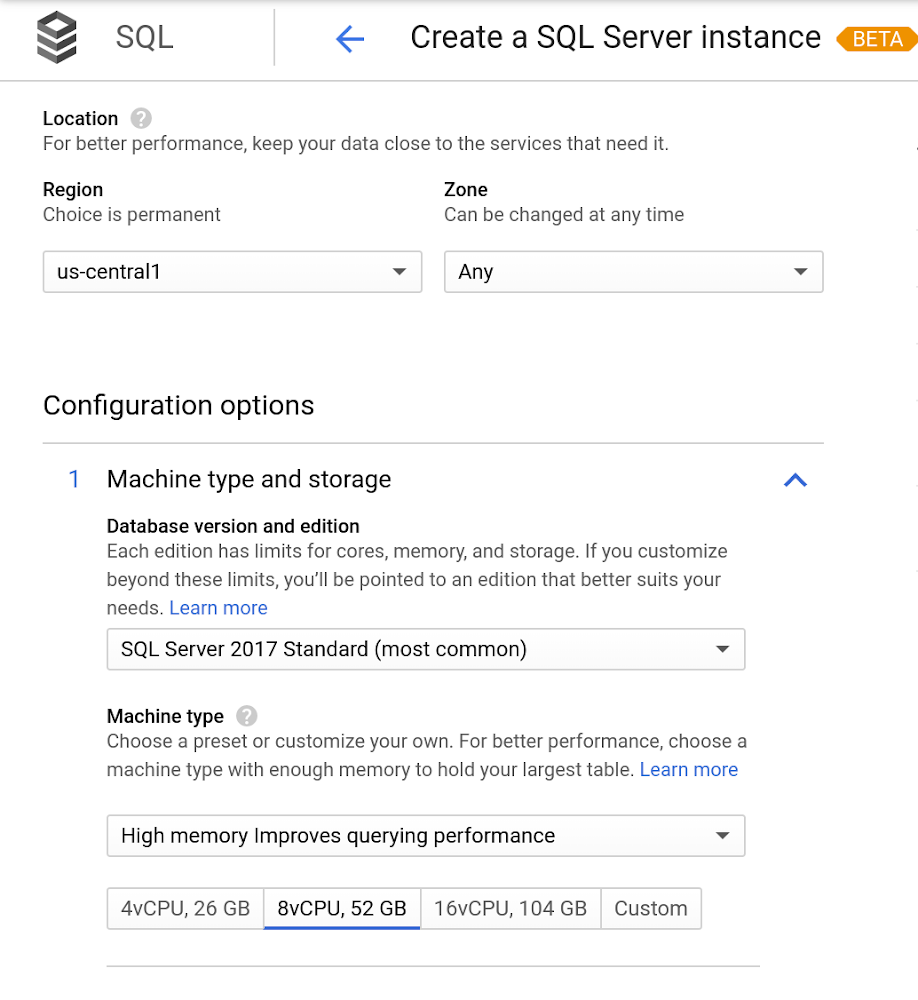
At Google Cloud, we develop our database services to meet the needs of enterprise teams wherever they are in their cloud journey. We’re excited today to announce the beta launch of Cloud SQL for SQL Server and make it available to all of our customers. This addition to our database lineup means you can migrate your enterprise SQL Server workloads to Google Cloud easily, then manage instances there. Earlier this year, we announced the addition of Microsoft SQL Server to the Cloud SQL portfolio of available database engines. At Next, we showed how easily an existing Windows environment could be migrated to Google Cloud, then integrated alongside our many other managed services. Cloud SQL for SQL Server is a key component when onboarding your existing applications and infrastructure to get the benefits of a fully managed and compatible database that will reduce your operational costs and overhead.  Highlights of Cloud SQL for SQL ServerCloud SQL for SQL Server brings some key benefits that can help you run workloads easily. Compatibility: Cloud SQL for SQL Server offers multiple editions of the current version of SQL Server and works with popular clients such as SQL Server Management Studio.Flexible backups: Schedule automatic daily backups or run them on-demand.Scalability: Enable the automatic storage increase configuration and Cloud SQL will add storage capacity whenever you approach your limit. Easily scale up your customized machines’ memory and processor cores as necessary.Built-in high availability: Cloud SQL for SQL Server has built-in high availability enabled for all editions that synchronously replicates data to each zone’s regional persistent disk.As part of the Cloud SQL platform, Cloud SQL for SQL Server will launch in all currently available regions and will integrate with our existing Cloud SQL functionality, such as connectivity via the Cloud SQL Proxy.   Here’s a look at creating a new instance.Early adopters of Cloud SQL for SQL Server have been using the service for the last few months, and we’ve heard that they see the potential value for onboarding more workloads.”Cloud SQL for SQL Server was very easy and fast to get up and going.” says Andrew P. Toi, database engineer lead at advertising management software company WideOrbit Inc. “With built-in high availability that can be used across editions, I can reduce the cost and overhead of managing databases dramatically, especially for smaller workloads” And desktop virtualization infrastructure company Itopia had this to say. “Cloud SQL Server dramatically reduces the complexity and cost involved in deploying cloud desktop infrastructure for our customers,” says Ubaldo Don, CTO of Itopia. “It turns a bulky pillar of infrastructure into a one-click service, reducing IT service management overhead.” More features coming soonWe’re continuing to improve Cloud SQL for SQL Server during beta and beyond to meet all of your cloud database needs. Watch for the following:Active Directory integrationRead replicasExpanded machine typesOnline migration toolsSee what Google Cloud can do for youSign up for a $300 credit to try Cloud SQL and the rest of GCP. You can start with inexpensive micro instances for testing and development. When you’re ready, you can easily scale them up to serve performance-intensive applications. As a bonus, everyone gets 100%sustained use discount during beta, regardless of usage. Enjoy your exploration of Google Cloud and Cloud SQL for SQL Server.
Quelle: Google Cloud Platform

New geospatial data comes to BigQuery public datasets with CARTO collaboration

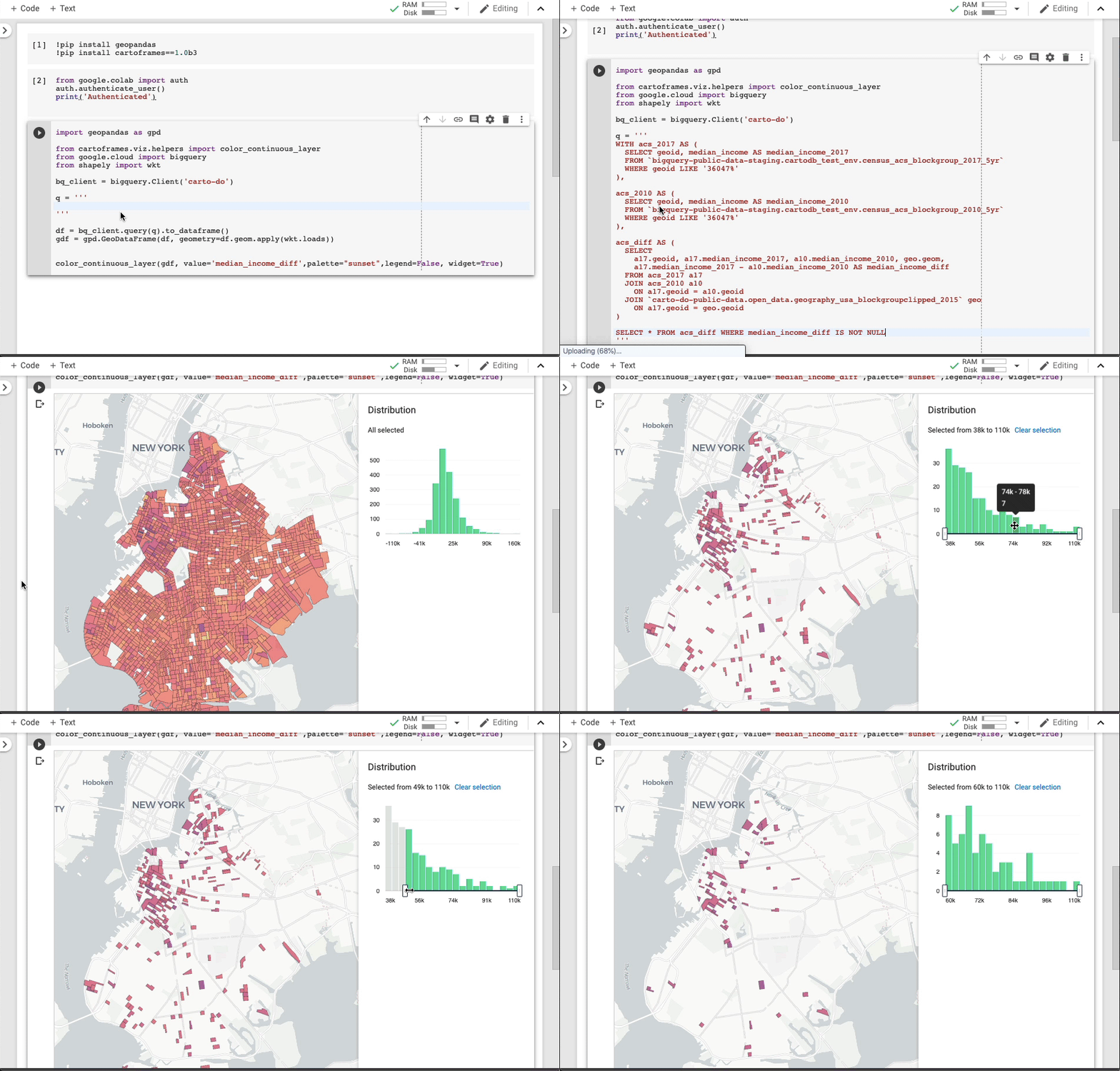
At Google Cloud, we host many public datasets, including weather, traffic, housing and other data, in BigQuery, our enterprise data warehousing platform. You can use this public data to experiment with data analytics and join it with your own data to find insights. We’re pleased to announce a new collaboration with CARTO to bring valuable location-based geospatial datasets to the BigQuery public datasets program. Spatial data is something that requires a community effort, and we’re excited to open up new possibilities for you to access, analyze and visualize GIS data.This collaboration makes it easier for users to access data and do geospatial analysis with CARTO Data Observatory 2.0, a location intelligence platform that’s powered by BigQuery. The first available dataset is the U.S. Census Bureau American Community Survey (ACS). The American Community Survey is one of the most valuable public datasets in the world. Much like the decennial census, it provides demographic, population, and housing data at an incredibly high spatial resolution. Unlike the census, though, this data is collected, aggregated and updated every year, which makes it a powerful tool to support business, non-governmental, or academic initiatives.For example, the query below shows the SQL to retrieve the data on the median income in Brooklyn in 2010 and 2017, calculate the difference, and join it to a census block groups dataset, which will then be visualized on a map.To see this in action, the CARTO team made a short Google Colab Python Notebook that performs that SQL query into BigQuery and visualizes it on CARTOframes. If you want to run it on your own, just open the following Google Colab and authenticate with your Google account that has access to BigQuery. After running this query, you can see a few of the Brooklyn neighborhoods stand out right away, as shown here:You can start using this ACS dataset in your BigQuery analyses or join your geo data with public datasets using any of the filters or predicates available in BigQuery GIS. Three additional public datasets will be available in the coming weeks, with many more to follow:Bureau of Labor Statistics (BLS) economic data: The Bureau of Labor Statistics is the U.S. government’s authoritative source on economic and employment data. The department provides extremely detailed data on the strength of the U.S. labor market, aggregated at various time periods and geographies. CARTO applies its technology to make this data easier to understand and use.TIGER/Line U.S. Coastlines, clipped by CARTO: Each year, the U.S. Census Bureau publishes detailed boundary files that describe the political and statistical boundaries in the U.S. Because the Census Bureau publishes files to define the national coastline boundaries, these do not always cleanly align with the boundary between the shore and the ocean. CARTO applies their expertise to clip the boundary to more accurately align with the coastline and let you better connect your data with the $7.9 trillion economy of the U.S. coastline.Who’s on First: An open-source gazetteer (essentially a long list) of places around the globe, Who’s on First is a combination of original works and existing open datasets that results in a massive, flexible, and incredibly detailed dictionary of places. Each place in the dataset has a stable identifier and some number of descriptive properties about that location. The dataset is carefully structured and updated, so you can depend on it to support a variety of projects.Using CARTO Data Observatory 2.0 and BigQuery GISCARTO’s Data Observatory 2.0, the latest version of their spatial data repository, helps GIS professionals and data scientists save time by simplifying access to public data and easing data joins for spatial analysis through a common geography base. Importing and wrangling geospatial datasets can present challenges, like needing to validate file formats or geometries. With CARTO’s team creating these datasets as well-maintained references in BigQuery, it gets a lot easier to use these datasets in either CARTO or BigQuery. Plus, the CARTO team takes advantage of BigQuery’s native GIS functionality in its own technology stack.”We chose BigQuery to power Data Observatory because it allows us to carry out geospatial analysis at scale for a wide range of use cases,” says Javier de la Torre, founder and chief strategy officer at CARTO. “And we like that Google Cloud hosts these datasets and covers the storage costs on behalf of customers. Finally, we love that public datasets can be referenced in analyses with the same ease and performance as a customer’s own internal data. No loading, no copying—just use the data and enjoy.” Here’s a look at how CARTO incorporates Google Cloud into its architecture:Read more about CARTO’s spatial data infrastructure, powered by BigQuery and other Google Cloudservices.We’re excited to make these new datasets available and bring new possibilities to your geospatial analytics projects. To get started, check out the BigQuery GIS documentation and start integrating these new datasets from the CARTO Data Observatory or our Google Cloud datasets marketplace.
Quelle: Google Cloud Platform

Make your voice heard in the Global Knowledge 2020 IT Skills and Salary Survey

IT professionals are always looking to expand their skills and get certified on new technologies. This truth was particularly clear in 2019, as 85% of global IT professionals reported holding at least one certification, with over half of those earned in the past 12 months. We’re especially proud to note that the Google Cloud Professional Cloud Architect certification was ranked as the top-paying IT certification in North America, Europe, the Middle East, and Africa this year. These are just a few of the findings from the Global Knowledge 2019 IT Skills and Salary Report, a comprehensive look at the IT industry that shares valuable insights on certification compensation and benefits, all broken down by region. If you’re an IT professional, we invite you to participate in the 2020 version of the survey and weigh in on industry salaries, the value of certifications, and which ones are in demand. This is your opportunity to make your voice heard in the largest worldwide study of the IT landscape, and provide information that will help shape organizational strategy and the future of the cloud industry. The survey runs through November 8, 2019 and takes about 10 to 15 minutes to complete. Don’t miss this opportunity to share your experience. Take the survey today.
Quelle: Google Cloud Platform