Introducing Pub/Sub as a new notification channel in Cloud Monitoring

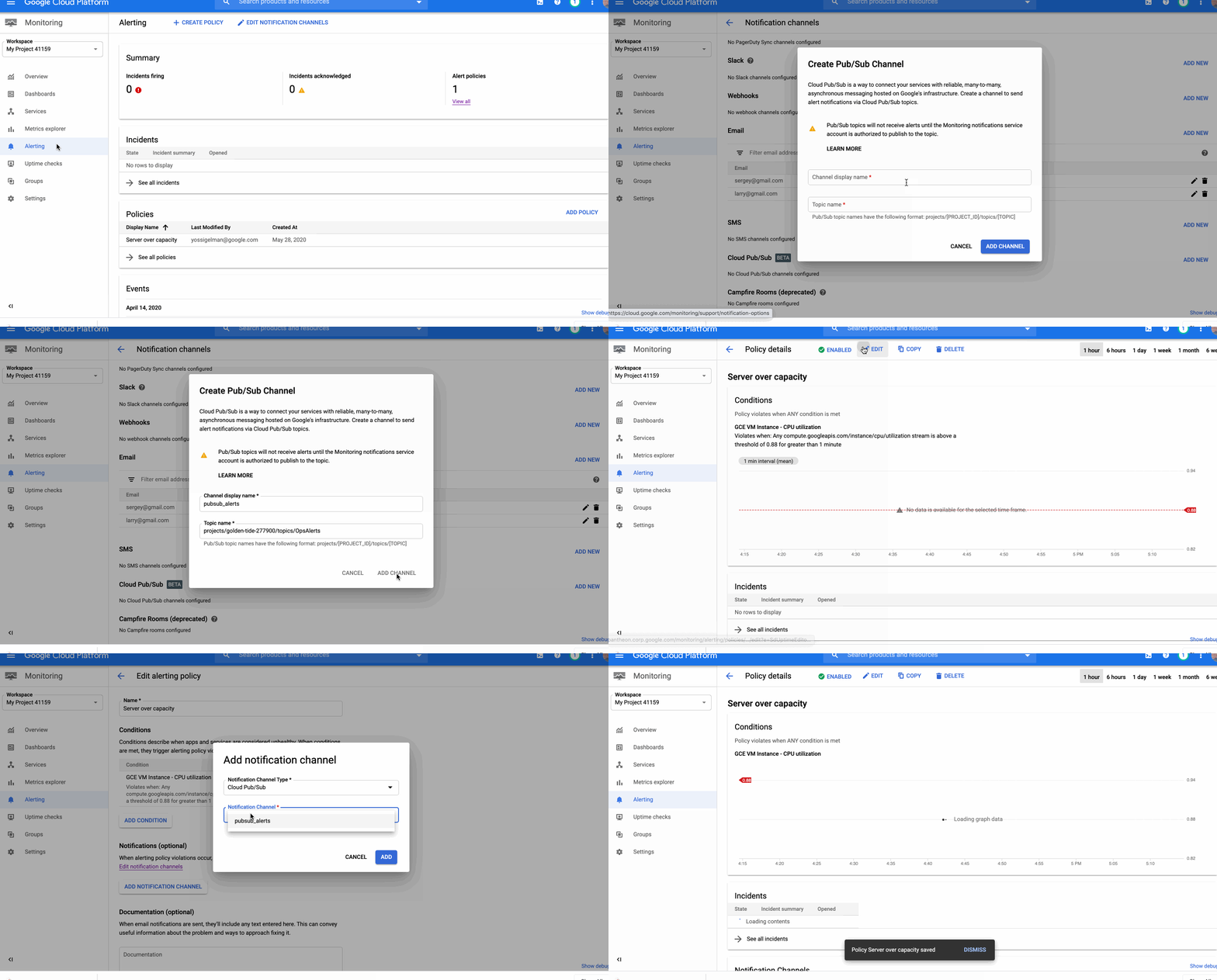
Around the world, operations teams are working to automate their monitoring and alerting workflows, looking to reduce the time they spend on rote operational work (what we call “toil”), so they can spend more time on valuable work. For instance, Google’s Site Reliability Engineering organization aims to keep toil below 50% of an SRE’s time, freeing them up to work on more impactful engineering projects.Our Cloud Monitoring service can alert you through a variety of notification channels. One of these channels, webhook, can be used for building automation into your systems with programmatic ways to respond to errors or anomalies in your applications.Today, we’re announcing a new notification channel type via Cloud Pub/Sub. Now in beta, this integration lets you create automated and programmatic workflows in response to alerts. Pub/Sub is a publish/subscribe queue that lets you build loosely coupled applications. Using Pub/Sub as your notification channel makes it easy to integrate with third-party providers for alerting and incident response workflows, you can use the Pub/Sub as a notification channel through the API and the Google Cloud Console.Pub/Sub vs webhookIt’s true that you can also use a webhook to integrate with third-party packages, so when should you use Pub/Sub rather than a webhook? Both of these methods can be used for different scenarios. The main differences between Pub/Sub and a webhook center around notions of implicit vs. explicit invocation, durability and authentication methods.When to use a webhookWebhooks are aimed at explicit invocation where the publisher (client) retains full control of the webhook’s execution. This means that the execution timing and the processing of the alert message are the server’s responsibility. Moveover, although a webhook does retry deliveries a few times upon failure, if the target endpoint is unavailable for too long, notifications are dropped entirely. Finally, this method supports only basic and token authentication. An example use case for a webhook is when you already have a central Incident Response Management (IRM) solution in place. The web server exposes endpoint URLs that third-party alerting solutions can invoke. Once the client invokes the webhook, the server receives the request, parses and processes the message and can create an incident, update or resolve it. And because the server is responsible for parsing the messages, multiple third parties, each sending a different JSON payload, can use a single endpoint. Another option is to expose separate endpoints for each third party or message format.Since different third parties can use this webhook, you can use basic or token-based authentication to authenticate the caller. And because you maintain and manage the server, you can ensure that the server is always available to receive incoming messages.When to use Pub/SubPub/Sub supports both explicit (push) and implicit (pull) invocation. In pull mode, the subscriber has control over when to pull the message from the queue and how to process an alert message. Pub/Sub provides a durable queue in which messages wait as long as necessary until the subscriber pulls the message. Pub/Sub is an access-controlled queue, with access managed by Cloud Identity and Access Management, meaning that the subscriber needs to be able to authenticate using a user or service account. Messages delivered to Pub/Sub never leave the Google network.An example of where to use Pub/Sub is if an alert message needs to be transformed before it is sent to be processed. Consider this scenario: an uptime check that you configured to check the health of your load balancers is failing. As a result, an alert is fired and a message is published to your Pub/Sub channel. A Cloud Function is triggered as soon as a new message hits the Pub/Sub topic. The function reads the message and identifies the failing load balancer. The function then sends a command to change the DNS record to point to a failover load balancer.We built our Pub/Sub notification channels capabilities to give you flexibility when defining your alerting notifications and to help reduce toil. You can get started with Pub/Sub notification channels using this guide. Also, be sure to join the discussion on our mailing list.
Quelle: Google Cloud Platform

How maintenance windows affect your error budget — SRE tips

So, you’ve started down the site reliability engineering (SRE) path at your organization. You have set up your service. You have analyzed how your users interact with it, which helped you identify some key metrics that correlate with user happiness. You set your service-level objectives, which in turn gives you an error budget. Great work!Now, the next consideration is that your organization maintains a schedule of maintenance windows that bring your service down. Should this downtime count toward your error budget? Let’s analyze it!Error budgetIn a nutshell, an error budget is the amount of error that your service can accumulate over a certain period of time before your users start being unhappy. You can think of it as the pain tolerance for your users, but applied to a certain dimension of your service: availability, latency, and so forth.If you followed our recommendation for defining an SLI, you’re likely using this SLI equation:Your SLI is then expressed as a percentage, and once you define an objective for each of those SLIs—that is, your service-level objective (SLO)—the error budget is the remainder, up to 100.Here’s an example. Imagine that you’re measuring the availability of your home page. The availability is measured by the amount of requests responded with an error, divided by all the valid requests the home page receives, expressed as a percentage. If you decide that the objective of that availability is 99.9%, the error budget is 0.1%. You can serve up to 0.1% of errors (preferably a bit less than 0.1%), and users will happily continue using the service.Remember that selecting the value for your objectives is not just an engineering decision, but a business decision made with input from many stakeholders. It requires an analysis of your users’ behavior, your business needs, and your product roadmap.Maintenance windowsIn the world of SRE practices, a maintenance window is a period of time designated in advance by the technical staff, during which preventive maintenance that could cause disruption of service may be performed.Maintenance windows are traditionally used by service providers to perform a variety of activities. Some systems require a homogeneous environment—for example, where you need to update the operating system of terminals in bulk. You may need to perform updates that introduce incompatible API/ABI changes. Some financial solutions need the database server and client software to be version-compatible, which means that major software upgrades require all the systems to be upgraded at the same time. Other examples of traditional maintenance windows are the ones required during database migrations to allow the synchronization of the data tables between the old and the new release during the downtime, and physical moves when computers are shut down to allow physical relocation of the devices.Similar to deciding your SLO, scheduling a maintenance window is a business decision that requires taking into account the agreements you may have with your users, the technical limitations of your system, and the wellbeing of the people responsible for those systems. It’s inevitably a compromise.The type of maintenance window that we are discussing in the rest of this post is the one that you, as a service provider, may perform and that affects your users directly, effectively causing a degradation of your service, or even a full outage.How to choose your maintenance windowsIn recent years, technologies like multithreaded processors, virtualization, and containerization have emerged. Using these paired with microservice architectures and good software development practices helps to reduce or completely eliminate the use of maintenance windows.However, while almost all business owners and product managers seek to minimize downtime, sometimes that is not possible. Usage of legacy software, regulations that apply to your business, or simply working in an environment in which the decision makers believe that the best way of maintaining the service is having a regular, scheduled downtime, forces us to bring our service down for a certain amount of time. So, in any of these situations, how should these maintenance windows affect your error budget? Let’s analyze some different scenarios where maintenance windows are necessary.Business hoursImagine you work at a company that serves a market with a trading window, like a Wall Street exchange. Every day your service starts operating at 9:30am and closes at 4:00pm sharp. No delays are permitted, either at the start or the end of the window.You can assume in this case that you have a maintenance window of ~15 hours a day. Should it burn through your error budget, then?Let’s remember the purpose of your error budget: It is a tool that helps identify when the reliability metrics for user journeys (your SLIs) have performed, over a period of time, at levels that are hurting your users.In this scenario, users are not able to use the service outside of business hours. In fact, users most likely should not be able to interact with the service at all. So, effectively, there is no harm in having this service down, and over this period of time, the error budget should not be affected at all.Burning your error budget in saw shapesLet’s move on to a different type of service, one that is extremely localized in space, serving only users in a single country. Think of a retailer with presence only in a small region. Your service may have a traffic pattern like this one:There are easily identifiable lows of traffic, where your users are probably sleeping, but even over those valley periods, you still receive a non-zero amount of requests. If you plan your maintenance windows during these periods, you have plenty of time to recover from errors, but at the risk of running into rising traffic if your maintenance overruns.For these saw-shape cases, let’s analyze a few strategies:Traffic projectionFor this approach, you’ll look at your past data and extrapolate the amount of valid traffic you’ll receive during the period of time your service will be unavailable by analyzing previous traffic and calculating what you expect to receive. Even if you have limited data to work with, use whatever data you have collected to calculate your traffic pattern.An important factor you have to take into account for this approach is that it is based on past performance, and it does not account for unforeseen events. To make sure the traffic that your site receives during a downtime window is not out of the ordinary, set up a captive portal that registers the incoming requests and redirects all traffic (including deep links) to a maintenance page. From those requests, you can easily analyze the traffic logs and count the valid ones. This way, you are not measuring the actual traffic, but the traffic pattern. Correlating this pattern with the actual missed traffic, using a reasonable multiplier, allows you to calculate the number of errors you are serving, and thus the error budget you are burning.Treat maintenance as downtimeWhen burning through the error budget associated with the availability of a service, it is usually done by counting the errors produced by the service. But when the service is down, you can also do it by measuring the time the service is down in relation to the total downtime your SLO allows you, as a percentage.Say that the SLO on availability for your service is 99%. Over a period of 28 days (measured using a rolling window) your service can be down a total of about seven hours and 20 minutes. If your maintenance window stretches for a period of two hours, that means you have consumed 27% of your error budget. That means that for the rest of the 28 days of your rolling window, your service can only throw (100 – 27) * 0.01 = 0.73% of errors, down from the initial 1% of total errors. Once your maintenance is finished, you can go back to using the SLI equation, and knowing how much traffic you are receiving (your valid requests) and how many errors you are returning to your users, you can calculate how much error budget you are burning over time.This approach has the disadvantage of treating all the traffic received as equal, both in size and in importance. A maintenance window occurring in the middle of the day when you are having a peak of traffic will burn the same amount of error budget as one happening in the middle of the night when traffic is low. So this approach should be used cautiously for traffic shapes that change wildly throughout the day.Considering the edge caseIn the situations described above, you need to take into account a small detail about the error budget. Say that you have an outage that burns a big chunk of your error budget, enough to bring the remaining budget close to zero (or even below), and the upcoming planned maintenance window is scheduled to happen inside the time window you use to calculate that error budget. If that scheduled downtime risks depleting your error budget, what are you supposed to do? We approach these situations by defining a number of “silver bullets”: a very small number of exceptions for truly business-critical emergency launches, despite the budget maintenance window freeze. Assuming the service still needs to be brought down, even for small updates, the use of a silver bullet lets you perform a short, very targeted maintenance window, during which only critical bug fixes can be released.In general, we don’t recommend looking for other types of exceptions, since these will most likely create a culture in which failure to maintain the reliability of the service is accepted. That nullifies the incentive to work on the reliability of your service, as the consequences of outages can simply be bypassed by escalating the problem.The curious case of not burning your error budgetLet’s, once more, remember how the error budget is used. As defined, the error budget is a tool to balance how you prioritize the time engineering teams spend between feature development and reliability improvements. It assumes that exhausting your error budget is a result of low availability, high latency, or other low score in any metric used to represent the reliability of your service.If you burn part of your error budget during maintenance windows, but you aren’t planning to get rid of them altogether (or at least reduce the length of those windows), there is no reliability work targeted at reducing your maintenance windows that you may need to prioritize as a result of burning through the budget. You are implicitly accepting a recurring error budget burn, without a plan to eliminate the maintenance window that is causing it. You have no consequences defined in your error budget policy that will prioritize work to stop your maintenance windows from consuming error budget in the future.So the lesson here is that the decision to burn through your error budget during your maintenance windows should be made only if you consider those downtime periods as part of your reliability work, and you plan to work on reducing them to minimize that downtime.If you decide to assume the risk of having a period of time when your service is down and the business owners have agreed that they are OK with scheduled downtime, with no plans in place to change the status quo, you probably don’t want it to count it toward your error budget. This acceptance of risk has some very strong implications for your business, as your maintenance windows need to:be as short as possible, to cause as little disruption as possiblebe clearly and properly communicated to your users/customers, well in advance, using channels that reach as many as possiblebe internally communicated to avoid disrupting other parts of your businesshave a clearly defined plan of execution, exit criteria, expected results, and rollback action planbe scheduled during expected low traffic hoursbe executed according to its planned time slothave well-defined (and in some cases, severe) consequences for your error budget when the windows go over timeRemember, according to the way the error budget is defined: During a maintenance window that does not count toward that error budget, you are taking a free pass for having your service down—possibly hurting your users but not accounting for it.Flat(ish) profile in global servicesIn a global service, things are quite different. While your traffic profile may have valleys of traffic, they are likely less pronounced than those deep valleys of traffic you see in a localized service, when you can bring your service down and only affect a relatively small number of users.But at the same time, due to the global nature of the service, you will probably require multi-regional presence. It’s in this situation where you can take advantage of the multi-region architecture and work to avoid localized maintenance windows by diverting traffic from the low-traffic areas to others.Our recommendation for this case is to take advantage of the distributed nature of your architecture and design your service to allow for regions to be disconnected at any given time, if you still need to bring some of your systems down for maintenance. This approach should, of course, take into account your capacity needs, so that your remaining serving capacity will be able to respond to all the active requests previously served from the disconnected regions. Additionally, you should design circuit breakers that trip whenever there is a need to blackhole some of the overflowing traffic in order to avoid creating a cascading outage.If this is your long-term goal, and assuming that your global service has no defined times of operation (like in our first scenario), any request that is not served (or served with an error) should be accounted for, and count toward your error budget burn.Putting it all togetherAlthough no single recommendation will fit all services, you can make informed decisions for your service once you examine maintenance windows in the context of SLOs and error budgets. You and your product owners are best positioned to know both your service and your users, understand their behavior, and make a decision that works best for your business.The most important analysis you need to make is how your maintenance windows affect your users (if at all), and whether depleting your error budget is going to imply a change in your reliability focus to reduce the impact of your maintenance windows.If you are considering introducing maintenance windows for your service, evaluate the pros and cons against the criteria outlined here. And if you already have them, check to see if you should change how you do them, or when you do them.Further readingIf you want to learn more about the SRE operational practices, how to analyze a service, identify SLIs, and define SLOs for your application, you can find more information in our SRE books. You can also find our Measuring and Managing Reliability course on Coursera, which is a more thorough, self-paced dive into the world of SLIs, SLOs, and error budgets.
Quelle: Google Cloud Platform
Open Match simplified matchmaking for developers is now 1.0

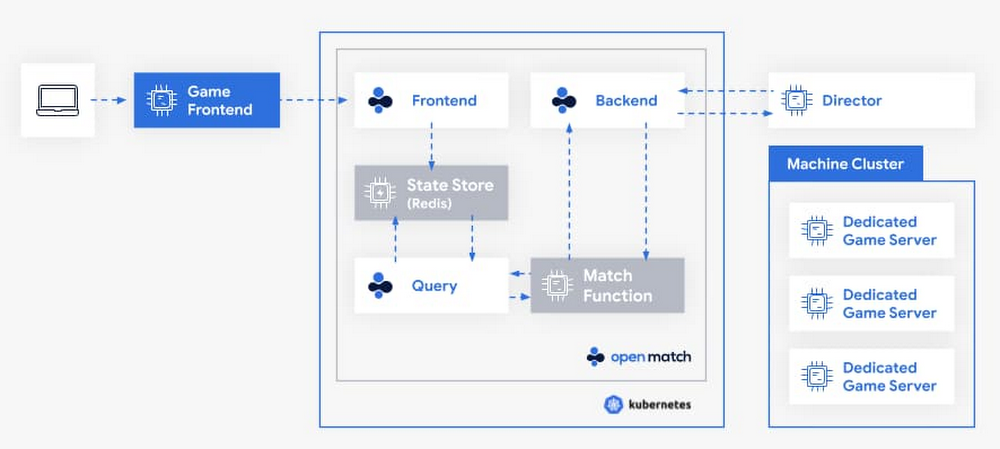
As interest in multiplayer games continues to grow, providing better and faster matches has been a key need for game developers. But matchmaking—the art of matching a set of players together to maximize their enjoyment of the game—is not easy. Each game is unique. That forces game developers to either create new matchmaking solutions from scratch, or to rely on off-the-shelf matchmakers that don’t always fit their game’s needs. In either scenario, game developers also have to dedicate time and effort to scale underlying infrastructure to support peaks and valleys in player demand.Open Match, an open source project cofounded by Google Cloud and Unity, was created to help game developers solve this problem. Open Match is a matchmaking framework that handles time consuming infrastructure management for game developers, all while giving them control over their match logic. We’re pleased to announce that Open Match has hit 1.0, meaning it’s ready for deployment in production. Let’s dig a little deeper into how Open Match works. Life of a game match When a player wants to join a game, a ticket is created and stored in the Open Match database. A concept that we call a Director will call the backend service to request matches from Open Match. Open Match will call into a Match Function, which you provide, to turn tickets into matches.Click to enlargeGiving you control of your match logicGame design evolves quickly, and you don’t want your infrastructure to limit your creativity.  From battle royals to asymmetric shooters and open world experiences, new ideas are plentiful. A matchmaker which makes assumptions about game size, what matches look like, or passed data types means less flexibility when creating new experiences.Match functions are implemented and deployed by you, outside of Open Match. The match function queries for relevant tickets and then returns matches. Open Match does not prescribe any algorithm for how players find matches; instead it’s your job to choose how matches are made.  Forget matching on pre-defined player attributes, or using someone’s configuration language, use the tool you really want to use: code.Solving for scaleThe flexibility the match functions provide is great. However, you don’t always want to solve scale with every new title. This is where Open Match reduces your burden.Open Match’s database layer is designed with the high query and high turnover requirements of video game matchmaking. Additionally, Open Match handles concurrency of calling multiple match functions at the same time, while preventing the match functions from creating multiple matches with the same player. We’ve tested Open Match with more than a thousand match functions, thousands of new tickets per second, and millions of tickets looking for a match concurrently, so it’s ready for your biggest game.Working with your existing infrastructureYour game is the next big thing, but what about the next game? Just like matchmaking infrastructure, you don’t want to rebuild your entire game backend for every new release. Open Match is designed to work with a variety of usage patterns, so it can work with your existing infrastructure. Open Match helps build a boundary between what needs to be created each new game, and what can be reused next time.Getting Started with Open MatchLearn more about how game developers are using Open Match or visit the developer site to begin integrating simpler matchmaking into your next game at open-match.dev.
Quelle: Google Cloud Platform

Father’s Day present of the past: 30 years of family videos in an AI archive

My dad got his first video camera the day I was born nearly three decades ago, which also happened to be Father’s Day. “Say hello to the camera!” are the first words he caught on tape, as he pointed it at a red, puffy baby (me) in a hospital bassinet. The clips got more embarrassing from there, as he continued to film through many a diaper change, temper tantrum, and—worst of all—puberty.Most of those potential blackmail tokens sat trapped on miniDV tapes or scattered across SD cards until two years ago when my dad uploaded them all to Google Drive. Theoretically, since they were now stored in the cloud, my family and I could watch them whenever we wanted. But with more than 456 hours of footage, watching it all would have been a herculean effort. You can only watch old family friends open Christmas gifts so many times. So this year, for Father’s Day, I decided to build my dad an AI-powered searchable archive of our family videos.If you’ve ever used Google Photos, you’ve seen the power of using AI to search and organize images and videos. The app uses machine learning to identify people and pets, as well as objects and text in images. So, if I search “pool” in the Google Photos app, it’ll show me all the pictures and videos I ever took of pools.The Photos app is a great way to index photos and videos in a hurry, but as a developer (just like my dad), I wanted to get my hands dirty and build my own custom video archive. In addition to doing some very custom file processing, I wanted to add the ability to search my videos by things people said (the transcripts) rather than just what’s shown on camera, a feature the Photos app doesn’t currently support. This way, I could search using my family’s lingo (“skutch” for someone who’s being a pain) and for phrases like “first word” or “first steps” or “whoops.” Plus, my dad is a privacy nut who’d never give his fingerprint for fingerprint unlock, and I wanted to make sure I understood where all of our sensitive family video data was being stored and have concrete privacy guarantees. So, I built my archive on Google Cloud. Here’s what it looked like:Building a searchable, indexed video archive is fun for personal projects, but it’s useful in the business world, too. Companies can use this technology to automatically generate metadata for large video datasets, caption and translate clips, or quickly search brand and creative assetsSo how do you build an AI-powered video archive? Let’s take a look.How to build an AI-powered video archiveThe main workhorse of this project was the Video Intelligence API, a tool that can:Transcribe audio (i.e. “automatic subtitles”)Recognize objects (i.e. plane, beach, snow, bicycle, cake, wedding)Extract text (i.e. on street signs, T-shirts, banners, and posters)Detect shot changesFlag explicit contentMy colleague Zack Akil built a fantastic demo showing off all these features, which you can check out here.Making videos searchableI used the Video Intelligence API in a couple of different ways. First, and most importantly, I used it to pull out features I could later use for search. For example, the audio transcription feature allowed me to find the video of my first steps by pulling out this cute quote:“All right, this is one of Dale’s First Steps. Even we have it on camera. Let’s see. What are you playing with Dale?” (This is the word-for-word transcription output from the Video Intelligence API.)The object recognition feature, powered by computer vision, recognized entities like “bridal shower,” “wedding,” “bat and ball games,” “baby,” and “performance,” which were great sentimental searchable attributes.And the text extraction feature let me search videos by text featured on the screen, so I could search for writing on signs, posters, t-shirts, and even birthday cakes. That’s how I was able to find both my brother’s and my first birthdays:The Video Intelligence API read the writing right off of our cakes!Splitting long videos and extracting the datesOne of the most challenging parts of this project was dealing with all the different file types from all the different cameras my dad has owned over the years. His digital camera produced mostly small video clips with the date stored in the filename (i.e. clip-2007-12-31 22;44;51.mp4). But before 2001, he used a camera that wrote video to miniDV tapes. When he digitized it, all the clips got slammed together into one big, two-hour file per tape. The clips contained no information about when they were filmed, unless my dad chose to manually hit a button that showed a date marker on the screen:Happily, the Video Intelligence API was able to solve both of these problems. Automatic Shot Change detection recognized where one video ended and another began, even though they were mashed up into one long MOV file, so I was able to automatically split the long clips into smaller chunks. The API also extracted the dates shown on the screen, so I could match videos with timestamps. Since these long videos amounted to about 18 hours of film, I saved myself some 18 hours (minus development time) of manual labor.Keeping big data in the cloudOne of the challenges of dealing with videos is that they’re beefy data files, and doing any development locally, on your personal computer, is slow and cumbersome. It’s best to keep all data handling and processing in the cloud. So, I started off by transferring all the clips my dad stored in Google Drive into a Cloud Storage bucket. To do this efficiently, keeping all data within Google’s network, I followed this tutorial, which uses a colab notebook to do the transfer.My goal was to upload all video files to the Google Cloud, analyze them with the Video Intelligence API, and write the resulting metadata to a source I could later query and search from my app.For this, I used a technique I use all the time to build machine learning pipelines: upload data to a Cloud Storage bucket, use a Cloud Function to kick off analysis, and write the results to a database (like Firestore). Here’s what that architecture looks like for this project:Click to enlargeIf you’ve never used these tools before, Cloud Storage provides a place to store all kinds of files, like movies, images, text files, PDFs—really anything. Cloud Functions are a “serverless” way of running code in the cloud: Rather than use an entire virtual machine or container to run your code, you upload a single function or set of functions (in Python or Go or Node.js or Java) which runs in response to an event—an HTTP request, a Pub/Sub event, or when a file is uploaded to Cloud Storage. Here, I uploaded a video to a Cloud Storage bucket (“gs://input_videos”) which triggered a Cloud Function that called the Video Intelligence API to analyze the uploaded video. Because this analysis can take a while, it runs in the background and finishes by writing data to a JSON file in a second Cloud Storage bucket (“gs://video_json”). As soon as this JSON file is written to storage, a second Cloud Function is triggered, which parses the JSON data and writes it to a database—in this case, Firestore. If you want an even more in-depth review of this design and the code that goes with it, take a look at this post.Firestore is a real-time, NoSQL database designed with app and web developers in mind. As soon as I wrote the video metadata to Firestore, I could access that data in my app quickly and easily.Screenshot of the Firestore database, where we keep track of all analyzed videos.Simple search with AlgoliaWith all this information extracted from my videos—transcriptions, screen text, object labels—I needed a good way to search through it all. I needed something that could take a search word or phrase, even if the user made a typo (i.e. “birthdy party”), and search through all my metadata to return the best matches. I considered using Elasticsearch, an open-source search and analytics engine that’s often used for tasks like this, but decided it looked a bit heavy-handed for my use case. I didn’t want to create a whole search cluster just to search through videos. Instead, I turned to Search API from a company called Algolia. It’s a neat tool that lets you upload JSON data and provides a slick interface to easily search through it all, handling things like typo correction and sorting. It was the perfect serverless search solution to complement the rest of my serverless app.A screenshot of me searching through all the data I uploaded to Algolia.Putting it all togetherAnd that’s pretty much it! After analyzing all the videos and making them searchable, all I had to do was build a nice UI. I decided to use Flutter, but you could build a frontend using Angular or React, or even a mobile app. Here’s what mine looks like:Finding lost memoriesWhat I hoped more than anything for this project was that it would let my dad search for memories that he knew he’d once recorded but that were almost impossible to find. So when I gifted it to him a few days before Father’s Day, that’s exactly what I asked: Dad, is there a memory of us you want to find?He remembered the time he surprised me with a Barbie bicycle for my fourth birthday. We searched “bicycle” and the clip appeared. I barely remembered that day and had never seen the video before, but from the looks of it, I was literally agape. “I love it!” I yelled as I pedaled around the living room. It might be the best birthday/Father’s Day we have on record.Want to see for yourself? Take a look
Quelle: Google Cloud Platform

How Unity analyzes petabytes of data in BigQuery for reporting and ML initiatives

Editor’s note: We’re hearing today from Unity Technologies, which offers a development platform for gaming, architecture, film and other industries. Here, Director of Engineering and Data Sampsa Jaatinen shares valuable insights for modern technology decision makers, whatever industry they’re in. Unity Technologies is the world’s leading platform for creating and operating real-time 3D (RT3D) content. We’ve built and operated services touching billions of endpoints a month, as well as external services benefiting financial operations, customer success, marketing and many other functions. All of these services and systems generate information that is essential for understanding and operating our company’s business and services. For complete visibility, and to unlock the full potential of our data, we needed to break down silos and consolidate numerous data sources in order to efficiently manage and serve this data. Centralizing data servicesData platforms are essential to keeping a business running, and ensuring that we can continue serving our customers—no matter what disruptions or events are happening. Before migrating to Google Cloud, we used one solution where datasets were stored for machine learning, an enterprise data warehouse for enterprise data, and yet another solution for processing reports from streaming data. We saw an opportunity to reduce overhead and serve all our needs from the same source. We wanted to centralize data services so we could build one set of solutions with a focused team instead of having different teams and business units creating their own siloed environments. A centralized data service can build once and serve multiple use cases. It also makes it easy to understand and govern the environment for compliance and privacy.Of course, centralization has its challenges. If the internal central service provider is the gatekeeper for numerous things, the team will eventually become a bottleneck, especially if the central team members’ direct involvement is needed to unlock other teams to move forward. To avoid this scenario, the centralized data services team assumes a strategy of building an environment where customer teams can operate more independently by employing self-service tooling. With easy-to-use capabilities, our data users would be able to manage their own data and development schedules independently, while maintaining high standards and good practices for data privacy and access. These cornerstones, together with the specific features and capabilities we wanted to provide, guided our decision to choose a foundational technology. We needed to build atop a solution that fully supports our mission of connecting the data to business and machine learning needs within Unity.Why we chose BigQueryFor these reasons, we decided to migrate our entire infrastructure, over two years ago, from another cloud service into Google Cloud, and based our analytics on top of BigQuery. We focused on a few main areas for this decision: scalability, features to support our diverse inputs and use cases, cost effectiveness that best fits our needs, and strong security and privacy.The scale of data that Unity processes is massive. With more than 3 billion downloads of apps per month, and 50% of all games (averaged across console, mobile, and PC) powered with Unity, we operate one of the largest ad networks in the world. We also support billions of game players around the world. Our systems ingest and process tens of billions of events every day from Unity services. In addition, we operate with outside enterprise services like CRM systems needed for our operations, whose data we want to integrate, combine, and serve alongside our own immense streaming datasets. This means that our data platform has to process billions of events per day. Furthermore, it had to be able to ingest petabytes of data per month, and enable a variety of company stakeholders to use the platform and its analytics results to make critical business decisions.The data we capture and store is used to serve insights to various internal teams. Product managers at Unity need to understand how their features and services are adopted, which also helps with development of future releases. Marketing uses the data to understand how markets are evolving and how to best engage with our existing and potential new customers. And decision makers from finance, business development, business operations, customer success, account representatives, and other teams need information about their respective domains to understand the present and recognize future gaming opportunities. In addition, the solution we chose needed to support Unity’s strong security and privacy practices. We enforce strict limitations on Unity employees’ access to datasets—the anonymization and encryption of this data is an absolute requirement and was important in making this decision.  In addition, the data platform we chose had to support the use of machine learning that sits at the heart of many Unity services. Machine learning relies on a fast closed feedback loop of the data, where the services generate data and then read it back to adjust behavior toward a more optimal behavior—for example, providing a better user experience by offering more relevant recommendations on Unity’s learning material. We wanted a data platform that could easily handle these activities.  Migrating to BigQueryThe migration started as a regular lift and shift, but required some careful tweaking of table schemas and ETL jobs and queries. The migration took slightly over six months and was a very complex engineering project—primarily because we had to meet the requirement to conform to GDPR policies. Another key factor was transforming our fragmented ecosystem of databases and tools toward a single unified data platform.Throughout this process, we learned some valuable lessons that we hope will be useful to other companies with extreme analytics requirements. Here are a few of the considerations to understand.Migration considerationsBigQuery requires a fixed schema, which has pros and cons (and differs from other products). A fixed schema removes flexibility on the side of the applications that write events, and forces stricter discipline on developers. But on the positive side, we can use this to our advantage, providing safe downstream operations since erroneous incoming records won’t break the data. This required us to build a schema management system. This allows the teams within Unity who generate data and need to store and process it to create schemas, change the schemas, and reprocess data that did not reach the target table because of a schema mismatch. The security provided by schema enforcement, and the flexibility of self-serve schema management, are essential for us to roll these data ingestion capabilities out to our teams.  Another consideration for us was data platform flexibility. On top of the ingested data, we aim to provide data aggregates for easy reporting and analysis, and an easy-to-use data processing toolset for anyone to create new aggregates, joins, and samples of the data. Both the aggregates and the event-level data are available for reporting, analysis, and machine learning targets of the data usage—all accessible in BigQuery in a flexible, scalable manner.  Something else to keep in mind with any complex analytics system is that it’s important to understand who the target users are. Some people in our company only need a simple dashboard, and BigQuery’s integration with products like Data Studio makes that easy. Sometimes these users require more sophisticated reporting and the ability to create complex dashboards, and the Looker option may make more sense.Support for machine learning was important for us. Some machine learning use cases benefit from easy-to-develop loops, where data stored in BigQuery allows easy usage of AutoML and BigQuery ML. At the same time, other machine learning use cases may require highly customizable production solutions. For these situations, we’re developing Kubeflow-based solutions that also are capable of consuming data from BigQuery. Next steps to modernize your analytics infrastructureAt Unity, we’ve been able to deploy a world-class analytics infrastructure, capable of ingesting petabytes of data from billions of events per day. We can now make that data available to key stakeholders in the organization within hours. After bringing together our previously siloed data solutions, we have seen improved internal processes, the possibility to operationalize reporting, and quicker turnaround times for many requests. Ingesting all the different data into one system, serving all the different use cases from a single source, and consolidating into BigQuery have resulted in a managed service that’s now highly scalable, flexible, and comes with minimal overhead.Check out all that is happening in machine learning at Unity, and if you want to work on similar challenges with a stellar team of engineers and scientists, browse our open ML roles.
Quelle: Google Cloud Platform

Bringing Modern Transport Security to Google Cloud with TLS 1.3

We spend a lot of time thinking about how to improve internet protocols at Google—both for our Google Cloud customers and for our own properties. From our work developing SPDY into HTTP/2 and QUIC into HTTP/3, we know that improving the protocols we use across the Internet is critical to improving user experience.Transport Layer Security, or TLS, is a family of internet protocols that Google has played an important role in developing. Formerly known as SSL, TLS is the main method of securing internet connections between servers and their clients. We first enabled TLS 1.3 in Chrome in October 2018, at the same time as Mozilla brought it to Firefox. Today, the majority of modern clients support TLS 1.3, including recent versions of Android, Apple’s iOS and Microsoft’s Edge browser, as well as BoringSSL, OpenSSL and libcurl. Support for TLS 1.3 is wide-ranging, and brings performance and security benefits to a large part of the Internet.Given this, we recently rolled out TLS 1.3 as the default for all new and existing Cloud CDN and Global Load Balancing customers. TLS 1.3 is already used in more than half of TLS connections across Google Cloud, nearly on-par with Google at large.To gain confidence that we could do this safely and without negatively impacting end users, we previously enabled TLS 1.3 across Search, Gmail, YouTube and numerous other Google services. We also monitored the feedback we received when we rolled out TLS 1.3 in Chrome. This prior experience showed that we could safely enable TLS 1.3 in Google Cloud by default, without requiring customers to update their configurations manually.What is TLS 1.3, and what does it bring?TLS 1.3 is the latest version of the TLS protocol and brings notable security improvements to you and your users, aligned with our goal of securing the Internet.Specifically, TLS 1.3 provides:Modern ciphers and key-exchange algorithms, with forward secrecy as a baseline.Removal of older, less-secure ciphers and key exchange methods, as well as an overall reduction in the complexity of the protocol.Low handshake latency (one round-trip between client and server) for full handshakes, which directly contributes to a good end-user experience.This combination of performance and security benefits is particularly notable: the perception is often that one must trade off one for the other, but modern designs can improve both. Notably, TLS 1.3 can have outsized benefits for users on:Congested networks, which is particularly relevant during times of increased internet usage.Higher-latency connections—especially cellular (mobile) devices—where the reduction in handshake round-trips is particularly meaningful.Low-powered devices, thanks to the curated list of ciphers.For example, Netflix also recently adopted TLS 1.3, and observed improvements in user experience around playback delay (network related) and rebuffers (often CPU related).As an added benefit, customers who have to meet NIST requirements, including many U.S. government agencies and their contractors, can begin to address the requirement to support TLS 1.3 ahead of NIST’s Jan 1, 2024 deadline.What’s next?TLS 1.3 has quickly taken responsibility for securing large swaths of Google Cloud customers’ internet traffic, and we expect that proportion to grow as more clients gain support for it. We’re (already!) working on the next set of modern protocols to bring to our Google Cloud customers—including TCP BBRv2, as well as IETF QUIC and HTTP/3, which are close to being finalized. We’re also planning to support TLS 1.3 0-RTT (though customers will need to update their applications to benefit from it) and certificate compression. Click here to learn more about how Google Cloud secures customer traffic using TLS across our edge network, and how to secure your global load balancer using SSL policies.
Quelle: Google Cloud Platform

Setting up advanced network threat detection with Packet Mirroring

When you’re trying to detect—or thwart—an attack, the network can be a good line of defense: attackers could compromise a VM and you could lose access to endpoint data, but you likely still have access to network data. An effective threat detection strategy is to use network data, logs, and endpoint data to gain visibility into your network during an attack, so you can investigate the threat quickly and minimize damage.In public cloud environments, getting access to full network traffic can be challenging. Last year, we launched Packet Mirroring in beta, and we’re excited to announce that it’s now generally available. Packet Mirroring offers full packet capture capability, allowing you to identify network anomalies within and across VPCs, internal traffic from VMs to VMs, traffic between end locations on the internet and VMs, and also traffic between VMs to Google services in production. Then, once Packet Mirroring is enabled, you can use third-party tools to collect and inspect network traffic at scale. For example, you can deploy intrusion detection solutions (IDS) or network traffic analysis (NTA) to protect workloads running in Compute Engine and Google Kubernetes Engine (GKE). You can also choose to deploy third-party solutions for network performance monitoring and troubleshooting, especially if you are using one on-prem and prefer to use the same vendor for your hybrid cloud deployment. See the overview video.Packet Mirroring use cases and ecosystemAlready, in a few short months, Packet Mirroring has assumed an important role in early adopters’ network threat detection and analysis practices. Below are the three most common use cases we see with our customers, with Packet Mirroring providing the full packet data captures that get fed to the partner solutions to perform the analysis:Deploy intrusion detection systems – Customers migrating to cloud typically have an IDS deployed on-prem to meet their security and compliance requirements. Packet Mirroring allows you to deploy your preferred IDS in the cloud. And because Packet Mirroring is deployed out-of-band, you don’t have to change your traffic routing or re-architect your application, thereby accelerating your cloud migration. Customers that prefer intrusion prevention and want to block malicious traffic can deploy a next generation firewall in-line and that deployment does not need packet mirroring.Perform advanced network traffic analysis – Sending mirrored data to an NTA tool can help you detect suspicious network traffic that other security tools might miss. Advanced NTA tools leverage machine learning and advanced analytics to inspect mirrored packet data, baselining the normal behavior of the network and then detecting anomalies that might indicate a potential security attack. Gain visibility into network health – You can also integrate Packet Mirroring data into third-party network performance monitoring solutions to gain better visibility into network health, quickly troubleshoot network issues and receive proactive alerts.Packet Mirroring enables these use cases through deep integration with leading network monitoring and security solutions. For example, you could use Google Cloud Packet Mirroring with Palo Alto VM-Series for IDS, helping you meet compliance requirements such as PCI DSS. Or, you could use Packet Mirroring with ExtraHop Reveal(x) to get improved visibility into your cloud (click here to learn how ULTA Beauty scaled its ecommerce operations with that combination). To date, we’ve built an extensive ecosystem of partners, and are actively exploring new ones. Having the right partner solution deployed in conjunction with packet mirroring is critical to get the security insights and avoid missing potential security attacks.Getting started with Packet MirroringTo get started with Packet Mirroring and mirroring traffic to and from particular instances, you need to create a Packet Mirroring policy, which has two parts: mirrored sources and a collector destination. Mirrored sources are compute instances that you can select by specifying subnets, network tags, or instance names. A collector destination is an instance group that is behind an internal load balancer. The mirrored traffic can be sent to the collector destinations where you’ve deployed one of our partners’ network monitoring or security solutions.  Within the Google Cloud Console, you can find Packet Mirroring from the VPC Network dropdown menu. First, click “Create Policy” from the UI, then follow these five steps:Define policy overviewSelect VPC NetworkSelect mirrored sourceSelect collector destinationSelect mirrored trafficStep 1: Define policy overviewIn the first step, enter information about the policy, such as the name, or region that includes the mirrored sources and collector destination. Note that the Packet Mirroring policy must be in the same region as the source and destination. You can select Enabled to activate the policy at the time of creation or leave it disabled and enable it later. Step 2: Select VPC networkNext, select the VPC networks where the mirrored source and collector destination are located. The source and destination can be in the same or different VPC networks. If they are in the same VPC network, just select that network. However, if they are in different networks, select the mirrored source network first, and then the collector destination network. If they are in two different networks, make sure the two networks are connected via VPC Peering.Step 3: Select mirrored sourceYou can select one or more mirrored sources. Mirroring happens on the selected instances that you specify by selecting one or more subnets, network tags or instance names. Google Cloud mirrors any instance that matches at least one of your selected sources.Step 4: Select collector destinationTo set the collector destination’s instance group, we recommend that you use managed instance groups for their auto-scaling and auto-healing capabilities. When you specify the collector destination, enter the name of a forwarding rule that is associated with the internal load balancer. You can also create a new internal load balancer if needed. Google Cloud then forwards the mirrored traffic to the collector instances. Then, on the collector instances, deploy a partner solution (e.g. IDS) to perform the advanced threat detection.Step 5: Select mirrored trafficBy enabling Packet Mirroring, Google Cloud mirrors all traffic for the selected instances. If you want to limit the traffic that’s mirrored as part of your policy, select Mirror filtered traffic. You can then specify additional filters such as filtering based on specific protocols (TCP, UDP, ICMP) or specific IP ranges. These filters help you control the volume of mirrored traffic and also manage your costs. Click Submit to create the packet mirroring policy and if your policy is enabled, traffic should get mirrored to the collector instances.Start using Packet Mirroring todayPacket Mirroring is available in all Google Cloud regions, for all machine types, for both Compute Engine instances and GKE clusters. From a pricing perspective, you pay for the amount of traffic that is mirrored, regardless of how many VMs you are running. For details, see Packet Mirroring pricing. Click to learn more about using Packet Mirroring.
Quelle: Google Cloud Platform

Announcing API management for services that use Envoy

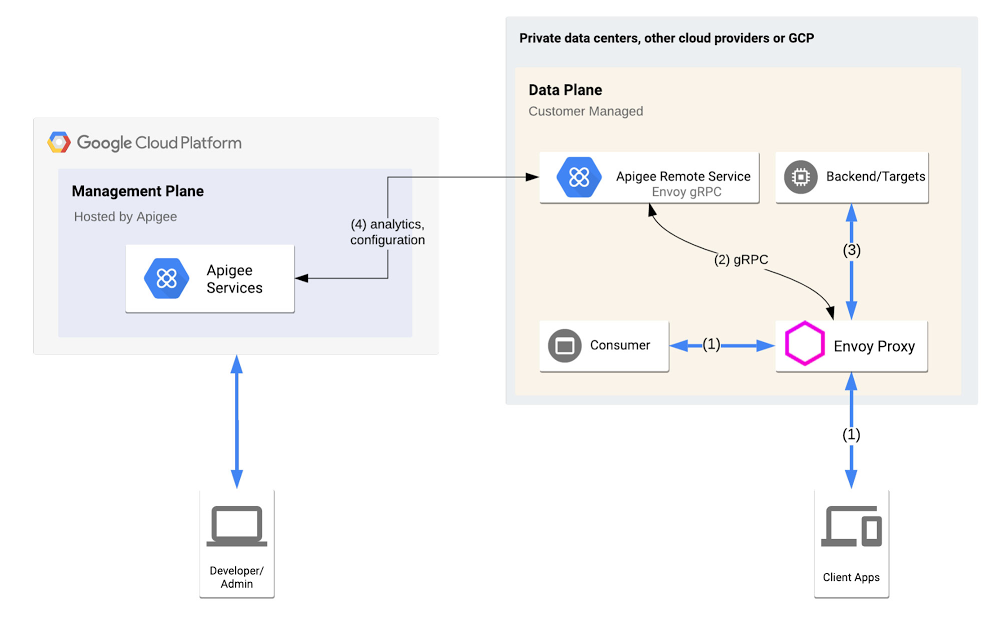
Among forward-looking software developers, Envoy has become ubiquitous as a high-performance pluggable proxy, providing improved networking and observability capability for increased services traffic. Built on the learnings of HAProxy and nginx, Envoy is now an official Cloud Native Computing Foundation project, and has many fans—including among users of our Apigee API management platform. To help you integrate Envoy-based services into your Apigee environment, we’re announcing the Apigee Adapter for Envoy in beta. Apigee lets you centrally govern or manage APIs that are consumed within your enterprise or exposed to partners and third parties, providing centralized API publishing, visibility, governance, and usage analytics. And now, with the Apigee Adapter for Envoy, you can extend Envoy’s capabilities to include API management, so developers can expose the services behind Envoy as APIs. Specifically, the Apigee Adapter for Envoy lets developers:Verify OAuth tokens or API KeysCheck API consumer based quota against API ProductsCollect API usage analyticsNow, with the availability of the Apigee Adapter for Envoy, organizations can deliver modern, Envoy-based services as APIs, expanding the reach of your applications. Let’s take a closer look.How does it work?Envoy supports a long list of filters—extensions that are written in C++ and compiled into Envoy itself. The Apigee Adapter for Envoy takes particular advantage of Envoy’s External Authorization filter, designed to allow Envoy to delegate authorization decisions for calls managed by Envoy to an external system.High level ArchitectureHere’s how the Apigee Adapter for Envoy works: The consumer or client app accesses an API endpoint exposed by Envoy (1),Envoy passes the security context (HTTP headers) to the Apigee Remote Service (2) The Apigee Remote Service acts as a Policy Decision Point and advises Envoy to allow or deny  the API consumer access to the requested API (3).A high-performance system may need to handle thousands of calls per second in this way. To accommodate that, the connection between Envoy and the Apigee Remote Service is based on gRPC, for speed and efficiency. Out of band, the Apigee Remote Service asynchronously polls and downloads its configuration (4), including API Products and API keys (after validation), from the remote Apigee control plane, which can be hosted in a different VPC than the Envoy cluster. Compatibility with Istio and AnthosThe Apigee Adapter for Envoy can be used by anyone who uses a standard Envoy proxy, including anyone who uses Istio or Google’s Anthos Service Mesh, getting the benefits of enforcing Apigee API management policies within a service mesh. Deploy in a MeshComparing Apigee API GatewaysIn addition to the Apigee Adapter for Envoy, Apigee also offers two other gateways:Apigee Message Processor, which powers Apigee public cloud, Apigee private cloud, and Apigee hybridApigee MicrogatewayHere’s a quick comparison to help you distinguish between these gateways and determine when to use which one or more than one together.Click to enlargeWhat’s next?Google Cloud’s Apigee is an industry-leading API management platform, and we’ve continued to expand its capabilities. Now, combining the Apigee Message Processor and Apigee Adapter for Envoy, you can get enterprise-grade API management capabilities . Do you use Envoy and want to up your API management game? To get started with the Apigee Adapter for Envoy, visit this page. 
Quelle: Google Cloud Platform

Speeding up, scaling out: Filestore now supports high performance

The world’s top scientists and researchers are working around the clock to advance the discovery of a therapeutic or vaccine to combat COVID-19. With the power of these minds focused on one singular goal, it’s important that the technology they’re using is up to the task. While the challenges of a global pandemic are immense, so are the powers of today’s technology. Processing jobs like molecular screening require massive computational power, as well as high-performance, high-throughput storage beneath it. At Google Cloud, we’re proud to offer tools that are enabling high-performance computing (HPC) in many industries, including COVID-19 therapeutics research. With powerful technology, scientists and researchers can work even faster, without tech barriers, to help people around the world. One of the critical enablers of HPC is file storage, and we are excited to announce the beta launch of Filestore High Scale, the next step in the evolution of Google’s file storage product, which includes Elastifile’s scale-out file storage capability.Google completed its acquisition of Elastifile in August 2019, and we’ve integrated the technology into Filestore to add both scale and performance, and make it easier for you to move workloads to cloud. The new Filestore High Scale tier adds the ability to easily deploy shared file systems that can scale out to hundreds of thousands of IOPS, tens of GB/s of throughput, and hundreds of TBs. Whether migrating traditional applications, modernizing existing applications with Kubernetes, or scaling to meet the performance demands of big compute workloads, Filestore can now address these challenges.Using Filestore in productionChristoph Gorgulla, a postdoctoral research fellow at Harvard Medical School’s Wagner Lab, uses Google Cloud’s scale-out file storage to enable his VirtualFlow virtual screening program for COVID-19 therapeutics.  “Virtual screening allows us to computationally screen billions of small molecules against a target protein in order to discover potential treatments and therapies much faster than traditional experimental testing methods,” says Gorgulla. “As researchers, we hardly have the time to invest in learning how to set up and manage a needlessly complicated file system cluster, or to constantly monitor the health of our storage system. We needed a file system that could handle the load generated concurrently by thousands of clients, which have hundreds of thousands of vCPUs. Much of the Filestore setup is automated, we’re able to scale up our capacity on the fly, and also actively monitor the speed of our workflows in a simple, graphical interface. VirtualFlow can massively reduce the time required for drug and treatment discovery, which will hopefully lead to faster development of therapeutics for COVID-19 and other diseases.” Learn more about Christoph’s research in a recently published Nature article, and read more about how Google Cloud is helping COVID-19 academic research in this recent blog post.Filestore is also a good fit to support workloads such as electronic design automation (EDA), video processing, genomics, manufacturing, and financial modeling, as well as other use cases that need high performance and capacity. Workloads benefit from Filestore High Scale’s support of concurrent access by tens of thousands of clients, scalable performance up to 16 GB/sec throughput and 480K IOPS, and the ability to scale capacity up and down based on demand.File storage is a critical component of HPC applications, and Filestore High Scale is built to address those needs. That includes predictable performance for scale-out file storage in the cloud, and the ability to scale up and scale down a file system on demand. Understanding the costs associated with the performance that you need makes it much easier to architect your solution and optimize based on changing workload demands. With Filestore High Scale, you get the power and performance of a distributed scale-out file system, and since it’s a fully managed service, you get the same ease of management of other Google Cloud products. You can spin up instances with just a few clicks in the Cloud Console, and you can automate management through gcloud and API calls. Plus, you can use Cloud Monitoring to keep an eye on these file systems, and integrate them into HPC workload management scheduling systems.Additionally, in order to improve support for deployments with advanced security requirements, this launch adds beta support for NFS IP-based access controls to all Filestore tiers. This new feature enables access control for clients on the VPC by adding per-IP range configuration of root squash and read-only NFS export options. See the IP-based access control documentation for more information.  Filestore High Scale provides persistent storage that you can mount directly to tens of thousands of clients using NFS, without the need to deploy and maintain specialized client-side plugins. This enables HPC users to save up to 80% on compute instance costs for batch workloads through the use of preemptible VM instances for their workloads. While individual client VMs may be preempted, the data is persisted on Filestore, providing the ability to immediately spin up new VMs and continue processing.Filestore High Scale is ready to take on your high-capacity challenges, so you can focus on managing your business. To get started, check out the Filestore documentation or create an instance in the Google Cloud Console.
Quelle: Google Cloud Platform

Future-proofing your business with Google Cloud and SAP

Things are changing fast for just about every business. Many are fundamentally shifting how they operate and how they serve their customers. Add in a global pandemic, and even organizations that are used to change are managing unprecedented shifts.Businesses running on SAP applications know this all too well. Some are adapting to shifting market conditions while others are operating every day like Black Friday. For SAP enterprises running on-premises or in co-location data centers, the imperative of the cloud is in the fore more than ever. As SAP’s SAPPHIRE NOW digital events kick off this week, we’re sharing the latest on how Google Cloud is helping SAP customers digitally transform their businesses in the short and long term.SAP customers are benefiting from the combined power of Google Cloud and SAPGoogle Cloud and SAP continue working together to help customers adopt a cloud strategy and build robust, flexible and innovative IT systems that will sustain them into the future. SAP recently announced the first ever SAP data center powered by Google Cloud infrastructure. Now operational in Frankfurt, Germany, this data center will allow SAP’s customers to enjoy all the benefits of Google Cloud’s solid and reliable cloud platform on Google Cloud infrastructure that is exclusive only to SAP applications. SAP can run customer workloads and administer capacity and services exclusively for those customers without the risk of being impacted by any external influence, while providing a secure environment based on SAP’s strict specifications regarding data protection requirements and compliance standards. There are more ways we’re innovating on behalf of our joint customers outside the data center. AutoML Vision is an intelligent, AI-powered solution that lets manufacturers automate the visual quality control process. Instead of relying on manual inspections—sometimes conducted under challenging conditions—customers such as AES and Kaeser Kompressoren are leveraging AutoML Vision, which is embedded into manufacturing and business workflows built around SAP, to perform quality controls efficiently and at any production stage. For manufacturing customers that have begun their Industry 4.0 journey, integrating AI-powered visual inspection is a critical piece that’s empowering them to achieve digital transformation.Getting to the cloud for business agility and insightsCurrent market conditions are creating an even greater need for SAP customers to take advantage of cloud agility and innovation. Tory Burch was able to complete SAP S/4HANA development in 16 weeks and deployment in six weeks on Google Cloud. Carrefour Spain deployed SAP HANA in production in 15 weeks. And they’re not alone. SAP customers report a 65% reduction in staff time to deploy/migrate SAP applications to Google Cloud. Our automated templates plus capabilities such as Migrate for Compute Engine offer significant support for customers in speeding deployments. To help SAP customers further simplify their cloud journeys, Google Cloud offers the Cloud Acceleration Program (CAP), a first-of-its-kind initiative empowering customers with solutions, guidance, and incentives from Google Cloud and our expert partner community. Customers receive access to expert capabilities for migration, implementation optimization plus deeper capabilities in the areas of analytics and machine learning. Google Cloud is also providing CAP participants with upfront financial incentives to defray infrastructure costs for SAP cloud migrations and help customers ensure that duplicate costs are not incurred during migration. New Google Cloud and partner capabilities for SAP customersOne key area where we continue to invest is certifications to drive more workloads, like OLTP and OLAP. This allows customers to use our VMs for more varied workloads and provides more throughput and better processing—without customers having to upgrade, move, or pay more. These performance bumps are simply part of customers’ existing subscriptions. Recently updated SAP HANA certifications include Google Cloud Compute Engine’s N2 family of VM instances, based on Intel Cascade Lake CPU platform. These new N2 VMs deliver two big benefits for our customers: Performance improvements for SAP HANA workloads. In SAP certification tests we have seen up to an 18% increase in performance for OLAP scenarios.Alignment to SAP HANA Enterprise Edition licensing’s 64GB memory unit metric. This enables customers to ‘right size’ their Google Cloud VMs to match their SAP HANA licenses—no need for VM capacity that they can’t use. In addition, for larger SAP HANA deployments, we recently announced the OLAP Scale-up certification for our M2 family of Compute Engine VM instances for SAP HANA with 6TB of memory. This gives customers increased options for running OLAP scenarios such as SAP HANA data warehouse and SAP BW/HANA.We’ve also been making improvements for SAP Netweaver deployments. A key example is the addition of new SAP NetWeaver certifications for the AMD-based N2D family of Compute Engine VM instances. The N2D instances give customers a benchmark-setting high-performance solution—up to 30% faster than prior Google Cloud offerings based on our SAPS benchmark testing, and at a lower-cost. This offers customers optionality and flexibility of choice for deploying SAP NetWeaver applications or SAP application servers alongside their SAP HANA deployments. One additional certification to mention is SAP Adaptive Server Enterprise (ASE) Database 16.0. This latest version of ASE is now certified on Google Cloud both for SAP NetWeaver based application deployments and also for customers who build applications on SAP ASE as a general purpose database.Customers also will soon be able to leverage a Google Cloud connector for SAP Landscape Management (LaMa) so they can automate and centralize the management, operations and lifecycle of their SAP landscape. The adapter will interface with Compute Engine and Cloud Storage operations so customers can manage their deployments on Google Cloud using SAP LaMa.Additionally, premium support for your enterprise and mission critical needs is now available, including a pilot program with supplementary support of SAP customers. The program layers Google Cloud premium support on top of the stellar support that SAP provides, and will roll out more broadly in the coming months.We’ve also strengthened our SAP partner ecosystem to ensure that our customers running SAP applications have access to the right tools and services. These include the following:Actifiooffers data protection capabilities for mission critical workloads such as SAP on Google Cloud. These highly efficient backup and recovery capabilities insure protection while minimizing required compute, bandwidth and storage. Avantra has tailored their solution for monitoring and managing SAP applications specifically for Google Compute Engine, enabling in-depth automation of SAP management and operations.Data management and integration partners—Informatica, Qlik, Datavard,and Software AG offer a robust set of tools and solutions to extract data from SAP systems including ECC, S/4 and BW into BigQuery as the target data warehouse. These solutions help aggregate data from SAP and non-SAP systems into a centralized, highly scalable data warehouse where customers can take advantage of Google Cloud’s smart analytics and machine learning services. Customers can get started quickly leveraging Google Cloud Marketplace solutions such as the Informatica Intelligent Cloud Services solution. IBM Power Systems is available for large enterprises that want to take advantage of these systems along with Google Cloud for IaaS and VM needs. NetApp for enterprise storage, delivering NetApp Cloud Volumes Service for Google Cloud—This is a fully managed file service integrated into Google Cloud with multi-protocol support, dynamic performance and high availability. The service is certified for use with SAP HANA scale up deployments on all Compute Engine VM instances that are certified for SAP HANA on Google Cloud. When Conrad Electronic, a B2B and B2C technology and electronics goods supplier, realized it could use its vast data set to optimize the company’s processes and offer more products and services with the help of Google Cloud, it decided to keep using its legacy SAP systems but consolidate all data on BigQuery. This allows Conrad to generate better, more insightful reports, analyze information faster, and automate more processes. “With BigQuery, we see all of our processes from start to finish, and every stage in between,” says Aleš Drábek, Chief Digital and Disruption Officer at Conrad Electronic. “We identify aspects to improve and can get the detail we need to improve them. Our legacy systems gave an overview on part of the process. Now we can see the whole thing.”Keeping the lights on and lighting the way forward for our customers As one of the largest healthcare organizations in the U.S., Cardinal Healthhas not been immune to market-related pressures. After migrating its SAP environment for its pharmaceutical business to Google Cloud in late 2019—which included more than 400 servers, 30 applications, and 150 integrations—Cardinal Health gained the scalability needed to manage demand spikes, full transparency into its systems as well as improved high availability and disaster recovery. The need to adapt to demand spikes and create supply chain transparency goes beyond healthcare. The Home Depot manages data from its SAP systems and other sources and empower its associates with Google Cloud, keeping 50,000+ items stocked in store at over 2,000 locations, monitoring online applications, or offering relevant call center information. While THD’s legacy data warehouse contained 450 terabytes of data, the BigQuery enterprise data warehouse they now use has over 15 petabytes. That means better decision-making by utilizing new datasets like website clickstream data and by analyzing additional years of data.As SAP customers begin and continue their cloud journeys, Google Cloud is committed to being there to simplify and optimize their move and ensure they have ready access to critical cloud native technologies. To see more work that we’ve done with SAP and SAP customers, visit our solution site, and check out our customer video testimonials.
Quelle: Google Cloud Platform