How Loblaw turns to technology to support Canadians during COVID-19

The impact of COVID-19—and the shift in how we work, live, and shop—has tested every industry, and retailers in the grocery space are no exception. While hospitals and local governments have crisis plans for scenarios like what we are experiencing, few grocery store operators had fully contemplated implications of a global pandemic. While traditional grocers have seen new, online, digital-native competitors enter the market before COVID-19, a majority of consumers still relied on physical grocery stores to purchase their household essentials. For these traditional grocers, online grocery sales were minimal compared to brick-and-mortar sales, causing many to focus their IT attention on in-store experiences. However, due to the pandemic, consumers’ online grocery spend increased from 1.5% to 9% on average in Canada alone. The drastic and immediate shift to online has created immense strain on grocers—from employee and community safety issues, to handling surges in online traffic that can crash websites, to struggling with inventory and order fulfilment. Some have weathered this new reality better than others, thanks to a variety of technologies that improve efficiency and help keep employees and customers safe. Meeting unprecedented online demandLoblaw is a great example of a grocer using technology to support its community and protect its employees, while also growing its business. A 100-year-old company, Loblaw is the largest grocery and retail pharmacy chain in Canada, with approximately 200,000 employees and more than 18 million shoppers active in its loyalty program. When COVID-19 first hit North America, Loblaw was one of a few grocery chains in Canada offering the ability to order online and pick up groceries the same day. As more shoppers moved their shopping to online, the company shifted quickly to meet the rising demand. As online traffic and order volumes reached unprecedented levels, the performance of Loblaw’s online grocery websites was starting to strain under the load. Google Cloud then activated its BFCM (Black Friday Cyber Monday) protocols, including a dedicated war room with Loblaw Digital’s Technology team where engineers from both companies worked side-by-side to quickly adjust the Loblaw platform and ensure an uninterrupted experience for shoppers.Together, Loblaw Digital and Google Cloud quickly stabilized and settled into a level of online traffic that seems now to be the new normal. According to Hesham Fahmy, VP of Technology at Loblaw Digital, “Loblaw’s systems are operating at a scale comparable to other large global e-commerce retailers.” Automating fulfilment with TakeoffWhile Google was working to scale Loblaw’s e-commerce system, the grocer was also searching for new ways to improve the fulfilment process and keep up with order volume. The Loblaw Digital PC Express team took several steps to reduce the bottleneck, such as hiring thousands of new personal shoppers, adding thousands of slots for pickup every week, along with the introduction of new technology to increase capacity across the country. Fortunately, Loblaw was in the process of rolling out its first Micro Fulfillment Center (MFC) with Google Cloud partner Takeoff Technologies. Takeoff’s MFC is essentially a small-scale automation and fulfillment solution placed within an existing storefront in a space that could be as small as two or three grocery aisles. The MFC uses a robotic racking system and cloud and AI technology, powered by Google Cloud, to store, pack, and fulfill orders. The efficiency of automation helps to drastically reduce what’s known as “last mile” costs, by keeping products as close to the customer as possible.  While the MFC implementation had been in progress for nearly a year, its completion couldn’t come at a better time. The new technology, opens-up additional availability for orders and has the capacity to support order volume for multiple PC Express locations in close proximity. To get the MFC up-and-running ahead of schedule, Waltham, Mass.-based Takeoff dispatched employees to Canada armed with webcams and Google Meet, Google’s premium video conferencing solution, to handle the last steps of go-live. This process would normally take 12+ employees, but Takeoff only needed to send two. After two weeks of self-quarantine in Canada, the employees collaborated with their team back at home via Google Meet to ensure an effective rollout. With the MFC in place, colleagues are able to pick and pack items faster than they could manually. As José V. Aguerrevere and Max Pedró, co-founders of Takeoff, put it: “It’s a great example of how automation can help support employee workloads to alleviate a time-consuming and costly process. This type of hyperlocal automation will help local firms not only survive, but thrive. In the long-run it also has the potential to lower food prices, decrease the footprint of stores, and feed data back to suppliers to reduce food and packaging waste, which could eventually help our planet.” Takeoff’s Chief Technology Officer, Zach LaValley, elaborated: “Google has allowed us to shine, particularly in our recent launch with Loblaw; from their solution architecture partnership during the implementation phase, to the stability and reliability of their cloud platform, to the ease of using Google Meet to remotely launch a new site. We have an ambitious mission to transform the grocery industry, and our services have never been more vital. Google provides the reliability, scalability, and global perspective we need in order to provide the top-tier service our retail partners deserve and need at this time.”Loblaw is Takeoff’s first Canadian facility to go-live; its technology, built on Google Cloud’s scalable platform, is expected to be live in 53 retail chains across the United States, Australia, New Zealand, and the Middle East by the end of 2020. Building on a Google Cloud foundationThe technology groundwork laid by Loblaw Digital has enabled them to quickly respond to sudden shifts in shopping dynamics. For the last two years, Google Cloud and Loblaw Digital have been working hand-in-hand on a broader digital roadmap that started with PC Express and expanded to include a new marketplace for pet supplies, toys, baby essentials, home decor, and other items that aren’t available in brick-and-mortar stores. Along the way, Loblaw Digital has gotten more efficient at building new online platforms using Google Cloud as the foundation. PC Express was completed in less than six months, while Loblaw’s new marketplace was up-and-running in just weeks. The teams are now consolidating multiple data sources in Google Cloud, which will give them the ability to look across their data and find new ways to serve customers.“In the matter of days, our online traffic spiked four-fold,” said Vice President, Online Grocery, Sharon Lansing. “During this time, it was critical that our teams were able to find ways to better serve our customers and ensure that we were able to deliver that service quickly.” Loblaw’s foresight and investments in technology enabled the company to react and adapt quickly to COVID-19. To learn more, read the Loblaw case study.
Quelle: Google Cloud Platform
Mitigating Web Scraping with reCAPTCHA Enterprise

As more and more businesses post content, pricing, and other information on their websites, information is more important than ever in today’s digital age. Web scraping—also commonly referred to as web harvesting or web extracting—is the act of extracting information from websites all around the internet, and it’s becoming so common that some companies have separate terms and conditions for automated data collection. In this blog post, however, we’ll examine the rising trend of malicious web scraping, how and why it happens, and how it can be mitigated with reCAPTCHA Enterprise. Web scraping 101Gathering all the information on the Internet manually would be time consuming and tedious. Web scraping with bots enables companies and individuals to automate web scraping in real time, and makes it very easy to retrieve and store the information being scraped much faster than a human ever could.Two of the most common types of web scraping are price scraping and content scraping. Price scraping is used to gather the pricing details of products and services posted on a website. Competitors can gain tremendous value by knowing each other’s products, offerings, and prices. Bots can be used to scrape that information and find out when competitors place an item on sale or when they make updates to their products. This information can then be used to undercut prices or make better competitive decisions. Content scraping is the theft of huge amounts of data from a specific site or sites. Content can be stolen and then reposted on other sites or distributed through other means, which can lead to a huge loss of advertising revenues or traffic to digital content. This information can also be resold to competitors or used in other bot campaigns, like spamming. Web scraping can also negatively impact how your site utilizes resources. Bots often consume more website resources than humans do because they can make requests much faster and more frequently. In addition, they search for information everywhere, often ignoring a site’s robots.txt file, which normally sets guidelines on what should be scraped. This can cause performance degradation for real users and increased compute costs from serving content to scraping bots. How reCAPTCHA Enterprise can helpScrapers who are abusing your site and retrieving data will often try to avoid detection in a similar manner to malicious actors performing credential stuffing attacks. For example, these bots may be hiding in plain sight, attempting to appear as a legitimate service in their user agent string and request patterns.reCAPTCHA Enterprise can identify these bots and continue to identify them as their methods evolve, without causing interference to human consumers. Sophisticated and motivated attackers can easily bypass static rules. With its advanced artificial intelligence and machine learning, reCAPTCHA Enterprise can identify bots that are working silently in the background. It then gives you the tools and visibility to prevent those bots from accessing your valuable web content and reduce the computational power spent on serving content to them. This has the added benefit of letting security administrators spend less time writing manual firewall and detection rules to mitigate dynamic botnets.In today’s threat landscape, fighting automated threats requires behavioral analysis. reCAPTCHA Enterprise can also give you visibility into just how many bots are accessing your web pages and how often. Most importantly, reCAPTCHA Enterprise’s detection won’t slow down or interfere with your end users and customers, providing protections with zero friction for your most important users—real humans.
Quelle: Google Cloud Platform

Your Next ‘20 OnAir journey starts here: Resources and session guides available now

Get ready. Get set. Get solving. Google Cloud Next ‘20 OnAir kicks off July 14, offering nine full weeks of programming to help you solve your toughest business challenges in the cloud. And the best part is you can join in, for free, no matter where you are, and at a time that works for you. Here’s how to get ready.Watch the keynote with Thomas Kurian on-demand starting July 14We’ll be kicking off Next ‘20 OnAir on July 14 (July 15 in Asia Pacific) with a keynote by Google Cloud CEO Thomas Kurian. Each week thereafter, there’ll be solution keynotes hosted by Google Cloud leaders. This means, for example, you can hear Javier Soltero, VP & GM, G Suite, talk about the future of cloud-native productivity and collaboration, or catch Eyal Manor, GM & VP, Engineering share the latest on app modernization. Find the full list of solution keynotes.Browse the session catalog and create your own playlistEach week during Next we’ll be adding a new batch of breakout sessions you can watch on demand. To plan ahead, you can browse the full session roster, and once you’ve registered for the event and are signed in, you can create your own customized playlist. Click “Filter” to search by speakers, topics, or industries. When you see a session you like, click “Add to playlist” to include it in your all-digital schedule. Toggle “My Playlist” to switch between the full session catalog and just the sessions you’ve bookmarked.Introducing session packagesOnly interested in a specific topic or learning area? Our curated session packages are an easy way to get recommendations on what to watch.Cloud in practiceAI for technologistsApplication developmentCost managementData analyticsData engineeringData security, disaster recovery, and backupMigrationSupporting high performance computing workloadsFor business leadersAI for business leadersBusiness continuityDigital transformationCloud essentials for business leadersWorkforce productivityFor startupsStartups: IntroductoryStartups: AdvancedBy industryFinancial servicesGamingHealthcareManufacturingMedia & entertainmentPublic sector: EducationPublic sector: GovernmentRetailTelecommunicationsStart your learning journeyWe’ve created a unique learning series for technical practitioners of all experience levels. Each week, we’ll focus on a different theme to help you boost your skills–from the fundamentals to more advanced topics, including infrastructure, analytics, AI, and more. You can find our full schedule of learning content on our Learning Hub.If you’re new to Google Cloud, or brushing up on the basics, join us during our weekly Cloud Study Jam where experts will walk you through relevant training and certification resources, lead you through hands-on labs, and answer your questions live.Attending a Cloud Study Jam event will also prepare you to earn your first skill badge on Qwiklabs. Digital skill badges allow you to demonstrate your growing Google Cloud-recognized skillset and share your progress with your network. You can earn the badges by completing a series of hands-on labs, including a final assessment challenge lab, to test your skills.Once you’re more confident in your skills, join our weekly Cloud Hero game. In this competitive challenge, you’ll find a curated collection of relevant hands-on labs to help you practice and track your progress with a live leaderboard.We also invite you to join us weekly for Google Cloud Talks by DevRel. Each Friday of Next OnAir, we’ll do a recap of the week’s topic focusing on the content most relevant to developers and technical practitioners, host a Q&A session with members of the Google Cloud Developer Relations team, and deliver technical talks that supplement the week’s programming. To see the full schedule and to register, visit the program website. Sign up for 1:1 time with Google Cloud expertsHave a specific cloud challenge facing you today? Get help solving it during a 15-minute appointment with a Google expert aligned with the session topic of the week.Please note: Appointments are limited, subject to availability, and not eligible for job inquiries.Stay up-to-date with weekly coverage and recapsThe Google Cloud blog will be posting updates and recaps each week on the key news from Next. You can find all our coverage here. Or follow us on social media:Twitter: Google Cloud, GCP, G Suite, and Google Cloud PartnersFacebook: Google Cloud, GCP, and G SuiteLinkedIn: Google Cloud and G SuiteWe can’t wait to get started with Next OnAir—we hope you’ll join us!
Quelle: Google Cloud Platform

More value for less with Cloud SQL committed use discounts

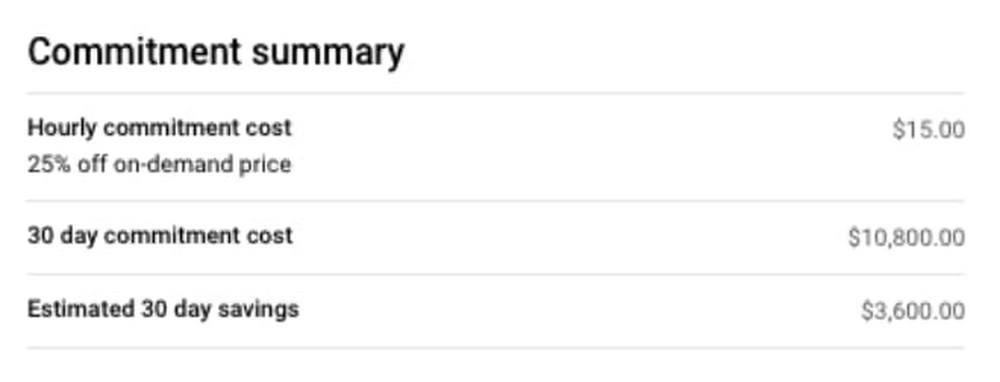
Getting the best price in the cloud shouldn’t require sophisticated forecasting models or unnecessary financial risk. Today, we’re introducing committed use discounts for Cloud SQL, which reward your steady-state, predictable usage in a way that’s easy to use and can accommodate changes in your database environment. Cloud SQL committed use discounts give you a 25% discount off of on-demand pricing for a one-year commitment and a 52% discount off of on-demand pricing for a three-year commitment.These committed use discounts are flexible:No upfront payments are requiredAvailable and able to be shared between MySQL, PostgreSQL, and SQL Server instancesFully transferable between machine sizesWhy is flexibility important? It saves you time by reducing management overhead and maximizes your savings by allowing you to pool more resources and achieve higher utilization.You can see what you’ll save before purchasing using the built-in calculator in the Purchase Commitment dialog of your Google Cloud billing console. Here’s an example:We’re also simplifying our on-demand pricing. Cloud SQL previously offered sustained use discounts, which automatically lower the price of your instances when you use them for a significant portion of the month. Starting today, we’re lowering our list price to the previous sustained use discount price (and removing sustained use discounts). Now, our list price is our best on-demand price, regardless of your usage. These new committed use discounts are applied to this new, lower list price.How this simple and flexible pricing worksWe built committed use discounts so you actually attain the savings you expect—no matter how you configure your resources or which database you select. You commit to a consistent amount of usage, measured in USD per hour of equivalent on-demand spend, for a one- or three-year term. Cloud SQL Committed Use Discounts cannot be applied to licensing, storage, or networking. Instead, these discounts apply to all Cloud SQL database instance CPU and memory usage in the region in which you have committed, except shared CPU machine types (db-f1-micro and db-g1-small). The discounts also apply to usage from all databases supported by Cloud SQL, including MySQL, PostgreSQL, and SQL Server. Committed use discounts automatically apply to aggregate Cloud SQL instance usage in a region, giving you low, predictable costs, without the need to make any manual changes or updates yourself. This flexibility saves you time and helps you to save more by achieving high utilization rates across your commitments, without requiring sophisticated forecasting or imposing constraints on resource configuration.For example, say you run several Cloud SQL for SQL Server database instances for one month with aggregate vCPU and memory consumption of $10,000. Then, the next month, you migrate some of these instances to Cloud SQL for PostgreSQL and change instance sizes. As long as your aggregate resource consumption remains at $10,000, you receive the same discount both months even though your database environment footprint is different.Getting started is easySign in to the Manage billing accounts page in the Google Cloud ConsoleOn the Billing Overview page, look for the What’s new card, then click Purchase Cloud SQL Commitment.Check out our documentation for more details on committed use discounts. For Cloud SQL pricing information, including the new list price, take a look at our pricing page or try out our pricing calculator.Want to learn more about what else is new with Cloud SQL? Be sure to check out our session at Next OnAir. Get started and try Google Cloud for free now.
Quelle: Google Cloud Platform

Increase visibility into Cloud Spanner performance with transaction stats

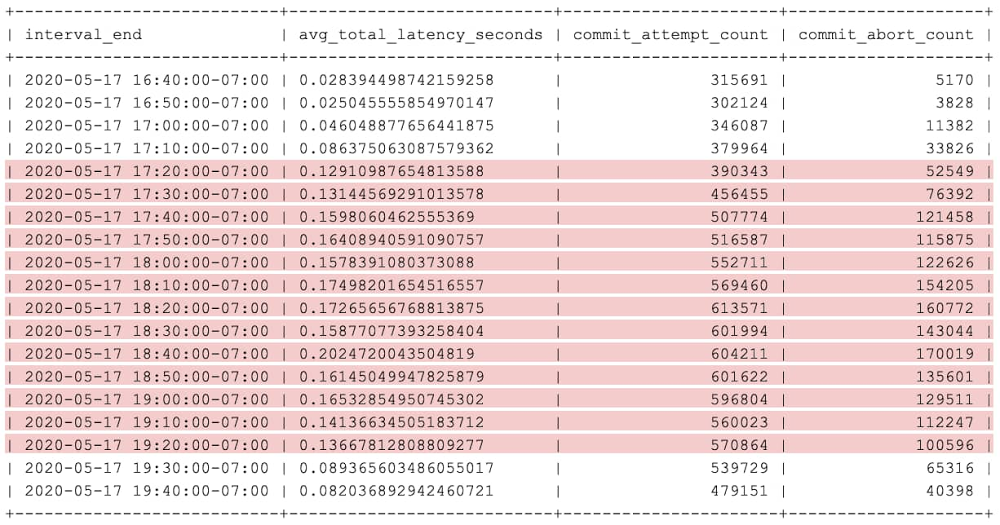
Cloud Spanner is Google’s fully managed scalable relational database service. We recently announced a new feature, Cloud Spanner transaction statistics, that lets you run SQL queries to retrieve transaction statistics for your database over several time periods. These transaction statistics give you greater visibility into what factors are driving the performance of your transactions.In this post, you’ll see how to use these transaction statistics to identify which transactions are involved in Cloud Spanner database contentions.Understanding transactions in SpannerA transaction in Spanner is used to perform a set of reads and writes that execute atomically at a single logical point in time across columns, rows, and tables in the database. It helps to understand how transactions work in Spanner to best troubleshoot any contentions. Transaction statisticsTransaction statistics bring you insight into how an application is using the database and are useful when investigating performance issues. For example, you can check whether there are any slow-running transactions that might be causing contention, or you can identify potential sources of high load, such as large volumes of updates to a particular column.Spanner provides built-in tables that store statistics about transactions. You can retrieve statistics from these SPANNER_SYS.TXN_STATS* tables using SQL statements.Aggregated transaction statisticsSpanner captures aggregated transaction statistics in the following system tables:SPANNER_SYS.TXN_STATS_TOTAL_MINUTE: Transactions during one-minute intervalsSPANNER_SYS.TXN_STATS_TOTAL_10MINUTE: Transactions during 10-minute intervalsSPANNER_SYS.TXN_STATS_TOTAL_HOUR: Transactions during one-hour intervalsEach row in the above tables contains aggregated statistics of all transactions executed over the database during the specific time interval. So, the above tables contain only one row for any given time interval.Top transaction statisticsSpanner captures transaction statistics including latency, commit attempts, and bytes written in the following system tables.SPANNER_SYS.TXN_STATS_TOP_MINUTE: Transactions during one-minute intervalsSPANNER_SYS.TXN_STATS_TOP_10MINUTE: Transactions during 10-minute intervalsSPANNER_SYS.TXN_STATS_TOP_HOUR: Transactions during one-hour intervalsIf Spanner is unable to store statistics for all transactions run during the interval in these tables, the system prioritizes transactions with the highest latency, commit attempts, and bytes written during the specified interval.Find the root cause of a database contention in SpannerTransaction statistics can be useful in debugging and identifying transactions that are causing contentions in the database. Next, you’ll see how this feature can be used to debug, using an example database where write latencies are high because of database contentions.Step 1: Identify the time period with high latenciesThis can be found in the application that’s using Cloud Spanner. For example, the issue started occurring around “2020-05-17T17:20:00″.Step 2: See how aggregated transactions metrics changed over a period of timeQuery the TXN_STATS_TOTAL_10MINUTE table around the start of the issue. The results of this query may give clues about how latency and other transaction statistics changed over that period of time.For example, this query can get aggregated transaction statistics, inclusive from “2020-05-17T16:40:00″ to “2020-05-17T19:40:00″. This brings back results, one for each 10-minute interval. Here’s what that looks like:QueryOutputIn the results, you can see that aggregated latency and abort count is higher in the highlighted period of time. We can pick any 10-minute interval (for example, interval ending at “2020-05-17T18:40:00″) where aggregated latency and/or abort count are high. Then, in the next step, you can see which transactions are contributing to high latency and abort count.Step 3: Identify the exact transactions that are causing high latencyQuery the TXN_STATS_TOP_10MINUTE table for the interval you picked in the previous step. The results of this query can give some clue about which transactions are having high latency and/or high abort count.Use the below query to get top performance-impacting transactions in descending order of total latency for the interval ending at “2020-05-17T18:40:00″.QueryOutputThe highlighted row in the preceding table is an example of a transaction experiencing high latency because of a high number of commit aborts.Step 4: Check for similarities among high-latency transactionsWe can fetch read_columns, write_constructive_columns and write_delete_tables columns for transactions with high abort count (also note the fprint value, which will be useful in the next step). This is to check whether high-latency transactions are operating on the same set of columns.QueryOutputAs the output shows, the transactions with the highest average total latency are reading the same columns. We can also observe some write contention, since the transactions are writing to the same column: TestHigherLatency._exists. Step 5: See the shape of high-latency transactions over the affected period of timeYou can see how the statistics associated with this transaction shape have changed over a period of time. Use the following query, where $FPRINT is the fingerprint of the high-latency transaction from the previous step.QueryOutputIn the above output, you can see that total latency is high for the highlighted period of time. And, wherever total latency is high, both commit_attempt_count and commit_abort_count are also high, even though commit latency (commit_latency) has not changed very much. Since transaction commits are getting aborted more frequently, commit attempts are also high because of commit retries.By using the above troubleshooting steps, we found the transactions that are involved in the contentions. So, high commit abort count is the cause of high latency. The next step is to look at the commit abort error messages received by the application to know the reason for aborts. By inspecting logs in the application, we see the application actually changed its workload during this time. That likely means that some other transaction shape showed up with high attempts_per_second, and that a different transaction (maybe a nightly cleanup job) was responsible for the additional lock conflicts.Cloud Spanner transaction statistics provides greater observability and insight into your database behaviors. Use both transaction statistics and query statistics to tune and optimize your workloads on Spanner.To get started with Spanner, create an instance in the Cloud Console or try it out with aSpanner Qwiklab.
Quelle: Google Cloud Platform

Detecting and responding to Cloud Logging events in real-time

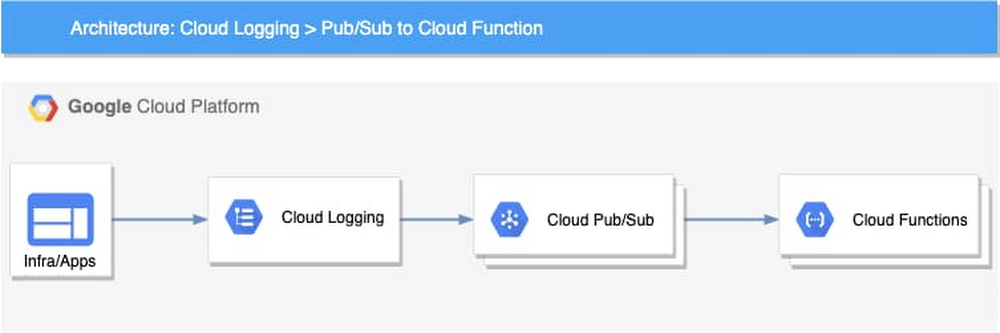
Logging is a critical component of your cloud infrastructure and provides valuable insight into the performance of your systems and applications. On Google Cloud, Cloud Logging is a service that allows you to store, search, monitor, and alert on log data and events from your Google Cloud Platform (GCP) infrastructure services and your applications. You can view and analyze log data in real time via Logs Viewer, command line or Cloud SDK. These logging tools are built to help you find and understand your logs. You may have business or technical processes that may require an automated action or you may want to reduce toil for your DevOps team. For example, you may want to use changes in your Cloud Audit Logs to take action and remediate a security vulnerability caused by inadvertent infrastructure changes.Using a Logging sink, you can build an event-driven system to detect and respond to log events in real time. Cloud Logging can help you to build this event-driven architecture through its integration with Cloud Pub/Sub and a serverless computing service such as Cloud Functions or Cloud Run.Architecture overviewThe high-level architecture of this event-driven system is both simple and flexible. There are four main components:Log events – The applications and the infrastructure send logs to Cloud LoggingLogging –  Cloud Logging sinks in the Logs Router lets you send log events to Pub/Sub topics based on the specific filters you createPub/Sub – Initiates Cloud Functions asynchronously based on the received log eventsCloud Functions – The business logic to process and respond to the log eventsThis loosely coupled event-driven system can autoscale based on the volume of log events without any capacity planning or management from the user. Using a serverless computing option can also significantly reduce the cost and improve programmers’ productivity. For example, you can use Cloud Function code to help analyze log entries, store data, and invoke other APIs or services as needed. Log eventsEach log event written to Cloud Logging includes a LogEntry, which includes the log name, timestamp, resource of the log source, payload, and metadata. Depending on how the log is written, the payload could be data stored as one of three types: a Unicode string (textPayload), a JSON object (jsonPayload), or a protocol buffer (protoPayload). You can examine the payload of the logs and extract useful events such as errors, exceptions, or specific messages. This same payload is available to the Cloud Function logic.For example, if public read permission is added to a Cloud Storage bucket, an audit log entry similar to the following one will be sent to Cloud Logging. You can extract the payload and process based on the action.Use casesThere is a wide range of situations where you can implement an event-driven system to process and respond to log events. To provide examples, we have developed three different Cloud Functions as reference code which respond to three different types of log messages. In our reference code, we implemented the logic using Cloud Functions to host and run the code. If you prefer, you could also implement similar logic using Cloud Run or App Engine. If you’re not sure which serverless computing options you need, you can read more at the serverless options comparison page to help you decide.Here are three common use cases that you can use as reference for an event-driven architecture for log events.1. Automatically enforce firewall rulesOur first use case is to automate firewall changes against “obvious policy violations” on Google Cloud such as allowing full internet access for an internal company service. In many organizations, there are security policies that only allow Ingress traffic to applications from specific ports, such as 80, 443, or within a particular IP range. If a change made to firewall rules violates these policies, that could open a security vulnerability and potentially leave a system open for compromise. For example, a private service not meant to receive internet traffic may be exposed with a firewall rule that allows all ingress traffic (0.0.0.0/0). You can remediate a firewall change that doesn’t adhere to policy when it is detected. Based on our event-driven architecture, the implementation includes three components:Logging sink – Using a Logging sink, you can direct specific log entries to your business logic. In this example, you can use Cloud Audit logs for Compute Engine which use the resource type gce_firewall_rule to filter for the logs of interest. You can also add an event type GCE_OPERATION_DONE to the filter to capture only the completed log events. Here is the Logging filter used to identify the logs. You can try out the query in the Logs Viewer.resource.type=”gce_firewall_rule” operation.last=truePub/Sub topic – In Pub/Sub, you can create a topic to which to direct the log sink and use the Pub/Sub message to trigger a cloud function. Cloud Function – In Cloud Functions, you can create logic to evaluate the received logs based on your business requirements.The cloud function can then be invoked for any firewall rule changes that are captured in Cloud Audit Logs including:compute.firewalls.patch compute.firewalls.insertcompute.firewalls.updateIf one of the log entries above appears in the audit logs, that triggers the cloud function logic. In the reference implementation, the cloud function retrieves the entire firewall rule details using the Compute Engine API and checks all the items in it. In our example, we simply remove the firewall rule if we find a violation. You can also patch the rule or roll it back with additional logic.After you write the code, you can deploy it using an Infrastructure-as-Code approach. For instance, you can use the following configuration with Cloud Deployment Manager to automate the deployment. In this configuration, you can see how the Logging sink, Pub/Sub topic and Cloud Function are provisioned. Optionally, you can also configure Sendgrid to send an email notification to your specified email address.2. Automatically remediate a misconfigured bucketOur second use case focuses on preventing a misconfigured bucket in Cloud Storage. A misconfigured bucket can expose sensitive data and cause damage to your organization. To help protect against this, you can monitor the configuration changes to the bucket. For example, if an admin inadvertently opens a bucket to the public for read/write, you can capture this change and remove the public access using a cloud function. This is especially useful when combined with an aggregated sink that captures all logs for your Google Cloud organization.You can then invoke the cloud function for any Cloud Storage bucket changes that Cloud Audit Logs captures, including:storage.buckets.createstorage.buckets.updatestorage.setIamPermissionsIf one of the changes above appears in the audit logs, you can look up the bucket policy and remove rules associated with allUsers or allAuthenticatedUsers.3. Automate your business event logicFor our last use case, we’ll show you how to extend the system by integrating it with other services. In Cloud Logging, you can create logs-based metrics, which are custom metrics in Cloud Monitoring from log entries. For example, the payment service in an ecommerce app logs various exceptions during the payment process. You can create a logs-based metric to count all those exceptions. After that, you can create an alerting policy to send your primary on-call person an alert if the metric exceeds a threshold in a short period.Built-in logs-based metrics are good for counting the number of log entries and tracking the distribution of a value in your logs. However, it might not be adequate when you need to perform computation based on the log entry content or add business-specific labels to your metrics. For those use cases, you can use the logs-based event-driven architecture to write the metrics. For example, let’s say that you want to monitor product recommendations in real time for your ecommerce app. You can use logs-based metrics to capture your specific business metrics. As an example, this microservices demo app is a simple demo ecommerce app that you can deploy. In it, when a user clicks a product, a recommendation is generated for related products on the site and written as a log entry. Using a logs-based event-driven architecture pattern, you can capture the log entries in a cloud function and then create your custom business metrics with business-specific labels for the products recommended by the application. With these metrics, you can create alerting policies in Cloud Monitoring just like you can for any other Monitoring metrics.Re-using the Pub/Sub and Cloud Function patternIn fact, we recently launched a Pub/Sub notification channel for alerting, which means that you could also use the same event-driven architecture described in these three examples to instead automate alerts for metrics not created from your logs.Get startedIt’s easy for you to build an automated, real-time analysis and operation capability with our logging and serverless computing services. You can find the code for the examples we discussed previously on github. If you haven’t already, get started with Cloud Logging and Serverless Computing with the Monitoring and Logging for Cloud Functions qwiklab. We also invite you to join the discussion on our mailing list. As always, we welcome your feedback.
Quelle: Google Cloud Platform

Predict workload failures before they happen with AutoML Tables

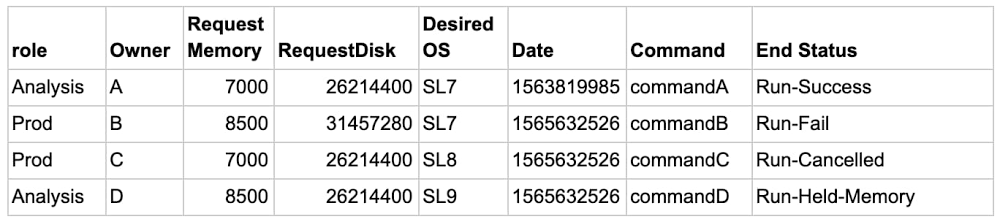
The worldwide High Performance and High Throughput Computing community consists of large research institutions that store hundreds of petabytes of data and run millions of compute workloads per year. These institutions have access to a grid of  interconnected data centers distributed across the globe, which allows researchers to schedule and run the compute workloads for their experiments at a grid site where resources are available.While most workloads succeed, about 10-15% of them eventually fail, resulting in lost time, misused compute resources, and wasted research funds. These workloads can fail for any number of reasons—incorrectly entered commands, requested memory, or even the time of day—and each type of failure contains unique information that can help the researcher trying to run it. For example, if a machine learning (ML) model could predict a workload was likely to fail because of memory (Run-Held-Memory class is predicted), the researcher could adjust the memory requirement and resubmit the workload without wasting the resources an actual failure would.  Using AI to effectively predict which workloads will fail allows the research community to optimize its infrastructure costs and decrease wasted CPU cycles. In this post we’ll look at how AutoML Tables can help researchers predict these failures before they ever run their workloads.Journey of 73 million events  With an annual dataset consisting of more than 73 million rows, each representing a workload, we decided to see if AutoML Tables can help us predict which workloads are likely to fail and therefore should not be processed on the grid. Successfully predicting which workloads will fail—and shouldn’t be run at all—helps free up resources, reduces wasted CPU cycles, and lets us spend research funds wisely. Here’s a sample dataset of four rows:The feature we’re predicting is End Status. In this sample, End Status can take one of 10 values (aka classes), including Run-Fail, Run-Success, Run-Cancelled, Run-Held-Memory, and so on, and there are more successful runs than failed ones.  In these situations, ML models usually predict common events (e.g. successes) well, but struggle to predict rare events (e.g. failures). We ultimately want to accurately predict each type of failure. Using ML terminology, we need to use a multi-class classification model and maximize recall for each of the classes.I have a data anomaly, where do I start?Let’s start with a simple approach. We’ll discuss an enterprise-grade solution using BigQuery in future posts.When solving similar types of problems, you often start with a CSV file saved in Cloud Storage. The first step is to load the file into an AI Platform Notebook on Google Cloud and do initial data exploration using Python. df.EndStatus.value_counts().plot(kind=’bar’, title=’Count of EndStatus’, logy=True)When predicting rare events, you’ll often see that some classes are orders of magnitude more represented than others—also known as a class imbalance.A model trained on such a dataset will forecast the most common class and ignore the others. To correct this, you can use a combination of undersampling of dominant classes and weighting techniques. Below is the code that computes weights for each row in the dataset and then generates a subset of the dataset with an equal number of datapoints for each class.After pre-processing using AI Platform Notebooks, you can export the resulting dataset to BigQuery, as shown below, and use it as a data source for AutoML Tables.The magic of AutoML Tables   When you’re getting started with a new ML problem on Google Cloud, you can take advantage of AutoML models.To do this, you’ll import the pre-processed dataset from BigQuery to AutoML Tables, specify the column with the target labels (EndStatus in our example), and assign the weight.The default automatic data split is 80% training, 10% validation, 10% test, and the suggested training time is based on the size of the dataset. AutoML performs the necessary feature engineering, searches among a variety of classification algorithms and tunes their parameters, and then returns the best model. You can follow the algorithm search process by examining the logs. In our use case, AutoML suggested a multi-layer neural network. Why use one model when you can use two?To improve  predictions, you can use multiple ML models. For example, you can first see if your problem can be simplified into a binary one. In our case, we can aggregate all the classes that are not successful into a failure class. We first run our data through a binary model, as shown below. If the forecast is successful, the researcher should go ahead and submit the workload. If the forecast is failure, you trigger the second model to predict the causes of failure. You can then send a message to the researcher informing them that their workload is likely to fail and that they should check the submission before proceeding.ResultsAfter training is over and you have the best performing model, AutoML Tables will present you with a confusion matrix. The confusion matrix below tells you that the model predicted 88% of Run-Success and 87% of Run-Fail workloads accurately.If the model predicts that the workload is likely to fail, to avoid a false negative result and provide the researcher with the cause of a potential failure, we run the workload through a multi-class classification model. The multi-class model will then predict why the workload will fail, for example because of disk space or memory issues, and inform the researcher that the workload is likely to fail.There is no perfect model, and some cases will always be harder to predict than others. For instance, it’s difficult to predict when a user decides to cancel a job manually.When you’re happy with the results, you can deploy the models directly from the AutoML Tables console or via the Python library. Models run as containers on a managed cluster and expose a REST API, which you can query directly or via one of the supported client libraries, including Python or Java.The deployed model supports both online and batch prediction. The online prediction will require a JSON object as input and will return a JSON object. The batch prediction will take a URL to an input dataset as either a BigQuery table or a CSV file in Cloud Storage and will return results in either BigQuery or Cloud Storage respectively. Incorporating the model described here into your on-premises workload processing workflow will let you process only the workloads that are likely to succeed, helping you optimize your on-premises infrastructure costs while providing meaningful information to your users. Next StepsWant to give it a try? Once you sign up for Google Cloud, you can practice predicting rare events, such as financial fraud, using AutoML Tables and a public dataset in BigQuery. Then, keep an eye out for part two of this series which will describe an enterprise-grade implementation of a multi-class classification model with AutoML Tables and BigQuery.
Quelle: Google Cloud Platform

The new Google Cloud region in Jakarta is now open

Indonesia is one of the most creative, dynamic, and entrepreneurial countries in Southeast Asia. We’ve seen developers and enterprises embrace new cloud technology to solve their challenges and drive one of the fastest growing economies in the world. To better help our customers in Southeast Asia accelerate their growth, we’re excited to announce that our new Google Cloud Platform (GCP) region in Jakarta is officially open.Designed to support Indonesian customers and their end users, the Jakarta region is our first GCP region in Indonesia and ninth in Asia Pacific. In this time of social distancing, we’re celebrating the opening of the region with a digital event. Watch the keynote by going here.  A cloud made for IndonesiaThe launch of our new Jakarta region (asia-southeast2) brings the best of GCP closer to our customers and users. With lower latency access to data and applications, companies doing business in Indonesia can accelerate their digital transformation. It will also help customers meet specific regulatory and compliance requirements, and provide more disaster recovery options for customers across APAC. The region has three Cloud zones from the start, enabling high availability workloads. With this region, Google Cloud now offers 24 regions and 73 zones across 17 countries worldwide.Having a region in Jakarta will help new and existing customers in Indonesia leverage Google Cloud technologies to provide better experiences for local users. “Google Cloud already helps us to execute our digital banking strategy, which accelerates financial inclusion, and to provide better banking services for Indonesians,” said Indra Utoyo, Director of Digital, Information Technology and Operation at Bank Rakyat Indonesia(Persero) Tbk. “Right now, we are using Apigee, Google Maps Platform APIs, and Cloud Vision for our development purposes. Using a hybrid approach, in cloud and on-premises, both Google and BRI are putting data security as our highest priority. The Jakarta region launch reinforces Google’s commitment and helps us reach out to our customers even better.” With a target to move 70% of workloads to the cloud within the next three years, telecommunications leader PT XL Axiata Tbk has adopted Anthos to automate, manage and scale workloads across its hybrid- and multi-cloud environments in a secure, consistent manner. “XL Axiata is committed to the modernization of our infrastructure to get more business agility and increase application deployment velocity. Anthos was a natural fit as it lets us adopt containers while letting Google, a leader in Kubernetes, manage our container infrastructure for us,” said Yessie D Yosetya, Chief Information and Digital Officer of XL Axiata.Indonesia is home to many digital unicorns like  Tokopediawho are disrupting their industries by transforming the way they provide digital services. “Google Cloud has enabled us to connect with 7+ million merchants and 90+ million monthly active users in over 97% of districts across this vast country. This collaboration presents us with an exciting opportunity to help Indonesians achieve more and to further democratize commerce through technology in Indonesia.” said Tahir Hashmi, VP of Engineering of Tokopedia.Together with our ecosystem of local partners, we’re helping businesses across industries adopt new technologies to accelerate their digital transformation. “In a rapidly evolving banking landscape, we are seeing more banks and financial institutions looking for cloud-native solutions,” said Myles Bertrand, Mambu’s Managing Director APAC at Mambu. “There is a greater understanding that when they run in the cloud they can be more responsive, agile, innovative and run at a lower cost. We believe our partnership with Google Cloud Platform will have a hugely positive impact on the digital banking space right across Asia Pacific.” The Jakarta region launches with our standard set of services, including Compute Engine, Google Kubernetes Engine, Cloud SQL, Cloud Storage, Cloud Spanner, Cloud Bigtable, and BigQuery. Developers, data scientists, and data engineers can also leverage our ML and AI tools to take their projects from ideation to deployment, quickly and cost-effectively. Hybrid cloud customers can integrate new and existing deployments with help from our regional partner ecosystem, and via multiple Dedicated Interconnect locations.Visit our cloud locations page for a complete list of services available in the Jakarta region.Maju Sama-SamaMaju Sama-Sama is Google Indonesia’s motto and it means “advancing forward together.” As we all face unprecedented challenges at this time, Google Cloud is committed to partnering with Indonesians to build a resilient future. In addition to launching our new cloud region, we’re making additional commitments today to help develop the talent that’s critical to our customers’ digital transformation journey.To help build a cloud-ready workforce, we will deliver 150,000 hands-on training labs this year in Indonesia. These include access to GCP training sessions at no charge, credits and a range of career readiness initiatives like Juara GCP, our Cloud OnBoard training, and digital scholarships with Indonesia’s Ministry of Communication and Information Technology to help people become GCP certified. Since the start of the COVID-19 crisis, we’ve provisioned G Suite for Education to thousands of schools throughout Jakarta to support remote learning arrangements. To help everyone make the best of the new “classroom,” we’ve launched the Google Teach from Home central hub in Bahasa Indonesia, which provides information, training, and tools to help educators teach from home. Today, we also announced our commitment to work collaboratively with the Indonesian government to equip millions of educators and learners by provisioning access to G Suite for Education nationwide. What’s next2020 continues to be a tremendous year for Google Cloud as we expand our global infrastructure. Visit our Jakarta region page for more details about the region, and our cloud locations page for updates on the availability of additional services and regions.
Quelle: Google Cloud Platform

How Schrödinger is advancing COVID-19 drug discovery efforts with Google Cloud

Technology has been key in helping the healthcare industry take actions in response to the coronavirus pandemic. Now, as doctors and nurses prepare for the possibility of a second wave, technology will take an even bigger role in the development of new medicines to fight COVID-19. To accelerate this drug discovery process, Schrödinger, a Google Cloud customer, has teamed up with Takeda, Novartis, Gilead Sciences, and WuXi AppTec in a philanthropic initiative to share ideas, resources, and data with the goal of developing antiviral therapeutics for coronavirus. As part of this alliance, Schrödinger, whose physics-based software platform enables discovery of high-quality, novel molecules for therapeutics and materials, is using credits from Google Cloud to enable rapid exploration and testing of potential new drugs. Schrödinger and Google Cloud first announced a strategic agreement earlier this year giving Schrödinger access to powerful computing capacity to accelerate discovery for its commercial partners and its internal pipeline. Historically, drug discovery relied more heavily on the experience and intuition of medicinal chemists, who had to synthesize and assay every potential compound by hand—a time-consuming and expensive process. Schrödinger’s computational platform–powered by Google Cloud’s high performance computing–revolutionizes this process. With this technology, the initial discovery work can be done “in silico,” enabling chemists to investigate vastly more compounds than they ever could before. As they begin to actually synthesize molecules, they do so with the knowledge that they have already explored billions of potential designs and identified the ones most likely to succeed as therapeutics. With the backing of Google Cloud, Schrödinger’s team can easily scale up their discovery work to meet the needs of the COVID-19 alliance..With these credits, Google Cloud is providing Schrödinger with 16 million hours of GPU time to enable computational drug discovery, which, if used consecutively, would equate to 1,826 years of around-the-clock computing. All of this has the potential to considerably accelerate the preclinical drug discovery process for COVID-19. By utilizing tens of thousands of GPU computing hours and hundreds of thousands of CPU computing hours on Google Cloud, Schrödinger’s computational design platform can triage and evaluate billions of molecules for two promising drug targets. That way, alliance partners can analyze the most promising compounds in the lab. Meanwhile, Schrödinger’s drug discovery team is turning to additional targets—and again scouring chemical space for molecules that could become powerful medicines. We’re honored to support Schrödinger and its alliance partners in the work they are doing to identify new medicines for the betterment of everyone.
Quelle: Google Cloud Platform

Bayer Crop Science seeds the future with 15000-node GKE clusters

Editor’s note: Today’s post examines how GKE’s support of up to 15,000 nodes per cluster benefits a wide range of use cases, including helping Bayer Crop Science rapidly process new information arriving from its genotyping labs.At Google, scalability is a core requirement for the products we build. With more enterprises adopting Google Kubernetes Engine (GKE), we’ve been working to push the limits of a GKE cluster way beyond the supported limits—specifically, clusters with up to 15,000 nodes. This is the most supported nodes of any cloud-based Kubernetes service, and 3X the number of nodes supported by open-source Kubernetes. There are various use cases when this kind of huge scale is useful:If you’re running large, internet-scale services If you need to simplify infrastructure management by having fewer clusters to manageBatch processing — shortening the time needed to process data by temporarily using much more resourcesTo absorb large spikes in resource demand, for example during a gaming launch, or an online ecommerce campaign. Being able to resize an existing cluster rather than provisioning a new one can improve the availability and performance of your service. Having 15,000 nodes per cluster is all the more significant when you consider that the scalability of an IT system is much more than just how many nodes it supports. A scalable system needs to be able to use a significant amount of resources and still serve its purpose. In the context of a Kubernetes cluster, the number of nodes is usually a proxy for the size of a cluster and its workloads. When you take a closer look though, the situation is far more complex.The scale of a Kubernetes cluster is like a multidimensional object composed of all the cluster’s resources—and scalability is an envelope that limits how much you can stretch that cube. The number of pods and containers, the frequency of scheduling events, the number of services and endpoints in each service—these and many others are good indicators of a cluster’s scale. The control plane must also remain available and workloads must be able to execute their tasks. What makes operating at a very large scale harder is that there are dependencies between these dimensions. For more information and examples, check out this document on Kubernetes Scalability thresholds and our GKE-specific scalability guidelines.The Kubernetes scalability envelope, based on http://www.gregegan.net/APPLETS/29/29.htmlIt’s not just hyperscale services that benefit from running on highly scalable platforms—smaller services benefit too. By pushing the limits of an environment’s scalability, you also expand your comfort zone, with more freedom to make mistakes and use non-standard design patterns without jeopardizing the reliability and performance of your infrastructure. For a real-world example of highly scalable platforms, today we are hearing from the team at Bayer Crop Science and learning about a recent project they designed.Setting on a journey to run at 15,000 node scaleTo make it possible for GKE users to run workloads that need more than 5,000 nodes in one cluster, we engaged a group of design partners into a closed early access program. Precision agriculture company Bayer Crop Science (BCS) is currently one of the biggest users of GKE, with some of the largest GKE clusters in the Google Cloud fleet. Specifically, it uses GKE to help it make decisions about which seeds to advance in its Research & Development pipeline, and eventually which products (seeds) to make available to farmers. Doing this depends upon having accurate and plentiful genotype data. With 60,000 germplasm in its corn catalog alone, BCS can’t test each seed population  individually, but rather, uses other data sets, like pedigree and ancestral genotype observations, to infer the likely genotypes of each population. This way, BCS data scientists can answer questions like “will this seed be resistant to a particular pest?”, reducing how much farmland they need each year to operate the seed production pipeline.Bayer Crop Science’s 60,000 member corn “galaxy,” where every dot is an individual corn germplasm, and every line is the relationship between them. Credit: Tim WilliamsonLast year, BCS moved its on-premises calculations to GKE, where the availability of up to 5,000-node clusters allowed scientists to precalculate the data they would need for the month, and run it as a single massive multi-day batch job. Previously, scientists had to specially request the genotype data they needed for their research, often waiting several days for the results. To learn more, watch this presentation from Next ‘19 by BCS’s Jason Clark. Bayer Crop Science infrastructure/architectureTo facilitate the rapid processing of new information arriving from genotyping labs, BCS implemented an event-driven architecture. When a new set of genotype observations passes quality control, it’s written to a service, and an event is published to a Cloud Pub/Sub topic. The inference engine watches this topic, and if the incoming events match the requirements to allow inference, a job request is created and placed on another topic. The inference engine worker nodes are deployed on the largest available Kubernetes cluster using a Horizontal Pod Autoscaler that looks at the depth of work on the incoming queue. Once a worker selects a job from the topic, it stages all the required inputs, including the genotype observations that initially triggered the job, and runs the genotype inference algorithm. Results are written into a service for accessibility and an event is emitted to a genotype inference topic. Downstream processes like decision making based on inferred genotypes are wired into this event stream and begin their work as soon as they receive the event.Click to enlargePreparations and joint testsBCS’s biggest cluster used to infer the data (a.k.a. for imputation) uses up to 4,479 nodes with 94,798 CPUs and 455 TB of RAM. And because that imputation pipeline is a highly parallelizable batch job, scaling it to run on a 15,000-node cluster was straightforward.In our joint tests we used the cluster hosting the inference engine and its autoscaling capabilities to overscale the size of the workload and amount of available resources. We aimed to scale the cluster from 0 to 15,000 nodes with large machines (16CPU highmem 104GB RAM), for a total of 240,000 CPU cores and 1.48PiB of RAM.To make sure that the resources here are provided at low cost, the cluster hosting the inference engine worker pods used exclusively preemptible instances, while the supporting services hosting the input data and handling outputs ran on regular instances. With preemptible VMs, BCS gets a massive amount of compute power, while slashing the costs of compute power almost by a factor of five.With 15,000 nodes at its disposal, BCS also saves a lot of time. In the old on-prem environment with 1,000 CPUs, BCS would have been able to process ~62,500,000 genotypes per hour. With clusters up to the 5,000 node limit BCS can process 100 times faster. And with 240,000 CPUs across 15,000 nodes, BCS can process ~15,000,000,000 genotypes per hour. That gives BCS the flexibility to make model revisions and quickly reprocess the entire data backlog, or quickly add inference based on new data sets, so data scientists can continue to work rather than waiting for batch jobs to finish.Lessons learned from running at large scaleBoth Google and BCS learned a lot from running a workload across a single 15,000 node cluster. For one thing, scaling the components that interact with the cluster proved to be very important. As GKE processed data with increased throughput, we had to scale up other components of the system too, e.g., increase the number of instances on which Spanner runs.Another important takeaway was the importance of managing preemptible VMs. Preemptible VMs are highly cost efficient but only run for up to 24 hours, during which period they can be evicted. To use preemptible VMs effectively, BCS checkpointed their Google Cloud Storage environment every 15 minutes. That way, if the job is preempted before it completes, the job request falls back into the queue and is picked up and continued by the next available worker. Sowing the seeds of innovationFor Bayer Crop Science to handle large amounts of genome data, it needs significant amounts of infrastructure on-demand. When all is said and done, being able to run clusters with thousands of nodes helps BCS deliver precomputed data quickly, for example, being able to reprocess the entire data set in two weeks. Up to 15,000 node clusters will help cut that time down to four days. This way analysts don’t have to request specific batches to be processed offline. BCS also realized the value of testing hypotheses on large datasets quickly, in a non-production setting. And thanks to this collaboration, all GKE users will soon be able to access these capabilities, with support for 15,000 node clusters broadly available later this year. Stay tuned for more updates from the GKE team. In particular, be sure to join our session during NEXT OnAir on August 25th. There we’ll talk about how Google Cloud is collaborating with large Mesos and Aurora users to offer similar hyperscale experiences on GKE.
Quelle: Google Cloud Platform