Reinforcing our commitment to privacy with accredited ISO/IEC 27701 certification

For decades, there has been a growing focus on privacy in technology, with laws such as the EU’s General Data Protection Regulation (GDPR), the California Consumer Privacy Act, and the Australian Privacy Principlesproviding guidance on how to protect and maintain user privacy. Privacy has always been a priority at Google, and we’re continuously evolving to help our customers directly address global privacy and data protection requirements. Today, we’re pleased to announce that Google Cloud is the first major cloud provider to receive an accredited ISO/IEC 27701 certification as a data processor. Published in 2019, ISO/IEC 27701 is a global standard designed to help organizations align with international privacy frameworks and laws. It provides guidance for implementing, maintaining, and continuously improving a Privacy Information Management System (PIMS), and can be used by both data controllers and processors—a key consideration for organizations that must align with the GDPR. ISO/IEC 27701 is an extension of the security industry best practices that are codified in ISO/IEC 27001, which outlines and provides the requirements for an information security management system (ISMS).  Unlocking the benefits of ISO 27701Coalfire ISO, an independent third party, issued an accredited certificate of registration for ISO/IEC 27701 to Google Cloud Platform (GCP). This accredited certificate shows that Google’s PIMS for GCP (as shown in the certificate’s scope) conforms to the ISO/IEC 27701 requirements, and that the body conducting the audit and issuing the certificate did so in accordance with the International Accreditation Forum (IAF)/ANSI National Accreditation Board (ANAB) requirements. This means that the certificate will be recognized by other IAF-accredited audit and certification bodies under the IAF Multilateral Recognition Agreement (MLA). Ouraccredited certification demonstrates Google Cloud’s long-standing commitment to privacy and providing the most trusted experience for our customers. By meeting the rigorous standards outlined by ISO/IEC 27701, Google Cloud customers can leverage the many benefits our certification, including:A universal set of privacy controls, verified by a trusted third party in accordance with the requirements of their accreditation body, that can serve as a solid foundation for the implementation of a privacy programThe ability to rely on Google Cloud Platform’s accredited ISO/IEC 27701 certification in your own compliance effortsReduced time and expense for both internal and third-party auditors, who can now demonstrate compliance with several privacy objectives within a single audit cycleGreater clarity on privacy-related roles and responsibilities, which can facilitate efforts to comply with privacy regulations such as GDPROur commitment to customersCertifications provide independent validation of our ongoing commitment to world-class security and privacy, while also helping customers with their own compliance efforts. You can find more information on Google Cloud’s compliance efforts and our commitment to privacy in our compliance resource center.
Quelle: Google Cloud Platform

Dataproc Metastore: Fully managed Hive metastore now available for alpha testing

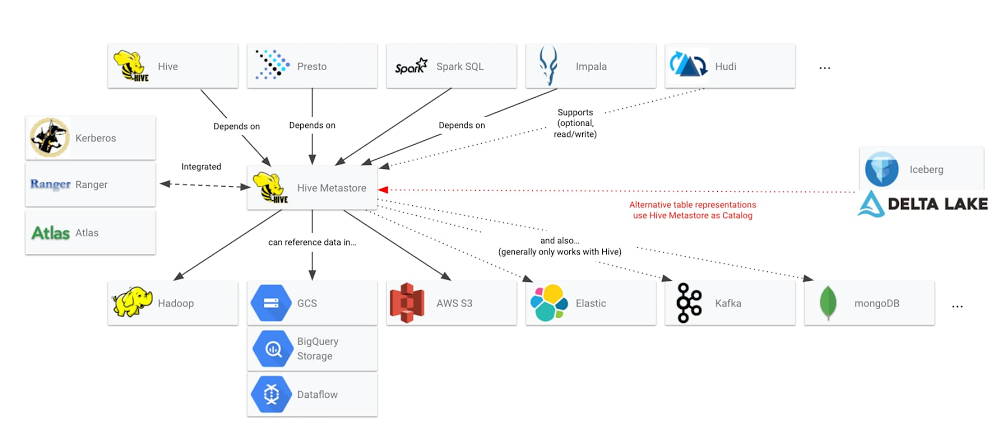
Google Cloud is announcing a new data lake building block for our smart analytics platform: Dataproc Metastore, a fully managed, highly available, auto-healing, open source Apache Hive metastore service that simplifies technical metadata management for customers building data lakes on Google Cloud. With Dataproc Metastore, you now have a completely serverless option for several use cases:A centralized metadata repository that can be shared among various ephemeral Dataproc clusters running different open source engines, such as Apache Spark, Apache Hive, and Presto;A metadata bridge between open source tables and code-free ETL/ELT with Data Fusion; A unified view of your open source tables across Google Cloud, providing interoperability between cloud-native services like Dataproc and various other open source-based partner offerings on Google Cloud.To get started with Dataproc Metastore today, join our alpha program by reaching out by email: join-dataproc-metastore-alpha@google.com.Why Hive Metastore?A core benefit of Dataproc is that it lets you create a fully configured, autoscaling, Hadoop and Spark cluster in around 90 seconds. This rapid creation and flexible compute platform makes it possible to treat cluster creation and job processing as a single entity. When the job completes, the cluster can terminate and you pay only for the Dataproc resources required to run your jobs. However, information about tables—the metadata—that was created during those jobs is not always something that you want to be thrown out with the cluster. You often want to keep that table information between jobs or make the metadata available to other clusters and other processing engines. If you use open source technologies in your data lakes, you likely already use the Hive Metastore as the trusted metastore for big data processing. Hive metastore has achieved standardization as the mechanism that open source data systems use to share data structures. The below diagram demonstrates just some of the ecosystem that is already built around Hive Metastore’s capabilities.Click to enlargeHowever, this same Hive Metastore can be a friction point for customers who need to run their data lakes on Google Cloud. Today, Dataproc customers will often use Cloud SQL to persist Hive metadata off-cluster. But we’ve heard about some challenges with this:You must self-manage and troubleshoot the RDBMS Cloud SQL instance.Hive servers are managed independently of RDBMS: This can create both scalability issues for incoming connections, and locking issues in the database. The CloudSQL instance is a single point of failure that requires a maintenance window with downtime, making it impossible to use with data lakes that need always-on processing. This architecture requires that direct JDBC access be provided to each cluster, which can introduce security risks when used with sensitive data.  In order to trust that the Hive Metastore can serve in the critical path for all your data processing jobs, your other option is to move beyond the CloudSQL workaround and spend significant time architecting a highly available IaaS layer that includes load balancing, autoscaling, installations and updates, testing, and backups. However, the Dataproc Metastore abstracts all of this toil and provides these as features in a managed service. Enterprise customers have told us they want a managed Hive Metastore that they can rely on for running business-critical data workloads in Google Cloud data lakes. In addition, customers have expressed a desire for the full, open source-based Hive metastore catalog that maintains their integration points with numerous applications, can provide table statistics for query optimization, and supports Kerberos authentication so that existing security models based on tools like Apache Ranger and Apache Atlas continue to function. We also hear that customers want to avoid a new client library that would require a rewrite of existing software or a “compatible” API that only offers limited functionality of the Hive metastore. Enterprise customers want to use the full features of the open source Hive metastore. The Dataproc Metastore team has accepted this challenge, and now provides a fully serverless Hive metastore service. The Dataproc Metastore complements the Google Cloud Data Catalog, a fully managed and highly scalable data discovery and metadata management service. Data Catalog empowers organizations to quickly discover, understand, and manage all their data with simple and easy-to-use search interfaces, while the Dataproc Metastore offers technical metadata interoperability among open source big data processing. Common use cases for Dataproc MetastoreFlexible analysis of your data lake with centralized metadata repositoryWhen German wholesale giant METRO moved their ecommerce data lake to Google Cloud, they were able to match daily events to compute processing and reduce infrastructure costs by 30% to 50%. The key to these types of gains when it comes to data lakes is severing the ties between storage and compute. By disconnecting the storage layer from compute clusters, your data lake gains flexibility. Not only can clusters come up and down as needed, but cluster specifications like vCPUs, GPUs, and RAM can be tailored to the specific needs of the jobs at hand. Dataproc already offers several features that help you achieve this flexibility.Cloud Storage Connector lets you take data off your cluster by providing Cloud Storage as a Hadoop Compatible File System (HCFS). Jobs based on data in the Hadoop Distributed File System (HDFS) can typically be converted to Cloud Storage with a simple file prefix change (more on HDFS vs. Cloud Storage here).Workflow Templates provides an easy-to-use mechanism for managing and executing workflows. You can specify a set of jobs to run on a managed cluster that gets created on demand and deleted when the jobs are finished. Dataproc Hub makes it easy to give data scientists, analysts, and engineers preconfigured Spark working environments in JupyterLab that automatically spawn and destroy Dataproc clusters without an administrator.   Now, with Dataproc Metastore, achieving flexible clusters is even easier for those clusters that want to share tables and schemas. Clusters of various shapes, sizes, and processing engines can safely and efficiently share the same tables and metadata simply by pointing a Dataproc cluster to a serverless Dataproc Metastore endpoint, as shown here:Serverless and code-free ETL/ELT with Dataproc Metastore and Data FusionWe’ve heard from customers that they’re able to use real-time data to improve customer service, network optimization, and more to save time and reach customers effectively. For companies building data pipelines, they can use Data Fusion, our fully managed, code-free, and cloud-native data integration service that lets you easily ingest and integrate data from various sources. Data Fusion is built with an open source core (CDAP), which offers a Hive source plugin. With this plugin, data scientists and other users of the data lake can share the structured results of their analysis using Dataproc Metastore, offering a shared repository that ETL/ELT developers can use to manage and productionize pipelines in the data lake. Below is one example of a workflow using Dataproc Metastore with Data Fusion to manage data pipelines, so you can go from unstructured raw data to a structured data warehouse without having to worry about running servers.Click to enlargeData scientists, data analysts, and data engineers log in to Dataproc Hub, which they use to spawn a personalized Dataproc cluster running a Juypter lab interface backed by Apache Spark processing. Unstructured raw data on Cloud Storage is analyzed, interpreted, and structured. Metadata about how to interpret Cloud Storage objects as structured tables is stored in Dataproc Metastore, allowing the personalized Dataproc cluster to be terminated without losing the metadata information.Data Fusion’s Hive connector uses the table created in the notebook as a data source via the thrift URL provided by Dataproc Metastore.Data Fusion reads the Cloud Storage data according to the structure provided by Dataproc Metastore. The data is harmonized with other data sources into a data warehouse table.The refined data table is written to BigQuery, Google Cloud’s serverless data warehouse.BigQuery tables are made available to Apache Spark on Jupyter Notebooks for further data lake queries and analysis with the Apache Spark BigQuery Connector.  Partner ecosystem accelerates Dataproc Metastore deployments across multi-cloud and hybrid data lakesAt Google, we believe in an open cloud, and Dataproc Metastore is built with our leading open source-centric partners in mind. Because Dataproc Metastore provides compatibility with open source Apache Hive Metastore, you can integrate Google Cloud partner services into your hybrid data lake architectures without having to give up metadata interoperability. Google Cloud-native services and open source applications can work in tandem. Collibra provides hybrid data lake visibility with Dataproc MetastoreIntegrating Dataproc Metastore with Collibra Data Catalog provides enterprises with enterprise-wide visibility across on-prem and cloud data lakes. Since Dataproc Metastore was built on top of Hive metastore, Collibra could quickly integrate into the solution without having to worry about proprietary data formats or APIs. “Dataproc Metastore provides a fully managed Hive metastore, and Collibra layers on data set discovery and governance, which is critical for any business looking to meet the strictest internal and external compliance standards,” says Chandra Papudesu, VP product management, Catalog and Lineage for Collibra.Qubole provides a single view of metadata across data lakesQubole’s open data lake platform provides end-to-end data lake services, such as continuous data engineering, financial governance, analytics, and machine learning with near-zero administration on any cloud. As enterprises continue to execute a multi-cloud strategy with Qubole, it’s critical to have one centralized view of your metadata for data discovery and governance. “Qubole’s co-founders led the Apache Hive project, which has spawned into many impactful projects and contributors globally,” said Anita Thomas, director of product management at Qubole. “Qubole’s platform has used a Hive metastore since its inception, and now with Google’s launch of an open metastore service, our joint customers have multiple options to deploy a fully managed, central metadata catalog for their machine learning, ad-hoc or streaming analytics applications,” Pricing During the alpha phase, you will not be charged for testing this service. However, under NDA, you can be provided a tentative price list to evaluate the value of Dataproc Metastore against the proposed fees. Sign up for the alpha testing program for Dataproc Metastore now.
Quelle: Google Cloud Platform

Google Cloud VMware Engine is now generally available

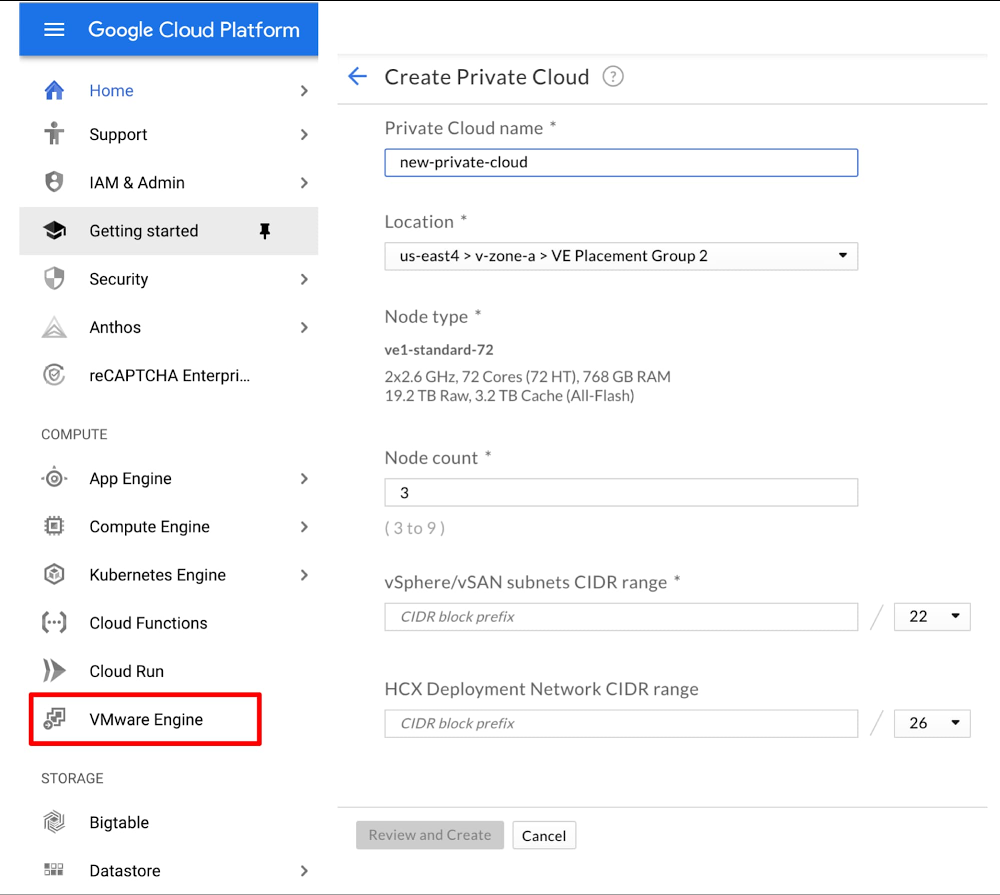
Let’s face it: bringing workloads to the public cloud isn’t always easy. And if you want to take full advantage of the elasticity, economics and innovation of the cloud, you usually have to write a new application. But that isn’t always an option, especially for existing applications, which may be from a third-party or written years ago. Compounding the challenge of rewriting those applications for the cloud is how you manage the application after you rebuild it—how you protect it from failures, monitor it, secure it, and so on. For many existing applications, this is done on a platform such as VMware®. So, the question becomes: how can these critical applications take advantage of the cloud when you don’t have a clear path to rearchitecting them outright? Google Cloud VMware Engine now generally availableToday, we’re happy to announce that Google Cloud VMware Engine is generally available, enabling you to seamlessly migrate your existing VMware-based applications to Google Cloud without refactoring or rewriting them. You can run the service in the us-east4 (Ashburn, Northern Virginia) & us-west2 (Los Angeles, California) regions, and we will  expand into other Google Cloud regions around the world in the second half of the year.Google Cloud VMware Engine provides everything you need to run your VMware environment natively in Google Cloud. The service delivers a fully managed VMware Cloud Foundation hybrid cloud platform, including VMware technologies vSphere, vCenter, vSAN, NSX-T, and HCX—in a dedicated environment on Google Cloud’s high performance and reliable infrastructure, to support your enterprise production workloads.With this service, you can extend or bring your on-premises workloads to Google Cloud in minutes—and without changes—by connecting to a dedicated VMware environment. Google Cloud VMware Engine is a first-party offering, fully owned, operated and supported by Google Cloud, that lets you seamlessly migrate to the cloud, without the cost or complexity of refactoring applications, and manage workloads consistently with your on-prem environment. You reduce your operational burden by moving to an on-demand, self-service model, while maintaining continuity with your existing tools, processes and skill sets, while also taking advantage of Google Cloud services to supercharge your VMware environment.Google Cloud VMware Engine is a unique solution for running VMware environments in the cloud, with four areas that provide a differentiated experience: a) user experience, b) enterprise-grade infrastructure, c) integrated networking and d) a rich services ecosystem. Let’s take a closer look.A simple user experienceLaunching a fully functional instance of Google Cloud VMware Engine is easy—all it takes is four clicks from the Google Cloud Console. Within a few minutes, you get a new environment, ready to consume. Compare that to the days and weeks it takes to design a new on-prem data center, ordering hardware and software, racking, stacking, cabling and infrastructure configuration. Not only that, but once the environment is live, you can expand or shrink it at the click of a button. To further simplify the experience, you can provision VMware environments using your existing Google Cloud identities. You also receive integrated support from Google Cloud—a one-stop shop for all support issues, whether in VMware or the rest of Google Cloud. The service is fully VMware certified and verified, and VMware’s support is fully integrated with Google Cloud support for a seamless experience. Consumption associated with the service is available in the standard billing views in the Google Cloud Console. And when you need to use native VMware tools, simply log into the familiar vCenter interface and manage and monitor VMware environment as you normally would.Dedicated, enterprise-grade infrastructureGoogle Cloud VMware Engine is built on high-performance, reliable and high-capacity infrastructure, giving you a fast and highly available VMware experience, at a low cost. The environment includes:Fully redundant and dedicated 100Gbps networking, providing 99.99% availability, low latency and high throughput to meet the needs of your most demanding enterprise workloads.Hyperconverged storage via the VMware vSAN stack on high-end, all-flash NVMe devices. This enables blazing fast performance with the scale, availability, reliability and redundancy of a distributed storage system.Recent generation CPUs (2nd Generation Intel Xeon Scalable Processors), delivering very high (2.6 GHz normal, 3.9 GHz burst) compute performance for your workloads. 768 GB of RAM, and 19.2TB of raw data capacity per node. Since VMware allows compute over-provisioning, many workloads in existing environments are often memory- or storage-constrained. The larger memory and storage capacity in Google Cloud VMware Engine nodes enables more workload VMs to be deployed per node, lowering your overall cost.The compute and storage infrastructure is single tenant—not shared by any other customer. The networking bandwidth to other hosts in a VMware vSphere cluster is also dedicated. This means that you get not only the privacy and security of a dedicated environment, but also highly predictable levels of performance. Integrated cloud networkingVMware environments in Google Cloud VMware Engine are configured directly on VPC subnets. This means you can use standard mechanisms such as Cloud Interconnect and Cloud VPN to connect to the service, as you would to any other service in Google Cloud. This eliminates the need to establish additional, expensive, bandwidth-limited connectivity.You also get direct, private, layer 3 networking access to workloads and services running on Google Cloud. You can connect between workloads in VMware and other services in Google Cloud with high-speed, low-latency connections, using private addresses. This provides faster access and higher levels of security for a wide variety of use cases such as hybrid applications, backup and centralized performance management. By eliminating a lot of networking complexity, you get a seamless, secure experience that is integrated with Google Cloud.A rich services ecosystemIn addition to its native capabilities, VMware users value the platform for its rich third-party ecosystem for disaster recovery, backup, monitoring, security—or any other imaginable IT need. Since the service provides a native VMware platform, you can continue to use those tools, with no changes.In Google Cloud VMware Engine, we have built unique capabilities to enable ecosystem tools. By elevating system privileges, you can install and configure third-party tools as you would on-prem. Third parties such as Zerto are taking advantage of this integration for mission-critical use cases such as disaster recovery.You can also benefit from native Google Cloud services and our ecosystem partners alongside your VMware-based applications. For instance, you can use Cloud Storage with a third-party data protection tool offered by companies such as Veeam, Dell, Cohesity, and Actifio to get a variety of availability and cost options for your backups. You can run third-party KMS tools externally and independently in your Compute Engine VMs to encrypt at-rest storage, making your environment even more secure.And then there are the native Google Cloud services. With your VMware-based databases and applications running inside Google Cloud VMware Engine, you can now manage them alongside your cloud-native workloads with our Operations family (formerly Stackdriver). You can interoperate VMware workloads with services such as Google Kubernetes Engine and Cloud Functions. You can use third-party solutions such as NetApp Cloud Volumes for extended VMware storage needs. And you can take advantage of the privacy and performance of Google Cloud VMware Engine to run cloud-native workloads directly next to your VMware workloads, with the help of Anthos deployed directly inside the service. Or supercharge analytics of your VMware data sources with BigQuery, and make it more intelligent with AI and machine learning services. Moving to the cloud doesn’t have to be hard. By migrating your VMware platform to Google Cloud, you can keep what you like about your on-prem application environment, and tap into next generation hardware and application services. To learn more about Google Cloud VMware Engine, check out our Getting Started guide, and be sure to watch our upcoming Google Cloud Next ‘20: OnAir session, Introducing Google Cloud VMware Engine during the week of July 27th.
Quelle: Google Cloud Platform

New IT Cost Assessment program: Unlock value to reinvest for growth

If you’re in IT, chances are you’re under pressure to prioritize investments and optimize costs in response to the current economic climate. According to a recent survey of our customers1, that situation describes 84% of IT decision makers. Likewise, Forrester Research has said CIOs could face a minimum of 5% budget cuts in 20202, and IDC is forecasting a 5.1% decline in worldwide IT spending3. These are sobering numbers. Here at Google Cloud, we understand the need for clear, actionable ways to optimize your IT costs—and the flexibility to adjust your IT spend to the most critical areas dynamically. To help, we developed a new IT Cost Assessment program that lets you understand how your company’s IT spend compares to your industry peers, so you can quickly identify key areas of opportunity to unlock value to reinvest for growth. Google Cloud has a proven and structured approach to validate these IT cost reduction opportunities. Every business is unique, but knowing where you stand relative to your industry peers is an invaluable piece of insight when strategizing how to survive in this new economic reality. The first thing we do with our IT cost assessment is analyze your individual IT spend and compare it to industry benchmark data derived from our extensive experience working with clients and trusted third-party research firms, providing you a view of cost optimization opportunities. Then, in a second phase, we propose Google Cloud solutions best aligned to helping you reap the benefits of IT cost reductions, reduce physical infrastructure complexity, leverage hybrid-cloud strategy and enhance security, compliance and flexibility. In addition, our differentiated capabilities across AI/ML & Big Data can help you identify opportunities to optimize processes and drive additional operational efficiencies. Once you have this baseline of your performance, we deliver a detailed TCO analysis, ROI projections, and an implementation plan, with Google Cloud solutions that will help you migrate and modernize your legacy environment and deliver a positive impact to your bottom line.We have partnered with leading enterprise companies in manufacturing, financial services, healthcare and life sciences, and insurance sectors, among others and delivered cost savings across their IT environments. In the aforementioned customer survey, three out of four respondents reported savings of up to 30% in the first 6 months of becoming a Google Cloud customer. And presented with the statement, “Google Cloud helped me increase our operational efficiency and optimize IT spend,” nine in ten agreed.Click here to learn more about the IT Cost Assessment program, and to request an engagement. We look forward to helping you navigate—and thrive—through these challenging times.1. TechValidate survey of 122 Google Cloud customers.2. Where To Adjust Tech Budgets In The Pandemic Recession, Forrester, May 19, 20203. International Data Corp., https://www.idc.com/getdoc.jsp?containerId=prUS46268520
Quelle: Google Cloud Platform

Bare Metal Solution: Coming to a Google Cloud data center near you

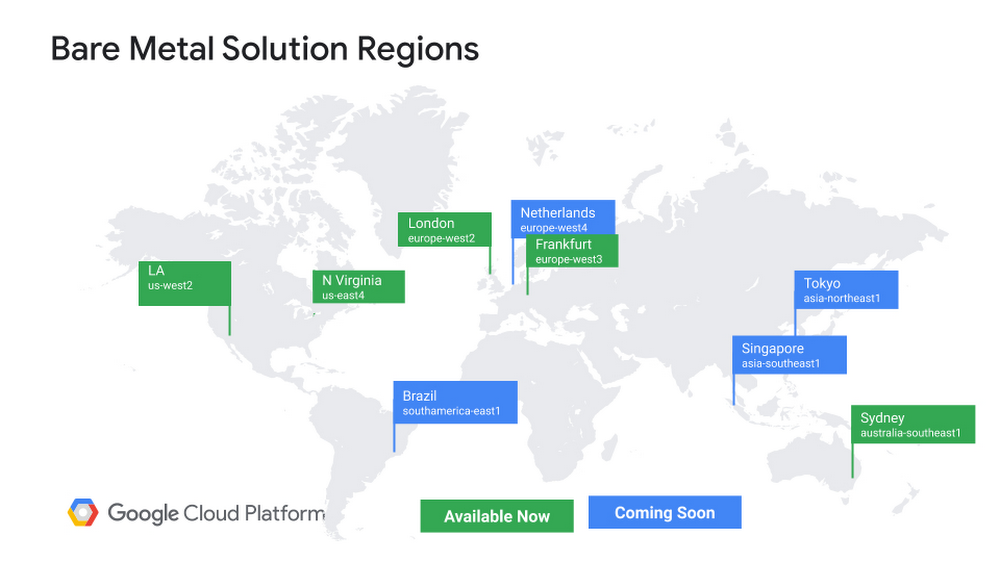
Last November, we announced Bare Metal Solution, which lets businesses run specialized workloads such as Oracle databases close to Google Cloud, while lowering overall costs and reducing risks associated with migration. Our next job was to make this solution global. Today, we’re announcing availability of Bare Metal Solution in five more regions: Ashburn, Virginia; Frankfurt; London; Los Angeles, California; and Sydney. By the end of this year we plan to launch four more sites: Amsterdam, São Paulo, Singapore, and Tokyo. Keep an eye out—Bare Metal Solution is coming to a Google Cloud data center near you!Click to enlargeEnabling specialized workloads in Google CloudBare Metal Solution is designed for the performance and high availability needs of mission-critical, enterprise-grade applications. To deliver that, Bare Metal Solution offers state-of-the-art dedicated servers based on 2nd Generation Intel Xeon Scalable Processors (Cascade Lake) that come in a variety of sizes. Depending on your needs, you can choose a Bare Metal server with as few as 16 cores, or all the way up to 112 cores with 3 terabytes of DRAM, all to handle your most demanding workloads. These servers are certified by almost all major software companies. We deploy Bare Metal Solution in a region extension with less than two millisecond latency to Google Cloud; in most cases we measured the latency to be sub-millisecond.One key aspect of any enterprise workload solution is storage performance and high availability. Bare Metal Solution leverages some of the world’s most advanced NVMe based storage that is fully tuned to provide a target level of IOPS and throughput out of the box. In addition, automated snapshots help provide data protection. Setting up networks can sometimes be an obstacle to deploying your enterprise applications quickly. Bare Metal Solution leverages our Partner Interconnect framework, delivering routing that’s pre-configured and optimized for your use case. This makes complex tasks such as setting up replication across sites a matter of a few clicks.With these features, Bare Metal Solution helps to make moving your workloads from your data center to Google Cloud a simple and quick task, while lowering overall costs and reducing migration risk. CloudBees, a leading provider of continuous delivery software services, recently used Bare Metal Solution to speed its migration to Google Cloud. “Google’s Bare Metal Solution provided us with ease of migration, and integration with Google Cloud services with little or no disruption to our current business processes. We are pleased with our experience with Bare Metal Solution—allowing us to easily leverage cloud-native databases.” – Francois Dechery, Chief Strategy Officer, CloudBees Built with a little help from our friends Bare Metal Solution leverages Google Cloud’s rich partner ecosystem to deliver important core functionality and optional add-on features. For example, Bare Metal Solution employs NetApp storage solution to support enterprise-class applications. Using NetApp’s NVMe storage technology provides enterprise-grade performance, while its industry-standard snapshot technology helps enhance Bare Metal Solution’s data protection capabilities. Our partner Actifio will provide add-on features to support backup and recovery. Actifio provides an integrated video of all of your data assets across Google Cloud in addition to a backup catalog and policy-based backups and restores. Actifio’s approach to copy data management reduces storage and software costs while lowering your time-to-recovery in the case of an outage. To learn more, please see Actifio’s blog post.In addition, Atos is delivering its Atos Database Hotel on top of Google’s Bare Metal Solution as a managed service for enterprise customers, providing organizations with a fully managed and secure cloud service, seamlessly integrated with Google Cloud, and leveraging Atos’ end-to-end orchestration, management, and infrastructure services.Taken together, we believe the mix of industry-leading technology and our partners’ expertise to enhance Bare Metal Solution can lower your implementation timelines and improve your overall user experience. Furthering our commitment to open source While developing Bare Metal Solution, we felt a responsibility to provide a differentiated experience to enterprise customers, in the form of an automation tool pack to help manage your specialized workloads, assist you with deployment, and help manage day-to-day functions such as backup. Using open-source Ansible IT automation, we created a toolkit to help you quickly install your databases, manage storage and set up your backups, and have made this toolkit available to everyone as open source on GitHub. In summaryWe at Google Cloud remain committed to building a cloud that meets and exceeds your expectations. Bare Metal Solution represents another step in that direction, helping to lower the cost of running enterprise workloads, reducing the risks associated with cloud migration, and making you the driver of your modernization journey. To learn more tune in to the Google Cloud Next ’20: OnAir session, Business Continuity with Oracle in Google Cloud, and visit the Bare Metal Solution website.
Quelle: Google Cloud Platform

Reimagining government social services in the COVID-19 era

It’s no secret that state governments in the U.S. have been asked to carry a heavy weight supporting their citizens during the COVID-19 pandemic. States have seen a rising volume of new unemployment requests, and other social services systems are being stressed like never before. At the same time, more state employees have transitioned to working from home and providing their services remotely. On top of all this, many states are trying to meet these challenges using decades-old legacy IT systems that were designed as the internet was gaining prominence and mobile was just a twinkle in technology’s eye. The coronavirus has shown what can happen when IT support systems get pushed to their limits. Governments have had to very quickly digitally transform their technology—making changes that would normally take months, or even years, in days. States provide support to citizens in all aspects of life, but the coronavirus has made that very difficult, given that shelter-at-home orders have increased states’ need to tap into more modern communication channels to connect with their citizens. States have responded by getting creative in the ways they’re handling the volume of requests, and many have turned to Google Cloud to help during these times when citizens need government support most. Agencies are transforming their service offerings to provide better customer service and rapid support that can scale to meet demand—no matter how high traffic gets, how citizens want to interact, or the status of legacy systems. Here’s a look at how states are addressing these challenges, and how Google Cloud is helping. Providing better service over the phone and webThis pandemic has left millions of people in need of state support, leading to unprecedented call volume and web traffic that many states’ legacy technology simply can’t support. With increased call volumes, it’s critical that employees can focus on cases that require the most expertise. Our Rapid Response Virtual Agent program can help agencies quickly develop and implement customized Contact Center AI virtual agents to respond to customers’ questions over chat, voice, and social channels—and deliver that information 24/7. This includes frequently asked questions, guidance from health authorities, locations for testing centers, and more. These features can help you efficiently deliver critical information, while alleviating the burden on your support staff.The Illinois Department of Employment Security (IDES) illustrates how this technology can help agencies provide better, faster customer service. Through Contact Center AI technology embedded in its Cisco Contact Center platform, IDES established an Automated Intelligent Virtual Web Agent and Intelligent Phone Agent to handle an influx of inbound calls and chats on its website, enabling the state to efficiently process 400,000 questions a day in 15,000 unique interactions. And the Virtual Phone Agent is answering 40,000 calls per day during after-hours. The service lets people interact in real time to offer immediate assistance to constituents with questions about eligibility, filing claims, and more. Another issue that comes up when lots of people are looking for information online at the same time is the risk of a critical website going down under the strain. Our content-delivery network (CDN)—the same one that supports other high-traffic Google services—can provide a backstop to help prevent your sites from crashing when traffic surges. Several state and local government websites, as well as healthcare providers, are turning to Google Cloud for our CDN offering for this very reason.Providing a more helpful user experienceSome users prefer to interact via a computer at home, others via a tablet or phone. For governments to serve all their constituents, they have to be able to make user experiences engaging and productive—no matter the device. Our modern, cloud-based architecture can help provide flexible user experiences and make changes on the fly, for the web or mobile devices.For example, the City of Chicago Public Health Department wanted to communicate directly with city residents experiencing COVID-19 symptoms. It worked with Google Cloud and MTX to build a health app, Chi COVID Coach, that will deliver important information and guidance directly to affected people. In a similar vein, Google Cloud and SpringML helped the City of Las Vegas build a COVID-19 intake application to manage placement of homeless patients at pop-up virus treatment centers in Las Vegas parking lots.Engaging with others remotelyOne of the biggest cultural changes COVID-19 has brought on is people relying on technology to interact virtually—for everything from meetings, to doctor’s appointments, to staying in touch with friends. But, it’s worth noting that remote work and other virtual interactions have been growing in popularity for years. Google Meet lets government employees, like social workers, engage with clients and deliver services virtually from the safety of their homes.We’re working with the Oklahoma State Department of Health, for instance, on solutions to help medical staff remotely engage with people who may have been exposed to the coronavirus. In under two days, the department deployed an app that lets medical staff follow up directly with people who reported symptoms and direct them to testing sites, if needed. In Georgia, there are a couple great examples of using Chromebooks with other Google technologies: Workers at the Georgia Department of Human Services Eligibility and Child Support are using Chromebooks to remotely access critical apps and data, while the Georgia Department of Community Supervision is using them to teleconference with Google Meet.Making legacy technology work for youIn the current environment, big IT projects like ripping out and replacing legacy IT systems are a non-starter for many government agencies. Our APIs (application programming interfaces) can help connect the modern technologies we’re discussing here with legacy mainframes and older IT systems. At the New York Department of Labor, for example, Google Cloud is working with the State Office of Information Technology Services to create a more user-friendly, streamlined, and reliable unemployment insurance application. The new system uses Google Cloud’s infrastructure to help increase reliability and allow the application to scale, so it can handle a high volume of users. In the first 24 hours of the updated application, more than 100,000 users successfully logged into the website.The past few months have changed the way we live and work. Public- and private-sector organizations alike are reimagining what’s possible and challenging the status quo to deliver digitally. Government agencies are moving with unheralded speed, innovation, and resiliency to modernize their legacy systems—and finding out along the way that this sort of transformation can provide benefits long into the future.
Quelle: Google Cloud Platform

A guide to setting up monitoring for object creation in Cloud Storage

Cloud Storage provides worldwide, highly durable object storage that scales to exabytes of data. This means customers of all sizes and industries can use it to store and protect any amount of data for a range of use cases, such as websites, mobile applications, backup and restore, archive, and big data analytics. The objects are stored in containers called buckets. Modern businesses typically collect data from internal and external sources at various frequencies throughout the day for batch and real-time processing. In most cases, if you’re an administrator or data engineer, it’s important to monitor when new files are received from an external source system and create alerts if the object count is less than expected. This helps in identifying any datasets that are missing due to source issues. This post walks you through setting up monitoring and alerting on object creation in Google Cloud Storage using data access logs and logs-based metrics. Data access audit logs contain API calls that read the configuration or metadata of resources, as well as user-driven API calls that create, modify, or read user-provided resource data. With this type of monitoring and alerting, you can ensure data quality and identify source system issues.Here’s a look at the architecture we’ll be using:Click to enlargeHere’s how to get started with monitoring and alerts. 1. Configure data access logs in your projectTo access audit log configuration options in the Cloud Console, follow these steps:From the Cloud Console, select IAM & Admin > Audit Logs from the upper left-hand overflow menu. Go to the Audit Logs page.Select an existing Google Cloud project, folder, or organization at the top of the page. In the main table on the Audit Logs page, select Google Cloud Storage by clicking on the box to the left of a service name in the Title column. In the Log Type tab in the information panel to the right of the table, select Data Write that you wish to enable and then click Save.After data access logs are enabled, every time you upload a file to the bucket you will be able to see a log created in your project.Click to enlarge2. Configure log-based metricIn the left pane, click Logging > Log-Based metricName the policy as Blog_demo.Provide the filter condition, as shown in the screenshot below. Note that the method name will be “storage.objects.create.” Replace bucket name with the name of the bucket you want to monitor and timestamp for which you want to monitor the logs.Click to enlargeA typical log entry for such a filter will look like this:Click to enlarge3. Create an alert in Cloud MonitoringIn the left pane, click Alerting > Create Policy.Name the policy as Blog_demo.Click Add Condition and create a condition for Cloud Storage data volume to fire an alert if no data is written within 10 minutes to the bucket.Here’s how the data looks from within Cloud Monitoring:Click to enlargeAs shown in the screenshot, the number of objects added to each bucket can be calculated by aligning the time series data into windows of 10 minutes each. For each window, the sum of all the underlying objects will give the final count.The thresholds for each bucket can be set up separately and can be used to trigger alerts.Learn more about data access logs and log-based metrics.
Quelle: Google Cloud Platform

Google Cloud’s AI Adoption Framework: Helping you build a transformative AI capability

We believe that enterprises that invest in building AI solutions are better positioned to be the industry leaders of tomorrow. Artificial intelligence (AI) can help organizations improve, scale, and automate the decision-making process across most business functions, while machine learning (ML) can create new opportunities and help you develop new revenue streams to grow your business. Together, they can drive significant value and give you a competitive advantage in your market. However, building an effective AI capability in your organization can present challenges, including: the technology you need to support building platforms and solutions, the people you need to implement and operate them, the data you need to fuel them, and the processes you need to govern them. When building an AI capability, executives often ask us: “Which skills should we hire and how should we structure our teams?”“What ML projects should we prioritise? ”“How do we implement responsible and explainable AI?” On the other hand, engineering leads often question: “How can we make data and ML assets discoverable, shareable, and reusable?”“How can we utilize cloud-native services to scale?”“How can we operationalize data processing and ML pipelines in production?”We created the Google Cloud AI Adoption Framework to help answer all these questions and more. This whitepaper aims to provide a guiding framework for technology leaders who want to leverage the power of AI to transform their business. It’s informed by Google’s own evolution, innovation, and thought leadership in AI, as well as many years of experience helping cloud customers—from startups to enterprises, in various industries—solve complex challenges. The AI Adoption Framework builds a structure on four areas: people, process, technology, and data. The interplay between these areas highlights six themes that are critical for success: Lead, Learn, Access, Scale, Automate, and Secure.Lead refers to the extent that leadership provides support and encouragement for data scientists and engineers to apply ML to business use cases, and the degree to which they are cross-functional, collaborative, and self-motivated.Learn entails the quality and scale of learning programs to upskill your staff, hiring talented people, and augmenting your data science and ML engineering staff with experienced partners.Access is about recognizing data management as a key element for enabling AI, and the degree to which data scientists and ML engineers can share, discover, and reuse data assets and other ML artifacts.Scale covers how you can use cloud-native services to scale with big datasets and a large number of data processing and ML jobs to reduce operational overhead.Secure addresses how you can classify and protect your sensitive data, as well as ensure that you’re implementing responsible and explainable AI practices.Automate encompasses the ability to deploy, execute, and operate technology for data processing and ML pipelines in production efficiently, frequently, and reliably.Successfully adopting AI in your business is determined by your current business practices in these areas, each of which will fall into one of three maturity phases: tactical, strategic,ortransformational. Knowing how mature your business is in each of these categories can help you determine where you are on your AI adoption journey today, and where you’d like to be.Download the whitepaper to learn more.AcknowledgementsThis whitepaper was authored by Donna Schut, Khalid Salama, Finn Toner, Barbara Fusinska, Valentine Fontama, and Lak Lakshmanan with valuable contributions from many teams across Google, including the Office of the CTO, ML Specialists, Solution Engineering, Professional Services, and Cloud AI.
Quelle: Google Cloud Platform

How the Google AI Community Used Cloud to Help Biomedical Researchers

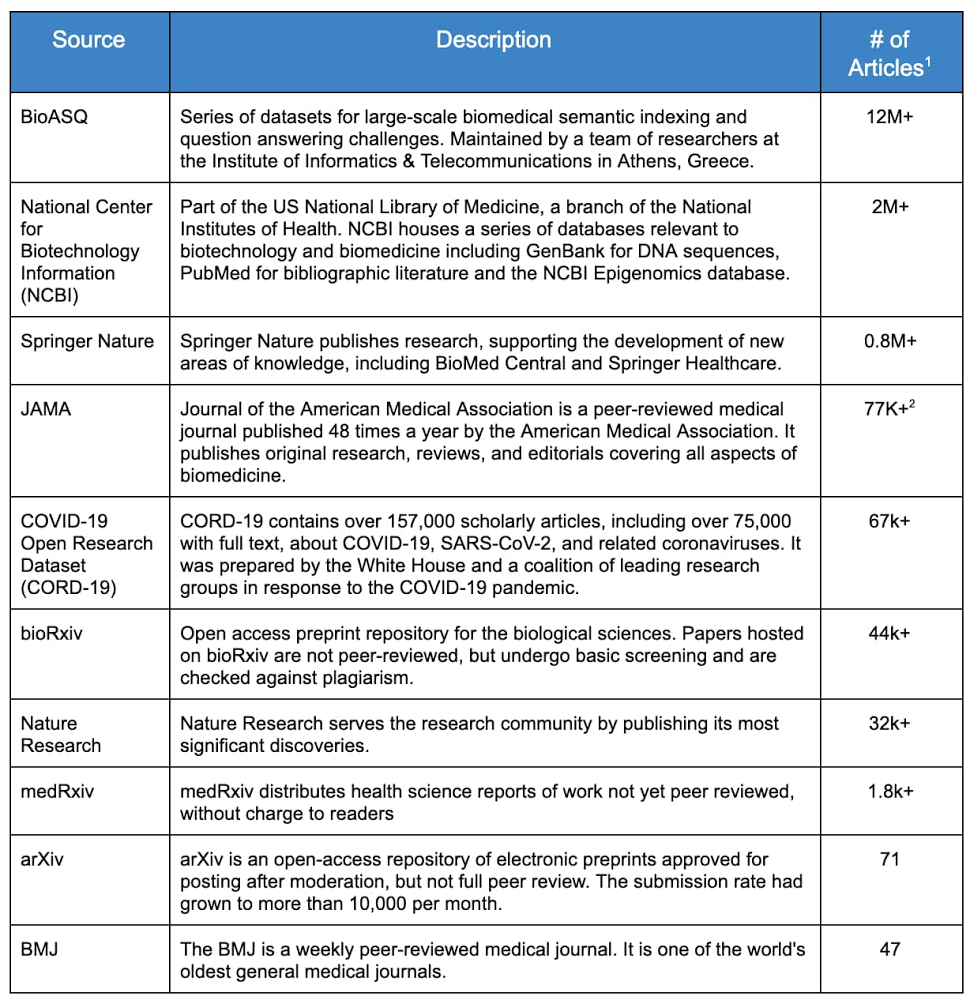
In response to the global pandemic, the White House and a coalition of research groups published the CORD19-dataset on Kaggle, the world’s largest online data science community. The goal—to further our understanding about coronaviruses and other diseases—caught the attention of many in the health policy, research and medical community. The Kaggle challenge has received almost 2 million page views since it launched in mid-March, according to this article in Nature.  The dataset, freely available to researchers and the general public, contains over 150,000 scholarly articles, thousands just on COVID-19, making it almost impossible to stay up-to-date on the latest literature. Furthermore, there are millions of medical publications with information that could enhance our scientific understanding of COVID-19 and other diseases. However, much of this literature is not readily consumable by machines and is difficult to digest and analyze using modern natural language processing tools. Enter the Google artificial intelligence (AI) community. External to the company, this is a group of data scientists known as Machine Learning Google Developer Experts (ML GDEs). They are a highly skilled community of AI practitioners from all over the world. With the support of Google Cloud credits and credits from the TensorFlow Research Cloud (TFRC), the ML GDEs began to tackle the problem of understanding the research literature. While not healthcare experts, they quickly realized they could help with the current crisis by applying their knowledge of big data and AI to the biomedical domain.The team came together in April under the audacious name of ‘AI versus COVID-19’ (aiscovid19.org) and established the objective of using state of the art machine learning and cloud technologies to help biomedical researchers discover new insights, faster, from research literature. Designing the DatasetThe first step by the ML GDE team was to reach out to biomedical researchers to better understand their workflows, tools, challenges, and most importantly, the ‘relevance’ in medical literature. They found some common insights: overwhelming amount of existing and new informationambiguous and inconsistent sources of truthlimited information retrieval functionality in current toolssearch based only on simple keywords multiple scattered datasets inability to understand the meaning of words in context One of the pillars of the current AI revolution is the ability of these systems to become better as they analyze more data. Recent work (BERT, XLNEt, T5, GPT3) uses millions of documents to train state of the art neural networks for NLP tasks. Based on these insights, they determined the best way to help the research community was to create a single dataset containing a very large corpus of papers, and then to make that dataset available in machine usable formats. Inspired by the Open Accessmovement and initiatives such as the Chan Zuckerberg Institute’s Meta, they sought to find as many relevant and unique, freely available publications and collect them into one easily accessible dataset designed specifically to train AI systems.Introducing BREATHEThe Biomedical Research Extensive Archive To Help Everyone (BREATHE), is a large-scale biomedical database containing entries from top biomedical research repositories. The dataset contains titles, abstracts, and full body texts (when licensing permitted) for over 16 million biomedical articles published in English. They released the first version in June 2020, and expect to release new versions as the corpus of articles is constantly updated by their search crawlers. Collecting articles originally written in different languages (other than English) is among the ideas on how to further improve the dataset and the domain specific knowledge that it tries to capture. While there are several COVID-19 specific datasets, BREATHE differs in that it is: broad – contains many different sources machine readablepublicly accessible and free-to-usehosted on a scalable, easy to analyze, cost-effective data-warehouse – Google BigQueryBREATHE Development ApproachThe ML GDE team identified the top ten web archives, or `sources’, with potential material based on three main factors: amount of data, quality of data, and availability. These sources are listed in Table 1.Table 1: Medical ArchivesData Mining Approach & ToolsThe development and automation of the article download workflow was significantly accelerated by using Google Cloud infrastructure. This system, internally called the “ingestion pipeline”, has the classical three stages: Extract, Transform and Load (ETL).  Google Cloud Platform BREATHE Dataset CreationExtract For all the resources, the ML GDE team first verified the content licensing, making sure they were abiding to the source’s terms of use, and then employed APIs and FTP servers when available. For the remaining resources, they adopted the ‘ethical scraping’ philosophy to ingest the public data.To easily prototype the main logic of the scrapers, their interns used a Google Colaboratory Notebook (or ‘Colab’). Colab is a hosted Python Jupyter notebook that enables users to write and execute Python in the browser, with no additional setup or configuration and provides free, limited access to GPUs, making it an attractive tool of choice for many machine learning practitioners. Google Colab provided us the ability to easily share code amongst our interns and collaborators. The scrapers are written using Selenium, a suite of tools for automating web browsers, among which they chose Chromium in headless mode (Chromium is the open source project on which the Google Chrome browser is based). All the raw data from the different sources is downloaded directly to their Google Cloud Storage bucket. TransformThe ML GDE team ingested over 16 million articles from ten different sources, each one with raw data formatted in CSV, JSON or XML and its own unique schema. Their tool of choice to efficiently process this amount of data was Google Dataflow. Google Dataflow is a fully managed service for executing Apache Beam pipelines on Google Cloud. In the transform stage the pipeline processes every single raw document, applying cleaning, normalization and multiple heuristic rules to extract a final general schema, formatted in JSONL. Some of the heuristic applied includes checks for null values, invalid strings, and duplicate entries. They also verified the consistency between fields with different names, in different tables, which represented the same entity. Documents going through these stages end up in three different sink buckets, based on the status of the operation: Success: for documents correctly processedRejected: for documents that did not match one or more of their rulesError: for documents that the pipeline failed to processApache Beam allows us to design logic that is not straightforward with an easy-to-read syntax (such as Snippet 1). Google Dataflow makes it easy to scale this process across many Google Cloud compute instances, without having to change any code. The pipeline was applied to the full raw data distilling it to 16.7 million records for a total of 100GB of JSONL text data.Snippet 1: Google Dataflow Processing ExampleLoadFinally the data was loaded into Google Cloud Storage buckets and Google BigQuery tables.BigQuery didn’t require us to manage any infrastructure nor does it need a database administrator – making it ideal for their project, which is composed mainly of data science experts. They iterated several times on the ingestion process, as they scaled the number of total documents processed. In the initial stages of data exploration, data scientists were able to explore the contents of the data loaded into BigQuery by simply using the standard Structured Query Language (SQL). One useful technique in this phase is to “sample” the dataset to discover non-conforming documents, for example to extract 5% of the whole dataset you can use this simple code:For more advanced queries, they used Google Colab and BigQuery Python API. For example, here’s how you can count the number of lines in each table:Using this approach, it was easy to calculate aggregate statistics about their dataset. If one considers all the abstracts in the BREATHE, there are 3.3 billion total words and 2.8 million unique words. Using Python and Colab, it was also easy to do some exploratory data analysis. For example, here’s a plot of the word frequencies:Google Public Dataset ProgramThe ML GDE team believes other data scientists may find value in the dataset, so they chose to make it available via the Google Public Dataset Program. This public dataset is hosted in Google BigQuery and is included in BigQuery’s free tier. Each user can process up to 1TB for free every month. This quota can be used by anyone to explore the BREATHE dataset using simple SQL commands. Watch this short video to learn about BigQuery and start querying BREATHE using the BigQuery public access program, today. What can YOU do with this dataset?The BREATHE dataset can be used in many ways to better understand and synthesize voluminous biomedical research and uncover new insights into biomedical challenges – such as the COVID-19 pandemic. The ML GDE team thinks there are many other interesting things that data scientists can build using BREATHE, such as training biomedical-specific language models, building biomedical information retrieval systems, or deriving new forms of unsupervised classification for niches of research in the vast biomedical domain. Some ideas may even address the challenging task of accurately translating articles to many different languages where non-native-english-speaking researchers and clinicians are often forced to understand and comprehend material in the original author’s language. The team is looking forward to seeing what the AI community can create with the BREATHE dataset.Cloud collaboration: it takes a villageOne of the distinct advantages of working in the cloud is that many geographically separated developers can work together on a single project. In this case, generating the dataset involved no less than 20 people on three continents and five time zones. Dan Goncharov, head of the 42 Silicon Valley AI and Robotics Lab led the team that drove the BREATHE dataset creation. 42 is a private, nonprofit and tuition-free computer programming school with 16 locations worldwide. The ML GDE team would like to acknowledge the work of Blaire Hunter, Simon Ewing, Khloe Hou, Gulnozai Khodizoda, Antoine Delorme, Ishmeet Kaur, Suzanne Repellin, Igor Popov, Uliana Popova, and especially the work of Ivan Kozlov, Francesco Mosconi (Zero to Deep Learning) and Fabricio Milo (Entropy Source).Next time: building a search tool using TensorFlow and state-of-the-art natural language architecturesIn this post, we went through the project background, the design principles, and the development process for creating BREATHE, a publicly available, machine readable dataset for biomedical researchers. In the next post, the ML GDE team will walk through how they built a simple search tool on top of this dataset using open source and state-of-the-art natural language understanding tools. Tools Used Creating BREATHEGoogle Networking & ComputeGoogle DataflowGoogle BigQuery (BQ)Google Cloud Storage (GCS)Google Cloud Public Dataset ProgramSelenium Google ColabPython 31. “Unique” articles as determined by DOI, however many that are listed with the same DOI contain valuable additional information.2. JAMA contained 70k+ articles with full body text that technically were duplicated in abstract form from other sources.
Quelle: Google Cloud Platform
Princeton University’s OIT connects students, staff, and faculty with Google Cloud and Palo Alto Networks

One of the biggest challenges organizations have faced due to the COVID-19 pandemic has been transitioning from in-person to remote working, and doing it securely, reliably, and quickly. This transition can be particularly tough for higher education institutions, which have to consider flexible options for faculty, students, and staff that let them be successful from across the globe.These were some of the issues Princeton University dealt with when it decided to transition its more than 12,000 faculty, students, and staff to work remotely due to the impact of COVID-19. Princeton’s Office of Information Technology (OIT) turned to Google Cloud and our partner Palo Alto Networks to execute this rapid shift, and provide secure, reliable remote access for all its users. To do this, Google Cloud and Palo Alto Networks helped deploy Prisma Access on Google Cloud to enable Princeton’s researchers, faculty, and students to stay securely connected to resources whenever they need them and at high speeds–even with thousands of people logging on simultaneously. Let’s look at some of the specific challenges Princeton’s OIT faced, and how Prisma Access on Google Cloud is helping.Joe Karam, Princeton’s Associate Director for Networking and Monitoring Services for OIT, leads a team responsible for network routing, switching, automation, and security. Karam knew the team had to work quickly to find a solution. “We had a variety of problems with performance and reliability—the performance would be stable, then unstable, and it would go back and forth,” he explains. “We knew it was causing a lot of grief for students and staff.” To fix the problems, Karam and his team considered upgrading the VPN or adding more on-premise hardware. But, none of the options were quite the right fit. Some had stringent licensing requirements: OIT staff would have had to match each license to a specific device, and regain control of licenses when students or staff left Princeton. Other solutions secured applications, but Karam needed an access solution that secured services.Karam’s team chose Prisma Access to quickly and securely support the university’s transition. It offered the same easy-to-use management interface the team was leveraging with Palo Alto Networks’ GlobalProtect firewall, along with Google Cloud’s best-in-class security and global infrastructure with five layers of data protection.“It’s been amazing to see the reliability improvements, which people tell us they really notice,” Karam says.“We never have to worry about scalability—that’s a big positive for IT. We look forward to continuing our partnership with Palo Alto Networks and Google Cloud to support over 2,000 unique faculty, students, and staff accessing files daily from six continents around the world.”Google Cloud and Palo Alto Networks believe that moving to the cloud can help enterprises simplify security. The goal of our joint solutions is to help more enterprises define, enforce, monitor, and maintain consistent security policies across on-premises, public cloud, and hybrid environments, so that more organizations can take advantage of everything the cloud has to offer. Visit the Google Cloud Marketplace to learn more about Prisma Access on Google Cloud.
Quelle: Google Cloud Platform