Online shopping gets more personal with Recommendations AI

With the continuing shift to digital, especially in the retail industry, ensuring a highly personalized shopping experience for online customers is crucial for establishing customer loyalty. In particular, product recommendations are an effective way to personalize the customer experience as they help customers discover products that match their tastes and preferences.Google has spent years delivering high-quality recommendations across our flagship products like YouTube and Google Search. Recommendations AI draws on that rich experience to give organizations a way to deliver highly personalized product recommendations to their customers at scale. Today, we are pleased to announce that Recommendations AI is now publicly available to all customers in beta.Upgrade your recommendation solution Instead of manually curating rules or managing cumbersome recommendation models in-house, you can upgrade your personalization strategy by replacing or complementing your existing solution with Recommendations AI.By putting a greater emphasis on each individual customer rather than on an item, Recommendations AI is able to piece together the history of a customer’s shopping journey and serve them with personalized product recommendations. Recommendations AI also excels at handling recommendations in scenarios with long-tail products and cold-start users and items. Its “context hungry” deep learning models use item and user metadata to draw insights across millions of items at scale and constantly iterate on those insights in real-time in a way that is impossible for manually curated rules to keep up with.Recommendations AI also delivers a simplified model management experience in a scalable managed service with an intuitive UI. This means your team no longer needs to spend months writing thousands of lines of code to train custom recommendation models while struggling to keep up with the state-of-the-art. Key updates to Recommendations AIYou can now get started with Recommendations AI with just a few clicks in the console. Once you create a Google Cloud project, you can integrate and backfill your catalog and user events data with the tools you already use, including Merchant Center, Google Tag Manager, Google Analytics 360, Cloud Storage, and BigQuery.Once the data import is complete, you can choose the model type, specify your optimization objective, and begin training your model. The initial model training and tuning takes just two-to-five days, then you can begin serving recommendations to your customers. To ensure that your setup is working like you want it to, you can preview the model’s recommendations before serving them to customers.In addition to making it easier to get started, we’ve also been collaborating with the Google Brain and Research teams to push the boundary of what’s possible for recommendation systems. As a result, our models can scale to support massive catalogs of tens of millions of items and ensure that your customers have the opportunity to discover the entire breadth of your catalog. Recommendations AI is also capable of correcting for bias with extremely popular or on-sale items, and can better handle seasonality or items with sparse data. Our model training infrastructure allows us to re-train your models daily to draw insights from changing catalogs, user behavior, or shopping trends and incorporate them into the recommendations being served.How customers are using Recommendations AIMany retailers from around the globe have realized tremendous value from Recommendations AI.Sephora, a multinational omni-channel retailer for beauty and personal-care goods with thousands of stores globally, is using product recommendations to personalize their customers’ e-commerce experience.“We wanted to deliver the same highly personalized shopping experience to our clients on our digital platforms that they receive in our physical stores,” says Jaclyn Luft, Manager, Site Personalization & Testing at Sephora. “We started working with Google Cloud to explore how we could leverage its innovative machine learning technology to provide enhanced personalization to our online customers through product recommendations.””Since implementing Recommendations AI we’ve seen impressive results with a 50% increase in CTR on our product pages and a nearly 2% increase in overall conversion rate on our homepage relative to our previous ML-driven recommendations,” Luft continues. “We are now evaluating how we can continue to test, iterate, and expand the application of Recommendations AI to power recommendations on other areas of our ecosystem, such as within the checkout flow and in our emails.” Hanes Australasia—home to many iconic Australian apparel and lifestyle brands—is another customer that’s powering personalization with Recommendations AI.“Recommendations AI delivers extremely good data execution and shows how Google Cloud can turn data into real commercial value,” says Peter Luu, Online Analytics Manager at Hanes Australasia. “When we A/B tested the recommendations from Recommendations AI against our previous manual system, we identified a double-digit uplift in revenue per session.”Luu also added, “the product is extremely easy to use—Google Cloud has provided the expertise, functionality, and performance, so we do not need to be machine learning experts to make the most of it.”Digitec Galaxus, the largest online retailer in Switzerland that offers a wide range of products to its customers from electronics to clothes, uses Recommendations AI to help their customers find products they are looking for.“At Digitec Galaxus, delivering a great online shopping experience to our customers is a top priority,” says Christian Sager, Product Owner for Personalization at Digitec Galaxus. “With Recommendations AI, we are able to provide personalized product recommendations to our customers at scale throughout our website. Recommendations AI is also a great reference to test and challenge our in-house recommendations algorithms against.”“During the pandemic, finding the product you need is more important than ever,” Sager explains. “In the past few months, we’ve noticed a strong increase in the usage of recommendations in general, with Recommendations AI performing with up to a 40% additional increase in CTR compared to the previous period. Customer needs evolved as the pandemic continued, and Recommendations AI adapted well to the changes and allowed us to keep up with our customers and their preferences.”Start using Recommendations AI today with a $600 free creditTo accompany the Recommendations AI public beta, we’re also introducing a new pricing structure, with three volume-based price tiers for predictions and a separate charge for model training and tuning. This new structure lets you determine how many models to keep active and whether to pause or unpause model training, giving you greater control over your costs. Additionally, all new Recommendations AI customers will receive a $600 credit on top of the general $300 free credit for new Google Cloud customers. This is typically sufficient to train a model and test its performance in production through a two-week A/B test. Learn more about the new pricing structure and free credit here.To get started using Recommendations AI see our step-by-step guide and check out our website, or contact sales for more information.
Quelle: Google Cloud Platform
Rethinking application modernization for CIOs

The current global crisis has only reinforced what was already true for many IT organizations—that they must increase agility and accelerate innovation to better serve customers and prevent future disruptions. But for many, maintenance of legacy IT systems has inhibited change and consumed disproportionate amounts of budget. In fact, a recent McKinsey study of enterprises found that legacy systems account for 74% of an organization’s IT spend while continuing to be a drag on innovation.Today’s crisis has only increased the urgency with which organizations must modernize their applications in the cloud. By embracing public cloud technologies, organizations can reduce infrastructure costs and management overhead while increasing agility, scalability, and security. But change is not easy, and determining the right path forward can be challenging when critical systems are on the line.At Google Cloud we’ve developed a number of best practices through our work with organizations of all sizes that we’re sharing in our new whitepaper, the CIO Guide to Application Modernization. In it, we share our insights on everything from modernizing your first applications all the way to transforming your entire software delivery strategy with a product delivery model. Getting started with application modernizationMost application modernization starts with evaluating your existing applications. By streamlining your existing application portfolio, you can improve efficiency, reduce complexity, and lower your Total Cost of Ownership (TCO). In our guide, we describe how to reorient your roadmap for application modernization through the lens of business services rather than applications.Designing, building, and using your new application platformYour digital transformation journey will begin to generate value even in its early phases.. Focusing on low-hanging fruit early means every new capability improves the organization’s ability to enhance business services to provide better value. In our guide, we’ll introduce you to what our Devops Research and Assessment (DORA) calls “The J-Curve of Transformation” which can help you determine the right path forward.Adopting a new product delivery modelUltimately, any changes to your organization’s IT structure must deliver value to your customers. In our guide, we share how we can help you reorient your IT organization to adopt a product-based model for delivering business capabilities quickly, efficiently and securely. Whether you’re an enterprise trying to untangle the challenges of a legacy Java environment or looking to adopt modern development principles, we’re here to support your transformation. Download the guide to view our in-depth recommendations and start your application modernization journey today.
Quelle: Google Cloud Platform

Traffic Director and gRPC—proxyless services for your service mesh

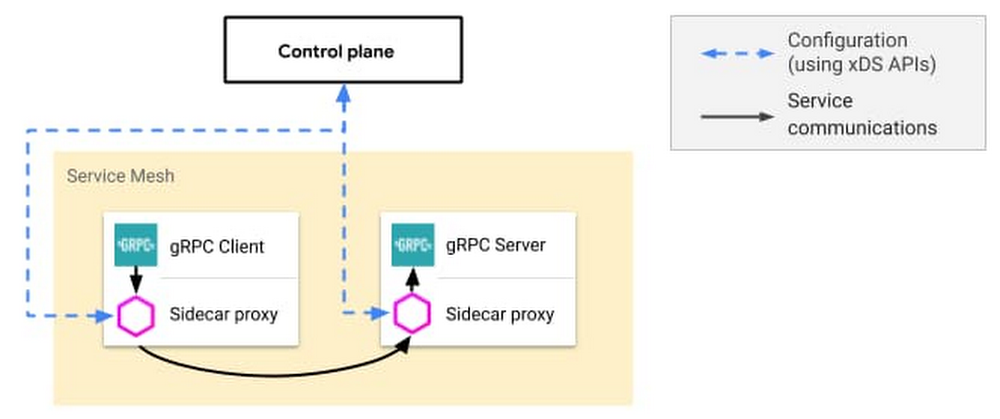
Lot of organizations turn to service mesh because it solves tedious and complicated networking problems, especially in environments that make heavy use of microservices. It also allows them to manage application networking policies, like load balancing and traffic management policies, in a centralized place. But adopting a service mesh has traditionally meant (1) managing infrastructure (a control plane), and (2) running sidecar proxies (the data plane) that handle networking on behalf of your applications.Illustrative service mesh with sidecar proxies configured by a control planeWe built Traffic Director, a Google Cloud-managed control plane, to solve that first barrier to service mesh adoption—you shouldn’t need to manage yet another piece of infrastructure (the control plane). Today, we’re happy to share a new approach to solving the second problem—you shouldn’t need to manage a fleet of sidecar proxies. With Traffic Director support for proxyless gRPC services, you can bring proxyless gRPC applications to your proxy-based service mesh or even have a fully proxyless service mesh.A service mesh with proxyless gRPC applications configured by Traffic DirectorTraffic Director support for proxyless gRPC servicesTraffic Director’s support for proxyless gRPC services is built on a simple idea: if Traffic Director can configure sidecar proxies to do load balancing on behalf of a gRPC client, why not have it just configure the gRPC client directly?gRPC, as you may know, is a high performance and feature-rich open-source RPC framework that underpins many of the Google Cloud Platform (GCP) services that you use every day. GCP uses it in the Google Cloud client libraries, which you use to reach services like Cloud Storage, Cloud Pub/Sub and many others. gRPC handles connection management, bidirectional streaming, and other critical networking functions. In short, it’s a great framework for building microservices-based applications.But, out of the box, gRPC only provides DNS-based name resolution and simple load balancing. For service mesh functionality (for example, dynamically discovering the backends for a service or global proximity-based load balancing), customers have traditionally turned to sidecar proxies. These sidecar proxies deliver powerful service mesh capabilities… but they’re also an additional piece of infrastructure to manage.gRPC + xDSTo make proxyless gRPC possible, we added xDS API support to the most recent version of gRPC. The xDS APIs are the same open source APIs used by the popular Envoy proxy. They enable xDS control planes (such as Traffic Director) to configure gRPC clients with service information such as endpoint address, health status, priority (based on proximity and capacity) and which policies to use when calling out to the service.Traffic Director provides endpoint information for a multi-regional service. Traffic is prioritized to the nearest healthy instances that have capacity, and can fail over automatically to other regions.Additionally, we added support for GCP-managed native gRPC health checks for your gRPC applications. Traffic Director collects data from these health checks and uses it to determine the health status of a service’s endpoints (as shown in the image above).These additions enable you to get the benefits of a service mesh without having to deploy sidecar proxies alongside your gRPC applications.Getting started with proxyless gRPCWe want to make it as easy as possible for you to get access to the benefits of service mesh. A big part of that is reducing the need for additional infrastructure. And the process of getting started with proxyless gRPC is easy too:Update your gRPC application to the latest versionUse the new `xds` gRPC name resolverAdd a small bootstrap fileConfigure services and policies in Traffic DirectorMore broadly, you can think of proxyless gRPC services as another way of deploying services in your service mesh (similar to services based on sidecar proxies). Traffic Director allows you to deploy both proxy-based and proxyless gRPC services in a service mesh.Traffic Director supports service mesh deployments that include both proxyless and proxy-based gRPC applicationsWe fully expect that customers will run service meshes that include both deployment models. We’ve even made it possible for a single gRPC client to call some services via the proxyless route and others via a sidecar proxy.When to deploy Traffic Director with proxyless gRPC servicesWe see three main use cases for the proxyless gRPC approach—simplified gRPC adoption (thanks to a managed networking experience), high performance services in a service mesh, and bringing service mesh to environments where you can’t add sidecar proxies.Managed networking for simplified gRPC adoptionWe talk to customers all the time who are considering adopting gRPC as part of their efforts to modernize their application stack. The benefits of gRPC are clear but, on its own, gRPC doesn’t solve problems like client-side load balancing, service discovery and global failover. Traffic Director’s support for proxyless gRPC services was built to solve these needs, thereby making it easier to adopt gRPC as part of a modernized deployment.Resource efficiency and performanceProxies consume resources and those may start to add up as you scale to hundreds or thousands of proxies. Plus, high-performance applications may find it difficult to meet performance targets when sending requests through multiple sidecar proxies (client sidecar proxy, server sidecar proxy, and back again for request/response exchanges).In our testing, we’ve found that proxyless gRPC can save on networking-related CPU costs compared to sidecar proxies. Benchmarks have shown that introducing sidecar proxies introduces latency due to additional network hops. The proxyless approach promises savings on both of these dimensions. Finally, we believe that this performance gain will be important for emerging use cases, such as service mesh deployments for telco network functions and 5G/edge computing.Service mesh for environments where you can’t add sidecar proxies.We’ve talked to customers who can’t necessarily add sidecar proxies to deployments. Some managed compute environments don’t let you spin up multiple processes (one for the application, one for the proxy) or make changes to an instance’s network stack (for example, using iptables). In such cases, proxyless gRPC applications provide a great way to get the benefits of service mesh.What’s next?Enterprise networks are heterogeneous. We built Traffic Director to be flexible so that we can support deployment options that meet your needs. Supported deployment options include Envoy sidecar proxies, Envoy middle/gateway proxies (including our Internal HTTP(S) Load Balancer, which uses Traffic Director under the hood) and, now, proxyless gRPC applications.This initial release is focused on service discovery and load balancing. We know that service mesh promises a lot more than that—layer 7-based traffic management and security, for example—but we’re excited about this first step. The traffic management capabilities that we’re announcing today, alongside new GCP-managed gRPC health checks, are just one step in making it easy to bring service mesh to your gRPC applications.We hope you’ll join us and check out the setup guides for Traffic Director with proxyless gRPC services on Compute Engine and Google Kubernetes Engine. To learn more and see Traffic Director’s support for proxyless gRPC services in action, watch our breakout session NET206 on NextOnAir, starting July 28, 2020.
Quelle: Google Cloud Platform

Migrate and modernize your on-prem data lake with managed Kafka

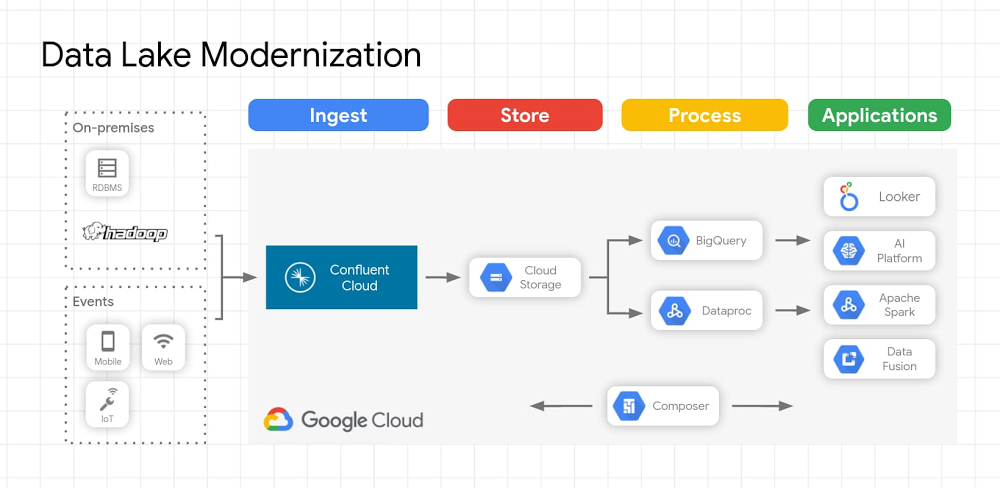
Data analytics has been a rapidly changing area of technology, and cloud data warehouses have brought new options for businesses to analyze data. Organizations have typically used data warehouses to curate data for business analytics use cases. Data lakes emerged as another option that allows for more types of data to be stored and used. However, it’s important to set up your data lake the right way to avoid those lakes turning into oceans or swamps that don’t serve business needs.The emergence of “keep everything” data lakesData warehouses require well-defined schemas for well-understood types of data, which is good for long-used data sources that don’t change or as a destination for refined data, but they can leave behind uningested data that doesn’t meet those schemas. As organizations move past traditional warehouses to address new or changing data formats or analytics requirements, data lakes are becoming the central repository for data before it is enriched, aggregated, filtered, etc. and loaded to data warehouses, data marts, or other destinations ultimately leveraged for analytics. Since it can be difficult to force data into a well-defined schema for storage, let alone querying, data lakes emerged as a way to complement data warehouses and enable previously untenable amounts of data to be stored for further analysis and insight extraction. Data lakes capture every aspect of your business, application, and other software systems operations in data form, in a single repository. The premise of a data lake is that it’s a low-cost data store with access to various data types that allow businesses to unlock insights that could drive new revenue streams, or engage audiences that were previously out of reach. Data lakes can quickly grow to petabytes, or even exabytes as companies, unbound from conforming to well-defined schemas, adopt a “keep everything” approach to data. Email, social media feeds, images, and video are examples of unstructured data that contain rich insights, but often goes unutilized. Companies store all structured and unstructured data for use someday; the majority of this data is unstructured, and independent research shows that ~1% of unstructured data is used for analytics. Open-source software and on-prem data lakesDuring the early part of the 2010s, Apache Hadoop emerged as one of the primary platforms for companies to build their data lake. While Hadoop can be a more cost-effective repository alongside a data warehouse, it’s also possible that data lakes become destinations for data with no value realization. In addition, directly integrating each data source with the Hadoop file system is a hugely time-consuming proposition, with the end result of only making data available to Hadoop for batch or micro-batch processing. This type of data capture isn’t suitable for real-time processing or syncing other real-time applications; rather than produce real-time streams of actionable insights, Hadoop data lakes can quickly become passive, costly, and less valuable.In the last few years, a new architecture has emerged around the flow of real-time data streams. Specifically, Apache Kafka has evolved to become a popular event streaming platform that allows companies to have a central hub for streams of data across an enterprise. Most central business systems output streams of events: retail has streams of orders, sales, shipments, and price adjustments; finance has stock changing prices, orders, and purchase/sale executions; web sites have streams of clicks, impressions, and searches. Other enterprise software systems have streams of requests, security validations, machine metrics, logs, and sometimes errors. Due to the challenges in managing on-prem Hadoop systems, many organizations are looking to modernize their data lakes in the cloud while maintaining investments made in other open source technologies such as Kafka.Building a modern data lakeA modern data lake solution that uses Apache Kafka, or a fully managed Apache Kafka service like Confluent Cloud, allows organizations to use the wealth of existing data in their on-premises data lake while moving that data to the cloud. There are lots of reasons organizations are moving their data from on-premises to cloud storage, including performance and durability, strong consistency, cost efficiency, flexible processing, and security. In addition to these reasons cloud data lakes enable you to take advantage of other cloud services including AI Platforms that help gain further insights from both batch and streaming data. Data ingestion to the data lake can be accomplished using Apache Kafka or Confluent, and data lake migrations of Kafka workloads can be easily accomplished with Confluent Replicator. Replicator allows you to easily and reliably replicate topics from one Kafka cluster to another. It continuously copies the messages in multiple topics, and when necessary creates the topics in the destination cluster using the same topic configuration in the source cluster. This includes preserving the number of partitions, the replication factor, and any configuration overrides specified for individual topics. Unity was able to use this technology for a high-volume data transfer between public clouds with no downtime. We’ve heard from other users that they’ve been able to use this functionality to migrate data for individual workloads, allowing organizations to selectively move the most important workloads to the cloud. Pre-built connectors let users move data from Hadoop data lakes as well as from other on-premises data stores including Teradata, Oracle, Netezza, MySQL, Postgres, and others. Once the data lake is migrated and new data is streaming to the cloud, you can turn your attention to analyzing the data using the most appropriate processing engine for the given use case. For use cases where data needs to be queryable, data can be stored in a well-defined schema as soon as it’s ingested. As an example, data ingested in Avro format and persisted in Cloud Storage enables you to:Reuse your on-premises Hadoop applications on Dataproc to query dataLeverage BigQuery as a query engine to query data directly from Cloud StorageUse Dataproc, Dataflow, or other processing engines to pre-process and load the data into BigQueryUse Looker to create rich BI dashboardsConnections to many common endpoints, including Google Cloud Storage, BigQuery, and Pub/Sub are available as fully managed connectors included with Confluent Cloud.Here’s an example of what this architecture looks like on Google Cloud:Click to enlargeTo learn more about data lakes on Google Cloud and Kafka workload migrations, join our upcoming webinar that will cover this topic in more depth: Modernizing Your Hadoop Data Lake with Confluent Cloud and Google Cloud Platform on July 23 at 10 am PT.
Quelle: Google Cloud Platform

Google Cloud’s Commitment to EU International Data Transfers and the CJEU Ruling

On July 16, 2020,  the Court of Justice of the European Union (CJEU) issued a ruling invalidating the EU US Privacy Shield Framework, but upholding the validity of EU Model Contract Clauses (MCCs), also known as Standard Contractual Clauses. Both of these mechanisms were created for the lawful transfer of personal data from the European Union (EU) to countries outside of the EU under the EU Directive, and then the EU’s General Data Protection Regulation (GDPR). Given the CJEU has upheld the MCCs, it is important to know that your use ofG SuiteandGoogle Cloud Platformmeets GDPR’s standards for transfer of personal data outside of the EU. Google Cloud has always been committed to compliance with EU privacy legislation since we began offering our first Google Cloud services in 2006.  We have ensured our products and services are built with the highest standards of security and privacy, enabling not only our customers in Europe—but all of our customers—to meet regulatory and compliance frameworks, even as legislation evolves. Millions of organizations rely on our cloud services to run their businesses, and we’re committed to helping them directly address global privacy and data protection requirements by offering industry-leading security, third-party audits and certifications, legal commitments, and products and services to support compliance needs.  Beginning in 2012, Google Cloud began offering MCCs as a data transfer mechanism, and in 2017, the Article 29 Working Party, the predecessor of the European Data Protection Board, concluded that Google’s agreements for international transfers of data for G Suite and Google Cloud Platform are in alignment with the European Commission’s MCCs. Our customers have been able to rely on Google Cloud MCCs for the international transfer of their data, and this continues today.Regardless of the location of the data, data protection remains a priority for Google. We will continue to follow and be certified against internationally-recognized privacy standards such as ISO 27018 and ISO 27701.We have been closely monitoring the developments around the evolution of the international data transfer mechanisms permitted under the General Data Protection Regulation (GDPR). We are currently studying the ruling, as well as related developments, and will keep you updated as things evolve.
Quelle: Google Cloud Platform

Week 1 recap of Google Cloud Next ‘20: OnAir

Google Cloud Next ’20: OnAir kicked off this week, and we couldn’t be more excited. From inspiring words from Google and Alphabet CEO, Sundar Pichai, to a deep dive into the future of cloud with Thomas Kurian, to dozens of industry-specific breakout sessions, this week set the tone for what’s to come during our nine-week series, with plenty of resources to get started.Spotlight on customersWe’re continually inspired by the ways Google Cloud customers are growing and transforming in the cloud. Here are just a few of the Google Cloud customer stories we’ve recently shared.Deutsche BankFOX SportsProcter & GambleGroup RenaultTelefónicaVerizonGoldman SachsCarrefourHumanaSpotifyWe also heard directly from our innovative customers and partners during ourindustry keynotes, including MLB, Lowe’s, Capital One, Activision Blizzard King, New York State Department of Labor, Mayo Clinic Platform and Groupe Renault who each shared stories about how Google Cloud is helping them adapt to the current environment. Key announcements from the weekThomas Kurian, CEO of Google Cloud, kicked off Next OnAir with an overview of Google Cloud’s strategy and how we’re helping businesses grow and transform digitally. Read Thomas’ blog post and watch the keynote.Data is a critical component of decision making across organizations, but is often scattered across multiple public clouds, resulting in a fragmented user experience, multiple copies of data across different environments, siloed IT and varying levels of access and controls needed. This week we announced BigQuery Omni, a flexible, multi-cloud analytics solution that allows you to  cost-effectively access and securely analyze data across Google Cloud, AWS, and Azure (coming soon), without leaving the familiar BigQuery user interface. BigQuery Omni is powered by Anthos, and is an extension of our continued innovation and commitment to multi-cloud. BigQuery Omni is currently in private alpha. Learn more in our blog post, or read our recent Forbes BrandVoice piece on the future of multi-cloud.At Google, we believe the future of cloud computing will increasingly shift to private, encrypted services that give users confidence that they are always in control over the confidentiality of their data. To complement our encryption in-transit and at-rest, Google Cloud will now offer the ability to encrypt data in use—while it’s being processed. This is called Confidential Computing and our first product in this space, Confidential VMs is now in beta. Learn more in our blog post.As US government agencies, and the enterprises that serve them, adopt cloud technologies, security and compliance requirements around data locality and personnel access are key considerations. Many cloud providers have built separate environments to run government workloads, requiring users to operate two distinct application and operation supply chains. To provide a better way, this week we announced Assured Workloads for Government (private beta) to help you serve government workloads without the compromises of traditional “government clouds.” Learn more in our blog post or read our recent Forbes BrandVoice article.The need for flexible work has increased the volume of demands on everyone’s time, and many of us want the tools we already use to be even more helpful. That’s why we introduceda better home for workin G Suite that integrates core tools like video, chat, email, files, and tasks. This makes them better together, so you can stay on top of things from anywhere. Learn more in our blog post, or check out G Suite Vice President and General Manager Javier Soltero’s keynote, available on demand starting next Tuesday, July 21.Thomas’s keynote also included recaps of key announcements made in the past month including Filestore High Scale (beta), Cloud VMware Engine (GA), Active Assist,Data QnA (alpha), and our expansion of Bare Metal Solution in five more regions.Our partners play a critical role in supporting the needs of our customers. At our Partners Summit this week, we announced updates to our Partner Advantage program which helps partners differentiate themselves through certification, expertise, and specialization. We also announced the Google Cloud ISV/SaaS Center of Excellence (CoE), a new resource to help independent software vendor (ISVs) transform their applications with open, cloud-agnostic architectures, improve user experience through AI/ML and voice, and deliver intelligent insights from their applications by providing rich analytics to business users.Industry-focused demos to help you get hands-on with the cloud As part of our broader Next OnAir program, we also launched 18 industry-focused demos this week, where attendees could explore AI/ML for manufacturing use cases, how to fuel growth with retail market insights, how to transform customer service with Contact Center AI, and more. You can find the complete list on the Demos page.Looking ahead to Week 2: Productivity and collaboration with Google CloudNext OnAir started off with a bang, and we can’t wait to share more in the eight weeks ahead. Next week we’ll be giving you a deeper look into productivity and collaboration with Google Cloud. Here’s where you can browse the complete session catalog.COVID-19 accelerated the shift to flexible work faster than we ever thought possible, and an organization’s success has never been more reliant on virtual collaboration. In our solution keynote, Helpful and Human: G Suite’s Vision for Your Future Workspace, Vice President and General Manager Javier Soltero will share what the future of G Suite means for teams and organizations. You’ll get a deep dive on our newest, most exciting innovations and hear how G Suite is helping our customers navigate what’s next.We’re also excited to be bringing you weekly live technical talks and learning opportunities, aligned with each week’s content. Click “Learn” on the Explore page to find each week’s schedule. Haven’t yet registered for Google Cloud ’20 Next: OnAir? Get started at g.co/cloudnext and check out the 200+ sessions over the coming weeks.Click to enlargeSee you next week!
Quelle: Google Cloud Platform

Use IAM custom roles to manage access to your BigQuery data warehouse

When migrating a data warehouse to BigQuery, one of the most critical tasks is mapping existing user permissions to equivalent Google Cloud Identity and Access Management (Cloud IAM) permissions and roles. This is especially true for migrating from large enterprise data warehouses like Teradata to BigQuery. The existing Teradata databases commonly contain multiple user-defined roles that combine access permissions and capture common data access patterns. Mapping those Teradata roles to predefined or custom BigQuery IAM roles requires a deeper understanding of your organization’s common data access patterns.Based on our experiences helping customers migrate to BigQuery, we’ve identified some common data access patterns that our customers define as roles in their Teradata environments. In this post, you’ll learn how to map those common Teradata user-defined roles to BigQuery IAM custom roles. Those roles may be helpful not only to users who migrate from Teradata but also to any data admins who manage data warehouses on BigQuery. Understanding this concept ahead of your migration can help save time and ensure that your users and data are protected throughout the process.Teradata access rights codes and user-defined rolesIn Teradata, access rights codes describe the user access privilege on a particular database, table, or column. There are some common access rights codes combinations that describe common actions that a user can perform on Teradata objects. For example, one user may only read and modify metadata, another user may read the data, and yet another user may read and modify that data.  Here are the common combinations of access rights codes with corresponding role name and description:Note that to build views or stored procedures in both Teradata and BigQuery, a user should have access to objects that are referenced in those views or procedures in addition to the schema editor or developer role. Cloud IAM equivalent permissionsOur Cloud IAM controls are used by some of our most security-conscious customers, and you can map many of the concepts you’re used to in Teradata into Google Cloud. You can grant permissions to access BigQuery by granting roles to a user, a group, or a service account. There are three types of roles in Cloud IAM:Predefined roles are managed by Google Cloud and meant to support common use cases.Custom roles are a user-specified list of permissions. You’ll leverage them to map BigQuery IAM to Teradata user-defined roles.Primitive roles existed prior to the introduction of Cloud IAM.Below, you’ll see how to map identified Teradata roles to BigQuery Cloud IAM permissions:Note that none of the above roles grant a user permissions to create datasets, or grant permissions to other users. Those actions are best performed by the data warehouse admin, for whom BigQuery specifies the predefined Cloud IAM role roles/bigquery.admin.Create and assign Cloud IAM rolesYour next step is to create corresponding Cloud IAM custom roles with the privileges listed above. The fastest way to assign multiple permissions to a role is to use gcloud command, as described in the documentation.In Google Cloud, you can create a custom role on a project or organization level. If you decide to create a role on the organization level, consider adding resourcemanager.projects.get and resourcemanager.projects.list permissions to the schema reader and schema editor roles. Those additional permissions authorize a user to see information about projects in your organization, which fosters openness and transparency in the cloud environment.After you define the custom roles, the next step is to bind those roles to a Google group (groups offer a convenient method of assigning roles to users). These bindings of roles to groups form a policy, and you can attach this policy to Google Cloud resources at any level of your entire organization’s resource hierarchy (shown in the image below). Attaching policies in this way provides optimal resource sharing by limiting the need to duplicate data as a means for sharing data.For example, an engineer in your organization may create stored procedures in the BI-dev project, which reads data stored in the Data-dev project, in addition to engineers running their BigQuery jobs from the Billed-dev project to easily gauge the engineering spend using the project-level total in your invoice. To implement this in Google Cloud, grant your engineering group these roles: Developer role on BigQuery datasets in BI-devData reader role on BigQuery datasets, tables, and views in Data-devPredefined BigQuery roles/bigquery.jobUser role or at least bigquery.jobs.create permission on Billed-dev project.  Give it a shotIn addition to trying out the roles we’ve described here, consider using BigQuery predefined roles, which are helpful in managing your data warehouse users. Special thanks to Daryus Medora, who verified the permissions mapping and provided valuable feedback on this content.
Quelle: Google Cloud Platform

Getting to know Looker – common use cases

As we welcome Looker’s team and their business intelligence (BI) and analytics technology to Google Cloud, we’re exploring all the platform can do. Looker helps to leverage the full potential of data you’re collecting or have access to. You can model the data, analyze it, create visualizations, embed real-time dashboards, build data applications, and share the right data with the people who need it in your organizations. In many ways, Looker is like an API for your data.With the potential to gather so much data today, that part often seems easy. But putting that data to work for you can really bring value. Get started with Looker’s unique approach to BI with some of these common use cases, and consider how you might apply some of these in your own organization. Once you know what you’re looking for and have some concrete numbers, you can decide which data can help you make decisions and set business goals. Check out these explainers to learn more about BI concepts and how you can work across business, IT, and operations teams to apply them appropriately.Building beautiful dashboards. After all the work of getting data into BigQuery and applying analytics to it, dashboards are a great payoff. To build one that users will love, start by knowing what the reason for the dashboard is, and who the audience is within your organization. From there, get approval on the overall look of the dashboard, then start working on the actual creation. Ideally, your dashboard will be easy to scan and offer opportunities for users to drill down further if needed. You can also pay attention to details like flow and color to really entice users. Learn more.Measuring customer profitability. Having a handle on customer profitability can help you understand whether customers are actually costing you money, rather than making you money. The measure of customer profitability is more complex than lifetime value or net margin of a transaction—it should include all touch points the customer has with your company. Those could include customer service interactions, fulfillment requirements, or overuse of services.You can use a step-by-step process to determine customer profitability, including identifying customer channels, segmenting customer groups, and digging into your collected data to understand more about various costs related to customers. Once that process is in place, you can find that number as often as possible, then use the resulting information to adapt your business strategies and goals. Learn more.Understanding customer segmentation. Customer segmentation refers to splitting customers into groups based on shared characteristics. These groups may have demographic, lifestyle, or behavioral differences that are useful to know. For example, you might segment customers using the recency, frequency, monetary (RFM) method to identify consumer habits and high-value shoppers. There are some typical customer segmentation models, ranging from simple to complex, and you may choose various models to understand your business and make product and budget decisions. Using customer segmentation can also inform your marketing and promotional strategies, and deliver the right content to users. With Looker, queries are made directly against your database and not by moving or extracting data to workbooks, cubes, .csv files, proprietary databases, or desktops. This key Looker differentiator promotes data integrity while keeping data movement to a minimum and access to sensitive information restricted. Learn more.Using conversion funnels. Measuring customer or user experience can include lots of gray areas, but a conversion funnel is a way to explore how site visitors are progressing as they move around your website. You can do an initial conversion funnel analysis as a baseline measurement, then find where you can optimize the site experience for customers. You may measure conversions, transactions, and leads, but may also include average order value or gross margin. There are typically five steps in a site purchase funnel. Learn more.Going beyond BI. Business intelligence is just the beginning—you can go beyond simply action-oriented insights to perform other tasks within Looker. For example, you can trigger workflows in other systems based on unified metrics within Looker using the Action Hub, securely and reliably send governed data to other systems, or bring routine tasks into Looker to close the loop between insight and action. Learn more.These use cases just scratch the surface. To find more inspiration about what’s possible, head over to the Looker blog to discover the BI topics most pertinent to your business, catch one of Looker’s breakout sessions at Google Cloud Next ‘20: OnAir, or explore this new page.
Quelle: Google Cloud Platform

Enabling SAP enterprises and mission critical workloads on Google Cloud

For the vast majority of businesses, the future they see today is very different than the one they saw before the global pandemic: different priorities, different resources, and different approaches to risks and rewards.Thinking about the future can be especially challenging for our enterprise customers running SAP applications. Many kicked off 2020 with their plans for digital transformation in full swing, including long-awaited migrations from legacy SAP instances onto modern, cloud-native S/4HANA environments. Many other enterprises were at least considering similar initiatives, based on Google Cloud’s ability to enable, support, and drive new sources of innovation for customers pursuing SAP HANA migrations.New concerns about business continuityAlmost all of these companies have something in common: They’re deeply concerned with recognizing and responding to the business technology challenges that emerged and continue to emerge from the pandemic—and which, in some cases, exposed them to significant and costly disruptions.Based on our conversations with customers running SAP environments, three of these challenges stand out as especially important and impactful:Managing and minimizing infrastructure risk: Beginning in March of this year, IT departments learned what happens when their supply chains get stretched past the breaking point. As network and storage hardware suddenly grew scarce, so did access to the onsite IT staff required to install and maintain these systems. And today, as a result, operating and maintaining an on-premises SAP environment looks quite a bit riskier than it once did.Adapting to new realities for elasticity and scale: The height of the pandemic featured extremes in scale and demand; some businesses shut down unused data center infrastructure, while others raced to keep up with massive, yet highly unpredictable, surges in demand.Retooling for faster, smarter business analytics: Many enterprises were confronting market disruptions and business-model shifts even before the pandemic. But the past few months accelerated the evolution of new business models and competitive landscapes. Winning in this environment will be much easier for enterprises equipped with smarter, faster, better-integrated analytical capabilities.Today, we’re sharing a number of ways we’re helping SAP customers address these challenges. Announcing Mission Critical Support for SAP customersTo address the support requirements for businesses running SAP, Google Cloud launched Premium Support earlier this year. Premium Support provides third party support of applications like SAP to meet the unique needs of these applications, including a specialized team of Technical Solution Engineers with the right expertise to support SAP customers running on Google Cloud. This global team of experts will offer 24/7 support, brings deep SAP and Google Cloud Platform knowledge to customer inquiries, and can assist with higher quality and more timely issue resolution. For customers who require an even greater level of support, Google Cloud is announcing Mission Critical Support to help SAP customers that cannot tolerate any type of downtime.  When your business can’t afford to be down, our Mission Critical Support provides:Fastest response time with a 5 Min Service Level objective response. We work to thoroughly understand your environment ahead of time so if an incident arises, we are prepared to act.   Proactive and preventative engagement with support experts that can navigate your issues quickly. Mission Critical Support teams know your architecture, which partners you work with, your workloads, the areas of the world in which you operate to help inform their response. A collaborative approach for continuous improvement of your environment.Mission Critical Support involves a deep understanding of your SAP environment. Through an Assessment, Google Cloud’s Professional Services Organization (PSO) will evaluate your environment. Based on the assessment findings, you will take corrective action during Remediation to ensure your SAP environment is ready. On Boarding entails Google Technical Solutions Engineers (TSE) working to determine your Service Level Indicators. Customers running Mission Critical support can file priority zero (P0) cases. The ongoing benefit is Google Cloud’s partnership with you to deliver continuous improvement for your Mission Critical SAP environment.Enterprise grade business continuity FFF Enterprises, Inc. has been a trusted name in wholesale pharmaceutical distribution for decades, serving over 80% of US hospitals. After encountering outage issues running SAP on a legacy infrastructure and hosting provider, FFF Enterprises recognized the need for a change, and transitioned their critical SAP S/4HANA environment to Google Cloud. This move has provided FFF with higher performance and more robust and dependable infrastructure than their legacy systems at a comparable or lower cost.Migrating our SAP hosting service with Google Cloud and Managecore has been a game changer. It maximizes the reliability of our IT systems and puts us on a path toward advancing our digital transformation. Jon Hahn, Chief Information Officer, FFF EnterprisesFor SAP customers, our robust support offering is underpinned by highly reliable infrastructure capabilities. Google Cloud’s rugged infrastructure maintains business continuity for all of Alphabet’s applications at massive scale; we are ready to help keep your SAP environment up and running with these key capabilities: Multilayer infrastructure high availability (HA): Google Cloud ishighly available by design, with a redundant infrastructure of data centers around the world that contain zones designed to be independent from each other. Live Migrationkeeps virtual machine instances running through planned host system events, such as hypervisor  or hardware updates. VM instances also have the ability to restart automatically in the event of unplanned downtime. Fast, flexible, reliable disaster recovery (DR): Many SAP enterprises learned during the pandemic just how vulnerable their data centers can be to supply chain disruptions. Using Google Cloud for DR ensures that critical SAP workloads and data sources are protected.Efficient and reliable data protection: Creating a backup strategy and choosing suitable services for backup are key to protecting your SAP systems. Google Cloudoffers several native capabilities for automated, cost-effective SAP system backup. You can also use the backup options and interfaces that are offered by applications (for example, SAP HANA Backint) or managed backup solutions from third parties such as Actifio, Commvault and Dell EMC.  Simple, cost-effective ways to scale fast while minimizing risk: For many SAP enterprises, managing risk comes down to ensuring that one or two business-critical apps are available and securely running at peak performance. A common solution here involves “lift and shift” projects that migrate applications to the cloud as quickly and simply as possible, while trading off some of the advantages of more complex migrations.Learn more about how SAP customers can ensure support, and business continuity with Google Cloud—read “How to run SAP on Google Cloud if high availability is high priority,” and visit SAP on Google Cloud.
Quelle: Google Cloud Platform

Powering past limits with financial services in the cloud

Editor’s note: We asked financial institution KeyBank to share their story of moving their data warehouse from Teradata to Google Cloud. Here are details on why they moved to cloud, how they did their research, and what benefits cloud can bring.At KeyBank, we serve our 3.5 million customers online and in-person, and managing and analyzing data is essential to providing great service. We process more than four billion records every single day, and move that data to more than 40 downstream systems. Our teams use that data in many ways; we have about 400 SaaS users and 4,000 Tableau users exploring analytics results and running reports.We introduced Hadoop four or five years ago as our data lake architecture, using Teradata for high-performance analytics. We stored more than a petabyte of data in Hadoop on about 150 servers, and more than 30 petabytes in our Teradata environment. We decided to move operations to the cloud when we started hitting the limits of what an on-premises data warehouse could do to meet our business needs. We wanted to move to cloud quickly and open up new analytics capabilities for our teams. Considering and testing cloud platformsTeradata had worked well for us when we first deployed it. Back then, Teradata was a market leader in data warehousing, with many of the leading banks invested in it. We chose it for its high-performance analytics capabilities, and our marketing and risk management teams used it heavily. It also worked well with other SaaS tools we were using, and SaaS remains a good tool for accessing our mainframe.Ten years into using Teradata, we had a lot of product-specific data stores. It wasn’t a fully formed data lake architecture. We also maintain more than 200 SaaS models. In 2019, our Teradata appliances were nearing capacity, and we knew they would need a refresh in 2021. We wanted to avoid that refresh, and started doing proof-of-concept cloud testing with both Snowflake and Google Cloud.When we did those trials, we ran comparative benchmarks for load time, ETL time, performance and query time. Snowflake looked just like Teradata, but in the cloud. With Google, we looked at all the surrounding technology of the platform. We couldn’t be on a single cloud platform if we chose Snowflake. We picked Google Cloud, since it would let us simplify and offer us a lot more options to grow over time.Adapting to a cloud platformAlong with changing technology, our teams would have to learn some new skills with this cloud migration. Our primary goal when moving to a cloud architecture was getting the performance of Teradata at the cost of Hadoop, but on a single platform. Managing a Hadoop data lake running on Teradata architecture is complicated—it really takes two different skill sets. There are some big considerations that go into making these kinds of legacy vs. modern enterprise technology decisions. With an on-premises data warehouse like Teradata, you govern in capacity, so performance varies based on the load on the hardware at any given time. That led to analytics users hitting the limits during month-end processing, for example. With Google Cloud, there are options for virtually unlimited capacity. Cost savings was a big reason for our move to cloud. Pricing models are very different with cloud, but ultimately we’re aiming not to pay for storage that’s just sitting there, not in use. Cloud gives us the opportunity to scale up for a month if needed, then back down after the peak, managing costs better. Figuring this out is a new skill we’ve learned. For example, running a bad query in Teradata or Hadoop wouldn’t change the on-premises cost for that query, but would consume horsepower. Running that query on Google Cloud won’t interfere with other users’ performance, but would cost us money. So we’re running training to ensure people aren’t making those types of mistakes, that they’re running the right types of queries.Shifting to cloud computingThe actual cloud migration involved working closely with the security team to meet their requirements. We also needed to align data formats. For example, we had to make sure our ETL processing could talk to Google Cloud Storage buckets and BigQuery data sets. We’re finding that for the most part the queries do port over seamlessly to BigQuery. We’ve had to tweak just a handful of data types. Since moving to cloud, the early results are very promising; we’re seeing 3 to 4x faster query performance, and we can easily turn capacity up or down. We have five data marts in testing to use real-world data volumes to get comparison queries.We’re still making modifications to how we set up and configure services in the cloud. That’s all part of the change that comes when you’re now owning and operating data assets securely in the cloud. We had to make sure that any personally identifiable information (PII) was stored securely and tokenized. We’ll also continue to tune cost management over time as we onboard more production data. Managing change and planning for the futureThe change management of cloud is an important component of the migration process. Even with our modern data architecture, we’re still shifting established patterns and use cases as we move workloads to Google Cloud. It’s a big change to go to a capacity-based model, where we can change capacity on demand to meet our needs, vs. needing more hardware with our old Teradata method. Helping 400 users migrate to newer tools requires some time and planning. We hosted training sessions with help from Google, and made sure business analysts were involved up front to give feedback. We also invested in training and certifications for our analysts.We’re on our way to demonstrating that Google can give us better performance based on the cost per query than Teradata did. And using BigQuery means we can do more analytics in place now, rather than the previous process of copying, storing, and manipulating data, then creating a report. As we think through how to organize our analytics resources, we want to get the business focused on priorities and consumer relationships. For example, we want to know the top five or so areas where analytics can add value, so we can all be focused there. To make sure we would get the most out of these new analytics capabilities, we set up a charter and included cross-functional leaders so we know we’re all keeping that focus and executing on it. We’re retraining with these new skills, and even finding new roles that are developing. We built a dedicated cloud-native team—really an extension of our DevOps team—focused on setting up infrastructure and using infrastructure as code. The program we’ve built is ready for the future. With our people and technology working together, we’re well set up for a successful future.
Quelle: Google Cloud Platform


