Google Cloud Next ‘20: OnAir—delivering infrastructure for all your apps

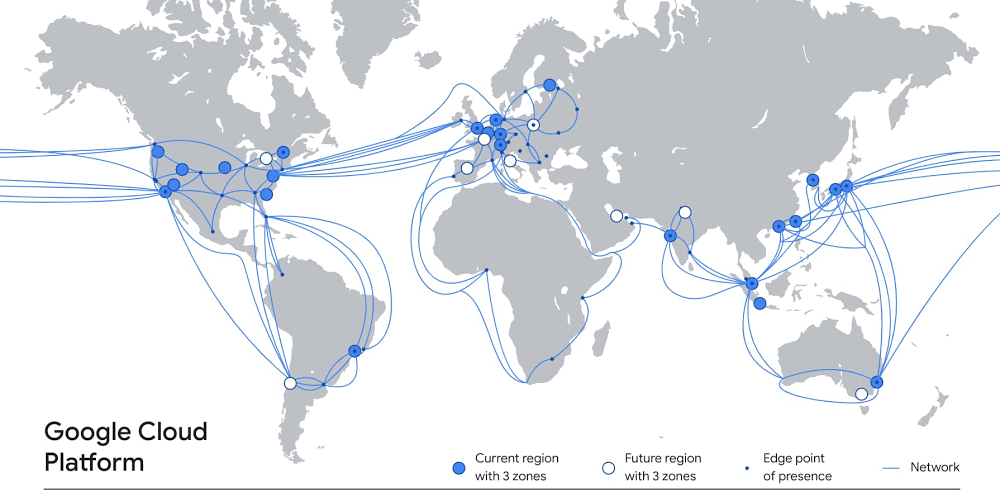
The applications you run on Google Cloud rely on extensive amounts of infrastructure, deployed around the world, in dozens of data centers, across hundreds of points of presence, and connected by a system of high-capacity fiber optic cables that encircle the globe. Inside our data centers, you’ll find the latest compute, storage and network systems and services on which to run a wide variety of workloads—from lightweight microservices to high performance computing to demanding enterprise applications. And that infrastructure is growing all the time, delivering more capacity and resilience, and better performance for your end users.At the same time, we’re always working to simplify that infrastructure complexity for you, so setting up and using Google Cloud infrastructure is easy and seamless. Today, we want to tell you about recent enhancements to Google Cloud’s global infrastructure, as well as new deployment options and functionality that you can take advantage of. A global presenceLet’s start with our worldwide footprint. At Next ‘19 in San Francisco, Google Cloud counted 19 regions around the world. Since then, we’ve opened five new regions in Jakarta, Las Vegas, Osaka, Salt Lake City and Seoul. We’ve also announced new forthcoming regions, including Toronto, Warsaw, Delhi, Doha, and Melbourne. Combined with 144 network edge locations and counting, these regions deliver the services, capacity and performance you need to ensure a terrific experience for your users.Those regions rely on robust networks to transport data between them, including private subsea cables. Today, we announced the new Grace Hopper cable that will run between the United States, the United Kingdom, and Spain. When Grace Hopper is commissioned in 2022, it will be one of the first new transatlantic cables to go live since 2003, delivering 16 fibre pairs of capacity, powering a variety of Google services like Gmail, Meet and of course Google Cloud.A flexible, secure networkEnterprises are increasingly adopting hybrid and multi-cloud to deliver the best experiences for their customers. The network is at the foundation of this transformation, but is getting exponentially more complex to manage, secure, and scale. To help enterprise customers with these challenges, we recently expanded our partnership with Cisco to bring the best of Cisco and Google Cloud technologies together, with a turnkey networking solution: Cisco SD-WAN Cloud Hub with Google Cloud. This joint solution will help our customers simplify enterprise networking and advance security capabilities, while helping IT teams minimize operational costs and meet application service-level objectives.And today, we’re announcing a new secure, easy way to connect to Google Cloud, with Private Service Connect. By taking a service-centric approach to networking and abstracting the underlying infrastructure, Private Service Connect creates service endpoints in consumer VPCs that provide private connectivity and policy enforcement, so you can easily connect services across different networks and organizations. Further, with Private Service Connect, traffic is not exposed to the public internet; customers can access services directly and securely over Google’s global network. Read this blog to learn more. Private Service Connect complements Service Directory, which we launched in March to help customers simplify service management and operations. Together, Private Service Connect and Service Directory let you easily and securely connect to and manage services at scale. As enterprises use Private Service Connect to access more first- and third-party services, Service Directory helps engineering teams to publish and discover them.In addition, you can further manage your network with Network Intelligence Center, Google Cloud’s comprehensive network monitoring, verification and optimization platform. Centralized monitoring reduces troubleshooting time and effort, increases network security and improves overall user experience. We are excited to announce updates to two of the modules in the platform: Firewall Insights is now in beta and Performance Dashboard is generally available. Firewall Insights brings intelligence and proactive management to network security, while Performance Dashboard offers real-time visibility into packet loss and latency at a per-project level. Finally, for customers with hybrid or multi-cloud deployments, Cloud CDN now supports serving content from on-prem data centers, or even other clouds. See this infographic to learn more about Cloud CDN.Industry-leading computeOf course, one of the many reasons people choose Google Cloud is for access to the latest high-performance compute and storage services. On the compute side, Google Compute Engine can be configured with some of the most powerful, cost-effective hardware, like efficient VMs (E2), one of our newest families of general-purpose virtual machines. E2 features dynamic resource management that delivers the lowest total cost of ownership (TCO) on Google Cloud and is our fastest growing new virtual machine family on Compute Engine. It now offers machine types with up to 32 vCPUs and is available in all Google Cloud regions.We also recently announced the Accelerator-Optimized VM family (A2), the first public cloud offering to feature the NVIDIA Ampere A100 GPUs. The A2 was designed for demanding workloads such as machine learning and high performance computing, providing up to 16 A100 GPUs in a single instance.For customers running large VM fleets, we announced the general availability of OS patch management service, to keep your operating systems up-to-date and reduce the risk of security vulnerabilities.The service works on Compute Engine and enables you to apply OS patches across a set of VMs, receive patch compliance data across your Windows or Linux environments, and automate installation of OS patches—all from one centralized location. The current release of OS patch management is available at no cost through December 31, 2020. To learn more about the service, check out our NEXT session: Managing Large Fleets of Compute Engine VM Fleets.The right storage for all your workloadsFor many applications, the performance is only as good as the underlying storage. If you need to support workloads such as Electronic Design Automation (EDA), video processing, genomics, manufacturing and financial modeling, we recently launched Filestore High Scale, a high-performance, scale-out file system. Currently in beta, the new Filestore High Scale tier is a fully managed service and makes it easy to mount file shares on Compute Engine VMs. With High Scale, it’s simple to deploy a file system that can scale to hundreds of thousands of IOPS, 10s GB/s throughput, and 100s of TBs.And if you’re looking for reliable, high-performance block storage, there’s Persistent Disk, which delivers industry-leading price performance for both HDD and SSD to satisfy your needs. Today we’re excited to announce an expanded approach to our Persistent Disk product portfolio, giving you the ability to pick the performance that best fits your workload: Best suited for most enterprise applications, we will have Balanced PD, giving you the best price per GB. For customers seeking the best price per IOPS for performance sensitive workloads such as databases or persistent cache we will have Performance PD. We will also introduce our Extreme PD SKU, well-suited for the highest performance workloads such as SAP HANA or large in-memory databases. This strategy is all about tailoring your storage to your workload, so we can deliver on your price and performance needs. Support for all your workloadsAll this infrastructure is in service of running your workloads, however you see fit. In the early days of Google Cloud, we started with a cloud-native platform as a service (App Engine), but today, our infrastructure supports a broad range of your most demanding enterprise workloads. For example, you can now run your VMware workloads on Google Cloud, using our Google Cloud VMware Engine service, which recently became generally available. This first-party offering lets you run a fully managed VMware environment so you can easily lift and shift your existing on-premises VMware based workloads into Google Cloud with no changes to your apps, tools or processes. Or perhaps you need to run Microsoft and Windows workloads. Google Cloud offers a first-class experience for these, too. Customers cite reliability and performance advantages as reasons they initially chose Google Cloud for migrating these workloads. They can also leverage the platform’s unique features—sole-tenant nodes, CPU overcommit, containerization, and managed services—to reduce their overall license spend. Further, Google Cloud provides an opinionated path to modernization to further reduce licensing costs and move to open-source alternatives.As SAP customers continue to adopt Google Cloud, we are continuously innovating to improve ease of migration, performance and scalability as well as lower barriers to entry for analytics and machine learning. Recently, we updated our SAP HANA certifications to include Google Compute Engine’s N2 family of VM instances, based on 2nd Generation Intel Xeon Scalable Processors. These N2 VMs improve performance and reduce waste with better alignment with SAP licensing increments. We also added SAP NetWeaver certifications for AMD-based N2D VM instances with improved performance compared to prior Google Cloud offerings based on our SAP Application Performance Standard (SAPS) benchmark testing, and at a lower-cost. Finally, in addition to running workloads on Google Cloud Platform, our Bare Metal Solution lets you run specialized workloads such as Oracle databases on dedicated hardware, close to Google Cloud. This can simplify your path of moving from on-premises to cloud, while reducing migration risks and helping you lower overall costs faster. We recently brought Bare Metal Solution to five additional regions, with four more regions on tap by the end of the year. Migrate and manage with easeTo make it easier to rapidly migrate to Google Cloud, today we’re announcing our Rapid Assessment and Migration Program (RAMP), publicly available today. Built on feedback from customers and partners, RAMP offers end-to-end migration guidance and training, as well as incentives to help you offset a significant portion of your migration cost. RAMP also brings together a full suite of tools for every phase of the migration journey to accelerate the process.And once your workloads are on Google Cloud, you don’t want to have to choose between performance and cost, or functionality and ease of use. Our goal is to create a platform that delivers terrific performance, that is easy to use, for a great price. That’s why we built Active Assist, a portfolio of intelligent tools and capabilities to help you manage complexity in your cloud operations. Active Assist leverages data, machine learning, automation, and intelligence to help customers focus on three key areas: making proactive improvements to your cloud with smart recommendations, preventing mistakes from happening in the first place with better analysis, and helping you figure out why something went wrong with intuitive troubleshooting tools. To learn more about Active Assist, be sure to check out our Next OnAir session, CMP100: Cloud is Complex. Managing it Shouldn’t Be. New security controlsWe want you to be able to operate your mission critical workloads securely, efficiently, and effectively, and we strive to simplify and reduce toil along the way. Today we’re simplifying the way you can use Google Cloud Armor to help protect your websites and applications from exploit attempts, as well as Distributed Denial of Service (DDoS) attacks.We’re announcing the beta release of Cloud Armor Managed Protection Plus, a bundle of products and services that helps protect your internet-facing applications for a monthly subscription fee. We’re making curated Named IP Lists available in beta. We’re expanding our set of pre-configured WAF rules with beta rules for Remote File Inclusion (RFI), Local File Inclusion (LFI), and Remote Code Execution (RCE).You can learn more about our security announcements here. Infrastructure is hard; Google Cloud makes it easyBuilding and managing the right infrastructure to power your workloads can be hard—we know, we do it day in, day out, at a scale that few other providers can lay claim to. Thankfully, building and managing your cloud infrastructure doesn’t have to be difficult—simply build your environment on top of Google Cloud, and automatically gain from our global presence, robust network, industry-leading compute and storage hardware, and intelligent, automated management capabilities. To learn more about Google Cloud infrastructure, register for Google Cloud Next ‘20: OnAir, and check out over 50 infrastructure keynote, breakout and spotlight sessions that go live this week.
Quelle: Google Cloud Platform

New Private Service Connect simplifies secure access to services

As the use of cloud services increases and matures, organizations want to streamline the process of securely connecting to services at scale. But for different domains to communicate, cloud and network architects have traditionally spent a lot of time exchanging infrastructure-level information like IP addresses and coordinating subnets with technologies such as VPC peering. They also have to manage complex routing topologies across different networks and organizations. This can be challenging for enterprises that want to keep services completely isolated to address security concerns or policy requirements.At Google Cloud, we want to help you fundamentally change how you consume and deliver applications in the cloud, with a service-centric approach to networking. We’re excited to announce Private Service Connect in alpha, which allows you to connect and consume first- and third-party as well as customer-owned services easily and privately. It creates service endpoints in consumer VPCs that provide private connectivity and policy enforcement, allowing you to easily connect services across different networks and organizations. Private Service Connect abstracts the underlying infrastructure for both the teams consuming and delivering services, making it easier for you to use value-added services. With Private Service Connect, traffic stays private and secure over Google’s global network. See the overview video.“In today’s data-driven world, organizations need to securely connect to increasingly large volumes of data spread across different networks and organizations. Google Cloud’s new Private Service Connect will allow our joint customers to consume Snowflake faster and more securely when they are connecting to Snowflake from Google’s network.” – Vikas Jain, Head of Security Product Management, SnowflakeIn short, Private Service Connect allows you to: Simplify connectivity to services: You can easily and privately connect to and access Google Cloud services (e.g., Cloud Storage, Bigtable), third-party partner services (e.g. Snowflake), and your company’s own applications. Services can be consumed directly in their virtual networks without requiring middleboxes, proxies, or other complex configurations, simplifying the management of cloud architectures.Protect your network traffic: When consuming services, you can prevent your network traffic from being exposed to the public internet, reducing exposure to potential security threats; traffic remains on Google’s backbone network, extending private transit to the “last mile.” Accelerate cloud migrations: Since the underlying infrastructure is not exposed, connecting to and managing services is much simpler, more secure and private. You can accelerate your cloud migrations by simply connecting from on-premises to new services in the cloud, while enforcing the security standard and best practice of leveraging a private IP space.Discover service-centric networkingIn March, we launched Service Directory, which helps customers simplify service management and operations. Together, Private Service Connect and Service Directory allow you to easily and securely connect to services and manage them at scale. While Private Service Connect lets you connect and privately access services, Service Directory helps principals (users and applications) discover and publish those services, so you can deliver services faster and more securely.Let’s connectOur goal is to give you the right networking solutions for connecting your business to Google Cloud. With Private Service Connect, you can access and connect to services faster, more easily protect your network traffic, and accelerate your migration to the cloud. To try the product, please contact your Google Cloud account team, and click here to learn more about Google Cloud’s networking portfolio. And be sure to tune in to Google Cloud Next ‘20: OnAir this week, where we’re highlighting enhancements to our infrastructure.
Quelle: Google Cloud Platform

RAMP up your cloud adoption with new assessment and migration program

Today’s enterprises are under increased pressure to migrate to the cloud. Maybe an enterprise has an upcoming data center contract or hardware refresh cycle that they want to avoid. Perhaps developers are hitting performance thresholds because they don’t have enough capacity, or because procuring hardware takes too long. Or a migration might be triggered by an acquisition, licensing and support issues, or compliance and security concerns. And of course, businesses around the world have been impacted by the global pandemic, causing massive demand to innovate and modernize right now.Helping solve your unique challenges is our top priority. Migrating to the cloud must be simple and provide clear advantages. To help ease the complex challenges our customers are facing, we are launching the Google Cloud Rapid Assessment & Migration Program (RAMP), a holistic, end-to-end migration program that enables a simpler and faster path to success for our customers and partners.Repeatable processes, predictable resultsOver the years, we’ve learned a lot from listening to our customers and helping them migrate to Google Cloud. It has been interesting to learn from their experiences with other cloud providers about why certain projects succeed where others fail. In many cases, the success of cloud migration projects is determined by the ability to accurately and efficiently assess project requirements and dependencies up front. Organizations that take the time to do a complete, thorough analysis of their IT environments are consistently more successful in their cloud projects. By understanding their requirements, organizations can make informed decisions, allowing them to create a more comprehensive migration plan with improved priorities. Many customers tell us that Google Cloud is the easiest platform to build on and work with. To help with your migration planning, we’ve standardized our process into a phased model with predictable steps and repeatable outcomes:Assess and evaluate your IT landscape and workloadsPlan what can move, what should move, and in what orderMigrate by picking a path, and get startedOptimize your operations and save on costsWe want to help you reduce risk and costs while accelerating your success by providing a clear path to business value. To simplify your migration journey across each phase, RAMP is built on six key pillars to meet your cloud adoption and onboarding needs:Guidance – Migration best practices for business and technical leadership including white papers, reference architectures, and CIO guides for application migration, data center transformation, and large-scale migration.Training – Advanced labs and training resources to get you startedTools – Google Cloud-native tools and partners to make assessment and migration easier, faster, and more efficientPartners – Thousands of trusted partners to help you move to, build, and work in Google CloudGoogle Cloud Professionals – Hands-on with Google Cloud subject matter experts including Google Professional ServicesOffers – Customer and partner incentives for workload migrationGet started with your cloud migrationMigrating to the cloud should be easy, even if your project is large and has lots of moving parts. But there’s a right way and a wrong way to migrate—with RAMP, we want to make sure it works right for you. To help get things off the ground, we offer a free discovery and assessment so you can start crafting a migration plan. In addition, here are some other potential first steps you can take as you embark on your migration journey, all of which we’re eager to help you with: Review the material provided as part of RAMPMeet with partners, customer engineers and solution architectsPerform a discovery and assessment of your IT landscapeCraft a pilot for 100 low-risk VMsExperience the ease of migration and power of running VMs in Google CloudCreate a detailed cloud architecture and migration plan for your remaining workloadsOur team has helped scores of enterprises migrate to the cloud. Let your business be the next one we help. To get started, click here to estimate your cloud migration costs with a free assessment.
Quelle: Google Cloud Platform

Google Cloud Armor: Introducing 3 key features to protect your websites and applications

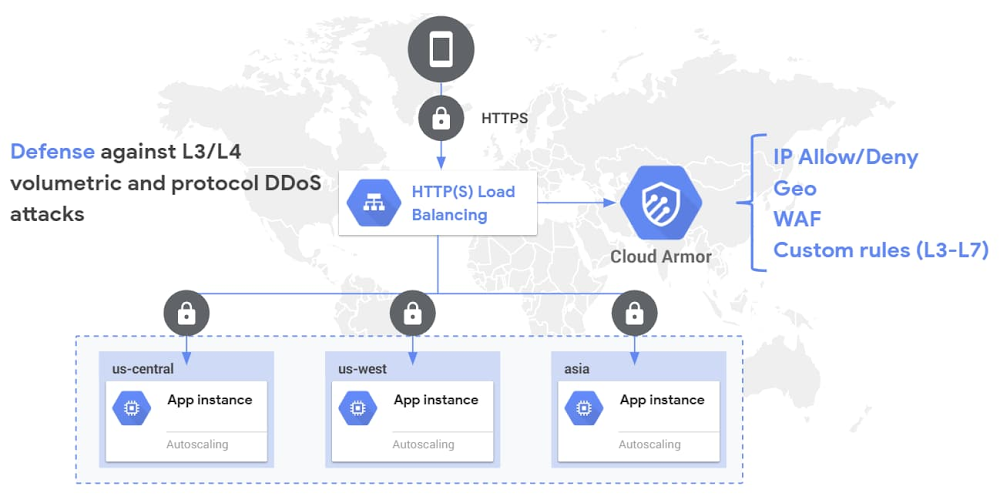
With the seemingly never-ending list of threats, keeping your websites and applications secure is a constant challenge. At Google, we strive to help you operate your mission critical workloads securely and efficiently, while reducing toil along the way. Over the first half of this year we’ve made several critical features and capabilities generally available for Google Cloud Armor, includingWAF rules, geo-based access controls, a custom rules language, support for CDN Origins servers, and support for hybrid deployment scenarios. At Google Cloud Next ’20: OnAir we’re simplifying the way you can use Cloud Armor to help protect your websites and applications from exploit attempts as well as distributed denial-of-service (DDoS) attacks.We’re announcing the beta release of Cloud Armor Managed Protection Plus, a bundle of products and services that helps protect your internet-facing applications for a predictable monthly subscription fee. We’re making Google-curated Named IP Lists available as a beta. We’re continuing to expand our set of pre-configured WAF rules by launching beta rules for Remote File Inclusion (RFI), Local File Inclusion (LFI), and Remote Code Execution (RCE).Cloud Armor: DDoS Prevention and WAF.Introducing Cloud Armor Managed Protection PlusCloud Armor Managed Protection Plus leverages the edge of Google’s network, as well as a set of products and services from across Google Cloud, to help protect your applications from DDoS attacks and targeted exploit attempts. With Managed Protection, you can now benefit from the same scale and expertise Google employs to protect your applications and mission critical services from malicious activity on the internet.Managed Protection tiers (visible to customers enrolled in beta)Managed Protection is available in two service tiers: Standard and Plus. All existing Cloud Armor users, as well as workloads behind any of our global load balancers, are automatically enrolled in Managed Protection Standard. At this level, you get Google-scale volumetric and protocol-based DDoS protection for any of your globally load balanced applications and services, as well as access to Cloud Armor WAF and layer 7 (L7) filtering capabilities, including the pre-configured WAF rules subject to usage based pricing based on rules, policies, and requests. Cloud Armor Managed Protection Plus, which is now in beta, is a subscription service with a predictable, enterprise-friendly monthly pricing model that mitigates cost risk from defending against a large L7 DDoS attack. Managed Protection Plus streamlines and bundles in DDoS protection, Cloud Armor WAF, and other future value added services. Customers that subscribe to Managed Protection Plus will get access to DDoS and WAF services, and curated rule sets for a predictable monthly price based on the size of a deployment. Since Cloud Armor WAF usage is included in Managed Protection Plus, subscribers no longer need to worry about the number of queries processed or the size of an L7 attack. Managed Protection Plus subscribers will also have access to a growing list of advanced capabilities, including Named IP Lists and future Google-curated rule sets and services. Sign up your projects for access to the beta.Managed Protection Plus subscription (visible to customers enrolled in the beta).Introducing Named IP Lists Named IP Lists, now in beta, are Google-curated rule sets containing a pre-configured list of IP addresses that can be referenced and reused across policies and projects. We’re starting with providing Named IP Lists that have source IP ranges for common upstream service providers that many of our users would want to allow through their Cloud Armor security policies.Named IP Lists.Customers often have to configure Cloud Armor security policies with a large set of IP ranges to allow traffic from an upstream provider. With Named IP Lists, customers no longer have to self-manage the list of their upstream providers’ IP addresses and instead can rely on Google to curate and keep up to date the list of IPs. We’re now working with a growing list of service providers to ensure that customers can seamlessly permit traffic from third-party services through a Cloud Armor security policy without having to keep track of the service providers’ changing lists of source IPs. You can now refer to these Named IP Lists while crafting custom rules. The underlying list of IPs is kept up to date by regular syncs with the third-party service providers’ APIs.New WAF rules: RFI, LFI, RCEAs part of our effort to expand the scope of the pre-configured WAF rules to all Cloud Armor customers, we are making RFI, LFI, and RCE rules available as a beta. Collectively, these rules contain industry standard signatures from the ModSecurity core Rule Set to help mitigate the  Command Injection class vulnerabilities while enhancing the out-of-the-box coverage for OWASP Top 10 vulnerabilities as well.Like the other pre-configured WAF rules, the new rules contain dozens of sub-signatures and are tunable on a per-application basis by end users. As usual, a rich set of telemetry including per-request logging, near real-time request volume metrics, and correlated security findings are sent to Cloud Logging, Cloud Monitoring, and Cloud Security Command Center respectively. ConclusionGoogle Cloud Armor is helping protect a rapidly growing set of customers’ mission critical workloads while helping support their compliance requirements, like PCI DSS, for their Google Cloud deployments. With the capabilities and services we announced this week, you can simplify your deployments and reduce operational overhead when integrating with upstream partners and service providers.More resources:Cloud Armor Managed Protection Plus beta sign-up formNamed IP Lists documentationWAF Rule Tuning GuideCloud Armor product page
Quelle: Google Cloud Platform

Helping teach a community cloud skills with Google Cloud Associate Cloud Engineer certification

“Unconventional” doesn’t begin to describe Joy Payton’s career path in technology. Before becoming the Data Education Supervisor at the Children’s Hospital of Philadelphia and an adjunct faculty member at Yeshiva University, Joy spent 10 years working as a full-time volunteer in prisons, schools, and homeless shelters across Spain, Bolivia, and El Salvador. While Joy was always interested in tech, her time volunteering showed her the power of education and its ability to change people’s lives at every level.“I came back to full-time work because I love technology and I love education,” Joy said. “I’m lucky enough to combine the two.” But Joy still has that passion for helping underserved communities. She recently earned her Google Cloud Associate Cloud Engineer certification to grow professionally, but is also excited to use the skills she’s learned to help everyone she’s teaching—from a wide variety of backgrounds—work with the latest technology so they can thrive in a cloud-first world.“It’s exciting knowing that I have the skills in Google Cloud Platform and can help other people at all levels,” Joy explained. “I can really help someone grow their skills that will help them make a living, to help them provide for their families, and also improve a lot of organizations in under-resourced areas that are doing really important, good things.” With her certification, Joy has inspired others outside of her work to earn their own Google Cloud Associate Cloud Engineer certification and change their career path. And these certifications have measurable results. An independent third-party research organization found that almost one-in-five certified individuals were able to switch to a job that better utilizes cloud skills. In fact, 70% of Google Cloud certified individuals who applied for jobs received at least one job offer, with 42% percent receiving two or more. Additionally the Google Cloud certification impact report found that 17%, or almost one-in-five, of individuals received a raise at their existing job after becoming certified. “I had a conversation with someone who has a lot of information science experience but is not a programmer… and she said, ‘Can I pursue this?’” Joy recalled. “I said, ‘Absolutely. This initial associate-level exam is a great overview of lots of different things… If nothing else, this will give you a chance to learn a lot, figure out what parts you like, and what parts you don’t.’” Joy also wants to use the skills she’s built with her certification to help nonprofit organizations that serve under-resourced communities. “At the end of the day what I would love to do is go back into some of these lower-resourced areas and say, ‘Hey, NGOs [non-governmental organizations], I would like to help you boost your signal. Let’s take a look at your data.’’’ Joy explained. “‘And not only can I help you, NGO, can I help the community you serve? What’s the population you serve? What are they like?’ Because the wonderful thing about technology is not the formal degrees you have, it’s what you can do.” Want to learn more about Joy’s story? Watch our full conversation below: If Joy has inspired you to learn more about the Google Cloud Associate Cloud Engineer certification, register for our no-cost “Next Steps: Associate Cloud Engineer Certification (ACE)” Cloud Study Jam session at Next ‘20: OnAir on July 29. Ready to start preparing for your Google Cloud Associate Cloud Engineer certification? Sign up to receive a six-week learning path designed to help you prepare.
Quelle: Google Cloud Platform

3 paths for disaster recovery for SAP systems on Google Cloud

Disaster recovery (DR) is all too often an afterthought in business continuity strategies. Even enterprises with complex systems and terabyte upon terabyte of sensitive data can be guilty of having outdated and untested DR plans, or no DR plan at all. An effective DR plan focuses on the technology systems supporting critical business functions; it involves a set of policies and procedures for recovering and/or continuing vital technology infrastructure and systems following any kind of disaster. Essentially, in an effective DR plan, technology systems will transition from the primary site to the DR site. One of the biggest challenges companies face when creating DR plans is deciding between self-managed, on-prem hardware or cloud solutions. For enterprises and organizations with complex monolithic applications, the relative ease of expanding their existing on-prem solutions for disaster recovery is tempting; after all, using a cloud DR solution would require refactoring and modernization. But there are some hefty risks associated with on-premises hardware—labor-intensive maintenance, infrastructural rigidity, potential outages, networking limitations, high latencies, and data storage and retrieval issues. SAP customers teetering between the two strategies should consider a number of important factors. What matters to your disaster recovery strategyThere is no one-size-fits-all approach to disaster recovery. Strategies differ from application to application according to structure, function, and objective. The most successful DR plans consider the entire technology network and the company’s end-goals. Identifying the best strategy, architecture, and toolset for your business begins with defining your Recovery Time Objective (RTO), which is how long you can afford to have your business offline, and your Recovery Point Objective (RPO), which is how much data loss you can sustain before you run into compliance issues due to financial losses. The smaller your RTO and RPO goals are, the more costly the application will be. Every organization, regardless of its situation and goals, also needs to determine and factor in the costs to the business while the system is offline, and the costs for data loss and re-creation.3 types of applications and 3 paths to DR Depending on the application and databases involved, there are several ways of replicating data and the corresponding application configuration from the primary site to the DR site. Path 1: RTO within days/RPO depends on functionThis scenario is meant for non-critical business applications and non-production environments; it has a recovery time objective in the range of a few hours to a few days, with a recovery point objective of less than a day. In the event of a disaster, SAP systems running in Google Cloud are recovered from persistent disk snapshots, backups stored in Cloud Storage buckets, or both. New VMs for database and application servers can also be created from Compute Engine machine images (beta). In addition, SAP HANA databases can be recovered directly from Cloud Storage buckets, when the SAP HANA Backint agent for Google Cloud (beta) is used for database backup. The frequency of backups for SAP system database and application servers determines the RPO. One of the key advantages with this path is that there are no costs incurred for having systems in standby mode (hot or cold) during normal operations until the time point of a disaster, as new VMs are created after a disaster. Additionally, managed backup solutions from third parties such as Actifio, Commvault and Dell EMC can also be used. Path 2: RTO in less than one day/RPO within minutesThis path is meant for applications that a business can function without temporarily, provided there’s a reasonable recovery plan. In the event of a disaster, the recovery approach for SAP application servers is from persistent disk snapshots or Google machine images (which is the same as that of the previous path). For database server recovery, the approach will differ based on the type of database that’s underlying the SAP system (SAP HANA or other databases). The SAP HANA database has an asynchronous replication feature that ensures near real-time replication. For other databases, the recovery approach is based on the specific features for replication or restore from backup, and replay of the most recent logs that are replicated. Because you can recover the database to any point in time until the time of the last replicated log, you help protect the system from potential user error. In Google Cloud, persistent disk snapshots and Compute Engine machine images can have multiregionalstorage locations for geo-redundancy of data. Cloud Storage buckets also offer the additional option of dual-region storage locations that combine the performance of a single region with geo-redundancy. The key consideration in this approach is the benefit of shorter RTO/less RPO, which comes with the cost that’s incurred for running a database server in a DR site (for data or log replication). An additional risk could be the potential capacity crunch in the DR region to stand up application servers within the targeted RTO. This can be mitigated by either making reservations for capacity (at an additional cost) or by running a non-productive system, like a quality assurance or test system, in the DR region whose capacity can be repurposed for the recovery of a production system in the event of a disaster. Path 3: RTO in minutes/RPO as close to zero as possibleThis final strategy is best suited for business-critical applications. With this path, the full reservation of resources is guaranteed at the disaster recovery site. The SAP systems in the DR region are always on and configured to the same size as the source systems, which ensures that your applications will recover quickly. While the benefit of the lowest RTO/RPO numbers comes at the cost of constantly running servers in the DR region, Google Cloud’s innovative pricing, with options like Sustained use discounts, allows you to architect a cost-effective DR strategy. In any of the paths that you choose for DR, Google Cloud’s premium networking brings industry-leading network performance, software-defined networking, global virtual private networks, and best-in-class security, all of which enable a simplified, yet robust and reliable DR architecture.More considerations for planning your DR strategyAfter you’ve defined the RPOs and RTOs that will guide your DR design, consider capacity planning and automation as part of your larger business continuity plan. Begin by making sure there’s enough capacity available to stand up a copy of a development system, so that you can control how to develop and transport any emergency SAP changes to the production system. Although initiating a DR plan is usually a manual task, recovery and startup should be automated to ensure fast and error-free recovery. With Google Cloud, infrastructure is considered as code—we believe that repeatable tasks like provisioning, configuration, and deployment should be automated. All Google Cloud customers have access to infrastructure as code (IaC) capabilitieswhere you can repeatedly build, start, and stop landscapes (these are the three steps needed to bring systems back into operation). For SAP installations, Google Cloud also offers specific deployment manager/terraform scripts that not only reduce infrastructure creation times but also automate typical SAP system configurations, such as an SAP HANA Cluster setup with HSR and Pacemaker (full list of configurations here). These scripts can be enhanced or customized for specific deployment use cases, including standing up systems in the first recovery path mentioned above. Google Cloud also has additional automation tools like Cloud Scheduler which, in combination with Cloud Functions and Cloud Pub/Sub, can be used to automate your backups as well as testing of your DR strategies.Don’t wait to develop your DR planMost businesses have learned firsthand that planning for the unexpected requires urgent attention. It begins with developing your DR plan—but that’s not enough. Your plan needs to address the full recovery process, from fail-over to fail-back, which includes planning, architecting, testing, and iterating or updating. Keep your business objectives top of mind so that your solution provides the right service, at the right cost. Once your plan is in place, remember that frequent testing and updating is critical to business continuity and DR strategies. And finally, automate whenever and wherever possible. Automation can be daunting without features like Cloud Scheduler, Cloud Functions, and Deployment Manager. With these features ready and at hand in Google Cloud, with minimum effort, your DR plan will be always ready to go and error-free.To learn more about creating the optimal disaster recovery strategies for your SAP systems and applications on Google Cloud, download our whitepaper SAP on Google Cloud: Disaster Recovery Strategies and view this video on Google Cloud Disaster Recovery Strategies and Solutions for SAP Customers.
Quelle: Google Cloud Platform

IDC study shows Google Cloud Platform helps SMBs accelerate business growth with 222% ROI

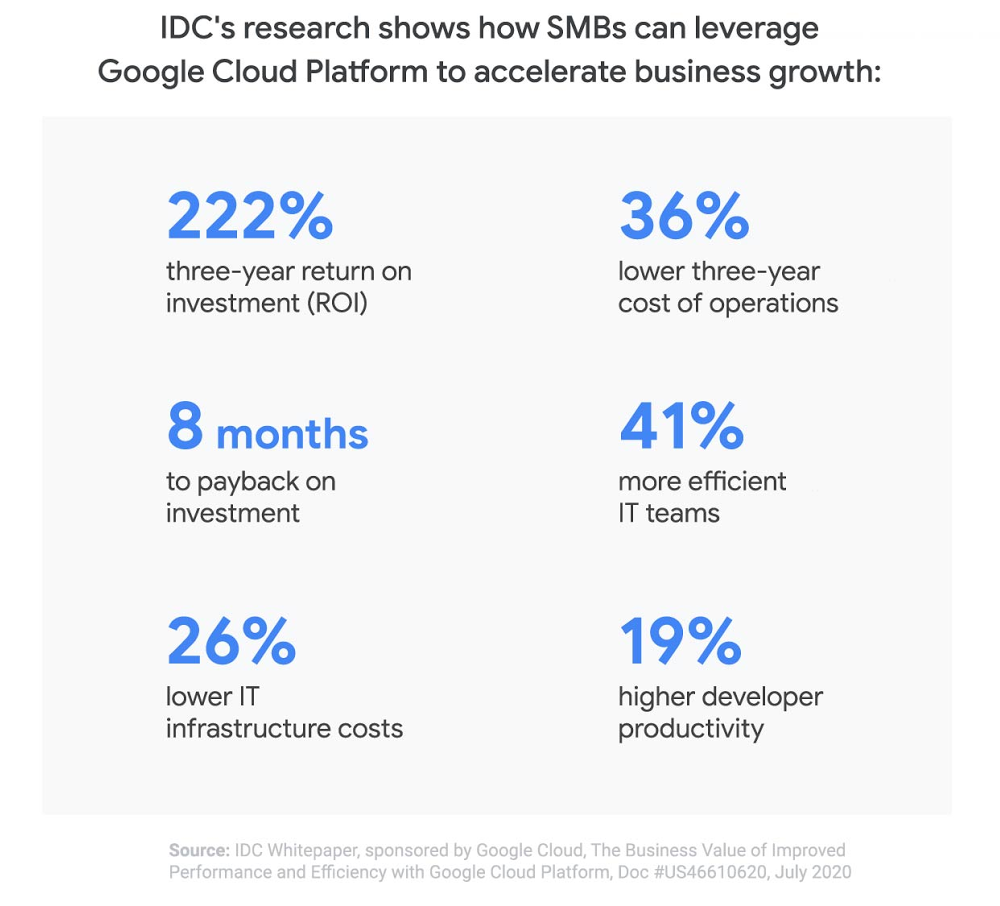
Often facing limited time and resources, small and medium businesses (SMBs) increasingly need solutions that can help them accelerate innovation and gain a competitive edge. As a result, many are turning to cloud technologies that can help them spend less time managing infrastructure and more time growing their businesses. But not all public cloud providers are the same when it comes to SMBs, and many of our SMB customers have told us they choose Google Cloud because it’s easy to use and designed to be open, reliable, and innovative with smart analytics and artificial intelligence built-in.To understand the challenges that SMBs have adopting cloud technologies, we commissioned IDC Research to evaluate how Google Cloud could address their unique needs. Today, we’re sharing the results of this study in The Business Value of Improved Performance and Efficiency with Google Cloud Platform, which describes how SMBs can accelerate business growth while achieving greater cost efficiencies. As part of this study, IDC found that Google Cloud SMB customers can achieve a 222% return on their investment over three years with an average annual benefit of $1.09M per year per organization.Here’s a closer look at IDC’s findings.1. Improving IT agility and productivityIDC’s research found that SMBs often need to react quickly to changes in customer demand and behavior—and that’s especially true in the current global climate. Google Cloud helps SMBs scale up or down to meet demand, so they only need to pay for what they use. In the study, IDC also shared insights on how Google Cloud benefits application development teams through improved infrastructure agility, scalability, flexible capacity, and other platform functionality like autoscaling with Kubernetes Engine to address changing business requirements. IDC ultimately found that seamless access to the resources needed to efficiently build new applications and features on Google Cloud led to 19% higher developer productivity or the equivalent of more than four additional development team members. In the case of Google Cloud customer idwall, developers saw productivity improvements of ~30%:2. Improving business results and performanceSMBs don’t necessarily have the luxury of relying on existing customer relationships or their brand to help maintain and grow their businesses. They must instead be nimble and adaptive to quickly take advantage of business opportunities as they arise and consistently meet customer expectations to stay competitive. IDC found that Google Cloud Platform delivers increased agility, flexibility, and performance, helping SMBs grow their businesses faster. Through the use of leading-edge cloud services such as Google BigQuery, Kubernetes Engine, and AutoML, businesses are able to realize revenue gains of 16% per year per organization or $881,500 annually.One Google Cloud customer attributed 25% of their growth to Google Cloud Platform:3. Lowering cost of operationsSMBs often have limited budgets and lean staffing models so it’s important to run IT operations as cost-effectively as possible. Staffing efficiencies can go a long way in helping lower the cost of operations. With Google Cloud Platform, IDC found that SMBs were able to achieve a 41% improvement in overall efficiency across IT teams or the equivalent productivity of almost three IT staff resources. When drilling down on infrastructure costs, IDC calculated that SMBs spend 26% less over three years with Google Cloud Platform with preemptible VM instances, automated patching, Google’s strong customer support team, and serverless offerings contributing to the lower costs.In the case of Google Cloud customer GESTO, a Brazilian healthtech company, they were able to leverage serverless computing to save ~15%:Helping SMBs achieve more with the cloudFor a deeper look into IDC’s findings on the benefits of Google Cloud Platform for SMBs, download the whitepaper. For more information on Google Cloud and SMBs, explore our SMB solutions or watch our session packages from Google Cloud Next ‘20: OnAir specifically tailored for SMBs, including Startup: Introductory, Startup: Advanced, Business Continuity, and Business/Digital Transformation.
Quelle: Google Cloud Platform

Improved customer feedback management with Google Cloud AutoML

When it comes to customer satisfaction, the customer service experience can often be more important than the actual product. According to Forbes, companies lost about $75 billion in 2018 due to poor customer service, and 39% of customers who experienced poor customer service will not do business with the offending company again.An important part of delivering a positive customer service experience is handling customer feedback, especially negative feedback, quickly and efficiently. But responding to and acting on customer feedback is a complex and time consuming process that’s usually done manually—making it a good fit for efficiency increases using AI. Integrating AI into a customer feedback management process can automate repetitive tasks, freeing up customer support agents to work on the most complex and time-sensitive cases. In this blog we’ll look at an example of how you can use AutoML to make your customer feedback management more efficient.Automating complaint classificationUsing AutoML Tables, we built an example solution (including code) to classify customer feedback. The AI-enabled classifications can then be used to send appropriate automated responses, to route complaints and other actionable feedback to the right support team, and to flag selected feedback as high priority. Automating these actions can reduce customer wait times, decrease the amount of feedback that needs to be handled manually, and bring critical issues to the surface.AutoML offers several advantages over a manually-built machine learning model. AutoML uses more than 10 years of Google Research technology to create faster models that make more accurate predictions. AutoML automatically manages the training and deployment of custom models. Once your data is in the appropriate structure, AutoML can train and deploy your custom model behind a scalable API in a couple hours, saving days, weeks, or even months versus developing a machine learning model.If you provide customer support, you probably already have the data you need to train your custom AutoML Tables model. Normal customer service workflow data—how feedback was resolved, what team feedback was routed to, what products the feedback addressed, what issues were identified, the resolution of negative feedback, the time to resolution, and the text of the feedback itself—are ingested by AutoML Tables, which learns from both structured data and text.The provided code example trains a model on publicly-available customer complaint data collected by Consumer Financial Protection Bureau (CFPB), a United States government agency focused on consumer protection in the financial sector. The data includes variables like the product type, the subproduct, the issue, location data, and the complaint narrative (a text field), along with data about the resolution of the complaint. The data is ingested from BigQuery, cleaned and transformed into a form appropriate for machine learning, and then used to train an AutoML Tables model. From there, the code makes batch predictions (for evaluation), deploys an API endpoint used to make predictions, and makes a prediction using the API. The code uses configuration to find and parse the data and deploy the model, easing adaptation to new datasets.Click to enlargeWhenever a customer takes the time to provide feedback—positive or negative—you have an opportunity to show them how much they’re valued. This example code and pipeline, powered by AutoML and BigQuery, provides the foundation for a more efficient and consumer-friendly customer service experience, which can help you improve not only your core customer support metrics, but also how your company is perceived in the eyes of consumers.To learn more about how we are helping companies manage the surge in customer needs related to COVID-19, see How Cloud AI is helping during COVID-19.AcknowledgementThis code linked from this post was built by Sahana Subramanian, Michael Sparkman, Karan Palsani, and Shane Kok, 2020 graduates of the Master of Science in Business Analytics program at the University of Texas at Austin. We’d also like to thank Dimos Christopoulos and Andrew Leach.
Quelle: Google Cloud Platform

Using new traffic control features in External HTTP(S) load balancer

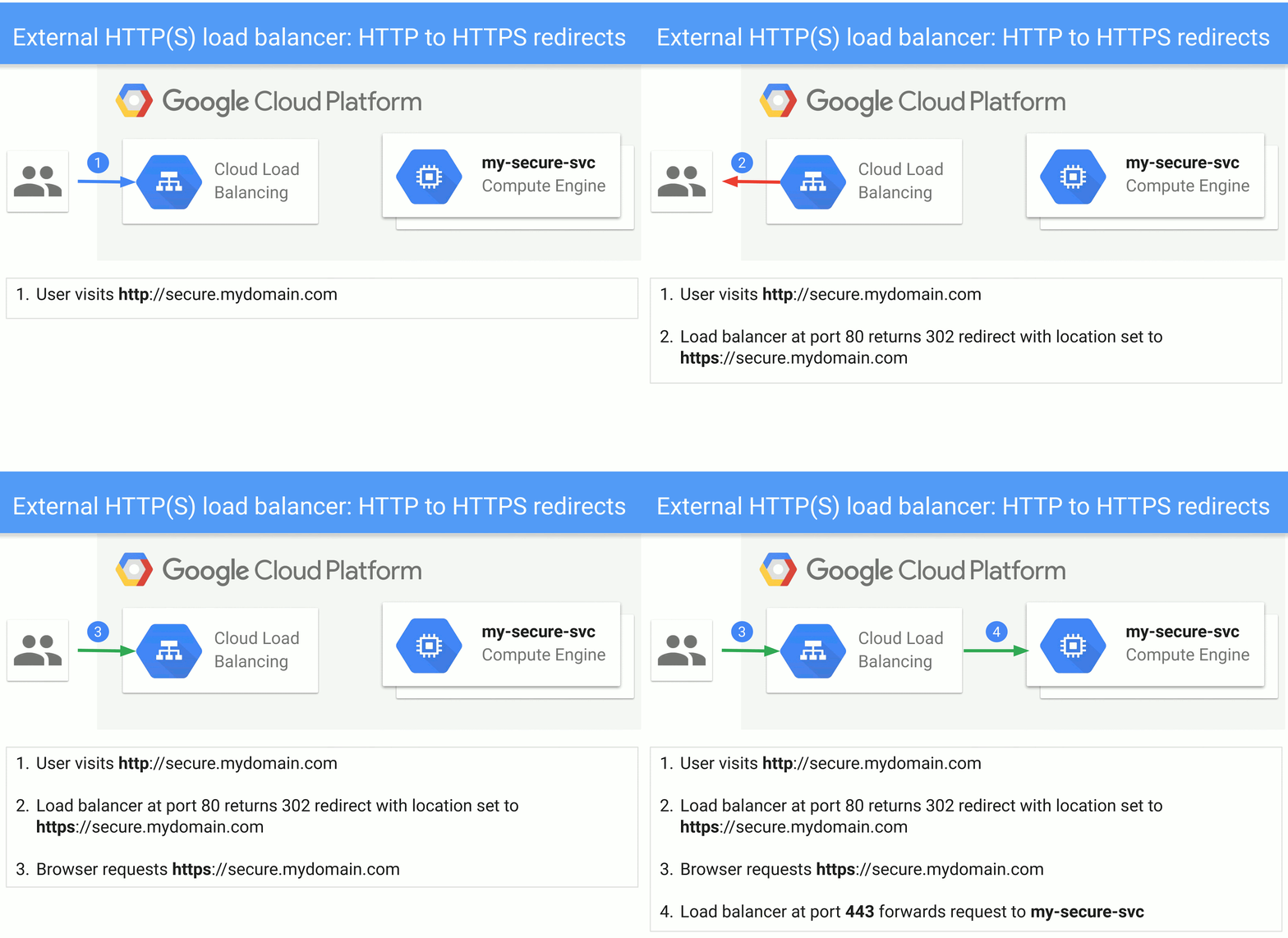
At the heart of every HTTP(S) load balancer is an enduring URL map that reliably directs each incoming request to its appropriate destination. In April, we announced two new actions supported by the URL map: redirects and rewrites. With URL redirects the load balancer redirects incoming requests from one URL to another. With rewrites, you can present external users with different URLs than those used by the backend service. In addition, we added more matching criteria that lets you match on HTTP headers and URL query parameters.These traffic control features will allow you to shift more of your routing decisions to the load balancer, rather than relying on homegrown solutions. And since we announced the features, we’ve seen a few common use cases emerge. Read on to learn how Google Cloud customers are using these features in production, to inspire some use cases of your own. HIPAA compliance with HTTP-to-HTTPS redirectThe Health Insurance Portability and Accountability Act of 1996 (HIPAA) demands that personal health information (PHI) be encrypted in transit. For web sites, this all but requires that you use HTTPS to protect web requests and responses. Unencrypted HTTP requests should result in a response to the browser telling the browser to re-send the request instead as an HTTPS request; this is known as a redirect response. Usually the browser silently follows the redirect response’s suggestion, for a seamless user experience.But having the backend web server generate the redirect responses results in increased computational costs, configurational complexity, latency and bandwidth consumption. Now you can short circuit the process, and have the load balancer issue the redirect directly, reducing any risk of an unencrypted request landing on your backend server. In addition to changing the scheme from HTTP to HTTPS, a redirect response generated from the load balancer can also signal that the request should be sent to a different host, or to a different URL path. To accomplish an HTTP to HTTPS redirect, simply configure the defaultUrlRedirect to set the httpsRedirect to true for all hosts.Backend reorganization with URL rewriteA URL redirect is usually a conversation between the user (browser) and the load balancer. Cloud Load Balancing’s new URL rewrite feature, however, only affects communication between the load balancer and the backend.A typical use case for URL rewrite arises when migrating static web content from a VM web server to Google Cloud Storage. In this case, you must map the URL paths for the static web elements to a URL that identifies the storage bucket and the path within the bucket. This translation is not of interest to the client browser, and affects only the interaction between the load balancer and the storage system backend.To accomplish this, first configure the routeAction as a urlRewrite, where the corresponding host and path matches the client to load-balancer URL.A/B testing with routing by query parameterAnother capability enabled by these new Cloud Load Balancing features is making routing decisions based on HTTP headers and/or query parameters, rather than just the host and path of the URL.For example, say you are testing out a new version of a website. You can add a query parameter to a URL that states that a given request should be directed to an experimental backend. Then, the load balancer checks for the presence of the ‘experimental’ query parameter and routes traffic to the experimental-web-server backend service:We hope you find these examples useful. To learn more about added traffic control features associated with External HTTP(S) Load Balancing, please refer to the documentation. Also check out the Traffic Control APIs supported by Internal HTTPS Load Balancer here. We’d love to learn how you are using these Traffic Control APIs and get your feedback.
Quelle: Google Cloud Platform

Giving you better cost analytics capabilities—and a simpler invoice

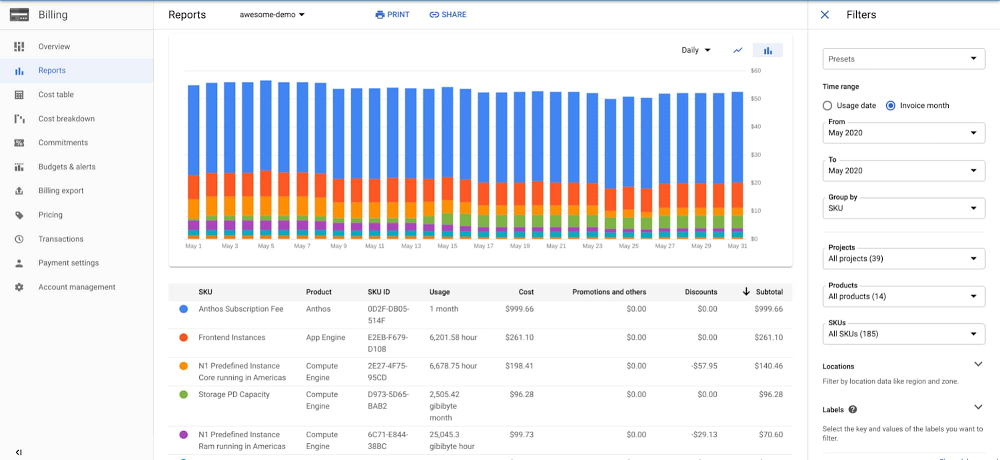
Invoices are an important part of your ability to record and track spending and attribute it back to purchase orders and department budgets. They’re also often required for enterprises by law for financial record keeping and audits. However, a typical invoice doesn’t offer the level of detail that a financial operations (FinOps) team needs to accurately report out across all your cloud services, your organizational hierarchy, and how you use those services. Our data shows that many companies use dozens of Google Cloud services, across tens to hundreds of projects, and some of our customers’ invoices are over 20 pages long! Nor do invoices let FinOps teams perform data-driven analysis or predict future cloud costs. At Google Cloud, we enable you to monitor and analyze costs by providing transparency and clarity about your cloud spending. We provide tools that present a timely, consistent, relevant and complete records of all your charges, credits, and payments.Instead of overloading invoices with all this detail, we’ve been simplifying them—pointing you to the Google Cloud Console for granular details of all your cloud consumption. At the same time, we’re creating more detailed cost analytics tools in the Cloud Console, including new graph and table views, plus ways to export billing data to CSV and BigQuery. With this approach, we think you’ll get easier access to the information you need, according to your role in your company—so you can better analyze costs and predict future expenditures. Let’s take a look at some of the cost management tools in the Cloud Console, and how to use them. Cloud Console, reporting for billing dutyThere are two main pages in the Cloud Console designed to help you understand your costs: Cloud Billing reports and the Cost Table report.The Billing Reports page lets you view usage costs at a glance so you can discover and analyze trends. It’s especially useful because it lets you see which products and geographical regions contributed to the most spend in a simple and chart-based format, and analyze costs by your organizational structure, which are often represented as Folders, Projects or Labels. The Cost Table report, on the other hand, presents a detailed, tabular view of your monthly costs for a given invoice month. The Cost Table matches your statement total, effectively reconciling your invoice. Then, you can dynamically filter, sort and group the various line items, so you can better understand the costs associated with your invoice. Examples always help, so let’s take a look at a few ways of analyzing your invoice that you can now perform from Cloud Console’s Billing Reports and Cost Table pages. We’ve added many features to these areas in the past year, and plan to continue to invest heavily in these pages going forward.Understanding costs by SKUYour invoice today includes a per-SKU breakdown. SKUs, which you can think of as Google’s parts list, are more granular than product families, including information such as product configuration (e.g., VM sizes), and location. Analyzing your costs organized by SKU helps you identify the specific Google Cloud services that make up your monthly bill. Here’s a per-SKU view from the Billing Reports page, which lets you quickly see which SKUs are contributing to your monthly bill.Here, we’ve set our time range to “Invoice month” and chosen the invoice we’re interested in analyzing—May 2020. We’ve chosen to “Group by SKU” and kept all our projects, products and SKUs selected. Below the graph, we’re sorting the table by Subtotal, which reflects committed-use and sustained-use discounts, and any credits for which the account is eligible.Similarly, you can get SKU-level information from the Cost Table report. One of the benefits of this view is that it highlights the data in a tabular format, which you can export to CSV. Another cool feature is the ability to group the results by multiple fields, using our recently introduced “Table Configuration” option found on the top right of the table.In this example, we’ve used one of the predefined grouping options, “Service > SKU”, which first groups by Service name, and then nests the SKUs.In the previous Billing Reports page example, Compute Engine was split into multiple rows, including instance size and storage. Here, in the Cost Table, we have an aggregated view of all costs incurred to the product for that invoice month cycle, but we can just as easily expand the Compute Engine row and see SKU-level details.Understanding costs per projectCustomers frequently ask how to attribute cloud costs by the projects that incurred them, as projects often relate directly to specific work happening in a company.Up until last year, a Google Cloud invoice included costs per project, but we removed that as many large companies had hundreds, if not thousands, of projects, which doesn’t scale in a PDF format.Now, you can find that information in the Cloud Console instead. Let’s see how to do it using the Cost Table report first. Choose the “Table Configuration” option. We won’t choose one of the pre-defined options as we did before. Choose “Custom grouping”, and in dimensions choose “Project ID” and then “SKU ID”. The result will look like this:Because we’ve ordered our results according to total cost, we can see projects ordered by their total cost. And then, when we expand “My Project 200”, we see the per-SKU costs ordered by highest to lowest. We recently introduced the ability to allocate spending based and sustained use discounts across multiple projects. In this group-by, we can see how discounts are attributed to a specific project.Speaking of discounts, one of the advanced capabilities of the Billing Reports page is filtering by credit type. For example, you might want to see your spend grouped by project, taking into account all types of credits, except the spending-based discounts. This might be useful if you want to hypothesize about what your bill might have been had you not been eligible for these discounts. To do so, group your spending by “Project”, and deselect the “Spending-based discounts” option, as you can see in the lower right-hand corner.Filtering by labelsLabels are an important way to add metadata to your resources, so you can understand fine-grained details of your costs. For example, imagine you receive your monthly invoice and want to understand how your development environments contributed to the total. In this example, we’ve tagged resources with a label with the key “env”, and values of “prod”, “staging”, “dev”. We’ll use the Billing Reports page grouped by “label”, and then choose “env” as the key. Then, under the “Label” filter, we choose to only filter charges that have the key “env”, and keep the default selection of all three of the chosen environments. This results in the following reportUnderstanding creditsWhat if you want to understand the impact of various credits on specific projects or products?Credits are SKUs in their own right. From the Cost Table report, you use the new custom group-by feature, and set it to “Project”, then “SKU”. Notice how you can see the spending-based discounts and sustained use discounts attributed to “My Project 200”.Then, if you want to understand how a specific credit, for example, a sustained use discount, affected your invoice across projects, simply add a filter for “Sustained use discount”. The result will be similar to below, where you can see one row per credit per project.Using other tools to analyze the dataWe understand that no matter how many cost reporting and analysis features we add, there comes a time when you want to use other data analytics tools. That’s why we’ve made all the data presented to you available via CSV export. The CSV export feature takes the flat list of cost list items, together with all the data you can see on screen, into a file that can be easily read by most data processing tools, for example Google Sheets. Alternatively, for more detailed or programmatic data analysis, you can export your cost to BigQuery and analyze it using a tool like Data Studio.Supercharging cost analysis and reportingIf you’ve read this far, you know that we’ve made a lot of improvements to our cost reporting user interface—with many more to come. Together with data exports to CSV and BigQuery, you can analyze and report on the data as you see fit. While you’ll still want your Google Cloud invoice for accounting purposes, going forward, these are the tools we recommend for building cost analysis workflows. Click here to learn more about our cost management capabilities, and be sure to register for the Google Cloud Next ‘20: OnAir session, What’s New in Google Cloud Cost Management.
Quelle: Google Cloud Platform