Bucket list: Better log storage and management for Cloud Logging

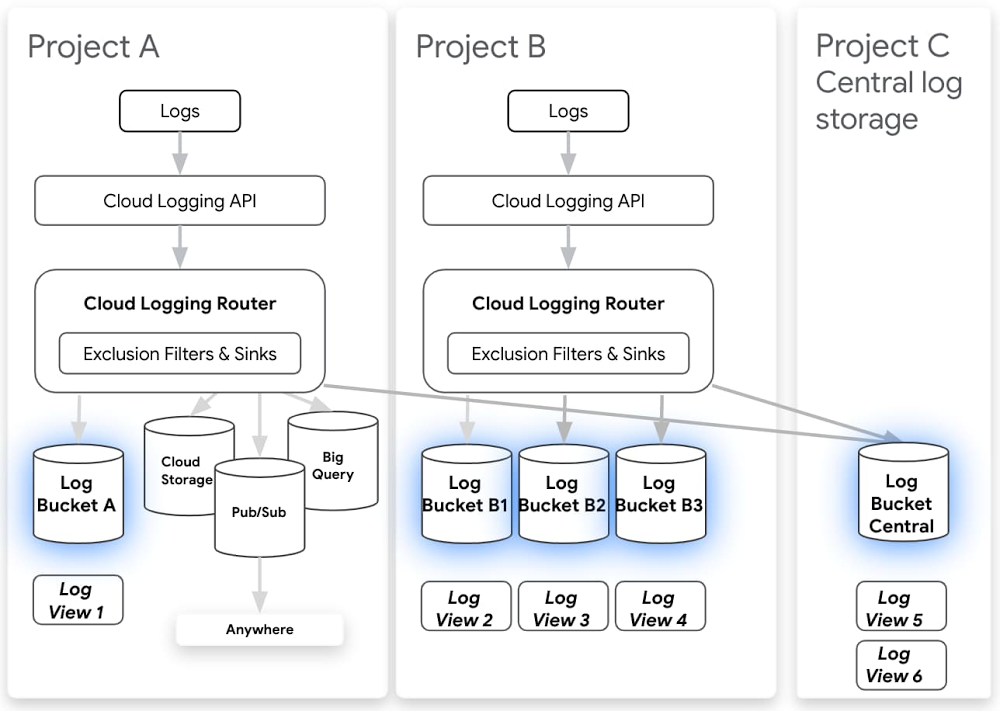
As more organizations move to the cloud, the volume of machine generated data has grown exponentially and is increasingly important for many teams. Software engineers and SREs rely on logs to develop new applications and troubleshoot existing apps to meet reliability targets. Security operators depend on logs to find and address threats and meet compliance needs. And well structured logs provide invaluable insight that can fuel business growth. But first logs must be collected, stored and analyzed with the right tools, and many organizations have found they can be expensive to store and difficult to manage at scale.Our goal for Google Cloud Logging has always been to make logging simpler, faster, and more useful for our customers. That means making it easy to search and analyze logs as well as providing a secure, compliant, and scalable log storage solution. Today we’re announcing a number of improvements to log storage and management, building on several recent improvements for exploring and analyzing logs. Here’s a selection of what’s new:Logs buckets (beta) Logs views (alpha) Regionalized log storage (alpha) Customizable retention (generally available)Cloud Logging Router (generally available – new functionality in beta)Exploring and analyzing logs (generally available)New logs viewerHistogramsField explorer Regular expression support Logging DashboardCloud Logging has been deeply integrated in Google Cloud Platform from the beginning. We automatically collect logs from dozens of Google Cloud services including audit logs, which play a key role in security and compliance. These logs are available right in context from places like Compute Engine, Cloud Functions, App Engine and more to improve development velocity and troubleshooting. Our challenge was to build a logging storage solution that was flexible enough to meet many different organizational needs while preserving the in-context experience and enterprise-class security around logs.We do this by introducing “logs buckets” as a first-class logs storage solution in Cloud Logging. Using logs buckets, you can centralize or subdivide your logs based on your needs. From the name, logs buckets may sound like Cloud Storage buckets, but logs buckets are built on the same logging tech stack we’ve been using to deliver your logs in real time with advanced indexing and optimizations for timestamps so that you can keep benefiting from our logs analytics features. In order to support logs buckets, we’ve also augmented the Cloud Logging router to give you more control over where your logs go. Previously, there were different models to manage which logs went to Cloud Logging vs. other destinations including BigQuery, Cloud Storage and Pub/Sub. Now, you can manage all destinations consistently using log sinks, and all log sinks can also support exclusions, making it easier to configure the logs you want to the right destination. You can also now route logs from one project to another or even use aggregated log sinks from across folders or organization level for security and ease of maintenance.Here are some examples of solutions our alpha customers have built using logs buckets:Log centralization – Centralize all logs from across an organization to a single Cloud Logging project. This solution was so popular among security teams that we’ve put together a dedicated user guide for centralizing audit logs, but you can centralize any or all logs in your org. This allows you to identify patterns and comparisons across projects.Splitting up logs from a single project for GKE multi-tenancy – Send logs from one shared project to other projects owned by individual development teams. One of our alpha customers’ favorite things about logs buckets is that we do magic behind the scenes to look up where your logs are stored. That way, you can, for example, still view those logs for your Kubernetes cluster in the GKE console in project A, even if they’re stored centrally in project B. Get started with this user guide.Compliance-related retention – Logs buckets also allow you to take advantage of advanced management capabilities such as setting custom retention limits or locking a logs bucket so that the retention cannot be modified. We’ve recently launched custom retention to GA and are excited to announce that you can use custom retention through the end of March 2021 for no additional cost. This gives you a chance to try out log management for your long-term compliance and analytics needs for logs without a commitment.Regionalized log storage – You can now keep your logs data in a specific region for compliance purposes. When you create a logs bucket, you can set the region in which you want to store your logs data. Setting the location to global means that it is not specified where the logs are physically stored. The logs bucket beta only supports the global location, but more regions are available in the regionalized logs storage alpha. Sign up for the alpha or to be notified when more regions are publicly available.Another piece of feedback we hear is that you’d like to be able to configure who has access to logs based on the source project, resource type or log name. We’ve also introduced log views so that you can specify which logs a user should have access to, all using standard IAM controls. Logs views can help you build a system using the principle of least privilege, limiting sensitive logs to only users who need this information. While we’ve created logs views automatically for you to preserve limited access to sensitive logs, you’ll soon be able to create your own logs views based on the source project, resource type or log name. If you’d like to try it out in alpha, sign up here.Getting started Having the right logs, and being able to access them easily, is essential for development and operations teams alike. We hope these new Cloud Logging features make it easier for you to find and examine the logs you need. To learn more about managing logs in Google Cloud, check out these resources: OPS100 – Designing for Observability on Google CloudMulti-tenant logging on GKEStoring your organization’s logs in a centralized Logs Bucket
Quelle: Google Cloud Platform

Multi-language Dataflow pipelines enabled by new, faster architecture

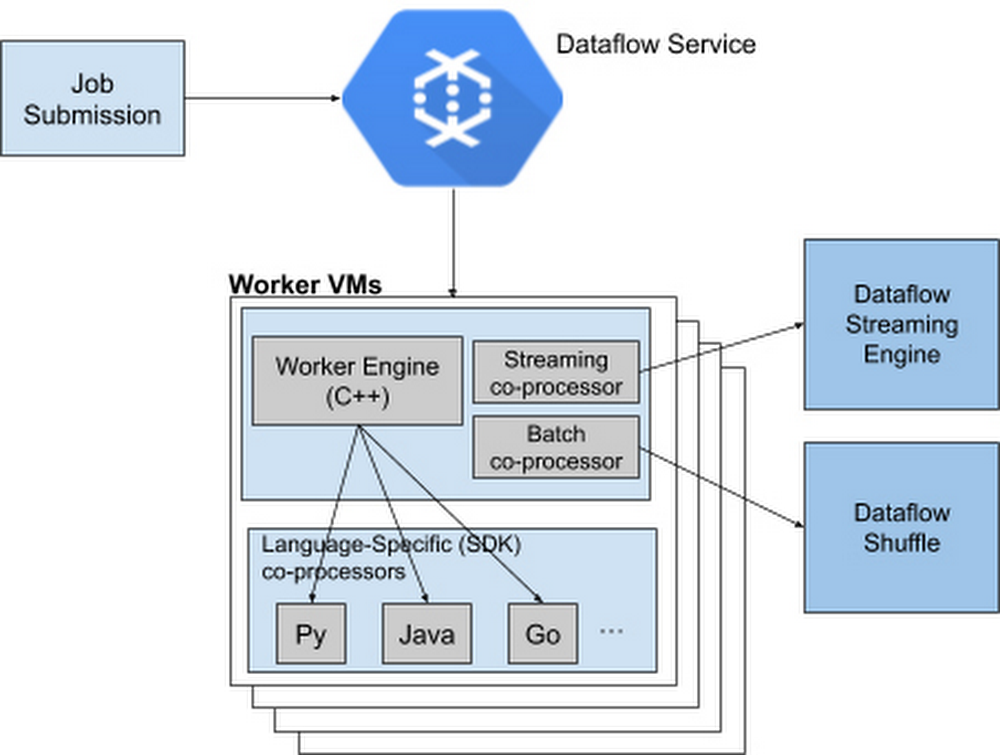
What do you do when your development and data science teams work in different language SDKs or if there are features available in one programming language, but not available in your preferred language? Traditionally, you’d either need to create workarounds that bridge the various languages, or else your team would have to go back and recode. Not only does this cost time and money, it puts real strain on your team’s ability to collaborate.  Introducing Dataflow Runner v2To overcome this, Google Cloud has added a new, more services-based architecture called Runner v2 (available to anyone building a pipeline) to Dataflow that includes multi-language support for all of its language SDKs. This addition of what the Apache Beam community calls “multi-language pipelines” lets development teams within your organization share components written in their prefered language and weave them into a single, high-performance, distributed processing pipeline.This architecture solves the current problem where language-specific worker VMs (called Workers) are required to run entire customer pipelines. If features or transforms are missing for a given language, they must be duplicated across various SDKs to ensure parity; otherwise, there will be gaps in feature coverage and newer SDKs like Apache Beam Go SDK will support fewer features and exhibit inferior performance characteristics for some scenarios.Runner v2 includes a more efficient and portable worker architecture rewritten in C++, which is based on Apache Beam’s new portability framework, packaged together with Dataflow Shuffle for batch jobs and Streaming Engine for streaming jobs. This allows us to provide a common feature set going forward across all language-specific SDKs, as well as share bug fixes and performance improvements.Dataflow Runner v2 is available today with Python streaming pipelines. We encourage you to test out Dataflow Runner v2 with your current (non-production) workloads before it is enabled by default on all new pipelines. You do not have to make any changes to your pipeline code to take advantage of this new architecture.Dataflow Runner v2 comes with support for many new features that are not available in the previous Dataflow runner. In addition to support for multi-language pipelines, Dataflow Runner v2 also provides full native support for Apache Beam’s powerful data source framework named Splittable DoFn, and support for using custom containers for Dataflow jobs. Also, Dataflow Runner v2 enables new capabilities for Python streaming pipelines, including Timers, State, and expanded support for Windowing and Triggers. Using Java implementations in PythonApache Beam’s multi-language capabilities are unique among modern-day data processing frameworks, letting Runner v2 make it easy to provide new features simultaneously in multiple Beam SDKs by writing a single language-specific implementation. For example, we have made the Apache Kafka connector and SQL transform from the Apache Beam Java SDK available for use in Python streaming pipelines starting with Apache Beam 2.23. To see it for yourself, check out the Python Kafka connector and the Python SQL transform that utilizes corresponding Java implementations. To use newly supported Python transforms with Dataflow Runner v2, simply install the latest Java Development Kit (JDK) supported by Apache Beam on your computer and use Python transforms in your Dataflow Python streaming pipeline. For example:For more details regarding pipeline setup and usage of the newly supported transforms, see the Apache Beam Python examples for Kafka and SQL transform.How cross-language transforms workUnder the hood, to make Java transforms available to a Dataflow Python pipeline, the Apache Beam Python SDK starts up a local Java service on your computer to create and inject the appropriate Java pipeline fragments into your Python pipeline. The SDK then downloads and stages the necessary Java dependencies needed to execute these transforms.At runtime, the Dataflow Workers will execute the Python and Java code side by side to run your pipeline. And we’re working on making more Java transforms available to Beam Python through the multi-language pipelines framework.Next stepsEnable Runner v2 to realize the benefits of multi-language pipelines and performance improvements in Python pipelinesTry accessing Kafka topics from Dataflow Python pipelines by following this tutorialTry embedding SQL statements in your Dataflow Python pipelines by using this example
Quelle: Google Cloud Platform

Dataflow Under the Hood: the origin story

Editor’s note: This is the first blog in a three-part series examining the internal Google history that led to Dataflow, how Dataflow works as a Google Cloud service, and how it compares and contrasts with other products in the marketplace. Google Cloud’s Dataflow, part of our smart analytics platform, is a streaming analytics service that unifies stream and batch data processing. To get a better understanding of Dataflow, it helps to also understand its history, which starts with MillWheel. A history of DataflowLike many projects at Google, MillWheel started in 2008 with a tiny team and a bold idea. When this project started, our team (led by Paul Nordstrom), wanted to create a system that did for streaming data processing what MapReduce had done for batch data processing—provide robust abstractions and scale to massive size. In those early days, we had a handful of key internal Google customers (from Search and Ads), who were driving requirements for the system and pressure-testing the latest versions. What MillWheel did was build pipelines operating on click logs to attempt to compute real-time session information in order to better understand how to improve systems like Search for our customers. Up until this point, session information was computed on a daily basis, spinning up a colossal number of machines in the wee hours of the morning to produce results in time for when engineers logged on that morning. MillWheel aimed to change that by spreading that load over the entire day, resulting in more predictable resource usage, as well as vastly improved data freshness. Since a session can be an arbitrary length of time, this Search use case helped provide early motivation for key MillWheel concepts like watermarks and timers.Alongside this session’s use case, we started working with the Google Zeitgeist team—now Google Trends—to look at an early version of trending queries from search traffic. In order to do this, we needed to compare current traffic for a given keyword to historical traffic so that we could determine fluctuations compared to the baseline. This drove a lot of the early work that we did around state aggregation and management, as well as efficiency improvements to the system, to handle cases like first-time queries or one-and-done queries that we’d never see again.In building MillWheel, we encountered a number of challenges that will sound familiar to any developer working on streaming data processing. For one thing, it’s much harder to test and verify correctness for a streaming system, since you can’t just rerun a batch pipeline to see if it produces the same “golden” outputs for a given input. For our streaming tests, one of the early frameworks that we developed was called the “numbers” pipeline, which staggered inputs from 1 to 1e6 over different time delivery intervals, aggregated them, and verified the outputs at the end. Though it was a bit arduous to build, it more than paid for itself in the number of bugs it caught. Dataflow represents the latest innovation in a long line of precursors at Google. The engineers who built Dataflow (co-led with Frances Perry) first experimented with streaming systems by building MillWheel, which defined some of the core semantics around timers, state management, and watermarks, but proved to be challenging to use in a number of ways. A lot of these challenges were similar to the issues that led us to build Flume for users who wanted to run multiple logical MapReduce (actually map-shuffle-combine-reduce) options together. So, to meet those challenges, we experimented with a higher-level model for programming pipelines called Streaming Flume (no relation to Apache Flume). This model allowed users to reason in terms of datasets and transformations, rather than physical details like computation nodes and the streams between them.When it came time to build something for Google Cloud, we knew that we wanted to build a system that combined the best of what we’d learned with ambitious goals for the future. Our big bet with Dataflow was to take the semantics of (batch) Flume and Streaming Flume and combine them into a single system, which unified streaming and batch semantics. Under the hood, we had a number of technologies that we could build the system on top of, which we’ve successfully decoupled from the semantic model of Dataflow. That has let us continue to improve this implementation over time without requiring major rewrites to user pipelines. Along the way, we’ve created a number of publications about our work in data processing, particularly around streaming systems. Check those out here:Millwheel: Fault-Tolerant Stream Processing at Internet ScaleThe Dataflow Model: A Practical Approach to Balancing Correctness, Latency, and Cost in Massive-Scale, Unbounded, Out-of-Order Data ProcessingFlumeJava: Easy, Efficient Data-Parallel PipelinesHow Dataflow worksLet’s take a moment to quickly review some key concepts in Dataflow. When we say that Dataflow is a streaming system, we mean that it processes (and can emit) records as they arrive, rather than according to some fixed threshold (e.g., record count or time window). While users can impose these fixed semantics in defining what outputs they want to see, the underlying system supports streaming inputs and outputs. Within Dataflow, a key concept is the idea of event time, which is a timestamp that corresponds to the time when an event occurred (rather than the time at which it is processed). In order to support a number of interesting applications, it’s critical for a system to support event time, so that users can ask questions like “How many people logged on between 1am and 2am?”One of the architectures that Dataflow is often compared to is the Lambda Architecture, where users run parallel copies of a pipeline (one streaming, one batch) in order to have a “fast” copy of (often partial) results as well as a correct one. There are a number of drawbacks to this approach, including the obvious costs (computational and operational, as well as development costs) of running two systems instead of one. It’s also important to note that Lambda Architectures often use systems with very different software ecosystems, making it challenging to replicate complex application logic across both. Finally, it’s non-trivial to reconcile the outputs of the two pipelines at the end. This is a key problem that we’ve solved with Dataflow—users write their application logic once, and can choose whether they would like fast (but potentially incomplete) results, slow (but correct) results, or both.To help demonstrate Dataflow’s advantage over Lambda Architectures, let’s consider the use case of a large retailer with online and in-store sales. These retailers would benefit from in-store BI dashboards, used by in-store employees, that could show regional and global inventory to help shoppers find what they’re looking for, and to let the retailers know what’s been popular with their customers. The dashboards could also be used to drive inventory distribution decisions from a central or regional team. In a Lambda Architecture, these systems would likely have delays in updates that are corrected later by batch processes, but before those corrections are made, they could misrepresent availability for low-inventory items, particularly during high-volume times like the holidays. Poor results in retail can lead to bad customer experiences, but in other fields like cybersecurity, they can lead to complacency and ignored intrusion alerts. With Dataflow, this data would always be up-to-date, ensuring a better experience for customers by avoiding promises of inventory that’s not available—or in cybersecurity, an alerting system that can be trusted.That covers much of Dataflow’s origin story, but there are more interesting concepts to discuss. Be sure to check out the other blogs in our Dataflow “Under the Hood” series to learn more.
Quelle: Google Cloud Platform

Synthetic data generation with Dataflow data generator flex template

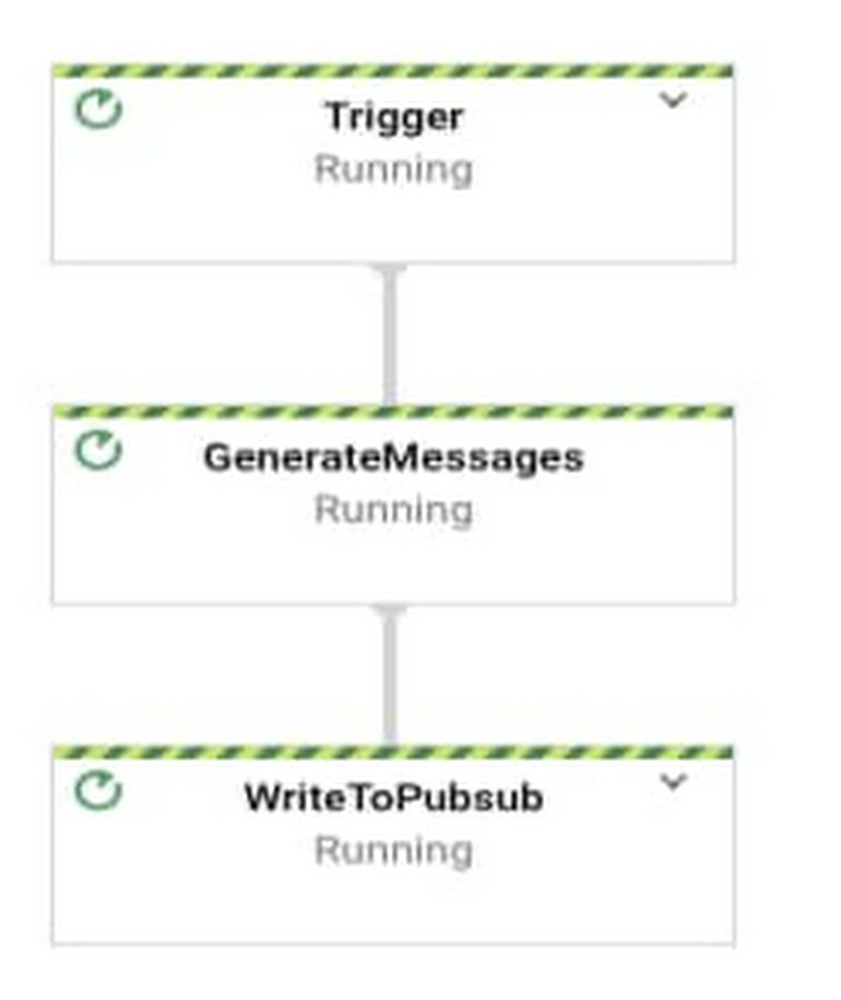
Generating synthetic data at a very high queries per second (QPS) is a challenging task that forces developers to build and launch multiple instances of a complex multi-threaded application. Having learned that this is a very common need which helps IT teams to validate system resilience during evaluations and migrations to new platforms, we decided to build a pipeline that eliminates the heavy lifting and makes synthetic data generation easier.  We are excited to announce the launch of a new Dataflow Flex template called Streaming Data Generator that is capable of publishing unlimited high-volume JSON messages to a Google Cloud Pub/Sub topic. In this blog post, we will briefly discuss the use cases and how to use the template.Flex TemplatesBefore diving into the details of the Streaming Data Generator template’s functionality, let’s explore Dataflow templates at a very high level:The primary goal of Dataflow templates is to package Dataflow pipelines in the form of reusable artifacts that can be run in various channels (UI / CLI / REST API) and be used by different teams. In the initial version of templates (called traditional templates), pipelines were staged on Google Cloud Storage and could be launched from the Google Cloud Console, the gcloud command-line tool or other cloud-native Google Cloud services such as Cloud Scheduler or Cloud Functions.However, traditional templates have certain limitations:Lack of support for Dynamic DAGsMany I/Os don’t implement ValueProvider Interface, which is essential to supporting runtime parametersFlex templates overcome these limitations. Flex templates package Dataflow pipeline code, including application dependencies, as Docker images and stage the images in Google Container Registry (GCR). Metadata specification files referencing the GCR image path and parameters details will be created and stored in Google Cloud Storage. Users can invoke a pipeline through a variety of channels (UI, gcloud, REST) by referring to the spec file. Behind the scenes, the Flex template launcher service runs Docker containers with parameters supplied by the user.Streaming Data Generator OverviewThe Streaming Data Generator template can be used to publish fake JSON messages based on a user-provided schema at a specified rate (measured in messages per second) to a Google Cloud Pub/Sub topic. The JSON Data Generator library used by the pipeline supports various faker functions that can be associated with a schema field. The pipeline supports configuration parameters to specify message schema, specify the number of messages published per second (i.e., QPS), enable auto scaling, and more. Pipeline steps are shown below:The primary use case of the pipeline is to benchmark the consumption rate of Streaming pipelines and evaluate the resources (number of workers/machine types) required to meet the desired performance.Launching the PipelineThe pipeline can be launched either from the cloud console , gcloud command-line tool or REST API.To launch from Cloud Console:1. Go to the Dataflow page in the Cloud Console.2. Click “Create Job From Template.”3. Select “Streaming Data Generator” from the Dataflow template drop-down menu.4. Enter the job name.5. Enter required parameters as shown below:6. Enter optional parameters such as autoscalingAlgorithm and maxNumWorkers, if required.7. Click “Run Job.”To launch using the gcloud command-line tool, enter the following:To launch using REST API:Next StepsWe hope the template combined with Dataflow’s serverless nature will enhance your productivity and make synthetic data generation much simpler. To learn more, you can read the documentation,  check out the code or get started by running a template on Google Cloud. In addition to Utility templates, the Dataflow team provides a wide variety of Batch and Streaming templates for point-to-point data transfers covering popular data sources and destinations.
Quelle: Google Cloud Platform

How SAP customers can accelerate analytics in the cloud

These days, real-time, real-world data usually comes from multiple, disparate sources—for instance, IoT devices, messaging applications, social media, and clickstreams from web and ecommerce activity. This data is rapidly growing in variety, volume, and velocity. In a recent ESG survey, 66% of organizations report that they are managing a petabyte of data or more, with nearly one-third (31%) managing at least 5 petabytes. Taken together, these data sources offer a tremendous opportunity to add significant business value. This is certainly true for SAP customers where the combined power of operational and other data sources has the ability to transform decision making. And therein lies the challenge: This firehose of data makes it difficult to efficiently and securely manage, store, analyze, and generate robust insights. In fact, most organizations surveyed by ESG reported that they use no more than 30% of their total data for analytics purposes. So it’s no surprise that, according to SAPinsider research from May 2020, 52% of SAP customers surveyed say that their top analytics pain point is data integration. In the past few years, many organizations have seen the benefits of migrating their SAP and other enterprise solutions to the public cloud—from reduced IT maintenance spend, to increased data security, to a more flexible, scalable cost structure. But the choice of public cloud provider can offer much more in the way of data integration and analytics—far beyond the capabilities of on-premises solutions. Google Cloud offers two powerful analytics solutions for SAP cloud and on-premises deployments alike: BigQuery, our cloud data warehouse, and a suite of AI and machine learning tools. BigQuery: Data warehousing with the power of Google CloudBigQuery is a fully managed, and serverless cloud data warehouse that supports petabyte-scale projects at blazing-fast speeds, with zero operational overhead. It offers built-in machine learning with BigQuery ML allowing users to operationalize ML models using standard SQL and supports geospatial analysis with BigQuery GIS.  BigQuery automatically scales its infrastructure up or down for the best performance and separates storage from compute allowing you to  run analytics at scale with a 26% to 34% lower three-year total cost of ownership (TCO) than cloud data warehouse alternatives1. German retailer Breuninger, which operates 11 department stores and an ecommerce site serving customers in three countries, realized its data was the key to keep evolving and innovating alongside the ever-changing needs and behaviors of its customers. As a result, it turned to Google Cloud to bring together its dispersed IT landscape, which included multiple SAP systems, and use BigQuery to analyze diverse datasets from across the business. Now that Breuninger runs reports in BigQuery instead of pulling custom SAP reports, it’s getting insights more cost-effectively and much faster—so quick, in fact, that customer data is in real time. This means more informed decision-making for Breuninger’s teams and more personalized, exciting experiences for its customers across every channel.Google Cloud integrates seamlessly with all of our IT components, helping us unite and make more sense of our data. On top of that, we’ve received excellent support from the Google Cloud team throughout our journey. Matthias Krenzel, Head of Data Platform Services, BreuningerThe BigQuery Data Transfer Service automates data movement from external data sources —like Google Marketing Platform, Google Ads, YouTube, and partner SaaS applications—to BigQuery on a scheduled and fully managed basis. Your analytics team can lay the foundation for a data warehouse without writing a single line of code.  In addition, Google Cloud Public Datasets offer a powerful data repository of more than 100 high-demand public datasets from different industries. Google Cloud provides storage at no charge for all public datasets, and customers can query up to 1 TB of data per month at no cost. Google Cloud has partnered with leading data management and integration solution providers, such as Informatica, Qlik, Datavard, SAP and Software AG, for a robust set of tools and solutions to extract data from SAP systems including ECC, S/4, and BW into BigQuery as the target data warehouse. Additionally, Atos has developed Rapid Deployment Accelerators for SAP Analytics with BigQuery. Using pre-defined data models  and combining master with transactional data to enable self service reporting while providing business logic that can achieve 50-70% faster development cycles at 60-75% lower cost, according to Atos. SAP data in BigQuery creates the opportunity to add external source data such as Search trends, Ads, Maps and more to drive deep business insights leveraging the built-in machine learning capabilities of BigQuery.Google Cloud’s AI and ML tools for analyticsIn addition to BigQuery, Google Cloud has a number of tools that let you quickly and easily integrate AI and ML into your applications for advanced analytics. Google Cloud AI Building Blocks make it easy to add sight, language, conversation, and structured data into your applications. You can use proven, pre-trained APIs, or you can use Cloud AutoML to create high-quality custom models with minimal effort and machine learning expertise.Organizations with data residing in visual sources can use Google Cloud AutoML Vision, an intelligent, AI-powered product that allows customers to derive learnings from images in the cloud or at the edge. Power company AES relies on AutoML Vision to assess damage to its hundreds of wind turbines. AES uses drones to inspect and photograph its turbines. These drones typically take 30,000 images, and each one must be examined. With Google Cloud’s AutoML Vision, AES can use machine learning to auto-detect damage so that engineers can spend less time identifying damage and more time repairing it.Build a data-driven businessGoogle Cloud Platform is designed to let you take your SAP cloud migration at your own pace, in your own way. You can shift your SAP applications to the cloud to take full advantage of a flexible, scalable solution that eliminates ongoing infrastructure maintenance costs; leverage  BigQuery for your enterprise data to unlock new business value; integrate machine learning into business processes; or mix and match solutions to suit your needs now and in the future. To learn more about how SAP customers can benefit from Google Cloud analytics and machine learning solutions, visit cloud.google.com/solutions/sap. 1. Source: ESG Master Survey Results, The State of Data Analytics, August 2019
Quelle: Google Cloud Platform

3 reasons to consider Cloud Spanner for your next project

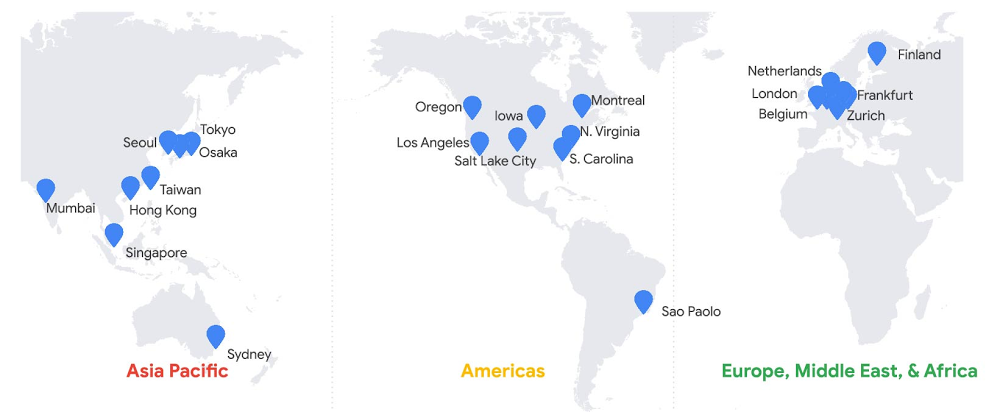
A database is a key architectural component of almost every application. When you design an application, you’ll invariably need to durably store application data. Without persisting data to a shared database, there are neither options for application scalability nor for upgrades to the underlying hardware. More disastrous, any data will be immediately lost in the case of infrastructure failure. With a reliable database, though, you enable application scalability and ensure data durability and consistency, service availability, and improved system supportability. A database is a key architectural component of almost every application.Google Cloud’s Spanner database was built to fulfill needs around storing structured data for products here at Google and at our many cloud customers. Spanner is part of Google’s core infrastructure, trusted to safeguard our business—so you can, too, regardless of your industry or use case.Before Spanner, our products predominantly used sharded MySQL for database use cases where transactions were needed. The goal of the development effort, as described in the Spanner paper, was to create a data storage service for those applications that have complex, evolving schemas, or those that want strong consistency in the presence of wide-area replication.One of the first concepts that comes up when considering Spanner is its ability to scale to arbitrarily large database sizes. Spanner does indeed support Google applications (such as Gmail and YouTube) that provide features for billions of our users, so scalability must be a first-class feature. In this post, we’ll explore how Spanner is designed for applications that operate at any scale, big or small, across a variety of use cases; how it provides a low-barrier to entry for developers; and how it lowers total cost of ownership (TCO). Here’s what you need to know.Start anywhere and scale as you growSpanner can handle data volumes at a massive scale, so it’s useful for applications of many sizes, not just those large ones. Further, your organization can benefit from standardizing on a single database engine for all workloads that require an RDBMS. Spanner provides a solid foundation for all kinds of applications with its combination of familiar relational database management system (RDBMS) features, such as ANSI 2011 SQL, DML, Foreign Keys and unique features such as strong external consistency via TrueTime and high availability via native synchronous replication. We’d like to take a moment to challenge what “smaller scale” may be perceived as: that smaller applications are not important, or that they do not have lofty availability goals or the need for transactional fortitude. This categorization does not indicate that an application is any less business-critical than a massive scale application. Nor does it imply that a given application will not eventually require higher scale than at its initial rollout. While your application might have a small user base or transaction volume to start, this Spanner scalability advantage should not be overlooked. An application designed with a Spanner back end will not require a rewrite or any sort of database migration if success results in future data volume or transaction growth. For example, if you are a gaming company developing the next cool, groundbreaking game, you want to be prepared to meet user growth if the game is a runaway success on launch day.No matter the scale of your application, there are strong benefits when you choose Spanner, including transaction support, high-availability guarantees, read-only replicas, and effortless scalability. Transaction support and strong external consistencySpanner provides external consistency guarantees via TrueTime. Spanner uses this fully redundant system of atomic clocks to obtain timestamps from what amounts to a virtual, distributed global clock. Since Spanner can apply a timestamp from a globally agreed-upon source to every transaction upon commit, the transaction commit sequence is unequivocal. External consistency requires that all transactions be executed sequentially. Spanner satisfies this strong consistency guarantee. Strong consistency is required by many application types, especially those where quantities of goods or currency are maintained, and for which eventual consistency would not be at all suitable. That includes, but is not limited to, supply chain management, retail pricing and inventory management, and banking, trading, and ledger applications.If your database does not have strong consistency, transactions must be split into separate operations. If a transaction is not atomic, that means that the transaction can partially fail. Imagine that you use a digital wallet to divide expenses, such as the cost of dinner, with friends. If a money transfer from your wallet to their wallets were not handled within a strongly consistent transaction, you could find yourself in the position where half of the transaction has failed: the funds are in neither your nor your friend’s wallet. The undesirable characteristics of eventual consistency is in the name: immediately after a database operation, the overall database state is inconsistent; only eventually will the changes be served back to all requesters. In the interim, disparate client requests may return different results. If you use a social media service, for example, you have likely experienced a lag time between pressing the button to post a picture and the moment that the image is shown on your timeline. Niantic, the creators of Pokemon GO, choose Spanner specifically to avoid this type of inconsistency in their social application.You can find more detail in this blog post on strong consistency. Essentially, what we’ve learned at Google is that application code is simpler and development schedules are shorter when developers can rely on underlying data stores to handle complex transaction processing and keeping data ordered. To quote the original Spanner paper, “we believe it is better to have application programmers deal with performance problems due to overuse of transactions as bottlenecks arise, rather than always coding around the lack of transactions.”High-availability guaranteesSpanner offers up to 99.999% availability with zero downtime for planned maintenance and schema changes. Spanner is a fully managed service, which means you don’t need to do any maintenance. Automatic software updates and instance optimizations happen in the background. This is achieved without any maintenance windows. Moreover, in case there is a hardware failure, your database will seamlessly recover without downtime.A Spanner instance provides this high availability via synchronous replication between three replicas in independent zones within a single cloud region for regional instances, and between at least four replicas in independent zones across two cloud regions for multi-region instances. Spanner regional instances are available in various regions in our Asia Pacific, Americas, and Europe, Middle East and Africa geographies; multi-region instances are offered in various combinations of regions across the globe.This protects your application from both infrastructure and zone failure for regional instance configurations, and region failure for multi-regional instance configurations.Read-only replicasIf you’re working with read requests that can tolerate a minor amount of data staleness, you can take better advantage of the computing power made available by these replicas and receive results with lower average read latency. This reduction of latency can be significant if you are using a multi-region instance configuration with replicas in geographic proximity to your application client.For queries that can accept this constraint, replicas are able to provide direct responses to your stale read queries without consulting the read-write replica (the split leader). In the case of multi-region instance configurations, the replicas may be much closer geographically to the application client, which can markedly improve the read performance. This capability is comparable to horizontal scaling that’s achieved when traditional RDBMS topologies are deployed with asynchronous read replicas. However, unlike a typical relational database, Spanner delivers this feature without incurring additional operational or management overhead.Effortless horizontal upscaling and downscalingSpanner decouples compute resources from data storage, which makes it possible to increase, decrease, or reallocate the pool of processing resources without any changes to the underlying storage. This is not possible with traditional open source or cloud-based relational database engines.This means that with a single click or API call, horizontal upscaling is possible so you can serve higher operations per second capacity as required by your application, even if data throughput remains low. Moreover, the additional compute resources added can process both reads and writes. Scaling down is just as simple. Spanner provides this capability at the press of a button, as instance nodes can be added or removed easily as your needs change, and these changes take effect in just a few seconds.In other databases, both relational and NoSQL, significant effort is required to grow a cluster horizontally to support additional write capacity. Further, it may not be straightforward, or even possible, to remove the capacity once added.Spanner stands out as a general-use databaseThe relational database is based on concepts outlined in a 1970 paper written by E.F. Codd, and despite being the oldest continually used database technology, the RDBMS retains its position as the database of choice for most new projects. The relational database is trusted technology and many successful companies have published lore relating to their initial choice of MySQL or PostgreSQL. Companies choose the technology because developers know SQL, and because the relational model is flexible during the product development process. (To the point made earlier, it is worth mentioning that in many cases, these origin stories go on to discuss the extreme management effort associated with relational databases once data volumes exceed an unmanageable level.)Of course, with Spanner, there are more abstract concepts involved. Spanner is a distributed database, and its strong external consistency is provided by a robust system featuring redundant local and remote atomic clocks located on the server racks and available via GPS signal, respectively. Yet, it still presents the familiar ANSI SQL compliant interface of a relational database. As a result, application developers can quickly achieve proficiency. The database technology has proven its worth for countless applications at Google—internal and external, big and small. Spanner is firmly seated as a foundational technology that enables a low barrier of entry for developers, and thus the freedom to try new ideas. While our user bases can be extremely large and transaction volumes can be exceptionally high for some product applications, there are other less frequently used applications that serve smaller cohorts. Spanner serves as the back-end data storage service for both application categories.And Google Cloud customers across various verticals have used Spanner successfully for numerous core business use cases: gaming (Lucille Games), fintech (Vodeno), healthcare (Maxwell Plus), retail (L.L.Bean), technology (Optiva) and media and entertainment (Whisper). Here are examples of how those in various industries use Spanner:Spanner lowers TCO with a simpler experience When considering the total cost of ownership (TCO), Spanner costs less to operate. Moreover, when you consider opportunity cost, the return on investment (ROI) can be even higher. Before you solely evaluate the operating expense of Spanner using the per-hour price, compare it to other database options by contrasting holistically the various costs of an alternate choice with the value provided by Spanner.First, consider the cost of running a production-grade database. There are three cost categories: resource, operational, and opportunity. Resource cost is relatively straightforward to calculate as it is based on published list prices. Operational costs are somewhat more difficult to calculate, as this cost is equivalent to the number of team members required to complete various tasks. Opportunity cost calculation is less tangible, but should not be ignored. When you choose to expend organizational budget, in currency or in hours, toward one effort category, there will be less budget available for other opportunities.For this exercise, we’ll first discuss resource cost by comparing the list price of Spanner compared with that of a self-managed open source database running on virtual machines. Then, we’ll compare the operational burden and cost of the same environments. Finally, we’ll address some opportunity value provided by Spanner.To start, when you consider a single database engine running on a small virtual machine, Spanner may appear costly. However, it is not recommended to run a production database on a single compute node. More likely, you will be running on a medium-sized virtual machine with sufficient memory and attached persistent disk provisioned with sufficient headroom for short- to medium-term growth.Also likely is that you will have provisioned a high-availability database topology, which includes an online database replica with the same specifications as your production virtual machine. Further, you may maintain an additional replica database specifically for read-only workloads. If this is the case, you have the compute and storage topology equivalent as provided by Spanner. You have three copies of the data, and three running virtual machines: one virtual machine to manage writes, a second as a high-availability replica, and a third to serve read-only workloads. This reflects the core philosophy behind Spanner: that you should operate with at least three replicas to ensure high availability.Now, let’s consider the relative list price of Spanner to that of a database running on Compute Engine. The list price for Spanner database storage is approximately twice that of zonal persistent disk. However, since you have three copies of data stored in persistent disk, the total cost will be higher.In this topology, for the same amount of application data, Spanner database storage costs approximately one-third less than the price of traditional database storage. Additionally, with Spanner, you only pay for what you use, which saves cost since you will not need to pre-provision initially unused space. And if your data decreases in size, unlike a traditional database, no migration will be required to materialize reduced storage costs.Compute resource price comparison is a bit more complex, as performance is dependent upon your workload. You can compare the price of your three-way replicated traditional RDBMS on production size virtual machines to an equivalent count of Spanner nodes to get a sense of the relative price.However, the scenario does not end here. As you know, the operational cost of managing your own databases is not insignificant. Also, every operational task introduces an additional amount of risk to system uptime. Spanner was designed to provide a high level of service with a low level of operational overhead.In most cases, the operational cost for Spanner approaches zero. To start, Spanner reduces the operational effort required to obtain and retain database backups. Spanner requires no maintenance windows or planned downtime. There is never a need for manual corruption remediation or index rebuilding with Spanner. Nor is any effort required to increase the available storage size for your database. (Unless you deem “effort” the button click to increase the instance node count.) Most important: There is no effort required (again, unless you count the button click) to achieve horizontal or vertical scaling, since Spanner automatically provides dynamic data resharding and data replication.The Enterprise Strategy Group quantified the total cost of ownership (TCO) savings of Spanner in their report Analyzing the Economic Benefits of Google Cloud Spanner Relational Database Service. What they found was that due to the TCO savings and the benefits provided by improved flexibility and innovation, every customer they interviewed preferred Spanner over other database options. Spanner’s total cost of ownership is 78% lower than on-premises databases and 37% lower than other cloud options. With this reduction in operational effort, you can focus on other things that can make your business more successful. This is the opportunity value provided by Spanner. Getting startedSpanner is incredibly powerful, but is also incredibly simple to operate. Spanner has been battle-tested at Google, and we’re proud to provide this technology to customers. There are strong (pun intended) reasons why Spanner is a great choice for your next project, regardless of the workload scope or size. We choose to use Spanner internally at Google Cloud to guarantee object listing in Cloud Storage, and the same choice is made by our customers, such as Colopl, which chose Spanner to help bring you Dragon Quest Walk. Spanner provides familiar relational semantics and query language, and shares the powerful flexibility that has made relational databases the top choice for data storage. No matter the size of your application or your business goals, there is a good chance that Spanner would make a great choice for you as well. Learn moreTo get started with Spanner, create an instanceor try it out with a Spanner Qwiklab.
Quelle: Google Cloud Platform
Simplifying global game launches with Google Cloud Game Servers, now GA

As more and more people across the world turn to multiplayer games, developers must scale their game to meet increased player demand and provide a great gameplay experience, while managing complex underlying global infrastructure.To solve this problem, many game companies build and manage their own costly proprietary solutions, or turn to pre-packaged solutions that limit developer choice and control.Earlier this year, we announced the beta release of Game Servers, a managed service built on top of Agones, an open source game server scaling project. Game Servers uses Kubernetes for container orchestration and Agones for game server fleet orchestration and lifecycle management, providing developers with a modern, simpler paradigm for managing and scaling games. Today, we’re proud to announce that Game Servers is generally available for production workloads. By simplifying infrastructure management, Game Servers empowers developers to focus their resources on building better games for their players. Let’s dive into a few foundational concepts that will better illustrate how Game Servers helps you run your game.Clusters & RealmsA game server cluster is the most atomic level concept in Game Servers, and is simply a Kubernetes cluster running Agones. Once defined by the user, clusters must be added to a realm.Realms are user-defined groups of game server clusters that can be treated as a cohesive unit from the perspective of the game clients. Although developers can define their realms in any way they choose, the geographic distribution of a realm is typically dictated by the latency requirement of your game. For that reason, most games will define their realms on a continental basis, with realms in gaming hotspots such as the U.S., England, and Japan serving players in North America, Europe, and Asia.Regardless of whether you expect your game to build momentum in certain countries over time, or be a global hit from day one, we recommend running multiple clusters in a single realm to ensure high availability and a smooth scaling experience.Deployments & ConfigsOnce you have defined your realms and clusters, you can roll out your game software to them using concepts we call deployments and configs. A game server deployment is a global record of a game server software version that can be deployed to any or all game server clusters worldwide. A game server config specifies the details of the game server versions being rolled out across your clusters.Once you have defined these concepts, key distinctions between Agones and Game Servers begin to emerge.First, you now have the control to define your own custom auto-scaling policies. The segmentation of your game into realms and clusters, in combination with self-defined scaling policies, provides developers with an ideal mix of precision, control and simplicity. For example, you could specify a policy at the realm level that automatically provisions more servers to match geo-specific diurnal gaming patterns, or you can scale up all clusters globally simultaneously in preparation for a global in-game event.Second, you have the flexibility to roll out new game server binaries to different areas of the world by targeting specific realms with your deployments. This allows you to A/B or canary test new software rollouts in whichever realm you choose.And finally, although we are building Game Servers to be as customizable as possible, we also recognize technology is only half the battle (royale). Google Cloud’s gaming experts work collaboratively with your team to prepare for a successful launch, and Game Servers is backed by Google Cloud support to ensure your game continues to grow over the long term.Building an open architecture for gamesYour game is unique, and we recognize that control is paramount to game developers. Developers can opt out of Game Servers at any time and manage Agones clusters themselves. Furthermore, you always have direct access to the underlying Kubernetes clusters, so if you need to add your own game specific additions on top of the Agones installation, you have the power to do so. You are always in control.Choice is also important. Today, Game Servers supports clusters that run on Google Kubernetes Engine, and we are currently working on the ability to run your clusters on any environment, be it Google Cloud, other clouds, or on premise. With hybrid and multi-cloud support, developers will have the freedom to run their game server workloads wherever it makes the most sense for the player. You can also use Game Servers’ custom scaling policies to optimize the cost of deploying a global fleet across hybrid and multi-cloud environments as you see fit. “As a Google Cloud customer for many years, we’re now following the progress of Google Cloud Game Servers closely,” said Elliot Gozanksy, Head of Architecture at Square Enix. “We believe that containers and multi-cloud capabilities are extremely compelling for future large multiplayer games, and Google Cloud continues to prove its commitment to gaming developers by creating flexible, open solutions that scale worldwide.”Game Servers is free until the end of the year, and you will be billed only for the underlying use of Kubernetes clusters. To learn more about Game Servers, please visit our Game Server product page, or get started immediately with our quickstart guide. You can also join us for Solutions for Launching Massive Global Games in the Cloud at Google Cloud Next ‘20: OnAir (register here for free) and learn more about how Google Cloud is helping game developers of all sizes connect their games with players across the world.
Quelle: Google Cloud Platform

New GKE Dataplane V2 increases security and visibility for containers

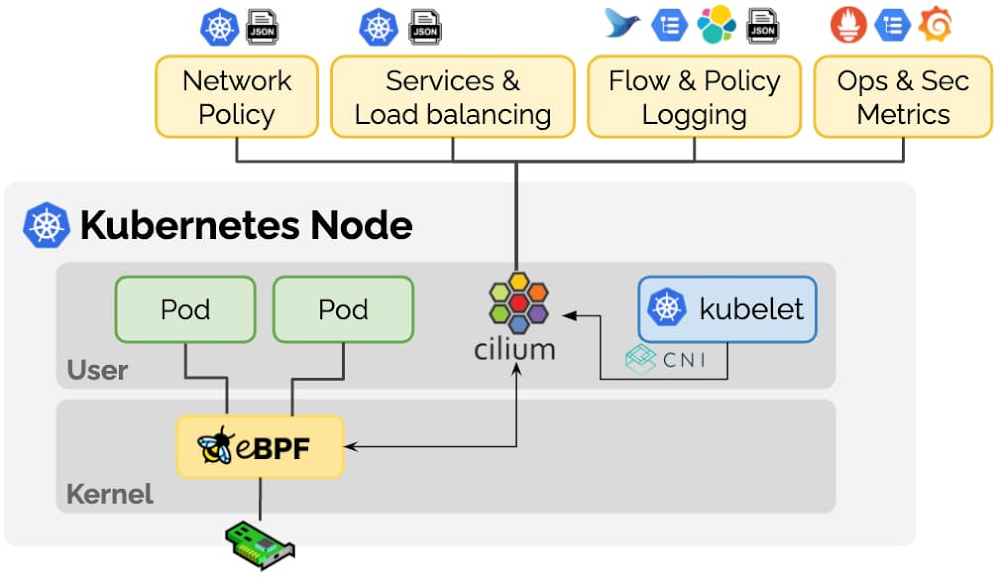
One of Kubernetes’ true superpowers is its developer-first networking model. It provides easy-to-use features such as L3/L4 services and L7 ingress to bring traffic into your cluster as well as network policies for isolating multi-tenant workloads. As more and more enterprises adopt Kubernetes, the gamut of use cases is widening with new requirements around multi-cloud, security, visibility and scalability. In addition, new technologies such as service mesh and serverless demand more customization from the underlying Kubernetes layer. These new requirements all have something in common: they need a more programmable dataplane that can perform Kubernetes-aware packet manipulations without sacrificing performance.Enter Extended Berkeley Packet Filter (eBPF), a new Linux networking paradigm that exposes programmable hooks to the network stack inside the Linux kernel. The ability to enrich the kernel with user-space information—without jumping back and forth between user and kernel spaces—enables context-aware operations on network packets at high speeds.Today, we’re introducing GKE Dataplane V2, an opinionated dataplane that harnesses the power of eBPF and Cilium, an open source project that makes the Linux kernel Kubernetes-aware using eBPF. Now in beta, we’re also using Dataplane V2 to bring Kubernetes Network Policy logging to Google Kubernetes Engine (GKE).What are eBPF and Cilium?eBPF is a revolutionary technology that can run sandboxed programs in the Linux kernel without recompiling the kernel or loading kernel modules. Over the last few years, eBPF has become the standard way to address problems that previously relied on kernel changes or kernel modules. In addition, eBPF has resulted in the development of a completely new generation of tooling in areas such as networking, security, and application profiling. These tools no longer rely on existing kernel functionality but instead actively reprogram runtime behavior, all without compromising execution efficiency or safety.Cilium is an open source project that has been designed on top of eBPF to address the new scalability, security and visibility requirements of container workloads. Cilium goes beyond a traditional Container Networking Interface (CNI) to provide service resolution, policy enforcement and much more as seen in the picture below.The Cilium community has put in a tremendous amount of effort to bootstrap the Cilium project, which is the most mature eBPF implementation for Kubernetes out there. We at Google actively contribute to the Cilium project, so that the entire Kubernetes community can leverage the advances we are making with eBPF.Using eBPF to build Kubernetes Network Policy LoggingLet’s look at a concrete application of how eBPF is helping us solve a real customer pain point. Security-conscious customers use Kubernetes network policies to declare how pods can communicate with one another. However, there is no scalable way to troubleshoot and audit the behavior of these policies, which makes it a non-starter for enterprise customers. With the introduction of eBPF to GKE, we can now support real-time policy enforcement as well as correlate policy actions (allow/deny) to pod, namespace, and policy names at line rate with minimal impact on the node’s CPU and memory resources.The image above shows how highly specialized eBPF programs are installed into the Linux kernel to enforce network policy and report action logs. As packets come into the VM, the eBPF programs installed in the kernel decide how to route the packet. Unlike IPTables, eBPF programs have access to Kubernetes-specific metadata including network policy information.This way,  they can not only allow or deny the packet, they can also report annotated actions back to user space. These events make it possible for us to generate network policy logs that are meaningful to a Kubernetes user. For instance, the log snippet shown below pinpoints which source pod was trying to connect to which destination pod and which network policy allowed that connection.Under the hood, Network Policy logging leverages GKE Dataplane V2. Not only does GKE Dataplane V2 expose the information needed for policy logging, it also completely abstracts away the details of configuring network policy enforcement from the user. That is, when you use Dataplane V2, you no longer have to worry about explicitly enabling network policy enforcement or picking the right CNI to use network policy on your GKE clusters. Talk about making Kubernetes easy to use!Besides network policy, Kubernetes load balancing can also use eBPF to implement Direct Server Return (DSR) mode. DSR eliminates the additional NAT problem that loses the client’s IP address when using Kubernetes LoadBalancer services. eBPF’s ability to encode metadata into a network packet on the fly allows us to provide additional information to the destination node such that it can directly converse with the original client. With DSR, we can reduce the bandwidth requirements of each node as well as avoid port exhaustion.eBPF’s ability to augment network packets with custom metadata enables a long list of possible use cases. We are as excited about the future of Kubernetes and eBPF as you are, so stay tuned for more innovations.How you can benefit from thisEnterprises are always looking to improve their security posture with better visibility into their infrastructure. They want to be able to quickly identify abnormal traffic patterns such as pods that are unexpectedly talking to the internet and denial-of-service attacks. With Kubernetes Network Policy logging, you can now see all allowed and denied network connections directly in the Cloud Logging console to troubleshoot policies and spot irregular network activity.To try out Kubernetes Network Policy logging for yourself, create a new GKE cluster with Dataplane V2 using the following command.Google would like to thank Thomas Graf, co-founder of the Cilium project, for his contributions to this blog post.
Quelle: Google Cloud Platform

Get more from every core: Announcing CPU overcommit for Compute Engine

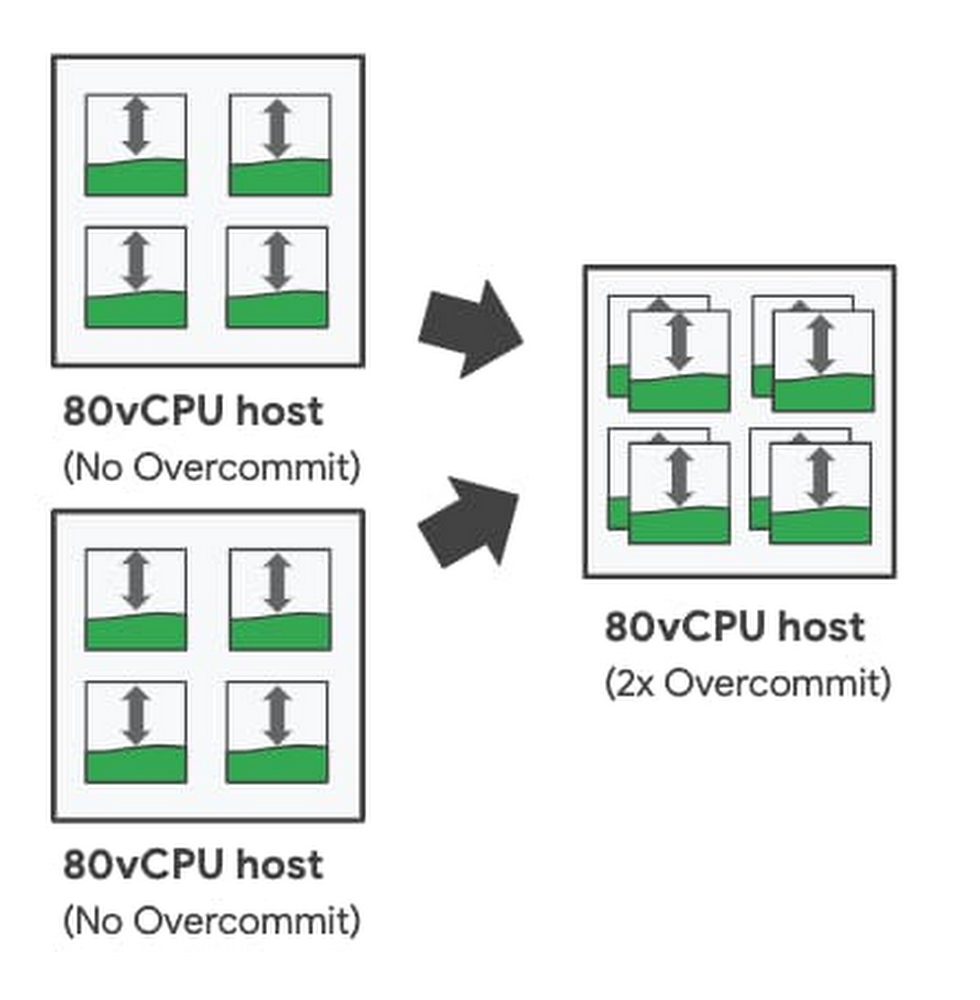
As part of our commitment to provide the most enterprise-friendly, intelligent, and cost effective options for running workloads in the cloud, we are excited to announce CPU overcommit for sole-tenant nodes is now generally available. With CPU overcommit for sole-tenant nodes, you can over-provision your dedicated host virtual CPU resources by up to 2X. CPU overcommit automatically reallocates virtual CPUs across your sole-tenant nodes from idle VM instances to VM instances that need additional resources. This allows you to intelligently pool CPU cycles to reduce compute requirements when running enterprise workloads on dedicated hardware.CPU overcommit for sole-tenant nodes addresses common enterprise challenges such as:Running cost-efficient virtual desktops in the cloud- CPU overcommit for  sole-tenant nodes enables building cost-efficient virtual desktop solutions by intelligently sharing resources across VMs based on usage when dedicated hardware requirements from licensing requirements exist. Improving host utilization and helping to reduce infrastructure costs – CPU overcommit allows you to further increase the available host CPUs on each sole-tenant node. Coupled with custom machine types, CPU overcommit helps optimize memory usage and supports higher utilization for workloads with lower memory footprints.Reducing license costs – For licenses based on host physical-cores — such as bring-your-own-license for Windows Server or Microsoft SQL Server — CPU overcommit for sole-tenant nodes allows you to place more VMs on each licensed server. This allows you to persist on-prem licensing constructs and can help greatly reduce your licensing cost burden when running on Google Cloud.Flexible controlCPU overcommit for sole-tenant nodes is controlled at the VM instance-level by setting the minimum number of guaranteed virtual CPUs per VM along with the maximum burstable virtual CPUs per VM. This gives you flexible per-VM control to mix-and-match VM sizes and overcommit levels on a single sole-tenant node, so you can meet your specific workload needs. For example, when running a traditional virtual desktop workload, you can choose to uniformly overcommit all instances on a sole-tenant node; while for custom application deployments, you can choose tailored CPU overcommit levels (or no overcommit) for workloads with greater performance sensitivity.  With up to a 2X overcommit setting per instance, you can oversubscribe each sole-tenant node by up to twice the number of base virtual CPUs. This means that for an n2-node-80-640 with 80 virtual CPUs, CPU overcommit allows you to treat the node as if there were up to 160 virtual CPUs.Configuring Instance-level CPU OvercommitIntelligent monitoringCPU overcommit for sole-tenant nodes offers detailed metrics to monitor your VM instancesto help you better tune your instance overcommit settings. Using the built-in Scheduler Wait Time metric available in Cloud Monitoring, you can view instance-level wait-time statistics to see the impact of oversubscription on your workload. The scheduler wait-time metric allows you to measure the amount of time your instance is waiting for CPU cycles so that you can appropriately adjust overcommit levels based on workload needs. To help you take action quickly, you can set up Cloud Monitoring to trigger alerts for instance wait-time thresholds.Pricing and availabilitySole-tenant nodes configured for CPU overcommit incur a fixed 25% premium charge. CPU overcommit configured sole-tenant nodes are available on N1 and N2 nodes in regions and zones with sole-tenant node availability. Click here to learn more about Compute Engine and sole-tenant nodes.
Quelle: Google Cloud Platform

Bringing databases to the center of a modern business

For many decades, databases have been the engines fueling the most business-critical enterprise workloads across industries such as retail, banking, manufacturing, and healthcare. These are the systems that, for example, allow money to move around the world and supplies to get to hospitals and patients when they need it most. These workloads require the highest levels of reliability, durability, and performance. As the keepers of the world’s most critical data, databases are top of mind as enterprises accelerate their adoption of cloud and consider how to meet new and changing demands. We have partnered with some of the largest global enterprises and have seen some clear trends emerge. While the amount of data managed by applications continues to grow at an unbelievable rate, companies are rethinking how they handle this data. They want to increase the speed at which they build and launch new features and not get bogged down in maintaining and scaling databases, which ultimately stifles innovation. They’re increasingly adopting databases with open APIs—freeing themselves from restrictive licenses and maintaining portability of their data. They’re having to meet new, stringent regulations for security and data sovereignty, like the GDPR or CCPA, which introduce new complexity and the need for more controls as they scale globally. As these companies map out their cloud journeys, multi-cloud and hybrid strategies are the default. What’s most exciting to see is how they’re looking to transform their business through new data-driven applications that deliver always-on availability, local experiences at a global level, and synchronization across all channels. These trends are top of mind as customers embark on their journey to cloud, and there is no single path that’s right for everyone. We believe in meeting customers where they are so they can reap the benefits of the cloud and catalyze what they can deliver to their business.  Taking a three-phase journeyWhether it’s to increase their agility and pace of innovation, better manage costs, or entirely shut down data centers, we’re seeing customers accelerate their move to cloud and follow a three-phase journey: migration, modernization, and transformation. We have customers who are trying to move as many as thousands of applications and databases to the cloud, frequently on a tight timeline. They need a fast-track approach to lift and shift what they’re running today to the cloud. This “as-is” migration already adds tremendous value, even if it doesn’t provide the full benefits of cloud-native capabilities. We’ve partnered closely with our customers to transition large database estates of both commercial and open source databases to our environment in this migration phase. Fully managed database services such as Cloud SQL (offered for MySQL, PostgreSQL, and SQL Server) provide familiarity while letting customers offload the 24/7 management of their databases to Google Cloud. By adopting managed services, they can refocus their resources on moving the business forward and improving productivity, leaving the heavy lifting of ensuring a highly available environment to us. Our Bare Metal Solution for Oracle workloads allows customers to lower overall costs while maintaining existing investments.Once migrated, many of our customers seek to modernize their database environments by transitioning off legacy databases and onto open source databases. The lack of licensing flexibility, high costs, and constrained deployment options highly motivate customers to make the needed investment to transition off. With open source databases having become enterprise-ready, customers are able to remove operational limitations and seamlessly handle unpredictable demand, all without compromising on performance and reliability. By modernizing, DevOps teams can better manage their development and testing cycles, push new releases faster, and improve accuracy and predictability overall.To release new features to customers faster, Autotrader migrated their Oracle database to Cloud SQL. This meant the teams could make changes with less risk and, by moving to a managed service, AutoTrader can focus more on improving its products. After migrating, AutoTrader’s release cadence improved by over 140% (year over year) with an improved success rate of 99.87%.For customers looking to build next-gen applications entirely in the cloud, they are in the transformation phase. This is about unlocking new possibilities and competitive differentiation for businesses. For relational workloads, Cloud Spanner leads in its ability to run at global scale with strong consistency, all while delivering industry-leading reliability (5 9s). For non-relational workloads, this same global consistency with 5 9s availability is achieved with Cloud Firestore—enabling an unmatched experience to build mobile, web, and IoT applications with live synchronization. Building transformational applications goes beyond any specific service; it’s about how they can work together to deliver game-changing benefits. Cloud-native databases integrate with other services in Google Cloud, enabling you to run your IT systems and apps as microservices and apply advanced analytics and AI to your data. In just one example, social media platform ShareChat saw their traffic grow 500% in the span of just a few days, and were able to scale Spanner horizontally with zero lines of code change.Wherever the customer is in this journey, we’re focused at Google Cloud on supporting them with the services, best practices, and tooling ecosystem to enable their success. Whether they’re all-in on transformation, or just looking to take the first step, we enable them to mix and match these options to migrate at the pace that’s realistic and manageable for their teams and organization. This week at Google Cloud Next ‘20: OnAir, check out expert sessions and demos to learn more about our entire suite of database offerings. And explore how organizations rely on Google Cloud databases to power their most critical applications, drive new innovation, and build better experiences for their customers.
Quelle: Google Cloud Platform