Anthos rising—now easier to use, for more workloads

Today more than ever, customers ask for help addressing two critical business needs: reimagining their application portfolios and driving cost savings. Earlier today, we announced Google Cloud App Modernization Program, or Google CAMP. We built this program to help you innovate faster, so you can reach your customers with world-class, secure, reliable applications, all while saving on costs. Google CAMP does this with a consistent development and operations experience, tools, best practices and industry leading-guidance on how to develop, run, operate and secure applications. A key component of Google CAMP is Anthos, our hybrid and multi-cloud cloud modernization platform. In fact, we recently announced BigQuery Omni, a multi-cloud analytics solution, powered by Anthos. And today, building on that momentum, we’re excited to share several new Anthos capabilities with you. Bring AI to hybrid environmentsWhether it’s image recognition, pattern detection, conversational chatbots, or any number of other emerging use cases for artificial intelligence (AI), organizations are eager to incorporate AI functionality into their offerings. AI models require a lot of data, which more often than not resides in an organization’s data center—not in the cloud. Further, many organizations’ data is sensitive and must stay on-prem. As a result, you’re often forced to rely on fragmented solutions across on-prem and cloud deployments, or to minimize your use of AI entirely. With Anthos, you don’t have to make those types of compromises. Today we’re pleased to announce hybrid AI capabilities for Anthos, designed to let you use our differentiated AI technologies wherever your workloads reside. By bringing AI on-prem, you can now run your AI workloads near your data, all while keeping them safe. In addition, hybrid AI simplifies the development process by providing easy access to best-in-class AI technology on-prem. The first of our hybrid AI offerings, Speech-to-Text On-Prem, is now generally available on Anthos through the Google Cloud Marketplace. Speech-to-Text On-Prem gives you full control over speech data that is protected by data residency and compliance requirements, from within your own data center. At the same time, Speech-to-Text On-Prem leverages state-of-the-art speech recognition models developed by Google’s research teams that are more accurate, smaller, and require less computing resources to run than existing solutions.We collaborated with organizations across many industries to design Anthos’ hybrid AI capabilities. One customer in particular is Iron Mountain, a global leader for storage and information management services. “Iron Mountain built its InSight product on Google Cloud’s AI technology because it was by far the best AI service available. Now with Anthos hybrid AI, we can bring Google’s AI technology on site,” said Adam Williams, Director, Software Engineering at Iron Mountain. “Anthos is hybrid done right, allowing us to build software quickly in the cloud, and seamlessly deploy it on-premises for applications that have data residency and compliance requirements. Thanks to Anthos we have been able to meet our customers where they are and open up millions of dollars of new opportunities.” You can get started today with Speech-to-Text On Prem with five supported languages, with more coming soon. Think services-first for more workloadsMany of our customers choose Anthos because of its service-first approach (versus infrastructure-first). Anthos lets you automate those services, allowing you to proactively monitor and catch issues early. It does so with declarative policies that treat “configuration as data,” so you can minimize manual errors while maintaining your desired configuration state.These are some of the reasons that leading global financial-services provider Macquarie Bank chose Anthos as its application modernization platform. “Embracing Anthos enables us to move at the speed of now, by absorbing the complexity of building secure and efficient distributed systems,” said Richard Heeley, CIO, Banking and Financial Services, Macquarie Bank. “This means we can focus on driving innovation and delivering leading banking experiences for our customers, now and into the future.” We’ve also been doing more to bring the benefits of this services-first approach to a wider range of workloads. Today we are introducing Anthos attached clusters, which let you manage any Kubernetes cluster with the Anthos control plane—including centralized management for configuration and service mesh capabilities.We are also excited to share that Anthos for bare metal is now in beta, which lets Anthos run on-prem and at edge locations without a hypervisor. Anthos for bare metal provides a lightweight, cost-effective platform that minimizes unnecessary overhead and opens up new cloud and edge use cases. In fact, Google is itself an early adopter for Anthos for bare metal, working towards using it as a platform to run containers internally for our production workloads.Faster development cyclesWriting and managing production workloads can be labor-intensive. There are many ways Anthos can help your developers, security teams and operators be more productive. Let’s take a look at the newest capabilities. First, we’ve united our Cloud Code Integrated Development Environment (IDE) plugins with Cloud Run for Anthos. This allows you to build serverless applications directly from IDEs like VS Codeand Intellij. Supported languages include Java, Node.js, Python and Go. Once you’ve written your code, the new Cloud Code-Cloud Run emulator lets you quickly validate local changes on your own machine, with automated re-deploys on every saved code change. You can even use this emulator to locally debug your Cloud Run apps. When your code is ready, you can push changes directly to a remote dev environment in the cloud, right from the IDE.Additionally, Cloud Code now lets you create Kubernetes clusters with Cloud Run for Anthos enabled, right from within your IDE, pre-populating key details like project ID, zone/region, number of nodes, etc.Expand your security optionsWe built Anthos with a security-first approach from day one, following principles of least-privilege and extending defense-in-depth to your deployments. This simplifies everything from release management, to updating and patching. In particular, identity and authentication play a key role in securing your deployments—all the more so in Anthos environments that can span a variety of cloud and on-prem environments. Today, we’re announcing Anthos Identity Service, which extends your existing identity solutions to seamlessly work with Anthos workloads. With support for OpenID Connect, (generally available on-prem and in beta for Anthos on AWS), you can leverage your existing identity investments and enable consistency across environments. We will be adding support for additional protocols in the coming months.Then, with the new Anthos security blueprints you get best practices in a templated format, making it easy for you to quickly adopt best practices like auditing and monitoring, policy enforcement and enforcing locality restrictions. Anthos security blueprints also give you purpose-built solutions to automate governance, compliance and data residency for regulated industries such as financial services, retail and public sector. Finally, through Google Cloud Marketplace, we’ve made containerized applications for various use cases such as security, analytics, developer tools, etc. easier to access than ever before. Because of this, sales of partner SaaS offerings through the Google Cloud Marketplace have increased 3x since the beginning of 2020. Take the first step with easier migration As you look to modernize, the first step is often to migrate specific workloads before you can build on top of them. But moving VM-based workloads to containers can be very complex. You may not even have access to the source code, especially for third-party software, making manual containerization impossible.Today we’re also announcing new capabilities to make migrating your workloads to Anthos easier—even ones for which you don’t have the source code.Migrate for Anthos, widely used today as a low-friction path for migrating workloads to GKE, now provides build migration automation using the new CRD-based API to integrate with your custom processes and tooling. This enables several new features:Support for Anthos deployed on-prem so that you can convert VMs running on-prem—and keep them there—if you need that flexibility. Support for Windows containers, now in beta, for anyone looking to start converting their Windows workloads. Integration into the Google Cloud Console web admin UI, making it easier to monitor ongoing migrations or perform multiple migrations at once.One of our customers, the national British newspaper The Telegraph, uses Migrate for Anthos to accelerate its modernization. “The Telegraph was running a legacy content management system (CMS) in another public cloud on several instances. Upgrading the actual system or migrating the content to our main Website CMS was problematic, but we wanted to migrate it from the public cloud it was on,” said Lucian Craciun, Head of Technology, Platforms, The Telegraph. “We found out about Migrate for Anthos and gave it a try, and in about one month we were able to containerize and migrate all of those CMS workloads to GKE. We are already seeing significant savings on infrastructure and reduced day-to-day operational costs.”In addition, we’re making it easier for you to migrate workloads from Cloud Foundry, a first-generation cloud application platform. This new migration feature uses Kf on Anthos, which presents developers with a Cloud Foundry-like interface on top of Anthos. With this approach, you can benefit from Anthos’ operational benefits (e.g., declarative operations, service mesh, etc.), while minimizing disruption for your developers.More workloads from more places, with more ease No matter where you run your workloads—in Google Cloud, on-prem, in other clouds or at the edge—Anthos provides a consistent platform on which your teams can quickly build great applications that adapt to an ever-changing world. Over the coming weeks, we will publish deep dives into each of these areas with more detailed information; in the meanwhile, to learn more about these launches, as well as how to get the most out of Anthos, check out these great sessions that are going live at Google Cloud Next ‘20: OnAir this week:Anthos deep dive: part oneAnthos deep dive: part two
Quelle: Google Cloud Platform
Accelerate your application development and delivery

Delivering software quickly, reliably, and safely is at the heart of every digital transformation and application modernization journey. After all, an increase in speed generates powerful business outcomes. As showcased by research from DevOps Research and Assessment (DORA),software speed, stability, and availability contribute directly to organizational performance (including profitability, productivity, and customer satisfaction). Today, we are announcing new additions to our application development and delivery platform to help developers, operators, and security professionals deliver better quality software to production, faster. These new capabilities embed best practices we’ve learned at Google over the years while building applications at scale. They’re also consistent with research performed by DORA over the past six years with over 31,000 IT professionals. Let’s take a closer look at the new features and services that can help you accelerate application development and delivery today. Driving developer productivityFirst, we’ve added support for Cloud Run, our fully managed container platform, into our Cloud Code IDE plugins. Now you can write, deploy, and debug containerized applications directly from your IDEs such as VS Code and IntelliJ onto our fully managed serverless runtime. The integration comes with starter templates in various languages including Java, Node.js, Python, and Go—making it easy to get started and observe best practices. This in turn helps you rapidly explore the core benefits of Cloud Run such as automated day 2 operations, and cost-effective, automatically scaled containerized applications. Second, we built in extensive support for fast feedback as part of the local development loop. To achieve this, Cloud Code includes a new Cloud Run emulator for VS Codeand IntellIJ that runs on your local machine to let you quickly validate changes, thereby taking away the toil of iterating on and redeploying changes. Once you’ve vetted the changes locally, you can push the changes directly as an update/revision to Cloud Run right from within the IDE. With the ability to rapidly iterate on your code locally as well in the cloud, you can catch issues early and resolve any issues discovered in the live application.Third, to further enable you to start building applications quickly we’ve added built-in support for Google Cloud Buildpacks in Cloud Code. Developers should focus their effort on translating business requirements into code—not working out how to containerize that code. Today, developers spend a lot of time writing Dockerfiles and defining how a container should be built. This process is error-prone and requires skills and time that are better spent developing new functionality. Google Cloud Buildpacks pull together all the dependencies and frameworks required to run your application without a Dockerfile. These buildpacks also provide a great way for security teams to validate what runs on the platform, ensuring compliance and an enhanced security posture. Cloud Buildpacks are fully supported by Google Kubernetes Engine (GKE), Cloud Run and Anthos. The above enhancements in Cloud Code and Cloud Run streamline application development and delivery. As you build larger applications and automate increasingly complex business processes, you may need to integrate Google Cloud APIs, External APIs, and our serverless runtimes. We are announcing two new products to assist with this process. Events for Cloud Run is now available in beta. Events for Cloud Run allows you to connect Cloud Run services with events from a variety of sources, including GCP services, your own software, GitHub, etc. We are also excited to introduce Workflows in beta, to help you integrate custom actions, Google APIs and third-party APIs. This includes support for advanced features such as passing values between steps, parsing JSON responses to objects, iterating arrays, error handling and retries, and more. Workflows are serverless, so there is no infrastructure to manage and the product takes care of rapid scaling, following your business demand. Events and Workflows allow you to automate even the most complex business requirements.Securing the software supply chain  Accelerated software delivery goes hand in hand with “shifting left” on security. And in an era of ubiquitous threats, securing the software supply chain is vitally important. However, you don’t want security reviews to slow you down. DORA’s research highlights how the highest performing “Elite” teams are able to conduct security reviews in days, by building security throughout the software development process. The same process can take weeks for low performers. To help you improve your security posture and employ practices implemented by Elite performers, Artifact Registry is now available in beta. With Artifact Registry, you can now  manage and secure artifacts like maven and npm language packages, along with Docker images. Artifact Registry also provides greater visibility and control over the different types of artifacts that go through your software supply chain, and now supports regional repositories and creating multiple repositories per project. Enterprises can also now use VPC-SC to restrict access to the repository to callers within a security perimeter, and leverage customer-managed encryption keys to encrypt the contents of the repositories.Built-in deployment best practices When it comes time to push your code to production, automating your deployments is a game changer. That’s reflected in DORA’s research: 69% of Elite teams automate their deployments, in comparison to 17% of low performers. Automating deployments also reduces the stress of pushing changes and frees teams up for important refactoring, design, and documentation work. To help you more easily automate your deployments, Cloud Run now supports traffic splitting and gradual rollouts. Before, changes were pushed to all users in production, but now you collect feedback from a small percentage of users. This way, you can limit the “blast radius” of a problematic code change and perform a rollback if need be. We follow a similar process internally to roll out changes to google.com, Gmail, and many other services.To further drive deployment automation, we have also made it easy to set up Continuous Deployment directly from the Cloud Run user interface. Simply connect a git repository, specify the branch to watch for changes, and your code will be automatically deployed to Cloud Run when new changes are pushed.  Enterprise additions to serverless servicesRecently we announced Serverless VPC access that allows serverless services to access resources in a VPC network, and now we are excited to announce that it supports Shared VPC, enabling enterprises to connect their serverless services to Shared VPC networks and any on-prem resources connected by VPN or Cloud Interconnect.Deliver better software, fasterOur goal with these releases is to give you the speed, security, and stability you need to implement application development and deliver practices employed by Elite DevOps teams. You can see all of these new features in action here. We have also incorporated the best practices as a part of our Google Cloud App Modernization Program (CAMP). To learn more about CAMP along with more about these new features, join us at the following Next OnAir sessions:Develop for Cloud Run in the IDE with Cloud CodeCloud Run: What’s New? Serverless Workflows in Google CloudEvent-driven Microservices with Cloud RunBuildpacks on Google Cloud
Quelle: Google Cloud Platform

From the ballpark to the cloud: How MLB is using Anthos

Whether it’s calculating batting averages or hot dog sales, data is at the heart of baseball. For Major League Baseball (MLB), the governing body of the sport known as America’s National Pastime, processing, analyzing, and ultimately making decisions based on that data is key to running a successful organization, and they’ve increasingly turned to Google Cloud to help them do it.MLB supports 30 teams spread across the US and Canada, running workloads in the cloud as well as at the edge with on-premises data centers at each of their ballparks. By using Anthos, they can containerize those workloads and run them in the location that makes the most sense for the application. We sat down with Kris Amy, VP of Technology Infrastructure at Major League Baseball, to learn more.Eyal Manor: Can you tell us a little bit about MLB and why you chose Google Cloud?Kris Amy: Major League Baseball is America’s pastime. We have millions of fans around the world, and we process and analyze extreme amounts of data. We know Google Cloud has tremendous expertise in containerization, AI and big data. Anthos enables us to take advantage of that expertise whether we’re running in Google Cloud, or running on-prem in our stadiums. Eyal: Why did you choose Anthos, and how is it helping you?Kris: Anthos is the vehicle we’re using to run our applications anywhere—whether that’s in a ballpark or in the cloud. We have situations where we have to do computing in the park for latency reasons, such as delivering stats in the stadium, to fans, or to broadcast, or to the scoreboard. Anthos helps us process all that data and get it back to whomever is consuming it. Uniformity across this deployment environment is especially key for our developers. They don’t want to know the differences between whether they’re running in the cloud, or running on-prem in a datacenter or in one of our stadiums.To give you an example, if something were to happen during a broadcast at Yankee Stadium, we could run our code across the city at Citi Field where the Mets play and continue broadcasting without interruption. And if we had any issue in any stadium, we can shoot that data up to Google Cloud and process it there.Eyal: That is really amazing. Can you tell us what this journey looked like for you?Kris: We started our journey of modernizing our application stack 18 months ago. We previously had various siloed applications, and we were now eager to move down this path of containerizing everything and using that as our path forward for deploying applications. From there, we had uniformity across all of our environments, whether that’s a miniature datacenter that we have running in the stadium, or a true datacenter, or in Google Cloud. So we had chosen containers, and we were well down the path, and then we were coming to the problem of “what do we do once we want to run this in the stadium?”We saw Google and noticed that Anthos was coming. We got excited because it seemed like the simplest and easiest solution for managing these applications and deploying them regardless of whether they’re in the stadium or in the cloud. That journey took us about 12 months and we’re happy to say that as of opening day this year, we’ve been running applications in our stadiums on Anthos.Learn more about how MLB is using Google CloudThere’s more to learn from how MLB is using Google Cloud. Check out their Next OnAir sessions on running Anthos on bare metal and at the edge and their data warehouse modernization journey, read their recent Google Cloud blog post, or see a live demo of how they’re using BigQuery to share subsets of fan data with MLB Clubs.
Quelle: Google Cloud Platform

Advancing telehealth with Amwell

Today, healthcare organizations are reimagining how care is delivered. While many organizations were already beginning to embrace telehealth at the start of the year, the global COVID-19 pandemic has accelerated this trend virtually overnight—for instance, according to HHS data, Medicare primary care visits delivered virtually grew from less than one percent in February of 2020 to more than 40 percent in April. And, telehealth is here to stay: A study from Frost & Sullivan analysts forecasts a “sevenfold growth in telehealth by 2025.” At Google Cloud, we are committed to helping the healthcare industry transform to meet today’s extraordinary challenges and to build a platform for the future that enables high quality, efficient, and cost-effective care from anywhere. A comprehensive, patient-friendly telehealth system is critical to providing high quality virtual care. Imagine a not too distant future in which your visit begins with a customized greeting and relevant information in a digital waiting room. A conversational chatbot agent is immediately available to assist you, in your preferred language, by asking about your symptoms and the reason for your visit, and provides this information to your physician before she enters your virtual exam room. During your appointment, you continue to speak in your preferred language to your physician, while cloud-based artificial intelligence (AI) provides live, translated captioning of the conversation. Before, during, and after the appointment, AI and conversational agents simplify, automate, or offload your providers’ routine tasks, such as filling out common intake forms or collecting insurance information, so they are free to focus on you. Your health information like medication, symptoms, and records from your past visits are immediately available during your telehealth visit and afterwards, your medical records are immediately updated, privately and securely. Your doctor can quickly share notes, fill prescriptions, send relevant information and schedule a follow-up visit via email.The same technology that powers this telehealth platform can also enable providers to have better, ongoing monitoring of patients in home health situations as well as for those managing chronic conditions, by leveraging sophisticated data analytics tools in the cloud to help providers monitor and flag interventions at the right time.Today, we announced a new partnership with Amwell to help the healthcare industry transform for a world that is more reliant on telehealth, and to ensure that healthcare organizations and providers are equipped with telehealth solutions that provide holistic and secure experiences, support HIPAA compliance, are fully-integrated, and that will enable cohesive, patient-friendly journeys through the healthcare system.Google Cloud and Amwell will closely partner to bring telehealth solutions to healthcare organizations around the world, leveraging Amwell’s telehealth platform running on Google Cloud and integrating Google Cloud’s capabilities in areas including artificial intelligence (especially natural language processing and translation services), services aimed at secure handling of healthcare data in the cloud and enabling healthcare data interoperability, as well as collaboration tools like G Suite. We’ll work together to bring these solutions to market, helping expand access to virtual care among our mutual customers and the global healthcare industry. As part of this strategic partnership, Google Cloud will invest $100 million into Amwell to evolve and scale its telehealth portfolio to serve the needs of providers, insurers, and patients. You can read more about our partnership with Amwell here.Over the coming months and years, patients will expect healthcare organizations to offer a comprehensive, seamless, and friendly virtual care experience. It’s critical that organizations are thinking today about building this platform for the future. We’re committed to partnering with the healthcare industry to adapt, prepare, and thrive in the new future.
Quelle: Google Cloud Platform

Ramping up cloud migration discovery and assessment with StratoZone

Businesses around the world have been impacted by the global pandemic, making the need to migrate to the cloud more urgent than ever. On their own, many organizations have difficulty completing cloud migrations on time and on budget. Among their challenges: unknown capacity needs and sizing; unknown performance thresholds; navigating expensive hardware refresh cycles or contract renewals; understanding licensing and support issues; and compliance and security concerns. At Google Cloud, we believe migrating to the cloud must be simple and provide clear advantages. We recently launched RAMP, our holistic migration program that provides the best of our expertise, services, partners, and tools to enable a simpler, faster path to cloud success. RAMP helps customers unlock their cloud potential through repeatable processes with predictable results for cloud migrations. To accelerate the assessment and planning phases, we acquired StratoZone, a migration discovery and assessment specialist.Since 2014, StratoZone has helped thousands of companies understand their data center footprint, plan out their migration, and make the jump to the cloud. Now as part of Google Cloud, their technology and expertise supports enterprises who are looking to accelerate their cloud migrations, helping discover, assess, and understand complex dependencies across workloads moving to the cloud. As part of our cloud migration program, these tools will help you more predictably evaluate your IT landscape and plan what can move, what should move, and in what order. This means a migration program that is:Fast: Assess your workloads quickly, with a solution that takes very little time to install and run (typically under 45 minutes), and can scale to discover and assess thousands of assets in hours. Initial results are typically available in days.Easy to use: Discover workloads and assets using an agentless process. No appliances, hardware, or agents to deploy. Discovery is hypervisor and physical/virtual agnostic.Secure: All data is encrypted in transit and at rest. Customers control data anonymization.Based on best practices: Recommendations for optimal migration and modernization targets based on existing assets (including estimating TCO), proposing an optimal mix of cloud services as well as migration phases that minimize application disruption.How to get started with discovery and assessment for your migrationWe’re excited to help you make your move to the cloud. To get started, click here to estimate your cloud migration costs with a free assessment or get hands-on with the tech with this Qwiklab.
Quelle: Google Cloud Platform

Shining a light on Anthos at Next OnAir application modernization week

Welcome to Week 7 of Google Cloud Next ‘20: OnAir! This week’s app modernization track goes live Tuesday, August 25 at 9:00am PT, and is all about containers, serverless, app development—and my personal favorite, Anthos.App modernization is such a relevant and timely topic. Now more than ever, companies across the globe are looking at their existing applications, and considering how new technologies could help modernize them to make their businesses more efficient and streamlined. This week is all about that very challenge. As a Developer Advocate who strives to help businesses understand what app modernization can look like, I’m blocking lots of time on my calendar to watch these sessions this week!Here are some breakout talks at the top of my watch list:Hands-on Keynote: Building Trust for Speedy Innovation: I always love a good keynote to help dig into what this week in Next is all about. And a hands-on keynote sounds even better! As with any app modernization effort, this session focuses on the basics—“what are you really trying to accomplish?”—by tying technology innovation back to business goals such as increasing trust and speed.Getting Started with Anthos: Containers are at the core of many app modernization journeys. With many businesses adopting hybrid- and multi-cloud strategies, they’re looking for tools that can help them create the best environments for their applications, wherever they may be. Anthos is a tool with a lot to offer in these modern, distributed environments.Modernizing Texas’ Best Retail Chain with Anthos: There’s nothing like a customer story to understand how to use a new tool or technology in practice. Many viewers will be able to relate to how H-E-B grappled with the challenges of transforming traditional systems into modern microservice-style architectures. I’ll be looking to learn about what specific challenges H-E-B faced, why they chose the solutions they did, and what they’re planning to do next.Mainframe Modernization: Accelerating Legacy Transformation: Mainframes are everywhere, but more and more businesses are working to understand life beyond the mainframe. A whole session addressing challenges and solutions around mainframe-to-container modernization sounds like just what this app modernization expert ordered.Integrating VM Workloads into Anthos Service Mesh: While containers are a cornerstone of many app modernization efforts, “app modernization” is really all about the apps—and not every app belongs in a container! VM solutions are still popular and sometimes the best tool for the job. But did you know that popular technologies commonly associated with containers, like service mesh, can offer benefits to VM-based applications too?Evolve to Zero Trust Security Model‎ with Anthos Security: No app modernization journey would be complete without incorporating security. And a key component of modernizing security postures is evolving closer to a zero-trust security model. Google has a wealth of experience to draw on when it comes to modern, zero-trust application architectures and this session will share that expertise with you, and show you the tools to implement it yourself.These are just a few of the exciting sessions I have on my playlist. Looking through the schedule, I know I’ll be checking out a lot more as the week goes on! Let’s not forget that Next OnAir is also offering more than just the typical breakout sessions:Check out the Explore Anthos Demo for a technical demonstration of the tools Anthos uses to support modernized applications.Get hands-on practice managing traffic routing with Istio and Envoy and how to implement continuous delivery with Jenkins in Google Kubernetes Engine (GKE) during this week’s Cloud Study Jam workshops. You’ll also learn more about Google Cloud’s Professional Cloud DevOps Engineer certification. Take your app modernization skills to the next level and compete with peers for prizes in this week’s Cloud Hero game.Recap what you’ve learned, learn about some great content you might have missed, and take the opportunity to ask experts your questions at Cloud Talks by DevRel live on Friday, August 28th.We hope you have fun at Next OnAir this week! Don’t forget to check out our other breakout talks and register at g.co/cloudnext.
Quelle: Google Cloud Platform

Dataflow Under the Hood: comparing Dataflow with other tools

Editor’s note: This is the third blog in a three-part series examining the internal Google history that led to Dataflow, how Dataflow works as a Google Cloud service, and here, how it compares and contrasts with other products in the marketplace.To place Google Cloud’s stream and batch processing tool Dataflow in the larger ecosystem, we’ll discuss how it compares to other data processing systems. Each system that we talk about has a unique set of strengths and applications that it has been optimized for. We’re biased, of course, but we think that we’ve balanced these needs particularly well in Dataflow.Apache Kafka is a very popular system for message delivery and subscription, and provides a number of extensions that increase its versatility and power. Here, we’ll talk specifically about the core Kafka experience. Because it is a message delivery system, Kafka does not have direct support for state storage for aggregates or timers. These can be layered on top through abstractions like Kafka Streams. Kafka does support transactional interactions between two topics in order to provide exactly once communication between two systems that support these transactional semantics. It does not natively support watermark semantics (though can support them through Kafka Streams) or autoscaling, and users must re-shard their application in order to scale the system up or down.Apache Spark is a data processing engine that was (and still is) developed with many of the same goals as Google Flume and Dataflow—providing higher-level abstractions that hide underlying infrastructure from users. Spark has a rich ecosystem, including a number of tools for ML workloads. Spark has native exactly once support, as well as support for event time processing. Spark does have some limitations as far as its ability to handle late data, because its event processing capabilities (and thus garbage collection) are based on static thresholds rather than watermarks. State management in Spark is similar to the original MillWheel concept of providing a coarse-grained persistence mechanism. Users need to manually scale their Spark clusters up and down. One major limitation of structured streaming like this is that it is currently unable to handle multi-stage aggregations within a single pipeline.Apache Flink is a data processing engine that incorporates many of the concepts from MillWheel streaming. It has native support for exactly-once processing and event time, and provides coarse-grained state that is persisted through periodic checkpointing. The effect of this on the cost of state persistence is ambiguous, since most Flink deployments still write to a local RocksDB instance frequently, and periodically checkpoint this to an external file system. Depending on the frequency of checkpointing, this can increase time to recovery in the case that computation has to be repeated. Flink also requires manual scaling by its users; some vendors are working towards autoscaling Flink, but that would still require learning the ins and outs of a new vendor’s platform.Finally, a brief word on Apache Beam, Dataflow’s SDK. Given Google Cloud’s broad open source commitment (Cloud Composer, Cloud Dataproc, and Cloud Data Fusion are all managed OSS offerings), Beam is often confused for an execution engine, with the assumption that Dataflow is a managed offering of Beam. That’s not the case—Dataflow jobs are authored in Beam, with Dataflow acting as the execution engine. The benefits of Apache Beam come from open-source development and portability. Jobs can be written to Beam in a variety of languages, and those jobs can be run on Dataflow, Apache Flink, Apache Spark, and other execution engines. That means you’re never locked into Google Cloud.This concludes our three-part Under the Hood walk-through covering Dataflow. Check out part 1 and part 2. We’re excited about the current state of Dataflow, and the state of the overall data processing industry. We look forward to delivering a steady “stream” of innovations to our customers in the months and years ahead.
Quelle: Google Cloud Platform

Databases that transform businesses—What happened at Google Cloud Next ‘20: OnAir

Week 6 of Google Cloud Next ‘20: OnAir was all about Google Cloud databases and how to choose and use them, no matter where you are in your cloud journey. There was plenty to explore, from deep-dive sessions and demos to feature launches and customer stories. Across it all, what stood out is the strong momentum and adoption across Google Cloud databases for developers and enterprises alike.Google Cloud’s range of databases are designed to help you tackle the unpredictable. Your databases shouldn’t get in the way of innovation and growth, but many legacy, on-prem databases are holding businesses back. We build our databases to meet you at any stage, whether it’s an as-is migration or a brand-new app developed in the cloud.  Key data management announcements this weekThis week, we launched new features aimed at solving the hardest data problems to help our customers run the most mission-critical applications. We kicked off the week with a keynote from Director of Product Management Penny Avril, who talked with social media platform ShareChat about how they met a 500% increase in demand using Cloud Spanner without changing a line of code. We also announced updates to our databases. For Spanner, the Spanner Emulator lets app developers do correctness testing when developing an app. A new C++ client library and increased SQL feature set also add more flexibility. In addition, cloud-native Spanner now offers new multi-region configurations for Asia and Europe with 99.999% availability. NoSQL database service Cloud Bigtable now offers more capabilities, like managed backups for high business continuity and added data protection. And expanded support and SLA for single-node production instances makes it even easier to use Bigtable for all use cases, both large and small. Mobile and web developers use Cloud Firestore to build apps easily, and it now offers a richer query language, C++ client library, and Firestore Unity SDK to make it easy for game developers to adopt Firestore. We are also introducing tools to give you better visibility into usage patterns and performance with Firestore Key Visualizer, which will be coming soon.Cloud SQL, the fully managed service for MySQL, PostgreSQL, and SQL Server, now offers more maintenance controls, cross-region replication, and committed use discounts, providing reliability and flexibility as you migrate to the cloud. For those users running specialized workloads like Oracle, Google Cloud’s Bare Metal Solution enables you to move these workloads within milliseconds of latency to Google Cloud. Our Bare Metal Solution is now available in even more regions and provides a fast track to cloud while lowering overall costs. How customers are building and growing with cloud databasesWe also heard from customers across industries on how they use Google Cloud databases to transform their business, especially in the face of the unpredictable. From The New York Times building a real-time collaborative editor to help publish faster and Khan Academy on how they met the rising demand for online learning to gaming publishers like Colopl supporting massive scale and variable usage through Spanner and ShareChat migrating from Amazon DynamoDB to Spanner for better scale and efficiency at 30% lower costs, it’s exciting to see what they’ve been able to accomplish. Check out data management demosFor data management week, we debuted new interactive demos that let you explore database decisions for yourself. If you’re trying to understand where to start, check out this demo that can help you choose which database is right for you. To see how Cloud SQL lets you achieve high availability, explore this demo. Or learn how you can get a consistent, real-time view of your inventory at scale across channels and regions using Spanner. And take a close look at how Bare Metal Solutions can help you run specialized workloads in the cloud.Go deep with databasesAcross our entire database portfolio, there are sessions to help you better understand each service and what’s new. For SQL Server, MySQL, or Postgres users, check out Getting to Know Cloud SQL for SQL Server or High Availability and Disaster Recovery with Cloud SQL. If it’s cloud-native you’re interested in, sessions like Modernizing HBase Workloads with Cloud Bigtable, Future-proof Your Business for Global Scale and Consistency with Cloud Spanner, or Simplify Complex Application Development Using Cloud Firestore provide deep dives to help you get started.Looking ahead: Application modernizationStay tuned to Next OnAir—next week is all about application modernization. Check out Tuesday’s keynote to learn more about Anthos and how it can help make the most of your on-premises investments and cloud offerings. Of course, we’ll also bring you live technical talks and learning opportunities, aligned with each week’s content. Click “Learn” on the Explore page to find each week’s schedule. Haven’t yet registered for Google Cloud ’20 Next: OnAir? Get started at g.co/cloudnext.
Quelle: Google Cloud Platform

Dataflow Under the Hood: understanding Dataflow techniques

Editor’s note: This is the second blog in a three-part series examining the internal Google history that led to Dataflow, how Dataflow works as a Google Cloud service, and how it compares and contrasts with other products in the marketplace. Check out part 1: Dataflow Under the Hood: the origin story.In the first post in this series, we explored the genesis of Dataflow within Google, and talked about how it compares to Lambda Architectures. Now, let’s look a little closer at some of the key systems that power Dataflow. As mentioned in the first post, we’ve taken advantage of a number of technologies that we had built for previous systems, and also developed some new techniques.The origins of our timer system go back to the original MillWheel system, which provided users with direct access to setting timers for triggering processing logic. Conceptually, these are similar to other scheduling systems, where users set an arbitrary number of alarms, and the system is responsible for triggering those alarms at an appropriate time. For durability, we journal these timers to a backing store (like the Cloud Bigtabledatabase), and cache a subset of them in memory, such that all upcoming timers are in memory, and the cache can be refreshed asynchronously without putting storage reads on the hot path. One subtlety for timers arises from the need to support event time timers, which depend on the completeness of data for previous stages in order to trigger. We call these completion markers watermarks, and they are managed by a separate component, which communicates with all the nodes that are responsible for processing a given stage in order to determine current watermark value. This watermark component then publishes these values to all relevant downstream computations, which can use the watermark to trigger event time timers. To help illustrate why this is important, let’s consider a classic IoT use case—a manufacturing line where the equipment is instrumented with sensors. These sensors will emit reams of data, and the watermarks associated with the data will help group together this data by time, or perhaps by manufacturing run, and ensure we don’t miss data in our analysis just because it came in late or out of order.Understanding state managementState management in Dataflow takes advantage of a number of similar concepts as timers. State is journaled to a durable store, and cached for speed and efficiency. One thing that we learned from our experience with MillWheel was the need to provide useful abstractions for users to interact with state—some applications want to read and write the entirety of the stored state for each incoming record, but others want to read only a subset, or append to a list that is only occasionally accessed in full. In Dataflow, we’ve worked hard to provide relevant state abstractions that are integrated with the right caching and persistence strategies, so that the system is efficient and fast out of the box. We’ve also found it important to commit state modifications in an atomic operation with record processing. Many other systems take the approach of telling users to use an external state system, which is very difficult to get working correctly. Thinking back to the IoT use case we just discussed, Dataflow’s state management features would make it easy—meaning involving trivial amounts of user code—to do things like aggregating and counting equipment revolutions per minute, calculating the average temperature from a sensor over a given period of time, or determining the average deviation from a cutting or molding process without complicated retry logic for interacting with a secondary system.A major reason for the popularity of the Lambda Architecture is the challenges of providing exactly once processing in streaming processing systems (see this blog series for additional details). Dataflow provides exactly once processing for records by storing a fingerprint of each record that enters a given stage, and uses that to deduplicate any retries of that record. Of course, a naive strategy for this would create an unbounded number of fingerprints to check, so we use the watermark aggregator to determine when we can garbage-collect the fingerprints of records that have fully traversed the system. This system also makes ample use of caching, as well as some additional optimizations, including the use of rotating Bloom filters.One final aspect of Dataflow that we’ll touch upon is its ability to support autoscaling of pipeline resources. It is able to support dynamic scaling (both up and down) of both streaming and batch pipelines by having a means of dynamically reallocating the underlying work assignments that power the system. In the case of streaming pipelines, this corresponds to a set of key ranges for each computation stage, which can be dynamically shifted, split, and merged between workers to balance out the load. The system responds to changes in usage by increasing or decreasing the overall number of nodes available, and is able to scale these independently from the disaggregated storage of timers and state. To visit our IoT factory floor example one last time, these autoscaling capabilities would mean that adding more sensors or increasing their signal frequency wouldn’t require the long operations and provisioning cycles you would have needed in the past.Next, be sure to check out the third and final blog in this series, which aims to compare and contrast Dataflow with some of the other technologies available in the market.
Quelle: Google Cloud Platform

Using Cloud Logging as your single pane of glass

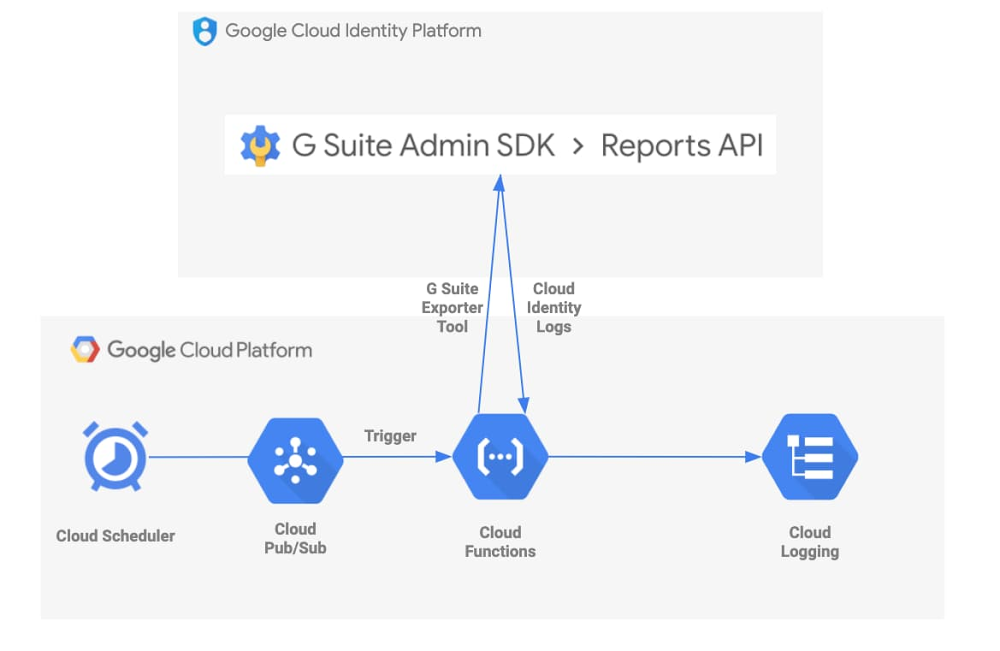
Logs are an essential tool for helping to secure your cloud deployments. In the first post in this series, we explored Cloud Identity logs and how you can configure alerts for potentially malicious activity in the Cloud Identity Admin Console to make your cloud deployment more secure. Today, we’ll take it a step further and look at how you can centralize collection of these logs to view activity across your deployment in a single pane of glass. Our best practices for enterprises using Google Cloud Platform (GCP) encourage customers to centralize log management, operations, searching, and analysis in GCP’s Cloud Logging. However, sometimes customers use services and applications that may not automatically or fully log to Cloud Logging. One example of this is Cloud Identity.Fortunately, there’s a way to get Cloud Identity logs into this central repository by using a Cloud Function that executes the open-source GSuite log exporter tool. A Cloud Scheduler job will trigger the execution of this Cloud Function automatically, on a user-defined cadence. Here’s a visual representation of this flow:Google Cloud Professional Services also provides resources that can help you automate the deployment of the GCP tools involved in this solution. Even better, the services used are fully-managed: no work is required post-deployment.Is this solution right for me? Before proceeding, let’s decide if the tools in this post are right for your organization. Cloud Identity Premium has a feature that lets you export Cloud Identity logs straight to BigQuery. This may be sufficient if your organization only needs to analyze the logs in BigQuery. However, you may want to export the logs to Cloud Logging for retention or further processing as part of your normal logging processes.GCP also has a G Suite audit logging feature which automatically publishes some Cloud Identity logs into Cloud Logging. You can explore which Cloud Identity logs this feature covers in the documentation. The G Suite log exporter tool we will explore in this post provides additional coverage for getting Mobile, OAuth Token, and Drive logs into Cloud Logging, and also allows the user to specify exactly which logs they want to ingest from Cloud Identity.If either of these situations are relevant to your organization, keep reading!The tools we useThe G Suite log exporter is an open-source tool developed and maintained by Google Cloud Professional Services. It handles exporting data from Cloud Identity by calling G Suite’s Reports API. It specifies Cloud Logging on GCP as the destination for your logs, grabs the Cloud Identity logs, does some cleanup and reformatting, and writes to Cloud Logging using the Cloud Logging API.One way to run this tool is to spin up a virtual machine using Google Compute Engine. You could import and execute the tool as a Python package and set up a cronjob that runs the tool on a cadence. We even provide a Terraform module that will automate this setup for you. It seems simple enough, but there are some things you must consider if you take this path, including how to secure your VM and what project and VPC it belongs to. An alternative approach is to use Google-managed services to execute this code. Cloud Functions gives you a serverless platform for event-based code execution—no need to spin up or manage any resources to run the code. Cloud Scheduler is Google’s fully managed enterprise-grade cronjob scheduler. You can integrate a Cloud Function with a Cloud Scheduler job so that your code executes automatically on a schedule, per the following steps:Create a Cloud Function that subscribes to a Cloud Pub/Sub topicCreate a Pub/Sub topic to trigger that functionCreate a Cloud Scheduler job that invokes the Pub/Sub triggerRun the Cloud Scheduler job.We also provide open-source examples that will help you take this approach, using a script or a Terraform module. Post-deployment, the Cloud Function will be triggered by the recurring Cloud Scheduler job, and the GSuite log exporter tool will execute indefinitely. That’s it! You now have up-to-date Cloud Identity logs in Cloud Logging. And since we’re using fully-managed GCP services, there’s no further effort required.Customizing the solutionThe open-source examples above can also be customized to fit your needs. Let’s take a look at the one that uses a script.In this example, the default deploy.sh script creates a Cloud Scheduler job that triggers the exporter tool every 15 minutes. But, let’s say your organization needs to pull logs every 5 minutes to meet security requirements. You can simply change the “–schedule” flag in this file so that the exporter tool is fired as often as you’d like. The cadence is defined in unix-cron format.You may also want to customize main.py to control which specific Cloud Identity logs you grab. Our example pulls every log type currently supported by the exporter tool: Admin activity, Google Drive activity, Login activity, Mobile activity, and OAuth Token activity. The log types are defined in the sync_all function call in this file. Simply edit the “applications=” line (Line 34) to customize the log types you export (see below).Next stepsA few minutes after running the script or executing the Terraform module, you will have a Cloud Function deployed that automatically pulls the logs you want from Cloud Identity and puts them into Cloud Logging on a schedule you define. Now you can integrate them into your existing logging processes: send them to Cloud Storage for retention, to BigQuery for analysis, or to a Pub/Sub topic to be exported to a destination such as Splunk.A Cloud Function integrated with a Cloud Scheduler job is a simple but effective way to collect Cloud Identity logs into Cloud Logging, so that your Google Cloud logs live behind a single pane of glass. The fully managed and easy-to-deploy examples we discussed today free up resources and time so your organization can further focus on keeping your cloud safe.
Quelle: Google Cloud Platform






