An application modernization bonanza — What happened at Next OnAir

Week seven of Google Cloud Next ‘20: OnAir was all about application modernization—of your existing workloads, and the ones you will build tomorrow. We kicked things off with not one, not two, but three keynotes: the first, by Eyal Manor, GM & VP, Engineering; Pali Bhat, VP, Product & Design and Chen Goldberg, Engineering Director, talks about all things Anthos. Then, a second keynote by Bhat and Aparna Sinha, Director, Product Management shows you how Google Cloud can help bring your application development and delivery processes to the next level. Finally, in a third developer keynote, VP of Developer Relations Amr Awadallah tackled the question of whether you can have both innovation and stability in enterprise IT.And then the party really got started. Key announcements from app modernization weekAnthos just keeps getting better and more full-featured. With Anthos’ new hybrid AI capabilities, you can now run Google Cloud AI services on-premises, near your most sensitive data. We announced Anthos attached clusters, to let you manage AWS EKS and Azure AKS clusters with the Anthos control plane, and the beta availability of Anthos for bare metal, a low-overhead alternative to run Anthos at the edge. In addition, Google Cloud application development tools are now more tightly integrated with Anthos than ever before, and the Anthos Identity Service lets you extend your existing identity solutions with Anthos workloads. Finally, it’s easier than ever to migrate workloads into Anthos, even when they run windows, or run on Cloud Foundry. Read this blog for more details. We showered new features on developers this week too. First, we added support for Cloud Run into our Cloud Code IDE plugins, and made it easier to incorporate changes in your local development environment with the help of a new Cloud Run emulator in Cloud Code. New Google Cloud Buildpacks in Cloud Code help you start writing new applications quickly, while Events for Cloud Run lets you connect Cloud Run services with events from a variety of sources. New Workflows in beta let you integrate custom actions, Google APIs and third-party APIs into your code, and the beta Artifact Registry can help you secure your software supply chain by letting you manage and secure artifacts. Finally, Cloud Run now supports traffic splitting and gradual rollouts, and we’ve made it easier to set up Continuous Deployment directly from the Cloud Run user interface. For all this developer news (and more!), check out this post. Are you ready to modernize your applications, but don’t know where to start? The new Google Cloud Application Modernization Program, or Google CAMP, can help you get to the future faster. With data-driven assessment and benchmarking, a full suite of developer tooling and compute platforms, and proven best practices and recommendations from Google and the DevOps Research and Assessment team (DORA), click here to learn more about how Google CAMP can help you get a leg up on your modernization project.Break out the knowledgeThis is quite the week for breakout sessions—not counting solutions keynotes and highlight reels, we debuted 53 new sessions this week! Take your pick from sessions on application modernization and containers, application development, operations and SRE, cost management, security and serverless. Click here for a full list and to add them to your watchlist. Watch demosA conference isn’t complete without demos, and Next OnAir app modernization week was no different. We debuted three new interactive demos, plus four video demos, to educate you about trends in application development or to get you up to speed about Google Cloud’s latest products and features. To wit: go on an app modernization journey and watch how Anthos balances security with agility, reliability with efficiency, and portability with consistency. Watch cloud-native app development in action or see how Cloud Code makes it easy to manage Kubernetes config and debug a service on a Kubernetes cluster. Check out the complete list of interactive demo content from the week. Don’t just take our word for itPerhaps the most important part of Next OnAir is hearing from your peers at companies that have adopted Google Cloud. Texas retailer H-E-B takes to the OnAir airwaves to talk about how it modernized with containers and Anthos. Lowe’s talks software development, CI/CD and monitoring; and MTX talks about how Google Cloud has helped state agencies through the pandemic. Etsy shares best practices for cost management using billing data. Game maker Niantic talks about custom metrics and SRE, and Shopify opines on observability. And you’ll be on the edge of your seat listening to Major League Baseball talk about Anthos on bare metal. Check out all these customer stories and others from the full app modernization week session guide. Looking ahead: AISeven weeks of Next OnAir down, two to go. Up next: artificial intelligence. Join us on Tuesday, September 1, when Principal Software Engineer Ting Lu and VP of Product Management Rajen Sheth take to the stage to talk about generating value with Cloud AI. Of course, we’ll also bring you live technical talks and learning opportunities, aligned with each week’s content. Click “Learn” on the Explore page to find each week’s schedule. Haven’t yet registered for Google Cloud ’20 Next: OnAir? Get started at g.co/cloudnext.
Quelle: Google Cloud Platform
Compute Engine explained: How to orchestrate your patch deployment

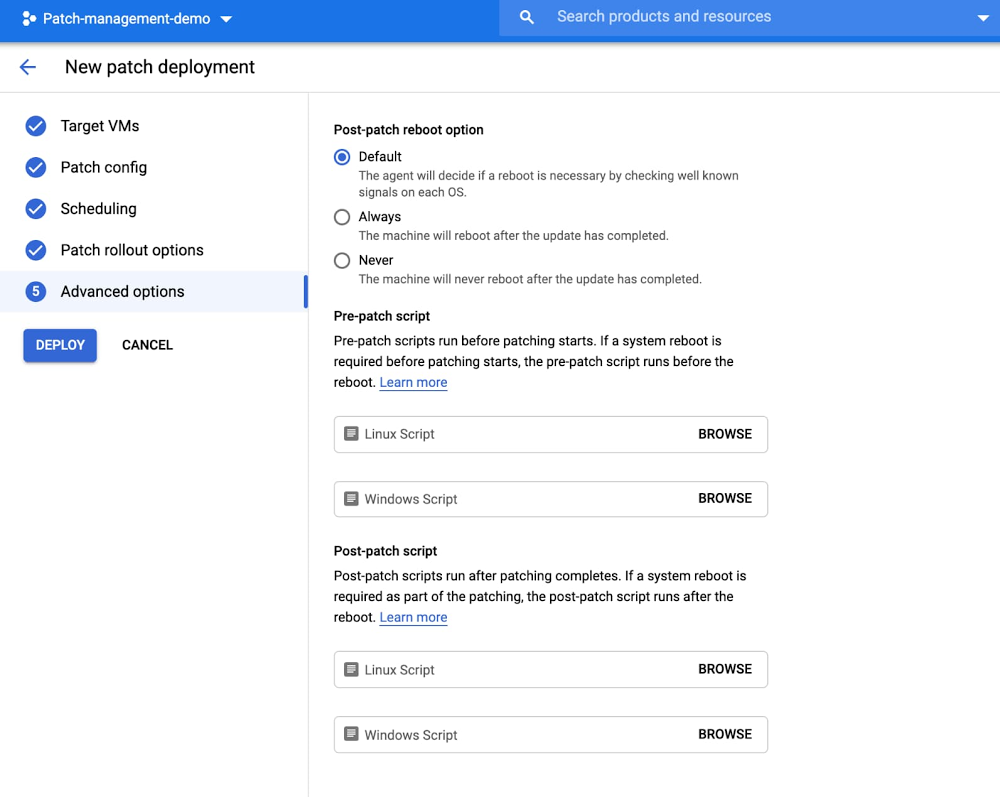
In April, we announced the general availability of Google Cloud’s OS patch management service to protect your running VMs against defects and vulnerabilities. This service works on Compute Engine and across Windows and Linux OS environments. In this blog, we share how to orchestrate your patch deployment using pre-patch and post-patch scripts.What are pre-patch and post-patch scripts?When running a patch job, you can specify the scripts that you want to run as part of the patching process. These scripts are useful for performing tasks such as safely shutting down an application and performing health checks:Pre-patch scripts run before patching starts. If a system reboot is required before patching starts, the pre-patch script runs before the reboot.Post-patch scripts run after patching completes. If a system reboot is required as part of the patching, the post-patch script runs after the reboot.Note: A patch deployment is not executed if the pre-patch script fails, which can be an important safeguard feature for customers before deploying patches on their machines. If the post-patch script fails in any VM, the patch job is marked as failed.  Why pre-patch and post-patch scripts?By reducing the risk of downtime, patch management can be one of the most important determiners in the security of your entire IT system, as well as for end-user productivity. To successfully automate the complete end-to-end patching process, you as the patch administrator may need to customize these scripts for your environment and workload. For example, as part of your patch deployment process, you might want to run health checks before or after patching to make sure your services and applications are running as expected. There are lots of other scenarios where a pre-patch or post-patch script might be useful.Scenarios that can be automated using a pre-patch scriptTaking a VM out of load balance before patchingDraining users from an application server instance before they perform maintenance on the server or take it offlineEnsuring the VM is in a state that is safe to patchScenarios that can be automated using a post-patch script Checking if all your services and applications are running after a patch jobPerforming health checksPutting a VM back into the load balancer after patchingHow to enable pre-patch and post-patch scripts on Compute EngineSetting up pre-patch and post-patch scripts for your Compute Engine environment is a straightforward process.1. During a new patch deployment, select Advanced options to add your pre-patch and / or post-patch script. These script files can either be stored on the VM or in a versioned Cloud Storage bucket:If your Cloud Storage object is not publicly readable, ensure that the default Compute Engine service account for the project has the necessary IAM permissions to read Cloud Storage objects. To ensure that you have the correct permissions, check the permission settings on the Cloud Storage object.If you want to use a Cloud Storage bucket to store your scripts, create a Cloud Storage bucket and upload your scripts to the bucket.2. Select your pre- or post-patch script from the Cloud Storage bucket or local driveNote that you can select one pre-patch and post-patch script that runs on all targeted Linux VMs and one pre-patch and post-patch script that runs on all targeted Windows VMs.Patch your Compute Engine VMs todayWith this done, orchestrating your patch deployment using pre / post steps on Compute Engine should now be easy to execute. To learn more about the OS patch management service, including automating your patch deployment, visit the documentation.
Quelle: Google Cloud Platform

Understanding the fundamentals of tagging in Data Catalog

Google Cloud Data Catalog is a fully managed and scalable metadata management service. Data Catalog helps your organization quickly discover, understand, and manage all your data from one simple interface, letting you gain valuable business insights out of your data investments. One of Data Catalog’s core concepts, called tag templates, helps you organize complex metadata while making it searchable under Cloud Identity and Access Management ( Cloud IAM) control. In this post, we’ll offer some best practices and useful tag templates (referred to as templates from here) to help you start your journey.Understanding Data Catalog templatesA tag template is a collection of related fields that represent your vocabulary for classifying data assets. Each field has a name and a type. The type can be a string, double, boolean, enumeration, or datetime. When the type is an enum, the template also stores the possible values for this field. The fields are stored as an unordered set in the template and each field is treated as optional unless marked as required. A required field means that a value must be assigned to this field each time the template is in use. An optional field means it can be left out when an instance of this template is created. You’ll create instances of templates when tagging data resources, such as BigQuery tables and views. Tagging means associating a tag template with a specific resource and assigning values to the template fields to describe the resource. We refer to these tags as structured tags because the fields in these tags are typed as instances of the template. Typed fields let you avoid common misspellings and other inconsistencies, a known pitfall with simple key value pairs. Organizing templatesTwo common questions we hear about Data Catalog templates are: What kind of fields should go into a template and how should templates be organized? The answer to the first question really depends on what kind of metadata your organization wants to keep track of and how that metadata will be used. There are various metadata use cases, ranging from data discovery to data governance, and the requirements for each one should drive the contents of the templates. Let’s look at a simple example of how you might organize your templates. Suppose the goal is to make it easier for analysts to discover data assets in a data lake because they spend a lot of time searching for the right assets. In that case, create a Data Discovery template, which would categorize the assets along the dimensions that the analysts want to search. This would include fields such as data_domain, data_owner, creation_date, etc. If the data governance team wants to categorize the assets for data compliance purposes, you can create a separate template with governance-specific fields, such as data_retention, data_confidentiality, storage_location, etc. In other words, we recommend creating templates to represent a single concept, rather than placing multiple concepts into one template. This avoids confusing those who are using the templates and helps the template administrators maintain them over time. Some clients create their templates in multiple projects, others create them in a central project, and still others use both options. When creating templates that will be used widely across multiple teams, we recommend creating them in a central project so that they are easier to track. For example, a data governance template is typically maintained by a central group. This group might meet monthly to ensure that the fields in each template are clearly defined and decide how to handle requirements for additional fields. Storing their template in a central project makes sense for maintainability. When the scope of the template is restricted to one team, such as a data discovery template that is customized to the needs of one data science team, then creating the template in that team’s project makes more sense. When the scope is even more restricted, say to one individual, then creating the template in their personal project makes more sense. In other words, choose the storage location of a template based on its scope. Access control for templatesData Catalog offers a wide range of permissions for managing access to templates and tags. Templates can be completely private, only visible to authorized users (through the tag template viewer role), as well as visible and used by authorized users for creating tags (through the tag template user role). When a template is visible, authorized users can not only view the contents of the template, but also search for assets that were tagged using the template (as long as they also have access to view those underlying assets). You can’t search for metadata if you don’t have access to the underlying data. To obtain read access to the cataloged assets, they would need to be granted the Data Catalog Viewer role; alternately, the BigQuery Metadata Viewer role can be used if the underlying assets are stored in BigQuery. In addition to the viewer and user roles, there is also the concept of a template creator (via the tag template creator role) and template owner (via the tag template owner role). The creator can only create new templates, while the owner has complete control of the template, which includes rights to delete it. Deleting a template has the ripple effect of deleting all the tags created from the template. For creating and modifying tags, use the tag editor role. This role should be used in conjunction with a tag template role so that users can access the templates from which to tag.   Billing considerations for templatesThere are two components to Data Catalog’s billing: metadata storage and API calls. For storage, projects in which templates are created incur the billing charges pertaining to templates and tags. They are billed for their templates’ storage usage even if the tags created from those templates are on resources that reside in different projects. For example, project A owns a Data Discovery template and project B uses this template to tag its own resources in BigQuery. Project A will incur the billing charges for Project B’s tags because the Data Discovery template resides in project A. From an API calls perspective, the charges are billed to the project selected when the calls are made for searching, reading, and writing. More details on pricing are available from the product documentation page.    Prebuilt templatesAnother common question we hear from potential clients is: Do you have prebuilt templates to help us get started with creating our own? Due to the popularity of this request, we created a few examples to illustrate the types of templates being deployed by our users. You can find them in YAML format below and through a GitHub repo. There is also a script in the same repo that reads the YAML-based templates and creates the actual templates in Data Catalog. Data governance templateThe data governance template categorizes data assets based on their domain, environment, sensitivity, ownership, and retention details. It is intended to be used for data discovery and compliance with usage policies such as GDPR and CCPA. The template is expected to grow over time with the addition of new policies and regulations around data usage and privacy.Derived data templateThe derived data template is for categorizing derivative data that originates from one or more data sources. Derivative data is produced through a variety of means, including Dataflow pipelines, Airflow DAGs, BigQuery queries, and many others. The data can be transformed in multiple ways, such as aggregation, anonymization, normalization, etc. From a metadata perspective, we want to broadly categorize those transformations as well as keep track of the data sources that produced it. The parents field in the template is for storing the uris of the origin data sources and is populated by the process producing the derived data. It is declared as a string because complex types are not supported by Data Catalog as of this writing.Data quality templateThe data quality template is intended to store the results of various quality checks to help in assessing the accuracy of the underlying data. Unlike the previous two templates, which are attached to a whole table, this one is attached to a specific column of a table. This would typically be an important numerical column that is used by critical business reports. As Data Catalog already ingests the schema of BigQuery tables through its technical metadata, this template omits the data type of the column and stores only the results of the quality checks. The quality checks are customizable and can easily be implemented in BigQuery.Data engineering templateThe data engineering template is also attached to individual columns of a table. It is intended for describing how those columns are mapped to the same data in a different storage system. Its goal is to support database replication scenarios such as warehouse migrations to BigQuery, continuous real-time replication to BigQuery, and replication to a data lake on Cloud Storage. In those scenarios, data engineers want to capture the mappings between the source and target columns of tables for two primary reasons: facilitate querying the replicated data, which usually has a different schema in BigQuery than the source; and capture how the data is being replicated so that replication issues can be more easily detected and resolved.You can now use Data Catalog structured tags to bring together all your disparate operational and business metadata, attach them to your data assets and make them easily searchable. To learn more about tagging in Data Catalog, try out our quickstart for tagging tables.
Quelle: Google Cloud Platform

Extended retention for custom and Prometheus metrics in Cloud Monitoring

Metrics help you understand how your business and applications are performing. Longer metric retention enables quarter-over-quarter or year-over-year analysis and reporting, forecasting seasonal trends, retention for compliance, and much more. We recently announced the general availability (GA) of extended metric retention forcustom andPrometheus metrics in Cloud Monitoring, increasing retention from 6 weeks to 24 months. Extended retention for custom and Prometheus metrics is enabled by default.Longer retention is particularly useful in financial services, retail, healthcare, and media organizations. For example, a finance team could use the extended data to forecast seasonal trends, so that you know how many Compute Engine instances to reserve ahead of time for Black Friday. Similarly, a DevOps team could use year over year data to help inform a scaling plan for Cyber Monday.To achieve higher charting performance, Cloud Monitoring stores metric data for 6 weeks at its original sampling frequency, then downsamples it to 10-minute intervals for extended storage. This ensures that you can view extended retention metrics but still query with high performance. There is no additional cost for extended retention (see Cloud Monitoring chargeable services which is based on volume ingestion for specific metric types). Extended retention for Google Cloud (system) metrics, agent metrics, and other metric types is coming soon.How to query extended retention metricsLet’s take an example scenario where you have a Compute Engine VM running a web application. In that web app, you write a metric that tracks a critical user journey for which you want to perform a month-over-month analysis.To query metric data for a month-over-month comparison, go to Cloud Monitoring and select Metrics Explorer. Select your custom or Prometheus metric and the resource type. Then click on “Custom” in the time range selector above the chart. Previously the time-range selector only allowed you to select up to 6 weeks of metric data; now you can select up to 24 months.Querying extended retention metric data for custom and Prometheus metrics in Cloud Monitoring Metrics ExplorerThe Custom time range selector lets you query metric data that is up to 24 months oldIn addition to the UI, you can also perform the above query steps programmatically through theListTimeSeries endpoint of the Monitoring API.The above query lets you view metric data values for a given time range. But how do you compare results month over month?To perform time shift analysis, you can use the Cloud Monitoring Query Language, which recently became generally available.Let’s take the example of a custom metric that tracks request counts for a shopping cart service in an e-commerce application. The following query returns the overall mean request counts now and from a month ago. Using “union”, you can display these two results on the same chart. Note: the resource and metric specified below are an example; to use it in your environment, replace them with your own custom or Prometheus metric.To enter the query, go to Metrics Explorer and click the “Query Editor” button:Enter the above query, click “Run Query”, and you’ll see a result like the following:Extending the usefulness of metricsWith Cloud Monitoring, we give you visibility into your data and help you to understand the health and performance of your services and applications. Extended metric retention helps your DevOps, engineering, and business teams with troubleshooting and debugging, compliance, reporting, and many other use cases. It allows you to do real-time operations and long-term data analysis in a single tool, without needing to export to another data analytics tool. If you have any questions or feedback, please click Help > Send Feedback in the Cloud Monitoring UI or contact Cloud Support. We also invite you to join the discussion on our mailing list. As always, we welcome your feedback.
Quelle: Google Cloud Platform

MySQL 8 is ready for the enterprise with Cloud SQL

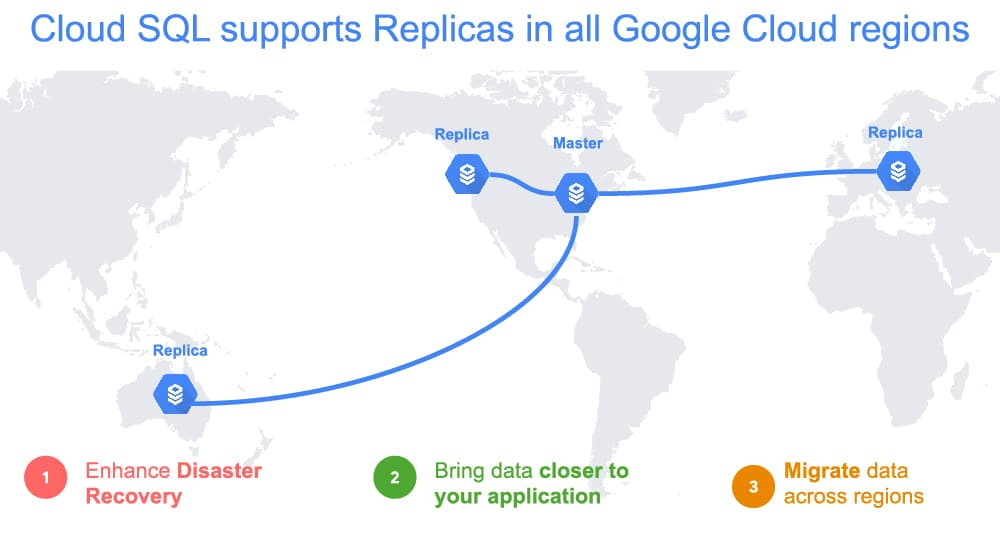
Today, we’re announcing that Cloud SQL, our fully managed database service for MySQL, PostgreSQL, and SQL Server, now supports MySQL 8. This means you get access to a variety of powerful new features—such as instant DDL statements (e.g. ADD COLUMN), atomic DDL, privilege collection using roles, window functions, and extended JSON syntax – to help you be more productive. And, as a managed service, we’ll ensure your MySQL 8 deployments help you stay stable and more secure. You’ll get automatic patches and updates, as well as our maintenance controls so you can reduce the risk associated with upgrades. More so, we’ve fully integrated it with Cloud SQL’s high availability configuration and security controls, to make sure your MySQL 8 database instance is enterprise ready.High availability and Disaster RecoveryConsidering a wide variety of failure scenarios, from localized problems to widespread issues, is an important party of business continuity planning. With MySQL 8 on Cloud SQL, you enable high availability (HA) to ensure your database workloads are automatically fault tolerant in the event of an instance-level problem or even a zone outage. We’ve worked closely with Cloud SQL customers facing business continuity challenges to simplify their experience with support for cross-region replication. Cross region replication for MySQL 8 is supported in all Google Cloud regions.SecurityCloud SQL is designed to provide multiple layers of security without complexity, whether you’re looking to protect your data or comply with regulations. Encryption of data is a foundational control, which is why Cloud SQL encrypts data at rest by default. For organizations that have sensitive or regulated data, we offer customer-managed encryption keys (CMEK) to support compliance with regulatory requirements and maintain control of your own encryption keys.To secure connectivity to your MySQL 8 instance, you can use private services access and VPC Service Controls. Private services access gives your database instance a private IP address, using Google Cloud VPC. Because VPCs are global, creating a cross-region replica requires no networking setup. Global VPC uses private IP for replication traffic between regions—helping to eliminate the need for complex VPN and VPC configuration, which would otherwise be needed to set up cross-region networking. With VPC Service Controls, you can define fine-grained perimeter controls to make your Cloud SQL API accessible only from within your service perimeter.Ready to build?Combine powerful availability and these security features to quickly build a scalable and fault tolerant application, using the Cloud SQL Proxy, our connection management integration with Google Kubernetes Engine (GKE). The Cloud SQL Proxy automatically encrypts connections without the need to manually configure SSL and makes connecting from GKE easy. With more than than 500,000 proxy instances deployed on GKE, this is a popular option. See for yourself by building an application with our Codelab.Can I apply my Committed Use Discounts?We built Committed Use Discounts so you attain the savings you expect—no matter how you configure your resources or which database you select. The discounts also apply to usage from all versions supported by Cloud SQL, including MySQL 8. Feel free to start using MySQL 8 and know that you don’t need to make any manual changes or updates to realize savings from your existing Committed Use Discounts.What’s next for Cloud SQLSupport for MySQL 8 has been a top request from users. We’re committed to compatibility and bringing you more frequent version updates in the future. We’re also committed to making sure new database versions are fully integrated with the Cloud SQL platform so you can run your most sensitive and critical applications. Have more ideas? Let us know what other features and capabilities you need with our Issue Tracker and by joining the Cloud SQL discussion group. We’re glad you’re along for the ride, and we look forward to your feedback!
Quelle: Google Cloud Platform

6 spectacular serverless sessions at Next OnAir this week

You made it to the Week 7 of Google Cloud Next ‘20: OnAir! This week, our track is full of technical talks around containers, Anthos, serverless and app development.As someone who is super passionate about the intersection of app development and Linux cloud-native technologies, there are enough talks to pin me to my couch for the entire week! It’s fantastic to watch these talks on-demand and in any order you wish.First up, I’ll start off with a keynote from Pali Bhat, VP, Product & Design and Aparna Sinha, Director, Product Management about Accelerating App Development and Delivery. Then, I’ll continue with my top breakout talks watch-list:Cloud Run: What’s New?: Since its launch more than a year ago, we’ve added tons of new features to Cloud Run that improve the quality of life better for developers and operators. Join this talk by the Cloud Run product manager to learn more.Develop Scalable Apps with Cloud Run for Anthos: This talk will show how the Knative project helps Kubernetes users run their applications better, with case studies and examples from Google Cloud customers.Serverless Workflows in Google Cloud: Ever heard of “step functions”? This talk reveals a brand new API for putting together arbitrary workflows that you host on Cloud Functions or Cloud Run.Event-driven Microservices with Cloud Run: Are you ready for eventing support on Cloud Run? Get ready for a brand new experience that lets you receive events from your resources on Google as well as from third-party/external sources.Buildpacks on Google Cloud: Did you know that you can build docker images without writing Dockerfiles? Did you know you can build docker images from your Cloud Functions? This is the grand reveal of a new open source project we’ve been working on. Join to find out more.Develop for Cloud Run in the IDE with Cloud Code: This talk gives you a hands-on view of a new feature we’ve been working on: the ability to refactor and iterate on your applications locally without having to deploy them on Cloud Run or GKE.Application Modernization week doesn’t end with these breakout talks. We’ve put together great demos for you. Make sure to check out this 4-minute demo of Cloud Run, and this 5-minute demo of inner loop iteration with Kubernetes using Cloud Code.Finally, you can learn more about Google Cloud’s Professional Cloud DevOps Engineer certification during this week’s Cloud Study Jam workshops. Want to see how your cloud skills stack up against others and win prizes? Try out our Cloud Hero game to complete hands-on labs and see where you fall on the leaderboard. But most of all, I hope you have as much fun at this week’s Next OnAir as I will! You can register at g.co/cloudnext and make sure to check out the other breakout talks.
Quelle: Google Cloud Platform

Jumpstarting your digital acceleration with ecommerce migration

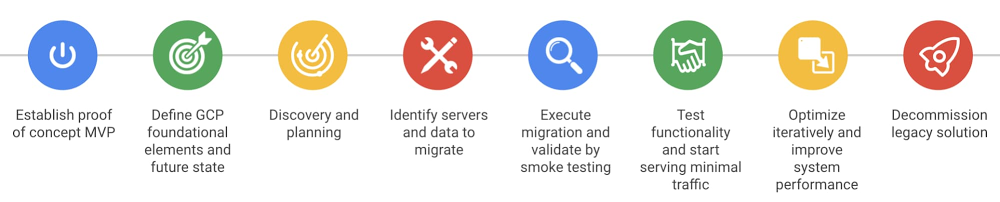
The COVID-19 pandemic has put a strain on retailers’ digital capabilities as customers shift from in-store to online purchases. We’ve been working with retailers to support their business operations during this time, and have highlighted the importance of investing in digital channels, particularly by modernizing ecommerce platforms in Google Cloud.Ecommerce modernization is a complex undertaking, part of a long-term goal consisting of various phases. As a retailer, however, you can take some initial first steps right now to build the foundation for a flexible and agile ecommerce platform that caters to your customer’s expectations.In this blog post we’ll go over one of these first steps, ecommerce migration. We’ll discuss what ecommerce migration consists of, what problems it addresses, and go over some tactical recommendations on how to get started, including using our ecommerce migration Retail Solution.What is ecommerce migration?Ecommerce migration entails taking your current ecommerce platform and moving it to the cloud—a so-called “lift and shift.” From experience, this is common with retailers who have already virtualized and/or containerized ecommerce workloads and want to focus on getting into the cloud quickly, with an end goal of refactoring in the cloud later. As we mentioned previously, this is typically the first step toward a broader ecommerce transformation effort, and the quickest way to get into the cloud.Even if it’s just as a first step, retailers who embark on an ecommerce migration initiative can take advantage of Google Cloud’s elasticity, scalability, security, and best-in-class cloud platform. Here are a few of the benefits:Migration capabilities: Google Cloud’s Live Migration of compute instances means you no longer require maintenance downtime due to provider infrastructure upgrades and maintenance. To aid with the migration process from your existing host, Migrate for Compute Engine reduces migration complexity and effort for ecommerce workloads. Migration Center can help accelerate the migration process for highly complex workloads with the help of either Google Cloud Professional Services or our specialized partners.Flexible Compute: Google Cloud offers a wide range of Compute Engine machine type options to better right size compute to the retailer’s ecommerce workloads and help reduce cost.Security: Google Cloud encrypts all data in transit and at rest by default, helping support retailers’ compliance requirements, including Payment Cardholder Industry (PCI), and secure their end consumer data.Network: Google Cloud’s Load Balancing and private networking spans multiple geographic areas. Our load balancer will automatically distribute multi-regional traffic to the closest GCP resources to the consumer, which improves the experience, leads to higher conversion, and also provides automatic high availability and disaster recovery for regional failures.AI & Data Analytics: Migrating to Google Cloud unlocks AI capabilities that can enhance the customer experience. Our Recommendations AI and other AI technologies can improve conversions via AI-driven recommendations and AI-powered search results on the ecommerce front end.As a result, retailers can increase their organization’s agility and innovation capability and more quickly launch new experiences to keep up with changing consumer expectations. In addition to these benefits, ecommerce migration addresses many challenges retailers face, and are top of mind at the executive level, including:Velocity: Lack of agility to support ongoing business via digital channels and adapt to heightened and more sophisticated customer expectations.Total cost of ownership: High operational costs due to upfront investment in on-premise infrastructure and capacity to accommodate peak loads, and the need to implement cost reduction procedures to focus solely on mission-critical workloads.Business shift: The shift from in-store to online creates strain on omni-channel capabilities including logistics and supply chain.Legacy systems: Constraints with existing legacy ecommerce infrastructure (pushing the limits of both the software and hardware) hinder the ability to modernize and adapt to changing customer demands.A move to Google Cloud via an ecommerce migration addresses these pain points in the following ways:Help your business accommodate any traffic pattern set by your customers with Google Cloud’s scalability and elasticity capabilities. You can also safeguard your own cloud resources by leveraging Compute Engine Reservations, which come in handy during peak events such as promo days, Black Friday, Cyber Monday, and other times when you need guaranteed cloud resources.Help your business prevent downtime and loss of businessHelp your business minimize cost by scaling down unused capacity. You can also bring down costs even more by leveraging Compute Engine Sustained Use Discounts and Committed Use Discounts for your predictable workloads.Accelerate the speed and performance of your ecommerce channel. By having access to Google Cloud’s countless regions around the globe, you can serve requests closer to customers by leveraging Google Cloud’s networking backbone.How do I get started?The reality is that any ecommerce migration project can be complex, but you can reduce that complexity by following a tried and tested approach. Based on our experience working with various retailers, the Google Cloud Professional Services team has developed a methodology to help with this journey.Click to enlargeThis is a common migration path which follows a methodology based on best practices we’ve seen from the field:Proof of concept: Get comfortable with Google Cloud by experimenting with our products and services. Test out a subset of future-state ecommerce functionality in a risk-free sandbox environment to gain confidence in the migration.Cloud Foundations: Define and build out the minimal set of Google Cloud foundational components required by the migration across domains such as Identity and Access Management, Resource Management, Networking, Cloud Monitoring & Logging, and Cost Control.Discovery and planning: Perform ecommerce application inventory to understand the overall complexity of your migration. Plan for the subsequent stages of the migration.Execution: Migrate your ecommerce workload without serving customer traffic. Validate your deployment by performing integration and smoke testing.Testing: Validate functionality and start serving minimal traffic. A good rule of thumb is to start by splitting traffic between the legacy and the new solution—for example, you could serve ~1% of traffic from the new solution and increase volume progressively.Optimization: Tweak telemetry and instrumentation iteratively in Cloud Monitoring based on SRE best practices. Tweak monitoring metrics based on KPIs used to track SLI and SLOs.Decommissioning: Phase out and decommission your legacy ecommerce solution once you achieve a desired level of comfort.The approach above might look daunting, but by following it with the right methodology and organizational mindset you can execute a successful migration and lay the groundwork for a flexible and agile ecommerce foundation. And remember, Google Cloud’s Professional Services team and partner ecosystem are here to help.To learn more about getting started with your ecommerce migration, contact your Google Cloud account team.
Quelle: Google Cloud Platform

Building business resilience with API management

Over the last several years, as digital services and interfaces have become the primary way businesses interact with their customers, maintaining ‘business as usual’ has demanded digital transformation. In difficult times such as these, however, it may be tempting to put digital transformation projects on pause until budget surpluses return. This is a mistake. In fact, it’s more important than ever during  disruptive periods to make your business more resilient against both ongoing challenges and others that will emerge. One path to greater resilience starts with application programming interfaces, or APIs. APIs are how software talks to other software, and many of today’s most compelling digital experiences involve using APIs to connect data and functionality in new ways, including combining legacy technologies, such as CRM systems, with new technologies, such as artificial intelligence, or new interfaces, such as voice. Taking an API-first strategy to digital transformation can increase operational efficiency, accelerate innovation, and improve data security. An API management platform can help you leverage APIs in a strategic way. Here are the three key ways that implementing an API management platform can help you to build a more adaptive and resilient business:Reusing existing assetsAPIs make it easy for companies to take valuable functionality and data that already exist within their four walls and make it accessible and reusable, hiding underlying technical complexity. So, when the market changes and you need to pivot, you can easily re-task these APIs to build new apps and services. Furthermore, an API management platform acts as the connective tissue that allows you to take those APIs and securely share them with developers, both inside and outside the enterprise, to foster new operational efficiencies, unlock new business models, and enable business transformation. For example, Pitney Bowes used to connect to backend systems through a lengthy and repetitive process. Using APIs, they integrated applications into their back office, accelerating internal development and lowering costs. The results were dramatic. They reduced the time to build new applications from 18 months down to four.Improving security and scalabilityThe move to digital interactions as the primary customer touchpoint also introduces new scalability and security challenges that must be addressed to ensure a seamless experience. Companies may face sudden spikes in demand for their digital services. Scalable APIs keep services accessible and extensible, independent of the volume of transactions. An API management platform enables companies to rapidly scale their API programs without business interruptions by providing scalable API design, extensibility, and demand balancing. To address the increased avenues for bad actors to access sensitive data, API management streamlines secure third-party access to existing resources without passwords and reduces the risk and exposure to security vulnerabilities and possible data breaches. It lets businesses offer developers self-service access to APIs, which keeps innovation humming, while also monitoring every digital interaction and controlling access with light-touch processes, which helps to keep data secure. Driving customer interactions By bringing the latest advances in big data, machine learning, APIs, and predictive analytics to bear, you can bring a higher level of engagement with your customers, across various channels. API analytics create a strategic view of all of the business transactions, helping IT teams identify APIs that are driving the majority of traffic. Armed with this information, companies can optimize their budgets and focus on the API products that are in demand by customers. Similarly, API monitoring can ensure that every interaction meets your customers’ high expectations. Monitoring dashboards provided by an API management platform provide at-a-glance visibility into hotspots, latency, and error rates while enabling users to drill down to find policies where faults occur, target problems, and address other specific elements that require remediation.Looking at business resilience in a wider context, digital transformation is the key driver of innovation and operational efficiency during times of uncertainty. Whether you are facing challenges or opportunities, you must be able to reconfigure the things you already have to meet internal and external demands. More than ever before, developers, and partners look to APIs to drive operational efficiency, accelerate innovation, and create rich customer experiences. Our new ebook “The Path of Most Resilience” explores these three tangible ways in which APIs help build business resilience. To learn more about these strategies and how Apigee can help, click here.
Quelle: Google Cloud Platform

High-resolution user-defined metrics in Cloud Monitoring

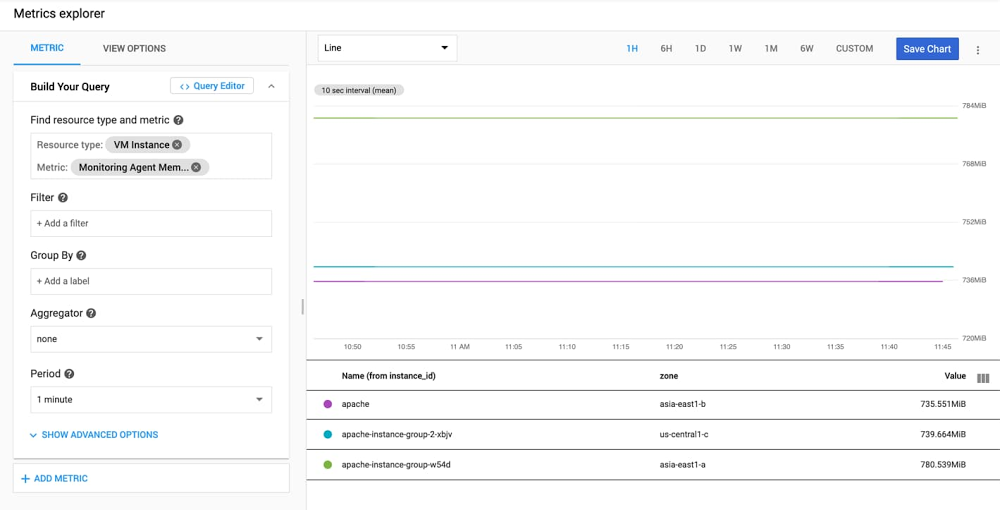
Higher resolution metrics are critical for monitoring dynamically changing environments and rapidly changing application metrics. Examples where high resolution metrics are critical include high volume e-commerce, live streaming, autoscaling bursty workloads on Kubernetes clusters, and more. Higher resolutioncustom, Prometheus, and agent metrics are now generally available, and can be written at a granularity of 10 seconds. Previously these metric types could only be written once every 60 seconds. How to write Monitoring agent metrics at 10-second resolutionThe Cloud Monitoring agent is a collectd-based daemon that collects system and application metrics from virtual machine instances and sends them to Cloud Monitoring. The Monitoring agent collects disk, CPU, network, and process metrics. By default, agent metrics are written at 60-second granularity. You can modify the agent collectd.conf configuration to send metrics at 10-second granularity by changing the Interval value to ‘10’ in the Monitoring agent’s collectd.conf file.After making this change, you will need to restart your agent (this may differ based on your operating system and distro):sudo service stackdriver-agent restartHigher resolution agent metrics require Monitoring agent version 6.0.1 or greater. You can find documentation for determining your agent version here.Now that your Monitoring agent is emitting metrics at 10-second granularity, you can view them in Metrics Explorer by searching for metrics with the prefix “agent.googleapis.com/agent/”.How to write custom metrics at 10-second resolutionCustom metrics allow you to define and collect metric data that built-in Google Cloud metrics cannot provide. These could be specific to your application, infrastructure, or business. For example: “Latency of the shopping cart service” or “Returning customer rate” in an e-commerce application.Custom metrics can be written in a variety of ways: via the Monitoring API, Cloud Monitoring client libraries, OpenCensus/OpenTelemetry libraries, or the Cloud Monitoring agent.We recommend using the OpenCensus libraries to write custom metrics for several reasons:It is open source and supports a wide range of languages and frameworks.OpenCensus provides vendor-agnostic support for the collection of metric and trace data.OpenCensus provides optimized collection of points and batching of Monitoring API calls. It also handles timing API calls for 10-second resolution and other time intervals, so that the Monitoring API won’t reject points for being written too frequently. It also handles retries, exponential backoff, and more, helping to ensure that your metric points make it to the monitoring system.OpenCensus allows you to export the collected data to a variety of backend applications and monitoring services, including Cloud Monitoring.Instrumenting your code to use OpenCensus for metrics involves three general steps:Import the OpenCensus stats and OpenCensus Stackdriver exporter packages.Initialize the Cloud Monitoring exporter.Use the OpenCensus API to instrument your code.The following is a minimal Go program that illustrates the instrumentation steps listed above by writing a counter metric to Cloud Monitoring.If you don’t have a working Go development environment, follow these steps in the Google Cloud Console and Cloud Shell to compile and run the demo program:Go to Cloud Monitoring. If you’re using Cloud Monitoring for the first time, you’ll be prompted to create a workspace (it will default to the same name as the GCP project you are currently in).Open up the Cloud Shell in the Cloud Console.Make sure to enable the Monitoring API by running gcloud services enable monitoringIf you don’t already have a working go environment, follow these steps:mkdir ~/goexport GOPATH=~/gomkdir -p ~/go/src/testCustomMetricscd ~/go/src/testCustomMetricsRun “go mod init”touch testCustomMetrics.goOpen testCustomMetrics.go in your text editor of choice and copy in the code belowRun “go mod tidy”. Note: “go mod tidy” finds all the packages transitively imported by packages in your moduleRun “go build testCustomMetrics.go”Run “./testCustomMetrics”The example program is as follows:This program writes a random star count every one second, for three minutes. As you may note from above, custom metrics can only be written with 10-second granularity. We are writing raw metric points more frequently, but we’ve set the OpenCensus exporter ‘ReportingInterval’ to be every 10 seconds, so the Exporter handles calling the ‘CreateTimeSeries endpoint’ of the Monitoring API correctly every 10 seconds. When you query your points, select an ‘aligner’ and ‘aggregation’ option from Metrics Explorer. This way, even if you have multiple points in a 10-second span, you’ll return a single point based on your aligner and aggregation options.After running the program, you can go to Metrics Explorer in Cloud Monitoring to see the “OpenCensus/star_count” metric, written against the “global” resource.How to write Prometheus metrics at 10-second resolutionThe Prometheus monitoring tool is often used with Kubernetes. If you configure Cloud Operations for GKE to include Prometheus support, then the metrics that are generated by services using the Prometheus exposition format can be exported from the cluster and made visible as external metrics in Cloud Monitoring.Installing and configuring Prometheus, including configuring export to Cloud Monitoring, involves a few steps, so we recommend you follow these instructions. OpenCensus also offers a guided codelab for configuring Prometheus instrumentation.To enable 10-second resolution for Prometheus metrics that are exported to Cloud Monitoring, set the “scrape_interval” parameter in “prometheus.yml” to:scrape_interval:     10sOnce Prometheus is properly configured to export metrics to Cloud Monitoring, you can go to Metrics Explorer in Cloud Monitoring and search for metrics with the prefix external.googleapis.com/prometheus/.Pricing for Cloud Monitoring metricsCloud Monitoring chargeable metrics are billed per megabyte of ingestion, with the first 150MB free, and reduced pricing tiers for customers that send larger volumes of metrics. There is no additional cost for sending higher resolution metrics other than the additional cost incurred from sending metric data more frequently. The frequency at which you write custom metrics (with 10 seconds as the lower bound) is up to you. GCP platform (system) metrics remain free and the granularity at which they are written is determined by each individual GCP service. Toward better observabilityWe hope you find the ability to write higher resolution custom, Prometheus, and Agent metrics useful and that it helps you build more observable applications and services. Higher resolution logs-based metrics at 10-second granularity are on our roadmap as well, so stay tuned for more information in an upcoming blog post.
Quelle: Google Cloud Platform

Google Cloud Application Modernization Program: Get to the future faster

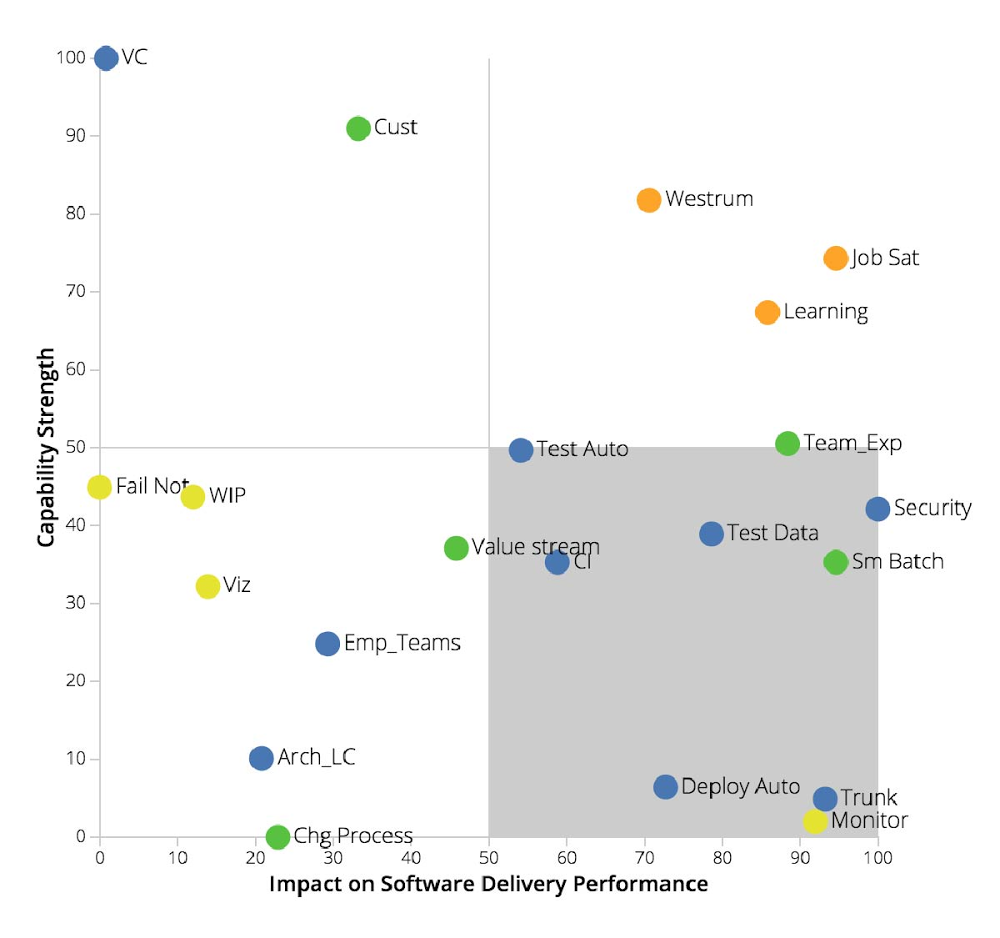
It’s been almost 10 years since Marc Andreessen coined the phrase ‘software is eating the world.’ In that time, organizations have come to realize the fundamental truth of this idea, and have started their own journeys into becoming software companies. As large enterprises embrace the journey, they are looking for advice and a proven set of practices to guide their progress. They don’t have 10 more years to figure it out.Which is why today, we’re introducing Google Cloud App Modernization Program (Google CAMP). Google CAMP is based on our experience of driving application delivery at speed and scale. Examples of this scale include deploying 12M builds and running 650M test cases daily, along with processing 2.5 exabytes of logs every month and parsing over 14 quadrillion monitoring metrics. Google CAMP also reflects learnings gained via six years of research by DevOps Research and Assessment(DORA) into practices that drive high performance. Google CAMP allows large enterprises to modernize application development and delivery and drive improvements in speed, which directly drives a business’s bottom line. DORA’s research with over 31,000 IT professionals highlights that “Elite” teams that ship code numerous times per day are 1.53 times more likely to achieve or exceed their commercial goals, including profitability, and market share.Google CAMP drives improved business results via three main components: 1) tailored modernization advice gained through a data-driven assessment; 2) concrete solutions, recommendations, and best practices for application modernization; 3) a modern, yet extensible platform for everything from writing code, to running, operating, and securing your applications.The Google CAMP approach While the need for application modernization is evident, forging a path forward can be challenging for large organizations. Common hurdles revolve around maintaining visibility and control across disparate on-prem, hybrid, and cloud environments, often resulting in a disjointed developer experience. Additionally, navigating the modernization path necessitates an understanding of how to drive continuous progress, while leveraging the right metrics to guide business and IT decisions. Finally, while changing culture is critical, it’s hard—common pitfalls include treating transformation as a one-time project or driving app modernization as a top-down effort.Google CAMP addresses these challenges in the following ways, thereby helping large enterprises successfully modernize their applications:1. Data-driven assessment and benchmarking: First and foremost, Google CAMP provides a data-driven baseline assessment. Whether you’re building a Kubernetes, serverless, or mainframe application, the Google CAMP assessment shows you where to start your application modernization journey, identify your priorities, and how to maximize your ROI. Unlike a one-size-fits-all maturity model, the Google CAMP assessment is tailored to your organization, your processes, and your teams. You can benchmark yourself against other lines of business in your company, the overall IT industry, or elite performers within your industry. Next, the Google CAMP assessment shows you where your bottlenecks are and how to make the biggest and most impactful investments. Here’s an example of a final assessment report. Below, trunk-based development and monitoring are the highest impact and lowest current capability, making them ideal targets for the organization to prioritize as part of its application modernization initiative.Before your teams take the full Google CAMP assessment and Google Cloud experts start to help you set your priorities, it is worthwhile to try our quick check assessment tool. Within a couple of minutes, you’ll get a good sense of how your organization is performing and identify some quick wins you can implement. 2. A modern, yet extensible platform: Google CAMP leverages existing GCP product offerings to help you to build, run, secure, and manage both legacy and net-new applications. Google Cloud has end-to-end tooling developed from the ground up to support modern cloud-native principles. Examples of these principles include building on a strong security foundation, providing fast feedback on changes, gradual rollouts, rapid elasticity, etc. Tools available include Cloud Code, Cloud Build, Container Registry, and Cloud Ops. For compute, customers have the choice of using Google Kubernetes Engine (GKE), Cloud Run, and Anthos. In Q2 of 2020 alone, more than 100,000 companies used these products to modernize their application development and delivery.Adopters of tools available via Google CAMP have achieved both speed and reliability, while delivering higher-quality products and services at lower cost. MediaMarktSaturn Retail Group, a German holding company and the leading consumer electronics retailer in Europe with headquarters in Ingolstadt, Germany, partnered with Google Cloud to modernize its applications. “In April and June with COVID-19 on the rise, we saw a 145% traffic increase across our digital channels. We responded to this shift by modernizing our apps and web shop using Google Cloud. This strong growth for our online business, built on top of Google Cloud, in turn made us the third largest e-commerce player in Germany,” said Johannes Wechsler, Managing Director at MediaMarktSaturn Technology. “Thanks to Cloud Run, Google Cloud’s fully managed compute platform, we are able to bring applications in the hands of our customers 8x faster than before and with a 40% cost reduction.”3. Proven practices, solutions, and recommendations: Last but not least, Google CAMP brings together a tailored set of technical, process, measurement, and cultural practices along with app modernization solutions and recommendations based on years of DORA’s scientific research along with Google’s own internal experience. These cover the entire gamut of the application lifecycle, from writing code, to running, operating, and securing applications. Examples of these practices include driving alignment between developers and operators, lean product development, and technical practices such as implementing loosely coupled architectures, continuous testing, and more. Learn more about Google CAMPModernizing applications and software development processes is one of the hardest challenges facing today’s enterprises. With Google CAMP, large organizations across all industries can modernize to generate powerful business outcomes. Here are some ways you can learn more about Google CAMP:Watch the Google Cloud Next ‘20: OnAir keynote introducing Google CAMPBefore engaging in a full Google CAMP assessment, do a quick check assessment to compare your performance with the rest of industry. With just five questions, it takes less than 2 minutes.Read more about how you can accelerate application development and delivery with Google CAMP tooling Consider how Anthos can augment your application acceleration plans.
Quelle: Google Cloud Platform