Tips and tricks for using new RegEx support in Cloud Logging

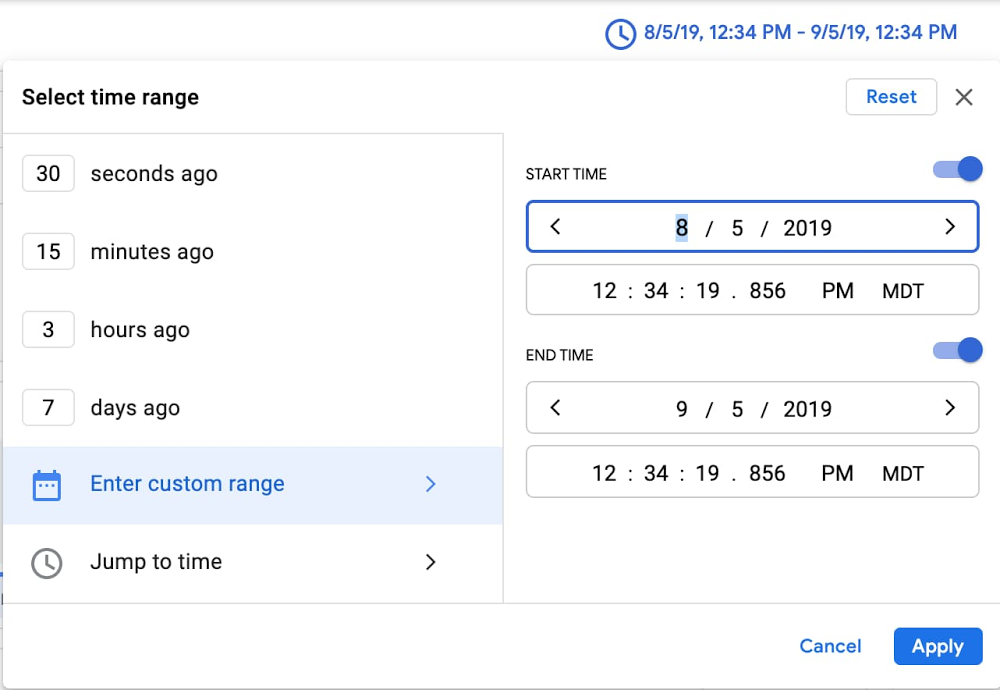
One of the most frequent questions customers ask is “how do I find this in my logs?”—often followed by a request to use regular expressions in addition to our logging query language. We’re delighted to announce that we recently added support for regular expressions to our query language — now you can search through your logs using the same powerful language selectors as you use in your tooling and software! Even with regex support, common queries and helpful examples in our docs, searching petabytes of structured or unstructured log data efficiently is an art, and sometimes there’s no substitute for talking to an expert. We asked Dan Jacques, a software engineering lead on logging who led the effort to add regular expressions to the logging query language, to share some background on how logging works and tips and tricks for exploring your logs.Can you tell me a little bit about Cloud Logging’s storage and query backend?Cloud Logging stores log data in a massive internal time-series database. It’s optimized for handling time-stamped data like logs, which is one of the reasons you don’t need to swap out old logs data to cold storage like some other logging tools. This is the same database software that powers internal Google service logs and monitoring. The database is designed with scalability in mind and processes over 2.5 EB (exabytes!) of logs per month, which thousands of Googlers and Google Cloud customers query to do their jobs every day…Can you tell me about your experience adding support for regular expressions into the logging query language?I used Google Cloud Platform and Cloud Logging as a Googler quite a bit prior to joining the team, and had experienced a lack of regular expression support as a feature gap. Championing regular expression support was high on my list of things to do. Early this year I got a chance to scope out what it would require. Shortly after, my team and I got to work implementing regular expression support.As someone who has to troubleshoot issues for customers, can you share some tips and best practices for making logging queries perform as well as possible?Cloud Logging provides a very flexible, largely free-form logging structure, and a very powerful and forgiving query language. There are clear benefits to this approach: log data from a large variety of services and sources fit into our schema, and you can issue queries using a simple and readable query notation. However, the downside of being general purpose is that it’s challenging to optimize for every data and query pattern. As a general guide, you can improve performance by narrowing the scope of your queries as much as possible, which in turn narrows the amount of data we have to search. Here are some specific ideas for narrowing scope and improving performance:Add “resource type” and “log name” fields to your query whenever you can. These fields are indexed in such a way that make them particularly effective at improving performance. Even if the rest of your query already only selects records from a certain log/resource, adding these constraints informs our system not to spend time looking elsewhere. The new Field Explorer feature can help drill down into specific resources.Original search: “CONNECTING”Specific search:LOG_ID(stdout) resource.type=”k8s_container”resource.labels.location=”us-central1-a”resource.labels.cluster_name=”test”resource.labels.namespace_name=”istio-system””CONNECTING”Choose as narrow a time range as possible. Let’s suppose you’re looking for a VM that was deleted about a year ago. Since our storage system is optimized for time, limiting your time range to a month will really help with performance. You can select the timestamp through the UI or by adding it to the search explicitly.Pro tip: you can paste a timestamp like the one below directly into the field for custom time. Original search: “CONNECTING”Specific search:timestamp>=”2019-08-05T18:34:19.856588299Z”timestamp<=”2019-09-05T18:34:19.856588299Z””CONNECTING”Put highly-queried data into indexed fields. You can use the Cloud Logging agent to route log data to indexed fields for improved performance, for example. Placing indexed data in the “labels” LogEntry field will generally yield faster look-ups.Restrict your queries to a specific field. If you know that the data you’re looking for is in a specific field, restrict the query to that field rather than using the less efficient global restriction.Original search: “CONNECTING”Specific search: textPayload =~ “CONNECTING”Can you tell us more about using regular expressions in Cloud Logging?Our filter language is very good at finding text, or values expressed as text, in some cases to the point of oversimplification at the expense of specificity. Prior to regular expressions, if you wanted to search for any sort of pattern complexity, you had to build a similitude of that complexity out of conjunctive and disjunctive terms, often leading to over-querying log entries and underperforming queries.  Now, with support for regular expressions, you can perform a case-sensitive search, match complex patterns, or even substring search for a single “*” character.The RE2 syntax we use for regular expressions is a familiar, well-documented, and performant regular expression language. Offering it to users as a query option allows users to naturally and performantly express exactly the log data that they are searching for.For example, previously if you wanted to search for a text payload beginning with “User” and ending with either “Logged In” or “Logged Out”, you would have to use a substring expression like: (textPayload:User AND (textPayload:”Logged In” OR textPayload:”Logged Out”))Something like this deviates significantly from the actual intended query:There is no ordering in substring matching, so “I have Logged In a User” would match the filter’s constraints.Each term executes independently, so this executes up to three matches per candidate log entry internally, costing additional matching time.Substring matches are case-insensitive. There is no way to exclude e.g., “logged in”.But with a regular expression, you can execute:textPayload =~ “^User.*Logged (In|Out)$”This is simpler and selects exactly what you’re looking for.Since we dogfood our own tools and the Cloud Logging team uses Cloud Logging for troubleshooting, our team has found it really useful and I hope it’s as useful to our customers!Ready to get started with Cloud Logging? Keep in mind these tips from Dan that will speed up your searches:Add a resource type and log name to your query whenever possible, Keep your selected time range as narrow as possible.If you know that what you’re looking for is part of a specific field, search on that field rather than using a global search.Use regex to perform case sensitive searches or advanced pattern matching against string fields. Substring and global search are always case insensitive.Add highly-queried data fields into the indexed “labels” field.Head over to the Logs Viewer to try out these tips as well as the new regex support.
Quelle: Google Cloud Platform

Now, setting up continuous deployment for Cloud Run is a snap

Deploying code to production directly from your dev machine can lead to unforeseen issues: the code might have local changes, the process is manual and error prone, and tests can be bypassed. And later on, it makes it impossible to understand what actual code is running in production. A best practice for avoiding these hardships is to continuously deploy your code when changes are pushed to a branch of your source repository.As we announced at Google Cloud Next ‘20: OnAir, Cloud Run now allows you to set up continuous deployment in just a few clicks: From the Cloud Run user interface, you can now easily connect to your Git repository and set up continuous deployment to automatically build and deploy your code to your Cloud Run and Cloud Run or Anthos services. This feature is available for both new and existing services.You can select any repository that includes a Dockerfile or code written in Go, Node.js, Java, Python and .NET. Under the hood, the continuous deployment setup process configures a Cloud Build trigger that builds the code into a container using Docker or Google Cloud Buildpacks, pushes it to Google Container Registry and deploys it to your Cloud Run service. You can later customize this by adding steps to the Cloud Build trigger configuration, for example adding unit or integration tests before deploying.By default, your code is automatically built and deployed to a new Cloud Run revision, but you can decide if it should receive 100% of the incoming traffic immediately or not, and later gradually migrate traffic using the newly added traffic controls.With Continuous Deployment set up, the Cloud Run service detail page shows relevant in-context information:A link to the exact commit in the Git repository that was used for this deploymentA link to the build logs and the build trigger that created this revision / container.A quick preview of the health of the latest builds.Pushing your code directly to production was never a good idea. Now, Cloud Run makes it easy for you to embrace best practices like continuous deployment. Give it a try at http://cloud.run/.Related ArticleAccelerate your application development and deliveryAt Google Cloud Next ‘20: OnAir, we released a wealth of tools and capabiltiies to enhance developer productivity.Read Article
Quelle: Google Cloud Platform

Setting the stage for better conversations about allyship

Jenae Butler has been a Googler for just under a year, but she became well-known both inside and outside of the company in June during a national spotlight on racial injustices here in the U.S. She created a presentation to help her colleagues understand what was going on; people found it so helpful that her “Standing United” resource spread quickly within Google as well as on social media. It starts with the context of George Floyd’s death and the impact police brutality has on the Black community while offering actionable tips and advice for anyone looking to learn how to be a better ally to marginalized communities of color.We sat down with Jenae to hear about how she navigated her own path as a Black woman in tech, and how she advises her peers to practice allyship successfully.Tell us about your path to Google.When I was in college, internships in the technical field felt hard to obtain. It seemed like businesses were looking for a student who already had experience or other qualifications—which I found to be odd. I was a computer info systems major at Georgia State University and was looking to get into project management. I wasn’t lucky enough to get an internship at the time but I found a back door into technology by working at Microsoft’s retail stores. That was my first time getting real exposure to the tech field and ended up being the reason I got into my career field.I transitioned from the retail side of Microsoft through a college hire program offered by the company. I worked as a consultant focused on SQL-themed projects and eventually made my way into program management for Microsoft’s retail store support team. In that time I was heavily involved in community outreach through their Black community employee resource group (ERG) which is where my love for diversity, equity, and inclusion (DEI) stemmed from.I came to Google after 5 years of working at Microsoft to join the Cloud Systems team as a program manager in Austin. My team focuses on the continued improvement and maintenance of rep-facing tools. At that time, I was a technical program manager working directly with the engineers, tasked with maintaining their workloads by lifting blockers and collaborating with the product owners for timely solution deliveries. I now work as an enablement program manager for the same team, with a new focus on training and communication mediums. Tell us about the creation of the Standing United deck.A common theme in my career is being one of the very few Black people and/or women on my team. The upside to this is that I’ve gotten comfortable working in these spaces that are typically white-male dominated and can normally find ways to show impact. However, I find these spaces to typically be uncomfortable when racially charged protests begin. Having had those firsthand experiences, I knew that George Floyd’s death would spark conversations. I know how uncomfortable it can be for Black people to engage in this topic because it’s complex and is a conversation that is often met with resistance or defensiveness by non-Black people. While Google has many existing resources, I wanted to find a way to aid my team with information as well as process my own thoughts and translate my own experiences as a way to equip myself. I did not realize that my work would resonate for so many Googlers around the company. I didn’t predict that the deck would make its way into so many resource hubs, team meetings, and external networks. I’ve had the opportunity to speak to thousands of people over the summer, contribute to countless DEI working sessions and events, and even join some of these work groups and resource groups as a committee lead.I was afraid to do something this big, but allowing my natural instincts to guide me has had amazing results. I think we all can be shocked by what bravery produces—especially in regards to racial equity. I think it’s a must for those who want to be impactful and really change outdated and incorrect narratives and the systems that are structured around them. For myself, I didn’t realize that my small action would cause such a widespread impact. I believe this same sort of effort can be repeated by everyone, honestly. Any effort—of any capacity—can create a ripple effect and inspire more folks and change than expected.Do you have advice for others, particularly Black women in tech?Be yourself, whoever that is. You don’t have to look, act, or talk a certain way to be successful. I bring my locs, tattoos and piercings to work as a Black woman from the South every day. You may have to make sacrifices for your career, like location, but identity shouldn’t be one of them. Take time to find your community so you can have a home away from home—especially if you have to sacrifice leaving your community to pursue your career. The Black woman’s corporate experience requires so much strategy and as you try to find your place in this white-male dominated space, remember to commit to finding ways to show impact in whatever capacity you can. Your journey will be a sum of your persistence to overcome the challenges you will face, finding flexibility in your methods and staying committed to your goals.Allyship can be defined as supporting those in marginalized groups to which one does not identify.
Quelle: Google Cloud Platform

Data warehouse migration tips: preparation and discovery

Data warehouses are at the heart of an organization’s decision making process, which is why many businesses are moving away from the siloed approach of traditional data warehouses to a modern data warehouse that provides advanced capabilities to meet changing requirements. At Google Cloud, we often work with customers on data warehouse migration projects, including helping HSBC migrate to BigQuery, reducing more than 600 reports and several related applications and data pipelines. We’ve even assembled a migration framework that highlights how to prepare for each phase of migration to reduce risk and define a clear business case up front to get support from internal stakeholders. While we offer a data management maturity model, we still receive questions, specifically around how to prepare for migration. In this post, we’ll explore a few important questions that come up during the initial preparation and discovery phases, including the impact of modernizing a data warehouse in real life and how you can better prepare for and plan your migration to a modern data warehouse.Tackling the preparation phaseAn enterprise data warehouse has many stakeholders with a wide range of use cases, so it’s important to identify and involve the key stakeholders early in the process to make sure they’re aligned with the strategic goals. They can also help identify gaps and provide insight on potential use cases and requirements, which can help prioritize the highest impact use cases and identify associated risks. These decisions can then be approved and aligned with business metrics, which usually revolve around three main components:People. To make sure you’re getting input and buy-in for your migration, start with aligning leadership and business owners. Then, explore the skills of the project team and end users. You might identify and interview each functional group within the team by conducting workshops, hackathons, and brainstorming sessions. Remember while discussing issues to consider how to secure owner sign-off by setting success criteria and KPIs, such as: Time savedTime to create new reportsReporting usage increaseTalent acquired through innovationTechnology. By understanding the current technical landscape and classifying existing solutions to identify independent workloads, you can more easily separate upstream and downstream applications to further drill down into their dependency on specific use cases. For example, you can cluster and isolate different ETL applications/pipelines based on different use cases or source-systems being migrated to reduce the scope as well as underlying risks. Similarly, you can couple them with upstream applications and make a migration plan which moves dependent applications and related data pipelines together.In addition to understanding current migration technologies, it’s key that you are clear on what you are migrating. This includes identifying appropriate data sources with an understanding of your data velocity, data regionality, and licensing, as well as identifying business intelligence (BI) systems with current reporting requirements and desired modernizations during the migration. For example, you might want to move that daily report about sales to a real-time dashboard. You might also want to decide if any upstream or downstream applications should be replaced by a cloud-native application and could be driven by KPIs below:TCO of new solution vs. functionality gainsPerformance improvements and scalabilityLower manageabilityRisk of lock-in vs. using open sourceProcess. By discussing your process options, you can uncover dependencies between existing components and data access and governance requirements, as well as the ability to split migration components. For example, you should evaluate license expiration dependencies before defining any migration deadlines. Processes should be established to make effective decisions during migration and ensure optimal progress inline, using KPIs such as:Risk of data leakage and misuseRevenue growth per channelNew services launched vs. cost of launching themAdoption of ML-driven analyticsA strong understanding of the processes you intend to put in place can open up new opportunities for growth. For example, a well-known ecommerce retailer wanted to drive product and services personalization. Their existing data warehouse environment did not provide predictive analytics capabilities and required investments in new technology. BigQuery ML allowed them to be agile and apply predictive analytics, unlocking increased lifetime value, optimized marketing investment, improved customer satisfaction, and increased market share.Entering the discovery phaseThe discovery process is mainly concerned with two areas: business requirements and technical information.1. Understanding business requirementsThe discovery process of a data warehouse migration starts with understanding business requirements and usually has a number of business drivers. Replacing legacy systems has implications in many fronts, ranging from new team skill set requirements to managing ongoing license and operational costs. For example, upgrading your current system might require all of your company’s data analysts to be re-trained, as well as new additional licenses to be purchased. Quantifying these requirements, and associating them with costs, will allow you to make a pragmatic, fair assessment of the migration process. On the other hand, proposing and validating potential improvement gains by identifying gaps in the current solution will add value. This can be done by defining an approach to enhance and augment the existing tools with new solutions. For example, for a retailer, the ability to deliver new real-time reporting will increase revenue, since it provides significant improvements in forecasting and reduced shelf-outs.This retailer realized that shelf-outs were costing them millions in lost sales. They wanted to find an effective solution to predict inventory needs accurately. Their legacy data warehouse environment had reached its performance peak, so they wanted a cloud offering like BigQuery to help them analyze massive data workloads quickly. As a result of migrating, they were able tostream terabytes of data in real time and quickly optimize shelf availability to save on costs and get other benefits like:Incremental revenue increase with reduced shelf-outs2x accuracy vs. previous predictive modelBusiness challenges that were previously perceived as too difficult to solve can be identified as new opportunities by re-examining them using new technologies. For example, the ability to store and process more granular data can aid organizations in creating more targeted solutions. A retailer may look into seasonality and gauge customer behavior if Christmas Day falls on a Monday versus another day of the week. This can only be achieved with the ability to store and analyze increased amounts of data spanning across many years.Last but not least: Educating your users is key to any technology modernization project. In addition to learning paths defined above this can be done by defining eLearning plans for self study. In addition, staff should have time to be hands-on and start using the new system to learn by doing. You can also identify external specialized partners and internal champions early on to help bridge that gap.2. Technical information gatheringIn order to identify the execution strategy, you’ll want to answer the following question: Will your migration process focus on a solution layer or an end-to-end lift-and-shift approach? Going through some of the points below can make this decision simpler:Identify data sources for up and downstream applicationsIdentify datasets, tables and schemas relevant for use casesOutline ETL/ELT tools and frameworksDefine data quality and data governance solutionsIdentify Identity and Access Management (IAM) solutionsOutline BI and reporting toolsFurther, it is important to identify some of the functional requirements before making a decision around buy or build. Are there any out-of-the-box solutions available in the market that meet the requirements, or will you need a custom-built solution to meet the challenges you’ve identified? Make sure you know whether this project is core to your business, and would add value,  before deciding on the approach.Once you’ve concluded the preparation and discovery phase, you’ll have some solid guidance on which components you’ll be replacing or refactoring with a move to a cloud data warehouse.  Visit our website to learn more about BigQuery.Thanks to Ksenia Nekrasova for contributions to this post.
Quelle: Google Cloud Platform

Deutsche Bӧrse Group continues its journey to the cloud

The word “transformation” brings many things to mind, like innovation, agility, and change. Consistency and stability are probably not as high on the list of synonyms, but for regulated industries undergoing digital transformation initiatives, those characteristics are just as critical—in fact, they’re critically important for digital transformation to succeed.Deutsche Bӧrse Group, an international financial exchange organization offering products and services that cover the entire value chain, plays a role in contributing to the soundness of the global financial system. It is a prime example of how a large company in a highly regulated industry can achieve a delicate balance between innovation and stability. The company sees cloud as an important enabler, supporting its strategic focus on new technologies and helping to keep it on the forefront (of technology) while maintaining its own highly secure, resilient, trusted infrastructure. Under the leadership of CIO and COO Christoph Böhm, Deutsche Bӧrse started its cloud transformation journey more than three years ago, bringing on strategic partners like Google Cloud to advise and support it during the process. Midway through what has been a tumultuous year for organizations and people around the world, Deutsche Bӧrse has made significant progress in its growth strategy, most recently adopting Google Cloud VMware Engine to extend and migrate its on-premises workloads to Google Cloud. The best of all worldsA central part of Deutsche Bӧrse’s growth strategy is to maintain an agile, sophisticated IT infrastructure that spans a wide range of on-prem and cloud apps, as well as multiple cloud platforms. This multi-cloud, hybrid environment helps Deutsche Bӧrse keep the stability, resilience, and control required within a highly regulated environment—without sacrificing the scale, speed, and agility needed to stay ahead of the market and service evolving customer needs.Deutsche Bӧrse has a long list of on-prem VMware applications across its portfolio that have been customized over the years for the company’s unique processes. Many of these applications, especially in the business’s post-trading side, could benefit from the cloud. Using Google Cloud VMware Engine, Deutsche Bӧrse is now migrating these apps to the cloud without the cost or complexity of refactoring applications—in most cases, with just a few mouse clicks.The ability to run and manage workloads consistent with its on-prem environments reduces the team’s operational burden and enables staff to continue using existing skills, tools, policies, and processes that comply with the company’s stringent regulatory requirements. The exchange’s hybrid, multi-cloud approach also helps with choice and portability to avoid vendor lock-in and gives the IT team another option for disaster recovery. Deutsche Bӧrse’s developers are also benefiting from the company’s move to the cloud. According to Böhm, using cloud services has significantly sped up development and testing of new customer-facing services. Prior to this, the team had limited testing capabilities, but can now conduct thousands of tests across three or four environments in the same amount of time, allowing for earlier identification of errors in the development process. By moving VMware workloads to Google Cloud, Deutsche Börse can set up a new private cloud instance in minutes, while maintaining existing policies and tools, including existing cloud constructs such as networking interconnects—all while increasing business agility.In general, the use of cloud services has kept teams fully productive, especially during the peak of the global COVID-19 pandemic, when 95 percent of teams were working remotely. Böhm attributes many of these benefits to scaling in the cloud. He also highlights Google’s AI capabilities and comprehensive machine learning framework. Hyperscaling machine-learning services will enable Deutsche Börse to train data science models in a couple of hours rather than weeks, a huge improvement in supporting Deutsche Börse’s ambitions to further automate internal processes and provide new data-driven services to customers faster than before—in a secure way. For the company, ensuring the security of the data has always been a top priority: a powerful data privacy strategy is applied to all public cloud activities in place, enabling two layers of encryption. From the very beginning, the strict privacy and data security measures Google Cloud is offering and applying were a critical factor in deciding for Google Cloud.Like many companies on their paths to the cloud, Deutsche Bӧrse is not finished with its journey, proving that cloud transformation (or any transformation, for that matter) doesn’t happen overnight. However, the cloud’s productivity benefits and speed of innovation have already prepared the company for the future, without placing too many demands on the present.Learn more here about how Deutsche Börse Group is adopting Google Cloud to lay the foundations for scalability, resilience, and compliance.
Quelle: Google Cloud Platform

What you can learn in our Q3 2020 Google Cloud Security Talks

Cloud deployments and technologies have become an even more central part of organizations’ security program in today’s new normal. As you continue to evolve your strategies and operations, it’s vital to understand the resources at your disposal to protect your users, applications, and data. To help you navigate the latest thinking in cloud security, we hope you’ll join us for the latest installment of our Google Cloud Security Talks, a live online event on September 23rd. We’ll share expert insights into our security ecosystem and cover the following topicsSunil Potti and Rob Sadowski will open the digital event with our latest security announcements.Ansh Patnaik and Svetla Yankova will do a deep dive into threat detection and investigation with Chronicle, followed by a panel discussion with Matthew Svensson from BetterCloud, Ryan Ogden from Groupon and Sean Doyle from Paradigm Quest.Anoosh Saboori and Anton Chuvakin will talk about our new Certificate Authority Service (CAS) that automates the management and deployment of private CAs while meeting the needs of modern developers and applications.Nelly Porter will discuss our two new products in the area of Confidential Computing:  Confidential VMs and Confidential GKE NodesWe’ll look at security solutions such as Cloud Armor and reCAPTCHA Enterprise which can be deployed to protect online applications, preventing denial of service and stopping bots, fraud, and malware, with Cy Khormaee and Emil Kiner. You’ll get a walkthrough of our latest security best practices for Meet, Chat and Gmail with G Suite security experts Brad Meador and Vidya Nagarajan Raman.Finally, Sam Lugani will host the Google Cloud Security Showcase, a special segment where we’ll focus on security use cases. We’ll pick a few security problems and show how we’ve helped customers solve them using the tools and products that Google Cloud provides. We look forward to sharing our latest security insights and solutions with you. Sign-up now to reserve your virtual seat.
Quelle: Google Cloud Platform

Making it easier to manage Windows Server VMs

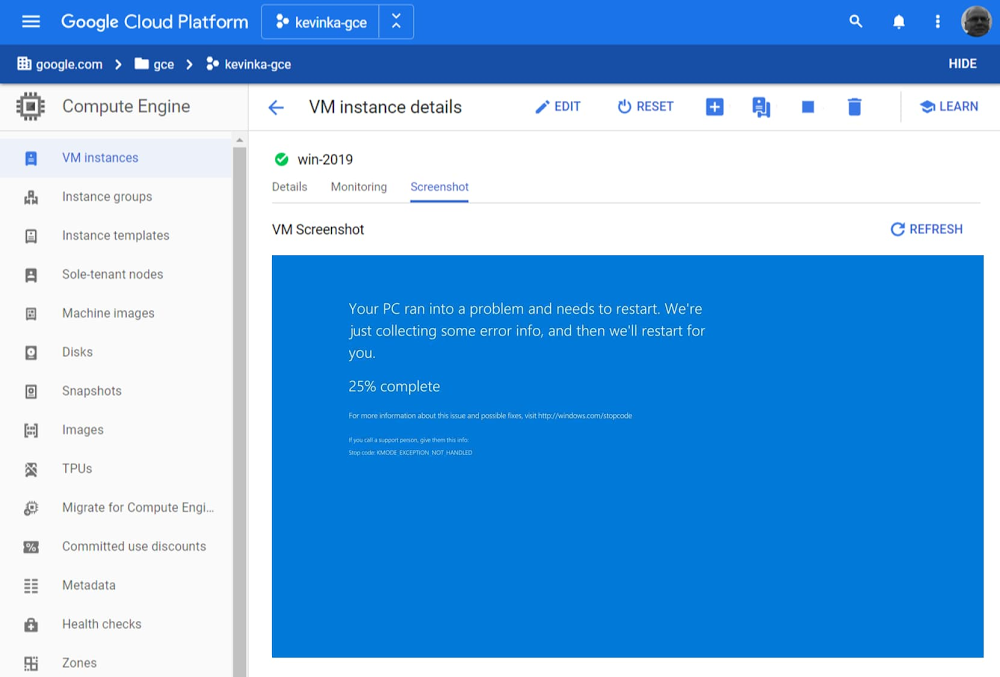
Google Cloud provides a first-class experience for migrating and modernizing Windows workloads. Organizations choose Google Cloud for reliability, performance, and cost savings from the underlying infrastructure, as well as for features, tooling and guidance that helps them modernize. Companies like Geotab rely on Google Cloud to keep ahead of change and increased demand, and reduce licensing costs by modernizing from a proprietary stack to open-source. We’re also incredibly proud to have earned the recognition of analyst firms such as IDC for helping companies migrate and modernize their Windows-based workloads.Today we’re announcing a number of new features that will make running Windows Server workloads in Google Cloud easier: boot-screen diagnostics, auto-upgrade for Windows Server, new diagnostics tooling, and improved license reporting. Read on to learn about these new features.  Boot-screen diagnostics (beta)Windows VMs often rely on a virtual display device to report certain errors, and when connecting by Remote Desktop Protocol (RDP) doesn’t work, accessing the virtual display screen becomes a necessity. Building on the Virtual Displays feature we launched last year, we’re now enabling you to more easily troubleshoot Windows VMs by capturing boot-screen screenshots without having to RDP into the machine. Capturing a screenshot from a VM can help diagnose issues if VMs are not otherwise accessible, for example, during the boot process, or if trying to start a VM with a corrupted disk image.For those of us who miss seeing this blue screen, it is now viewable directly from within the Cloud Console :-)Auto-upgrade for Windows 2008 (beta)Many customers are still using Windows Server 2008 even after end-of-service was reached earlier this year. We want to make it easier for you to upgrade your instances by performing an in-place auto-upgrade for Windows Server 2008 using a single gcloud command. This command backs up your current VM, performs the upgrade, and handles roll-backs automatically if something fails. You can quickly test if a Windows OS in-place upgrade will work and then automate upgrades at scale. Collect diagnostic information (beta)When you try to troubleshoot your Windows VMs or reach out to Google Cloud Support, it can be hard to provide all the necessary diagnostic information that you need to quickly and effectively troubleshoot a problem. A new diagnostic tool for Windows VMs helps collect all the necessary information so you can either troubleshoot the issue yourself or provide the necessary diagnostic information to Support. License reporting toolingIf you bring your own Windows licenses to Google Cloud, calculating licensing usage for Microsoft Enterprise Agreement True-ups and audits can be an onerous task. We have often seen customer procurement, engineering, and operations teams work for months to generate the data to satisfy complex licensing reporting needs. Further, these complex reports often need to be analyzed to identify high watermarks for physical server usage or understand license usage at any given time. For those of you running on sole-tenant nodes, the new Windows licensing reporting tool automates this process so you can quickly and comprehensively generate reports to quantify your physical server usage. The tool, which runs in a Windows environment, ingests log data and outputs graphical results and reports to users. Envision easier Windows managementTogether, we hope these new features will make it easier for you to troubleshoot problems, upgrade, and manage the license requirements of Windows workloads running on Google Cloud. And we’re not done yet—stay tuned as we work to make Google Cloud the best platform on which to migrate, optimize, and modernize your Windows workloads, all with enterprise-class, Microsoft-backed support. Click here to learn more about running Windows on Google Cloud.Related ArticleDriving change: How Geotab is modernizing applications with Google CloudOver time, Geotab converted production servers running Windows Server to containers and open source, saving hundreds of thousands of doll…Read Article
Quelle: Google Cloud Platform

Forrester names Google Cloud a Leader in Notebook-based Predictive Analytics and Machine Learning

Forrester Research has named Google Cloud a Leader in its latest report on Notebook-based Predictive Analytics and Machine Learning Solutions. Forrester’s analysis and recognition gives customers the confidence they need as they make important platform choices that will have lasting business impact. This recognition is based on Forrester’s evaluation of Google Cloud’s AI Platform that includes Notebooks, Explainable AI, and AutoML products, amongst a suite of predictive analytics and machine learning services used by data scientists, developers, and machine learning engineers. In the report, Forrester evaluated 12 notebook-based predictive analytics and machine learning solutions against a set of pre-defined criteria. In addition to being named a leader, Google Cloud received the highest possible score in eleven evaluation criteria including explainability, security, open source, and partners.Google offers one-stop AI shopping on Google Cloud Platform The Forrester Wave:™ Notebook-based Predictive Analytics and Machine Learning Solutions, Q3 2020Our AI Platform supports the entire ML lifecycle from data ingestion and preparation all the way up to model deployment, monitoring, and management. And we recently announced new MLOps services that unify ML systems development and operations, removing many of the challenges of scaling production ML workflows.  AI Platform Notebooks is a managed JupyterLab notebook service, with enterprise security features like CMEK, VPC-SC, shared VPC, and private IP controls built-in.  It also comes with deep integration to BigQuery (our serverless, multi-cloud data warehouse), Dataproc (managed Hadoop, Spark and Presto) and Google Cloud Storage (GCS). And with Dataproc Hub, you can use Notebooks to work with Spark and your favorite ML and data science libraries. This streamlines cost management for data science teams and reduces the overhead of managing different environments for IT administrators. AI for all interests and levels of expertiseAt Google Cloud, we think that AI can meaningfully improve people’s lives and that the biggest impact will come when everyone can access it. Between Kaggle Notebooks for enthusiasts, Colab for researchers and students, and AI Platform Notebooks for enterprise users, we are working hard to make sure that all users can build and use AI. Be it domain users, or seasoned data scientists, everyone has a part to play in mapping business objectives against key outcomes achieved through AI. We recently announced that AutoML technology will be integrated as a workflow within AI Platform supporting structured and unstructured data problems. With this integration, AI Platform will provide a unified workflow with no code and code-based options for model builders of all types and experiences. Our vision to empower every enterprise to transform their business with AI is inspired by Google’s mission of universal access to information and shows up in our Responsible AI practice and Explainable AI tools and services. Apart from providing the best-in-class tools for model understanding and evaluation, we are steering a path with best practices, design guides, and education that advocates for AI governance in organizations. Regardless of your experience and expertise, our platform is built with a purpose to help you achieve your business objectives with AI. To learn more about how to make AI work for you, download a complimentary copy of The Forrester Wave™ for Notebook-based Predictive Analytics and Machine Learning Solutions, Q3 2020 report.
Quelle: Google Cloud Platform

Export data from Cloud SQL without performance overhead

While there are a variety of reasons to export data out of your databases – such as to maintain backups, meet regulatory data retention policies, or feed downstream analytics – exports can put undue strain on your production systems, making them challenging to schedule and manage. To eliminate that resource strain, we’ve launched a new feature for Cloud SQL: serverless exports. Serverless exports enables you to export data from your MySQL and PostgreSQL database instances without any impact on performance or risk to your production workloads.Cloud SQL exports, which offer portable data formats (SQL, CSV), can be triggered anytime and are written to Cloud Storage buckets that you control.If you need to meet regulatory requirements around data retention, you can easily send exports to buckets with Bucket Lock enabled. Bucket Lock allows you to configure a data retention policy for a Cloud Storage bucket that governs how long objects in the bucket must be retained. It also allows you to lock the data retention policy, permanently preventing the policy from being reduced or removed.As another example, you can export data to CSV based on a custom query, then import the data directly to BigQuery for analytics. And if this is for regular reporting, you can schedule a recurring import with Data Transfer Service or Cloud Scheduler.Using the new serverless export feature ensures these exports won’t bog down your Cloud SQL database instance, so you can continue to run predictably and reliably. And until February 2021, you can use serverless exports at no charge.What’s next for Cloud SQLWe’re excited to see what you build with the new serverless exports feature. Have more ideas? Let us know what other features and capabilities you need with our Issue Tracker and by joining the Cloud SQL discussion group. We’re glad you’re along for the ride, and we look forward to your feedback!Related ArticleMySQL 8 is ready for the enterprise with Cloud SQLCloud SQL, our fully managed database service for MySQL, PostgreSQL, and SQL Server, now supports MySQL 8. As a managed service, MySQL 8 …Read Article
Quelle: Google Cloud Platform

Better together: orchestrating your Data Fusion pipelines with Cloud Composer

The data analytics world relies on ETL and ELT pipelines to derive meaningful insights from data. Data engineers and ETL developers are often required to build dozens of interdependent pipelines as part of their data platform, but orchestrating, managing, and monitoring all these pipelines can be quite a challenge.That’s why we’re pleased to announce that you can now orchestrate and manage your Data Fusion pipelines in Cloud Composer using a rich set of Cloud Data Fusion operators.The new Cloud Data Fusion operators let you easily manage your Cloud Data Fusion pipelines from Cloud Composer without having to write lots of code. By populating the operator with just a few parameters, you can now deploy, start, and stop your pipelines, letting you save time while ensuring accuracy and efficiency in your workflows.Managing your data pipelinesData Fusion is Google Cloud’s fully managed, cloud-native data integration service that is built on the open source CDAP platform. Data Fusion helps users build and manage ETL and ELT data pipelines through an intuitive graphical user interface. By removing the coding barrier, data analysts and business users can now join developers in being able to manage their data.Managing all your Data Fusion pipelines can be a challenge. Determining how and when to trigger your pipelines, for example, is not as simple as it sounds. In some cases, you may want to schedule a pipeline to run periodically, but quickly realize that your workflows have dependencies on other systems, processes, and pipelines. You may find that you often need to wait to run your pipeline until some other condition has been satisfied, such as receiving a Pub/Sub message, data arriving in a bucket, or dependent pipelines in which one pipeline is dependent on data outputted by the other pipeline.This is where Cloud Composer comes in. Google’s Cloud Composer, built on the open source Apache Airflow, is our fully managed orchestration service that lets you manage these pipelines throughout your data platform. Cloud Composer workflows are configured by building directed acyclic graphs (DAGs) in Python. And while DAGs describe the collection of tasks in a given workflow, it’s the operators that determine what actually gets done by a task. You can think of operators as a template, and these new Data Fusion operators let you easily deploy, start and stop your ETL/ELT Data Fusion pipelines by providing just a few parameters.Let’s look at a use case where Composer triggers a Data Fusion pipeline once a file arrives in a Cloud Storage bucket:The steps above will be carried out as a series of tasks in Composer. Once an operator is instantiated, it will become a single task in a workflow. We will use the CloudDataFusionStartPipeline operator to start the Data Fusion pipeline.Using these operators simplifies the DAG. Instead of writing Python code to call the Data Fusion or CDAP API, we’ve provided the operator with details of the pipeline, reducing complexity and improving reliability in the Cloud Composer workflow.Getting started: orchestrating pipelinesSo how would orchestrating these pipelines with these operators work in practice? Here’s an example of how to start one pipeline. The principles here can easily be extended to start, stop, and deploy all your Data Fusion pipelines from Cloud Composer.Assuming there’s a Data Fusion instance with a deployed pipeline ready to go, let’s create a Composer workflow that will check for the existence of a file in a Cloud Storage bucket. (Note: If you’re not familiar with Cloud Composer DAGs, you may want to start with this Airflow tutorial.) We’ll also add one of the new Data Fusion operators to the Cloud Composer DAG so that we can trigger the pipeline when this file arrives, passing in the new file name as a runtime argument.We can then start our Cloud Composer workflow and see it in action.1. Check for existence of object in Cloud Storage bucketAdd the GCSObjectExistenceSensor sensor to your DAG. Once this task is started, it will wait for an object to be uploaded to your Cloud Storage bucket2.Start the Data Fusion pipelineUse the CloudDataFusionStartPipelineOperator operator to start a deployed pipeline in Data Fusion. This task will be considered complete once the pipeline has started successfully in Data Fusion.You can check out the airflow documentation for further details on the parameters required for this operator. 3. Set the order of the task flow using the bit shift operatorWhen we start this DAG, the gcs_sensor task will run first, and only when this task has completed successfully will the start_pipeline task execute.4. Upload your DAG to Cloud Composer DAG bucket and start workflowNow your DAG is complete, click the link to the DAGs Folder from the Cloud Composer landing page and upload your DAG.Click on the Airflow web server link to launch the Airflow UI and then trigger the DAG by clicking the run button.5. The tasks are now running. Once a file is uploaded to our source bucket, the Data Fusion pipeline will be triggered.Operate and orchestrateNow that you no longer have to write lines of Python code and maintain tests that call the Data Fusion API, you have more time to focus on the rest of your workflow. These Data Fusion operators are a great addition to the suite of operators already available for Google Cloud. Cloud Composer and Airflow also support operators for BigQuery, Cloud Dataflow, Cloud Dataproc, Cloud Datastore, Cloud Storage, and Cloud Pub/Sub, allowing greater integration across your entire data platform. Using the new Data Fusion operators is a straightforward way to yield a simpler and more easy-to-read DAG in Cloud Composer. By reducing complexity and removing the coding barrier, managing ETL and ELT pipelines becomes more accessible to members of your organization. Check out the Airflow documentation to learn more about these new operators.
Quelle: Google Cloud Platform