How AI uncovers important contract data

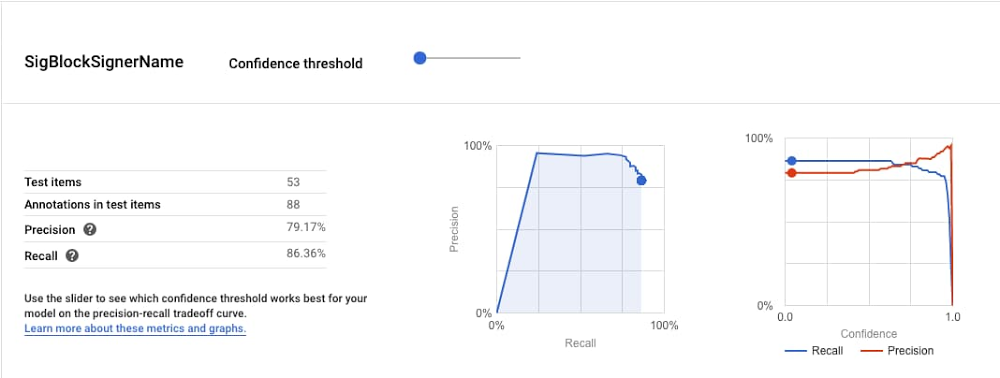
What happens to business contracts in an organization after signature? Usually, the answer is nothing. They sit in Gmail, Drive, or in a dedicated contract repository until, in rare cases, someone needs to recheck the agreement terms. At which point a scramble ensues to find the contract, read through it, and discover what exactly was agreed to.Contracts contain valuable data about your business: whom you’ve engaged with, what you’ve promised, how much you’re owed, when the deal expires, where terms apply, and that’s just the tip of the iceberg. These documents are legally validated by all the parties involved, which means that the data they contain is intrinsically accurate.So why, in an age when data flows freely from every imaginable source, is it still so hard to see what’s in your contracts? At Ironclad, that’s one of the major problems we’re attempting to solve. And thanks in large part to Google Cloud AI, we’re excited to share the news of our advancements.But first, a few things about contracts. Why contracts are hardBusiness contracts have all but resisted the wave of digital transformation. Yes, we now draft in Microsoft Word, share via email, and use eSignature instead of “wet” signatures, but the structure, language, and formatting of contracts are the same as they were in the 1920s, and the valuable information represented in contracts remains decidedly analog. We believe that the world is sure to adopt a form of natively-digital contracting. (We’re working on it!) But it’s going to take a while, and, in the meantime, we need to find a way to unlock the data stored in Word docs and PDFs.That’s not an easy thing to do. Here’s why:Problem #1: Contracts are unstructured, unstandardized, and use nuanced legal language.Problem #2. Contracts exist to guard against rare and potentially catastrophic occurrences, so tolerance for false negatives and false positives is pretty close to zero. Natural Language Processing (NLP) is a great tool for Problem #1. In 2017 we started experimenting with it. Unfortunately, the feature development was too slow. A single experiment could take weeks, and to build a pipeline of promising experiments took months. It would have taken ages just to get half-decent accuracies, let alone figure out how to address Problem #2.So, we put NLP on the back-burner and waited for the technology to catch up. The technology did catch up – and just in time, too.Almost as soon as the pandemic began, our customers started asking for more information about their contracts. They needed to know everything from opt-out clauses and force majeure to employment terms and accounts receivables, and they wanted to know faster (and more cheaply) than a team of humans could reasonably extract it.All of a sudden, we needed a new approach to AI. And as fate would have it, we discovered Google Cloud AutoML Natural Language.We started with AutoML’s Entity Extraction model. First, we uploaded a small, curated set of contracts and labeled three properties: entity name, signature date, and signer name. After a few hours of training, signature date had precision and recall rates surpassing 90%. This was the best result we’d ever achieved over three years of on-and-off experiments — and, incredibly, Google needed a relatively tiny data set to achieve it.But we weren’t fully convinced. The data set was small and the model failed on both entity name and signer name. So as a next step we changed up our labeling and expanded the data set. A few more hours of training, and accuracy rates on entity name and signer name rose to 70% and 90%, respectively.An early experiment with promising results.That was all we needed to see. We’d found the answer to our NLP problem, and it took just two tests to get there. Plus, it came with a bonus: the model was immediately live on Google Cloud AI Platform for predictions, so we could start testing the user experience that very day. Within a week, we had our first feature prototype.Before/after AutoML + AI Platform Prediction.Ironclad Smart Import: Unlocking contract data with Google Cloud AINow, a few months later, we’re in alpha with a handful of customers. The feature is Smart Import, a fast and accurate way to extract data from contracts generated outside of Ironclad. (Contracts generated within Ironclad are already digital and don’t require data extraction.) The feature works on an increasing number of key data properties with some accuracy rates exceeding 90%. Yet even 90%+ isn’t good enough in the world of contracting. (See Problem #2.) That’s why the feature also enables users to deliver the last mile of data accuracy themselves, aided by an intuitive data validation flow with human reviewers. Ironclad’s design and product teams had plenty of flexibility to implement this validation flow thanks to AI Platform and our massively simplified NLP pipeline. And their work has paid off: a few customers have already used Smart Import to analyze thousands of contracts.Problem #2, solved.At this rate, we expect to launch in Q1 2021 to hundreds of excited customers. (We hope you’ll join us at the event!) But we see this as just the beginning — already we’re exploring new ways to apply Google Cloud AI to make contracting faster and smarter for our customers.Related ArticleDiscover insights from text with AutoML Natural Language, now generally availableAutoML Natural Language is generally available and has new featuresRead Article
Quelle: Google Cloud Platform
Preparing for serverless big data open source software

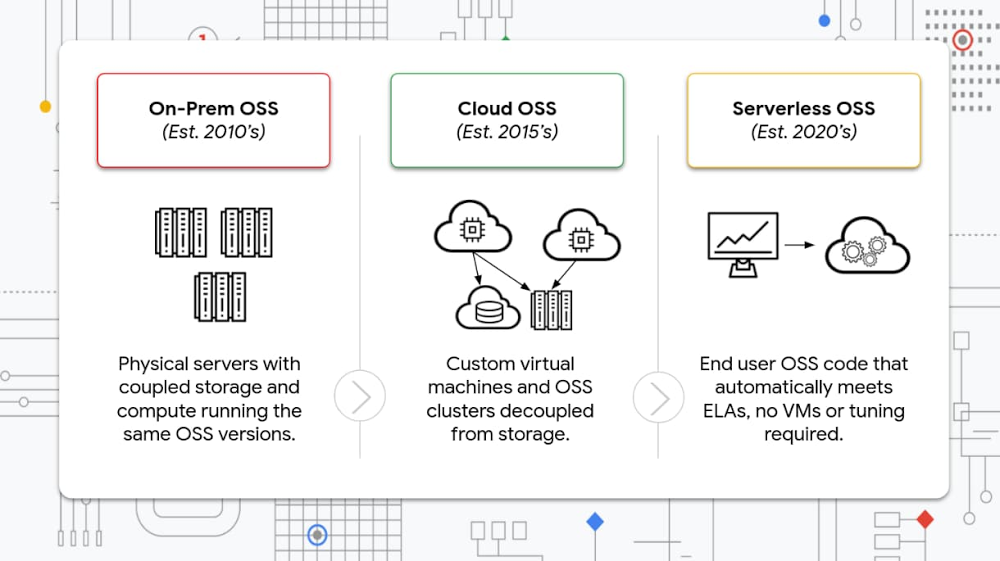
Big data open source software (OSS) like Apache Hadoop, Apache Spark, Presto, and others continue to become industry-standard in enterprise data lakes and big data architectures. As enterprises turn to on-prem OSS deployments to avoid vendor lock-in, lower costs, and harness the power of community innovation, they struggle to balance the requirements of the enterprise (security, SLAs, etc.) with the needs of the business. We’re at a moment of change in this industry, and our Dataproc platform offers a way forward to manage, analyze and take full advantage of your data and the OSS systems you’re already using. It all started with on-prem deployments of Apache Hadoop in 2010, which left much to be desired as big data architects had to work with rigid machines that couldn’t scale independently, and required significant tuning and testing. They couldn’t tell if the next spike in data or the next OSS release would break pipelines or queries. Then the cloud came along and solved many of these issues. With the launch of Google Cloud’s Dataproc in 2015, enterprises could now decouple compute from storage and allow custom OSS clusters to be built with custom machines. Automating the cluster build and scaling avoided common on-prem challenges and helped set our customers up for the next massive transition in OSS: serverless. Before we examine the serverless future, let’s first discuss where the industry started and where we are today.On-prem OSS: Where we started and the challenges Big data open source software started with a mission to simplify the hardware setups for clusters in the data center and minimize the impact of hardware failures on data applications. Big data OSS also delivers cost optimizations by simplifying management and efficiently utilizing all available resources, while also taking advantage of innovation across the open source community. These strategies must be used cautiously so you don’t prohibit developers’ freedom in leveraging underlying hardware any way they see fit without data center reconfiguration.Instead of the traditional approach of bringing the data to the processing, early versions of big data analytics changed the processing paradigm by bringing the processing to the data. Other design simplifications allowed the data center team to focus on setting up interconnected racks of commodity servers running Linux. These racks were then handed over to big data developers so that they could configure and optimize their data application processing environments. Hadoop, a key big data open source component, implemented a distributed file system and processing framework (MapReduce) that simplified the execution of the data applications and gracefully handled any hardware failures. All of this meant that a small team of data center engineers could now manage thousands of machines. Although there was separation of processing and data, application developers paid special attention to data proximity. They still relied on physical servers’ locations to give the necessary I/O bandwidth required for their data processing applications. As a result, these processing environments’ configuration required detailed understanding of how the processing environment was laid out (physical server configuration, connected storage and network links within the rack and across racks). Developers also designed software to take full advantage of the underlying physical environment, such as the available memory, I/O characteristics, storage, and compute.These environments did come with their own challenges, however. On-prem OSS challengesCapital investment and lead times: Setting up on-prem infrastructure requires upfront investments and lengthy lead times. Building data centers takes multiple years, upgrading power and cooling capacity takes multiple quarters, and installing new servers requires many months just to configure. All of these additions require significant planning and execution that most data developers cannot do.Selecting hardware configurations to meet all needs: Careful experimentation with multiple machine configurations for various workloads is necessary to finalize hardware configurations. Most of the open source software relies on standardization, and making changes to hardware configuration to support new business needs is disruptive. Refreshing the hardware to take advantage of the new technologies also requires careful planning to minimize disruption to the user ecosystem.Data center constraint management: Data center planning requires optimization of power, cooling, and physical space to maximize utilization.Migration: Relocating a data center is a hassle, as the cost to move the data across the network is non-trivial. To avoid the cost and effort of relocating the data and applications, users have sometimes resorted to manually migrating the hardware on trucks.Disaster planning: Disaster recovery planning is problematic, as multiple data center locations need enough network bandwidth to minimize network latency while ensuring successful recovery from failures. Of course, takeover needs to be designed and validated prior to the actual events.Cloud-based OSSInnovation in virtualization technologies erased some of on-prem environments’ design constraints, such as available I/O bandwidth, virtualization penalty, and storage performance. Cloud computing also enabled quick access to storage and compute capacity, allowing the data developers to take advantage of on-demand scaling. Cloud computing lets data developers select custom environments for their processing needs, allowing them to focus more on their data applications and less on the underlying infrastructure. All of these capabilities have resulted in a surge in popularity of cloud-based data analytics environments. Developers can now focus more on the high-level application configurations and can design software to take advantage of these new cloud economics. Cloud-based OSS challengesInfrastructure configuration: Although cloud infrastructure as a service eliminated the need for logistics planning for the data center, the complex task of cluster configuration continues to be a challenge. Users need to understand the specific cloud infrastructure challenges and the constraints when configuring their data processing environments. Processing environment configuration: The cloud provides an easy way to configure complex processing environments. Cloud users still find optimizing the processing environments requires a detailed understanding of the data and workload characteristics. Sometimes changes to the data or the processing algorithms carry over to the environment, such as changes to data organization, storage format, and location. Cost optimization: Configuration settings to minimize the total cost of the execution environment require continuous monitoring and management of data and workloads.Latency optimization: As workloads evolve over time, the need for managing SLOs is critical and requires constant monitoring and fine tuning. In extreme cases, a redesign of the storage format or processing paradigm is necessary to maintain SLOs. Dataproc is helping alleviate OSS cloud challenges today, while preparing us for a serverless futureDataproc is an easy-to-use, fully managed cloud service for running managed open source, such as Apache Spark, Apache Presto, and Apache Hadoop clusters, in a simpler, more cost-efficient way. We hear that enterprises are migrating their big data workloads to the cloud to gain cost advantages with per-second pricing, idle cluster deletion, autoscaling, and more. Dataproc recently launched these preview capabilities to simplify management of the open analytics environment:Personal cluster authentication: Allows interactive workloads on the cluster to securely run as your end-user identity. As a Cloud IAM Notebook user, your workloads will run and perform data access as the user. This allows for improved identity access controls and logging, thereby allowing administrators to effectively manage the security of their environments while simplifying user access management. Flex mode: Dataproc supports Preemptible VMs (PVMs) and Autoscaling, which allows right-sizing the cluster based on demand to ensure that you are using your budget wisely. Flex mode feature allows you to further optimize cluster operations costs while reducing job failures. You can leverage Flex mode to save all intermediate Spark data on primary worker nodes, allowing you to set aggressive autoscaling policies and/or take more advantage of preemptible VMs for secondary nodes. Intermediate shuffle data is stored outside of “workers” (mappers in MapReduce and executors in Spark) such that job progress is not lost during scale-down events following the removal (or preemption) of worker machines during a job.Persistent history server: You can now view job logs and cluster configurations even when the cluster is offline. Offline implies either an ephemeral cluster is currently not running or the cluster has been deleted. You have to configure the clusters to persist their job logs to Cloud Storage and then configure the Persistent History Server to view the logs from a set of Cloud Storage locations. A single Persistent History Server can be configured to aggregate logs from multiple clusters, simplifying manageability and debuggability of your workflows and data applications. Dataproc allows enterprises to quickly test new OSS, develop code, deploy pipelines and models, and automate processes so that the business focuses more on building and less on maintaining. As Dataproc continues to provide enhancements to your OSS test/dev, deploy, and automate development cycle, we will continue to build intelligence into our service so that we are prepared for the serverless future. The next phase: serverless OSS The complexity of tuning/configuring data analytics platforms (processing and storage) due to the plethora of choices available to customers add to the complexity of selecting an ideal platform over the life of the data application as the usage and use case evolves. Serverless OSS will change that. In the future, serverless concepts will focus on taking complexities and challenges away from you, enabling you to focus more on quality of service (QoS) while the platforms underneath make intelligent choices. This can be intimidating; however, it can be solved in multiple steps. There are three major aspects that can be selected when delivering on QoS:Cluster: Selection of the appropriate cluster to run the workload for the desired QoS.Interface: Selection of the appropriate interface for the workload (Hive, SparkSQL, Presto, Flink and many more) Data: Selection of the location, format, and data organization.In the serverless world, you focus on your workloads and not on the infrastructure. We will do the automatic configuration and management of the cluster and job to optimize around metrics that matter to you, such as cost or performanceServerless is not new to Google Cloud. We have been developing our serverless capabilities for years and even launched BigQuery, the first serverless data warehouse. Now it’s time for OSS to have its turn. This next phase of big data OSS will help our customers accelerate time to market, automate optimizations for latency and cost, and reduce investments in the application development cycle so that they can focus more on building and less on maintaining. Check out Dataproc, let us know what you think, and help us build the serverless generation of OSS.
Quelle: Google Cloud Platform

A giant list of Google Cloud resources

The growth of Google Cloud has been staggering.  If you’re a technical person that is trying to get plugged in, it can be hard tracking down all of the available online resources. I decided to invest some time in building you a comprehensive list. Even I was surprised at how long this list became by the time I finished! Hope you find it as valuable as I do. Google Cloud resourcesGoogle Cloud home pageGoogle Cloud developer advocates Twitter listAll 200+ Google Cloud product described in <=4 wordsgcloud command-line tool cheat sheet (PDF brochure)Google Cloud blogGoogle Cloud blog – developers & practitioners topicGoogle Cloud open sourceGoogle Cloud Medium publicationApigee blogFirebase blogGoogle Workspace developers blogGoogle Workspace GitHubGoogle Workspace TwitterGoogle Workspace solutions galleryGoogle Cloud certificationsGoogle Cloud system statusGoogle Cloud trainingGoogle developers blogGoogle maps platform blogGoogle open source blogGoogle security blogKaggle home PageKubernetes blogRegions and network MapGoogle Cloud solutions libraryGoogle Cloud support hubGCP pricingGCP pricing calculatorQwiklabs home pageCodelabs home pageYouTube channelsGoogle Cloud YouTube channelGoogle Cloud technical YouTube channelGoogle Workspace YouTube channelGoogle developers YouTube channelFirebase YouTube channelPodcastsGoogle Cloud podcastKubernetes podcastReddit/r/googlecloud/r/AppEngine/r/bigquery/r/dataflow/r/firebase/r/GoogleAppsScriptProduct comparisonsBig data / data analytics product comparisonsCompute product comparisonsDatabase product comparisonsNetworking product comparisonsStorage product comparisonsGCP foundational open source projectsApache Beam: Batch/streaming data processingGo: High concurrency programming languagegRPC: RPC frameworkgVisor: Secure container runtimeIstio: Connect and secure servicesKnative: Serverless framework for KubernetesKubeflow: ML toolkit for KubernetesKubernetes: Management of containerized applicationsOpenCensus: Cloud native observability frameworkTensorFlow: ML frameworkGoogle Cloud comparisons with other platformsGoogle Cloud Platform for AWS ProfessionalsGoogle Cloud Platform for Azure ProfessionalsGoogle Cloud Platform for Data Center ProfessionalsGoogle Cloud Platform for OpenStack UsersLanguage specific documentationApps ScriptJavaNode.jsPythonGoRubyPHP.NET/C#If we’re missing something, DM me on Twitter @gregsramblingsRelated ArticleBigQuery explained: Blog seriesFind links to all posts in the BigQuery Explained series.Read Article
Quelle: Google Cloud Platform
Mercari: Faster and more efficient development with the help of Google Cloud

A key part of launching and running services on a cloud platform is the support of experts that fully understand a customer’s unique challenges. At Google Cloud, we do this through Premium Support and Technical Account Management (TAM), which pairs Google engineers with customers to design effective cloud strategies and provide long-term support during implementation. In October 2018, Japanese ecommerce company Mercari Group began building and operationalizing the infrastructure for its Mercari marketplace app and Merpay smartphone payment service. Although they’d adopted a microservice architecture for system infrastructure using Google Kubernetes Engine (GKE) in 2016, by 2018 they realized they’d need to run multiple services, like Merpay, on the same infrastructure. As a result, they turned to Google Cloud’s TAM.Working with TAM to launch Merpay“Around the time of the Merpay release we were holding weekly meetings with people from Google, and they worked closely with us and provided support for things such as capacity planning and security,” says Junichiro Takagi of Mercari’s SRE Team. “We also had meetings set up for us about Google Cloud products with the product managers, and it was great to be able to directly convey our requests.”“Since the cause of many problems simply can’t be understood from the outside, having TAM and working with Google Cloud technical experts to identify the cause is very helpful,” says Shingo Ishimura of the Solutions Team. “For feature requests as well, working with TAM has made a big difference. We appreciate the information sharing ability that TAM has, which incorporates a product-like approach and provides information such as whether or not there have been any similar requests from other companies, whether there are any workarounds, and how the product manager reacted to the issue.”TAM has helped Mercari in ways the team didn’t even expect. “We once put a request on GitHub about the default delay time for the Cloud Spanner client library being too long,” says Ishimura, “and after we did that, TAM actually set up an opportunity for us to speak directly with the relevant staff members at Google Cloud about it.” The result of this interaction was a reduction of the original two-second delay time down to 20 milliseconds, and the TAM team also caught requests the Mercari team elevated to support cases.After the launch of Merpay in 2019, TAM also implemented capacity planning that took into account the significant increase in traffic that results from large-scale campaigns, TV commercials, and similar events. By sharing Merpay’s architecture with the support team in advance, it also put in place a structure to swiftly deal with any problems that occur, and as a result, the service has not experienced any significant failures since it was launched.Getting a helping hand with troubleshooting from Google Cloud Premium SupportTo guarantee a stable service environment, Mercari has also taken advantage of Google Cloud’s Premium Support in addition to TAM. This means they can rely on a swift response to a failure, should one occur.“Our system has a range of layers comprising multiple applications, GKE and networks, and Cloud Spanner, so in some cases it’s difficult to identify the cause of a problem,” says Takagi. “In such cases we isolate the problem with Google Cloud support engineers, but in cases with low reproducibility this can sometimes drag on for a long time. With Google Cloud, support engineers from Google in Japan form the main point of contact when this happens, and we’re able to jump on a meeting with them, which is very helpful. TAM also coordinates any misunderstandings in the communication, which is very reassuring.”How using TAM has benefitted Mercari globallyTAM is also contributing greatly to the creation of microservice architecture that Mercari is undertaking at a global level.“Something that TAM did for us that was amazing was facilitate an exchange of information between us and a certain global company that had used Google Cloud to achieve a microservice architecture. We were really grateful for the opportunity to meet directly with engineers from this company and get very practical information from them,” says Taichi Nakashima of Mercari’s Microservices Platform Team. “We were also given the opportunity to talk to the engineers who actually develop GKE. It was really nice to have Tim Hockin, one of the engineers leading the development of Kubernetes, attend a meeting with us and give his advice.”Similar meetings were set up proactively not only in Japan but overseas as well, says Mercari US Director of Engineering Naoki Shimizu. “For example, TAM provided support by connecting us with the Enterprise Team for reCAPTCHA, which is used for authentication, and thanks to this, we were able to learn about reCAPTCHA’s latest products and the best practice for them. Furthermore, when we subsequently found a technical problem with the reCAPTCHA Enterprise SDK, TAM escalated it to them and we were able to obtain an updated SDK within a week.”Shimizu says the global presence of TAM, with its holistic perspective of Mercari’s business and solutions in both Japan and the US, will deliver new value to the business by facilitating the sharing of solutions and practical information between the two countries.Nakashima and the Microservice Platform Team are now working on a project to migrate the monolithic system that is still on premises entirely over to Google Cloud. “And in these circumstances,” says Nakashima, “I think there will be quite a few problems that we won’t be able to deal with by ourselves, which is why we’re so grateful for the support from TAM.”Mercari was founded with the mission to make it easy to sell, or buy, almost anything. With Google Cloud, Mercari is also simplifying how it builds the technical foundation for its business.Learn more about Google Cloud Premium Support and Technical Account ManagementRelated ArticleAnnouncing the launch of Premium Support for your enterprise and mission-critical needsNew support tiers from Google Cloud offer even more tailored support for your enterprise-class, mission-critical workloads.Read Article
Quelle: Google Cloud Platform

Scale in at your own pace with Compute Engine autoscaler controls

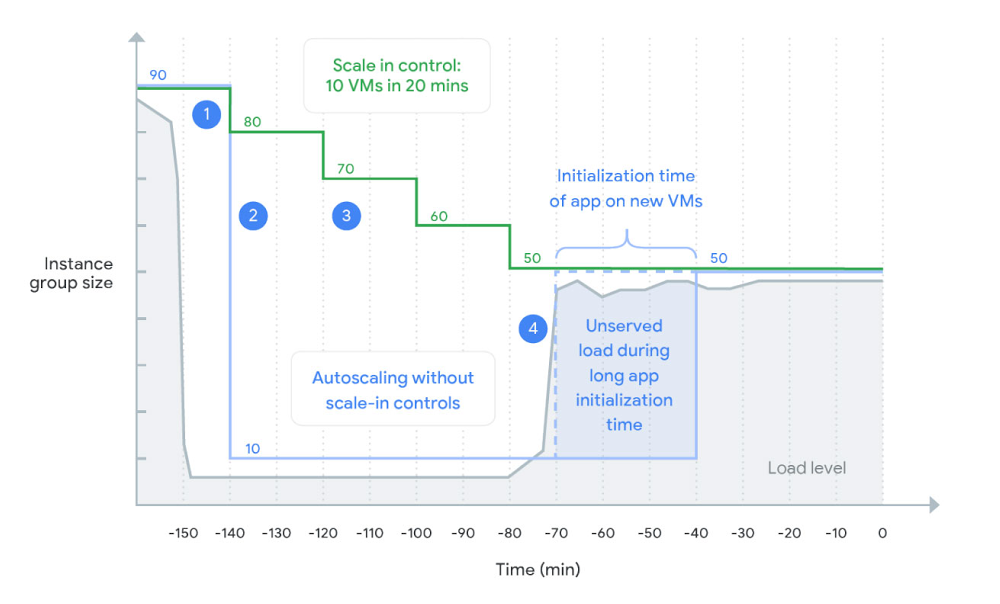
In a Compute Engine environment, managed instance groups (MIGs) offer autoscaling that lets you automatically change an instance group’s capacity based on current load, so you can rightsize your environment—and your costs. Autoscaling adds more virtual machines (VMs) to a MIG when there is more load (scaling out), and deletes VMs when the need for VMs is lesser (scaling in).When load declines, the autoscaler removes all unused capacity. This allows you to save costs but might cause the autoscaler to scale in abruptly. For example, if the load goes down by 50%, the autoscaler removes ~50% of your VMs immediately after a 10-minute stabilization period. Deleting VMs so abruptly might not work well for some workloads. For example, if your VMs take many minutes to initialize you might want to slow down the rate at which you scale in to maintain capacity for imminent load spikes.Introducing scale-in controlsNew scale-in controls in Compute Engine let you limit the VM deletion rate by preventing the autoscaler from reducing a MIG’s size by more VM instances than your workload can tolerate to lose.When you configure autoscaler scale-in controls, you control the speed at which you scale in. The autoscaler never scales in faster than your configured rate, as shown in this diagram:When load declines, the autoscaler maintains the size for the group at a level required to serve the peak load observed in the last 10 minutes (the stabilization period). This works the same with and without scale-in controls.An autoscaler without scale-in controls keeps only enough instances required to handle the recently observed load. After the stabilization period, the autoscaler removes all unneeded instances in one step. A sudden drop in load can lead to a dramatic reduction of instance group size.An autoscaler with scale-in controls limits how many VM instances can be removed in a given period of time (here 10 VMs in 20 minutes). This slows down the instance reduction rate.With the load spikes again, the autoscaler adds new instances. However, because VMs take a long time to initialize, the new VMs aren’t ready to serve the load. With scale-in controls, the previous capacity wasn’t deleted yet, allowing existing VMs to serve the spike.Getting startedYou can set up scale-in controls in the Google Cloud Console. Select an autoscaled MIG from the instance groups page and click Edit group. Under the Autoscaling section, set your scale-in controls:You can also configure scale-in controls programmatically. Here’s the same command written using CLI (gcloud):For more details including configuration using API refer to the documentation.Try scale-in controls todayScale-in controls are generally available across all regions. For more information on how you can control the scale-in rate, check out the docs. Related Article5 best practices for Compute Engine cost optimizationBest practices for saving money on Google Compute EngineRead Article
Quelle: Google Cloud Platform

How rapid integrated clinical data helps prioritize care for a vulnerable population

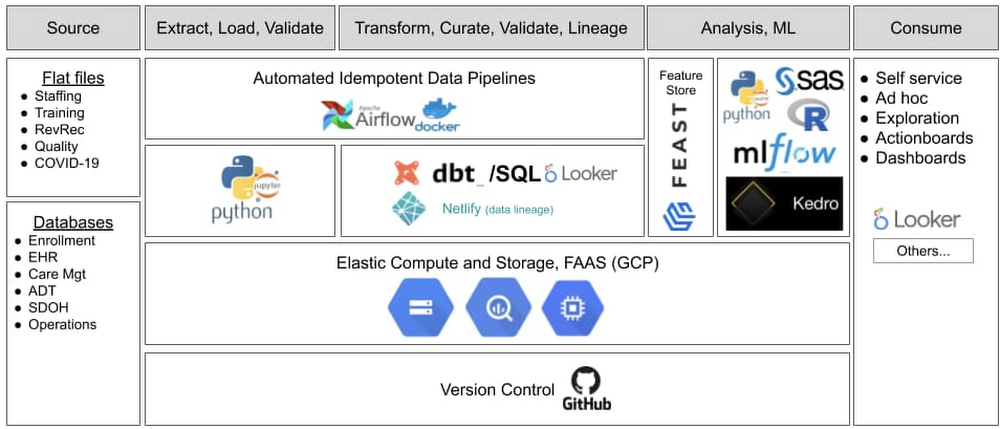
Editor’s note: When the COVID-19 pandemic arrived in the U.S. earlier this year, healthcare organizations had to quickly change or speed up their plans to serve patients. Commonwealth Care Alliance (CCA) used data analytics from Google Cloud to connect clinicians and care managers with high-risk members. Valmeek Kudesia, vice president of clinical informatics and advanced analytics at CCA, shares their story. CCA is a community-based healthcare organization nationally recognized as a leader in providing and coordinating care for high-cost, high-need individuals who are dually eligible for Medicaid and Medicare. CCA integrates the roles of healthcare payor, care management organization, and direct care provider to serve these individuals (known as “members”). Our members live with medical, behavioral health, and social challenges. Many have complicated lives and almost all are vulnerable or marginalized. When news of COVID-19 arrived here in the U.S. last winter, we knew our members would need enhanced levels of care and attention. We needed to deliver on our mission of serving our members while accounting for many new and rapidly changing factors. Our dedicated staff and clinicians needed reliable data that was available quickly and integrated across many domains and sources. We had already put in place an advanced analytics platform with Google Cloud’s BigQuery and Looker. Six months later, we’ve established trust in our data and provide our clinicians with a more holistic view of members’ needs—extending our ability to provide compassion and care to our members, i.e., human-centered use of data and analytics. We will continue to lean upon our data to best serve our members during the upcoming combination of COVID-19 and influenza.Related ArticleData warehouse migration tips: preparation and discoveryIn this post, we’ll explore a few important questions that come up during the initial preparation and discovery phase for data warehouse …Read ArticleThe data required to make decisions fasterThe platform we’d chosen was built for a situation where many users must move fast and in different directions and quickly change what data or information they need. This meant we didn’t have to pivot when COVID-19 arrived. Our data science team used Looker and BigQuery in combination with other technologies (see figure below) to develop and deploy our data ops and ML ops capabilities. All of Google Cloud was available under a single business associate agreement (BAA) to meet HIPAA requirements and BigQuery was (and still is) elastic and available as a service. These two features made it easier for our small data science team to stay focused and move fast, while remaining compliant and enjoy great platform performance.As we used query abstraction and a columnar-based data engine, we discovered an advantage during our response to the COVID-19 pandemic. We had a rapidly increasing number of ways to describe individual “things” combined with very rapid cycles to define “what mattered” at a moment of the day or week. We took advantage of the columnar format to pre-answer as many questions as possible and used straightforward query virtualization to quickly iterate on the idea of what clinicians wanted to see at the speed that they needed to see new or different data. Consequently, we could “move with” clinicians and provide data and predictive insights via general dashboards and role-specific dashboards called action boards. “Action boards” go beyond dashboards—they offer the information needed to help decide which action a clinician will take next, depending on the specific needs of each member. Incorporating daily or even hourly data from various sources was essential to ensure our members got what they needed, whether home-delivered meals, medications, or another service. In some cases, we already had all the required data. For example, in less than 30 minutes, we implemented the CDC’s definition of high-risk for COVID-19 complications in LookML (Looker’s query abstraction layer) and linked the concept “high-risk COVID-19 complications” into our information model. Within a day, we built our main COVID-19 monitoring dashboards and infused relevant pandemic data into other clinical dashboards and action boards. The combination of concept flexibility via abstraction and wide delivery allowed us to quickly identify every member at high risk of a poor COVID-19 outcome and provide that knowledge to their assigned CCA clinicians and integrated care team.Some of the data we needed wasn’t easily accessible—for example, at the time there wasn’t a repository of COVID-19 data or data services on GitHub. But it was essential that we incorporated all needed data to serve all our members—a data-omnivorous approach. In many cases, we had to gather the data ourselves. For example, in the early stages of the COVID-19 pandemic in Massachusetts, adult day health (ADH) centers, community centers that provide critical services for seniors, were closing one-by-one and then abruptly closed en masse. We were able to distribute that knowledge to each member’s assigned CCA clinician action board within minutes of learning of new ADH closings. At a later stage of the COVID-19 pandemic, we started to ingest Massachusetts Department of Public Health data describing test positivity rates to provide insights describing the concentration of high-risk members living in areas with high or escalating COVID-19 risk. The journey from “just data” to “essential for care and support” As the COVID-19 pandemic and its effects continue to evolve, we continually use the latest available information to update and guide our member support and care strategies. Our teams have become more comfortable using data. Typically, we have more than 450 weekly active users and, on average, someone looks at data nearly once every second during the workday. The questions have gotten more interesting and we’re able to ask more about how a piece of data fits, or doesn’t fit, into the member’s bigger picture. Instead of thinking of data as a separate factor, it fades away and becomes part of the surrounding context in which we see the person who is the member—just like how we don’t think specifically about GPS anymore, but rather we focus on the destination. Now the use of data is really built into the way we care for members–it’s part of daily routines. With this kind of reliability, the data science team has moved on to deeper feature engineering and causal inference to enrich the insights delivered to our staff and clinicians. Additionally, our staff and clinicians have come to expect that data can help them take care of vulnerable people. Retrospective for data-informed decisionsThe road to data-informed decision making involves time to build trust in the system. COVID-19 helped solidify that trust and now our clinicians expect data to help toward the care of vulnerable members. We learned that you must build up the ability to quickly iterate to get the data and platform good enough (not perfect) to start being meaningful —and the technology has to allow for that iteration speed. As humans, we see what we know and when people don’t see the big picture or don’t have all the information, they may make near-sighted or counterproductive choices. They can fall into habits or heuristics that reinforce existing problems.Now we’re dealing with human-to-machine interactions as well as human-to-data interactions. When we get it right, we start to incorporate data into our decision making without adding another step. Eventually, it’s just a natural part of the decision process—in this case to take care of a person. For example, evaluation of chest pain frequently requires an electrocardiogram (ECG) interpretation, which encapsulates a large amount of data, and clinicians expect an ECG to help them take better care of the person vs. focusing on the data itself. The COVID-19 pandemic showed us that data used in the right way can extend the human touch and become a therapeutic ally.  You can learn more about CCA in our JOIN@Home session and the full case study.
Quelle: Google Cloud Platform

APIs 101: Everything you need to know about API design

Application programming interfaces, or APIs, are how software talks to other software. They abstract the complexity of underlying systems so the systems can connect in novel ways even if they were never intended to interoperate. Consequently, APIs are key ingredients in both most modern digital experiences and the execution of many of today’s most exciting business opportunities. How much value an API provides, however, involves not only the functionality and data to which the API provides access, but also how the API is designed. Many APIs are designed for integration—that is, as one-off projects that connect systems but do not anticipate future use of the API. The most valuable APIs tend to be designed to make developers’ jobs easier, which typically means designing them with the expectation they’ll be used by other developers in the future. This is designing for consumption. The distinction can significantly impact a business’s efficiency and ability to innovate. APIs designed for consumption make valuable functionality and data reusable, letting developers modularly mix and match different APIs to create new digital experiences or enable new strategies. For goals such as streamlining partner engagement or facilitating participation in digital ecosystems, being able to leverage APIs in this way is crucial. APIs designed for integration, in contrast, may serve the needs of an immediate project but do not help developers do much with the APIs going forward. These APIs may not be designed in ways that future developers will easily understand and may not behave in ways future developers expect. This can lead to the creation of new APIs, adding work and delay that could have been avoided if the older APIs had been designed with broader vision in the first place. How can API designers ensure they’re building APIs that will maximize value and developer productivity? We’ve explored this topic many times in the Google Cloud Blog, and in this post, we offer a collection of some of our most useful API design tips and best practices.Different approaches: REST, RPC, and GraphQLWhat an API even entails can involve different approaches to system interaction and different design norms, so overviewing various API design models is a great starting point. Check out API Design: Understanding gRPC, OpenAPI and REST and When to Use Them, Rest vs. RPC: What Problems are You Trying to Solve with Your APIs?, GraphQL: Building a Consistent Approach for the API Consumer, and Why Your Web APIs Should Be Entity-Oriented to dive in. Holistic API design overviewsFor deep overviews of many API design topics, our ebook API Web Design: The Missing Link: Best Practices for Crafting. Interfaces that Developers Love provides a strong foundation, as does the Google Cloud API Design Guide, which has been used inside Google since 2014 and is the guide Google follows when designing Cloud APIs and other Google APIs. We also encourage you to read API Design Best Practices & Common Pitfalls, which summarizes a wide-ranging Q&A on API design. Specific Challenges and Best Practices Whereas the above articles address numerous broad topics, we’ve also explored many of the more granular and specific API design challenges that can impact an API’s long-term value. For example, APIs are in many ways about defining relationships. In a retailer’s API, the information model might address relationships among entities such as customers, orders, catalog items, carts, and so on. Similarly, a banking API expresses which customer an account belongs to or which account each credit or debit applies to. The most common way that API developers express relationships is to expose database keys, or proxies for them, in the fields of the entities they expose. However, at least for web APIs, that approach has several disadvantages over the alternative: the web link. To learn why, check out API Design: Why You Should use Links, Not Keys, to Represent Relationships in APIs. Similarly, when creating API URLs, it can be confusing — but impactful — to know when to use URLs built around names that are easy for humans to read versus when to use URLs that rely on static numeric identifiers. A bank account, for example, may be difficult to reliably reference if a numeric identifier is not used. Details about the account’s owner are all subject to change (e.g., name, address, marital status), or subject to ambiguity (date and place of birth), or both. Even if we have a reliable identifier for the owner, ownership of the account can change. A static numeric identifier is the most reliable choice—to dig deeper, read API Design: Choosing Between Names and Identifiers in URLs and, for a specific discussion of API design tradeoffs between human readability and system stability, don’t miss The False Dichotomy of URL Design in Web APIs.APIs designed for consumption are essentially software products for developers, which means they may be iterated and improved, just as any software product is. Handling versioning of new APIs can involve some nuances, however, so be sure to peruse API Design: Which Version of Versioning is Right for You? and Common Misconceptions about API Versioning. Finally, APIs can impact how single-page applications are indexed by search engines—so if this sounds pertinent to your business’s needs, our two-part series on API design and SEO might be right up your alley. Doing more with APIsYou’re now well on your way to creating more powerful, user-friendly, and versatile APIs—and because the point of these consumption-focused APIs is partly to facilitate reuse, you’re also on your way to enabling myriad new ways to build richer applications more quickly. To learn even more about how APIs are driving business results, be sure to check out our round-up of API-related topics from Google Cloud Next ‘20: OnAir. We can’t wait to see what you build.Related ArticleNo-code momentum: Accelerating app development and automationLearn why no-code development is gaining momentum and empowering citizen developers to create powerful automations and line-of-business a…Read Article
Quelle: Google Cloud Platform

Meeting the need for speed with a cloud data warehouse

In our work with Google Cloud customers, we hear great stories of growth, change, and cloud success. We worked closely with Trendyol Group, a fast-growing e-commerce company based in Turkey, on their data warehouse migration project. Trendyol employs about 2,000 people, and the company’s e-commerce site gets about 50 billion page views per year, 5 billion visits per year, and 50 million monthly unique users. For this digital-native company, data has been at the heart of their business. Trendyol Group was facing unprecedented growth, and the Trendyol data warehouse (DWH) team had been challenged with the performance and scalability of their existing Vertica data warehouse, especially during the holiday shopping season and other busy retail seasons. Performance issues had become critical over the past 18 months, and had business impact. The DWH team realized that not being able to process data and deliver internal reports and dashboards on time was causing lost revenue and inaccurate supplier management. For example, the business couldn’t react quickly when suppliers made bad decisions or sold a product that didn’t actually have inventory.  The capacity limitations of the on-premises data warehouse forced the IT team to constantly tune performance and plan and scale capacity instead of focusing on business insights. Trendyol’s reporting team serves more than 600 users with roughly 2,000 workbooks and 7,000 views in Tableau. Prior to migration, Trendyol stored over 30 TB of data in their Vertica environment. In addition, there were over 300 slowly changing dimensions (SCDs) in the ETL pipelines, requiring the team to update 10% of the data every day, which led to an 11 TB truncate-insert during the ELT process. The size of the data was weighing down the business. Business users couldn’t meet SLAs for their Monday morning financial reports required by the executives. To meet those busy periods, their IT team had to spend time tuning workloads by killing long-running queries to ensure timely completion of the reports. For example, business users couldn’t run queries that spanned a three-year period for aggregations due to capacity issues; they could only do a one-year time frame. By the time that business users accessed the report, the data was already stale. Then, when Thursdays came and users weren’t running as many queries, the DWH team found themselves with excess capacity. With the impact of COVID-19, Trendyol needed to be able to react quickly and cut off non-compliant products or suppliers to be able to meet the sudden increase in demand. The DWH team knew they needed to auto-scale the workloads in a cost-effective way. They extended their Vertica environment for one more year while they started evaluating cloud data warehousing alternatives. Cloud data warehouse decision criteria The Trendyol team decided to look into a number of vendors, including Snowflake and Google Cloud. Their decision criteria for a cloud data warehouse included:Instant scalability. Given the variability in their analytical workload, this was a critical need so they could have capacity on demand to run the Monday morning reports. Reduced operational costs. Since the retail business is seasonal, Trendyol needed to keep their costs low, in line with demand. Uptime SLAs. Their analytical platform needed to be highly available to meet business needs, especially in these critical times. BigQuery now offers a 99.99% SLA.Backup and recovery. This is important so the team can look back in time, in case there are errors in processing. Security. This is a key requirement for them, since they need to restrict access to personally identifiable information (PII) and sensitive data depending on roles. Ease of use. It was very important that business users could transition to the new cloud data warehouse platform without a learning curve and could be productive immediately.Evaluating cloud data warehousesBigQuery’s comprehensive documentation and simple management interface let the Trendyol team set up BigQuery and fine-tune queries for their proof-of-concept trial. Other data warehouse vendors’ trials required a consultant to optimize and tune the environment. They were able to move the data into BigQuery by themselves and it just worked. They also used BigQuery features like time travel, which met backup and recovery requirements out of the box, and integrated Cloud Identity and Access Management (Cloud IAM) roles that met security requirements easily.The most important feature in BigQuery for Trendyol was the separation of storage and compute, so that they would not have to pay for compute when not in use. Furthermore, it was easy to scale their workload up and down without the need for startup or shutdown time, which other tools required. The DWH team ran through a comprehensive evaluation of alternative data warehouse tools with a variety of benchmarks to represent their main workloads, including ELT, end-to-end BI, integration with BI, and a number of different OLAP queries. BigQuery was the preferred option for price and performance for each of the workloads. Here are three example queries—OLAP-type queries with joins involving a billion rows (Regex, 20+ analytical functions). 1. Ad hoc queries representing power users: Join four tables; high cartesian joins: 632m, 162m, 13m, 23k Regex functions, 2x dist. count2. ELT publish layer with analytical functions: Join five tables; rows: 800m, 13m, 11m, 10m, 360k 20+ analytical functions, first/last_value group by3. Example of publish layer: Join 13 tables (including subqueries), rows: 274m, 262m, 135m, 13m,10x group byTesting results from TrendyolConcurrent queries: BigQuery was the most cost-effective and faster compared to the alternative solution. BigQuery allowed testing increased slots and sharing resources seamlessly across reservations, which wasn’t possible in the alternative solution.DML statements performance: Similar across platforms, including CTAS/updates/inserts, but BigQuery was the most cost-effective. End-to-end runtime: With BI run, BigQuery was faster.Ingestion times: BigQuery was an order of magnitude faster. Data ingestion benchmark: 492 Parquet files with size of 63GB (400 million rows, 50 columns, snappy compressed)ELT’s SCD phase: With one of the largest dimensions, creates more than 2.1 million updates and approximately 1 million inserts.Overall, BigQuery provided the best price for performance, and its predictable flat-rate pricing was key for the decision. In the past, the DWH team had purchased capacity ahead of time, and often thought that it would end up being utilized, but didn’t—creating significant cost and unpredictability. The team would now be able to predict how much capacity they would use at the end of each month. And, the ability to scale up and down in minute intervals with Flex Slots was not available from any other vendor.  Migrating to BigQueryThe Trendyol DWH team separated the migration into three main categories:BI/Tableau migration was done in two weeks. The team changed 50 source tables accessed by 2,000 worksheets and 7,000 weave reports. Since Tableau has a native connection to BigQuery, it was easy to migrate. They used the same table and column names in BigQuery, matching the ones Tableau reports are using, and it just worked. They also avoided using custom SQL in Tableau, eliminating the need to rewrite most of the reports. The team found BigQuery’s ANSI SQL-compliant dialect to be compatible with most of their requirements. Additionally they had some custom SQL with a good amount of regular expressions, which were easily addressed by writing around 10 UDFs. ETL: More than 1,500 ETL jobs are scattered across three tools (Attunity, custom Python scripts, and Kafka Connect). The team has been doing ETL on-prem, and now, in the second phase of the migration, they’ve started migrating ETL to BigQuery.Data: There was 22 TB to start in Vertica that the team moved to BigQuery. They used Attunity for SQL Server and Kafka Connect for cloud-based sources. In addition, custom Python code integrated natively with the BigQuery JDBC driver. Within three months, the team ingested 600 TB into BigQuery, an order of magnitude larger than they had expected.  Currently, the Trendyol team stores 650 TB of data and 300+ SCDs in BigQuery and processes 11 TB of data daily. They mix and match flat-rate, slot reservations, and Flex Slots to get the best pricing at any given time. For example, they can now handle fluctuations in demand by purchasing Flex Slots on an on-demand basis. The data team can now concentrate on creating value rather than spending time on operationalizing the data warehouse. The relationship between the IT and business teams has been transformed, too. There are now plenty of compliments on speed and scalability. The data team can now produce reports in an hour on Monday morning, meeting their SLAs comfortably. The ODS pipeline previously took two to three hours, depending on the day. Trendyol’s BigQuery migration has helped restore trust between the IT and business teams, enable data-driven decision making, save on costs, and meet customer needs quickly. Learn more about Trendyol and about BigQuery’s data warehouse migration program.
Quelle: Google Cloud Platform

Graceful shutdowns on Cloud Run: Deep dive

Cloud Run now sends a SIGTERM signal to your container instance before the container instance terminates, due to an event like scale down or deleted revision.  By handling this signal, you can now gracefully terminate your applications and do some cleanup tasks –as opposed to an abrupt shutdown of the container.In this blog, we will explore some use cases for this and how you can try it out.Graceful shutdownsWhen a container instance is shut down on Cloud Run, a SIGTERM signal will be sent to the container and your application will have 10 seconds to exit. If the container does not exit by then, a SIGKILL signal (which you cannot capture) will be sent to abruptly close your application. If you choose not to write a signal handler for SIGTERM, your process is terminated instantly.Using this termination signal, you can perform various “graceful shutdown” tasks in your application code:Flush monitoring data: If you use Cloud Trace or upload metrics from your application, you can develop a signal handler and call the function that flushes out the trace spans collected before your container quits and loses these in-memory trace spans that are not uploaded.Log termination of your container: By logging the termination event of the container, you can refer to your application logs to see when a specific container instance has started and exited, and get full visibility into the lifecycle of individual container instances.Close file descriptors or database connections: Some abruptly quit connections can confuse the connected servers and cause them to keep connections open for a long time than gracefully disconnecting.The graceful termination signal is primarily sent to your application when it’s scaling down container instances that are not getting traffic. Therefore, you don’t need to handle draining in-flight requests in your signal handler. However, you might sometimes receive this signal before your container will be shut down due to underlying infrastructure reasons and your container might still have in-flight connections. The graceful termination is therefore not always guaranteed.Trapping signals, the right wayMost programming languages provide libraries to trap termination signals like SIGTERM and run routines before your program terminates.If your application does not receive the termination signal on Cloud Run, the most prominent reason for this might be because your application is not running as the init process (PID 1) and its parent process is not forwarding the signal appropriately.The leading reason why this happens is that the ENTRYPOINT statement in your container image’s Dockerfile is not set directly to your application process. For example, the Dockerfile statement:ENTRYPOINT node server.jsinternally is translated to:ENTRYPOINT [“/bin/sh”, “-c”, “node server.js”]when your Dockerfile is executed to build a container image.Most notably, the GNU /bin/sh and other shells like bash do not forward signals to child processes by default. Therefore, you should write your entrypoint statements in the vector form, like the following, to prevent your app to be executed as the sub-process of a shell:ENTRYPOINT [“python”, “server.js”]Similarly, if you use an entrypoint script to kick off background processes in your containers, consider using a proper init process that can forward signals to child processes, such as tini, dumb-init or supervisord. (I have compared init process alternatives for the multi-process container use case here.)See graceful shutdowns in actionTo try trapping SIGTERM signals in Cloud Run, let’s a small Node.js server app to try this out. For this purpose, let’s take the Node.js sample application for Cloud Run. You can download it from this repository on GitHub.Add this snippet of code to index.js:process.on(‘SIGTERM’, function () {    console.log(‘helloworld: received SIGTERM, exiting gracefully’);    process.exit(0); });After completing this step, you can now build and push this container image, and deploy it to Cloud Run. As part of your new deployment a container instance is spun up to handle the request.After some time passes, your container will scale to zero since it is not getting any requests. (If you want to trigger a scale-to-zero event, you can also edit your Cloud Run application’s settings such as CPU or memory on the Google Cloud Console. This will deploy a new revision, and the old revision will be turned off.)The scale-to-zero will trigger a SIGTERM signal to be sent to your container before it is shut down, and you can see the graceful shutdown routine executed in the Logs tab:As you can see, Cloud Run does not require additional settings to enable graceful shutdowns. It’s turned on by default for all Cloud Run services. ConclusionIf you have cleanup tasks or have monitoring data to push out before your serverless container instances on Cloud Run shut down, give termination signals a try. Check out our documentation for more information about this feature.
Quelle: Google Cloud Platform

Unifiedpost and Google collaborate on Document AI to automate procurement data capture

Belgian fintech company, Unifiedpost Group has deployedProcurement DocAI to process nearly 350 million invoices and other procure-to-pay docs per year, in 15 countries across Europe. Procurement DocAI, which was announced at Google Cloud Next OnAir, automates the capture of invoices, receipts and other procurement data at scale. It takes unstructured documents across a variety of formats and turns them into cleanly structured data, increasing operational efficiency and improving document processing accuracy.    “At Unifiedpost, we believe that administrative and financial processes should be simple and smart. Google Cloud’s Procurement DocAI solution helps us achieve that goal by providing the best in class document automation processing with high accuracy and global, multi-language support.” – Hans Leybaert, CEO, Unifiedpost GroupLarge enterprise procurement and distribution networks as well as small and medium enterprises (SMEs) generate millions of invoices, receipts, and other related documents a year. These processes generate significant overhead for every procured item. With competitive pressures increasing, businesses are finding new ways to automate one of their highest volume business processes — the procurement cycle.A key part of our strategy at Google Cloud is the creation of industry-specific solutions that address vertical needs. Cross-industry solutions like Document AI are built to plug into your existing workflows and deliver business results from AI without having to hire an army of AI experts, or manage cloud infrastructure to get there.Procurement DocAI is one of our newest solutions, and it’s deployed by many customers and partners including Unifiedpost. The company currently serves 400k SMEs and 250+ corporations; their offering includes: documents (e.g., invoice PDF to XML conversion, e-invoicing), identity (e.g., KYC), and payments (e.g., IBAN accounts, online collection services, PSD2 payment services). With a large, rapidly growing, and heavily multi-language footprint, Unifiedpost sought the best industry solutions to meet their automation challenges and connect their customers such as Billtobox.com or JeFacture.com. Google Cloud’s Procurement DocAI delivered two key benefits to address Unifiedpost’s business needs:Lower TCO of procure-to-pay processing. Unifiedpost will be able to lower their TCO of procure-to-pay processing costs by up to 60% with Procurement DocAI. This solution provided them a cost effective approach for data extraction for invoices, receipts, and other valuable documents in the procurement cycle of procure to invoice, and invoice to pay.Improve procurement document processing accuracy. Procurement DocAI also helped boost data accuracy by 250% for Unifiedpost’s document extraction through specialized DocAI parsers with advanced OCR, computer vision, and Natural Language Processing. Additionally, Unifiedpost needed rapid multi-language expansion to enable regionalization support across Europe, particularly for French and Dutch to begin with, which Google delivered in less than a month.The collaboration between Google Cloud and Unifiedpost is just one of the latest examples of how we’re providing AI-powered functional solutions to solve business problems by leveraging our Deployed AI approach.Let’s connectFor more customer stories from EMEA, check out Google Cloud Next OnAir EMEA, which has tailored content to support the needs of our customers in Europe, Middle East, and Africa, kicking off from 29 September – 27 October.
Quelle: Google Cloud Platform




