Improving security, compliance, and governance with cloud-based DLP data discovery

One of the more critical, but sometimes forgotten, questions related to data security is how do you find the data you need to secure. To security newcomers, this may sound contradictory; surely you have that valuable data firmly in your hands?In reality, many types of sensitive, personal and even regulated data get “misplaced” at some organizations. For example, cases where payment data—credit card numbers, in particular—is found outside of the formally defined Cardholder Data Environment (CDE) have been strikingly common over many years. Sadly, they often come to light during a post-breach investigation or, somewhat better, during a PCI DSS assessment by a QSA.Similarly, recent attention (such as due to GDPR or CCPA) paid to personally identifiable information has led to cases where personal data was discovered in unexpected places. Furthermore, the accelerating pace of cloud migrations means that there are more cases of personal data being uploaded to the public cloud. It happens sometimes without the necessary controls, and, in fact, without awareness of security and privacy teams. For example, a test instance of a data analysis application may be moved from the data center to the cloud, without thinking that the test instance used production customer data. In fact, perhaps it was acceptable to use personal data for testing while the application was developed and then deployed internally, but now public cloud changed things.These and other similar cases have elevated the importance of data discovery, a key component of DLP technology. As we noted in our previous blog, sensitive data discovery is critically important for security, compliance and privacy initiatives. Thus, there is value in knowing where your sensitive data is at any time, whether it is in the cloud or not.Perhaps surprisingly, one can still see situations where sensitive data discovery is a “hard sell” with security leaders. Some leaders see the value in preventing the leaks (and theft) of valuable data across the perimeter, but not necessarily the discovery of the data inside the perimeter.  However, the fact is that such thinking has become outdated in the cloud era! The perimeter has morphed in many ways hence simply sitting at the border (that is, if you can find the border to sit on) looking for departing data is no longer real (that is, if you assume that it ever was). In light of this, there are organizations that consider a broad accidental disclosure of sensitive data inside their organization to be “an internal data breach”, even though the data was never seen departing from the company. In fact, in a global organization, such internal disclosure may violate rules because it may make the data visible by employees from other countries.Why discover?Hence, the only approach that works today is protecting sensitive data by starting with knowing where it exists. This may have been conceptually true for years, but today this is also true operationally. Cloud has made this true!Still, there is a substantial debate about sensitive data in the cloud. One survey found out that “71% of organizations report that the majority of their cloud-resident data is sensitive.” However, the real challenge is that it is very likely that many organizations have sensitive data in the cloud and they are not aware of what data and where in the cloud. Gartner recently noted that data discovery plays a role in Data Access Governance (DAG). Hence, even though discovery on its own does not make the data “more secure”, it is a critical first step to take. It can make decisions about the data (approving access requests, sharing, retention, etc.) more informed and thus more secure.What to discover?The definition of sensitive data remains the subject of some debate in the security community. Some define it as data that, if revealed, will cause harm; some focus on data that others may want to steal; and some use the pure regulatory definition (hence substituting “regulated” data for “sensitive”—perhaps not a very logical change).Still, there are some types of data where there is broad agreement that such data is considered sensitive (even though the universal definition of “sensitive data” perhaps remains elusive):Regulated data such as payment data, personally identifiable information (PII) and many types of personal health information (PHI).Corporate secrets and other data that is sensitive because it is clearly valuable for business.Data that if made public will cause harm, negative PR or other damage to a company and/or its brand.It is very likely that entire industries and even specific companies can identify many other types of data considered sensitive. Note that valuing data as a business asset is an area of much research.When to discover?Our conversation here focuses on sensitive data in the cloud, hence it is useful to relate our discovery activities to cloud migration. Sensitive data discovery has value across the entire migration process.Before cloud migration—this helps plan what data can be moved to the public cloud and whether additional controls will be needed when it moves to specific cloud services. This ultimately helps organizations make an informed decision about sensitive data in the cloud.During cloud migration—this focuses on validating that the data being migrated is being moved into the properly secured areas. It also checks for mistakes with data classification (e.g. moving secret data to an open environment by mistake or moving regulated data into an environment without the prescribed controls). This may also be used to drive data transformation (masking, tokenization, de-identification) for reducing the risk.After cloud migration—this looks for mistakes in placing the data, moving data from more protected to less protected areas by mistake, and many other user cases. This activity evolves into an ongoing set of discovery activities that continue indefinitely. Security and compliance implications of this may include changing permissions, moving data to more protected areas and of course encrypting it.To migrate and operate sensitive data workloads in the cloud, you would very likely utilize a combination of all three of the above.How to discover?Based on when you’re performing data discovery, there are a few practices to consider.Before cloud migration, you would scan specific locations and systems to be migrated, likely looking for specific data types. Inspecting data before migration can also help inform how you will migrate the data. For example, will you triage certain data to stay off-cloud and other data to be cleared to move to cloud? Or will you employ a de-identification strategy to selectively mask and tokenize sensitive data as it migrates? During migration, data being migrated is filtered through a DLP engine looking for sensitive data. Here are two examples of where you can use DLP during migration:Transforming data—During migration you might want to inspect for and remove or mask sensitive data.  This can be a technique to lower the risk inherent to certain data types and to compliment other security controls like encryption at rest and access control. (Example migration solution)Quarantine—Let’s say that you have data migrating to the cloud from several sources (internal, partners, customers, etc.) and you are not able to always inspect the data ahead of time. You can have this data land in a protected zone first and then use DLP to scrutinize it. After that, based on inspection results, you can either keep the data locked or to release the data from the “lockdown” into its intended and approved location.  (Example triage solution). When focused on ongoing discovery activities, it makes sense to structure the scans as broad (discover some or all types of sensitive data across all systems) or deep (discover specific types of sensitive data across one particular system). This will also serve the needs of data access governance. (Who is accessing what data and why?) The pattern “broad first, deep second” is in fact an effective way to organize discovery. For example, a broad scan of many (or all) cloud locations for many data types may answer the questions “Do you have sensitive data in the cloud?”, “What data, specifically?” and “Where in the cloud, exactly?” Such broad scans should ideally be ongoing.Finally, ad hoc scans are also part of the mix. During an audit, a scan may be run over many locations looking for a specific data type. Howerer, if a particular project is being tested for security and privacy issues, its environment may be scanned for a long list of sensitive data types.A detailed discussion of how DLP helps data transformation is coming in the next post.Resources to reviewWatch Cloud Next OnAir Hybrid DLP VideoCreate a scan of your cloud storageTry out one of our demo tutorialsActions to plan for your data security programIf you’re in the cloud, the internal / external distinction goes away, so you need to be more proactive about data governance.Moving to cloud allows you to make data discovery part of your normal BAU processes and that will aid in security, compliance, and governance. Include pre- and post-migration data discovery efforts to your program or verify the ongoing discovery activities.Related ArticleNot just compliance: reimagining DLP for today’s cloud-centric worldA look back at the history of DLP before discussing how DLP is useful in today’s environment, including compliance, security, and privacy…Read Article
Quelle: Google Cloud Platform

Deploying Anaplan at enterprise scale on Google Cloud

Adapting to rapidly-changing market conditions in real-time—while still building for the future—is top of mind for virtually every business leader. We recently announced a strategic partnership with Anaplan to deliver its enterprise planning platform on Google Cloud, and to jointly deliver cloud-based, intelligent planning solutions to our global customers.Today, many organizations use Anaplan to support critical decision-making in areas such as financial planning and forecasting, supply chain planning, sales operations, people operations and more. Deploying Anaplan on Google Cloud enables customers to run Anaplan’s Hyperblock calculation engine on our scalable, global infrastructure, enables compliance with local and industry-specific data residency requirements, and enables new, intelligent capabilities in data analytics and blending.At Google, Anaplan has been a part of our planning and operations toolset since 2016. We use Anaplan to help inform our decision-making across multiple business units, regions, and teams. Like many global organizations, this means we need to deliver Anaplan to many business users, at large scale. To help do so, we have deployed our Anaplan environment in the cloud, running on Google Cloud’s global, highly-performant infrastructure.Running Anaplan on Google Cloud has enabled us to expand our usage of Anaplan to additional teams and blend even more data from disparate sources into the Anaplan platform, yielding more insights. For instance, our global finance teams use Anaplan to effectively manage budgets, forecasting, and operational planning. Anaplan enables business users to rapidly and easily leverage data from across our organization, in a self-service manner, so they can quickly and collaboratively develop and evolve annual and multi-year plans and budgets. Our teams working on hardware supply chains also use Anaplan to get visibility into complex, global order and inventory data towards demand, supply & allocation planning. Anaplan helps our teams spend less time crunching data, and more time focused on getting products to consumers and business customers. In addition, our sales operations teams use Anaplan to help inform decisions around territory and quota planning and modeling. Anaplan has enabled faster execution and stronger collaboration, plus real-time visibility into quota attainment and performance across global regions. In each of these cases, delivering Anaplan on our global, scalable, and highly-performant network has helped bring Anaplan’s capabilities to even more Googlers with better performance and enabled us to drive further insights from critical business data.We are excited to partner with Anaplan to help more organizations scale Anaplan globally by running on Google Cloud’s hyperscale platform, and to share our successes and learnings from deploying Anaplan internally at one of the largest companies in the world.You can learn more about Anaplan on Google Cloud on Anaplan’s blog, our partnership press release and watch the partnership announcement videofeaturing our joint CEO’s.
Quelle: Google Cloud Platform

Lending DocAI fast tracks the home loan process

Artificial intelligence (AI) continues to transform industries across the globe, and business decision makers of all kinds are taking notice. One example is the mortgage industry; lending institutions like banks and mortgage brokers process hundreds of pages of borrower paperwork for every loan – a heavily manual process that adds thousands of dollars to the cost of issuing a loan. In this industry, borrowers and lenders have high expectations; they want a mortgage document processing solution catered to improving operational efficiency, while ensuring speed and data accuracy. They also want a document automation process that helps enhance their current security and compliance posture.At Google, our goal to understand and synthesize the content of the world wide web has given us unparalleled capabilities in extracting structured data from unstructured sources. Through Document AI, we’ve started bringing this technology to some of the largest enterprise content problems in the world. And with Lending DocAI, now in preview, we’re delivering our first vertically specialized solution in this realm.Lending DocAI is a specialized solution in our Document AI portfolio for the mortgage industry. Unlike more generalized competitive offerings, Lending DocAI provides industry-leading data accuracy for documents relevant to lending. It processes borrowers’ income and asset documents to speed-up loan applications—a notoriously slow and complex process. Lending DocAI leverages a set of specialized models, focused on document types used in mortgage lending, and automates many of the routine document reviews so that mortgage providers can focus on the more value-added decisions. Check out this product demo. In short, Lending DocAI helps:  Increase operational efficiency in the loan process: Speed up the mortgage workflow processes (e.g. loan origination and mortgage servicing) to easily process loans and automate document data capture, while ensuring that accuracy and breadth of different documents (e.g. tax statements, income and asset documents) support enterprise readiness.Improve home loan experience for borrowers and lenders: Transform the home loan experience by reducing the complexity of document process automation. Enable mortgage applications to be more easily processed across all stages of the mortgage lifecycle, and accelerate time to close in the loan process.Support regulatory and compliance requirements: Reduce risk and enhance compliance posture by leveraging a technology stack (e.g. data access controls and transparency, data residency, customer managed encryption keys) that reduces the risk of implementing an AI strategy. It also streamlines data capture in key mortgage processes such as document verification and underwriting.Partnering to transform your home loan experienceOur Deployed AI approach is about providing useful solutions to solve business challenges, which is why we’re working with a network of partners in different phases of the loan application process. We are excited to partner with Roostify to transform the home loan experience during origination. Roostify makes a point-of-sale digital lending platform that uses Google Cloud Lending DocAI to speed-up mortgage document processing for borrowers and lenders. Roostify has been working with many customers to develop our joint solution, and we have incorporated valuable feedback along the way.“The mortgage industry is still early in transitioning from traditional, manual processes to digitally-enabled and automated, and we believe that transformation will happen much more quickly with the power of AI. And if you are going to do AI, you’ve got to go Google.” – Rajesh Bhat, Founder and CEO, RoostifyOur goal is to give you the right tools to help borrowers and lenders have a better experience and to close mortgage loans in shorter time frames, benefiting all parties involved. With Lending DocAI, you will reduce mortgage processing time and costs, streamline data capture, and support regulatory and compliance requirements.Let’s connectBe sure to tune in to the Mortgage Bankers Association annual convention to learn more from our Fireside Chat and session with Roostify!Related ArticleEmpowering teams to unlock the value of AIThe latest and greatest AI and machine learning news from Google CloudRead Article
Quelle: Google Cloud Platform
Strengthen zero trust access with the Google Cloud CA service

As more organizations undergo digital transformation, evolve their IT infrastructure and migrate to public cloud, the role of digital certificates will grow—and grow a lot. Certificates and certificate authorities (CAs) play a key role in both modern IT models like DevOps and in the evolution of traditional enterprise IT.In August, we announced our Certificate Authority Service (CAS)—a highly scalable and available service that simplifies and automates the management and deployment of private CAs while meeting the needs of modern developers building and running modern systems and applications. Take a look at how easy it is to set up a CA in minutes!At launch, we showed how CAS allows DevOps security officers to focus on running the environment and offload time consuming and expensive infrastructure setup to the cloud. Moreover, as remote work continues to grow, it’s bringing a rapid increase in zero trust network access (example), and the need to issue an increasing number of certificates for many types of devices and systems outside the DevOps environment. The challenge that emerged is that the number of certificates and the rate of change both went up. It is incredibly hard to support a large WFH workforce from a traditional on-premise CA, assuming your organization even has the “premises” where it can be deployed.To be better ready for these new WFH related scenarios,  we are introducing a new Enterprise tier that is optimized for machine and user identity. These use cases tend to favor longer lived certificates and require much more control over certificate lifecycle (e.g., ability to revoke a certificate when the user loses a device). This new tier complements the DevOps tier which is optimized for high throughput environments, and which tend to favor shorter lived certificates (e.g., for containers, micro-services, load balancers, etc.) at an exceptionally high QPS (number of certificates issued per second).Simply put, our goal with the new Enterprise tier is to make it easy to lift and shift your existing on-premises CA. Today CAS supports “bring your own root” to allow the existing CA root of trust to continue being the root of trust for CAS. This gives you full control over your root of trust while offloading scaling and availability management to the cloud. This also gives you freedom to move workload across clouds without having to re-issue your PKI, and vastly reduces the migration cost.Moreover, through our integration with widely deployed certificate lifecycle managers (e.g., Venafiand AppViewX), we have made the lift and shift of an existing CA to the cloud a breeze, so you can continue using the tooling that you are familiar with and simply move your CA to the cloud. CAS leverages FIPS 140-2 Level 3 validated HSMs to protect private key material. With the two tiers of CAS (Enterprise and DevOps), you can now address all your certificate needs (whether for your devops environments or for your corporate machine and user identity) in one place. This is great news for security engineers and CA admins in your environment as now they can use a single console to manage the certificates in the environment, create policies, audit, and react to security incidents. Visibility and expiration have always been the two biggest issues in PKI and with CAS and our partner solutions, you can solve these issues in one place.So whether you are at the beginning of your journey of using certificates and CAs, or have an existing CA that has reached its limit to address the surge in demand (either due to WFH or your new DevOps environment), CA Service can deliver a blend of performance, convenience, ease of deployment/operation with the security and trust benefits of Google Cloud. CAS is available in preview for all customers to try. Call to action:Review CAS video “Securing Applications with Private CAs and Certificates” at  Google Cloud Security Talks Review “Introducing CAS: Securing applications with private CAs and certificates”for other CAS use cases such as support for DevOps environments.Try Certificate Authority Service for your organization.Related ArticleIntroducing CAS: Securing applications with private CAs and certificatesCertificate Authority Service (CAS) is a highly scalable and available service that simplifies and automates the management and deploymen…Read Article
Quelle: Google Cloud Platform
What’s happening in BigQuery: Time unit partitioning, Table ACLs and more

At Google Cloud, we’re invested in building data analytics products with a customer-first mindset. Our engineering team is thrilled to share recent feature enhancements and product updates that we’ve made to help you get even more value out of BigQuery, Google Cloud’s enterprise data warehouse.  To support you in writing more efficient queries, BigQuery released a whole new set of SQL features. You can now easily add columns to your tables or delete the contents using new table operations, efficiently read from and write to external storage with new commands, and leverage new DATE and STRING functions. Learn more about these features in Smile everyday with new user-friendly SQL capabilities in BigQuery.Read on to learn about other exciting recent additions to BigQuery and how they can help you speed up queries, efficiently organize and manage your data, and lower your costs.Create partitions using flexible time units for fast and efficient queriesA core part of any data strategy is how you optimize your data warehouse for speed while reducing the amount of time spent looking at data you don’t need. Defining and implementing a clear table partitioning and clustering strategy is a great place to start. We’re excited to announce that now you have even more granular control over your partitions with time unit partitioning available in BigQuery. Using flexible units of time (ranging from an hour to a year), you can organize time-based data to optimize how your users load and query data. BigQuery time-based partitioning now also supports the DATETIME data type, in addition to DATE and TIMESTAMP. Now you can easily aggregate global timestamp data without the need to convert data or add additional TIMESTAMP columns. With these updates, BigQuery now supports different time units on the same DATETIME data type, giving you the flexibility to write extremely fast and efficient queries.Time unit partitioning is easily implemented using standard SQL DDL. For example, you can create a table named newtable that is hourly partitioned by the transaction_ts TIMESTAMP column using TIMESTAMP_TRUNC to delineate the timestamp at the hour mark:As with other partitioning schemes in BigQuery, you can use clustering along with these new partitioning schemes to speed up the performance of your queries. Best part—there is no additional cost for the use of these new partitioning schemes; it’s included with the baseBigQuery pricing. These new partitioning schemes can help you lower query costs and allow you to match partitioning schemes available in traditional data warehouses for ease of migration.Check out the demo video to see time unit partitioning in action, and read more in the BigQuery documentation.Take advantage of expanded access to metadata via INFORMATION_SCHEMAWhen our team was deciding where and how to expose rich metadata about BigQuery datasets, tables, views, routines (stored procedures and user-defined functions), schemas, jobs, and slots, the natural answer was BigQuery itself. You can use the INFORMATION_SCHEMA views to access metadata on datasets, tables, views, jobs, reservations, and even streaming data!Here are some quick code snippets of how people are asking questions of this metadata:What are all the tables in my dataset?How was this view defined again…?You can also use INFORMATION_SCHEMA.JOBS_TIMELINE_BY_* views to retrieve real-time BigQuery metadata by timeslice for the previous 180 days of currently running and/or completed jobs. The INFORMATION_SCHEMA jobs timeline views are regionalized, so be sure to use a region qualifier in your queries, as shown in the examples below.How many jobs are running at any given time?Which queries used the most slot resources in the last day?Of course, running the above query every day and monitoring the results can be tedious, which is why the BigQuery team created new publicly available report templates (more on that shortly). Practice some INFORMATION_SCHEMA basics with more examples and browse the documentation. Streamline the management of your BigQuery slots and jobsIf you’re using BigQuery reservations, monitoring the slot usage from each of your projects and teams can be challenging. We’re excited to announce BigQuery System Tables Reports, a solution that aims to help you monitor BigQuery flat-rate slot and reservation utilization by leveraging BigQuery’s underlying INFORMATION_SCHEMA views. These reports provide easy ways to monitor your slots and reservations by hour or day and review job execution and errors. Check out the new Data Studio dashboard template to see these reports in action. Here’s a look at one option:Explore all of the available BigQuery System Tables Reports, and learn more about managing BigQuery usage and reservations on Coursera. In addition to streamlining the management of BigQuery slots, we’re also working on making it easier for you to manage your jobs. For example, you can now use SQL to easily cancel your jobs with one simple statement:The procedure returns immediately, and BigQuery cancels the job shortly afterwards. Review all of the ways that you can manage your BigQuery jobs in the documentation.Leverage advances in data governance to manage access to individual tables (and columns soon!)Building on the introduction of data class-based access controls earlier this year, we have now launched Table ACLs into GA and added integration into Data Catalog. These new features provide you with individualized control over your tables and allow you to find and share data more easily via a data dictionary in the Data Catalog. With Table ACLs, you no longer need access to the entire dataset to query a specific table. You can now set an Identity and Access Management (IAM) policy on an individual table or view in one of three easy ways:Using the bq set-iam-policy command (bq command-line tool version 2.0.50 or later)Using the Google Cloud ConsoleCalling the tables.setIamPolicy methodFor example, using the role BigQuery Data Viewer (roles/bigquery.dataViewer), you can grant read access on an individual table, without the user needing access to the dataset the table belongs to. In addition, you can let users see which tables they have access to in a dataset by granting the role BigQuery Metadata Viewer (roles/bigquery.metadataViewer) or the bigquery.tables.list permission on a specific dataset. And coming soon to GA is column-level security. With this feature (currently in beta), you will be able to restrict data access at the column level with just three steps: UseData Catalog to create and manage a taxonomy and policy tags for your data usingbest practices.Use schema annotations to assign a policy tag to each column for which you want to control access.UseIdentity and Access Management (IAM) policies to restrict access to each policy tag. The policy will be in effect for each column belonging to the policy tag.Both column-level and Table ACLs are exposed in Data Catalog searches. Using policy-tag based search, you will be able to find specific data policed with column-level ACLs.Data Catalog will also index all tables that you have access to (again, even if you don’t have access to the surrounding dataset). Learn more about these new features in the docs on Table ACLs and column-level security, and get hands-on practice with Data Catalog on Qwiklabs.   In case you missed it:The BigQuery Simba ODBC driver now leverages the optimized, synchronous API:Jobs.Query, for the majority of BI and analytical queries. In addition, the BigQuery Simba ODBC and JDBC drivers both now auto-enable thehigh-throughput read API for all queries on anonymous tables (check out necessary criteria). To enable these improvements, install the latest Simba driver versionshere. Cloud Next OnAir ‘20 sessions included some great sessions on data analytics. Check them out to learn more about Best Practices from Experts to Maximize BigQuery Performance, Analytics in a Multi-Cloud World with BigQuery Omni, and Awesome New Features to Help You Manage BigQuery.Now in preview, the Cloud Console UI lets you opt in to search and autocomplete powered by Data Catalog. With this feature, you can search for all of your resources, even those outside your pinned projects. If you have a large number of resources, the overall performance of the Cloud Console is also improved with this option. Preview this feature by enabling it when prompted in the Cloud Console UI.To keep up on what’s new with BigQuery, subscribe to our release notes. You can try BigQuery with no charge in our sandbox. Let us know how we can help.
Quelle: Google Cloud Platform

How to create and deploy a model card in the cloud with Scikit-Learn

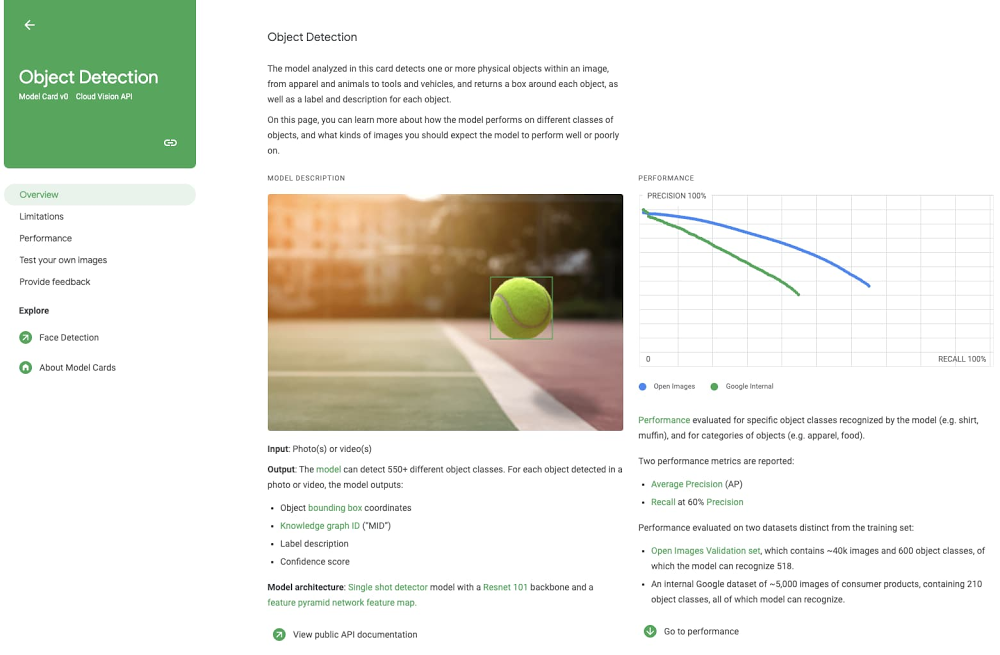
Machine learning models are now being used to accomplish many challenging tasks. With their vast potential, ML models also raise questions about their usage, construction, and limitations. Documenting the answers to these questions helps to bring clarity and shared understanding. To help advance these goals, Google has introduced model cards.Model cards aim to provide a concise, holistic picture of a machine learning model. To start, a model card explains what a model does, its intended audience, and who maintains it. A model card also provides insight into the construction of the model, including its architecture and the training data used. Not only does a model card include raw performance metrics– it puts a model’s limitations and risk mitigation opportunities into context. The Model Cards for Model Reporting research paper provides detailed coverage of model cards.An example model card for object detectionIn this blog post, I hope to show how easy it is for you to create your own model card. We will use the popular scikit-learn framework, but the concepts you learn here will apply whether you’re using TensorFlow, PyTorch, XGBoost, or any other framework.Model Card ToolkitThe Model Card Toolkit streamlines the process of creating a model card. The toolkit provides functions to populate and export a model card. The toolkit can also import model card metadata directly from TensorFlow Extended or ML Metadata, but that capability is not required. We will manually populate the model card fields in this blog post, and then export the model card to HTML for viewing.Dataset and ModelWe’ll be using the Breast Cancer Wisconsin Diagnostic Dataset. This dataset contains 569 instances with numeric measurements from digitized images. Let’s peek at a sample of the data:An extract of rows from the training dataWe’ll use a GradientBoostedClassifier from scikit-learn to build the model. The model is a binary classifier, which means that it predicts whether an instance is of one type or another. In this case, we’re predicting whether a mass is benign or malignant, based on the provided measurements.For example, you can see from the two plots below that the “mean radius” and “mean texture” features are correlated with the diagnosis (0 is malignant, 1 is benign). The model will be trained to optimize for the features, relationships between features, and weights of the features that predict best. For the purposes of this article, we won’t go into more depth on the model architecture.Plots from the dataset showing a relationship with the diagnosisCreating a NotebookAI Platform Notebooks enable data scientists to prototype, develop, and deploy models in the cloud. Let’s start by creating a notebook in the Google Cloud console. You can create a new instance that already has scikit-learn, pandas, and other popular frameworks pre-installed with the “Python 2 and 3″ instance. Once your notebook server is provisioned, select OPEN JUPYTERLAB to begin.Create a new AI Platform Notebooks instanceSince the dataset we’ll use only contains 569 rows, we can quickly train our model within the notebook instance. If you’re building a model based on a larger dataset, you can also leverage the AI Platform Training service to build your scikit-learn model, without managing any infrastructure. Also, when you’re ready to host your model, the AI Platform Prediction service can serve your scikit-learn model, providing a REST endpoint and auto-scaling if needed.Loading the Sample NotebookThe Model Card Toolkit Github repository contains samples along with the project source code. Let’s start by cloning the repository by selecting Git > Clone a Repository in the JupyterLab menu.Then, enter the repository URL (https://github.com/tensorflow/model-card-toolkit), and the contents will be downloaded into your notebook environment. Navigate through the directory structure: model-card-toolkit/model_card_toolkit/documentation/examples, and open the Scikit-Learn notebook.Load the model card toolkit sample notebookCreating a Model CardLet’s get started! In this section, we’ll highlight key steps to create a model card. You can also follow along in the sample notebook, but that’s not required.The first step is to install the Model Card Toolkit. Simply use the Python package manager to install the package in your environment: pip install model-card-toolkit.To begin creating a model card, you’ll need to initialize the model card, and then generate the model card toolkit assets. The scaffolding process creates an asset directory, along with a model card JSON file and a customizable model card UI template. If you happen to use ML Metadata Store, you can optionally initialize the toolkit with your metadata store, to automatically populate model card properties and plots. In this article, we will demonstrate how to manually populate that information.Populating the Model CardFrom this point, you can add a number or properties to the model card. The properties support nesting and a number of different data types, as you can see below, such as arrays of multiple values.The model card schema is available for your reference. It defines the structure and accepted data types for your model card. For example, here’s a snippet that describes the name property we showed above.Images need to be provided as base-64 encoded strings. The sample notebook provides some code that exports plots to PNG format, then encodes them as base-64 strings.The final step is writing the model card contents back to the scaffolded JSON file. This process will first validate the properties you populated in the model card.Generating a Model CardWe’re now ready to generate the model card. In this next code snippet, we’ll simply export the model card to HTML and display it within the notebook.The HTML file is generated into your output directory specified when you initialize the toolkit. By default, the assets are created in a temp directory. Also, you can optionally pass in a custom UI template for your model card. If you choose to do that, the default template is a great starting point.Let’s take a look at the results!A generated model card for the Breast Cancer Wisconsin DatasetNext StepsIn this post, we’ve shown how to create your own model card using scikit-learn. In fact, you can apply what you’ve learned here to any machine learning framework, and if you use TensorFlow Extended (TFX), you can even populate the model card automatically.Using the Model Card Toolkit, it’s as straightforward as populating model properties and exporting the result into an HTML template of your choice. You can use the sample notebook to see how it’s done.We’ve also discussed how you can use the Google Cloud AI Platform to manage the full lifecycle of a scikit-learn model, from developing the model, to training it, and then serving it.We hope that you’re able to use the platform to improve understanding of your own models in the future!Related ArticleIncreasing transparency with Google Cloud Explainable AIWe’re working to build AI that’s fair, responsible and trustworthy, and we’re excited to introduce the latest developments.Read Article
Quelle: Google Cloud Platform
Cloud Code makes YAML easy for hundreds of popular Kubernetes CRDs

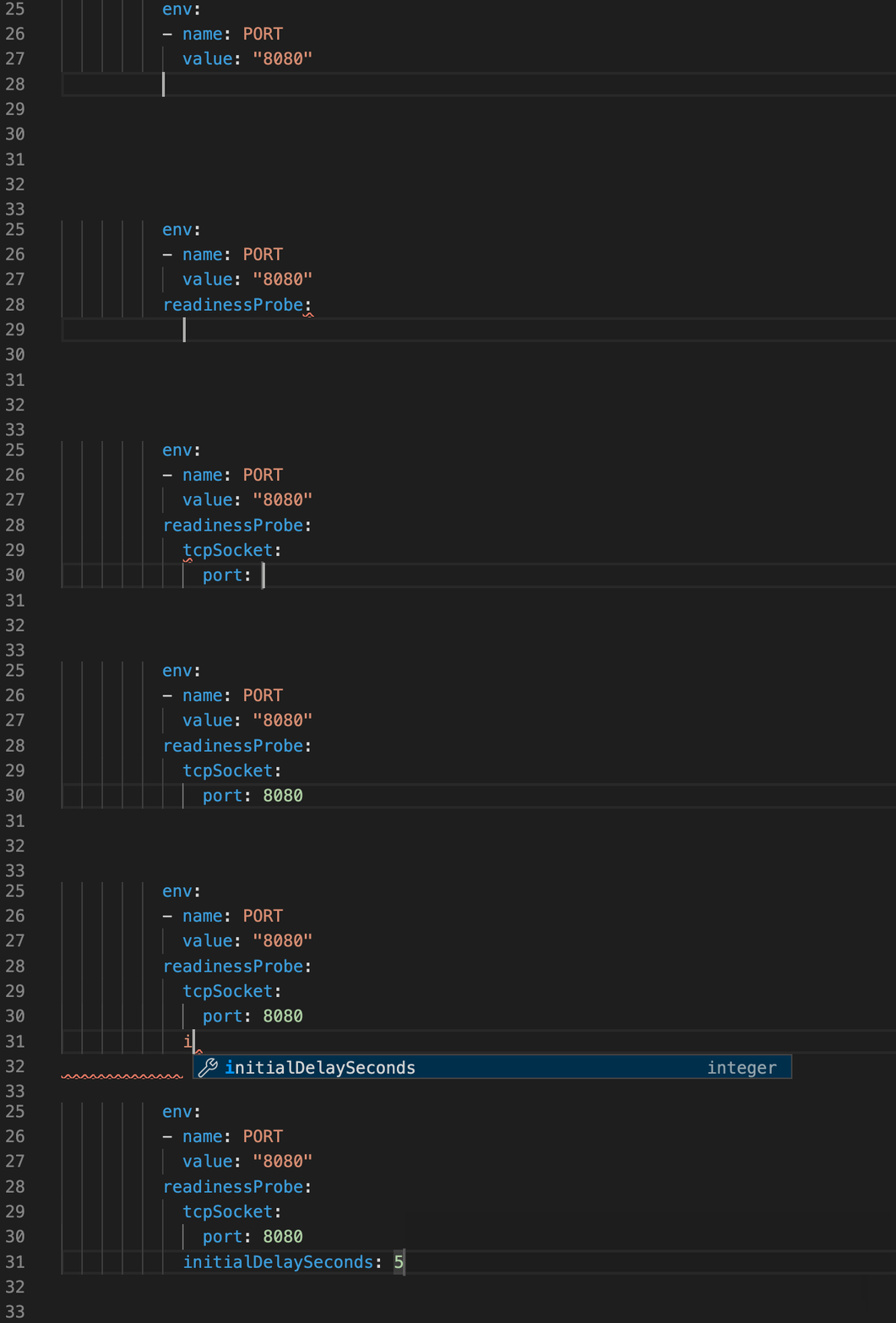
When developing a service to deploy on Kubernetes, do you sometimes feel like you’re more focused on your YAML files than on your application? When working with YAML, do you find it hard to detect errors early in the development process? We created Cloud Code to let you spend more time writing code and less time configuring your application, including authoring support features such as inline documentation, completions, and schema validation, a.k.a.  “linting.”Completions provided by Cloud Code for a Kubernetes deployment.yaml fileInline documentation provided by Cloud Code for a Kubernetes deployment.yaml fileSchema validation provided by Cloud Code for a Kubernetes deployment.yaml fileBut over the years, working with Kubernetes YAML has become increasingly complex.  As Kubernetes has grown more popular, many developers have extended the Kubernetes API with new Operators and Custom Resource Definitions (CRDs).  These new Operators and CRDs expanded the Kubernetes ecosystem with new functionality such as continuous integration and delivery, machine learning, and network security.Today, we’re excited to share authoring support for a broad set of Kubernetes CRDs, including: Over 400 popular Kubernetes CRDs out of the box—up from just a handfulAny existing CRDs in your Kubernetes clusterAny CRDs you add from your local machine or a URL Cloud Code is a set of plugins for the VS Code and JetBrains Integrated Development Environments (IDEs), and provides everything you need to write, debug, and deploy your cloud-native applications. Now, its authoring support makes it easier to write, understand, and see errors in the YAML for a wide range of Kubernetes CRDs.Cloud Code’s enhanced authoring support lets you leverage this custom Kubernetes functionality by creating a resource file that conforms to the CRD. For example, you might want to distribute your TensorFlow jobs across multiple pods in a cluster. You can do this by authoring a TFJob resource based on the TFJob CRD and applying it to the cluster where the KubeFlow operator can act on it. Expanding built-in support Cloud Code has expanded authoring support for over 400 of the most popular Kubernetes CRDs, including those used by Google Cloud and Anthos. This includes a wide variety of CRDs such as:Agones for game servers Gatekeeper for enforcing policyKubeFlow for machine learning workflowsCalico for networking and network securitycert-manager for managing and issuing TLS certificatesand many moreInline documentation, completions, and schema validation for the Agones GameServer CRD provided by Cloud Code.Works with your cluster’s CRDsWhile Cloud Code now supports a breadth of popular public, Google Cloud, and Anthos CRDs, you may have your own private CRDs installed on a cluster. When you set a cluster running Kubernetes v1.16 or above as the active context in Cloud Code’s Kubernetes Explorer, Cloud Code automatically provides authoring support from the schema of all CRDs installed on the cluster.The CronTab CRD installed on the active cluster in Cloud Code for VS Code’s Kubernetes ExplorerAuthoring support provided by Cloud Code for the CronTab CRD installed on the active clusterAdd your own CRDs Despite the breadth of existing CRDs, you may find that there isn’t one that meets your needs. The solution here is to define your own CRD. For example, if you’re running your in-house CI system on Kubernetes, you could define your CRD schemas and allow developers to easily point Cloud Code to copies of those CRD schema files, to get authoring assistance for the resources in their IDEs. To add a CRD to Cloud Code, just point Cloud Code to a local path or remote URL to a file defining the custom resource. The remote URL can be as simple as a direct link to a file in GitHub. If you want to learn more about custom resource definitions or create your own, take a look at this documentation page. Once configured, you get the same great inline documentation, completions, and linting from Cloud Code when editing that CRDs YAML files—and it’s super easy to set up in both VS Code and JetBrains IDEs.Specifying your own CRD in settings.json in VS CodePreferences > Other Settings > Cloud Code > Kubernetes in IntelliJGet started todayTo see how Cloud Code can help you simplify your Kubernetes development, we invite you to try out the expanded Kubernetes CRD authoring support. To get started, simply install Cloud Code from the VS Code or JetBrains extension marketplaces, open a CRD’s YAML file, and start editing. Once you have Cloud Code installed, you can also try Cloud Code’s fast, iterative development and debugging capabilities for your Kubernetes projects. Beyond Kubernetes, Cloud Code can also help you add Google Cloud APIs to your project or start developing a Cloud Run service with the Cloud Run Emulator.Related ArticleBest practices for building Kubernetes Operators and stateful appsRecently, the Kubernetes community has started to add support for running large stateful applications such as databases, analytics and ma…Read Article
Quelle: Google Cloud Platform
Exponential growth in DDoS attack volumes

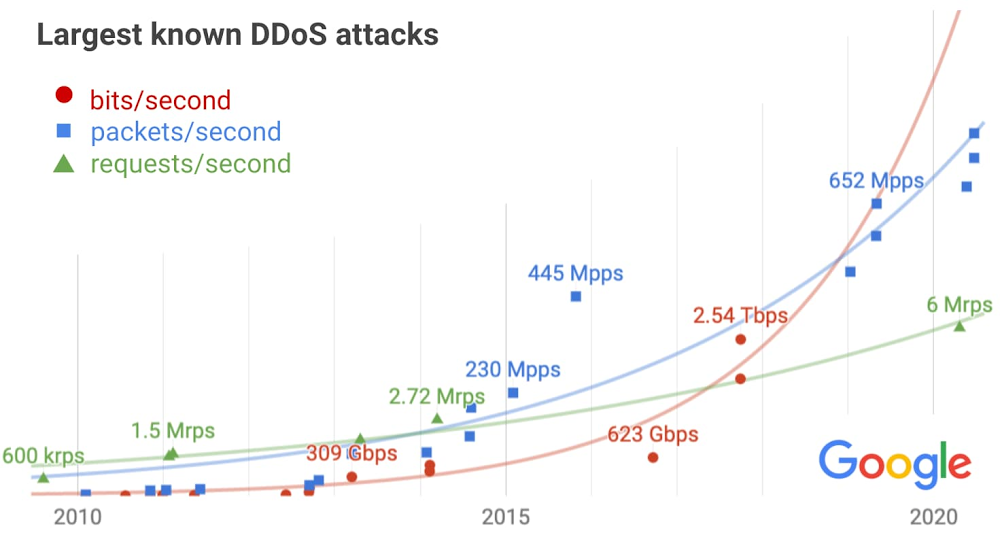
Security threats such as distributed denial-of-service (DDoS) attacks disrupt businesses of all sizes, leading to outages, and worse, loss of user trust. These threats are a big reason why at Google we put a premium on service reliability that’s built on the foundation of a rugged network. To help ensure reliability, we’ve devised some innovative ways to defend against advanced attacks. In this post, we’ll take a deep dive into DDoS threats, showing the trends we’re seeing and describing how we prepare for multi-terabit attacks, so your sites stay up and running.Taxonomy of attacker capabilitiesWith a DDoS attack, an adversary hopes to disrupt their victim’s service with a flood of useless traffic. While this attack doesn’t expose user data and doesn’t lead to a compromise, it can result in an outage and loss of user trust if not quickly mitigated.Attackers are constantly developing new techniques to disrupt systems. They give their attacks fanciful names, like Smurf, Tsunami, XMAS tree, HULK, Slowloris, cache bust, TCP amplification, javascript injection, and a dozen variants of reflected attacks. Meanwhile, the defender must consider every possible target of a DDoS attack, from the network layer (routers/switches and link capacity) to the application layer (web, DNS, and mail servers). Some attacks may not even focus on a specific target, but instead attack every IP in a network. Multiplying the dozens of attack types by the diversity of infrastructure that must be defended leads to endless possibilities.So, how can we simplify the problem to make it manageable? Rather than focus on attack methods, Google groups volumetric attacks into a handful of key metrics:bps network bits per second → attacks targeting network linkspps network packets per second → attacks targeting network equipment or DNS serversrps HTTP(S) requests per second → attacks targeting application serversThis way, we can focus our efforts on ensuring each system has sufficient capacity to withstand attacks, as measured by the relevant metrics.Trends in DDoS attack volumesOur next task is to determine the capacity needed to withstand the largest DDoS attacks for each key metric. Getting this right is a necessary step for efficiently operating a reliable network—overprovisioning wastes costly resources, while underprovisioning can result in an outage.To do this, we analyzed hundreds of significant attacks we received across the listed metrics, and included credible reports shared by others. We then plot the largest attacks seen over the past decade to identify trends. (Several years of data prior to this period informed our decision of what to use for the first data point of each metric.)The exponential growth across all metrics is apparent, often generating alarmist headlines as attack volumes grow. But we need to factor in the exponential growth of the internet itself, which provides bandwidth and compute to defenders as well. After accounting for the expected growth, the results are less concerning, though still problematic.Architecting defendable infrastructureGiven the data and observed trends, we can now extrapolate to determine the spare capacity needed to absorb the largest attacks likely to occur.bps (network bits per second)Our infrastructure absorbed a 2.5 Tbps DDoS in September 2017, the culmination of a six-month campaign that utilized multiple methods of attack. Despite simultaneously targeting thousands of our IPs, presumably in hopes of slipping past automated defenses, the attack had no impact. The attacker used several networks to spoof 167 Mpps (millions of packets per second) to 180,000 exposed CLDAP, DNS, and SMTP servers, which would then send large responses to us. This demonstrates the volumes a well-resourced attacker can achieve: This was four times larger than the record-breaking 623 Gbps attack from the Mirai botnet a year earlier. It remains the highest-bandwidth attack reported to date, leading to reduced confidence in the extrapolation.pps (network packets per second) We’ve observed a consistent growth trend, with a 690 Mpps attack generated by an IoT botnet this year. A notable outlier was a 2015 attack on a customer VM, in which an IoT botnet ramped up to 445 Mpps in 40 seconds—a volume so large we initially thought it was a monitoring glitch!rps (HTTP(S) requests per second)In March 2014, malicious javascript injected into thousands of websites via a network man-in-the-middle attack caused hundreds of thousands of browsers to flood YouTube with requests, peaking at 2.7 Mrps (millions of requests per second). That was the largest attack known to us until recently, when a Google Cloud customer was attacked with 6 Mrps. The slow growth is unlike the other metrics, suggesting we may be under-estimating the volume of future attacks.While we can estimate the expected size of future attacks, we need to be prepared for the unexpected, and thus we over-provision our defenses accordingly. Additionally, we design our systems to degrade gracefully in the event of overload, and write playbooks to guide a manual response if needed. For example, our layered defense strategy allows us to block high-rps and high-pps attacks in the network layer before they reach the application servers. Graceful degradation applies at the network layer, too: Extensive peering and network ACLs designed to throttle attack traffic will mitigate potential collateral damage in the unlikely event links become saturated.For more detail on the layered approach we use to mitigate record-breaking DDoS attacks targeting our services, infrastructure, or customers, see Chapter 10 of our book, Building Secure and Reliable Systems.Cloud-based defensesWe recognize the scale of potential DDoS attacks can be daunting. Fortunately, by deploying Google Cloud Armor integrated into our Cloud Load Balancingservice—which can scale to absorb massive DDoS attacks—you can protect services deployed in Google Cloud, other clouds, or on-premise from attacks. We recently announced Cloud Armor Managed Protection, which enables users to further simplify their deployments, manage costs, and reduce overall DDoS and application security risk.Having sufficient capacity to absorb the largest attacks is just one part of a comprehensive DDoS mitigation strategy. In addition to providing scalability, our load balancer terminates network connections on our global edge, only sending well-formed requests on to backend infrastructure. As a result it can automatically filter many types of volumetric attacks. For example, UDP amplification attacks, synfloods, and some application-layer attacks will be silently dropped. The next line of defense is the Cloud Armor WAF, which provides built-in rules for common attacks, plus the ability to deploy custom rules to drop abusive application layer requests using a broad set of HTTP semantics.Working together for collective securityGoogle works with others in the internet community to identify and dismantle infrastructure used to conduct attacks. As a specific example, even though the 2.5 Tbps attack in 2017 didn’t cause any impact, we reported thousands of vulnerable servers to their network providers, and also worked with network providers to trace the source of the spoofed packets so they could be filtered.We encourage everyone to join us in this effort. Individual users should ensure their computers and IoT devices are patched and secured. Businesses should report criminal activity, ask their network providers to trace the sources of spoofed attack traffic, and share information on attacks with the internet community in a way that doesn’t provide timely feedback to the adversary. By working together, we can reduce the impact of DDoS attacks.
Quelle: Google Cloud Platform

Prevent planned downtime during the holiday shopping season with Cloud SQL

Routine database maintenance is a way of life. Updates keep your business running smoothly and securely. And with a managed service, like Cloud SQL, your databases automatically receive the latest patches and updates, with significantly less downtime. But we get it: Nobody likes downtime, no matter how brief. That’s why we’re pleased to announce that Cloud SQL, our fully managed database service for MySQL, PostgreSQL, and SQL Server, now gives you more control over when your instances undergo routine maintenance.Cloud SQL is introducing maintenance deny period controls. With maintenance deny periods, you can prevent automatic maintenance from occurring during a 90-day time period. This can be especially useful for the Cloud SQL retail customers about to kick off their busiest time of year, with Black Friday and Cyber Monday just around the corner. This holiday shopping season is a time of peak load that requires heightened focus on infrastructure stability, and any upgrades can put that at risk.By setting a maintenance deny period from mid-October to mid-January, these businesses can prevent planned upgrades from Cloud SQL during this critical time.Understanding Cloud SQL maintenanceBefore describing these new controls, let’s answer a few questions we often hear about the automatic maintenance that Cloud SQL performs.What is automatic maintenance?To keep your databases stable and secure, Cloud SQL automatically patches and updates your database instance (MySQL, Postgres, and SQL Server), including the underlying operating system. To perform maintenance, Cloud SQL must temporarily take your instances offline.What is a maintenance window?Maintenance windows allow you to control when maintenance occurs. Cloud SQL offers maintenance windows to minimize the impact of planned maintenance downtime to your applications and your business. Defining the maintenance window lets you set the hour and day when an update occurs, such as only when database activity is low (for example, on Saturday at midnight). Additionally, you can control the order of updates for your instance relative to other instances in the same project (“Earlier” or “Later”). Earlier timing is useful for test instances, allowing you to see the effects of an update before it reaches your production instances. What are the new maintenance deny period controls?You can now set a single deny period, configurable from 1 to 90 days, each year. During the deny period, Cloud SQL will not perform maintenance that causes downtime on your database instance.Deny periods can be set to reduce the likelihood of downtime during the busy holiday season, your next product launch, end of quarter financial reporting, or any other important time for your business.Paired with Cloud SQL’s existing maintenance notification and rescheduling functionality, deny periods give you even more flexibility and control. After receiving a notification of upcoming maintenance, you can reschedule ad hoc, or if you want to prevent maintenance longer, set a deny period. Getting started with Cloud SQL’s new maintenance controlReview our documentation to learn more about maintenance deny periods and, when you’re ready, start configuring them for your database instances. What’s next for Cloud SQLSupport for additional maintenance controls continues to be a top request from users. These new deny periods are an addition to the list of existing maintenance controls for Cloud SQL. Have more ideas? Let us know what other features and capabilities you need with our Issue Tracker and by joining the Cloud SQL discussion group. We’re glad you’re along for the ride, and we look forward to your feedback!
Quelle: Google Cloud Platform

New Dataproc optional components support Apache Flink and Docker

Google Cloud’s Dataproc lets you run native Apache Spark and Hadoop clusters on Google Cloud in a simpler, more cost-effective way. In this blog, we will talk about our newest optional components available in Dataproc’s Component Exchange: Docker and Apache Flink.Docker container on DataprocDocker is a widely used container technology. Since it’s now a Dataproc optional component, Docker daemons can now be installed on every node of the Dataproc cluster. This will give you the ability to install containerized applications and interact with Hadoop clusters easily on the cluster. In addition, Docker is also critical to supporting these features:Running containers with YARNPortable Apache Beam jobRunning containers on YARN allows you to manage dependencies of your YARN application separately, and also allows you to create containerized services on YARN. Get more details here. Portable Apache Beam packages jobs into Docker containers and submits them the Flink cluster. Find more detail about Beam portability. Docker optional component is also configured to use Google Container Registry, in addition to the default Docker registry. This lets you use container images managed by your organization.Here is how to create a Dataproc cluster with the Docker optional component:gcloud beta dataproc clusters create <cluster-name>   –optional-components=DOCKER   –image-version=1.5When you run the Docker application, the log will be streamed to Cloud Logging, using gcplogs driver.If your application does not depend on any Hadoop services, check out Kubernetes and Google Kubernetes Engine to run containers natively. For more on using Dataproc, check out our documentation.Apache Flink on DataprocAmong streaming analytics technologies, Apache Beam and Apache Flink stand out. Apache Flink is a distributed processing engine using stateful computation. Apache Beam is a unified model for defining batch and steaming processing pipelines. Using Apache Flink as an execution engine, you can also run Apache Beam jobs on Dataproc, in addition to Google’s Cloud Dataflow service.Flink and running Beam on Flink are suitable for large-scale, continuous jobs, and provide:A streaming-first runtime that supports both batch processing and data streaming programsA runtime that supports very high throughput and low event latency at the same timeFault-tolerance with exactly-once processing guaranteesNatural back-pressure in streaming programsCustom memory management for efficient and robust switching between in-memory and out-of-core data processing algorithmsIntegration with YARN and other components of the Apache Hadoop ecosystemOur Dataproc team here at Google Cloud recently announced that Flink Operator on Kubernetes is now available. It allows you to run Apache Flink jobs in Kubernetes, bringing the benefits of reducing platform dependency and producing better hardware efficiency. Basic Flink ConceptsA Flink cluster consists of a Flink JobManager and a set of Flink TaskManagers. Like similar roles in other distributed systems such as YARN, JobManager has responsibilities such as accepting jobs, managing resources and supervising jobs. TaskManagers are responsible for running the actual tasks. When running Flink on Dataproc, we use YARN as resource manager for Flink. You can run Flink jobs in 2 ways: job cluster and session cluster. For the job cluster, YARN will create JobManager and TaskManagers for the job and will destroy the cluster once the job is finished. For session clusters, YARN will create JobManager and a few TaskManagers.The cluster can serve multiple jobs until being shut down by the user.How to create a cluster with FlinkUse this command to get started:gcloud beta dataproc clusters create <cluster-name>   –optional-components=FLINK   –image-version=1.5How to run a Flink jobAfter a Dataproc cluster with Flink starts, you can submit your Flink jobs to YARN directly using the Flink job cluster. After accepting the job, Flink will start a JobManager and slots for this job in YARN. The Flink job will be run in the YARN cluster until finished. The JobManager created will then be shut down. Job logs will be available in regular YARN logs. Try this command to run a word-counting example:The Dataproc cluster will not start a Flink Session cluster by default. Instead, Dataproc will create the script “/usr/bin/flink-yarn-daemon,” which will start a Flink session. If you want to start a Flink session when Dataproc is created, use the metadata key to allow it:If you want to start the Flink session after Dataproc is created, you can run the following command on master node:Submit jobs to that session cluster. You’ll need to get the Flink JobManager URL:How to run a Java Beam jobIt is very easy to run an Apache Beam job written in Java. There is no extra configuration needed. As long as you package your Beam jobs into a JAR file, you do not need to configure anything to run Beam on Flink. This is the command you can use:How to run a Python Beam job written in PythonBeam jobs written in Python use a different execution model. To run them in Flink on Dataproc, you will also need to enable the Docker optional component. Here’s how to create a cluster:You will also need to install necessary Python libraries needed by Beam, such as apache_beam and apache_beam[gcp]. You can pass in a Flink master URL to let it run in a session cluster. If you leave the URL out, you need to use the job cluster mode to run this job:After you’ve written your Python job, simply run it to submit:Learn more about Dataproc.
Quelle: Google Cloud Platform




