These inspiring small and medium businesses are helping the world navigate COVID-19 together

No matter where you are in the world, we’ve all had to adapt our routines to navigate the “new normal” brought on by COVID-19. We’ve been inspired by the ways businesses and organizations have responded, from accelerating medical research using the latest AI technology to enabling remote healthcare to protect doctors and their patients. As Google Cloud small and medium business (SMB) customers keep innovating to support governments and organizations around the world, we share some of their stories to inspire you in the fight against this virus:Giving millions the information they urgently needCOVID-19 triggered an overwhelming need for information, flooding healthcare support centers with calls. At the same time, social distancing measures disrupted legacy customer support systems and forced call center staff to find new, safer ways to provide continuous support to those in need. Solutions were needed to keep the public informed, and Landbot.io and Clustaar promptly partnered with entrepreneurs, businesses, and governmental organizations to help.Spanish startup Landbot helps people find what they need, quickly and easily, when browsing a website. A no-code solution, Landbot is easy to implement on both the web and popular messaging platforms, gives users an interactive, adaptive messaging thread that uses conversational prompts to understand and deliver the information they need. Since the start of the pandemic, organizations all over the world—from online pharmacies in Ireland to hospitals in the US to official COVID-19 communication channels in Syria—have used Landbot at cost price or for free to supply the public with urgent information. So far, Landbot has automated 280 million messages to respond to urgent requests from more than 20 million unique users. To make this possible, Google Cloud for Startups supports Landbot.io with free credits to grow and continue developing more resources using the same tools and infrastructure used to build Google.At the same time, in France, Clustaar is reducing the pressure on customer support lines using front-line chatbots, designed to handle the high volumes of medical and political queries on local government and media websites. With support from the Google Cloud for Startups program, Clustaar has scaled its architecture to handle more than 8 million queries from more than 1.5 million people.Making remote healthcare and medical research possibleFor our most vulnerable, who need to monitor their health more often due to COVID-19 risks, lockdown has posed a new challenge: regular visits to the doctor were no longer recommended. When diabetes patients were advised to self-isolate to avoid exposure to the virus, SocialDiabetes made it possible for them to continue being monitored 24/7 from home. The app, which is free to download, monitors and diagnoses diabetes in real time by integrating with glucometers to automatically collect blood glucose data from patients. With their permission, the app can also send this information to doctors so they can continue to provide recommendations and support their patients remotely. SocialDiabetes includes a video conference and chat system to make it easier for doctors and patients to connect remotely. With support from Google Cloud for Startups, SocialDiabetes has made this important platform free to use for HCPs during COVID19 pandemy.Another point of concern for the medical community is that innovation across biomedicine and other disease areas aside from COVID-19 risked falling behind due to the closure of research labs, delayed clinical trials, and reallocated scientific funding. To help, UK-based AI startup Biorelate has opened up free access to its lead product, Galactic AI, a browser-ready deep search tool that helps researchers to make better use of existing biomedical research data from their desks. Google Kubernetes Engine helps to scale the solution, which auto-ingests more than 30 million biomedical research texts from a wide range of sources to reveal hidden insights by curating and connecting data from global scientific output, quickly. The company is now rolling out a long-term plan to register more researchers focused on drug discovery and to keep Galactic AI open for academic researchers for as long as possible.Keeping the public informed on the factsMeanwhile, being exposed to an overload of information about COVID-19 brings its own kinds of challenges to the general public. Between January and April 2020, 100 million social media posts and more than 25 million long-form documents, such as news articles and blog posts, were published about COVID-19. Amongst them were not only important recommendations published by health experts, but also conspiracy theories and misinformation with potential to put lives at risk. This surge in media and public interest presented Logically, an AI-powered platform fighting online misinformation, with a workload 10 times greater than it processes in a typical month. Faced with the challenge of exponential demand, Google Cloud connected Logically with Searce, a Global Google Cloud Premier Partner, to quickly scale-up using Google Kubernetes Engine (GKE). Searce helped implement a combination of preemptible and on-demand node pools on Google Cloud to scale cost-effectively. In the new architecture, Logically can offer a high degree of availability to users and public sector partners looking to fact-check online information about COVID-19. To help tackle the spread of false information about the pandemic and improve the information landscape for more than a billion people around the world, the platform has identified half a million false posts and articles, and alerted partners to 13 million instances of bot involvement on social media.Responding to the pandemic without coding Faces Advendurance is a South African company that organizes adventure and endurance sporting events. Being able to participate in such events represents a normalcy that many have sought throughout the pandemic, and as the virus spread, the company focused on making participation safe. They turned to AppSheet, Google Cloud’s no-code application development platform, in order to quickly build new registration and logistics processes. Hennie Scheepers, Information Systems Manager at Faces Advendurance, does not consider himself a programmer. But with AppSheet, he quickly built an app that imports data into Google Sheets from race participants who have pre-registered online through their entry platform, and that volunteers can use on mobile phones to manage participants as they arrive at the event—all things that made it that much easier to comply with COVID regulations limiting the number of people at events or in race batches. Faces Advendurance uses an RFID (Radio-Frequency Identification) timing system in which race participants get a tag with a tracking code that is automatically scanned by RFID readers as participants cross the finish line. Participants’ results automatically update in Sheets, which makes results available in the app in real time for race organizers. “It could hardly have gone better!” Scheepers said of a September 2020 event. “We received so many compliments from participants about the new registration system.”The AppSheet team has been active in pandemic response in other ways, including partnering with USMEDIC, a provider of comprehensive equipment maintenance solutions in the healthcare industry, and other companies to build and deploy a medical equipment tracking and management solution to support healthcare organizations in their COVID-19 response.Working collaboratively to stop the spread of the virusUnder the coordination of the Comité Stratégique de Filière Mode & Luxe, French textile industries gathered to tackle a shortage of masks and surgical gowns by converting their production lines, even while maintaining revenue streams and employment in face of an emergent economic downturn. Supporting them is Savoir Faire Ensemble, a web platform where professionals able to produce masks and surgical gowns could register for free, and those in need of these products could easily order them directly from suppliers during the peak of the pandemic. Nearly 1,500 firms joined Savoir Faire Ensemble, and more than 1,500 Google Accounts were set up for free to support their work during the pandemic. Using Google Workspace collaboration and communication tools, the consortium coordinates the work of suppliers and answers questions from buyers and from potential new members. Sheets is consulted by hundreds of members everyday, who use it to view and keep track of all orders coming in from the consortium’s website. The Savoir Faire Ensemble is now the biggest textile and clothing consortium in France, and it has produced 90 million masks and 12 million surgical coats since the start of the pandemic.In Italy, COVID-19 also highlighted the need for new protocols, procedures, and tools to enable specialists across the country to collaborate in real time. To help emergency care units achieve this goal, a national project was set in motion by SIAARTI, the Italian Society for Anesthesia, Analgesia, Resuscitation, and Intensive Care, which develops guidelines and clinical protocols in these fields. With support from Biotest Italia, the Society was able to establish a multifunctional communication platform capable of grouping hospitals in the same area, regionally or nationally, to share COVID-19 knowledge, starting with adoptable therapeutic protocols. Using Google Currents to exchange information, Google Forms to collect data analyzed with Google Data Studio, and Google Meet to provide training and host meetings, SIAARTI created a repository for COVID-19 guidelines and articles and enabled the safe sharing of protocols and other sensitive data amongst Italian health practitioners.Supporting the scientific community in the search for a cureCOVID-19 may have brought the world to a virtual halt, but the scientific community is in a race against time to publish scientific results related to the virus and unlock as much knowledge as possible to treat those in need. Supporting these efforts is a biomedical research discovery tool launched by UK-based company Causaly. It unlocks key evidence in research papers, faster, by applying machine learning to global scientific literature, supporting speedy new predictions in biomedical science. Causaly’s AI platform enables rapid identification of all previously reported drugs for the betacoronavirus genus, and uncovers relationships that wouldn’t be obvious in a traditional literature review search. Using Google Compute Engine to run its natural language processing pipeline and host the graph database containing all the analysis results, the platform uses artificial intelligence to rapidly read, interpret, and surface evidence from 30 million biomedical publications in seconds, enabling researchers to not only rapidly map epidemiology data, biomarkers, genes, and molecular targets, but also identify potential treatment options. As of April 2020, Causaly’s AI platform analyzed 40,000 COVID-19 papers made public as part of CORD-19, the COVID-19 Open Research Dataset, and 30 million existing biomedical publications. From this, it has identified 250 compounds with the highest promise for further COVID-19 research treatments, and made the information available for immediate download to aid researchers. Causaly’s dataset has also been provided to the Global Health Drug Discovery Institute (GHDDI) to support COVID-19 research in the future. Meanwhile, here at Google Cloud, we continue working to ensure that these inspiring companies and many others have the tools they need to bring their innovative solutions to the world. We are humbled and inspired to join forces with our customers and to support their efforts throughout COVID-19 and beyond.Related ArticleThe Google Cloud Healthcare Consent Management API: protecting emerging data in digital care and researchGoogle Cloud’s Healthcare Consent Management API helps healthcare app developers and researchers manage individuals’ consent of their hea…Read Article
Quelle: Google Cloud Platform
New Cloud Shell Editor: Get your first cloud-native app running in minutes

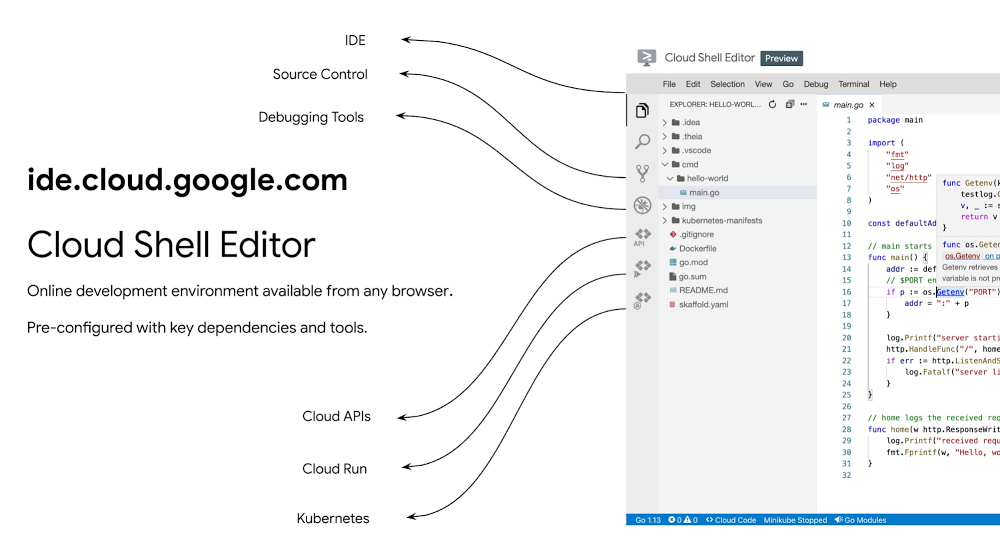
As enterprises move their applications and services to the cloud, developers frequently find themselves evaluating and experimenting with new technologies to identify the best solution to solve their day-to-day problems. This evaluation process could include tasks such as: identifying which platform to host or migrate an application to, or learning how to use an API to implement a new feature.However, we know from talking with you that you frequently spend more time than expected in this initial evaluation phase, doing things such as:Getting your development environment set upFinding the the right libraries and dependencies Switching back and forth between documentation, your Integrated Development Environment (IDE), terminal, and the Google Cloud Console In addition, making these kinds of configuration changes to your daily development environment could impact your core work—something you probably want to avoid.  Cloud Shell provides you with command-line access to your cloud resources directly from your browser. And today we’re excited to introduce a new version of our Cloud Shell Editor, immediately available in preview on ide.cloud.google.com and powered by the Eclipse Theia IDE platform. This new version extends Cloud Shell with an online development environment that includes:Cloud-native development via Cloud Code plugin supportRich language support for Go, Java, .Net, Python and NodeJS Additional features such as integrated source control and support for multiple projectsUnder the covers the Cloud Shell Editor development VM comes pre-configured with all the tools you need to get going with cloud-native development on Google Cloud, including:Local emulators for Kubernetes and serverless, andCommand line tools for working with cloud-native appsCloud Shell Editor is a fully functional development tool that requires no local setup, and is available directly from the browser. Let’s take a deeper look at how Cloud Shell Editor integrates with the rest of the Google Cloud developer ecosystem.Samples with interactive tutorialsWe’ve extended our online interactive tutorial platform to include the Cloud Shell Editor features, making initial experiences with a new platform a breeze. You can try it out now with our quickstarts:Google Kubernetes EngineCreate and deploy a containerized web app with Cloud Shell EditorCloud RunCreate and deploy a Cloud Run serverless service with Cloud Shell EditorCloud Code integration for cloud-native developmentCloud Code is a set of IDE plug-ins originally available for IntelliJ and VS Code that helps developers stay productive when developing cloud-native applications, and we’ve now extended it to support the Cloud Shell Editor. Cloud Code offers capabilities such as: an integrated Kubernetes and Cloud Run development and debugging environment; container tools such as minikube, Skaffold, Buildpacks and Jib integrated under the hood to provide local emulators and continuous feedback for faster local development; and an integrated API explorer to make it easy to incorporate Google APIs into your application.Rich language supportIn addition, to support day-to-day development tasks, Cloud Shell Editor now includes advanced language support for Go, Java, .Net, Python and Node.js out of the box, providing powerful editing features such as syntax highlighting, code suggestions, linting, code navigation, refactoring, testing and intuitive debugging support.Version control and support for multiple projectsLast but not least, to simplify team collaboration and work across multiple projects, we’re introducing integrated source control via Git and support for IDE workspaces, leveraging existing Theia development features. For example, you can perform typical source control tasks directly from Cloud Shell Editor such as exploring code samples, cloning a repository or pushing your changes back to a repository. You can also easily create or switch between projects via workspaces, which defines IDE and debugging environment configuration directly in the source.Get started todayWith Cloud Shell Editor, we want to make it easy for you to explore new cloud technologies, prototype applications or do short-term development tasks directly from your browser. We invite you to try the Cloud Shell Editor via our GKE and Cloud Run quickstart, or access it directly from ide.cloud.google.com.
Quelle: Google Cloud Platform

Trigger Cloud Run with events from more than 60 Google Cloud sources

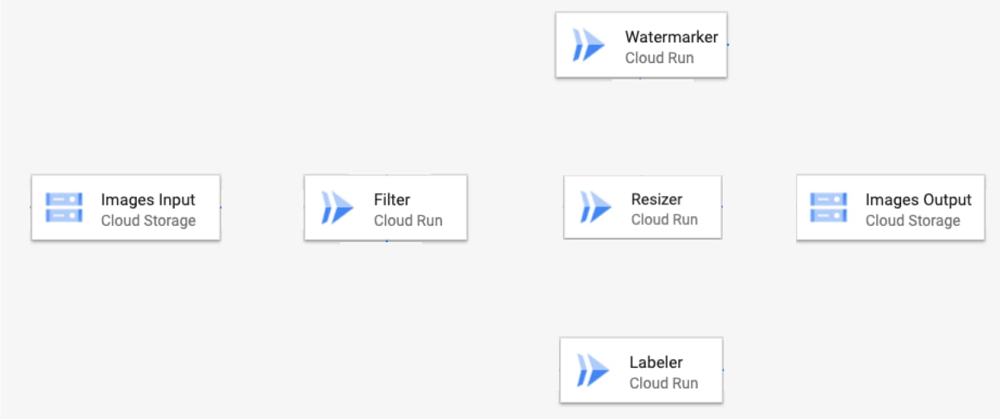
Cloud Run (fully-managed) lets you create microservice-based applications that are scalable and extensible. But setting up event-based communication between decoupled microservices can be hard to implement, customize and maintain.Today, we’re announcing Eventarc, new events functionality that allows you to trigger Cloud Run from more than 60 Google Cloud sources. Now in Preview, Eventarc helps you easily build event-driven applications and takes care of event ingestion, delivery, security, authorization, observability, and error handling.With Eventarc, you can address key use cases such as video analysis, file conversion, new user signup, application monitoring, and hundreds of others by acting on events that originate from Cloud Storage, BigQuery, Firestore and more than 60 other Google Cloud sources. Eventarc lets you:Receive events from 60+ Google Cloud sources (via Cloud Audit logs).Receive events from custom sources by publishing to Pub/Sub – Your code can send events to signal between microservices Adhere to the CloudEvents standard for all your events, regardless of source, to ensure a consistent developer experienceEnjoy on-demand scalability and no minimum feesThe service is available in five Google Cloud locations, with more coming soon. It is accessible from its own API and CLI and also within Cloud Run’s UI.Key use casesEventarc enables any number of use cases for applications running on Cloud Run, among them:Use a Cloud Storage event (via Cloud Audit Logs) to trigger a data processing pipeline Use a BigQuery event (via Cloud Audit Logs) to initiate downstream processing in Cloud Run each time a job is completedUse an event from custom sources (publishing to Cloud Pub/Sub) to signal between microservices, leveraging the same standardized infrastructure for any asynchronous coordination of services.Eventarc in actionCloud Run allows you to run workloads on a serverless platform. Used alongside Cloud Run, Eventarc offers standardized infrastructure to manage the flow of events, letting you focus on what you do best: building great applications.Let’s see Eventarc in action. Our demo app (details on github) builds an image processing pipeline to connect Cloud Storage (via Cloud Audit Logs) events to various services. When you save images to the input bucket, the pipeline filters unsafe images, extracts labels from the images, resizes them and finally adds a watermark to them. In the end, there’s a resized, watermarked and labelled image in the output bucket.But because the services in the pipeline don’t communicate directly with one another, we use events to ‘wire up’ coordination between them.See the full list of actions and the order in which to take them on github. Here we’ll highlight a few key steps that pertain to eventsHighlight 1: Creating a trigger for the Filter service to receive events from Cloud Storage (via Cloud Audit Logs)Highlight 2: Handling the event in the Filter service’s codeIn our example, we need the details provided in the event. These are delivered via the HTTP header and body of the request and can easily be “unmarshalled” (i.e., unpacked) using the CloudEvents SDK along with the Google Events library. We will use C# in this example.Read the event using CloudEvents SDK:Highlight 3: Signaling the Resizer service by writing to Cloud Pub/SubFilter service signals to the Resizer service by writing to the Pub/Sub topic managed by Resizer’s trigger:There you have it—a complete image processing pipeline that connects a Cloud Storage bucket to various services using events, wired together using standard Google Cloud tools! What’s next?Together, Eventarc and Cloud Run make it easy to build a standardized event-based architecture without having to manage the underlying infrastructure.But we’re just getting started—stay tuned as we work to make Eventarc a full-featured events offering for Google Cloud. To learn more about Events with Cloud Run, check out this talk from Next 2020. And to get started, follow the quickstart guide.Related ArticleCloud Run for Anthos brings eventing to your Kubernetes microservicesNew eventing capabilities in Cloud Run for Anthos make it easy to build event-driven applications on top of your GKE environment.Read Article
Quelle: Google Cloud Platform

Boo! Fight off your scariest cloud monsters with Active Assist

Look, when you’re running your applications in the cloud there’s a lot you have to keep top of mind: performance, security, agility, cost, and more. One thing you shouldn’t have to worry about? Monsters. That’s right, monsters. And yet, many of you do have monsters running amok in your cloud—just not the kind you see in scary movies. With Halloween just around the corner, let’s talk about how these monsters can show up in your cloud and how you can fight them off! Compute zombies… brains, brains, BRAINS! If TV and movies have taught us one thing, it’s that zombies crave brains. Gross, we know. And in the cloud it’s actually still true, in that your compute resources are your “brains in the cloud,” and the zombies are coming for them! The most common manifestation of these ‘compute zombies’ are virtual machine instances that are either over-provisioned or sitting idle. They come to life (sort of) when well-intentioned developers set up a new project with cloud resources but forget to decommission them before moving on to their next project. As a result, these compute zombies hide in your cloud and eat up your budget without you even knowing about it. Thankfully for all of us, there is an easy way to thwart the compute zombie horde. With VM Rightsizing and Idle VM Recommendations, provided by Active Assist, you get instant insight into what VMs you can resize or turn off. With just a few clicks you could be on your way to saving hundreds or even thousands of dollars per month. Sometimes zombies evolve, too, so in case your compute zombies mutate into storage zombies or IP zombies, Active Assist also has recommendations for idle persistent disks (PDs) and will soon have recommendations for idle IP addresses. Complete zombie protection!Hungry vampires… sucking away at your company’s lifeblood! What’s one of the most top-of mind-topics for CIOs and CTOs today? Security. Making sure that your customer data, internal data, and intellectual property are safe and secure is a huge priority. And yet it seems every month or so there’s a new report of a huge company being hacked or breached. Unfortunately for these companies, a vampire found their way in and started to drain them of their most valuable digital assets! As we (once again) know from TV and movies, the most effective way to ward off vampires is sunlight. And, believe it or not, this metaphor applies to the cloud, too: you need to proactively “shine a light” on any potential security holes. You can do this with IAM Recommendations, also part of Active Assist, which uses ML and modeling to give you explicit guidance on over-provisioned user and service accounts. With just a few clicks you can take action on these recommendations and proactively plug the holes that vampires might have otherwise used in the cover of darkness!Budget werewolves… shape shifting your money into zeros!What’s the most terrifying thing about a werewolf? You could be standing next to one right now and not even know it… unless a full moon appears! Believe it or not, there are potential werewolves frolicking around your cloud, too, ready to consume your cloud budget. You see, Google Cloud offers substantive committed use discounts (CUDs) but you need to set them up first and operate your cloud accordingly. If you don’t do that, then your normal looking cloud resources might transform overnight into a budget thirsty werewolf, consuming your hard earned budget faster and less efficiently than if you maximized your committed use discount options! But have no fear, friends, we have an answer to keep the werewolves at bay, too. Within Active Assist, we offer committed use discount recommendations, a way for you to easily maximize all of the discounts available to you without requiring heavy manual analysis or interpretation. The recommendations are simple and clear, and let you make sure you make the best use of your cloud budget!Zombies, vampires, and werewolves — oh my! It’s been a scary blog post to say the least. Despite all the monster metaphors, we hope that this blog actually does the opposite of scare you. Because with Active Assist’s portfolio of intelligence tools and recommendations, it’s super easy to keep all the (figurative) cloud monsters at bay! Give it a try by checking out your Recommendations Hub, available to all Google Cloud users. Or if you’d just like to learn more, visit our Active Assist or Recommender web pages.Related ArticleIntroducing Active Assist: Reduce complexity, maximize your cloud ROIIntroducing Active Assist, a family of tools to help you easily optimize your Google Cloud environment.Read Article
Quelle: Google Cloud Platform

BHI: Embracing Google Workspace and AppSheet to transform the workplace

In the last two decades, BHI, once a small construction company in Vernal, Utah, has expanded its operations to dozens of industries in over 25 states. But while the company grew, its technology trailed behind. File sharing and emails both ran off a single server. Editing a document was a grueling undertaking that required an employee to VPN in, patiently download the file, edit it, then upload it again—all from a job site with limited internet connection. Acknowledging the need for better technology, BHI adopted Google Workspace and AppSheet and transformed its business to be more innovative, productive, and profitable.Rebuilding collaboration and productivityBHI first looked to replace its archaic email and file-sharing systems. They found that Google Workspace—as a proven and popular collaboration solution for remote teams and a familiar, preferred platform that most employees use in their personal lives—was the clear choice. BHI migrated its 500 employees to Google Workspace in less than a week. Productivity immediately soared, since employees could collaborate more easily with Google Workspace’s products and access them from any device, from anywhere—even at the construction sites.For instance, the contract writing process drastically improved with Google Workspace. Version control had always been a struggle—as employees circulated a draft contract from one computer to the next, versions became unruly and randomized, untracked changes popped up, and files went missing. With Google Workspace, the pre-construction, legal, and finance teams can all edit and track changes of a contract from wherever they work. Version control has become a thing of the past, as everyone is always working on the latest version.By adopting Google Workspace, BHI decentralized its operations and began collaborating in real time across over 150 job sites. Management and IT gained new insights into challenges that they may never have uncovered nor confronted without a cloud-based productivity tool. The IT team also saw an opportunity to overhaul the methods of their deskless workforce, which accounts for 90% of the company. This deskless majority needed to connect directly to the data that influenced, impacted, and comprised their work. They also required more streamlined processes. AppSheet provided the answer to the workforce’s needs, enabling IT to create applications that simplified key tasks so mobile workers could get their jobs done faster and better.For example, one BHI client required extensive inspections multiple times a day. Before using AppSheet, a BHI inspector would perform the inspection, return to a computer, record the results from paper to a spreadsheet, copy and paste them into a formatted report in a Google Docs, convert the Doc to a PDF, and email the final inspection report to the customer. This manual process took two hours to complete. Now, using AppSheet, the inspector inputs the results on their mobile device while performing the inspection. As soon as the device connects to the internet, it automatically updates the database with the inspector’s inputs, adds the inspection results to a preformatted report built in Google Docs, and emails the final report as a PDF to the customer. With AppSheet, BHI shortened this inspection process from two hours to six minutes, saving over $50,000 a month in labor.With Google Workspace and AppSheet, BHI has turned into a digital company with real-time data allowing for real-time decisions, collaboration, and transparency in a decentralized environment. Johnny Hacking, Director of ITAn easier software choice for faster resultsBHI also found that building apps with AppSheet is much easier than using other solutions, such as developing with low- or full-code tools or purchasing third-party products. Because AppSheet is a true no-code platform, anyone can learn to build and maintain apps. Since adopting AppSheet, the BHI IT team has become so proficient with the platform that they have eliminated the company’s previous backlog of software needs. Now, when a new site opens up, IT proactively works with the site managers to understand its unique requirements in order to build a custom app. Start to finish, scoping and building this site-specific app typically takes less than a week—compared to months with traditional development platforms. IT team members aren’t the only BHI employees building apps. As Johnny Hacking, BHI’s Director of IT explains, “We have people that aren’t in IT, and when they have an idea we say hey, log into AppSheet, build it out, and then we’ll help out with some final touches on it.” Empowering employees outside of IT to build AppSheet apps has benefited teams across the company. For example, one team on a solar farm construction project needed to perform inspections of an array of specialized technical equipment with which IT was not familiar. In this case, the solar team, being the subject matter experts, simply built the app according to their specifications. All IT had to do was jump in at the end to help finalize the app—the final product was completely customized to the solar team’s very specific needs. This highlights the benefits of no-code development: on-the-ground experts build and prototype job-specific apps and IT puts the finishing touches on the functionality, all while keeping guardrails in place.Using Google Workspace and AppSheet also simplifies BHI’s reliance on third-party software. “Our company divisions are so diverse that they each require different software,” says Hacking. “Plus, if we buy a third-party software, we still have to customize it by getting other software, because they don’t play well together. By replacing this software with AppSheet apps, we save a lot of money. And it’s easy to integrate those apps because on the back end, they’re all connected to Google Sheets.” For the few third-party software products that BHI hasn’t been able to replace, they’ve used Apps Scripts to import the software’s data into Google Sheets, so that their data all lives on one platform. Overall, BHI has been able to free up 10% of its total IT spend by replacing third-party software with Google Workspace and AppSheet apps.Company culture transformed by technology“Because we’ve used Google Workspace and AppSheet and it’s been so successful, people are very willing to use them,” Hacking says. “And for a construction company to gain so much trust in these platforms in such a short period of time—that’s huge. Now we’re at the point where employees are asking, ‘What else can we do?’”Adopting Google Workspace and AppSheet has not only made BHI more productive, but also transformed the company culture. Employees feel empowered to be more innovative and are constantly seeking ways to improve. Simplifying employees’ work has led to a direct boost in morale. The role of IT has also transformed. As Hacking explains, “In just three years of using these technologies, IT has gone from being support overhead to being proactively brought to the table to take part in the business strategy.” Increased IT visibility and culpability has helped solve business problems and led to increased profitability. BHI continues to find new ways to leverage Google Workspace and AppSheet to improve business. In response to COVID, they created a timesheet app that allows employees to clock in without touching a device. Most meetings are now held virtually using Google Meet. Fleet maintenance and repairs are all managed with apps. And, of course, the company has better data and insights than ever. As Hacking puts it, “We’re continuing to stay on the cusp of innovation because of Google Workspace and AppSheet.”Learn more about Google Workspace and AppSheet.Related ArticleIntroducing Google WorkspaceGoogle Workspace includes the productivity apps you know and love—Gmail, Drive, Docs, Meet, and many more—in one location, so you can cre…Read Article
Quelle: Google Cloud Platform
Cybersecurity Awareness Month—New security announcements for Google Cloud

Security is at the heart of any cloud journey. On the one hand, as you adopt cloud services and move workloads to the cloud, you need to make sure you’re conforming to your established security policies. On the other hand, you can take advantage of new capabilities, use new tools, and help improve your security posture. Today’s announcements include new security features, whitepapers that explore our encryption capabilities and use-case demos to help deploy products optimally. These updates will help facilitate safer cloud journeys and give admins increased visibility and control for their organizations.New Google Cloud Security Showcase videosThe Google Cloud Security Showcase is a video resource that’s focused on solving security problems and helping you create a safer cloud deployment. With more than 50 step-by-step videos on specific security challenges or use cases, complete with actionable information to help you solve that specific issue, there’s something for every security professional. We’ve added 2 new use-case based videos this month:How do I get started on Confidential GKE nodes?Built on Confidential VMs, which utilize the AMD Secure Encrypted Virtualization (SEV) feature, Confidential GKE Nodes encrypt the memory of your nodes and the workloads that run on top of them with a dedicated per-Node instance key that is generated and managed by the AMD Secure Processors, which is embedded in the AMD EPYC™ processor.How do I enable safer and more productive meetings on Google Meet?Get a deeper look at the security controls available within Google Meet and how to use them.SMS based MFA in Identity PlatformMulti-factor authentication (MFA) is an essential option for users of online apps and services to help keep account data safe and protect against account takeovers. To better protect your applications and user accounts, Identity Platform, Google Cloud’s customer identity and access management platform, is making MFA via SMS generally available.Refer to the quickstart guide for more information. If your project has multiple tenants, you will need to enable MFA individually for each tenant. Select the tenant that you want to enable MFA for using the drop down menu on the left navigation panel, and follow the same process as documented in the guide. Encryption whitepapers for Google Cloud and Google WorkspaceCentral to our comprehensive security strategy is encryption in transit and at rest, which ensure that data can be accessed only by authorized roles and services with audited access to the encryption keys. Our updated encryption-at-rest whitepaper describes Google Cloud’s approach to encryption at rest, and how we use it to keep your information more secure.Alongside the encryption-at-rest whitepaper, we have rolled out a new Google Workspace encryption deep-dive whitepaper that details how Google Workspace helps keep your data safe with encryption. In this paper, you’ll find information around our encryption methodology and key management processes.We also recently released a new Cloud Key Management Service Deep Dive whitepaper to help you make informed decisions about cloud key management. Discussing Google Cloud’s Key Management Service (Cloud KMS) platform and generally available key management capabilities, this paper can help you understand the options you have to protect your keys and other sensitive information you store in Google Cloud. With these announcements, we’re adding to our constantly growing security portfolio that aims to help you prioritize security in your move to the cloud. To learn more about Google Cloud’s security vision and understand how to implement cutting-edge security technology in your organization, tune into the latest installment of our Google Cloud Security Talks on November 18th.Related ArticleA better, safer normal: Helping you modernize security in the cloud or in placeWe’re sharing more on unique and powerful capabilities Google Cloud has to simplify security operations in your organization.Read Article
Quelle: Google Cloud Platform
All treats, no tricks with product recommendation reference patterns

In all things technology, change is the only constant. This year alone has brought more uncertainty than ever before, and the IT shadows have felt full of perils. With the onset of the pandemic, the way consumers shop has shifted faster than anyone could have predicted. The move to online shopping vs. brick and mortar stores was already happening, but it’s significantly accelerated just this year alone. Shoppers have quickly transitioned to online purchasing, resulting in increased traffic and varying fulfillment needs. Shopper expectations have evolved as well, with 66% of online purchasers choosing a retailer based on convenience, while only 47% choosing a retailer based on price/value, according to Catalyst and Kantar research.So the pressure is on for retailers to become digital and make sure shoppers are happy. But there’s no reason to be spooked out. Done right, you can serve customers better with an understanding of their customers’ purchasing behavior and patterns using predictive analytics. Deep, data-driven insights are important to ensuring customer demand and preferences are accurately met. To make it easier to treat (not trick) your customers to better recommendations, we recently introduced Smart Analytics reference patterns, which are technical reference guides with sample code for common analytics use cases with Google Cloud, including predicting customer lifetime value, propensity to purchase, product recommendation systems, and more. We heard from many customers that you needed an easy way to put your analytics tools into practice, and that these are some common use cases.Understanding product recommendation systemsProduct recommendation systems are an important tool for understanding customer behavior. They’re designed to generate and provide suggestions for items or content a specific user would like to purchase or engage with. A recommendation system creates an advanced set of complex connections between products and users, and compares and ranks these connections in order to recommend products or services as customers browse your website, for example. A well-developed recommendation system will help you improve your shoppers’ experience on a website and result in better customer acquisition and retention. These systems can significantly boost sales, revenues, click-through-rates, conversions, and other important metrics because personalizing a user’s preferences creates a positive effect, in turn translating to customer satisfaction, loyalty, and even brand affinity. Instead of building from scratch and reinventing the wheel every time, you can take advantage of these reference patterns to quickly start serving customers. It’s important to emphasize that recommender systems are not new, and you can build your own in-house or from any cloud provider. Google Cloud’s unique ability to handle massive amounts of structured and unstructured data, combined with our advanced capabilities in machine learning and artificial intelligence, provide a powerful set of products and solutions for retailers to leverage across their business.Using reference patterns for real-world casesIn this reference pattern, you will learn step-by-step how to build a recommendation system by using BigQuery ML (a.k.a. BigQu-eerie ML

Modernize your Java apps with Spring Boot and Spring Cloud GCP

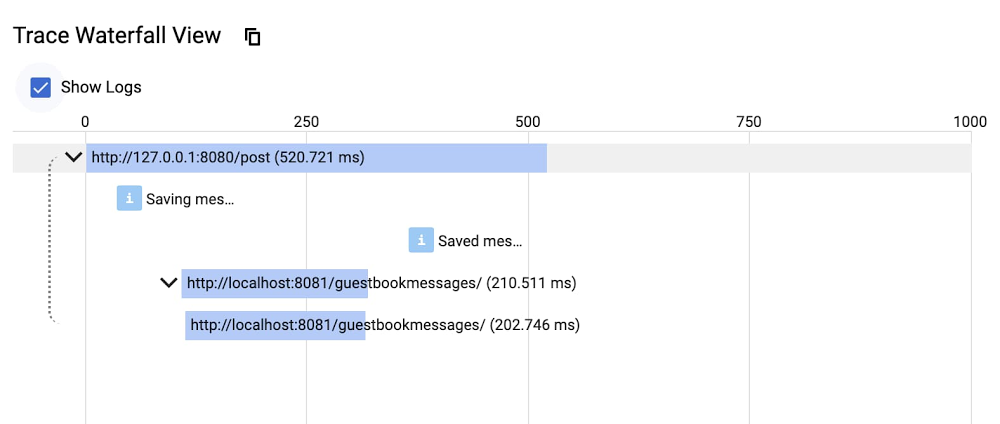
It’s an exciting time to be a Java developer: there are new Java language features being released every 6 months, new JVM languages like Kotlin, and the shift from traditional monolithic applications to microservices architectures with modern frameworks like Spring Boot. And with Spring Cloud GCP, we’re making it easy for enterprises to modernize existing applications and build cloud-native applications on Google Cloud. First released two years ago, Spring Cloud GCP allows Spring Boot applications to easily utilize over a dozen Google Cloud services with idiomatic Spring Boot APIs. This means you don’t need to learn a Google Cloud-specific client library, but can still utilize and realize the benefits of the managed services:If you have an existing Spring Boot application, you can easily migrate to Google Cloud services with little to no code changes.If you’re writing a new Spring Boot application, you can leverage Google Cloud services with the framework APIs you already know.Major League Baseball recently started their journey to the cloud with Google Cloud. In addition to modernizing their infrastructure with GKE and Anthos, they are also modernizing with a microservices architecture. Spring Boot is already the standard Java framework within the organization. Spring Cloud GCP allowed MLB to adopt Google Cloud quickly with existing Spring Boot knowledge.”We use the Spring Cloud GCP to help manage our service account credentials and access to Google Cloud services.” – Joseph Davey, Principal Software Engineer at MLBSimilarly, bol.com, an online retailer, was able to develop their Spring Boot applications on GCP more easily with Spring Cloud GCP.”[bol.com] heavily builds on top of Spring Boot, but we only have a limited capacity to build our own modules on top of Spring Boot to integrate our Spring Boot applications with GCP. Spring Cloud GCP has taken that burden from us and makes it a lot easier to provide the integration to Google Cloud Platform.” – Maurice Zeijen, Software Engineer at bol.comDeveloper productivity, with little to no custom codeWith Spring Cloud GCP, you can develop a new app, or migrate an existing app, to adopt a fully managed database, create event-driven applications, add distributed tracing and centralized logging, and retrieve secrets—all with little to no custom code or custom infrastructure to maintain. Let’s look at some of the integrations that Spring Cloud GCP brings to the table. DataFor a regular RDBMS, like PostgreSQL, MySQL, and MS SQL, you can use Cloud SQL and continue to use Hibernate with Spring Data, and connect to Cloud SQL simply by updating the JDBC configuration. But what about Google Cloud databases like Firestore, Datastore, and the globally-distributed RDBMS Cloud Spanner? Spring Cloud GCP implements all the data abstractions needed so you can continue to use Spring Data, and its data repositories, without having to rewrite your business logic. For example, you can start using Datastore, a fully-managed NoSQL database, just as you would any other database that Spring Data supports.You can annotate a POJO class with Spring Cloud GCP annotations, similar to how you would annotate Hibernate/JPA classes:Then, rather than implementing your own data access objects, you can extend a Spring Data Repository interface to get full CRUD operations, as well as custom query methods.Spring Data and Spring Cloud GCP automatically implement the CRUD operations and generate the query for you. Best of all, you can use built-in Spring Data features like auditing and capturing data change events.You can find full samples for Spring Data for Datastore, Firestore, and Spanner on GitHub.MessagingFor asynchronous message processing and event-driven architectures, rather than manually provision and maintain complicated distributed messaging systems, you can simply use Pub/Sub. By using higher-level abstractions like Spring Integration, or Spring Cloud Streams, you can switch from an on-prem messaging system to Pub/Sub with just a few configuration changes.For example, by using Spring Integration, you can define a generic business interface that can publish a message, and then configure it to send a message to Pub/Sub:You can consume messages in the same way. The following is an example of using Spring Cloud Stream and the standard Java 8 streaming interface to receive messages from Pub/Sub by simply configuring the application:You can find full samples with Spring Integration and Spring Cloud Stream on GitHub.ObservabilityIf a user request is processed by multiple microservices and you would like to visualize that whole call stack across microservices, then you can add distributed tracing to your services. On Google Cloud, you can store all the traces in Cloud Trace, so you don’t need to manage your own tracing servers and storage.Simply add the Spring Cloud GCP Trace starter to your dependencies, and all the necessary distributed tracing context (e.g., trace ID, span ID, etc) is captured, propagated, and reported to Cloud Trace.This is it—no custom code required. All the instrumentation and trace capabilities use Spring Cloud Sleuth. Spring Cloud GCP supports all of Spring Cloud Sleuth’s features, so distributed tracing is automatically integrated with Spring MVC, WebFlux, RestTemplate, Spring Integration, and more.Cloud Trace generates a distributed trace graph. But notice the “Show Logs” checkbox. This Trace/Log correlation feature can associate log messages to each trace so you can see the logs associated with a request to isolate issues. You can use Spring Cloud GCP Logging starter and its predefined logging configuration to automatically produce the log entry with the trace correlation data.You can find full samples with Logging and Trace  on GitHub.SecretsYour microservice may also need access to secrets, such as database passwords or other credentials. Traditionally, credentials may be stored in a secret store like HashiCorp Vault. While you can continue to use Vault on Google Cloud, Google Cloud also provides the Secret Manager service for this purpose. Simply add the Spring Cloud GCP Secret Manager starter so that you can start referring to the secret values using standard Spring properties:In the applications.properties file, you can refer to the secret values using a special property syntax:You can find a full sample with Secret Manager on GitHub.More in the works, in open sourceSpring Cloud GCP closely follows the Spring Boot and Spring Cloud release trains. Currently, Spring Cloud GCP 1.2.5 works with Spring Boot 2.3 and Spring Cloud Hoxton release train. Spring Cloud GCP 2.0 is on its way and it will support Spring Boot 2.4 and the Spring Cloud Ilford release train.In addition to core Spring Boot and Spring Cloud integrations, the team has been busy developing new components to meet developers’ needs:Cloud Monitoring support with MicrometerSpring Cloud Function’s GCP Adapter for Cloud Functions Java 11Cloud Spanner R2DBC driver and Cloud SQL R2DBC connectors to enable scalable and fully reactive servicesExperimental Graal VM support for our client libraries, so you can compile your Java code into native binaries, to significantly reduce your startup times and memory footprint.Developer success is important to us. We’d love to hear your feedback, feature requests, and issues on GitHub, so we can understand your needs and prioritize our development work. Try it out!Want to see everything in action? Check out the Developer Hands-on Keynote from Google Cloud Next ‘20: On Air, where Daniel Zou shows how to leverage Spring Boot and Spring Cloud GCP when modernizing your application with Anthos, Service Mesh, and more:You can also easily try Spring Cloud GCP with many samples. Or, you can take the guided Spring Boot on GCP course on Qwiklab or Coursera. Last but not least, you can find out about detailed features and configurations in the reference documentation.Related ArticleAnnouncing Spring Cloud GCP 1.1: deepening ties to Pivotal’s Spring FrameworkHere at Google we have been working hard with Pivotal’s Spring team to integrate the Spring Framework and Google Cloud Platform (GCP). La…Read Article
Quelle: Google Cloud Platform
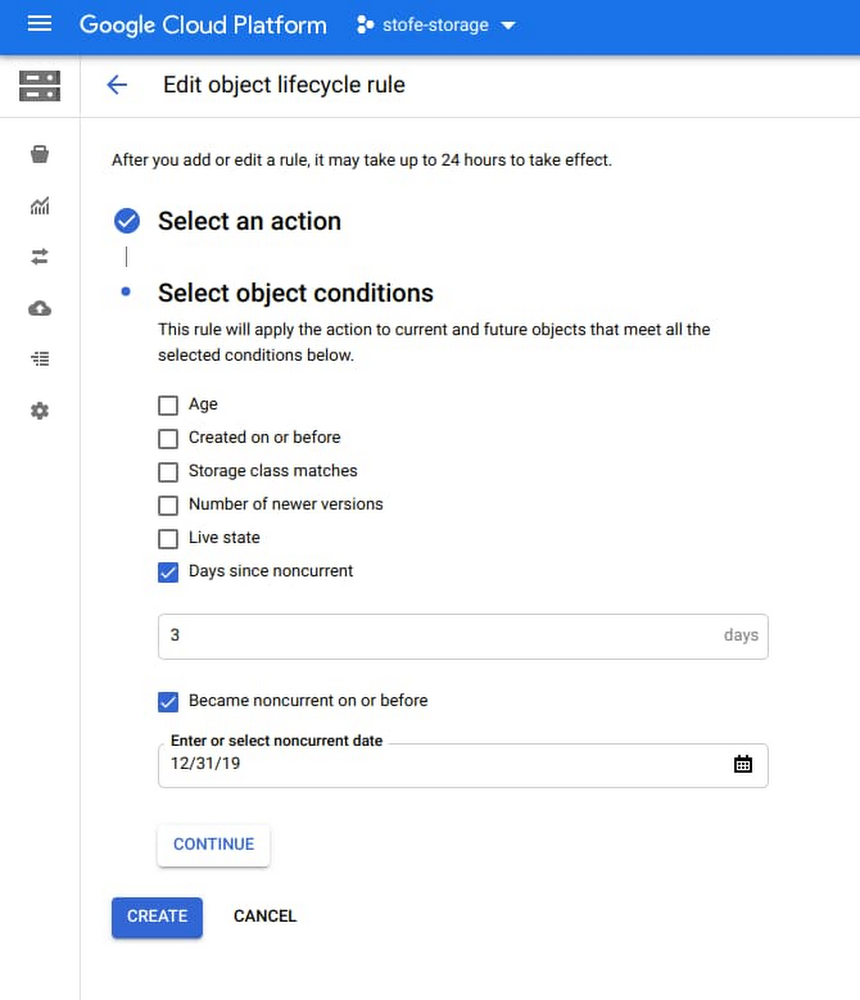
Cloud Storage object lifecycle management gets new controls

Managing your cloud storage costs and reducing the risk of overspending is critical in today’s changing business environments. Today, we’re excited to announce the immediate availability of two new Object Lifecycle Management (OLM) rules designed to help protect your data and lower the total cost of ownership (TCO) within Google Cloud Storage. You can now transition objects between storage classes or delete them entirely based on when versioned objects became noncurrent (out-of-date), or based on a custom time stamp you set on your objects. The end result: more fine grained controls to reduce TCO and improve storage efficiencies. Delete objects based on archive time Many customers who leverage OLM protect their data against accidental deletion with Object Versioning. However, without the ability to automatically delete versioned objects based on their age, the storage capacity and monthly charges associated with old versions of objects can grow quickly. With the non-current time condition, you can filter based on archive time and use it to apply any/all lifecycle actions that are already supported, including delete and change storage class. In other words, you can now set a lifecycle condition to delete an object that is no longer useful to you, reducing your overall TCO. Here is a sample rule to delete all the noncurrent object versions that became versioned (noncurrent) more than 30 days ago:This rule downgrades all the noncurrent object versions that became versioned (noncurrent) before January 31, 1980 in Coldline to Archive:Set custom timestampsThe second new Cloud Storage feature is the ability to set a custom timestamp in the metadata field to to assign a lifecycle management condition to OLM. Before this launch, the only timestamp that could be used for OLM was given to an object when writing to the Cloud Storage bucket. However, this object creation timestamp may not actually be the date that you care the most about. For example, you may have migrated data to Cloud Storage from another environment and want to preserve the original create dates from before the transfer. In order to set lifecycle rules based on dates that make more sense to you and your business case, you can now set a specific date and time and apply lifecycle rules to objects. All existing actions, including delete and change storage class are supported. If you’re running applications such as backup and disaster recovery applications, content serving, or a data lake, you can benefit from this feature by preserving the original creation date of an object when ingesting data into Cloud Storage. This feature delivers fine-grained OLM controls, resulting in cost savings and efficiency improvements, as a result of being able to set your own timestamps directly to the assets themselves. This sample rule deletes all objects in a bucket more than 2 years old since the specified custom timestamp:This rule downgrades all objects with custom timestamp older than May 27, 2019 in Coldline to Archive:The ability to use age or custom dates with Cloud Storage object lifecycle management is now generally available. To get started or for more information, visit the Cloud Storage Lifecycle Documentation page or navigate to the Google Cloud Console.Related ArticlePut your archive data on ice with new storage offeringThe new storage class called Archive, our coldest Cloud Storage offering yet, is now available for data backup and storage.Read Article
Quelle: Google Cloud Platform

Cloud Acceleration Program: More reasons for SAP customers to migrate to Google Cloud

The arrival of COVID-19 caused massive disruption for companies around the globe and made digital transformation a more urgent priority. That’s why it’s so important that enterprises running their businesses on SAP have the agility, uptime and advanced analytics that Google Cloud can offer. But given the drain on financial and human resources that the pandemic has caused, many organizations are worried about the risks of migrating to the cloud and have considered hitting the brakes on their cloud migrations, just when they should be pressing the gas pedal. Last year we launched the Cloud Acceleration Program (CAP), which has significantly helped SAP customers speed their transitions to the cloud. This first-of-its-kind program empowers customers with solutions from both Google Cloud and our partners to simplify their cloud migrations. Google Cloud is also providing CAP participants with upfront financial incentives to defray infrastructure costs for SAP cloud migrations and help customers ensure that duplicate costs are not incurred during migration. Here’s what customers are saying about the program:“We had plans to migrate to the cloud, but COVID brought into sharp focus the need to accelerate our SAP migration to the cloud. With help from Google Cloud and their Cloud Acceleration Program, we were able to get the skills and the funding to accelerate this effort dramatically. With our new strategic relationship with Google Cloud, we feel significantly better positioned for the future to take advantage of the elastic, scalable computing capabilities and vast amounts of innovation that [are] constantly being developed.”  —Maneesh Gidwani, CIO of FIFCO, a global food, beverage, retail and hospitality organization“The ability to leverage Managecore through the Cloud Acceleration Program dramatically reduced the risk and costs of our SAP migration to Google Cloud. The CAP program enabled Pegasystems to offset the upfront migration expense and significantly expedite our go-live process. With the help of Managecore we were able to focus on running our ERP business operations in the Cloud, rather than the technical elements of the project.”  —David Vidoni, Vice President of IT, Pegasystems, a CRM and BPM software developer company Cloud Acceleration Program Partners step up for SAP customersGoogle Cloud’s strongecosystem of partners are stepping up to the plate more than ever to help customers de-risk their SAP migrations to the cloud. By completing their migrations faster and with minimal cost, customers are now shifting their conversations from concerns about infrastructure and deployment, to higher-value topics such as optimizing costs and driving business value with analytics and machine learning tools.  “As one of the early partner participants in the Cloud Acceleration Program, we have been able to apply these significant resources to help multiple Enterprise customers in their SAP cloud migration engagements. CAP allows HCL to efficiently get tools and resources to the customer to ease their migration risk concerns & costs. Our customers are now engaging to drive strategic conversations on how they can leverage the SAP platform on the Google Cloud to drive new insights, improve business KPIs and create new business models with capabilities such as Google Cloud analytics and machine learning tools.”—Sanjay Singh, Senior VP & Global Head, HCL Google Ecosystem Unit”At NIMBL, we’ve seen both a great deal of interest in Google Cloud by our SAP customers as well as the significant results being realized by those who have deployed. A common concern for many other customers still on this journey – however – continues to be the overall disruption that a cloud migration may cause. Our migration expertise combined with the industry best tools and resources that Cloud Acceleration Program (CAP) offers, helps provide customers with a clear and confident path to the cloud. As a CAP partner, Google Cloud continues to set us up for success with the resources and support we need to deliver these critical customer deployments.”—Sergio Cipolla, Managing Partner, NIMBL Techedge GroupGoogle Cloud is a great place to run SAPAs pressures to transform increase for SAP enterprises, customers are looking to modernize on a smarter cloud.Google Cloud continues to be a great place to run SAP. Like no other for these unprecedented times, our Cloud Acceleration Program gets customers one step closer by reducing the complexities of migration and technical and financial risk management.Contact us to learn more aboutGoogle Cloud for SAP.
Quelle: Google Cloud Platform





