3 Ways to optimize Cloud Run response times

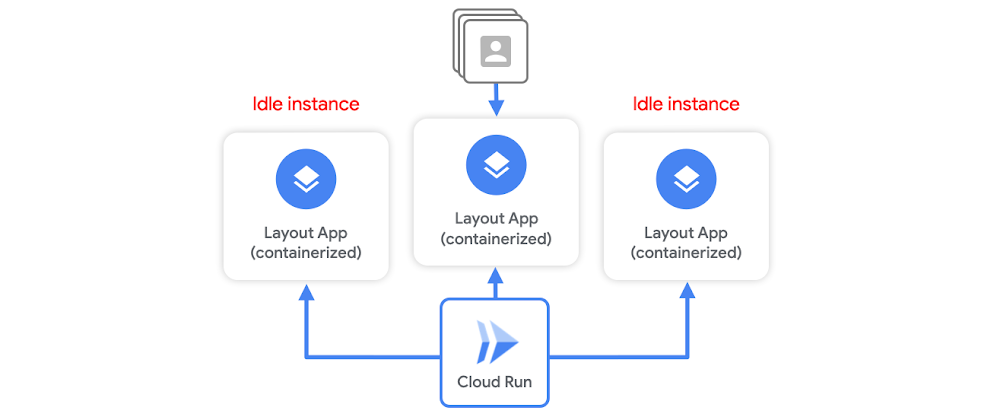
Serverless containerization has taken the world by storm as it gives developers a way to deploy their stateless microservices without a heavy burden of infrastructure management. Cloud Run abstracts all infrastructure management. You hand over a container image with a web server and stateless logic, and specify a combination of memory/CPU and allowed concurrency. Cloud Run takes care of creating an HTTP endpoint, routing requests to containers, and scaling containers up and down to handle the volume of requests. While Cloud Run offers some native features to reduce response time latency, such as idle instances, much of it can be improved by writing effective services, which I’ll outline below. Idle instancesAs traffic fluctuates, Cloud Run attempts to reduce the chance of cold starts by keeping some idle instances around to handle spikes in traffic. For example, when a container instance has finished handling requests, it might remain idle for a period of time in case another request needs to be handled.But, Cloud Run will terminate unused containers after some time if no requests need to be handled. This means a cold start can still occur. Container instances are scaled as needed, and it will initialize the execution environment completely. While you can keep idle instances permanently available using the min-instance setting, this incurs cost even when the service is not actively serving requests. So, let’s say you want to minimize both cost, and response time latency during a possible cold start. You don’t want to set a minimum number of idle instances, but you also know any additional computation needed upon container startup before it can start listening to requests means longer load times and latency. Cloud Run container startup There are a few tricks you can do to optimize your service for container startup times. The goal here is to minimize the latency that delays a container instance from serving requests. But first, let’s review the Cloud Run container startup routine. At a high level, it consists of:Starting the serviceStarting the containerRunning the entrypoint command to start your serverChecking for the open service portYou want to tune your service in order to minimize the time needed for step 1a. Let’s walk through 3 ways to optimize your service for Cloud Run response times.#1 Create a leaner serviceFor starters, on Cloud Run, the size of your container image does not affect cold start or request processing time. Large container images, however, mean slower build times, and slower deployment times.You want to be extra careful when it comes to applications written in dynamic languages. For example, if you’re using Node.js or Python, module loading that happens on process startup will add latency during a cold start.Also be aware of some modules that run initialization code upon importing.To build a leaner service you can:Minimize the number and size of dependencies if you’re using a dynamic language.Instead of computing things upon startup, compute them lazily. The initialization of global variables always occurs during startup, which increases cold start time. Use lazy initialization for infrequently used objects to defer the time cost and decrease cold start times.Shorten your initializations and speed up time to start your HTTP server.And use code-loading optimizations like PHP’s composer autoloader optimization.#2 Use a smaller base imageYou want to build a minimal container by working off a lean base image like: alpine, distroless. For example, the alpine:3.7 image is 71 MB smaller than the centos:7 image. You can also use, scratch, which is an empty image on which you can build your own runtime environment. If your app is a statically linked binary, it’s easy to use the scratch base image:You should also only install what is strictly needed inside the image. In other words, don’t install extra packages that you don’t need.#3 Use global variablesIn Cloud Run, you can’t assume that service state is preserved between requests. But, Cloud Run does reuse individual container instances to serve ongoing traffic. That means you can declare a global variable. When new containers are spun up, it can reuse its value. You can also cache objects in memory. Moving this from the request logic to global scope means better performance when traffic is ongoing. Now this doesn’t exactly help cold start times, but once the container is initialized, cached objects can help reduce latency during subsequent ongoing requests. For example, if you move per-request logic to global scope, it should make a cold starts last approximately the same amount of time (and if you add extra logic for caching that you wouldn’t have in a warm request, it would increase the cold start time), but any subsequent request served by that warm instance will have a lower latency.One option that can help with cold starts is to offload global state to an in-memory datastore like Memorystore, which provides sub-millisecond data access to application caches. ConclusionA lot of this boils down to creating a leaner service so logic that computes during container initialization is minimized, and it can start serving requests as soon as possible. While these are just a few best practices for designing a Cloud Run service, there are a number of other tips for writing effective services and optimizing performance, which you can read about here. For more cloud content follow me on Twitter @swongful.Related Article3 cool Cloud Run features that developers loveCloud Run developers enjoy pay-per-use pricing, multiple concurrency and secure event processing.Read Article
Quelle: Google Cloud Platform

Apigee: Your gateway to more manageable APIs for SAP

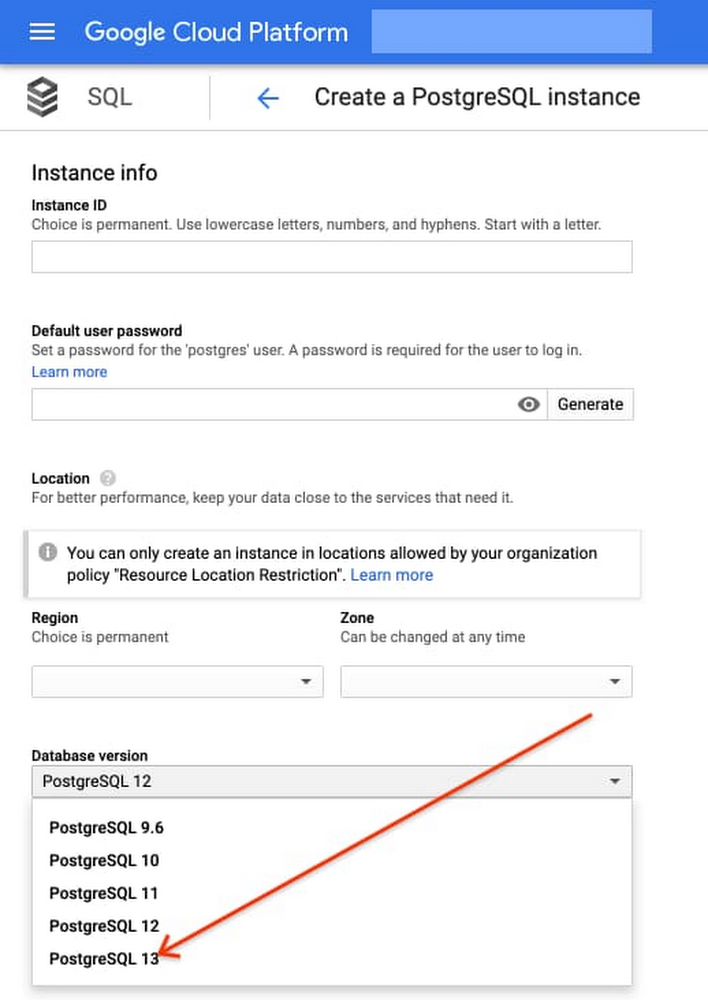
Businesses migrating their SAP environments to Google Cloud do so for a number of reasons. Most cite the agility, scalability and security advantages of migrating SAP workloads to Google Cloud; many also focus on improved uptime and performance. At some point, most businesses also want to explore the idea that there’s a fortune locked up in their business data—and that the cloud holds the key. But leveraging the cloud to transform data into dollars is a process that involves special challenges—and specialized tools to address these challenges. For businesses running SAP environments in the cloud, most of which maintain a significant stake in legacy systems and data stores, the challenges tend to get even bigger.The promises and pitfalls of APIsThis is where Google Cloud’s advanced data analytics, machine learning and AI capabilities, especially our API (application programming interface) management tools, come into play. Our Apigee API Management Platform is emerging as a star player for many of our SAP customers because it can open the door to innovation and opportunity for SAP systems and data stores.API management speaks directly to what it really means to get value from business data. By connecting the right data sets with people willing and able to monetize that data, your business can benefit both indirectly (for example, by generating insights that lead to increased sales or better customer experiences) and directly (such as by selling access to your data to another business).APIs have emerged as a pillar of modern digital business practices because they facilitate precisely these types of transactions. Today, every mobile device, website and application uses APIs to access connected services and data sources. APIs provide connection points between apps, platforms and entire application ecosystems. And by using de-facto standards such as REST (representational state transfer), businesses can utilize APIs to build and deploy innovative applications quickly.3 reasons legacy systems and modern APIs don’t mixGoogle Cloud customers running SAP environments may be ready to find the value in their data, but their SAP systems and data, as well as legacy APIs that don’t adhere to REST or other modern approaches,  may not quite be up to the task. This is because:Balancing accessibility, usability and security is a tough task—and the stakes are high. Opening up access to business-critical systems to third-party as well as internal developers could raise significant risks. Even for SAP teams with a high focus on security, the process of providing dependable, programmatic access to legacy SAP systems often involves significant time and effort. And while limiting access and API functionality are both valid ways to mitigate security risk, employing these tactics can slow the pace of innovation and very quickly undermine the reasons for starting this process in the first place.Managing APIs across legacy SAP applications and other data stores can be complex, costly and technically challenging. There’s a fundamental mismatch between the “how and why” of modern APIs and the types of programmatic access for which legacy systems were designed. Modern apps, for example, typically deliver API requests in far greater numbers; that’s true for client-side single-page applications as well as for more traditional server-side apps running on modern, elastically scaled app servers. There are also disparities in the size and structure of data payloads between what modern apps were designed to use and what legacy systems were designed to serve.These examples boil down to the same issue: If your business is running legacy SAP systems or is in the process of migrating away from them, you’ll have serious work to do to make your data accessible for modern use cases and integrations. And asking third-party developers to adjust their methods and skill sets to consume your legacy systems is going to be a very tough sell.Monetizing API access presents another set of technical and practical challenges. For many companies, the name of the data game is monetization: actually charging developers for the privilege of accessing your high-value data sources. Getting this right isn’t just a matter of putting a virtual turnstile in front of your existing APIs. Any monetization strategy lives or dies based on its pricing—and this means understanding exactly who’s using your data, when they access it and how they’re using it. Even if you are not charging your developers for API calls, there are also some valuable insights to be gained from more advanced types of analysis, right up to having a unified view of every data flow and data interaction related to your organization’s API traffic. Overall, API monetization demands that APIs be built in a modern style, designed and maintained for developer consumption rather than just, per legacy methods, for exposing a system.It probably comes as no surprise that an SAP environment, whether or not it’s considered legacy, was designed to focus on SAP system data and not designed to open the data inside an SAP system to other applications. And since these tools don’t build themselves, the question becomes, who will build them?Apigee: Bridging the gaps with API managementAn API management solution such as Apigee can help IT organizations tackle these issues more efficiently. In practice, companies are turning to Apigee for help with three primary SAP application modernization patterns, all of which speak to the challenges of using APIs to create value:1. Modernizing legacy services. One of Apigee’s most important capabilities involves placing an API “wrapper” around legacy SAP interfaces. Developers then get to work with feature-rich, responsive, thoroughly modern APIs, and the Apigee platform handles the process of translating and optimizing incoming API calls before passing the requests through to the underlying SAP environment.This approach to API management also gives IT organizations some useful capabilities. Apigee simplifies the process of designing, implementing and testing APIs that can add more functionality on top of legacy SAP interfaces; and it helps manage where, how and when developers work with APIs. This is also the basis for Apigee’s API monitoring and metrics—essential capabilities that would involve significant effort for most IT teams to build themselves.2. Abstracting APIs from source systems. By providing an abstraction layer between SAP legacy systems and developers, the Apigee platform also ensures a consistent, reliable and predictable developer experience. Through this decoupling of APIs from the underlying source systems, Apigee can adjust to changes in the disposition and availability of systems while carrying on business as usual with developers using its APIs. In this way, SAP enterprises can package and market their API offerings—for example, publishing APIs through a developer portal—and lets them monitor API consumption by target systems.Decoupling the source system from the developer entry points also shields connected applications from significant backend changes like a migration from ECC to S/4HANA. As you make backend changes to your services, apps continue to call the same API without any interruption. The migration may also provide opportunities for consolidating multiple SAP and non-SAP implementations into S/4HANA or cleaning up core SAP systems by moving out some of the functionality to cloud-native systems. Because Apigee abstracts consuming applications from changes to underlying systems and creates uniformity across these diverse systems, it can de-risk the migration from ECC to S/4HANA or similar consolidation projects.3. Creating cloud-native, scalable services. Apigee also excels at bridging the often wide gap between SAP applications and modern, distributed application architectures in which microservices play an essential role. In addition to repackaging SAP data as a microservice and providing capabilities to monetize this data, Apigee takes on some essential performance, availability and security functions: handling access control, authentication, security monitoring and threat assessment plus throttling traffic when necessary to keep backend systems running normally while providing applications with an endpoint that can scale to suit any of your workloads.Needless to say, Apigee’s security capabilities are absolutely essential no matter how you’re using API management tools. But because Apigee also offers performance, analytics and reliability features, it can position companies to jump into a fully mature API monetization strategy. At the same time, it can give IT teams confidence that opening their SAP systems to innovation does not expose mission critical systems to potential harm. Conrad Electronic and Apigee: using APIs to drive innovationWe’re seeing quite a few businesses using Apigee to create value from legacy SAP environments in ways that didn’t seem possible before. For an example of how Apigee and the rest of Google Cloud work together to open new avenues for innovation for SAP users, consider Conrad Electronic.Conrad Electronic combines many years of history as a successful German retailer with a progressive approach to innovation. The company has digitally transformed itself by leveraging an existing, legacy SAP environment alongside Google BigQuery, which provides a single repository for data that once resided in dozens of disparate systems. Conrad Electronic is using Apigee to amplify the impact and value of its transformation on two levels.First, it’s using Apigee to manage data exchanges with shipping companies and with the procurement systems of its B2B customers, giving these companies an improved retail experience and reducing the friction and potential for error that come with traditional transaction environments.At the same time, Conrad Electronic uses Apigee to give its own developers a modern set of tools for innovation and experimentation. A small development team ran with the idea, building an easy-to-use tool that gives in-store staff and visitors access to key product, service and warranty information, using their own tablets and other devices.“APIs give people the freedom and independence to implement their ideas quickly and effectively,” said Aleš Drábek, Conrad Electronics’ Chief Digital and Disruption Officer. “As an effective API management solution, Apigee enables us to harness the power of APIs to transform how we interact with customers and how we transfer data with our B2B customers.”Explore the possibilities with API managementTo learn more about how Apigeecan solve the challenges that come with opening up your SAP systems to new business models and methods for innovation, see here. Also for more information on Google Cloud solutions for SAP customers, seehere.Related ArticleGoogle named a leader in the 2020 Gartner Magic Quadrant for Full Life Cycle API ManagementFor the fifth year in a row, Google Cloud (Apigee) has been named a leader in Gartner’s Full Life Cycle API Management Magic Quadrant.Read Article
Quelle: Google Cloud Platform
Hack your own custom domains for Container Registry

If you serve public container images from Container Registry or Artifact Registry, you are exposing your project ID and other details to your users downloading this image. However, by writing a small middleware and running it serverless, you can customize how your registry works.In this article, I would like to show you how you can develop and run a serverless reverse proxy to customize the behavior of your registry, such as serving your images publicly on your custom domain name instead of gcr.io.Anatomy of a “docker pull”Serving container images from a container registry is not magical. All container image registries, such as Google Container Registry, Google Artifact Registry or Docker Hub implement an open API specification. Therefore, when you actually run a pull command like: docker pull gcr.io/google-samples/hello:1.0 the underlying container engine (such as Docker Engine) makes bunch of HTTP REST API calls to the REST endpoint like https://gcr.io/v2/google-samples/hello-app/manifests/1.0 to discover details about this image and download the layer blobs. You can use a tools like crane to further inspect how a container registry works when you try to pull or push an image.Custom domains for your container registryServing images on custom domains are especially useful for public images such as open source projects. It also helps you hide the details of the underlying registry (such as gcr.io/*) from your users.When you use a registry like Container Registry or Artifact Registry to serve images publicly, not only you expose your project IDs to the outside world, you can also end up with really long image names:docker pull us-central1-docker.pkg.dev/<project-id>/<registry-name>/<image-name>From the example above, you can see that the name of your container image determines where the registry is hosted and therefore which host the API calls are made. If you were to build a registry that serves images on your custom domain e.g. example.com, you could pull the images by specifying example.com/IMAGE:TAG as the container image reference. In turn, the API requests would be proxied to the actual registry host.To build such an experience, you can simply use your existing Google Container Registry or Artifact Registry to store your images, and build a “reverse proxy” on top of it to forward the incoming requests while still serving the traffic on the custom domain name you own.Cloud Run: right tool for the jobCloud Run is a great fit to host an application like this on Google Cloud. Cloud Run is a serverless container hosting platform and its pricing is especially relevant here, since you only pay for each request served.In this design, you would be charged only while a request is being handled (i.e. someone is pulling an image), which can easily fit to the free tier.When you use this proxy with Google Container Registry, actual image layers (blobs) are not not downloaded from the registry API (instead, a Cloud Storage download link is generated for pulling the layer tarball). Since your possibly gigabytes-large layers are not going through this proxy, it is easy to keep the costs low on Cloud Run. However, when used with Artifact Registry, since layer blobs of the image are served through this proxy, it will be more costly due to egress networking charges serving larger blobs and longer “billable time” on Cloud Run as a result of proxying large responses during a request.Building a reverse proxy for your registryTo accomplish this task, I have built a simple reverse proxy using the Go programming language in about 200 lines of code. This proxy uses the httputil.ReverseProxy and adds some special handling around credential negotiation for serving public images (and private images publicly, if you want). You can find the example code and deployment instructions at my repository github.com/ahmetb/serverless-registry-proxy. To deploy this proxy to your project to serve public images on your custom domain, refer to the repository for step-by-step instructions. At a high level, you need to:Build the reverse proxy app from its source code into a container image and push it to your registry.Create a Docker registry on Google Container Registry or Artifact Registry, make it publicly accessible to allow serving images without credentials.Deploy the reverse proxy as a publicly-accessible Cloud Run service, while specifying which registry it should be proxying the requests to.Map your domain name to this Cloud Run service on Cloud Console.Cloud Run will now prepare and configure a SSL certificate for your custom domain.After DNS records finish propagating, it’s ready to go. Your users can now run: docker pull<YOUR-DOMAIN>/<IMAGE>:<TAG>to download images from your custom domainConclusionYou can extend the idea of building “middleware proxies” in front of your container registry and hosting them for cheaply on a serverless platform like Cloud Run with minimal costs.For example, you can build a registry proxy that serves only particular images or particular tags. Similarly, you can build your own authentication layer on top of an existing registry. Since the Registry API is a standard, my example code works for other container registries such as Docker Hub as well. This way, you can host a serverless proxy on Cloud Run that serves images from Docker Hub or any other registry.Feel free to examine the source code and fork the project to extend it for your needs. Hopefully this example open source project can also help you serve your container registry on a custom domain.Related ArticleComparing containerization methods: Buildpacks, Jib, and DockerfileContainer Images can be created using a variety of methods including Buildpacks, Jib, and Dockerfiles. Let’s compare them.Read Article
Quelle: Google Cloud Platform
Cloud SQL now supports PostgreSQL 13

Today, we are announcing that Cloud SQL, our fully managed database service for PostgreSQL, MySQL, and SQL Server, now supports PostgreSQL 13. With PostgreSQL 13 available shortly after its community GA, you get access to the latest features of PostgreSQL while letting Cloud SQL handle the heavy operational lifting, so your team can focus on accelerating application delivery.PostgreSQL 13 introduces performance improvements across the board, including enhanced partitioning capabilities, increased index and vacuum efficiency, and better extended monitoring. Here are some highlights of what’s new:Additional partitioning and pruning cases support: As part of the continuous improvements of partitioned tables in the last two PostgreSQL versions, new cases of partition pruning and direct joins have been introduced, including joins between partitioned tables when their partition bounds do not match exactly. In addition, BEFORE triggers on partitioned tables are now supported.Incremental sorting: Sorting is a performance-intensive task, so every improvement in this area can make a difference. Now PostgreSQL 13 introduces incremental sorting, which leverages early-stage sorts of a query and sorts only the incremental unsorted fields, increasing the chances the sorted block will fit in memory and by that, improving performance.Efficient hash aggregation: In previous versions, it was decided in the planning stage whether hash aggregation functionality could be used, based on whether the hash table fits in memory. With the new version, hash aggregation can be determined based on cost analysis, regardless of space in memory.B-tree index now works more efficiently, thanks to storage space reduction enabled by removing duplicate values.Vacuuming: Vacuuming is an essential operation for database health and performance, especially for demanding and critical workloads. It reclaims storage occupied by dead tuples and catalogues it in the visibility map for future use. In PostgreSQL 13, performance improvements and enhanced automations are being introduced: Faster vacuum: Parallel vacuuming of multiple indexes reduces vacuuming execution time.Autovacuum: Autovacuum can now be triggered by inserts (in addition to the existing update and delete commands), ensuring the visibility map is updating in time. This allows better tuning of freezing tuples while they are still in buffer cache.Monitoring capabilities: WAL usage visibility in EXPLAIN, enhanced logging options, new system views for monitoring shared memory and LRU buffer usage, and more.WITH TIES addition to FETCH FIRST: To ease paging, simplify processing and reduce number of statements, FETCH FIRST WITH TIES returns any additional rows that tie for the last place in the result set according to the ORDER BY clause.Cloud SQL helps ensure you can benefit from what PostgreSQL 13 has to offer quickly and safely. With automatic patches and updates, as well as maintenance controls, you can reduce the risk associated with upgrades and stay current on the latest minor version.To support enterprise workloads, this version is also fully integrated with Cloud SQL’s newest capabilities, including IAM database authentication for enhanced security, audit logging to meet compliance needs, and point-in-time recovery for better data protection.IAM database authenticationPostgreSQL integration with Cloud Identity and Access Management (Cloud IAM) simplifies user management and authentication processes by using the same Cloud IAM credentials instead of traditional database passwords.Cloud SQL IAM database authentication consolidates the authentication workflow, allowing administrators to monitor and manage users’ access in an easy and simple way. This approach brings added consistency when integrating with other Google Cloud database services especially for demanding and scaled environments. Audit loggingAudit logging is enabled now in Cloud SQL for companies required to comply with government, financial, or ISO certifications. The pgaudit extension enables you to produce audit logs at the level of granularity needed for future investigation or auditing purposes. It provides you the flexibility to control the logged statements by setting configuration to specify which classes of statements will be logged. Point-in-time recoveryPoint-in-time recovery (PITR) helps administrators restore and recover an instance to a specific point in time using backups and WAL files when human error or a destructive event occurs. PITR provides an additional method of data protection and allows you to restore your instance to a new instance at any point in time in the past seven days. Point-in-time recovery is enabled by default when you create a new PostgreSQL 13 instance on Cloud SQL.Getting started with PostgreSQL 13To deploy a new PostgreSQL 13 instance using Cloud SQL, you simply need to select PostgreSQL 13 from the database version drop-down menu:To learn more about Cloud SQL for PostgreSQL 13, check out our documentation. Cloud SQL will continue to ensure that you get access to the latest versions and capabilities, while continuing to provide best-in-class availability, security, and integrations to meet your needs. Stay tuned for more updates across all of Google Cloud’s database engines.Related ArticleImproving security and governance in PostgreSQL with Cloud SQLManaged cloud databases need security and governance, and Cloud SQL just added pgAudit and Cloud IAM integrations to make security easier.Read Article
Quelle: Google Cloud Platform
USC accelerates patient enrollment in clinical trials with ML

As research and life science organizations around the world continue to devote tremendous energy and funds to drug development, more efficient processes and cost-effective technology can expedite clinical trials and deliver therapies to patients faster. The University of Southern California (USC)Keck School of Medicine, along with theSouthern California Clinical and Translational Science Institute (SC CTSI), embarked on a digitization journey to modernize its Medicare Coverage Analysis (MCA) processes managed in the Clinical Trials Office. MCA processes are a critical component of clinical trial administration as they dictate whether Medicare will cover the medical trial.“We work with teams on promising clinical trials to remove roadblocks from researchers at USC and across the U.S.,” says Allison Orechwa, Ph.D., Director of Programmatic Development and Interim Program Director for Healthcare Delivery Science at CS CTSI. “We need to be as efficient as possible in our approach to empower the organizations we support — taking a more advanced approach to analytics stood out as one of the best ways to accomplish this.”Pluto7, the 2019 Google Cloud Specialization Partner of the Year for Data and Analytics, helped the school with this transformation. The team began by surveying USC researchers to identify the challenges they faced and find opportunities to streamline their processes. A highly skilled research administrator has to understand each study procedure to determine how the school will be reimbursed for the trial. This manual procedure is a major bottleneck to swiftly launching new clinical trials that can evaluate new therapies.To streamline this process, Pluto7 built an algorithm to read standard of care guidelines, match a given procedure with those guidelines, and assign it to the correct billing category in milliseconds. Google Cloud solutions including Document AI and Vision AI further accelerated the analysis. After successfully completing a proof of concept to streamline the billing processes, the school was able to significantly shorten the budgeting process for breast cancer studies. Now, the school is looking into a range of other projects to accelerate clinical trials across other diseases. The more that time can be reduced, the faster critical results will be available within USC and the broader research community around the globe.“This is about saving lives,” says Allison. “Getting new drugs developed and to market can greatly improve patient outcomes, so the faster we are, the better the impact on healthcare providers and their patients. With Pluto7’s help and Google Cloud solutions, we have a foundation for accelerating clinical trials and in the end, supporting better patient outcomes.”Read the full case study to learn more about how USC partnered with Google Cloud and Pluto7 on this project.Related ArticleUnifiedpost and Google collaborate on Document AI to automate procurement data captureUnifiedpost uses Google Cloud Document AI to automate procurement data capture.Read Article
Quelle: Google Cloud Platform
Introducing Document AI platform, a unified console for document processing

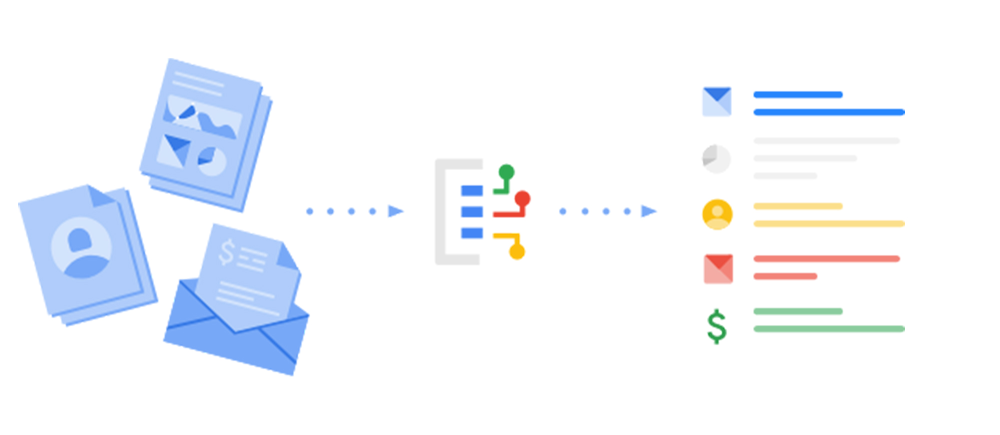
We believe that any company that has to manually extract data from complex documents at scale can greatly benefit from Google Cloud AI. Transforming documents into structured data increases the speed of decision making for companies, unlocking measurable business value and helping develop better experiences for customers. Historically, doing this at scale hasn’t been efficient. This is why Google Cloud has worked to help businesses use Artificial Intelligence (AI) and machine learning to automate these processes, and why we’re excited to announce the new Document AI (DocAI) platform, a unified console for document processing.Today, the DocAI platform is available in preview, enabling you to:Ensure your data is accurate and compliant: Automate and validate all your documents to streamline compliance workflows, reduce guesswork, and keep data accurate and compliant.Make better business decisions: Improve operational efficiency by extracting structured data from unstructured documents and making that available to your business applications and users.Use your data to meet customer expectations: Leverage insights to meet customer expectations and improve CSAT, advocacy, lifetime value, and spend.With the new DocAI platform, you can quickly access all parsers, tools and solutions (e.g. Lending DocAI, Procurement DocAI) with a unified API, enabling an end-to-end document solution from evaluation to deployment. It allows effortless creation and customization of document processing workflows. Data extraction is now easier because the specialized parsers on the platform are built with Google Cloud’s predefined taxonomy, without the need to perform additional data mapping or training.One of our customers, Unifiedpost, a FinTech company from Belgium, increased their data capture accuracy by 250% and also lowered their TCO of procure-to-pay processing costs by up to 60% by using Procurement DocAI.How to use the new DocAI platformTo illustrate how the DocAI platform works, here’s an example of the main selection screen of all the parsers, followed by two examples from a W9 and an invoice. First, you need to first create a document processor. You can either use one of our general processors such as Form Parser, or a specialized processor such as W9 Parser for your domain-specific documents.Once you’ve created your processors, they can be viewed in a unified dashboard. You can also test your processor by uploading your own document directly in the console. In the example below, you see that the W9 parser has accurately classified the information (e.g. address, account numbers, and signatures) in the document.You can also try this with an invoice for procurement document processing. In the example below, the invoice parser was able to extract the appropriate data (e.g. supplier name, invoice date, and payment terms) from the document.We’re working on additional capabilities for the DocAI platform to rapidly grow its core capabilities and support for additional parsers. All of its specialized parsers are created and fine-tuned to achieve industry-leading accuracy, helping businesses confidently unlock insights from documents with machine learning. General parsers such as OCR (Optical Character Recognition), Form parser, and Document splitter are publicly accessible. You can also request access to specialized parsers such as W9, 1040, W2, 1099-MISC, 1003, invoice, and receipts. What’s nextWe’re excited to have you start working with the DocAI platform. To learn more about how to get started and everything you can do with the platform, check out our documentation or contact the Google Cloud sales team.Related ArticleUnifiedpost and Google collaborate on Document AI to automate procurement data captureUnifiedpost uses Google Cloud Document AI to automate procurement data capture.Read Article
Quelle: Google Cloud Platform

Google Cloud and Managecore: Partnering to accelerate SAP cloud migrations

An SAP cloud migration can be an incredibly valuable IT investment, giving an enterprise a practical upgrade path away from on-premises SAP infrastructure to a flexible, scalable, and efficient public cloud environment. But moving SAP workloads to the cloud is rarely simple or easy. Many IT organizations struggle to manage the short-term cost, complexity, and risk that come with SAP cloud migrations—and too many migrations fall short or fail completely. As a result, some IT organizations hesitate to move ahead with their SAP cloud migrations, frustrating their business partners and delighting faster-moving competitors.Google Cloudand Managecore LLC, a Google Cloud specialized partner and SAP cloud migration expert, have been partnering for some time to modernize SAP workloads for SAP customers. This includes helping customers such as FFF Enterprises and DistributionNOW take advantage of key Google Cloud SAP capabilities in the areas of agility, uptime, performance, support, lower TCO plus advanced analytics and machine learning capabilities, paving the way for further digital transformation. Working together, Google Cloud and Managecore, demonstrated how the Google Cloud Acceleration Program (CAP) significantly reduces the cost and risk of SAP cloud migrations. Managecore used CAP to secure major SAP migration wins with clients including Pegasystems, GDT, and BK Medical—reducing migration and infrastructure costs, and giving these companies faster, simpler, and less disruptive SAP cloud migration experiences.CAP clears a path to value in the cloudGoogle Cloud’s work with SAP customers reveals two keys to overcoming the challenges of an SAP cloud migration:Giving IT leaders confidence that their SAP cloud migrations will travel a simple, predictable, consistent path to value that minimizes business risk.Connecting IT organizations with skilled, experienced SAP cloud migration experts who understand how to plan, prepare, and execute a flawless migration to Google Cloud—minimizing business disruptions, and accelerating time to value.The Cloud Acceleration Program (CAP) works to clear these obstacles. CAP reduces migration and infrastructure costs until go-live, so that cost-related risk and uncertainty are removed from the migration process.In addition, CAP offers a wealth of technical and migration process resources to companies that want to migrate SAP workloads to Google Cloud, or that want to extend SAP solutions with Google Cloud infrastructure and functionality. This includes access to architecture templates, migration accelerators, specialized SAP-focused support, and partner-led assessment services, architecting, and centers of excellence. These resources give companies a reliable and repeatable formula for a faster, simpler, a more predictable migration journey.Practice and expertise mean no surprisesAs valuable as the Cloud Acceleration Program can be, we understand that nothing replaces firsthand SAP migration expertise and practical experience. That’s where a partner like Managecore enters the picture and proves its value.Managecore’s extensive SAP cloud migration experience gives them visibility to potential technology, platform, planning and architecture decisions. Managecore can also help with ongoing Google Cloud infrastructure management and SAP application support. These capabilities help to protect the long-term value of an SAP cloud environment. Managecore brings the same expertise when an SAP customer is ready to make the move to SAP S/4HANA or to implement other SAP upgrades. Pegasystems, GDT, and BK Medical wins with CAPManagecore has already applied this formula to score some wins migrating its clients’ SAP environments to Google Cloud. While each of these cloud migrations was different in key respects, all of them exemplify the value of a simpler, faster, less expensive and far less risky path to success with SAP in the cloud.Pegasystems: Minimizing the pain of migration costsFor cloud software provider Pegasystems, an existing private-cloud SAP environment had fallen painfully short of expectations. Lackluster SAP and hosting support left the company tied to outdated, inflexible systems with reliability issues. Rising costs were also a concern. Pegasystems was also eager to access modern AI/ML and analytics capabilities that its legacy environment couldn’t support.Managecore orchestrated a cloud migration that brought together a number of best-in-class technology capabilities, including the ability to leverage BigQuery on Google Cloud. Pegasystems also uses Managecore to manage its Google Cloud infrastructure and SAP applications, ensuring that its SAP Google Cloud environment will deliver consistent peak performance. Pegasystems’ SAP environment is also serving as a starting point for a broader cloud modernization strategy—including the prospect of migrating the company’s entire data center to Google Cloud within three years.“The ability to leverage Managecore through the Cloud Acceleration Program dramatically reduced the risk and costs of our SAP migration to Google Cloud. With the help of Managecore we were able to focus on running our ERP business operations in the Cloud, rather than the technical elements of the project.” —David Vidoni, Vice President of IT, PegasystemsGeneral Datatech (GDT): Using the cloud to maintain financial agilityGDT, a provider of IT solutions, took an important lesson away from the COVID-19 pandemic: they needed a secure, modern, long-term solution for running its SAP ERP systems. They also wanted to dramatically reduce their CapEx budget in favor of a more flexible and versatile OpEx model.By leveraging CAP, Managecore compounded the financial flexibility and cost savings for GDT—eliminating its cloud migration costs, and also ensuring that GDT wouldn’t pay any infrastructure costs until its new SAP environment was ready to go live. In July, GDT worked with Managecore and Google Cloud to migrate its SAP workloads to modern Google Cloud infrastructure. With the migration project still underway, Managecore and Google Cloud will also lay the groundwork for GDT to adopt SAP HANA and other key technology upgrades, with Managecore providing ongoing cloud and SAP technical managed services for steady state support after the go-live.BK Medical: Securing a platform for stability and growth For BK Medical, a healthcare information and treatment solutions provider, there was real urgency in its SAP cloud migration plans. The company had inherited its SAP landscape in a divestiture from Analogic Devices, and the company was eager to migrate its SAP systems onto a new platform as quickly as possible. Once again, Google Cloud and Managecore delivered a major advantage with CAP, allowing BK Medical to plan its SAP strategy with no migration costs and no charge for infrastructure until its new SAP environment went live. The migration is getting underway and, once completed, BK Medical will be taking advantage of Managecore’s ongoing cloud and technical managed SAP services for steady state support.IT decision-makers know that their choice for hosting SAP applications in the cloud is one with huge implications—for the business, for their teams, and for their careers. Cost alone has never been the deciding factor for hosting business-critical applications, which is why Managecore’s success with CAP isn’t just a matter of reducing a customer’s migration and infrastructure costs. Through CAP, Google Cloud and Managecore allow SAP customers to focus on what really matters: making the most of the opportunities the cloud gives them. Learn more about SAP on Google Cloud, the Cloud Acceleration Program and Managecore capabilities for SAP.
Quelle: Google Cloud Platform

Using remote and event-triggered AI Platform Pipelines

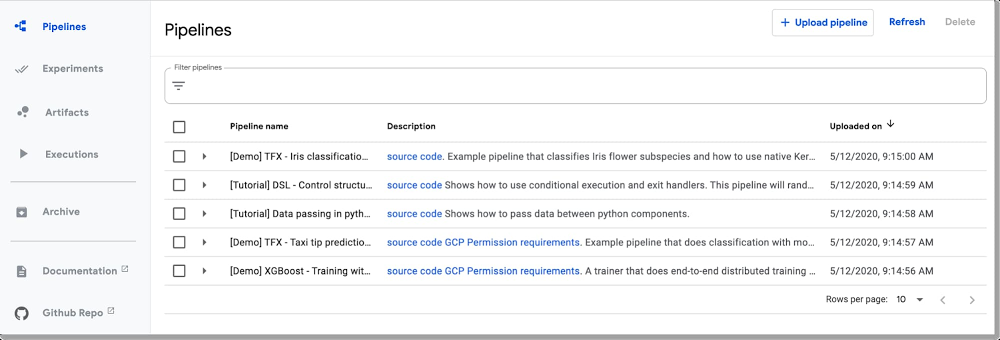
A machine learning workflow can involve many steps with dependencies on each other, from data preparation and analysis, to training, to evaluation, to deployment, and more. It’s hard to compose and track these processes in an ad-hoc manner—for example, in a set of notebooks or scripts—and things like auditing and reproducibility become increasingly problematic.Cloud AI Platform Pipelines, which was launched earlier this year, helps solve these issues: AI Platform Pipelines provides a way to deploy robust, repeatable machine learning pipelines along with monitoring, auditing, version tracking, and reproducibility, and delivers an enterprise-ready, easy to install, secure execution environment for your ML workflows.While the Pipelines Dashboard UI makes it easy to upload, run, and monitor pipelines, you may sometimes want to access the Pipelines framework programmatically. Doing so lets you build and run pipelines from notebooks, and programmatically manage your pipelines, experiments, and runs. To get started, you’ll need to authenticate to your Pipelines installation endpoint. How you do that depends on the environment in which your code is running. So, today, that’s what we’ll focus on.Event-triggered Pipeline callsOne interesting class of use cases that we’ll cover is using the SDK with a service like Cloud Functions to set up event-triggered Pipeline calls. These allow you to kick off a deployment based on new data added to a GCS bucket, new information added to a PubSub topic, or other events.The Pipelines Dashboard UI makes it easy to upload and run pipelines, but often you need remote access as well.With AI Platform Pipelines, you specify a pipeline using the Kubeflow Pipelines (KFP) SDK, or by customizing the TensorFlow Extended (TFX) Pipeline template with the TFX SDK. To connect using the SDK from outside the Pipelines cluster, your credentials must be set up in the remote environment to give you access to the endpoint of the AI Platform Pipelines installation. In many cases, where it’s straightforward to install and initialize gcloud for your account (or it’s already set up for you, as is the case with AI Platform Notebooks), connection is transparent.Alternatively, if you are running on Google Cloud, in a context where it is not straightforward to initialize gcloud, you can authenticate by obtaining and using an access token via the underlying VM’s metadata. If that runtime environment is using a different service account than the one used by the Pipelines installation, you’ll also need to give that service account access to the Pipelines endpoint. This scenario is the case, for example, with Cloud Functions, whose instances use the project’s App Engineservice account. Finally, if you are not running on Google Cloud, and gcloud is not installed, you can use a service account credentials file to generate an access token.We’ll describe these options below, and give an example of how to define a Cloud Function that initiates a pipeline run, allowing you to set up event-triggered Pipeline jobs.Using the Kubeflow Pipelines SDK to connect to an AI Platform Pipelines cluster via gcloud accessTo connect to an AI Platform Pipelines cluster, you’ll first need to find the URL of its endpoint.An easy way to do this is to visit your AI Pipelines dashboard, and click on SETTINGS.Click ‘Settings’ to get information about your installation.A window will pop up that looks similar to the following:KFP client settingsCopy the displayed code snippet to connect using your installation’s endpoint using the KFP SDK. This simple notebook example lets you test the process. (Here is an example that uses the TFX SDK and TFX Templates instead).Connecting from AI Platform NotebooksIf you’re using an AI Platform Notebook running in the same project, connectivity will just work. All you need to do is provide the URL for the endpoint of your Pipelines installation, as described above.Connecting from a local or development machineYou might instead want to deploy to your Pipelines installation from your local machine or other similar environments. If you have gcloud installed and authorized for your account, authentication should again just work.Connecting to the AI Platform Pipelines endpoint from a GCP runtimeFor serverless environments like Cloud Functions, Cloud Run, or App Engine, with transitory instances that use a different service account, it can be problematic to set up and initialize gcloud. Here we’ll use a different approach: we’ll allow the service account to access Cloud AI Pipelines’ inverse proxy, and obtain an access token that we pass when creating the client object. We’ll walk through how to do this with a Cloud Functions example.Example: Event-triggered Pipelines deployment using Cloud FunctionsCloud Functions is Google Cloud’s event-driven serverless compute platform. Using Cloud Functions to trigger a pipeline deployment opens up many possibilities for supporting event-triggered pipelines, where you can kick off a deployment based on new data added to a Google Cloud Storage bucket, new information added to a PubSub topic, and so on.For example, you might want to automatically kick off an ML training pipeline run once a new batch of data has arrived, or an AI Platform Data Labeling Service “export” finishes.Here, we’ll look at an example where deployment of a pipeline is triggered by the addition of a new file to a Cloud Storage bucket.For this scenario, you probably don’t want to set up a Cloud Functions trigger on the Cloud Storage bucket that holds your dataset, as that would trigger each time a file was added—probably not the behavior you want, if updates include multiple files. Instead, upon completion of the data export or ingestion process, you could write a Cloud Storage file to a separate “trigger bucket”, where the file contains information about the path to the newly added data. A Cloud Functions function defined to trigger on that bucket could read the file contents and pass the information about the data path as a param when launching the pipeline run.There are two primary steps to setting up a Cloud Functions function to deploy a pipeline. The first is giving the service account used by Cloud Functions—your project’s App Engine service account—access to the service account used by the Pipelines installation, by adding it as a Member with Project Viewer privileges. By default, the Pipelines service account will be your project’s Compute Engine default service account. Then, you define and deploy a Cloud Functions function that kicks off a pipeline run when triggered. The function obtains an access token for the Cloud Functions instance’s service account, and this token is passed to the KFP client constructor. Then, you can kick off the pipeline run (or make other requests) via the client object.Information about the triggering a Cloud Storage file or its contents can be passed as a pipeline runtime parameter.Because the Cloud Function needs to have the kfp SDK installed, you will need to define a requirements.txt file used by the Cloud Functions deployment that specifies this.This notebook walks you through the process of setting this up, and shows the Cloud Functions function code. The example defines a very simple pipeline that just echoes a file name passed as a parameter. The Cloud Function launches a run of that pipeline, passing the name of the new or modified file that triggered the Function call.Connecting to the Pipelines endpoint using a service account credentials fileIf you’re developing locally and don’t have gcloud installed, you can also obtain a credentials token via a locally-available service account credentials file. This example shows how to do that. It’s most straightforward to use credentials for the same service account as the one used for the Pipelines installation—by default the Compute Engine service account. Otherwise, you will need to give your alternative service account access to the Compute Engine account.SummaryThere are several ways you can use the AI Platform Pipelines API to remotely deploy pipelines, and the notebooks we introduced here should give you a great head start. Cloud Functions, in particular, lets you support many types of event-triggered pipelines. To learn more about putting this into practice, check out the Cloud Functions notebook for an example of how to automatically launch a pipeline run on new data. Give these notebooks a try, and let us know what you think! You can reach me on Twitter at @amygdala.Related ArticlePerformance and cost optimization best practices for machine learningBest practices on how you can enhance the performance and decrease the costs of your ML workloads on Google Cloud.Read Article
Quelle: Google Cloud Platform

Cache me if you can with latest Cloud CDN features

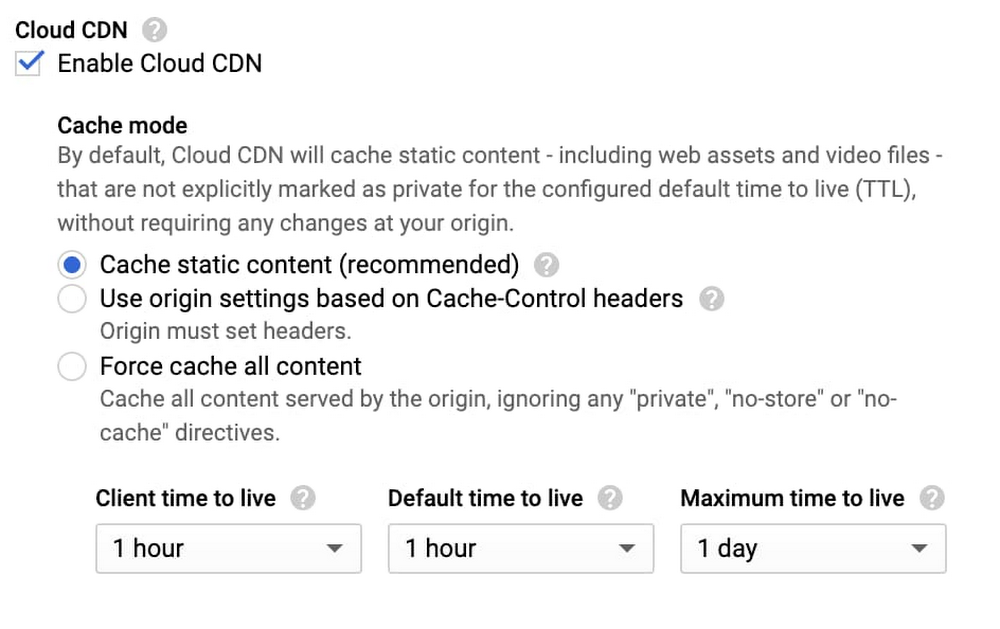
A content delivery network is a critical part of getting frequently used content to your users quickly and cost-effectively. We’re excited to announce new, more flexible controls for Cloud CDN, making it even easier to improve performance and reducing the serving costs for regularly accessed content, no matter where your users are.Today, we’re delivering three features in Preview that let you enable Cloud CDN as part of your HTTP(S) Load Balancer and start caching content with just one click. Specifically, Cloud CDN now offers:Cache modes, a new concept that allows Cloud CDN to automatically cache common static content types without further origin configuration, cache all responses, or continue to respect your origin’s cache directives The ability to set and/or override cache TTLs (“time to live”, or “expiration”), so you can fine-tune how long Cloud CDN caches your responses, when we revalidate expired objects in our caches, as well as define client-facing TTLs to make the most of browser cachesCustom response headers, allowing you to reflect the cache status to your clients, geographic data, and/or your own static response headers, such as Cross-Origin Resource Sharing (CORS) policies and/or web security headers when serving from Cloud Storage or Compute Engine.How to use these featuresThese new capabilities are openly available to all customers, and you can use the Google Cloud Console or the gcloud SDK on your existing Cloud CDN-enabled backends right now.If you have an existing backend with Cloud CDN enabled, you can turn on the new “Cache All Static” cache mode, which automatically caches common static content types, and fine-tunes the TTLs used to determine cache lifetime and behavior:Backends that enable Cloud CDN via the Cloud Console now defaults to caching all static content, so you can just check a box to benefit from our global network of caches.If you’re using Cloud Storage backends, you can now use our custom response header features to set both static and dynamic response headers. You can now return client geolocation data, the RTT (round trip time) between Google’s edge and the client, and static headers such as Content-Security-Policy, reducing the need to configure it across your origins.Here’s an example using the gcloud SDK that returns the cache status (such as HIT, MISS or DISABLED), the geolocation of the client (user) who connected, and then applies a useful web security header:Make sure you are on gcloud version 309.0.0 or greater, and that you’re using the beta channel, in order to use these new features.What’s next?We’re also working on additional capabilities for Cloud CDN, including the ability to serve stale content when your origin is overloaded or unavailable (for example, if your origin is external to Google Cloud), you will be able to bypass the cache when needed, and configure cache behavior at status-code granularity (often called “negative caching”). These capabilities will be available before the end of this year: monitor our release notes for updates.We’re also continuing to expand our global network: Google’s network is one of the most peered in the world, and nearly all of Google Cloud traffic is delivered over peering (a major advantage for reliability). To get started with Cloud CDN, take a look at our how-to guides and review our best practices here.Related ArticleEnabling hybrid deployments with Cloud CDN and Load BalancingCloud CDN and HTTP(S) Load Balancing now let you pull content and reach services that are on-prem or in another cloud over Google’s network.Read Article
Quelle: Google Cloud Platform

The democratization of insights: Empowering Data Analysts and Business Users

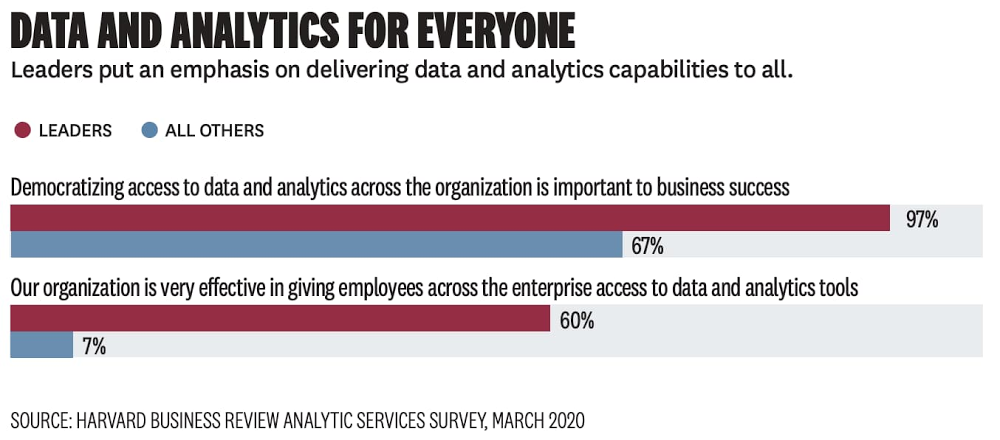
Today, we’re kicking off a multi-part series that looks at one of the things all businesses—regardless of geography, size, or industry—have in common: they want to be data-driven. As long as there has been data, businesses have tried to use it to better understand their customers, market, and competitors. What’s changed recently is the nature of three core factors that lead to becoming data-driven: a) data availability, b) data access, and c) insight access. As these factors have expanded, or become “democratized,” businesses have enabled themselves to be better managed not just top-down, but also bottoms-up, middle-out, and everywhere between. A recent Google Cloud/Harvard Business Review paper confirms this: 97% of industry leaders surveyed said democratizing access to data and analytics across the organization is important to business success. This blog series will explore what it means to be “data-driven,” how this concept has changed over time, and how Google Cloud is helping customers push the boundaries of what they can do with their data.The early days of the modern data landscape & the rise of big dataModern enterprise reporting and business intelligence began to take form in the 1990s, when companies started using enterprise data warehouses (EDWs) as the foundation of operational reporting. A breakthrough in the ability to understand a business as it was unfolding, the EDWlet analysts ask and answer questions like “What’s today’s inventory based on yesterday’s sales?” or “What do last week’s regional sales figures look like?”.Traditional business-oriented data and systems didn’t hold primacy for long. Almost as soon as self-service BI became available, the broader data landscape shifted, requiring new tools and new skills to generate differentiated insights from new kinds of signals. Society-wide digitization—of shopping habits, of communication, of entertainment, and more—gave companies a new window into how to better interpret and meet their customers’ needs. A new set of big data tools (spurred by the release of academic papers describing Google’s internal technology) gave data engineering experts the ability to collect and store this new data, making it available to expert users who could generate insights. Organizations built early data lakes and, with the gains from self-service BI fresh in their minds, expected rapid value generation. Unfortunately, even with this new data made available and accessible, most business users didn’t have the skills to generate insights. The systems were too complex for novice users.Clearly, in the new world of big and unstructured data, insights wouldn’t come just from making data available and democratizing its access. Democratization of insights, which is what really matters, had to come by expanding the capabilities of familiar tooling. Technology had to meet users where they were, not vice-versa. That’s where Google Cloud went to work.Google Cloud: Democratizing insights through radically simplified toolsAt Google Cloud, we’ve focused on empowering users to generate insights by leaning into the tools and skills they already have. The first step occurred behind the scenes. We automated the backend of our technology stack and helped pioneer the concept of “serverless” analytics, which meant resource provisioning, handling growing scale, performance tuning, deployment and other technical tasks associated with managing the stack were taken care of without user input. Users only need analysis, so Google Cloud developed simple user-facing tools that let them focus on their work while leaving machines to manage the complexity of executing user inputs.Empowering the data analyst to generate deeper insights through data accessIn democratizing and generating insights, there’s maybe no group more important to enable than data analysts. Typically the largest group of data-focused workers across Fortune-500 companies, this persona has a well-rounded grasp of both data and the business challenges that need to be solved. Unlocking new capabilities for data analysts via SQL has given our customers a whole new window into their businesses. Let’s examine how that happened.First, the decoupling of compute and storage allowed BigQuery to store more data more economically than other data warehouses in which compute and storage scale together. This led customers to adopt a “structured data lake” approach to data warehousing and increased the prevalence of ELT (extract-load-transform) using SQL within the data warehouse itself. This democratized data access by allowing more full-fidelity data to reside in the data warehouse. More importantly, it also democratized insight generation because the expanded data access occurred within a familiar tool—the data warehouse with its familiar SQL semantics.Next, we knew analysts wanted to access data outside the data warehouse, often in Google Cloud Storage. We built paths for them to access this data, via SQL, which allowed them to generate new insights by incorporating data not previously available to them. This object storage/data warehouse interoperability goes both ways; not only can data analysts use SQL to query object storage, but data scientists and data engineers can run Spark jobs against data in BigQuery. The result of increased data access within familiar tools is again, predictably, more insights.Empowering the business user to drive self-service insights through intuitive toolsA huge benefit to automated systems is the ability to build easy-to-use interfaces for businesses users that make it easy for them to drive their own insights, breaking the typical “request and wait” paradigm business users have become accustomed to.Business intelligence tools are the most common entry point for business users looking to either generate their own insights or make decisions based on the analysis generated from data analysts. Modern BI tools provide interactive, self-service capabilities that allow business users to customize the analysis that they’re driving for the specific business problem they’re looking to solve. However, these tools can only be as powerful as the system that serves the data to them. The serverless backend provided by BigQuery makes interactive, self-service BI easier than ever by providing the scalability needed for any amount of data or any number of users. BigQuery works seamlessly with any number of popular BI tools, including Tableau, Qlik, Microstrategy, and many more. At Google Cloud, the addition of Looker to our portfolio has made it easier for business users to interact with dashboards, follow data-driven workflows, and generate more value for their organizations. Businesses can embed data at every stage of a given workflow or application, making data-driven insights the default for front line workers, whether that means Sunrun defining cross-organizational metrics or CCA providing better and actionable insights to caregivers treating patients threatened by COVID-19.There’s a very tight relationship between the data and the expectation that something needs to be done with it Dr. Valmeek Kudesia, CCA VP of Clinical Informatics & Advanced AnalyticsIn addition to improving self-service business intelligence, we’re helping business users generate insights by bringing new capabilities to a familiar tool—the spreadsheet. Connected Sheets can deliver the power and scale of BigQuery to the hundreds of millions of business users who are familiar with a simple spreadsheet. That means being able to analyze billions of rows and petabytes of data without having to know SQL to drive analysis and insights, bringing scale to data insights.Beyond giving superpowers to spreadsheets, we’ve democratized insights for business users (and their customers) by driving the capabilities of BigQuery into the oldest query system there is—natural language. Data QnA makes it easy for non-technical business users to access the data insights they need by simply asking natural language questions of their data. This enables anyone to conversationally analyze petabytes of data stored in both BigQuery and federated data sources. Data QnA is among the most accessible self-service tools for data analysis and has the potential to drive new insights and data-driven decisions into every corner of the businesses that deploy it.“At Veolia, we were taking weeks responding to ad hoc analytics requests from our business partners. This was reducing the time we could spend on higher value activities,” said Fabrice Nico, Data and Robotic Manager at Veolia. “We at the BI team have since enabled self-service access to BigQuery data by asking questions in natural language. The Google service, through Sheets and chatbots, is going to free up our time significantly, and enable our business partners to execute faster through natural language-based analytics.”Finally, we know it’s hard to discuss data insights today without touching on both real-time analysis and machine learning. Increasingly, organizations need access to machine learning to help derive insights from the messy world of big data. If insights are the buried treasure of the data world, machine learning is the equivalent of a metal detector, particularly when the data volumes are large. Real-time data analysis is key to powering better customer experiences and better (often automated) decision making. At Google Cloud, we’ve given the democratization of these capabilities a lot of thought and investment, which you can read about in the upcoming parts of this blog series.Learn more about smart analytics on Google Cloud.
Quelle: Google Cloud Platform



