Database Migration Service Connectivity – A technical introspective

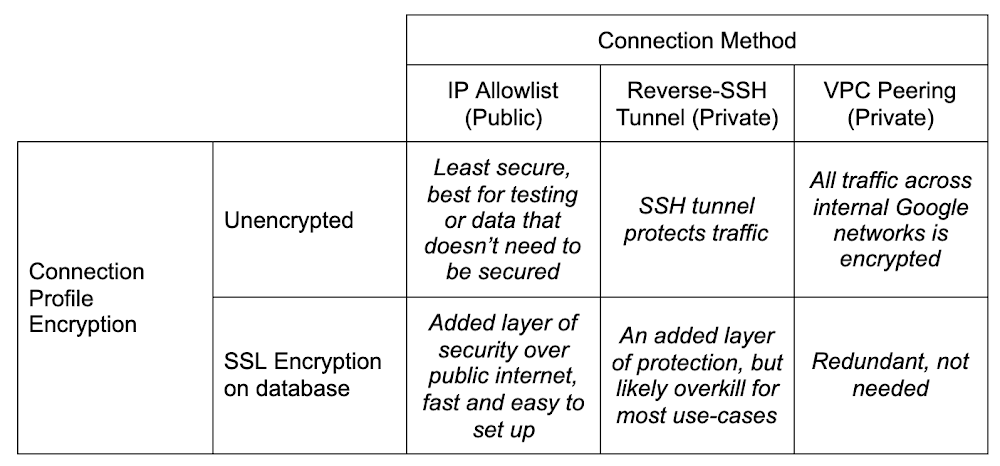
Hopefully you’ve already heard about a new product we’ve released: Database Migration Service (DMS). If you haven’t, you should check out the announcement blog. TL;DR, the idea is to make migrating your databases reliably into a fully managed Cloud SQL instance as easy and secure as possible.I’ll be talking a lot about MySQL (available in preview) and PostgreSQL (available in preview by request, follow this link to sign up) in this post. I’m not leaving SQL Server out in the cold, it’s just that as of the writing of this blog, DMS doesn’t yet support SQL Server, but it will! Look for an announcement for support a bit later on.So, you’ve got a database you want to move into the Cloud. Or perhaps it’s in the Cloud, but it’s not managed by Cloud SQL (yet). Let’s chat a bit, shall we?There’s lots of work that goes into making the decision to migrate, and preparing your application for its data store’s migration. This post assumes you’ve made the decision to migrate, you’re evaluating (or have evaluated and are ready to go with) DMS to do it, and you’re prepared to get your  application all set to cut over and point to the shiny new Cloud SQL instance once the database migration is complete.What I want to talk to you about today is connectivity. I know, I know, it’s always DNS. But, on the off chance it’s not DNS? Let’s talk. DMS guides you through the process with several knobs you can turn to fit how you manage the connection between your source and the managed Cloud SQL database in a way that satisfies your org’s security policy.Before I go too far down the connectivity rabbit hole, I want to call out that there are things that you’ll need to do and think about before you get here. You’ll want to think about preparing your database and application for migration, and understand the next steps once the migration with DMS is complete. Be on the lookout for a few other blogs that cover these topics in depth. One in particular which covers homogenous migration best practices segues nicely into my next section…Pre-emptive troubleshootingCouple pieces that are super important for prep that I want to also call out here, because they will cause a failure if you miss them. They are covered in depth in the blog I linked to just above, and are presented in the DMS UI as required configuration for migration, but they are important enough to repeat!Server_id configIf you’re migrating MySQL (I might have hit this a few times, and by a few I mean lots), don’t forget to change your source database’s server_id. The TL;DR is when you set up replicas, each database has to have a different server_id. You can change it a few different ways. You can start the mysqld process with the –server-id=# flag if you’re starting it by hand, or via script. You can connect to the db with a client and run SET GLOBAL server_id=#, but note if you do this, you have to remember to re-do this each time the server resets. And lastly, you can set in a my.cnf file:Bind-address configOne other big thing to watch out for, which I hit a couple times as well, is the bind-address for your database. Again, this is covered in more detail in the other posts, but to fix it (and note you should be careful here as it can be a security risk) you need to change it in your configuration from the default (at least for MySQL) from 127.0.0.1 to 0.0.0.0. This is what opens it wide to allow connections from everywhere, not just local connections. You can also try to be more targeted and just put the IP address of the created Cloud SQL database, but the exact IP address can be a bit hard to pin down. Cloud SQL doesn’t guarantee outgoing IP addresses, so specifying the current one may not work.For both server_id and bind-address, don’t forget if you’re changing the configuration files you need to restart the database service so the changes take effect.Connectivity options and setupDMS has a matrix of how you can connect your source database to the new Cloud SQL instance created in the migration setup. Choose the method that best fits where your source database lives, your organization’s security policy, and your migration requirements. As you can see, most of the decisions come down to how secure you need to be. Consider, for example, that using the IP allowlist method means poking a hole in your network’s firewall for incoming traffic. This might not be possible depending on your company’s security policies. Let’s dive in.DMS Connection ProfilesWhen defining your source, you create a connection profile that defines the information used to connect to the source database you are migrating from. These connection profiles are standalone resources, so once you’ve created one, you can re-use it in future migrations. A use case for re-use might be something like, as a step towards sharding your database, you might want to migrate the same database to multiple target Cloud SQL instances that would live behind a proxy or load balancer of some sort. Then you could pare down each individual instance to only the sharded data you want in each one, rather than trying to be careful to only pull out the sharded data from the main instance.Connection profiles are made up of the following components: The source database engine, a name and ID, connection information for the database itself (host, port, username, password) and whether or not you want to enforce SSL encryption for the connection. Everything’s straight forward here except the SSL connectivity, which can be confusing if you’re not familiar with SSL configurations. DMS supports either no encryption, server-only encryption, or server-client encryption. The documentation on this is good for explaining this bit!Short version: Server-only tells the Cloud to verify your source database, and server-client tells both to verify each other. Best practice is of course to always encrypt and verify. If you’re really just playing, and don’t want to deal with generating SSL keys, then sure, don’t encrypt. But if this is at all production data, or sensitive data in any way, especially if you’re connecting with public connectivity, please please be sure to encrypt and verify.When you do want to, the hardest part here is generating and using the right keys. DMS uses x509 formatted SSL keys. Information on generating and securing instances with SSL, if you haven’t done it before, can be found here for MySQL and here for PostgreSQL. Either way, you’ll need to be sure to get your keys ready as part of your migration prep. On MySQL for example, you can run mysql_ssl_rsa_setup to get your instance’s keys, and it’ll spit out a bunch:If, like me, you’re relatively new to setting up SSL against a server, you can test to be sure you’ve set it up correctly by using a client to connect via SSL. For example, for MySQL you can do:  mysql -u root -h localhost –ssl-ca=ca.pem –ssl-cert=client-cert.pem –ssl-key=client-key.pem –ssl-mode=REQUIRED -p to force testing if your keys are correct.I had a bit of difficulty uploading the right formatted key using the upload fields. It complained about improperly formatted x509 keys, despite me confirming that I had (or least I THOUGHT I was sure, I am not an SSL expert by any stretch of the imagination) wrapped them correctly. The solution for me, if you’re getting the same errors, was to simply switch from uploading the key files to manually entering them, and copy/pasting the contents of the key into the fields. That worked like a charm!Okay, so now that we’re covered on the source side, time to talk about the different methods we can use to connect between the source and the soon-to-be-created Cloud SQL instance.Creating the destination is straightforward in that you’re specifying a Cloud SQL instance. DMS handles all the pieces setting up the replication and preparing it to be receiving the data. The one thing to look out for is connectivity method. If you use IP allowlist, you need to have Public IP set for connectivity on the Cloud SQL instance, and for Reverse-SSH and VPC peering, you need to have Private IP set. And if you’re using VPC peering, be sure to put the Cloud SQL instance into the same VPC as the GCE instance where your source database lives. Don’t worry, if you forget to select the right setting or change your mind, DMS will update the Cloud SQL instance settings when you choose your connectivity setting.As I outlined above, there are three different ways you can bridge the gap: IP allowlist, Reverse-SSH tunnel, and VPC peering. Really this decision comes down to one consideration: how secure you’re required to be. Maybe because of some industry regulations, internal policies, or just needing to be secure because of the data involved in the database.Note here before we get into specifics… one of the hardest parts about migrating a database (to me), whether that is on your home machine playing around, or it’s on a server on-prem at your office’s server room, or in some other cloud, is creating a network path between all the various firewalls, routers, machines and the Internet. I was stuck here for longer than I care to admit before I realized that I not only had a router I had to forward ports between so it knew how to find my local database, but I ALSO had a firewall on my modem/router that sits between the internet and my internal switch which I had failed to ALSO forward through. So word to the wise, triple check each hop on your network that it’s correctly forwarding from the outside. If you have a network expert handy to help, they can even help create the connection profile for you to use later!IP allowlistIP allowlisting is, by an order of magnitude, the simplest method of connecting the two points. When creating your Cloud SQL instance as part of migration setup, you’re going to add an authorized network pointing at the IP address of your source database and conversely, you need to open a hole in your own firewall to allow Cloud SQL to talk to your source database. In my case, running a local database meant searching whatsmyip, and copying the IP into the authorized network in the Cloud SQL creation. And the other direction was I created a port forward on my firewall for traffic from the Cloud SQL outgoing IP address, which DMS gave me on the connectivity step (but I could have also copied from the Cloud SQL instance’s details page), to my local database’s machine, and away we went. There aren’t any special gotchas with this method that I’ve encountered beyond what I mentioned above about making sure to check your network topology for anything stopping the route from getting through to your database.IP allowlist is the least secure of the three connectivity methods. I’m not saying that it’s inherently insecure. As long as you’re still using SSL encryption, you’ll probably find it’s still plenty secure for your normal use-cases. Just compared to the reverse-SSH tunnel, or using a VPC peering, it’s going to be less secure. It’s all relative!Reverse-SSH tunnel via cloud-hosted VMNext in the secure spectrum is going to be reverse-SSH tunneling. If you haven’t used this before, or don’t know what it is, I really liked this person’s answer on stack exchange. It’s a good, thorough explanation that makes it easy to understand what’s going on. Short version, think of it as a literal tunnel that gets built between your source database network, a virtual machine instance in Google Compute Engine, and the Cloud SQL instance that you’re migrating to. This tunnel shields your traffic from the internet it travels through.Alright, so with this method, we have an added component: The virtual machine that we use as the connector piece of our SSH tunnel. This brings with it an added layer of fun complexity! For the most part, the creation of this is handled for you by DMS. When you choose Reverse-SSH as your connectivity method in the UI, you have the option of using an existing VM, or creating one. Either way, a script will be generated for you that when run from a machine that has access to your source database, will set up the VM in such a way that it can successfully be used as the SSH tunnel target.As with all things automated, there’s a few gotchas here that can happen and cause some rather hard to diagnose blocks. Things I hit to watch out for:VM_ZONE The UI is pretty good about this now, but beware that if somehow you manage to get to viewing the VM setup script before the Cloud SQL instance completes setup first (and creating a Cloud SQL instance can take up to about five minutes sometimes), then a variable in the script will not get set properly: VM_ZONE.It won’t have the right zone there, and you’ll have to fill it in, and/or re-hit the “View Script” button once the Cloud SQL instance creation finishes to have it filled in.Machine typeAs of the writing of this blog, this hasn’t been fixed yet, but the VM_MACHINE_TYPE is also the wrong variable if you left the machine type dropdown as the default. The variable will be set to db-n1-standard-1 in the script, when it should be n1-standard-1. That will fail to create the VM.Server IDTriple check that if you’re migrating MySQL that your server_id is set to non-zero. I know, I said it before. I may or may not have forgotten at this step and lost some time because of it. Just sayin’.The script also immediately establishes the reverse tunnel in the background with this line:gcloud compute ssh “${VM_NAME}” –zone=”${VM_ZONE}” –project=”${PROJECT_ID}” — -f -N -R “${VM_PORT}:${SOURCE_DB_LOCAL_IP}:${SOURCE_DB_LOCAL_PORT}”Heads up, this script will run something in the background on the machine you run it on. That -f in the above command is what causes it to be in the background. I’m not a fan of things running in the background, mostly because then I have to remember to stop it if it’s not something I want running all the time. In this case, if I’m doing multiple migrations it could get confused about which tunnel should be used, or some other edge case. So for me, I stripped this command out of the script, ran it to generate the VM, then ran this command without the -f in a terminal, substituting the values from the script variables.So, run the script (even though I didn’t leave the background command in there, it’s fine if you’re comfortable with it, just don’t forget that you did). Once you do, in the output from the script, you’ll see a line like:  echo “VM instance ‘${VM_NAME} created with private ip ${private_ip}”. That IP address you need to put in the field VM server IP in the DMS migration step 4.So, remember when I said network connectivity can be a challenge? I wasn’t kidding. Now we have another layer of complexity with the virtual machine. By default, Google Compute Engine virtual machines are very locked down by a firewall (Security!!! It’s good that they are even if it makes our life more complicated). In order for reverse-SSH to work, we need to open a pinhole to our VM to communicate with the Cloud SQL instance we’ve created, even across the internal network. To do this, we need to create a new firewall rule.First things first, we want to keep things as locked down as we can. Towards that end, head over to the details page for the virtual machine you just created. The list of VMs are here. Edit your VM, and scroll down to find the network tags section:This allows you to pinpoint JUST this instance with your firewall rules. The tag can be anything, but remember what you use for the next step.Head on over to the firewall area of the console. It’s under Networking -> VPC network -> Firewall. Or just click here. Create a new firewall rule. Give it a name, and if you’re using a different VPC for your migration than the default one, be sure you pick the right one in the Network dropdown menu. Then in the Targets field, leave it on Specified target tags and in the field below, put the same tag that you added to your VM. Now, for the source filter, we have a bit of an oddity.Let me explain. Traffic comes from Cloud SQL through the tunnel back to your source to ensure connectivity. You can look back up at the diagram at the beginning of this section to see what it looks like.This means that Cloud SQL is going to try to get through the firewall to the VM, which is why we need to do this. There’s a catch here. The IP address you see for Cloud SQL, which you might think is what you need to put into the IP range filter for our firewall, is NOT in fact, the IP address that Cloud SQL uses for outgoing traffic. What this causes is a situation where we don’t know the IP address we need to filter on here. Cloud SQL doesn’t guarantee a static address for outgoing Cloud SQL traffic.So to solve for this, we need to allow the whole block of IP addresses that Cloud SQL uses. Do this by putting 10.121.1.0/24 in the Source IP ranges field. This is unfortunately a necessary evil. To lock it down further though, if you’re feeling nervous about doing this (they’re internal IPs so it’s really not that bad), you can, in the Protocols and ports section of your firewall, only allow tcp for the default port for your db engine (3306 for MySQL or 5432 for PostgreSQL). So the firewall will only allow traffic from that internal range of IPs, and only on the port of your db engine, and only for that one VM that we created.That’s it for the firewall, go ahead and hit Create. We should now, in theory, be all set to go! If you didn’t run the actual command to setup the tunnel in the script, then run it now; this is the command were talking about: gcloud compute ssh “${VM_NAME}” –zone=”${VM_ZONE}” –project=”${PROJECT_ID}” — -N -R “${VM_PORT}:${SOURCE_DB_LOCAL_IP}:${SOURCE_DB_LOCAL_PORT}”Once that’s going, you’re good to hit Configure & Continue and on to testing the job! Presuming all the stars align and the network gods favor you, hitting “Test Job” should result in a successful test, and you’re good to migrate!VPC PeeringPHEW, okay. Two methods down, one to go.VPC peering is, similarly to IP allowlist, very straightforward as long as you don’t forget the fundamentals I mentioned up above. Server_id, being sure your source database has its bind-address set to allow connections from the target, etc.There’s two scenarios (probably more, but two main ones) where you’d want to use VPC peering:Your source database is running in Google Cloud already, like on a Compute Engine instance.You’ve set up some networking to peer your source database’s network to the Google Cloud network using something like Cloud VPN or Cloud Interconnect.There is yet another deep rabbit hole to be had with peering external networks into GCP. In some cases it involves routing hardware in regions, considerations around cost versus throughput, etc. It’s a bit beyond the scope of this blog post because of the combinations possible, which often bring with them very specific requirements, and this blog post would end up being a novella. So for now, I’m going to gloss over it and just say it’s definitely possible to join your external network to Google Cloud’s internal one and use VPC peering to do a migration that way. In our documentation there’s a page that talks about it with an example if you want to dig in a bit more here.A more traditional usage of the VPC peering, however, is when you’ve got a database running on Compute Engine and want to switch to the more managed solution of Cloud SQL. There are several reasons why you might have originally wanted to be running your database on Compute Engine. A particular flag you were relying on that wasn’t mutable on Cloud SQL, or a version of MySQL or PostgreSQL you needed that wasn’t available yet, and many more.Whatever the reason you have it on GCE, now you’d like it managed on Cloud SQL, and VPC peering is the way to go. Here you’ll need to double-check the config settings on your database to be sure it’s ready as I’ve mentioned before. When creating your source connection profile, the IP address will be the GCE VM’s internal IP, not external IP (keep things inside the private network). You’ll need the firewall setup same as I described with the reverse-SSH tunnel. Note, that when you’re using VPC, the IP address of the Cloud SQL instance that you need to allow into your GCE instance won’t be the standard Cloud SQL range (10.121.1.0/24) because it will have been allocated an IP range in the VPC instead. So you’ll want to head over to the Cloud SQL instances page and grab the internal IP address of the read replica that’s there. If you don’t see the instance you created in the DMS destination step, or if the internal IP address isn’t specified, it might just not have been created yet. It does take a few minutes. Last piece is just make sure that whatever VPC you want this to happen in, all the pieces need to be in the same network. Your Cloud SQL destination you created, and the GCE instance holding your source database. Which means you might need to move them both into a new VPC first if that’s what you want. There’s definitely nothing wrong with doing it in the default VPC, BUT note if this is a very old project, then you may have a legacy default VPC. If you do, this won’t work and you will need to create a new VPC to do the migration.1) Logging. There’s two places which can help here. In the details of your GCE instance that’s hosting your database, or the hosting machine for the reverse-SSH tunnel, there’s a link for Cloud Logging.Clicking on that takes you straight to Logging filtered on that GCE’s entries. Then the second place is on the VPC network’s subnet you’re using. You can go here and then click on the zone that your GCE instance lives on, edit it, and turn on Flow Logs. Once you’ve done that, you can re-try the migration test and then check the logs to see if anything looks suspicious.2) Connectivity Tests. I hadn’t known about this until I was working with DMS, and it’s very handy. It lets you specify two different IP addresses (source and destination), a port you want to look at (MySQL 3306, PostgreSQL 5432), and it will give you a topology that shows you what hops it took to get from point a to point b, which firewall rules were applied to allow or deny the traffic. It’s super fun. You can go straight to it in the console here to play with it. It does require the Network Management API to be enabled to work with it.ConclusionThat’s it! Hopefully I’ve covered the basics here for you on how to get your source database connected to DMS in order to get your database migrated over to Cloud SQL. There’s some pieces to handle once you’ve finished the migration and we have an upcoming blog post to cover those loose ends as well.If you have any questions, suggestions or complaints, please reach out to me on Twitter, my DMs are open! Thanks for reading.Related ArticleAccelerating cloud migrations with the new Database Migration ServiceThe new Database Migration Service lets you perform a homogeneous migration to managed cloud databases like Cloud SQL for MySQL.Read Article
Quelle: Google Cloud Platform

Supporting the next generation of Startups

At Google Cloud, we’re committed to helping organizations at every stage of their journey build with cloud technology, infrastructure, and solutions. For startups, the cloud provides a critical foundation for the future, and can help early-stage businesses not only spin up key services quickly, but also prepare for the bursts of growth they will experience along the journey.Supporting innovative startup businesses is a part of Google’s DNA, and I am excited to join Google Cloud to help every startup—from the earliest days of product-market fit to mature companies with multiple funding rounds under their belts—tap into Google Cloud’s unique capabilities. I’ve spent much of my career in the startup ecosystem, including as a founder and early team member at several successful startups, and I’m thrilled to join Google Cloud to help startups take advantage of Google Cloud’s capabilities. We believe that our products and technology offer startups incredibly strong value, ease-of-use, and reliability. And our AI/ML capabilities, analytics, and collaboration tools have become critical tools for helping startups grow and succeed. My role is to help ensure we match the resources and support of Google Cloud to the right startups, at the right time in their journeys. With that in mind, I want to share more about our vision for helping startups and founders build the next generation of technology businesses on Google Cloud. We’re excited to roll out several new priorities for our startups program in 2021, including: Continuing our support for all early-stage startups, with new offerings specific to their stage to ensure they can get up and running quickly with Google Cloud.Enabling our teams to engage more deeply with select high potential startups and their associated investors, to ensure we’re providing a better overall experience, including hands-on help with Google Cloud products, expertise, and support.More closely aligning our offerings to the stage of a startup’s growth, including helping to connect founders and their teams with the resources that will have the biggest impact depending on the stage of their journey.Expanding resources and support to later-stage startups, including support from our sales and partner teams, increased access to Google Cloud credits, free Google Workspace accounts, go-to-market support, training and workshops, and mentorship from Googlers.Continuing to focus on diversity and inclusion internally and across the broader startup community, including our work with the Black Founders Fund, Google for Startups Accelerator: Women Founders, and other initiatives.To date, we’ve supported thousands of startups around the world grow their businesses with Google Cloud, such as:Sesame, a startup focused on simplifying how patients receive healthcare, which used Google Cloud to ramp up its capacity for telehealth during the global COVID-19 pandemic. Sesame was able to dramatically expand its platform, ultimately scaling to help patients in 35 U.S. states see a doctor, virtually.MyCujoo, a business launched in The Netherlands, which provides a scalable platform for live streaming football competitions around the world, at all levels. The team at MyCujoo is using Google Cloud to power its video and community platform.doc.ai, which has developed a digital health platform that leverages cloud AI and ML capabilities to help users develop personal health insights and predictive models and get a precise view of their health.I’m tremendously excited about the opportunity we have to support the next generation of high-growth companies through our program for startups, and look forward to supporting visionary founders and teams around the world.To learn more and to sign up to join us at cloud.google.com/startups.Related ArticleIDC study shows Google Cloud Platform helps SMBs accelerate business growth with 222% ROIA new IDC study found that Google Cloud SMB customers can achieve a 222% return on their investment over three years with an average annu…Read Article
Quelle: Google Cloud Platform

Announcing our new Professional Machine Learning Engineer certification

Machine learning (ML) is becoming an integral part of how organizations are run with more than two-thirds of businesses around the globe already using ML. However, finding employees with the right ML skills is one of the top concerns for IT leaders in 2020. To help address this skills shortage, we’re offering the Google Cloud Professional Machine Learning Engineer certification. Now, cloud professionals can become industry recognized and demonstrate to employers their expertise in designing, building, and productionizing ML models to solve business challenges. Feedback from the launch of the exam has been positive. Brian O’Connor, Director of Data Science at Pandera Systems, earned the Google Cloud Professional Machine Learning Engineer certification earlier this year as a part of the exam’s beta phase and specifically found the exam’s integration of machine learning operations (MLOps) as a marker that Google Cloud’s certification has its finger on the pulse of where the future of ML is headed. “There’s a very high demand for the right tools and skills for MLOps, and Google Cloud is ahead of that curve by offering the necessary MLOps tools and training, “ said Brian. “Most corporations have data science teams who are successful at building ML algorithms to solve a problem. However, they’re currently having difficulties integrating those ML algorithms into their existing processes and infrastructure,” he said. O’Connor expects MLOps to be a big trend in the future of data science just as DevOps became a massive trend for development teams years ago. Why get the Google Cloud Professional Machine Learning Engineer certification?Google Cloud certifications have measurable impact on careers and businesses. According to an independent third-party research organization, 87% of Google Cloud certified individuals are more confident in their cloud skills. Moreover, 71% of Google Cloud certified individuals report that becoming certified enabled or will enable their employer to get more business, increase work with existing customers, or help scale up their business. The Machine Learning Engineer certification exam is a two-hour exam which assesses individuals’ ability to frame ML problems, develop ML models, and architect ML solutions. It also evaluates abilities to automate ML pipelines, orchestrate ML pipelines, prepare data, process data, as well as monitor, optimize, and maintain ML solutions. We recommend you have at least three years of industry experience, including one year of experience designing and managing solutions using Google Cloud before taking the exam.How to prepare for the Google Cloud Professional Machine Learning Engineer certification examThe certification exam is thorough and some of the material covered may be new to those interested in earning a Professional Machine Learning Engineer certification. We recommend studying Google Cloud documentation, reviewing sample exam questions, and getting plenty of hands-on experience while preparing for the exam. You can explore labs on Qwiklabs and other course offerings in our ML learning path to gain more hands-on ML experience on Google Cloud.  Start getting more hands-on ML system development and operations experience byattendingour November 20 webinar. If you want to learn more about the Professional Machine Learning Engineer certification,sign upfor our prep webinar on November 19 to hear from Lak Lakshmanan, Google Cloud’s Head of Data Analytics and AI Solutions, review sample exam questions, and more.Related ArticlePrepare for Google Cloud certification with one free month of new Professional Certificates on CourseraTrain for Google Cloud certifications with one free month of Professional Certificates on CourseraRead Article
Quelle: Google Cloud Platform

Google Cloud CEO Thomas Kurian to kick off first-ever Public Sector Summit—Dec 8

TheGoogle Cloud Public Sector Summit is less than a month away, Dec. 8-9, and we have a fantastic lineup of stellar speakers that you will not want to miss! Register now at no cost.Google Cloud CEO Thomas Kurian will kick things off during our opening keynote, reflecting on the public sector’s impressive ability over the last year to transform quickly and collaborate more broadly than ever before. Then, we’ll welcome Mike Daniels, Google Cloud’s vice president of global public sector, who will share important updates and lessons learned from a year of unprecedented challenges and achievements , and look ahead to the future of service delivery and experiences in the digital world. You definitely won’t want to miss this keynote, where we will share real-world stories of public sector innovation and highlight how Google Cloud supports the unique requirements of government organizations, educational institutions, and researchers.After the keynote, you’ll want to tune in for two days of interactive content, featuring thought-provoking panels, keynotes, customer success stories, and more. We’re especially excited to welcome more than 40 Google Cloud public sector customers to the virtual stage. Their candid stories and experiences will showcase the creativity and innovation they are using to tackle some of the world’s toughest challenges.Session topics will cover critical issues including:Applying AI to overcome limitations. Hear how the City of Toronto, Upper Grand School District (Ontario, Canada), DoD Joint AI Center, and the Illinois Department of Employment Security are using AI to scale up, and be more efficient and productive.Prioritizing student success. Partners like Jenzabar and Strategic Education are leveraging analytics and machine learning to improve learning environments for better student outcomes. Delivering benefits to citizens faster. Customers like the State of Illinois embraced virtual agents to scale response and support to citizens. Driving research outcomes. Partners like GDIT are working with Google Cloud to conduct data discovery at scale and help improve disease research in areas like breast cancer.We’re also pleased to offer a series of sessions focused on diversity, equity, and inclusion to help our public sector community lead with openness in the workplace, in the classroom and with citizen services. We will kick off day two of our event with a special keynote from Dr. Jennifer Eberhardt, author of Biased: Uncovering the Hidden Prejudice That Shapes What We See, Think and Do, who will walk us through how bias shows up in our lives and offer tools to help address it. Lastly, don’t miss our live Ask the Expert experience! Sign up to chat with a Google expert on one of these topics: Smart Analytics, Security, Infrastructure Modernization, Application Modernization, Productivity and Collaboration Artificial Intelligence, and Digital Transformation. Spaces will fill up, so don’t delay. The Google Cloud Public Sector Summit is a complimentary event, filled with opportunities to learn! Save your spot to be with us on December 8-9 –register today. If you have any questions about the event, please reach out to us at ps-summit-support@google.com.
Quelle: Google Cloud Platform

Health checking your gRPC servers on GKE

gRPC is a high-performance open source RPC framework under the Cloud Native Computing Foundation. gRPC is a frequently preferred method for creating microservices among GKE customers since it lets you build services that talk to each other efficiently, regardless of the implementation language of the client and the server.However, Kubernetes does not support gRPC health checks natively. To address this, we have developed and released an open source project called grpc-health-probe, a command-line tool to assess health of a gRPC server that has been downloaded over 1.8 million times.In this article, we will discuss the need for a custom-built tool for health-checking gRPC servers running on Kubernetes clusters such as Kubernetes Engine.The case for gRPC health checking on KubernetesSince Kubernetes runs microservices and gRPC is a popular choice for microservices communication (and gRPC and Kubernetes both are CNCF projects), you might think Kubernetes natively supports gRPC protocol for health checking. However, that’s not the case.Kubernetes natively supports some health check methods to assert readiness or liveness of a Pod:TCP socket openHTTP GET requestexecuting a binary inside the containerDespite the fact that gRPC primarily uses HTTP/2 stack as its transport layer, it’s not possible to craft a gRPC request using Kubernetes “httpGet” probe. Therefore, it was proposed to Kubernetes to add gRPC health checks. However, the current position is to maintain an equal stance towards other RPC frameworks such as Apache Thrift and not support any of these natively in Kubernetes health checks.As a result, Kubernetes does not support gRPC health checks natively for the time being and you need to use a custom-built tool (or write your own).What does “health” mean for a gRPC server?Typically at Google, we have a set of well-known endpoints on every microservice called z-pages (such as /healthz) that helps us standardize health checking across the fleet, among other things. However, there’s no such single well-known health check endpoint that comes with all gRPC servers.To address this, the gRPC core offers a Health Checking Protocol that’s distributed with all gRPC language implementations. All you need to implement this protocol is to register this health service to your server, and implement the rpc Check(HealthCheckRequest) returns (HealthCheckResponse) method to reflect your service’s status.Providing an implementation of this protocol in your gRPC service adds a /grpc.health.v1.Health/Check  path to your service that an external tool (or potentially Kubernetes itself) can query to figure out whether your server is healthy or not.Meet grpc_health_probeTo address the problems listed above, we have released a small open source command-line utility called grpc_health_probe that uses the gRPC Health Checking Protocol to query the health of a service, print its status and exit with a success or error code indicating the check result.grpc_health_probe has been downloaded over 1.8 million times and is used in production at many companies using gRPC in part of their stack, including Google.Running this command-line probe tool with a healthy server will show its status and return a zero status code, indicating success:$ grpc_health_probe -addr localhost:5000status: SERVINGHowever, a misbehaving server, such as a frozen one might return a different response and exit with a non-zero exit code:$ grpc_health_probe -addr localhost:5000 -dial-timeout 100mstimeout: failed to connect service “localhost:10000″ within 100ms(exit code 2)grpc_health_probe is designed primarily for Kubernetes. You integrate it to your health checks by making use of exec probes that execute the binary in your container’s Linux namespace periodically. This means that the probe can query the gRPC server running over the loopback interface (i.e. localhost).As a result, integrating grpc_health_probe to your Kubernetes manifests requires you to bundle the binary in your gRPC server’s container image and configuring an “exec” probe in your manifests such as:ConclusionDespite Kubernetes not supporting a native way to health-checking gRPC servers, it can be done simply by bundling a standard probe tool in your container image and invoking it via exec probes.Not surprisingly, this approach works for health checking on other Kubernetes-based compute environments such as Knative (and therefore on Cloud Run for Anthos) as well.Alternative to executing a probe binary, you can implement your own /healthz endpoint using vanilla HTTP within the same server process and use Kubernetes httpGet probe. Some languages like Go make this easier, while others might not. For that scenario, you can develop a sidecar container running a vanilla HTTP server that queries the gRPC server in the same pod, and use httpGet probe with that.If you are interested in reading more about the reasoning that led to creation of the grpc-health-probe project, make sure to check out the reading links below and I’m always happy to chat about this topic, so find me on Twitter.Further reading:Kubernetes Blog: Health checking gRPC servers on Kubernetesgrpc-health-probe on GitHubgRPC health checking protocolRelated ArticleAPI design: Understanding gRPC, OpenAPI and REST and when to use themWhen designing a modern API, learn when to use RPC (gRPC), OpenAPI or REST.Read Article
Quelle: Google Cloud Platform

Forbes embraces MongoDB on Google Cloud as part of digital-first strategy

It’s often said that success is more about the journey than it is about your destination. But for a modern tech organization, just the opposite is true. Every technology journey gets judged by its outcome: Does it contribute something of value to the business?The emergence of cloud-based managed services didn’t change the importance of this question for IT organizations. But the cloud has challenged IT to rethink which technology choices truly create business value—and which ones today aren’t as compelling as they used to be.Database systems are a great example of how this process is playing out for many IT organizations. The care and feeding of an on-premises database is one of the most expensive, demanding, and unforgiving IT functions. A typical enterprise will dedicate a small army of database administrators, along with a good part of its server, storage, network, and disaster recovery infrastructure, to keep business-critical data stores available and secure.Modern database systems, including MongoDB, have been a big step forward—giving businesses a more flexible, scalable, and developer-friendly alternative to legacy relational databases. But there’s an even bigger payoff with a solution such as MongoDB Atlas: a fully managed, database-as-a-service (DBaaS) offering. It’s an approach that gives businesses all of the advantages of a modern, scalable, highly available database, while freeing IT to focus on high-value activities.Forbes and MongoDB Atlas: rising to the challenge of record-setting growthForbes is one example of what’s possible when a tech organization executes a growth strategy that integrates a DBaaS solution with a cloud-native application architecture—in this case, migrating from self-managed MongoDB to MongoDB Atlas running on Google Cloud. Forbes was one of the first media brands to launch a web presence, and its team was already contending with a long run of record-breaking growth. In May 2020 alone, the company attracted more than 120 million unique visitors to Forbes.com. At the same time, however, Forbes was tasked with driving an aggressive growth and innovation strategy that included seven new online newsletters and an array of new services for both readers and journalists.Forbes’ decision to migrate from its on-premises MongoDB deployment to MongoDB Atlas database running on Google Cloud was crucial to hitting its business technology goals. By adopting a cloud-native architecture, Forbes could also implement an intermediate abstraction layer that placed a stable API on top of the database. This allowed more freedom and flexibility to work with changing data structures while minimizing the risk of breaking the services that use the data. In addition, by pairing MongoDB Atlas with Google Cloud, Forbes could build its digital products on a reliable and highly scalable infrastructure—one that can seamlessly handle both upward and downward spikes in traffic, without the cost and complexity of overprovisioning.And by adopting a fully managed DBaaS, Forbes got out from under the immense burden of managing, scaling, and securing an on-premises system. Resources the company had devoted to running database systems and infrastructure were now free to focus entirely on delivering high-value projects that drove growth and elevated the Forbes reader experience. “We did not want to be in the database management business,” said Forbes CTO Vadim Supitskiy. “We were now abstracted enough to focus solely on value delivery.”Forbes’ decision to run MongoDB Atlas on Google Cloud yielded other important benefits. The company’s application architecture, for example, relied on Kubernetes to orchestrate more than 50 microservices, which made Google Kubernetes Engine (GKE) a key source of IT value. Forbes unlocked additional value via integrations with other pieces of the Google Cloud software ecosystem, including its AI and machine learning capabilities; and with serverless applications built on App Engine that dramatically improved developer productivity and efficiency.For Forbes, the move to MongoDB Atlas on Google Cloud is already showing results: Release cycles for services have accelerated anywhere from 2x-10x, while total cost of ownership for its database system has dropped by 25%. And the company’s newly launched newsletters drove a 92% increase in overall newsletter subscriptions during 2020—a critical metric for any brand, and one that can be hard to push upward in a highly competitive industry.An example like Forbes provides a good starting point for understanding how MongoDB Atlas and Google Cloud can create value for your IT organization when assessing DBaaS offerings on various cloud platforms.Sizing up your database-as-a-service options: 4 key questions1. Who is managing a database service, and how will they add value to an offering? Look around online, and you’ll find a number of vendors with cloud offerings that look, at first glance, very similar to MongoDB Atlas. Some of these actually use MongoDB, but they may or may not offer the latest version with the most complete capabilities. Other vendors don’t actually use MongoDB but rather attempt to emulate it—and their efforts may fall short in unpredictable ways.What’s unique about MongoDB Atlas is the fact that it’s built, supported, and maintained by the core MongoDB engineering team. There’s tremendous value in getting database support directly from MongoDB engineers and consulting services from engineers with multiple years of MongoDB experience.MongoDB Atlas also holds a significant technology edge over third-party managed database services based on MongoDB. Compared to these competing offerings, for example, only MongoDB Atlas supports all MongoDB features with full application compatibility, or access to the latest MongoDB version, or even the most complete JSON data type support.2. Will a database service support a true cloud-native app strategy? In theory, moving your database to the cloud opens the doors to massive gains in performance, scalability, and innovation potential. In practice, not every managed database is equal in terms of being engineered and optimized as a cloud-native application.Keeping this in mind, there are five key areas where you should expect any cloud database, including MongoDB Atlas, to offer a clear advantage over legacy database systems:Efficiency, including automated deployments and provisioning, setup and maintenance, and version upgrades.Performance, with on-demand scaling and real-time performance insights.Mission-critical reliability, including distributed fault tolerance and backup options.Security, with controls and features that meet current protocols and compliance standards.Productivity, with drivers, integrations, and native tools that keep developers focused and engaged.3. Does a database service maximize your freedom and flexibility? Every cloud provider wants your business, but the reality is that many companies want the ability to deploy databases, services, and data stores across multi-cloud and hybrid cloud environments. MongoDB Atlas offers true multi-cloud capabilities, with easy portability between clouds. MongoDB also supports public cloud, private cloud, on-premises, and hybrid deployments with MongoDB Enterprise Advanced. This degree of multi-cloud support also means that MongoDB Atlas is available across a total of more than 70 public-cloud global regions—a high-value capability for companies with specialized data security, governance, or compliance requirements.4. How dependent is your business on your ability to provide a high-quality customer experience—anywhere, at any time? Adopting a truly global database infrastructure isn’t just about data security or disaster recovery. It’s also a major piece of the puzzle for businesses focused on global growth, especially in regions where digital businesses often create less-than-stellar customer experiences due to performance and latency issues.MongoDB Atlas addresses these types of performance issues with its use of global clusters—in essence, a cluster that includes different zones around the world to handle both reads and writes. By combining MongoDB Atlas with Google Cloud’s virtual private cloud capabilities, it becomes possible to build applications that offer in-region latency experiences for audiences almost anywhere in the world. And that’s an advantage with game-changing potential for any business aiming to build a loyal and satisfied global customer base.The goal: Getting the most from your cloud choicesThere’s tremendous value in migrating to a database service that frees up IT for projects that drive innovation and growth, and MongoDB Atlas meets that need. But questions like the ones above address the bigger challenge: choosing a DBaaS offering that truly taps into the full potential the cloud has to offer, and that leaves nothing off the table in terms of performance, growth, freedom, and flexibility. This is a much stricter and more difficult standard for any cloud application to meet, and it’s the reason why MongoDB Atlas and Google Cloud offer some important and unique advantages.Learn more about MongoDB Atlas on Google Cloud.Watch Vadim Supitskiy, Forbes’ CTO chat with Lena Smart, MongoDB CISO about how Forbes set digital innovation standards with MongoDB and Google Cloud.Related ArticleAnnouncing MongoDB Atlas free tier on GCPThe free tier offers a no-cost sandbox environment for MongoDB Atlas on GCP so you can test any potential MongoDB workloads and decide to…Read Article
Quelle: Google Cloud Platform

DORA and the shared pursuit of digital operational resilience in finance

If you are a financial entity in the European Union (EU), the new draft regulation from the European Commission on Digital Operational Resilience for the Financial Sector (DORA) is likely top of mind. DORA aims to consolidate and upgrade existing Information and Communications Technology (ICT) risk management requirements, and is also introducing a new framework for direct oversight of critical ICT service providers by financial regulators in the EU. Where the criteria are met, this would apply to cloud service providers like Google Cloud. It’s important to know that DORA is still in draft and is going through the legislative process. As of today, DORA doesn’t create any new requirements for financial entities or ICT service providers. Google Cloud is following the proposed regulation and is contributing to the collaborative dialogue that is shaping it to help DORA achieve the European Commission’s priorities.Enhancing the digital resilience of the European financial systemDORA addresses a number of important topics for financial entities using ICT services, with the objective of enhancing the digital resilience of the European financial system from incident reporting to operational resilience testing and third party risk management.Resilience and security are at the core of Google Cloud’s operations. We firmly believe that migration to the public cloud can help financial entities improve their operational resilience and security posture. These benefits have come into full view during the COVID-19 pandemic — our technology and infrastructure have continued to support our customers without shortfalls. At the same time, the oversight framework for critical third-party providers under DORA could create a genuine opportunity to enhance understanding, transparency, and trust among ICT service providers, financial entities, and financial regulators, and ultimately stimulate innovation in the financial sector in Europe. Google Cloud already supports our customers in many of the areas addressed in DORA: Incident reporting: To protect our customers’ data, Google Cloud runs an industry-leading information security operation that combines stringent processes, a world-class team, and multi-layered information security and privacy infrastructure. Our Data incident response whitepaper outlines Google Cloud approach to managing and responding to data incidents. Operational resilience and testing: Our global infrastructure, baseline controls, and security features offer strong tools that customers can use to achieve resilience on our services. We are also committed to open source standards. These solutions help customers control the availability of their workloads and run them wherever they want without being dependent on or locked into a single cloud provider. We also recognize that resilience must be tested. Google Cloud conducts our own rigorous testing, including penetration testing and disaster recovery testing, and empowers our customers to perform their own penetration testing. We also provide information about how customers can use our services in their disaster recovery planning in our Disaster Recovery Planning Guide. Third-party risk: We recognize that financial entities must consider outsourcing and third-party risk management requirements when using cloud services. Google Cloud’s contracts for financial entities in the EU address the contractual requirements in the EBA outsourcing guidelines and the EIOPA cloud outsourcing guidelines. We pay close attention as laws and regulatory expectations continue to evolve. Policy engagement on the new frameworkAs the conversation around DORA progresses, we will continue to lend our view and technology expertise to policymakers and industry in a transparent manner, in particular advocating for the following:Harmonization and deduplication of requirements, including between DORA and existing frameworks like the European Supervisory Authorities’ Outsourcing Guidelines and the NIS Directive.Requirements that are proportionate and fit-for-purpose, especially those that recognize the technological and operational realities of evolving ICT services in the cloud context.Technology neutrality and innovation, which we believe is always encouraged by open ecosystems and the free flow of data.An approach that would be consistent with a multi-tenant cloud environment and respect the security and integrity of our services for all customers, whether they are subject to DORA or not. We are committed to being a constructive voice as we engage with stakeholders on the proposal. Open dialogue and sharing expertise and best practices will be key to DORA’s effectiveness.
Quelle: Google Cloud Platform

Healthcare gets more productive with new industry-specific AI tools

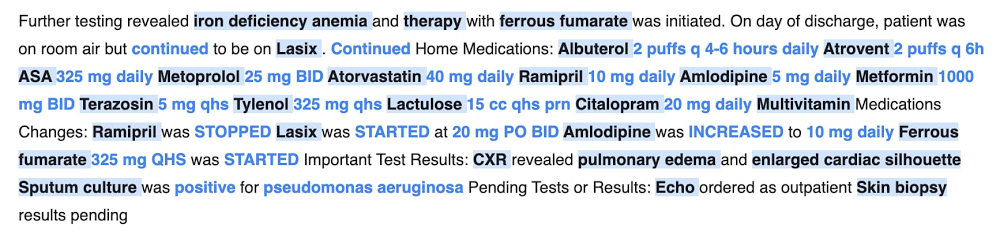
COVID-19 shined a light on the heroic efforts of front-line healthcare workers. But it also highlighted some of the challenges around managing healthcare data and interpreting unstructured digital text. For healthcare professionals, the process of reviewing and writing medical documents is incredibly labor-intensive. And the lack of intelligent, easy-to-use tools to assist with the unique requirements of medical documentation creates data capturing errors, a diminished patient-doctor experience, and physician burnout. Today, we are excited to launch in public preview a suite of fully-managed AI tools designed to help with these challenges: Healthcare Natural Language API and AutoML Entity Extraction for Healthcare. These tools assist healthcare professionals with the review and analysis of medical documents in a repeatable, scalable way. We hope this technology will help reduce workforce burnout and increase healthcare productivity, both in the back-office and in clinical practice. Healthcare Natural Language API enables auto summarization of medical insightsA significant pain point in the healthcare industry is that mission-critical medical knowledge is often stored in unstructured digital text—that is, content lacking metadata that can’t be mapped into standard database fields. For example, social determinants of health like substance abuse or physical activity, and follow-up recommendations such as medication amounts or behavior suggestions, often reside within the unstructured text of a medical record. The main path to accessing such information is a manual review of the medical document by the healthcare professional. With the Healthcare Natural Language API, enterprise customers can now better coordinate valuable medical insights that are captured in unstructured text, such as vaccinations or medications, that may be overlooked as patients move through their healthcare journeys. This solution can drive measurable outcomes by lowering the likelihood of redundant bloodwork or other tests, reducing operational spending, and improving the patient-doctor experience.How does it work? The Healthcare Natural Language API identifies medical insights in documents, automatically extracting knowledge about medical procedures, medications, body vitals, or medical conditions. By using machine learning, the API identifies clinically relevant attributes based on the surrounding context. For example, it discerns medications prescribed in the past from medications prescribed for the future and it picks up the likelihood of a specific symptom or diagnosis, as captured in language nuances. It can also distinguish medical insights that pertain to the patient from information that pertain to a patient’s relative.To facilitate analysis of medical insights at scale, the Healthcare Natural Language API automatically normalizes medical information against an industry-standard knowledge graph such as Medical Subject Headings (MeSH) or International Classification of Diseases (ICD). Human language is rich in concepts—often with overlapping meaning—yet analysis necessitates standardized data inputs. For example, the medical condition diabetes is commonly referred to as diabetes mellitus, while croup is also called laryngotracheobronchitis in specialist terms. With the Healthcare Natural Language API, similar medical information gets normalized into a standardized medical knowledge graph.Finally, the Healthcare Natural Language API enriches health applications that rely on the interpretation of unstructured digital text. For example, telehealth companies can deploy the Healthcare Natural Language API to identify the most relevant symptoms, pre-existing conditions, and medications from a doctor-patient transcribed conversation. Pharmaceutical and biotechnology customers may employ the Healthcare Natural Language API to optimize clinical trials by increasing the accuracy of patients matched against granular inclusion/exclusion protocol criteria. The Healthcare Natural Language API technology can also drive operational efficiencies in document-review workflows like Healthcare Effectiveness Data and Information Set (HEDIS) quality reporting or Hierarchical Condition Category (HCC) risk adjustment.AutoML Entity Extraction for Healthcare facilitates custom information extraction In addition to the Healthcare Natural Language API, we are launching AutoML Entity Extraction for Healthcare—an easy-to-use AI development platform that broadens access to AI across users with various technical backgrounds. AutoML Entity Extraction for Healthcare complements the coverage of insights available through the Healthcare Natural Language API.Healthcare professionals may not have the technical expertise on-hand to build their own tools for extracting information from digital documents. With AutoML Entity Extraction for Healthcare, we’ve made this much easier to do via a low-code interface, letting healthcare professionals build information extraction tools for gene mutations and socioeconomic factors, for example. AutoML Entity Extraction for Healthcare enriches digital health applications such as telemedicine, drug discovery, or clinical trials for rare diseases.To help customers get started with AutoML Entity Extraction for Healthcare, we are open-sourcing a set of annotation guidelines for medical text. We hope the community will contribute to the refinement and expansion of these guidelines to mirror the ever-evolving nature of healthcare.Accelerating impact through partnersTo help deliver these solutions to providers, payers, and life science companies nationwide, Google Cloud is partnering with a number of key solutions providers. SADA, a Google Cloud solutions provider, believes the new tools will be able to help healthcare customers implement medical analysis projects in days, not weeks. “The richest information about the health of a patient is typically not found within the structured fields of a medical record system. Instead, it is contained within the lengthy free-text notes that a clinician either types or dictates into the medical record in the course of care,” says Michael Ames, Sr. Director Healthcare and Life Sciences at SADA. “I’m very excited for the opportunities this suite of Healthcare Natural Language AI tools from Google Cloud will create.”What’s nextLearn more about getting started with the Healthcare Natural Language API, which is free-of-charge for the next 30 days, until December 10th, 2020. To get started with the public preview of AutoML Entity Extraction for Healthcare, see our step-by-step guide and check out our website, or contact sales for more information.Related ArticleRead Article
Quelle: Google Cloud Platform

Dataproc cooperative multi-tenancy

Data analysts run their BI workloads on Dataproc to generate dashboards, reports and insights. Diverse sets of Data analysts from various teams analyzing data to generate reports, dashboards and insights drive the need for multi-tenancy for Dataproc workloads. Today, workloads from all the users on the cluster runs as a single service account thereby every workload has the same data access. Dataproc Cooperative Multi-tenancy enables multiple users with distinct data accesses to run workloads on the same cluster. A Dataproc cluster usually runs the workloads as the cluster service account. Creating a Dataproc cluster with Dataproc Cooperative Multi-tenancy enables you to isolate user identities when running jobs that access Cloud Storage resources. The mapping of the  Cloud IAM user(s) to a service account is specified at cluster creation time and many service accounts can be configured for a given cluster. This means that interactions with Cloud Storage will be authenticated as a service account that is mapped to the user who submits the job, instead of the cluster service account.ConsiderationsDataproc Cooperative Multi-Tenancy has the following considerations:Setup the mapping of the Cloud IAM user to the service account by enabling the dataproc:dataproc.cooperative.multi-tenancy.user.mapping property. When a user submits a job to the cluster, the VM service account will impersonate the service account mapped to this user and interact with Cloud Storage as that service account, through the GCS connector.Requires GCS connector version to be at least 2.1.4.Does not support clusters with Kerberos enabled.Intended for jobs submitted through the Dataproc Jobs API only.ObjectivesWe intend to demonstrate the following objects as part of this blog.Create a Dataproc cluster with Dataproc Cooperative Multi-tenancy enabled.Submit jobs to the cluster with different user identities and observe different access rules applied  when interacting with Cloud Storage.Verify that interactions with Cloud Storage are authenticated with different service accounts, through StackDriver loggings.Before You BeginCreate a ProjectIn the Cloud Console, on the project selector page, select or create a Cloud project.Make sure that billing is enabled for your Google Cloud project. Learn how to confirm billing is enabled for your project.Enable the Dataproc API.Enable the StackDriver API.Install and initialize the Cloud SDK.Simulate a Second UserUsually, you have another user as a second user, however you can also simulate a second user by using a separate service account. Since you are going to submit jobs to the cluster by different users, you can activate a service account in your gcloud settings to simulate a second user.First, get your current activated account in gcloud. In most cases this would be your personal accountFIRST_USER=$(gcloud auth list –filter=status:ACTIVE –format=”value(account)”)Create a service account Grant the service account proper permissions to submit jobs to a Dataproc clusterCreate a key for the service account and use the key to activate it in gcloud. You can delete the key file after the service account is activated. Now if you run the following command:gcloud auth list –filter=status:ACTIVE –format=”value(account)”You will see this service account is the active account. In order to proceed with the examples below, switch back to your original active accountgcloud config set account ${FIRST_USER}Configure the Service AccountsCreate 3 additional service accounts, one as the Dataproc VM service account, and the other 2 as the service accounts mapped to users (user service accounts). Note: we recommend using a per-cluster VM service account and only allow it to impersonate user service accounts you intend to use on the specific cluster.Grant the iam.serviceAccountTokenCreator role to the VM service account on the two user service accounts, so it can impersonate them.AndGrant the dataproc.worker role to the VM service account so it can perform necessary jobs on the cluster VMs.Create Cloud Storage Resource and Configure Service AccountsCreate a bucketWrite a simple file to the bucket.echo “This is a simple file” | gsutil cp – gs://${BUCKET}/fileGrant only the first  user service account, USER_SA_ALLOW, admin access to the bucket.gsutil iam ch serviceAccount:${USER_SA_ALLOW}:admin gs://${BUCKET}Create a Cluster and Configure Service AccountsIn this example, we will map the user “FIRST_USER” (personal user) to the service account with GCS admin permissions, and the user “SECOND_USER” (simulated with as a service account) to the service account without GCS access.Note that cooperative multi-tenancy is only available in GCS connector from version 2.1.4 onwards. It is pre-installed on Dataproc image version 1.5.11 and up, but you can use the connectors initialization action to install a specific version of GCS connector on older Dataproc images.The VM service account needs to call the generateAccessToken API to fetch access token for the job service account, so make sure your cluster has the right scopes. In the example below I’ll just use the cloud-platform scope.Note: The user service accounts might need to have access to the config bucket associated with the cluster in order to run jobs, so make sure you grant the user service accounts access.2. On Dataproc clusters with 1.5+ images, by default, Spark and MapReduce history files are sent to the temp-bucket associated with the cluster, so you might want to grant the user service accounts access to this bucket.Run Example JobsRun a Spark job as “FIRST_USER”, and since the mapped service account has access to the GCS file gs://${BUCKET}/file, the job will succeed.And the job will succeed with output like:Now run the same job as “SECOND_USER”, and since the mapped service account has no access to the GCS file gs://${BUCKET}/file, the job will fail, and the driver output will show it is because of permission issues.And the job driver shows it is because the service account used does not have storage.get.access to the GCS file.Similarly for a Hive job (creating an external table in GCS, inserting records, then reading the records), when running the following as user “FIRST_USER”,It will succeed because the mapped  service account has access to the bucket <BUCKET>: However, when querying the table employeeas a different user “SECOND_USER”, the job will use the second user service account which has no access to the bucket, and the job will fail.Verify Service Accounts Authentication With Cloud Storage Through StackDriver LoggingFirst, check the usage of the first service account which has access to the bucket.Make sure the gcloud active account is your personal accountgcloud config set account ${FIRST_USER}Find logs about access to the bucket using the service account with GCS permissionsgcloud logging read “resource.type=”gcs_bucket” AND resource.labels.bucket_name=”${BUCKET}” AND protoPayload.authenticationInfo.principalEmail=”${USER_SA_ALLOW}””And we can see the results are that permissions are always granted:Checking the service account which has no access to the bucketAnd we see access permissions were never granted:And we can verify the VM service account was never directly used to access the bucket (the following gcloud command returns 0 log entries)gcloud logging read “resource.type=”gcs_bucket” AND resource.labels.bucket_name=”${BUCKET}” AND protoPayload.authenticationInfo.principalEmail=”${VM_SA}””CleanupDelete the clustergcloud dataproc clusters delete ${CLUSTER_NAME} –region ${REGION} –quietDelete the bucketgsutil rm -r gs://${BUCKET}Deactivate the service account used to simulate a second usergcloud auth revoke ${SECOND_USER}Delete the service accountsNoteThe cooperative multi-tenancy feature does not yet work on clusters with Kerberos enabled.Jobs submitted by users without service accounts mapped to them will fall back to use the VM service account when accessing GCS resources. However, you can set the `core:fs.gs.auth.impersonation.service.account`property to change the fallback service account. The VM service account will have to be able to call `generateAccessToken` to fetch access tokens for this fallback service account as well.This blog successfully demonstrates how you can use Dataproc Cooperative Multi-Tenancy to share Dataproc clusters across multiple users.Related ArticlePresto optional component now available on DataprocThe Presto query engine optional component is now available for Dataproc, Google Cloud’s fully managed Spark and Hadoop cluster service.Read Article
Quelle: Google Cloud Platform

The Cloud trust paradox: To trust cloud computing more, you need the ability to trust it less

At their core, many cloud security and, in fact, cloud computing discussions ultimately distill to trust. This concept of trust is much bigger than cyber security, and even bigger than a triad of security, privacy, and compliance.For example, trust may involve geopolitical matters focused on data residency and data sovereignty. At the same time, trust may even be about the emotional matters, something far removed from the digital domain of bits and bytes, going all the way to the entire society.In a decade since the rise of cloud computing, a lot of research has been generated on the topic of cloud trust. Today, the very concept of “using public cloud” is inseparably connected to “trusting your cloud provider.” One of the clear themes that emerged was that to be able to trust cloud computing, you need to be able to trust it less.A paradox? Not really! Imagine you have two choices:Trust a cloud provider that has a lot of well-designed data security controls.Trust a cloud provider that has a lot of well-designed data security controls and an ability to let you the customer hold the encryption key for all your data (without any ability of the provider to see the key).For sure, security, privacy and compliance controls contribute to trust in cloud computing in general and your cloud provider in particular. However, it is still easier to trust if you can trust less. Moreover, there is additional magic in this: I bet that simply knowing that your cloud provider is working in the direction of reducing the amount of trust you need to place in them will probably make you trust them more. This is true even if you don’t use all the trust-requirement-reducing features, such as Google Cloud External Key Manager that allows a customer to keep their key encryption keys on premises and to never have them come to Google Cloud, or Confidential VMs that encrypts the sensitive data during processing [a good read on this topic). Note that this logic applies even for cases where a public cloud environment is measurably more secure than an old on-premise environment—yet on-premises somehow feels more secure and hence more trusted.This means that building technologies that allow organizations to benefit from cloud computing, while decreasing the amount of trust they need to place into the provider controls (both technical and operational) is of huge importance. However, such technologies are not only about the notional trust benefits—let’s speak about specific threat models. To list a few, the threats that are addressed by this particular example of trust-requirement-reducing technology—our EKM. These are (in our opinion):Accidental loss of encryption keys by the provider (however this is unlikely) is mitigated by EKM; because the provider does not have the keys, it cannot lose them whether due to a bug, operational issue or any other reason.Along the same line, a misconfiguration of native cloud security controls can, in theory, lead to key disclosure. Keeping the key off the cloud and in the hands of a cloud customer will reliably prevent this (at the cost of a risk of key being lost by a client).A rogue provider employee scenario is also mitigated as said rogue employee cannot ever get access to the encryption key (this is also mitigated by a cloud HSM route)— admittedly, this is even more unlikely.Finally, if some entity requests that a provider surrender the keys to a particular client’s data, this becomes impossible because said keys are not in provider’s possession (here, we will leave this as an exercise to the reader to decide how unlikely that may be).Operationally, protections such as EKM make sense for a subset of sensitive data. For example, an organization may process sensitive data in the cloud, and only apply such trust reduction  (or, better: “trust externalization”) for some of the data that is truly the most sensitive.As we established, such trust-requirement-reducing technologies are not only about security threats. Their contribution to compliance is also significant: they can help meet any requirement for a cloud customer to maintain the possession of encryption keys and also to any mandate to separate keys from data.In fact, trust in the cloud is further enhanced by letting the customer have direct control over key access. Specifically, by retaining control of the keys, a cloud customer gains an ability to cut off cloud data processing by preventing key access. Again, this is important for both actual threats and security/trust signalling.Furthermore, here is an interesting edge case: you may trust your cloud provider, but not the country where they are located or under whose laws they operate. This is where trust again moves outside of the digital domain into a broader world. Our trust-requirement-reducing approach works here as well; after all, if nobody outside of a customer has the keys, nobody can compel any 3rd party (including a cloud provider) to reveal the keys and, hence, the sensitive data.Now, a trick question: won’t there be a challenge of needing to trust the provider to build the “trust reducing controls” correctly? Yes. However, we think there is a big difference between “just trust us” and “here is the specific technology we build to reduce trust; trust we built it correctly because of these reasons.” In other words, trust us because we let you trust us less.Finally, some thoughts to keep this going:Be aware that trust is much broader than security, compliance, and privacy.Keep in mind that it is easier to trust a cloud provider that enables you to trust them less.Specific threat models still matter—trust improvement alone probably won’t make people adopt new technologies.Watch this fun Google Cloud NEXT OnAir presentation on this topic.Finally, add “trust reduction” to your security arsenal: you can secure system components, sure, but you can also architect the system in such a way that you need to trust the components less. Win!
Quelle: Google Cloud Platform