Google Cloud, Harvard Global Public Health release improved COVID-19 Public Forecasts, share lessons learned

Harvard Global Health Institute and Google Cloud have been working the past three months to improve the COVID-19 Public Forecasts, to give first responders and healthcare organizations the best possible information to prepare for what lies ahead. These forecasts use AI to provide a projection of COVID-19 cases, deaths, and other metrics for U.S. counties and states. Since their original release, the COVID-19 Public Forecasts are now used by many organizations across the United States, and have been significantly improved in five major ways:1. Longer forecasts & confidence intervals. When initially launched, the COVID-19 Public Forecasts included predictions for 14 days in the future. They now include predictions for a 28-day horizon. Because predictions in general become more uncertain as they predict events further into the future, we have added confidence intervals to help users model that uncertainty.2. Improved model quality. A dedicated team has been continuously improving the model quality with cutting edge AI research. A white paper detailing some of these innovations was published in the machine learning conference, NeurIPS 2020. The model was one of the few to correctly forecast a surge in cases in October and November. The accuracy of the model has continuously improved over time and is retrained daily as more data becomes available. Since the forecasts were first published, we’ve seen the predictions improve by approximately 50%. “The COVID-19 Public Forecasts is an important public health tool for guiding the policy response to the COVID-19 pandemic. By providing an ‘early warning system’ of COVID-19 cases, hospitalizations, ICU admissions, ventilator utilization, and deaths, the COVID-19 Public Forecasts create the opportunity for public health officials and policymakers to move from a reactive to a proactive approach to suppress the pandemic,” said Dr. Thomas Tsai, MD, MPH, surgeon and health policy researcher at Harvard T.H. Chan School of Public Health. His research team is using the COVID-19 Public Forecasts to develop state and national testing targets to guide a testing strategy around screening of asymptomatic individuals to suppress the silent transmission of SARS-CoV-2.3. Ability to expand to other countries. We have added support for expanding the COVID-19 Public Forecasts to other countries, and today we are launching forecasts for Japan. As with the United States, these forecasts are free and based on public data such as the public COVID-19 Situation Report in Japan. The model predicts confirmed cases, deaths, recoveries, and hospitalizations, per day, and will look ahead 28 days into the future. Japan is made up of several prefectures and we offer these forecasts for each one. This information is available now on the Japan forecast dashboard. “We validated this COVID-19 forecast model for Japan from the academic perspective. The forecasts will be useful to professionals that understand the capabilities and constraints of the model, and will play a critical role for Japan’s public health and enhance our ability to understand and respond to the rapidly evolving COVID-19 pandemic. Coupled with other existing works such as Keio University’s COVID-19 response surveys partnering with Ministry of Health, Labour and Welfare and prefectures, this model will allow for more proactive and efficient public health interventions on a prefecture-by-prefecture basis,” said Prof. Miyata, Department of Health Policy and Management, School of Medicine, Keio University.4. Customized forecasts. Since the launch in August, we have worked with many organizations to better understand how these forecasts can help. In the process we have learned that many organizations have specific needs that go beyond just consuming our public forecast, such as wanting to use their own datasets as inputs. To that end, we have turned the initial forecasting model into a system that is customizable to new problems and datasets. We are working with public sector and healthcare leaders to help them create custom forecasts for their states and hospitals.5. What-if analysis for informing policy decisions. We have also seen significant interest in using the forecasting model to ask “what-if” questions to help make better-informed policy decisions. For example, you can see how the forecasts change in response to policy changes such as if non-pharmaceutical interventions (e.g. mask mandates) are introduced, reopening plans are changed, or vaccination policies are modified. To that end we have been developing a novel AI-driven what-if model to be used for COVID-19 and other infectious disease decision making. We hope that it will be helpful for organizations interested in doing vaccine rollout planning and other important decision making that may impact COVID-19 outcomes. If you or your organization are interested in exploring this tool, please contact us at COVID19-public-forecasts-feedback@google.com.Lessons learnedOver the course of the development of the COVID-19 forecasts, our team was faced with the risk of launching too quickly. On the one hand, the potential impact of more accurate and robust forecasts on the COVID-19 response was large, so launching quickly was important. However, we also needed to make sure that the quality was high enough to help inform decision makers as well as ensuring that it did not further any existing disparities through model bias. The following sections share some background about our journey leading up to the original launch of the COVID-19 Public Forecasts. Googlers across Alphabet came together in March and dove into literature to understand epidemiological forecasting, discover the best public datasets on which to train the model, build the infrastructure to train massive machine learning models, and design novel AI for time series forecasting. Over a hundred Googlers worked over many months to make sure the forecasts were robust, accurate, and fair.Combining cutting-edge machine learning with traditional epidemiological models. Most AI forecasting models learn from data, such as forecasting weather based on historical data. In contrast, most COVID-19 forecasting models do not learn from data but simulated spread according to human epidemiological assumptions. We designed a new kind of time series forecasting model that learns from both epidemiological human prior knowledge as well as data. Another significant challenge was to design systems that learn in a non-stationary environment: interventions such as mask and movement restrictions change frequently and sometimes in response to forecasts – progression of the disease influences public policy and individuals’ public behaviors and vice versa.Building on public Google Cloud products. From the beginning we knew that the tool we were creating would likely be shared broadly with the public and many organizations. That drove our decision to build this software on our public Google Cloud products, including Kubeflow pipeline, GCP hyper-parameter tuning, Kubernetes, BigQuery, Google Cloud Storage, and Cloud SQL. Using our own products helped us prepare our forecasts more quickly.Improving robustness of forecasts. To help make sure we were developing a useful forecast, we partnered with the Harvard Global Health Institute who guided us on how to maximize policy-making impact and ensure the forecasts would be useful to those who most needed it. Additionally, we partnered with a handful of early testers, including HCA Healthcare, to help us understand what should be forecasted, how it is formatted, and even test early versions of the forecasts. These efforts helped improve the forecasts before they were made available to the general public. We also brought in experts within Google with statistical and epidemiological expertise to ensure our work met the highest scientific standards. We designed a daily forecast launch process that first runs over 100 checks looking for any abnormalities, and we required a manual review for a qualitative analysis to check for issues. Every day our model training searches over hundreds of hyperparameter options, and the team works to ensure the best models reach our users.  Fair and equitable forecasts. It was important to us that the forecasts were reliable and robust. Given the disproportionate impact that COVID-19 has had on communities of color in the United States, we conducted a fairness analysis, looking at how both relative and absolute errors are different across various groups (particularly African American and Hispanic populations) and interpreting the results. We wrote up our findings in a public Fairness Analysis. We’re excited by what we were able to achieve in the eight months since this effort began, but more importantly, we’re proud of the people who have come together to make this small difference in the fight against the global pandemic and grateful for all of those on the front-lines saving lives, innovating, and bringing the world one step closer to returning to normal. If you have any questions about the COVID-19 Public Forecasts (g.co/covidforecast), customizations or what-if analysis, please contact us at COVID19-public-forecasts-feedback@google.com.Related ArticleGoogle Cloud AI and Harvard Global Health Institute Collaborate on new COVID-19 forecasting modelTo help first responders be better prepared for what lies ahead, Google Cloud is releasing the COVID-19 Public Forecasts.Read Article
Quelle: Google Cloud Platform

Turbocharge your software supply chain with Artifact Registry, now GA

As enterprises modernize their applications with improved software delivery processes, they face increasing challenges in managing their dependencies—the artifacts that make up their applications, deployed in accordance with security and compliance best practices. Today, we’re excited to announce that Artifact Registry is generally available. With support for container images, Maven, npm packages, and additional formats coming soon, Artifact Registry helps your organization benefit from scale, security, and standardization across your software supply chain. As the evolution of Google Container Registry, Artifact Registry is the single place to store container images as well as language and OS packages. As a fully managed platform, Artifact Registry helps you get total control of the software delivery process with numerous new features, including support for regional repositories, VPC service controls, granular per-repository access controls, and Customer Managed Encryption Keys (CMEK). It also offers built-in vulnerability scanning for container images and integrates with Binary Authorization, so you can enforce validation and define policies to ensure only verified images make it to production. Delivering software both fast and safely is an important goal of enterprise software development. Data from DevOps Research & Assessment (DORA) shows that there’s a vast gap between elite DevOps teams and everyone else in their ability to meet this goal. Artifact Registry brings together many of the best practices employed by elite DevOps teams so that any organization can deliver software at scale, reduce operational overhead, and free developers to focus on building differentiated value for customers. Swiss financial services provider Leonteq Securities is an early adopter of Artifact Registry, and reports that it has allowed them to streamline their software delivery process:“The migration from our on-prem registry to Artifact Registry has been a smooth experience. Artifact Registry builds upon Container Registry by providing us a single place to store, manage, secure, and share both Maven and Docker artifacts. And given Artifact Registry is fully serverless, unlike our on-prem registry, we never run out of space and pay for what we actually use.”  – Imants Firsts, Senior Software Engineer, Leonteq SecuritiesLet’s take a deeper look at the features you’ll find in Artifact Registry, and how to get started. Integrate security into your CI/CD pipelineArtifact Registry gives you the freedom to integrate with tools you use and love on a day-to-day basis. It is fully integrated with Cloud Build, Google Cloud’s CI/CD platform, automatically storing, managing, and securing any artifacts it creates. And with baked-in vulnerability scanning, container images are automatically scanned for OS package vulnerabilities. Artifact Registry is also integrated with Google Cloud runtimes such as Google Kubernetes Engine (GKE), Cloud Run, and Compute Engine. So whether you’re deploying to serverless, Kubernetes, or a Virtual Machine environment, Artifact Registry supports your DevOps processes. In addition, because Artifact Registry supports standard protocols, you can easily integrate it with popular CI/CD and security tooling. This enables you to benefit from Artifact Registry’s increased capabilities without having to change all of your existing CI/CD workflow and tooling. StackRox, Qualys, Palo Alto Networks, and Sysdig are early partners who have integrated and verified their tooling with Artifact Registry. StackRox is a Kubernetes-native container security platform that protects cloud-native applications across the entire software life cycle—from build, to deploy, to runtime—and delivers better security, accelerates development velocity, and lowers operational risks. Qualys container security, built on the Qualys Cloud platform, provides comprehensive inventory, security assessment and runtime defense capabilities for containers across the build-ship-run container lifecycle in your hybrid IT environment. Palo Alto Networks Prisma Cloud provides full-lifecycle, full-stack security for any cloud-native workload or application running on Google Cloud. Sysdig secures and monitors containers on Anthos with GKE and GKE On Prem. It provides deep visibility into the risk, health, and performance of cloud-native apps across public, hybrid, and multi-cloud deployments enabling secure and reliable software delivery.Artifact Registry: Evolution of Container Registry With more features, Artifact Registry builds upon the benefits already available in Container Registry. Following are just some of the benefits enterprises can get with Artifact Registry:*Some features are in pre-GA release stages. For full details please see Artifact Registry’s documentation.We’ll continue to develop Artifact Registry with even greater control and security features for both container and non-container artifacts. To take advantage of these improvements and additions, you can learn more about transitioning from Container Registry here. Try it today!With Artifact Registry, you now have an easy way to manage artifacts and improve security within your CI/CD pipeline. Here are more ways you can learn more about Artifact Registry:Artifact Registry for Java application development and deliveryIntro to Artifact RegistryDeploying from Artifact Registry to GKE
Quelle: Google Cloud Platform

The democratization of data and insights: Expanding Machine Learning Access

In the first blog in this series, we discussed how data availability, data access, and insight access have evolved over time, and what Google Cloud is doing today to help customers democratize the production of insights across organizational personas. In this blog we’ll discuss why artificial intelligence (AI) and machine learning (ML) are critical to generating insights in today’s world of big data, as well as what Google Cloud is doing to expand access to this powerful method of analysis.A report by McKinsey highlights the stakes at play: by 2030, companies that fully absorb AI could double their cash flow, while companies that don’t could see a 20% decline. ML and AI have traditionally been seen as the domain of experts and specialists with PhDs, so it’s no surprise that many business leaders frame their ML goals around HR challenges: creating new departments, hiring new employees, developing retaining programs for the existing workforce, and so on. But this isn’t the way it has to be. At Google Cloud, we’re focused not only on making the experts more efficient but also driving ML capabilities into the day-to-day work for anyone who works with data. For experts, the traditional ML audience, we’ve built an entire suite of tools. Our AI Platform makes it easy for them to rapidly iterate and turn ideas to deployment efficiently. Across ML teams, AI Hub makes it easier to collaborate with teammates to avoid duplicating work streams and get work done faster. Finally, TensorFlow Enterprise delivers supported and scalable TensorFlow in the cloud, directly from the leading contributors to the OSS project (us!). Making existing experts nimbler and faster helps them increase their output, which expands access to ML within an organization. However, to truly integrate ML throughout an entire organization, we need to create tools that more personas can use to drive actionable insights. Let’s take a look at what Google Cloud is doing to democratize ML across three key personas: data analysts, developers, and data engineers.Data AnalystsData analysts, as we mentioned in our first blog, are the data analytics backbone of many Fortune 500 companies. They’re experts within a data warehouse, very comfortable with SQL, and knowledgeable about the needs of the business. We knew that to drive ML capabilities to this persona, we would need to meet them where their expertise already was. That’s exactly what BigQuery ML does: it brings ML inside the data warehouse, and it’s deployed using just a few easy-to-use SQL statements—much more familiar to analysts than the Python, R, and Scala-reliant tools on which many data scientists rely. When combined with BigQuery’s ability to scale to larger data volumes than traditional enterprise data warehouses, BigQueryML gives data analysts the ability to drive ML across vast amounts of data to uncover previously unseen insights. There are a wide variety of available models within BigQuery that can help customers drive use cases as varied as recommendations, segmentation, anomaly detection, forecasting, and prediction. Further, if there’s a need for custom models, ML experts can build models to import into BigQuery, where analysts can use them at scale. We’ve seen customers in very different industries with very different use cases successfully deploy BigQuery ML. Telus has used ML to deploy anomaly detection that secures its network; UPS has used it to achieve precise package volume forecasting; Geotab is driving smarter cities by blending ML and geospatial analytics; and we’ve even seen BigQuery ML deployed to predict movie audiences. Beyond that, we see retailers predicting purchasing, financial services institutions determining insurance risk, and gaming companies forecasting long-term customer value. This analysis would have been impossible for data analysts to drive in the past. Today, it’s not only efficient, but it also has a very quick path to production.With the growing functionality of BigQuery ML, data-savvy team members have less need to also build expertise in transferring large amounts of data into and out of the BigQuery environment, and learning how to parallelize and scale data pipelines to handle deployment. By working directly in BigQuery for data cleaning, model training, and deployment, you can spend more time focused on understanding the data and delivering value from it, rather than moving it around. Daniel Lewis, Senior Data Scientist, R&D Specialist, GeotabDevelopersFor the developer audience, we’ve developed two different types of services that democratize ML and serve as “building blocks” in creating applications. The first is a set of pre-trained models that are easily accessible by APIs. These APIs tackle many common use cases around sight, language, conversation, and more. For models that require more specificity, such as  identifying all trucks of a particular make and model versus general identification of a truck, we offer AutoML custom models, which empower developers to build domain-specific customer models. These tools have enabled companies like Keller Williams, USA Today, PWC, AES Corporation, and more.With AutoML Vision, nearly half of our inspection images no longer need human review. Google is a great partner, because their technology is consistently among the world leaders. Nicholas Osborn, Director, AES Digital HubWhen it comes to building machine learning models at scale, AutoML Tables gives developers (as well as data scientists and analysts) the ability to automatically build and deploy ML models on structured data with incredible speed. A codeless interface not only makes it easy for anyone to build models and incorporate them into broader applications, but it also saves time, saves money, and increases the quality of deployed ML models. Using AutoML Tables, we’ve seen customers deliver marketing programs that delivered 150% more subscribers per dollar spent and user engagement at 140% of industry averages, all by communicating to the right user in the right place at the right time.Further, these ML APIs do more than enable application developers. For ETL developers using Cloud Data Fusion, it’s easy to integrate these APIs into your data integration pipelines to enhance and prepare analysis for downstream applications and users. ML is now as easy as point, click, drag, and drop.Data EngineersThe final persona in our discussion of ML democratization is the data engineer. It’s worth mentioning that all of the personas we’ve discussed benefit from the autoscaling nature of Google Cloud’s platform, which eliminates the need for time-intensive tuning and provisioning of infrastructure to run ML models. This work can disproportionately fall to data engineers (or can turn data scientists into de facto data engineers as they try to productionize their models).We’ve worked to embed ML capabilities in both buckets of data engineering we see at Google: the Dataproc-oriented open source path, as well as the cloud-native Dataflow path. Let’s examine both.For open source adherents and those familiar with Hadoop and Spark environments, we make it easy to run SparkML jobs that you may be comfortable building, or have previously built. We have an easy-to-run Quicklab that can introduce you to the concept of ML with Spark on Dataproc, and you can try that out with free credits. We also give customers the ability to build custom OSS clusters on custom machines – and do it fast – to bring GPU-powered ML to our customers. Together with features announced earlier this year, Dataproc users can now quickly deploy ML leverage easy-to-use notebooks, schedule cluster deletion, and more.For data engineers using Dataflow, Google Cloud has made it easy to use Tensorflow Extended (TFX) to build and manage ML workflows in production. Working through Apache Beam (Dataflow’s SDK), this integration yields a toolkit for building ML pipelines, a set of standard components you can use as a part of a pipeline or ML training script, and libraries for the base functionality of many standard components. Our solutions teams are working to make this even easier, releasing common patterns like anomaly detection, which telco customers are putting to use for cybersecurity while banks use it to detect financial fraud. Wrapping upBringing ML capabilities to this broad set of new personas democratizes the most important aspect of big data: generating insights that help businesses drive predictions, new customer segments, recommendations, or more. The deeper insights provided by ML are going to become more and more critical to business success, which means the businesses that succeed are going to be the ones that can deploy ML and artificial intelligence widely. At Google, we know the best ideas tend to bubble up rather than get pushed down. When your full organization has access to both data and the tools to analyze the data, you’re ready for whatever comes next. If you’d like to give machine learning a try today, the BigQuery sandbox is a great (and free!) place to get started trying out BigQuery ML.Having discussed the importance of democratizing data, insights, and ML, our next blog will address how to take advantage of these insights in real-time—a critical piece of delighting customers and staying ahead of the competition.
Quelle: Google Cloud Platform

Introducing the Anthos Developer Sandbox—free with a Google account

Your colleagues in IT operations talk about needing a platform that can run a wide variety of apps: new or existing, running on Linux or Windows, long-running or serverless, capable of rapidly scaling up and down according to demand. Anthos is Google Cloud’s answer to these requirements for hybrid and multi-cloud. With Anthos, you not only get to choose how your apps will run but also where the runtimes are located—on-prem, in Google Cloud or in another cloud provider. But that may leave you wondering, “So what does it actually look like to develop on top of Anthos?”Today, we’re excited to launch the Anthos Developer Sandbox, giving you an easy way to learn how to develop on Anthos. With only a few minutes of your time you can get a developer-focused overview of Anthos. Better yet, the Anthos Developer Sandbox is available at no cost, to anyone with a Google account! You don’t need to be a Google Cloud customer, you don’t need to have billing enabled, and you don’t need the help of your IT department to experience Anthos first hand—simply click the button below to get started with the guided flow and then use the Sandbox to create and iterate on your own applications.The Anthos Developer Sandbox includes the following tools, plus a guided flow for learning how to use each of them:Cloud Shell Editor – A development workstation in the cloud. Announced last month and available on ide.cloud.google.com, Cloud Shell Editor makes it easy to deploy cloud-native apps from an in-browser IDE, powered by the Eclipse Theia IDE platform and including all the underlying tools you need.Cloud Code – A set of IDE enhancements that bring you the tools you need for modern cloud-native development like Skaffold and Minikube, and provides an idiomatic and consistent development experience.Cloud Build Local – A tool for running Cloud Build builds locally, without needing an active Google Cloud Platform project.With these three components you have everything you need to iterate on, debug, and test your own applications before deploying to Anthos. Once you have finished experimenting, the Anthos Developer Sandbox cleans up all of the related resources for you. The Anthos Developer Sandbox doesn’t incur any fees as it’s wholly encapsulated in the Cloud Shell free-to-use environment.Cloud Shell Editor (pictured) all within your web-browser.Regardless of which runtime you choose, the Anthos Developer Sandbox guides you to perform common day-to-day development tasks with Anthos, including:Running an application with Cloud Code in a local development environment for Kubernetes that emulates Anthos clustersUsing Cloud Build to run your tests locallyIterating on your application with live updates as you developUsing Buildpacks to simplify your application image creation without needing DockerfilesDeploying your app to the Cloud Run Emulator, which provides a similar experience to Cloud Run for AnthosThe Anthos Developer Sandbox shows you the tools you can use to build an idiomatic developer experience on top Anthos’ container-based runtimes like GKE and Cloud Run. Although we’re focused on developer tasks with this Sandbox, operators may also be interested in Anthos capabilities such as the embedded service mesh and GitOps-style configuration management in the full platform. These capabilities are a good follow on step from the Sandbox. After you’ve completed the Anthos Developer Sandbox guided walkthrough, you can adapt the process to deploy one of your own applications. The following tutorials will help you learn and improve your development experience with Anthos:Deploy to Cloud Run for Anthos on Google Cloud Deploying internal services using Cloud Run for Anthos on Google Cloud Safe rollouts with Anthos Config Management With the Anthos Developer Sandbox, we’re excited to show off the great developer tools that we’ve created for you, and we look forward to helping you have an even more streamlined and productive developer experience. Let us know how you like the Anthos Developer Sandbox by joining the #anthos channel of our Community Slack!
Quelle: Google Cloud Platform

It’s not DNS: Ensuring high availability in a hybrid cloud environment

Our customers have multi-faceted requirements around DNS forwarding, especially if they have multiple VPCs that connect to multiple on-prem locations. As we discussed in an earlier blog post, we recommend that customers utilize a hub-and-spoke model, which helps get around reverse routing challenges due to the usage of the Google DNS proxy range.But in some configurations, this approach can introduce a single point of failure (SPOF) within the hub network, and if there are connectivity issues within your deployment, it could cause an outage in all your VPC networks. In this post, we’ll discuss some redundancy mechanisms you can employ to ensure that Cloud DNS is always available to handle your DNS requests.Figure 1.1 – A non-redundant hub and spoke DNS architectureAdding redundancy to the hub-and-spoke modelIf you need a redundant hub-and-spoke model, consider a model where the DNS-forwarding VPC network spans multiple Google Cloud regions, and where each region has a separate path (via interconnect or other means) to the on-prem network. In the image below, VPC Network H spans us-west1 and us-east1 and each region has a dedicated Interconnect to the customer’s on-prem network. The other VPC networks are then peered with the hub network.Figure 1.2 – A highly available hub-and-spoke architectureThis scenario provides highly available DNS capabilities, allowing the VPC to egress queries out of either interconnect path, and allowing return queries to return via either interconnect path. The outbound request path always leaves Google Cloud via the nearest interconnect location to where the request originated (unless a failure occurred, at which point it uses the other interconnect path). Note, while Cloud DNS will always route the request back to on-prem through the interconnect closest to the region, the responses back from the on-prem network to Google Cloud will depend on your WAN routing. In cases with equal cost routing in place, you may see asymmetric routing behaviors on the return responses, which take a different path than the way they went, and may introduce additional resolution latencies in some cases. Alternative DNS setupsA highly available hub-and-spoke model isn’t an option for all companies, though. Some organizations’ IP address space consists of a mixture of address blocks across many locations. This often happens to companies as a result of a merger or acquisition, which can make it difficult to set up a clean geo-based DNS. Let’s look at a different DNS setup and how customers may have to adapt for failures of the DNS stack.To understand the problem, consider the case of a Google Cloud customer that was managing U.S. East Coast DNS resolvers for East Coast-based VPCs, and U.S. West Coast resolvers for West Coast-based VPCs, in order to reduce latency for DNS queries. The challenge arose when it came time to build out redundancy. Specifically the customer wanted a third set of resolvers to provide backup for both east and west coast resolvers in the event of a failure of either of the resolvers.  Unfortunately, a setup like Figure 1.3 could cause issues in a failure scenario.Figure 1.3 – Multiple Hub and Spokes With a Single Set Of Backup DNS ResolversIn this setup, the failure of the West Coast DNS resolvers would result in traffic being forwarded to the backup servers running in the central US, with the source IP addresses for these DNS requests corresponding to Google Cloud’s DNS proxy server address range (35.199.192.0/19). But because there are two VPCs and the WAN sees two different routes to get back to the Google Cloud DNS proxy server address range, it would typically route the return requests back via the closest link advertising the Google Cloud DNS proxy IP range. In this case, that would be the east coast interconnect. And because the east coast interconnect connected to a different VPC than originated the request, the response would be dropped by the Google Cloud DNS proxies (since the Virtual Network ID (VNID) of the return packets would be different from the VNID for the east coast VPC). The problem herein lies with the routing and subnet advertisements, not the DNS layer itself.  So the question becomes, how do you support network topologies with multiple VPCs and DNS resolvers while still providing HA DNS resolvers on-premise?One approach is to proxy the DNS request as shown in Figure 1.4 below. By forwarding all DNS requests to a proxy setup within the VPC (or even within a specific subnet, depending on your desired granularity), you end up with VPC-specific IP addresses making it easy for the on-prem infrastructure to correctly send their responses back to the correct VPC. This also simplifies on-prem firewall configurations because you no longer need to open them up for Google’s DNS proxy IP range. Since you can specify multiple IP addresses for DNS forwarding, you can run multiple proxy VMs for additional proxy redundancy and further bolster your availability.Figure 1.4 – Insertion of Proxy VM For HA DNS ConfigurationHighly available DNS: the devil is in the detailsDNS is a critical capability for any enterprise, but setting up highly available DNS architectures can be complex. It’s easy to build a highly redundant DNS stack that can handle many failure scenarios, but overlook the underlying routing until something fails and DNS queries are unable to resolve. When designing a DNS architecture for a hybrid environment, be sure to take a deep look at your underlying infrastructure, and think through how failure scenarios will impact DNS query resolution. To learn more about designing highly available architectures in Google Cloud, check out our patterns for resilient and scalable apps.Related ArticleUnderstanding forwarding, peering, and private zones in Cloud DNSCloud DNS private zones, peering, and logging and auditing enhance security and manageability of your private GCP DNS environment.Read Article
Quelle: Google Cloud Platform

Best practices for homogeneous database migrations

Migrating applications to Google Cloud is most effective when you’re migrating their backing database or databases to Google Cloud as well. The result is improved performance, lowered cost, and ease of management and operations.To make these migrations easier, we’ve announced the new Database Migration Service (DMS), an easy-to-use, serverless migration tool that provides minimal downtime database migration to Cloud SQL for MySQL (in preview) and Cloud SQL for PostgreSQL (in private preview—sign up here).DMS currently focuses on homogeneous migrations—that is, migrations across compatible database engines, which don’t require transformations such as schema conversion from source to destination. In this case, the goal of the migration is for the migrated database to be as close as possible to a copy of the source database, available in the Cloud SQL destination.This blog outlines the best practices of homogeneous database migration to Cloud SQL for MySQL, and how DMS enables a secure, straightforward database migration experience. The Database Migration Service advantageDMS supports homogeneous database migrations as a serverless service. By utilizing the database engine’s own native replication technology, DMS supports continuous replication from source to destination. This ensures the databases are constantly in sync, with maximum fidelity of data being transferred. You can cut over to use your application with your new Cloud SQL instance with minimal downtime.DMS makes database migration simple and reliable with a few key capabilities:Guided, validated setup flow. The migration job creation flow uniquely features built-in source configuration guidance and secure connectivity support (see screenshot below), to ease the highest complexity portions of migration setup. Within the flow, setup and configuration are validated to ensure that the database migration is set up to succeed.Modularity and reuse of connection profile. The connection to the source database is specified separately, so you can reuse it throughout the definition, testing, and execution phases without requiring the user to re-enter configuration values. This also enables separation of ownership between teams, separating who defines the connection and who executes the migration.Monitored, native migrations. DMS utilizes the open source database’s own native replication technologies to ensure a reliable, high-fidelity migration. Running migrations can be monitored via UI and API, including tracking any migration delay (see second screenshot below).Automatic management of migration resources. As a serverless service, any required migration resources are automatically managed by DMS. No resources have to be provisioned or managed by the user, and migration-specific resources never need to be monitored.DMS’s user interface provides a structured process for migration job creation:DMS provides status and monitoring visibility:Using Database Migration Service for your migration journeyHere, we’ll go through the phases of an overall database migration journey, with guidance on how to leverage DMS in the process.Assessment and planningThe goal of the assessment phase of a database migration is to collect and review the source databases that have been identified as candidates for migration to Google Cloud. The subsequent planning phase then creates an overall migration plan, including tasks for the implementation of migration jobs, their testing, and the actual migration of the production databases, including database promotion and application cutover.For this post, we’ll focus on migrating the database with DMS, and not the applications that access it. Find more details on application migrations in the Migration to Google Cloud Solution.Source database assessmentIn the common case of database migration, several databases are migrated in a coordinated wave, since applications can depend on more than one data source, or they may be interrelated. The first step for such a process is to collect all databases that are in the scope of a wave of database migrations. For each database, decide if it’s a homogeneous migration to the same, compatible database engine in Google Cloud, and therefore a good fit for the current capabilities of DMS. The most important aspects for analysis are:Prerequisites.To migrate a database, it has to fulfill specific prerequisites: Namely, specific source database configuration needs to be performed (for example, enabling binary logging), and preparing network connectivity that suits the security posture and requirements of the organization. You can meet these requirements by changing the source configuration and network setup from within the Database Migration Service in order to streamline the process and simplify the migration setup.Size. Determine the database size, since this will provide input to planning the migration timeline: The larger the database, the more time it will take to migrate the initial snapshot and test the migration as part of the move to Google Cloud in production.The following discussion focuses on a single database for simplicity. In the case of migrating several databases, all migration-related tasks can be performed in parallel for each of the databases.Database migration planningThe goal of planning a database migration is to create a list of all the necessary tasks that will ensure a successful migration and production promotion. A timeline-based project plan will indicate the time and the order of the various tasks. Their duration often depends on the size of the database, especially in the case of testing and migration tasks, as well as other factors like team availability and application usage.If multiple databases are migrated in waves, a staggered overall migration plan is a good approach. In order to gain experience with DMS and the database migration process, it is a good practice to start with smaller, less mission-critical databases.The basic elements of a migration plan for a single database are:Migration timeline. A timeline with start and projected end dates will specify the overall duration. It contains all the tasks that have to be accomplished.Preparation tasks. Preparation tasks determine the size of the database and confirm that all prerequisites are met (as indicated above). This should also include any changes that have to be made to the source database in preparation for migration.Execution tasks. These tasks implement the DMS migration job. Information about preparation details as well as migration job creation details are provided in the user interface as a one-stop shop for all required knowledge and background.Testing. One of the most important tasks is to test the migration in context of a proof of concept. This can be done only for the initial databases as you gain migration experience, or for every migrated database. A test migrates the database to Google Cloud completely and performs validation, while not yet moving the production application workload to Google Cloud. The goal of testing is to verify that the migration of the database and moving production to Google Cloud will be successful. The application is thoroughly tested against the migrated database. In addition, it’s frequently part of the process to spot-test expected queries against the migrated database to ensure consistency.Final migration and promotion. The date and time has to be set and communicated for the production migration, generally when the application usage is low, for the application to experience downtime. At that point, the DMS migration job is executed. Once the continuous migration has caught up so that the lag between the source and Cloud SQL is minimal, the database can be promoted and the application can be cut over. The application is shut down, and any pending changes are migrated by the DMS to Cloud SQL. Promotion of the Cloud SQL instance is initiated, any outstanding validation is performed, and the application is cut over and restarted to run against the new Cloud SQL instance.Database tuning. Once the application is running in Google Cloud and working against the new Cloud SQL instance, you can tune the database to further improve performance.Migration planning is a detailed and multi-step process. While most frequently a migration will run without a hitch, it’s generally good practice to plan for contingencies in case of additional time required for debugging (such as for establishing connectivity) or if a migration may need to be restarted.Implementation, testing, execution, cutoverAfter assessment and planning is completed, implementation, testing migration and cutover can commence.ImplementationThe implementation consists of three resources that correspond to the systems involved.Source connection profile. Define a connection profile that represents the connectivity info of the source database, which will be used in the migration job. Note that migrations are frequently initiated directly against the primary database, but in the cases where the primary is load-sensitive, or many DDLs run on it, it’s preferable to connect to a read replica. Destination database. The destination Cloud SQL instance is created during the flow of migration job creation, and a connection profile is automatically created for it in the back end when the instance is created to provide the destination of the migration job.Migration job. The migration job is specified either through the user interface (see screenshot above for an overview of the user interface flow) or using the API, utilizing the created connection profiles. If you use the user interface, you can copy the configuration values that you entered in case you need those again for another migration job specification. Most importantly, use the job testing feature as part of migration job creation to ensure a complete and consistent migration job implementation.Limitations: Currently the Database Migration Service does not migrate MySQL user management and permission management to the destination database. Users and permissions need to be manually set in the new Cloud SQL instance, and this can be done as soon as the destination database has been created. Learn more about migration limitations.After the implementation is completed, you can begin testing.Migration testingTesting is a very important aspect of database migration to ensure that all aspects of the migration are taken care of, including application migration and application testing.The best practice is to begin by running a migration job entirely for testing purposes. Start a migration job, and after the migration job enters the continuous replication (CDC) phase with minimal lag, promote the destination database and use it for testing the application in Google Cloud to ensure expected performance and results. If any error occurs during the migration testing, analyze it and make the required changes, either to the source database or to the migration job. If a change was made, run a complete test again to ensure expected results.Production migrationOnce testing is completed, you can migrate the production database and application. At this point you need to finalize the day and time of production migration. Ideally, there is low application use at this time. In addition, all stakeholders that need to be involved should be available and ready.Once the production migration starts, it requires close monitoring to ensure that it goes smoothly. The monitoring user interface in DMS is important during this phase to ensure replication lag is low at the time of promotion.Once the migration is completed, validate that the destination database is complete and consistent in order to support the application.Database and application cutoverIt is a best practice to create a backup of the destination database as a consistent starting point for the new primary database before connecting any application.Once you take the backup, promote the Cloud SQL database to be the new primary going forward. Cut over all dependent applications to access the new primary database, and open up the applications for production usage.Once the application starts running on Cloud SQL, monitor the database performance closely to see if performance tuning is required. Since the application has never run before on Cloud SQL, there may be tuning options available that could optimize application performance, as shown here and here.What’s nextReview the DMS Documentation Try out DMS in the Google Cloud console. It’s available at no additional charge for native lift-and-shift migrations to Cloud SQLRelated ArticleAccelerating cloud migrations with the new Database Migration ServiceThe new Database Migration Service lets you perform a homogeneous migration to managed cloud databases like Cloud SQL for MySQL.Read Article
Quelle: Google Cloud Platform

Supporting the next generation of startups

At Google Cloud, we’re committed to helping organizations at every stage of their journey build with cloud technology, infrastructure, and solutions. For startups, the cloud provides a critical foundation for the future, and can help early-stage businesses not only spin up key services quickly, but also prepare for the bursts of growth they will experience along the journey.Supporting innovative startup businesses is a part of Google’s DNA, and I am excited to join Google Cloud to help every startup—from the earliest days of product-market fit to mature companies with multiple funding rounds under their belts—tap into Google Cloud’s unique capabilities. I’ve spent much of my career in the startup ecosystem, including as a founder and early team member at several successful startups, and I’m thrilled to join Google Cloud to help startups take advantage of Google Cloud’s capabilities. We believe that our products and technology offer startups incredibly strong value, ease-of-use, and reliability. And our AI/ML capabilities, analytics, and collaboration tools have become critical tools for helping startups grow and succeed. My role is to help ensure we match the resources and support of Google Cloud to the right startups, at the right time in their journeys. With that in mind, I want to share more about our vision for helping startups and founders build the next generation of technology businesses on Google Cloud. We’re excited to roll out several new priorities for our startups program in 2021, including: Continuing our support for all early-stage startups, with new offerings specific to their stage to ensure they can get up and running quickly with Google Cloud.Enabling our teams to engage more deeply with select high potential startups and their associated investors, to ensure we’re providing a better overall experience, including hands-on help with Google Cloud products, expertise, and support.More closely aligning our offerings to the stage of a startup’s growth, including helping to connect founders and their teams with the resources that will have the biggest impact depending on the stage of their journey.Expanding resources and support to later-stage startups, including support from our sales and partner teams, increased access to Google Cloud credits, free Google Workspace accounts, go-to-market support, training and workshops, and mentorship from Googlers.Continuing to focus on diversity and inclusion internally and across the broader startup community, including our work with the Black Founders Fund, Google for Startups Accelerator: Women Founders, and other initiatives.To date, we’ve supported thousands of startups around the world grow their businesses with Google Cloud, such as:Sesame, a startup focused on simplifying how patients receive healthcare, which used Google Cloud to ramp up its capacity for telehealth during the global COVID-19 pandemic. Sesame was able to dramatically expand its platform, ultimately scaling to help patients in 35 U.S. states see a doctor, virtually.MyCujoo, a business launched in The Netherlands, which provides a scalable platform for live streaming football competitions around the world, at all levels. The team at MyCujoo is using Google Cloud to power its video and community platform.doc.ai, which has developed a digital health platform that leverages cloud AI and ML capabilities to help users develop personal health insights and predictive models and get a precise view of their health.I’m tremendously excited about the opportunity we have to support the next generation of high-growth companies through our program for startups, and look forward to supporting visionary founders and teams around the world.To learn more and to sign up to join us at cloud.google.com/startups.Related ArticleIDC study shows Google Cloud Platform helps SMBs accelerate business growth with 222% ROIA new IDC study found that Google Cloud SMB customers can achieve a 222% return on their investment over three years with an average annu…Read Article
Quelle: Google Cloud Platform

BigQuery Explained: Data Manipulation (DML)

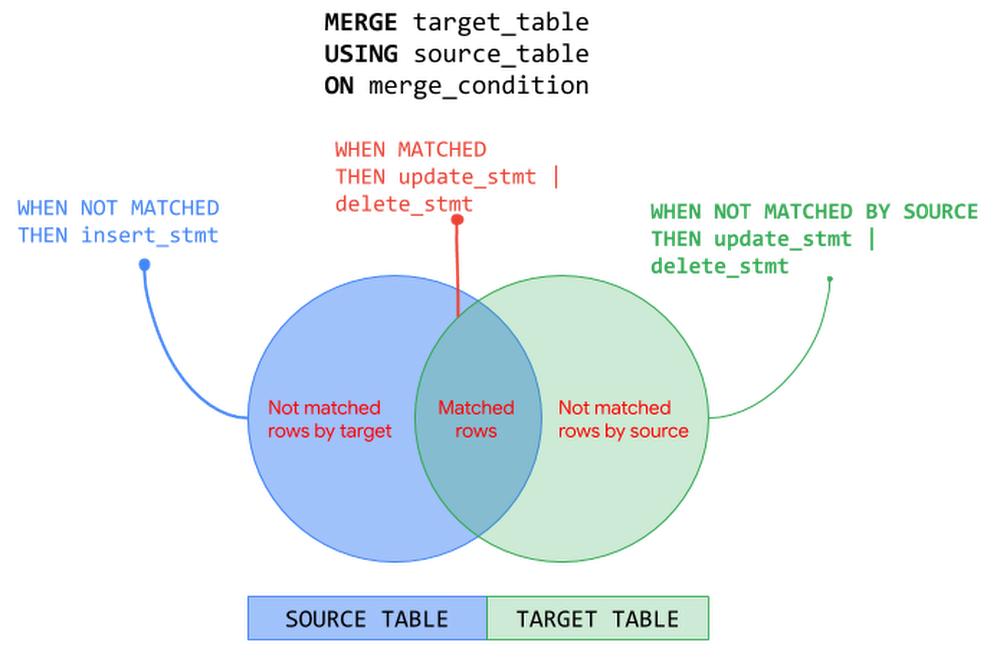
In the previous posts of BigQuery Explained, we reviewed how to ingest data into BigQuery and query the datasets. In this blog post, we will show you how to run data manipulation statements in BigQuery to add, modify and delete data stored in BigQuery. Let’s get started!Data Manipulation in BigQueryBigQuery has supported Data Manipulation Language (DML) functionality since 2016 for standard SQL, which enables you to insert, update, and delete rows and columns in your BigQuery datasets. DML in BigQuery supports data manipulation at an arbitrarily large number of rows in a table in a single job and supports an unlimited number of DML statements on a table. This means you can apply changes to data in a table more frequently and keep your data warehouse up to date with the changes in data sources. In this blog post we will cover:Use cases and syntax of common DML statementsConsiderations when using DML, including topics like quotas and pricingBest practices for using DML in BigQueryFollowing tables will be used in the examples in this post:TransactionsCustomerProductLet’s start with DML statements supported by BigQuery and their usage – INSERT, UPDATE, DELETE and MERGE.INSERT statementINSERT statement allows you to append new rows to a table. You can insert new rows using explicit values or by querying tables or views or using subqueries. Values added must be compatible with the target column’s data type. Following are few patterns to add rows into a BigQuery table:INSERT using explicit values:This approach can be used to bulk insert explicit values.INSERT using SELECTstatement: This approach is commonly used to copy a table’s content into another table or a partition. Let’s say you have created an empty table and plan to add data from an existing table, for example from a public data set. You can use the INSERT INTO … SELECT statement to append new data to the target table.INSERT using subqueries or common table expressions (CTE):As seen in the previous post, WITH statement allows you to name a subquery and use it in subsequent queries such as the SELECT or INSERT statement here (also called Common Table Expressions). In the example below, values to be inserted are computed using a subquery that performs JOIN operation with multiple tables.DELETE statementDELETE statement allows you to delete rows from a table. When using a DELETE statement, you must use WHERE clause followed by a condition. DELETE all rows from a tableDELETE FROM `project.dataset.table` WHERE true;DELETE with WHEREclause: This approach uses WHERE clause to identify the specific rows to be deleted.DELETE FROM `project.dataset.table` WHERE price = 0;DELETE with subqueries:This approach uses a subquery to identify the rows to be deleted. The subquery can query other tables or perform JOINs with other tables.DELETE `project.dataset.table`tWHERE t.id NOT IN (SELECT id from `project.dataset.unprocessed`)UPDATE statementUPDATE statement allows you to modify existing rows in a table. Similar to DELETE statement, each UPDATE statement must include the WHERE clause followed by a condition. To update all rows in the table, use WHERE true.Following are few patterns to update rows in a BigQuery table:UPDATE with WHERE clause: Use WHERE clause in the UPDATE statement to identify specific rows that need to be modified and use SET clause to update specific columns.UPDATE using JOINs: In a data warehouse, it’s a common pattern to update a table based on conditions from another table. In the previous example, we updated quantity and price columns in the product table. Now we will update the transactions table based on the latest values in the product table. (NOTE: A row in the target table to be updated must match with at most one row when joining with the source table in the FROM clause. Otherwise runtime error is generated)UPDATE nested and repeated fields: As seen in the previous post, BigQuery supports nested and repeated fields using STRUCT and ARRAY to provide a natural way of denormalized data representation. With BigQuery DML, you can UPDATE nested structures as well. In the product table, specs is a nested structure with color and dimension attributes and the dimension attribute is a nested structure. The below example UPDATEs the nested field for specific rows identified by WHERE clause.MERGE statementMERGE statement is a powerful construct and an optimization pattern that combines INSERT, UPDATE and DELETE operations on a table into an “upsert” operation based on values matched from another table. In an enterprise data warehouse with a star or snowflake schema, a common use case is to maintain Slowly Changing Dimension (SCD) tables that preserves the history of data with reference to the source data i.e. insert new records for new dimensions added, remove or flag dimensions that are not in the source and update the values that are changed in the source. The MERGE statement can be used to manage these operations on a dimension table with a single DML statement.Here is the generalized structure of the MERGE statement:A MERGE operation performs JOIN between the target and the source based on merge_condition. Then depending on the match status – MATCHED, NOT MATCHED BY TARGET and NOT MATCHED BY SOURCE – corresponding action is taken. The MERGE operation must match at most one source row for each target row. When there is more than one row matched, the operation errors out. The following picture illustrates MERGE operation on the source and target tables with the corresponding actions – INSERT, UPDATE and DELETE:MERGE operation can be used with source as subqueries, joins, nested and repeated structures. Let’s look at MERGE operation with INSERT else UPDATE pattern using subqueries. In the below example, MERGE operation INSERTs the row when there are new rows in source that are not found in target and UPDATEs the row when there are matching rows from both source and target tables.You can also include an optional search condition in WHEN clause to perform operations differently. In the below example, we derive the price of ‘Furniture’ products differently compared to other products.  Note that when there are multiple qualified WHEN clauses, only the first WHEN clause is executed for a row.The patterns seen so far in this post is not an exhaustive list. Refer to BigQuery documentation for DML syntax and more examples.Things to know about DML in BigQueryUnder the HoodBigQuery performs the following steps when executing a DML job. This is only a representative flow of what happens behind the scenes when you execute a DML job in BigQuery.Note that when you execute a DML statement in BigQuery, an implicit transaction is initiated that commits the transaction automatically when successful. Refer this article to understand how BigQuery executes a DML statement.Quotas and LimitsBigQuery enforces quotas for a variety of reasons such as to prevent unforeseen spikes in usage to protect the community of Google Cloud users. There are no quota limits on BigQuery DML statements i.e. BigQuery supports an unlimited number of DML statements on a table. However,  you must be aware of following quotas enforced by BigQuery when designing the data mutation operations:DML statements are not subjected to a quota limit but they do count towards the quota – tables operations per day and partition modifications per day. DML statements will not fail due to these limits but other jobs can.Concurrent DML JobsBigQuery manages the concurrency of DML statements that mutate rows in a table. BigQuery is a multi-version and ACID-compliant database that uses snapshot isolation to handle multiple concurrent operations on a table. Concurrently running mutating DML statements on a table might fail due to conflicts in the changes they make and BigQuery retries these failed jobs. Thus, the first job to commit wins which could mean that when you run a lot of short DML operations, you could starve longer-running ones. Refer this article to understand how BigQuery manages concurrent DML jobs.How many concurrent DML jobs can be run?INSERT DML job concurrency: During any 24 hour period, you can run the first 1000 INSERT statements into a table concurrently. After this limit is reached, the concurrency of INSERT statements that write to a table is limited to 10. Any INSERT DML jobs beyond 10 are queued in PENDING state. After a previously running job finishes, the next PENDING job is dequeued and run. Currently, up to 100 INSERT DML statements can be queued against a table at any given time.UPDATE, DELETE and MERGE DML job concurrency: BigQuery runs a fixed number of concurrent mutating DML statements (UPDATE, DELETE or MERGE) on a table. When the concurrency limit is reached, BigQuery automatically queues the additional mutating DML jobs in a PENDING state. After a previously running job finishes, the next PENDING job is dequeued and run. Currently, BigQuery allows up to 20 mutating DML jobs to be queued in PENDING state for each table and any concurrent mutating DMLs beyond this limit will fail. This limit is not affected by concurrently running load jobs or INSERT DML statements against the table since they do not affect the execution of mutation operations. What happens when concurrent DML jobs get into conflicts?DML conflicts arise when the concurrently running mutating DML statements (UPDATE, DELETE, MERGE) try to mutate the same partition in  a table and may experience concurrent update failures. Concurrently running mutating DML statements will succeed as long as they don’t modify data in the same partition. In case of concurrent update failures, BigQuery handles such failures automatically by retrying the job by first determining a new snapshot timestamp to use for reading the tables used in the query and then applying the mutations on the new snapshot. BigQuery retries concurrent update failures on a table up to three times. Note that inserting data to a table does not conflict with any other concurrently running DML statement. You can mitigate conflicts by grouping DML operations and performing batch UPDATEs or DELETEs.Pricing DML StatementsWhen designing DML operations in your system, it is key to understand how BigQuery prices DML statements to optimize costs as well as performance. BigQuery pricing for DML queries is based on the number of bytes processed by the query job with DML statement. Following table summarizes the calculation of bytes processed based on table being partitioned or non-partitioned:Since the DML pricing is based on the number of bytes processed by the query job, the best practices of querying the data with SELECT queries applies to DML query jobs as well. For example, limiting the bytes read by querying only data that is needed, partition pruning with partitioned tables, block pruning with clustered tables and more. Following are best practices guides for controlling bytes read by a query job and optimizing costs:Managing input data and data sources | BigQueryEstimating storage and query costs | BigQueryCost optimization best practices for BigQueryDMLs on Partitioned and Non-Partitioned TablesIn the previous BigQuery Explained post, we perceived how BigQuery partitioned tables make it easier to manage and query your data, improve the query performance and control costs by reducing bytes read by a query. In the context of DML statements, partitioned tables can accelerate the update process when the changes are limited to the specific partitions. For example, a DML statement can update data in multiple partitions for both ingestion-time partitioned and partitioned tables (date, timestamp, datetime and integer range partitioned).Let’s refer to the example from the partitioning section of BigQuery Explained: Storage Overview post where we created non-partitioned and partitioned tables from a public data set based on StackOverflow posts. Non-Partitioned TablePartitioned TableLet’s run an UPDATE statement on non-partitioned and partitioned tables to modify a column for all the StackOverflow posts created on a specific date.Non-Partitioned TablePartitioned TableIn this example, with the partitioned table the query with DML job scans and updates only the required partition processing ~11 MB data compared to the DML job on the non-partitioned table that processes ~3.3 GB data doing a full table scan. Here the DML operation on the partitioned table is faster and cheaper than the non-partitioned table.Using DML statements (INSERT, UPDATE, DELETE, MERGE) with partitioned and non-partitioned tables follow the same DML syntax as seen in the post earlier. Except when working with an ingestion-time partitioned table, you specify the partition refering the _PARTITIONTIME pseudo column. For example, see the INSERT statement below for ingestion-time partitioned table and a partitioned table.INSERT with ingestion-time partitioned tableINSERT with partitioned TableWhen using a MERGE statement against a partitioned table, you can limit the partitions involved in the DML statements by using partition pruning conditions in a subquery filter, a search_condition filter, or a merge_condition filter.Refer BigQuery documentation for using DML with partitioned tables and non-partitioned tables.DML and BigQuery Streaming insertsIn the BigQuery Explained: Data Ingestion post, we touched upon the streaming ingestion pattern that allows continuous styles of ingestion by streaming data into BigQuery in real-time, using the tabledata.insertAll method. BigQuery allows DML modifications on tables with active streaming buffer based on recency of writes in the table.Rows written to the table recently using streaming cannot be modified. Recent writes are typically those that occur within the last 30 minutes. All other rows in the table are modifiable with mutating DML statements (UPDATE, DELETE or MERGE).Best Practices Using DML in BigQueryAvoid point-specific DML statements. Instead group DML operations.Even though you can now run unlimited DML statements in BigQuery, consider performing bulk or large-scale mutations for the following reasons: BigQuery DML statements are intended for bulk updates. Using point-specific DML statements is an attempt to treat BigQuery like an Online Transaction Processing (OLTP) system. BigQuery focuses on Online Analytical Processing (OLAP) by using table scans and not point lookups.Each DML statement that modifies data initiates an implicit transaction. By grouping DML statements you can avoid unnecessary transaction overhead.DML operations are charged based on the number of bytes processed by the query which can be a full table or partition or cluster scan. By grouping DML statements you can limit the number of bytes processed.DML operations on a table are subjected to rate limiting when multiple DML statements are submitted too quickly. By grouping operations, you can mitigate the failures due to rate limiting.The following are a few ways to perform bulk mutations:Batch mutations by using the MERGE statement based on contents of another table. MERGE statement is an optimization construct that can combine INSERT, UPDATE, and DELETE operations into one statement and perform them atomically.Using subqueries or correlated subqueries with DML statements where the subquery identifies the rows to be modified and the DML operation mutates data in bulk.Replace single row INSERTs with bulk inserts using explicit values or subqueries or common table expressions (CTE) as discussed earlier in the post. For example, if you have the following point specific INSERT statements, running them as is in BigQuery is an anti-pattern:You can translate into a single INSERT statement that performs a bulk operation instead:If your use case involves frequent single row inserts, consider streaming your data instead. Please note there is a charge for streamed data unlike load jobs which are free.Refer BigQuery documentation on examples of performing batch mutations.Batch your updates and inserts.Performing large-scale mutations in BigQueryUse CREATE TABLE AS SELECT (CTAS) for large-scale mutations.DML statements can get significantly expensive when you have large scale modifications. For such cases, prefer CTAS (CREATE TABLE AS SELECT) instead. So instead of performing a large number of UPDATE or DELETE statements, you run a SELECT statement and save the query results into a new target table with modified data using CREATE TABLE AS SELECT operation. After creating the new target table with modified data, you would discard the original target table. SELECT statements can be cheaper than processing DML statements in this case. Another typical scenario where a large number of INSERT statements is used is when you create a new table from an existing table. Instead of using multiple INSERT statements, create a new table and insert all the rows in one operation using the CREATE TABLE AS SELECT statement.Use TRUNCATE when deleting all rows.When performing a DELETE operation to remove all the rows from a table, use TRUNCATE TABLE statement instead. The TRUNCATE TABLE statement is a DDL (Data Definition Language) operation that removes all rows from a table but leaves the table metadata intact, including the table schema, description, and labels. Since TRUNCATE is a metadata operation it does not incur a charge.TRUNCATE TABLE `project.dataset.mytable`Partition your data.As we have seen earlier in the post, partitioned tables can significantly improve performance of DML operation on the table and optimize cost as well. Partitioning ensures that the changes are limited to specific partitions within the table. For example, when using MERGE statement you can lower cost by precomputing the partitions affected prior to the MERGE and include a filter for the target table that prunes partition in a subquery filter, a search_condition filter, or a merge_condition filter of MERGE statement. If you don’t filter the target table the mutating DML statement will do a full table scan. In the following example, you are limiting the MERGE statement to scan only the rows in the ‘2018-01-01′ partition in both the source and the target table by specifying a filter in the merge condition.When UPDATE or DELETE frequently modify older data, or within a particular range of dates, consider partitioning your tables. Avoid partitioning tables if the amount of data in each partition is small and each update modifies a large fraction of the partitions.Cluster tablesIn the previous post of BigQuery Explained, we have seen clustering data can improve performance of certain queries by sorting and collocating related data in blocks. If you often update rows where one or more columns fall within a narrow range of values, consider using clustered tables. Clustering performs block level pruning and scans only data relevant to the query reducing the number of bytes processed by the query. This improves DML query performance as well as optimizes costs. You can use clustering with or without partitioning the table and clustering the tables is free. Refer example of DML query with clustered tableshere. Be mindful of your data editsIn the previous post of BigQuery Explained, we mentioned long term storage can offer significant price savings when your table or partition of a table has not been modified for 90 days. There is no degradation of performance, durability, availability or any other functionality when a table or partition is considered for long-term storage. To get the most out of long-term storage, be mindful of any actions that edit your table data, such as streaming, copying, or loading data, including any DML or DDL actions. Any modification can bring your data back to active storage and reset the 90-day timer. To avoid this, you can consider loading the new batch of data to a new table or a partition of a table. Consider Cloud SQL for OLTP use casesIf your use case warrants OLTP functionality, consider using Cloud SQL federated queries, which enable BigQuery to query data that resides in Cloud SQL. Check out this video for querying Cloud SQL from BigQuery.Querying Cloud SQL from BigQueryWhat’s Next?In this article, we learned how you can add, modify and delete data stored in BigQuery using DML statements, how BigQuery executes DML statements, best practices and things to know when working with DML statements in BigQuery.Check out BigQuery documentation on DML statementsUnderstand quotas, limitations and pricing of BigQuery DML statements Refer to this blog post on BigQuery DML without limitsIn the next post, we will look at how to use scripting, stored procedures and user defined functions in BigQuery.Stay tuned. Thank you for reading! Have a question or want to chat? Find me on Twitter or LinkedIn.Thanks to Pavan Edara and Alicia Williams for helping with the post.Related Article[New blog series] BigQuery explained: An overviewOur new blog series provides an overview of what’s possible with BigQuery.Read Article
Quelle: Google Cloud Platform
Enhancing our privacy commitments to customers

Around the world, companies in every industry rely on our cloud services to run their businesses, and we take that responsibility seriously. That’s why we’re focused on providing industry-leading security and product capabilities, certifications, and commitments, along with transparency and visibility into when and how customer data is accessed. Today, we’re expanding on these commitments and sharing an update on our latest work in this area. Commitment to privacy Our Google Cloud Enterprise Privacy Commitments outline how we protect the privacy of customers whenever they use Google Workspace, G Suite for Education and Google Cloud Platform (GCP). There are two distinct types of data that we consider across both of these platforms—customer data and service data:Customer data: We start from the fundamental premise that, as a Google Cloud customer, you own your customer data. We implement stringent security measures to safeguard that data, and provide you with tools to control it on your terms. Customer data is the data you, including your organization and your users, provide to Google when you access Google Workspace, G Suite for Education and GCP, and the data you create using those services.Service data: We also secure any service data—the information Google collects or generates while providing and administering Google Workspace, G Suite for Education and GCP—which is critical to help ensure the security and availability of our services. Service data does not include customer data—it includes information about security settings, operational details, and billing information. We process service data for the purposes that are detailed in our Google Cloud Privacy Notice (newly launched to provide more specific information about how we process service data, and effective November 27, 2020), such as making recommendations to optimize your use of Google Workspace and GCP, and improving performance and functionality.When you use Google Cloud services, you can be confident that:You control your data. Customer data is your data, not Google’s. We only process your data according to your agreement(s). We never use your data for ads targeting. We do not process your customer data or service data to create ads profiles or improve Google Ads products.We are transparent about data collection and use. We’re committed to transparency, compliance with regulations like the GDPR, and privacy best practices.We never sell customer data or service data. We never sell customer data or service data to third parties.Security and privacy are primary design criteria for all of our products. Prioritizing the privacy of our customers means protecting the data you trust us with. We build the strongest security technologies into our products.These commitments are backed by the strong contractual privacy commitments we make available to our customers for Google Workspace, G Suite for Education and GCP. Enhanced customer controls and new third party certificationsWe recently released new capabilities that further improve visibility and control over how data in our cloud is accessed and processed. In 2018, we were the first major cloud provider to bring Access Transparency to our customers, providing you with near real-time logs of the rare occasions Google Cloud administrators access your content. To give you even more visibility and control, we’ve made Access Approval for GCP generally available to let you approve or dismiss requests for access by Google employees working to support your service. Our Transparency & Control Center is also now generally available as part of the GCP Console. It gives you the ability to enable and disable data processing that supports features such as recommendations and insights at the organization and project level. It also allows you to export personal data that may be used to generate recommendations and insights. For Google Workspace, in addition to providing granular audit logs, we offer organization admins and users the ability to download a copy of their data via the data export tool and Google Takeout. These are just some of the ways we help support data portability requirements under privacy regulations such as the EU’s GDPR and the California Consumer Privacy Act (CCPA).We continue to reinforce our commitment to privacy by meeting the requirements of internationally-recognized privacy laws, regulations, and standards. This summer we announced that we are the first major cloud provider and productivity suite to receive accredited ISO/IEC 27701 certification as a data processor. Ouraccredited ISO/IEC 27701 certifications for Google Workspace and GCP provide customers with benefits including simplified audit processes, universal privacy controls and greater clarity around privacy-related roles and responsibilities. Certifications provide independent validation of our ongoing dedication to world-class security and privacy, and we look forward to obtaining additional certifications in the future. Continued innovation to support customer needsAs the global privacy landscape and our customers’ needs change, Google Cloud will continue to work diligently to maintain our commitments to privacy, control and transparency. To learn more about our efforts, visit our Trust and Security center.
Quelle: Google Cloud Platform

Accelerating cloud migrations with the new Database Migration Service

Enterprises across all industries are answering the call to move their business infrastructure, and with that their databases, to the cloud. They are flocking to fully managed cloud databases like Cloud SQL to leverage their unparalleled reliability, security, and cost-effectiveness. Today, we’re launching the new serverless Database Migration Service (DMS) as part of our vision at Google Cloud for how to meet those modern needs in a way that’s easier, faster, more predictable, and more reliable. We know that database migrations can be a challenge for enterprises. That’s why we give our customers a uniquely easy, secure, and reliable experience with DMS. We worked with dozens of customers around the world, including Samsung Electronics, Adwerx, Affle, Cirruseo (Accenture), Guichê Virtual, and Ryde, to successfully migrate their production databases with minimal downtime using DMS. So, what is it exactly that makes DMS different? Simple experience: “I have a hard time imagining a migration process being easier,” says Josh Bielick, VP of Infrastructure at Adwerx. Migrations shouldn’t be a headache to set up, nor require independent research or searching through documentation. Preparing databases for replication, configuring secure source connectivity, and validating migration setup is baked right into DMS, making the setup clear, fast, and repeatable.Minimal downtime: Application uptime is key to keeping your business running. Every migration with DMS can replicate data continuously from source database to destination without cumbersome manual steps, minimizing database downtime and enabling fast application cutover. “At Ryde, our ride-sharing app users are always active. When we made the decision to move to Google Cloud, we needed a way to migrate our production databases from Amazon RDS to Cloud SQL. Database Migration Service made this simple, and we were able to complete the migration in less than a day, with minimal disruption to our users,” says Nitin Dolli, CTO, Ryde Technologies. “Now that we’re fully migrated to Cloud SQL, we no longer need to worry about scaling, maintenance, or other operations as we continue to grow. We can just focus on building robust applications.” Reliable and complete: Migrations need to be high-fidelity, so the destination database just works. For like-to-like migrations across compatible source and destination database engines, DMS is unique among migration services because it uses the database’s native replication capabilities to maximize fidelity and reliability. Serverless and secure: Migrations just work, at scale, in a serverless fashion. With DMS, there’s no hassle of provisioning or managing migration-specific resources, or monitoring them to make sure everything runs smoothly. For sensitive data, DMS also supports multiple secure private connectivity methods to protect your data during migration.DMS provides a fast and seamless migration to Cloud SQL, the fully managed database service for MySQL, PostgreSQL, and SQL Server. By migrating to Cloud SQL, you not only benefit from its enterprise-grade availability, security, and stability, but you also get unique integrations with the rest of Google Cloud, including Google Kubernetes Engine and BigQuery. “We needed to create live dashboards built on top of BigQuery that pulled data from both on-premises and cloud sources. Google Cloud’s Database Migration Service made this easy for us,” says Sofiane Kihal, Engineer, Cirruseo (Accenture). “Using its continuous replication, we were able to migrate data to Cloud SQL and then query directly using federation from BigQuery. Additionally, using Cloud SQL as a managed service for MySQL has allowed us to reduce the time we spend on operations by over 75%.”How does Database Migration Service work?DMS provides high-fidelity, minimal downtime migrations for MySQL and PostgreSQL workloads. We designed it to be truly cloud-native—built by and for the cloud. DMS utilizes log shipping to replicate data at super-low latencies from the source database to the destination. It streams the initial snapshot of data, then catches up and continuously replicates new data as it arrives in the source.The source and destination are continuously up to date because they rely on the databases’ own native replication capabilities. This replication technique maximizes the fidelity of data transferred with very low latency. That means you can decide when you’re ready to promote your database, then just point your application to Cloud SQL as the primary database, with minimal downtime. DMS is serverless, so you never have to worry about provisioning, managing, or monitoring migration-specific resources. The source database’s data, schema, and additional database features (triggers, stored procedures, and more) are replicated to the Cloud SQL destination reliably, and at scale, with no user intervention required.Getting started with Database Migration ServiceYou can start setting up a migration to Cloud SQL for MySQL with DMS today. Head over to the Database Migration area of your Google Cloud console, under Databases, and click Create Migration Job. There you can:Initiate migration creation, and see what actions you need to take to set up your source for successful migration.Define your source, whose connectivity information is saved as a connection profile you can re-use for other migrations. Create your destination—a Cloud SQL instance, right-sized to fit your source data and optimize your costs.Define the connectivity method, with both private and public connectivity methods supported to suit your business needs.Test your migration job to ensure it will be successful when you’re ready to go.Once your migration job runs and the source and destination are in sync, you’ll be ready to promote and use your new Cloud SQL instance!Learn more and start your database journey  DMS, now in Preview, supports migrations of self-hosted MySQL databases, either on-premises or in the cloud, as well as managed databases from other clouds, to Cloud SQL for MySQL. Support for PostgreSQL is currently available for limited customers in Preview, with SQL Server coming soon (request access for both). You can get started with DMS for native like-to-like migrations to Cloud SQL at no additional charge. For more resources to help get you started on your migration journey, read our blog on migration best practices, or head on over to the DMS documentation.Customer stories provided through a TechValidate survey conducted October 2020.Related ArticleCloud migration: What you need to know (and where to find it)Google Cloud offers a rich set of solutions and documentation to help guide your cloud migration. Here’s where to find what you need.Read Article
Quelle: Google Cloud Platform