Best practices to use Apache Ranger on Dataproc

Dataproc is an easy-to-use, fully managed cloud service for running managed open source, such as Apache Spark, Apache Presto, and Apache Hadoop clusters, in a simpler, more cost-efficient way. Dataproc allows you to have long-running clusters similar to always-on on-premises OSS clusters. But even better, it allows multiple smaller, customized, job-focused clusters that can be turned off when a job is done to help manage costs. However, using these ephemeral clusters opens a few questions: How do you manage secure and fine-grained access to Hadoop services in this new architecture? How can you audit user actions and make sure the logs persist beyond any cluster lifecycle?In this blog, we propose an end-to-end architecture and best practices to answer these questions using Apache Ranger, an authorization OSS for Hadoop, on Google Cloud.In this architecture, several Dataproc clusters share a single Ranger back-end database while each cluster has its own Ranger admin and plugin components. The database, hosted on Cloud SQL, centralizes the policies so that policies are synchronized among all the clusters. With this architecture, you don’t have to deploy one Ranger database per cluster and consequently, deal with policy synchronization and incur higher costs. Moreover, you don’t need a central Ranger admin instance, which requires maintenance to be always up. Instead, the only centralized component is your Ranger database, backed by Cloud SQL, Google Cloud’s fully managed relational database service.How is the cloud different?With Dataproc you create clusters in a few minutes, manage them easily, and save money by turning clusters off when you don’t need them. You can create as many clusters as you need, tailor them for a job or a group of jobs, and have them around only while those jobs are running. That sounds great, but how is authentication and authorization managed in such an environment? Dataproc shares the Cloud Identity and Access Management (Cloud IAM) functionalities with the rest of Google Cloud; however, IAM permissions are high-level and not specifically aimed to control very fine-grained access to the services in a Hadoop environment. That is where Ranger excels. If you are used to Ranger on your on-prem environments, you will feel at home on Dataproc. Dataproc supports Ranger as an optional component, so you continue to have Ranger installed on each cluster using Dataproc’s component exchange.In this diagram, you can see four Dataproc clusters on Google Cloud. Each cluster hosts an instance of Ranger to control access to cluster services such as Hive, Presto, HBase, and othersClick to enlargeUsers of these services have their identities defined in an identity provider service that is external to the clusters. As an example, the diagram shows an LDAP server such as Apache DS running on Google Compute Engine. However, you can also use your own identity provider like Active Directory on-prem or on a different cloud provider. See Authenticating corporate users in a hybrid environment. The access policies defined in Ranger are also external to the clusters. The diagram shows them stored in a centralized Cloud SQL instance, along with the Ranger internal users. Finally, auditing is externalized to Cloud Storage, with each cluster storing its logs in its own bucket and folder. Having the policies, internal users, and logs separated from the Hadoop clusters allows you to create and turn off clusters as needed.What is behind the scenes in a cluster?Let’s go under the hood of a cluster and drill down to the components that make this architecture possible:Click to enlargeUsers of the system, shown on top of the diagram, want to access one or more of the cluster services to process some data and get results back. They authenticate using an on-cluster Kerberos Distribution Center, or alternatively using an Apache Knox Gateway as described in this article. Both Kerberos and Apache Knox can verify the user identities defined in an external LDAP server. The Ranger User Sync Server periodically retrieves the identities from the LDAP server so that it can apply access policies to the users. Dataproc supports Kerberos integration on the cluster out of the box. If you use Kerberos in your cluster with this architecture, you need to use an LDAP server as an external cross-realm trust to map users and groups into Kerberos principals.Once a user is authenticated, their request is routed to the appropriate service. However, it is intercepted by the corresponding Ranger plugin for the service. The plugin periodically retrieves the policies from the Ranger Policy Server. These policies determine if the user identity is allowed to perform the requested action on the specific service. If it is, then the plugin allows the service to process the request and the user gets back the results. Note that the policies are external to the cluster and stored in a Cloud SQL database so that they persist independently of the cluster lifecycle.Every user interaction with a Hadoop service, both allowed or denied, is written to cluster logs by the Ranger Audit Server. Each cluster has its own logs folder in Cloud Storage. Ranger can index and search these logs leveraging Apache Solr. Examining the logs of a previously deleted cluster is as easy as creating a new cluster and pointing the dataproc:solr.gcs.path property to the old cluster logs folder.Last but not least, the Admin UI of Ranger is installed to allow an easy way to visualize and manage the different policies, roles, identities, and logs across clusters. Access to the Admin UI is given to a separate group of users, internal to Ranger, and stored in the Ranger database.All the Ranger components run on the Hadoop master node. Workers that ultimately run jobs orchestrated through YARN are not pictured in the diagram, and do not need any particular configuration.How does the architecture work with ephemeral clusters? Dataproc allows you to run multiple long-running and/or ephemeral clusters simultaneously. Should you install Ranger in every cluster? The answer is yes and no. If every cluster had its own Ranger admin and database, it would be cumbersome to re-populate the users and policies every time you have a new cluster. On the other hand, a central Ranger service brings up scalability issues, since it has to deal with the user sync, policy sync, and the audit logs for all the clusters.The proposed architecture keeps a central Cloud SQL database always up while all the clusters can be ephemeral. The database stores policies, users, and roles. Every cluster has its own Ranger components synchronized with this database. The advantage of this architecture is that you avoid policy synchronization and the only centralized component is Cloud SQL, which is managed by Google Cloud. See the first figure above that shows the architecture.How do you authenticate users?For Ranger, there are two user types: External users: These are users that access data processing services such as Hive. In most cases, they do not need explicit access to the Ranger UI. Ranger runs a user synchronization daemon service in every cluster to fetch these users and groups from LDAP, then persists them in the Ranger database. This daemon can run safely in each Dataproc cluster as long as they all fetch users from the same LDAP server with the same parameters. To avoid race conditions, where a particular user is synchronized twice by different clusters, the Ranger database has a uniqueness constraint on user/group IDs.  Internal users: These are the users of the Ranger UI. Authentication is different from external users. You define authentication to the UI via an LDAP/AD setup or by manually creating the users. This method must be set up in every cluster explicitly because every UI checks its own configuration to learn where to query for authentication. When you create a user via UI directly, Ranger persists that user into the shared database. Hence, it is available in the Ranger UIs on all clusters without any additional configuration.A Ranger admin user is a special internal user who has the authority to perform any action on the Ranger UI, such as creating policies, adding internal users, and assigning the admin role to others. The Dataproc Ranger component allows you to set the Ranger admin user password during startup and stores the credentials in the central Ranger database. Therefore, the admin user and password are the same across all the clusters.How do you synchronize authorization policies across clusters?Ranger stores authorization policies in a relational database. The architecture uses a shared Cloud SQL Ranger database so that policies are available to all clusters. Admin users can alter these policies by logging into any Ranger UI that shares the same database.How do you audit user actions?Apache Solr handles the Ranger audit logs and stores them in a Cloud Storage bucket for durability even after cluster deletion. When you need to read the logs of a deleted cluster, you create a cluster and point Solr to the same Cloud Storage folder. You will then be able to browse the logs in the Ranger UI of that cluster. The cluster that you create for log retrieval can be small, such as a single node cluster, and ephemeral. To avoid having different Cloud Storage buckets per cluster, use the same bucket for all as long as each cluster logs to a different folder. Clusters cannot write their audit logs to the same folder since each cluster has its own Solr component managing these logs.In addition to Ranger audit logs, Google Cloud provides Cloud Audit Logs. These logs are not as granular as the Ranger logs, but are an excellent tool that allows you to answer the questions of “who did what, where, and when?” on your Google Cloud resources. For example, if you use the Dataproc Jobs API, you could find out which Cloud IAM user submitted a job through Cloud Audit Logging. Or you can track the Dataproc Service Account reads and writes on a Cloud Storage Bucket.Use the right access control for your use caseBefore we finish, we’d ask you to consider whether you need Ranger. Ranger adds minutes to cluster creation and you have to manage its policies. As an alternative, you can create many ephemeral Dataproc clusters and assign them individual service accounts with different access rights. Depending on your company size, creating a service account and cluster per person may not be cost-effective, but creating shared clusters per team would offer enough degree of separation for many use cases. You can also use Dataproc Personal Cluster Authentication if a cluster is only intended for interactive jobs run by an individual (human) user.Use these alternatives instead of Ranger when you don’t need fine-grained authorization and audit at the service, table, or column level. You can limit a service account or user account to access only a specific cluster and data set.Get started with Ranger on DataprocIn this blog post, we propose a Ranger architecture to serve multiple long-running and/or ephemeral Dataproc clusters. The core idea is sharing the Ranger database, authentication provider, and audit log storage and running all other components such as Ranger Admin, Ranger UI, Ranger User Sync, and Solr in individual clusters. The database serves the policies, users, and their roles for all the clusters. You don’t need to run a central Ranger service because Ranger components are stateless. Solr stores the audit logs on Cloud Storage to keep them for further analysis even after the deletion of a cluster.Try Ranger on Dataproc with the Dataproc Ranger Component for easy installation. Combine it with Cloud SQL as the shared Ranger database. Go one step further and connect your Visualization Software to Hadoop on Google Cloud.
Quelle: Google Cloud Platform

Better service orchestration with Workflows

Going from a single monolithic application to a set of small, independent microservices has clear benefits. Microservices enable reusability, make it easier to change and scale apps on demand. At the same time, they introduce new challenges. No longer is there a single monolith with all the business logic neatly contained and services communicating with simple method calls. In the microservices world, communication has to go over the wire with REST or some kind of eventing mechanism and you need to find a way to get independent microservices to work toward a common goal.Orchestration vs ChoreographyShould there be a central orchestrator controlling all interactions between services or should each service work independently and only interact through events? This is the central question in Orchestration vs Choreography debate. In Orchestration, a central service defines and controls the flow of communication between services. With centralization, it becomes easier to change and monitor the flow and apply consistent timeout and error policies. In Choreography, each service registers for and emits events as they need. There’s usually a central event broker to pass messages around, but it does not define or direct the flow of communication. This allows services that are truly independent at the expense of less traceable and manageable flow and policies. Google Cloud provides services supporting both Orchestration and Choreography approaches. Pub/Sub and Eventarc are both suited for choreography of event-driven services, whereas Workflows is suited for centrally orchestrated services. Workflows: Orchestrator and moreWorkflows is a service to orchestrate not only Google Cloud services, such as Cloud Functions and Cloud Run, but also external services. As you might expect from an orchestrator, Workflows allows you to define the flow of your business logic in a YAML based workflow definition language and provides a Workflows Execution API and Workflows UI to trigger those flows.It is more than a mere orchestrator with these built-in and configurable features:Flexible retry and error handling between steps for reliable execution of steps.JSON parsing and variable passing between steps to avoid glue-code. Expression formulas for decisions allow conditional step executions. Subworkflows for modular and reusable Workflows.Support for external services allows orchestration of services beyond Google Cloud.Authentication support for Google Cloud and external services for secure step executions. Connectors to Google Cloud services such as Pub/Sub, Firestore, Tasks, Secret Manager for easier integration (in private preview soon). Not to mention, Workflows is a fully-managed serverless product. No servers to configure or scale and you only pay for what you use. Use casesWorkflows lends itself well to a wide range of use cases. For example, in an e-commerce application, you might have a chain of services that need to be executed in a certain order. If any of the steps fail, you want to retry or fail the whole chain. Workflow with its built-in error/retry handling is perfect for this use case:In another application, you might need to execute different chains depending on a condition with Workflow’s conditional step execution:In long-running batch data processing kind of applications, you usually need to execute many small steps that depend on each other and you want the whole process to complete as a whole. Workflows is well suited because it:Supports long-running workflows.Supports a variety of Google Cloud compute options such as GCE or GKE for long-running and Cloud Run or Cloud Functions for short-lived data processing.Is resilient to system failures. Even if there’s a disruption to the execution of the workflow, it will resume at the last check-pointed state.In orchestration vs choreography debate, there is no right answer. If you’re implementing a well-defined process with a bounded context, something you can picture with a flow diagram, orchestration is often the right solution. If you’re creating a distributed architecture across different domains, choreography can help those systems to work together. You can also have a hybrid approach where orchestrated workflows talk to each other via events. I’m definitely excited about using Workflows in my apps and it’ll be interesting to see how people use Workflows with services on Google Cloud and beyond. For more information, check out Workflows documentation and feel free to reach out to me on Twitter @meteatamel for questions/feedback!Related ArticleCloud Composer is now in beta: build and run practical workflows with minimal effortLearn more about the beta of Cloud Composer, a managed Apache Airflow service to facilitate your multi-cloud strategy.Read Article
Quelle: Google Cloud Platform

Advancing healthcare with the Healthcare Interoperability Readiness Program

The 21st Century Cures Act, a United States law enacted at the end of 2016, mandates patient data interoperability for payers, providers, and healthcare organizations. As we approach rolling implementation deadlines, healthcare organizations are wrestling with how to liberate data from siloed systems—not only to give patients more granular control of their data, but also to improve outcomes by giving doctors a more complete view into their patients’ conditions.The stakes are significant. Yet, in speaking with our customers, the number of healthcare organizations that feel prepared to meet these new requirements is small. Why is this the case? In short, providers and payers aren’t sure where to start. And with many critical applications running on legacy IT systems that aren’t built on modern web standards, the goal can seem daunting.That’s why today, we’re launching the Google Cloud Healthcare Interoperability Readiness Program. The program is designed to help healthcare organizations:Understand their current interoperability maturity levels;Map out a stepwise journey to enable interoperability; and Navigate changes and increase their readiness for the new Office of the National Coordinator for Health Information Technology (ONC) and the Centers for Medicare and Medicaid Services (CMS) rules.With COVID-19 underscoring the importance of even more data sharing and flexibility, the next few years promise to accelerate data interoperability and the adoption of open standards even further—ideally ushering in new and meaningful partnerships across the care continuum, new avenues for business growth, and new pathways for patient-centered innovation.  Our program is built to meet customers wherever they are on their interoperability journeys, and to empower them with tailored services, technologies and strategies. We’re working with a variety of both consultants and ISV partners like Bain & Company, Boston Consulting Group, Deloitte, HCL Technologies, KPMG, MavenWave, Pluto7, SADA and 8K Miles Healthcare Triangle to meet our customers’ unique needs and support the changes needed to meet the upcoming regulatory requirements.   How is interoperability achieved?Just as interoperability is foundational to achieving the transformational goals in healthcare for everything from telemedicine to app-based healthcare ecosystems, application programming interfaces, or APIs, are the foundation for interoperability. APIs have been around for decades and allow data to flow across disparate systems. Whereas older APIs were designed for bespoke integration projects, modern APIs are designed to be easy for developers and have become the standard for building mobile applications.API management tools can put a security gateway between patient data and developers or apps, helping to protect a patient’s control over access to and uses of their data. And with API management, healthcare organizations can pursue the same sort of innovative models around healthcare data, while also applying governance and security controls, streamlining infrastructure complexities, and maintaining regulatory compliance and patient privacy. In addition to APIs, implementation of  open data standards—such as FHIR—is another critical step toward interoperability. We’ve worked closely with the U.S. Department of Health and Human Services (HHS) and collaborated across the tech industry to support open standards to electronically exchange healthcare information and build an ecosystem that supports data privacy, security, compliance, and API management.How can the Google Cloud Interoperability Readiness Program help? Google Cloud has long supported data interoperability and an API-based ecosystem to reduce friction surrounding healthcare data. Through our Healthcare Interoperability Readiness Program, we’ll help customers understand the current status of their data and where it resides, map out a path to standardization and integration, and make use of data in a secure, reliable, and compliant manner. This program provides a comprehensive set of services for interoperability, including: HealthAPIx Accelerator provides the jumpstart for the interoperability implementation efforts. With best practices, pre-built templates and lessons learned from our customer and partner implementations, it offers a blueprint for healthcare stakeholders and app developers to build FHIR API-based digital experiences.Apigee API Management provides the underpinning and enables a security and governance layer to deliver, manage, secure and scale APIs; consume and publish FHIR-ready APIs for partners and developers; build robust API analytics, and accelerate rollout of digital solutions.Google Cloud Healthcare API enables secure methods (including de-identification) for ingesting, transforming, harmonizing, and storing your data in the latest FHIR formats, as well as HL7v2 and DICOM, and serves as a secondary longitudinal data store to streamline data sharing, application development, and analytics with BigQuery. Interoperability toolkit that includes solution architectures, implementation guides, sandboxes and other resources to help accelerate interoperability adoption and streamline compliance with standards such as FHIR R4. As we reflect on the lessons of COVID-19, building resilient interoperable health infrastructure will not only be a catalyst, but table stakes for delivering better care. The Healthcare Interoperability Readiness Program aims to help free up patient data and make it more accessible across the continuum of care, as well as set up organizations for long-term success with more modern, API-first architectures. We’re eager to help payers, providers, and life sciences organizations navigate these changes—and ultimately save patient lives.Related ArticleOur Healthcare API and other solutions for supporting healthcare and life sciences organizations during the pandemicAt Google Cloud, our healthcare and life sciences team is committed to supporting healthcare and life sciences organizations during this …Read Article
Quelle: Google Cloud Platform

Anthos on bare metal, now GA, puts you back in control

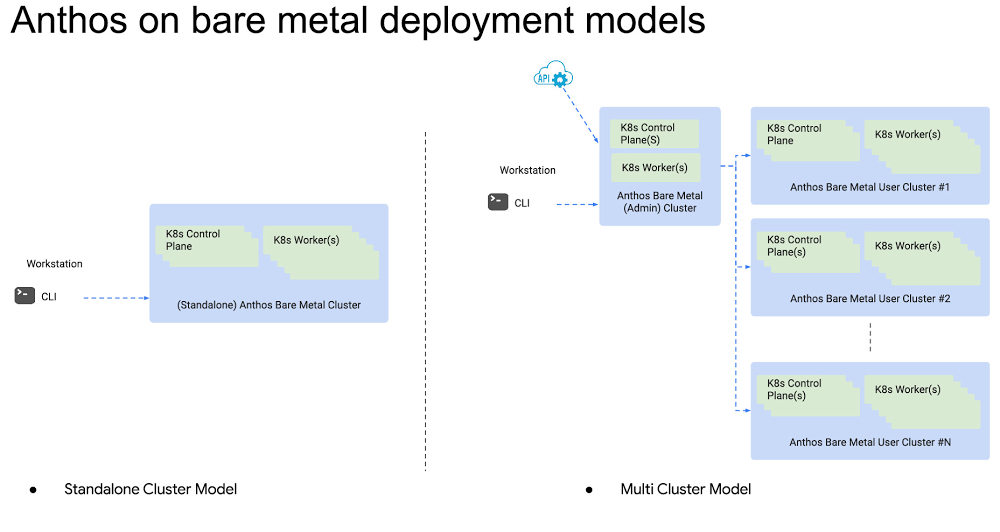
Enterprise IT organizations want it all, don’t they? Choice and freedom in their technology choices, but also automation, security, scale, and support. From the beginning, Anthos has been about putting you back in charge of how you consume the cloud (private or public), while imparting some of the best practices we’ve learned from running a global cloud at scale. With Anthos on bare metal, now generally available, we’ve gone a step further. Anthos on bare metal opens up new possibilities for how you run your workloads, and where. Some of you want to run Anthos on your existing virtualized infrastructure, but others want to eliminate the dependency on a hypervisor layer, to modernize applications while reducing costs. For example, you may consider migrating VM-based apps to containers, and you might decide to run them at the edge on resource-constrained hardware. Anthos on bare metal is generally available today, with subscription or pay-as-you-go pricing. Let’s dive into the specifics of Anthos on bare metal and also share technical details for how to get started. Leverage your existing investmentsAnthos on bare metal allows you to leverage existing investments in hardware, OS and networking infrastructure. The minimal system requirement to run Anthos on bare metal at the edge is two nodes with a minimum of 4 cores, and 32 GB RAM, and 128GB of disk space with no specialized hardware. The setup allows you to run Anthos on bare metal on most any infrastructure.Anthos on bare metal uses a “bring your own operating system” model. It runs atop physical or virtual instances, and supports Red Hat Enterprise Linux 8.1/8.2, CentOS 8.1/8.2, or Ubuntu 18.04/20.04 LTS. Anthos provides overlay networking and L4/L7 load balancing out of the box. You can also integrate with your own load balancer such as F5 and Citrix. For storage, you can deploy persistent workloads using CSI integration with your existing infrastructure.You can deploy Anthos on bare metal using one of the following deployment models:A standalone model allows you to manage every cluster independently. This is a good choice when running in an edge location or if you want your clusters to be administered independently from on another. A multi-cluster model allows a central IT team to manage a fleet of clusters from a centralized cluster, called the admin cluster. This is more suitable if you want to build automation, tooling or to delegate the lifecycle of clusters to individual teams without sharing sensitive credentials such as SSH keys or Google Cloud service account details.Click to enlargeLike with all Anthos environments, a bare metal cluster has a thin, secure connection back to Google Cloud called Connect. Once it’s installed in your clusters, you can centrally view, configure, and monitor your clusters from the Google Cloud Console. We’ve been working on Anthos on bare metal with early-access customers and design partners, and their feedback has been overwhelmingly positive. For example, VideoAmp offers a video measurement and optimization platform, and uses Anthos on bare metal to help reduce the operational overhead of managing clusters while also maximizing the utilization of their cloud infrastructure. “Here at VideoAmp, we run real-time compute-intensive applications, which enable advertisers to optimize their entire portfolio of linear TV, OTT and digital video to business outcomes. Kubernetes is a critical part of our strategy because of the scalability, portability, and flexibility it provides our developers,” says Hector Sahagun, Director of Engineering at VideoAmp. ”Anthos brings centralized lifecycle and policy management tools, allowing our infrastructure teams to focus on key initiatives instead of the day-to-day management of Kubernetes.” Expanding the Anthos Ready Partner Program We’re launching Anthos on bare metal with our partners in the Anthos Ready Partner Initiative. The program highlights partner solutions that adhere to Google Cloud’s interoperability requirements and meet the infrastructure and application development needs of enterprise customers running Anthos. These solutions are validated to work across Anthos deployment options including: Anthos on Google Cloud, Anthos on VMware, and Anthos on bare metal.Atos, Dell Technologies, Equinix Metal, HPE, Intel, NetApp, Nutanix, NVIDIA, and other partners have committed to delivering Anthos on bare metal for their customers’ infrastructure requirements. In addition, our storage partners including Dell Technologies, HPE, NetApp, Portworx, Pure Storage, and Robin.io are providing shared storage solutions by qualifying their respective CSI drivers for Anthos on bare metal.Finally, system integrators including Arctiq, Atos, IGNW, SADA, SoftServe, and World Wide Technology can help you get started with Anthos on bare metal with services and solutions to integrate Anthos on bare metal in your environment. More workloads from more places, with more ease No matter where you run your workloads—in Google Cloud, on-prem, in other clouds or at the edge—Anthos provides a consistent platform on which your teams can quickly build great applications that adapt to an ever-changing world. We developed Anthos to help all organizations to tackle multi-cloud, taking advantage of modern cloud-native technologies like containers, serverless, service mesh, and consistent policy management; both in the cloud or on-premises. Now, with the option of running Anthos on bare metal, there are even more ways to enjoy the benefits of this modern cloud application stack.  To learn more about Anthos on bare metal, check out this video, from which you’ll learn how to create a cluster and how to deploy your own application on an on-prem cluster. Then, if you’re interested in seeing how Anthos on bare metal can help your organization get hybrid cloud right, reach out to our sales team to schedule an architecture design session.Related ArticleIntroducing the Anthos Developer Sandbox—free with a Google accountThe new Anthos Developer Sandbox spins up all the tools you need to learn how to develop for the Anthos platform.Read Article
Quelle: Google Cloud Platform

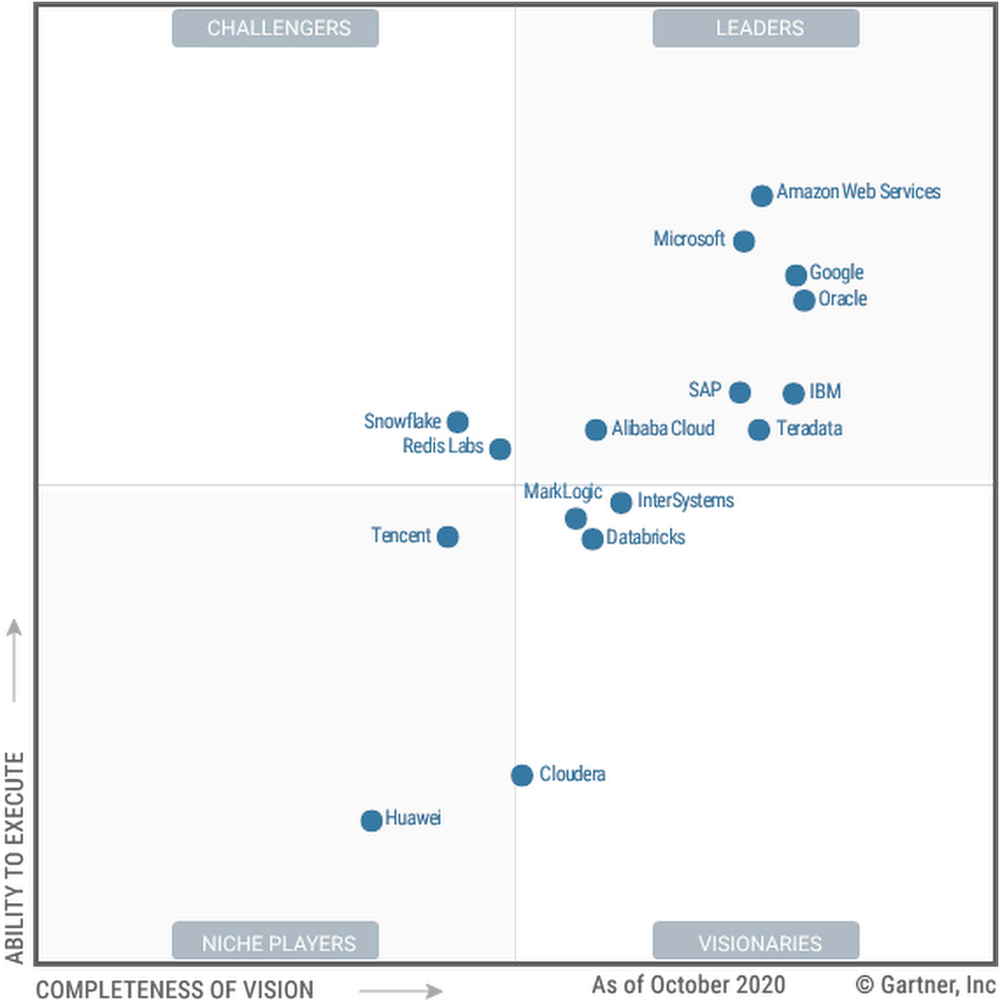
Gartner 2020 Magic Quadrant for Cloud Database Management Systems names Google a Leader

We’re announcing today that Google has been named a Leader in the first-ever Gartner Magic Quadrant for Cloud Database Management Systems (DBMS), 2020. We believe this recognition is due to Google Cloud’s data analytics and databases vision and strategy, and is echoed by the growth in customers across all industries and geographies selecting Google Cloud as their data platform of choice. Gartner has positioned Google as a Magic Quadrant Leader among the furthest three positioned vendors on the completeness-of-vision axis. We are delivering on our multi-cloud and hybrid promise, showcasing adoption across a diverse customer base in every region and industry, setting the new standard for flexible pricing with strong financial governance capabilities, and partnering across a diverse ecosystem. We’re making our vision a reality and are proud of the work we’re doing as the first hyperscale provider to offer a multi-cloud data warehouse with BigQuery Omni. In addition, we offer the industry’s most flexible pricing with Committed Use Discounts across Cloud SQL engines; instant insights for your entire business with Data QnA; and even better reliability and development experience with Cloud Spanner, just to name a few.In today’s world, it’s clear that you have to consider a comprehensive end-to-end ecosystem of data analytics and database services to get full value from your data. So it doesn’t make sense to evaluate analytic and operational use cases in isolation. Per our understanding, as the operational and analytic markets for database management systems (DBMSs) have converged, Gartner has converged its evaluations into a single DBMS Magic Quadrant, with vendors and products that provide support for both classes of use cases. Having been a Leader in both of the previous Magic Quadrants, we’re very supportive of this move, since it aligns to the way our enterprise customers buy, deploy, and consume our services. Moving the focus to customer innovation, not infrastructureEnterprises like Procter & Gamble, Vodafone, and Sharechat have trusted Google Cloud to help them build and scale their products faster while improving digital customer experiences using our fully managed data platform.  “We’re always looking to ensure a great consumer experience across all our categories, from healthcare to beauty products and much more,” says Vittorio Cretella, CIO, Procter & Gamble. “As a leader in analytics and AI, Google Cloud is a strategic partner helping us offer our consumers superior products and services that provide value in a secure and transparent way.”We are honored to be a Leader in the 2020 Gartner Magic Quadrant for Cloud Database Management Systems (DBMS), and look forward to continuing to innovate and partner with you on your digital transformation journey. Download the full 2020 Gartner Magic Quadrant for Cloud Database Management Systems report. You can get started for free with Google Cloud today. Gartner, Magic Quadrant for Cloud Database Management Systems, November 23, 2020, Donald Feinberg, Adam Ronthal, Merv Adrian, Henry Cook, Rick GreenwaldThis graphic was published by Gartner, Inc. as part of a larger research document and should be evaluated in the context of the entire document. The Gartner document is available upon request from Google Cloud.Gartner does not endorse any vendor, product or service depicted in its research publications and does not advise technology users to select only those vendors with the highest ratings or other designation. Gartner research publications consist of the opinions of Gartner’s research organization and should not be construed as statements of fact. Gartner disclaims all warranties, expressed or implied, with respect to this research, including any warranties of merchantability or fitness for a particular purpose.Related ArticleBringing databases to the center of a modern businessDatabase migration is at the heart of a modern business transformation strategy. See how a phased approach can bring the cloud to your da…Read Article
Quelle: Google Cloud Platform

Google charts the course for a modern data cloud

Google Cloud is a leader when it comes to data, and in the past few years, we’ve made leaps and bounds to help our customers level up their enterprise databases and analytics capabilities. Our data platform is a primary reason why the largest enterprises in the world like The Home Depot, HSBC, and UPS run their mission-critical applications on Google Cloud. We’ve also seen momentum in the analyst community, with Gartner, Forrester, and IDC validating our leadership in analyst evaluations across data analytics, databases, and AI. Our fully managed database and analytics services continue to power enterprise digital transformation as the always-on, hyperconnected world drives migrations to the cloud. Google was built to organize the world’s information and make it universally accessible and useful. To deliver on this vision, we process and analyze the world’s largest data sets on the cleanest and most reliable cloud infrastructure. We have leveraged this expertise to deliver a new kind of enterprise-ready data cloud to our customers that is simple, intelligent, and open. It offers built-in automation to ensure your data-first business is operating at its best, with the simplicity to build whatever is next. Let’s dive into five reasons why we lead in the data cloud space.1. Leading analyst firms agree that Google Cloud’s database and analytics are proven and enterprise-ready for any size data team. Today, our customers process and analyze up to petabytes of data on the world’s most advanced and scalable data platform. Customers of every size and maturity are able to seamlessly grow from small prototypes to global success. Cloud Spanner leads the relational world with its unique pairing of a relational operational database with non-relational scale. Cloud Bigtable unlocks high-throughput, low-latency applications and supports customers with millions of queries per second. Google Cloud delivers industry-leading reliability across regions, so you’re always up and running to support your mission-critical applications. Google has some of the highest SLAs in the industry. Spanner includes up to a 99.999% SLA and BigQuery recently announced a 99.99% SLA. When it comes to performance, third-party analyst firms recognize that Google Cloud is a leader when it comes to high-performance and scalable data management for analytics. To bring this all together, you need robust security and governance controls to protect customer’s data. Our customer’s data is encrypted by default, and identity and access management across our solutions are provided by Cloud Identity and Access Management (Cloud IAM). 2. Google Cloud is one of the fastest-growing cloudsin the world across industries.We’re seeing growth across customer segments and industry verticals. BigQuery is widely perceived as the leading solution for analytics and data warehousing; Looker, with its multi-cloud universal semantic layer, gets people to insights from data quickly; and our database services, like Spanner and Cloud SQL, power the most mission-critical applications while redefining the bounds of scale, availability, and performance. Our document database, Cloud Firestore, even has the most satisfied developers compared to any other cloud databases on the market, according to a recent study by SlashData. Over the past year we’ve seen Cloud SQL’s popularity grow—it’s now one of Google Cloud’s fastest-growing top services. With the release of Database Migration Service, we’re now making it even easier for enterprises to move to Cloud SQL from on-premises or other clouds without disrupting their business. Our leadership in the data realm is a primary reason organizations like HSBC, Major League Baseball, Mayo Clinic, and Sharechat choose Google to run their data-driven applications. And that’s also why IDC named our data platform a leader in their 2020 MarketScape report on APeJ Cloud Data Analytics Platform Vendors.3. Google Cloud’s databases and analytics operate with an open philosophy, which includes open source software and databases, open APIs, open data formats, and an inclusive partner ecosystem. Customers can choose from a wide range of operational and analytical engines, open source tools, and machine learning services. Cloud SQL provides a managed service for the world’s most popular open source databases, MySQL and PostgreSQL, so customers can benefit from the latest community enhancements paired with enterprise-grade availability, security, and performance. And open APIs ease migrations, portability, and data access through your preferred tools. In addition, our open platform enables out-of-the-box interoperability between a variety of services for ingestion, storage, processing and analytics—including Apache Spark, Presto and more. And with our rich partner ecosystem and integrations with core Google services (such as Google Analytics), you can quickly and seamlessly integrate with the data sources and technologies you and your team know and love. We are committed to partner and customer success. Our open, partner-friendly platform not only helps our customers scale their data and analytics needs, but helps our partners like Elastic, Confluent, and MongoDB scale their cloud go-to-market. 4. Google makes it easy for enterprises to solve their biggest data-driven problems with packaged horizontal and vertical analytics solutions, embedded with market-leading AI. Packaged, priced, and supported by partners, solutions range from improving contact center operations and document processing to targeted industry solutions for healthcare, retail, manufacturing and industrial, financial services, and media and entertainment. As companies look to expand their business across new channels and deliver real-time experiences, Firestore helps accelerate mobile, web, and IoT application development. Firestore enables developers to quickly build reliable, real-time applications at scale that can handle the changing demands of today’s business. For companies that want to build their own analytics solutions and ask questions of their data, we’ve made it easier for anyone within the organization—from the business user to the data scientist—to get insights from data with BigQuery ML, Dataproc Hub, Connected Sheets, and Data QnA. “With Connected Sheets, we’re not really pulling the data into the spreadsheet; rather it lives in the database where it belongs,” says Peter Van Nieuwerburgh, Global Change Manager at PwC. “The ability to go and so easily analyze and visualize the data is really powerful.”5. We’re the only hyperscale cloud provider that’s executed on a multi-cloud vision. Google Cloud’s commitment to multi-cloud enables customers to use their data where and how they want. Customers can build or modernize their apps anywhere and deliver new app features faster, enabling success in this rapidly changing environment. Industry analysts have recognized Google Cloud as one of the only hyperscale cloud vendors to deliver on the promise of multi-cloud. In addition to facilitating customer innovation with our dedication to open standards, Google Cloud ensures customers can choose the right cloud vendor or environment for each of their workloads, removing over-dependence on one IT vendor. Customers can run apps wherever they want and get the management and support that comes with Google Cloud, creating opportunities for developers to rapidly build and innovate in any environment, including on-premises. With solutions like Anthos, customers can run cloud offerings in a hybrid environment using containers. This architecture also runs in a multi-cloud environment and today runs on AWS. Moving up the stack, Dataproc on Kubernetes allows enterprises to build containerized Spark machine learning and data processing jobs that can be deployed anywhere. Additionally, BigQuery Omni allows you to analyze data in AWS using standard SQL, and without leaving the familiar BigQuery interface. We’re just getting startedGoogle is a leader when it comes to data. By building a data infrastructure that powers Google products used by billions of people, such as Search, Maps, Ads, and YouTube, we have stress-tested our systems, services, and expertise. We have used this expertise to deliver a new kind of data cloud to every enterprise, with fully managed automations to ensure your data-first business is operating at the highest level and the simplicity to build whatever is next. We will continue to help our customers spend less time on management and more time on building. That means continuing to deliver a data cloud that creates an integrated experience across multi-cloud and hybrid environments for your enterprise data and analytics needs. Stay tuned for more to come, and get started today with our free trial offering. Gartner, Magic Quadrant for Cloud Database Management Systems,  November 23, 2020, Donald Feinberg, Adam Ronthal, Merv Adrian, Henry Cook, Rick GreenwaldGartner does not endorse any vendor, product or service depicted in its research publications and does not advise technology users to select only those vendors with the highest ratings or other designation. Gartner research publications consist of the opinions of Gartner’s research organization and should not be construed as statements of fact. Gartner disclaims all warranties, expressed or implied, with respect to this research, including any warranties of merchantability or fitness for a particular purpose.
Quelle: Google Cloud Platform

Wayfair delights suppliers and customers with help from Google Cloud

At Wayfair, we use data to advance our business processes and help our suppliers work more efficiently, all with the end goal of delivering great customer experiences. As one of the world’s largest online destinations for the home, our massive scale allows us to use data to delight our customers and help our thousands of suppliers to identify opportunities and bottlenecks. We had previously worked with Google Cloud for our storefront expansion and relied on them to help us scale our web service that was supporting the buyer experience. As we continue to rapidly grow, this partnership will give us more flexibility to handle surges in customer web traffic and unlock more ways to improve the shopping experience. Being able to help scale operations, while providing a richer experience for our customers, employees, and suppliers, gave us the confidence to continue to work with Google Cloud for our analytics needs. Improving our customer and supplier experienceWith over 18 million products from more than 12,000 suppliers, the process of helping customers find the exact right item for their needs across the vast supplier ecosystem presents exciting challenges, from managing our online catalog and inventory to building a strong logistics network that includes aspects like route optimization and bin packing, while also making it easier to share product data with our suppliers. At Wayfair, we work hand-in-hand with our suppliers so that we can help them grow their businesses and create offerings that are a win-win for both the supplier and for customers. Thanks to this partnership mindset, our suppliers benefit from a steady stream of recommendations that are informed by data. For example, we might let a supplier know that there is an opportunity to capitalize on demand within a certain category by making some merchandising adjustments, such as creating more robust product descriptions. We might also work with a supplier to identify ways to incorporate product tags that allow us to surface a more personalized offering for customers whose aesthetic preferences lean toward a certain style. We are in constant dialogue with our supplier partners, sharing insights like “We know there’s a growing demand for this category and you could surface your products better if you made these adjustments to your merchandising decisions,” or working with them on questions such as, “If we have tens of thousands of sofas, how do we offer personalized recommendations to our end buyers?” Obviously, providing this level of analysis at scale requires a platform that is able to process massive amounts of data across multiple systems.Why we chose Google Cloud We chose Google Cloud because we knew they could scale to meet our needs. Google Cloud helped us effectively centralize our data on a platform with low operational overhead, enabling our data analysts and data scientists to run business-critical analytics. With Google Cloud, we were able to move our application datastores, data movement, and analytics and data science tools all into one place, which gave our developers and analysts the ability to store, secure, enrich, and present data that our teams could take action on. Google Cloud’s flexibility and embracing of open-source solutions in products like Dataproc and Composer was proof to us that they are investing in a platform without too much proprietary technology, which made it easier for our teams to adopt and use those tools. The team also liked how easy it was to move data in from different sources into Google Cloud. Plus, Google Cloud’s consistent data access model improved data governance for Wayfair. The standardization on Cloud Identity and Access Management (Cloud IAM) controls makes sure that our data is accessible to the right people and always secure.Google Cloud’s fully managed platform has well-defined services, which made it easy for us to use and adopt products across the portfolio. For example, the Cloud DLP API can be composed together with other Google Cloud tools such as BigQuery and Pub/Sub to build integrated applications for data security, and the BigQuery Storage API and managed metastore offerings enable smooth integration of open source products with Google’s data platform offerings. How we modernized our data stackWe needed a way to get our streaming and batch data available quickly for insights. In our previous environment, we maintained data warehouse systems that required multiple copies of data to scale and required complex data synchronization routines. This had resulted in long lead times for our team.Now, we can ingest event data from Pub/Sub and Dataflow as the data pipeline for real-time insights and centralize our data using Dataproc, Cloud Storage, and BigQuery storage to help overcome data silos, and derive actionable insights. Because BigQuery decouples compute and storage, we’re able to operate with more agility. Unstructured data lives in Dataproc while structured data lives in BigQuery. Our Dataproc instance is used as a single managed cluster with autoscaling for Hive, Presto, and Spark jobs that read data from BigQuery and Cloud Storage-based tables. We visualize our data in Looker to develop curated dashboards to offer a high-level summary with the ability to drill into diagnostics on what’s driving a particular business metric. We also use Data Studio for operational reporting, which is straightforward to spin up on BigQuery.By analyzing data from our operational SQL stores data as our applications in BigQuery, we were able to improve our inventory and demand forecasting to help our suppliers make better decisions and generate more revenue, faster. Using BigQuery’s flat-rate pricing option, we were able to ensure price predictability for our business.Enjoying the results of a cloud data platformAt Wayfair, we have always believed in the value of data and recognize the importance of maintaining volume, velocity, and agility as we continue to grow. Google Cloud’s powerful and accessible infrastructure has let our data teams reallocate their time and effort from moving and managing the data to instead innovating on what’s next. BigQuery and Dataproc give us high-performance, low-maintenance access to our data at scale. Google Cloud’s analytics product offerings support the full set of requirements of our internal and external users—from descriptive analytics to proscriptive alerting and ML—in a platform that effectively blends Google’s internal technology and open-source standards and technologies. In addition to enjoying the scalability and power these tools bring, we also value the performance. In production, we are seeing a greater than 90% reduction in the number of analytic queries that take more than one minute to run. The combination of scale and speed is generating impressive adoption. Less than a year into our transition, the migration has had tangible benefits—users on cloud tooling report 30% higher NPS with the platform offerings over existing alternatives with significantly lower investment in support. We get more business done with less effort and more satisfied users with Google Cloud.We’re looking forward to our continued work with Google Cloud in improving our overall customer and supplier experience.Want to learn more about Wayfair?Check out all the exciting things happening at Wayfair engineering on our blog, and if you want to work on these kinds of challenges with a talented, global team, check out our Engineering and ML roles.
Quelle: Google Cloud Platform

Serverless load balancing with Terraform: The hard way

Earlier this year, we announced Cloud Load Balancer support for Cloud Run. You might wonder, aren’t Cloud Run services already load-balanced? Yes, each *.run.app endpoint load balances traffic between an autoscaling set of containers. However, with the Cloud Balancing integration for serverless platforms, you can now fine tune lower levels of your networking stack. In this article, we will explain the use cases for this type of set up and build an HTTPS load balancer from ground up for Cloud Run using Terraform.Why use a Load Balancer for Cloud Run?Every Cloud Run service comes with a load-balanced *.run.app endpoint that’s secured with HTTPS. Furthermore, Cloud Run also lets you map your custom domains to your services. However, if you want to customize other details about how your load balancing works, you need to provision a Cloud HTTP load balancer yourself.Here are a few reasons to run your Cloud Run service behind a Cloud Load Balancer:Serving static assets with CDN since Cloud CDN integrates with Cloud Load BalancingServing traffic from multiple regions since Cloud Run is a regional service but you can provision a load balancer with a global anycast IP and route users to the closest available region.Serve content from mixed backends, for example your /static path can be served from a storage bucket, /api can go to a Kubernetes cluster.Bring your own TLS certificates, such as wildcard certificates you might have purchased.Customize networking settings, such as TLS versions and ciphers supported.Authenticating and enforcing authorization for specific users or groups with Cloud IAP (this does not work yet with Cloud Run, however, stay tuned)Configure WAF or DDoS protection with Cloud Armor.The list goes on, Cloud HTTP Load Balancing has quite a lot of features.Why use Terraform for this?The short answer is that a Cloud HTTP Load Balancer consists of many networking resources that you need to create and connect to each other. There’s no single “load balancer” object in GCP APIs.To understand the upcoming task, let’s take a look at the resources involved:global IP address for your load balancerGoogle-managed SSL certificate (or bring your own)forwarding rules to associate IP address with backendstarget HTTPS proxy to terminate your HTTPS traffictarget HTTP proxy to receive HTTP traffic and redirect to HTTPSURL maps to specify routing rules for URL path patterns.backend service to keep track of eligible backendsnetwork endpoint group allowing you to register serverless apps as backends.As you might imagine, it is very tedious to provision and connect these resources just to achieve a simple task like enabling CDN.You could write a bash script with the gcloud command-line tool to create these resources; however, it will be cumbersome to check corner cases like if a resource already exists, or modified manually later. You would also need to write a cleanup script to delete what you provisioned.This is where Terraform shines. It lets you declaratively configure cloud resources and create/destroy your stack in different GCP projects efficiently with just a few commands.Building a load balancer: The hard wayThe goal of this article is to intentionally show you the hard way for each resource involved in creating a load balancer using Terraform configuration language.We’ll start with a few Terraform variables:var.name: used for naming the load balancer resourcesvar.project: GCP project IDvar.region: region to deploy the Cloud Run servicevar.domain: a domain name for your managed SSL certificateFirst, let’s define our Terraform providers:Then, let’s deploy a new Cloud Run service named “hello” with the sample image, and allow unauthenticated access to it:If you manage your Cloud Run deployments outside Terraform, that’s perfectly fine: You can still import the equivalent data source to reference that service in your configuration file.Next, we’ll reserve a global IPv4 address for our global load balancer:Next, let’s create a managed SSL certificate that’s issued and renewed by Google for you:If you want to bring your own SSL certificates, you can create your own google_compute_ssl_certificate resource instead.Then, make a network endpoint group (NEG) out of your serverless service:Now, let’s create a backend service that’ll keep track of these network endpoints:If you want to configure load balancing features such as CDN, Cloud Armor or custom headers, the google_compute_backend_service resource is the right place.Then, create an empty URL map that doesn’t have any routing rules and sends the traffic to this backend service we created earlier:Next, configure an HTTPS proxy to terminate the traffic with the Google-managed certificate and route it to the URL map:Finally, configure a global forwarding rule to route the HTTPS traffic on the IP address to the target HTTPS proxy:After writing this module, create an output variable that lists your IP address:When you apply these resources and set your domain’s DNS records to point to this IP address, a huge machinery starts rolling its wheels.Soon, Google Cloud will verify your domain name ownership and start to issue a managed TLS certificate for your domain. After the certificate is issued, the load balancer configuration will propagate to all of Google’s edge locations around the globe. This might take a while, but once it starts working.Astute readers will notice that so far this setup cannot handle the unencrypted HTTP traffic. Therefore, any requests that come over port 80 are dropped, which is not great for usability. To mitigate this, you need to create a new set of URL map, target HTTP proxy, and a forwarding rule with these:As we are nearing 150 lines of Terraform configuration, you probably have realized by now, this is indeed the hard way to get a load balancer for your serverless applications.If you like to try out this example, feel free to obtain a copy of this Terraform configuration file from this gist and adopt it for your needs.Building a load balancer: The easy wayTo address the complexity in this experience, we have been designing a new Terraform module specifically to skip the hard parts of deploying serverless applications behind a Cloud HTTPS Load Balancer.Stay tuned for the next article where we take a closer look at this new Terraform module and show you how easier this can get.Related ArticleGlobal HTTP(S) Load Balancing and CDN now support serverless computeNow, our App Engine, Cloud Run and Cloud Functions serverless compute offerings can take advantage of global load balancing and Cloud CDN.Read Article
Quelle: Google Cloud Platform

Closing the gap: Migration completeness when using Database Migration Service

Database Migration Service (DMS) provides high-fidelity, minimal downtime migrations for MySQL (Preview) and PostgreSQL (available in Preview by request) workloads to Cloud SQL. Since DMS is serverless, you don’t have to worry about provisioning, managing, or monitoring any migration-specific resources. In this post, we’ll focus on what is and is not included in database migration for MySQL, and what you can do to ensure migration completeness when using DMS. The source database’s data, schema, and additional database features (triggers, stored procedures, and more) are replicated to the Cloud SQL destination reliably, and at scale, with no user intervention required. Due to the peculiarities of MySQL, there are a few things that won’t be migrated, though. Let’s look at what is and isn’t migrated with DMS in more detail.What’s included in MySQL database migrationDMS for MySQL uses the database’s own native replication technology to provide a high-fidelity way to migrate database objects from one database to another. The migration fidelity section of the documentation goes into detail about what is included in the migration. At the time of this Preview launch, all of the following data, schema, and metadata components are migrated as part of the database migration:Data Migration All tables from all databases and schemas, excluding the following default databases and schemas: sys, mysql, performance_schema, and information_schema.Schema MigrationNamingPrimary keyData typeOrdinal positionDefault valueNullabilityAuto-increment attributesSecondary indexesMetadata MigrationStored proceduresFunctionsTriggersViewsForeign key constraintsWhat’s not included in database migrationMySQLThere are certain things that are not migrated as part of a MySQL database migration, as well as some known limitations and quotas that you should be aware of. Users definitionWhen you’re migrating a MySQL database, the MySQL system database, which contains information about users and privileges, is not migrated. That means that user account and login information must be managed in the destination Cloud SQL instance directly. The root account will need to be set up before the instance can be used. You can add users to the Cloud SQL destination instance either from the Users tab in the UI, or from the mysql client. The Cloud SQL documentation contains more information about managing MySQL user accounts.Usage of Definer clauseSince a MySQL migration job doesn’t migrate users data, sources which contain metadata defined by users with the DEFINER clause will fail when invoked on the new Cloud SQL replica, as the users don’t yet exist there. To run a migration from a source that includes the DEFINER clause:Create a migration job without starting it (choose Create instead of Create & Start).Create the users on the new Cloud SQL destination instance using the Cloud SQL API or the Users tab in the UI.Start the migration job from the migration job list or the specific job’s page.Alternatively, you can update the DEFINER clause to INVOKER on the source prior to setting up the migration job. Note that if the metadata was created by ’root’@’localhost’,  the process will fail. Change the DEFINER before starting the migration job.Next Steps with DMSReady to learn more about migrating your MySQL or PostgreSQL database to Cloud SQL? These resources will help you gather the information you need to get started:This blog post announces the launch of DMS and provides an overview of the capabilities it supportsThe DMS documentation goes into more detail about requirements and steps to set up a MySQL database migrationAn in-depth look at configuring connectivity for DMSFill out this form to express interest in DMS for PostgreSQLRelated ArticleDatabase Migration Service Connectivity—A technical introspectiveMigrating your database is hard. So is network connectivity. See how Google’s Database Migration Service can make migration reliable, eas…Read Article
Quelle: Google Cloud Platform

Money matters: Automating your Cloud Billing budgets

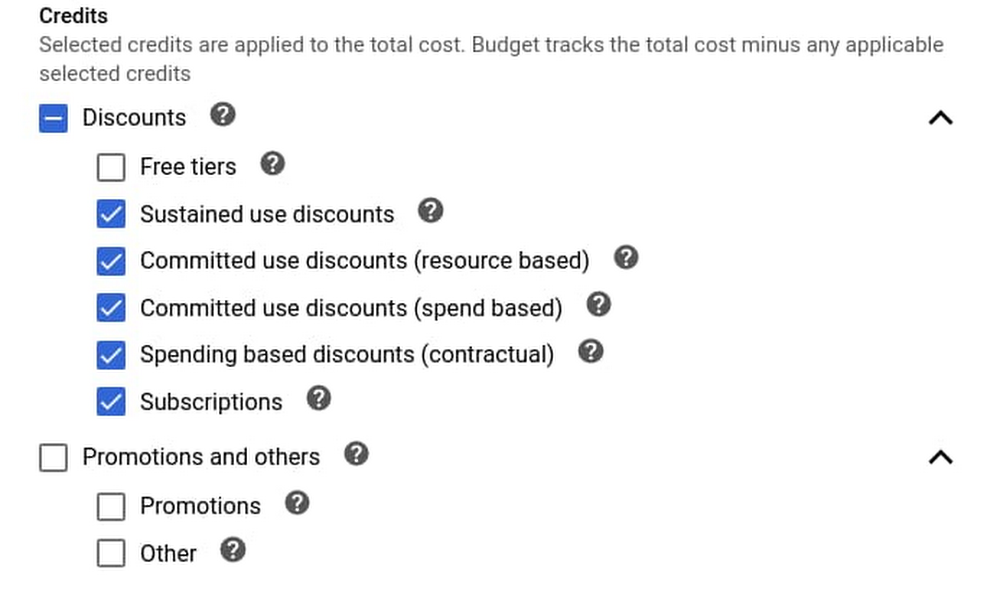
The bigger a cloud environment, the more important it is to have robust cost management tools, including budget automation capabilities. Budgeting tools can help you avoid unnecessary costs via proactive notifications of future (and actual) overages. Billing automation can help you support multiple budgets, each with very granular filters (we have customers with thousands of individual budgets!), and customize your budget notifications. Here on the Cloud Billing team, we’ve been working hard to improve these capabilities based on your feedback, and are excited to announce several enhancements: General availability (GA) of the Budgets API (learn more)Granular choice of credits – choose specific credits to include in your budget (learn more)Customized budget alert email recipients – send email notifications to whoever you want, as well as remove billing admins and users from the default list (learn more)Let’s take a look at these new features in greater depth. Cloud Billing’s latest budgeting featuresOur goal with Cloud Billing is to create an enterprise-grade cost management suite, complete with all the tools you need to manage the largest and most complex of cloud environments. Read on to learn more about Cloud Billing’s new budgeting and automation capabilities. Budgets APIEarlier this month we announced the general availability of the Budgets API. The Budgets API allows you to do almost everything from within the Cloud Billing UI: create, edit and delete budgets, as well as use its scoping and filtering capabilities. You can interact with the API directly through REST calls, or with our Java, Node.JS, Python, GO, and .NET client libraries. Where the UI and API capabilities differ, know that those differences will be short-lived—our goal is to ultimately deliver feature parity between the UI and the API. The Budgets API is especially useful when you want to automate budget creation, i.e., create a budget when a team spins up a new project. It’s also great for editing budgets en masse. For example, if you know you’re about to have a spike in sales, you could increase all related budgets by 20%. Another great use for the Budgets API is to obfuscate and simplify your end users’ permission model for budget creation and editing. If your company already has a self-managed portal for cloud resource management, you can integrate simple budget experiences there, and then use a Service Account to create or edit the budgets. This way, you don’t need to give your users budget-related IAM permissions to allow them to do more than they were originally set up to do. Learn more in our documentation.Previously, the credits setting was a simple checkbox that let you include available credits in your budget. Now, you can choose specific credit families, such as discounts or promotions, or even specific credit types (e.g., free tiers). For example, you can build a durable budget that excludes any one-time promotional credits that you may receive at the free tier level. Customized budget alert email recipientsCloud Billing is now integrated with Cloud Monitoring so you can send notification emails to up to five notification channels; in addition you can decide whether or not to send budget notifications to billing users and admins. With these two features together, you can ensure that notifications are sent to the appropriate recipients.Programmatic budget notificationsJust like the ability to automate budget creation, Cloud Billing can also alert Pub/Sub topics about changes to a budget. Unlike with email notifications, Cloud Billing notifies the Pub/Sub topics regardless of whether a budget threshold has been crossed, and that information can be easily incorporated into your business logic. You can see some examples of programmatic budget notifications here, including posting to a Slack channel.A sample processHow might you use these features together? Here’s a sample process that you could implement in your organization to create a budget for a project, monitor it, and automatically disable the project if it reaches a certain threshold.Initiate infrastructure deployment using your tool of choice, for example Terraform or another Infrastructure as Code tool.That in turn calls into Google Cloud Build to deploy your custom workflows across multiple environments, including VMs, serverless, Kubernetes, or Firebase.Using the Google Cloud Budget API, create an overall budget for the new project, using actual amounts, as well as forecasted thresholds.You can send notifications to: Billing admins and specific employees via Cloud Monitoring channelsA Pub/Sub topicCreate a cloud function to monitor the Pub/Sub topic, which automatically disables billing if spend is over 150% of budget. This happens if (and only if), this is a test environment, as determined by the environment label. For all other environments publish a message to the team Slack channel.Click to enlargeSee code examples here. Your budget, your wayEvery organization is different, and you need the ability to customize the rate at which you consume your cloud resources. We continue to add features to Cloud Billing that allow any organization—from the smallest business to the largest enterprise—to manage their budget how they want, with programmatic methods that enable granular budgets and automated cost controls. To learn more and get started with budgeting on Cloud Billing, check out the documentation.Related ArticleGiving you better cost analytics capabilities—and a simpler invoiceGoogle Cloud Console features cost management tools to help financial operations (FinOps) teams analyze and predict their organization’s …Read Article
Quelle: Google Cloud Platform