You do you: How to succeed in a distributed, multi-cloud world

Why do we use more than one thing to solve a particular need? Sometimes we don’t have a choice. All my financial assets aren’t in one place because my employer-provided retirement account is at a different financial institution than my personal account. Other times, we purposely diversify. I could buy all my clothes at one retailer, but whether it’s a question of personal taste, convenience, or just circumstance, I buy shoes at one store (and often different stores for different types of shoes), shirts at another store and outerwear somewhere else. Is it the same situation within your IT department? Based on organizational dynamics, past bets on technology, and current customer demands, I’d bet that you have a few solutions to any given problem. And it’s happening again with public clouds, as the statistics show that most of you are using more than one provider.But all public clouds aren’t the same. To be sure, there’s commonality amongst them: every public cloud provider offers virtual compute, storage, and networking along with middleware services like messaging. But each cloud offers novel services that you won’t find elsewhere. And each operates within different geographic regions. Some clouds offer different security, data sovereignty, and hybrid capabilities than others. And the user experience—developer tools, web portals, automation capabilities—isn’t uniform and may appeal to different teams within your company. Using multiple clouds may be becoming commonplace, but it’s not simple to do. There are different tools, skills, and paradigms to absorb. But don’t freak out. Don’t send your developers off to learn every nuance of every cloud, or take your attention away from delivering customer value. You do, however, need to prepare your technical teams, so that they’re prepared to make the most of multi-cloud. So what should you do, as a leader of technical teams? Here is some high-level advice to consider as you think about how to approach multi-cloud. And remember, there’s no universal right solution—only the right solution for your organization, right now. Keep your primary focus on portable skillsYour software isn’t defined by your choice of cloud. That’s probably blasphemous to say, coming from someone working for a public cloud provider, but it’s the truth. Most of what it takes to build great software transcends any given deployment target.What software development skills truly matter? Go deep on one or more programming languages. Really understand how to write efficient, changeable, and testable code. Optimize your dev environment, including your IDE, experimental sandboxes, and source control flow. Learn a frontend framework like Angular or Flutter. Grok the use cases for a relational database versus a schema-less database. Figure out the right ways to package up applications, including how to use containers. Invest in modern architectural knowledge around microservices, micro frontends, event stream processing, JAMstack, APIs, and service mesh. Know how to build a complete continuous integration pipeline that gives your team fast feedback. This is valuable, portable knowledge that has little to do with which cloud you eventually use.Don’t get me wrong, you’ll want to develop skills around novel cloud services. All clouds aren’t the same, and there are legitimate differences in how you authenticate, provision, and consume those powerful services. An app designed to run great on one cloud won’t easily run on another. Just don’t forget that it’s all about your software and your customers. The public clouds are here to serve you, not the other way around!Use the “thinnest viable platform” across environmentsToo often, organizations put heavyweight, opaque platforms in place, and hope developers will come and use them. That’s an anti-pattern and companies are noticing a better way.The authors of the book Team Topologies promote the idea of Thinnest Viable Platform (TVP) to accelerate development. In many organizations, Kubernetes is the start of their TVP. It offers a rich, consistent API for containerized workloads. It could make sense to layer Knative on top of that TVP to give developers an app-centric interface that hides the underlying complexity of Kubernetes. Then, you might introduce an embedded service mesh to the cluster so that developers don’t have to write infrastructure-centric code—client-side load balancing, service discovery, retries, circuit breaking and the like. (Note, if you combine those things, and mix in a few others, you get Anthos. Just sayin’).But what’s really powerful here is having a base platform made up of industry-standard open source. Not just open source, but standard open source. You know, the projects that a massive ecosystem supports and integrates with—think Kubernetes, Istio, Envoy, Tekton, and Cloud Native Buildpacks. This allows you to run an identical platform across your deployment targets and integrate with best-of-breed infrastructure and services. Your developers are free to take the foundational plumbing for granted, and steer their attention to all the value-adding capabilities available in each environment.Pick the right cloud (and services) based on your app’s needsLet’s recap. You’re focused on portable skills, and have a foundational platform that makes it easier to run software consistently on every environment. Now, you need to choose where the software actually runs.Your developers may write software that’s completely cloud-agnostic and can run anywhere. That’s hard to do, but assuming you’ve done it, then your developers don’t need to make any tough choices up front. When might you need upfront knowledge of the target environment? A few examples:Your app depends on unique capabilities for AI, data processing, IoT, or vertical-specific APIs—think media or healthcare.You need to host your application in a specific geography, and thus choose a specific cloud, datacenter, or partner facility.Your app must sit next to a specific data source—think SaaS systems, partner data centers, mobile users—and use whatever host is closest.Have a well-tested decision tree in place to help your teams decide when to use novel versus commodity services, and how to select the cloud that makes the most sense for the workload. Choosing the cloud and services to use may require expert help. Reach out toGoogle’s own experts for help, or work with our vast network of talented partners who offer proven guidance on your journey. The choice is yours.Related ArticleAnthos: one multi-cloud management layer for all your applicationsAnthos can be the foundation of current and future applications.Read Article
Quelle: Google Cloud Platform

What’s new in BigQuery ML: non-linear model types and model export

We launched BigQuery ML, an integrated part of Google Cloud’s BigQuery data warehouse, in 2018 as a SQL interface for training and using linear models. Many customers with a large amount of data in BigQuery started using BigQuery ML to remove the need for data ETL, since it brought ML directly to their stored data. Due to ease of explainability, linear models worked quite well for many of our customers.However, as many Kaggle machine learning competitions have shown, some non-linear model types like XGBoost and AutoML Tables work really well on structured data. Recent advances in Explainable AI based on SHAP values have also enabled customers to better understand why a prediction was made by these non-linear models. Google Cloud AI Platform already provides the ability to train these non-linear models, and we have integrated with Cloud AI Platform to bring these capabilities to BigQuery. We have added the ability to train and use three new types of regression and classification models: boosted trees using XGBoost, AutoML tables, and DNNs using Tensorflow. The models trained in BigQuery ML can also be exported to deploy for online prediction on Cloud AI Platform or a customer’s own serving stack. Furthermore, we expanded the use cases to include recommendation systems, clustering, and time series forecasting. We are announcing the general availability of the following: boosted trees using XGBoost, deep neural networks (DNNs) using Tensorflow, and model export for online prediction. Here are more details on each of them:Boosted trees using XGBoostYou can train and use boosted tree models using the XGBoost library. Tree-based models capture feature non-linearity well, and XGBoost is one of the most popular libraries for building boosted tree models. These models have been shown to work very well on structured data in Kaggle competitions without being as complex and obscure as neural networks, since they let you inspect the set of decision trees to understand the models. This should be one of the first models you build for any problem. Get started with the documentation to understand how to use this model type.Deep neural networks using TensorFlowThese are fully connected neural networks, of type DNNClassifier and DNNRegressor in TensorFlow. Using a DNN reduces the need for feature engineering, as the hidden layers capture a lot of feature interaction and transformations. However, the hyperparameters make a significant difference in performance, and understanding them requires more advanced data science skills. We suggest only experienced data scientists use this model type, and leverage a hyperparameter tuning service like Google Vizier to optimize the models. Get started with the documentation to understand how to use this model type.Model export for online predictionOnce you have built a model in BigQuery ML, you can export it for online prediction or further editing and inspection using TensorFlow or XGBoost tools. You can export all models except time series models. All models except boosted tree are exported as TensorFlow SavedModel, which can be deployed for online prediction or even inspected or edited further using TensorFlow tools. Boosted tree models are exported in Booster format for online deployment and further editing or inspection. Get started with the documentation to understand how to export models and use them for online prediction.We are building a set of notebooks for common patterns (use cases) for these models that we see in different industries. Check out all the tutorials and notebooks.Related ArticleAnnouncing our new Professional Machine Learning Engineer certificationLearn about the Google Cloud Professional Machine Learning Engineer certification.Read Article
Quelle: Google Cloud Platform
Beyond COVID-19, retail looks to transform with AI/ML

The global retail industry, which has grappled with waves of change over the past decade, is facing one of its most dynamic and unpredictable periods to date. When I speak with retail executives, some are thriving, some are surviving, and some are struggling. What I have taken from these conversations is that COVID-19 has seriously condensed the timeline available to play ‘catch up’ in developing agile, resilient operating models powered by cloud infrastructure, artificial intelligence and machine learning (AI/ML) technologies. At Google Cloud, we recently commissioned a survey of global retail executives to better understand which AI/ML use cases across the retail value chain drive the highest value and returns in retail, and what retailers need to keep in mind when going after these opportunities. While the study has applicability across all of retail, the researchers focused their effort around two specific sub-segments —Food, Drug, and Mass merchants (FDM) and Specialty —as these verticals have faced dramatically different challenges during COVID-19. Here are the key findings: There is significant value at stake that can be created with AI/ML across Food, Drug, Mass and Specialty retailersThe researchers looked at 75 use cases across Food, Drug, Mass and Speciality retail to understand where AI/ML can help retailers derive value across different areas of their business.Click to enlargeFor Food, Drug, Mass merchant retail the research showed that the application of AI/ML technologies can potentially drive ~$280-650B across the value chain as adoption accelerates. Similarly for Speciality Retailers the research found a potential to deliver ~$230-520B in value by 2023. In an industry where profit margins are in the single digits, AI/ML is increasingly a foundational investment area for retail leaders. A few use cases unlock a disproportionately large share of value While there are many considerations that go into deciding which AI/ML projects to work on, the data showed there is a clear opportunity for retailers to choose initiatives that drive greater value creation. Across a wide range of retailers a few use cases stood out.Click to enlargeFor Food, Drug and Mass merchant retailers, merchandising, store operations and logistics are some of the largest cost drivers of the P&L. Not surprisingly, four out of the top ten use cases for this segment fall under these parts of the value chain, including frictionless check out, picker routing, automated task dispatch and shelf checking. Retailers in this space can leverage AI/ML capabilities to gain efficiency and productivity for their employees by automating tasks across stores and distribution centers. In Specialty, the use cases that drive the most value fall within merchandising and assortment, product lifecycle management, and logistics and fulfillment. For these retailers, use cases within merchandising and assortment make up five out of the top ten list and focus on improvements in demand planning by optimizing assortment, inventory, and markdowns. By combining data and signals from various parts of their business and using AI/ML enabled analytics, merchandising teams can see patterns that traditional analytics often miss and make granular predictions even for new/ short life cycle products.  Learn more about transforming your business with AIAt Google, we’ve been solving business problems with AI and machine learning technologies for over a decade and are excited to be bringing this experience and our technology to our customers. Leading retailers including Carrefour, Zulilyand The Home Depot rely on Google Cloud AI and machine learning products to transform their businesses. You can dig deeper into the results of the research and read more customer case studies in this ebook or watch our recent webinar featuring a conversation with Zulily.
Quelle: Google Cloud Platform

How AI, and specifically BERT, helps the patent industry

In recent years the patent industry has begun to use machine-learning (ML) algorithms to add efficiency and insights to business practices. Any company, patent office, or academic institution that works with patents—generating them through innovation, processing applications about them, or developing sophisticated ways to analyze them—will benefit from doing patent analytics and machine learning in Google Cloud. Today, we are excited to release a white paper that outlines a methodology to train a BERT (bidirectional encoder representation fromtransformers) model on over 100 million patent publications from the U.S. and other countries using open-source tooling. The paper describes how to use the trained model for a number of use cases, including how to more effectively perform prior art searching to determine the novelty of a patent application, automatically generate classification codes to assist with patent categorization, and autocomplete. The white paper is accompanied by a colab notebook as well the trained model hosted in GitHub. Google’s release of the BERT model (paper, blog post, and open-source code) in 2018 was an important breakthrough that leveraged transformers to outperform other leading state of the art models across major NLP benchmarks, including GLUE, MultiNLI, and SQuAD. Shortly after its release, the BERT framework and many additional transformer-based extensions gained widespread industry adoption across domains like search, chatbots, and translation.We believe that the patents domain is ripe for the application of algorithms like BERT due to the technical characteristics of patents as well as their business value. Technically, the patent corpus is large (millions of new patents are issued every year world-wide), complex (patent applications generally average ~10,000 words and are often meticulously wordsmithed by inventors, lawyers, and patent examiners), unique (patents are written in a highly specialized ‘legalese’ that can be unintelligible to a lay reader), and highly context dependent (many terms are used to mean completely different things in different patents). Patents also represent tremendous business value to a number of organizations, with corporations spending tens of billions of dollars a year developing patentable technology and transacting the rights to use the resulting technology and patent offices around the world spending additional billions of dollars a year reviewing patent applications.We hope that our new white paper and its associated code and model will help the broader patent community in its application of ML, including:Corporate patent departments looking to improve their internal models and tooling with more advanced ML techniques.Patent offices interested in leveraging state-of-the-art ML approaches to assist with patent examination and prior art searching.ML and NLP researchers and academics who might not have considered using the patents corpus to test and develop novel NLP algorithms.Patent researchers and academics who might not have considered applying the BERT algorithm or other transformer based approaches to their study of patents and innovation.To learn more, you can download the full white paper, colab notebook, and trained model. Additionally, seeGoogle Patents Public Datasets: Connecting Public, Paid, and Private Patent Data, Expanding your patent set with ML and BigQuery, and Measuring patent claim breadth using Google Patents Public Datasets for more tutorials to help you get started with patent analytics in Google Cloud.Related ArticleUnifiedpost and Google collaborate on Document AI to automate procurement data captureUnifiedpost uses Google Cloud Document AI to automate procurement data capture.Read Article
Quelle: Google Cloud Platform
Introducing .NET on Google Cloud Functions

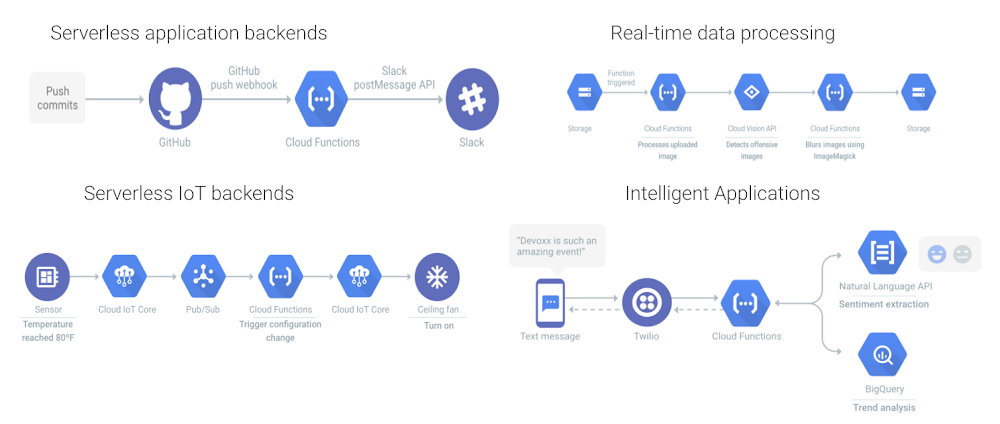
Cloud Functions is Google Cloud’s Function-as-a-Service platform that allows users to create single-purpose, stand-alone functions that respond to events, without having to manage a server or runtime environment. Cloud functions are a great fit for serverless applications, mobile or IoT backends, real-time data processing systems, video, image and sentiment analysis and even things like chatbots, or virtual assistants.Today we’re bringing .NET Core 3.1, a free, cross-platform and open-source platform for Windows, Mac and Linux, to Cloud Functions. With this integration you can write cloud functions using your favorite .NET Core 3.1 runtime with our Functions Framework for .NET, for an idiomatic developer experience!With Cloud Functions for .NET, now in Preview, you can use .NET Core 3.1 to build business-critical applications and integration layers, and deploy the function in a fully managed environment, complete with access to resources in a private VPC network. .NET functions scale automatically based on your load. You can write HTTP functions to respond to HTTP events, and CloudEvent functions to process events sourced from various cloud and Google Cloud services including Pub/Sub, Cloud Storage and Firestore.You can develop functions using the Functions Framework for .NET, an open source functions-as-a-service framework for writing portable .NET functions. With Functions Framework you develop and run your functions locally, then deploy them to Cloud Functions, or to another .NET environment.The Functions Framework for .NET supports HTTP functions and CloudEvent functions. A HTTP cloud function is very easy to write. Below, you’ll find a simple HTTP function for Webhook/HTTP use cases.CloudEvent functions on the .NET runtime respond to industry standard CNCF CloudEvents. These events can be from various Google Cloud services, such as Pub/Sub, Cloud Storage and Firestore.Here is a simple CloudEvent function working with Pub/Sub.VB and F# SupportThe Cloud Functions .NET runtime also supports VB and F#. The programming model is exactly the same, and there are examples in the GitHub repository. The .NET Functions Framework comes with a template package for use from the command line or Visual Studio, and these templates support VB and F# as well.Try Cloud Functions for .NET todayCloud Functions for .NET is ready for you to try today. Read the Quickstart guide, learn how to write your first functions, and try it out with a Google Cloud Platform free trial. If you want to dive a little bit deeper into the technical aspects, you can also read Jon Skeet’s blog on a tour of the .NET Functions Framework. If you’re interested in the open-source Functions Framework for .NET, please don’t hesitate to have a look at the project and potentially even contribute to it. In addition, we also have a codelab that you could try out to help you get familiarized with the runtime. We’re looking forward to seeing all the .NET functions you write!Related ArticleNew in Cloud Functions: languages, availability, portability, and moreCloud Functions includes a wealth of new capabilities that make it a robust platform on which to build your applicationsRead Article
Quelle: Google Cloud Platform
.NET 5.0 on Google Cloud

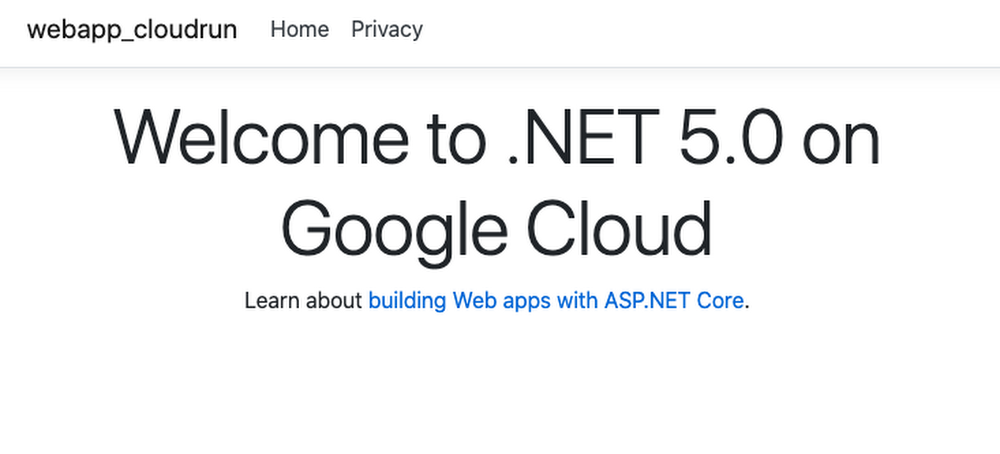
A unified .NET.NET 5.0 was released just a few days ago with many new features, improvements, C# 9 support, F# 5 support, and more. .NET 5.0 is the first release of the unified .NET vision that was announced last year. Going forward, there will be just one .NET targeting Windows, Linux, macOS, and more. Google Cloud already has support for different versions of .NET. You can run traditional Windows based .NET apps on Windows Servers in Compute Engine or on Windows Containers in Google Kubernetes Engine (GKE). For modern Linux based containerized .NET apps, there’s more choice with App Engine (Flex), GKE and my favorite Cloud Run. Not to mention, the .NET Core 3.1 support in Cloud Functions is currently in preview for serverless .NET functions. In the rest of the blog post, I want to show you how to deploy .NET 5.0 to Cloud Run. Cloud Run makes it really easy to deploy and scale containerized apps on a fully managed platform..NET 5.0First, make sure you have the latest .NET 5.0 installed:> dotnet –version5.0.100Let’s follow the ASP.NET tutorial to create a web app with ASP.NET framework. Create a simple web app with plain HTTP support:> dotnet new webapp -o webapp-cloudrun –no-httpsCloud Run expects for the app to listen on a PORT environment variable. Change CreateHostBuilder function of Program.cs file to do that:Also, let’s change the default welcome message in Index.cshtml file to display a welcome message like this:<h1 class=”display-4″>Welcome to .NET 5.0 on Google Cloud</h1>After the changes, you can build and run the app locally. It should start a server listening on port 8080:> dotnet runinfo: Microsoft.Hosting.Lifetime[0]      Now listening on: http://0.0.0.0:8080Containerize .NET 5.0 To containerize the app, we will create a Dockerfile. One thing to keep in mind is that with the release of .NET 5.0, all Docker tags for .NET Core 2.1/3.1 and .NET 5.0 is published to one set of unified Docker repositories (see 2375). The names of these repositories have been changed from the originals to no longer include “core” in the name. Here’s the Dockerfile for our app using the new dotnet/sdk and dotnet/aspnet base images with 5.0 versions:FROM mcr.microsoft.com/dotnet/sdk:5.0-alpine AS buildWORKDIR /appCOPY *.csproj ./RUN dotnet restoreCOPY . ./WORKDIR /appRUN dotnet publish -c Release -o outFROM mcr.microsoft.com/dotnet/aspnet:5.0-alpine AS runtimeWORKDIR /appCOPY –from=build /app/out ./ENTRYPOINT [“dotnet”, “webapp-cloudrun.dll”]Build and save the Docker image to Google Container Registry with Cloud Build:> gcloud builds submit –tag gcr.io/${GOOGLE_CLOUD_PROJECT}/hello-dotnet5Deploy to Cloud RunFinally, deploy to Cloud Run:> gcloud run deploy –image gcr.io/${GOOGLE_CLOUD_PROJECT}/hello-dotnet5         –platform managed         –allow-unauthenticatedIn a few seconds, you should see the service deployed:✓ Deploying… Done.✓ Creating Revision…✓ Routing traffic…✓ Setting IAM Policy…Done.Service [hello-dotnet5] revision [hello-dotnet5-00002-tux] has been deployed and is serving 100 percent of traffic.Service URL: https://hello-dotnet5-dhmnie7yqa-ew.a.run.appAnd visiting the service URL will display our page:Of course .NET support is not limited to Cloud Run. Check out how we support .NET on Google Cloud.  Related ArticleStreamlining Cloud Run development with Cloud CodeCloud Run is now integrated with Cloud Code, making it easier to create new Cloud Run services from your favorite IDE.Read Article
Quelle: Google Cloud Platform

How APIs expand reach and drive ROI for content producers

Over the course of just a few years, the ways in which we consume content have changed dramatically. In order to compete in this new landscape and to adapt to the technological change that underpins it, media studios and other content producers should consider providing relatively open access to their proprietary content. This necessitates a cultural change across the industry. Cable television cancellation, or “cord cutting,” has increased significantly since 2010, and with the pandemic accelerating the trend, there are now more than 30 million cord-cutter U.S. households. The American digital content subscriber now watches streaming content across an average of more than three paid services. For several years, more video content has been uploaded to streaming services every 30 days than the major U.S. television networks have created in 30 years. With an abundance of content readily available across a growing number of platforms, each accessible from a plethora of different devices, media providers should invest in making it easier for consumers to find the video content they want to watch. If a viewer can’t access and stream something with minimal effort, they’ll likely move on to one of the countless alternatives readily at their disposal. Think about voice-based assistants and search services. When prompted to find a piece of content, these services sift through a multitude of third-party libraries, where access is permitted, and remove friction from the user experience. It’s important for media companies to evolve from siloed, closed-off content libraries to participation in digital ecosystems, where a host of partnership opportunities can precipitate wider reach and revenue opportunities. Ultimately, joining these communities facilitates the delivery of the right experience on the right device at the right time to the right consumer.Navigating a streaming jungle Legacy silos prevalent in the media and entertainment industry must be broken down to make way for richer viewing experiences. It’s critical that studios roll out content faster, distribute it more securely, and better understand their audiences so they can provide customers the content they want in the contexts they want. In order to achieve these goals, publishers must leverage technology that’s purpose-built for the demands of a more dynamic, competitive landscape.Publishers should consider embracing application programming interfaces, or APIs, to better connect with viewers and maximize return on content production. APIs, which facilitate interoperability between applications, allow publishers’ content to be consumed by more developers and publishing partners, who subsequently create more intelligent, connected experiences surrounding that content for the viewers.  This new content value chain should leverage an API management tool that resides on top of cloud infrastructure to manage the partnerships that ultimately ensure media can easily make its way to the consumer on their ideal viewing platform. APIs let content owners and distributors interact with partner technologies to drive value from social interactions and attract a wider audience via insights derived from data and analytics. Perhaps most important is the ability for APIs to allow content to follow users as they start watching on one device, stop, and transfer to another. Content is increasingly separated from the device. APIs enable experiential continuity to be maintained when devices are changed, facilitating more seamless experiences across devices of different form factors and screen sizes. Consumers expect content to follow them wherever they go. How APIs improve content creation and distribution Last year, streaming services produced more original content than the entire television industry did in 2005—so for many media producers, adjusting to consumers’ new media consumption habits involves not only making content available on more devices but also producing more content, faster. Studios should explore solutions that help them collaborate globally and produce great content more securely and efficiently. In the content value chain, APIs are used to seamlessly connect artists and production crews to necessary resources and assets across multiple production technologies and locations. For example, via APIs, a film crew in one country can record, encode, and collaborate and share content with another studio in another country. These cloud-based production environments can offer a single destination for all contributors to access the assets they need while also keeping those assets accessible only to the right people in the right contexts. In addition, creating and distributing content requires a complex supply chain. APIs let multiple parties, each responsible for a different core function (such as content purchasing, storage, payments, physical media delivery, customer service, etc.), meld into a seamless experience for the customer.  Rather than reimagining their strategy when it comes to these backend tasks, studios can leverage third-party APIs to expedite getting content in front of the right people and ultimately execute each of those functions more efficiently than they could on their own. Besides tapping into partner APIs, savvy media and entertainment companies can accelerate consumption of content by developing their own public APIs to securely provide access to their asset libraries, pricing, and other relevant information. This is important, as it lets media creators use the same API to serve content to a variety of services and device types, thus helping them scale content distribution without simultaneously having to scale security resources. Media companies’ APIs can also be implemented  to deliver better customer experiences. Because APIs are involved each time a customer streams a video and every time a developer integrates a media asset into a new app or digital experience, API usage analytics can provide powerful insights into where, when, by whom, and on what devices different types of media—from traditional movies to augmented reality and other interactive content—are being accessed. Bringing it all together with an API management tool In order for studios to quickly adapt to a content value chain and distribute their content across multiple platforms, it’s important that they implement an API management tool on top of the cloud environment that powers content creation and distribution. For instance, Google Cloud offers Apigee, which sits on top of its public cloud. This added layer facilitates the integration between a studio’s proprietary environment and the strategic partnerships that APIs make possible. The API lifecycle can be rather complex, especially when multiple APIs are leveraged. It can include:Planning, design, implementation, testing, publication, operation, consumption, maintenance, versioning, and retirement of APIsLaunch of a developer portal to target, market to, and govern communities of developers who leverage APIsRuntime managementEstimation of APIs’ valueAnalytics to understand patterns of API usageUsing a management layer such as Apigee increases the likelihood that media and entertainment companies can combine the ability offered by public clouds and APIs to adapt to the requirements of new devices and protocols. It brings next-generation technology together to ensure studios can scale, secure, monitor, and analyze digital content creation and distribution.Related ArticleHelping media companies navigate the new streaming normalAs media and entertainment companies evolve their future plans as a result of COVID-19, they should keep new audience behaviors top of mi…Read Article
Quelle: Google Cloud Platform

Filestore Backups eases migration of file-based apps to cloud

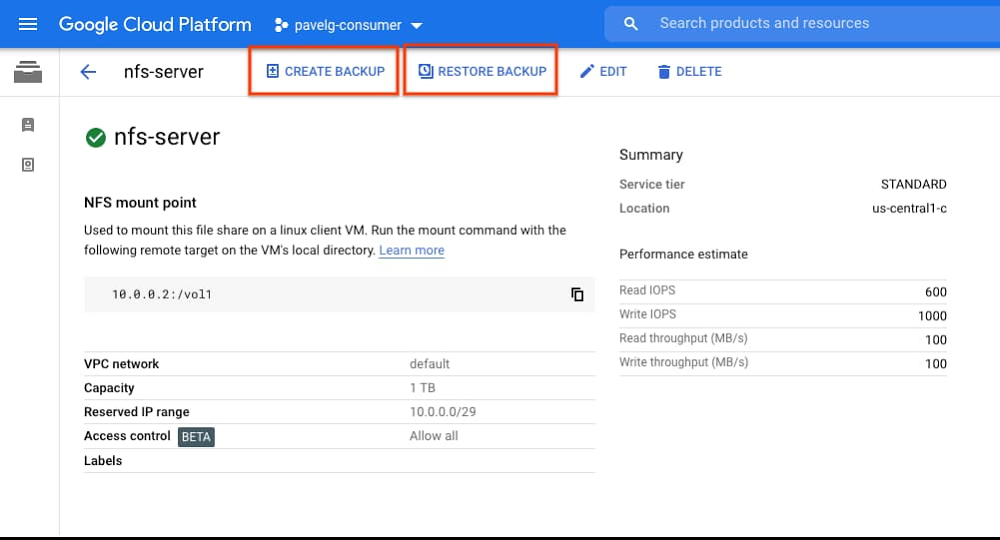
When you’re considering migrating mission-critical workloads to the cloud, it’s important to make it as easy as possible. We think maintaining your established, on-prem best practices can make a cloud migration a lot easier. Using established best practices reduces the need to rearchitect applications, and also helps ensure continuity as you migrate your infrastructure. We’re announcing the availability of Filestore Backups preview in all regions, making it easier to migrate your business continuity, disaster recovery and backup strategy for your file systems in Google Cloud.File system backups serve use cases such as disaster recovery, protection against accidental data changes, file system cloning and migration of data, all of which benefit from the ability to efficiently store a copy of data and metadata in a separate storage system. File system backups form a central component of any solid backup strategy, as they let you safely retain point-in-time copies of data shared across VMs and applications. While resiliency is an essential aspect of nearly every industry today, websites and ecommerce are one example where 24×7 uptime and reliability is critical. Downtime or lost data can mean a direct and immediate impact to a business. Google Cloud customer Liferay, one of the leading platforms for websites and ecommerce businesses, relies on Filestore backups to make sure they are supporting their customers with best-in-class reliability. “On Liferay DXP Cloud, we work with customers from all sizes and backgrounds with different storage and compliance needs,” says Eduardo Lundgren, CTO of Liferay Cloud. “Using Filestore allowed us to support all these needs while focusing on delivering new features instead of managing storage. Filestore Backups enable us to create daily snapshots of each customer, and if needed, restore their data quickly and safely.” Filestore backups can be used to restore a file system back to a previous state or to create a new Filestore instance whose data is identical to the original at the point in time the backup was taken. Filestore Backups features were designed to answer the requirements of enterprise file users. Here are a few of the benefits that Filestore Backups offers:Regional availability – Filestore backups are regional resources, which enables them to protect users against the rare case of inaccessibility of a given zone. If data in a zone is inaccessible, users can restore the data using the regional backup and continue working in any available zone. Cross-region creation – Filestore backups can also be created and stored to a region different from that of the origin file system. This enables users to protect their workloads against the inaccessibility of an entire region or to efficiently migrate file system data between regions. Compression and incremental data retention – To reduce costs, backups within a region are created incrementally based on previous backups and are automatically compressed. This means that the first backup you create is a compressed copy of the file share, and subsequent backups include only the new or modified data that is not contained in the previous backup.‘Create’ and ‘Restore’ functionality across Filestore Basic HDD and Filestore Basic SSD – Filestore backups can be created for either Filestore Basic HDD or Filestore Basic SSD instances and can be restored to either tier. This means that Filestore backups can be used to migrate data from Filestore Basic HDD to Basic SSD to increase performance or from Filestore Basic SSD to Basic HDD to reduce costs. Customers may use the backup feature to optimize cost and performance based on actual workload needs.Independent lifecycle of backup and filestore instance – Once a backup of a file system is created, the original instance may be safely deleted. As backups are stored on separate storage, the backup will be retained until it is deleted by the user. If access to the data in the backup is required a new filesystem can be created from the backup recreating the data and metadata of the deleted file system.These features let you use Filestore backups across multiple use cases, including:Backing up data for disaster recovery – Use Cloud Scheduler to regularly back up instances to a remote region. In the event of a disaster you can create a new instance in another location from any previous backup.Backing up data to protect against accidental changes – To protect your data against accidental deletions or changes due to human or software errors, back up your file system regularly and before major changes or upgrades. In the event of inadvertent loss or change to a file, you can identify the backup with the version of the file needed, create a new Filestore instance, and copy the original file over. Alternatively, you can do an in-place restore where the backup data is directly restored to the original Filestore instance.Creating clones for development and testing – If your Filestore instance serves production traffic and you want to run a test with the data in the file system as an input, simply create a clone Filestore instance from a backup to enable testing and development usage without interfering with production files systems.Migrating data – If you need to migrate a Filestore instance to another region, you can simply create a backup and restore the Filestore instance in the new region. This same method may also be used to create multiple copies of a file system across a collection of regions.Creating a backup or restoring from a backup is easy from the Google Cloud Console:The list of existing Filestore backups with more details is available in a separate “Backups” tab.Creation of a new instance from a backup details page is just a single click away:To get started, check out the Filestore Backup documentation or create a backup in the Google Cloud Console.This blog is dedicated to Allon Cohen, our colleague and friend who passed away this month. We want to thank Allon for his contributions to Filestore and Google Cloud.
Quelle: Google Cloud Platform

I do declare! Infrastructure automation with Configuration as Data

Over the years there’s been an explosion in infrastructure platforms and application frameworks that form the foundation of “cloud native.” Modern infrastructure platforms range from container orchestrators such as Kubernetes to serverless platforms aimed at rapid application development. In parallel, shell scripts that administrators used to deploy, configure, and manage these platforms evolved into what is now called Infrastructure as Code (IaC), which formalizes the use of higher level programming languages such as Python or Ruby or purpose-built languages such as HashiCorp’s HCL (through Terraform). Though IaC has been broadly adopted, it suffers from a major flaw: code does not provide a contract between the developer’s intent and runtime operation. Contracts are the foundation of a consistent, secure and high-velocity IT environment. But every time you modify or refactor code, you need to run validation tools to determine its intent.Which begs the question, why are admins using programming languages in the first place? Why is all of this so complicated? In many ways it’s an attempt to automate the unknown, the unpredictable. But by nature, most infrastructure is loosely defined and requires baling wire and duct tape to stick things together in ways that mimic what a system administrator would do when logged into a server.Furthermore, while provisioning infrastructure is important, IT practitioners also need to deploy and manage both infrastructure and applications from day two onwards in order to maintain proper operations. Ideally, you could use the same configuration management tools to deploy and manage both your infrastructure and applications holistically. The Kubernetes wayThings are different with Kubernetes…Instead of taking an imperative or procedural approach, Kubernetes relies on the notion of Configuration as Data, taking a declarative approach to deploying and managing cloud infrastructure as well as applications. You declare your desired state without specifying the precise actions or steps for how to achieve it. Every Kubernetes resource instance is defined by Configuration as Data expressed in YAML and JSON files. Creating a Deployment? Defining a Service? Setting a policy? It’s all Configuration as Data, and Kubernetes users have been in on the secret for the past six years. Want to see what we mean? Here’s a simple Kubernetes example…In just 10 lines of YAML, you can define a Service with a unique version of your application, set up the network to create a route, ingress, Service, and load balancer, and automatically scale up and down based on traffic. How does Configuration as Data work? Within the Kubernetes API Server are a set of controllers that are responsible for ensuring the live infrastructure state matches the declarative state that you express. For example, the Kubernetes service controller might ensure that a load balancer and Service proxy are created, that the corresponding Pods are connected to the proxy, and all necessary configuration is set up and maintained to achieve your declared intent. The controller maintains that configured state forever, until you explicitly update or delete that desired state.What’s less well known is that the Kubernetes Resource Model (KRM) that powers containerized applications can manage non-Kubernetes resources including other infrastructure, platform, and application services. For example, you can use the Kubernetes Resource Model to deploy and manage cloud databases, storage buckets, networks, and much more. Some Google Cloud customers also manage their applications and services using Kubernetes controllers that they developed in-house with open-source tools.How do you start leveraging the KRM for managing Google Cloud resources? Last year, Google Cloud released Config Connector, which provides built-in controllers for Google Cloud resources. Config Connector lets you manage your Google Cloud infrastructure the same way you manage your Kubernetes applications—by defining your infrastructure configurations as data—reducing the complexity and cognitive load for your entire team.Following our service example above, let’s say we want to deploy a Google Cloud Redis instance as a backing memory store for our service. We can use KRM by creating a simple YAML representation that is consistent with the rest of our application:We can create the Redis instance via KRM and Config Connector:Where CaD meets IaCDoes that mean you no longer need traditional IaC tools like Terraform? Not necessarily. There will always be a need to orchestrate configuration between systems, for example, collecting service IPs and updating external DNS sources. That’s where those tools come in. The benefit when managing Google Cloud resources with Config Connector is that the contract will be much stronger. This model also offers a better integration story and cleanly separates the responsibility for configuring a resource and managing it. Here’s an example with Terraform:Terraform is used to provision a Google Cloud network named “demo_network” via the Terraform provider for Google and to create a Google Cloud Redis instance connected to it via the Terraform Kubernetes provider and KRM. On the surface, the contract between Terraform and the two providers looks the same, but beneath the surface lies a different story.The Terraform provider for Google calls the Google Cloud APIs directly to create the networking resources. If you wanted to use another configuration tool you would need to create a new set of Google Cloud API integrations. Furthermore, you will jump back and forth between Kubernetes and Terraform to view resources created separately in each interface.On the other hand, the Kubernetes provider is backed by a controller running in Kubernetes that presents a KRM interface for configuring Redis instances. Once Terraform submits configuration in the form of data to a Kubernetes API server, the resource is created and is actively managed by Kubernetes. Configuration as Data establishes a strong contract between tools and interfaces for consistent results. You’re able to remain in the Kubernetes interface to manage resources and applications together. The Kubernetes API server continuously reconciles the live Google Cloud state with the desired state you established in Terraform with KRM. Configuration as Data complements Terraform with consistency between Terraform executions that may be hours, days, or weeks apart.To make a long story short, Configuration as Data is an exciting approach to infrastructure and app management that enables fluid interaction between native resources and configuration tools like IaC and command lines.  It’s also an area that’s moving quickly. Stay tuned for more about Configuration as Data coming soon. In the meantime, try Config Connector with your Google Cloud projects and share your feedback about what you did, what worked, and what new features you’d like to see.Related ArticleUnify Kubernetes and GCP resources for simpler and faster deploymentsThe new Config Connector lets you manage GCP resources as if they were in Kubernetes.Read Article
Quelle: Google Cloud Platform

Use real-time anomaly detection reference patterns to combat fraud

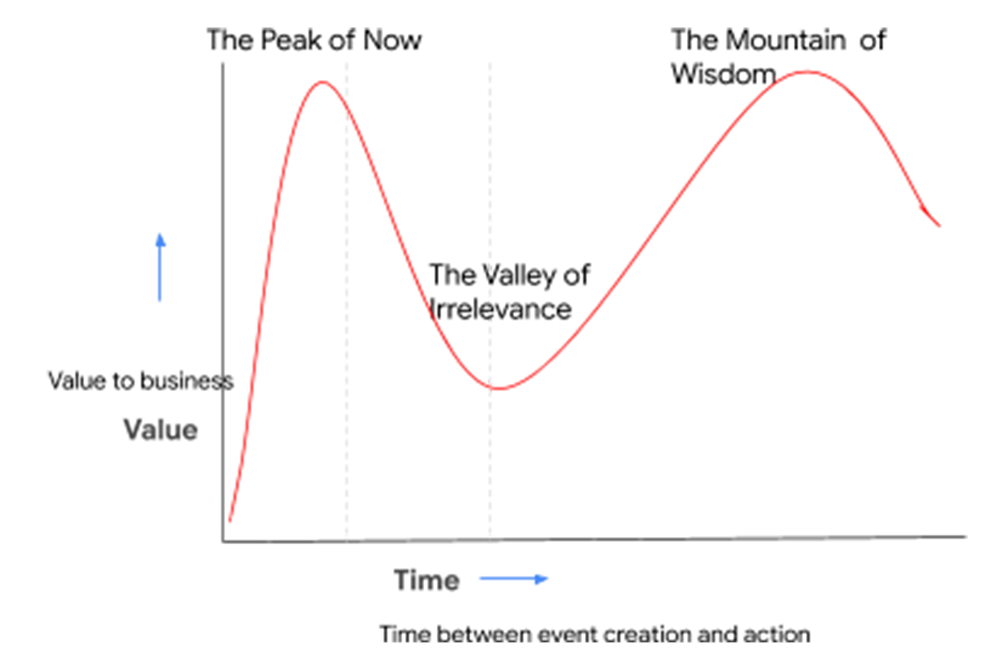
Businesses of every size and shape have a need to better understand their customers, their systems, and the impact of external factors on their business. How rapidly businesses mitigate risks and capitalize on opportunities can set apart successful businesses from businesses that can’t keep up. Anomaly detection—or in broader terms, outlier detection—allows businesses to identify and take action on changing user needs, detect and mitigate malignant actors and behaviors, and take preventive actions to reduce costly repairs.The speed at which businesses identify anomalies can have a big impact on response times, and in turn, associated costs. For example, detecting a fraudulent financial transaction in hours or days after it happens often results in writing off the financial loss. The ability to find the anomalous transaction in seconds allows for the invalidation of the transaction and corrective actions to prevent future fraud. Similarly, by detecting anomalies in industrial equipment, manufacturers can predict and prevent catastrophic failures that could cause capital and human loss by initiating proactive equipment shutdowns and preventative maintenance. Likewise, detecting anomalous user behavior (for example, sign-in into multiple accounts from the same location/device) can prevent malignant abuse, data breaches, and intellectual property theft.In essence, anomalous events have an immediate value. If you don’t seize that value, it vanishes into irrelevance until there’s a large enough collection of events to perform retrospective analysis. (See image below for an illustration of that concept.) To avoid falling off this “value cliff,” many organizations are looking to stream analytics to provide a real-time anomaly detection advantage.At Google Cloud, our customer success teams have been working with an increasing number of customers to help them implement streaming anomaly detection. In working with such organizations to help them build anomaly detection systems, we realized that providing these reference patterns can significantly reduce the time to solution for those and future customers.Reference patterns for streaming anomaly detectionReference patterns are technical reference guides that offer step-by-step implementation and deployment instructions and sample code. Reference patterns mean you don’t have to reinvent the wheel to create an efficient architecture. While some of the specifics (e.g., what constitutes an anomaly, desired sensitivity level, alert a human vs. display in a dashboard) depend on the use case, most anomaly detection systems are architecturally similar and leverage a number of common building blocks. Based on that learning, we have now released a set of repeatable reference patterns for streaming anomaly detection to the reference patterns catalog (see the anomaly detection section).These patterns implement the following step-by-step process:Stream events in real time Process the events, extract useful data points, train the detection algorithm of choiceApply the detection algorithm in near-real time to the events to detect anomaliesUpdate dashboards and/or send alertsHere’s an overview of the key patterns that let you implement this broader anomaly detection architecture:Detecting network intrusion using K-means clusteringWe recently worked with a telecommunications customer to implement streaming anomaly detection for Netflow logs. In the past, we’ve seen that customers have typically implemented signature-based intrusion detection systems. Although this technique works well for known threats, it is difficult to detect new attacks because no pattern or signature is available. This is a significant limitation in times like now, when security threats are ever-present and the cost of a security breach is significant. To address that limitation, we built an unsupervised learning-based anomaly detection system. We also published a detailed writeup: Anomaly detection using streaming analytics and AI. The following video gives a step-by-step overview of implementing the anomaly detection system. Keep in mind that the architecture and steps in the video can be applied to other problem domains as well, not just network logs. Detecting fraudulent financial transactions using Boosted TreesWhile the previous pattern used a clustering algorithm (trained in BigQuery ML), the finding anomalies in financial transactions in real time using Boosted Trees pattern uses a different ML technique called BoostedTrees. BoostedTrees is an ensemble technique that makes predictions by combining output from a series of base models. This pattern follows the same high-level architecture and uses Google Cloud AI Platform to perform predictions. One of the neat things in the reference pattern is the use of micro-batching to group together the API calls to the CAIP Prediction API. This ensures that a high volume of streaming data does not necessarily result in API quota issues. Here’s what the architecture looks like:Time series outlier detection using LSTM autoencoderMany anomaly detection scenarios involve time series data (a series of data points ordered by time, typically evenly spaced in time domain). One of the key challenges with time series data is that it needs to be preprocessed to fill any gaps (either due to source or transmission problems) in data. Another common requirement is the need to aggregate metrics (e.g., Last, First, Min, Max, Count values) from the previous processing window when applying transforms to the current time window. We created a Github library to solve these problems for streaming data and jump-starts your implementation for working with time series data. These patterns are driven by needs we’ve seen in partnering with customers to solve problems. The challenge of finding the important insight or deviation in a sea of data is not unique to any one business or industry; it applies to all. Regardless of where you are starting, we look forward to helping you on the journey to streaming anomaly detection. To get started, head to the anomaly detection section in our catalog of reference patterns. If you have implemented a smart analytics reference pattern, we want to hear from you. Complete this short survey to let us know about your experience.
Quelle: Google Cloud Platform



