A new Terraform module for serverless load balancing

Today we are announcing a new Terraform module for provisioning load balancers optimized for serverless applications. With this Terraform module, you can complete your load balancing task with a single module, instead of configuring many underlying network resources yourself in Terraform.In an earlier article, we showed you how to build a Cloud HTTPS Load Balancer for your serverless applications from the ground up using Terraform. It was cumbersome, requiring you to know many networking APIs and wire them up. This new Terraform module solves this problem by abstracting away the details of building a load balancer and gives you a single Terraform resource to interact with.You can now easily place your serverless applications (Cloud Run, App Engine, or Cloud Functions) behind a Cloud Load Balancer that has an automatic TLS certificate, and lets you set up features like Cloud CDN, Cloud IAP, or custom certificates with only a few lines of configuration.A quick exampleFor illustration purposes, let’s say you have a serverless network endpoint group (NEG) for your Cloud Run application. Provisioning a global HTTPS load balancer for this application on your custom domain with this new Terraform module looks like this:As you can see from the code snippet above, it takes just a few lines of configuration to set up a managed TLS certificate, deploy your own TLS certificate(s), enable CDN, and define Identity-Aware Proxy or Cloud Armor security policies.Harnessing the power of TerraformWith this new Terraform module, you can take deployment automation to the next level by taking advantage of HCL syntax and Terraform features.For example, a common use case for using global load balancers is to serve traffic from multiple regions. However, automating deployment of your app to 20+ regions and keeping your load balancer configuration up-to-date may require a nontrivial amount of bash scripting. This is where Terraform shines!In this next example, we deploy a Cloud Run app to all available regions and add them behind a global load balancer. To do that, we simply create a variable named regions that holds the list of deployment locations.Then, we create a Cloud Run service (and its network endpoint group), using the for_each syntax:Then, we add all the network endpoint groups with a simple for loop syntax:By implementing this technique, we create 60+ API resources for 20+ regions with a couple lines of simple modifications to our Terraform configuration, a task that would otherwise require a lot of bash scripting.If you’re interested in the full implementation of this example, check out my Cloud Run multi-region deployment with Terraform repository.ConclusionWith the serverless network endpoint groups launch, we allow you to create an HTTP or HTTPS load balancer in front of your serverless applications on Google Cloud. And with this new Terraform module, we’re making this interaction even easier.To get started, make sure to check out the module GitHub repository or module registry for the detailed and up-to-date documentation and take a look at the Cloud Run example of the module to get started. We welcome your feedback; please report issues in our GitHub repository.Related ArticleServerless load balancing with Terraform: The hard wayWhat Cloud Load Balancer integration means for Cloud Run, and how to build a load balancer from scratch using Terraform resources.Read Article
Quelle: Google Cloud Platform

Online shopping gets a boost from Cloud SQL

Editor’s note: With the events of 2020 driving an enormous shift to online shopping, martech provider Bluecore was in prime position. One of our Google Cloud Tech Partners for the Year in Retail, Bluecore offers a marketing platform to over 400 retail brands that combines data and predictive intelligence for targeted campaigns. Here, we look at how Google Cloud SQL’s managed services freed up Bluecore’s valuable time and energy so they could continue to innovate.At Bluecore, we help large-scale retail brands transform their shoppers into lifetime customers. We’ve developed a fully automated multi-channel personalized marketing platform that leverages machine learning and artificial intelligence to deliver campaigns through predictive data models. Our product suite includes email, site, and advertising channel solutions, and data is at the heart of everything we do, helping our retailers deliver personalized experiences to their customers. Because our retail marketing customers need to access and apply data in real time in their UI—without downtime or a drop in performance—we needed a new database solution. Our engineering team was spending valuable time trying to create and manage our own relational database, which meant less time spent on building our marketing products. We realized we needed a fully managed service that would fit into our existing architecture so that we could focus on what we do best. Google Cloud SQL was that solution.Personalized shopping experiencesOur retail marketing customers can create highly precise campaigns inside the Bluecore app by applying their marketing and campaign messaging to target customers based on triggers such as referral source, time on page, scroll depth, products browsed, and shopping cart status. Based on those rules, our product intelligently decides which information should be shown to which customers. Highly personalized campaigns can be created easily with drag-and-drop features and widgets such as campaign-specific images or email capture. Our requirement for a database was full campaign creation functionality that uses metadata, including type of campaign (pop-up, full-page, etc.), timed campaigns (Christmas, Black Friday, etc.), and targeted customer segments. This campaign metadata needs to be connected and available in real time within the UI itself without slowing down the retail brand’s website. So a marketer’s customer who has a high affinity towards discounts, for example, can be shown products with high discounts when browsing products. Once the campaign is rendered, we can measure who engaged with the campaign, what products they browsed, and whether or not they made a purchase. Those analytics are available to the e-commerce marketer and also to our own data science team, so we can measure which campaigns are most effective. We can then use that information to optimize our features and our retail brands’ future campaigns.  Using the same underlying data sets and feeds, we can tie the email capabilities to the site capabilities. For instance, if the customer hasn’t opened the email in a certain amount of time, and they visit the website, we can show them a campaign. Or if they’ve read a brand’s email, we can show them a different offer. The email and site channels can be used independently or together, according to the marketer’s preference.Needing a real-time solutionOur first use case with Cloud SQL was around the storage of campaign information. We have a multi-tenant architecture. Our raw data such as user activity (clicks, views) is stored in raw tables in BigQuery. At first, our campaign information was stored in Datastore, which can scale easily, but we found out very quickly that our data fits a relational model much better and we started using Cloud SQL.. If a marketer makes a change to one campaign, it can affect many other campaigns, so we needed a solution that could take that data and apply it immediately without degraded performance or a need for downtime. This was a mission-critical feature for Bluecore. Choosing Cloud SQLIn evaluating relational databases, we looked at a few options, and even tried at first to set up our own MySQL using Google Kubernetes Engine (GKE). But we quickly realized that turning to our existing partner, Google, could deliver the results we needed while freeing time for our engineers. Google Cloud SQL had the fully managed database capabilities to provide high availability while handling common time-consuming tasks like backups, maintenance, and replicas. With Google ensuring reliable, secure and scalable databases, our engineers could focus on what we do best, enhancing our marketing platform’s features and performance. As an example, one feature that we developed is allowing our retail brand clients the ability to offer custom messaging in real time. For example, we can send a personalized message offering a coupon code in exchange for a customer’s email signup to a customer who has looked at five web pages but hasn’t yet added anything to their cart. Cloud SQL plays well with Google Cloud’s suite of productsIn addition to our BigQuery and Cloud SQL services, we rely upon many of Google’s related managed services across our infrastructure. Events are being sent from web pages to Google App Engine from which they are queued into Pub/Sub and processed by Kubernetes/GKE. Our UI is hosted on App Engine as well. It is extremely easy to communicate with Cloud SQL from both App Engine and GKE. Google continues to work with us to realize the full capabilities of the services we use, and to determine which services would best accelerate our growth plan. To learn more about their marketing technology platform, visit Bluecore. Ready to get started with a fully managed relational database solution? Explore Cloud SQL now.Related ArticleJoining fans and artists in perfect harmony with Cloud SQLConcert discovery service Songkick chose managed cloud database Cloud SQL to modernize their infrastructure and cut out maintenance and o…Read Article
Quelle: Google Cloud Platform
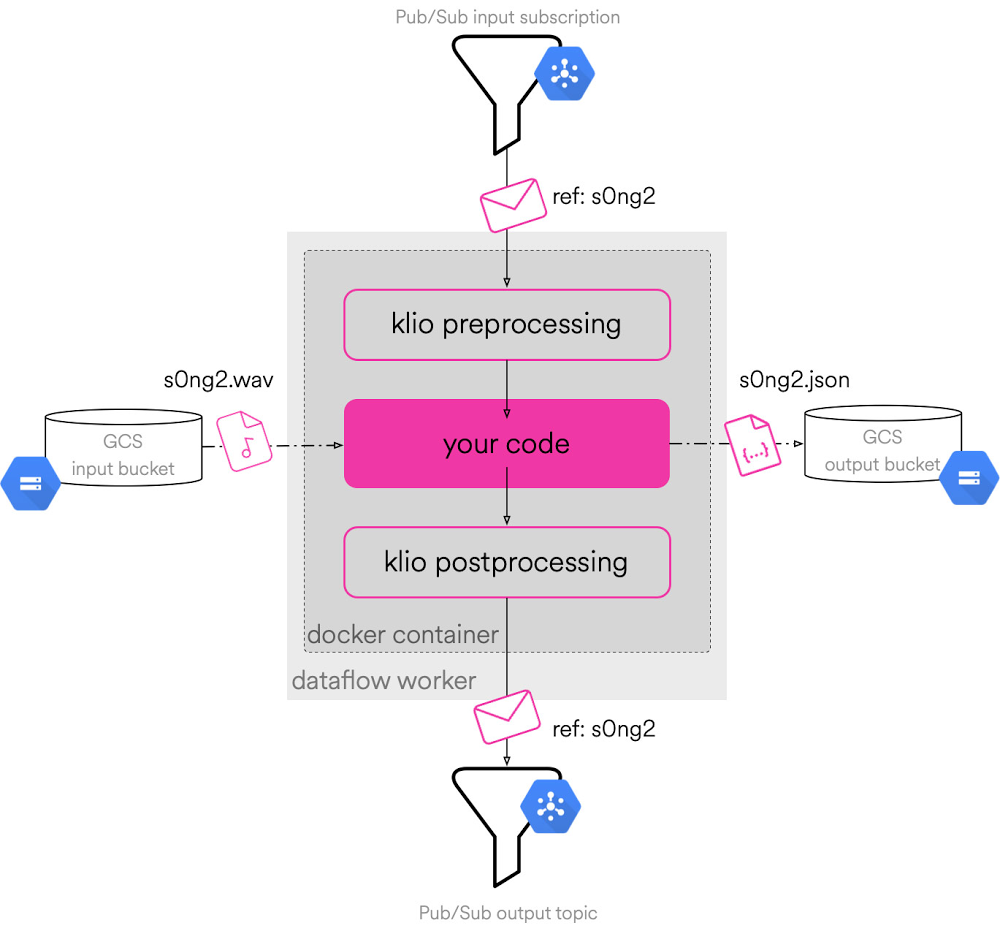
Image archive, analysis, and report generation with Google APIs

File backup isn’t the most exciting topic, while analyzing images with AI/ML is more interesting—so combining them probably isn’t a workflow you think about often. However, by augmenting the former with the latter, you can build a more useful solution than without. Google provides a diverse array of developer tools you can use to realize this ambition, and in fact, you can craft such a workflow with Google Cloud products alone. More compellingly, the basic principle of mixing-and-matching Google technologies can be applied to many other challenges faced by you, your organization, or your customers.The sample app presented uses Google Drive and Sheets plus Cloud Storage and Vision to make it happen. The use-case: Google Workspace (formerly G Suite) users who work in industries like architecture or advertising, where multimedia files are constantly generated. Every client job results in yet another Drive subfolder and collection of asset files. Successive projects lead to even more files and folders. At some point, your Drive becomes a “hot mess,” making users increasingly inefficient, requiring them to scroll endlessly to find what they’re looking for.A user and their Google Drive filesHow can Google Cloud help? Like Drive, Cloud Storage provides file (and generic blob) storage in the cloud. (More on the differences between Drive & Cloud Storage can be found in this video.)Cloud Storage provides several storage classes depending on how often you expect to access your archived files. The less often files are accessed, the “colder” the storage, and the lower the cost. As users progress from one project to another, they’re not as likely to need older Drive folders and those make great candidates to backup to Cloud Storage.First challenge: determine the security model. When working with Google Cloud APIs, you generally select OAuth client IDs to access data owned by users and service accounts for data owned by applications/projects. The former is typically used with Workspace APIs while the latter is the primary way to access Google Cloud APIs. Since we’re using APIs from both product groups, we need to make a decision (for now and change later if desired).Since the goal is a simple proof-of-concept, user auth suffices. OAuth client IDs are standard for Drive & Sheets API access, and the Vision API only needs API keys so the more-secure OAuth client ID is more than enough. The only IAM permissions to acquire are for the user running the script to get write access to the destination Cloud Storage bucket. Lastly, Workspace APIs don’t have their own product client libraries (yet), so the lower-level Google APIs “platform” client libraries serve as a “lowest common denominator” to access all four REST APIs. Those who have written Cloud Storage or Vision code using the Cloud client libraries will see something different.The prototype is a command-line script. In real life, it would likely be an application in the cloud, executing as a Cloud Function or a Cloud Task running as determined by Cloud Scheduler. In that case, it would use a service account with Workspace domain-wide delegation to act on behalf of an employee to backup their files. See this page in the documentation describing when you’d use this type of delegation and when not to.Our simple prototype targets individual image files, but you can continue to evolve it to support multiple files, movies, folders, and ZIP archives if desired. Each function calls a different API, creating a “service pipeline” with which to process the images. The first pair of functions are drive_get_file() and gcs_blob_upload(). The former queries for the image on Drive, grabs pertinent metadata (filename, ID, MIMEtype, size), downloads the binary “blob” and returns all of that to the caller. The latter uploads the binary along with relevant metadata to Cloud Storage. The script was written in Python for brevity, but the client libraries support most popular languages. Below is the aforementioned function pseudocode:Next, vision_label_img() passes the binary to the Vision API and formats the results. Finally that information along with the file’s archived Cloud Storage location are written as a single row of data in a Google Sheet via sheet_append_row().Finally, a “main” program that drives the workflow is needed. It comes with a pair of utility functions, _k_ize() to turn file sizes into kilobytes and _linkify() to build a valid Cloud Storage hyperlink as a spreadsheet formula. These are featured here:While this post may feature just pseudocode, a barebones working version can be accomplished with ~80 lines of actual Python. The rest of the code not shown are constants, error-handling, and other auxiliary support. The application gets kicked off with a call to main() passing in a filename, the Cloud Storage bucket to archive it to, a Drive file ID for the Sheet, and a “folder name,” e.g., a directory or ZIP archive. Running it several times results in a spreadsheet that looks like this:Image archive report in Google SheetsDevelopers can build this application step-by-step with our “codelab”—codelabs are free, online, self-paced tutorials—which can be found here. As you journey through this tutorial, its corresponding open source repo features separate folders for each step so you know what state your app should be in after every implemented function. (NOTE: Files are not deleted, so your users have to decide when to their cleanse Drive folders.) For backwards-compatibility, the script is implemented using older Python auth client libraries, but the repo has an “alt” folder featuring alternative versions of the final script that use service accounts, Google Cloud client libraries, and the newer Python auth client libraries. Finally to save you some clicks, here are links to the API documentation pages for Google Drive, Cloud Storage, Cloud Vision, and Google Sheets. While this sample app deals with a constrained resource issue, we hope it inspires you to consider what’s possible with Google developer tools so you can build your own solutions to improve users’ lives every day!
Quelle: Google Cloud Platform

Joining fans and artists in perfect harmony with Cloud SQL

Editor’s note: We’re hearing today from Songkick, a U.K.-based concert discovery service owned by Warner Music Group. Annually, Songkick helps over 175 million music fans from all around the world to track their favorite artists, discover concerts and live streams, and buy tickets with confidence online and via their mobile apps and website. Here’s how the team was able to streamline their process and open up new potential by moving their data from physical servers to the cloud.Since 2007, we have specialized in making it as easy, fun, and fair as possible for fans to see their favorite artists live. We do this by gathering information shared by artists, promoters, and ticketing partners, storing it on a database of event information, and cross-referencing against user-flagged data in a tracking database. This lets our users know who is playing in their favorite venues, where their favorite artists are performing, and how to get tickets as soon as they’re on sale.For many years, all of this depended on physical server space. We managed three racks in an offsite location, so whenever we had any hardware issues, it meant that someone would need to physically go to the location to make changes, even if it was the middle of the night. This meant more unnecessary, time-consuming work for our team and a greater potential for long downtimes. When we were acquired by Warner Music Group, we evaluated what we should focus on and what kind of value we want to deliver as an engineering team. It became clear that maintaining physical machines or database servers were not part of it. Moving to a global venueMoving to the cloud was the obvious solution, and when we did our research, we found that Google Cloud was the best option for us. By adopting Google Cloud managed services, all of our database infrastructure is managed for us, meaning we don’t have to deal with issues like hardware failure—especially not at 4 a.m. It also meant that we no longer had to deal with one of the biggest infrastructure headaches—software upgrades—which, between testing and prep work, previously would have taken over a month to upgrade the physical offsite servers. Honestly, we are just happy to let Google deal with that and our engineers can focus on creating software.Migration was thankfully very easy with Google Cloud. Using external replication, we moved one database instance at a time, with about five minutes of downtime for each. We could have made it with almost zero downtime but it was not necessary for our scenario. Today, all four of our databases run on Cloud SQL for MySQL with the largest databases—musical event information and artist tour and show tracking information—hosted on dedicated instances. These are quite large; our total data usage is around 1.25TB, which includes about 400 GB of event data and 100 GB of tracking data. The two larger databases are 8 CPU, 30 GB of RAM, and the other two are 4 CPU, with 15 GB RAM. We duplicate that data into our staging environment, so total data in CloudSQL is about 2.5 TB.Overall, we get to spend less time thinking about and dealing with MySQL, and more time making improvements that directly impact the business.Keeping data clean and clear with Cloud SQLOne of the great things about Songkick is that we get data directly from artists, promoters, venues, and ticket sellers, meaning that we can get more accurate information as soon as it’s available. The drawback of this is that when data comes from all of these sources, it means that it comes in multiple formats that often weren’t created to work together. It also means that we often get the same information from multiple sources, which can make things confusing for users.Cloud SQL acts as our source-of-truth datastore, ensuring that all of our teams and the 30 applications that contain our business logic are sharing the same information. We apply dedupe and normalization rules on incoming data before it is stored in Cloud SQL, thus reducing the risk of incorrect, inconsistent, duplicated, or incomplete data.This is only the beginning of what we’re looking to improve at Songkick on Google Cloud. We’re planning to expand our data processing operations, including creating a service for artists that will show them where their most engaged audiences are, helping them plan better tours. We want to streamline this process by aggregating queries on BigQuery, then storing the summarized results back in Cloud SQL. That means a better experience for the fans and the artists, and it all starts with a better database in the cloud.Learn more about Songkick and about Google Cloud databases.Related ArticleCloud SQL now supports PostgreSQL 13Fully managed Cloud SQL cloud database service now supports PostgreSQL 13.Read Article
Quelle: Google Cloud Platform

Traffic Director takes application networking beyond Google Cloud

Whether you run services in Google Cloud, on-premises, in other clouds, or all of the above, the fundamental challenges of application networking remain the same: How do you get traffic to these services? And how do these services talk to each other?Traffic Director is a fully managed control plane for service mesh and load balancing. We built Traffic Director with the vision that it could solve these challenges, no matter where your services live. Today, we’re delivering on another part of that vision so that we can better support your multi-environment needs.With Traffic Director, you can now send traffic to services and gateways that are hosted outside of Google Cloud. Traffic is routed privately, over Cloud Interconnect or Cloud VPN, according to the rules that you configure in Traffic Director.This capability enables services in your VPC network to interoperate more seamlessly with services in other environments. It also enables you to build advanced solutions based on Google Cloud’s portfolio of networking products, such as Cloud Armor protection for your private on-prem services. Whether you’re only running workloads in Google Cloud, or have advanced multi-environment needs, Traffic Director is a versatile tool in your networking toolkit.Introducing Hybrid Connectivity NEGsThis is all made possible through support for Hybrid Connectivity Network Endpoint Groups (NEGs). Now generally available, think of a Hybrid Connectivity NEG as a collection of IP addresses and ports (“endpoints”) that clients can use to reach your application.You probably already use NEGs when configuring Traffic Director with GKE-based services. Hybrid Connectivity NEGs are special because they don’t need to resolve to a destination within Google Cloud. Instead, they can resolve to a destination outside of your VPC network (like a gateway in an on-prem data center or an application on another public cloud).If you’re sending traffic from Google Cloud to another environment, that traffic travels over hybrid connectivity (for example, Cloud Interconnect or Cloud VPN). This allows you to have workloads in another environment and reach them securely from Google Cloud, without having to make those workloads accessible via the public internet.Here’s a simple example of how you might use Hybrid Connectivity NEGs with Traffic Director:Imagine you have a virtual machine (VM) running on-prem and that VM can be reached from your VPC network via Cloud VPN interconnect at 10.0.0.1 on port 80. In Traffic Director, you create a service called `on-prem-service` and add a Hybrid Connectivity NEG with an endpoint with IP address 10.0.0.1 and port 80. Traffic Director then sends that information to its clients (for example, Envoy sidecar proxies running alongside your applications). Thus, when your application sends a request to `on-prem-service`, the Traffic Director client inspects the request and directs it to `10.0.0.1:80`.What can I do with it?With this feature, you can now build powerful solutions that involve existing Traffic Director capabilities as well as Cloud Load Balancing’s global network edge services. Here are a few examples:Route mesh traffic to on-prem or another cloudThe simplest use case for this feature is plain old traffic routing. For example:You want to get traffic from one environment to another. In the above example, when your application sends a request to the `on-prem` service, the Traffic Director client inspects the outbound request and updates its destination. The destination gets set to an endpoint associated with the `on-prem` service (in this case, `10.2.0.1`). The request then travels over VPN or Interconnect to its intended destination.If you need to add more endpoints, you just add them to your service by updating Traffic Director. You don’t need to make any changes to your application code.Migrate a service between environmentsBeing able to send traffic privately to an endpoint outside of Google Cloud is powerful. But things get even more interesting when you combine this with Traffic Director capabilities like weight-based traffic splitting.The above example extends the previous pattern, but instead of configuring Traffic Director to send all traffic to the `on-prem` service, you configure Traffic Director to split traffic across two services using weight-based traffic splitting.Traffic splitting allows you to start by sending 0% of traffic to the `cloud` service and 100% to the `on-prem` service. You can then gradually increase the proportion of traffic sent to the `cloud` service. Eventually, you send 100% of traffic to the `cloud` service and you can retire the `on-prem` service.Use Google Cloud’s edge services with workloads in other environmentsFinally, you can combine this functionality with Cloud Load Balancing to bring global edge capabilities to workloads that are outside of your VPC network. Cloud Load Balancing offers a wide range of network edge services, such as globally distributed ingress, Cloud Armor for DDoS protection, and Cloud CDN.You can now use these with Traffic Director to support workloads that are not exposed to the public internet: if you have Cloud VPN or Cloud Interconnect between Google Cloud and another environment, your traffic will travel via that private route. We previously posted about how you can use Cloud Armor with on-prem and cloud workloads that can be reached via the public internet. In the approach described below, workloads in other environments don’t need to be publicly reachable.In this example, traffic from clients travels over the public internet and enters Google Cloud’s network via a Cloud Load Balancer such as our global external HTTP(S) load balancer. You can use network edge services, for example, Cloud Armor DDoS protection or Identity-Aware Proxy user authentication when traffic reaches the load balancer.After you’ve secured your ingress path, the traffic makes a brief stop in Google Cloud, where an application or standalone proxy (configured by Traffic Director) forwards it across Cloud VPN or Cloud Interconnect to your on-prem service.Get started todayWith Traffic Director, we’ve been focused on enterprise needs since day one, and we’re excited about the class of problems that Hybrid Connectivity NEGs solve for enterprises that operate beyond GCP.Get started today with Traffic Director, Google Cloud Load Balancing and Cloud Armor to set up a secure global ingress solution for private multi-environment workloads. This is just a first step on our journey to delivering on Traffic Director’s mission of being a truly universal application networking solution. More to come!Related ArticleGoogle Cloud networking in depth: How Traffic Director provides global load balancing for open service meshGoogle Cloud’s new Traffic Director control-plane management tool brings load balancing a resiliency to environments running on a service…Read Article
Quelle: Google Cloud Platform
Simplify creating data pipelines for media with Spotify’s Klio

On any given day, music streaming service Spotify might process an audio file a hundred different ways—identifying a track’s rhythm and tempo, timestamping beats, and measuring loudness—as well as more sophisticated processing, such as detecting languages and separating vocals from instruments. This might be done to develop a new feature, to help inform playlists and recommendations, or for pure research.Doing this kind of processing on a single audio file is one thing. But Spotify’s music library is over 60 million songs, growing by 40,000 tracks a day, not including the rapidly expanding podcast catalog. Then, factor in that hundreds of product teams are processing these tracks at the same time, all around the world, and for different use cases. This scale and complexity—plus, the difficulty of handling large binary files to begin with—can hinder collaboration and efficiency, bringing product development to a grinding halt. That’s unless you have Klio.What is Klio?In order to productionize audio processing, Spotify created Klio—a framework built on top of Apache Beam for Python that helps researchers and engineers alike run large-scale data pipelines for processing audio and other media files (such as video and images). Spotify originally created Klio after realizing that ML and audio researchers across the company were performing similar audio processing tasks, but were struggling to deploy and maintain them. Spotify saw an opportunity to produce a flexible, managed process that would support a variety of audio processing use cases over time—efficiently and at scale—and got to work. At a high level, Klio allows a user to provide a media file as input, perform the necessary processing, and output intelligent features and data. There are a multitude of possible use cases for audio alone, from standardizing common audio-processing tasks with ffmpeg or librosa to running custom machine learning models. Klio simplifies and standardizes pipeline creation for these tasks, increasing efficiency and letting users focus on their business objectives rather than maintaining the processing infrastructure. Now that Klio has been released as open source, anyone can use the framework to build their own scalable and efficient media processing workflows.How does Klio work?Klio job overviewKlio currently enables a few key steps to create the desired pipeline. First, it assumes that the pipeline will accept a large binary file as input. This can be audio, images, or video. This file is stored in Cloud Storage. As part of this, the job sends a unique message to Pub/Sub, where it announces that a file has been uploaded. Klio then reads this message and downloads the file to begin processing. At this step, Klio can begin performing the necessary logic to intelligently process the desired outcome for the particular use case, such as language extraction. Once the processing is complete, it uploads its output artifact to another Cloud Storage bucket for storage. The overall orchestration of the whole pipeline is done by Apache Beam, which allows for a traditional Python interface for audio/ML users and traditional pipeline execution. One of Klio’s key benefits is its support for directed acyclic graphs (DAGs), which allow users to configure dependent jobs and their order of execution so that a parent job can trigger corresponding children jobs.In this example, there are three teams all relying on the same overall parent job, called Downsample. This downsampling adjusts the number of samples in an audio file to essentially compress the file to a specified rate that may be required for later jobs. As a result, now Team A, B, and C’s jobs may begin to launch their needed processing. This might be detecting the “speechiness” or amount of spoken word, “instrumentalness” or the lack of vocals, and much more.  Another key feature of Klio is its ability to optimize the order of execution. It’s not always efficient or necessary to run every Klio job in the graph for a given file. Maybe you want to iterate on your own job without triggering sibling or downstream jobs. Or you have a subset of your media catalogue that requires some backfill processing. Sometimes this means running the parent Klio jobs to fill in missing dependencies. With that, Klio supports bottom-up processing when needed, like this:A Klio job will first check to see if work has already been processed for a given file. If so, work is skipped for that job. However, if the job’s input data is not available (i.e., if the Energy job does not have the output from the Beat Tracking job for a given audio), Klio will recursively trigger jobs within its direct line of execution without triggering work for sibling jobs.What’s next for Klio?This initial release of Klio represents two years of building, testing, and practical application by different teams all across Spotify. From the beginning, Klio was made with open source in mind.With this overall architecture, users are free to add in their particular customizations as needed to cater to their requirements. Klio is cloud-agnostic, meaning that it can support a variety of runners, both locally and in the cloud. In Spotify’s case, this meant Google Cloud, using Apache Beam to call the Dataflow Runner. But it can be extended to other runners as well. If you’re interested in contributing back, they welcome more collaborations with the open source community.  While Klio was initially built for audio, it is capable of serving all types of media. At Spotify, they’ve already seen success in a variety of different internal use cases. Specifically, it separates the vocals and instruments to enable Sing Along functionality in Japan as well as fingerprints common audio attributes, such as “danceability” and  “tempo,” in their Audio Features API. Based on the early success from these use cases, it will be exciting to see what other media processing problems Klio can help solve, whether it is enabling large-scale content moderation or performing object detection across large video streams.How to get startedTo learn more, read the rest of the Klio story on the Spotify Engineering blog. Or jump in and get started with Klio now.
Quelle: Google Cloud Platform

Launching code you didn't write: Shipping Next 2020 demos at scale

Our biggest conference of the year couldn’t happen in person. We’ve pushed everything online. That’s fine, we’re Google, we know how to do websites. And demos. And apps. We got this!Turns out there were some hiccups along the way. Settle down with your favorite beverage, I’d like to tell you a story.Back in the spring, as we were gearing up for Cloud Next 2020, Terry Ryan (@tpryan) and the Cloud Marketing team put their heads together to figure out what a fully online Next conference would be like. Demos are always a big part of Next, giving Google’s product teams a chance to show off new products and features to a large audience, in person. These demos are often interactive, frequently eye-catching, and meant to both excite and educate. They include  staffers available to walk attendees through a demo and to explain the complicated bits. A lot to accomplish in person; now even harder to move them entirely online!Terry took the lead on making this all happen, working across 27 demos to oversee building, testing and deploying these projects to the NextOnAir site in time for the summer launch. Below we’ll talk through some lessons learned from that process, and some of what he built to accomplish this feat.Each demo had a different Google team (or an agency) behind it, doing the coding and visual development. Each one their own application, using whatever frontend framework that team is most comfortable with, or best fits the use case. The teams had a lot of flexibility in making their choice: in the end they just needed to deliver a web app that we would host. All demos were served by  App Engine, which we chose because it is easy to use, scales up and down quickly, and provides built-in security.Next we head to implementation, where the developer team works to create what the designers envisioned. Here’s our first challenge, on the Google side:1. How do we get code from the agencies?In the past all demos focused on delivering a working demo for the event show floor. Formatting and communication could take any form imaginable: an emailed .zip file, a Github repo, a Drive folder, a carrier pigeon. We knew that wouldn’t scale. So Terry set up an individual  Github repo for each demo for the agencies to push code to, allowing a single control plane (and logging system) to manage all the demo code. Already a major improvement, and much simpler to manage.Additionally, now that every demo is going through Github, we can use some existing Continuous Integration / Continuous Deployment (CICD) tools to automate. Without automation every step of the way Terry would have to manually push each build or each demo to get them published. Not a fun manual chore.. Okay, next up, making changes:2. How do we update these demos in production when code changes?Lucky for us we have strong integrations between Cloud Build and Github, so we can trigger a new build each time the master branch is updated in Github (by the team making that demo). We can even automate deploying that new build to App Engine to speed things up.All code hosted by Google is required to pass through rigorous security and privacy reviews. This is true in all cases but even more important when the code is created by a third party. However these projects frequently require multiple last minute, urgent updates in response to stakeholder requests. 3. How do we control deployment so only reviewed code is pushed?In most cases, third party code has to be pushed to Google hosted sites by a Google employee,  so Terry had to be a bottleneck there. With Github tools, he could prevent unapproved merging of pull requests, set himself up as the required reviewer, then approve the code to trigger a push to the production version  of the App Engine apps, so nothing would get into production without his express authorization. With this system in place Terry was able to manage a rapid flurry of updates as the deadlines approached, even if all he had was his phone! But with so much happening simultaneously, there’s still another challenge:4. How do we keep these systems moving forward consistently?For that Terry made scripts. So many scripts! He used scripts to activate individual services and service accounts. To bind Cloud Build as an App Engine admin for each project. To perform initial git commits before sharing to Github. To add functionality to Cloud Build pipelines so they could report on whether or not the builds succeeded.What about securing all these projects and apps?A script to set up Identity-Aware Proxy for each project, to restrict access to the applications. On the Github side, adding people to each repo and locking down the master branch – Scripts!We’ll use this to set up the default project and get Cloud Build going.[Set the gcloud default project and to kick off a Cloud Build session. ]And here we establish some essential APIs we need to use, add some access policy for security, and start the GitHub project with an initial commit.[Spin up the APIs we need to run these demos, and initialize the  GitHub  project]Next we need to get our email tool so Terry can find out when a build completes, or has an error.[Deploy our mail-sending tool in a Cloud Function, to notify on build completion or problems]And we’re going to add Identity-Aware Proxy for controlling web-app access to only the right people, since we don’t want a publicly available IP just yet.[Set up and tear down  IAP so only our organization’s logged in people can look at these apps]Finally we get the directories established, with our template to save time on manual file creation.[Script to set up project directories, and copy a template in]And then once it’s all flowing:5. How do I keep track of all this work?Guess what? It’s more scripts. And notifications. Terry made scripts to collect stats on the whole thing, so we know there were 281 commits, 312 code reviews, and 27 demos launched. Setting up the right set of notifications allowed a rapid response time when new code got pushed, and allowed Terry to keep the turnaround tight. When rapidly collaborating with these outside partners that speed becomes critical. These projects averaged 5 minutes from code approval to application pushed out to production. And if the new code push fails, a notification from Cloud Build tells Terry and the development team what went wrong.This project brought together many moving parts, many access and authorization challenges, and a tricky form of remote collaboration, but with some clever process design (and a ton of scripting) Terry got it all launched in time for our big show. Congratulations!Related ArticleCloud Build brings advanced CI/CD capabilities to GitHubTighter integration between Cloud Build and GitHub opens up advanced CI/CD workflows for DevOps shops.Read Article
Quelle: Google Cloud Platform
Cloud Run is now one year old: a look back

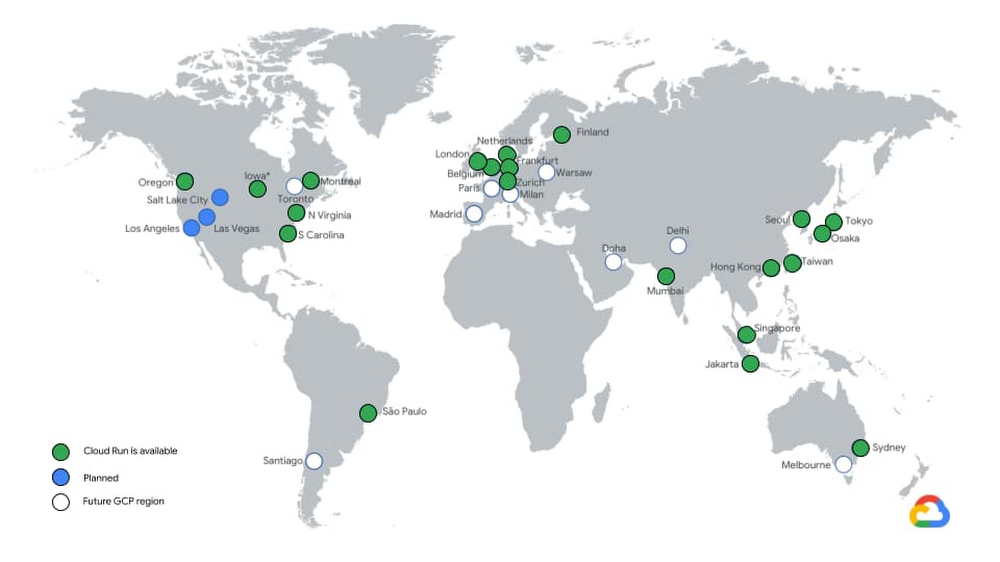
Cloud Run is built on a simple premise: combine the flexibility of containers with the simplicity, scalability, and productivity of serverless. In a few clicks, you can use Cloud Run to continuously deploy your Git repository to a fully managed environment that autoscales your containers behind a secure HTTPS endpoint. And because Cloud Run is fully managed, there’s no infrastructure management, so you can focus on delivering your applications quickly. Cloud Run has been generally available (GA) for a full year now! Here’s a recap of how Cloud Run has evolved in that time.Enterprise readyWe’ve been hard at work expanding Cloud Run to 21 regions and are on track to be available in all the remaining Google Cloud regions by the end of the year.Cloud Run services can now connect to resources with private IPs or use Cloud Memorystore Redis and Memcached by using Serverless VPC connectors, which support shared VPCs so you can connect to resources on-premises or in different projects. By routing all egress through the VPC, you benefit from a static outbound IP address for traffic originating from Cloud Run, which can be useful for making calls to external services that only allow certain IP ranges.You can now also harness the power of Cloud Load Balancing with Cloud Run: bring your own TLS certificates, specify which versions of SSL you accept, or configure custom URL-based routing on your load balancer to serve content from different backends.Global Load Balancing also enables you to run globally-distributed applications by serving traffic from multiple regions, serve static content cached on the edge via Cloud CDN, or protect your endpoints with the Cloud Armor web application firewall.With API Gateway support, you can build APIs for your customers and run them on Cloud Run without having to implement authentication and other common concerns around hosting APIs.With gradual rollouts and rollbacks, you can now safely release new revisions of your Cloud Run services by controlling the percentage of traffic sent to each revision, and testing specific revisions behind dedicated URLs.Developer friendlyAs developers ourselves, we are proud to work on a product that is so well received by the developer community.Novice users are able to build and deploy an app on their first try in less than 5 minutes. It’s so fast and easy that anyone can deploy multiple times a day. We love hearing your stories about how Cloud Run makes you more productive, so you can ship code faster. The Cloud Run user interface displays the build history and links to the git repositoryIn the past year, we added a number of features to improve developer productivity:We added an easy user interface to set up Continuous Deployment from Git repositories. Every time you push a commit to a particular branch or tag a new release, it’s automatically built and deployed to Cloud Run using Cloud Build.We also made it easier to develop applications. You can now deploy and run Cloud Run applications locally using Cloud Code. If you’re just getting started, Cloud Code can create a new application template for you, and you can run or debug your code locally in the emulator.Hate writing Dockerfiles? With Google Cloud Buildpacks, you can now turn your application code directly into a container image for supported languages. This is great if you’re bringing an existing application to Cloud Run. Similarly, buildpacks let you convert your Cloud Functions to container images, thanks to the Functions Framework.Then, to help you monitor the performance of your services and easily identify latency issues, requests sent to Cloud Run services are now captured out-of-the-box in Cloud Trace. If you want to do distributed tracing between your services, all you need to do is to pass on the trace header that you get to the outgoing requests and the trace spans will automatically correlate.While Cloud Run is able to respond to requests, and to privately and securely process messages pushed by Pub/Sub, we also added the ability to trigger Cloud Run services from 60+ Google Cloud sources. And for more powerful orchestration, you can leverage Workflows to automate and orchestrate processing using Cloud Run.FlexibilityWe’re constantly pushing the limits of Cloud Run, so you can run more workloads in a fully managed environment. You can now allocate up to 4GB of memory and 4 CPUs to your container!We also heard you want to minimize “cold starts,” notably when scaling from zero. To help, we added the ability to keep a minimum number of warm container instances to handle requests without hitting the cold starts. These idle instances are priced cheaper than active instances when they’re not handling requests. If cold starts are bothering you, give this a try.gRPC and server-side streaming let you reduce the time-to-first-byte of services by letting you send partial responses as they are computed, and write applications that stream data from the server side. With this capability, you are no longer limited to 32MB responses and you can implement HTTP/2 server push and server-sent events (SSE).With one-hour request timeouts, a single request can now run up to an hour. Combined with server-side streaming, you can now stream large responses (such as documents or videos) or handle long-running tasks from Cloud Run.Finally, graceful instance termination sends your process a termination signal (SIGTERM) before Cloud Run scales down your container instance. This gives you the opportunity to flush out any telemetry data that was kept local, and clean up the open connections, release locks, and so on.What’s next for Cloud Run?It was a great first year for Cloud Run, but this is just the beginning. We’re working hard to improve Cloud Run so you can use it for more and more diverse workloads. At the same time, we’re still laser-focused on providing you with a delightful developer experience and addressing key enterprise requirements. Stay tuned for more exciting releases, like mounting secrets from Cloud Secret Manager, integration with Identity-Aware Proxy, bidirectional streaming and WebSockets.To follow past and future Cloud Run features, take a spin through the release notes. And to learn more about these new features, check out this video.Related ArticleCloud Run, a managed Knative service, is GACloud Run, based on Knative, is available on GCP and for AnthosRead Article
Quelle: Google Cloud Platform

How computing has evolved, and why you need a multi-cloud strategy

Information technology has been moving fast for several years, bringing more powerful and agile computation in the cloud, richer software, better analytics, mobility, and sensors. If only most enterprise technology vendors were keeping up. The incumbents were schooled in the old world of proprietary systems, higher switching costs, and vendor lock-in, and it shows in how they see the world.There is no better example of this than in the trend to hybrid- and multi-cloud computing. In both cases, cloud-era technologies provide customers the ability to better use existing assets and take advantage of newer ways to compute, store, and analyze data. This is not theory, but reality. According to Gartner, 81% of organizations are working with two or more public cloud providers. A multi-cloud strategy gives companies the freedom to use the best possible cloud for each workload. In contrast, single-cloud stacks impose a significant cost. Where there could be greater power drawn from the unique capabilities of every cloud, there is higher complexity and the limitation of proprietary systems. Where there could be more insight, there is siloed data. Where there could be resilience of entirely different systems, there is concentrated risk. Where there could be more innovation and efficiency, there are impediments. Where there could be a single view of assets, there is a lack of control, haphazard security, and opaque costs.At Google Cloud, we’re committed to meeting the needs of customers by providing choice, flexibility and openness. This commitment is reflected in our contributions to projects like Kubernetes, TensorFlow, and many more.Google Cloud is the birthplace and home of the Kubernetes project. Created by the same engineers that built Kubernetes,Google Kubernetes Engine (GKE) is an easy-to-use cloud-based Kubernetes service for running containerized applications—everywhere, not just on GCP. Anthos builds on the firm foundations of GKE, so you can build out hybrid and multi-cloud deployments with better cloud software production, release, and management—the way you want, not how a vendor dictates. That is key to how a healthy cloud ecosystem works. The flexibility to run applications where you need them without added complexity has been a key factor in choosing Anthos—many customers want to continue to use their existing investments both on-premises as well as in other clouds, and having a common management layer helps their teams deliver quality services with low overhead.Today, just two years after launch, Anthos now supports more kinds of workloads, in more kinds of environments, in many more locations. According to Forrester, Anthos brings a 40% to 55% improvement in platform operating efficiency. Taking multi-cloud even further, recently we announced Anthos on bare metal, so customers could have high performance computing with minimal latency in even remote locations. And the leading API management platform, Apigee, works on every cloud or on-premises, just as it should.Anthos is but one part of our commitment to maximize customer power, choice, and control wherever possible. In July we announced BigQuery Omni, a multi-cloud version of our popular analytics services. For the first time, an enterprise can seamlessly connect directly to their data across Google Cloud, Amazon Web Services (AWS), and (soon) Microsoft Azure, managing large-scale data analysis fast, without having to move or copy data sets, on a single user interface.Earlier this year Google Cloud announced the acquisition of Looker, a multi-cloud data analysis platform that supports multiple data sources and deployment methods. Naturally, Looker as part of Google Cloud still supports hosting on public clouds like AWS, and connects with data sources like Redshift, Snowflake, BigQuery and more than 50 other supported SQL dialects, so you can link to multiple databases, avoid database lock-in, and maintain multi-cloud data environments.From open source to multi-cloud to what might be called “analytics anywhere,” our strategy is not based on our predetermined need, or some sense of “how it’s always been” in enterprise computing, but rather on Google’s experience and vision of how computing has evolved, and where it’s likely headed. Computing wants to be everywhere, you might say, with the right machine crunching the right data for the right purpose. Done right, that’s the future: Enabling businesses to innovate and compete wherever they want, using the data they own to best serve their customers with better products and services.We’re confident that history is on the side of open-source based multi-cloud APIs. Years ago, open source was condemned, and sometimes forked, to preserve a provider’s power over customers. Eventually it was allowed, and today it’s welcomed. Now it’s multi-cloud’s turn to move from rejection to acceptance and eventually, ubiquity. There’s a good chance that soon your cloud will do even more of what it should have done in the first place. Watch this space.Related ArticleYou do you: How to succeed in a distributed, multi-cloud worldHow a CIO should prepare developers for a multi-cloud feature.Read Article
Quelle: Google Cloud Platform

Monitor and secure your containers with new Container Threat Detection

As more containerized workloads find their way into your organization, you want to be able to detect and respond to threats to containers running in this environment. Today, we’re excited to announce the general availability of Container Threat Detection to help you monitor and secure your container deployments in Google Cloud.Container Threat Detection is a built-in service in Security Command Center Premium tier. Container Threat Detection detects the most common container runtime attacks and alerts you to any suspicious activity. This release includes multiple new detection capabilities and provides an API.Here are the key findings that are identified by Container Threat Detection:Suspicious Binary Executions: Container Threat Detection can see when a binary that was not part of the original container image is executed, and triggers a finding, indicating that an attacker may have control of the workload and that they are executing suspicious software such as malware or cryptocurrency mining software.Suspicious Library Loaded: Container Threat Detection can also detect when a library that was not part of the original container image is loaded—a possible sign that the attacker has control of the workload and that they are executing arbitrary code.Reverse Shell: Container Threat Detection monitors for processes that get started with stream redirection to a remote connected socket. An attacker can use a reverse shell to communicate from a compromised workload to an attacker controlled machine and perform malicious activities, for example as part of a botnet.Get started todayYou can get started with Container Threat Detection by simply enabling the built-in service in the Security Command Center with a Premium subscription. To enable a Premium subscription, contact your Google Cloud Platform sales team.We’ve also made it easy for you to test Container Threat Detection in a non-production environment. To trigger Container Threat Detection findings in a test environment, follow the steps outlined in this Testing Container Threat Detection guide.Security Command Center is a native security and risk management platform for Google Cloud. In addition to Container Threat Detection, it provides built-in services that enables you to gain visibility into your cloud assets, discover misconfigurations and vulnerabilities in your resources, and help maintain compliance based on industry standards and benchmarks.Click to enlargeYou can learn more about the Security Command Center and how it can help with your security operations using our product documentation.
Quelle: Google Cloud Platform




