Silos are for food, not data—tackling food waste with technology

While 40% of food in America goes to waste, 35 million Americans (likely even more during this pandemic) are food-insecure—meaning they are without food or not sure where future meals will come from. In addition, food waste has been called the “world’s dumbest environmental problem.” As the pandemic continues, the food system is in the spotlight. Farmers are plowing their crops back into their fields, restaurants are struggling to get back into business, and millions of newly unemployed Americans are lining up at food pantries. Leaders in the industry are looking to move more food to the right place as governments and philanthropists look to deploy capital to improve the situation. Moving things and moving money require, first and foremost, good data and a common language for describing food in the supply chain. As an early-stage team from X, an Alphabet subsidiary, worked on this moonshot, they worked closely with Kroger and Feeding America®️ to explore, transform and analyze datasets using Google Cloud technology. While our food sits securely in silos and storehouses across the U.S., information about the quality and quantity of that food also sits static in silos, with the latter benefitting no one. By sharing raw data with X as the neutral information steward, Kroger and Feeding America have discovered potential systems-level opportunities for change, beyond optimizing their own organizations. In a world where data is a highly valued corporate asset, sharing data may be viewed as a strategic and competitive risk, not to mention the legal, operational and technical hurdles. But it can lead to huge benefits, too. We’re sharing our collective story because we’ve learned a lot about how three very different organizations can work together to achieve industry-wide goals while ensuring that each organization’s data assets are secure. We found that solving industry-wide challenges starts with sharing datasets. Here’s how un-siloing data led to advances in reducing food waste. What are data silos and why do they exist? Data siloing is an information management pattern where relevant and interrelated subsystems are unable to communicate with one another in real-time, due to logical, physical, technical, or cultural barriers to their interaction. For example, a human resources system may be isolated from other company systems to protect sensitive employee information, but when compensation information is updated in the finance department, information across the two systems needs to be reconciled manually.Data silos are pervasive across industries and organizations. In government and policy circles, experts talk about “stovepiping,” application architects talk about “disparate systems,” and organizational culture consultants talk about incompatible “subcultures.” In each case, the end results are similar: Even with vast amounts of data, decision makers struggle to access data, process it, find the answers they need, and respond quickly. When X, Feeding America and Kroger came together, they first had to address underlying organizational obstacles. Mandates and beliefs: Each party had a different vision for coming together—some were focused on sustainability, and others on food security—and thereby had different data needs. At times, the data silos in place also reinforced inconsistent beliefs. For example, certain food banks were concerned that retail donations were dwindling, while Kroger had plenty to donate, but had not yet operationalized that data.Organizational fears: It took courage for Feeding America and Kroger to share what was behind the curtain, exposing their own challenges with data quality and standards. The individuals who led this project also had to face corporate approval processes and articulate why each organization had more to gain by sharing than holding onto data as a form of power, and why they shouldn’t fear unlikely unintended consequences.Technical limitations: While the leaders who came together had influence and decision-making power, they were not the technical staff who had the authority and knowledge to access the data and implement data pipelines. In addition, neither Kroger nor Feeding America was in a position to store and analyze each other’s proprietary data. How to break through data silosThis three-way partnership was able to break through data silos by being strategic about how to build confidence and credibility with their respective organizations. Here are steps that the partnership took. 1. Align on objectives, then bring in others. The partners came together and fully clarified respective high-level goals, data assets needed to achieve these goals, and overall operating principles, before bringing in their respective legal teams to draft data-sharing agreements and move through executive approval processes. By doing so, champions for this project inside of each organization were able to negotiate internally with a clear rationale rather than following the traditional company policies. 2. Think big, start small. While the partners all believed in what was possible with a combined global source of truth and reinforced this vision to their superiors, each individual leader also made it easy for their respective corporations to sponsor this effort by starting small. Rather than going immediately to scale, this team prototyped with one store and one food bank and went deep, building everything end to end. Learnings were incorporated before asking the next ten stores and ten food banks to participate. 3. Make it frictionless to share.  The X team invested in working with Kroger and Feeding America’s data teams to set up automated processes to schedule and sequence the transfer of data to Google Cloud regularly. This detailed case study explains how to set up extract, transform, load (ELT) processes using Cloud Composer. 4. Find a common language.  Once the X Team had both Kroger and Feeding America datasets in  BigQuery, Google Cloud’s enterprise data warehouse, they discovered that both organizations and their respective departments did not have a consistent language for locations, food items, quantities and other variables. There were at least 27 ways of representing Texas! The first step was to format the data to be consistent. As an example, this case study describes standardizing geolocation data using Maps API.  5. Show insights, early and often.  The partnership was able to show, with initial analyses on one store or five food banks, immediate impactful opportunities. Examples include ways to do bulk sourcing of food between specific food banks for better pricing, and which days pantries should schedule their store pickups to get the most donated food. This earned the team additional support from sponsors and operational staff to continue scaling the broad data un-siloing effort. Check out further examples and tools.Organizing the world’s food informationThe X team working on this project has now joined the Google Food team to continue to grow their partnership with Kroger and Feeding America together on Google Cloud. This collaborative effort to solve for waste and hunger will continue with the confidence they need in the reliability and security of Google’s infrastructure at global scale. Learn more about the technical details of this food waste project.If you’d like to learn more and donate to these efforts, check out:Kroger’s Zero Hunger Zero Waste FoundationFeeding AmericaSt. Mary’s Food BankThe X and Google team would like to thank Kroger, Feeding America, its member food banks, and St. Mary’s Food Bank for their contributions to this article.
Quelle: Google Cloud Platform

Google Cloud named a leader in latest Forrester Research IaaS Platform Native Security Wave

The adoption of cloud services has created a generational opportunity to meaningfully improve information security and reduce risk. As an organization moves applications and data to the cloud, they can take advantage of native security capabilities in their cloud platform. Done well, use of these engineered-in platform capabilities can simplify security to the extent that it becomes almost invisible to users, reducing operational complexity, favorably altering the balance of shared responsibility for customers, and decreasing the need for highly specialized security talent. At Google Cloud, we call the result Invisible Security, and it requires a foundation of innovative, powerful, best-in-class native security controls. Given the importance of these capabilities to our strategy, we are happy to announce today that Forrester Research has again named Google Cloud as one of just two leaders in The Forrester Wave™ Infrastructure-as-a-Service Platform Native Security (IPNS), Q4 2020 report, and rated Google Cloud highest among providers evaluated in the current offering category.The report evaluates the native security capabilities and features of cloud infrastructure as a service (IaaS) platform providers such as storage and data security, identity and access management, network security and hardware & hypervisor security. The report states that “Google has been steadily investing in its offering and has added many new security features, including Anthos (a service to manage non-Google public and private clouds) and Security Command Center Premium” and notes that the Google Cloud features of “data leak prevention (DLP) capabilities, integration support for external hardware security modules (HSMs), and third-party threat intelligence source integration are also nice.” The report also emphasizes the increasing importance of extending consistent security capabilities across hybrid and multi-cloud deployments, stating “vendors that can provide comprehensive IPNS, not only for their own platforms but also for competing public and private cloud and on premises workloads and platforms, position themselves to successfully evolve into their customers’ security central nervous systems” and notes in Google’s vendor profile that “Anthos is ahead of the competition when it comes to managing non-Google, third-party clouds.”In this Wave, Forrester evaluated seven cloud platforms against 29 criteria, looking at current offerings, strategy and market presence. Of the seven vendors, Google Cloud scored highest overall in the current offering category, and received the highest score possible in its plans for security posture management, hypervisor security, guest OS and container protection, and network security criteria.Further, Google Cloud’s had the highest possible score in the execution roadmap criterion. Google Cloud continues to redefine what’s possible in the cloud with unique security capabilities like External Key Manager, Key Access Justifications, Assured Workloads, Confidential VMs, Binary Authorization, IAM Recommender, and enabling a zero trust architecture for customers with BeyondCorp. Elaborating on Google Cloud’s roadmap, the report noted:“The vendor plans to: 1) invest in providing customers with digital sovereignty across data, operations and software in the cloud; 2) expand security for multicloud and cross-cloud environments; and 3) increase support for Zero Trust and identity-based and richer policy creation.” Google Cloud also received the highest possible score for the partner ecosystem strategy criterion. As further validation of the strength of our platform’s native capabilities, numerous Google Cloud security partners have chosen to take advantage of our platform to run and deliver their own security offerings:”At ForgeRock we help people safely access the connected world. We put a premium on security because our customers and our business depend on digital experiences that can withstand and prevent cyber attacks and bad actors,” said Fran Rosch, CEO of ForgeRock. “Our partnership with Google Cloud gives us access to unique security platform capabilities that help us meet customer needs and strengthens our position as a global identity and access management leader.”We are honored to be a Leader in The Forrester Wave™ IaaS Platform Native Security Q4 2020 report, and look forward to continuing to innovate and partner with you on ways to make your digital transformation journey safer and more secure. Download the full The Forrester Wave™ IaaS Platform Native Security (IPNS), Q4 2020 report.You can get started for free with Google Cloud today.
Quelle: Google Cloud Platform

Just in time for TechEd, our latest innovations for SAP customers

With SAP TechEd kicking off this week, we thought it would be a good time to update you on the ways that Google Cloud continues to enhance our offerings for SAP customers. We’ve released new capabilities for both running SAP applications on Google Cloud as well as ways to get more out of your SAP data including our advanced analytics, AI and ML capabilities. Here’s a quick rundown of what’s new and what’s coming soon. SAP Application Certifications: We continue to add to a growing list of SAP application solutions certified by SAP to run on Google Cloud. The most recent additions include:Custom machine types for N2 and N2DN2 and N2D Custom Machine Types – SAP NetWeaverAMD N2D certifications up to 96 vCPUS – SAP NetWeaver6TB OLAP Scale-up for SAP HANA12TB OLTP Scale-out for SAP S/4HANASAP ASE (Sybase) CertificationNetApp CVS Performance – SAP HANA (all sizes)Scaling up SAP on bare metal to 18TB/24TB: Google Cloud already offers 6TB and 12TB VM-based offerings for specialized SAP workloads such as very large HANA deployments. For customers looking to scale beyond 12TB per server, we will have 18TB and 24TB bare metal configurations. This makes lift-and-shift migrations easier for even the largest on-premises SAP systems, clearing an even wider path to cloud migration.Backint for HANA/4 backup: Google Cloud’s SAP-certified Cloud Storage Backint agent for SAP HANA lets customers use Cloud Storage directly for backups and recoveries for both on-premises and cloud installations of SAP databases. The Backint agent is integrated with SAP HANA so you can store and retrieve backups directly from Cloud Storage by using the native SAP backup and recovery functions. When you use the Backint agent, you don’t need to use persistent disk storage for backups. Our latest release enhances support of large or high-frequency backups and also allows customers to supply their own encryption keys for backups in addition to Google Cloud’s native encryption.  Connector for SAP Landscape Management (LaMa) (in preview): SAP LaMa simplifies, automates, and centralizes the management of SAP systems running in different infrastructures, whether on premises, in the cloud, or a hybrid of both. Google Cloud connector for SAP LaMa interfaces with Google Compute Engine and Cloud Storage operations so customers can schedule system management events connected to Google Cloud infrastructure right from SAP LaMa. System administrators can now handle management tasks such as snapshots, mounting and unmounting storage, relocating servers, and performing system refreshes without having to leave the LaMa interface.BigQuery integration: A key goal for SAP customers is to enrich data from their SAP assets with non-SAP data in Google Cloud’s analytics solutions. SAP customers can confidently derive more use and value from their data via consolidation on BigQuery, our fully managed, enterprise data warehouse. Using robust integration solutions from our partners—SAP, Informatica, Qlik, Datavard, Software AG, Boomi, and HVR customers have more choice on how to best accelerate and simplify the delivery of SAP data to BigQuery, whether it originates from legacy SAP environments, SAP HANA, or SAP application servers. We’re also working to add real-time data connectivity and integration options with Google Cloud native solutions such as Data Fusion so customers can build complex ETL/ELT data pipelines from their SAP systems leveraging existing skillsets and investments. Stay tuned for more announcements in this space in 2021.Apigee API management platform: APIs have emerged as a pillar of modern digital business practice. For businesses using SAP either in the cloud or data centers, Apigee can provide value in three different ways. First, unlocking the value of legacy systems. Every company in the world has valuable data and functionality housed in its systems—but activating that value via APIs means being able to leverage systems for faster time to market of new experiences. Second, modernize legacy systems. Apigee provides an abstraction layer between client facing applications and backend systems during the backend modernization process to minimize business disruption. Third, Creating cloud-native, scalable services. In addition to repackaging SAP data as a microservice and providing capabilities to monetize this data, Apigee takes on some essential performance, availability and security functions: handling access control, authentication, security monitoring and threat assessment plus throttling traffic when necessary to keep backend systems running normally while providing applications with an endpoint that can scale to suit any of your workloads.Cloud Acceleration Program (CAP): This first-of-its-kind program empowers customers with solutions from both Google Cloud and our partners to simplify and de-risk their SAP cloud migrations. Google Cloud and our partners have created specialized migration solutions, accelerators, and methodologies for both lift and shift as well as migrating to S/4HANA. We have also created new ways to extend SAP solutions to drive fresh insights quickly and efficiently. In addition, CAP provides financial incentives to defray many of the costs associated with moving SAP systems to Google Cloud and safeguard customer migrations.Partner spotlight: OpenTextAn enterprise environment generates a staggering number of documents and unstructured content—contracts, orders, invoices, receipts, emails to name a few. Each requires proper governance to store and manage over its lifetime. For SAP customers, attaching these documents to each transaction is relatively easy, but their sheer volume increases database size and slows performance and it is hard to collaborate across multiple stakeholders, applications and processes. .OpenText’s enterprise content management (ECM) turns documents into a resource rather than a burden, making them securely accessible to those who need them, whenever and wherever they need them, while improving the performance of the organization’s SAP solutions and reducing compliance risks. Now, Google Cloud has selected OpenText as its preferred ECM partner, which multiplies the advantages that OpenText brings to SAP customers by letting them take advantage of advanced technologies such as analytics and AI, streamline and automate workflows, and manage and capitalize on critical data. With Google Cloud as OpenText’s preferred partner for enterprise cloud, SAP customers using OpenText gain flexibility and more powerful capabilities, including:Containerized managed services with full hybrid functionalities across existing on-premises infrastructure and Google Cloud.Offloading data. Documents and other unstructured content from SAP to an integrated archiving and content management system, streamlining the SAP database to make cloud and/or SAP S/4 HANA migration faster and less complex.Multiple deployment options on virtual machines, servers or containers, on premises or in the cloud.There’s more to comeIt is our goal to become the perfect home for your SAP solutions, for worry-free, highly scalable infrastructure as well as the ability to extract the most value possible from data within your organization and beyond using groundbreaking analytics and cutting-edge innovations.Join Google Cloud (virtually) at TechEd and tune into our session, DT137, Innovate your business with Google Cloud industry solutions. To learn more about Google Cloud for SAP, including technical resources, visithttps://cloud.google.com/solutions/sap.Related ArticleSAP on Google Cloud: 2 analyst studies reveal quantifiable business benefitsFrom uptime and infrastructure to efficiency and productivity—both Forrester and IDC identified major benefits to companies that have mad…Read Article
Quelle: Google Cloud Platform

Google Cloud fuels new discoveries in astronomy

From understanding our origins to predicting future events, some of the greatest breakthroughs we’ve made on Earth have come from studying the universe. High-performance computing and machine learning (ML) are accelerating this kind of research at an unprecedented pace. At Google Cloud, we’re proud to play even a small role in advancing the science of astronomy—and that’s why we’re excited today to highlight new work with the Vera C. Rubin Observatory in Chile and researchers at the California Institute of Technology. The cloud foundation for 20TB of nightly sky observationsIn a pioneering collaboration, the Rubin Observatory has finalized a three-year agreement to host its Interim Data Facility (IDF) on Google Cloud. Through this collaboration, Rubin will process astronomical data collected by the observatory and make the data available to hundreds of users in the scientific community in advance of its 10-year Legacy Survey of Space and Time (LSST) project. The LSST aims to conduct a deep survey over an enormous area of sky to create an astronomical catalog thousands of times larger than any previously compiled survey. Using the 8.4-meter Simonyi Survey Telescope and the gigapixel LSST Camera, the survey will capture about 1,000 images of the sky every night for 10 years. These high-resolution images will contain data for roughly 20 billion galaxies and a similar number of stars, providing researchers with an unparalleled resource for understanding the structure and evolution of our universe over time. By building the IDF on Google Cloud, Rubin Observatory will lay the foundation to manage a massive dataset—500 petabytes in total—that will eventually be shared with the scientific community at scale, and with flexibility. “We’re extremely pleased to work with Google Cloud on this project, which will have a big and positive impact on our ability to deliver for the Rubin community,” says Bob Blum, acting director of operations for Rubin Observatory.“We don’t have to build the infrastructure ourselves—it’s well-established and has been tested and improved for other users, so we benefit from that,” explains Hsin-Fang Chiang, data management science analyst and engineer for Rubin Observatory, and one of the early users of the IDF. The Rubin Observatory will use Google Cloud Storage and Google Kubernetes Engine, and Google Workspace will enable productivity and collaboration.Rubin Observatory at sunset, lit by a full moonCaltech researcher discovers new comet with AIWhile comet sightings are relatively common, the discovery of a new comet is rare. The Minor Planet Center, which tracks the solar system’s minor bodies in space, cataloged fewer than 100 new comets in 2019, as opposed to about 21,000 new minor planets. In late August 2020, Dr. Dmitry Duev, research scientist in the Astronomy department at Caltech, began a pilot program to use Google Cloud’s tools to identify the objects observed by the Zwicky Transient Facility (ZTF) at the Palomar Observatory in Southern California. The ZTF scans the Northern skies every clear night, measuring billions of astronomical objects and registering millions of transient events. Using these images, Duev trained an ML model on Google Cloud to pinpoint comets with over 99% accuracy. On October 7, the model identified Comet C/2020 T2, the first ever such discovery attributed to artificial intelligence. This achievement makes the discovery of new comets possible at a greatly accelerated rate. “Having a fast and accurate way to classify objects we see in the sky is revolutionizing our field,” Duev says. “It’s like having a myriad of highly trained astronomers at our disposal 24/7.”The orbit of comet C/2020 T2 as of October 7, 2020.Image credit: NASA/JPL-Caltech / D. Duev.Interested in using Google Cloud to unlock the secrets of the universe?These are just a few of the fascinating projects we’re working on with our customers in astronomy. In April 2019, the Event Horizon Telescope, a virtual combination of eight radio telescopes from all over the world, used Google Cloud’s virtual machine (VMs) instances to produce thefirst image of a supermassive black hole. And, since 2018, Google has also been working in partnership with the Frontier Development Lab on applying machine learning to some of NASA’s most challenging problems in our universe: forecasting floods here on Earth, finding minerals on the moon to support a permanent base there, and predicting solar flares that can interrupt satellite communications.To start or ramp up your own project, we offer research credits to academics using Google Cloud for qualifying projects in eligible countries. You can find our application form on Google Cloud’s website or contact our sales team. To learn more about powering research in astronomy and other fields, register for the Google Cloud Public Sector Summit which features many research sessions. The sessions launch December 8-9 and will also be available on demand.Related ArticleIs there life on other planets? Google Cloud is working with NASA’s Frontier Development Lab to find outGoogle Cloud collaborates with NASA’s Frontier Development Lab to pursue astrobiological analytics, in an attempt to profile the atmosphe…Read Article
Quelle: Google Cloud Platform

Keeping students, universities and employers connected with Cloud SQL

Editor’s note: Today we’re hearing from Handshake, an innovative startup and platform that partners with universities and employers to ensure that college students have equal access to meaningful career opportunities. With over 7 million active student users, 1,000 university and 500,000 employer partners, it’s now the leading early career community in the U.S. Here’s how they migrated to Google Cloud SQL.At Handshake, we serve students and employers across the country, so our technology infrastructure has to be reliable and flexible to make sure our users can access our platform when they need it. In 2020, we’ve expanded our online presence, adding virtual solutions and establishing new partnerships with community colleges and bootcamps to increase career opportunities for our student users.These changes and our overall growth would have been harder to implement on Heroku, our previous cloud service platform. Our website application, running on Rails, uses a sizable cluster and PostgreSQL as our primary data store. As we grew, we were finding Heroku to be increasingly expensive at scale. To reduce maintenance costs, boost reliability, and provide our teams with increased flexibility and resources, Handshake migrated to Google Cloud in 2018, choosing to have our data managed through Google Cloud SQL. Cloud SQL freed up time and resources for new solutionsThis migration proved to be the right decision. After a relatively smooth migration over a six-month period, our databases are completely off of Heroku now. Cloud SQL is now at the heart of our business. We rely on it for nearly every use case, continuing with a sizable cluster and using PostgreSQL as our sole owner of data and source of truth. Virtually all of our data, including information about our students, employers, and universities, is in PostgreSQL. Anything in our website is translated to a data model that’s reflected in our database.Our main web application uses a monolithic database architecture. It uses an instance with one primary and one read replica and it has 60 CPUs, almost 400 GB of memory, and 2 TB of storage, of which 80 percent is utilized.Cloud SQL is at the heart of our business, providing our startup with enterprise-level features. Rodney Perez, Infrastructure EngineerSeveral Handshake teams use the database, including Infrastructure, Data, Student, Education, and Employer teams. The data team is usually interacting with the transactional data, writing pipelines, pulling data out of PostgreSQL and loading it into BigQuery or Snowflake. We run a separate replica for all of our databases, specifically for the data team, so they can export without a performance hit. With most managed services, there will always be maintenance that requires downtime, but with Cloud SQL, any necessary maintenance is easy to schedule. If the Data team needs more memory, capacity, or disk space, our Infrastructure team can coordinate and decide if we need a maintenance window or a similar approach that involves zero downtime. We also use Memorystore as a cache and heavily leverage Elasticsearch. Our Elasticsearch index system uses a separate PostgreSQL instance for batch processing. Whenever there are record changes inside our main application, we send a Pub/Sub message from which the indexers queue off, and they’ll use that database to help with that processing, putting that information into Elasticsearch and creating those indices. Nimble, flexible and planning for the futureWith Cloud SQL managing our databases, we can devote resources toward creating new services and solutions. If we had to run our own PostgreSQL cluster, we’d need to hire a database administrator. Without Cloud SQL’s service-level agreement (SLA) promises, if we were setting up a PostgreSQL instance in a Compute Engine virtual machine, our team would have to double in size to handle the work that Google Cloud now manages. Cloud SQL also offers automatic provisioning and storage capacity management, saving us additional valuable time. We’re generally far more read-heavy than write-heavy, and our future plans for our data with Cloud SQL include offloading more of our reads to read replicas, and keeping the primary for just writes, using PgBouncer in front of the database to decide where to send which query. We are also exploring committed use discounts to cover a good baseline of our usage. We still want to have the flexibility to do cost cutting and reduce our usage where possible, and to realize some of those initial savings right away. Also, we’d like to split up the monolith into smaller databases to reduce the blast radius, so that they can be tuned more effectively to each use case. With Cloud SQL and related services from Google Cloud freeing time and resources for Handshake, we can continue to adapt and meet the evolving needs of students, colleges, and employers.Read more about Handshake and the solutions we found in Cloud SQL.Related ArticleCloud SQL now supports PostgreSQL 13Fully managed Cloud SQL cloud database service now supports PostgreSQL 13.Read Article
Quelle: Google Cloud Platform

Pub/Sub makes scalable real-time analytics more accessible than ever

These days, real-time analytics has become critical for business. Automated, real-time decisions based on up-to-the-second data are no longer just for advanced, tech-first companies. It is becoming a basic way of doing business. According to IDC, more than a quarter of data created will be real-time in the next five years. The factors we see driving this growth are the competitive pressure to improve service and user experience quality. Another factor is the consumerization of many traditional businesses where many functions that used to be performed by agents are now done by consumers themselves. Now, every bank, retailer, and service provider needs to have a number of user interfaces, from internal apps, to mobile apps, and web apps. These interfaces not only require fresh data to operate but also produce transaction and interaction data at unprecedented scale. Real-time data is not just about application features. It is fundamentally about scaling operations to deliver great user experiences: up-to-date systems monitoring, alerts, customer service dashboards, and automated controls for anything from industrial machinery to customer service operations to consumer devices. It can accelerate data insights to action and in turn increase operational responsiveness.“With Google Cloud, we’ve been able to build a truly real-time engagement platform,” says Levente Otti, Head of Data, Emarsys. “The norm used to be daily batch processing of data. Now, if an event happens, marketing actions can be executed within seconds, and customers can react immediately. That makes us very competitive in our market.” Real-time analytics all starts with messaging At Google, we’ve contended with the challenge of creating real-time user experiences at a vast scale from the early days of the company. A key component of our solution for this Pub/Sub, a global, horizontally scalable messaging system. For over a decade, Google products, including Ads, Search and Gmail, have been using this infrastructure to handle hundreds of millions of events per second. Several years ago, we made this system available to the world as Cloud Pub/Sub. Pub/Sub is uniquely easy to use. Traditional messaging middleware offered many of the same features, but were not designed to scale horizontally or were offered as services. Apache Kafka, the open-source stream processing platform, has solved the scalability problem by creating a distributed, partitioned log that supported horizontally scalable streaming writes and reads. Managed services inspired by the same idea have sprung up. Because these services are generally based on the notion of a fixed, local resource, such as a partition or a cluster, these services still left the users to solve the problem of global distribution of data and managing capacity.Pub/Sub took automated capacity management to an extreme: Data producers need not worry about the capacity required to deliver data to subscribers, with up to 10,000 subscribers per topic supported. In fact, consumers even pay for the capacity needed to read the data independently from the data producers. The global nature of Pub/Sub is unique, with a single endpoint resolving to nearby regions for fast persistence of data. On the other side, the subscribers can be anywhere and receive a single stream of data aggregated from across all regions. At the same time, users retain precise control over where the data is stored and how it makes it there. This makes Pub/Sub a convenient way to make data available to a broad range of applications on Google Cloud and elsewhere, from ingestion into BigQuery to automated, real-time AI-assisted decision making with Dataflow. This provides data practitioners with the choice of creating an integrated feedback loop easily. “Our clients around the world increasingly are looking for quality real-time data within the cloud,” said Trey Berre, CME Group Global Head of Data Services. “This innovative collaboration with Google Cloud will not only make it easier for our clients to access the data they need from anywhere with an internet connection, but will also make it easier than ever to integrate our market data into new cloud-based technologies.” Making messaging more accessibleIn 2020, we have focused on making Pub/Sub even simpler. We observed that some of our users had to adapt their application design to the guarantees made by the service. Others were left building their own cost-optimized Apache Kafka clusters to achieve ultra low-cost targets. To address these pain points, we have made Pub/Sub much easier to use for several use cases and introduced an offering that achieves an order of magnitude lower total cost of ownership (TCO) for our customers. The cost-efficient ingestion optionWe set out to build a version of Pub/Sub for customers who needed a horizontally scalable messaging service at a cost typical of cost-optimized, self-managed single-zone Apache Kafka or similar OSS systems. The result is Pub/Sub Lite, which can match or even improve upon the TCO of running your own OSS solution. In comparison to Pub/Sub itself, Pub/Sub Lite is as much as ten times cheaper, as long as the single-zone availability and capacity management models work for your use case. This managed service is suitable for a number of use cases, including:Security log analysis, where it is often a cost center and not every event must be scanned to detect threats Search indexes and serving cache updates, which are commonly “best effort” cost-saving measures and don’t require a highly reliable messaging serviceGaming and media behavior analytics, where low price is often key to getting startups off the groundThisguide to choosing between Pub/Sub and Pub/Sub Lite and thepricing comparisons can help you decide if Lite is for you. Comprehensive and enterprise-ready messaging that scalesThis year, Pub/Sub added a number of features that will allow our users to simplify their code significantly. These features include: Scalable message ordering: Scalable message delivery in order is a tough problem and critical for many applications, from general change data capture (CDC) to airplane operations. We were able to make this work with only minimal changes to our APIs and without sacrificing scalability and the on-demand capacity. Your applications that require ordering can now be much less stateful, and thus simpler to write and operate. There are no shards or partitions and every message for a key, such as a customer ID, arrives in order reliably. Dead-letter topics automatically detect messages that repeatedly cause applications to fail and put them aside for manual, off-line debugging. This saves on processing time and keeps processing pipeline latency low. Filters automatically drop messages your application does not care to receive, saving on processing and egress costs. Filters are configuration, so there is no need to write code or deploy an application. It’s that simple. Data residency controls: In addition to Pub/Sub’s resource location constraints, which allows organizations to dictate where Pub/Sub stores message data regardless of where it is published, we have launched regional endpoints to give you a way of connecting to Pub/Sub servers in a specific region. Publisher flow control (Java, Python) is perhaps the most notable of many updates to our client libraries. Flow control is another surprisingly tough problem, as many applications require multiple threads to publish data concurrently, which can overwhelm the client machine’s network stack and lose data unless the threads coordinate. With flow control, you can achieve very high, sustainable publish rates safely. Also of note are configurable retry policy and subscription detachment. As one of our users recently said: “I’m going to go and use this right now.”What’s nextWe will continue to make Pub/Sub and our real-time processing tools easier to use in the coming months. You can stay up-to-date by watching our release notes. In the meantime, we invite you to learn more about how to get started and everything you can do with Google Cloud’s real-time stream analytics services in our documentation or by contacting the Google Cloud sales team.Related ArticleSimplify creating data pipelines for media with Spotify’s KlioSpotify open-sources Klio: scalable, efficient media processing on top of Apache Beam.Read Article
Quelle: Google Cloud Platform

Enabling Microsoft-based workloads with file storage options on Google Cloud

Enterprises are rapidly moving Microsoft and Windows-based workloads to the cloud to reduce license spend and embark on modernization strategies to fully leverage the power of cloud-native architecture. Today’s business climate requires agility, elasticity, scale, and cost optimization, all of which are far more difficult to attain by operating out of data centers. Google Cloud offers a top-level enterprise-grade experience for Microsoft-based services and tools. Many Windows-based workloads require a Server Message Block (SMB) file service component. For example, highly available SAP application servers running in Windows Server clusters need SMB file servers to store configuration files and logs centrally. The COVID-19 pandemic has resulted in increased demand for virtual desktop solutions to enable workers to adapt to the sudden necessity of working remotely. Those virtual desktop users often require access to SMB file servers to store documents and to collaborate with coworkers. Fortunately, there are numerous options for SMB file services in Google Cloud that meet the varying needs of Microsoft shops. They fall into three categories: fully managed, semi-managed, and self-managed services. In this post, we’ll examine several options across those three buckets. (Note: this is by no means an exhaustive list of SMB file service providers for Google Cloud. Rather, this is a brief review of some of the common ones.)Fully managed SMB file servicesFor many enterprises, reducing operational overhead is a key objective of their cloud transformation. Fully managed services provide the capabilities and outcomes, without requiring IT staff to worry about mundane tasks like software installation and configuration, application patching, and backup. These managed SMB file service options let customers get their Windows applications and users to work expeditiously, reducing toil and risk. (Note that these are managed partner-provided services, so make sure to check the region you’ll be using to ensure availability.)NetApp Cloud Volumes ServiceIf you work in IT and have ever managed, used, or thought about storage, chances are you’re familiar with NetApp. NetApp has been providing enterprise-grade solutions since 1992. With NetApp Cloud Volumes Service (CVS), you get highly available, cloud-native, managed SMB services that are well-integrated with Google Cloud. Storage volumes can be sized from 1 to 100 TB to meet the demands of large-scale application environments, and the service includes tried-and-true NetApp features like automated snapshots and rapid volume provisioning. It can be deployed right from the Google Cloud Marketplace, managed in the Google Cloud console, supported by Google, and paid for in your Google Cloud bill.Dell Technologies PowerScaleDell Technologies is another leader in the enterprise storage market, and have partnered with them to offer PowerScale on Google Cloud. PowerScale leverages an all-flash architecture for blazing fast storage operations. However, it will be backward-compatible, allowing you to choose between PowerScale all-flash nodes and Isilon nodes in all-flash, hybrid, or archive configuration. The OneFS file system boasts a maximum of 50 PB per namespace; this thing scales! And as with NetApp, PowerScale in Google Cloud includes enterprise-grade features like snapshots, replication, and hybrid integration with on-premises storage. It’s tightly integrated with Google Cloud: it can be found in the Google Cloud Marketplace, is integrated with the Google Cloud console, and billed and supported directly by Google.Both of these managed file storage products support up to SMBv3, making them outstanding options to support Windows workloads, without a lot of management overhead.  Semi-managed SMB file servicesNot everyone wants fully managed SMB services. While managed services take a lot of work off your plate, as a general rule they also reduce the ways in which you can customize the solution to meet your particular requirements. Therefore, some customers prefer to use self-managed (or semi-managed) services, like the storage services below, to tailor the configurations to the exact specifications needed for their Windows workloads.NetApp Cloud Volumes ONTAPLike the fully managed NetApp Cloud Volumes Service, NetApp Cloud Volumes ONTAP (CVO) gives you the familiar features and benefits you’re likely used to with NetApp in your data center, including SnapMirror. However, as a semi-managed service, it’s well-suited for customers who need enhanced control and security of their data on Google Cloud. CVO deploys into your Google Cloud virtual private cloud (VPC) on Google Compute Engine instances, all within your own Google Cloud project(s), so you can enforce policies, firewall rules, and user access as you see fit to meet internal or external compliance requirements. You will need to deploy CVO yourself by following NetApp’s step-by-step instructions. In the Marketplace, you get your choice of a number of CVO price plans, each with varying SMB storage capacity (2 TB to 368 TB) and availability. NetApp Cloud Volumes ONTAP is available in all Google Cloud regions.Panzura Freedom Hybrid Cloud StoragePanzura Freedom is a born-in-the-cloud, hybrid file service that allows global enterprises to store, collaborate, and back up files. It presents a single, geo-distributed file system called Panzura CloudFS that’s simultaneously accessible from your Google Cloud VPCs, corporate offices, on-premises data centers, and other clouds. The authoritative data is stored in Google Cloud Storage buckets and cached in Panzura Freedom Filers deployed locally, giving your Windows applications and users high-performing access to the file system. Google Cloud’s global fiber network and 100+ points of presence (PoPs) reduce global latency to ensure fast access from anywhere. Panzura can be found in the Google Cloud Marketplace as well.  Self-managed SMB file servicesIn some cases, managed services will not meet all the requirements. This is not limited to technical requirements. For example, in your industry you might be subject to a compliance regulation for which none of the managed services are certified. If you consider all of the fully managed and semi-managed SMB file service options, but none of them are just right for your budget and requirements, don’t worry. You still have the option of rolling your own Windows SMB file service on Google Cloud. This approach gives you the most flexibility of all, along with the responsibility of deploying, configuring, securing, and managing it all. Don’t let that scare you, though: These options are likely very familiar to your Microsoft-focused staff.Windows SMB file servers on a Google Compute Engine instanceThis option is quite simple: you deploy a Compute Engine instance running your preferred version of Windows Server, install the File Server role, and you’re off to the races. You’ll have all the native features of Windows at your disposal. If you’ve extended or federated your on-premises Active Directory into Google Cloud or are using the Managed Service for Active Directory, you’ll be able to apply permissions just as you do on-prem.  Persistent Disks add a great deal of flexibility to Windows file servers. You can add or expand Persistent Disks to increase the storage capacity and disk performance of your SMB file servers with no downtime. Although a single SMB file server is a single point of failure, the native protections and redundancies of Compute Engine make it unlikely that a failure will result in extended downtime. If you choose to utilize Regional Persistent Disks, your disks will be continuously replicated to a different Google Cloud zone, adding an additional measure of protection and rapid recoverability in the event of a VM or zone failure.  Windows clusteringIf your requirements dictate that your Windows file services cannot go down, a single Windows file server will not do. Fortunately, there’s a solution: Windows Failover Clustering. With two or more Windows Compute Engine instances and Persistent Disks, you can build a highly available SMB file cluster that can survive the failure of Persistent Disks, VMs, the OS, or even a whole Google Cloud zone with little or no downtime. There are two different flavors of Windows file clusters: File Server Cluster and Scale-out File server (SOFS).  Windows file server clusters have been around for around 20 years. The basic architecture is two Windows servers in a Windows Failover Cluster, connected to shared storage such as a storage area network (SAN). These clusters are active-passive in nature. At any given time, only one of the servers in the cluster can access the shared storage and provide file services to SMB clients. Clients access the services via a floating IP address, front-ended by an internal load balancer. In the event of a failure of the active node, the passive node will establish read/write access to the shared storage, bind the floating IP address, and launch file services. In a cloud environment, physical shared storage devices cannot be used for cluster storage. Instead, Storage Spaces Direct (S2D) may be used. S2D is a clustered storage system that combines the persistent disks of multiple VMs into a single, highly available, virtual storage pool. You can think of it as a distributed virtual SAN.Scale-Out File Server (SOFS) is a newer and more capable clustered file service role that also runs in a Windows Failover Cluster. Like Windows File Server Clusters, SOFS makes use of S2D for cluster storage. Unlike a Windows File Server Cluster, SOFS is an active-active file server. Rather than presenting a floating IP address to clients, SOFS creates separate A records in DNS for each node in the SOFS role. Each node has a complete replica of the shared dataset and can serve files to Windows clients, making SOFS both vertically and horizontally scalable. Additionally, SOFS has some newer features that make it more resilient for application servers.  As mentioned before, both Windows File Server Clusters and SOFS depend on S2D for shared storage. You can see the process of installing S2D on Google Cloud virtual machines hereis described, and the chosen SMB file service role may be installed afterwards. Check out the process of deploying a file server cluster role here, and the process for an SOFS role.  Scale-Out File Server or File Server Cluster?File Server Clusters and SOFS are alike in that they provide highly available SMB file shares on S2D. SOFS is a newer technology that provides higher throughput and more scalability than File Server Cluster. However, SOFS is not optimized for the metadata-heavy operations common with end-user file utilization (opening, renaming, editing, copying, etc.). Therefore, in general, choose File Server Clusters for end-user file services and choose SOFS when your application(s) need SMB file services. See this page for a detailed comparison of features between File Server Cluster (referred to there as “General Use File Server Cluster”) and SOFS.Which option should I choose?We’ve described several good options for Microsoft shops to provide their Windows workloads and users access to secure, high-performing, and scalable SMB file services. How do you choose which one is best suited for your particular needs? Here are some decision criteria you should consider:Are you looking to simplify your IT operations and offload operational toil? If so, look at the fully managed and semi-managed options.Do you have specialized technical configuration requirements that aren’t met by a managed service? Then consider rolling your own SMB file service solution as a single Windows instance or one of the Windows cluster options.Do you require a multi-zone for fully automated high availability? If so, NetApp Cloud Volumes ONTAP and the single instance Windows file server are off the table. They run in a single Google Cloud zone.Do you have a requirement for a particular Google Cloud region? If so, you’ll need to verify whether NetApp Cloud Volumes Service and NetApp Cloud Volumes ONTAP are available in the region you require. As partner services that require specialized hardware, these two services are available in many, but not all, Google Cloud regions today.Do you require hybrid storage capabilities, spanning on-premises and cloud? If so, all of the managed options have hybrid options.Is your budget tight? If so, and if you’re OK with some manual planning and work to minimize the downtime that’s possible with any single point of failure, then a single Windows Compute Engine instance file server will do fine. Do you require geo-diverse disaster recovery? You’re in luck—every option described here offers a path to DR.What next?  This post serves as a brief overview of several options for Windows file services in Google Cloud. Take a closer look at the ones that interest you. Once you’ve narrowed it down to the top candidates, you can go through the Marketplace pages (for the managed services) to get more info or start the process of launching the service. The self-managed options above include links to Google Cloud-specific instructions to get you started, then general Microsoft documentation to deploy your chosen cluster option.Related ArticleFilestore Backups eases migration of file-based apps to cloudThe new Filestore Backups lets you migrate your copy data services and backup strategy for your file systems in Google Cloud.Read Article
Quelle: Google Cloud Platform

Machine learning patterns with Apache Beam and the Dataflow Runner, part I

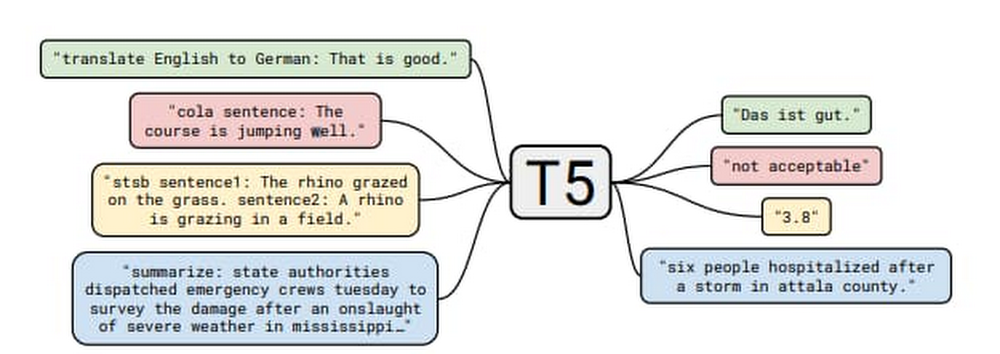
Over the  years, businesses have increasingly used Dataflow for its ability to pre-process stream and/or batch data for machine learning. Some success stories include Harambee, Monzo, Dow Jones, and Fluidly.A growing number of other customers are using machine learning inference in Dataflow pipelines to extract insights from data. Customers have the choice of either using ML models loaded into the Dataflow pipeline itself, or calling ML APIs provided by Google Cloud. As these use cases develop, there are some common patterns being established which will be explored in this series of blog posts. In part I of this series, we’ll explore the process of providing a model with data and extracting the resulting output, specifically:Local/remote inference efficiency patternsBatching patternSingleton model patternMulti-model inference pipelinesData branching to get the data to multiple modelsJoining results from multiple branches Although the programming language used throughout this blog is Python, many of the general design patterns will be relevant for other languages supported by Apache Beam pipelines. This also holds true for the ML framework; here we are using TensorFlow but many of the patterns will be useful for other frameworks like PyTorch and XGBoost. At its core, this is about delivering data to a model transform and the post processing of that data downstream.To make the patterns more concrete for the local model use case, we will make use of the open source “Text-to-Text Transfer Transformer” (T5) model which was published in “Exploring the Limits of Transfer Learning with a Unified Text-to-Text Transformer”. The paper presents a large-scale empirical survey to determine which transfer learning techniques for language modelling work best, and applies these insights at scale to produce a model that achieves state-of-the-art results on numerous NLP tasks.In the sample code, we made use of the “Closed-Book Question Answering” ability, as explained in the T5 blog;”…In our Colab demo and follow-up paper, we trained T5 to answer trivia questions in a more difficult ‘closed-book’ setting, without access to any external knowledge. In other words, in order to answer a question T5 can only use knowledge stored in its parameters that it picked up during unsupervised pre-training. This can be considered a constrained form of open-domain question answering.” For example, we ask the question, “How many teeth does a human have?” and the model returns with “20 primary.” The model is well suited for our discussion, as in its largest incarnation it has over 11 billion parameters and is over 25 Gigabytes in size, which necessitates following the good practices described in this blog. Setting up the T5 ModelThere are several sizes of the T5 model, in this blog we will make use of  small and XXL sizes. Given the very large memory footprint needed by the XXL mode (25 GB for the save model files), we recommend working with the small version of the model when exploring most of the code samples below. You can download instructions from the T5 team in this colab. For the final code sample in this blog, you’ll need the XXL model, we recommend running that code via python command on a machine with 50+ GB of memory.The default for the T5 model export is to have an inference batch size of 1. For our purposes, we’ll need this to be set to 10 by adding –batch_size=10 as seen in the code sample below.Batching patternA pipeline can access a model either locally (internal to the pipeline) or remotely (external to the pipeline).  In Apache Beam, a data processing task is described by a pipeline, which represents a directed acyclic graph (DAG) of transformations (PTransforms) that operate on collections of data (PCollections). A pipeline can have multiple PTransforms, which can execute user code defined in do-functions (DoFn, pronounced as do-fun) on elements of a PCollection. This work will be distributed across workers by the Dataflow runner, scaling out resources as needed.Inference calls are made within the DoFn. This can be through the use of functions that load models locally or via a remote call, for example via HTTP, to an external API endpoint. Both of these options require specific considerations in their deployment, and these patterns are explored below.Inference flowBefore we outline the pattern, let’s look at the various stages of making a call to an inference function within our DoFn.Convert the raw data to the correct serialized format for the function we are calling. Carry out any preprocessing required.Call the inference function:In local mode: Carry out any initialization steps needed (for example loading the model). Call the inference code with the serialized data.In remote mode, the serialized data is sent to an API endpoint, which requires establishing a connection, carrying out authorization flows, and finally sending the data payload.Once the model processes the raw data, the function returns with the serialized result.Our DoFn can now deserialize the result ready for postprocessing.The administration overhead of initializing the model in the local case, and the connection/auth establishment in the remote case, can become significant parts of the overall processing. It is possible to reduce this overhead by batching before calling the inference function. Batching allows us to amortize the admin costs across many elements, improving efficiency. Below, we discuss several ways you can achieve batching with Apache Beam, as well as ready made implementations of these methods.Batching through Start/Finish bundle lifecycle eventsWhen an Apache Beam runner executes pipelines, every DoFn instance processes zero or more “bundles” of elements. We can use DoFn’s life cycle events to initialize resources shared between bundles of work. The helper transform BatchElements leverages start_bundle and finish_bundle methods to regroup elements into batches of data, optimizing the batch size for amortized processing.  Pros:  No shuffle step is required by the runner. Cons: Bundle size is determined by the runner. In batch mode, bundles are large, but in stream mode bundles can be very small.Note: BatchElements attempts to find optimal batch sizes based on runtime performance. “This transform attempts to find the best batch size between the minimum and maximum parameters by profiling the time taken by (fused) downstream operations. For a fixed batch size, set the min and max to be equal.” (Apache Beam documentation) In the sample code we have elected to set both min and max for consistency.In the example below, sample questions are created in a batch ready to send to the T5 model:Batching through state and timers The state and timer API is the primitives within Apache Beam which other higher level primitives like windows are built on. Some of the public batching mechanisms used for making calls to Google Cloud APIs like the Cloud Data Loss Prevention API via Dataflow templates, rely on this mechanism. The helper transform GroupIntoBatches leverages the state and timer API to group elements into batches of desired size. Additionally it is key-aware and will batch elements within a key. Pros: Fine-grained control of the batch, including the ability to make data driven decisions.Cons: Requires shuffle.CombinersApache Beam Combiner API allows elements to be combined within a PCollection, with variants that work on the whole PCollection or on a per key basis. As Combine is a common transform, there are a lot of examples of its usage in the core documents.Pros: Simple APICons: Requires shuffle. Coarse-grained control of the output.With these techniques, we will now have a batch of data to use with the model, including the initialization cost, now amortized across the batch. There is more that can be done to make this work efficient, particularly for large models when dealing with local inference. In the next section we will explore inference patterns. Remote/local inferenceNow that we have a batch of data that we would like to send to a model for inference, the next step will depend on whether the inference will be local or remote. Remote inferenceIn remote inference, a remote procedure call is made to a service outside of the Dataflow pipeline. For a custom built model, the model could be hosted, for example on a Kubernetes cluster or through a managed service such as Google Cloud AI Platform Prediction. For pre-built models which are provided as a service, the call will be to the service endpoint, for example Google Cloud Document AI. The major advantage of using remote inference is that we do not need to assign pipeline resources to loading the model, or take care of versions.Factors to consider with remote calls:Ensure that the total batch size is within the limits provided by the service. Ensure that the endpoint being called is not overwhelmed, as Dataflow will spin up resources to deal with the incoming load. You can limit the total number of threads being used in the calls by several options:Set the max_num_workers value within the pipeline options.If required, make use of worker process/thread control (discussed in more depth later in this blog).In circumstances when remote inference is not possible, the pipeline will also need to deal with actions like loading the model and sharing that model across multiple threads. We’ll look at these patterns next.  Local inferenceLocal inference is carried out by loading the model into memory. This heavy initialization action, especially for larger models, can require more than just the Batching pattern to perform efficiently. As discussed before, the user code encapsulated in the DoFn is called against every input. It would be very inefficient, even with batching, to load the model on every invocation of the DoFn.process method.In the ideal scenario the model lifecycle will follow this pattern:Model is loaded into memory by the transformation used for prediction work.Once loaded, the model serves data, until an external life cycle event forces a reload.Part of the way we reach this pattern is to make use of the shared model pattern, described in detail below.Singleton model (shared.py)The shared model pattern allows all threads from a worker process to make use of a single model by having only one instance of the model loaded into memory per process.  This pattern is common enough that the shared.py utility class has been made available in Apache Beam since version 2.24.0. End-to-end local inference example with T5 modelIn the below code example, we will apply both the batching pattern as well as the shared model pattern to create a pipeline that makes use of the T5 model to answer general knowledge questions for us.In the case of the T5 model, the batch size we specified requires the array of data that we send to it to be exactly of length 10. For the batching, we will make use of the BatchElements utility class. An important consideration with BatchElements is that the batch size is a target, not a guarantee of size. For example, if we have 15 examples, then we might get two batches; one of 10 and one of 5. This is dealt with in the processing functions shown in the code.Please note the inference call is done directly via model.signatures as a simple way to show the application of the shared.py pattern, which is to load a large object once and then reuse.  (The code lab t5-trivia shows an example of wrapping the predict function).Note: Determining the optimum batch size is very workload specific and would warrant an entire blog discussion on its own. Experimentation as always the key for understanding the optimum size/latency.Note: If the object you are using for shared.py can not be safely called from multiple threads, you can make use of a locking mechanism. This will limit parallelism on the worker, but the trade off may still be useful depending on the size / initialization cost of loading the model. Running the code sample will produce the following output (when using the small T5 model):Worker thread/process control (advanced) With most models, the techniques we have described so far will be enough to run an efficient pipeline. However, in the case of extremely large models like the T5 XXL, you will need to provide more hints to the runner to ensure that the workers have enough resources to load the model. We are working on improving this and we will remove the needs for these parameters eventually. But until then, use this if your models need it.A single runner is capable of running many processes and threads on a worker, as shown in the diagram below:The parameters detailed below are those that can be used with the Dataflow Runner v2. Runner v2 is currently available using the flag –experiments=use_runner_v2.To ensure that the total_memory/num processes are at a ratio that can support large models, these values will need to be set as follows:If using the shared.py pattern, the model will be shared across all threads but not across processes. If not using the shared.py pattern and the model is loaded, for example, within the @setup DoFn lifecycle event, then make use of number_of_worker_harness_threads to match the memory of the worker.Multiple-model inference pipelinesIn the previous set of patterns, we covered the mechanics of enabling efficient inference. In this section, we will look at some functional patterns which allow us to leverage the ability to create multiple inference flows within a single pipeline. Pipeline branchesA branch allows us to flow the data in a PCollection to different transforms. This allows multiple models to be supported in a single pipeline, enabling useful tasks like: A/B testing using different versions of a model. Having different models produce output from the same raw data, with the outputs fed to a final model.Allowing a single data source to be enriched and shaped in different ways for different use cases with separate models, without the need for multiple pipelines.In Apache Beam, there are two easy options to create a branch in the inference pipeline. One is by applying multiple transformations to a PCollection:The other uses multi-output transforms:Using T5 and the branch pattern As we have multiple versions of our T5 model (small and XXL), we can run some tests which branch the data, carry out inference on different models, and join the data back together to compare the results. For this experiment, we will use a more ambiguous question of the form. “Where does the name {first name} come from.” The intent of the question is to determine the origins of the first names. Our assumption is that the XXL model will do better with these names than the small model. Before we build out the example, we first need to show how to enhance the previous code to give us a way to bring the results of two separate branches back together. Using the previous code, the predict function can be changed by merging the questions with the inferences via zip().Building the pipelineThe pipeline flow is as follows:Read in the example questions.Send the questions to the small and XXL versions of the model via different branches.Join the results back together using the question as the key.Provide simple output for visual comparison of the values.Note: To run this code sample with the  XXL model and the directrunner, you will need a machine with a minimum of 60GB of memory. You can also of course run this example code with any of the other sizes that fall between the small to XXL which will have a lower memory requirement.The output is shown below.As we can see, the larger XXL model did a lot better than the small version of the model. This makes sense as the additional parameters allow the model to store more world knowledge. This result is confirmed by findings of https://arxiv.org/abs/2002.08910″. Importantly, we now have a tuple which contains the predictions from both of the models which can be easily used downstream. Below we can see the shape of the graph produced by the above code when run on the Dataflow Runner.Note: To run the sample on the Dataflow runner, please make use of a setup.py file with the install_requires parameters as below, the tensorflow-text is important as the T5 model requires the library even though it is not used directly in the code samples above.install_requires=[‘t5==0.7.1′, ‘tensorflow-text==2.3.0′, ‘tensorflow==2.3.1′]A high memory machine will be needed with the XXL model, the pipeline above was run with configuration:machine_type = custom-1-106496-extnumber_of_worker_harness_threads = 1experiment = use_runner_v2As the XXL model is > 25 Gig in size, with the load operation taking more than 15 mins. To reduce this load time, use a custom container.The predictions with the XXL model can take many minutes to complete on a CPU.Batching and branching:Joining the results:ConclusionIn this blog, we covered some of the patterns for running remote/local inference calls, including; batching, the singleton model pattern, and understanding the processing/thread model for dealing with large models. Finally, we touched on how the easy creation of complex pipeline shapes can be used for more advanced inference pipelines. To learn more, review the Dataflow documentation.
Quelle: Google Cloud Platform

Get to know Workflows, Google Cloud’s serverless orchestration engine

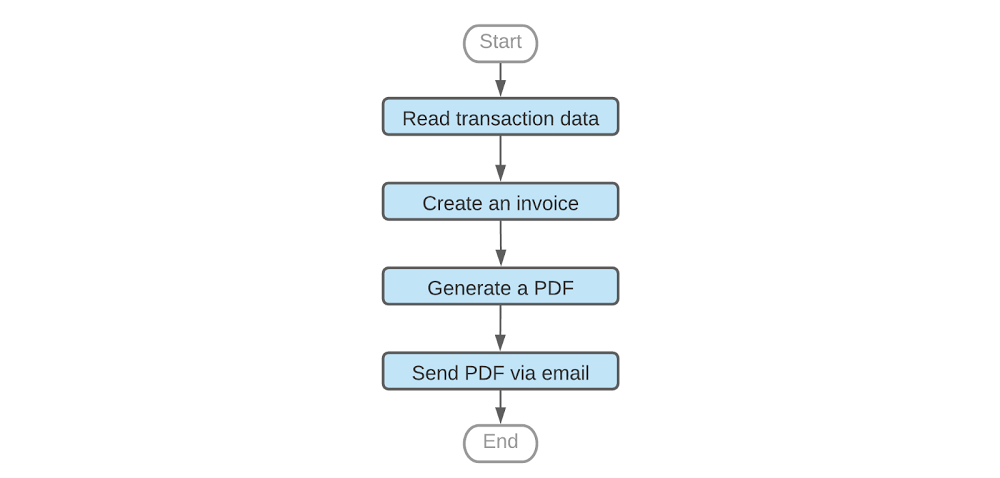
Whether your company is processing e-commerce transactions, producing goods or delivering IT services, you need to manage the flow of work across a variety of systems. And while it’s possible to manage those workflows manually or with general-purpose tools, doing so is much easier with a purpose-built product. Google Cloud has two workflow tools in its portfolio: Cloud Composer and the new Workflows. Introduced in August, Workflows is a fully managed workflow orchestration product running as part of Google Cloud. It’s fully serverless and requires no infrastructure management.In this article we’ll discuss some of the use cases that Workflows enables, its features, and tips on using it effectively.A sample workflowFirst, consider the following workflow for generating an invoice:A common way to orchestrate these steps is to call API services based on Cloud Functions, Cloud Run or a public SaaS API, e.g. SendGrid, which sends an e-mail with our PDF attachment. But real-life scenarios are typically much more complex than the example above and require continuous tracking of all workflow executions, error handling, decision points and conditional jumps, iterating arrays of entries, data conversions and many other advanced features. Which is to say, while technically you can use general-purpose tools to manage this process, it’s not ideal. For example, let’s consider some of the challenges you’d face processing this flow with an event-based compute platform like Cloud Functions. First, the max duration of a Cloud Function run is nine minutes, but workflows—especially those involving human interactions—can run for days; your workflow may need more time to complete, or you may need to pause in between steps when polling for a response status. Attempting to chain multiple Cloud Functions together with for instance, Pub/Sub also works, but there’s no simple way to develop or operate such a workflow. First, in this model it’s very hard to associate step failures with workflow executions, making troubleshooting very difficult. Also, understanding the state of all workflow executions requires a custom-built tracking model, further increasing the complexity of this architecture. In contrast, workflow products provide support for exception handling and give visibility on executions and the state of individual steps, including successes and failures. Because the state of each step is individually managed, the workflow engine can seamlessly recover from errors, significantly improving reliability of the applications that use the workflows. Lastly, workflow products often come with built-in connectors to popular APIs and cloud products, saving time and letting you plug into existing API interfaces. Workflow products on Google CloudGoogle Cloud’s first general purpose workflow orchestration tool was Cloud Composer.Based on Apache Airflow, Cloud Composer is great for data engineering pipelines like ETL orchestration, big data processing or machine learning workflows, and integrates well with data products like BigQuery or Dataflow . For example, Cloud Composer is a natural choice if your workflow needs to run a series of jobs in a data warehouse or big data cluster, and save results to a storage bucket.However, if you want to process events or chain APIs in a serverless way—or have workloads that are bursty or latency-sensitive—we recommend Workflows. Workflows scales to zero when you’re not using it, incurring no costs when it’s idle. Pricing is based on the number of steps in the workflow, so you only pay if your workflow runs. And because Workflows doesn’t charge based on execution time, if a workflow pauses for a few hours in between tasks, you don’t pay for this either. Workflows scale up automatically with very low startup time and no “cold start” effect. Also, it transitions quickly between steps, supporting latency-sensitive applications. Workflows use casesWhen it comes to the number of processes and flows that Workflows can orchestrate, the sky’s the limit. Let’s take a look at some of the more popular use cases. Processing customer transactionsImagine you need to process customer orders and, in the case that an item is out of stock, trigger an inventory refill from an external supplier. During order processing you also want to notify your sales reps about large customer orders. Sales reps are more likely to react quickly if they get such notifications using Slack. Here is an example workflow diagram.The workflow above orchestrates calls to Google Cloud’s Firestore as well as external APIs including Slack, SendGrid or the inventory supplier’s custom API. It passes the data between the steps and implements decision points that execute steps conditionally, depending on other APIs’ outputs. Each workflow execution—handling one transaction at a time—is logged so you can trace it back or troubleshoot it if needed. The workflow handles necessary retries or exceptions thrown by APIs, thus improving the reliability of the entire application. Processing uploaded filesAnother case you may consider is a workflow that tags files that users have uploaded based on file contents. Because users can upload text files, images or videos, the workflow needs to use different APIs to analyze the content of these files. In this scenario, a Cloud function is triggered by a Cloud Storage trigger. Then, the function starts a workflow using the Workflows client library, and passes the file path to the workflow as an argument. In this example, a workflow decides which API to use depending on the file extension, and saves a corresponding tag to a Firestore database.Workflows under the hoodYou can implement all of these use cases out of the box with Workflows. Let’s take a deeper look at some key features you’ll find in Workflows. StepsWorkflows handles sequencing of activities delivered as ‘steps’. If needed, a workflow can also be configured to pause between steps without generating time-related charges.In particular, you can orchestrate practically any API that is network-reachable and follows HTTP as a workflow step. You can make a call to any internet-based API, including SaaS APIs or your private endpoints, without having to wrap such calls in Cloud Functions or Cloud Run.AuthenticationWhen making calls to Google Cloud APIs, e.g., to invoke a Cloud function or read data from Firestore, Workflows uses built-in IAM authentication. As long as your workflow has been granted IAM permission to use a particular Google Cloud API, you don’t need to worry about authentication protocols.Communication between workflow stepsMost real-life workflows require that steps communicate with one another. Workflows supports built-in variables that steps can use to pass the result of their work to a subsequent step. Automatic JSON conversionAs JSON is very common in API integrations, Workflows automatically converts API JSON responses to dictionaries, making it easy for the following steps to access this information. Rich expression languageWorkflows also comes with a rich expression language supporting arithmetic and logical operators, arrays, dictionaries and many other features. The ability to perform basic data manipulations directly in the workflow further simplifies API integrations. Because Workflows accepts runtime arguments, you can use a single workflow to react to different events or input data.Decision pointsWith variables and expressions, we can implement another critical component of most workflows: decision points. Workflows can use custom expressions to decide whether to jump to another part of the workflow or conditionally execute a step. Conditional step executionFrequently used parts of the logic can be coded as a sub-workflow and then called as a regular step, working similarly to routines in many programming languages.Sometimes, a step in a workflow fails, e.g., due to a network issue or because a particular API is down. This, however, shouldn’t immediately make the entire workflow execution fail. Workflows avoids that problem with a combination of configurable retries and exception handling that together allow a workflow to react appropriately to an error returned by the API call.All features above are configurable as part of the Workflows source code. You can see practical examples of these configurationshere. Get started with Workflows todayWorkflows is a powerful new addition to Google Cloud’s application development and management toolset, and you can try it out immediately on all your projects. Have a look at theWorkflows site or go right ahead to theCloud Console to build your first workflow. Workflows comes with a free tier so you can give it a try at no cost. Also, watch out for exciting Workflows announcements coming soon!Happy orchestrating! :)
Quelle: Google Cloud Platform

Getting higher MPI performance for HPC applications on Google Cloud

Most High Performance Computing (HPC) applications such as large-scale engineering simulations, molecular dynamics, and genomics, run on supercomputers or HPC clusters on-premises. Cloud is emerging as a great option for these workloads due to its elasticity, pay per use, and the lower associated maintenance cost.Reducing Message Passing Interface (MPI) latency is one critical element of delivering HPC application performance and scalability. We recently introduced several features and tunings that make it easy to run MPI workloads and achieve optimal performance on Google Cloud. These best practices reduce MPI latency, especially for applications that depend on small messages and collective operations. These best practices help optimize Google Cloud systems and networking infrastructure to improve MPI communication over TCP without requiring major software changes or new hardware support. With these best practices, MPI ping-pong latency falls into single-digits of microseconds (μs), and small MPI messages are delivered in 10μs or less. In the figure below, we show how progressive optimizations lowered one-way latency from 28 to 8μs with a test setup on Google Cloud.Improved MPI performance translates directly to improved application scaling, expanding the set of workloads that run efficiently on Google Cloud. If you plan to run MPI workloads on Google Cloud, use these practices to get the best possible performance. Soon, you will be able to use the upcoming HPC VM Image to easily apply these best practices and get the best out-of-the-box performance for your MPI workloads on Google Cloud.1. Use Compute-optimized VMsCompute-optimized (C2) instances have a fixed virtual-to-physical core mapping and expose NUMA architecture to the guest OS. These features are critical for performance of MPI workloads. They also leverage second Generation Intel Xeon Scalable Processors (Cascade Lake), which can provide up to a 40% improvement in performance compared to previous generation instance types due to their support for a higher clock speed of 3.8 GHz, and higher memory bandwidth. C2 VMs also support vector instructions (AVX2, AVX512). We have noticed significant performance improvement for many HPC applications when they are compiled with AVX instructions. 2. Use compact placement policy A placement policy gives you more control over the placement of your virtual machines within a data center. A compact placement policy ensures instances are hosted in nodes nearby on the network, providing lower latency topologies for virtual machines within a single availability zone. Placement policy APIs currently allow creation of up to 22 C2 VMs.3. Use Intel MPI and collective communication tuningsFor the best MPI application performance on Google Cloud, we recommend the use of Intel MPI 2018. The choice of MPI collective algorithms can have a significant impact on MPI application performance and Intel MPI allows you to manually specify the algorithms and configuration parameters for collective communication. This tuning is done using mpitune and needs to be done for each combination of the number of VMs and the number of processes per VM on C2-Standard-60 VMs with compact placement policies. Since this takes a considerable amount of time, we provide the recommended Intel MPI collective algorithms to use in the most common MPI job configurations.For better performance of scientific computations, we also recommend use of Intel Math Kernel Library (MKL).4. Adjust Linux TCP settingsMPI networking performance is critical for tightly coupled applications in which MPI processes on different nodes communicate frequently or with large data volume. You can tune these network settings for optimal MPI performance.Increase tcp_mem settings for better network performanceUse network-latency profile on CentOS to enable busy polling5. System optimizationsDisable Hyper-ThreadingFor compute-bound jobs in which both virtual cores are compute bound, Intel Hyper-Threading can hinder overall application performance and can add nondeterministic variance to jobs. Turning off Hyper-Threading allows more predictable performance and can decrease job times. Review security settingsYou can further improve MPI performance by disabling some built-in Linux security features. If you are confident that your systems are well protected, you can evaluate disabling the following security features as described in Security settings section of the best practices guide:Disable Linux firewallsDisable SELinuxTurn off Spectre and Meltdown MitigationNow let’s measure the impact  In this section we demonstrate the impact of applying these best practices through application-level benchmarks by comparing the runtime with select customers’ on-prem setups: (i) National Oceanic and Atmospheric Administration (NOAA) FV3GFS benchmarksWe measured the impact of the best practices by running the NOAA FV3GFS benchmarks with the C768 model and 104 C2-Standard-60 Instances (3,120 physical cores). The expected runtime target, based on on-premise supercomputers, was 600 seconds. Applying these best practices provided a 57% improvement compared to baseline measurements—we were able to run the benchmark in 569 seconds on Google Cloud (faster than the on-prem supercomputer).(ii) ANSYS LS-DYNA engineering simulation softwareWe ran the LS-DYNA 3 cars benchmark using C2-Standard-60 instances, AVX512 instructions and a compact placement policy. We measured scaling from 30 to 120 MPI ranks (1-4 VMs) . By implementing these best practices, we achieved on-par or better runtime performance on Google Cloud in many cases when compared with the customer’s on-prem setup with specialized hardware.There is more: easy and efficient application of best practices To simplify deployment of these best practices, we created an HPC VM Image based on CentOS 7 and that makes it easy to apply these best practices and get the best out-of-the-box performance for your MPI workloads on Google Cloud. You can also apply the tunings to your own image, using the bash and Ansible scripts published in the Google HPC-Tools Github repository or by following the best practice guide.To request access to HPC VM Image, please sign up via this form. We recommend benchmarking your applications to find the most efficient or cost-effective configuration.Applying these best practices can improve application performance and reduce cost. To further reduce and manage costs, we also offer automatic sustained use discounts, transparent pricing with per-second billing, and preemptible VMs that are discounted up to 80% versus regular instance types.Visit our website to get started with HPC on Google Cloud today.
Quelle: Google Cloud Platform