MakerBot implements an innovative autoscaling solution with Cloud SQL

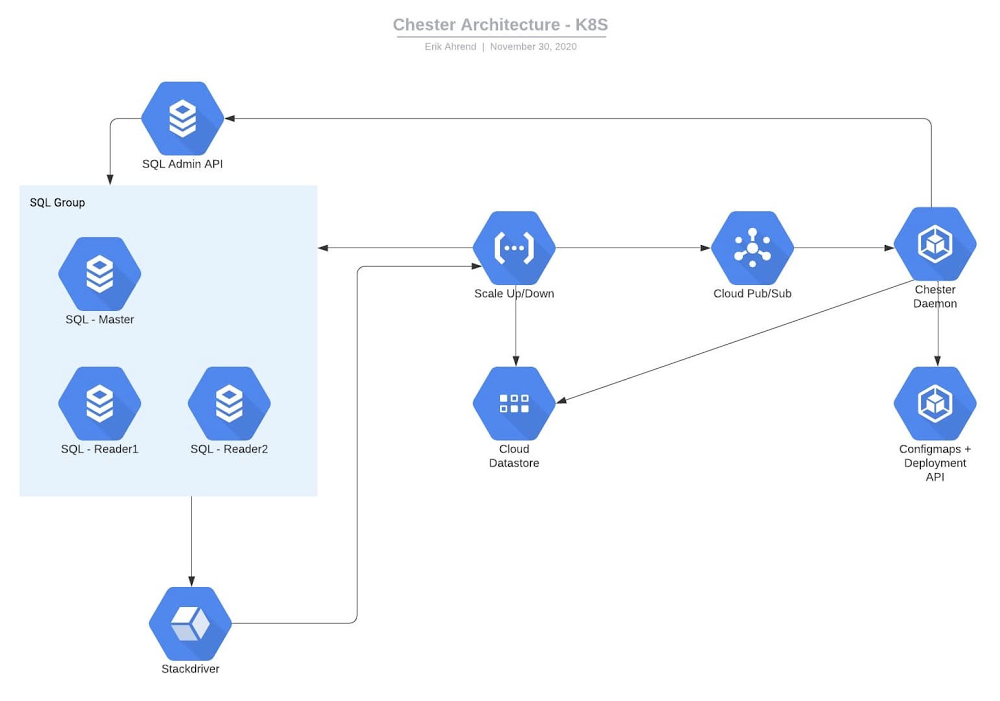
Editor’s note: We’re hearing today from MakerBot, a pioneer in the desktop 3D printing industry. Their hardware users and community members needed easy access to 3D models, and IT teams needed to offload maintenance operations to focus on product innovation. Here’s how they moved to Google Cloud to save time and offer better service.MakerBot was one of the first companies to make 3D printing accessible and affordable to a wider audience. We now serve one of the largest install bases of 3D printers worldwide and run the largest 3D design community in the world. That community, Thingiverse, is a hub for discovering, making, and sharing 3D printable things. Thingiverse has more than two million active users who use the platform to upload, download, or customize new and existing 3D models.Before our database migration in 2019, we ran Thingiverse on Aurora MySQL 5.6 in Amazon Web Services. Looking to save costs, as well as consolidate and stabilize our technology, we chose to migrate to Google Cloud. We now store our data in Google Cloud SQL and use Google Kubernetes Engine (GKE) to run our applications, rather than hosting our own AWS Kubernetes cluster. Cloud SQL’s fully managed services and features allow us to focus on innovating critical solutions, including a creative replica autoscaling implementation that provides stable, predictable performance. (We’ll explore that in a bit.)A migration made easierThe migration itself had its challenges, but SADA—a Google Cloud Premier Partner—made it a lot less painful. At the time, Thingiverse’s database had ties to our logging ecosystem, so a downtime in the Thingiverse database could impact the entire MakerBot ecosystem. We set up a live replication from Aurora over to Google Cloud, so reads and writes would go to AWS and, from there, shipped to Google Cloud via Cloud SQL’s external master capability.Our current architecture includes three MySQL databases, each on a Cloud SQL Instance. The first is a library for the legacy application, slated to be sunset. The second stores data for our main Thingiverse web layer—users, models, and their metadata (like where to find them on S3 or gif thumbnails), relations between users and models, etc—that has about 163 GB of data.Finally, we store statistics data for the 3D models, such as number of downloads, users who downloaded a model, number of adjustments to a model, and so on. This database has about 587 GB of data. We leverage ProxySQL on a VM to access Cloud SQL. For our app deployment, the front end is hosted on Fastly, and the back end on GKE. Worry-free managed serviceFor MakerBot, the biggest benefit of Cloud SQL’s managed services is that we don’t have to worry about them. We can concentrate on engineering concerns that have a bigger impact on our organization rather than database management or building up MySQL servers. It’s a more cost-effective solution than hiring a full-time DBA or three more engineers. We don’t need to spend time on building, hosting, and monitoring a MySQL cluster when Google Cloud does all of that right out of the box. A faster process for setting up databasesNow, when a development team wants to deploy a new application, they write out a ticket with the required parameters, the code then gets written out in Terraform, which stands it up, and the team is given access to their own data in the database. Their containers can access the database, so if they need to read-write to it, it’s available to them. It only takes about 30 minutes now to give them a database, a far more automated process thanks to our migration to Cloud SQL.Although autoscaling isn’t currently built into Cloud SQL, its features enable us to implement strategies to get it done anyway. Our autoscaling implementationThis is our solution for autoscaling. Our diagram shows the Cloud SQL database with main and other read replicas. We can have multiple instances of these, and different applications going to different databases, all leveraging ProxySQL. We start by updating our monitoring. Each one of these databases has a specific alert. Inside of that alert’s documentation, we have a JSON structure naming the instance and database. When this event gets triggered, Cloud Monitoring fires a webhook to Google Cloud Functions, then Cloud Functions writes data about the incident and the Cloud SQL instance itself to Datastore. Cloud Functions also sends this to Pub/Sub. Inside GKE, we have the ProxySQL name space and the daemon name space. There is a ProxySQL service, which points to a replica set of ProxySQL pods. Every time a pod starts up, it reads the configuration from a Kubernetes config map object. We can have multiple pods to handle these requests.The daemon pod receives the request from Pub/Sub to scale up Cloud SQL. With the Cloud SQL API, the daemon will add/remove read replicas from the database instance until the issue is resolved.Here comes the issue—how do we get ProxySQL to update? It only reads the config map at start, so if more replicas are added, the ProxySQL pods will not be aware of them. Since ProxySQL only reads the config map at the start, we have the Kubernetes API perform a rolling redeploy of all the ProxySQL pods, which only takes a few seconds and this way we can also scale up and down the number of ProxySQL pods based on load.This is just one of our plans for future development on top of Google Cloud’s features, made easier by how well all of its integrated services play together. With Cloud SQL’s fully managed services taking care of our database operations, our engineers can get back to the business of developing and deploying innovative, business-critical solutions.Learn more about MakerBot and about Google Cloud’s database services.Related ArticleExport data from Cloud SQL without performance overheadWe’re launching export offloading in Cloud SQL so you can export data from your MySQL and PostgreSQL database instances without impacting…Read Article
Quelle: Google Cloud Platform
How to develop secure and scalable serverless APIs

Among Google Cloud customers, we see a surge in interest in developing apps on so-called serverless platforms that let you develop scalable, request- or event-driven applications without having to set up your own dedicated infrastructure. A serverless architecture can considerably improve the way you build applications and services, in turn accelerating innovation and increasing agility. Serverless computing is also a key enabler of “composable enterprise” strategies where you modularly reuse and combine data and functionality to create new customer experiences and new business models.  Adding an API facade to serverless applications is a great way to connect data, integrate systems, and generally build more modern applications. APIs let a business securely share its data and services with developers both inside and outside the enterprise; doing so with serverless makes it easy to scale those APIs securely—without any of the usual technical complexity. Benefits of serverless RESTful APIsAs organizations expand their API programs, a key question is how to build comprehensive APIs that are highly scalable and secure. To accomplish this, many organizations have been migrating their business-critical APIs to serverless architectures. For these organizations, serverless APIs provide several benefits:ScalabilityReduced hardware and labor costs due to cloud-based payment modelReliability and availabilityNo need for load balancing, infrastructure maintenance, or security patchesOperational efficiency Increase in developer productivityDesigning serverless APIsDevelopers use REST APIs to build standalone applications for a mobile device or tablet, with apps running in a browser, or through any other type of app that can make a request to an HTTP endpoint. By building that API on a serverless environment like Cloud Run or Cloud Functions, you can have that code execute in response to requests or events—something you can’t do in a traditional VM or container-based environment. Since building a robust serverless application means designing with services and data in mind, it is important to develop APIs as an abstraction layer for your data and services. As an example, a database activity such as changes to a table’s row could be used as an event trigger that happens via an API call.Leveraging Google Cloud API Gateway to secure your APIsGoogle Cloud API Gateway lets you provide secure access to your backend services through a well-defined REST API, which is consistent across all of your services, regardless of the service implementation. This provides two key benefits: Scalability – API Gateway gives you all the operational benefits of serverless, such as flexible deployment and scalability, so that you can focus on building great applications. It can manage APIs for multiple backends including the serverless Cloud Functions, Cloud Run, and App Engine, as well as Compute Engine, and Google Kubernetes Engine.Security  – Google Cloud’s API Gateway adds additional layers of security, such as authentication and key validation, by configuring security definitions that require all incoming calls to provide a valid API key. It also allows you to set quotas and specify usage limits to protect your APIs from abuse or excessive usage.Here is a quick demo of Google Cloud API Gateway:Get started nowWith API Gateway, you can create, secure, and monitor APIs for Google Cloud serverless back ends, including Cloud Functions, Cloud Run, and App Engine. Built on Envoy, API Gateway gives you high performance, scalability, and the freedom to focus on building great apps. Get started building your APIs for free.Related ArticleGoogle Cloud API Gateway is now available in public betaGoogle Cloud API Gateway makes it easy to securely share and manage serverless APIsRead Article
Quelle: Google Cloud Platform

How EDI empowers its workforce in the field, in the office, and at home

For consulting companies such as EDI Environmental Dynamics Inc. (EDI), interactions among employees and customers are the direct drivers of value, and helping them collaborate has a tangible impact on the bottom line. However, connecting people from the field to work-from-home spaces to the office is no easy task.EDI, an environmental consulting company that helps organizations assess environmental impacts and meet government regulations, has eight offices across Western and Northern Canada. Frontline workers account for 80% of its total employees, ranging from biologists and scientists to safety inspectors and project managers. EDI’s success is directly linked to its remote workforce’s ability to work effectively in the field and to collaborate with coworkers and clients across Western Canada. With the help of Google Workspace and AppSheet, EDI is enabling its mobile workforce to function more efficiently and collaboratively than ever before.Bringing efficiency to its frontline workersJust four years ago, much of EDI’s field work was still being tracked with pen and paper, resulting in frequent challenges, from error-prone data retention to inefficient collaboration. Luckily, EDI was able to address this using AppSheet, Google Cloud’s no-code application development platform. With AppSheet, EDI has replaced the majority of its pen-and-paper processes with tailored apps. As EDI’s Director of IT, Dennis Thideman explains, “AppSheet allows us to be much more responsive to our field needs. Using it, we can spin up a basic industrial application, share it with our field workers, and have them adjust their workflows—all in just a few hours. Doing that from scratch might take weeks or months.”For EDI, there are a couple of features that make AppSheet shine. First, AppSheet is platform-agnostic, meaning it works on most devices and most operating systems, so any employee can access their AppSheet apps. Secondly, because 90% of EDI’s projects involve working in remote areas, they can leverage AppSheet’s Offline Mode, allowing workers to collect data on their mobile devices in the field and have it automatically download when they reconnect to the internet. Eliminating the challenges associated with pen and paper has resulted in even more benefits than EDI leaders originally anticipated: namely, employees work faster across an unexpectedly wide range of use cases. For example, governmental regulations require EDI to complete a pre-trip safety evaluation before heading into the field. Before using AppSheet, this evaluation would take upwards of four hours to complete. By streamlining the process with an AppSheet app, EDI employees have reduced that time down to one hour. EDI averages over 850 evaluations every year, and they’ve realized over 2,550 hours in annual savings—savings that can be passed on to clients and allow staff to focus more time on other tasks. This is just one of more than 35 mission-critical applications that EDI has built with AppSheet.Time savings is a huge benefit, but as Logan Thideman, an IT manager at EDI, explains “At the end of the day, we realized that the biggest benefits of AppSheet aren’t about time savings as much as they are about high-quality data.” Collecting and analyzing good data is critical to EDI’s operations, as most data collected in the field can never be replicated. For example, if a water quality sample for a certain day is lost (which can happen easily when using pen and paper), that information can never be retrieved again. AppSheet makes data collection easy. Employees are much less likely to lose a smart device than they are a paper form, and any data entered would be immediately uploaded to a Google Sheet or SQL database when they return from the field, meaning data is always backed up in the cloud. From there, information can quickly be analyzed by coworkers, passed on to the client, or shared with government agencies to ensure proper compliance.Overall, EDI found that the more they could enable their field workers with AppSheet apps, the more those employees could focus on providing quality research and recommendations to their clients and gain a stronger competitive advantage in the market.Enhancing collaboration everywhereEnabling collaboration in remote environments can be difficult, but Google Workspace has made this easy for EDI. Google Workspace lets employees effortlessly share documents and work together in real time. Given its ease of use for mobile workers, Google Meet has become all-important and is used as EDI’s tool of choice for face-to-face collaboration. It became even more essential when COVID-19 arrived. As Dennis Thideman explains, “Google Meet allowed us to adapt to the COVID-19 environment quickly as we were already conversant with it. In just two days, we were able to transition our employees from office to home because of it.” By leveraging Google Meet and the rest of the Google Workspace platform, EDI employees are able to remain productive, regardless of where they’re working.Google Workspace also makes it easy to collaborate with customers. Because many of EDI’s customers leverage Microsoft Office tools such as Word, Excel, and PowerPoint, EDI still needs to use them. Google Workspace makes it easy to continue using Microsoft products in its environment, allowing employees to store Microsoft Office files on Google Drive and open, edit and save them using Google Docs, Sheets, and Slides. AppSheet and Google Workspace’s deep integrations also make collaboration easy. Employees can update data in Google Sheets, save images and reports to Drive, and update Calendar events all from AppSheet apps. Together, the two platforms simplify many of the activities that consumed so much time in the past.An empowered workforceEmpowering employees has been at the core of EDI’s success, and Google Workspace and AppSheet have given EDI a clear advantage. Collaboration has become easier and more agile using Google Workspace. Robust AppSheet apps have been built to streamline mission-critical processes. For unique project requirements, simple AppSheet apps are built in a matter of hours. As Dennis Thideman summarizes, Google Workspace and AppSheet “make managing a distributed, deskless workforce much simpler, giving EDI better growth opportunities and a competitive edge in the marketplace.”Learn more about Google Workspace and AppSheet.
Quelle: Google Cloud Platform

Using Document AI to automate procurement workflows

Earlier this month we announced the Document AI platform, a unified console for document processing. Document AI is a platform and a family of solutions that help businesses to transform documents into structured data with machine learning. With custom parsers and Natural Language Processing, DocAI can automatically classify, extract, and enrich data within your documents to unlock insights. We showed you how to visually inspect a parsed document in the console. Now let’s take a look at how you can integrate parsers in your app or service. You can use any programming language of your choice to integrate DocAI and we have client libraries in Java, Node.js, Go and more. Today, I’ll show you how to use our Python client library to extract information from receipts with the Procurement DocAI solution. Step 1: Create the parserAfter enabling the API and service account authentication (instructions), navigate to the Document AI console and select Create Processor.We’ll be using the Receipt Parser, click on it to create an instance.Next you’ll be taken to the processor details page,  copy your processor ID.Step 2: Set up your processor codeIn this code snippet, we show how to create a client and reference your processor. This code snippet shows how to create a client and reference your processor. You might want to try one of our quickstarts before integrating this into production code.Note how simple the actual API call looks. You only have to specify the processor and the content of your document. No need to memorize a series of parameters, we’ve done the hard work for you. You can also process large sets of documents with asynchronous batch calls. This is beneficial because you can choose to use a non-blocking background process and poll the operation for its status. This also integrates with GCS and can process more than one document per call. Step 3: Use your data Inspect your results, each of the fields extracted per processor are relevant to the document type. For our receipt parser, Document AI will correctly identify key information like currency, supplier information (name, address, city) and line items. See the full list here. Across all the parsers, data is grouped naturally where it would be otherwise difficult to parse out with only OCR. For example, see how a receipt’s line items attributes are grouped together in the response. Use the JSON output to extract the data you need and integrate into other systems. With this structure, you can easily create a schema to use with one of our storage solutions such as BigQuery. With the receipt parser, you’ll never have to manually create an expense report again!Get started today! Check out our documentation for more information on all the parser types or contact the Google Cloud sales team.Related ArticleIntroducing Document AI platform, a unified console for document processingDocument AI Platform is a unified console for document processing in the cloud.Read Article
Quelle: Google Cloud Platform
AI, Kubernetes, multi-cloud, and more: Free training to take advantage of before 2021

Google Cloud is continuing to offer no-cost learning opportunities until the end of this year to help you build in-demand cloud skills. Read on to find out how you can further your knowledge of AI, Kubernetes, multi-cloud, and more. AI and machine learning Join Lak Lakshmanan, Google Cloud’s Director of Data Analytics and AI Solutions, on December 15 to find out how to use Google Cloud’s new Document AI. Lak will walk you through how to extract structured data from scanned PDF documents so you can increase operational efficiency, improve customer experience, and make faster, smarter decisions. You’ll also have an opportunity to get your questions answered live. Reserve your seathereto learn about Document AI.You can also learn how to use AI and machine learning to help power businesses in different industries such as finance and retail in sessions from our Let’s Get Solving series. Google experts will provide case studies, teach you how to use BigQuery, demo technology like Open Banking, and more. Registerherefor industry-specific learning opportunities.  Kubernetes If you sign up by December 31, you’ll get access to unlimited Kubernetes training and the opportunity to earn Google Cloud skill badges on Qwiklabs at no-cost for 30 days. We recommend you begin with the following quests on Qwiklabs: “Deploy to Kubernetes in Google Cloud” and “Kubernetes Solutions.” “Deploy to Kubernetes in Google Cloud” will teach you how to configure Docker images and containers and deploy fully fledged Kubernetes Engine applications. By taking the “Kubernetes Solutions” quest, you’ll have a chance to practice with a wide variety of Kubernetes use cases such as building Slackbots with NodeJS, deploying game servers on clusters, and running the Cloud Vision API. Sign uphereto get started with Kubernetes. Hybrid and multi-cloud  Instructors will lead you through hands-on labs and you’ll have a chance to test your skills throughout with quizzes during our two-day Cloud OnBoard series on architecting with Google Kubernetes Engine (GKE) and hybrid architecture with Anthos. Register for the introduction to hybrid and multi-cloud technologyhere. Data analytics Interested in taking your data analytics skills to the next level? If you register by December 31, you can get access to a 6-week learning path which will outline recommended Google Cloud training to prepare experienced cloud professionals for the Google Cloud Professional Data Engineer certification. Google Cloud certifications validate your cloud expertise and help you elevate your career. Through our training partner, Coursera1, the first month of training will be available at no cost as well as 30 days of unlimited Qwiklabs access at no cost. You can get access to the certification preparation learning pathhere. We hope these training resources help you strengthen your cloud skills this year. Stay tuned for new learning opportunities in January. 1. Coursera first month free promotion is only available to learners who have not previously paid for training on Coursera. A credit card is required to activate your free month. After the first month is over, your subscription will auto-renew to a $49 monthly charge until you cancel your Coursera subscription.
Quelle: Google Cloud Platform

Control access to your web sites with Identity-Aware Proxy

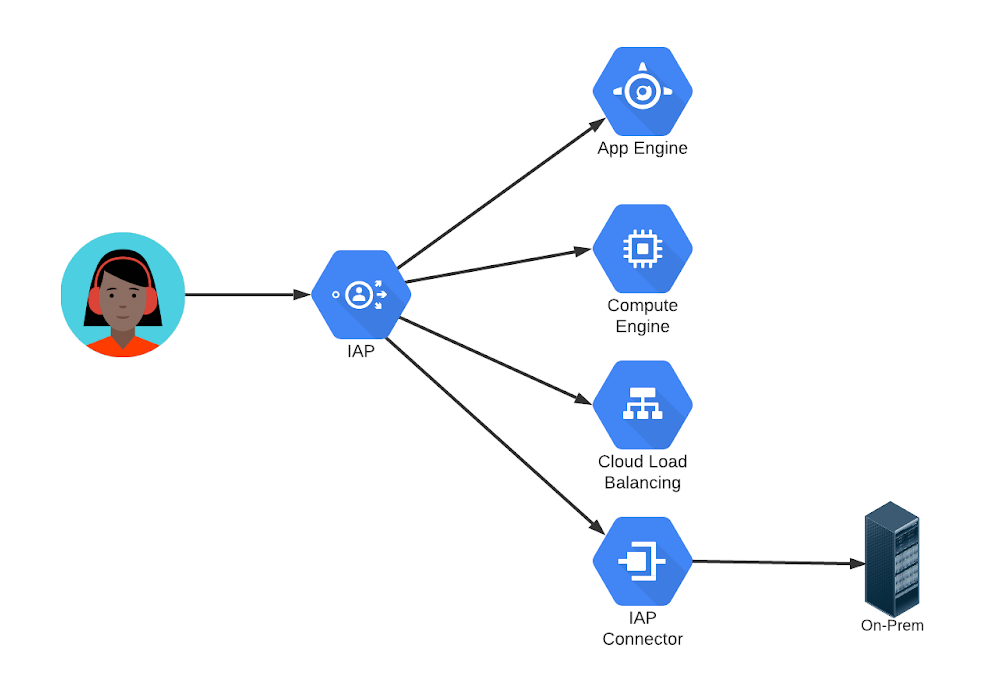
Does your company need to make an internal website accessible to employees, temporary workers, and contractors? How about running a public site open to all, but with some functions requiring personalization? Or perhaps providing a highly restricted site that only authorized users, running on secure platforms, can access?Those are all common use cases, and there are many different ways to address each of them. But there is one easy-to-use and deploy solution that can handle them all: Google Cloud Identity-Aware Proxy (IAP).IAP is a service that intercepts requests to a web site, authenticates the user making the request, and allows only authorized users’ requests to reach the site. IAP can be used to protect web sites running on many platforms, including App Engine, Compute Engine, and other services behind a Google Cloud Load Balancer. But it isn’t restricted to Google Cloud: you can use it with IAP Connector to protect your own on-premises applications, too.Protecting a website with IAP can be configured using the Google Cloud Console. Identity-Aware Proxy is managed under the Security submenu. From there, an organization can enable IAP and then turn it on for selected sites. Access is permitted by granting the IAP-secured Web App User role to one or more individual email addresses, entire email domains, or a group email address. Those users can use the sites just like any other internet site after an authentication step.The core steps are similar regardless of the case:Create an employee-only, or “intranet”, server by specifying that only users who authenticate with company email addresses should be allowed access. IAP can authenticate Gmail or Google Workspace addresses, addresses in a company’s Active Directory or other LDAP directory via Google Cloud Directory Sync, or addresses supported by other common identity providers. For public, but authenticated, access, specify that IAP should allow “allAuthenticatedUsers”. Anyone willing and able to authenticate will be given access to the site. IAP’s second major function is to add headers to each request with user identity information, so the receiving site can use that information without having to perform its own authentication.Access can be limited to any group, or combination of groups, by specifying a group email address instead of individual ones. And IAP can go even further than basing access on identity only. Organizations can set device policies members of a group must follow in order to be given access. Those policies can require specific operating system versions, use of company profiles on browsers or mobile devices, or even use of company owned equipment only.Over my career, I have set up web sites, managed user registration and authentication, tracked sessions, configured firewalls, and used VPNs for internal sites. I was thrilled to discover Identity-Aware Proxy. I didn’t need to do any of those things any more! It seemed almost magical. If you have similar use cases, you should take a close look at IAP for yourself.Related ArticleCloud Identity-Aware Proxy: Protect application access on the cloudWhether your application is lift-and-shift or cloud-native, administrators and developers want to provide simple protected application ac…Read Article
Quelle: Google Cloud Platform
Cloud Run min instances: Minimize your serverless cold starts

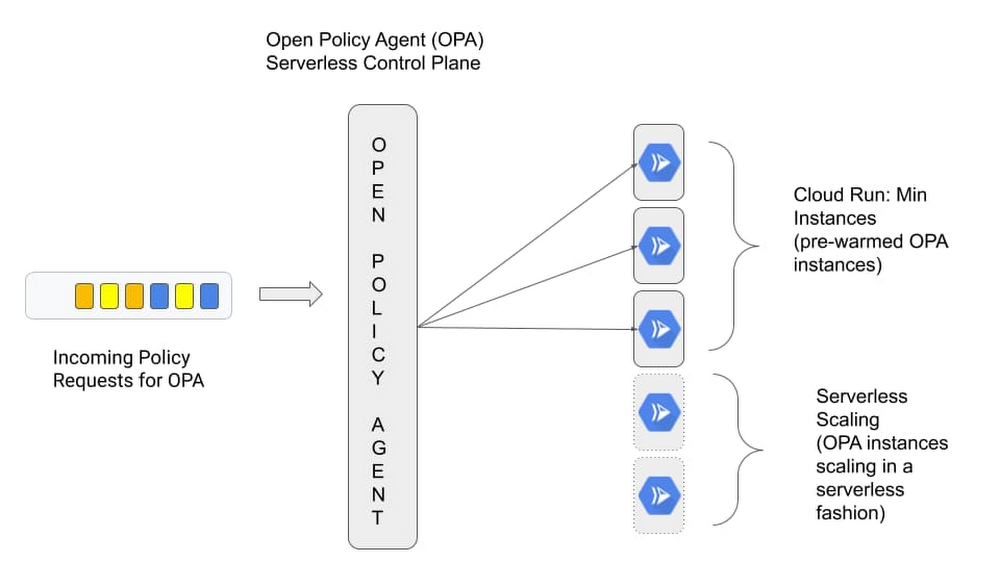
One of the great things about serverless is its pay-for-what-you-use operating model that lets you scale a service down to 0. But for a certain class of applications, the not-so-great thing about serverless is that it scales down to 0, resulting in latency to process the first request when your application wakes back up again. This so-called “startup tax” is novel to serverless, since, as the name implies, there are no servers running if an application isn’t receiving traffic. Today, we’re excited to announce minimum (“min”) instances for Cloud Run, our managed serverless compute platform. This important new feature can dramatically improve performance for your applications. And as a result, it makes it possible to run latency-sensitive applications on Cloud Run, so they too can benefit from a serverless compute platform. Let’s take a deeper look. Cut your cold startsWith this feature, you can configure a set of minimum number of Cloud Run instances that are on standby and ready to serve traffic, so your service can start serving requests with minimal cold starts. To use Cloud Run’s new min instances feature, simply configure the number of min instances for your Cloud Run service with a simple gcloud command or the UI.Once configured, the min instances will be ready and waiting to serve traffic for your application, thereby minimizing the cold starts for your application and enabling you to run latency sensitive applications on Cloud Run.Reuse bootstrapping logicIn addition to minimizing cold starts, Cloud Run min instances also helps you cut down on bootstrapping time for key operations such as opening database connections or loading files from Cloud Storage into memory. By lowering bootstrapping time, min instances help reduce request latency further, since you only need to run your bootstrapping logic once, and then leverage it across multiple requests for your configured number of min instances.Consider the following golang serverless function, which shows how you can run your bootstrapping logic once, and reuse it across your min instances:Run bootstrapping logic once, and reuse it across Min InstancesReap benefits of serverless at lower cost  In addition to setting a minimum number of instances, Cloud Run min instances also lets you configure them with throttled CPU, so you can take advantage of this capability at a much lower cost. This way, you can have your cake and eat it too: leverage the efficiency and cost advantages of serverless, while moving latency sensitive workloads to serverless.Cloud Run min instances in actionSo we talked about the benefits that Cloud Run min instances can bring, and how to use the feature, but how does it work in real life and why would you want to use it? Traditionally serverless platforms cater to applications that benefit from scaling to zero, but make certain trade offs on initial response times due to cold start latency during the bootstrap period. This is acceptable for applications you’ve built from the ground up and for which you have full control over the source and how it behaves at runtime. But there’s a whole class of applications that people use off the shelf for which a traditional serverless approach isn’t a great fit. Think custom control planes such as Prometheus for collecting metrics and Open Policy Agent (OPA) for making policy decisions. These control planes typically require advanced configuration and a bit of bootstrapping during the initial start up, and can’t tolerate additional latency. When you’re starting up OPA, for instance, you typically fetch policies from a remote source and cache them to speed up future policy decisions. In a typical serverless environment, control planes such as OPA would take a performance hit when scaling to zero and back up again to handle policy requests, as it sits in the request path for critical user transactions.Cloud Run min instances allows you to address this problem head on. Instead of scaling to zero and possibly having to bootstrap the policy engine between each request, we can now ensure each request will be handled by a “warm” instance of OPA.Let’s look at this in action. In the following section we deploy OPA to run as a central control plane and enable min instances to meet our performance requirements.We configure the OPA server to pull a policy bundle from a Cloud Storage bucket at run time, which, when queried will allow http GET requests for the “/health” HTTP path. Here is what the OPA policy looks like:The policy is packaged in a policy bundle and uploaded to a Cloud Storage bucket. But first, we need to bootstrap some dependencies, as we show in this tutorial about the bootstrapping process. To keep things simple we leverage a helper script.Change into the min-instances-tutorial directory:Before we can deploy the OPA Cloud Run instance we need to perform the following tasks:Create an OPA service account Create a Cloud Storage bucket to hold the OPA policy bundleUpload the OPA policy bundle (bundle.tar.gz) to Cloud StorageGrant permission to the OPA service account to access the OPA bundleAt this point all the dependencies to host OPA are in place. We are ready to deploy OPA using the ‘gcloud’ command. The bucket name and the service account email address are stored in the ‘.env’ file created by the bootstrapping script run in the previous step.$ source .envCreate the open-policy-agent Cloud Run instance:Here’s the output from the command, signaling that we’ve successfully bootstrapped our environment:Now, when the OPA server starts up for the first time, it downloads the policy bundle from Cloud Storage and caches it. But thanks to the min instances, this only happens once.Now we are ready to test making a policy decision. We can do that with curl. Retrieve the open-policy-agent cloud run URL:Query the OPA server by providing a set of input and retrieve a policy decision based on the policy bundle stored in Cloud Storage:Here’s the response:Now if you wait for a few minutes you’ll observe that OPA does not scale to zero, and that the process is frozen in the background, and will only be thawed when the next request hits the instance. If you would like to learn more about how this affects pricing be sure to check out the Pricing Page. Min instances for a maximum of applications At first glance, Cloud Run min instances may seem like a small thing, but we believe that this feature is going to enable more off-the-shelf applications to run under the serverless model and be more cost efficient—and give you more control over the trade-offs inherent in serverless compute. To get started with Cloud Run, check out these Quickstarts.
Quelle: Google Cloud Platform

Integrating Dialogflow with Google Chat

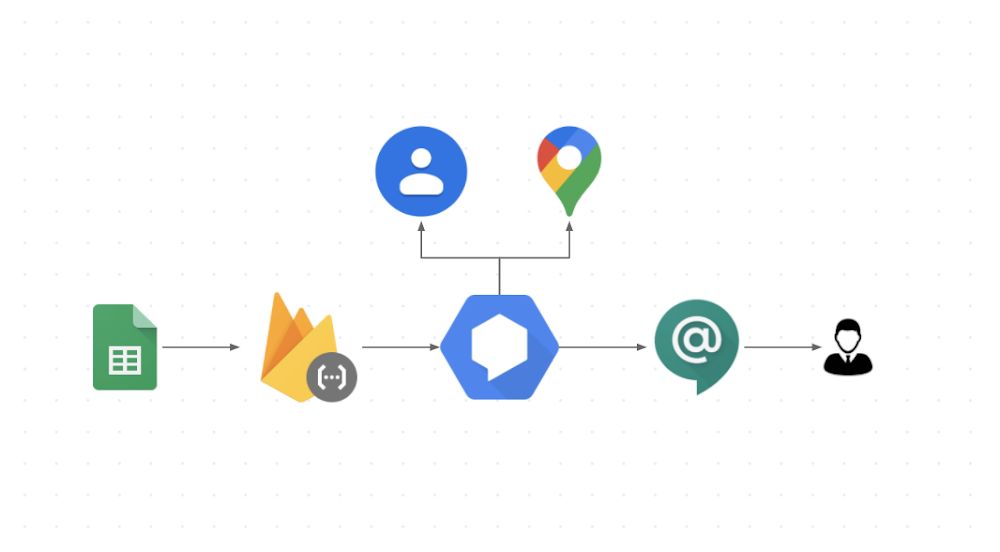
In today’s world, where online collaborative work is crucial and maintaining productivity is key,  chatbots have an important role to play. Why chatbots? Workers frequently need to incorporate information from external sources in their communications, and chatbots can help them find that information all in one place. In this post we’ll walk you through a bot that was inspired by a real use case here at Google. In large companies such as Google, it can be difficult to find out which person is responsible for a specific product area. When customer teams have a question they often have to go through many ad hoc trackers such as the one here in Sheets (sample scrubbed data) to find answers. When you are on the go a lot, this gets even harder, especially if you don’t remember the Sheets URL and how to use it to find your answer. Instead of sifting through a spreadsheet, what if you could just send a chat message to see who to contact for networking or security expertise? That’s where the integration between Dialogflow and Google Chat comes in! It helps reduce context switching for users, because they can ask their questions right within Google Chat, addressing a bot built in Dialogflow that integrates with the Sheets API to find answers. Let’s see how it works!If you’d rather watch than read, we share the entire process in this video:How does it work?When a user asks a question in  Google Chat, the bot that is initiated integrates with Dialogflow to facilitate natural conversations. Dialogflow, in turn, integrates with a backend database or Sheets (as shown in the image) via a Cloud Functions fulfillment. Extracting the information from Google SheetsTo extract the information from Sheets we first need to know exactly what information is relevant to fulfill a request. After identifying the pieces of information we need, we use the Sheets API to extract them. Defining the input phrasesWhile it would be easier to write a basic bot that requires the input to be formatted in a predetermined order, such a bot would be difficult to use. Users would have to remember the order and always spell everything correctly. And if a tool is too hard to use, people aren’t going to use it.The key to chatbot adoption is usability, and that means the ability to handle phrases that occur in natural conversation, like these: “Who is on Gmail for data management?””I would like to know the data management guru “”Tell me who is the data management specialist”This is where Dialogflow comes in. Dialogflow is a natural language understanding platform that simplifies the design and integration of conversational user experiences for mobile apps, web apps, bots, and more. We built our bot in three easy steps, which should look familiar to you if  you’ve completed the Deconstructing Chatbots video series. Step 1: Define the entitiesDialogflow uses models trained on natural conversation.  Before we can use these models, however, our bot needs to know the key phrases in our context, such as the role types, skills, and account names (e.g.,  Account Specialist, Gmail, and Security).Step 2: Configure the intentsAn intent is essentially the user’s question. This is where we define how to use the entities we just created by defining Actions and Parameters. When we add the bot to a room, the intent is where the response comes from.Actions and ParametersThe entities you define are used in  configuring your actions and parameters. In this case, Roles, Skills, and Accounts are all required parameters for this intent to be fulfilled (and the user can provide these in any order they like). If a user forgets one, we define a prompt to get it from the user. Training phrases Because different people talk differently, we use training phrases to provide different examples of user requests. Dialogflow uses a pretrained NLP model, and these training phrases are the realistic questions that help train a specific model for our use case.Step 3: Set up fulfillment codeFulfillment is where we glue everything together, connecting all the APIs in a Node.js Firebase function. In this case, we use the Sheets API but you can connect to any backend you choose. Refer to the sample code for details.One-click integration Dialogflow integrates with many popular conversation platforms like Google Chat, Google Assistant, Slack, and more. Direct end-user interactions are handled for you, so you can focus on building your agent. Each integration handles end-user interactions in a platform-specific way, so see the documentation for your integration platform for details. ConclusionBuilding a chatbot that integrates Google Chat, Dialogflow, and Sheets (or another data source) is straightforward.  For more details, watch our Integrate Dialogflow with Google Chat video, where we talk in more depth about the process, and check out the full source code on GitHub. Want to learn more about building chat and voice applications using Dialogflow? We’ve created an entire video series on Deconstructing Chatbots that will take you from zero to hero in no time!For more cloud content follow us on Twitter @pvergadia and @srivas_dev.Related ArticleConversational AI drives better customer experiencesConversational AI takes contact centers into a new era of customer service.Read Article
Quelle: Google Cloud Platform
Dataform is joining Google Cloud: Deploy data transformations with SQL in BigQuery

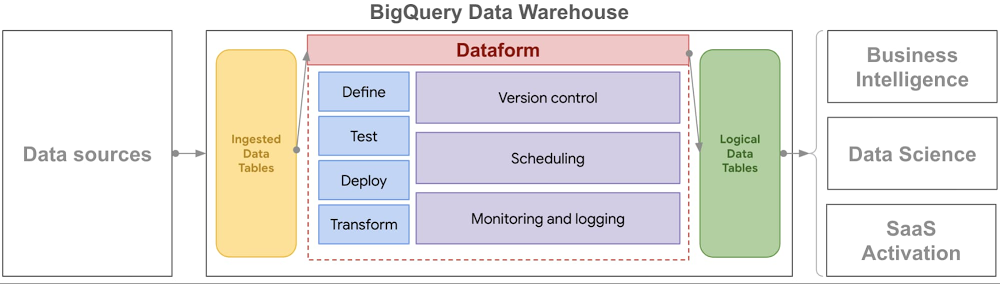
The value of data—and the insights it contains—only continues to grow, and Google has invested in technologies to empower teams to do more with that data for more than a decade. We were honored to be named a Leader in Gartner’s first-ever Magic Quadrant for Cloud Database Management Systems (DBMS). BigQuery, our cloud data warehouse, continues to be a place where an increasing number of enterprises across every industry turn to make sense of all this growing data.Today, we’re making this work even easier for our customers with our acquisition of Dataform. Dataform leverages BigQuery’s innovative architecture, allowing for practically unlimited scale, to enable analysts and engineers to manage all their data processes within BigQuery. This combination means you can leverage software development best practices to define, document, test and deploy data transformations using SQL executed within BigQuery. There’s no need to learn new programming languages or deploy and manage entirely new applications in your data stack. You can now create and manage your data transformations all within your comfortable, secure and reliable data warehouse.Click to enlargeDataform brings a software engineering approach to data modeling and pipelines making data transformations more accessible and reliable:Collaborate and create data pipelines—Develop data workflows in SQL and collaborate with others via Git. Include data documentation that is automatically visible to others.Deploy data pipelines—Keep logical data up-to-date by scheduling data workflows which incrementally update downstream datasets, reducing cost and latency.Ensure data quality—Define data quality checks in SQL and automatically receive alerts when those checks fail. View logs, version history and dependency graphs to understand changes in data.We’re excited to welcome Dataform to Google Cloud as we continue to deliver on our mission to democratize insights across organizations. Today, we are making Dataform free to all users and moving forward we are looking forward to bringing the best of Dataform and BigQuery together. You can learn more by visiting dataform.co.Gartner, Magic Quadrant for Cloud Database Management Systems, November 23, 2020, Donald Feinberg, Adam Ronthal, Merv Adrian, Henry Cook, Rick Greenwald.  Gartner does not endorse any vendor, product or service depicted in its research publications and does not advise technology users to select only those vendors with the highest ratings or other designation. Gartner research publications consist of the opinions of Gartner’s research organization and should not be construed as statements of fact. Gartner disclaims all warranties, expressed or implied, with respect to this research, including any warranties of merchantability or fitness for a particular purpose.
Quelle: Google Cloud Platform

Unsiloing data to work toward solving food waste and food insecurity

While working on the Project Delta team, an early stage moonshot at X that was exploring new technologies to solve the pervasive problems of food waste and food insecurity, we worked closely with Kroger and Feeding America to transform and analyze datasets using Google Cloud.In this blog, we’ll talk about the technical effort of data un-siloing. (Check out this post for more on the overall project.) Before data can tell powerful stories, it needs to be made accessible, transformed and formatted so data sets can be joined, then reviewed with industry experts to surface underlying industry-specific relationships. Getting to the data: Automating flows into a shared data archipelagoMuch of the food system in the U.S. still operates on paper printouts and spreadsheets. While these ways of capturing, analyzing and communicating data have increased the pace and scale of business over time, they do bring limits. As disparate organizations look to work together and share vast amounts of data in real time, emailing spreadsheets back and forth no longer suffices.  Kroger is a longtime historic partner of Feeding America—the two organizations have worked together for four decades. As part of a nationwide retail donation program, Kroger stores regularly set aside food to be donated and Feeding America member food banks coordinate pickups and distribute the food in their communities through pantries.As part of their company-wide Zero Hunger, Zero Waste initiative, Kroger sought to make more of their vast donation and waste database. Leading the industry, in 2017 Kroger publicly committed to donating 3 billion meals by 2025 and were keen to find as many donation opportunities as possible across their network of 2,700-plus stores nationwide. To do so, they wanted to find deeper patterns in their own store data and also in the food charity data of their food banking partners pertaining to Kroger’s donation patterns. As the first retail organization in this data-unsiloing partnership, Kroger offered to share their shrink data on a daily basis. Shrink is the loss of grocery store inventory due to imperfection, spoilage, and other factors. Any item not sold to a customer is denoted as shrink and earmarked for donation, animal feed, compost, or landfill. Scan loss data represents the subset of shrink that is formally logged. While Kroger uses this information extensively across divisions internally, this was the first time they worked with two external partners. Collaborating closely with Kroger’s business intelligence and IT teams, the Kroger Zero Hunger, Zero Waste leadership team navigated Kroger’s hybrid multi-cloud system. The path of least organizational and technical resistance to get the X team a daily data snapshot was to send an automated nightly email with an attached data file from each of their 20 operating store divisions. Processing incoming dataWith all those emails containing data files coming in, the team needed a way to process and load the data for shaping and analysis. The X team chose BigQuery, Google Cloud’s enterprise data warehouse, for its scalability and speed. To hold and process incoming emails automatically, the team set up a Cloud Storage bucket. When a new file is added to the bucket, a Pub/Sub notification triggers a Cloud Function to load the data into BigQuery automatically. Processed files in the root bucket are then archived into a “completed” folder if successfully loaded into BigQuery or into an “error” folder if incomplete for any reason.Flow chart for ingesting and organizing incoming data every day.The team did this in two steps:1. Set up triggers and notifications: Pub/Sub notifications can be set up directly from the Pub/Sub section of the cloud console. An appropriate topic was created. Then, the team configured the Cloud Storage bucket to call the Pub/Sub topic when a new data file is added to the bucket. This can be done via the command line in Cloud Shell.2. Set up Cloud Function: The Pub/Sub will trigger the Cloud Function to be invoked and move the data to BigQuery. The function’s code is stored in Cloud Source Repositories and was written in Python with accompanying SQL templates. The code processes spreadsheet files into a dataframe using Pandas, then writes the dataframe into BigQuery using the BigQuery Python Client library. Making data consistent: Getting to a common languageThe food system lacks a common standardized language, an ontological and semantic infrastructure that everyone can baseline to and build from. Professor Matt Lange of UC Davis, who’s leading efforts toward an “Internet of Food,” often references the healthcare system, where conditions and diseases are clearly classified and coded, with a structure that drives, informs and supports all financial and operational activity in the sector. Nothing close to that exists for food.After building data pipelines to Feeding America and Kroger, the X team’s first task was to confront disparities in food descriptors head on. How does one name a tomato, describe it, quantify it, and locate it? How do we represent a clamshell container of tomatoes consistently across all datasets from all parties? Even within one organization, there were dialects and different ways of talking about and representing the same thing. Feeding America is a nationwide network of 200 independent food banks, all with their own origin stories, practices, and non-corresponding IT systems. The X team, as humans, could understand what a data record from a food bank represented, but accurately linking those records across food banks was very difficult. As an example, even something as simple as the name of the state of Texas was logged in 27 different ways! This was common throughout the data: for storage facilities, for example, one food bank may refer to their refrigerators as REFR, while another might use REFER. Pinpointing food locationsWith a vision of matching excess food supplies to where they are most needed, the partnership prioritized standardizing the geolocation of all data records. Where a particular quantity of food originated directly impacted the recommendation of where it could go, since transporting perishable food requires time, money and in certain cases, temperature control. Many records from Feeding America member food banks were filled with descriptive titles for their staff and useful for manual operations, but that was difficult for a computer to understand. For example, a retail donation from “Kroger on Main St.” makes sense to a tenured driver who has been picking up from that store for a decade, but this descriptor needed to be decoded and matched with Kroger’s description in its own donation data record that lists the same store as Store #123.Using Google Maps Platform, the first step was to identify the Place ID for each of Kroger’s approximately 2,700 stores, given a list of addresses. Google Maps Platform includes Place IDs, which uniquely identify a location, for more than 200 million places around the world. In parallel, food bank location descriptors like “Kroger on Main St. Frisco, AZ” were also converted into Place IDs using the Maps API search-based querying function. Beyond this, the food banks participating in the initial phase of this data effort serve over 18,000 pantries collectively. The partnership was keen to fully explore geospatial opportunities in the entire system, and agreed to include these locations as well. This enabled the team to not only map the flow of food from a Kroger store to the local food bank and then to the pantry, but also explore network route optimization opportunities broadly. Using these Place IDs helped give us a common language.When working with the food bank data, however, normalizing places was not always as straightforward as querying Maps API. While different food banks might get food from the same suppliers, these suppliers were often represented in each food bank’s database differently. Because of typos or incomplete addresses, the Maps API could return the wrong place or not be able to find a result. To reconcile these entries, the team built an algorithm to determine the confidence that two places were the same before assigning a unique ID to the location. This extensive effort resulted in a comprehensive picture of suppliers and pantries in the charitable food network.Seen in isolation, three pantries pick up food from a local Fry’s (Kroger) store.Those same three pantries also reach many other stores across the community.Finally, the partnership recognized that food insecurity is shaped by poverty, employment, and various demographic variables and sought to include this in the analysis. To bring in these variables, the team used the US Census API to find the block groups, statistical divisions of census tracts containing about 600 to 3,000 people, for each food bank and pantry location. This opened the door to easily bring in thousands of state and federal datasets, helping tell a richer story to stakeholders about the needs of specific communities. Shared maps bring humans and things together in the right place. In the case of mapping in the food system, they enable the more effective use of food and the associated transportation and labor resources. Mapping all the nodes in our food system has never been more important in these pandemic times, where there is still an abundance of food—just unevenly distributed. Knowing where that food is located is step number one. Visualizing data: Show and tell the storyAs part of a network of 200 independent food banks, each with its own network of hundreds of pantries, each Feeding America member food bank can speak to their work, but there is no way yet to see real-time food flows in the network nationwide. This is a common theme for industry groups and organizational networks; focusing closely on specific trees can make it easy to lose sight of the forest as a whole.One of the team’s first visuals was simply to show where food banks were getting their food from on a map. Food banks can find donated food anywhere and they do sometimes purchase food to supplement what they have received. This can mean that, if the right opportunity comes, they can acquire food from far away. There has been talk among food banks for many years about how routing might be made more efficient, but each can only see their part of the story; none is equipped to optimize a national logistics network. After moving the data from multiple food banks out of their silos, the Feeding America and X team worked together to plot the flows in Looker. The network is quite complex even with just a few food banks (see below). While this visual is easy to create and shows data that each food bank already had, the impact is in seeing the forest. There are tremendous opportunities to make more of every food bank dollar by pooling purchasing and optimizing routing. This visual is messy and not necessarily immediately actionable, but it was a powerful tool for gaining buy-in for building a national data warehouse at Feeding America. Leaders at the national office and food banking executives saw this visualization and immediately understood the purpose and potential benefits.Supplier flows into seven participating food banks.Tracking physical flows over timeWhile Kroger and Feeding America have partnered for more than 40 years, Kroger does not see where their donated food goes after it is picked up from a store. The store may receive confirmation from their food bank partner that 100 pounds was picked up a few weeks later, but Kroger did not have a way to track individual food items all the way through the food chain.To visualize these flows, the team first reconciled all of Kroger’s stores with the food bank representation of these stores. This made it possible to track inventory records in Store 123 from Kroger’s data and compare them to donation records the food bank recorded from Store 123. Next, the food received into the food banks was traced as it moved through their inventory. Food banks, particularly in grocery rescue and food drive programs, will verify food is safe to eat and then likely aggregate it to make more useful shipments. For example, 20 different cans of mixed vegetables that came in from different stores may be combined into a case of food for a local pantry. From this work, Kroger was able to see for the first time the ways that their donations help touch entire communities. When volunteers picked up food at Kroger stores, they broke the donation up, recombined it with others, and then sent it out to hundreds of small pantries. Even fairly small donations were coming together with others from across the community to make a huge impact, reaching hundreds of pantries and distribution points.Food flows from a Kroger store in Arizona through a food bank and to pantries.Solving enormous, large-scale problems like hunger starts with exploring data in new ways and visualizing for stakeholders the current state of flows geospatially and with respect to time. No single Kroger store was going to solve hunger in its community; no single organization was going to solve hunger across the country. Each contribution comes together to make a collective positive impact. Data, visualized well, tells the story of the work already underway, and invites others to join the mission, inspiring action in the right time and place. Putting data siloing into practiceWhen starting on a large multi-stakeholder data un-siloing initiative, be prepared for a journey with unexpected twists and turns. It is rarely straightforward to go from raw, disparate, datasets to integrated and impactful analytics. As you persist through obstacles—getting data out of silos, making it consistent, and visualizing it to tell stories—remember that this effort can fundamentally reshape your business and industry in positive ways. If you’d like to learn more and donate to these efforts, check out:Kroger’s Zero Hunger Zero Waste FoundationFeeding AmericaSt. Mary’s Food BankThe X and Google team would like to thank Kroger, Feeding America, its member food banks, and St. Mary’s Food Bank for their contributions to this article.Related ArticleThe democratization of insights: Empowering data analysts and business usersWe explore how what it means to be “data-driven” has changed over time, and how Google Cloud is helping customers push those boundaries t…Read Article
Quelle: Google Cloud Platform