Automatically right-size Spanner instances with the new Autoscaler

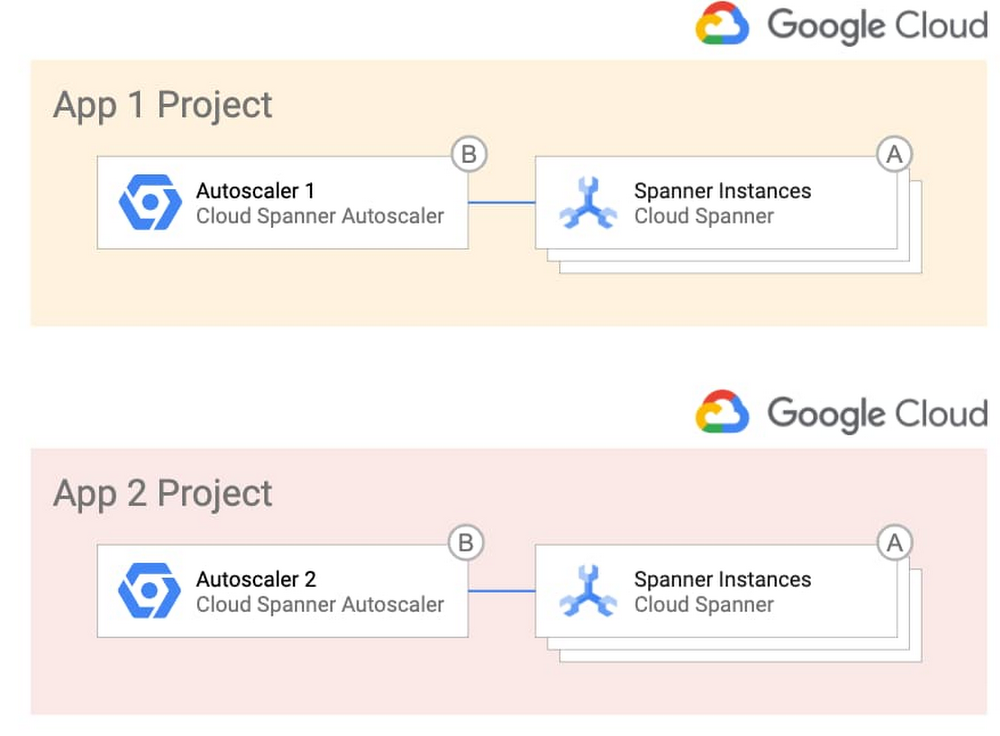
With Cloud Spanner, you can easily get a highly available, massively scalable relational database. This has enabled Google Cloud customers to innovate on applications without worrying about whether the database back end will scale to meet their needs. Spanner also lets you optimize costs based on usage. To make it even easier to build with Spanner, we’re announcing the release of the Autoscaler tool. Autoscaler is an open source tool for Spanner that watches key utilization metrics and adds or removes nodes as needed based on those metrics.To quickly jump in, clone this GitHub repository and set the Autoscaler up with the provided Terraform configuration files. What can the Autoscaler do for me?Autoscaler was built to make it easier to meet your operational needs while maximizing the efficiency of your cloud spend by adjusting the number of nodes based on your user demand. The Autoscaler supports three different scaling methods: linear, stepwise, and direct. With these scaling methods, you can configure the Autoscaler to match your workload. You can mix and match the methods to adjust to your load pattern throughout the day, and if you have batch processes, you can scale up on a schedule and then back down once the job has finished.While most load patterns can be managed using the default scaling methods, in the event you need further customization, you can easily add new metrics and scaling methods to the Autoscaler, extending it to support your particular workload. Many times you will have more than one Spanner instance to support your applications, so the Autoscaler can manage multiple Spanner instances from a single deployment. Autoscaler configuration is done through simple JSON objects, so different Spanner instances can have their own configurations and use a shared Autoscaler.Lastly, since development and operations teams have different working models and relationships, the Autoscaler supports a variety of different deployment models. Using these models, you can choose to deploy the Autoscaler alongside your Spanner instances or use one centralized Autoscaler to manage Spanner in different projects. The different deployment models allow you to find the right balance between empowering developers and minimizing support of the Autoscaler.Related Article3 reasons to consider Cloud Spanner for your next projectLearn about the cloud database Spanner, which brings massive scale and strong consistency to your applications. Here’s why to consider al…Read ArticleHow do I deploy the Autoscaler in my environment?If you want the simplest design, you can deploy the Autoscaler in a per-project topology, where each team that owns one or more Spanner instances becomes responsible for the Autoscaler infrastructure and configuration. Here’s what that looks like:Alternatively, if you want more control over the Autoscaler infrastructure and configuration, you can opt to centralize them and give the responsibility to a single operations team. This topology could be desirable in highly regulated industries. Here’s a look at that topology:If you want the best of both worlds, you can centralize the Autoscaler infrastructure so that a single team is in charge of it, which offers your application teams the freedom to manage the configuration of the Autoscaler for their individual Spanner deployments. This diagram shows this deployment option.To get you up and running quickly, the GitHub repository includes the Terraform configuration files and step-by-step instructions for each of the different environments.How does Autoscaler work?In a nutshell, the Autoscaler retrieves metrics from the Cloud Monitoring API, compares them to recommended thresholds, and requests Spanner to add or remove nodes. This diagram shows the internal components of the distributed deployment.You define how often the Autoscaler gets the metrics by configuring one or more Cloud Scheduler Jobs (1). When these jobs trigger, Cloud Scheduler publishes a message with per-instance configuration parameters that you define into a Pub/Sub queue (2). A Cloud Function (“Poller”) reads the message (3), calls the Cloud Monitoring API to get the Cloud Spanner instance metrics (4), and publishes them into another Pub/Sub queue (5).A separate Cloud Function (“Scaler”) reads the new message (6), verifies that a safe period has passed since the last scaling event (7), calculates the number of recommended nodes, and requests Cloud Spanner to add or remove nodes to a particular instance (8).Throughout the flow, the Autoscaler writes a step-by-step summary of its recommendations and actions to Cloud Logging for tracking and auditing.Get startedWith Autoscaler, you now have an easy way to automatically right-size your Spanner instances while continuing to deliver best performance and high availability for your database. Its deployment flexibility and configuration options mean that it can adapt to your particular use case, environments, and team structure. To learn more or contribute, check out the GitHub repository, experiment with the Autoscaler in a Qwiklab, or check out the free trial to get started.Related ArticleOpening the door to more dev tools for Cloud SpannerLearn how to integrate a graphical database development tool with cloud databases like Cloud Spanner with the JDBC driver.Read Article
Quelle: Google Cloud Platform

The Wellcome Sanger Institute: Creating the right conditions for groundbreaking research with Anthos

Editor’s note: Today we speak with Dr. Vladimir Kiselev, head of the Cellular Genetics Programme’s Informatics team at the Wellcome Sanger Institute, to hear how Google Cloud’s multi-cloud solution, Anthos, will help researchers collaborate and share their analyses more effectively.The Wellcome Sanger Institute has been at the very forefront of scientific discovery since 1992. Originally created to sequence DNA for the Human Genome Project, it’s now one of the world’s biggest centers for genomic science, employing almost 1,000 scientists, engineers, and research professionals across five separate programs. One of these is the Cellular Genetics Programme, which combines cutting-edge “cell-atlasing” methodologies with computational techniques to map cells in the human body and further our understanding of how they work.The programme calls for cutting-edge technology, and that’s where Dr. Vladimir Kiselev, who heads the informatics team for the Cellular Genetics Programme, comes in. “We provide the technological infrastructure that lets researchers do their work,” he says. “Our tasks are varied, from setting up imaging data pipelines to helping researchers to analyze sequencing data, and running websites for them. It’s a mixed environment with plenty of scope and freedom to support the research team with whatever it needs.”One of the most popular initiatives spearheaded by the informatics team has been to enable secondary data analysis through JupyterHub, an open-source virtual notebook that allows researchers to fully document and share their analyses online. With a user-friendly interface, JupyterHub makes it easy for researchers with minimal bioinformatics experience to access a Sanger cloud service with sufficient power to handle large datasets. This has not only assisted the work of faculty members within the Cellular Genetics Programme, it has also made working with external collaborators much easier. Today, 90 registered users rely on JupyterHub, and 15% of them are from other institutes based anywhere from Newcastle to Oxford, working on collaborative projects with the Wellcome Sanger Institute. But any solution has to fit within the confines of the institute’s uniquely complex IT infrastructure. After the original deployment of JupyterHub, users began to see a drop in stability due to increased demand, with 50 user pods running in parallel at any given time. The informatics team tested various configurations within the existing infrastructure and with commercial solutions but saw little improvement. Looking to gain a powerful yet flexible infrastructure, earlier this year the team turned to Anthos, Google Cloud’s hybrid and multi-cloud platform. Finding the balance between functionality and stabilityAs a major scientific establishment, the Wellcome Sanger Institute has access to powerful High Performance Compute clusters and a private data center that runs the open-source operating system OpenStack. This enabled it to adopt the ideal solutions for its needs, from a range of different providers. To run the Cellular Genetics JupyterHub, for example, the informatics team selected Kubernetes, the open-source container orchestration platform developed by Google. But as powerful as the Institute’s existing stack is, integrating JupyterHub was a complex task that required significant resources to set up and maintain. As the demand for JupyterHub grew, maintenance became harder and instability common. Additionally, the legacy Openstack on-premise solution with Kubespray  did not allow for upgrades in place. As a result , users were increasingly affected, which slowed down research.The Institute needed a solution that would allow it to run JupyterHub clusters reliably and at scale on its own hardware, without disrupting the existing infrastructure. The informatics team worked with Google Cloud Premier Partner Appsbroker to come up with the best approach. Together, they realized that Anthos could be the ideal answer for introducing an enterprise-grade conformant Kubernetes solution in their data center, allowing for in-place upgrades and removing reliance on OpenStack.Following a series of training sessions, the informatics team worked with Appsbroker to run a Proof of Concept (POC) with a handful of JupyterHub accounts. Back when they first set up JupyterHub, it had taken four months to configure it for the complex IT infrastructure. But using Anthos, the Institute could run GKE on-prem natively on VMware (the de facto infrastructure platform at the Institute), and the team had JupyterHub up and running in just five days, including all notebooks and secure researcher access. Harnessing the power of Google Cloud in a hybrid architectureEven in the POC, the benefits of JupyterHub on Anthos were immediate. “Stability has significantly improved with Anthos,” says Vladimir, explaining that Kubernetes maintenance is now an Anthos service supported by the institute’s central IT team via Google Cloud Console. “It’s great not having to worry about our cluster anymore. Better yet, users don’t have to worry about not being able to log on and get their important work done.”Anthos also offers an ease of use and reliability that the informatics team had not experienced with previous solutions. This enables them to spend more time developing new solutions for the research faculty instead of standing by for maintenance. Finally, being able to run Anthos on the Institute’s own hardware rather than on the cloud means that it pays a fixed license fee, which helps with long-term planning and strategizing. “When project funding is discussed at the informatics committee, it’s much easier for everyone to make decisions when they can see a predictable, monthly cost,” explains Vladimir. A proof of concept with Anthos, a way forward for the programAfter its successful POC with Google Cloud and Appsbroker, the Cellular Genetics Programme is currently working toward full deployment of JupyterHub on Anthos. And now that the team has some experience with Google Cloud, it’s easier to experiment with new projects, such as hosting internal and external websites for researchers or introducing more automation into the stages of application development by deploying GitLab on Anthos to run CI/CD pipelines.“I really like the integration with the Google Cloud Console,” says Kiselev. “We can control everything we need to from one place, whether that’s JupyterHub, a pipeline, or anything else. Having a single platform to manage everything is definitely a vision we want to aim for.”
Quelle: Google Cloud Platform
Rodan + Fields achieve business continuity for retail workloads with SAP on Google Cloud

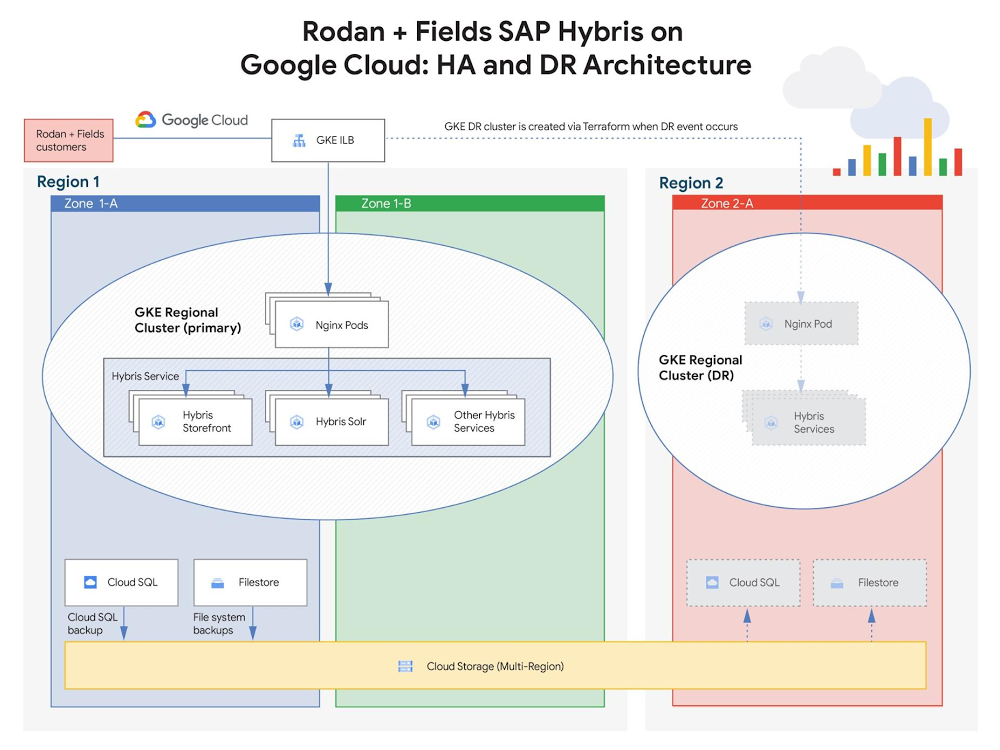
Since its founding in 2002, Rodan + Fields, one of the leading skincare brands in the U.S., has been delighting customers worldwide with its innovative product portfolio. Recently, however, after taking stock of its pre-existing IT infrastructure, Rodan + Fields realized it needed a more modern, scalable solution—one that could keep pace with the company’s growth while simplifying management of critical SAP workloads and delivering access to cutting-edge IT services. After carefully considering their options, the Rodan + Fields team decided to move the company’s mission-critical SAP workloads to Google Cloud.Ensuring business continuity was a top priority driving the company’s move to Google Cloud. Rodan + Fields needed an infrastructure solution that would protect against unpredictable, potentially catastrophic business disruptions, such as user error, malicious activities, natural disasters. To achieve this, Rodan + Fields partnered with Google Cloud to design and implement a cloud-native, automated resilience strategy, protecting the two core elements of its business infrastructure:SAP Hybris: The e-commerce platform supporting online shopping and customer experience managementSAP ERP:The resource planning platform supporting logistics for product manufacturing and distributionBuilding e-commerce resilience using SAP Hybris on Google Cloud With SAP Hybris powering Rodan + Fields’ online shopping experience, ensuring business continuity for the associated workloads was a must. Rodan + Fields consultants assist customers and execute sales entirely online, so the e-commerce site is responsible for all of the company’s global revenue and must operate reliably 24×7. If customers are unable to quickly and seamlessly browse products, place orders, and access support, the company risks substantial damage to its sales and reputation. The Rodan + Fields IT team defined the following key data protection requirements to mitigate risk to critical e-commerce services :High-availability (HA): The e-commerce infrastructure must deliver uptime resilience against local failures.Disaster recovery (DR): The e-commerce infrastructure must support rapid, automated recovery in the event of a larger-scale failure (e.g. geo-impact caused by a natural disaster).To address these requirements, Rodan + Fields partnered with Google Cloud to design and implement an architecture leveraging container-based application management and geo-redundant storage.High-availability and disaster recovery for SAP HybrisRodan + Fields decided to implement Google Kubernetes Engine (GKE), due to both its scalability (specifically, GKE supports clusters with up to 15,000 nodes. This is the most supported nodes of any cloud-based Kubernetes service) and its native high-availability features. With its Hybris application stack running on GKE, Rodan + Fields can spin up (or spin down) Kubernetes clusters to match its user volume. Like many retailers, Rodan + Fields experiences traffic in bursts, with especially high volume a few days of each month. As a result, the elasticity provided by GKE helps minimize costs by enabling infrastructure to be “right-sized” in alignment with the company’s business needs.As depicted in the diagram above, GKE also delivers on Rodan + Fields’ high availability requirements for the Hybris service, as GKE will automatically (and immediately) redeploy Hybris pods in the event of a failure. Also, since the Hybris service leverages GKE’s regional clustering capability, pods can also be redeployed in a secondary zone, which provides operational resilience for Rodan + Fields’ critical e-commerce infrastructure—even in the event of a zonal outage. In the cloud, “disaster recovery” typically refers to the ability to recover from an unexpected regional failure. To support this, Rodan + Fields implemented the following DR strategy to protect the three key elements of its Hybris infrastructure:Hybris service: Terraform infrastructure-as-code (IaC) scripts were developed by Rodan + Fields to automate recreation and configuration of the GKE-based Hybris service (and the associated load balancing) in a secondary region.E-commerce databases: Cloud SQL is configured to periodically store backups on multi-region Cloud Storage. This ensures accessibility in the secondary region if the primary region becomes unavailable.Shared file storage for e-commerce assets (e.g. media files, pictures of products, etc.): File system backups are stored periodically on multi-region Cloud Storage—again, ensuring accessibility in the secondary region if the primary region becomes unavailable.With these DR protection strategies in place, Rodan + Fields achieved an automated, testable failover process. If the primary region supporting Hybris were to become unavailable, the Terraform scripting can redeploy the Hybris service infrastructure in the secondary region and restore the associated databases and shared storage from backups.Delivering logistics resilience with SAP ERPTo prevent costly manufacturing/distribution issues, Rodan + Fields’ ERP systems also require cloud-native business continuity strategies. Those systems leverage SAP ERP Central Component (ECC), which supports operations planning and logistics processes worldwide. SAP ECC needs to run 24×7, which creates the following key protection requirements:Backup: ECC must be capable of restoring to a prior state in order to mitigate the potential impact of user error or malicious activity.Disaster recovery: ECC must support rapid recovery in the event of a larger-scale failure (e.g. geo-impact caused by a natural disaster).To address these ECC protection requirements, Rodan+Fields designed and implemented a backup and DR architecture leveraging VM snapshots, SAP database replication, and geo-redundant storage, as depicted below.Rodan + Fields leverages persistent disk snapshots to provide recoverable backups of SAP ECC VM system state (e.g. config data) and data disks. These snapshots are taken periodically, based on predefined policies, and are stored on multi-region Cloud Storage. If needed—for instance, to recover from a user or system error—the ECC VMs can be rapidly returned to a prior, known-good state by restoring from a selected snapshot. Rodan + Fields also implemented an automated multi-tier architecture to support disaster recovery, which protects the key elements of its ERP application stack:SAP ECC VM system state: Protected by the same VM snapshots that support backup. Since the snapshots reside on multi-region Cloud Storage, they can be recovered in the secondary region if the primary region becomes inaccessible.Shared NFS data (supporting SAP ECC VMs): Stored on a scale-out Filestore (formerly Elastifile) NFS storage cluster and replicated asynchronously to a live cluster in the secondary regionTo complement the DR strategy employed to protect Hybris, Rodan + Fields also implemented an automated, testable DR process to protect SAP ECC. Terraform scripting, created by Rodan + Fields integration partner, NTT, automates ERP DR processes, delivering 1) automated creation of new VMs in the failover region (from PD snapshots) and 2) automated failover to use the secondary Filestore cluster in the failover region. The Terraform scripts, which are stored on GitHub, contain the ECC configuration information required to regenerate the ERP service.Next steps on the cloud journeyBy shifting its SAP workloads to Google Cloud, Rodan + Fields is enjoying the benefits of modern, scalable infrastructure, while also protecting its business with a robust business continuity strategy. To support a peak in user access, Rodan + Fields was able to scale Hybris infrastructure by 10X in 10 minutes, supporting millions in additional revenue. In addition, as of the date of this blog publication, Rodan + Fields has experienced zero unplanned ERP outages in the year since the company migrated to running production on Google Cloud. And they aren’t stopping there… To gain additional business value, Rodan + Fields plans to continue modernizing its workflows to leverage additional cloud-native Google features and services, including:Using machine images to further simplify protection architecturesIntegrating ERP data with BigQuery to enhance data warehouse capabilities Learn more about Rodan + Fields SAP deployment on Google Cloud. For more stories of SAP customer deployments on Google Cloud, check out our solution page and YouTube channel.Related ArticleSAP on Google Cloud: 2 analyst studies reveal quantifiable business benefitsFrom uptime and infrastructure to efficiency and productivity—both Forrester and IDC identified major benefits to companies that have mad…Read Article
Quelle: Google Cloud Platform

ESG quantifies benefits of moving Microsoft workloads to Google Cloud

Customers tell us there are many benefits and opportunities to reduce costs that can be unlocked from migrating and modernizing Microsoft and Windows Server-based workloads to Google Cloud. We recently worked with the Enterprise Strategy Group (ESG) to run an economic validation study across Google Cloud customers who have migrated or modernized their Microsoft and Windows Server-based workloads to the cloud. What they found quantifies and reinforces what we are hearing from customers. According to the ESG study, customers that move Windows workloads to Google Cloud can see the following benefits:Significantly reduced licensing and hardware costs—from 32% to to 88% depending on workloadImproved agility and a better customer experience, for example, 65% improved load timesReduced risk and an improved security postureThe ability to leverage managed services for license usage and manageability efficiencyGoogle Cloud Sole Tenant up to a 32% TCO savings on a three-year modeled cost of operating 520 Windows Server 2016 workloads (with BYOL)Google Cloud offers a first-class experience for Microsoft workloads like SQL Server and any Windows Server-based applications, all backed by enterprise grade support. Moving Windows workloads to Google Cloud lets you increase IT agility and reduce your on-prem footprint. We simplify the proof-of-concept and technological validation process to reduce risk during the migration. Google Cloud can also help optimize your license expense and exposure by increasing the license usage efficiency on the underlying infrastructure through innovative features like custom VM shapes and sole tenant nodes. Managed services for SQL Server and Active Directory, robust Windows container support, and an opinionated modernization path off of the Microsoft stack to open source, provide the tools you need to achieve your strategic IT goals.We are pleased this report further validates and complements the value that customers realize from choosing Google Cloud for their Windows Server and Microsoft workloads. Register to download this report to get all the details.
Quelle: Google Cloud Platform

Updates on Google collaborations with Cisco featured at WebexOne

Over the past three years, Google Cloud has worked closely with Cisco to deliver a number of customer-focused solutions in areas such as hybrid cloud, multicloud, work transformation, and contact center integrations. Earlier this week, we were excited to share updates on our joint work in the collaboration space atWebexOne, Cisco’s digital collaboration conference, which brings together global customers to share the latest on remote work, customer service, and more. These developments to our partnership include enabling Webex Contact Center with Google Cloud’s Contact Center AI (CCAI) solution, which is powered by Google Cloud artificial intelligence (AI) and Natural Language Processing capabilities, and bringing Cisco Webex Expert on Demand to Glass Enterprise Edition.Making contact centers more customer-centric with AIAs the world continues to adjust to a new way of working, the role of contact centers has become even more critical to businesses, governments, and individuals. According to IDC, more than 70 percent of buyers point to customer experience as the most important consideration in their purchasing decisions. Businesses have realized that providing seamless and effective customer service to their buyers increases customer loyalty and increasingly, that this can be achieved with AI-powered contact center solutions. In fact, IDC predicts that by 2025, AI-powered enterprises will be able to achieve Net Promoter Scores that are 1.5 times higher than those of their competitors. Recently, Cisco integrated its Contact Center solutions with Google Cloud’sContact Center AI solution, making it easy for businesses to complement their existing Cisco-powered contact center services with virtual agents quickly, and to support their customers with 24/7, self-service systems. By leveraging Google Cloud capabilities in ML, natural language understanding, and speech recognition and synthesis, this joint solution from Google Cloud and Cisco helps customers get answers to questions quickly, through natural and efficient conversations. CCAI also supports contact center agents, helping them address questions and problems with easy access to documents and information.”The contact center is going through a renaissance, and artificial intelligence is playing a key role during this very exciting time,” said Omar Tawakol, VP and GM for Cisco’s Contact Center group.” By combining Google Cloud’s Natural Language Processing and AI capabilities that are able to deduce a consumer’s intent with our industry leading skills based routing capabilities that are able to match an agent’s specific skill with the AI determined intent, we’re able to create a unique and differentiated fusion of human and AI that will empower agents and delight customers.”Improving service and responsiveness to Illinois citizens with AIWhile industries ranging from retail and e-commerce to financial services are leveraging AI solutions to support consumers, the use cases for AI increasingly involve delivering critical assistance to citizens, as governments step up digital access to services and information.In the spring of 2020, the State of Illinois faced an unprecedented surge in applications for unemployment benefits, with more than a million claims submitted between March 1 and May 9—nearly 12 times the volume the department processed during the same period in 2019. Compounding the challenge was the need to transition state employees to remote work due to COVID-19.The Illinois Department of Employment Security (IDES) chose Google Contact Center AI to enable their virtual agents to quickly and effectively serve citizens through chat and voice. Cisco’s Contact Center AI APIs connect the GoogleCloud Dialogflow service to the state’s Cisco contact center and communications system. Their web and phone systems were up and running by late April, with Virtual Agents answering 40,000 after-hours calls per day to provide immediate, real-time assistance with questions about eligibility, filing claims, and more. Importantly, the state was able to generate cost savings through the solution, according to initial analysis.Extending Cisco Webex Expert on Demand on Glass Enterprise Edition 2 The Cisco Webex Expert on Demand application forGlass Enterprise Edition 2 empowers remote frontline workers such as retail store employees, manufacturing line workers, and field service technicians by enabling hands-free collaboration in the field, around the world. Expert on Demand connects these professionals to experts who can guide them step-by-step in real time. Real-time collaboration is a key use case for Glass Enterprise Edition 2, a wearable device that provides hands-on workers and professionals with glanceable information in a comfortable, lightweight profile designed to be worn all day. With a transparent heads-up display and a point of view camera, Glass helps onsite workers collaborate with others, while staying focused on the task at hand. Remote workers dialed into Cisco Webex Expert on Demand can see exactly what onsite workers see as they perform their jobs and communicate directly with them to provide real-time assistance.If you’re interested in participating in this customer preview program, visitgoogle.com/glass/contact/business to place a request.Google Cloud and Cisco keep collaborating to innovateInnovation is the cornerstone of Google Cloud’s global partnering strategy, and as you can see, there is an incredible amount of innovation happening between Cisco and Google Cloud. We take pride in offering these and more collaborative ventures in the future, with the goal of helping our mutual customers get work done. We look forward to your business joining us on this journey.Want to Learn More?For additional details on the Google-Cisco partnership, visit:Cisco and Google CloudGoogle Cloud Contact Center AI
Quelle: Google Cloud Platform

Preparing your MySQL database for migration with Database Migration Service

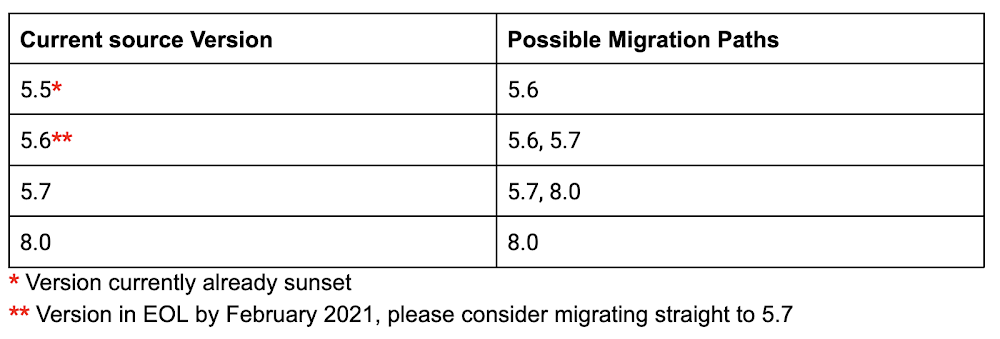
Recently, we announced the new Database Migration Service (DMS) to make it easier to migrate databases to Google Cloud. DMS is an easy-to-use, serverless migration tool that provides minimal downtime database migration to Cloud SQL for MySQL (Preview) and Cloud SQL for PostgreSQL (available in Preview by request). In this post, we’ll cover some of the tasks you need to take to prepare your MySQL database for migration with DMS.What types of migrations are supported?When we talk about migrations, usually we either do an offline migration, or a minimal downtime migration using continuous data replication. With Database Migration Service (DMS) for MySQL, you can do both! You have an option for one-time migration or continuous migration.Version supportDMS for MySQL supports source database versions 5.5, 5.6 5.7, or 8.0, and it supports migrating to the same version or one major version higher.  Here are the possible migration paths for each version:When migrating to a different version than your source database, your source and destination databases may have different values for the sql_mode flag. The SQL mode defines what SQL syntax MySQL supports and what types of data validation checks it performs. For instance, the default SQL mode values are different between MySQL 5.6 and 5.7. As a result, with the default SQL modes in place, a date like 0000-00-00 would be valid in version 5.6 but would not be valid in version 5.7. Additionally, with the default SQL modes, there are changes to the behavior of GROUP_BY between version 5.6 and version 5.7. Check to ensure that the values for the sql_mode flag are set appropriately on your destination database.You can learn more about  the sql_mode flag and what the different values mean in the MySQL documentation. PrerequisitesBefore you can proceed with the migration, there are a few prerequisites you need to complete. We have a quickstart that shows all the steps for migrating your database, but what we want to focus on in this post is what you need to do to configure your source database, and we’ll also briefly describe setting up a connection profile and configuring connectivity.Configure your source databaseThere are several steps you need to take to configure your source database. Please note that depending on your current configuration, a restart on your source database may be necessary to apply the required configurations.Stop DDL write operationsBefore you begin to migrate data from the source database to the destination database, you must stop all Data Definition Language (DDL) write operations, if any are running on the source. This script can be used to verify whether any DDL operations were executed in the past 24 hours, or if there are any active operations in progress.server_id system variableOne of the most important items to set up in your source database instance is the server_id system variable. If you are not sure what your current value is, you can check by running this on your mysql client:SELECT @@GLOBAL.server_id;The value displayed must be any value equal or greater than 1. If you are not sure about how to configure the server_id, you can look at this page. Although this value can be dynamically changed, replication is not automatically started when you change the variable unless you restart your server.Global transaction ID (GTID) loggingThe gtid_mode flag controls whether or not global transaction ID logging is enabled and what types of transactions the logs can contain. Make sure that gtid_mode is set to ON or OFF, as ON_PERMISSIVE and OFF_PERMISSIVE are not supported with DMS. To know which gtid_mode you have on your source database run the following command:SELECT @@GLOBAL.gtid_mode;If the value for gtid_mode is set to ON_PERMISSIVE or OFF_PERMISSIVE, when you are changing it, note that changes to the value can only be one step at a time. For example, if gtid_mode is set to ON_PERMISSIVE, you can change it to ON or OFF_PERMISSIVE, but not to OFF in a single step. Although the gtid_mode value can be dynamically changed without requiring a server reboot, it is recommended that you change it globally. Otherwise, it will only be valid for the session where the change occurred and it won’t have effect when you start the migration via DMS. You can learn more about gtid_mode in the MySQL documentation.Database user accountThe user account that you are using to connect to the source database needs to have these global privileges:EXECUTERELOADREPLICATION CLIENTREPLICATION SLAVESELECTSHOW VIEWWe recommend that you create a specific user for the purpose of migration, and you can temporarily leave the access to this database host as %. More information on creating a user can be found here.The password of the user account used to connect to the source database must not exceed 32 characters in length. This is an issue specific to MySQLreplication. For more information about the MySQL user password length limitation, see MySQL Bug #43439.DEFINER clauseBecause a MySQL migration job doesn’t migrate user data, sources that contain metadata defined by users with the DEFINER clause will fail when invoked on the new Cloud SQL replica, as the users don’t yet exist there.You can identify which DEFINER values exist in your metadata by using these queries. Check if there are entries for either root%localhost or users that don’t exist in the target instance.SELECT DISTINCT DEFINER FROM INFORMATION_SCHEMA.EVENTS;SELECT DISTINCT DEFINER FROM INFORMATION_SCHEMA.ROUTINES;SELECT DISTINCT DEFINER FROM INFORMATION_SCHEMA.TRIGGERS;SELECT DISTINCT DEFINER FROM INFORMATION_SCHEMA.VIEWS;If your source database does contain this metadata you can do one of the following:Update the DEFINER clause to INVOKER on your source MySQL instance prior to setting up your migration job.Create the users on your target Cloud SQL instance before starting your migration job.Create a migration job without starting it. That is, choose Create instead of Create & Start.Create the users from your source MySQL instance on your target Cloud SQL instance using the Cloud SQL API or UI.Start the migration job from the migration job list or the specific job’s page.Binary loggingEnable binary logging on your source database, and set retention to a minimum of 2 days. We recommend setting it to 7 days to minimize the likelihood of lost log position. You can learn more about binary logging in the MySQL documentation.InnoDBAll tables, except tables in system databases, will use the InnoDB storage engine. If you need more information about converting to InnoDB, you can reference this documentation on converting tables from MyISAM to InnoDB.Set up a connection profileA connection profile represents all the information you need to connect to a data source. You can create a connection profile on its own or in the context of creating a specific migration job. Creating a source connection profile on its own is useful if the person who has the source access information is not the same person who creates the migration job. You can also reuse a source connection profile definition in multiple migration jobs.Learn more about connection profiles and how to set them up in the documentation.Configure connectivityDMS offers several different ways that you can set up connectivity between the destination Cloud SQL database and your source database. There are four connectivity methods you can choose from:IP allowlistingReverse SSH tunnelVPCs through VPNsVPC peeringThe connectivity method you choose will depend on the type of source database, and whether it resides on-premises, in Google Cloud, or in another cloud provider. For a more in-depth look at connectivity, you can read this blog post.Extra ResourcesNow that you’ve learned how to prepare your MySQL database for migration, you can visit the DMS documentation to get started, or continue learning by reading these blog posts:Best practices for homogeneous database migrationsDatabase Migration Service connectivity – A technical introspectiveClosing the gap: migration completeness when using Database Migration ServiceTry out DMS in the Google Cloud console. It’s available at no additional charge for native lift-and-shift migrations to Cloud SQL.Related ArticleClosing the gap: Migration completeness when using Database Migration ServiceLearn what is and isn’t included when migrating a MySQL database to Cloud SQL using Database Migration Service (DMS).Read Article
Quelle: Google Cloud Platform

Dataproc Hub makes notebooks easier to use for machine learning

Dataproc is a fast, easy-to-use, fully managed cloud service for running open source, such as Apache Spark, Presto, and Apache Hadoop clusters, in a simpler, more cost-efficient way. Today, with the general availability of Dataproc Hub, and the launch of our machine learning initialization action, we are making it easier for data scientists to use IT-governed, open source notebook-based machine learning with horizontally scalable compute, powered by Spark. Our enterprise customers running machine learning on Dataproc require role separation between IT and data scientists. With Dataproc Hub, IT administrators can pre-approve and create Dataproc configurations to meet cost and governance constraints. Data scientists can then create personal workspaces backed by IT pre-approved configurations to spin up scalable distributed Dataproc clusters with a single click. Jupyter Notebooks enable data scientists to interactively explore and prepare the data and train their models using Spark and additional OSS machine learning libraries. These on-demand Dataproc clusters can be configured with auto-scale and auto-deletion policies and can be started and stopped manually or automatically. We have received very positive feedback from our enterprise customers especially on the role separation, and we want to make Dataproc setup even easier with the new machine learning initialization action. Having worked with enterprises across industries, we have observed common requirements for Dataproc data science configurations that we are now packaging together in our machine learning initialization action. You can further customize the initialization action and add your own libraries to build a custom image. This simplifies Dataproc ML cluster creation while providing data scientists a cluster with:Python packages such as TensorFlow, PyTorch, MxNet, Scikit-learn, and KerasR packages including XGBoost, Caret, randomForest, and sparklyrSpark-BigQuery Connector: Spark connector to read and write data from and to BigQueryDask and Dask-Yarn: Dask is a Python library for parallel computing with similar APIs to the most popular Python data science libraries, such as Pandas, NumPy, and scikit-learn, enabling data scientists to use the standard Python at scale. (There’s a Dask initialization available for Dataproc.)RAPIDS on Spark (optionally): RAPIDS Accelerator for Apache Spark combines the power of the RAPIDS cuDF library and the scale of the Spark distributed computing framework. Accelerated shuffle configuration leverages GPU-GPU communications and RDMA capabilities to deliver reduced latency and costs for select ML workloadsK80, P100, V100, P4, or T4 Nvidia GPUs and drivers (optional)Considerations when building a Dataproc cluster for machine learningData scientists predominantly infer business events from the data events. Data scientists then, in collaboration with business owners, develop hypotheses and build models leveraging machine learning to generate actionable insights. Ability to understand how business events translate to data events is a critical factor for success. Our enterprise users need to consider many factors prior to selecting the appropriate Dataproc OSS machine learning environment. Points of consideration include:Data access: Data scientists need access to long-term historical data to make business event inference and generate actionable insights. Access to data at scale in proximity to the processing environment is critical for large-scale analysis and machine learning.Dataproc includes predefined open source connectors to access data on Cloud Storage and on BigQuery storage. Using these connectors, Dataproc Spark jobs can seamlessly access data on Cloud Storage in various open source data formats (Avro, Parquet, CSV, and many more) and also data from BigQuery storage in native BigQuery format.  Infrastructure: Data scientists need the flexibility to select the appropriate compute infrastructure for machine learning. This compute infrastructure comprises VM type selection, associated memory, and attached GPUs and TPUs for accelerated processing. Ability to select from a wide range of options is critical for optimizing for performance, results, and costs. Dataproc provides the ability to attach K80, P100, V100, P4, or T4 Nvidia GPUs to Dataproc compute VMs. RAPIDs libraries leverage these GPUs to deliver performance boost to select Spark workloads. Processing environment: There are many open source machine learning processing environments such as Spark ML, DASK, RAPIDS, Python, R, TensorFlow, and more. Usually data scientists do have a preference, so we’re focused on enabling as many of the open source processing environments as possible. At the same time, data scientists usually add custom libraries to enhance their data processing and machine learning capabilities. Dataproc supports Spark and DASK processing frameworks for running machine learning at scale. Spark ML comes with standard implementations of machine learning algorithms, and you can utilize them on your datasets already stored on Cloud Storage or BigQuery. Some data scientists prefer ML implementations from Python libraries for building their models. Essentially, swapping a couple of statements enables you to switch from standard Python libraries to DASK. You can select the appropriate processing environment to suit your specific machine learning needs. Orchestration: Many iterations are required in an ML workflow because of model refinement or retuning. Data scientists need a simple approach to automate data processing and machine learning graphs. One such design pattern is building a machine learning pipeline for modeling and another approach is scheduling the notebook used in interactive modeling.Dataproc workflow templates enable you to create simple workflows and Cloud Composer can be used to orchestrate complex machine learning pipelines.Metadata management: Dataproc Metastore enables you to store the associated business metadata with the table metadata for easy discovery and communication. Dataproc Metastore, currently in private preview, enables a unified view of open source tables across Google Cloud. Notebook user experience: Notebooks allow you to interactively run workloads on Dataproc clusters. Data scientists have two options to use Notebooks on Dataproc:You can use Dataproc Hub to spin up a personal cluster with Jupyter Notebook experience using IT pre-approved configurations with one click. IT administrators can select the appropriate processing environment (Spark or DASK), the compute environment (VM type, cores, and memory configuration) and optionally also attach GPU accelerators along with RAPIDS for performance gains for some machine learning workloads. For cost optimizations, IT administrators can configure auto-scaling and auto-deletion policies and data scientists at the same time can manually stop the cluster when not in use. You can configure your own Dataproc cluster, selecting the appropriate processing environment and compute environment along with the notebook experience (Jupyter and Zeppelin) using Component Gateway. Data scientists need a deep understanding of how data represents business transactions and events and the ability to leverage the innovation in OSS machine learning and deep learning, Notebooks, and Dataproc Hub to deliver actionable insights. We at Google focus on understanding the complexity and limitations of the underlying framework, OSS, and infrastructure capabilities and are actively working to simplify the OSS machine learning experience so that you can focus more on understanding your business and generating actionable insights and less on managing the tools and capabilities used to generate them. Check out Dataproc, let us know what you think, and help us build the next-generation OSS machine learning experience that is simple, customizable, and easy to use.Related ArticleMachine learning patterns with Apache Beam and the Dataflow Runner, part IAs more people use ML inference in Dataflow pipelines to extract insights from data, we’ve seen some common patterns emerge. In this post…Read Article
Quelle: Google Cloud Platform

Ensuring financial stability starts with database stability

Editor’s note: We are hearing today from Freedom Financial Network, provider of technology-based solutions that help consumers overcome debt and establish financial security. To meet the demand of their growing suite of services across the organization, they moved from Rackspace to Google Cloud SQL.At Freedom Financial Network, our products and services have helped hundreds of thousands of consumers reduce and consolidate their debt. Our suite of customized solutions is driven by a core architecture of intelligent decision-making microservices, shared across the organization, that depend upon independent instances. Before making the switch to Google Cloud, we utilized Rackspace’s solution. But over the past year (during a period of significant growth), we realized that we needed to free up our infrastructure and platform teams to provide more comprehensive support across the enterprise. We also wanted to drive growth by transitioning from a monolithic to a microservices architecture, helping us expand our suite of consumer products and allowing our internal teams a more flexible, self-service access to our infrastructure.Related ArticleMaking your monolith more reliableAs microservices grow, monoliths still exist for enterprises. Here’s how to apply SRE principles to those single-tiered software apps.Read ArticleOn Rackspace, through our existing monolithic architecture, we were managing large clusters of instances running on MySQL. Each of Freedom Financial Network’s business units had one large cluster of instances. Rackspace was managing those clusters, and thus taking work off our hands, but we had very little control over these databases. Every small change such as disk resizing would take a couple of weeks at least. Because of that, our database instances were vastly overprovisioned and expensive. We saw that Google Cloud could host and manage all of our databases, saving us valuable time and resources, and that Google Cloud SQL’s versatility would allow us to build flexible, secure solutions that would meet the needs of our teams and our customers. We were able to break down our clusters into many smaller instances that we can manage entirely through automation without adding overhead.A complex migration made easier by Google CloudOur migration involved the transformation of our monolithic architecture to a microservices architecture, deployed on Google Kubernetes Engine (GKE) and using the Cloud SQL Proxy in a sidecar container pattern or the Go proxy library to connect to Cloud SQL. Each microservice uses its own schema and schemas can be grouped in shared instances or be hosted on dedicated instances for higher load applications. We successfully leveraged Google Cloud’s new Database Migration Service (DMS) to migrate our databases from Rackspace to Cloud SQL. We used it to migrate three separate production databases, with five total schemas migrated and an overall size of close to 1 TB of data with less than 15 minutes of downtime. Ultimately, the migration was successful and largely painless. We’ve shut down our services at Rackspace, and all of our databases are running on Google Cloud’s managed services now. DMS was really the only option because of the size of our databases. We estimated that doing a “dump and load” migration would have required application downtime in excess of 12 hours—not to mention the hours we would have spent doing prep work. Using Cloud SQL as our database foundationSince completing the migration, Cloud SQL has helped us meet our goals around security, scale, and flexibility. We now deploy a robust set of microservices and instances—following a recent resizing, we have an estimated 180 instances consuming 350 CPUs, for 1300 gigs of RAM. Our microservice examples include everything from simple use cases and application configuration databases to larger, more complex databases that hold information used frequently by business teams. We save so much time not having to manage 180 instances.With Google Cloud SQL, we save time and resources no longer managing 180 instances. We know that we are going to grow, and our current structure is better suited for that growth. Mathieu DuboisOur Platform Team now uses Terraform to create new resources to other Freedom Financial Network teams in Google Cloud. For example, when a team starts a new project and needs a new instance, all they have to do is use the custom Terraform module we’ve built on top of the default Cloud SQL provider to submit a pull request. By creating a module, we ensure that all of the instances are created consistently. The module configures and manages common default options around size of instance needed, if they want to add a read replica, and high availability, while adhering to our regular naming conventions.We’ve recently switched to using Workload Identity on GKE, which gives us a lot of flexibility around permissions. Each of our microservices has a Kubernetes service account, which is linked through Workload Identity to a Google Cloud services account, and we only grant that account its necessary permissions. This allows us to ensure that each microservice only accesses the instances it needs to perform its tasks. A huge benefit of the Cloud SQL Proxy is its security features, allowing us to enforce SSL connections to the databases, and ensuring that the databases aren’t accessible from the outside. We can segregate our data easier, boosting reliability. With greater database segregation, we can limit the blast radius of a potential incident. All of Cloud SQL’s out-of-the-box services, including monitoring, help us flag any potential problems with instances.With Google Cloud managing our databases, we can focus more time and resources on supporting our other teams. With every team running faster, Freedom Financial Network as a whole can operate faster, we can solve business problems more efficiently, and drive growth in a greater diversity of new areas and customer products. With Google Cloud SQL, our new structure is optimized for our expected growth.Explore Freedom Financial Network and learn more about Google Cloud SQL.Related ArticleCloud SQL now supports PostgreSQL 13Fully managed Cloud SQL cloud database service now supports PostgreSQL 13.Read Article
Quelle: Google Cloud Platform

What is zero trust identity security?

A zero trust network is one in which no person, device, or network enjoys inherent trust. All trust, which allows access to information, must be earned, and the first step of that is demonstrating valid identity. A system needs to know who you are, confidently, before it can determine what you should have access to. Add to that the understanding of what you can access–authorization–and you’ve got the core foundation of zero trust security.At Google we rely on a zero trust system known as BeyondCorp, to move beyond the idea of a privileged corporate network.In this issue of GCP Comics we discuss ways of acquiring trust, as our friend attempts to visit some distant relatives.Why set up a zero trust model?Here are a few compelling reasons for setting up a zero trust system:Preserve the productivity of your employees working from home, from the office, from a coffee shop, or from anywhere elseDeploy quickly, faster than a traditional VPN system, for rapid onboardingSpin up new device access quickly in case of unexpected latté-applied-to-laptop and similar incidentsGive each web application its own access control, for precise security and lower riskDecide access based on identity, device health, location, time of day, or other factorsGoogle zero trust tools can protect your workloads on any public cloud, or on-premises, so you don’t need to move your applications to improve their securityBenefits of zero trustLower friction Zero trust systems can be invisible to the employees at your company. They sign in, they use a strong second factor, and they are ready to go. PortabilityThe authentication and authorization aren’t tied to your location. Previous methods of access control relied on trusted networks, giving privileged access to anyone inside the established corporate network. With a zero trust model it’s easy to work from home and access all the same systems and tools.SafetySwitching to a zero trust system has helped Google, and many other enterprises, reduce their exposure and minimize security incidents, proactively stopping phishing-based attacks and lateral movement after a compromise.ResourcesBeyondCorp Remote Access, our enterprise grade security offering for protecting workloads on Google Cloud, other clouds, or on-premisesBeyondCorp at Google, our own zero trust implementationPublished research papers on how Google created, deployed, and evolved the BeyondCorp model.Identity-Aware Proxy, The Google Cloud protective layer used to create context-based access to apps, VMs, and services.Want more GCP Comics? Visit gcpcomics.com & follow us on Twitter at @pvergadia and @maxsaltonstall  for updates on the next issue!Related ArticleKeep your teams working safely with BeyondCorp Remote AccessEnabling remote access to internal apps with a simpler and more secure approach without a remote-access VPNRead Article
Quelle: Google Cloud Platform

Streaming analytics 101: Making modern data decisions with ease

Within the realm of modern data collection, streaming analytics is just what it sounds like: a flow of constantly moving data called event streams. These streams comprise events that occur as the result of an action at any moment, such as a web click, a transaction, or a fraudulent activity. Streaming analytics provides the ability to constantly monitor these operational events and automatically perform an action as soon as these event streams are generated. When streaming analytics is working well, you can ask questions of your data and get answers that help you make better decisions: What are your customers buying online at any given moment? What error messages are they seeing, and how often? To get streaming analytics right, it helps to think about what you want to get out of it. Think about where you want to focus your time and resources, and which data can provide you the most relevant insights.Why should you consider streaming analytics? According to IDC, by 2025, more than a quarter of data created in the global datasphere will be real time in nature. What’s driving the growth? Well, what aspects of your life or business aren’t creating a digital trail today? There are a lot of forces at work creating all this real-time data: digital and connected devices and connected devices innovations such as industrial sensors, smartphones, wearables, and car navigation; online interactions such as purchase histories, clickstreams, advertising, inventories, and ledgers; and digital communication services such as social media posts, photos, email, and collaboration platforms. The volume, velocity and variety of data is exponentially increasing and businesses have to be able to charter this new brave world in order to remain competitive. The de facto approach of organizing data for analytics has been in batch, where new data may only be processed hourly, daily or even weekly. This approach focuses on historical information, which limits businesses to only be able to react to past events. In today’s business environment, where data often has become a strategic differentiator, if data is not processed in near-real time, decisions may be made too late. Real-time data from event sources provides a high-value opportunity to act on a perishable insight within a tight window. That means businesses need to act fast. To do so, we need analysis to arrive at the point of action in real time. That’s the difference between preventing fraud and discovering fraud, a customer making a purchase or abandoning a cart, and proactive/effective and reactive/ineffective customer service.There are plenty more places where real-time data can make a difference on a business’s bottom line:Creating targeted pricing strategies. If your business runs promotions on items, testing the right pricing is paramount to ensuring that customers buy your products. Streaming data can allow for more precise actions on price elasticity for each customer, timing of discounts, customized offering and sales channelDetecting fraud in real time. Access to real-time streaming data means you can respond quickly to any financial irregularities—so instead of writing off the costs of a fraudulent transaction, a company can flag it immediately.Building customer loyalty and capturing market share. Building more responsive relationships helps to gain customer trust and capture revenue. So companies that can propose and interact with their prospects in close to real time with a customized offering of content, pricing, and solution will lead to loyal and happy customers.Finding operational efficiencies. Real-time data analytics can continually monitor data integrity and let you respond automatically. Adoption of streaming can help eliminate manual processes that are susceptible to error, enable better data interoperability with other organizations, and increase speed-to-market by making data more actionable.How to assess if streaming analytics is right for your businessNot all your problems will benefit from streaming analytics equally and getting started with real-time data can be overwhelming. There are plenty of ways to capture, ingest, and process data, and plenty of information to be gleaned from analyzing your company’s data. Which data is the right data to gather and analyze? What’s the right way to prioritize the data you want to capture in real time, and which data can wait? To decide if streaming analytics is right for you, it helps to consider the following: Assess your current environment: identify which applications generate data in your organization and rank those data streams based on their importance. For example, in retail, the need for real-time applications would probably rank higher for website clickstreams compared to back office payroll, given direct revenue generation opportunity. Map real-time analysis use cases to the data streams: decide which are your critical activities to improve top and bottom line, whether it be responding to customers, detecting faulty products or enhancing security.Evaluate buy vs. build: Do you have staff with the right skill sets to capture the maximum value from the technology? Do you have the resources to hire these experts? This will have an implication on time to value as you choose between an open source technology vs. a fully managed service.At Google Cloud, our fully managed, real-time streaming platform includes Cloud Pub/Sub for durable message storage and real-time message delivery, Cloud Dataflow, our data processing engine for real-time and batch pipelines, and BigQuery, our serverless data warehouse. We design for flexibility and scalability, so we also support and integrate with familiar open-source tools, plus other Google Cloud tools like Cloud Storage and our databases. The result is you don’t have to make compromises as streaming and batch sources are pulled into one place for easy access and powerful analytics.We offer reference patterns to help you get started with an architecture for your high-value use cases. What’s next?Learn more here, try Google Cloud for free or contact the Google Cloud sales team.Related ArticlePub/Sub makes scalable real-time analytics more accessible than everHere’s how the move from daily batch processing to real-time processing for data analytics gets easier with Pub/Sub to scale fast.Read Article
Quelle: Google Cloud Platform