Beyond Corp Enterprise: True zero trust architecture for the multicloud

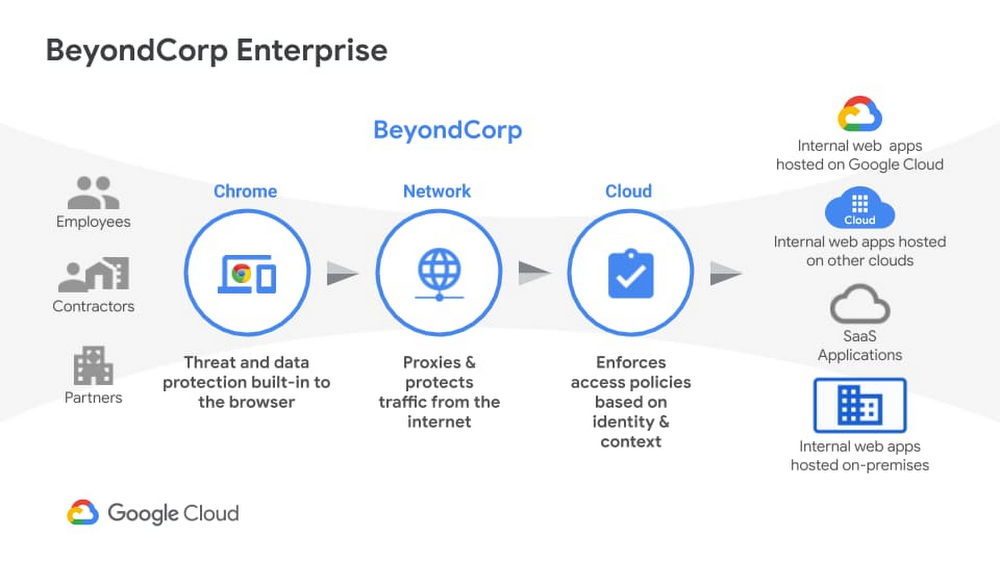
We recently announced the general availability of BeyondCorp Enterprise, Google’s comprehensive zero trust product offering. As we work to democratize zero trust, building a solution to support customers across different environments was top of mind for our team. Google has over a decade of experience managing and securing cloud applications at a global scale and this new offering was developed based on learnings from our experience managing our own enterprise, feedback from customers and partners, as well as informed by leading engineering and security research. We recognize the complexities that come with a zero trust journey and understand that most customers host resources across different cloud providers. With this in mind, BeyondCorp Enterprise was purpose-built as a multicloud solution, enabling customers to securely access resources hosted not only on Google Cloud or on-premises, but also across other clouds such as Azure and Amazon Web Services (AWS). Beyond Corp Enterprise provides context-aware access controls for internal and SaaS applications and cloud resources, and offers integrated threat and data protection without the for a Virtual Private Network (VPN). This solution is hosted on Google’s global network infrastructure and enables elastic-scaling based on use, helping customers manage secure access for different user groups, including employees, contractors or temporary workers, and partners. The diagram below shows the high-level architecture of BeyondCorp Enterprise. As you can see, BeyondCorp Enterprise supports applications and resources hosted on Google Cloud, on other clouds, or on-premises.Click to enlargeSo what does this mean for you and how can BeyondCorp Enterprise help? Google continues to emphasize its commitment for multi-cloud environments with BeyondCorp Enterprise. Customers “live” in a diverse world of different clouds and different vendors and we know it’s unrealistic that customers would have 100 percent of their resources hosted in one provider. That’s why we have been mindful to not only support access to apps on other clouds, but also build integrations with other leading technology vendors so customers can leverage their existing investments. The potential for the zero trust architecture is limitless as our ecosystem is built such that it is easily extensible by security partners, and the rulesets can be enriched to include additional signals like threat and data loss. Using a combination of user and device attributes, BeyondCorp Enterprise uses criteria such as the user’s location when trying to access a resource, the time of day the user is trying to access the resource, or the type of device a user is using to access a resource. BeyondCorp Enterprise also leverages Endpoint Verification in the Chrome Browser to identify the posture of the device accessing an application. These various parameters are used to configure “grant” or “deny” rules and policies, which are then enforced by the cloud Identity Aware Proxy and a combination of other controls.Click to enlargeEnterprise customers who adopt a “best of breed” approach to security will find Google’s approach to zero trust and the BeyondCorp Enterprise architecture complementary to their strategy. As an example, if you use one of our BeyondCorp Alliance partners  as your endpoint detection and response solution or Unified Endpoint Management (UEM) solution, you can also integrate signals from these solutions to incorporate into your policies and protect your resources across your on-premises, Google Cloud, or other clouds. This architecture ensures that you have the autonomy to choose your preferred security vendors.Once secure access is granted, BeyondCorp Enterprise provides threat and data protection capabilities, including the ability to protect SaaS applications and other websites from data loss, data exfiltration, credential theft, malware, and phishing attacks. Because these capabilities are delivered through the Chrome Browser, we can support users on Windows, Mac, Linux, and ChromeOS, again making it easy to meet customers where they are and enable simple deployment and adoption.Many people think zero trust requires a complete overhaul of their environment and would entail installing multiple agents on a computer; but instead, all you need is a web browser. We are excited to bring disruptive innovation to our customers in a way that does not disrupt security operations. rotectionGoogle is a true engineering-driven company. Innovating and solving global-scale problems is at the core of the company’s DNA. Ideas and projects that led to the creation of products that have redefined how people across the world work, such as Gmail, Google Maps, and of course, the Chrome Browser, which also birthed BeyondCorp Enterprise. If you would like to learn more about BeyondCorp Enterprise, visit the product page, register for our upcoming webinar on Feb 23, or contact your Google account team.Related ArticleBeyondCorp Enterprise: Introducing a safer era of computingThe GA of Google’s comprehensive zero trust product offering, BeyondCorp Enterprise, brings this modern, proven technology to organizatio…Read Article
Quelle: Google Cloud Platform
Set up Anthos Service Mesh for multiple GKE clusters using Terraform

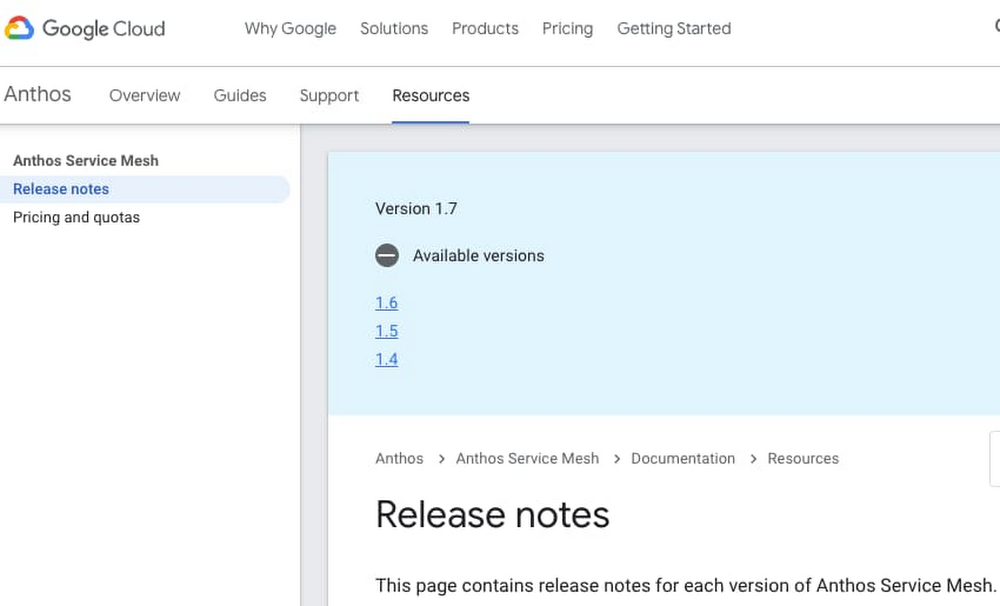
Anthos Service Mesh is a managed service mesh for Google Kubernetes Engine (GKE) clusters. Anthos Service Mesh allows GKE clusters to use a single logical service mesh, so that pods can communicate across clusters securely and services can share a single Virtual Private Cloud (VPC). Using Anthos Service Mesh requires GKE clusters and firewall rules. As well, access to the GKE GKE control plane needs to be granted, if private clusters are used. Infrastructure-as-code (IaC) makes bootstrapping Anthos Service Mesh significantly easier. In this blog post, we explain the new features of Anthos Service Mesh, and how to implement it across two private GKE clusters using Terraform. We also provide automation scripts, giving a guided tour for setting up a cloud environment.For those who want to get started immediately, there is a Git repo with complete source code and README instructions. There are also bonus sections at the end, for mesh traffic security scanning and external databases respectively.Supported versionThe supported versions are Anthos Service Mesh 1.7 and 1.8. For more information on Anthos Service Mesh versions, please check the Anthos Service Mesh release notes.Fig 3.1 – Anthos Service Mesh version release notesShared VPCsAnthos Service Mesh 1.8 can be used for a single shared VPC, even across multiple projects. Please consult the documentation on Anthos Service Mesh 1.8 multi-cluster support for complete details:Fig 3.2 – Anthos Service Mesh multi-cluster supportSSL/TLS terminationTLS termination for external requests is supported with Anthos Service Mesh 1.8. Doing so requires modifying the Anthos Service Mesh setup files.You can set up Anthos Service Mesh using the install_asm script. A custom istio-operator.yaml file can be used by running install_asm with the –custom_overlay option.In order for Istio (i.e., Anthos Service Mesh) to allow access to external services, change the egress policy to REGISTRY_ONLY. Please see the blocking-by-default Istio documentation for more details.For TLS termination of requests to Prisma Cloud (Twistlock), please the below section on Prisma Cloud.SecurityAnthos Service Mesh has inherent security features (and limitations), as described in the security overview documentation. Additionally, please follow the GKE best practices for security.NOTE: Anthos Service Mesh inherently implements Istio security best practices, such as namespaces and limited service accounts. Workload identity is an optional GKE-specific service account, limited to a namespace.The Istio ingress gateway needs to be secured manually. Please see the Secure Gateways Istio documentation for more details.For security scanning of GKE cluster ingress, please see the below section on Prisma Cloud.Container workload securityGKE cluster network policies allow you to define workload access across pods and namespaces. This is built on top of the Kubernetes NetworkPolicy API. There is also a helpful tutorial on configuring GKE network policies for applications.There are detailed steps for securing container workloads in GKE. This involves a layered approach to node security, pod/container security contexts and pod security policies. As well, Google Cloud’s Container-Optimized OS (both cos and cos_containerd) apply the default Docker AppArmor security policies to all containers started by Kubernetes.Container runtime (Containerd)We recommend using the cos_containerd runtime for GKE clusters using Anthos Service Mesh. The current Docker container runtime is being sunsetted from GKE. Adopting cos_containerd now will avoid having to migrate in the future.Using Containerd as the container runtime still allows developers to use Docker to build containers. Here are some potential conflicts, when migrating from Docker to Containerd:running privileged Pods executing Docker commandsrunning scripts on nodes outside of Kubernetes infrastructure (for example, using ssh to troubleshoot issues)using third-party tools that perform such similarly privileged operationsusing tooling that was configured to react to Docker-specific log messages in your monitoring systemTo avoid such conflicts, we recommend a canary deployment of your clusters with cos_containerd. You can find Instructions for canary deployments in the above-linked migration documentation.Security scanning with Prisma Cloud (formerly Twistlock)To do a security scan of the pod traffic on Anthos Service Mesh, you can use Palo Alto Networks’ Prisma Cloud (formerly Twistlock), a cloud security posture management (CSPM) and cloud workload protection platform (CWPP) that provides multi-cloud visibility and threat detection. Please consult the Prisma Cloud admin guide (latest as of January 7, 2021) for more details.Prisma Cloud setupFor setup instructions, please see the Twistlock folder README file in the anthos-service-mesh-multicluster source code repository. The table below contains links to the official Prisma Cloud setup documentation.Table 4.1 – Prisma VersionsTLS terminationPrisma Cloud TLS requests are terminated at the Prisma Cloud console. When a request comes from Prisma Cloud SaaS to a Twistlock container, the API call is also terminated with a TLS certificate.External databases with Google Cloud SQL for PostgreSQLMany organizations wish to establish external database connectivity to their Anthos Service Mesh environment. One common example uses Google Cloud SQL for PostgreSQL (Cloud SQL).Cloud SQL is external to GKE, thus requiring GKE to do SSL termination for external services. With Anthos Service Mesh, you can use an Istio ingress gateway, which allows SSL passthrough, so that the server certificates can reside in a container. However, this approach is problematic for many PostgreSQL databases.PostgreSQL uses application-level protocol negotiation for SSL connections. The Istio proxy currently uses TCP-level protocol negotiation. This causes the Istio proxy sidecar to error out during the SSL handshake, when it tries to auto-encrypt the connection with PostgreSQL. Fortunately Cloud SQL can itself host a sidecar for TLS termination.For setup instructions, please see the postgres folder README file in the anthos-service-mesh-multicluster source code repository.Towards federated clustersAnthos Service Mesh 1.7 and 1.8 can now federate multiple GKE clusters. Taken as “managed Istio” in a single VPC, this container orchestration model takes GKE to its full potential, and can be configured using tools like Terraform and shell scripts that are available in the anthos-service-mesh-multicluster Git repo.If you have not already tried out the sample code, please navigate to the Git repo and do so. This is a good next step as the README files are detailed and instructive. Learning-by-doing is an effective way to understand Anthos Service Mesh. As well, the Terraform code uses the latest Google Cloud modules, giving you valuable tools for your toolbox.We encourage you to make contributions to the Git repo, using Google Cloud Professional Services’ contributing instructions.NOTE: As of November 12, 2020, Anthos Service Mesh, Mesh CA and the Anthos Service Mesh dashboards in Google Cloud Console are available for any GKE customer and do not require the purchase of Anthos. See pricing for details.[1] Prisma Cloud SaaS Version Administrator’s Guide[2] Twistlock Reference ArchitectureRelated ArticleGKE best practices: Exposing GKE applications through Ingress and ServicesWe’ll walk through the different factors you should consider when exposing applications on GKE, explain how they impact application expos…Read Article
Quelle: Google Cloud Platform
The Dunant subsea cable, connecting the US and mainland Europe, is ready for service

We’re thrilled to say bonjour to the Dunant submarine cable system, which has been deployed and tested and is now ready for service. Crossing the Atlantic Ocean between Virginia Beach in the U.S. and Saint-Hilaire-de-Riez on the French Atlantic coast, the system expands Google’s global network to add dedicated capacity, diversity, and resilience, while enabling interconnection to other network infrastructure in the region. It’s named in honor of Swiss businessman and social activist Henry Dunant, the founder of the Red Cross and first recipient of the Nobel Peace Prize. The historic landing was made possible in partnership with SubCom, a global partner for undersea data transport, which engineered, manufactured and installed the Dunant system on schedule despite the ongoing global pandemic.Delivering record-breaking capacity of 250 terabits per second (Tbps) across the AtlanticAs we shared when we originally announced the Dunant cable, Dunant is the first long-haul subsea cable to feature a 12 fiber pair space-division multiplexing (SDM) design, and will deliver record-breaking capacity of 250 terabits per second (Tbps) across the ocean—enough to transmit the entire digitized Library of Congress three times every second. Increased cable capacity is delivered in a cost-effective manner with additional fiber pairs (twelve, rather than six or eight in past generations of subsea cables) and power-optimized repeater designs. While previous subsea cable technologies relied on a dedicated set of pump lasers to amplify each fiber pair, the SDM technology used in Dunant allows pump lasers and associated optical components to be shared among multiple fiber pairs. This ‘pump sharing’ technology enables more fibers within the cable while also providing higher system availability. Transforming businesses in the cloud worldwideThe power and capacity of our infrastructure plays an important role in Google’s mission to make the world’s information more accessible and useful, and in Google Cloud’s role in transforming businesses in the cloud worldwide.This means organizations can:Run their apps where they need them with open, hybrid, and multi-cloud solutions so their developers can build and innovate faster, in any environment, without being forced into a single vendor solution.Get smarter and make better decisions with the leading data platform with machine learning and advanced analytics capabilities that helps them maximize the insights they derive from their data.Run on the cleanest cloud in the industry, on tools and technologies that will foster a carbon-free future for everyone and enable them to reduce their carbon footprint. Operate confidently with advanced security tools that protect their data, applications, and infrastructure—as well as that of their customers—from fraudulent activity, spam, and abuse. Transform how their people connect and collaborate, with all the digital tools they need to do their best work, whether at home, at work, or in the classroom.Save money, increase efficiency, and optimize spend—from reducing time spent on platform management with Anthos to saving up to 32% migrating your applications to Google versus running them on-prem.Get customized industry solutions that tackle their toughest challenges—retail, CPG, financial services, manufacturing, media, entertainment and telco, gaming, public sector, and healthcare and life sciences, you name it.Looking aheadThis work is part of our ongoing efforts to build a superior cloud network for our customers, with well-provisioned direct paths between our cloud and our customers. The Google Cloud network consists of fiber optic links and subsea cables—which will soon include the Grace Hopper subsea cable—between 100+ points of presence, thousands of edge node locations, 100+ Cloud CDN  locations, 91 dedicated interconnect locations and 24 GCP regions, with additional regions announced in places like Chile, Spain, Italy France and Poland. All of this means better reliability, speed and security performance as compared with the nondeterministic performance of the public internet, or other cloud networks. And while we haven’t hastened the speed of light, we’re still very much hard at work at bringing you a better and faster cloud.Learn more about our infrastructure and data centers.Related ArticleA quick hop across the pond: Supercharging the Dunant subsea cable with SDM technologyIn 1858, Queen Victoria sent the first transatlantic telegram to U.S. President James Buchanan, sending a message in Morse Code at a rate…Read Article
Quelle: Google Cloud Platform
Introducing HPC VM images—pre-tuned for optimal performance

Today, we’re excited to announce the Public Preview of a CentOS 7-based Virtual Machine (VM) image optimized for high performance computing (HPC) workloads, with a focus on tightly-coupled MPI workloads.In 2020, we introduced several features and best-practice tunings to help achieve optimal MPI performance on Google Cloud. With these best practices, we demonstrated that MPI ping-pong latency falls into single-digits of microseconds (us) and small MPI messages are delivered in 10us or less. Improved MPI performance translates directly to improved application scaling, expanding the set of HPC workloads that run efficiently on Google Cloud. However, building a VM image that includes these best practices requires systems expertise and knowledge of Google Cloud. Starting with an HPC-optimized image can make it easier to maintain an image.The HPC VM image makes it easy and quick to instantiate VMs that are tuned to achieve optimal CPU and network performance on Google Cloud. The HPC VM image is available at no additional cost via the Google Cloud Marketplace. Continue reading below for details about the HPC VM image and its benefits, or skip ahead to our documentation and quickstart guide to start creating instances using the HPC VM image today!Benefits of using the HPC VM imageThe HPC VM image is pre-configured and regularly maintained, providing the following advantages to HPC customers on Google Cloud:Easily create HPC-ready VMs out-of the-box that incorporate our best practices for tightly-coupled HPC applications. You can quickly create HPC-ready VMs and always stay up-to-date with the latest tunings.Networking optimizations for tightly-coupled workloads help reduce latency for small messages, and benefit applications that are heavily dependent on point-to-point and collective communications.Compute optimizations for HPC workloads allow more predictable single-node high performance by reducing system jitter that can lead to performance variation.Consistent and reproducible multi-node performance by using a set of tunings which have been tested across a range of HPC workloads.  Using the HPC VM image is simple and easy, as it is a drop-in replacement for the standard CentOS 7 image.Customer story: Scaling SDPB solver using CloudyCluster and HPC VM imageWalter Landry is a research software engineer in the Caltech Particle Theory Group working with the international Bootstrap Collaboration. The collaboration uses SDPB, a semidefinite program solver, to study Quantum Field Theories, with application to a wide variety of problems in theoretical physics, such as early universe inflation, superconductors, quantum Hall fluids, and phase transitions.To expand the collaboration’s computation capabilities, Landry wanted to see how SDPB would scale on Google Cloud. Working with Omnibond CloudyCluster and leveraging the HPC VM image, Landry achieved comparable performance and scaling to an on-premises cluster at Yale, based on Intel Xeon Gold 6240 processors and Infiniband FDR.Google Cloud’s C2-Standard-60 instance type is based on the second-generation Intel Xeon Scalable Processor. The C2 family of instances can utilize placement policies to reduce inter-node latency, ideal for tightly-coupled MPI workloads. CloudyCluster leverages the HPC VM image and placement policy for the C2 family out of the box, making it seamless for the researcher. These tests show the ability to scale low latency workloads across many instances in Google Cloud.If you would like to try out the HPC VM image with Omnibond CloudyCluster, an updated version of Omnibond CloudyCluster using the HPC VM image is available in the Google Cloud Marketplace. This version also comes complete with NSF funded Open OnDemand led by  Ohio Supercomputing Center, making it easy for system administrators to provide web access to HPC resources.What’s included in the HPC VM image? Tunings and OptimizationsThe current release of the HPC VM image focuses on tunings for tightly coupled HPC workloads and implements the following best-practices for optimal MPI application performance:Disable Hyper-Threading: Intel Hyper-Threading is disabled by default in the HPC VM image. Turning off Hyper-Threading allows more predictable performance and can decrease execution time for some HPC jobs.MPI collective tunings: The choice of MPI collective algorithms can have a significant impact on MPI application performance. HPC VM image includes recommended Intel MPI collective algorithms to use in the most common MPI job configurations.Increase tcp_*mem settings: C2 machines can support up to 32 Gbps bandwidth, and they benefit from larger TCP memory than Linux defaults.Enable busy polling: Busy polling can help reduce latency in the network receive path by allowing socket-layer code to poll the receive queue of a network device and by disabling network interrupts.Raise user limits: Default limits on system resources—like open files and numbers of processes that any one user can use—are typically unnecessary for HPC jobs where compute nodes in a cluster aren’t shared between users.Disable Linux firewalls, Disable SELinux: For Google Cloud CentOS Linux images, SELinux and firewall is turned on by default. HPC VM image disables Linux firewalls and SELinux to improve MPI performance.Disable CPUIdle: C2 machines support CPU C-states to enter low-power mode and save energy.  Disabling CPUIdle can help reduce jitter and provide consistent low latency.The benefits of these tunings can vary from application to application and we recommend that you benchmark your applications to find the most efficient or cost-effective configuration.Performance measurement using HPC benchmarksWe have  compared the performance of the HPC VM image vs. the default CentOS 7 image across both the Intel MPI Benchmarks and real application benchmarks for Finite Element Analysis (ANSYS LS-DYNA), Computational Fluid Dynamics (ANSYS Fluent) and Weather Modeling (WRF). The following versions of the HPC VM image and CentOS Image were used for the benchmarks in this section:HPC VM image: hpc-centos-7-v20210119 (with –nomitigation applied and mpitune configs installed as suggested in the HPC VM image documentation)CentOS Image:  centos-7-v20200811Intel MPI Benchmark (IMB) Ping-Pong IMB Ping-Pong measures the ping-pong latency of transferring a fix-sized message between two ranks over a pair of VMs. On average, we saw that the HPC VM image reduces inter-node ping-pong latency by up to 50% compared to the default CentOS 7 Image (baseline).Benchmark setup2x C2-standard-60 VMs with compact placement policyMPI Library: Intel MPI Library 2018 update 4Command line: mpirun -genv I_MPI_PIN=1 -genv I_MPI_PIN_PROCESSOR_LIST=0 -hostfile <hostfile> -np 2 -ppn 1 IMB-MPI1 Pingpong -iter 50000ResultsIntel MPI Benchmark (IMB) AllReduceThe IMB AllReduce benchmark measures the collective latency among multiple ranks across VMs. It reduces a vector of a fixed length with the MPI_SUM operation. We show 1 PPN (process-per-node) results to represent the case when we have a 1 MPI rank/node and 30 threads/rank and 30 PPN results where there are 30 MPI ranks/node and 1 thread/rank. We saw that the HPC VM image reduces AllReduce latency by up to 40% for 240 MPI ranks across 8 nodes (30 processes per node) compared to the default CentOS 7 image (baseline).Benchmark setup8x C2-standard-60 VMs with compact placement policyMPI Library: Intel MPI Library 2018 update 4Command line: mpirun -tune -genv I_MPI_PIN=1 -genv I_MPI_FABRICS ‘shm:tcp’ -hostfile <hostfile> -np <#vm*ppn> -ppn <ppn> IMB-MPI1 AllReduce -iter 50000 -npmin <#vm*ppn>ResultsHPC application benchmarks: LS-DYNA, Fluent and WRFAt an application level, the HPC VM image yielded up to a 25% performance improvement to the ANSYS LS-DYNA “3 cars” vehicle collision simulation benchmark when running on 240 MPI ranks across 8 Intel Xeon processor based C2 instances. With ANSYS Fluent and WRF, we observed up to 6% performance improvement using the HPC VM image in comparison with the default CentOS Image.Benchmark setupANSYS LS-DYNA (“3-cars” model): 8 C2-standard-60 VMs with compact placement policy, using the LS-DYNA MPP binary compiled with AVX-2 ANSYS Fluent (“aircraft_wing_14m” model): 12 C2-standard-60 VMs with compact placement policyWRF V3 Parallel Benchmark (12 KM CONUS): 16 C2-standard-60 VMs with compact placement policyMPI Library: Intel MPI Library 2018 update 4ResultsWhat’s next? SchedMD Slurm support and additional Linux distributionsWe are continuing to work with our HPC partners to integrate the HPC VM image with partner offerings by default. Starting next month, HPC customers who use Slurm will be able to start HPC-ready clusters that make use of the HPC VM image by default (preview version is  available here). For customers who are looking for HPC Enterprise Linux options and support, SUSE is working with Google on a SUSE Enterprise HPC VM image that has been optimized for Google Cloud. If you’re interested in learning more about SUSE Enterprise HPC VM image, or have a requirement for additional integrations or Linux distributions, please contact us.Get started today!The HPC VM image is available in Preview for all customers through the Google Cloud Marketplace today. Check out our documentation and quickstart guide for more details on creating instances using the HPC VM image. Special thanks to Jiuxing Liu, Tanner Love, Jian Yang, Hongbo Lu and Pallavi Phene for their contributions.Related ArticleGetting higher MPI performance for HPC applications on Google CloudYou can reduce MPI latency in HPC workloads running on Google Cloud by following these best practices.Read Article
Quelle: Google Cloud Platform

What are my hybrid and multicloud deployment options with Anthos?

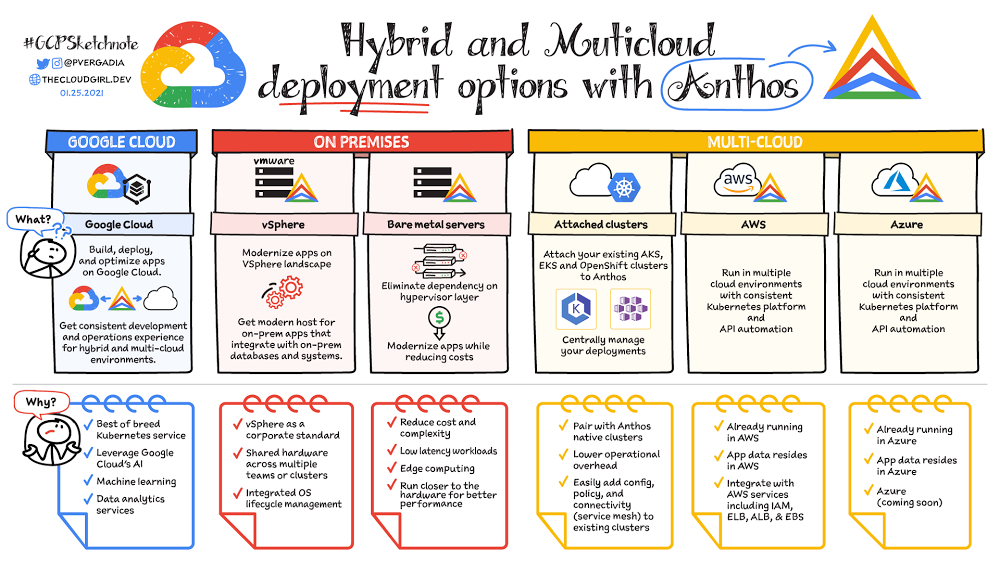
Anthos is a managed application platform that extends Google Cloud services and engineering practices to your environments so you can modernize apps faster and establish operational consistency across them. With Anthos, you can build enterprise-grade containerized applications faster with managed Kubernetes on Google Cloud, on-premises, and other cloud providers.. In this blog post, we outline each of Anthos deployment options:Google Cloud VMware vSphereBare metal serversAWSMicrosoft AzureAttached clustersDeployment Option 1: Google CloudOne way to improve  your apps’ performance is to run your compute closer to your data. So, if you are already running your services on Google Cloud then it’s best to use Anthos to build, deploy, and optimize your containerized workloads directly on Google Cloud. You can take advantage of Google Cloud AI, machine learning, and data analytics services to gain critical business insights, improve decision-making, and accelerate innovation. In this video, Tony Pujals walks you through a sample deployment for Anthos, including how to use the different tools that Anthos offers—such as Anthos Service Mesh and Anthos Config Management—to modernize, manage, and standardize your Kubernetes environments.Deployment Option 2: VMware vSphere If you are using VMware vSphere in your own environment then you can choose to run Anthos clusters on VMware, which enables you to create, manage, and upgrade Kubernetes clusters on your existing infrastructure. This is a good option if vSphere is a corporate standard for your organization and if you have shared hardware across multiple teams or clusters and with integrated OS lifecycle management. With Anthos clusters on VMware, you can keep all your existing workloads on-premises without significant infrastructure updates. At the same time, you can modernize legacy applications by transforming them from VM-based to container-based using Migrate for Anthos. Going forward, you may decide to keep the newly updated, containerized apps on-prem or move them to the cloud. Either way, Anthos helps you to manage and modernize your apps with ease and at your own pace.Deployment Option 3: Bare metal serversThough virtual machines are unquestionably useful for a wide variety of workloads,  a growing number of organizations are  running Kubernetes on bare metal servers to take advantage of reduced complexity, cost, and hypervisor overhead. Anthos on bare metal lets you run Anthos on physical servers, deployed on an operating system provided by you, without a hypervisor layer. Anthos on bare metal comes with built-in networking, lifecycle management, diagnostics, health checks, logging, and monitoring. Mission critical applications often demand the highest levels of performance and lowest latency from the compute, storage, and networking stack. By removing the latency introduced by the hypervisor layer, Anthos on bare metal lets you run computationally intensive applications such as GPU-based video processing, machine learning, and more, in a cost-effective manner. Anthos on bare metal allows you to leverage existing investments in hardware, OS and networking infrastructure. The minimal system requirement to run Anthos on bare metal at the edge on resource-constrained hardware. This means that you can capitalize on all the benefits of Anthos—centralized management, increased flexibility, and developer agility—even for your most demanding applications.Deployment Option 4: AWSIf your organization has more than a few teams, chances are pretty good that they’re using different technologies, and perhaps even different cloud platforms. Anthos is designed to abstract these details and provide you with a consistent application platform.Anthos on AWS enables you to create Google Kubernetes-based clusters with all of the Anthos features you’d expect on Google Cloud. This means easy deployment using Kubernetes-native tooling, Anthos Config Management for policy and configuration enforcement, and Anthos Service Mesh for managing the increasing sprawl of microservices.When you use the Google Cloud Console, you have a single pane of glass that you can use to manage your applications all in one place no matter where they are deployed.  Deployment Option 5: Microsoft AzureWe are always extending Anthos to support more kinds of workloads, in more kinds of environments, and in  more locations. We announced last year that Anthos is coming to Azure. Support for Microsoft Azure is currently in preview, so stay tuned for more details!Deployment Option 6: Anthos attached clustersWhen thinking about deploying Anthos, you may be wondering about what you’ll do with your existing Kubernetes clusters. With Anthos attached clusters, you can retain your existing Kubernetes clusters while taking advantage of key Anthos features.  Whether you’re running Amazon EKS,  Microsoft AKS, or Red Hat OpenShift, you can attach your existing clusters to Anthos. That means you can centrally manage your deployments in Google Cloud Console, enforce policies and configuration using Anthos Config Management, and centrally monitor and collect logs. Of course, Anthos doesn’t manage everything; you still must manually maintain your clusters and keep them up to date. This deployment option does, however, enable you to begin your Anthos journey at a pace that works well for you, and eases the transition to Anthos in other cloud environments.ConclusionSo there you have it—six different hybrid and multicloud deployment options for Anthos! Depending on where your infrastructure and data is today, one or perhaps a combination of these options will help you power your application modernization journey, with a modern application platform that just works on-prem or in a public cloud, ties in seamlessly with legacy data center infrastructure, enables platform teams to cost-optimize, and supports a modern security posture anywhere.Here is a comprehensive video series on Anthos that walks you through how to get started:Here is a comprehensive video series on Anthos that walks you through how to get started:What is Anthos?For more resources on Anthos checkout the Consistent service delivery everywhere with Anthos eBook.And, for more #GCPSketchnote and similar cloud content follow me on twitter @pvergadia and keep an eye out on thecloudgirl.dev.Related ArticleIntroducing the Anthos Developer Sandbox—free with a Google accountThe new Anthos Developer Sandbox spins up all the tools you need to learn how to develop for the Anthos platform.Read Article
Quelle: Google Cloud Platform

The cloud trust paradox: 3 scenarios where keeping encryption keys off the cloud may be necessary

As we discussed in “The Cloud trust paradox: To trust cloud computing more, you need the ability to trust it less” and hinted at in “Unlocking the mystery of stronger security key management,” there are situations where the encryption keys must be kept away from the cloud provider environment. While we argue that these are rare, they absolutely do exist. Moreover, when these situations materialize, the data in question or the problem being solved is typically hugely important.Here are three patterns where keeping the keys off the cloud may in fact be truly necessary or outweighs the benefits of cloud-based key management.Scenario 1: The last data to go to the cloudAs organizations migrate data processing workloads to the cloud, there usually is this pool of data “that just cannot go.” It may be data that is the most sensitive, strictly regulated or the one with the toughest internal security control requirements.Examples of such highly sensitive data vary by industry and even by company. One global organization states that if they present the external key approach to any regulator in the world, they would be expecting an approval due to their robust key custody processes. Another organization was driven by their interpretation of PCI DSS and internal requirements to maintain control of their own master keys in FIPS 140-2 level 3 HSMs that they own and operate.This means that risk, compliance or policy reasons make it difficult if not impossible to send this data set to the public cloud provider for storage or processing. This use case often applies to a large organization that is heavily regulated (financial, healthcare and manufacturing come to mind). It may be data about specific “priority” patients or data related to financial transactions of a specific kind. However, the organization may be willing to migrate this data set to the cloud as long as it is encrypted and they have sole possession of the encryption keys. Thus, a specific decision to migrate may be made involving a combination of risk, trust, as well as auditor input. Or, customer key possession may be justified by customer interpretation of specific compliance mandates.Now, some of you may say “but we have data that really should never go to the cloud.” This may indeed be the case, but there is also general acceptance that digital transformation projects require the agility of the cloud, so an acceptable, if not entirely agreeable solution must be found.Scenario 2: Regional regulations and concernsAs cloud computing evolves, regional requirements are playing a larger role in how organizations migrate to the cloud and operate workloads in public cloud. This scenario focuses on a situation where an organization outside of one country wants to use a cloud based in a different country, but is not comfortable with the provider having access to encryption keys for all stored data. Note that if the unencrypted data is processed in the same cloud, the provider will access the data at one point anyhow.  Some of these organizations may be equally uncomfortable with keys stored in any cryptographic device (such as an HSM) under logical or physical control of the cloud provider. They reasonably conclude that such an approach is not really Hold Your Own Key (HYOK). This may be due to issues with regulations they are subject to their government, or all of the above. Furthermore, regulators in Europe, Japan, India, Brazil and other countries are considering or strengthening mandates for keeping unencrypted data and/or encryption keys within their boundaries. Examples may include specific industry mandates (such as TISAX in Europe) that either state or imply that the cloud provider cannot have access to data under any circumstances, that may necessitate not having any way for them to access the encryption keys.  However, preliminary data indicates that some may accept the models where the encryption keys are in a sole possession of a customer and located in their country, and hence off the cloud provider premises (while the encrypted data may be outside). Another variation is the desire to have the keys for each country specific data set in the respective country under the control of that country’s personnel or citizens. This may apply to banking data and will necessitate the encryption keys for each data set being stored in each country. An example may be a bank that insists that all their encryption keys are stored under one particular mountain in Switzerland. Yet another example covers the requirements (whether regulatory or internal) to have complete knowledge and control over administrators to the keys, and a local audit log of all key access activity.As Thomas Kurian states here, “data sovereignty provides customers with a mechanism to prevent the provider from accessing their data, approving access only for specific provider behaviors that customers think are necessary. Examples of customer controls provided by Google Cloud include storing and managing encryption keys outside the cloud, giving customers the power to only grant access to these keys based on detailed access justifications, and protecting data-in-use. With these capabilities, the customer is the ultimate arbiter of access to their data.”Therefore, this scenario allows organizations to utilize Google Cloud while keeping their encryption keys in the location of their choice, under their physical and administrative control.Scenario 3: Centralized encryption key controlWith this use case, there are no esoteric threats to discuss or obscure audit requirements to handle. The focus here is on operational efficiency. As Gartner recently noted, the need to reduce the number of key management tools is a strong motivation for keep all the keys within one system to cover multiple cloud and on-premise environments.It may sound like a cliche, but complexity is very much the enemy of security. Multiple “centralized” systems for any task—be it log management or encryption key management—add complexity and introduce new points for security to break.In light of this, a desire to use one system for a majority of encryption keys, cloud or not, is understandable. Given that few organizations are 100% cloud-based today for workloads that require encryption, the natural course of action is to keep all the keys on-prem. Additional benefits may stem from using the same vendor as an auxiliary access control and policy point. A single set of keys reduces complexity and a properly implemented system with adequate security and redundancy outweighs the need to have multiple systems.Another variant of this is a motivation to retain an absolute control over data processing by means of controlling the encryption key access. After all, if a client can push the button and instantly cut off the cloud provider from key access, the data cannot possibly be accessed or stolen by anybody else.Finally, centralizing key management gives the cloud user a central location to enforce policies around access to keys and hence access to data-at-rest.Next stepsTo summarize, these scenarios truly call for encryption keys being both physically away from the cloud provider,  away from their physical and administrative control. This means that a customer managed HSM at the CSP location won’t do. Please review Unlocking the mystery of stronger security key management for a broader review of key management in the cloud.Assess your data risks in regards to attackers, regulations, geopolitical risks, etc.Understand the three scenarios discussed in this post and match your requirements to them. Apply threat model thinking to your cloud data processing and see if you truly need to remove the keys from the cloud.Review services covered by Google EKM and partners to deliver encryption key management for keeping the keys away from the cloud, on premises (Ionic, Fortanix, Thales, etc).
Quelle: Google Cloud Platform

How to optimize your network for live video on Google Cloud

Like so many industries impacted by the global pandemic, the media and entertainment industry was forced to quickly create ad-hoc solutions to help broadcasters “keep the show on the air.” This caused seismic shifts in media production, distribution, and consumption, which accelerated trends like virtual work that were already underway and are now likely permanent. Google Cloud can be a key enabler in the long-term evolution of live TV supply chains. In 2020, the internet also faced unprecedented demand. Internet Exchanges (IXPs) recorded net increases up to 60%1 in total bandwidth handled per country during Q1 2020. Google’s unique global fiber optic network and approach to cloud provides highly differentiated capabilities for media supply chains that can isolate broadcasters from potential bandwidth bottlenecks.Next, in line with Google’s philosophy of creating an open platform and making it easy for our partners to work with us, Google has created a comprehensive partnership ecosystem with some of the best known media technology companies. This blog post is one of the first in a series from the Google Cloud teams that work closely with media customers and partners every day. In this installment, we share best practices for network setup and configuration, which is crucial for high-quality video broadcasts. 1. Understanding and Calibrating your Network and VMsBroadcast distribution of live video requires highly consistent network performance. The following considerations are important factors in the production and distribution of a video stream:Latency (the time taken to transmit a packet from Point A → Point B)Jitter (the latency’s variance over time)Packet drops (the number of packets lost from Point A → Point B)Here is how to understand and calibrate your network and VMs:Network Baseline: Understand your current network’s performance level of latency, jitter and packet drops.Calibrate: Adjust your cloud transmission endpoints to compensate for these artifacts by:Adjusting your lossless overlay protocol with the correct amount of error correction and redundancy to manage the packet drops especially over large distances. Opt for a suitable media overlay transport protocol like Secure Reliable Transport (SRT), Zixi or Reliable Internet Stream Transport(RIST)/SMPTE 2022-7.Latency and jitter change by distance and number of intermediate processing and transit steps; therefore, measure both parameters and adjust receiving app/VM network buffers as needed.Benchmark VMs: Optimizing VM sizes and tuning OS changes (in a Linux environment) have a direct impact on video transport performance. These include:Changing the size of Guest OS ‘receive’ buffer.Changing to a higher performance (CPU/RAM) machine type if your VMs used for media transport (responsible for ingress/egress traffic) run at greater than 50% sustained CPU utilization. It’s best to leave the extra headroom to account for the inevitable temporary spikes in CPU utilization due to workload/network jitter inherent in any network.A blanket high level of error correction, buffering, and redundancy in your transport protocol is wasteful and can significantly increase network traffic and CPU overhead. Google Cloud’s network allows you to create systems with lower latency and jitter in two ways:Google’s global fiber optic network directly connects different continents and regions over a dedicated backbone. Therefore, all regions are within a single network hop of each other, not encumbered by extraneous network hops or third-party transit agreements.We published PerfKit Benchmarker to provide you with visibility and further understanding of jitter and latency in your architecture.Details of setting up and executing a thorough test will be provided in an upcoming blog post. In the meantime, you can refer to this prior blog post about general network measurement and instrumentation on Google Cloud.2. Ingest into CloudYou can get your raw media stream into Google Cloud over the public internet or over interconnect, with your business requirements determining the most appropriate ingest method. In either case, the use of a lossless protocol like SRT is recommended.Public Internet: When using the public internet, you’ll likely use either TCP or UDP with a lossless protocol overlay. Generally, UDP with a lossless overlay (such as SRT) is recommended; alternatively, you can also transmit your signal over a VPN from on-premise to Google Cloud. If using a secure transport like SRT, the need for a VPN is reduced, but other protocols without security might still require a VPN.The Google Cloud VPN is not a VM-based, single point of failure. Instead, it’s a regional scale-out service that provides up to 3gbps bandwidth per tunnel. Additional tunnels can be set up for greater bandwidth, and the VPN is available in HA configurations that offer 99.99% service availability as well. The Google Cloud VPN uses the premium network tier. You can also proactively get notified of over-utilized VPN tunnels before it becomes a bottleneck, preventing packet loss and increasing resiliency of your system. When not using a VPN, we recommend using Google Premium Network tier for public internet ingestion so that traffic from your source enters Google’s network from the closest point of presence to that source.Interconnect: For higher throughput streaming, especially for UDP/RTP based ingest methods, a dedicated connection (Dedicated Interconnect or Partner Interconnect via a service provider) is more common. When choosing an interconnect type, consider your connection requirements, such as the connection location and required capacity. Both types of interconnect can be configured with redundancy to achieve a 99.99% SLA. Visit Google’s peering site to get started, and read  more about Google Cloud’s interconnect best practices.3. DistributionToday’s modern broadcasters and media companies have two main distribution needs: one, sending linear channels/streams to other traditional MVPDs, partners, and operators; and two, sending VOD/live traffic directly to end consumers for viewing via applications and smart TVs.Distribution to traditional MVPDs, Partners, and OperatorsGoogle’s global network is a differentiated offering that provides distributors a quantum leap in cloud-based media transmission capability across three key areas: reach, reliability, and performance.Reach: the single, global planet-wide network with 91 global direct interconnect locations allows feeds originating from any region in the world to be transmitted to any other region after the appropriate in-cloud processing and transformation. This allows you to confidently meet your business requirements to supply media to your distribution partners.Reliability: the global network has been designed to self-heal in the event of various failures or congestion by intelligently finding alternate optimal paths for your data with minimal effort on your part. These operations are handled automatically. We’ve devised mechanisms to defend against advanced attacks including DDoS threats. Our infrastructure was able to absorb a 2.5 Tbps DDoS attack in September 2017—the highest-bandwidth attack reported to date. By deploying Google Cloud Armor integrated into our Cloud Load Balancingservice—which can scale to absorb massive DDoS attacks—you can protect services deployed in Google Cloud, other clouds, or on-premise.Performance: Google’s innovation in its network stack gives you the benefit of extremely high network performance within and between regions. That means you can transmit media to partners with high throughput and low latency, packet loss, and jitter.OTT and Direct-to-Consumer (DTC) DistributionThe en-masse adoption of streaming media has necessitated petabyte-scale global delivery of content to end customers. The end customers vary widely in their location, connectivity, equipment, and last-mile ISPs.Google Cloud CDN has been purpose-built to deliver content with speed, efficiency, and reliability to all corners of the world. Cloud CDN caches your content in more than 100 locations around the world and hands it off to 144 network edge locations, placing your content close to your users, usually within one network hop through their ISP – giving your viewers the best possible content experience. Additionally, by using Cloud CDN, you get the benefit of over a decade of edge innovation, such as fast SSL handshakes through QUIC, advanced congestion control through BBR, simplified DNS management through global anycast IPs, and DDoS absorption at scale.While Cloud CDN can serve content from any origin, Google Cloud Storage (GCS) with advanced capabilities like multi-regional buckets allow you to further leverage Google’s innovations to delight your customers.4. Measuring, Monitoring, and ImprovingPerfKit Benchmarker is an open-source tool created at Google that allows you to measure and understand performance across multiple clouds and hybrid deployments. Use PerfKit Benchmarkerto get visibility into and benchmark performance metrics like latency, throughput, and jitter. You can access the tutorial here. Google Cloud offers Network Intelligence Center for comprehensive and proactive monitoring, troubleshooting, and optimization capabilities across hybrid deployments. Four products are available within Network Intelligence Center today: Connectivity Tests, Network Topology, Performance Dashboard, and Firewall Insights. Learn more about how to fix your top network issues using these products.ConclusionProper network setup and configuration is crucial to achieve high quality video broadcasts in the cloud. Google’s global network provides customers with a highly capable system, and with proper tuning for media use cases, customers can achieve high reliability and performance in their broadcast system.No network system is static and unchanging. The Google Cloud network provides out-of-the-box tools for monitoring and insights. This allows you to continuously measure and improve your aggregate performance in an ever-changing environment where the needs of your broadcast partners and customers are continuously evolving.1. https://www.oecd.org/coronavirus/policy-responses/keeping-the-internet-up-and-running-in-times-of-crisis-4017c4c9/Related ArticleYour top network performance problems and how to fix themWhether you want to troubleshoot a performance problem or optimize your deployment decisions, Google Cloud has a comprehensive set of too…Read Article
Quelle: Google Cloud Platform

Limiting public IPs on Google Cloud

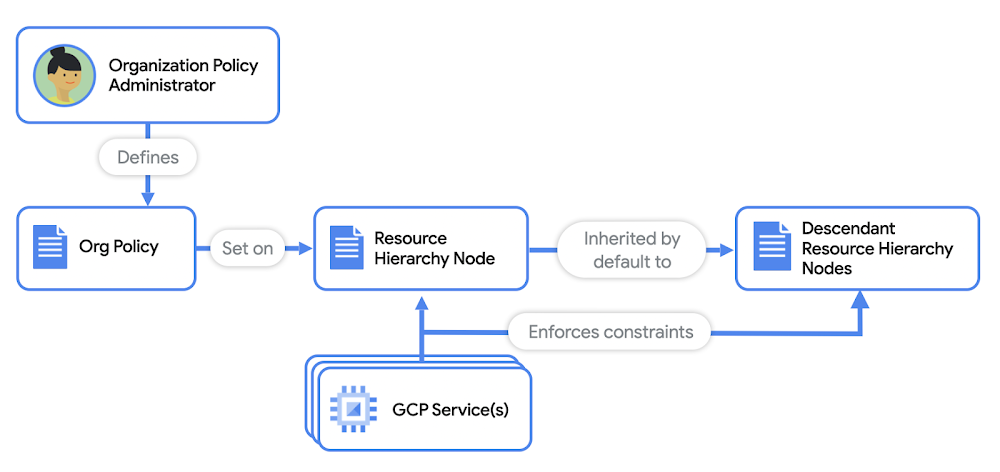
You’ve heard this saying: Hope is not a strategy when it comes to security. You have to approach security from all angles, while minimizing the burden on dev and SecOps. But with an ever increasing number of endpoints, networks, and attack surfaces, setting automated and trickle down security policies across your cloud infrastructure can be a challenge. On top of that administrators need to set guardrails to ensure that their workloads are always compliant with security requirements and industry regulations. Public IPs are among the most common ways that enterprise environments are exposed to the internet, making them susceptible to attacks and data exfiltration. That’s why limiting public IPs is paramount in securing these environments. On Google Cloud Platform, it’s important to understand what resources use public IPs in your network, which can include:VMsLoad balancersVPN gatewaysWhen you start to deploy production level systems, you’re looking at potentially thousands of instances in which your developers can deploy public IP addresses. Organization PoliciesOrganization policies give you centralized control over your organization’s Google Cloud resources. As the organization policy administrator, you can configure restrictions across your entire resource hierarchy. For example, you can set organization policies on your top-level GCP organization, on nested folders, or on projects. These policies can be inherited by nested folders and projects, or they can be overridden on a case by case basis. Using organization policies, you can enforce constraints on Google Cloud resources, such as VMs and load balancers to adhere to basic security requirements at all times. You can use organization policies as guardrails to ensure no public IPs are allowed in your Google Cloud network. It’s a perfect tool for IT or Security Admins to ensure all cloud deployments adhere to their security standards. Let’s walk through how to set them up.Limit public IPs for VMsCompute Engine instances can be exposed to the internet directly when you:Assign the VM a public IPUse protocol forwarding with the VM as its endpointTo prevent Compute Engine instances from getting public IPs, first make sure you have the Org Policy Admin role in the organization, so you can add and edit org policies. Then, on the Organization policies page in the Google Cloud Console, search for and edit the org policy constraint named constraints/compute.vmExternalIpAccess. This constraint lets you define the set of Compute Engine VMs that are allowed to use public IPs in your network. (No other VMs will be able to be assigned a public IP.) Edit the policy with the following values:Under Custom values, paste the path to any instance for which you want to want to allow external IP creation, for example: projects/{project-id}/zones/{zone}/instances/{instance-name}.Now you’ve restricted public IP creation to only the instances you’ve explicitly specified, and prevented public IP creation for any other instances in your organization.Prevent protocol forwarding to a VMTo prevent protocol forwarding from being enabled, use the org policy constraint named constraints/compute.restrictProtocolForwardingCreationForTypes, and set it to the following values. Note that the policy value is case sensitive.This constraint lets you limit virtual hosting of public IPs by Compute Engine VM instances in your organization.Limit public IPs of VPN gatewaysFor VPNs, a VPN gateway requires a public IP address for you to connect your on-premises environment to Google Cloud. To ensure that your VPN gateway is protected, use the org policy constraint named constraints/compute.restrictVpnPeerIPs. This constraint will limit the public IPs that are allowed to initiate IPSec sessions with your VPN gateway.Limit Public IPs of Load BalancersGoogle Cloud offers a variety of internal and external load balancers. To prevent the creation of all external load balancer types, use the org policy constraint named  constraints/compute.restrictLoadBalancerCreationForTypes. Then make sure to add all external load balancers for the policy values, as shown below:Instead of manually entering each load balancer, you can also simply add in:EXTERNAL, which will always cover all types of external load balancers. As new load balancer types are introduced, you can be assured your infrastructure will remain secure.Restricting GKE servicesGoogle Kubernetes Engine (GKE) lets developers create and expose their services to the internet easily. But if you apply the previously discussed policies for VMs and load balancers, no new GKE services can be exposed to the internet without the org admin’s knowledge. For example, if a developer attempts to create a GKE service with an external load balancer, the forwarding rule for the required load balancer can’t be created with the org policy constraint in place. Furthermore, checking the status of the GKE service will deliver a pending external IP. When they run kubectl describe service, they’ll get an error due to the load balancer org policy constraint in place.Keep in mind organization policies are not retroactive. They will only apply to new infrastructure requests after the policy is set. So you don’t have to worry about breaking any existing workloads when you add these policies to your org. You can apply org policies easily and efficiently across your entire org hierarchy or on a subset of resources from a single, centralized place, and prevent stray resources from being assigned public IPs when they shouldn’t have them. Try it out for yourself, and learn more in the organization policy constraints documentation.For more cloud content, follow me on Twitter @stephr_wong.Related ArticleYour top network performance problems and how to fix themWhether you want to troubleshoot a performance problem or optimize your deployment decisions, Google Cloud has a comprehensive set of too…Read Article
Quelle: Google Cloud Platform

Getting vaccines into local communities safely and effectively

Introducing: Google Cloud’s Intelligent Vaccine Impact solutionWith a number of COVID-19 vaccines approved, state and local governments are now focused on executing effective and equitable immunization programs. This promises to be the largest public health campaign of a generation, and Google is committed to helping our customers and communities rise to the challenge of getting vaccines to more people.Google has supported communities and public health organizations throughout the pandemic through research grants, telehealth support, and more. And as the global challenge to immunize millions of people continues to rise, we’re proud to extend our commitment by today announcing Google Cloud’s Intelligent Vaccine Impact solution. With this offering, we’ve created a set of core technologies to help regional and local governments deliver successful COVID-19 public health strategies, ranging from vaccine information and scheduling, to distribution and analytics, to forecasting and modeling COVID-19 cases, and more.The Intelligent Vaccine Impact solution helps increase vaccine availability and equitable access to those who need it, and assists governments in building awareness, confidence, and acceptance of vaccines. We designed our solution to easily integrate with existing technologies, knowing that governments will administer their vaccine distributions in unique ways. COVID forecasting to help make better decisions on vaccine distribution and allocation The first part of the Intelligent Vaccine Impact solution involves COVID-19 forecasting and “what-if” analysis. Google Cloud researchers developed a novel, time-series, machine-learning approach that combines AI with a foundation of epidemiology. We also developed an AI-driven “what-if” model to be used for COVID-19 response and other infectious disease policy intervention decision-making, using our Application Modernization platform with Anthos, Kubernetes, and BigQuery.  Using a unique set of Looker dashboards, state epidemiologists and public health professionals can now aggregate the results of these models in BigQuery with both public and private datasets to drive better policy decisions. Government leaders can then see how the forecasts change in response to policy changes (e.g., mask mandates, modified reopening plans, or vaccination programs). And public sector leaders can also create custom forecasts for their counties and public health organizations. The goal of this component of the solution is to help leaders make informed and effective decisions. Higher-quality vaccine information to take the burden off state & local agenciesThe second core component of the Intelligent Vaccine Impact solution is the vaccine information portal. The COVID-19 vaccine release has brought a flood of questions and concerns from the public to government agencies. As people search for answers on public web pages, call health departments, and react to announcements on social media, many local governments have been overwhelmed. Working in partnership with SpringML, MTX, Deloitte, and other partners, Google Cloud has built several vaccine information portals—part of the Intelligent Vaccine Impact solution—that help people learn about vaccine availability, determine if they qualify, sign up for vaccination, and submit their information so that when they are eligible they can be vaccinated as quickly as possible. Using core Google Cloud serverless technologies like App Engine, Firestore, and Cloud Functions, these portal websites allow for seamless scalability to meet the needs of thousands to hundreds of thousands of constituents registering simultaneously. Vaccine scheduling management to seamlessly manage vaccine rollout to populationsOnce constituents have visited the vaccine information portal, they then interact with the scheduling management component of the Intelligent Vaccine Impact solution. Google Cloud’s Dialogflow and Contact Center AI intelligent virtual agents provide call-in lines that can help people determine their eligibility, get registered, and schedule vaccine appointments even if they are not able to get online. And to assist in scheduling and reminders, standard text messaging notifications can help patients remember appointments and vaccine information. The solution also offers convenient online registration and pre-screening, location searches, and appointment setting, as well as automated reminders. And it supports QR codes or the creation of unique patient IDs that accelerate check-in, as well as the ability to quickly book booster appointments. Of course, because the response requires high levels of integration and data portability, the Intelligent Vaccine Impact solution relies on Apigee and the Google Cloud Healthcare API to transmit data securely using common formats such as HL7 or FHIR—which interoperates with existing healthcare and immunization systems. Sentiment analysis to help assess community sentiment around vaccinesFinally, understanding how local communities feel about the risks and benefits of the vaccine is critical to being able to increase confidence in vaccination—and ultimately end COVID-19. That’s why the Intelligent Vaccine Impact solution features a Sentiment Analysis component, in partnership with Syntasa, that offers a central source of insight for constituent sentiment and feedback. Constituents engage with government organizations across a wide variety of communications systems, including call centers, websites and apps, chatbots, advertising campaigns, social media, search, and news feeds. With Google’s sentiment analysis tool, government organizations can direct communications efforts that provide clear and accurate information to specific audiences, addressing specific concerns as they arise. Understanding changing beliefs and behaviors throughout the vaccination lifecycle allows agencies to enable a more tailored and informed vaccination campaign.Intelligent Vaccine Impact solution in actionGoogle Cloud is already deploying the Intelligent Vaccine Impact solution in a number of states. North Carolina, for instance, is engaged with Google Cloud on several of the solution’s components to help streamline their vaccine rollouts.“Our newest effort is to develop a process and technology to streamline accessing information for North Carolinians,” said Sam Gibbs, deputy secretary for Technology and Operations, State of North Carolina. “This technology will provide a central location for residents to find information such as when it is their turn to get their vaccine or guidance to easily locate a vaccination location.”We’re proud to support this critical mission, and to put resilient infrastructure in place to face the challenges around COVID-19 vaccinations. Google Cloud’s Intelligent Vaccine Impact solution builds on our strong foundation of projects supporting state and local health agencies during the COVID-19 pandemic, and we remain committed to assisting public health agencies nationwide. For more information, visit cloud.google.com/solutions/government.
Quelle: Google Cloud Platform

Building the digital factory with SAP on Google Cloud

Manufacturers today face challenges on many fronts: increasingly demanding customer expectations, higher costs, sustainability concerns, and disruption—most recently and dramatically due to the global COVID-19 pandemic. But data can help companies navigate their way through the obstacle course of modern manufacturing. Manufacturing generates petabytes of useful data that can improve production yields, avert problems, and spot opportunities. But this data is only as useful as their ability to analyze and use it to make decisions. SAP customers need to merge their enterprise data with machine and IoT data to inform more insightful business intelligence, feed advanced automation, and build more innovative Industry 4.0 solutions.How? By integrating SAP’s enterprise applications with Google Cloud’s artificial intelligence (AI), machine learning (ML) and data analytics capabilities. Google Cloud simplifies SAP deployment and offers a suite of applications that integrate with and enhance SAP. Manufacturers can bring together their operational and business data at scale to build an intelligent, connected digital factory. Here are just a few ways Google Cloud brings greater value to your organization’s SAP enterprise applications:Cloud migration with minimal risk: SAP deployments can be complex, so moving to the cloud can seem daunting. Google Cloud’s tools and services help simplify and streamline the process with security capabilities and migration options. Manufacturers can take advantage of Google Cloud’s SAP-specific automated templates to deploy more quickly, consolidate SAP data within the cloud, and shrink time to value for AI- and ML-generated insights. TheCloud Acceleration Program for SAP customers leverages our network of partners with pre-built migration solutions and applications to make cloud transitions less risky and more efficient.Data management, solved: Running SAP on Google Cloud gives manufacturers massive and highly flexible data storage without the cost of buying or maintaining infrastructure. Manufacturers can quickly gain fresh insight—not only from historic data, but also from real-time production, quality, and business data as well.Multiple paths to the cloud: There are a lot of reasons to keep running legacy on-premises systems and multiple cloud deployments, including regulatory requirements and industry-specific needs. Manufacturers that rely on SAP for their core operations can take advantage of Google Cloud’s AI, ML, and analytics wherever their applications reside. Google Cloud’s hybrid and multicloud capabilities give manufacturers the strength of multiple cloud platforms, on-premises solutions, legacy providers, and a diversity of hardware. SAP manufacturers such as Kaeser Kompressoren are also taking advantage ofAnthos, an application platform that lets them easily migrate and modernize  legacy applications to the cloud, build new applications securely while staying in compliance, and gather and analyze their data. Rich data integration: Manufacturers can build their digital factory from the ground up using Google Cloud’s API toolkit. By consolidating data signals from tools across the Google Cloud portfolio, such as web search data, weather, maps, shopping, and more, companies can gain insight into production planning, customer needs, and other business processes. This includes AutoML Vision capabilities that allow SAP customers to automate visual inspection, identify defects early and reduce costs.  Intelligent analytics: Google BigQuery allows manufacturers to quickly analyze  large amounts of data from a variety of sources, including SAP systems, production facilities, data lakes, sensors, and more to make more informed decisions. Manufacturers can train customized ML models for accurate forecasts withCloud AutoML, which uses machine learning to build data-driven predictive maintenance models. With AI-driven demand forecasts, businesses are able to reduce production delays, improve yield at their facilities, and free up working capital.Accelerated innovation: Package your backend SAP data and functionality as API products using Google Cloud’s Apigee API management tool. Use these rich and valuable API products with AppSheet to allow non-developers to build innovative applications faster without coding.Southwire takes the first step in its tech evolution with SAP on Google Cloud Southwire, one of the world’s leading manufacturers of wire and cable, tools and components, had a comprehensive plan to overhaul its SAP environment consisting of three key elements: upgrade the SAP environment to take advantage of the latest functionality; deploy SAP Business Warehouse on SAP HANA to accelerate reporting; and upgrade to the latest version of SAP Process Orchestration—an essential component that touches key manufacturing interfaces in all Southwire facilities.“We wanted to be on a platform for SAP that was flexible, scalable, and secure; that we could count on to get up and running quickly,” says Dan Stuart, Senior Vice President of IT Services at Southwire. “We chose Google Cloud not only for those reasons, but also because we recognize that Google has other assets that we may be able to take advantage of down the line, such as technologies like artificial intelligence. There’s no shortage of areas where we think Google Cloud will come into play, and we intend to look at these things with an open mind to understand how we can leverage current investments to take our organization where we want to go.”Getting the most value from manufacturing data In order to maximize the value of their data, it’s not enough for today’s manufacturers to connect disparate data streams. They must also extract insight, forecast accurately, and drive intelligent decisions. By running SAP on Google Cloud, manufacturers gain the best of both worlds: advanced digital manufacturing process control and ML and AI-driven analytics and automation.To learn more about how Google Cloud can help your manufacturing operation leverage rich data to compete in Industry 4.0, read SAP on Google Cloud for Manufacturing, andwatch this video.Related ArticleRead Article
Quelle: Google Cloud Platform

