Can machine learning make you a better athlete?

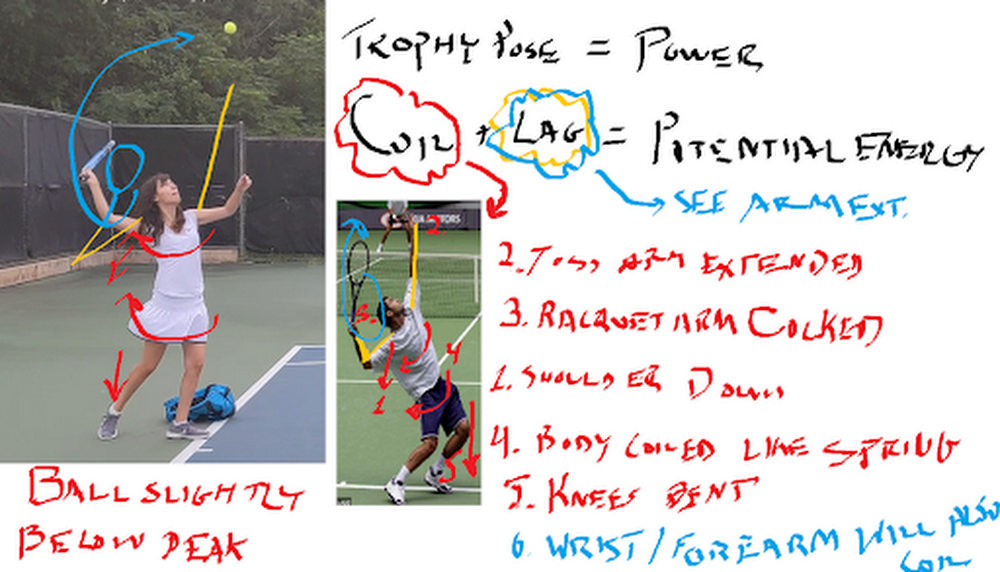
Ah, the Super Bowl. Or, as I prefer to say, the Superb Owl—that oh-so-American Sunday defined by infinite nachos, high-budget commercials, and memes that can last us half a decade. As an uncoordinated math geek, I can’t say I’ve ever had much connection to the “Football” part of the Super Bowl. That said, sports, data analytics, and machine learning make a powerful trio: most professional teams use this technology in one way or another, from tracking players’ moves to detecting injuries to reading numbers off players’ jerseys. And, for the less athletic of us, machine learning may even be able to help us improve our own skills.Which is what we’ll attempt today. In this post, I’ll show you how to use machine learning to analyze your performance in your sport of choice (as an example, I’ll use my tennis serve, but you can easily adopt the technique to other games). We’ll use the Video Intelligence API to track posture, AutoML Vision to track tennis balls, and some math to tie everything together in Python.Want to try this project for yourself? Follow along in the Qwiklab.I give full credit for this idea from my fellow Googler Zack Akil, who used the same technique to analyze penalty kicks in soccer (sorry, “football”).Using machine learning to analyze my tennis serveTo get started, I set out to capture some video data of my tennis serve. I went to a tennis court, set up a tripod, and captured some footage. Then I sent the clips to my tennis coach friend, who gave me some feedback that looked like this:These diagrams were great because they analyzed key parts of my serve that differed from those of professional athletes. I decided to use this to hone in on what my machine learning app would analyze:Were my knees bent as I served?Was my arm straight when I hit the ball?How fast did the ball actually travel after I hit it? (This one was just for my personal interest)Analyzing posture with pose detectionTo compute the angle of my knees and arms, I decided to use pose detection—a machine learning technique that analyzes photos or videos of humans and tries to locate their body parts. There are lots of tools you can use to do pose detection (like TensorFlow.js), but for this project, I wanted to try out the new Person Detection feature of the Google Cloud Video Intelligence API. (You might recognize this API from my AI-Powered Video Archive, where I used it to analyze objects, text, and speech in my family videos.) The Person Detection feature recognizes a whole bunch of body parts, facial features, and clothing. From the docs:To start, I clipped the video of my tennis serves down to just the sections where I was serving. Since I only caught 17 serves on camera, this took me about a minute. Next, I uploaded the video to Google Cloud Storage and ran it through the Video Intelligence API. In code, that looks like: To call the API, you pass the location in Cloud Storage where your video is stored as well as a destination in cloud storage where the Video Intelligence API can write the results.When the Video Intelligence API finished analyzing my video, I visualized the results using this neat tool built by @wbobeirne. It spits out neat visualization videos like this:Pose detection makes a great pre-processing step for training machine learning models. For example, I could use the output of the API (the position of my joints over time) as input features to a second machine learning model that tries to predict (for example) whether or not I’m serving, or whether or not my serve will go over the net. But for now, I wanted to do something much simpler: analyze my serve with high school math!For starters, I plotted the y position of my left and right wrists over time:It might look messy, but that data actually shows pretty clearly the lifetime of a serve. The blue line shows the position of my left wrist, which peaks as I throw the tennis ball a few seconds before I hit it with my racket (the peak in the right wrist, or orange line).Using this data, I can tell pretty accurately at what points in time I’m throwing the ball and hitting it. I’d like to align that with the angle my elbow is making as I hit the ball. To do that, I’ll have to convert the output of the Video Intelligence API–raw pixel locations–to angles. How do you do that? Obviously using the Law of Cosines, duh! (Just kidding, I definitely forgot this and had to look it up. Here’s a great explanation of the Law of Cosines and some Python code.)The Law of Cosines is the key to converting points in space to angles. In code, that looks something like:Using these formulae, I plotted the angle of my elbow over time:By aligning the height of my wrist and the angle of my elbow, I was able to determine the angle was around 120 degrees (not straight!). If my friend hadn’t told me what to look for, it would have been nice for an app to catch that my arm angle was different from professionals and let me know.I used the same formula to calculate the angles of my knees and shoulders. (You can find all the details in the code.)Computing the speed of my servePose detection let me compute the angles of my body, but I also wanted to compute the speed of the ball after I hit it with my racket. To do that, I had to be able to track the tiny, speedy little tennis ball over time.As you can see here, the tennis ball was sort of hard to identify because it was blurry and far away.I handled this the same way Zack did in his Football Pier project: I trained a custom AutoML Vision model.If you’re not familiar with AutoML Vision, it’s a no-code way to build computer vision models using deep neural networks. The best part is, you don’t have to know anything about ML to use it.AutoML Vision lets you upload your own labeled data (i.e. with labeled tennis balls) and trains a model for you.Training an object detection model with AutoML VisionTo get started, I took a thirty second clip of me serving and split it into individual pictures I could use as training data to a vision model:ffmpeg -i filename.mp4 -vf fps=10 -ss 00:00:01 -t 00:00:30 tmp/snapshots/%03d.jpgYou can run that command from within the notebook I provided, or from the command line if you have ffmpeg installed. It takes an mp4 and creates a bunch of snapshots (here at fps=20, i.e. 20 frames per second) as jpgs. The -ss flag controls how far into the video the snapshots should start (i.e. start “seeking” at 1 second) and the flag -t controls how many seconds should be included (30 in this case).Once you’ve got all your snapshots created, you can upload them to Google Cloud storage with the command:gsutil mb gs://my_neat_bucket  # create a new bucketgsutil cp tmp/snapshots/* gs://my_neat_bucket/snapshotsNext, navigate to the Google Cloud console and select Vision from the left hand menu:Create a new AutoML Vision Model and import your photos.Quick recap: what’s a machine learning classifier? It’s a type of model that learns how to label things from example. So to train our own AutoML Vision model, we’ll need to provide some labeled training data for the model to learn from.Once your data has been uploaded, you should see it in the AutoML Vision “IMAGES” tab:Here, you can start applying labels. Click into an image. In the editing view (below), you’ll be able to click and drag a little bounding box:For my model, I hand-labeled about 300 images which took me ~30 minutes. Once you’re done labeling data, it’s just one click to train a model with AutoML–just click the “Train New Model” button and wait.When your model is done training, you’ll be able to evaluate its quality in the “Evaluate” tab below.As you can see, my model was pretty darn accurate, with about 96% precision and recall.This was more than enough to be able to track the position of the ball in my pictures, and therefore calculate its speed:Once you’ve trained your model, you can use the code in this Jupyter notebook to make a cute little video like the one I plotted above.You can then use this to plot the position of the ball over time, to calculate speed:Unfortunately, I realized too late I’d made a grave mistake here. What is speed? Change in distance over time, right? But because I didn’t actually know the distance between me, the player, and the camera, I couldn’t compute distance in miles or meters–only pixels! So I learned I serve the ball at approximately 200 pixels per second. Nice.So there you have it–some techniques you can use to build your own sports machine learning trainer app. And if you do build your own sports analyzer, let me know!Related ArticleBaking recipes made by AIIn this post, we’ll show you how to build an explainable machine learning model that analyzes baking recipes, and we’ll even use it to co…Read Article
Quelle: Google Cloud Platform

Why a leader at Twitter thinks Google Cloud training is a must for IT execs and employees

Editor’s note: Today we’re hearing from Kathleen Vignos, Director of Platform Engineering at Twitter. Kathleen shares how Google Cloud training and certifications help Twitter leaders and employees increase business impact, stay up to date with the latest technologies, and grow their careers. One of Twitter’s core values is having a growth mindset, and as a director in Twitter’s Platform Engineering organization, I believe it’s important for engineering leaders like me to stay up to date on technical training and ensure our teams also have the training they need. I lead our infrastructure automation group which includes our cloud acceleration team. As part of our hybrid cloud strategy, our cloud acceleration engineers focus on enabling Twitter developers to use cloud services such as Google Cloud. To ensure we promote best practices in the cloud, I helped organize and participated in a 6 day-long Google Cloud training session at Twitter. This training gave us all an opportunity to better understand how we could use the latest cloud technologies as well as learn new skills and ways of thinking. During the sessions, we focused on how to design and plan secure cloud architecture solutions as well as manage and provision cloud infrastructure. We also learned how to analyze and optimize technical and business processes. On top of that, the training helped us prepare for Google Cloud’s Professional Cloud Architect certification. Why IT leaders should take Google Cloud trainingCloud architecture training is important for technical leaders because it helps you further your cloud architecture expertise and understand which business decisions to make and the trade-offs involved as you assess your cloud strategy. The training can also help you improve your on-prem strategy. I see the way Google Cloud groups their products together as a type of organizational framework which helped me gain a fresh perspective on how I should structure teams who support our on-prem environment. I’ve also been able to improve our on-prem strategy by considering some of the cloud best practices taught in the sessions. The hands-on experience provided during Google Cloud’s training is valuable as well. As engineering leaders progress in their careers, they get further away from the hands-on experience of coding every day and digging into consoles and features. This type of training provides a unique opportunity for us to keep learning, which is vital as our industry continues to rapidly evolve. We need to have a strong understanding of the technologies we’re already managing and the emerging innovations we need to invest in. For example, running gcloud commands in training labs helps demonstrate how to do things like spin up instances, along with options to do that on the command line, through the console, or via the Cloud API. Creating a networking subnet during the sessions helps mimic the problems that arise for our teams when they need to troubleshoot while setting up networking between services. Simple queries against Bigtable show the power and ease of being able to manipulate large datasets.Moreover, taking the training allowed me to assess the value of the coursework to decide what kind of training to continue providing for my teams.Why IT leaders should invest in Google Cloud training and certifications for their teamsTo earn a Google Cloud certification, individuals need to take Google Cloud training and pass a comprehensive certification exam. The certifications are valuable credentials which help your team validate their expertise and grow their careers as well as help organizations retain top talent. When members of my team became certified, it signaled to others at Twitter that my team includes cloud experts. Certified individuals can also help others at Twitter grow their cloud skills. Developers and engineers highly value the ability to work with new technologies and continue learning new skills at their jobs. In fact, given Twitter’s commitment to learning and growth, our developers and engineers have an expectation that they’re going to be able to work with the most interesting, complex, challenging scale problems and have access to the newest technologies to solve those problems. Providing training and certification opportunities along with the ability to train during work hours signals to employees that a company is invested in their careers and growth. Employees feel more engaged in their work and are more likely to stay at an organization when it’s clear they can move their careers forward within the company with strong support from leadership. Interested in learning more about Google Cloud certifications? Watch this on-demandwebinarfor an overview of available certifications and receive learning paths with recommended training courses, tips, and tools you can use to prepare for certification exams.Related Article2021 resolutions: Kick off the new year with free Google Cloud trainingTackle your New Year’s resolutions with our new skills challenges which will provide you with no cost training to build cloud knowledge i…Read Article
Quelle: Google Cloud Platform
The time for digital excellence is here—Introducing Apigee X

Digital transformation has been a top enterprise priority for years, and in the wake of the global pandemic, that urgency has only increased. Many industries have had to manage in weeks or months what previously would have taken years. According to surveys conducted for our “State of the API Economy 2021” report, three-quarters of enterprises remained focused on digital transformation in 2020, and two-thirds of those companies actually increased their investments. APIs are the backbone of digital transformation, and to help organizations navigate today’s challenging landscape, we’re announcing Apigee X. A major release of our API management platform, Apigee X seamlessly weaves together Google Cloud’s expertise in AI, security and networking to help enterprises efficiently manage the assets on which digital transformation initiatives are built. “APIs have become one of the most crucial steps for enterprises to achieve digitalization. APIs are key to adopting modern architecture patterns such as microservices, EDA, serverless or hybrid/multicloud,” wrote research & advisory firm Gartner in its July 2020 report “Gartner Market Share Analysis: Full Life Cycle API Management, Worldwide, 2019.” “As enterprises reopen post-COVID-19, they will have to find their own path to the new normal. The most successful will have started rescaling and reinventing themselves during the crisis, but the bulk of them will start at reopening. Rescaling and reinventing goes through a decomposition and a recomposition of their operating practices, and the role of an API platform in those activities is paramount. The more effective and extensive the API platform is, the quicker and easier rescaling and reinventing will be.”  Because APIs are how software talks to software and how developers leverage data and functionality at scale, APIs are not just a component in the software stack, but rather products that developers use to execute business strategies and achieve innovation at scale. Like all products, APIs need to be managed, and as Apigee turns 10 this month, we bring a decade of deep expertise and experience from working with over a thousand customers globally. “Apigee provided guidance on how we should roll out our API strategy and how we can think strategically about digital transformation using APIs,” said Rick Schnierer, Vice President, Annuity Technology, at Nationwide Insurance. “What used to take us two to three months to develop as a monolithic service now takes days as a microservice. Apigee has also allowed us to federate development, meaning our developers are empowered to create and share APIs on their own rather than going through a centralized model. We have business connections coming through the Apigee API management platform that we wouldn’t have even thought to initiate on our own.”  “At Deutsche Bank we are looking forward to using Apigee X as we design and implement API solutions integrated into our ecosystem,” said Shaun Cotter, Managing Director, Corporate Bank Technology at Deutsche Bank. “The effective and secure use of API-led integration is a key component of our Google Cloud partnership, and will enable the bank to better connect services internally, innovate with third parties and offer our products to a broader client base.” Achieving digital excellence with Apigee XAs increased digital transformation investments may suggest, competitiveness is increasingly less about transformation ambitions and more about actual transformation. It’s not enough to simply use the cloud, have APIs, or even adopt API management. Rather, the requirement is digital excellence: the ability to rapidly and repeatedly deploy and scale, and to consistently deliver on digital programs. It involves adopting digital as a core enterprise strategy for building profitable API-based platforms and delivering measurable business outcomes. Helping customers make this leap–from gradual transformation and API-based programs to digital excellence and API-based platforms–has been our core goal for Apigee X. “At Pitney Bowes we are always looking for ways to provide the best experience for our clients and Apigee’s technology helps us make this possible. We are very excited about the launch of Apigee X, as it can help businesses elevate API-led programs, and accelerate digital transformation even more,” said James Fairweather, Chief Innovation Officer at Pitney Bowes. “During these uncertain times, organizations worldwide are doubling-down on their API strategies to operate anywhere, automate processes, and deliver new digital experiences quickly and securely. By powering APIs with new capabilities like reCAPTCHA Enterprise, Cloud Armor (WAF), and Cloud CDN, Apigee X makes it easy for enterprises like us to scale digital initiatives, and deliver innovative experiences to our customers, employees and partners.” What Differentiates Apigee XLet’s take a closer look at Apigee X.Global reach, high performance & reliabilityWith shifting market conditions and dynamic work environments, organizations are scaling API programs for global expansion and supporting distributed workforces. Apigee X makes it easy for customers to harness the power of Cloud CDN to maximize the availability and performance of APIs globally. Customers can now deploy their APIs across 24 Google Cloud regions and enhance caching at more than 100 locations. Multi-layer security & privacyScaling API programs also opens up more doors for fraudulent activities, both internally and outside of the organizational boundaries. As our “State of the Economy 2021” report elaborates, in the past year, Apigee saw an increase in abusive API traffic of over 170%. Apigee X offers an integrated approach for applying capabilities like Cloud Armor web application firewall for enhanced API security and Cloud Identity and Access Management (IAM) for authenticating and authorizing access to the Apigee platform. It gives businesses more control over encrypted data with CMEK while allowing them to store data in the region of their choice and control the network locations from which users can access data by using VPC Service Controls.AI-powered automationWith the increasing adoption of APIs for powering enterprise business-critical applications, there’s growing pressure on operations and security teams to ensure they’re always available, secure and performing as expected. Apigee X applies Google’s industry-leading AI and machine learning capabilities to historical API metadata to autonomously identify anomalies, predict traffic for peak seasons, and ensure APIs adhere to compliance requirements. This helps API operators and security admins focus on programs that really matter to their business, rather than spending time on trivial tasks.Being an industry leader in the space of API management, and having worked across customers for a decade, we’ve seen how enterprises can truly transform their businesses by leveraging APIs to build new digital experiences, more powerful and intelligent automations, and more impactful data-driven applications. Today’s launch continues to expand what API management can do, and it offers businesses an onramp to achieve digital excellence over the next decade. We can’t wait to see what you’ll do next with us. Click here to try the new release of Apigee for free.Gartner does not endorse any vendor, product or service depicted in its research publications and does not advise technology users to select only those vendors with the highest ratings or other designation. Gartner research publications consist of the opinions of Gartner’s research organization and should not be construed as statements of fact. Gartner disclaims all warranties, expressed or implied, with respect to this research, including any warranties of merchantability or fitness for a particular purpose.Related ArticleTop 5 trends for API-powered digital transformation in 2021Google Cloud’s State of APIs report investigates digital transformation in 2020 and where trends point in 2021 and beyond.Read Article
Quelle: Google Cloud Platform

Google Cloud AI leaders share tips for getting started with AI

Machine learning (ML) can help you solve hard business problems in new ways, but getting started can feel overwhelming. We are fortunate to have some great leaders in Google Cloud AI who have decades of experience in artificial intelligence (AI) and have generously agreed to share a few words of advice from their learnings. In the following videos they share tips for businesses and organizations getting started in AI, as well as what’s top of mind for them in Cloud AI this year.How do you enjoy these revenue and efficiency gains? Here’s why this field of artificial intelligence has the business world so enthralled. According to a recent McKinsey & Company study, AI is expected to increase economic output by $13 trillion in the next decade. The firm states businesses that fully absorb this technology could double their cash flow in that time, while companies that don’t could see a 20% decline. Businesses in every sector and across the globe are seeing this opportunity and choosing Google Cloud AI to solve some of their toughest challenges. From Etsy, which exemplifies the new era of scaling a business, to deluged government agencies like the Illinois Department of Employment Security—organizations in every industry are using our Cloud AI services to solve problems and innovate. There’s lots of ways to get started with Google Cloud AI: from prepackaged solutions that integrate with your existing systems and workflows, to our managed AI Platform for building and managing the entire ML model development lifecycle, to pretrained models accessible via APIs, to easily add sight, language, conversation and data into your apps.   If you’d like to take our AI Platform for a spin, you can explore labs on Qwiklabs and other course offerings in our ML learning path to gain more ML experience on Google Cloud. And there’s a $300 creditand free tier to start experimenting today.Related ArticleEmpowering teams to unlock the value of AIThe latest and greatest AI and machine learning news from Google CloudRead Article
Quelle: Google Cloud Platform

Customers who make data sing and analytics product news to cure your data FOMO

In December, we predicted that a “revolution was coming for data and the cloud in 2021.” Well, January came and gone: our team has been busy delivering new capabilities, content and best practices to help kick your year into high gear. Our work is guided by our customers; we’re always listening to your needs and working to build innovative solutions that will help you succeed.Here is a quick digest of what’s happening in data analytics at Google this month.The Data Democracy Trilogy This past week we released the third and final installment of our “data democratization trilogy,” a series of blogs aimed at helping our community deliver on their mission to become more data-driven.  Our blogs include best practices from incredible organizations like AB Tasty, Sunrun, Veolia, Geotab and AES Digital Hub who have empowered business users, expanded the use of machine learning and made real-time analytics ubiquitous. The democratization of insights has been a key theme for our customers and a personal passion of mine, and it will be front and center of our plans for 2021. If you want to find out how Dataflow, together with Pub/Sub, can help the challenges posed by traditional streaming systems or how the combination of BigQuery, Connected Sheets, Looker and Data QnA can provide faster answers to your employees, be sure to bookmark these blogs and share them with your teams and colleagues.And, if you’re ready for more, check out our design pattern catalog. This past week, we released a set of resources to help you perform demand forecasting at scale using BQML and Data Studio. The best way to understand this pattern is to watch the video below and to register for our webinar next week: How to do demand forecasting with BigQuery ML.As you navigate through the catalog, you’ll find everything you need from predicting customer lifetime value, building propensity to purchase models, or architecting product recommendation and anomaly detection systems. You’ll probably wonder how we came up with such an impactful list of best practices. The answer is simple: our customers!  Our customers guide everything we do and we pride ourselves in building the solutions you need across any and all industries. That’s why, when you navigate through our catalog, you’ll find that these resources are applicable across many industries, from retail and manufacturing to financial services, telecommunications and many more.From staying up until 3am to relaxing and eating ice cream To give you an example of the commitment we make to our customers, I want to point you to an outstanding conversation we posted last week between Chad Jennings, Data Analytics product manager and two of our greatest customers: the New York Times & The Major League Baseball.The video is accompanied by a great blog, authored by The New York Times’ Executive Director for Data Products, Edward Podojil. In the piece, Ed talks about his company’s data architecture evolution and how he went from staying “up until three in the morning one night trying to keep data running for their needs” to “relaxing and eating ice cream” because he could now “more easily manage his data environment, set and meet higher expectations for data ingestion, analysis and insight.” This is the kind of story that truly warms my heart; I hope you’ll enjoy it too!Innovators in all industriesOur customers work on some of the most meaningful and interesting issues. We pride ourselves in serving them and paying attention to their progress. Great publications like Diginomica and Healthcare business and policy site FierceHealthcare documented the journeys of some of them this month:We hope you’ll find value in how The Home Depot describes their journey and documented how BigQuery allowed them to achieve their “one version of the truth”.  You might have been inspired by Highmark Health’s decision to tackle the data fragmentation experienced in the healthcare industry by partnering with Google Cloud to tap into our AI and Analytics technology.Our goal is to enable every industry to accelerate their ability to digitally transform and reimagine their business through data-powered innovation. And we mean every industry.  If you’re in the entertainment industry for instance, you’ll want to read about why BMG selected Google Cloud, BigQuery and Dataproc to tap into relevant data across the music lifecycle with smarter analytics tools.“We actually migrated all of our data warehouse to BigQuery over the last three years. The upside of that is now we have a lot more of this data together. There’s only one place of truth, so there’s never an argument in our organization about whether your copy of the data is the real truth or my copy of the data is the real truth.” – The Home Depot”The Living Health model takes the information and preferences that a person provides us, applies the analytics developed with Google Cloud, and creates a proactive, dynamic, and readily accessible health plan and support team that fits an individual’s unique needs.” – Highmark HealthProduct capabilities you’re not going to want to missOur customers inspire us to do more every day and we aim to continuously introduce new functionality that makes your work easier, more robust, and better integrated.  In January, we introduced radical usability improvements with our new BigQuery Cloud Console UI: you can now experience new multi-tab navigation, a new resource panel & new SQL editor. Find out more. Beyond usability, customers value scale and we hear that you want our help in making queries and use cases virtually limitless. This is why, this month, we introduced support for the BigNUMERIC datatype. BigQuery already supports a wide range of data types for storing numeric data. Of these data types, NUMERIC supports the highest degree of precision with 38 digits of precision and 9 digits of scale. But, as large web-scale datasets expand to support time, location or finance-based information with an expanded degree of precision, the current precision and scale in NUMERIC was not sufficient to support the data. We introduced BIGNUMERIC, which supports 76 digits of precision and 38 of scale, in public preview in all regions. Read more here. Finally, many of you have reached out to us to ask how you can use BigQuery with Open Source engines like Apache Spark. Chris Crosbie, product manager on Dataproc, produced an outstanding tutorial video introducing our Spark-BigQuery-connectorthrough the use of three common use cases for data engineers and data scientists.Want to take BigQuery for spin? Get started with the BigQuery sandbox here. While you’re at it, you might want to refer to this January blog on how to let users upload their complex CSV file into BigQuery using Google SheetsMore community news!If you’re subscribing to this blog, you know that our teams are focused on enabling the community and partnering with you to advance the field of data analytics, machine learning and data science. Let us know how we can participate in your success!  This past month, I had the opportunity to speak about X-Analytics with Justin Borgman, the CEO of Starburst Data, in preparation for his company’s upcoming event: Datanova. I hope you can make time for it: the two-day virtual conference kicks off on February 9th and Bill Nye, the “science guy” is the keynote! Find out more about it here.
Quelle: Google Cloud Platform

Give app teams autonomy over their DNS records with Cloud DNS peering

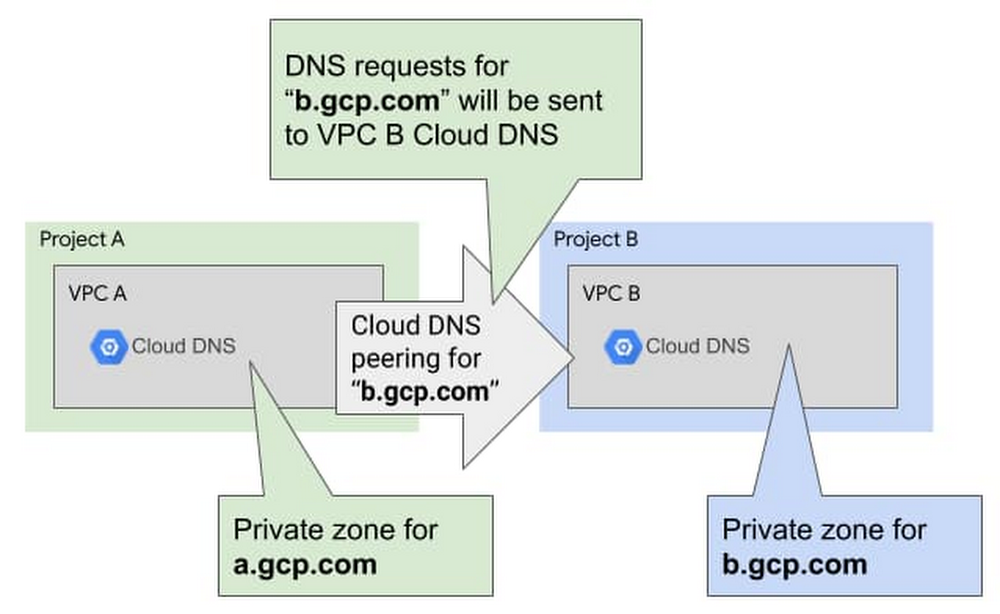
In large Google Cloud environments, Shared VPC is a very scalable network design that lets an organization connect resources from multiple projects to a common Virtual Private Cloud (VPC) network, so that they can communicate with each other securely and efficiently using internal IPs. Typically shared by many application teams, a central team (or platform team) often manages the Shared VPC’s networking configuration while application teams use the network resources to create applications in their own service projects.In some cases, application teams want to manage their own DNS records (e.g., to create new DNS records to expose services, update existing records…). There’s a solution to support fine-grained IAM policies using Cloud DNS peering. In this article, we explore how to use it to give your application teams autonomy over their DNS records, while ensuring that the central networking team maintains fine-grained control over the entire environment.Understanding the Cloud DNS peering solutionImagine that you, as an application team (service project) owner, want to be able to manage your own application (service project) DNS records without impacting other teams or applications. DNS peering is a type of zone in Cloud DNS that allows you to send DNS requests from a specific sub-domain to another Cloud DNS zone configured in another VPC—and it lets you do just that!DNS peering in actionCloud DNS peering is not to be confused with VPC peering, and it doesn’t require you to configure any communication between the source and destination VPC. All the DNS flows are managed directly in the Cloud DNS backend: each VPC talks to Cloud DNS and Cloud DNS can redirect the queries from one VPC to the other.So, how does DNS peering allow application teams to manage their own DNS records? By using DNS peering between a Shared VPC and other Cloud DNS zones that are managed by the application teams.For each application team that needs to manage its own DNS records, you provide them with:Their own private DNS subdomain (for example <applicationteam>.<env>.<customer>.gcp.com)Their own Cloud DNS zone(s) in a dedicated project, plus a standalone VPC with full IAM permissionsYou can then configure DNS peering for the specific DNS subdomain to their dedicated Cloud DNS zone. In this VPC, application teams have Cloud DNS IAM permissions only on their own Cloud DNS instance and can manage only their DNS records.The central team, meanwhile, manages the DNS peering and decides which Cloud DNS instance is authoritative for which subdomain, thus allowing application teams to only manage their own subdomain. By default, all VMs in the Shared VPC use Cloud DNS in the Shared VPC as their local resolver. This Cloud DNS instance answers for all DNS records in the Shared VPC, uses DNS peering to the application teams’ Cloud DNS instances and VPC peering or forwarding to on-prem for on-prem records.High-level design of the Cloud DNS peering solutionAs detailed above, the flow is the following:A VM in any project of the Shared VPC uses Cloud DNS as its local DNS resolver.This VM tries to resolve app1.team-b.gcp.com, which is a DNS record owned by team B that exposes a local application (a Compute Engine instance or a Cloud Load Balancer).This VM sends the DNS request to the Shared VPC Cloud DNS. This Cloud DNS is configured with DNS peering that sends everything under the “team-b.gcp.com” subdomain to Cloud DNS in the DNS project for team B.Team B is able to manage its own DNS records, but only in its dedicated DNS project. It has a private zone there for “*.team-b.gcp.com” and an A record for “app1.team-b.gcp.com” that resolves to “10.128.0.10”.When the VM receives its DNS answer, it tries to reach 10.128.0.10 using the VPC routing table. If the corresponding firewall rules are open, the request is successful!Terraform codeAre you interested in trying out this solution for yourself? You can find an end-to end-example in Terraform, which provisions the following architecture:This Terraform code should allow you to get started quickly and can be reused to integrate this design into your Infrastructure as Code deployment. Additional considerationsIn the above example, we used a standalone project dedicated to DNS per application team. You can also use the application team’s service project by creating a local VPC in the application project and configuring DNS peering to this local DNS project.The tradeoffs are the following:Security and autonomyMany organizations need the security and centralized control that Shared VPC provides. But with this architecture based on Cloud DNS peering, you can also grant application teams the autonomy they need to maintain their own DNS records—freeing the central networking team from that burden! For more on managing complex networking environments, check out this document on DNS best practices.
Quelle: Google Cloud Platform

Continuous model evaluation with BigQuery ML, Stored Procedures, and Cloud Scheduler

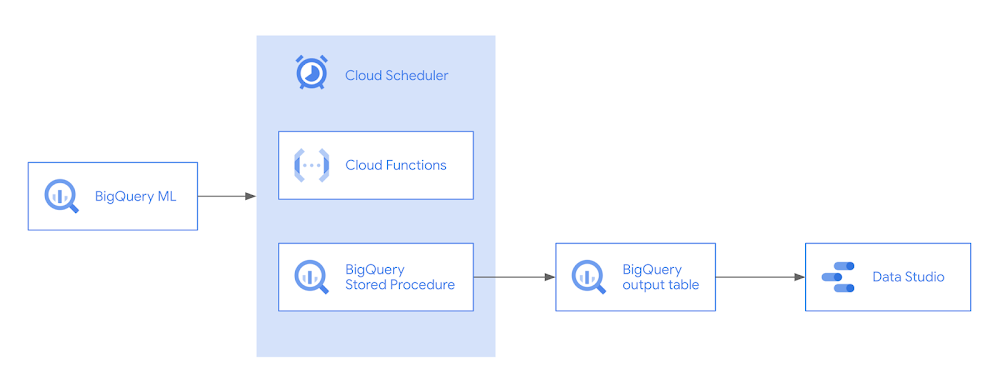
Continuous evaluation – the process of ensuring a production machine learning model is still performing well on new data – is an essential part in any ML workflow. Performing continuous evaluation can help you catch model drift, a phenomenon that occurs when the data used to train your model no longer reflects the current environment. For example, with a model classifying news articles, new vocabulary may emerge that were not included in the original training data. In a tabular model predicting flight delays, airlines may update their routes, leading to lower model accuracy if the model isn’t retrained on new data. Continuous evaluation helps you understand when to retrain your model to ensure performance remains above a predefined threshold. In this post, we’ll show you how to implement continuous evaluation using BigQuery ML, Cloud Scheduler, and Cloud Functions. A preview of what we’ll build is shown in the architecture diagram below.To demonstrate continuous evaluation, we’ll be using a flight dataset to build a regression model predicting how much a flight will be delayed.Creating a model with BigQuery MLIn order to implement continuous evaluation, we’ll first need a model deployed in a production environment. The concepts we’ll discuss can work with any environment you’ve used to deploy your model. Here we’ll use BigQuery Machine Learning (BQML) to build the model. BQML lets you train and deploy models on custom data stored in BigQuery using familiar SQL. We can create our model with the following query:Running this will train our model and create the model resource within the BigQuery dataset we specified in the CREATE MODEL query. Within the model resource, we can also see training and evaluation metrics. When training completes, the model is automatically available to use for predictions via a ML.PREDICT query:With a deployed model, we’re ready to start continuous evaluation. The first step is determining how often we’ll evaluate the model, which will largely depend on the prediction task. We could run evaluation on a time interval (i.e. once a month), or whenever we receive a certain number of new prediction requests. In this example, we’ll gather evaluation metrics on our model on a daily basis.Another important consideration for implementing continuous evaluation is understanding when you’ll have ground truth labels available for new data. In our flights example, whenever a new flight lands we’ll know how delayed or early it was. This could be more complex in other scenarios. For example, if we were building a model to predict whether someone will buy a product they add to their shopping cart, we’d need to determine how long we’d wait once an item was added (minutes? hours? days?) before marking it as unpurchased.Evaluating data with ML.EVALUATEWe can monitor how well our ML model(s) performs over time on new data, by evaluating our models regularly and inserting them into a table on BigQuery.Here’s the normal output you would get from using ML.EVALUATE:In addition to these metrics, we will also want to store some metadata, such as the name of the model we evaluated and the timestamp of the model evaluation. But as you can see below, the following code can quickly become difficult to maintain, as every time you execute the query, you would need to replace MY_MODEL_NAME twice (on lines 3 and 6), with the name of the model you created (e.g., “linreg”).Creating a Stored Procedure to evaluate incoming dataYou can use a Stored Procedure, which allows you to save your SQL queries and run them by passing in custom arguments, like a string for the model name. CALL modelevaluation.evaluate(“linreg”); Doesn’t this look cleaner already? To create the stored procedure, you can execute the following code, which you can then call using the CALL code shown above. Notice how it takes in an input string, MODELNAME, which then gets used in the model evaluation query.Another added benefit of stored procedures is that it’s much easier to share the query to CALL a stored procedure with others — which abstracts away from the raw SQL — rather than share the full SQL query. Using the Stored Procedure to insert evaluation metrics into a tableUsing the stored procedure below, in a single step, we can now evaluate the model and insert it to a table, modelevaluation.metrics, which we will first need to create. This table needs to follow the same schema as in the stored procedure. Perhaps the easiest way is to use LIMIT 0, which is a cost-free query returning zero rows, while maintaining the schema.With the table created, now every time you run the stored procedure on your model “linreg”, it will evaluate the model and insert them as a new row into the table:CALL modelevaluation.evaluate_and_insert(“linreg”);Continuous evaluation with Cloud Functions and Cloud SchedulerTo run the stored procedure on a recurring basis, you can create a Cloud Function with the code you want to run, and trigger the Cloud Function with a cron job scheduler like Cloud Scheduler.Navigating to the Cloud Functions page on Google Cloud Platform, create a new Cloud Function that uses a HTTP trigger type:Note the URL, which will be the trigger URL for this Cloud Function. It should look something like:https://<region>-<projectid>.cloudfunctions.net/<functionname>Clicking “Next” on your Cloud Functions gets you to the editor, where you can paste the following code, while setting the Runtime  to “Python” and changing the “Entry point” to “updated_table_metrics”:Under main.py, you can use the following code:Under requirements.txt, you can paste the following code for the required packages:You can then deploy the function, and even test your Cloud Function by clicking on “Test the function” just to make sure it returns a successful response:Next, to trigger the Cloud Function on a regular basis, we will create a new Cloud Scheduler job on Google Cloud Platform.By default, Cloud Functions with HTTP triggers will require authentication, as you probably don’t want anyone to be able to trigger your Cloud Functions. This means you will need to include a service account to your Scheduler job that has IAM permissions for:Cloud Functions InvokerCloud Scheduler Service AgentOnce the job is created, you can try to run the job by clicking “Run now”.Now you can check your BigQuery table and see if it’s been updated! Across multiple days or weeks, you should start to see the table populate, like below:Visualizing our model metricsIf we’re regularly running our stored procedure on new data, analyzing the results of our aggregate query above could get unwieldy. In that case, it would be helpful to visualize our model’s performance over time. To do that we’ll use Data Studio. Data Studio lets us create custom data visualizations, and supports a variety of different data sources, including BigQuery. To start visualizing data from our BigQuery metrics table, we’ll select BigQuery as a data source, choose the correct project, and then write a query capturing the data we’d like to plot:For our first chart, we’ll create a time series to evaluate changes to RMSE. We can do this by selecting “timestamp” as our dimension and “rmse” as our metric:If we wanted more than one metric in our chart, we can add as many as we’d like in the Metric section. With our metrics selected, we can switch from Edit to View mode to see our time series and share the report with others on our team. In View mode, the chart is interactive so we can see the rmse for any day in the time series by hovering over it:We can also download the data from our chart as a csv or export it to a sheet. From this view, it’s easy to see that our model’s error increased quite a bit on November 19th.What’s next?Now that we’ve set up a system for continuous evaluation, we’ll need a way to get alerts when our error goes above a certain threshold. We also need a plan for acting on these alerts, which typically involves retraining and evaluating our model on new data. Ideally, once we have this in place we can build a pipeline to automate the process of continuous evaluation, model retraining, and new model deployment. We’ll cover these topics in future posts – stay tuned!If you’d like to learn more about any of the topics covered in this post, check out these resources:BigQuery Machine Learning quickstartBigQuery Stored ProceduresData Studio + BigQuery quickstart Let us know what you thought of this post, and if you have topics you’d like to see covered in the future! You can find us on Twitter at @polonglin and @SRobTweets.Related ArticleHow to build demand forecasting models with BigQuery MLWith BigQuery ML, you can train and deploy machine learning models using SQL. With the fully managed, scalable infrastructure of BigQuery…Read Article
Quelle: Google Cloud Platform
Compliance with confidence: Introducing Assured Workloads Support

As organizations in regulated industries modernize and adopt cloud technologies, ensuring the security, privacy, and regulatory compliance of their sensitive workloads is an essential part of choosing a cloud provider. Regulated customers have specific compliance needs around data locality and personnel access to customer data. In the US specifically, these are mandated by requirements under the Department of Defense (i.e., IL4), the FBI’s Criminal Justice Information Services Division (CJIS), and the Federal Risk and Authorization Management Program (FedRAMP).Last year, we introduced Assured Workloads (now generally available with additional features in preview) which lets Google Cloud customers easily and quickly create controlled environments in which US data location and US person support controls are enforced. Regulated customers, and the organizations which interact with them, can use this product to support their compliance efforts by:Choosing to store their sensitive workloads in the US only;Ensuring only Google personnel who meet criteria on geographical access location (currently, US only), background checks, and “US Person” status, can support their workload.We understand that these compliance regulations have a significant impact to your organization and safeguarding your business is important to us. Therefore, today, we’re introducing Assured Workloads Supportfor Google Cloud, which is now generally available (GA) to Premium Support customers. Assured Workloads Support is a Value Add Service to Premium Support customers, who will receive Premium Support from a US Person, in a US Location, 24/7. Customers also receive all the key benefits from Premium Support—15-min response time  for P1 cases, issues resolved by customer aware Google Technical Solution Engineers with access to your business systems information, and direct engagement with a named Technical Account Manager (TAM), a trusted technical advisor focused on operational rigor, platform health and architectural stability. We look forward to expanding Assured Workloads Support in other regions beyond the US later this year. Assured Workloads Support for Google Cloud is available for purchase effective January 19th, 2021. Assured Workloads Support is available to customers who purchase the Assured Workloads Premium Subscription and Premium Support. Please connect with your Google Cloud Sales representative to learn more.Related ArticleCompliance without compromise: Introducing Assured Workloads for GovernmentAssured Workloads for Government, currently in Private Beta, can help you serve your government workloads without the compromises of trad…Read Article
Quelle: Google Cloud Platform
Introducing real-time data integration for BigQuery with Cloud Data Fusion

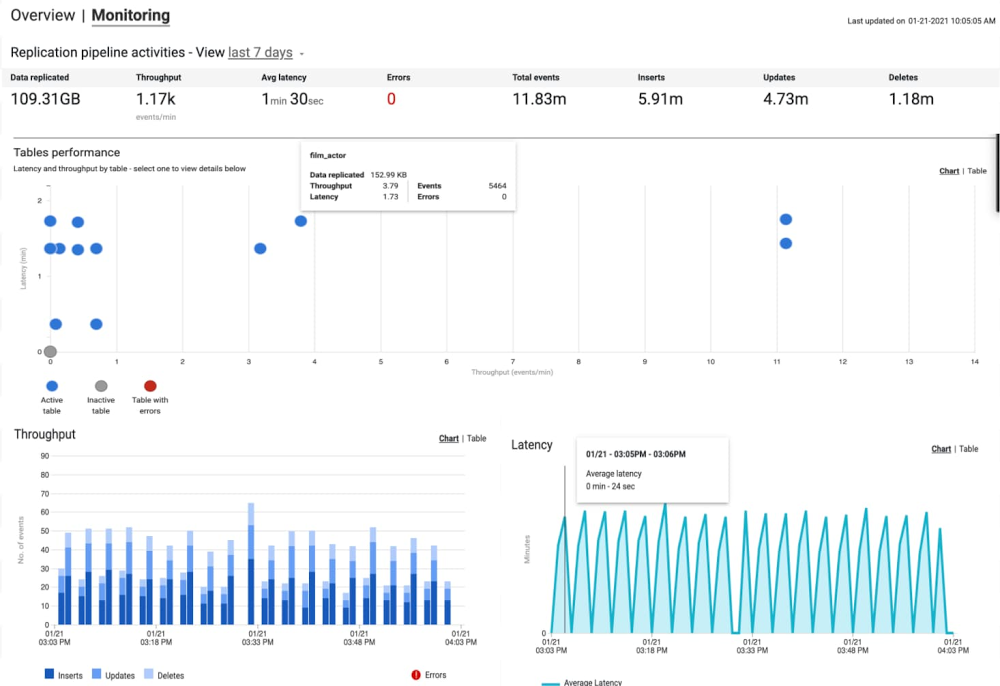
Businesses today have a growing demand for real-time data integration, analysis, and action. More often than not, the valuable data driving these actions—transactional and operational data—is stored either on-prem or in public clouds in traditional relational databases that aren’t suitable for continuous analytics. While old-school migrations or batch ETL loads can achieve the objective of loading data to a data warehouse, these high-latency approaches don’t cut it when it comes to making the accurate decisions based upon the most up-to-date insights. Cloud Data Fusion is a fully managed, cloud-native data integration and ingestion service that helps developers, data engineers, and business analysts alike to efficiently build and manage ETL/ELT jobs. Today we’re announcing the public preview launch of the replication application in Data Fusion that enables low-latency, real-time data replication from transactional and operational databases such as SQL Server and MySQL directly into BigQuery. Let’s take a closer look at the benefits of replication in Data Fusion:Remove technical bottlenecks so even citizen developers can set up replication easilyCloud Data Fusion features a simple, wizard-driven interface that enables even citizen developers such as ETL developers and data analysts to easily set up data replication. This standard, easy-to-use interface eliminates the need for development of complicated, bespoke tools for each type of operational database, thereby enabling self-service, continuous replication of data to BigQuery.Feasibility assessment and actionable recommendationsIt also includes an assessment tool to help identify schema incompatibilities, connectivity issues, and missing features prior to starting replication, then provides corrective actions. This helps users get ahead of potential issues during replication, thereby leading to faster development and iteration. Easily access the latest operational data in real time for analysis within BigQueryChange data capture, or CDC, provides a representation of data that has changed in a stream, allowing computations and processing to focus specifically on only the most recently changed records, thereby minimizing egress toll on sensitive production systems. With this release, Data Fusion now offers log-based replication directly into BigQuery. It integrates with Debezium as the change provider for making CDC logs from various databases available in a common format. It currently includes support for Microsoft SQL Server (which relies upon SQL Server CDC) and MySQL (which relies upon MySQL Binary Log). With support for CDC streams, Google Cloud users have access to the latest data in BigQuery for analysis and action.Enterprise scalability to support high-volume transactional databasesInitial loads of data to BigQuery are supported with zero-downtime snapshot replication to make the data warehouse ready for consuming changes continuously. Once the initial snapshot is done, high-throughput, continuous replication of changes then starts in real-time. End-to-end operational visibilityData Fusion also provides operational dashboards to monitor throughput, latency, and errors in replication jobs. These dashboards provide real-time insights into replication performance. This lets users proactively identify potential bottlenecks, and monitor data delivery SLAs.Take advantage of key Google Cloud features and integrationsReplication is available in all Google Cloud regions supported today for Data Fusion. This launch includes support for Customer-Managed Encryption Keys (CMEK) and VPC-SC. Cloud Data Fusion’s integration within the Google Cloud platform ensures that the highest levels of enterprise security and privacy are observed while making the latest data available in your data warehouse for analytics.Ready to try out replication? Create a new instance of Data Fusion and add the replication app. Don’t forget to bring the getting started guide along for the ride.
Quelle: Google Cloud Platform

How to develop with PyTorch at lightning speed

Over the years, I’ve used a lot of frameworks to build machine learning models. However, it was only until recently that I tried out PyTorch. After going through the intro tutorial, Deep Learning with PyTorch: A 60 Minute Blitz, I started to get the hang of it. With PyTorch support built into Google Cloud, including notebooks and pre-configured VM images, I was able to get started easily.There was one thing that held me back. All of the wonderful flexibility also meant that there were so many ways to do things. How should I load my training and test data? How should I train my model, calculating the loss and logging along the way? I got everything working properly, but I kept wondering if my approach could be improved. I was hoping for a higher level of abstraction that would take care of how to do things, allowing me to focus on solving the problem.I was delighted to discover PyTorch Lightning! Lightning is a lightweight PyTorch wrapper that helps you organize your code and provides utilities for common functions. With Lightning, you can produce standard PyTorch models easily on CPUs, GPUs, and TPUs! Let’s take a closer look at how it works, and how to get started.To introduce PyTorch Lightning, let’s look at some sample code in this blog post from my notebook, Training and Prediction with PyTorch Lightning. The dataset used, from the UCI Machine Learning Repository, consists of measurements returned from underwater sonar signals to metal cylinders and rocks. The model aims to classify which item was found based on the returned signal. Acoustic data has a wide variety of applications, including medical imaging and seismic surveys, and machine learning can help detect patterns in this data.Organizing your notebook code with PyTorch LightningAfter installing Lightning, I started by creating a SonarDataset, inheriting from the standard PyTorch Dataset. This class encapsulates logic for loading, iterating, and transforming data. For example, it maps the raw data, with “R” for rocks and “M” for mines, into 0 and 1. That enables the data to answer the question, “is this a mine?”, a binary classification problem. Here’s a code snippet from that class:Next, I created a SonarDataModule, inheriting from Lightning’s LightningDataModule. This class provides a standard way to split data across training, testing, and validation sets, and then to load each set into a PyTorch DataLoader. Here’s a code snippet of from the setup() method in the SonarDataModule:Finally, I created a SonarModel, inheriting from LightningModule. This class contains the model, as well as methods for each step of the process, such as forward() for prediction, training_step() for computing training loss, and test_step() for calculating accuracy.Training and predicting with your modelLightning’s Trainer class makes training straightforward. It manages details for you such as interfacing with PyTorch DataLoaders; enabling and disabling gradients as needed; invoking callback functions; and dispatching data and computations to appropriate devices.Let’s look at a couple of the methods in the tutorial notebook. First, you instantiate a new trainer, specifying options such as the number of GPUs to use and how long to train. You train your model with fit(), and can run a final evaluation on your test data with test(). A tune() method is also provided to tune hyperparameters.After the training process, you can use standard PyTorch functions to save or predict with your model, for instance:Getting started with LightningGoogle Cloud’s support for PyTorch makes it easy to build models with Lightning. Let’s walk through the steps. First, you’ll want to create a notebook instance using Cloud AI Platform Notebooks. You can select a PyTorch instance that is preloaded with a PyTorch DLVM image, including GPU support if you’d like. Once your notebook instance is provisioned, simply select OPEN JUPYTERLAB to begin.Since PyTorch dependencies are already configured, all you need to do is include one line in your notebook to start using Lightning: !pip install pytorch-lightning.If you’d like to access the sample for this tutorial, you can open a new terminal (File > New > Terminal), and then run git clone https://github.com/GoogleCloudPlatform/ai-platform-samples. You’ll find the sample in ai-platform samples > notebooks > samples > pytorch > lightning.With Lightning, using PyTorch is more accessible than ever before. With best practices and helpful utilities embedded in the framework, you can focus on solving ML problems. Since Lightning produces standard PyTorch code, you’ll be able to leverage Google Cloud’s PyTorch support for developing, training, and serving your models.
Quelle: Google Cloud Platform