Introducing Bare Metal Solution for SAP workloads

When customers run SAP workloads on Google Cloud, we know that scalability is a major concern. It’s why SAP on Google Cloud offers some of the industry’s most powerful SAP-certified infrastructure options: single-node 6TB and 12TB VMs optimized for S/4HANA OLTP workloads.Some of our customers, however, run on-premises SAP environments that are far bigger than the biggest and most robust VMs. As you might expect, running SAP workloads at such massive scale can be an expensive, complex, and generally burdensome undertaking. But customers can see major operational benefits like greater scalability and lower cost of ownership if they move these mega-scale SAP workloads to a cloud environment. Performance is critical as well. See below for details on our record setting bare metal performance benchmark for SAP. Bare Metal Solution: a good fit for massive SAP workloadsRecently, we expanded Bare Metal Solution to include SAP-certified hardware options. Bare Metal Solution systems are dedicated, single-tenant systems designed specifically to run workloads that are too large or otherwise unsuitable for standard, virtualized environments. The Bare Metal Solution gives SAP customers great options for modernizing their biggest and most challenging workloads.Bare Metal Solution supplies fully-managed hardware and supporting infrastructure offered as a subscription service. This includes storage and networking, as well as power, cooling, and other infrastructure within a secure, low latency datacenter. We handle the hardware, you handle the softwareWhile Google Cloud manages the hardware and infrastructure for Bare Metal Solution, our customers maintain control over the software running on these systems. This includes full control over the operating systems and all of the software associated with their SAP environments and application workloads. Bare Metal Solution also provides automated onboarding and provisioning tools that simplify tasks such as operating system configuration and setup for backup and monitoring tools.Click to enlargeThere are several ways our SAP customers see value when they migrate these mega-scale workloads to Bare Metal Solution. Many customers take advantage of low-latency connections with Google Cloud AI and machine learning tools, with BigQuery, and with private access to Google Cloud APIs and services. In addition, subscription-based pricing eliminates over-provisioning costs and requires no upfront capital investments. There are also no data ingress or egress charges between the Bare Metal Solution and other Google Cloud services in the same region.Bare Metal Solution gives customers a choice of SAP-certified systems for running their workloads. Google Cloud and Intel collaborated to create a best in class architecture for SAP on bare metal that can provide fast insights, low latency, and high throughput. This includes general-purpose Intel® Xeon systems with up to 224 vCPUs and 3TB of memory. Additionally two machine types are certified specifically to run very large-scale HANA workloads using 12 and 16-socket Intel® 2nd gen Xeon Scalable processors configured with 18TB and 24TB of memory, respectively. Bare Metal Solution hits a new SAP benchmarking recordCustomers require a high degree of performance and reliability from Google Cloud, which was a key principle in the design phase for Bare Metal Solution. The workloads running on these systems are absolutely critical for customers and it’s no small feat to ensure consistent infrastructure performance and reliability at such massive scale.That’s why we’re thrilled to share some recent news about a major Google Cloud team achievement: a new world record for system performance against a key SAP performance benchmark.Many of our SAP customers are familiar with the SAP Standard Application Benchmarks. These benchmarks are an important tool for testing hardware and database performance of SAP applications, scalability, concurrency, power efficiency, multi-user behavior, and many other facets of enterprise application performance.The Google Cloud team focused its benchmarking efforts on the SAP Sales & Distribution benchmark: a hardware-independent measure of system performance. The unit of measurement is the SAP Application Performance Standard (SAPS); 100 SAPs is defined as the system performance required to process 2,000 business order line items in one hour.To certify the solution, Google Cloud tested a 16-socket/24TB server using the Intel Cascade Lake processor against this critical and closely followed benchmark. We were thrilled with the result: the Bare Metal Solution server set a new world record for Intel processors, achieving 892,270 SAPS.SAP benchmarking records are a genuine mark of achievement for the companies that earn them—as you can tell by looking at how many times new contenders have stepped up with new performance records over the past quarter century. This is our first contribution as a SAP benchmarking record holder, but we certainly hope it won’t be the last as we work to deliver faster, more reliable and more innovative infrastructure for SAP customers.Learn more about Bare Metal Solution on Google Cloud as well as our offerings for SAP customers.Related ArticleBare Metal Solution: new regions, new servers, and new certificationsCheck out new regions and a smaller 8-core server, plus HIPAA and PCI-DSS compliance, for Bare Metal Solution to move your Oracle workloa…Read Article
Quelle: Google Cloud Platform

Architecting a data lineage system for BigQuery

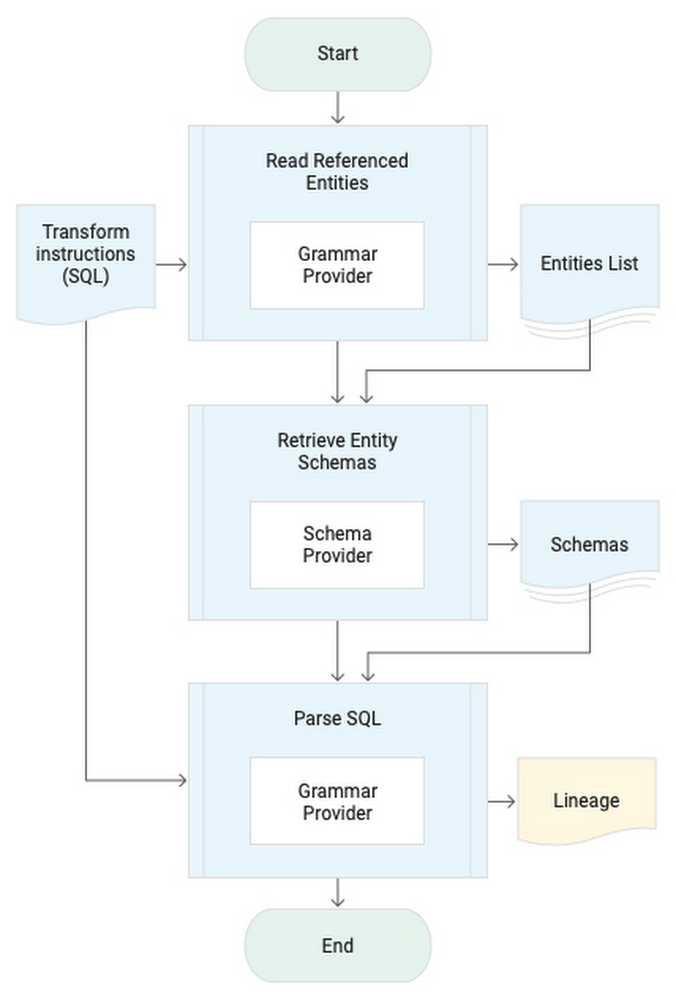
Democratization of data within an organization is essential to help users derive innovative insights for growth. In a big data environment, traceability of where the data in the data warehouse originated and how it flows through a business is critical. This traceability information is called data lineage. Being able to track, manage, and view data lineage helps you to simplify tracking data errors, forensics, and data dependency identification. In addition, data lineage has become essential for securing business data. An organization’s data governance practices require tracking all movement of sensitive data, including personally identifiable information (PII). Of key concern is ensuring that metadata stays within the customer’s cloud organization or project.Data Catalog provides a rich interface to attach business metadata to the swathes of data scattered across Google Cloud in BigQuery, Cloud Storage, Pub/Sub or outside Google Cloud in your on-premises data centers or databases. Data Catalog enables you to organize operational/business metadata for data assets using structured tags. Data Catalog structured tags are user-specified and you can use them to organize complex business and operational metadata, such as entity schema, as well as data lineage.Common data lineage user journeysData lineage can be useful in a variety of user journeys that require a number of related but different capabilities. Different user journeys require lineage information at different granularities like relationships between data assets such as tables or datasets, while other user journeys require data lineage at column level for each table. Another category of user journeys trace data from specific rows in a table and is often referred to as row-level lineage. Here, we’ll describe our proposed architecture, which focuses on the most commonly used (column-level) granularity for automated data lineage and can be used for the following user journeys:Impact/dependency analysisSchema modification of existing data assets, like deprecation and replacement of old data assets, is commonplace in enterprises. Data lineage helps you flag the breaking changes and identify specific tables or BI dashboards that will be impacted by the planned changes.Data leakage/exfiltrationIn a self-service analytics environment, accidental data exfiltration is high risk and can cause a loss of face for the enterprise. Data lineage helps in identifying unexpected data movement to ensure that data egress is done only to the approved projects/locations where it is accessible only by approved people. Debugging data correctness/qualityData quality is often compromised by missing or incorrect raw data as well as incorrect data transformations in the data pipelines. Data lineage enables you to traverse the lineage graph back, troubleshoot the data transformations, and trace the data issues all the way to raw data.Validating data pipelinesCompliance requirements need you to ensure that all approved data assets are sourcing data exclusively from authorized data sources and the data pipelines are not erroneously using, for instance, a table that was created by an analyst for their own use, or a table that still has PII data. Data lineage empowers you to validate and certify data pipelines’ adherence to governance requirements.Introspection for data scientistMost data scientists require a close examination of the data lineage graph to really understand the usability of data for their intended purpose. By traversing the data lineage graph and examining the data transformations, you get critical insights into how the data asset was built and how it can be used for building ML models or for generating business insights.Lineage extraction systemA passive data lineage system is suitable for SQL data warehouses like BigQuery. The lineage extraction process starts with identifying source entities used to generate the target entity through the SQL query. Parsing a query requires the schema information of the source entities of the query from the Schema Provider. The Grammar Provider is then used to identify the relation between output columns to the source columns and the list of functions/transforms applied for each output column. Here’s a look at the procedure to derive lineage:Click to enlargeA tuple of source, target, and transform information based lineage data model is used to record the extracted lineage.A cloud-native lineage solution for your BigQuery serverless data warehouse would use the BigQuery audit logs in real time from Pub/Sub. An extraction Dataflow pipeline parses the query’s SQL using the ZetaSQL grammar engine, uses the table schema from BigQuery API and persists the generated lineage in a BigQuery table and as a tag in Data Catalog. The lineage table can then be queried to identify the complete flow of data in the data warehouse. Here’s a look at the architecture:Click to enlargeTry data lineage for yourselfEnough talk! Deploy your own BigQuery data lineage system by cloning the bigquery-data-lineage Github repository or take it a step further by trying to dynamically propagate the data access policy to derived tables based on the lineage signals.Related ArticleUnderstanding the fundamentals of tagging in Data CatalogSee how to use tagging and templates inside Data Catalog, Google Cloud’s metadata management service that covers operational and business…Read Article
Quelle: Google Cloud Platform

Don't fear the authentication: Google Drive edition

There are times when I’m building an application on GCP when I don’t want to use a more traditional datastore like Cloud SQL or Bigtable. Right now, for example, I’m building an app that allows non-technical folks to easily add icons into a build system. I’m not going to write a front-end from scratch, and teaching them source control, while valuable, isn’t really something I wanted to tackle right now. So an easy solution is to use Google Drive. Maybe you never thought of it as a data store…but let’s talk about it here for a minute. Super simple interface, has rudimentary source control built into it, and it has an API so I can automate pulling the icons from Drive into proper source control and our build system for everyone to consume the icons!Only one problem…and I have a confession to make. I hate OAuth, and on the surface it seems like you need to use OAuth in order to use Google Drive’s API. Okay okay, hate is probably too strong of a word. I don’t hate what it does. I recognize that it’s hugely important. I just don’t like that since it’s not something I use every day, I can never remember exactly what I need to do. I need which token from where now? And do I put it in a header? What’s the name of the header? I’m always looking up how to implement OAuth correctly each time I have to do it.Now, what IS in my day to day sweetspot? Working with service accounts and IAM within GCP for authorization. So it turns out…if you want to integrate Google Drive functionality into your application that already uses GCP services, you can totally use IAM service accounts to do it!The key to this magic is to understand that IAM service accounts are also users. And users have email addresses. If you look at a service account in the list on the access page in the console:That email address is the magic. Just as you can share a Drive folder with a person, you can also share a Drive folder with an IAM service account. Or a Sheet, or a Doc. Whatever it is you want to integrate into your GCP application. So in my case, I needed to share the Drive folder where our marketing folks were going to put the icons. Let’s walk through what I did to get it working. I created a service account in the console here. Click the Create Service Account button up at the top. Give it a name, grant it account access to what roles the application needs for the GCP services you’re using. Drive itself doesn’t actually need a specific permission role. So for example, if the application needs to also be able to write entries into a Cloud SQL database as well as access the Drive content, then you’d need to give it the Cloud SQL Client role. Only add the permissions you need. Do not give blanket “Owner” permissions please.When you’re done, click into the details of your service account in the list, and click “Add Key”Pick the JSON type, and it will download the bearer token for that service account. PLEASE be careful with it. It’s a bearer token, which means anyone that has it now has permission to do stuff in your project based on the permissions you gave the service account. For example, writing to or reading from the database if you gave it the Cloud SQL Client role. This is why you only want to give it the specific roles you want, and not Owner level permissions.The code, in Python, looks like this:If you aren’t familiar, the discovery APIs are wrappers on the REST APIs in native languages, like Python. Finding all of what you can do with the API is a little bit all over the place depending on what you want to do. A good place to start is here, which walks through the basics of Drive APIs, like creating folders and files, downloading, searching, etc. For example, grabbing all the folders in a Drive folder would be:That will fetch the first 100 folders (pageSize is 100 by default, you can change it by adding another parameter pageSize=n to the list call) in our marketing_icon_folder_id, giving us the names and Drive ids of those folders.So that’s it. A nice quick way to avoid having to remember how to set up OAuth when you want to use Google Drive as a data store with a simple UI, basic versioning, and fully-featured APIs for your GCP-integrated application. Thanks for reading, hopefully it helps! If you’re looking for ideas for things to create, we have a number of codelabs that might spark some fun ideas here. If you have questions, or you want to tell me what cool things you’re doing with Drive and GCP, reach out to me on Twitter, my DMs are open.Related ArticleEnforcing least privilege by bulk-applying IAM recommendationsLearn how to identify IAM roles with unnecessary permissions in your Google Cloud organization—and rightsize them automatically.Read Article
Quelle: Google Cloud Platform

Improved troubleshooting with Cloud Spanner introspection capabilities

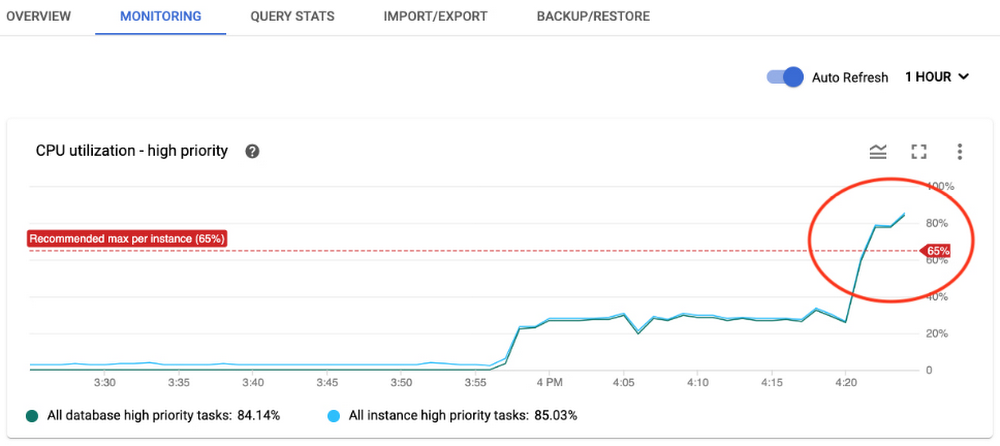
Excellent developer experience is one of the most important focus areas for Cloud Spanner, Google’s fully managed horizontally scalable relational database service. Whether you are a database specialist or a developer, it is important to have tools that help you understand the performance of your database, detect if something goes wrong, and fix the problems. So, Spanner has been continuously adding new introspection capabilities that allow you to easily monitor database performance, diagnose and fix potential issues, and optimize the overall efficiency of your application. We’ve recently launched a number of introspection tools in the form of built-in tables that you can query to gain helpful insights about operations in Spanner such as queries, reads, and transactions. These new introspection tables, when combined with existing alerting and monitoring capabilities, provide a powerful combination of tools that help you to diagnose and troubleshoot issues. Let’s take a closer look at these new introspection tools. We will start with the basics on how you can leverage the introspection and monitoring capabilities in Spanner to get the best out of your data-driven applications.How do you monitor resource utilization?CPU and storage are key resources that you need to monitor in Spanner to make sure that your instance is provisioned with enough nodes to give you the expected performance. Spanner already has integration with the Google Cloud Monitoring suite, where you can set alerts for CPU and storage utilization metrics based on recommended thresholds. You will be automatically alerted when the value of the metrics cross the threshold. You can visit the monitoring tab in the Spanner console to look at the metrics in detail and analyze how those change over time. Here’s an example: Let’s say you received an alert for CPU utilization and found a spike in the monitoring graph, as shown below.You can further slice and dice the data by visiting the Cloud Monitoring console and selecting the time periods. You can also filter by options such as instance, database, and priority of operations for detailed analysis and to decide where to focus for further investigation. You can even correlate different metrics from the metrics list to identify reasons for the spike and decide on possible remedies. For example, if an increase in API requests correlates with an increase in CPU utilization, you can infer that the workload on Spanner is causing an increase in CPU utilization and you need to provision more nodes to bring CPU utilization back within recommended limits.If CPU utilization has spiked without an increase in requests, then inefficient SQL queries or reads could be consuming higher CPU. How do you know which SQL queries or reads you should investigate? We have built introspection tables to help you with that. Visit the “New Introspection Tools” section in this blog, below, or the documentation to learn more.How do you monitor performance?You may have specific performance requirements for your application such as throughput expectation or latency expectation. For example, let’s say you want the 99th percentile latency for write operations to be less than 60ms, and have configured alerts if the latency metric raises above that threshold.Once you are alerted that write latency has exceeded the threshold, you can investigate this incident via the Spanner console by reviewing the latency graph. For example, in the image above, you can see that 99th percentile latency for write operations had spiked at around 6:10AM. Using the Cloud Monitoring console, you can determine which API methods contributed to latency spikes. Let’s say you find out that Commit APIs were responsible for the latency spike. As a next step, you want to know which transactions involve expensive commits. What were the reasons for increase in commit latency? To help you with that troubleshooting, we have built new introspection tools that provide detailed information and statistics regarding top queries, reads, transactions, and transaction locks. These tools consist of a set of built-in tables that you can query to gain more insight. Refer to this table to decide when to use each tool. Now, let’s take a closer look at what each tool offers.Exploring new Spanner introspection toolsDiving deep into SQL queriesQuery statistics: When you want to identify and investigate the expensive queries and their performance impact, use theQuery statistics table. This table helps you answer questions such as:Which are the most CPU-consuming queries?What is the average latency per query?What were the number of rows scanned and data bytes returned by the query? Here is an example of the result from the table, where you can easily identify the fingerprint of the top two queries that consumed the most CPU and had highest latency.Use these fingerprints to retrieve actual query texts from the table. As a next step, you can use the query explanation feature in the Spanner console to analyze query execution plans and optimize the queries. Spanner recently enhanced query statistics further by adding additional insights to cancelled/failed queries so that customers can troubleshoot different kinds of queries, not just completed queries.Oldest active queries: While the query statistics table helps you analyze past queries, oldest active queries table helps you identify the queries that are causing latency and high CPU usage issues as they are happening. This table helps you answer questions such as: How many queries are running at the moment?Which are the long-running queries?Which session is running the query?These answers will help you to identify the troublesome queries and resolve the issue quickly rather than boiling the ocean. For example: Once you identify the slowest query that is impacting the application performance, you can take steps such as deleting the session for an immediate resolution.Diving deep into read operationsRead statistics: When you want to troubleshoot issues caused by read traffic, use the Read statistics table. This table helps you answer questions such as: Which are the most CPU-consuming read operations?What is the average CPU consumption per read?What was the amount of different wait times associated with these reads?As a next step, you can optimize these read operations or take a decision on the suitable read operation (strong vs. stale reads) for your use case.Diving deep into read-write transactionsTransaction statistics: When you want to troubleshoot issues caused by transactions, use the Transaction statistics table to get greater visibility into factors that are driving the performance of your read-write transactions. This table helps you answer questions such as:Which are the slow-running transactions? What is the commit latency and overall latency for transactions?How many times did the transaction attempt to commit? Which columns were written or read by the transaction?By analyzing this information, you can discover potential bottlenecks such as large volumes of updates to a particular column slowing down the transaction. One of the frequent causes of transaction performance issues is lock conflict. If you see an increase in commit latency or overall latency for any transaction, use the lock statistics table to identify if transaction locks are causing issues.Lock statistics: Once you identify the transactions that are affecting the performance, use the lock statistics table to correlate transaction performance characteristics with lock conflicts. This table helps you answer questions such as:Which rows and columns are the sources of higher lock conflicts?Which kinds of lock conflicts are occurring?What is the wait time due to lock conflict?When you combine these crucial insights regarding sources of lock conflicts in the database with the transaction statistics table, you can identify the troublesome transactions. As a next step, apply the recommended best practices to optimize the transactions and improve the performance.Client-side metrics and Google Front End metrics monitoringSo far, we discussed how to use introspection metrics and tools at the Spanner layer. But for end-to-end monitoring, it is important to monitor the application layer (client side) and the network layer (Google Front End) too since sometimes the issues could be in those layers. Spanner already has integration with OpenCensus to help you monitor client-side metrics and gRPC metrics. Spanner also provides Google Front End-related metrics to help you determine if latency issues are due to the network layer. When you combine client-side metrics and Google Front End metrics with Spanner layer metrics, you can perform end-to-end monitoring and find out the source of the issue to proceed with further troubleshooting.We hope these updates to Spanner introspection capabilities make developing on Spanner even more productive.Check out our Spanner YouTube playlist for more about Spanner. Learn moreTo get started with Spanner, create an instanceor try it out with a Spanner Qwiklab.Read the following blogs to learn more about how you can use the introspection tools for troubleshooting:Cloud Spanner: Read StatisticsIncrease visibility into Cloud Spanner performance with transaction statsLock Statistics: Diagnose performance issues in Cloud SpannerAnalyze running queries in Cloud SpannerUse GFE Server-Timing Header in Cloud Spanner DebuggingTroubleshooting Cloud Spanner Applications with OpenCensusRelated ArticleDatabase observability for developers: introducing Cloud SQL InsightsNew Insights tool helps developers quickly understand and resolve database performance issues on Cloud SQL.Read Article
Quelle: Google Cloud Platform

6 best practices for effective Cloud NAT monitoring

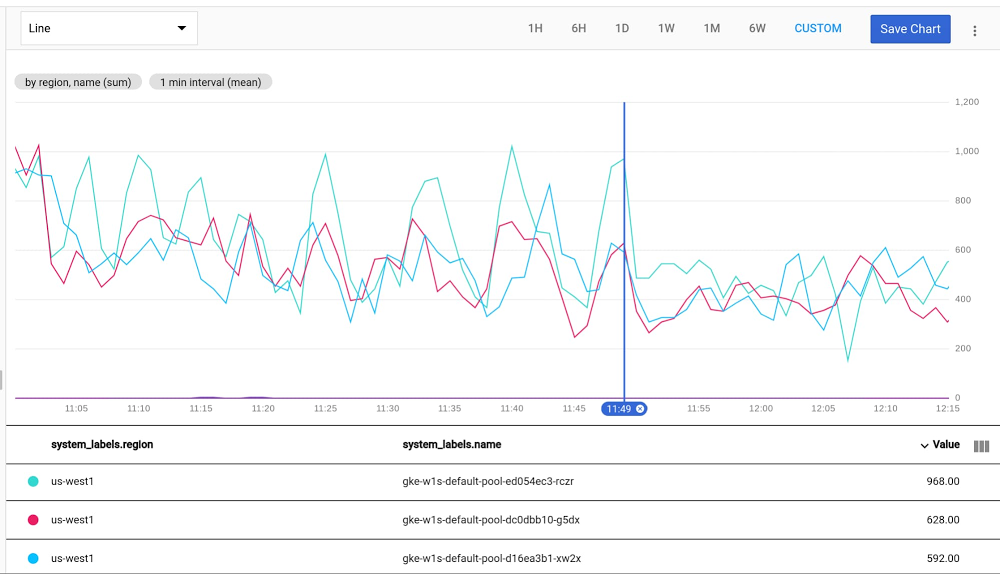
For anyone building distributed applications, Cloud Network Address Translation (NAT) is a powerful tool: with it, Compute Engine and Google Kubernetes Engine (GKE) workloads can access internet resources in a scalable and secure manner, without exposing the workloads running on them to outside access using external IPs. Cloud NAT features a proxy-less design, implementing NAT directly at the Andromeda SDN layer. As such, there’s no performance impact to your workload and it scales effortlessly to many VMs, regions and VPCs.In addition, you can combine Cloud NAT with private GKE clusters, enabling secure containerized workloads that are isolated from the internet, but that can still interact with external API endpoints, download package updates, and engage in other use cases for internet egress access.Pretty neat, but how do you get started? For example, monitoring is a crucial part of any infrastructure platform. When onboarding your workload onto Cloud NAT, we recommend that you monitor Cloud NAT to uncover any issues early on before it starts to impact your internet egress connectivity.From our experience working with customers who use Cloud NAT, we’ve put together a few best practices for monitoring your deployment. We hope that following these best practices will help you use Cloud NAT effectively.Best practice 1: Plan ahead for Cloud NAT capacityCloud NAT essentially works by “stretching” external IP addresses across many instances. It does so by dividing the available 64,512 source ports per external IP (equal to the possible 65,536 TCP/UDP ports minus the privileged first 1,024 ports) across all in-scope instances. Thus, depending on the number of external IP addresses allocated to the CloudNAT gateway, you should plan ahead for CloudNAT’s capacity in terms of ports and external IPs.Whenever possible, try to use the CloudNAT external IP auto-allocation feature, which should be adequate for most standard use cases. Keep in mind that Cloud NAT’s limits and quotas, might limit you to using manually-allocated external IP addresses.There are two important variables that dictate your CloudNAT capacity planning: How many instances will utilize the CloudNAT gatewayHow many ports you allocate per instance The product of the two variables, divided by 64,512, gives you the number of external IP addresses to allocate to your Cloud NAT gateway:The number of external IP addresses you come up with is important should you need to use manual allocation (it’s also important to keep track of in the event you exceed the limits of auto-allocation).A useful metric to monitor your external IP capacity is the nat_allocation_failed NAT GW metric This metric should stay 0, denoting no failures. If this metric registers 1 or higher at any point, this indicates a failure, and that you should allocate more external IP addresses to your NAT gateway.Best practice 2: Monitor port utilizationPort utilization is a very important metric to track. As detailed in the previous best practice, Cloud NAT’s primary resource is external IP:port pairs. If an instance reaches its maximum port utilization, its connections to the internet could be dropped (for a detailed explanation of what consumes Cloud NAT ports from your workloads, please see this this explanation). Using Cloud Monitoring, you can use the following sample MQL query to check port utilization in Cloud NAT:Click to enlargeIf the maximum port utilization is nearing your per-instance port allocation, it’s time to think about increasing the numbers of ports allocated per instance.Best practice 3: Monitor the reasons behind Cloud NAT dropsIn certain scenarios, Cloud NAT might fail to allocate a source port for a connection. The most common of these scenarios is that your instance has run out of ports. This shows up as “OUT_OF_RESOURCES” drops in the dropped_sent_packets_count metric. You can address these drops by increasing the numbers of ports allocated per instance.The other scenario is endpoint independence drops, when Cloud NAT is unable to allocate a source port due to endpoint independence enforcement. This shows up as “ENDPOINT_INDEPENDENCE_CONFLICT” drops.To keep track of these drops, you can add the following MQL query to your Cloud Monitoring dashboard.Click to enlargeIf you have an increasing number of drops of type “ENDPOINT_INDEPENDENCE_CONFLICT”, consider turning off Endpoint-Independent Mapping, or try one of these techniques to reduce their incidence. Best practice 4: Enable Cloud NAT logging and leverage log-based metricsEnabling Cloud Logging for Cloud NAT lets you proactively detect issues as well as provides additional context for troubleshooting. Please see these instructions to learn how to enable logging.Once you have enabled logging, you can create powerful metrics with these logs by creating log-based metrics. For example, use the following command and YAML definition file to expose NAT allocation events as metrics grouped by source/destination, ip/port/protocol as well as gateway name. We will explore ways to use these metrics in the next best practice.metric.yamlBest practice 5: Monitor top endpoints and their dropsBoth types of Cloud NAT drops (“ENDPOINT_INDEPENDENCE_CONFLICT” and “OUT_OF_RESOURCES”) are exacerbated by having many parallel connections to the same external IP:port pair. A very useful troubleshooting tool is to identify which of these endpoints are causing more drops than usual. To expose this data, you can use the log-based metric discussed in the previous best practice. The following MQL query graphs the top destination IP and ports causing drops.Here’s an example of a resulting graph:Click to enlargeWhat should you do with this information? Ideally you would try to spread out connections to these concentrated endpoints across as many instances as possible. Failing that, another mitigation step could be to route traffic to these endpoints through a different Cloud NAT gateway by placing it in a different subnet and associating it with a different gateway (with more port allocations per instance).Finally, you can mitigate these kinds of Cloud NAT drops by handling this kind of traffic through instances that attach external IPs.Please note that if you’re using GKE, ip-masq-agent can be tweaked to disable Source NATing traffic to only to certain IPs which will reduce the probability of a conflict. Best practice 6: Baseline a normalized error rate All the metrics we’ve covered so far show absolute numbers that may or may not be meaningful to your environment. Depending on your traffic patterns, 1000 drops per second could be a cause for concern or could be entirely insignificant.Given your traffic patterns, some level of drops might be a normal occurrence that don’t  impact your users’ experience. This is especially relevant for endpoint independence drops incidents, which can be random and rare.Leveraging the same log-based metric created in best practice 4, you can normalize the numbers by the total number of port allocations using the following MQL query:Click to enlargeNormalizing your drop metrics help you account for traffic level scaling in your drop numbers. It can also baseline “normal” levels of drops and make it easier to detect abnormal levels of drops when they happen.Monitor Cloud NAT FTWUsing Cloud NAT lets you build distributed, hybrid and multi-cloud applications without exposing them to the risk of outside access from external IPs. Follow these best practices for a worry-free Cloud NAT experience; keeping your pager silent and your packets flowing. To learn more, check out our Cloud NAT overview, review all Cloud NAT logging and metrics options, or take Cloud NAT for a spin in our Compute Engine and GKE tutorials!Related ArticleCloud NAT: deep dive into our new network address translation serviceAmong all the network services that you rely on when running your applications, Network Address Translation (NAT) is key. It allows your …Read Article
Quelle: Google Cloud Platform

Security keys and zero trust

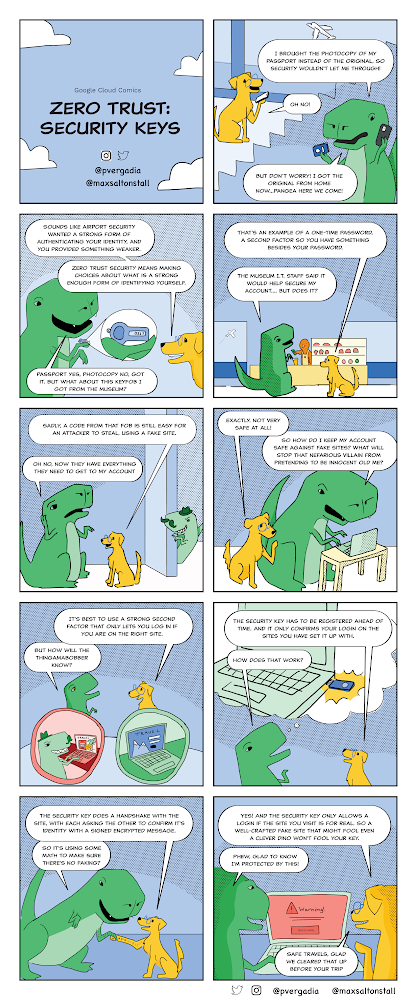
A security key is a physical device that works alongside your username and password to verify your identity to a site or app. They provide stronger login protection than an authenticator app or SMS codes, and the same device can be used for many services, so you don’t need to carry around a necklace of dongles and fobs.Security Keys provide the highest level of login assurance and phishing protection.In this issue of GCP Comics we are covering exactly that. Think of a Security Key as a way to protect yourself–and your company–from bad passwords and tricked users, as it stops fake sites from tricking people into logging in. Here you go!A password alone turns out to be fairly minimal protection for an account, so we’ve seen many new options for 2-Step Verification (also called multi-factor authentication), a phrase meaning “more than just your username and password” to log in.Getting a code by SMS or voice call is a little better than just a password, but you can still be fooled into feeding that code to a fake site, giving up your account credentials to an attacker. Backup codes and authenticator apps fall prey to the same malicious strategies, where an attacker harvests your info and then uses it to perform their own multi-factor authentication, gaining access to your account.Only a security key can stop the cleverest of phishing attacks.Why a security key over other multi-factor methods?A key must be registered in advance to a specific account, an action you take once to enhance the level of security for your sign in.The security key and the website perform a cryptographic handshake, and if the site doesn’t validate the key’s identity, including matching a previously registered URL, the login is stopped.Using open standards (FIDO) the same security key can be used for multiple sites and devices. You only need to carry one around, and they can be used for both personal and work accounts and devices.The firmware of Google Titan Security Keys is engineered to verify integrity, preventing any tampering.They come in all kinds of shapes and sizes, so you can get USB-A, USB-C, or NFC to match the use case that fits you best!In our experience deploying security keys to replace older forms of 2-Step Verification, we’ve seen both faster logins and fewer support tickets raised.ResourcesTitan Security Keys2-Step Verification overviewAdvanced Protection ProgramWant more GCP Comics? Visit gcpcomics.com & follow us on medium pvergadia & max-saltonstall, and on Twitter at @pvergadia and @maxsaltonstall  and to not miss the next issue!Related ArticleTitan Security Keys: Now available on the Google StoreTo make stronger, more phishing-resistant 2nd factor verification accessible to more people, our Titan Security Keys, based on FIDO stand…Read Article
Quelle: Google Cloud Platform

Avoid cost overruns: How to manage your quotas programmatically

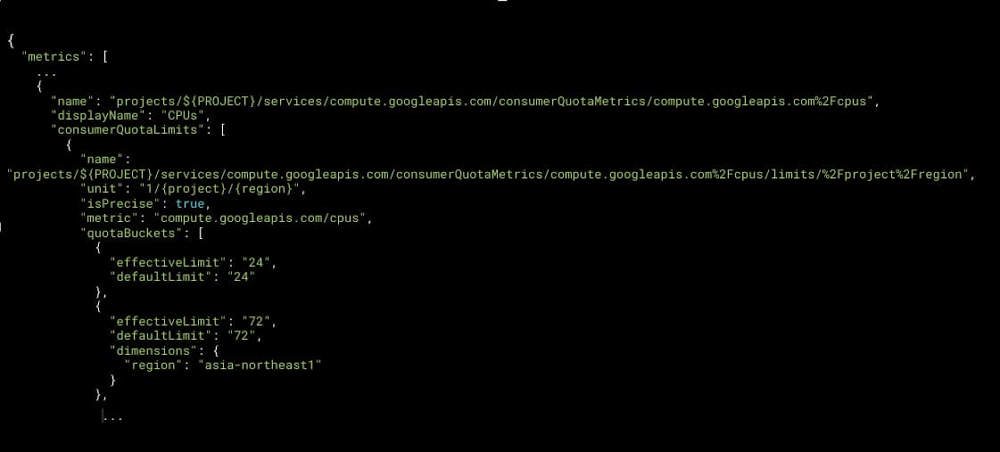
One important aspect of managing a cloud environment is setting up financial governance to safeguard against budget overruns. Fortunately, Google Cloud lets you set quotas for a variety of services, which can play a key role in establishing guardrails—and protect against unforeseen cost spikes. And to help you set and manage quotas programmatically, we’re pleased to announce that the Service Usage API now supports quota limits in Preview.The Service Usage API is a service that lets you view and manage other APIs and services in your cloud projects. With support for quota limits, you can now leverage the Service Usage API to manage service quotas, such as those from Compute Engine.In this blog post, we’ll take a look at how to use this new functionality with Google Cloud operations tools, so you can track the resources consumed by your projects, set alerts, and right-size your deployments for better cost control.Understanding quotasQuotas can be used to limit the resources a project/organization is authorized to consume.  From the type and number of Compute Engine CPUs, to the maximum number of requests made to an API over a certain period of time, quota metrics have associated quota limits that express the ceiling that the quota metric can reach.A quota limit may be applied globally. This is when there is only one quota limit for the project, independent of where the resource is consumed. Other quota limits may be applied separately for each cloud region (a regional limit) or cloud zone (a zonal limit).  As a project administrator, you can use these quota limits to control how much and where a project can use resources, so that costs stay under control. As an example, you may want to allow production workloads to use a substantial number of high-end CPUs, and a large number of external VPN gateways to allow for scaling flexibility. Experimental projects, meanwhile, may have significantly lower limits to make sure they stay within their allocated research budget.Quota limits were initially exclusively managed via the Google Cloud Console. This interface is ideal when you only need to apply a few changes. However, when you need to adjust a large number of quota limits, or when you need to apply these changes as part of an automated workflow, a programmatic approach is preferable. Setting quota limits programmaticallyWith the Service Usage API, you can discover the quota limits that are available as well as set new ceilings (called consumer overrides). This API will allow you to set quota limits programmatically in workflows and scripts when projects are created, or to leverage automation tools that you might already be using such as Terraform. Note that you can’t use the Service Usage API to increase the available quota above what is allowed by default. For this, you need to place a Quota Increase Request (QIR) via the Quota page.Click to enlargeYou can invoke the Service Usage API by making direct HTTP requests, or using the client libraries that Google provides in your favorite languages (Go, Java, Python, etc.)Monitoring and alerting on quotaYou can now monitor quotas, graph historical usage, and set alerts when certain thresholds are reached with the help of Cloud Monitoring, from both the user interface and its API (see Using quota metrics). Cloud Monitoring starts tracking each of the quotas supported by Service Usage API the moment the project starts consuming them. Allocation quota usage, rate quota usage, quota limit, and quota exceeded error (attempts to go over quota that failed) are all stored automatically by Cloud Monitoring under the “Consumer Quota” resource type.You can use Metrics explorer to query quota data, create charts and easily incorporate them in a monitoring dashboard. This enables you and your team to see historical events, track trends, and monitor usage over time.Click to enlargeYou can also create alerts on quota data in order to be notified when consumption thresholds you define are exceeded or when you are approaching a quota limit. You have to define which conditions trigger the alert, and where you want to be notified (notification channels include email, SMS, Cloud Console app, PagerDuty, Slack, Pub/Sub, and Webhooks). Cloud Monitoring offers both a UI and an API to create and configure these alerts.Click to enlargeRatio alertingThe new Monitoring Query Language (MQL) makes it possible to create flexible and powerful  ratio alerts. With ratio alerts, you can set an alerting threshold as a percentage of a quota limit instead of a fixed number. The advantage of an alert based on a ratio is that you don’t need to redefine the alert when the quota limit changes. For example, you could set an alert threshold as “75%” for the CPUs quota, which triggers the alert if the number of CPUs in use exceeds 75, given a quota limit of 100. If you then increase the quota limit to 300 CPUs, the alert triggers if the number of CPUs in use exceeds 225.Click to enlargeCombined with wildcard filters, MQL can help set up powerful alerts, e.g.,  “alert me if any of my quotas reach 80% of their limits.” This allows you to create one alert that covers a significant portion of your quotas.Click to enlargeGet started Any project owner, viewer or editor can access quota usage within the Cloud Console. You can get started by reviewing the Quota and Service Usage documentation and then Managing service quota using the Service Usage API. For quota monitoring and alerting, start with the documentation on using quota metrics, followed by more in-depth documentation on MQL, ratio alerting, and wildcards.Related ArticleCloud cost optimization: principles for lasting successLearn organizational principles that can help you run your cloud environment efficiently and cost effectively.Read Article
Quelle: Google Cloud Platform

Black History Month: Celebrating the success of Black founders with Google Cloud

February is Black History Month—a time for us to come together to celebrate and remember the important people and history of the African heritage. Over the next four weeks, we will highlight four Black-led startups and how they use Google Cloud to grow their businesses. Our first feature highlights TQIntelligence and its founder, Yared.As a psychologist, administrator, educator, and researcher, I’ve always wondered how we could use data to better serve children and adolescents who are being treated for trauma-related mental health disorders. Inspired by 20 years of experience focusing on poverty and trauma, I sought to rethink mental health services in low-income communities. This inspired me to found my startup TQIntelligence, which uses artificial intelligence and voice recognition technology to enable therapists to make more accurate diagnoses faster. Poverty and trauma—A double whammy for low-income communitiesPoverty and trauma are twofold blows. They go hand in hand, and quite often, one compounds the other. Children and adolescents in marginalized communities are at the highest risk for Adverse Childhood Experiences (ACE): traumatic events in childhood like abuse, neglect or violence, which lead to severe mental health disorders. These disorders impact children’s ability to learn and function on par with their peers. Severe ACEs can lead to mental impairments and an increased risk for suicide, and may inflict long-term adverse effects on children’s health and well-being into adulthood.Furthermore, a lack of quality health care exacerbates the trauma that low-income communities face, despite more than $500 billion in funding—the equivalent of nearly 4% of GDP per year on Medicare/Medicaid, Child Protective Services, and legal fees. This occurs primarily because therapists in low-income communities tend to be the least experienced in treating the most severe youth. Addressing these disparities in treatment outcomes requires innovation in the assessment and measurement of mental health disorder severity.TQIntelligence—Adding intelligence to mental healthcare with Clarity AIAt TQIntelligence, our goal is to enable therapists serving at-risk youth to make more accurate diagnoses, faster. Our proprietary Clarity AI technology uses scientifically-validated diagnostic tools, Artificial Intelligence, and voice recognition technology to bring a data-driven approach that has long been standard in physical medical practices to the mental health arena. Similar to other medical practices, where the diagnosis is based on a variety of tests and calibrations such as blood tests, x-rays, or MRIs to gain a holistic understanding of a patient’s problem, Clarity AI uses the science of Speech Emotion Recognition (SER) and AI to identify trauma biomarkers in a patient’s voice. These technologies give therapists the tools they need to better support and provide services to children and adolescents from low-income families. Google for Startups: Black Founders Fund—Google Cloud technology transforming behavioral health care  TQIntelligence relies on data and Cloud technology to drive accurate mental health diagnostics. Google has provided us with a wealth of resources and products to help us along this journey. Our Clarity AI tool utilizes Google’s Cloud Healthcare API, supporting HIPAA compliance and ensuring the safety of patient data. Google Cloud allowed us to collaborate with their voice analytics team, including giving access to Cloud AutoML tools to advance our speech emotion recognition technology. Once fully developed, this algorithm will help us identify a patient’s level of emotional distress and help therapists establish the patient’s baseline and track patient progress over time, monitoring for improvement, stagnation, or deterioration. So far, we have successfully collected and analyzed more than 800 voice samples as part of our ML model training. These audio clips go through a manual voice labeling process by four mental health professionals since there is no open-source youth clinical voice sample to help us train our model. With the help from Google Cloud, we have been able to scale our data collection process while providing data-driven solutions to our pilot site collaborators. We also leverage Cloud Functions, Firebase and Cloud SQL to create a highly scalable serverless application. Firebase offers seamless integration of data collected to our smartphone applications. The data to be used for our machine learning model training is collected on the mobile platforms and then moved into Cloud Storage using Cloud Functions for storing in buckets. Cloud Functions also is used to retrieve data in the web portal. The tabular data is then stored as databases in Cloud SQL.Black-led startups—Innovating for the futureOver the past year, there has been lot of noise surrounding the topic of social justice. I see many organizations using current conversations as a branding gimmick without any quantifiable commitment; others only offer reactionary or temporary responses. By showing up and putting their money where their mouth is, Google is leading the way for corporations, investors, and foundations looking for ways to start to address the dismal gap in funding for BIPOC and women founders. Google is empowering underrepresented founders like myself. For us, that came through our participation in the Google for Startups Founders Academy (apply here by February 9th!) and the Google for Startups Accelerator: Black Founders. These programs connected us to industry leaders and subject matter experts—relationships that converted into progress, and have proven to be a tremendous advantage in a space where Black-led startups have been excluded from developing AI technology. Receiving $100K in non-dilutive capital from the Google for Startups: Black Founders Fund truly changed the game for us. In addition to financial support, the Black Founders Fund provided us with product support, including 1:1 mentorship from Google Cloud’s engineering team as well as access to Google Cloud credits. Furthermore, we were able to secure an additional $1 million grant from the National Science Foundation. But most importantly, it is fostering meaningful change toward equitable funding. Despite being one of the fastest-growing groups of entrepreneurs, Black founders receive less than 1% of venture capital in the U.S. Excluding founders of color from access to funding isn’t just bad business; it reflects the legacy of white supremacy and racism in this country. At this pivotal point in our country’s history, we need more investors and decision-makers recognizing that diversity drives innovation. Part of this change requires organizations fearlessly and courageously examine their role in perpetuating the legacy of white supremacy, followed by intentional and well-thought actions on how they can contribute to social equity. As someone who grew up with limited resources, I know firsthand the consequences of scarcity to individuals’ emotional, psychological and spiritual development. Founders of color like me are the most appropriate change agents to address the ills of poverty and the psychological impact of scarcity. Going forward, the TQIntelligence team will continue our work with low-income communities and strive to help therapists in these communities make the most of their limited resources to provide effective psychotherapeutic intervention; effective therapy has the most significant impact on future generations. With the support of Google for Startups Black Founders Fund and our mentors at Google—such as Josh Belanich, Jason Scott, Jewel Burks Solomon, and many others—we’ve been able to positively impact the lives of young people from low-income communities. I look forward to continuing this journey with the Google team and changing the world for the better, one diagnosis at a time!If you want to learn more about how Google Cloud can help your startup, visit our startup page here and sign up for our monthly startup newsletter to get a peek at our community activities, digital events, special offers, and more.
Quelle: Google Cloud Platform

A primer on Cloud Bigtable cost optimization

To serve the various workloads that you might have, Google Cloud offers a selection of managed databases. In addition to partner-managed services, including MongoDB, Cassandra by Datastax, Redis Labs, and Neo4j, Google Cloud provide a series of managed database options: CloudSQL and Cloud Spanner for relational use cases, Firestore and Firebase for document data, Memorystore for in-memory data management, and Cloud Bigtable, a wide-column, key-value database that can scales horizontally to support millions of requests per second with low latency. Fully managed cloud computing databases such as Cloud Bigtable enable organizations to store, analyze, and manage petabytes of data without the operational overhead of traditional self-managed databases. Even with all the cost efficiencies that cloud databases offer, as these systems continue to grow and support your applications, there are additional opportunities to optimize costs. This blog post reviews the billable components of Cloud Bigtable, discusses the impact various resource changes can have on cost, and introduces several high-level best practices that may help manage resource consumption for your most demanding workloads. (In later posts, we’ll discuss optimizing costs while balancing performance trade-offs using methods and best practices that apply to organizations of all sizes.) Understand the resources that contribute to Cloud Bigtable costsThe cost of your Bigtable instance is directly correlated to the quantity of consumed resources. Compute resources are charged according to the amount of time the resources are provisioned, whereas for network traffic and storage, you are charged by the quantity consumed.More specifically, when you use Cloud Bigtable, you are charged according to the following:NodesIn Cloud Bigtable, a node is a compute resource unit. As the node count increases, the instance is able to respond to a progressively higher request (writes and reads) load, as well as serve an increasingly larger quantity of data. Node charges are the same for instances regardless if its clusters store data on solid-state drives (SSD) or hard disk drives (HDD). Bigtable keeps track of how many nodes exist in your instance clusters during each hour. You are charged for the maximum number of nodes during that hour, according to the regional rates for each cluster. Nodes are priced in hours per node; the nodal unit price is determined by the cluster region.Data storageWhen you create a Cloud Bigtable instance, you choose the storage type: SSD or HDD; this cannot be changed afterward. The average used storage over a one-month period is utilized to calculate the monthly rate. Since data storage costs are region-dependent, there will be a separate line item on your bill for each region where an instance cluster has been provisioned. The underlying storage format of Cloud Bigtable is the SSTable; and you are billed only for the compressed disk storage consumed by this internal representation. This means that you are charged for the data as it is compressed on disk by the Bigtable service. Further, all data in Google Cloud is persisted in the Colossus file storage system for improved durability. Data Storage is priced in binary gigabytes (GiB)/month; the storage unit price is determined according to the deployment region and the storage type, either SSD or HDD.Network trafficIngress traffic, or the quantity of bytes sent to Bigtable, is free. Egress traffic, or the quantity of bytes sent from Bigtable, is priced according to the destination. Egress to the same zone and egress between zones in the same region are free, whereas cross-region egress and inter-continent egress incur progressively increasing costs based on the total quantity of bytes transferred during the billing period. Egress traffic is priced in GiB sent.Backup storage Cloud Bigtable users can readily initiate, within the bounds of project quota, managed table backups to protect against data corruption or operator error. Backups are stored in the zone of the cluster from which they are taken, and will never be larger than the size of the archived table. You are billed according to the storage used and the duration of the backup between backup creation and removal, via either manual deletion or assigned time-to-live (TTL.) Backup storage is priced in GiB/month; the storage unit price is dependent on the deployment region but is the same regardless of the instance storage type.Understand what you can adjust to affect Bigtable cost As discussed, the billable costs of Cloud Bigtable are directly correlated to the compute nodes provisioned as well as the storage and network resources consumed over the billing period. Thus, it is intuitive that consuming fewer resources will result in reduced operational costs.  At the same time, there are performance and functional implications of resource consumption rate reductions that require consideration. Any effort to reduce operational cost of a running database-dependent production system is best undertaken with a concurrent assessment of the necessary development or administrative effort, while also evaluating potential performance tradeoffs. Certain resource consumption rates can be easily changed, while other types of resource consumption rate changes require application or policy changes, and the remaining type can only be achieved upon the completion of a data migration.Node countDepending on your application or workload, any of the resources consumed by your instance might represent the most significant portion of your bill, but it is very possible that the provisioned node count constitutes the largest single line item (we know, for example, that Cloud Bigtable nodes generally represent 50-80% of costs depending on the workload). Thus it is likely that a reduction in the number of nodes might offer the best opportunity for expeditious cost reduction with the most impact. As one would expect, cluster CPU load is the direct result of the database operations served by the cluster nodes. At a high level, this load is generated by a combination of the database operation complexity, the rate of read or write operations per second, and the rate of data throughput required by your workload.  The operation composition of your workload may be cyclical and change over time, providing you the opportunity to shape your node count to the needs of the workload. When running a Cloud Bigtable cluster, there are two inflexible maximum metric upper bounds: the maximum available CPU (i.e., 100% average CPU utilization) and the maximum average quantity of stored data that can be managed by a node. At the time of writing, nodes of SSD and HDD clusters are limited to manage no more than 2.5 TiB and 8 TiB data per node respectively.If your workload attempts to exceed these limits, your cluster performance may be severely degraded. If available CPU utilization is exhausted, your database operations will increasingly experience undesirable results: high request latency, and an elevated service error rate. If the amount of storage per node exceeds the hard limit in any instance cluster, writes to all clusters in that instance will fail until you add nodes to each cluster that is over the limit.As a result, you are recommended to choose a node count for your cluster such that some headroom is maintained below the respective metric upper bounds. In the event of an increase in database operations, the database can continue to serve requests with optimal latency, and the database will have room to support spikes in load before hitting the hard serving limits.  Alternatively, if your workload is more data-intensive than compute-intensive, it might be possible to reduce the amount of data stored in your cluster such that the minimum required node count is lowered.Data storage volumeSome applications, or workloads, generate and store a significant amount of data. If this evokes the behavior of your workload, there might be an opportunity to reduce costs by storing, or retaining, less data in Cloud Bigtable.  As discussed, data storage costs are correlated to the amount of data stored over time: if less data is stored in an instance, the incurred storage costs will be lower. Depending on the storage volume, the structure of your data and the retention policies, an opportunity for cost savings could exist for either instances of the SSD or HDD storage types.As noted above, since there is a minimum node requirement based on the total data stored, there is a possibility that reducing the data stored might reduce both data storage costs as well as provide an opportunity for reduced node costs.Backup storage volume Each table backup performed will incur additional cost for the duration of the backup storage retention. If you can determine an acceptable backup strategy that retains fewer copies of your data for less time, you will be able to reduce this portion of your bill. Storage typeDepending on the performance needs of your application, or workload, there is a possibility that both node and data storage costs can be reduced if your database is migrated from SSD to HDD.  This is due to the fact that HDD nodes can manage more data than SSD nodes, and the storage costs for HHD are an order of magnitude lower than SSD storage. However, the performance characteristics are different for HDD: read and write latencies are higher, supported reads per second are lower, and throughput is lower. Therefore, it is essential that you assess the suitability of HDD for the needs of your particular workload before choosing this storage type.Instance topology At the time of writing, a Cloud Bigtable instance can contain up to four clusters provisioned in the available Google Cloud zones of your choice. In case your instance topology encompasses more than one cluster, there are several potential opportunities for reducing your resource consumption costs.  Take a moment to assess the number and the locations of clusters in your instance.  It is understandable that each additional cluster results in additional node and data storage costs, but there is also a network cost implication. When there is more than one cluster in your instance, data is automatically replicated between all of the clusters in your instance topology.If instance clusters are located in different regions, the instance will accrue network egress costs for inter-region data replication. If an application workload issues database operations to a cluster in a different region, there will be network egress costs for both the calls originating from the application and the responses from Cloud Bigtable.There are strong business rationales, such as system availability requirements, for creating more than one cluster in your instance. For instance, a single cluster provides three nines, or 99.9% availability, and a replicated instance with two or more clusters provides four nines, or 99.99%, availability when a multi-cluster routing policy is used. These options should be taken into account when evaluating the needs for your instance topology.When choosing the locations for additional clusters in a Cloud Bigtable instance, you can choose to place replicas in geo-disparate locations such that data serving and persistence capacity are close to your distributed application endpoints. While this can provide various benefits to your application, it is also useful to weigh the cost implications of the additional nodes, the location of the clusters, and the data replication costs that can result from instances that span the globe. Finally, while limited to a minimum node count by the amount of data managed, clusters are not required to have a symmetric node count. The result is that you could asymmetrically size your clusters according to the expected load from application traffic expected for each cluster.High-level best practices for cost optimizationNow that you have had a chance to review how costs are apportioned for Cloud Bigtable instance resources, and you have been introduced to the resource consumption adjustments available that affect billing cost, check out  some strategies available to realize cost savings that will balance the tradeoffs relative to your performance goals. (We’ll discuss techniques and recommendations to follow these best practices in the next post.). Options to reduce node costsIf your database is overprovisioned, meaning that your database has more nodes than needed to serve database operations from your workloads, there is an opportunity to save costs by reducing the number of nodes.  Manually optimize node count If the load generated by your workload is reasonably uniform, and your node count is not constrained by the quantity of managed data, it may be possible to gradually decrease the number of nodes using a manual process to find your minimum required count.Deploy autoscalerIf the database demand of your application workload is cyclical in nature, or undergoes short-term periods of elevated load, bookended by significantly lower amounts, your infrastructure may benefit from an autoscaler that can automatically increase and decrease the number of nodes according to a schedule or metric thresholds.Optimize database performance As discussed earlier, your Cloud Bigtable cluster should be sized to accommodate the load generated by database operations originating from your application workloads with a sufficient amount of headroom to absorb any spikes in load. Since there is this direct correlation between the minimum required node count and the amount of work performed by the databases, an opportunity may exist to improve the performance of your cluster so the minimum number of required nodes is reduced.Possible changes in your database schema or application logic that can be considered include rowkey design modifications, filtering logic adjustments, column naming standards, and column value design. In each of these cases, the goal is to reduce the amount of computation needed to respond to your application requests.Store many columns in a serialized data structure Cloud Bigtable organizes data in a wide-column format. This structure significantly reduces the amount of computational effort required to serve sparse data. On the other hand, if your data is relatively dense, meaning that most columns are populated for most rows, and your application retrieves most columns for each request, you might benefit from combining the columnar values into fields in a single data structure. A protocol buffer is one such serialization structure.Assess architectural alternativesCloud Bigtable provides the highest level of performance when reads are uniformly distributed across the rowkey space. While such an access pattern is ideal, as serving load will be shared evenly across the compute resources, it is likely that some applications will interact with data in a less uniformly distributed manner.For example, for certain workload patterns, there may be an opportunity to utilize Cloud Memorystore to provide a read-through, or capacity cache. The additional infrastructure would add an additional cost, however certain system behavior may precipitate a larger decrease in Bigtable node cost. This option would most likely benefit cases when your workload queries data according to a power law distribution, such as theZipf distribution, where a small percentage of keys accounts for a large percentage of the requests, and your application requires extremely low P99 latency. The tradeoff is that the cache will be eventually consistent, consequently your application must be able tolerate some data latency.Such an architectural change would potentially allow for you to serve requests with greater efficiency, while also allowing you to decrease the number of nodes in your cluster. Options to reduce data storage costsDepending on the data volume of your workload, your data storage costs might account for a large portion of your Cloud Bigtable cost. Data storage costs can be reduced in one of two ways: store less data in Cloud Bigtable, or choose a lower-cost storage type. Developing a strategy for offloading data for longer-term data to either Cloud Storage or BigQuery may provide a viable alternative to keeping infrequently accessed data in Cloud Bigtable without eschewing the opportunity for comprehensive analytics use cases. Assess data retention policies One straightforward method to reduce the volume of data stored is to amend your data retention policies so that older data can be removed from the database after a certain age threshold. While writing an automated process to periodically remove data outside the retention policy limits would accomplish this goal, Cloud Bigtable has a built-in feature that allows for garbage collection to be applied to columns according to policies assigned to their column family. It is possible to set policies that will limit the number of cell versions, or define a maximum age, or a time-to-live (TTL), for each cell based on its version timestamp. With garbage collection policies in place, you are given the tools to safeguard against unbounded Cloud Bigtable data volume growth for applications that have established data retention requirements. Offload larger data structuresCloud Bigtable performs well with rows up to 100 binary megabytes (MiB) in total size, and can support rows up to 256 MiB, which gives you quite a bit of flexibility about what your application can store in each row. Yet, if you are using all of that available space in every row, the size of your database might grow to be quite large.For some datasets, it might be possible to split the data structures into multiple parts: one, optimally smaller part in Cloud Bigtable and another, optimally larger, part in Google Cloud Storage. While this would require your application to manage the two data stores, it could provide the opportunity to decrease the size of the data stored in Cloud Bigtable, which could in turn lower storage costs.Migrate from instance storage from SSD to HDDA final option that may be considered to reduce storage cost for certain applications is a migration of your storage type to HHD from SSD. Per-gigabyte storage costs for HDD storage are an order of magnitude less expensive than SSD. Thus, if you need to have a large volume of data online, you might assess this type of migration.That said, this path should not be embarked upon without serious consideration. Only once you have comprehensively evaluated the performance tradeoffs, and you have allotted the operational capacity to conduct a data migration, might this be chosen as a viable path forward.  Options to reduce backup storage costs At the time of writing, you can create up to 50 backups of each table and retain each for up to 30 days. If left unchecked, this can add up quickly.Take a moment to assess the frequency of your backups and the retention policies you have in place. If there are not established business or technical requirements for the current quantity of archives that you currently retain, there might be an opportunity for cost reduction. What’s next Cloud Bigtable is an incredibly powerful database that provides low latency database operations and linear scalability for both data storage and data processing. As with any provisioned component in your infrastructure stack, the cost of operating Cloud Bigtable is directly proportional to the resources consumed by its operation. Understanding the resource costs, the adjustments available, and some of the cost optimization best practices is your first step toward finding a balance between your application performance requirements and your monthly spend. In the next post in this series, you will learn about some of the observations you can make of your application to better understand the options available for cost optimization.  Until then, you can:Learn more about Cloud Bigtable pricing Review the recommendations about choosing between SSD and HDD storageUnderstand more about the various aspects of Cloud Bigtable performance
Quelle: Google Cloud Platform

Search and browse Google Cloud code samples

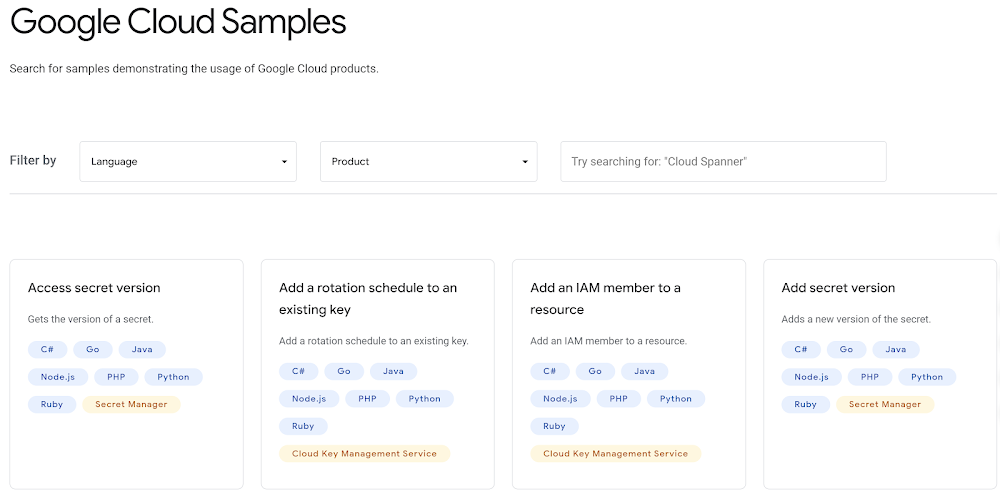
We’ve added new features to our documentation to provide quick and easy ways to search and browse all code samples that are available for Google Cloud. When getting started with a new technology, are you the type of developer who immediately looks for code samples? If so, you’ll be happy to check out these new features.  All code samples search pageThe first new feature is the all code samples search page. On this page, you can browse through 1200+ code sample “tiles”, each of which includes a list of programming languages that the code sample is available in, along with the relevant Google Cloud product. At the top of the page are two filters: the first provides a quick way to filter the code samples listed by programming language, and the second lets you filter the list of code samples by one or more Google Cloud products. Next to the filters is a text search box where you can search the titles and descriptions of code samples.All code samples page for a specific Google Cloud productThe next feature provides new pages that contain all code samples for a specific Google Cloud product, integrated into the product’s existing documentation. Use these pages to see all the code samples for a product like BigQuery. The code samples listed on this page include a View in documentation section, which lists all of the documentation pages that include the code sample.Individual code sample pagesIf you click the “View Sample” button from one of the new code sample pages, you open an individual page for that code sample. This page displays the code sample along with a list of documentation pages that include the code sample. You can click the View on GitHub button to see the complete code sample on Github.As we add new code samples to the Google Cloud open source Github repositories, we automatically create new standalone code sample pages in our documentation to feature these new additions.Try searching and browsing our new code sample pages. We hope they help you get started quicker. Or, if your development is already well underway, we hope that these improvements speed up your coding efforts by getting you right to the code samples that you’re looking for.Related ArticleIntroducing interactive code samples in Google Cloud documentationWith interactive code samples in Google Cloud documentation, you can replace the variables inline, before you even copy the snippet.Read Article
Quelle: Google Cloud Platform