To the cloud and beyond! Planning a multi-year data center migration

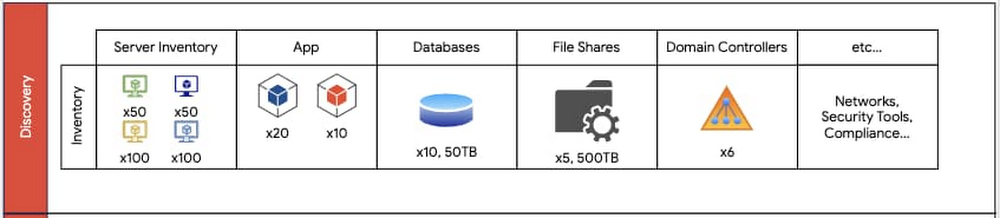
A data center migration into the cloud is often a daunting business initiative that can take years as you transition your existing hardware, software, networking, and operations into a brand new environment. In our roles with Google Cloud’s Professional Services organization, we work side by side with customers to collaboratively architect and enable data center migrations into Google Cloud. Over the years, we’ve participated in multiple migration journeys, and devised a general approach. Along the way, we’ve stumbled across a lot of complexities and learned a lot of lessons. In this blog post, we provide a high level overview of our recommended data center migration process. Then, in future blog posts, we’ll provide a more detailed view into the engineering and program management migration aspects of a migration. The migration journeyEvery data center migration has a reason behind it—something like the desire for cost savings or to become more cloud native. This results in a business objective such as “migrate n data centers to Google Cloud by this date.” Regardless of your motivation, the common challenge is how to enable a successful data center migration while effectively managing risk. To help, we’ve developed a repeatable migration approach that consists of four phases: Discovery, Planning, Execution and Optimization. For most data center migrations, leveraging this repeatable framework can help identify assets, minimize risk using a multi-phased migration approach, enable deployment and configuration, and finally, optimize the end state. Phase 1: DiscoveryThe first step of our migration approach is the Discovery phase. Here we partner with an organization’s data center team to understand and document the entire data center footprint. This includes understanding the existing hardware mapping, software applications, storage layers (databases, file shares), operating systems, networking configurations, security requirements, models of operation (release cadence, how to deploy, escalation management, system maintenance, patching, virtualization, etc.), licensing and compliance requirements, as well as other relevant assets. In this phase, our objective is to obtain a detailed view of all relevant assets and resources of the current data center footprint. These resources should also include a resource grouping classification, which will be leveraged in the following phases for dependency mapping and migration wave planning. For example, while inventorying a data center, you should identify the various operating environments (non-production vs. production), dependencies (third-party software, domain controllers, etc.) and the business impact of all applications, including third-party systems that are in the migration scope. The key milestones in the Discovery phase are:Creating a “shared” data center inventory footprint – All teams that are part of the cloud migration should be aware of the assets and resources that will go live.Completing an initial GCP foundations design – This involves identifying centralized concepts of the GCP organization such as folder structure, Identity and Access Management model, network administration model, and more.An example set of data center inventory components that should be documented during the discovery phase.Additionally, during the Discovery phase, we recommend you engage in cross-functional discussions with other internal business units, ranging from IT to Finance to Program Management, to align on changes to support future cloud processes. In migrating your physical data centers to Google Cloud, it’s important to consider whether your data center staff is trained to support managing systems and infrastructure in Google Cloud. Also, you may need to reevaluate and adjust the Service Level Agreements (SLAs) for services that you intend to use in Google Cloud. Phase 2: PlanningThe second phase is Planning. Planning leverages the assets and deliverables gathered in the Discovery phase to create migration waves—logical groupings of resources—to be sequentially deployed into production and non-production environments. As a rule of thumb, it’s best to target non-production migration waves first, identifying the sequence of waves to migrate first. Here, consider:Mapping of today’s server inventory to Google Cloud machine types – Each workload today will generally run on a machine type with similar compute power, memory and disk.Timelines – When are my targets for migrating what?Workloads in each grouping – What are my migration waves grouped by? Is it by non-production vs. production applications? Is it by function (databases vs. file shares vs. applications)?The cadence of your code releases – Factor in any upcoming code releases as this may impact the decision of whether to migrate sooner or later.Time for infrastructure deployment and testing – Factor in adequate time for testing your infrastructure before fully cutting over to Google Cloud.Number of application dependencies – The applications with the fewest dependencies are generally good candidates for migration first. In contrast, you may want to wait to migrate an application that depends on multiple databases.Migration complexity and risk – Migrations are generally more successful when you tackle the simpler aspects of the migration first.For the migration waves, we recommend you gain confidence by starting with more predictable and simple workloads. For example, here, we recommend migrating file shares first, then databases and domain controllers and finally apps.This diagram displays an example of mapping inventory content found in the Discovery phase translated into migration waves. Non-prod migration waves should occur first. Prod waves should follow a successful non-prod migration.The Planning phase is also when you begin to design a future state of your IT organization and discuss how to transform existing roles to support key workloads in Google Cloud. Customers often ask us “what’s the best way to map existing staff models to support Google Cloud after the migration?” In many cases, we discuss how to train existing staff and where we may require adjustments based on the future state of the organization after the migration. The perfect time to begin making adjustments to your operations is when you begin to deploy your migration waves. One additional area of consideration during the Planning phase is whether or not to implement DevOps and SRE practices. Many customers find cloud migrations to be the perfect time to establish Infrastructure as Code practices, integrate code build and release with continuous integration/continuous delivery (CI/CD) pipelines, and perhaps even define internal service level indicators (SLIs). Additionally, customers often update their incident management and application support processes, including processes that involve Google Cloud Support, which can help address issues and respond to incidents. Phase 3: ExecutionThe third phase is Execution: taking the plans you’ve developed and bringing them to fruition. During the Execution phase, you need to be careful about the exact set of steps you take and configurations you develop, as you’ll usually repeat them during the non-production and production migration waves. The Execution phase is when you put in place your infrastructure components—IAM, networking, firewall rules, and Service Accounts—and ensure they are configured appropriately. This is also when you test the applications on the infrastructure configurations, ensuring that they have access to their databases, file shares, web servers, load balancers, Active Directory servers and more. Execution also includes using logging and monitoring to ensure your application continues to function with the necessary performance.An overview of executing different migration waves. As an example, an organization may opt to migrate file shares first, then domain controllers; each of these processes require migrating infrastructure, then testing and verifying a successful migration.The key to a successful Execution phase is agile application debugging and testing. Additionally, be sure to have both a short and long term plan for resolving blockers that may come up during the migration. The Execution phase is iterative and the goal should be to ensure that applications are fully tested on the new infrastructure.Phase 4: OptimizeThe last stage of a large data center migration project is Optimization. Once you’ve migrated your workloads to Google Cloud, we recommend periodic review and planning to optimize them. During this time, you may want to consider a range of optimization activities:Resize your machine types and disks – Whether to save costs or improve performance, Active Assist can help you do this automatically.Leverage Terraform for more agile and predictable deploymentsImprove automation to reduce operational overhead Improve integration with logging, monitoring, and alerting toolsAdopt managed services to reduce operational overheadEnterprises have a number of common migration considerations. Topics such as cost optimization, replatforming, automation, logging and monitoring, and more should all be part of any migration plan.When you migrate from a traditional data center environment to the cloud, you obtain visibility into your resource consumption and spend. Taking Compute Engine as an example, Google Cloud provides you improved cost observability, displaying the overall cost for CPU cores vs. RAM, so that you can more easily identify the compute resources that you are paying for. You can also identify virtual machines that you no longer need or that you can rightsize them with the Recommender API to best fit the needed performance. Preemptible VMs are another option for saving on compute operations.Or with Cloud Storage, you can take advantage of storage classes (i.e., standard, nearline, coldline, and archival) based on your use cases and apply lifecycle and retention policies. Taking the first stepPerforming a full data center migration is a big but worthwhile undertaking. With this migration framework, you can break down the process into stages that will have you decommissioning your last data center in no time! Let’s wrap up with some key lessons learned that we have learned along the way. Focus on being agile – A data center migration has many moving parts. If important individuals are blocked, data center migration timelines will be put at risk. Tackle the easy parts first – Build by confidence by migrating a simple application, where it’s easier to iron out the misconfigurations or identify missing infrastructure. Trying to migrate the largest and most complex application is not recommended. Communicate early to your stakeholders – Many data centers have “external users”—these could be other users within your company, or even outside the organization. Notify them of the migration early and check for potential compliance issues, which could delay the migration.Help teams learn about Google Cloud – This involves establishing a process for learning GCP, through provisioning of sandbox spaces for testing and enrolling in training opportunities. When you’re ready to take the first step, we’re here to help with a free discovery and assessment, which will help you estimate and understand your potential migration costs and options. In addition, stay tuned for upcoming blog posts, where we’ll discuss more engineering principles to help you along an accelerated migration path, as well as how to establish a program management practice to manage a large migration program.Related ArticleCloud migration: What you need to know (and where to find it)Google Cloud offers a rich set of solutions and documentation to help guide your cloud migration. Here’s where to find what you need.Read Article
Quelle: Google Cloud Platform

New private cloud networking whitepaper for Google Cloud VMware Engine

At Google Cloud, we’re committed to helping you run your apps where you need them, with open, hybrid, and multi-cloud solutions. One way we do that is with Google Cloud VMware Engine, our managed VMware service. Among other benefits, VMware Engine is built on Google Cloud’s strong networking foundation: The service runs on top of a 100 Gbps, non-oversubscribed, fully redundant physical network, providing a 99.99% infrastructure availability SLA in a single site. To help you understand networking in VMware Engine, we’ve written Private cloud networking for Google Cloud VMware Engine. In this whitepaper, you’ll learn about the various connectivity options available in VMware Engine, with detailed explanations of traffic flows, optimization options and architectural design considerations. Building on the Google Cloud VMware Engine networking fundamentals post, the whitepaper provides additional details on how VMware Engine private cloud networking works in Google Cloud Platform (GCP), in two main sections:Google Cloud VMware Engine networking basics – Use cases, onboarding requirements, high-level system components and key networking capabilities. It also covers networks and address ranges on the VMware Engine service and private access options for services, including both, private Google access and private service access.A deep dive into network traffic flows and interactions – Here, the white paper covers all the services available to users such as customer Virtual Private Cloud (VPC), access to on-prem locations, internet egress, public IP service for VMware Engine-hosted workloads, as well as the available Google managed services (Cloud SQL, Cloud Build, etc.), with emphasis on key design considerations for a successful VMware Engine deployment.Click to enlargeGoogle Cloud VMware Engine is a first-party offering in GCP, meaning Google is your primary and sole point of contact. Whether you’re evaluating the service, or already have it in production, understanding how networking works will help ensure a successful deployment and help you deliver a better user experience.Go ahead and download the whitepaper today. For additional information about VMware Engine, please visit the VMware Engine landing page, and explore our interactive tutorials. And be on the lookout for future articles, where we’ll discuss how VMware Engine integrates with core Google Cloud services such as Cloud DNS, Cloud Load Balancing and Bring-Your-Own-IP (BYOIP).Related ArticleGoogle Cloud VMware Engine explained: Integrated networking and connectivityLearn about the networking features in Google Cloud VMware Engine to let you easily and deploy workloads across on-prem and cloud environ…Read Article
Quelle: Google Cloud Platform
New to Google Cloud? Here are a few training options to help you get started

Google Cloud has the tools you need to build apps faster and make smarter business decisions. To help you get started with Google Cloud, and get the most from the platform, we’ve put together a list of no-cost resources below. Get hands-on experience with Google Cloud fundamentalsJoin our half-day event, Cloud OnBoard: Begin with Google Cloud Fundamentals, on Feb. 23 to learn about the basics of Google Cloud from experts. Experts will start by introducing the core components of Google Cloud and provide an overview of how its tools impact the entire cloud computing landscape. The event will then cover Compute Engine and how to create VM instances from scratch and from existing templates, how to connect them together, and end with projects that can talk to each other safely and securely. You will also learn about the different storage and database options available on Google Cloud. Afterwards, you’ll have a chance to explore other Google Cloud offerings like Kubernetes Engine and App Engine, and learn more about our managed containerized environments. The Cloud OnBoard will end with experts guiding you through hands-on labs where you can practice using the Google Console, Google Cloud Shell, and more. Can’t join the event live on Feb. 23? The training will also be available on-demand after Feb. 23. Explore Google Cloud infrastructure Continue building your foundational Google Cloud knowledge with our on-demand infrastructure training, Baseline: Infrastructure. This training will provide you with practical experience through expert-guided labs which dive into Cloud Storage and other key application services like Google Cloud’s operations suite (formerly Stackdriver) and Cloud Functions. Dig deeper into Google Cloud tools Once you have a strong grasp on Google Cloud basics, we recommend you get more in-depth hands-on experience with different Google Cloud offerings. Join the skills challenge to get 30 days free access to Google Cloud labs where you can practice using BigQuery, Google Kubernetes Engine, Cloud Speech API, AI Platform, Cloud Vision API, Cloud Run, and Firebase.Ready to get started with Google Cloud? Sign uphereto attend the Feb. 23 Cloud OnBoard: Begin with Google Cloud Fundamentals event.Related Article2021 resolutions: Kick off the new year with free Google Cloud trainingTackle your New Year’s resolutions with our new skills challenges which will provide you with no cost training to build cloud knowledge i…Read Article
Quelle: Google Cloud Platform

Helping users keep their organization secure with their phone's built-in security key

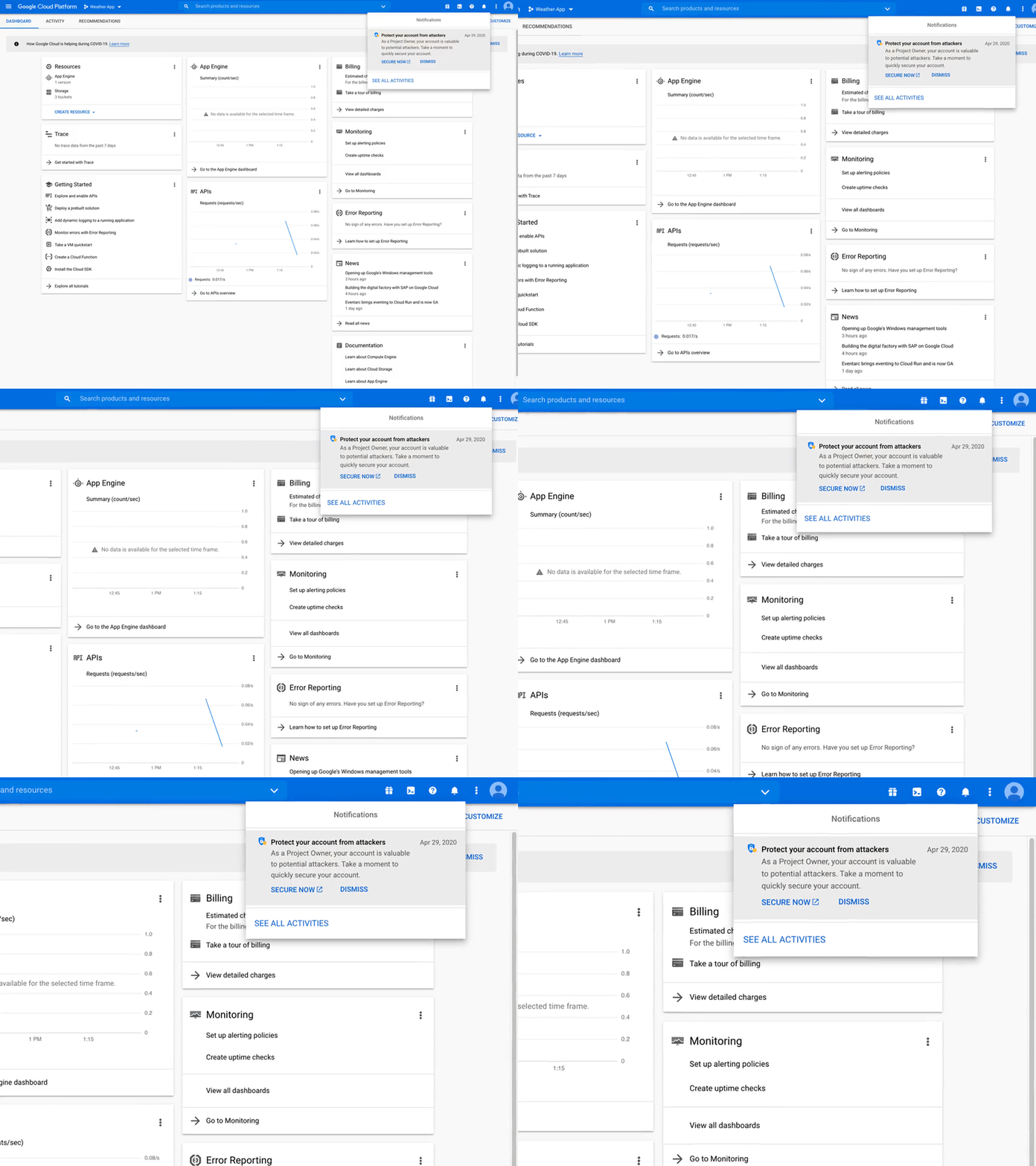
Phishing remains among an organization’s most prevalent security threats. At Google, we’ve developed advanced tools to help protect users from phishing attacks, including our Titan Security Keys. With the goal of making security keys even easier to use and more ubiquitous, we’ve recently made it possible to use your phone’s built-in security key to secure your account. Security keys based on FIDO standards are a form of 2-Step verification (2SV) and we consider them to be the strongest, most phishing-resistant method of 2SV because they leverage public key cryptography to verify a user’s identity, and that of the login page, blocking attackers from accessing an account even if they have the username and password. We want as many of our customers as possible to adopt this essential protection and to make them aware of potential risks they are exposed to if they don’t. That’s why today we’re launching a new Recommender into Active Assist, our portfolio of services that help teams operate and optimize their cloud deployments with proactive intelligence instead of unnecessary manual effort. This new “Account security” recommender will automatically detect when a user with elevated permissions, such as a Project Owner, is eligible to use their phone’s built-in security key to better protect their account, but has not yet turned on this important safeguard. Users will see a notification prompting them to enable their phone as a phishing-resistant second factor. This allows organizations to immediately implement this protection and strengthen their security posture using a device end-users almost certainly always have at-hand: their phones. The notification in the Cloud Console looks like this:Acting on the recommendation takes just three simple steps:Click on “Secure Now”, which will open the account’s Security Checkup tool.Follow the instructions located in the “2-Step Verification” tab.Finish the enrollment process.As with all of the recommenders within Active Assist, the goal is to make these recommendations easy to see, understand, and take action on. That means you spend less time on cloud administration, while still achieving a more performant, secure cloud. Here, users can bolster their security posture with just a few clicks by enabling their phone’s built-in security keys. This is similar to what we’ve already empowered security teams to do with Active Assist’s IAM Recommender, which helps greatly reduce unnecessary permissions across your user accounts. This feature will start rolling out to eligible users over the next several weeks. For more information on how to start using your phone’s built-in security key, read our documentation. To learn more about other ways Active Assist can help optimize your cloud operations, check out this blog.
Quelle: Google Cloud Platform

New whitepaper: CISO’s guide to Cloud Security Transformation

Whether you’re a CISO actively pursuing a cloud security transformation or a CISO supporting a wider digital transformation, you’re responsible for securing information for your company, your partners, and your customers. At Google Cloud, we help you stay ahead of emerging threats, giving you the tools you need to strengthen your security and maintain trust in your company.Enabling a successful digital transformation and migration to the cloud by executing a parallel security transformation ensures that not only can you manage risks in the new environment, but you can also fully leverage the opportunities cloud security offers to modernize your approach and net-reduce your security risk. Our new whitepaper shares our thinking, based on our experiences working with Google Cloud customers, their CISOs, and their teams, on how best to approach a security transformation with this in mind. Here are the key highlights:Prepare your company for cloud securityWhilst it is true that cloud generally, and cloud security specifically, involves the use of sophisticated technologies, it would be wrong to consider cloud security as only a technical problem to solve. In this whitepaper we describe a number of organisational, procedural, people and policy considerations that are critical to achieving the levels of security and risk mitigation you require. As your company starts on, or significantly expands its cloud journey, consider the following;Security Culture. Is security an afterthought, or nice to have, or deemed to be the exclusive responsibility of the security team? Are peer security design and code reviews common and positively viewed, and is it accepted that a culture of inevitability will better prepare you for worst case scenarios?Thinking Differently. Cloud security approaches provide a significant opportunity to debunk a number of longstanding security myths and to adopt modern security practices. By letting go of the traditional security perimeter model, you can direct investments into architectures and models that leverage zero trust concepts, and so dramatically increase the security of your technology more broadly. And by adopting a data-driven assurance approach you can leverage the fact that all deployed cloud technology is explicitly declared and discoverable in data, and build velocity and scale into your assurance processes.Understand how companies evolve with cloudWhen your business moves to the cloud, the way that your whole company works—not just the security team—evolves. As CISO, you need to understand and prepare for these new ways of working so you can integrate and collaborate with your partners and the rest of your company. For example:Accelerated development timelines. Developing and deploying in the cloud can significantly reduce the time between releases, often creating a continuous, iterative release cycle. The shift to this development process—whether it’s called Agile, DevOps, or something else—also represents an opportunity for you to accelerate the development and release of new security features. To take this opportunity, security teams must understand—or even drive—the new release process and timeline, collaborate closely or integrate with development teams, and adopt an iterative approach to security development. Infrastructure managed as code. When servers, racks, and data centers are managed for you in the cloud, your code becomes your infrastructure. Deploying and managing infrastructure as code represents a clear opportunity for your security organization to improve its processes and to integrate more effectively with the software development process. When you deploy infrastructure as code, you can integrate your security policies directly in the code, making security central to both your company’s development process and to any software that your company develops,Evolve your security operating modelTransforming in the cloud also transforms how your security organization works. For example, manual security work will be automated, new roles and responsibilities will emerge, and security experts will partner more closely with development teams. Your organization will also have a new collaborator to work with: your cloud service provider. There are three key considerations:Collaboration with your cloud service provider. Understanding the responsibilities your cloud provider has (“security of the cloud”), and the responsibilities you retain (“security in the cloud”), are important steps to take. Equally, so are the methods you will use to assure the responsibilities that both parties have, including working with your cloud service provider to consume solutions, updates and best practices so that you and your provider have a “shared fate”.Evolving how security roles are performed. In addition to working with a new collaborator in your cloud service provider, your security organization will also change how it works from within. While every organization is different, it is important to consider all parts of the security organisation, from policies and risk management, to security architecture, engineering, operations and assurance, as most roles and responsibilities will need to evolve to some extent.Identifying the optimal security operating model. Your transformation to cloud security is an opportunity to rethink your security operating model. How should security teams work with development teams? Should security functions and operations be centralized or federated? As CISO, you should answer these questions and design your security operating model before you begin moving to the cloud. Our whitepaper helps you choose a cloud-appropriate security operating model by describing the pros and cons of three approaches.Moving to the cloud represents a huge opportunity to transform your company’s approach to security. To lead your security organization and your company through this transformation, you need to think differently about how you work, how you manage risk, and how you deploy your security infrastructure. As CISO, you need to instill a culture of security throughout the company and manage changes in how your company thinks about security and how your company is organized. The recommendations throughout this whitepaper come from Google’s years of leading and innovating in cloud security, in addition to the experience that Google Cloud experts have from their previous roles as CISOs and lead security engineers in major companies that have successfully navigated the journey to cloud. We are excited to collaborate with you on your cloud security transformation.Related ArticleNew whitepaper: Designing and deploying a data security strategy with Google CloudOur new whitepaper helps you start a data security program in a cloud-native way and adjust your existing data security program when you …Read Article
Quelle: Google Cloud Platform

Service Directory is generally available: Simplify your service inventory

Enterprises are increasingly adopting a service-oriented approach to building applications, composing several different services that span multiple products and environments. For example, a typical deployment can include:Services on Google Cloud, fronted by load balancersThird-party services, such as RedisServices on-premisesServices on other cloudsAs the number and diversity of services grows, it becomes increasingly challenging to maintain an inventory of all of the services across an organization. Last year, we launched Service Directory in beta to help simplify the problem of service management, and it’s now generally available. Service Directory allows you to easily register these services to a single fully managed registry, build a rich ecosystem of services, and uplevel your environment from an infrastructure-centric to a service-centric model.Simplify service naming and lookupWith Service Directory, you can maintain a flexible runtime service inventory. Some of the benefits of using Service Directory include:Human-friendly service naming: Customers can associate human-readable names with their services in Service Directory, as opposed to autogenerated default names. For example, your payments service can be called payments, instead of something like service-b3ada17a-9ada-46b2, making it easier to reference and reason about your servicesEnrich service data with additional properties: In addition to control over names, Service Directory also allows you to annotate a service and its endpoints with additional information beyond names. For example, new services can be given an experimental annotation until they are ready for production, or be given a hipaa-compliant annotation if they are able to handle PHI. Customers can also filter services based on their annotations; for example, if you have services using multiple types of weather data, you can annotate those data sources with fields like sunnyvale-temp, sunnyvale-precipitation, and paloalto-temp. You could then use Service Directory’s query API to find services using only Sunnyvale weather data, by searching for all services annotated with sunnyvale-temp or sunnyvale-precipitation, but not paloalto-temp.Easily resolve services from a variety of clients: Service Directory allows you to resolve services via REST, gRPC, and DNS lookups. In addition, Service Directory’s private DNS zones automatically update DNS records as services change, instead of needing to manually add DNS entries as you add new services.Fully managed: Service Directory is fully managed, allowing you to maintain your service registry with minimal operational overhead.New: automatic service registrationIn this release, you can now automatically register services in Service Directory without needing to write any orchestration code. This feature is available today for Internal TCP/UDP and Internal HTTP(S) load balancers, and will be extended to several other products going forward. Registering services with Service Directory is easy. When you create an Internal Load Balancer forwarding rule, register it with Service Directory by specifying a –service-directory-registration flag with the name of the Service Directory service you want your load balancer to be registered in. This automatically creates a Service Directory entry for your ILB service, and populates it with data such as the forwarding rule’s IP and port. When you delete the forwarding rule, the Service Directory entry is automatically removed as well, without needing to write any cleanup or teardown code.To learn more about Service Directory, visit the documentation, or walk through the configuration guide to get started.
Quelle: Google Cloud Platform

Ship your Go applications faster to Cloud Run with ko

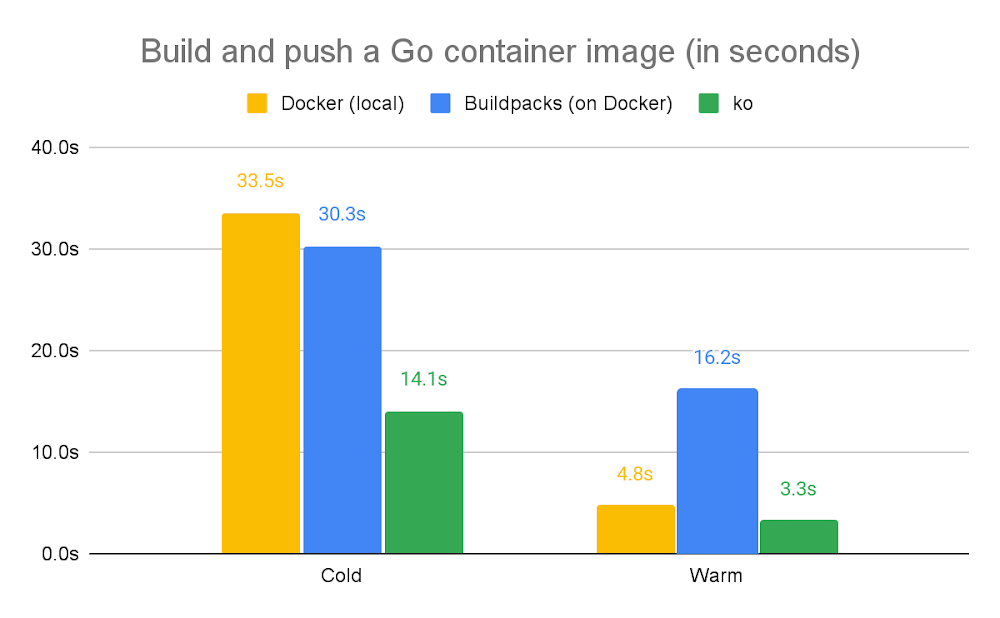
As developers work more and more with containers, it is becoming increasingly important to reduce the time to move from source code to a deployed application. To make building container images faster and easier, we have built technologies like Cloud Build, ko, Jib, Nixery and added support for cloud-native Buildpacks. Some of these tools focus specifically on building container images directly from the source code without a Docker engine or a Dockerfile.The Go programming language specifically makes building container images from source code much easier. This article focuses on how a tool we developed named “ko” can help you deploy services written in Go to Cloud Run faster than Docker build/push, and how it compares to alternatives like Buildpacks.How does ko work?ko is an open-source tool developed at Google that helps you build container images from Go programs and push them to container registries (including Container Registry and Artifact Registry). ko does its job without requiring you to write a Dockerfile or even install Docker itself on your machine.ko is spun off of the go-containerregistry library, which helps you interact with container registries and images. This is for a good reason: The majority of ko’s functionality is implemented using this Go module. Most notably this is what ko does:Download a base image from a container registryStatically compile your Go binaryCreate a new container image layer with the Go binaryAppend that layer to the base image to create a new imagePush the new image to the remote container registryBuilding and pushing a container image from a Go program is quite simple with ko:In the command above, we specified a registry for the resulting image to be published and then specified a Go import path (the same as what we would use in a “go build” command, i.e. the current directory in this case) to refer to the application we want to build. By default, the ko command uses a secure and lean base image from the Distroless collection of images (the gcr.io/distroless/static:nonroot image), which doesn’t contain a shell or other executables in order to reduce the attack surface of the container. With this base image, the resulting container will have CA certificates, timezone data, and your statically-compiled Go application binary.ko also works with Kubernetes quite well. For example, with “ko resolve” and “ko apply” commands you can hydrate your YAML manifests as ko replaces your “image:” references in YAML automatically with the image it builds, so you can deploy the resulting YAML to the Kubernetes cluster with kubectl:Using ko with Cloud RunBecause of ko’s composable nature, you can use ko with gcloud command-line tools to build and push images to Cloud Run with a single command:This works because ko outputs the full pushed image reference to the stdout stream, which gets captured by the shell and passed as an argument to gcloud via the –image flag.Similar to Kubernetes, ko can hydrate your YAML manifests for Cloud Run if you are deploying your services declaratively using YAML:In the command above, “ko resolve” replaces the Go import paths in the “image: …” values of your YAML file, and sends the output to stdout, which is passed to gcloud over a pipe. gcloud reads the hydrated YAML from stdin (due to the “-” argument) and deploys the service to Cloud Run.For this to work, the “image:” field in the YAML file needs to list the import path of your Go program using the following syntax:Ko, compared to its alternativesAs we mentioned earlier, accelerating the refactor-build-deploy-test loop is crucial for developers iterating on their applications. To illustrate the speed gains made possible by using ko (in addition to the time and system resources you’ll save by not having to write a Dockerfile or run Docker), we compared it to two common alternatives:Local docker build and docker push commands (with a Dockerfile)Buildpacks (no Dockerfile, but runs on Docker)Below is the performance comparison for building a sample Go application into a container image and pushing this image to Artifact Registry.Note: In this chart, “cold” builds do not cache layers either in the build machine or in the container registry. In contrast, “warm” builds cache both layers (if caching is enabled by default) and skip pushing the layer blobs to the registry if they already exist.ko vs local Docker Engine: ko wins here by a small margin. This is because the “docker build” command packages your source code into a tarball and sends it to the Docker engine, which either runs natively on Linux or inside a VM on macOS/Windows.  Then, Docker builds the image by spinning up a new container for Dockerfile instruction and snapshots the filesystem of the resulting container into an image layer. These steps can take a while.ko does not have these shortcomings; it directly creates the image layers without spinning up any containers and pushes the resulting layer tarballs and image manifest to the registry.In this approach we built and pushed the Go application using the following command:ko vs Buildpacks (on local Docker): Buildpacks help you build images for many languages without having to write a Dockerfile. It’s worth noting that Buildpacks still require Docker to work. Buildpacks work by detecting your language and using a “builder image” that has all the build tools installed, before finally copying the resulting artifacts into a smaller image.In this case, the builder image (gcr.io/buildpacks/builder:v1) is around 500 MB, so it will show up in the “cold” builds. However, even for “warm” builds, Buildpacks use a local Docker engine, which is already slower than ko. And similarly, Buildpacks will run custom logic during the build phase, so it is also slower than Docker.In this approach we built and pushed the Go application using the following command:Conclusionko is part of a larger effort to make developers’ lives easier by simplifying how container images are built. With buildpacks support, you can build container images out of many programming languages without writing Dockerfiles at all, and then you can deploy these images to Cloud Run with a single command.ko helps you build your Go applications into container images and makes it easy to deploy them to Kubernetes or Cloud Run. ko is not limited to the Google Cloud ecosystem: It can authenticate to any container registry and works with any Kubernetes cluster.To learn more, make sure to check out ko documentation at the GitHub repository and try deploying some of your own Go services to Cloud Run.Related ArticleStreamlining Cloud Run development with Cloud CodeCloud Run is now integrated with Cloud Code, making it easier to create new Cloud Run services from your favorite IDE.Read Article
Quelle: Google Cloud Platform

Discover and invoke services across clusters with GKE multi-cluster services

Do you have a Kubernetes application that needs to span multiple clusters? Whether for privacy, scalability, availability, cost management, and data sovereignty reasons, it can be hard for platform teams to architect, implement, operate, and maintain applications across cluster boundaries, as Kubernetes’ Service primitive only enables service discovery within the confines of a single Kubernetes cluster. Today, we are announcing the general availability of multi-cluster services (MCS), a Kubernetes-native cross-cluster service discovery and invocation mechanism for Google Kubernetes Engine (GKE), the most scalable managed Kubernetes offering. MCS extends the reach of the Kubernetes Service primitive beyond the cluster boundary, so you can easily build Kubernetes applications that span multiple clusters. This is especially important for cloud-native applications, which are typically built using containerized microservices. The one constant with microservices is change—microservices are constantly being updated, scaled up, scaled down, and redeployed throughout the lifecycle of an application, and the ability for microservices to discover one another is critical. GKE’s new multi-cluster services capability makes managing cross-cluster microservices-based apps simple. How does GKE MCS work?GKE MCS leverages the existing service primitive that developers and operators are already familiar with, making expanding into multiple clusters consistent and intuitive. Services enabled with this feature are discoverable and accessible across clusters with a virtual IP, matching the behavior of a ClusterIP service within a cluster. Just like your existing services, services configured to use MCS are compatible with community-driven, open APIs, ensuring your workloads remain portable. The GKE MCS solution leverages environs to group clusters and is powered by the same technology offered by Traffic Director, Google Cloud’s fully managed, enterprise-grade platform for global application networking.Common MCS use casesMercari, a leading e-commerce company and an early adopter of MCS: “We have been running all our microservices in a single multi-tenant GKE cluster. For our next-generation Kubernetes infrastructure, we are designing multi-region homogeneous and heterogeneous clusters. Seamless inter-cluster east-west communication is a prerequisite and multi-cluster Services promise to deliver. Developers will not need to think about where the service is running. We are very excited at the prospect.” – Vishal Banthia, Engineering Manager, Platform Infra, Mercari We are excited to see how you use MCS to deploy services that span multiple clusters to deliver solutions optimized for your business needs. Here are some popular use cases we have seen our customers enable with GKE MCS.High availability – Running the same service across clusters in multiple regions provides improved fault tolerance. In the event that a service in one cluster is unavailable, the request can fail over and be served from another cluster (or clusters). With MCS, it’s now possible to manage the communication between services across clusters, to improve the availability and resiliency of your applications to meet service level objectives.Stateful and stateless services – Stateful and stateless services have different operational dependencies and complexities and present different operational tradeoffs. Typically, stateless services have less of a dependency on migrating storage, making it easier to scale, upgrade and migrate a workload with high availability. MCS lets you separate an application into separate clusters for stateful and stateless workloads, making them easier to manage.Shared services – Increasingly, customers are spinning up separate Kubernetes clusters to get higher availability, better management of stateful and stateless services, and easier compliance with data sovereignty requirements. However, many services such as logging, monitoring (Prometheus), secrets management (Vault), or DNS are often shared amongst all clusters to simplify operations and reduce costs. Instead of each cluster requiring its own local service replica, MCS makes it easy to set up common shared services in a separate cluster that is used by all functional clusters.Migration – Modernizing an existing application into a containerized microservices-based architecture often requires services to be deployed across multiple Kubernetes clusters. MCS provides a mechanism to help bridge the communication between those services, making it easier to migrate your applications—especially when the same service can be deployed in two different clusters and traffic is allowed to shift.Multi-cluster Services & Multi-cluster IngressMCS also complements [Multi-cluster Ingress] with multi-cluster load balancing for both East-West and North-South traffic flows. Whether your traffic flows from the internet across clusters, within the VPC between clusters, or both, GKE provides multi-cluster networking that is deeply integrated and Kubernetes-native. Get started with GKE multi-cluster services, todayYou can start using multi-cluster services in GKE today and gain the benefits of higher availability, better management of shared services, and easier compliance for data sovereignty requirements of your applications.Thanks to Maulin Patel, Product Manager, for his contributions to this blog post.Related ArticleGKE best practices: Exposing GKE applications through Ingress and ServicesWe’ll walk through the different factors you should consider when exposing applications on GKE, explain how they impact application expos…Read Article
Quelle: Google Cloud Platform

Black History Month: Celebrating the success of Black founders with Google Cloud: Zirtue

February is Black History Month—a time for us to come together to celebrate and remember the important people and history of the African heritage. Over the next four weeks, we will highlight four Black-led startups and how they use Google Cloud to grow their businesses. Our second feature highlights Zirtue and its founder, Dennis. Specifically, Dennis talks about how the team was able to innovate quickly with easy to use Google Cloud tools and services. I’m sure many of you have loaned money to your family and friends—and experienced the awkwardness of asking for that money back. While we all want to support our loved ones, we also want to ensure the money is going toward the right causes and that we will get paid back as promised. I founded my startup Zirtue,to provide a simple, easy and non-threatening way to formalize the loan process between friends and family.Predatory lending—low-income communities and the military Growing up in low-income housing in Monroe, Louisiana, I witnessed predatory lending practices in my community firsthand. Check cashing establishments take 20% of checks, or up to 400% for some payday lenders. I personally was targeted by predatory lenders after my military service. Lenders would set up shop next to military bases and charge interest up to 300% on short-term loans. The recent Military Lending Act helps mitigate this by capping the interest rate at 36%. While this is a good start, there is still more we can do to help those who have served, as well as other targets of predatory lending, such as people of color. Low-income communities have fewer resources to begin with and lenders take a portion of their already minimal earnings. Our goal at Zirtue is to help these communities and provide them with alternatives to the aggressive lending practices of the past. We aim to give people a hand up to help them continuously thrive, as opposed to a one-off hand out. Zirtue—a fair and equitable lending optionZirtue is a relationship-based lending application that simplifies loans between friends, family, and trusted relationships with automatic ACH (automated clearing house) loan payments. Everything is done through our app: the lender sets their payment terms, receives a loan request from a friend or family member, the borrower gets the funds, and the lender is able to easily track payments. The app also handles reminding the borrower to stick to the agreed upon terms and gets you paid back—avoiding that awkward follow-up call or text. Currently, both parties must have a bank account to set up a Zirtue account. However, approximately 25% of our target market is unbanked or underbanked and thus, ineligible for a loan. So we’re proud to be launching a Zirtue banking card this summer, to empower customers to link their transactions to our card instead of a bank. Funds will automatically load onto the card, and can be used to direct deposit paychecks, as well as a form of payment for goods and services. Using the card will help users graduate to other banking products in the future. Good Zirtue performance metrics can function as an alternate credit history, giving banks the data they need to confidently provide additional services and ultimately help break the cycle of  predatory lending. Our recent infusion of $250K in funding from Morgan Stanley, as part of the Rise of the Rest Pitch Competition, and $250K from the Revolution Fund will help us achieve this major goal.Google Cloud technology for the greater good – Building Trust & SecurityFinancial transactions happen almost entirely online these days, so Zirtue relies on Google Cloud technology, including reCAPTCHA to make our app work day in and day out. Since we are handling sensitive financial information, security is top of mind. We are very proactive when it comes to protecting the integrity of the application and user data, including the use of bank-level encryption (AES-256), tokenization, hashing (SHA-512) and Two-Factor Authentication throughout the application. Further Google Cloud helps with security by encrypting data at rest and in transit.Our customers rely on us to send and receive money quickly, so it is vital to keep interruptions in service to a minimum. Firebase Crashlyticsprovides us with realtime crash reports that allow us to quickly troubleshoot problems within our app. Currently, we are growing 45% month over month, so there is no shortage of data to train and build out our AI/ML models. We are utilizing Cloud AutoML, which has the ability to train our ML models with a wealth of data from Zirtue borrowers using video to fill out their loan applications. The speech to text API transcribes the videos that are used to train our ML models to provide a more seamless user experience. This will also be used as an accessibility feature through the translation API, allowing customers to speak in their preferred language throughout the application process. Google for Startups Black Founder FundFirst, came the struggle of getting investors to believe in the app and—more importantly—believe that they should invest in a Black-owned business. The Black Founders Fund illuminates the struggles Black-led startups face when competing against their white counterparts, and proves what we can do when given access to the same resources.Next, it was difficult to take Zirtue to the next level. Hardcoding the front end of the app and outsourcing the back end meant that it was all hands on deck from every member of the team, 24/7. The $100K in non-dilutive funding from Google for Startups Black Founders Fund has been incredibly valuable for Zirtue, but the access to subject matter and product experts in AutoML and Google Cloud Team is priceless. Mentorship in marketing, SEO, and engineering—in combination with technology and the experts to implement it—has allowed us to deliver on our product promise and increase the impact we can have with our customers (special shoutout to Chandni Sharma and Daniel Navarro).It is an honor to be able to help those who historically have been viciously targeted by predatory lending practices—and an honor to help redefine what it means to be a successful founder while doing so. The Black Founders Fund means that we will be able to reach even more people with our efforts, and pave the way for future Black founders to come. With Google’s ongoing support, the financial technology industry—and the startup landscape—will never be the same. If you want to learn more about how Google Cloud can help your startup, visit our startup page here and sign up for our monthly startup newsletter to get a peek at our community activities, digital events, special offers, and more.Related ArticleBlack History Month: Celebrating the success of Black founders with Google Cloud: TQIntelligenceFebruary is Black History Month—a time for us to come together to celebrate and remember the important people and history of the African …Read Article
Quelle: Google Cloud Platform

NOAA and Google Cloud: A data match made in the cloud

With Valentine’s Day upon us, there is nothing the U.S. National Oceanic and Atmospheric Administration (NOAA) loves more than having our environmental data open and accessible to all⁠—and the cloud is the perfect match for NOAA’s goal to disseminate its environmental data more broadly than ever before.In 2019, as part of the Google Cloud Public Datasets Program and NOAA’s Big Data Program, NOAA and Google signed a contract with the potential to span 10 years, so we could continue our partnership and expand our efforts to provide timely, open, equitable, and useful public access to NOAA’s unique, high-quality environmental information. Democratizing data analysis and access for everyoneNOAA sits on a treasure trove of environmental information, gathering and distributing scientific data about everything from the ocean to the sun. Our mission includes understanding and predicting changes in climate, weather, oceans, and coasts to help conserve and manage ecosystems and natural resources. But like many federal agencies, we struggle with data discoverability and adopting emerging technologies. The reality is that on our own, it would be difficult to share our massive volumes of data at the rate people want it. Partnering up with cloud service providers such as Google and migrating to cloud platforms like Google Cloud lets people access our datasets without driving up costs or increasing the risks that come with using federal data access services. It also unlocks other powerful processing technologies like BigQuery and Google Cloud Storage that enhance data analysis and improve accessibility. Google Cloud and other cloud-based platforms help us achieve our vision of making our data free and open and also aligns well with the overall agenda of the U.S. Government. The Foundations for Evidence-Based Policy Making Act, signed in January 2019, generally requires U.S. Government data to be open and available to the public. Working with cloud service providers such as Google Cloud helps NOAA democratize access to NOAA data—it’s truly a level playing field. Everyone has the same access in the cloud, and it puts the power of data in the hands of many, rather than a select few.  Another critical benefit of data dissemination public-private partnerships, like our relationship with Google Cloud, is their ability to jumpstart the economy and promote innovation. In the past, the bar for an entrepreneur to enter a market like the private weather industry was extremely high. You needed to be able to build and maintain your own systems and infrastructure, which limited entry to larger organizations with the right resources and connections available to them. Today, to access our data on Google Cloud, all you need is a laptop and a Google account to get started. You can spin up your own HPC cluster on Google Cloud, run your model, and put it out into the marketplace without being burdened with the long-term maintenance. As a result, we see small businesses being able to leverage our data and operate in areas where previously they simply didn’t exist.Public-private data partnerships at the heart of innovationNOAA’s datasets have contributed to a number of innovative use cases that highlight the benefits of public-private data partnerships. Here are some projects to date: Acoustic detection of humpback whalesUsing over 15 years of underwater audio recordings from the Pacific Islands Fisheries Science Center of NOAA, Google helped develop algorithms to identify humpback whale calls. Historically, passive acoustic monitoring to identify whales was done manually by somebody sitting with a pair of headphones on all day, but using audio event analysis helped automate these tasks—and moved conservation goals forward by decades. Researchers now have new techniques at their disposal that help them automatically identify the presence of humpback whales so they can mitigate anthropogenic impacts on whales, such as ship traffic and other offshore activities. Our National Centers for Environmental Information established an archive of the full collection of multi-year acoustic data, which is now hosted on Google Cloud as a public dataset.Megaptera novaeangliae, the humpback whale, and a spectrogram of its call, one of the audio events found in the dataset, with time on the x-axis and frequency on the y-axis.Weather forecasting for fire detectionOne of the most important aspects of our mission is the protection of life—and the cloud and other advanced technologies are driving the discovery of new potential life-saving capabilities that keep people informed and safe. NOAA’s GOES-16 satellite and GOES-17 satellite provide critical datasets that help detect fires, identify their locations, and track their movements in near real-time. Combining our data and Google Earth Engine’s data analysis capabilities, Google recently introduced a new wildfire boundary map to provide deeper insights for areas impacted by ongoing wildfires.Using data from NOAA’s GOES satellites and Google Earth Engine, Google creates a digital polygon to represent the approximate wildfire impact area on Search and Google Maps.Start exploring and experimenting with NOAA’s datasets, including those found on Google Cloud Public Datasets. If you’re already using our public datasets, we’d love to hear from you. What data are you using and how? What are you looking forward to using the most?
Quelle: Google Cloud Platform




