Testing Cloud SQL failover: Where to begin

One of the key considerations of a high availability setup for Cloud SQL is its ability to failover from a primary instance to a standby instance if the primary instance becomes unresponsive. It might be a paradigm shift to think about purposely initiating a failover and watching what happens, but it can be tremendously helpful to do this sort of testing for your database to ensure that your application is resilient in the event of a zonal failover, whether for general performance testing or specific preparations for a peak event. Additionally, Regional Persistent Disks (RePD) used with your Cloud SQL instance will synchronously replicate data at the block level between two zones in a region, which means that all writes are automatically made to the standby instance in addition to the primary instance. This allows for reduced downtime and higher availability, but also brings an additional need to test failover recovery times and resiliency to ensure that your application connects to the backup instance as smoothly as possible. Let’s examine some of the key metrics to monitor when testing failover to optimize your application’s performance, including the number of database connections, queries per second, CPU and memory utilization of the instance, read/write IOPS, and peak replication lag.How do I actually failover test my Cloud SQL instance?Step 1: Select an instance for testingTake an inventory of your Cloud SQL instances and start with an instance that reflects your average workload. Don’t start out by testing your largest instance. Instead, choose an instance that is indicative of your environment’s most typical machine size and specifications, including number of tables and records.Use an instance that will be able to simulate production loads so that your testing results are meaningful.Make note of the instance’s region location as well — it is a good idea to repeat the failover testing process in all of your key regions. Step 2: Decide how you will run your testIt’s important to understand the specific data inputs and scenarios you want to test during failover. For example, you will probably want to test failover with different load sizes to understand any variations in behavior.It may help to think of it in terms of T-shirt sizing — consider your average workload, and test failover with a small, medium and large load comparative to that. While failover testing is different from load testing, it is important to make sure that you observe failover behavior under a range of different loads.Examples of variations to failover test:Non-peak loadPeak loadInstances in different regionsA range of machine sizesDifferent workloads, e.g., varying reads, writes, inserts, or updates Step 3: Conduct the failover test and get ready to observeSet aside enough time to conduct the failover test from start to finish and observe the results. It would be best to allow for several hours to fully capture important behaviors and resulting metrics leading up to, during, and post-failover tests.Capture baselines for your key metrics before testing failover so that you know what to compare.You can initiate manual failover from the GCP console or from the command line.Example metrics to capture:General:Number of database connections – you can control the number of connections, such as by automatically shutting down certain processes before initiating failover (e.g., database/network/connections)Queries per second (QPS)CPU utilization of the instance (e.g., database/cpu/utilization)Memory utilization of the instance (e.g., database/memory/utilization)Read/write IOPS (e.g., database/disk/read_ops_count, database/disk/write_ops_count)Peak replication lag (e.g., MySQL Seconds_Behind_Master metric or Postgres replica_byte_lag)MySQL:MySQL global statisticsMySQL undo spaceInnoDB dirty pages (e.g., database/mysql/innodb_buffer_pool_pages_dirty)InnoDB free pages (e.g., database/mysql/innodb_buffer_pool_pages_free)MySQL slow query log countsPostgres:Partitioned tables, tablespacesShared blocks cache access (e.g., database/postgresql/insights/aggregate/shared_blk_access_coun)Effective cache sizeVACUUM operationsOverall results:Time duration of failoverTime duration of recoveryOverall database/application performance (e.g., for both failover and failback) Step 4: Consider your lessons learnedWhat logs or metrics were useful to have? Are there any additional logs or metrics that could be set up in Google Cloud’s operations suite that would enhance your understanding of your database instance or application’s behavior?How did your read replica handle the failover traffic overflow? Could you create additional read replicas to handle load from the primary instance?Do you observe any differences in your application’s behavior for automatic failover compared to manual failover?Zonal failover in a high-availability instance from the primary to a standby instance is different from cross-regional disaster recovery. Consider testing regional failover as part of your DR strategy as well.Additional general performance tipsInternal database caching can be crucial for read performance. Whether using Cloud SQL for MySQL or Postgres, be sure you understand how your instance is caching data and reading from that cached data. For example, the way MySQL’s innodb engine caches the buffer pool.Generally, choose an instance size that allows for plenty of breathing room for CPU, RAM, and disk. The larger the disk size, the higher the IOPS capability.Similarly, if you are running a lot of CPU-intensive queries on your instance, such as sorting, regexes, etc, you will need to utilize a larger machine size.Understand how your application responds to lost connections. You can also test this by restarting your instance.Try this out on Cloud SQL in the console or read the documentation for the Cloud SQL insights that can help you troubleshoot performance issues in such scenarios.
Quelle: Google Cloud Platform

Google’s Cloud Healthcare Consent Management API now generally available

Last fall, weannounced the Public Previewof the Google Cloud Healthcare Consent Management API, which gives healthcare application developers and clinical researchers a simple way to manage individuals’ consent over use of health data. Since then, early adopters have used the API to do things like create personalized patient portals, securely integrate data into clinical workflows based on patient consent, and develop virtual clinical trials.     Today, we’re pleased to announce that the Healthcare Consent Management API is generally available, giving customers the ability to greatly scale the management of consents to meet increasing need, particularly amidst the emerging task of managing health data for new care and research scenarios. During the COVID-19 pandemic, healthcare organizations have quickly embraced concepts like virtual care and remote trials. As a result, healthcare application developers and researchers have needed easy and secure ways to manage patient consent. Further, the explosion of rich data generated by devices such as glucose monitors, wearables, and other sources have emphasized the importance of patient consent and privacy, as patients and caregivers look to safely incorporate data from more sources into their care plans.The Healthcare Consent Management API helps by making it easier to satisfy the requirements of existing and emerging privacy and consent frameworks, while supporting the transparent and responsible incorporation of digital health data into patient care and research. The flow of consent and privacy information can work as follows:Administrators within a provider or research organization configure a unique instance of the Healthcare Consent Management API with the privacy concepts and terminology that their organizations use.When a provider or researcher application offers privacy options to a user, the application creates or revises a corresponding consent record within the Healthcare Consent Management API to reflect that user’s selected option.As provider or researcher applications write data to their datastores, those applications inform the organization’s Healthcare Consent Management API instance about the relevant privacy characteristics of that data.When providers, researchers or their applications need to determine whether data can be accessed for a particular purpose, a query is sent to the Healthcare Consent Management API, which quickly determines if there is a valid consent record permitting that access. The Healthcare Consent Management API adds to Google Cloud’s efforts to bring innovative technologies to the healthcare and life sciences industries—particularly in data security, privacy, and interoperability. For example, our Healthcare API facilitates construction of cloud-native applications that work with industry-standard data like HL7v2, FHIR and DICOM; our Life Sciences API is accelerating genomics research; our Healthcare Interoperability Readiness Program helps organizations achieve secure interoperability among healthcare data sources; and Cloud Data Loss Prevention provides a fully managed service designed to help discover, classify, and protect sensitive data. We’re pleased to add the Healthcare Consent Management API to our portfolio of solutions, and to support healthcare and life sciences professionals as healthcare data begins to span a variety of devices, scenarios, and locations. To learn more about the Consent Management API, and to get started with your own healthcare project, visit theconcept articles andhow-to guides.Related ArticleAdvancing telehealth with AmwellOur new partnership with Amwell helps the healthcare industry transform for a world that is more reliant on telehealth.Read Article
Quelle: Google Cloud Platform

Zero-footprint DR solution with Google Cloud VMware Engine and Actifio

Data is the lifeblood of the modern business and you simply cannot afford to lose it: Downtime and data loss are costly and risky, and end users expect 24×7 access to their applications and data. As such, every organization needs a comprehensive business continuity (BC) and disaster recovery (DR) strategy that ensures uptime, minimizes data loss and maintains productivity in the face of a disruption. This is especially true in today’s climate when BC & DR plans are being tested by travel restrictions and remote work.However, traditional approaches to disaster recovery are often expensive because they require you to provision spare idle IT infrastructure at a DR site. And while using on-demand capacity in the cloud has long promised to deliver significant economic efficiencies for DR, it’s only an option if the DR environment is similar to your on-prem infrastructure. What you need is an on-demand, easy-to-stand-up solution that mimics your primary environment, and that lets you pay for capacity only during a disaster or a test. In this post, we’ll discuss how you use Google Cloud VMware Engine, our fully managed VMware platform delivered as a service, with Actifio enterprise data management software to create a ‘Zero Footprint’ DR solution. The service delivers a fully managed VMware Cloud Foundation stack, making it easy for you to replicate your on-prem environment in Google Cloud. And because you only pay for usage during failover / test time, it lowers your total cost of ownership (TCO). Let’s take a closer look. What is Google Cloud VMware Engine?Google Cloud VMware Engine is a first-party offering, fully owned, operated and supported by Google Cloud, that lets you run your VMware environment natively in Google Cloud. The service delivers a fully managed VMware Cloud Foundation hybrid cloud platform, including VMware vSphere, vCenter, vSAN, NSX-T, and HCX technologies, all in a dedicated environment on Google Cloud’s high performance and reliable infrastructure. The service lets you seamlessly migrate production workloads to the cloud without the cost or complexity of refactoring applications, and manage workloads consistently with your on-prem environment. Additionally, you can reduce your operational burden by moving to an on-demand, self-service model, while maintaining continuity with your existing tools, processes and skill sets, while also taking advantage of Google Cloud services to supercharge your VMware environment.What is Actifio?Actifio is a leading backup and disaster recovery software provider that lets you protect virtual copies of data in their native format, manage these copies throughout their entire lifecycle, and use these copies for scenarios like development and test. Recently acquired by Google Cloud, Actifio lets you:Increase business availability by simplifying and accelerating backup and DR at scale, across cloud-native, and hybrid environments Automatically back up and protect a variety of workloads, including enterprise databases like SAP HANA, Oracle, Microsoft SQL Server, PostgreSQL, and MySQL, as well as virtual machines (VMs) in VMware, physical servers, and Compute Engine environments.Bring significant efficiencies to data storage, transfer, and recoveryGoogle Cloud VMware Engine, meet ActifioSo, how can you combine Actifio with Google Cloud VMware Engine to create a cost-effective DR solution for your VMware workloads?If you have a recovery time objective (RTO) of a few hours, you can back up your data from on-prem to Cloud Storage using Actifio, and perform test, failover and failback operations. During a test or a failover, you can dynamically create a VMware environment using Google Cloud VMware Engine and restore your applications to this environment from the backup copy stored in Cloud Storage.With this solution, you don’t need to keep a running VMware Private Cloud in Google Cloud VMware Engine to protect your on-prem environments—you can create the DR VMware environment on-demand during failover / test time and restore your on-prem VMware applications as needed in the service, enabling like-for-like recoverability. Furthermore, as there is no network egress traffic, there are no associated costs during application recovery, making DR much more affordable.. And because this solution leverages an environment and tools that you’re already familiar with, it’s much easier to get your DR environment up and running.Actifio + Google Cloud VMware Engine under the hood The Google Cloud VMware Engine + Actifio solution drives down the cost of DR by rapidly and dynamically creating a VMware SDDC and enabling instant data access directly from Cloud Storage via Actifio. The solution uses a GCP Project as the DR site for an on-premises VMware environment. It requires a pair of Actifio Sky appliances—one of them is installed in your on-prem VMware environment and another (DR-Sky) in a GCP project as a Compute Engine instance that is part of the DR environment. The VMware SDDC and the DR-sky are started only at DR test/failover time, thus keeping zero ongoing compute on the DR site when it is not in use. The on-prem Sky appliance takes a snapshot of the VM’s disks and stores them as a recoverable image in Cloud Storage. At the time of a failover or a DR test, a VMware SDDC is dynamically created along with the DR-Sky in Compute Engine. The new SDDC is registered to Actifio. The backup images stored in Cloud Storage are imported by the Sky appliance into VMware Engine SDDC, letting VMs be instantly created from the backup images. The VMs boot directly from Cloud Storage and continue to run while its vmdk’s are still backed by Cloud Storage. This is a cost-effective approach when running DR tests, as you don’t necessarily need  to run on performance-optimized infrastructure. You can then subsequently use storage vMotion to move your recovered VMs to a local vSAN datastore to complete the recovery process and run the VMs in production configuration.Architectural diagram showing steady-state “zero footprint” (i.e. no DR-specific cloud-based compute required) protection.Architectural diagram showing a post-failover recovery deployment. Google Cloud VMware Engine and Actifio have been deployed to facilitate VM recovery from Cloud Storage.Next stepsTogether, the combination of VMware Engine and Actifio makes it easy and cost-effective to use Google Cloud as a DR target, ensuring that data doesn’t get lost in the event of an outage, and that your users don’t lose access to their applications. If you’re interested in trying this zero-footprint solution, please fill out this form and we will reach out to you with next steps.Related ArticleGoogle enters agreement to acquire ActifioAs organizations sharpen their disaster preparedness strategies, Actifio’s business continuity solutions will help Google Cloud customers…Read Article
Quelle: Google Cloud Platform

Using Cloud Build to keep Airflow Operators up-to-date in your Composer environment

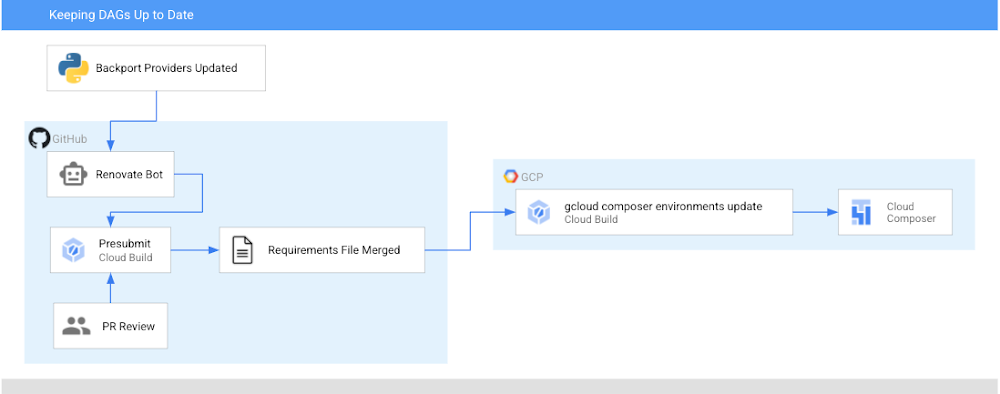
Before 2020, keeping your Airflow operators up to date meant either upgrading to the most recent version of Airflow, or bringing newer versions of the operators in as plugins.  Now (if you’re using Airflow 1.10.6 or later), the latest versions of operators are packaged as PyPI modules that can be installed in your Airflow environment! In this post, I’m going to show you how to automatically keep your operators (and any other PyPI packages) up to date in your Cloud Composer environment utilizing Cloud Build and GitHub automation. Note: in Cloud Composer some backport packages come pre-installed in your environment – see the versions list for more details about what is installed in the version you are running.After this walkthrough, this is how your development flow will look when a new version of the operators you are using is released:Step 0: There is an update to operatorsStep 1: Renovate Bot opens up a PR to a requirements-composer.txt file to make this updateStep 2: Cloud build runs unit tests to make sure none of your DAGs immediately breakStep 3: PR is approved and merged to mainStep 4: Cloud Build updates your dev environmentStep 5: You, a human, look at your DAGs in dev to make sure all is well. If there is a problem, you need to resolve this manually and revert your requirements file. Step 6: You, a human, manually update your prod PyPI packagesIn this post, we will first:Create a requirements file that Cloud Build will use to unit test your DAGs with a new version of the operators and eventually to update your Composer EnvironmentSet up the Cloud Build job to unit test your DAGsSet up the Cloud Build job to update your composer environmentsSet up Renovate Bot to automatically check for updates to the Airflow operators (and other dependencies)Repo StructureThis blog post assumes that you have your DAGs and their tests stored in a GitHub repository. In this directory, which contains the contents of an example repository, DAGs and tests are stored in a dags folder, with requirements files and configuration files living at the top level. Setting up Cloud BuildThere will be two Cloud Build steps – one that runs on a pull request to unit test your DAGs, and one that runs when a PR is merged to the “main” branch that updates your Composer environment with the latest PyPI dependency. Job #1 – Unit Testing Your DAGsCreating a requirements fileTo keep track of the PyPI modules installed in my Composer environment, I have been using a special requirements-composer.txt file that lives in the GitHub repository where I store my dags. Create this file now—it’s just like a regular requirements.txt file, only with a special name. In it, I’ve added the most recent version of the operator package I’m using – in this case, apache-airflow-backport-providers-google. I specifically pin the operators to a specific version so it is always clear what version is installed in my environment. requirements-composer.txtapache-airflow-backport-providers-google==2020.11.23Creating Your DockerfileIn order to run the unit tests, create a Dockerfile so that we can make a container image to run in Cloud Build. This Dockerfile installs all relevant dependencies and runs the test command. Creating your cloudbuild.yaml fileCreate a YAML file to configure your Cloud Build job named test-dags.cloudbuild.yaml. In it, there are two steps:The first step builds the Docker image from the Dockerfile you just created. The Docker image is taggedusing default substitutions with the tag cicd and the commit SHA, which acts as a UUID.The second step is to run the container image, executing the DAG testsNote: You can additionally choose to store your image in Container Registry as part of your workflow.Create the Cloud Build TriggerFollowing this guide, create a GitHub app based trigger with the following configurations:Name: test-dagsEvent: Pull RequestSource – Repository: choose your repositorySource – Base branch: ^main$ (or whatever the name of your base branch is)Source – Comment Control: not required (this means that any user can submit a PR that triggers the build)Build Configuration – Cloud build configuration file: /test-dags.cloudbuild.yaml (the path to your build file)To test your build, create a pull request to your main branch – you will see your check, and if you click “Details” and choose “View more details on Google Cloud Build”, you can see your build logs in the Cloud Console.Job #2 – Updating Your Composer EnvironmentNow that you are successfully using Cloud Build to unit test your DAGs against any requirements changes, let’s automate the updating of your Composer environment.Creating a cloudbuild.yaml fileCreate a YAML file to configure your Cloud Build job and name it update-composer.cloudbuild.yaml. In it, there is one step, which invokes the gcloud composer environments update command, passing the requirements-composer.txt file to install the Python dependencies. ${_COMPOSER_NAME} and ${_COMPOSER_REGION} are user-defined substitutions you will define in the next section. This configuration file also includes a timeout – the default Cloud Build timeout is too short to accommodate long running Composer Environment update operations – this timeout ensures the operation can finish and send its end status back to Cloud Build.Create the Cloud Build TriggerFollowing this guide, create a GitHub app based trigger with the following configurations:Name: update-composer-envEvent: Push to a branchSource – Repository: choose your repositorySource – Base branch: ^main$ (or whatever the name of your base branch is)Source – Included files filter (glob): requirements-composer.txt (this means the build should only run if this file is changed)Build Configuration – Cloud build configuration file: /update-composer.cloudbuild.yaml (the path to your build file)In the Advanced configuration, add two substitution variables _COMPOSER_NAME – the name of your composer environment_COMPOSER_REGION – the Compute engine region where your environment is locatedTo test your build, you can manually trigger it from the Triggers page by pressing “RUN” next to your newly created trigger. Additionally, you can create a pull request to your main branch specifically updating the requirements-composer.txt file – you will see your first check, and once you merge the PR to main, you should see the build start in your Build historyTo automate this even further, let’s have a robot keep our dependencies up to date.Setting up a Dependency BotThere are multiple options for bots that keep your dependencies up to date, but I personally prefer WhiteSource renovate bot. Not only does it do what I need, but I have found that the folks who work on it are very responsive and kind when I’ve opened issues and I really appreciate that. First, you’ll need to install the Renovate GitHub App and give it the appropriate access to your repository. You’ll then need to add a configuration file called renovate.json to the GitHub repository. Renovate will automatically look for changes in a regular requirements.txt file, but you can also configure it to watch additional requirements files. In our case, we want to watch the requirements-composer.txt file, so we add it to the pip_requirements filematch object. There are many additional configuration options that you can explore in addition to the ones shown here. Experiment and see what fits your needs!Putting it all togetherWhen there is an update to the packages in requirements-composer.txt, renovate bot will open up a PR to the repo. When that PR is merged to master (either by the bot, if you have automerge set to true in your config, or by a human), it will trigger the cloud build job, which will update your Cloud Composer environment. From now on, this automation will ensure you never miss an update to the Airflow operators!CaveatsIf your update composer environment operation fails, you need to resolve that failure manually, and you will need to make sure your requirements-composer.txt file is reverted to match the dependencies used in your Composer environmentYou will need to verify your DAGs using the Airflow UI as well, and if you’re using a two environment setup (Dev + Prod), it is recommended to use this automation with your dev environment, and only update the production environment once you verify that everything is functioning as expected.ConclusionBy following this process you can automatically keep your operators (and any other PyPI packages) up to date in your Cloud Composer environment utilizing Cloud Build and GitHub automation.Was this so fun that you want to continue automating this process? Check out how to add notifications to your Cloud Build status.Related ArticleGoogle Cloud and GitHub collaborate to make CI fast and easyToday, Google Cloud and GitHub are delivering a new integrated experience that connects GitHub with Google’s Cloud Build, our new CI/CD p…Read Article
Quelle: Google Cloud Platform

A guide to data protection offerings in Google Cloud

Cloud adoption has become a team sport. It started as an exciting effort led by forward-thinking developers, and it has turned into a global IT directive across countries and industries. Whether their goal is to migrate SAP workloads or to build next-generation analytics, thousands of technologists are learning how to work together to accelerate the shift to cloud platforms. Data protection experts have a vital role to play in this team effort. Fortunately, backup and storage administrators have multiple tools to safeguard their organization’s data during and after cloud migration. Here at Google Cloud, we recognize the RTO, RPO, and internal compliance requirements that administrators need to meet during these migrations. We also have heard two additional key requirements to enable team-wide adoption of cloud-based backup.The first is a demand for multi-region backup storage. Backup administrators are familiar with compliance requirements to keep secondary copies of their data in a different region from production data, sometimes at a prescribed minimum distance like 1000 kilometers or 500 miles. Equally familiar is the 3-2-1 rule that advises to keep three copies of data, two backup copies on different media, and one backup copy offsite. The second is the need for better performance at the price of cold storage. As organizations look to migrate global, mission-critical applications, storage administrators must be able to meet unpredictable auditor and operational demands to recover from a backup quickly. At the same time, those administrators are responsible for managing costs associated with long-term retention – not all data can be kept warm.Google Cloud Storage was architected to address these two common administrator needs – for multi-region storage and for performant, low-latency cold storage – and to ensure conventional RTO, RPO, and compliance requirements can easily be met. All of this facilitates team-wide adoption of cloud storage for backup use cases. We also have a number of offerings to allow our customers to architect a data protection strategy that meets their compliance and operational requirements. For backup and storage administrators engaged in the team effort of cloud migration, we’ve provided a brief description of some of them below.Persistent Disk Snapshots: Backup for Google Compute Engine WorkloadsGoogle Cloud provides Persistent Disk snapshotsfor workloads running on Compute Engine or Google Kubernetes Engine. Persistent Disk snapshots are an easy way of taking a regular, crash-consistent backup, with predictable RTO and RPO performance akin to warm on-premises backup storage. Compute Engine snapshots are incremental-forever and priced based on storage size.Persistent Disk snapshots are also stored in multi-region storage (e.g., eu or us) by default, at no additional cost, with the option to restore to any Google Cloud region contained within. For customers that demand very low RTO, one option is to make certain snapshots available locally, in the preferred recovery region. This trades some of the resiliency associated with multi-region storage in favor of faster restore performance in the single preferred recovery region, as well as easier compliance with data sovereignty requirements. Persistent Disk snapshots can be orchestrated via the Google Cloud Console, our API, or our CLI. Additionally, you can create a snapshot schedule to automate regular snapshots at hourly, daily, or weekly intervals, with custom retention policies. And for additional protection against downtime, customers can choose to architect their production applications for high availability using regional Persistent Disk.We look forward to sharing more news on Persistent Disk and Persistent Disk snapshots in future blog posts. Google’s Cloud SQL: Simple Backup for Managed DatabasesFor customers using Cloud SQL, our managed database service, Google Cloud offers two options for data protection. The first is fully automated, application-consistent and incremental-forever backup, along with point-in-time recovery. These automated backups are turned on by default, with a retention period of seven days.The second option is for on-demand backups. This allows an administrator to take a separate full backup with a different retention period from any automated backups.Both options are stored in multiple Google Cloud regions to ensure a redundant backup copy is preserved. Just like Persistent Disk snapshots, these Cloud SQL backups can be restored either in the same region as the production database or in the secondary region. You also have the option to restrict the location of your backups to a specific region to meet data residency or other compliance requirements.Actifio GO and Google Cloud Data ProtectionFor organizations interested in a first-party backup solution that backs data up to Cloud Storage, Actifio GO is available on Google Cloud. Actifio GO can be configured to protect your in-cloud applications running on Compute Engine and Google Cloud VMware Engine, including popular ‘lift and shift’ enterprise databases such as Oracle and SAP HANA. Administrators that use Actifio GO will be able to provide incremental-forever, application-consistent backup while orchestrating and automating their in-cloud backups via one centralized console. They will also be able to select from a range of storage options, including Persistent Disk for fast snapshot restores, Cloud Storage buckets in multiple regions for compliance purposes, and low-cost, performant cold storage for long-term archival.Additionally, Actifio GO can be deployed as a hybrid, SaaS backup solution. This architecture backs up on-premises VMs and databases to a snapshot pool locally, migrating backups to Cloud Storage for longer term retention. That enables lower-cost business continuity by allowing administrators to restore those backups inside Google Cloud in case of a disaster. For storage professionals asked to retire secondary data centers or on-premises secondary storage, Actifio GO can be a more direct route to the cloud.Actifio GO is available in the Google Cloud Marketplace today. For more information about Actifio GO, contact your Google Cloud sales representative.Using Google Cloud Storage with Our Partners’ Backup SolutionsDuring the first stages of cloud migration, some organizations may prioritize secondary workloads, such as backup or disaster recovery copies. These workloads make ideal candidates for low-friction cloud adoption, as they can be migrated from on-premises to cloud storage without impacting production applications. Many storage and backup administrators are already aware of how backup and recovery companies enable tiering cold backups to Cloud Storage. Administrators that use one of our backup and recovery partners, like Commvault, can take advantage of our multi-region and performant cold storage to meet key compliance requirements, like retaining an off-site backup copy for auditors or preserving a backup copy in multiple geographic regions. In recent months, partners like Veeam have enhanced their support for Google Cloud workloads and for Cloud Storage as an archival target. Storage administrators may also be interested in backup and data migration options from established enterprise vendors like NetApp and Dell. These vendors have partnered with Google Cloud to create simple cloud solutions for storage administrators that know their products well.Backup Alternative: Export Archival Data to Google’s Cloud StorageStorage administrators accustomed to on-premises workloads understand that there are a range of options, beyond full-fledged backup, to preserve additional copies of their data for compliance purposes. Google Cloud also enables you to perform backup exports, either exporting Persistent Disk data as a custom image or, alternately, exporting a Cloud SQL database as a CSV. These exported images and CSVs can be moved to Cloud Storage to be shared across projects or to be archived at a low cost. Just as it is possible to export this data to object storage, it is also possible to import it and recreate a VM or database. To learn more about exporting images for archival, please see the documentation for Compute Engine and Cloud SQL.ConclusionStorage and backup administrators have a key role to play in cloud adoption. Google Cloud has developed a number of data protection offerings to help administrators excel in their role and meet operational and compliance requirements. Underpinning each of these is a cloud storage architecture designed to make it easier and cheaper to store backup data in multiple regions, and built to provide great price-to-performance for long-term data retention. For more information on Google Cloud’s storage options, please visit our storage products page, or sign up for a free trial and receive a $300 credit today.
Quelle: Google Cloud Platform

Healthcare distributor FFF Enterprises improves performance 7x with SAP on Google Cloud

When getting the right product to the right person is a matter of life and death, you don’t want to have to worry about how well your ERP system is performing. That’s why FFF Enterprises, Inc. (FFF), a leading supplier of critical-care biopharmaceuticals, plasma products, and vaccines—including those used to protect against COVID-19—chose to migrate its core SAP enterprise applications to Google Cloud. “Our mission is to secure the biopharmaceutical supply chain and ultimately achieve the goal of ‘Helping Healthcare Care,’” says Brian Wemple, SAP Technical Manager at FFF. “We’re 100% dependent on the ERP system. It runs the business by integrating with our e-commerce systems; our pick, pack and ship; and our business intelligence. It has to be always available and always accurate.”FFF’s business and reputation depend on having a secure, reliable, and high-performance technology backbone. “Our supply chain security is second to none,” Wemple says. “With over 33 years of counterfeit-free product distribution, we take pride in the fact that our healthcare providers can purchase through us with confidence, knowing we make the safety of their patients our top priority. Our commitment to purchase directly from the manufacturer ensures the integrity of our supply channel is never compromised.” In 2016, FFF chose to host its SAP S/4HANA on-premises applications—including SAP’s Business Intelligence suite, BusinessObjects (BOBJ)—on a private cloud in hopes of increasing scalability. But the results fell short of expectations. “To upgrade a server, we had to place a change order to get a statement of work quote from the hosting company, approve the statement of work, then wait for the hardware to be provisioned and turned over to us to install and configure the application,” Wemple recalls. “Not quite the nimble, rapid response we were looking for.” After running SAP on legacy infrastructure for some time and experiencing core switch outages, server outages, multiprotocol label switching (MPLS) edge router outages, and other issues, FFF knew it needed to revisit its technology infrastructure.Google Cloud and Managecore: Deep experience with SAPAfter reviewing its options, FFF chose to migrate from its old hosting platform to Google Cloud. “Our decision was based on many factors, such as the ability to spin up and down servers on demand, as well as the strong relationship between SAP and Google Cloud,” Wemple explains. FFF selected Wisconsin-basedManagecore, a Certified Premier Google Cloud Partner, to perform the migration with ongoing SAP and Cloud managed services thereafter. “Managecore is our partner for our entire SAP environment,” Wemple notes. “Their knowledge of Google Cloud is superior to anybody else that I’ve spoken with, and with that extra knowledge, they’re able to offer solutions that both reduce our costs and improve our performance.”“The Managecore team leveraged our years of SAP technical expertise, and leading-edge tools to flawlessly execute the SAP to Google Cloud migration for FFF Enterprises within a rigorous time frame. Working with Brian and the FFF Enterprises leadership team for the migration was a real pleasure and continues to be as we manage their SAP landscape on the Google Cloud,” says Nick Miletich, Chief Technology Officer for Managecore. Managecore performed the migration to Google Cloud in the tight 12-week time frame that FFF required and upgraded FFF’s IT architecture to support better availability and reliability for its SAP systems. FFF now runs critical SAP S/4HANA applications, including BusinessObjects, Sales and Distribution, Material Management, FICO, Warehouse Management, and more, on Google Cloud all managed by Managecore.A faster, more dependable infrastructure with  80% improved performance“We’ve experienced an 80% improvement in the speed of our SAP environment for a lower monthly cost than we saw with our previous provider,” Wemple says about the migration to Google Cloud. “Our SAP applications are so much more reliable than they were previously. We’ve had no outages since we’ve gone live—that’s just a perfect situation for us.”Without the need to maintain systems or worry about outages, FFF’s IT team has more time and resources to focus on innovation and support. The move to Google Cloud also paves the way for further digital transformation, including advanced analytics and Internet of Things (IoT). “Since we went live on the Google Cloud in January 2019, we have expanded our footprint at Google Cloud,” Wemple says. “We’re now taking advantage of Google Cloud technology such as BigQuery, Cloud Data Fusion, Kubernetes Engine and IoT tools, just to name a few. Managecore has been helping us along the way, putting everything together.” In the end, Wemple says, having a dependable and responsive partner to host and manage its core systems lets FFF Enterprises get back to the crucial work at hand. “Our business is distributing lifesaving medical supplies with speed, reliability, and integrity,” he says. “It is not to worry about our ERP system. For that reason and many more, we look forward to a long and prosperous partnership with Google Cloud.”To learn more about the ways FFF Enterprises improved the speed and reliability of its SAP enterprise applications, watch the story and read the case study. For more examples of SAP on Google Cloud customers, or view our YouTube channel.
Quelle: Google Cloud Platform

Google Cloud Celebrates International Women’s Day

Today, Google Cloud celebrates International Women’s Day #IWD2021 and stands with those who #ChooseToChallenge inequality, call out bias, and question stereotypes. Together, we can   forge an inclusive world that accurately reflects the people and communities who live in it. Google’s mission is to organize the world’s information and make it universally accessible and useful. To achieve this, we believe that a diversity of backgrounds, perspectives, and experiences lead to better decision-making within our teams and company, resulting in more relevant products for our customers. As part of our ongoing commitment to support women in tech, Google Cloud is proud to announce new partnerships with Women Who Code, Women in Cloud, Yielding Accomplished African Women, Pink Programming, and Coding Black Females. These communities support women (cis, trans, non-binary) developers and entrepreneurs by offering hands-on training, leadership workshops, a support network, job matching, and events and programs to advance women in technology all throughout their professional development journey. Our partnerships will primarily focus on hosting educational events and workshops, supplying technical content for their bootcamps and training programs, mentorships, asking Google Cloud developers to speak at their events and conferences, co-authoring blogs, and providing financial support. Throughout the month, we’ll also use our platforms to spotlight exceptional women developers who support the broad developer community and use Google Cloud services in innovative ways. Learn a little about each of these fascinating women below including how and why they became Cloud developers, their experience as a woman in tech, and their advice to other female developers. Follow along with #WomenAreExperts on Twitter throughout Women’s History Month as we spotlight the women in our Google Developer Experts program.  Please join us in working towards eliminating gender bias by participating in one of the many worldwide IWD events, including TECK(K)NOW where Google Cloud is a Gold Sponsor and  Women Techmakers’ annual IWD North America Summit 2021. Register now to hear exciting keynotes, technical talks, and workshops hosted by Google Cloud developer advocates, all hosted through the lens of what it means to be a woman in tech today.Community PartnershipsWomen Who CodeGlobal PartnerWomen Who Code started as a community group in 2011 when a handful of technologists decided they wanted to change the industry experience for women engineers. Since then, it has become a global non-profit organization and the world’s largest and most active community dedicated to inspiring women to excel in technology careers.Women in CloudEducational and Mentorship PartnerWomen in Cloud is a source of inspiration and support that connects and empowers women, helping them to realize their potential and reach new growth through our leading cloud industry, community, and government partners. They bring together the voices and insights of a diverse range of female luminaries from the worlds of business, technology, and politics for the betterment of women who are carving their path in the cloud economy.Yielding Accomplished African WomenContent PartnerYielding Accomplished African Women will serve as a talent accelerator to harness economic opportunities for women. The Yaa W. program provides comprehensive certification courses, extensive online training software, and experience with hands-on social impact projects, constructed to ensure every participant masters the fundamental skills requisite for employment at top financial and technology corporations. A speaker series consisting of internationally recognized female executives and entrepreneurs will spur hope and provide examples of success. Additionally, their mentorship program provides professional socialization and personal support. Pink ProgrammingPink Programming is a non-profit association whose goal is for more women to program. Founded in 2015 by three women developers, they wanted to create an inspiring environment where women who are interested in programming can learn to code or build on their existing knowledge in a fun and comfortable environment.Coding Black FemalesCommunity SponsorCoding Black Females was created in 2017. They are a nonprofit organization with the primary aim to provide opportunities for Black female developers to develop themselves, meet familiar faces, network, receive support and build relationships through having regular meetups.Spotlight: Women Developers on Google CloudDiana RodriguezGoogle Developer Expert, USADiana Rodriguez is a Full Stack Developer/DevOps, Google Developer Expert in Web Technologies, Google Cloud Platform, Google Maps Platform and Firebase, Women Techmakers Ambassador, GDG Durham Organizer and Auth0 Ambassador.With 20+ years experience and a strong background in backend and infrastructure, Diana likes to bring together the best of both worlds, spreading DevOps culture. As a Chief DevOps Architect, she has a passion for automation, IaaS, and containers with strong proficiency in Kubernetes and Docker. She’s very enthusiastic about anything that encourages people to start a career in development and a huge advocate of female developers and DevOps. Connect with DianaLinkedIn | GitHub | Personal Website | TwitterTell us about your path to becoming a Cloud developerMy journey started at the age of 6. My parents were “nerds” and my mum had access to test c64’s without any storage so we had to manually type the game code from magazines and started modifying things like colors, etc. I became passionate about infrastructure when I was 17. Shortly after, I landed my “first big gig” within a data centre and ever since then, I’ve gotten to experience the evolution of the cloud!Can you provide any advice to other women in tech?As a woman in tech, my best advice is to carry on and move forward! The road has been paved for future generations and we need to continue inspiring others. Let’s work together to bring everybody to the table.Victoria MutaiMember of Google Developer Group: Nairobi, KenyaChief Technology Officer | Yielding Accomplished African WomenVictoria is a software developer with expertise in Python and JavaScript. A STEMIST with a life goal to narrow the gap between boys and girls in STEM, she is an active member of the Nairobi Google Developer Group, mentor in Wezesha DADA Initiative which empowers African women and children, volunteers with Rural Women Peace Link, is the Chief Technology Officer for Yielding Accomplished African Women, and is starting a company called Legacy Softwares which will introduce young kids to coding. Connect with VictoriaLinkedInTell us about your path to becoming a Cloud developerMy interest in cloud computing began in December 2019.  I had applied for the first Women in ML conference by YaaW and one of the prerequisites for the conference was a course on Google Cloud Platform. Going through the content, I wanted to know more about Cloud Computing and all its work arounds. This also led to my passion in training and mentoring and researching more about Cloud Computing.What has your experience been like as a woman in tech?Being a woman, especially in a male dominated field, is tough, but also comes with its advantages. One of the advantages I have includes better opportunities that match up with my skills compared to my male counterparts. I have faced many challenges such as people who have a predetermined opinion that women can’t code. I have also faced Imposter Syndrome, where I feel I am not good enough, but getting to interact with other young women like me, especially from my YaaW community, has taught me to become confident and believe in myself. Can you provide any advice to other women in tech?My advice to other women developers would be we rise by helping each other. I would also add that technology keeps changing, which gives us more reason to keep learning. Find a community that supports your thoughts, join it, and build yourself. Believe in yourself always. Do not listen to anyone who tries to bring you down, you only need to surround yourself with positive energy.Adriana MoyaGoogle Developer Expert, ColumbiaCloud Engineer | GlobantAdriana is a Cloud Engineer, Google Developer Expert in Google Cloud Products, Women Techmakers Ambassador and GDG organizer for the Botogá chapters, and also a coach for the non-profit Django Girls which provides women in tech free programming workshops, tools and resources, and support. Connect with AdrianaLinkedIn | GitHub | Personal Website | TwitterTell us about your path to becoming a Cloud developerI studied computer science and software engineering from early on. I started my career as a software developer where I faced many challenges, including suffering from Imposter Syndrome as I was always the only woman on the team. I was fortunate to have a great mentor who always inspired me to study and learn. Thanks to him, I was able to meet a large technology community in my city. After working for several years as a developer, I decided to change my career path and orient it towards Cloud Computing. I was very excited to be able to translate architecture problems into new opportunities for large-scale improvement. It was a difficult decision that I took a lot of time debating, but looking back, I do not regret it. I have always liked being involved in the cloud community where I could contribute, motivate, and empower more women in technology. This is where I was nominated as a Google Developer Expert for Google Cloud. At first, I was afraid and felt I was unable to achieve this status. Despite my fear, I started the process and I was able to become a GDE. It has been an incredible opportunity that has taken me out of my comfort zone and has helped me grow a lot. Most importantly, I have been able to contribute to my region in many new ways.Can you provide any advice to other women in tech?Some tips if you want to be GDEWork on your public speaking and communications.Study, study and study.Start creating something small – your personal blog, podcast, etc.Support a local community, this will connect you with the right people.Don’t be afraid to think big.Maria Tjahjadi Google Developer Expert, IndonesiaMaria has 10+ years of experience working with Data and is a Google Developer Expert in Google Cloud Platform. She is often a guest lecturer at universities speaking to students about data, analytics, and cloud technology and educates other lecturers on how to close the gap between industry needs and university curriculum. Connect with MariaLinkedInTell us about your path to becoming a Cloud developer I started my career as a business intelligence consultant and prior to that, I was a private tutor. I continue to teach students from various levels, especially in STEM subjects. As a business intelligence professional, I was involved in end-to-end implementations, from gathering requirements to full server installations and end user enablement. After that, I spent almost 6 years as a data warehouse consultant where I helped customers cleanse and integrate their data, created reports based on the data, and enabled users to gather insights from the data to help to grow their businesses. I was involved in data ingestion development, leading the technical team, marketing system and process implementation, while also designing the data solution to solve the customers’ toughest problems. Those systems and applications were once running on premise and we were able to migrate them to the cloud.What has your experience been like as a woman in tech?I was introduced to cloud technology when I joined one of Indonesia’s biggest ecommerce companies. As a Data Warehouse Senior Lead, my job was to lead the optimization and migration of the existing data warehouse to Google Cloud Platform, and then enhance the analytic data architecture and governance. Since then, I have designed data platforms and built and managed teams to implement data and analytics on cloud for several starts up in Indonesia. To support the community, I also joined a local Google Developer Group, so I can share how to effectively design and implement a data analytics platform on Google Cloud, and introduce cloud technology to a broader audience.Can you provide any advice to other women in tech?For other women developers, I would like to share a quote from Ginny Rometty, “Don’t let others define you. Define yourself.” Keep learning and be curious – and remember that we need to solve business problems, not just develop something.Events & OpportunitiesJoin Google Cloud at one of the following events to celebrate International Women’s Day. TECH(K)NOW Day March 8, 2021Google Cloud is a proud Gold Sponsor at TECH(K)NOW Day, a bi-yearly conference that showcases women in tech (cis, trans, non-binary) and their craft. Join Googlers, Aja Hammerly, Anna Potanina, Emma Twersky, Hava Babay-Adi, and Jessica Earley-Cha for their talks as well as our Google Developer Experts, Charmi Chokshi, lamis chebbi, Rihanna Kedir and Sharmistha Chatterjee.Learn more, share the invitation and sign-up for free.IWD North America Summit 2021 March 12-13, 2021Join us on March 12-13 to hear from keynote speaker Melonie Parker (Chief Diversity Officer, Google), Dr. Jen Welter (first woman NFL coach), community leaders, and developer advocates on Google Cloud, AI, Android technologies—all through the lens of what it means to be a woman in tech today, focused on having the #CouragetoCreate. RESERVE YOUR SPOT → goo.gle/iwd-northamerica#IWD2021 #CouragetoCreate #WTM #GDG #GoogleDevelopers
Quelle: Google Cloud Platform

Costs meet code with programmatic budget notifications

TL;DR – More than just alerts, budgets can also send notifications to Pub/Sub. Once they’re in Pub/Sub, you can hook up all kinds of services to react to them. You can use the information about the budget along with some code to do just about anything.Programmatic budget notifications can help you automate and fits well into the Optimize phase of the FinOps lifecycleSo, we’ve talked about how to set up a budget and how to add more emails to a budget alert. That’s great, but it’s also been limited so far to just getting alerts based on those thresholds. What if you wanted to do something more, like integrate another service or actually take action on a budget alert?Good news: you can use programmatic budget notifications to do exactly that!Bad news: programmatic budget notifications is really hard to say 5 times fast.Let’s look at how to set them up (it’s more than one checkbox this time) and start to look at what we can do with them!Pub/Sub saves the dayBefore you update any budgets, you should first create a Pub/Sub topic. If you’re not familiar with Pub/Sub, check out this page to learn more. In short, it’s a tool that helps you handle messages between publishers and subscribers (hence the name). We’re gonna keep things super simple and just use one topic that can have any number of publishers (things that send it messages) and any number of subscribers (things that can receive messages).In this case, the event publisher will be your budget, and we’ll come back to add the subscribers later. For now, you can find Pub/Sub using the left-nav. Remember from that my last post that you’ll need a project to have Pub/Sub in, but you can always use the one you used previously for the workspace!I guess the logo’s dark blue dots are publishers and the light blue ones are subscribers?Let’s keep things simple, so use that Create Topic button at the top to create a new topic. You can name it something like “budget-notification-topic” if you want to be appropriately verbose. Leave the encryption key option as-is (unless you want this blog post to be even longer) and create the topic. You should see a screen that gives you the full name of the topic and then you’re good to go!The full format is “projects/<project-id>/topics/<topic-name>”Now head back to your budgets and either create a new one or edit an existing one. The checkbox we’re looking for is right under the one we used in the last post and looks like this:Just one checkboxCheck that box and then choose the topic you just made (you may need to select your project first). Then hit save and you’re good to go!What’s in a notification anyway?You’ve set up a publisher (your budget) that will send events to your topic, but what does that actually mean? For starters, the budget is going to send notifications multiple times a day to your topic, and they’ll look something like this:This is just a sample of the message with a subset of propertiesHere’s the full notification format if you want to see more, but we’re mainly going to focus on a few key properties.costAmountis the current cost against that budget, for whatever filters you chose (such as just Compute Engine products, or just your dev projects)budgetAmountis the amount you’ve configured for the budget, and budgetAmountType will be SPECIFIED_AMOUNT or LAST_MONTH_COST depending on how you set the budget upcostIntervalStart is the start of the current time period where costs are being measured, which will be the start of the monthalertThresholdExceeded is the last threshold that has been passed based on the ones you’ve set up. If you want a refresher on thresholds, check out the first postbudgetDisplayNameis the name of the budget, but you can actually get the unique ID of the budget through some extra metadata (that we’ll come back to later)So with these basic properties, we get a lot of information about the budget! On top of that, we’ll get this notification multiple times a day (last time I checked I got it over 40 times scattered throughout a day) so we’ll always get pretty up-to-date information.Note: Even though the notifications come in pretty consistently, cost data can still take some time to be reported from the resource level. The budget information will be up to date with the best information it has, but plan accordingly.Another important note is that this notification doesn’t interfere with your threshold alerts. You can keep all of those the same and you’ll still get your alerts in the same way, plus these notifications will be sent to your Pub/Sub topic.Well that’s fine and dandy, but now we need to actually do something with the notification. So, let’s use the lightweight Cloud Functions to be a subscriber of our topic.Cloud Functions saves the dayUse the left-nav to head to find Cloud Functions and head there.Let’s keep using the same projectJust like Pub/Sub, you’ll need to have a project (and you’ll need to make sure you have billing enabled). You can use the same project for your workspace, Pub/Sub, and Functions related to budgets to help keep things organized.Once again, let’s keep things simple and focus on creating a lightweight function that just receives a message. Here’s a guide on creating a Python function if you want to dive deeper. Create a new function and name it “budget-notification-logger” and choose whatever region you’d like. The key part is to choose the Pub/Sub trigger and then select the topic you created earlier, then hit save.Functions can be triggered by a number of sources, including when a Pub/Sub topic gets a messageOn the second step, we’ll keep the function code super simple just to know we received a notification. I’ll show you the code in Python 3.7 but it should be easy to do in your language of choice. So, choose the Python 3.7 runtime and leave the entry point as hello_pubsub.Note: You may see a notification to enable the Cloud Build API, which is required to deploy certain functions. Follow the path to enable it and then go back to the function when it’s ready.The sample code should be perfect for what we need, which is just some code that receives a message and then print it out. Go ahead and deploy the function as-is!You should be good once that green check appears. This may take a bit so feel free to make some teaPub/Sub + Cloud Functions actually save the dayThe function is ready to go, but now we need to actually make sure it’s working. If you click on the three dots (or context menu if you want to call it that) on the right-side, you can click “View logs” to see the logs for the function, including our print statement.View logs shows you logs about your function and outputThe log viewer should show that you’ve created the function. You can sit here and wait for a budget notification to come in, but it could take a while. In order to make sure everything is working, we can send a test message in Pub/Sub. In a new tab/window, head back to the Pub/Sub page and click on your specific topic. At the top of the screen, click on that Publish Message button.Once again, we’ll keep things simple and just send the sample notification from before to your topic, which you should be able to copy and paste as-is. In this case, we’re publishing a test message to make sure everything is working, but ultimately your budget should start sending regular notifications as well.This is only a test. If this were a real budget notification, you’d see actual dataOnce you click Publish, head back to your tab/window that was showing the logs for your function. You may need to wait a few seconds before the log interface picks it up and you can click the button at the bottom to load newer logs to pick it up. After a bit, you should see something that looks like this:If you want to learn more about logging and related topics, check out the Stack Dr playlist!Success! We can see that our message was sent from Pub/Sub to the function and we simply printed it to the logs. If you check back on the logs page later, you should also see messages from your actual budget with real data come through.With the power of code, there’s a lot more we can do based on our budget. In the next post, we’ll walk through a more useful action by sending our budget to Slack. Meanwhile, here’s the documentation if you want to read more about programmatic budget notifications!Related ArticleProtect your Google Cloud spending with budgetsBudgets are the first and simplest way to get a handle on your cloud spend. In this post, we break down a budget and help you set up aler…Read Article
Quelle: Google Cloud Platform

Introducing Apache Spark Structured Streaming connector for Pub/Sub Lite

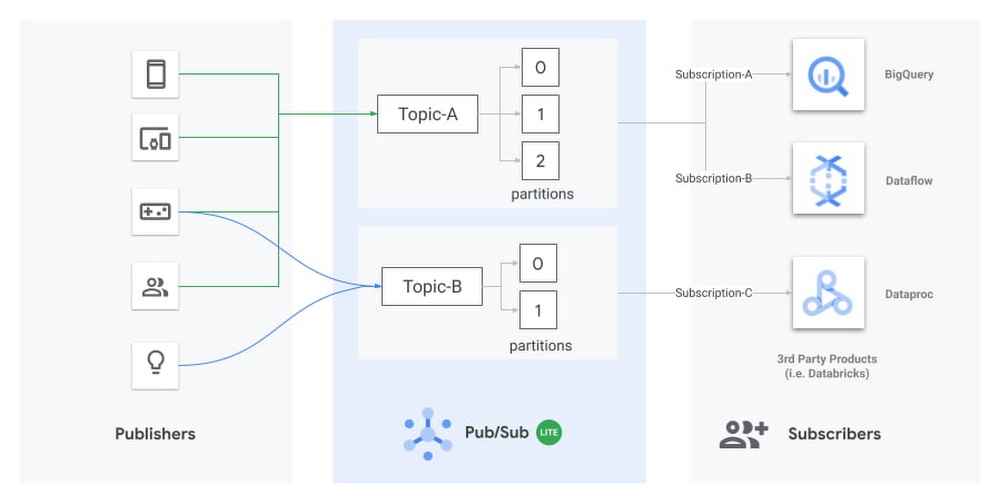
Today we’re excited to announce the release of an open source connector to read streams of messages from Pub/Sub Lite into Apache Spark. Pub/Sub Lite is a scalable, managed messaging service for Spark users on GCP who are looking for an exceptionally low-cost ingestion solution. The connector allows you to use Pub/Sub Lite as a replayable source for Structured Streaming’s processing engine with exactly-once guarantees1 and ~100ms processing latencies. The connector works in all Apache Spark 2.4.X distributions, including Dataproc, Databricks, or manual Spark installations. What is Pub/Sub Lite?Pub/Sub Lite is a recently released, horizontally scalable messaging service that lets you send and receive messages asynchronously between independent applications. Publisher applications publish messages to a Pub/Sub Lite topic, and subscriber applications (like Apache Spark) read the messages from the topic.Pub/Sub Lite is a zonal service. While you can connect to Pub/Sub Lite from anywhere on the internet, running publisher and subscriber applications in the same zone as the topic they connect to will help minimize networking egress cost and latency.Diagram showing publishers sending messages to Topic-A and Topic-B, which consist of multiple partitions. Subscribers reading the messages can include BigQuery, Dataflow, Dataproc (with Spark), or third-party products like Databricks.A Lite topic consists of a pre-configured number of partitions. Each partition is an append-only timestamped log of messages. Each message is an object with several fields, including message body, a user-configurable event_timestamp, and an automatically set publish_timestamp based on when Pub/Sub Lite stores the incoming message. A topic has a throughput and storage capacity that the user configures. To configure the topic capacity, you will have to consider a handful of properties, such as the number of partitions, storage/throughput capacity for each partition, and message retention period.The Pub/Sub Lite pricing model is based on provisioned topic throughput and storage capacity. Plan to provision enough capacity to accommodate peaks in traffic; then, as your traffic changes, you can adjust the throughput and storage capacity of your topics. Pub/Sub Lite’s Monitoring metrics let you easily detect conditions when you need to increase your capacity. Start by creating alerting policies that will notify you when your backlog is growing unexpectedly: subscription/backlog_quota_bytes should be comfortably lower than topic/storage_quota_byte_limit. If a subscription exceeds the storage capacity, the Pub/Sub Lite service removes the oldest message from the partition, regardless of the message retention period for the oldest message. You should also set up alerts for topic/publish_quota_utilization and topic/subscribe_quota_utilization to make sure publish/subscribe throughputs are comfortably below limit.Pub/Sub Lite scales vertically by allowing you to increase the throughput capacity of each partition in increments of 1MiB/s. You can increase the number of partitions in a topic as well, but this will not preserve the order of messages. The connector v0.1.0 will require you to restart with a new subscription on repartitioning, but we plan to remove this limitation soon—please keep an eye on the release notes. When starting with Pub/Sub Lite, it’s best practice to slightly overprovision the number of partitions so that the per-partition publishing and subscribing throughput capacities can be set to the lower bounds of 4 MiB/s and 8 MiB/s, respectively. As the application traffic increases, you can update the Lite topic to increase both the publishing and subscribing capacities up to 16 MiB/s and 32 MiB/s per partition, respectively. You can adjust publish and subscribe throughput capacity of a partition independently. For more details on how your application can interact with Pub/Sub Lite, review the publishing and subscribing messages guides.Architecture for Pub/Sub Lite + Structured StreamingThree-tier architecture showing Publishers writing to Pub/Sub Lite’s Topic-A, which contains three partitions that are read by Spark’s Structured Streaming.Pub/Sub Lite is only a part of a stream processing system. While Pub/Sub Lite solves the problem of message ingestion and delivery, you’ll still need a message processing component. Apache Spark is a popular processing framework that’s commonly used as a batch processing system. Streaming processing was introduced in Spark 2.0 using a micro-batch engine. The Spark micro-batch engine processes data streams as small batch jobs that periodically read new data from the streaming source, then run a query or computation on it. The time period for each micro-batch can be configured via triggers to run at fixed intervals. The number of tasks in each Spark job will be equal to the number of partitions in the subscribed Pub/Sub Lite topic. Each Spark task will read the new data from one Pub/Sub Lite partition, and together create a streaming DataFrame or Dataset. Each Different Structure Streaming pipeline must have its own independent subscription. Note that all subscriptions attached for one topic share the subscribing throughput capacity of that topic.The connector also supports Spark’s experimental continuous processing mode. In this mode, the connector is designed to map each topic partition to a long-running Spark task. Once the job is submitted, the Spark driver will instruct the executors to create long-running tasks, each with a streaming connection to a different partition within the topic. Note that this mode is not yet considered production-ready; it only supports limited queries and provides only at-least-once guarantees.Using Pub/Sub Lite with Spark Structured StreamingProcessing streams of data in Pub/Sub Lite with Spark is as simple as the Python script below. For a detailed guide to run a full Java end-to-end word count sample in Dataproc, please refer to the GitHub Readme.First, instantiate a Spark Session object and read in a Dataframe from the Pub/Sub Lite subscription:The following snippet processes the stream in two-second-long batches and prints the resulting messages to the terminal:In practice, you’ll perform transformations on this data. To do this, you will need to consider the schema of the DataFrame: A common transformation from BinaryType to StringType is as follows:Benchmarks for throughput performanceTo get a sense of the throughput performance of the connector, as well as Pub/Sub Lite itself, we turned up an example pipeline in a Dataproc YARN cluster. In the example, the pipeline consumed backlogs from Pub/Sub Lite with no further processing. The Dataproc YARN cluster consisted of one master node and two worker nodes. All nodes were n1-standard-4 machines (4 vCPUs, 15GB memory). All messages were 1 KiB. The total spark process throughput was calculated using processedRowsPerSecond per batch, and spark process throughput per partition was calculated with total spark process throughput divided by the number of partitions.Note that for 25 partitions, the workers were overloaded, and since the processing wall time per batch was determined by the slowest partition, the processedRowsPerSecond dropped dramatically. We can see that this drop is correlated with CPU saturation by looking at CPU utilization:For basic read operation as a baseline, it’s recommended to have 12 partitions (8 MiB/s subscribe throughput each) in a cluster with 8 CPUs. This suggests an approximate rule of thumb: a single n1-standard-series vCPU can handle 12 MiB/s of read throughput. Any significant processing of messages will decrease this capacity.The benchmark above did not consider memory allocation. In practice, long trigger time or spiky traffic could lead to large micro batches, requiring more memory. Also, complex queries such as aggregation and extended watermarks would require more memory. Next StepsWe hope you’ll find Pub/Sub Lite to be a useful service for your streaming applications. Please give the connector and Pub/Sub Lite a try following the full set of directions here. We would be grateful for feedback and bug reports submitted as GitHub Issues. We also welcome code contributions to this open source project.1. Pub/Sub Lite connector as source is compatible with exactly-once guarantee. It needs an idempotent sink to ensure exactly-once guarantee.
Quelle: Google Cloud Platform

How to use Packet Mirroring for IDS in different VPC designs

When migrating from on-premises to the cloud, many Google Cloud customers want scalable solutions to detect and alert on higher-layer network anomalies, keeping the same level of network visibility they have on-prem. The answer may be to combine Packet Mirroring with an Intrusion Detection System (IDS) such as the open-source Suricata, or some other preferred threat detection system. This type of solution can provide the visibility you need in the cloud to detect malicious activity, alert, and perhaps even implement security measures to help prevent subsequent intrusions. However, design strategies for Packet Mirroring plus IDS can be confusing, considering the number of available VPC design options. For instance, there’s Google’s global VPC, Shared VPCs and VPC Peerings. In this blog, we’ll show you how to use Packet Mirroring and virtual IDS instances in a variety of VPC designs, so you can inspect network traffic while keeping the ability to use the supported VPC options that Google Cloud provides. Packet Mirroring basicsBut first, let’s talk some more about Packet Mirroring, one of the key tools for security and network analysis in a Google Cloud networking environment. Packet Mirroring is functionally similar to a network tap or a span session in traditional networking: Packet Mirroring captures network traffic (ingress and egress) from select “mirrored sources,” copies the traffic, and forwards the copy to “collectors.” Packet Mirroring captures the full payload of each packet, not just the headers. Also, because Packet Mirroring is not based on any sampling period, you can use it for in-depth packet-level troubleshooting, security solutions, and application-layer network analysis.Packet Mirroring relies on a “Packet Mirroring policy” with five attributes:RegionVPC network(s)Mirrored source(s)Collector (destination)Mirrored traffic (filter)Here’s a sample Packet Mirroring policy:Click to enlargeWhen creating a Packet Mirroring policy, consider these key points:Mirrored sources and collectors must be in the same region, but can be in different zones—or even different VPCs or projects.Collectors must be placed behind an Internal Load Balancer (ILB).Mirrored traffic consumes additional bandwidth on the mirrored sources. Size your instances accordingly.The collectors see network traffic at Layer 3 and above the same way that the mirrored VMs see the traffic. This includes any NATing and/or SSL decryption that may occur at a higher layer within Google Cloud.There are two user roles that are especially relevant for creating and managing Packet Mirroring:“compute.packetMirroringUser” – This role allows users rights to create, update, and delete Packet Mirroring policies. This role is required in the project where the Packet Mirroring Policy will live.“compute.packetMirroringAdmin” – This role allows users to mirror the desired targets to collect their traffic. Using Packet Mirroring to power IDSAn IDS needs to see traffic to be able to inspect it. You can use Packet Mirroring to feed traffic to a group of IDSs; this approach has some significant benefits over other methods of steering traffic to an IDS instance. For example, some cloud-based IDS solutions require special software (i.e., an agent) to run on each source VM, and that agent duplicates and forwards traffic to the IDS. With Packet Mirroring, you don’t need to deploy any agents on VMs and traffic is mirrored to IDS in a cloud-native way. And while an agent-based solution is fully distributed and prevents network bottlenecks, it requires that the guest operating system support the software. Furthermore, with an agent-based solution, CPU utilization and network traffic on the VM will most certainly increase because the guest VM and its resources are tasked with duplicating traffic. High CPU utilization related to network throughput is a leading contributor to poor VM performance.Another common approach is to place a virtual appliance “in-line” between the network source and destination. The benefit of this design is that the security appliance can act as an Intrusion Prevention System (IPS) and actually block or deny malicious traffic between networks. However, an in-line solution, where traffic is routed through security appliances, doesn’t capture east-west traffic within VMs in the same VPC. Because subnet routes are preferred in a VPC, in-line solutions which are fed traffic via static routes, can’t alert on intra-VPC traffic. Thus, a large portion of network traffic is left unanalyzed; a traditional in-line IDS/IPS solution only inspects traffic at a VPC or network boundary. Packet Mirroring solves both these problems. It doesn’t require any additional software on the VMs, it’s fully distributed across each mirrored VM, and traffic duplication happens transparently at the SDN layer. The Collector IDS is placed out-of-path behind a load balancer and receives both north-south traffic and east-west traffic.Using Packet Mirroring in various VPC configurationsPacket Mirroring works across a number of VPC designs, including:Single VPC with a single regionSingle VPC with multiple regionsShared VPCPeered VPCHere are a few recommendations that apply to each of these scenarios:Use a unique subnet for the mirrored instances and collectors. This means if the mirrored sources and the collectors are in the same VPC, create multiple subnets in each region. Place the resources that need to be mirrored in one subnet and place the collectors in the other. There is no default recommended size for the collector subnet, but make sure to allocate enough space for all the collectors that might be in that region plus a little more. Remember, you can always add additional subnets to a region in Google Cloud.Don’t assign public IPs to virtual IDS instances. Rather, use CloudNAT to provide egress Internet access. Not assigning a public IP to your instances helps them from being exposed externally to traffic from the internet.If possible, use redundant collectors (IDS instances) behind the ILB for high availability.Now, let’s take a look at these designs one by one. Single VPC with a single regionThis is the simplest of all the supported designs. In this design, all mirrored sources exist in one region in a standard VPC. This is most suitable for small test environments or VPCs where network management is not dedicated to a networking team. Note that the mirrored sources, Packet Mirroring policy, collector ILB and the IDS instances, are all contained to the same region and same VPC. Lastly, CloudNAT is configured to allow the IDS instances internet access. Everything is contained in a single region, single VPC, and single project.Click to enlargeSingle VPC with multiple regionsBecause mirrored instances and collectors must be in the same region, it stands to reason that a VPC that contains subnets in multiple regions needs multiple collectors, multiple ILBs and multiple Packet Mirroring policies. To account for multiple regions, simply stamp out a similar deployment to the one above multiple times. We still recommend using CloudNAT. The following example shows a single VPC that spans two different regions, however, a similar architecture can be used for a VPC with any number of regions.Click to enlargeShared VPCPacket Mirroring also supports Shared VPC. In this example, the collectors (IDSs), ILB and the Packet Mirroring policy all exist inside the host project. The collectors use their own non-shared subnet. The mirrored sources (WebServers), however, exist inside their service project using a shared subnet from the Shared VPC. This allows the deployment of an IDS solution to be left up to the organization’s cloud network operations group, freeing application developers to focus on application development. CloudNAT is configured to allow the IDS instances Internet access.Click to enlargePeered VPCPacket Mirroring also supports when collectors and mirrored sources are in different VPCs that are peered together, such as in a hub-and-spoke design. The same requirements for mirroring traffic between VPCs are applicable. For example, the collector and mirrored sources must be in the same region. In the below example, the mirrored sources (WebServers) and the Packet Mirroring policy exist in VPC_DM_20 in the DM_20 project. On the other side, the ILB and collectors (IDSs) exist in the peered VPC named VPC_SECURITY in the DM_IDS project. This allows the users in the source VPC to selectively choose what traffic is forwarded to the collector across the VPC peering. CloudNAT is configured to allow the IDS instances internet access. Keep in mind the Packet Mirroring role requirements between the different projects. Proper IAM permissions must be configured.Click to enlargeDon’t sacrifice network visibilityUsing Packet Mirroring to power a cloud IDS solution, whether it’s open-source or proprietary, is a great option that many Google Cloud customers use. The key is where to place your collectors, ILBs and the Packet Mirroring policy itself—especially when you use a more advanced VPC design. Once multiple VPCs and GCP projects get introduced into the deployment, the implementation only becomes more complex. Hopefully, this blog has shown you how to use Packet Mirroring with an IDS in some of the more common VPC designs. For a hands-on tutorial, check out QwikLabs’ Google Cloud Packet Mirroring with OpenSource IDS, which walks you through creating a VPC, building an IDS instance, installing Suricata and deploying Packet Mirroring.
Quelle: Google Cloud Platform