VM Manager 101: Create a disk clone before patching VMs

Earlier this year, we introduced VM Manager, a suite of tools that can be used to manage virtual machines running on Google Cloud at scale.One of the services available with VM Manager isOS patch management, which helps to apply patches to virtual machines on-demand and based on schedules. Both Linux and Windows operating systems are supported and the service uses the respective update infrastructure of the operating system (e.g.apt,ZYpp,yum and Windows Update Agent) to both identify and apply missing patches. A request that comes up often when talking to customers that plan on using this service or are already using it, is how to create a backup of the state of a virtual machine before patches are applied in order to be able to roll back in case something goes wrong with patching or with the patches themselves. Unfortunately this feature is not supported by VM Manager out of the box. One of the capabilities the service supports however is the ability torun pre-patch and post-patch scripts on each VM that is targeted for patching. Scripts running pre-patching or post-patching run on the instance and in the context of the service account that is associated with it (eitherthe Compute Engine default service account or the one that was used during creation).In this blog, I will explain how pre-patch scripts can be leveraged to create a crash consistent disk clone of the attached persistent disks of a VM before patches are applied.ConsiderationsThis blog describes a solution to a common customer problem. The ideal solution would be to have a direct integration in the service, that does not rely on executing the snapshot creation on the VM and in the context of the associated service account. Assigning the required permission to the service account ultimately gives these permissions to any user that can login onto the VMs.By making the patching of a VM dependent on taking a disk clone (this is how the sample script in this article is put together), a failure to create the clone ultimately results in not patching the VM.PrerequisitesSetting up VM Manager and OS patch management is out of the scope of this article. Follow the instructions onSetting up VM Manager to enable VM Manager for your project.PermissionsCreating disk clones requires at least the followingpermissions to be assigned to the service account associated with the VM:compute.disks.create # on the projectcompute.disks.createSnapshot # on the source diskScopesThe script that creates the clone ultimately runs on the VM that is being patched. This means that it is not only required to set the correct permission to the service account associated with the VM but the API scope needs to be set as well.Set the scope to either Allow full access to all Cloud APIsUpload scriptsI’ve included sample scripts for both Linux and Windows based operating systems at the end of this section. I have tested these scripts Debian 10, Ubuntu 20.04, the latestContainer-Optimize OS and Windows Server 2019. If you use different versions, I strongly recommend to test the scripts.Both versions of the sample script follow the same logic:Retrieve the ID of the patch job (used to tag the snapshot for better discoverability)Retrieve disks associated with the VMCreate disk clonesYou need to download the appropriate version of the update script and then upload them to a storage bucket (this guide explains how to do just that):# Copy script to GCS bucketgsutil cp clone-linux.sh gs://<BUCKET>/clone-linux.shNow we need to get the version of the file we just uploaded. We need to pass along the version so the patch service can pick up the right version for execution:# Retrieve file versiongsutil ls -a gs://<BUCKET>/clone-linux.sh | cut -d’#’ -f 2LinuxFind the latest version on GitHub.WindowsFind the latest version on GitHub.Create patch job with pre-patch script executionNow that the scripts have been uploaded we can create patch jobs. These can either be on-demand or scheduled. Additionally they can be configured to target different subsets of VM instances.More information about instance filters can be found in the documentation.The following samples create on-demand patch jobs targeting all instances. Make sure to supply the correct values for the GCS bucket and the file version for the script.LinuxWindowsValidate snapshot creationPatch results / Cloud LoggingNavigate to Compute Engine then OS patch management.Select Patch Jobs.Select the job and review the status.For more details, scroll down in the patch job execution details overlay and select View for a VM that was targeted by this job.This opens Cloud Logging and contains a detailed log of the script execution.ClonesNavigate to Compute EnginethenDisks.Review the available disks.The name of the disk clone is the original disk name with the ID of the patch job appended. Additionally a few labels have been set to make discovery easier:The name of the disk clone is the original disk name with the ID of the patch job appended. Additionally a few labels haven been set to make discovery easier:ConclusionHope you enjoyed today’s blog, illustrating how the pre-patch and post-patch scripts can be used to automate common enterprise requirements. While there are limitations and considerations to be made this process can be used to secure workloads before patching at scale.To learn more about VM Manager, visit the documentation, or watch our Google Cloud Next ‘20: OnAir session, Managing Large Compute Engine VM Fleets.Related ArticleIntroducing VM Manager: Operate large Compute Engine fleets with easeThe new VM Manager simplifies infrastructure and compliance management for the largest of Compute Engine VM fleets.Read Article
Quelle: Google Cloud Platform

Next-generation claims: Transforming vehicle accidents with AI

Editor’s note: Today we’re hearing from risk management software provider Solera Holdings on how they transformed their automotive claims process using machine learning from Google Cloud.Stuck on hold with your car insurance claims department? If a fender-bender isn’t enough to send your stress levels through the roof, negotiating costs and insurance deductibles with a claims adjuster probably is. At Solera Holdings, our business is automobile damage estimation. We deal with around 60% of the claims worldwide between insurance companies, drivers, and the automotive industry. Like anything today, when people want their cars fixed, they want it done as fast as possible. But unlike other modern services such as rideshare or food delivery, claims departments at your insurance company likely aren’t quite up to speed. That’s why we decided to transform Qapter, our established claims workflow platform, into a touchless intelligent claims solution. Better safe than sorry—but no one wants slowWhen I joined Solera in 2020, I came with the understanding that no one particular artificial intelligence (AI) or machine learning (ML) technology could be applied to solve every business problem, no matter how innovative or disruptive that technology might be. In my experience, solving issues always requires multiple in-house and cloud technologies. My vision was to effectively implement AI technologies to the right problems to gain and maintain competitive advantages for Solera. So, I was delighted to discover my team was already way ahead of me and had been working on a way to solve one of their biggest problems with the help of AI and ML. Based on input from insurance companies over the years, the Solera product team knew that customers wanted an AI-based claims process. While repair estimation technology has evolved from estimation spreadsheets to three-dimensional models, modern customer expectations are fast outpacing yesterday’s solutions and processes. Unfortunately, many insurance providers take a “better safe than sorry” approach to existing systems, and the end result is a customer experience that is as frustrating as it is slow. It was clear this was an area that was ripe for improvement, and with our long history of transforming the insurance and automotive industry, we wanted to be the ones to crack the case. The challenge with any AI project is applying the right technologies to the problem at hand. It’s essential to understand the space and scope so we can use technology effectively, or risk falling short. Several insurers had already tried (and failed) to use computer vision to automate the collision damage repair process. While they managed to build working in-house solutions, all of these AI projects ultimately ran into issues when it came time to scale. What could we do differently to avoid failing as an AI project? First, we kept our focus narrow, only looking at ways to apply AI to identify vehicle damage in the collision claims workflow, not the entire repair process. We then chose to augment our existing backend systems with ML to leverage our substantial existing database of proprietary automotive images and parts catalogs to streamline the process of offering precise methods, cost, and time estimates for repairs. Additionally, before I arrived at Solera, the team had already built a previous version of an automated claims system that helped eliminate several less successful approaches. The original version gave us a strong blueprint to work off and enabled us to reimagine Qapter’s full potential when combined with the latest cloud and AI technologies. We knew where we wanted to go—all we needed was the right AI solution and the latest cloud technologies to help us transform the initial damage assessment into an AI-powered process.Google Cloud: An AI technology toolbox with everything we needOur team was already experienced with cloud technology when we started looking for an AI/ML solution that could integrate with a full suite of advanced cloud technologies. While we host our own data lake for contractual reasons with our customers, our accident claim workflow was already cloud-based. We knew that choosing the right technology vendor would be critical to a successful outcome for the next-generation platform.After completing a thorough technology bake-off, we found that Google Cloud’s AI/ML solutions were more sophisticated, robust, and scalable than what other vendors could offer. Having best-in-class technologies for building and deploying AI applications, such as Google Kubernetes Engine and Cloud Run, that integrate with the entire Google Cloud ecosystem played a definitive role in our decision. In short, Google Cloud had everything we needed to take full advantage of AI and ML solutions for processing touchless claims while also providing us with additional sophisticated capabilities and tooling that speeds up development and deployment rather than worrying about maintaining infrastructure. The core value of Qapter is its ability to understand how the vehicle is composed using 3D vehicle models. We repurpose this data and put it through different workflows, such as vehicle inspection or collision estimation. Using Vision API and TensorFlow, we built a system that allows us to collect and recognize claims information, such as vehicle make and model, damage information, and parts required for repairs—all based on collision images. Starting with Vision API’s simple image processing, we used its optical character recognition (OCR) to collect license plates and VINs. We then used TensorFlow to build custom algorithms and machine learning models for image recognition and vehicle data extraction, which enables us to collect other important information like vehicle make and model, damage information, and parts for repairs. In addition, Cloud GPUs (Graphics Processing Units) and TPUs (Tensor Processing Units) enabled us to accelerate our data model processing and increase our ability to train large, complex models faster. Now, all we need is a picture of the damaged car—and Qapter does the rest. Once Qapter has the image, it compares it against our massive repository of claims images to estimate the extent of the damage, recognizes the vehicle’s make and model, identifies what parts are needed, and estimates the final repair cost.From breakdown to breakthrough We started rolling out the new Qapter in France and the Netherlands during 2020, and there’s no doubt that it has dramatically changed the entire claims experience. Our customers are thrilled with the new AI-based approach. Instead of sending a claims adjuster to examine a vehicle physically, all a driver has to do now is take a picture of the car, upload it, and start the process.  It’s been a game-changer—within months of the initial launch, Qapter could auto-authorize 50% of damage claims, reducing estimation costs by nearly half. It has also provided an unexpected benefit across the entire damage claims value chain during the COVID-19 pandemic. While Qapter reduces time and costs for drivers, insurers, and auto repair providers—ultimately, it also cuts down on the need for human interaction. Even in a world of social distancing, necessary services must still be available. Qapter keeps the vehicle repair cycle running smoothly, so drivers can get back on the road, repair shops can continue working, and insurance companies don’t have to send out employees to assess claims in person.At Solera, we want to continue developing and building new products and services on top of the new Google Cloud framework we’ve created. Computer vision has a lot of applications within the damage estimation space, such as window and windshield damage, insurance coverage assessments, rental or lease returns, and fraud detection. Google Cloud isn’t just a spot solution for solving an issue, it’s a core competency for us that can be leveraged across the entire company.Related ArticleUSAA and Google Cloud work together to speed auto claimsLearn how USAA is using machine learning to speed up the auto claims process.Read Article
Quelle: Google Cloud Platform
What industry leaders teach us about the future of data

Almost two-thirds of leading organizations claim that creating data-rich platforms is one of the best ways they can “future proof” their business. The research, commissioned by McKinsey & Company highlights that one of the attributes of industry winners is that they don’t just think of data as a component of their business, they act as if “Data is the business”.What does this mean for your company? How can your team develop practices and perspectives that will allow it to stay ahead of the game?There’s no doubt that data is the essential ingredient for business transformation across analytical and transactional applications. Once generated, it powers deeper AI-driven business insights, helps companies make better real-time decisions, and is also the basis for how companies build and run their data-driven applications. Google Cloud customers have taught us that there are three key dimensions to a winning data strategy: leaders seek to build architectures that are Open, Intelligent and Flexible. In this blog, we explore what they each mean and how you can apply them.An Open ApproachWhile it might be logical to believe that tightly integrated and closed IT environments allow for more value creation through better control, the pace of technology innovation has shown to outstrip a company’s ability to build the solutions its needs from a handful of technologies; let alone get all the data it needs from a single source stored in the same cloud. In its latest forecast, IDC stated that 2021 would be the year of Multi-Cloud*. This makes sense: whether you’re in manufacturing, retail or healthcare, your business requires that you work with partners who most likely have made choices different from yours: the data you need, the protocols you use and the applications you’ll collaborate around are bound to be heterogeneous. A CIO’s reality is one of multiple interfaces, multiple technology stacks and multiple clouds. And in order to win, she needs to architect environments that are both open and adaptable to this “multiplicity”. This multiplicity extends beyond the choice of a cloud or a datastore. It also applies to her organization’s ability to build around its partners’ business models. Open-Source is an important consideration of an enterprise modern stack, and as it has been noted numerous times previously, open-source software has the potential to take over the world. We note that the companies that outpace their competitors’ ability to innovate also partner with vendors who have invested in open-source at their core. By embracing open-source early, industry leaders can contribute to the growth of a wider ecosystem and they benefit from the imagination unleashed by the community faster.Being open in 2021 means starting from the community up, embracing and enabling its choices across multiple clouds, multiple vendors and multiple business models – commercial and open-source.  For more, we suggest:Three ways Google Cloud delivers on hybrid and multi cloud, today hereBringing multi-cloud analytics to your data with BigQuery Omni hereGoogle Open Source Site hereMore Intelligent InsightsLeaders will also find that this “Open” mindset accelerates the operationalization of critical workloads like Artificial Intelligence for example. According to Gartner, “by 2025,50% of enterprises implementing AI orchestration platforms will use open-source technologies, alongside proprietary vendor offerings, to deliver state-of-the-art AI capabilities.”** Being “Open” is thus a key attribute of the “Intelligent Enterprise”.But, what does it mean to be “Intelligent”? We’ve found that “Intelligence” materializes in two ways at leading organizations. There is “Intelligence in Operation” and “Intelligence in Innovation”.“Operational Intelligence” refers to the methods used to optimize the operation of infrastructure. A great example of such intelligence can be found in Google’s Active Assist which provides policy, cost, network, compute, data and application platform intelligence. Intelligence in Operation refers to “self-tuning”, “self-healing” or “self-driving” capabilities, and the use of algorithms to increase operational efficiency and reliability.The second type of intelligence refers to the use of Artificial Intelligence to improve customer experiences and accelerate the creation of insights. Product recommendation solutions can help consumers discover better products and anomaly detection systems can help financial analysts detect fraud faster to protect customers and their company.I often joke that “A.I” doesn’t just stand for “Artificial Intelligence” but that it also stands for “Applied and Invisible”. The reason for such a pun is that, over the years, I’ve learned from customers that AI has been most useful to them when it was well embedded in the applications that support them and when it is applied to specific business problems and use-cases.You’ll find that the opportunity to democratize the consumption of artificial intelligence comes by enabling its integration with the applications your users already know and love. Take a look at Veolia (VEOEY), a French transnational utilities company and how it enables its non-technical employees to get answers fast through Data QnA, a natural language interface for analytics. You might also find the example of PWC familiar to your own needs: the global professional services organization, uses Connected Sheets as part of its efforts to make data more accessible across its workforce. Functionality like Sheets Smart Fill or Sheets Smart Cleanup are additional ways a company can take advantage of Google AI natively built into familiar applications.When looking for intelligence, look for modern applications that are built from AI and from the Data up. Look for tools that aim at democratizing access to analysis and artificial intelligence to more people. As more people get access to machine learning capabilities in applications they know and love, the faster your company will achieve its goal to become an “Open and Intelligent Enterprise”. For more, we suggest:How Toyota Canada 6X their conversions by using Embedded Machine Learning here.How PwC Connected Sheets to scale data insights hereWant to get started? Use any of our Design Patterns here.Flexibility of ChoiceOn the way to building an open and intelligent data architecture, your company might encounter friction. You might find the pricing models of the technologies you need to combine, rigid or incompatible with one another. You might find that certain technologies work well during your evaluation of pilots and at small scale but fail to perform when met with the reality of your fast growing and real-world workloads. And you might find solutions that are effective for batch-level work, don’t work for your real-time needs, forcing you to pull from completely different toolsets to accommodate your needs.When it comes to pricing, scale and the versatility of functionality, don’t compromise. Choice and Flexibility are key ingredients to your success for the future of enterprise data architecture is composable. According to Gartner, “by 2023, 60% of organizations will combine components from three or more analytics solutions to build business applications infused with analytics that connect insights to actions.”***Beware the “law of the instrument”The “composability” trend will have consequences with the types of vendors you decide to partner with. Increasingly you will find that the answer rarely comes from one vendor alone. Rather, value will be created through a well coordinated ecosystem that is both technologically open and offers choice of business models and deployment options.A key practice industry leaders observe is to “beware the law of the instrument”. The “law of the instrument” or “the law of the hammer” is a cognitive bias that involves an over-reliance on a familiar tool. As Abraham Maslow said in 1966, “I suppose it is tempting, if the only tool you have is a hammer, to treat everything as if it were a nail.”Industry leaders study their use-cases carefully. They focus on the type of scenarios they aim to enable and the productivity they accelerate by employee category (aka personas). They inspect the core capabilities of the solutions they aim to deploy in order to maximize their effectiveness around what they have been primarily built for (aka ‘center of design’).Next time a vendor offers its data lake solution to serve as a data warehouse, ask what you will gain and what you will lose. While convergence across these technologies is definitely occurring, your company will need to assess trade-offs before stretching the use of a particular solution beyond its ‘center of design’. Remember, a hammer can do a lot of things but it was primarily built to push down nails. You may also demand that the same product might be licensed to you differently based on your use-cases. Take a look at Google BigQuery pricing options. The same data warehouse product can be used on 3 different constructs: pay per-query (on-demand), allocation (flat-rate) or a mix of both. Another example includes Dataflow FlexRS, a pricing option that reduces batch processing costs by using advanced scheduling techniques. Examples of organizations that have successfully built Open, Intelligent and Flexible data architectures include Unity combining technologies like Dataproc, Dataflow & BigQuery. Another great example is how Vodafone executes on its vision for a Data Ocean for all users and all data. We hope you can learn from each of the above customers the way we have. Please reach out to our team if there is anything we can do to help you towards a more Open, Intelligence and Flexible World!For more, we suggest:Dataflow in a minute hereHow Unity is “making real-time real easy” hereHow Vodafone Built a Data Platform on Google Cloud below*IDC Press Release, IDC Expects 2021 to be the Year of Multi-Cloud as Global COVID-19 Pandemic Reaffirms Critical need for Business Agility, March 2020**Gartner, Predicts 2021: Operational AI Infrastructure and Enabling AI Orchestration Platforms, Chirag Dekate, et al., 2 December 2020. ***Gartner, Predicts 2021: Analytics, BI and Data Science Solutions — Pervasive, Democratized and Composable, Austin Kronz, et al., 5 January 2021Related ArticleWhy Verizon Media picked BigQuery for scale, performance and costSee the proof of concept (POC) numbers that Verizon’s Yahoo got when testing and verifying the improved performance, cost, and scale of B…Read Article
Quelle: Google Cloud Platform
Analyzing Python package downloads in BigQuery

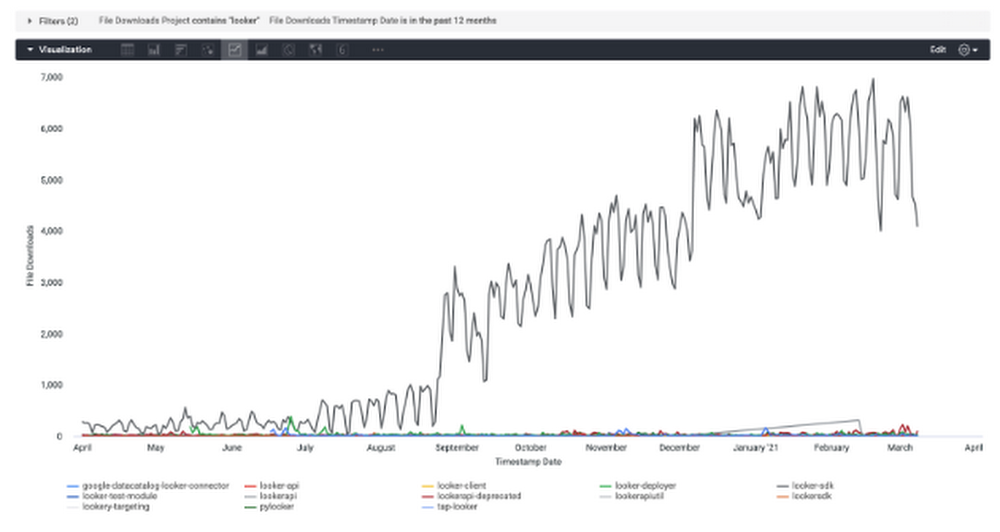
The Google Cloud Public Datasets program recently published the Python Package Index (PyPI) dataset into the marketplace. PyPI is the standard repository for Python packages. If you’ve written code in Python before, you’ve probably downloaded packages from PyPI using pip or pipenv. This dataset provides statistics for all package downloads, along with metadata for each distribution. You can learn more about the underlying data and table schemas here. Below, I’ll walk through a few examples of how you can leverage this data.As a Python enthusiast who has helped build out various Looker packages, I was particularly interested in jumping into this dataset to learn more about how the libraries are being used. First I began by looking at the number of installations each day for the past 12 months, for packages whose name contains looker.In the Looker platform, I can visualize this query and clearly see that looker-sdk, our official API wrapper, is the leader in terms of downloads. Additionally, I noticed a big jump at the end of August and the beginning of December, which may be the results of different marketing efforts.One other potential application of this data is to bring in competitor packages and visualize market share over time. As a software organization, trends in downloads can help us measure the effectiveness of different developer marketing strategies and make decisions on new programs.Next, I focused on just the looker-sdk package and looked at the number of installations by Python version. Knowing that most of our users are leveraging Python 3.6 means that we might want to prioritize features that are compatible with that version. This knowledge can also be helpful in messaging users regarding updating their environments for the best experience. I can easily save the results of the query to Google Sheets and share with our marketing team. Alternatively, in a tool like Looker, I can schedule the report to be emailed on a monthly basis so our team stays up-to-date on user trends. As a next step, I might join this data onto the Github dataset also available in the marketplace to see if there is a relationship between git activity and package installations. Interested in learning more about BigQuery?To get started with querying this dataset, or the many other public datasets hosted on BigQuery, check out thefree BigQuery sandbox and our quick start guides. You can also follow me on Twitter @leighajarett or connect with me on Linkedin at linkedin.com/in/leighajarett to stay informed on BigQuery news.Related ArticleCelebrating a decade of data: BigQuery turns 10BigQuery, Google Cloud’s data analytics platform, turns 10 in 2020. Here’s a look back on big data trends in the past decade.Read Article
Quelle: Google Cloud Platform
A2 VMs now GA—the largest GPU cloud instances with NVIDIA A100 GPUs

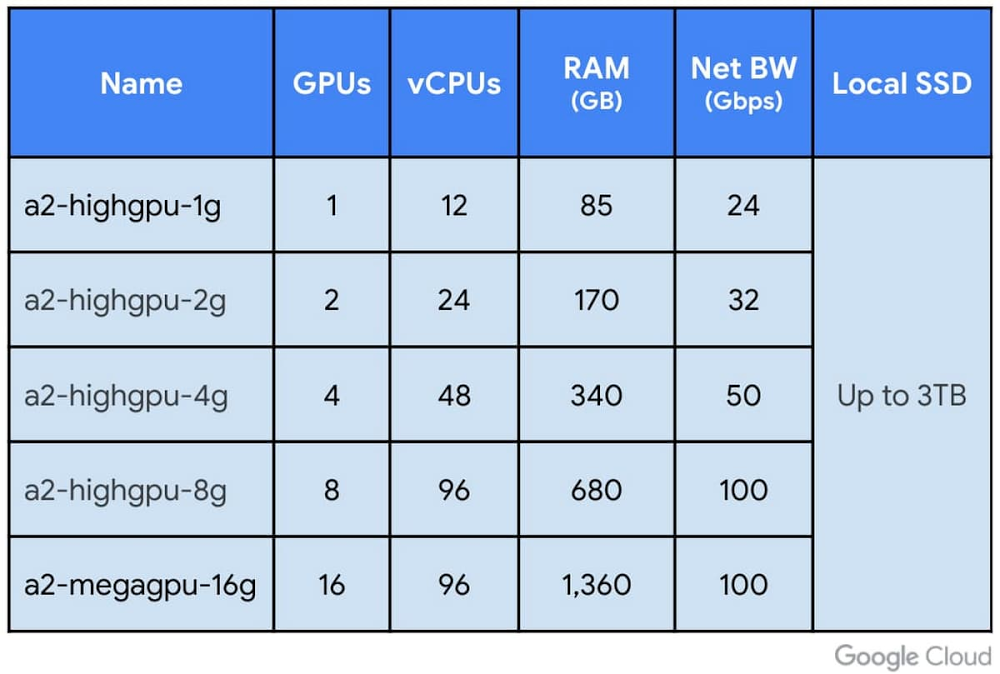
Today, we are excited to announce the general availability of A2 VMs based on the NVIDIA Ampere A100 Tensor Core GPUs in Compute Engine, enabling customers around the world to run their NVIDIA CUDA-enabled machine learning (ML) and high performance computing (HPC) scale-out and scale-up workloads more efficiently and at a lower cost. Our A2 VMs stand apart by providing 16 NVIDIA A100 GPUs in a single VM—the largest single-node GPU instance from any major cloud provider on the market today. The A2 VM also lets you choose smaller GPU configurations (1, 2, 4 and 8 GPUs per VM),  providing the flexibility and choice you need to scale your workloads.A2 VM shapes on Compute EngineThe new A2-MegaGPU VM: 16 A100 GPUs with up to 9.6 TB/s NVIDIA NVlink BandwidthAt-scale performanceA single A2 VM supports up to 16 NVIDIA A100 GPUs, making it easy for researchers, data scientists, and developers to achieve dramatically better performance for their scalable CUDA compute workloads such as machine learning (ML) training, inference and HPC. The A2 VM family on Google Cloud Platform is designed to meet today’s most demanding HPC applications, such as CFD simulations with Altair ultraFluidX. For customers seeking ultra-large GPU clusters, Google Cloud supports clusters of thousands of GPUs for distributed ML training and optimized NCCL libraries, providing scale-out performance. The single VM shape offering with 16 A100 GPUs tied together with NVIDIA’s NVlink fabric is unique to Google Cloud and is not offered by any other cloud provider. Thus, if you need to scale up large and demanding workloads, you can start with one A100 GPU and go all the way up to 16 GPUs without having to configure multiple VMs for a single-node ML training. A2 VMs are also available in smaller configurations, offering the flexibility to match differing application needs along with up to 3 TB of Local SSD for faster data feeds into the GPUs. As a result, running the A100 on Google Cloud delivers more than 10X performance improvement on BERT Large pre-training model compared to the previous generation NVIDIA V100, all while achieving linear scaling going from 8 to 16 GPU shapes. In addition, developers can leverage containerized, pre-configured software available from NVIDIA’s NGC repository to get up and running quickly on Compute Engine A100 instances.What customers are sayingWe first made A2 VMs with A100 GPUs available to early access customers in July, and since then, have worked with a number of organizations pushing the limits of machine learning, rendering and HPC. Here’s what they had to say:Dessa, an artificial intelligence (AI) research firm recently acquired by Square was an early user of the A2 VMs. Through Dessa’s experimentations and innovations, Cash App and Square are furthering efforts to create more personalized services and smart tools that allow the general population to make better financial decisions through AI.“Google Cloud gave us critical control over our processes,” said Kyle De Freitas, a senior software engineer at Dessa. “We recognized that Compute Engine A2 VMs, powered by the NVIDIA A100 Tensor Core GPUs, could dramatically reduce processing times and allow us to experiment much faster. Running NVIDIA A100 GPUs on Google Cloud’s AI Platform gives us the foundation we need to continue innovating and turning ideas into impactful realities for our customers.”HyperConnect is a global video technology company in video communication (WebRTC) and AI. With a mission of connecting people around the world to create social and cultural values, Hyperconnect creates services based on various video and artificial intelligence technologies that connect the world.“A2 instances with new NVIDIA A100 GPUs on Google Cloud provided a whole new level of experience for training deep learning models with a simple and seamless transition from the previous generation V100 GPU. Not only did it accelerate the computation speed of the training procedure more than twice compared to the V100, but it also enabled us to scale up our large-scale neural networks workload on Google Cloud seamlessly with the A2 megagpu VM shape. These breakthroughs will help us build better models for enhancing the user experience on Hyperconnect’s services.” – Beomsoo Kim, ML Researcher, HyperconnectDeepMind(an Alphabet subsidiary) is a team of scientists, engineers, machine learning experts and more, working together to advance the state of the art in AI.“At DeepMind, our mission is to solve intelligence, and our researchers are working on finding advances to a variety of Artificial Intelligence challenges with help from hardware accelerators that power many of our experiments. By partnering with Google Cloud, we are able to access the latest generation of NVIDIA GPUs, and the a2-megagpu-16g machine type helps us train our GPU experiments faster than ever before. We’re excited to continue working with Google Cloud to develop and build future ML and AI infrastructure.” – Koray Kavukcuoglu, VP of Research, DeepMindAI2 is a non-profit research institute founded with the mission of conducting high-impact AI research and engineering in service of the common good. “Our primary mission is to push the boundaries of what computers can do, which poses two big challenges: modern AI algorithms require massive computing power, and hardware and software in the field changes quickly; you have to keep up all the time. The A100 on GCP runs 4x faster than our existing systems, and does not involve major code changes. It’s pretty much plug and play. At the end of the day, the A100 on Google Cloud gives us the ability to do drastically more calculations per dollar, which means we can do more experiments, and make use of more data.” – Dirk Groeneveld, Senior Engineer, Allen Institute for Artificial IntelligenceOTOY is a cloud graphics company, pioneering technology that is redefining content creation and delivery for media and entertainment organizations around the world.“For nearly a decade we have been pushing the boundary of GPU rendering and cloud computing to get to the point where there are no longer constraints on artistic creativity. With Google Cloud’s NVIDIA A100 instances featuring massive VRAM and the highest OctaneBench ever recorded, we have reached a first for GPU rendering – where artists no longer have to worry about scene complexity when realizing their creative visions. OctaneRender GPU-accelerated rendering democratized visual effects enabling anyone with an NVIDIA GPU to create high-end visual effects on par with a Hollywood studio. Google Cloud’s NVIDIA A100 instances are a major step in further democratizing advanced visual effects, giving any OctaneRender and RNDR users on-demand access to state of the art NVIDIA GPUs previously only available in the biggest Hollywood studios” – Jules Urbach, Founder and CEO, OTOY.GPU pricing and availabilityNVIDIA A100 GPU instances are now available in the following regions: us-central1, asia-southeast1 and europe-west4 with additional regions slated to come online throughout 2021. A2 Compute Engine VMs are available via on-demand, preemptible and committed usage discounts and are also fully supported on Google Kubernetes Engine (GKE), Cloud AI Platform, and other Google Cloud services.  A100 GPUs are available for as little as $0.87 per hour per GPU on our preemptible A2 VMs. You can find full pricing details here. Getting started You can get up and running quickly, start training ML models, and serving inference workloads on NVIDIA A100 GPUs with our Deep Learning VM images in any of our available regions. These images include all the software you’ll need: drivers, NVIDIA CUDA-X AI libraries, and popular AI frameworks like TensorFlow and PyTorch. Our pre-built and optimized TensorFlow Enterprise Images also support A100 optimizations for current and older versions of TensorFlow (1.15, 2.1, and 2.3). We handle all software updates, compatibility, and performance optimizations, so you don’t have to think about it. Check out our GPU page to learn more about the wide selection of GPUs available on Google Cloud.Related ArticleNew Compute Engine A2 VMs—first NVIDIA Ampere A100 GPUs in the cloudGoogle Cloud’s new Accelerator-Optimized (A2) VM family is based on the NVIDIA Ampere A100 GPU, and designed for demanding HPC and ML wor…Read Article
Quelle: Google Cloud Platform

Building real-time market data front-ends with websockets and Google Cloud

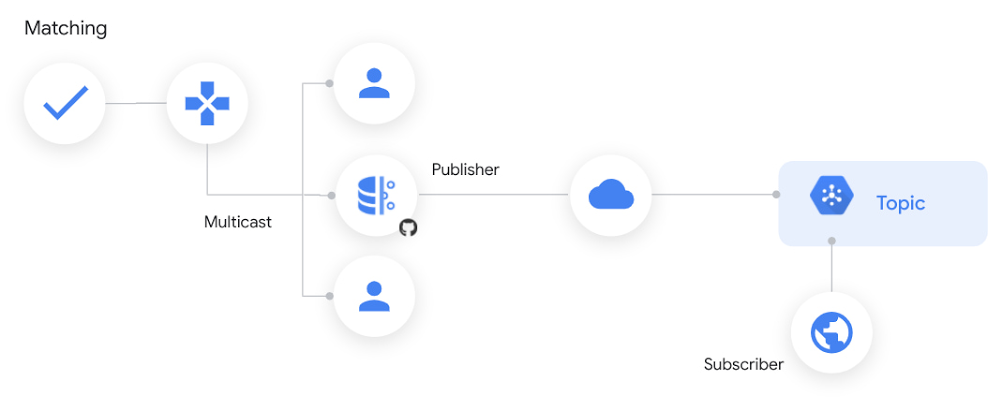
For those in the financial industry, the core applications for electronic trading of financial instruments have stringent tolerances around latency, throughput, and jitter. But there are also peripheral use cases that would benefit from real-time market data streams, and that are more tolerant of performance variability, such as data visualization and monitoring applications. Until recently, the high onboarding, licensing, and overall maintenance costs of real-time market data made it difficult for many firms to adopt. However, cloud-based delivery has now made real-time market data accessible to a wider array of applications.As firms reimagine their technology strategy through a cloud-first lens, they have an opportunity to apply real-time data (and its attendant benefits) to these peripheral use cases and accelerate their time to insight. In this blog post, we’ll share a cloud-first architectural pattern that provides developers a low-friction means of accessing real-time market data streams, with a focus on delivery to application front-ends. This pattern is based on an analytical market data app that we built at Google Cloud last year for our Next OnAir ‘20 conference.Simplifying access to real-time market dataThe traditional method of accessing real-time market data requires firms to co-locate in data centers, purchase and maintain physical hardware, and manage connectivity between the providers and their own data centers. Larger capital markets participants can have entire global teams responsible for these activities. By streaming market data in the cloud, the barrier to entry for consumers becomes lower. Application types such as retail screen trading, mark-to-market exposure monitoring, index publishing, now-casting, fan charting, and model-driven prediction stand to benefit from this expanded access to real-time data sources—without the infrastructure and maintenance costs that, as a practical matter, have been limited to institutions with the requisite budget and organizational structure.One relatively young asset class, however, has been cloud-first just about its entire existence. Cryptocurrency trading applications often have real-time market data streamed to trader front-ends via websockets. We applied this model of real-time dissemination to the markets for commodity and financial futures when we built the Next OnAir’20 app. Here’s more detail on that implementation.Examining the architecture for real-time visualization The real-time data source we used was Smart Stream, a service available on Google Cloud from CME Group. The data originates at the CME Globex trading platform as a User Datagram Protocol (UDP) stream running over multicast. Instrument pricing data is forwarded over an interconnect to different Pub/Sub topics, each corresponding to a single product, like silver or butter futures.As soon as a message is published to its corresponding Pub/Sub topic, it is available globally to subscribers. The delivery latency of the message to the subscriber depends on the clients’ proximity to the publishing region. Typical average packet latencies on consumer broadband connections, for example, are on the order of 10s to 100s of milliseconds – making it a good fit for live web front-end visualizations, given that the threshold of human perception hovers at around 80ms.Figure 1: Multicast adaptation to Pub/SubPub/Sub is a great core distribution mechanism for applications running globally in Google Cloud. However, there are some scenarios where applications sitting outside Google Cloud may need access to a Pub/Sub topic’s messages. One example would be a public website that allows the display of topic messages to anonymous consumers. To help address this and similar needs, we’ve open-sourced a package that we’ve nicknamed Autosocket to distribute Pub/Sub messages over standard websocket connections.  Autosocket serves as an adapter that receives Pub/Sub messages published to a single topic and delivers them to front-end clients that connect to the cluster over the websockets protocol, on a load-balanced IP address. It is a containerized application that uses Cloud Run and is configured with the Pub/Sub topic name to be mirrored. The deployed cluster is stateless, diskless and elastic, and features global load balancing. Additionally, upon connecting to the cluster, websocket clients are streamed a cache of the last 10 messages that were published to the topic, which can facilitate a better user experience during periods of low message traffic.Figure 2: Websocket endpoint client connectivityGetting started with implementationThere are two main steps to implementing a similar architecture in your own environment:Deploy a Cloud Run instance that provides the bridge between a Pub/Sub topic and the websocket data that is sent to front-end web applicationsCode the front-end application to manage the websocket connections and the continual refresh of visualizations based on the inbound data streamRelated ArticleRead ArticleConnection managementAutosocket is an open source package that automatically mirrors a Pub/Sub topic and handles connections between a Cloud Run instance and frontend web clients. We maintain a separate endpoint for each trading symbol that the application visualizes. When a user clicks on the relevant tab for each symbol, the current symbol’s endpoint connection is disconnected and another connection is established for the newly selected symbol. Connection management needs to be simple since build up and tear down happen frequently. The code in Figure 3 illustrates one straightforward way to manage the websocket connections.Figure 3: Websocket connection management in JavascriptVisualization at scaleOne of the visualizations in the application is a live forward curve chart, which reads the top-of-book data stream from the exchange. The prices plotted on most forward curve charts represent single settlement or last sale prices. Since we have the live prices of a two-sided market available via Smart Stream, we plotted those instead. This gives visibility into the relative bid-ask spreads across a given futures contract’s term structure. Figure 4 is a snapshot of the forward curve visualization from the application:Figure 4: Forward curve visualizationA summary of the coding approach to visualizing the chart is listed below, followed by a sample of the Javascript implementation in Figure 5. The visualizations were rendered using Google Charts:Connect to a product code’s websocket endpoint using Javascript’s Websocket APIKey a Javascript map by the expiry months of the futures contracts and maintain the most recent price as the corresponding value of each entryUpdate this map in the processMessage() routine that is called by SocketManager with each new message. This could add a new expiration month to the map, or it may update the latest price for an existing month already in the mapSort the map using Object.keys(), to represent the chronological range of expiration monthsUpdate the visualization with new data in your drawChart() routine, and use drawChart() as the callback for setInterval(x,i) to render the chart with current values from the map on a continual basisFigure 5: Refreshing a chart with live price data in JavascriptLive market data feeds can be combined with data from order management systems or exchange drop copies to display a trader’s real-time mark-to-market exposure. The unrealized profit-and-loss (P&L) visualization uses two websocket connections in parallel, one for the trader’s entered position and the other for the symbol’s real-time price. Each originates from a separate Pub/Sub topic. The P&L amount is derived at runtime based on the difference between the trader’s position entry price and the live market price, with an arrow preceding the expiration month indicating the direction (long or short) of the trade.Figure 6: Real-time trader unrealized profit and loss visualizationIn Figure 6, the leftmost box highlights the data that arrived from the order stream, which contains the trade direction, instrument, entry price and trader name. The rightmost box highlights the live market price of the instrument that arrives via the price stream, allowing the P&L column to be reevaluated continually as the price changes. How it looks in practiceThe Market data in the cloud site implements this architectural pattern concretely using real-time data from CME Group. Behind the scenes, we can quickly spin up and interconnect independent pillars of the app using Google Cloud Build. And of course Terraform and Google Cloud team up to enable declarative, repeatable deployments that guard against configuration drift.Learn more about Google Cloud for financial services.Related ArticleNew white paper: Strengthening operational resilience in financial services by migrating to Google CloudLearn how migrating to Google Cloud can play a critical role in strengthening operational resilience in the financial services sector.Read Article
Quelle: Google Cloud Platform

Earn the new Google Kubernetes Engine skill badge for free

We’ve added a new skill badge this month, Optimize Costs for Google Kubernetes Engine (GKE), which you can earn for free when you sign up for the Kubernetes track of the skills challenge. The skills challenge provides 30 days free access to Google Cloud labs and gives you the opportunity to earn skill badges to showcase different cloud competencies to employers. In this post, I’ll explain the basics of GKE cost optimization and how to earn this new skill badge. For best practices from experts and a live walkthrough of how to manage workloads and clusters at scale to optimize time and cost, sign up here for my no-cost March 19 webinar. Can’t join the event live on March 19? The training will also be available on-demand after March 19. GKE is a secured and fully managed Kubernetes service now with an autopilot mode of operation. It allows you to speed up app development without sacrificing security, streamline operations with release channels, and manage infrastructure with Google Site Reliability Engineers. When using GKE, you need to know Kubernetes workload best practices and understand how to optimize your costs. GKE includes autoscaling and our training will show you how to use this to help you run less when you don’t need it and more when you do. How to earn the Optimize Costs for Google Kubernetes Engine skill badgeBefore you take the training to earn the Optimize Costs for Google Kubernetes Engine skill badge, you’ll need to already know basic concepts around cluster creation and management. To earn the skill badge, you’ll first need to go through four labs which will provide you with hands-on experience on how to manage a GKE multi-tenant cluster with namespaces, optimize costs for GKE Virtual Machines, combine GKE autoscaling strategies, and optimize GKE workloads. Afterwards, you’ll need to successfully pass the challenge lab, which will test your knowledge before the skill badge can be yours. In this lab, you’ll play the role of the lead GKE administrator for an online boutique store whose site is broken down into microservices and now it’s time to get it running on GKE. As the GKE administrator, you need to make sure your GKE cluster is optimized to run the online boutique application with all its many microservices because you have a big marketing campaign coming up. You’ll also want to make sure it can autoscale appropriately to handle both traffic spikes and traffic lulls where you’ll want to save on your infrastructure costs. Along the way, you’ll learn core principles of cost optimization in GKE you can apply in your own environments.Ready to take your first step towards learning how to optimize GKE costs and earning your skill badge?Joinme for my March 19 webinar. You can also watch the webinar on-demand after March 19.Related Article2021 resolutions: Kick off the new year with free Google Cloud trainingTackle your New Year’s resolutions with our new skills challenges which will provide you with no cost training to build cloud knowledge i…Read Article
Quelle: Google Cloud Platform

Data-driven insights to improve teaching and learning through the Unizin Data Platform are now available to any college or university

When the University of Minnesota realized that Minnesota was facing a talent shortage in the critical field of healthcare, they knew they had to do something. The question of what action to take, however, was daunting. Though universities hold a host of data about their students, it can be difficult for university leaders to access the right data housed in multiple siloed systems to make decisions for educators and students. The University of Minnesota decided to address this challenge head-on. As a result, they are powering student success through a partnership with Google Cloud that brings together innovative education technology and data-driven insights to accelerate healthcare student learning, with the goal of addressing Minnesota’s healthcare talent shortage.The data-driven insights surfaced through the Unizin Data Platform are key to the project. “The NXT GEN MED project leverages the important work completed by our technologists and data analysts, the Unizin consortium, and Google Cloud in the establishment of the Unizin Data Platform. Without that effort, the University would not be positioned to embark on this exciting project.” says Bernie Gulachek, Vice President and Chief Information Officer for the University of Minnesota.A new data-driven solution for higher educationGoogle Cloud has teamed up with Unizin, a nonprofit consortium of 14 leading higher education institutions, to broaden the availability of its Unizin Data Platform (UDP) to all institutions. Unizin created the UDP, an integration and warehousing solution for data generated by learning tools, to help institutions share and analyze data from Learning Management Systems and Student Information Systems, such as video management tools, proctoring tools, assessment platforms and more. The UDP collects, cleans, models, curates and stores all teaching and learning data to create a holistic view of each student.Previously, the UDP was only available to consortium members. But now, Unizin and Google Cloud are providing all colleges and universities, including those who are not members of the Unizin consortium, access to the learning data platform. Institutions can adopt the UDP through the Google Cloud Marketplace, allowing them to use learning data to deliver more effective and engaging student experiences, and know which levers to pull when challenges arise.“It’s not easy for higher-learning institutions to aggregate, analyze, and use learning data at scale—nor can many institutions, except for the very largest, operationalize learning data in advising, business intelligence, and machine-learning initiatives,” notes Cathy O’Bryan, Unizin’s CEO. “The UDP frees up colleges and universities from the technical challenges of integrating, normalizing, and managing data, so they can focus on using data for insights to enable student success during and post-college years.”Accessing teaching and learning insights to support student successSmart analytics provide the data and analysis that educators need to improve student engagement, achievement, and retention. The UDP enables schools to use their teaching and learning data for student insights, business intelligence, advising, and research. They merge data from learning management systems, which makes it easier for educators to generate reports and gather details, such as a student’s level of class participation, learning tool use, course design, and other topics. Institutions can glean insights more quickly. Educators can see which educational methods are most effective and if particular students are falling behind.We believe that a data-informed academic mission must play an essential role in helping every student reach their potential. Every week, we see our institutions leveraging the Unizin Data Platform to engage, enrich, and empower their students and instructors with data, analytics, and insights. Etienne Pelaprat Chief Technology Officer of UnizinThe UDP works with Google Cloud solutions to aggregate data from teaching and learning platforms and make it accessible through tools that campuses may already be using. So institutions can ensure that learning data use conforms with their student privacy practices, and they can govern access to learning data across their own organization and third parties.“Data has value when it’s easy to gather, manage, and understand,” said Steven Butschi, head of education for Google Cloud. “By partnering with Unizin, Google Cloud helps institutions make a large leap in their digital transformation, helping enable smarter decision-making at scale.”Colleges and universities face a critical need to improve their insights in order to support student success. Even after the pandemic recedes, educators and students will still be adjusting to very different learning environments. You can get started today with the Unizin Data Platform in the Google Cloud Marketplace.Related ArticleIntroducing Student Success Services from Google CloudStudent Success Services is a set of tools/services that aims to unlock student successes with personalized assistants, real-time insight…Read Article
Quelle: Google Cloud Platform

Cloud Spanner launches point-in-time-recovery capability

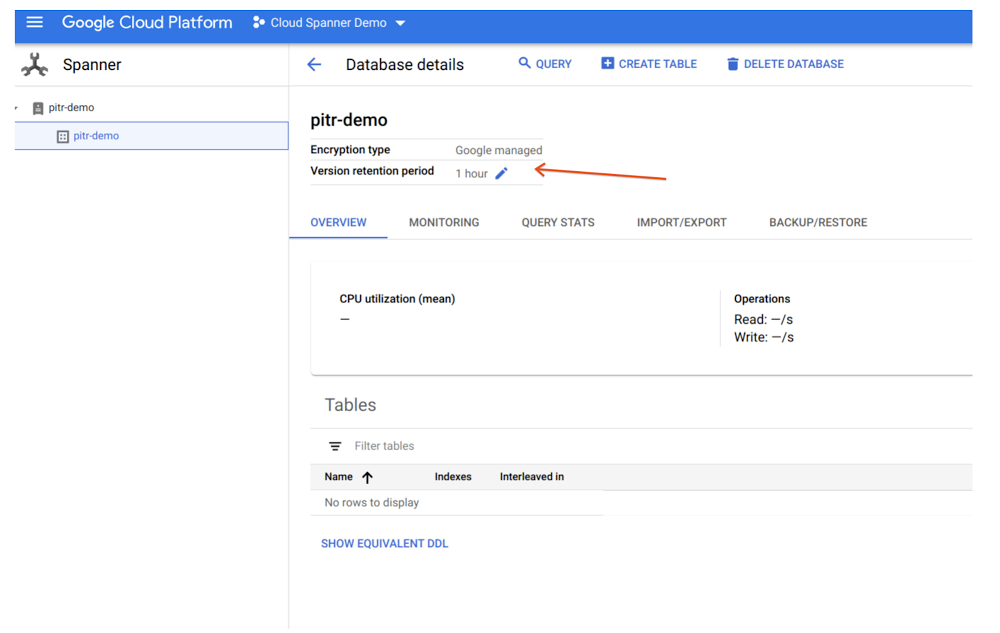
Cloud Spanner, a horizontally scalable relational database, recently launched a point-in-time recovery (PITR) capability that provides complete data protection against inadvertent data deletion or updates due to a user error. Spanner already provides Backup and Restore and Import/Export, which recover the database to the last state when the backup or the export was taken. With PITR capability, Spanner now offers continuous data protection with the ability to recover your past data to a microsecond granularity. This helps enterprises quickly fix data corruption to reduce risk and loss of business, and minimize impact on customer experience.PITR is simple and flexible to use and provides data protection with greater control and granularity. All you need to do is configure a database’s version retention period to retain all versions of data and schema, from a minimum of one hour up to a maximum of seven days. Spanner will take care of the rest. In the case of logical data corruption, depending on the situation, you have the choice of recovering the complete database or just restoring specific portions of the database—saving you precious time and resources, as you don’t have to restore the whole database.Let’s take two common real-life examples: first, John, a database administrator at a multinational financial company, accidentally deletes a live table in production and figures out the mistake based on customer complaints after a day. Second, Kim, a site reliability engineer at a national online retailer, rolls out a new payment processing engine that corrupts their consumer payments database while trying to perform multiple schema changes. If the version retention period in Spanner’s PITR capability is configured correctly, it can save the day for both John and Kim. John can perform a stale read specifying a query condition and timestamp in the past, then write the results back into the live database to recover the table. Kim can use the backup or export capability by specifying a timestamp in the past to back up or export the entire database, respectively, and then restore or import it to a new database. Setting up and recovering an entire database with PITRThe version retention period is at the database level, hence we first need to go to the desired Database Details page to set a new retention period. By default, it’s been set to one hour for every database created. Now, with the PITR feature, we can set this period up to seven days with minute/hour/day granularity.The figure below shows how to set a database’s retention period in the UI console:Click to enlargeYou can do this for each database in your instance. Now, let’s see how you can create a backup at a point in time in the past (version time) in the UI and restore from that backup. The figure below shows the creation of the backup in the UI:Click to enlargeWhen you list the backups for a database in the UI, you can see the Version time differs from the Backup Creation time, informing you that backup data is from a database version at a point in time in the past.Click to enlargeNow you can restore the database to recover the complete database within the same instance or in another instance within the same region or multi-region in which you are using Spanner.Note that the restored database will have the same version retention period that was in the original database at the time of backup creation; it won’t default back to one hour.If the seven-day maximum data retention window for PITR does not meet your needs, Spanner continues to offer data protection options for longer retention times with backups (maximum one-year retention window) and export capability, which enables you to export data in CSV or Avro file formats that you can keep for as long as you need. Learn more PITR is now available in all Google managed regions globally. You are charged for the additional storage consumed for storing all the versions of the key in the version retention period. If you choose to use Backup/Restore or Import/Restore capability for recovering the data, you will pay for them as per their pricing.  To learn more about PITR, see documentation. To get started with Spanner, create an instanceor try it out with a Spanner Qwiklab.Related ArticleBack up on demand, emulate and develop with ease — new Spanner featuresCloud database service Spanner adds backup-restore feature plus new developer features, like local emulator, query optimizer versioning, …Read Article
Quelle: Google Cloud Platform

How carbon-free is your cloud? New data lets you know

Google first achieved carbon neutrality in 2007, and since 2017 we’ve purchased enough solar and wind energy to match 100% of our global electricity consumption. Now we’re building on that progress to target a new sustainability goal: running our business on carbon-free energy 24/7, everywhere, by 2030. Today, we’re sharing data about how we are performing against that objective, so our customers can select Google Cloud regions based on the carbon-free energy supplying them. Completely decarbonizing our data center electricity supply is the critical next step in realizing a carbon-free future and supporting Google Cloud customers with the cleanest cloud in the industry. On the way to achieving this goal, each Google Cloud region will be supplied by a mix of more and more carbon-free energy and less and less fossil-based energy. We measure our progress along this path with our Carbon Free Energy Percentage (CFE%). Today we’re sharing the average hourly CFE% for the majority1 of our Google Cloud regions here and on GitHub. Customers like Salesforce are already integrating environmental impact into their IT strategy as they work to decarbonize the services they provide to their customers. Patrick Flynn, VP of Sustainability at Salesforce, is committed to harnessing their culture of innovation to tackle climate change. “At Salesforce we believe we must harness the power of innovation and technology across the customer relationship to address the challenge of climate change,” says Patrick Flynn, VP of Sustainability at Salesforce. “With Google’s new Carbon Free Energy Percentage, Salesforce can prioritize locations that maximize carbon free energy, reducing our footprint as we continue to deliver all our customers a carbon neutral cloud every day.”Click to enlargeWe’re sharing this data so you – like Salesforce – can incorporate carbon emissions into decisions on where to locate your services across our infrastructure. Just like the potential differences in a region’s price or latency, there are differences in the carbon emissions associated with the production of electricity that is sourced in each Google Cloud region. The CFE% will tell you on average, how often that region was supplied with carbon-free energy on an hourly basis. Maximizing the amount of carbon-free energy that supplies your application or workload will help reduce the gross carbon emissions from running on it. Of course, all regions are matched with 100% carbon-free energy on an annual basis, so the CFE% tells you how well matched the carbon-free energy supply is with our demand. A lower-scoring region has more hours in the year without a matching, local amount of carbon-free energy. As we work on increasing the CFE% for each of our Google Cloud regions, you can take advantage of locations with a higher percentage of carbon-free energy. You must also consider your data residency, performance and redundancy requirements, but here are some good ways to reduce the associated gross carbon emissions of your workload: Pick a lower-carbon region for your new applications. Cloud applications have a tendency to stay put once built, so build and run your new applications in the region with the highest CFE% available to you.Run batch jobs in a lower carbon region. Batch workloads are often planned ahead, so picking the region with the highest CFE% will increase the carbon-free energy supplying the job. Set an organizational policy for lower carbon regions. You can restrict the location of your cloud resources to a particular region or subset of regions using organizational policies. For example, if you want to use only US-based regions, restricting your workloads to run Iowa and Oregon, currently the leading CFE% leaders, rather than Las Vegas and S. Carolina would mean your app would be supplied by carbon-free energy an average of 68% more often. And remember, the cleanest energy is the energy you didn’t use in the first place. Increasing the efficiency of your cloud applications will translate into using less energy, and often less carbon emissions. Try serverless products that automatically scale with your workload and take advantage of rightsizing recommendations for your compute instances. 24/7 carbon-free energy is the goal we’re chasing for all of our Google Cloud regions around the globe. Along the way, we’re working on new ways to help you make lower-carbon decisions and lower your Google Cloud Platform carbon footprint. Stay tuned, and make sure you read the full details of today’s launch here.1. We’ll be updating the list as we receive data for additional regions.Related ArticleAnnouncing ‘round-the-clock clean energy for cloudGoogle Cloud sets goal for all services to be powered by carbon-free energy sources, all the time, by 2030.Read Article
Quelle: Google Cloud Platform


