How carbon-free is your cloud? New data lets you know

Google first achieved carbon neutrality in 2007, and since 2017 we’ve purchased enough solar and wind energy to match 100% of our global electricity consumption. Now we’re building on that progress to target a new sustainability goal: running our business on carbon-free energy 24/7, everywhere, by 2030. Today, we’re sharing data about how we are performing against that objective, so our customers can select Google Cloud regions based on the carbon-free energy supplying them. Completely decarbonizing our data center electricity supply is the critical next step in realizing a carbon-free future and supporting Google Cloud customers with the cleanest cloud in the industry. On the way to achieving this goal, each Google Cloud region will be supplied by a mix of more and more carbon-free energy and less and less fossil-based energy. We measure our progress along this path with our Carbon Free Energy Percentage (CFE%). Today we’re sharing the average hourly CFE% for the majority1 of our Google Cloud regions here and on GitHub. Customers like Salesforce are already integrating environmental impact into their IT strategy as they work to decarbonize the services they provide to their customers. Patrick Flynn, VP of Sustainability at Salesforce, is committed to harnessing their culture of innovation to tackle climate change. “At Salesforce we believe we must harness the power of innovation and technology across the customer relationship to address the challenge of climate change,” says Patrick Flynn, VP of Sustainability at Salesforce. “With Google’s new Carbon Free Energy Percentage, Salesforce can prioritize locations that maximize carbon free energy, reducing our footprint as we continue to deliver all our customers a carbon neutral cloud every day.”Click to enlargeWe’re sharing this data so you – like Salesforce – can incorporate carbon emissions into decisions on where to locate your services across our infrastructure. Just like the potential differences in a region’s price or latency, there are differences in the carbon emissions associated with the production of electricity that is sourced in each Google Cloud region. The CFE% will tell you on average, how often that region was supplied with carbon-free energy on an hourly basis. Maximizing the amount of carbon-free energy that supplies your application or workload will help reduce the gross carbon emissions from running on it. Of course, all regions are matched with 100% carbon-free energy on an annual basis, so the CFE% tells you how well matched the carbon-free energy supply is with our demand. A lower-scoring region has more hours in the year without a matching, local amount of carbon-free energy. As we work on increasing the CFE% for each of our Google Cloud regions, you can take advantage of locations with a higher percentage of carbon-free energy. You must also consider your data residency, performance and redundancy requirements, but here are some good ways to reduce the associated gross carbon emissions of your workload: Pick a lower-carbon region for your new applications. Cloud applications have a tendency to stay put once built, so build and run your new applications in the region with the highest CFE% available to you.Run batch jobs in a lower carbon region. Batch workloads are often planned ahead, so picking the region with the highest CFE% will increase the carbon-free energy supplying the job. Set an organizational policy for lower carbon regions. You can restrict the location of your cloud resources to a particular region or subset of regions using organizational policies. For example, if you want to use only US-based regions, restricting your workloads to run Iowa and Oregon, currently the leading CFE% leaders, rather than Las Vegas and S. Carolina would mean your app would be supplied by carbon-free energy an average of 68% more often. And remember, the cleanest energy is the energy you didn’t use in the first place. Increasing the efficiency of your cloud applications will translate into using less energy, and often less carbon emissions. Try serverless products that automatically scale with your workload and take advantage of rightsizing recommendations for your compute instances. 24/7 carbon-free energy is the goal we’re chasing for all of our Google Cloud regions around the globe. Along the way, we’re working on new ways to help you make lower-carbon decisions and lower your Google Cloud Platform carbon footprint. Stay tuned, and make sure you read the full details of today’s launch here.1. We’ll be updating the list as we receive data for additional regions.Related ArticleAnnouncing ‘round-the-clock clean energy for cloudGoogle Cloud sets goal for all services to be powered by carbon-free energy sources, all the time, by 2030.Read Article
Quelle: Google Cloud Platform

Albertsons Companies helps customers find COVID-19 vaccines with Business Messages

Since the release of initial COVID-19 vaccines in late 2020, online searches for vaccines have surged. While vaccines are becoming more broadly available, many people still have questions about eligibility criteria, as well as where and how vaccine appointments can be made.Meanwhile, for some vaccine administrators, there is no centralized process or call center that can efficiently handle the level of inquiries from the public. That’s where Google can help. Organizations around the world can activateBusiness Messages, a conversational messaging solution, and receive messages from customers in Google Search, Google Maps, and the business’s owned channels. We’re now supporting vaccine administrators such as Albertsons Companies that need to alleviate communication burdens, reduce the volume of incoming calls, combat potential misinformation, and boost customer satisfaction. People can connect with their local Albertsons Companies banner pharmacies—like Safeway, Jewel-Osco, Vons, Albertsons, Acme, Shaw’s, Tom Thumb, and more—directly through Google Search and Maps via a “message” button. From there, they can quickly receive up-to-date information about vaccine eligibility, availability, appointment booking, and frequently asked questions. Click to enlarge“The eligibility criteria for the COVID-19 vaccine is dynamic and varies across states or even adjacent counties. We were seeking hyper-local solutions for customers to find a timely answer to ‘Am I eligible?’” said Omer Gajial, SVP of Pharmacy and Health at Albertsons Companies. “With Google’s Business Messages, we can quickly and accurately inform people of where, when, and how they can get the vaccine. For our patients, this means getting them information quickly. For Albertsons Companies, it means freeing up our pharmacies to focus on what’s most important—administering the vaccine and taking care of our patients.”Other organizations are also choosing Google’s Business Messages as a scalable communication channel for vaccine information. Since early 2020, Walmart has been using Business Messages to inform the public of store hours, pick-up and delivery options, and it’s now using the technology to provide information about its vaccine distribution. Business Messages drives customer satisfaction and loyalty by providing helpful information to current and potential customers. This technology can also use Google Contact Center AI’s Dialogflow, which can build and deploy a virtual agent with personalized messaging. Business Messages will continue innovating to support all kinds of organizations, giving them the ability to connect people with helpful information when they need it. For more information on how you can activate Business Messages for your organization, please fill out the Contact form on the Business Messages website or reach out to a Business Messages partner.
Quelle: Google Cloud Platform

The bots are here: Use RPA and AI to automate digital tasks

The bots are coming! But don’t worry, they’re here for the boring stuff.Robotic Process Automation, or RPA to you acronym lovers, is all about AI-powered digital critters that take over repetitive and manual tasks, like receiving an invoice, extracting the data, and then entering that data into a bookkeeping system. RPA has been popular with CIOs as an emerging technology that streamlines enterprise operations. It fits well in the trend towards business process automation and higher levels of abstraction for developers, akin to serverless technologies. With RPA, you can automate mundane rules-based processes, enabling you to devote more time to serving customers, improving products, and other high-value work. Since they liberate developers, Google Cloud sees RPA bots as an investment in the future. In a strategic, multiyear collaboration, Automation Anywhere—a leader in RPA—will be working with Google Cloud to enable customers to scale application automation using API management, low- or no-code development, and the development of ML workflows. Automation Anywhere’s Automation 360 platform will be available on Google Cloud (generally available in May 2021), and together they will bring RPA capabilities to multiple Google Cloud products, including Apigee, AppSheet, and AI Platform. Let’s face it, we developers could use a break. With the digital acceleration that was spurred by COVID over the last year, developers have been spending more time on data entry, managing an ever growing number of APIs, and making sure cloud-native apps integrate with legacy on-premises systems. When existing software doesn’t provide the necessary APIs, users and developers spend time and resources performing work that feels… well, robotic. We’ve already seen an increase in companies applying RPA technologies to automate mundane tasks in invoice processing, call center workflows, and employee onboarding. Through business logic, RPA captures and interprets data from applications for processing transactions, manipulating data, triggering responses, and communicating with other digital systems. Where does RPA fit in?RPA fits well with the Google Cloud quest to offer more serverless and event-driven architectures. Cloud Workflows, launched in January 2021, enables you to orchestrate and automate Google Cloud and HTTP-based API services with serverless workflows. It’s service-oriented, and you can chain events in large emergent systems. Combining Cloud Workflows with other serverless products, such as Cloud Functions and Cloud Run, you can call external APIs to create flexible serverless applications. On the data processing side, Cloud Composer is a fully managed data workflow orchestration service that lets you author, schedule, and monitor pipelines. It’s well suited for data processing pipelines (for example, batch processing and ML workflows). RPA complements the serverless world by welcoming ML and AI into the picture. It uses AI to automate clunky business processes that usually involve manual, human-centric work. At the same time, it complements the AI world, like Google Cloud’s DocumentAI or Lending Doc AI. You can, for example, reduce the time it takes to move a lending application from start to finish by using Document AI to automate manual “stare and compare” work during the lending process and use RPA bots to connect this process to other systems, for instance, a cloud-based lending platform. I think the opportunity for RPA lies in industry-specific use cases in financial services, manufacturing, healthcare and life sciences, telecommunications, retail, and the public sector. RPA can handle the previously painstaking work of hunting for information hidden in documents and sheets (unstructured data in the form of XML files, web server logs, sensor data, emails, and images). This is why Apigee, AppSheet, and the Google Cloud ML APIs/AI Platform are a sensible launchpoint for RPA in the Google Cloud ecosystem. These low-code, API management, and ML-focused products pair well with Automation Anywhere’s ability to integrate computer vision, natural language processing, and ML to automatically classify, extract, and validate information from business documents and emails. The Automation Anywhere IQ Bot, for example, can uncover unstructured data and enable the automation of these processes (for example, extracting numerical data, performing calculations, and transferring results into another application). Meanwhile, Apigee acts as the API full lifecycle management layer deployable as a single view across hybrid and on-premises environments. This will surface Automation Anywhere’s internal APIs and bots as well designed, secure, and managed APIs. Then AppSheet empowers you to use these fully managed APIs to build custom applications without code. Use it for approval, audits, and scheduling, with built-in connections to data sources such as Google Sheets and Salesforce.Just because RPA bots do the boring stuff, that doesn’t mean you can’t be creative with them, either. You can combine products together, using RPA in conjunction with other technologies. Create an RPA bot that uses Google Cloud’s NLP API to contextually respond to FAQ emails and schedule meetings with faster-turnarounds. Meanwhile, use Cloud Workflows to process customer orders, trigger an inventory refill from a supplier, and call external APIs to notify sales reps about large orders. As they used to say, “Collect ‘em! Trade ‘em!”RPA should not stand apart from your development processAlthough RPA emphasizes low-code, visual techniques for defining applications and integrations, you should still think of RPA as a long-term arc and build it into your entire automated development cycle. Exception handling and data structures are still important. In a way, RPA is the inverse of software testing: Instead of creating automations designed to test a software application until it breaks, an RPA developer aims to create automations that will be resilient. Architecting and maintaining RPA bots means building them for durability, and understanding when you’re stretching them to their limits (in which case a traditional software development project might make more sense).With Google Cloud serverless, API, and AI offerings, Automation Anywhere and Google Cloud are poised to shake things up. As we gear up for a more automated future, RPA’s non-intrusive nature can help you make the most of existing infrastructure without causing disruption to underlying systems, opening up new opportunities for you to work on less robotic tasks. If you’re keen on exploring what a no-code development journey looks like, check out the AppSheet quickstarts here. To keep up with the latest on Google Cloud, follow me on Twitter @stephr_wong.
Quelle: Google Cloud Platform

New research on how COVID-19 changed the nature of IT

The impact of COVID-19 was felt everywhere, and the world of IT—and its budgets—was certainly not spared. Yet, along with the general slowdown in IT investment were widespread reports about how the COVID-19 pandemic accelerated digital transformation. To learn more about how organizations are shifting their technology priorities, Google commissioned a study by IDG to understand the impact of COVID-19 and its resulting implications to IT. This global survey of 2,000 IT leaders highlighted four key trends that are capturing the imagination of IT departments in 2021: (1) multicloud solutions that give organizations’ the flexibility to run apps where they need them, (2) data analytics solutions that provide real-time insights, (3) sustainability solutions that enable organizations to reduce their carbon emissions, and (4) security solutions that protect their data, applications, infrastructure, and customers. A deeper look at some of the results found that:Support for hybrid and multicloud is IT’s top priority: When considering cloud providers, 78% of respondents listed support for hybrid and multicloud as a must-have or major consideration factor. The COVID-19 pandemic has clearly highlighted the need for flexibility, resiliency, and redundancy in operations and development. IT leaders want the ability to write apps once and deploy them anywhere without feeling “locked in.”The promise of data intelligence continues to rise: Forty-four percent of digitally forward organizations (defined as those companies farther along in their digital transformation journeys) are currently using data analytics, AI/ML, and IoT technologies—this is 20% more than their more conservative peers. These more forward-looking companies are using disruptive and intelligent technologies to automate processes, make intelligent predictions, and streamline management and operations.Cloud has won over security skeptics: Eighty-four percent of those surveyed believe their cloud infrastructure is more secure or as secure as their on-premises infrastructure (vs. just 15% who believe on-premises is safer). Digging deeper into the research, IT leaders want more control over access to their data, as well as transparency and visibility into their provider’s operations. Sustainability is now an IT priority: Likely driven by shareholder and consumer pressures, 90% of respondents stated that sustainability is a priority and/or a performance metric for their IT department. However, even though the desire to become more sustainable is high, actions still lag behind. Only two-thirds of respondents reported their organizations have sustainability targets in place today. Many will choose providers with documented sustainability records, such as Google Cloud’s carbon neutrality commitments.There’s no doubt that the COVID-19 pandemic changed the shape of IT for years to come. To learn more about the findings, download the IDG report “No turning back: How the pandemic reshaped digital business agendas.”Related ArticleRead Article
Quelle: Google Cloud Platform
A (visual) space odyssey: How Theta Labs reached the outer limits of video streaming

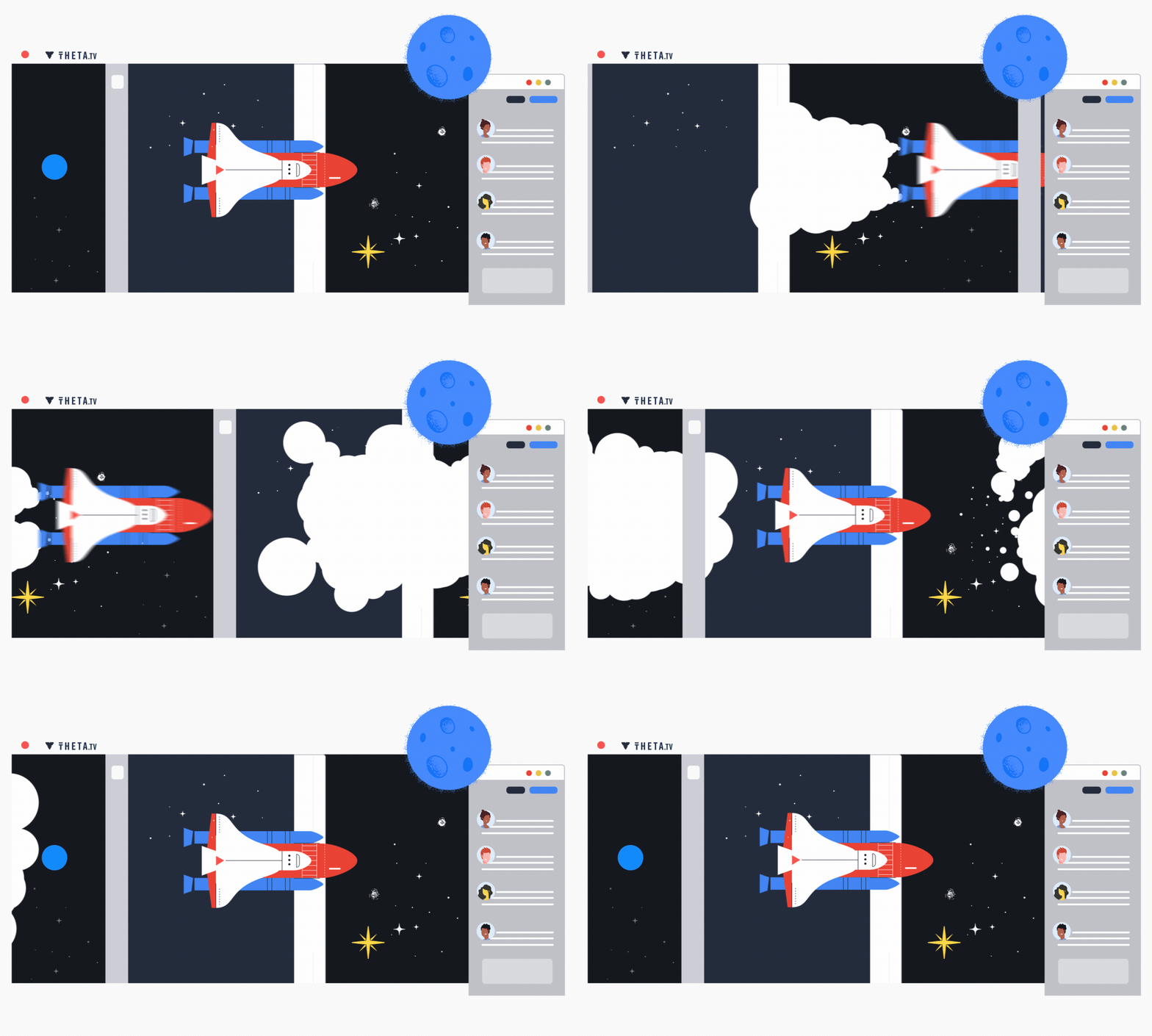
Theta Labs, a leading decentralized video streaming platform, revolutionized the livestream experience with their peer-to-peer bandwidth sharing distributed ledger technology. And thanks to database and analytics solutions from Google Cloud, Theta Labs has scaled to stay ahead of its growing active user base on their blockchain platform. It was this ability to reach more remote viewers and give larger audiences the opportunity to discover new things that caught the attention of NASA, which wanted to spread interest in science and technology to younger viewers. NASA chose Theta Labs as one of only a handful of video services with direct access to NASA’s source video feed for the SpaceX launch and other events. Below, take a visual joyride through Theta Labs’ interstellar streaming mission. See what they did, the technology they used to overcome the challenges, and the outcomes they were able to achieve.WhoTheta Labs is a leading decentralized video streaming platform that is powered by users and decentralized on a new blockchain. Theta broadcasted NASA’s Women’s Equality Day and livestreamed the latest SpaceX rocket launch during COVID-19.IndustryLive streaming experiences, with a twist: Theta Labs reaches viewers in areas with little or no access to high speed internet. Blockchain-based, peer-to-peer technology lets users share bandwidth using distributed ledger technology.The challengeFacilitating a livestream of a space launch with so many viewers requires a powerful infrastructure—one that’s scalable, reliable, and secure. Theta wanted to reach more users but needed to avoid hitting VM caps that previously caused issues with latency and the customer experience.“With Google Cloud’s over 1600 nodes, we are able to get closer to our users than ever before.” – Wes Levitt, Head of Strategy, Theta LabsThe solutionGoogle Cloud’s databases and analytics products such as BigQuery, Dataflow, Pub/Sub and Firestore brought Theta Labs unlimited scale and performance, allowing them to:Analyze streaming viewership data for real-time for analyticsForecast how many concurrent users to support during livestream eventsPredict reputation scores for thousands of edge nodes and address bad actors or underperformanceCreate the listener/subscriber for the topic the ETL pipeline publishes and ingest into BigQuery tables running fast queriesThe benefitsReplacing customized scripts for analysis with BigQuery saved hours or even days of engineering time, and saved costs while improving performanceGetting insights from data faster serves internal teams well and customers, too—Theta can now share engagement metrics with partners to help reach more audiencesRunning faster queries led to brand-new findings on viewership, bandwidth donations, and impactful moments during a livestreamTheta’s migration took less than six months, with a return on investment almost immediatelyOur partnership with Google Cloud has also let us reach viewers in regions that normally would have trouble accessing streaming video. Jieyi Long, Co-founder/CTO, Theta LabsLearn more about BigQuery here.
Quelle: Google Cloud Platform

Multi-layer API security with Apigee and Google Cloud Armor

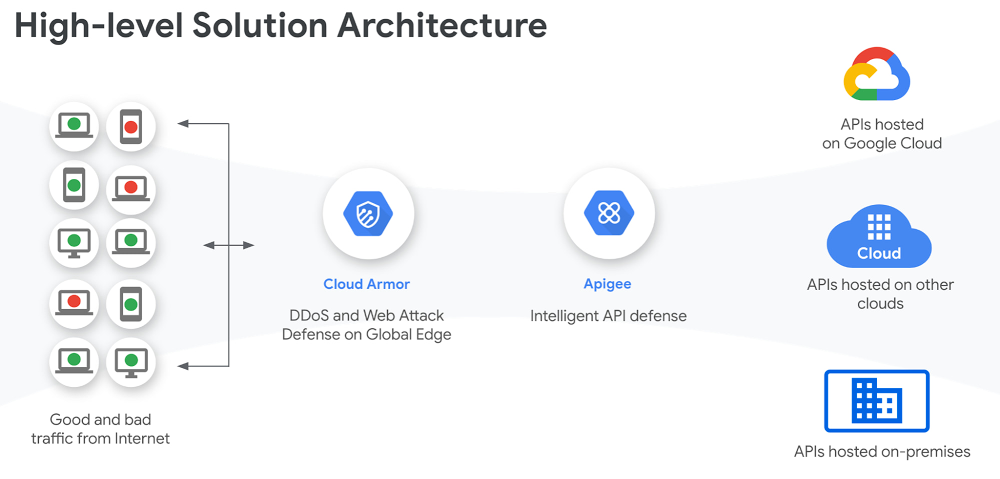
Information security has become headline news on a daily basis. You have probably heard of security risks ranging from malicious bots used in schemes both big and small, to all-out “software supply chain attacks” that involve large-name enterprises and their customers, and that ultimately affect numerous governments, organizations, and people. As businesses expand their digital programs to serve their customers via online channels and to operate from anywhere with a global remote workforce, such security attacks are expected to become more common. Because application programming interfaces (APIs) are fundamental components of an enterprises’ digital programs, connecting the data and functionality that power various apps and services, they are also vectors of malicious attacks–as well as sources of insights that enterprises can use to better understand attack patterns and how to thwart them. Our State of the API Economy 2021report found a 172% rise in abusive traffic and a 230% increase in enterprises’ use of anomaly detection, bot protection, and security analytics features. As agile, smart, and proactive digital security mechanisms have become the cost of doing business, API security has become an indispensable part of an enterprise’s IT security portfolio–and as this article explores, our recent release of Apigee X makes API security even more powerful. Multi-layer API security with Apigee and Google Cloud ArmorAPIs are the doors to various digital assets–and every door needs a lock to keep what’s behind it safe and protected from unauthorized access. Therefore, to help organizations secure APIs to the highest level, Google Cloud has brought together Apigee and Cloud Armor, combining industry-leading API management and web application firewall technologies. With Apigee X, the latest release of Google Cloud’s full lifecycle API management platform, customers can easily and seamlessly apply Cloud Armor web application firewall (WAF) to APIs, adding another layer of security to ensure that corporate digital assets are accessed only by authorized users. For companies such as AccuWeather, a global leader in weather data and forecasting, APIs have been essential to both building new applications and monetizing data and functionality for outside developers, so those communities can innovate with AccuWeather assets as well. With this new expanded surface area from their APIs, AccuWeather needed robust security to manage and secure its digital assets.“Over the last decade, AccuWeather has continued to transform as a digital solution for serving business customers with the most accurate and useful weather information using APIs. With Apigee’s strategic partnership and comprehensive API management platform, we were able to design, develop, and launch our industry-leading APIs in a few short weeks.” said Chris Patti, Chief Technology Officer at AccuWeather. “Today, we serve over 50 billion API calls per day. As many organizations embrace their own digital solutions, they are increasingly adopting API-first strategies for accelerated transformation. With the new Apigee X release, we can foresee furthering our API programs with the best of Google capabilities like reCaptcha, Cloud Armor, and Content Delivery Network (CDN) for global scale, performance and security.” Apigee and Cloud Armor together help secure your APIs at multiple levels.Click to enlargeWhile Apigee X includes OAuth (Open Authorization), API keys, role-based access and many other API-level security features, Cloud Armor offers network and application  security such as DDoS (Distributed Denial of Service) protection, geo-fencing, mitigation of OWASP (Open Web Application Security Project) Top 10 risks, and custom Layer-7 filtering. With Apigee X and Cloud Armor, developers enjoy integrated, out-of-the-box security capabilities to protect their APIs at multiple levels.Click to enlargeCustomers can also easily leverage Cloud Identity and Access Management (IAM) for authenticating and authorizing access to the Apigee platform as well as to gain more control over encrypted data with customer-managed encryption keys (CMEK). Apigee X and Cloud Armor deliver powerful protection for applications and APIs against threats and fraud.  These products are also available as part of our WebApp and API Protection (WAAP) solution that adds anti-bot and anti-abuse measures from reCAPTCHA Enterprise.Security is a moving target, with attackers and new vulnerabilities emerging all the time–but with a multi-layer approach to API security, enterprises can trust that they can quickly leverage APIs for new digital services and experiences without compromising security along the way.  To learn more about Apigee X, and see Apigee and Cloud Armor in action, check out this videoRelated ArticleHow leading enterprises use API analytics to make effective decisionsExplore why API monitoring and analytics are essential to successful digital transformation initiativesRead Article
Quelle: Google Cloud Platform
Event-triggered detection of data drift in ML workflows

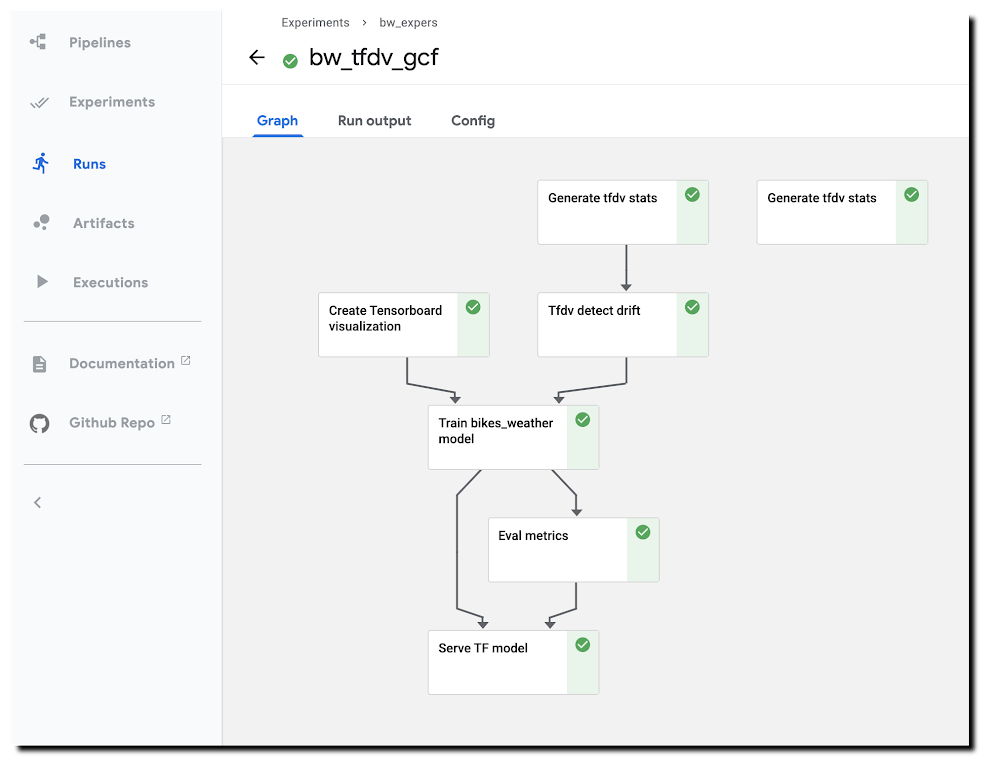
With ML workflows, it is often insufficient to train and deploy a given model just once. Even if the model has desired accuracy initially, this can change if the data used for making prediction requests becomes—perhaps over time—sufficiently different from the data used to originally train the model. When new data becomes available, which could be used for retraining a model, it can be helpful to apply techniques for analyzing data ‘drift’, and determining whether the drift is sufficiently anomalous to warrant retraining.It can also be useful to trigger such an analysis—and potential re-run of your training pipeline—automatically, upon arrival of new data.This blog post highlights an example notebook that shows how to set up such a scenario with Kubeflow Pipelines (KFP). It shows how to build a pipeline that checks for statistical drift across successive versions of a dataset and uses that information to make a decision on whether to (re)train a model; and how to configure event-driven deployment of pipeline jobs when new data arrives. (In this example, we show full model retraining on a new dataset. An alternate scenario—not covered here—could involve tuning an existing model with new data.)The notebook builds on an example highlighted in a previous blog post—which shows a KFP training and serving pipeline—and introduces two primary new concepts:The example demonstrates use of the TensorFlow Data Validation (TFDV) library to build pipeline components that derive dataset statistics and detect drift between older and newer dataset versions, and shows how to use drift information to decide whether to retrain a model on newer data.The example shows how to support event-triggered launch of Kubeflow Pipelines runs from a Cloud Functions (GCF) function, where the Function run is triggered by addition of a file to a given Cloud Storage (GCS) bucket.The machine learning task uses a tabular dataset that joins London bike rental information with weather data, and trains a Keras model to predict rental duration. See this and this blog post and associated README for more background on the dataset and model architecture.A pipeline run using TFDV-based components to detect ‘data drift’.Running the example notebookThe example notebook requires a Google Cloud Platform (GCP) account and project, ideally with quota for using GPUs, and—as detailed in the notebook—an installation of AI Platform Pipelines (Hosted Kubeflow Pipelines) (that is, an installation of KFP on Google Kubernetes Engine (GKE)), with a few additional configurations once installation is complete. The notebook can be run using either Colab (open directly) or AI Platform Notebooks (open directly).Creating TFDV-based KFP componentsOur first step is to build the TFDV components that we want to use in our pipeline.Note: For this example, our training data is in GCS, in CSV-formatted files. So, we can take advantage of TFDV’s ability to process CSV files. The TFDV libraries can also process files in TFRecords format. We’ll define both TFDV KFP pipeline components as ‘lightweight’ Python-function-based components. For each component, we define a function, then call kfp.components.func_to_container_op() on that function to build a reusable component in .yaml format. Let’s take a closer look at how this works (details are in the notebook).Below is the Python function we’ll use to generate TFDV statistics from a collection of csv files. The function—and the component we’ll create from it—outputs the path to the generated stats file. When we define a pipeline that uses this component, we’ll use this step’s output as input to another pipeline step.TFDV uses a Beam pipeline—not to be confused with KFP Pipelines—to implement the stats generation. Depending upon configuration, the component can use either the Direct (local) runner or the Dataflow runner. Running the Beam pipeline on Dataflow rather than locally can make sense with large datasets.To turn this function into a KFP component, we’ll call kfp.components.func_to_container_op(). We’re passing it a base container image to use: gcr.io/google-samples/tfdv-tests:v1. This base image has the TFDV libraries already installed, so that we don’t need to install them ‘inline’ when we run a pipeline step based on this component.We’ll take the same approach to build a second TFDV-based component, one which detects drift between datasets by comparing their stats. The TFDV library makes this straightforward. We’re using a drift comparator appropriate for a regression model—as used in the example pipeline—and looking for drift on a given set of fields (in this case, for example purposes, just one).The tensorflow_data_validation.validate_statistics() call will then tell us whether the drift anomaly for that field is over the specified threshold. See the TFDV docs for more detail.(The details of this second component definition are in the example notebook). Defining a pipeline that uses the TFDV componentsAfter we’ve defined both TFDV components—one to generate stats for a dataset, and one to detect drift between datasets—we’re ready to build a Kubeflow Pipeline that uses these components, in conjunction with previously-built components for a training & serving workflow.Instantiate pipeline ops from the componentsKFP components in yaml format are shareable and reusable. We’ll build our pipeline by starting with some already-built components—(described in more detail here)—that support our basic ‘train/evaluate/deploy’ workflow. We’ll instantiate some pipeline ops from these pre-existing components like this, by loading them via URL:Then, we define a KFP pipeline from the defined ops. We’re not showing the pipeline in full here—see the notebook for details.Two pipeline steps are based on the tfdv_op, which generates the stats. tfdv1 generates stats for the test data, and tfdv2 for the training data.In the following, you can see that the tfdv_drift step (based on the tfdv_drift_op) takes as input the output from the tfdv2 (stats for training data) step.While not all pipeline details are shown, you can see that this pipeline definition includes some conditional expressions; parts of the pipeline will run only if an output of an ‘upstream’ step meets the given conditions. We start the model training step if drift anomalies are detected. (And, once training is completed, we’ll deploy the model for serving only if its evaluation metrics meet certain thresholds.)Here’s the DAG for this pipeline. You can see the conditional expressions reflected; and can see that the step to generate stats for the test dataset provides no downstream dependencies, but the stats on the training set are used as input for the drift detection step.The pipeline DAGHere’s a pipeline run in progress: A pipeline run in progress.See the example notebook for more details on how to run this pipeline.Event-triggered pipeline runsOnce you have defined this pipeline, a next useful step is to automatically run it when an update to the dataset is available, so that each dataset update triggers an analysis of data drift and potential model (re)training.We’ll show how to do this using Cloud Functions (GCF), by setting up a function that is triggered when new data is added to a GCS bucket.Set up a GCF function to trigger a pipeline run when a dataset is updatedWe’ll define and deploy a Cloud Functions (GCF) function that launches a run of this pipeline when new training data becomes available, as triggered by the creation or modification of a file in a ‘trigger’ bucket on GCS.In most cases, you don’t want to launch a new pipeline run for every new file added to a dataset—since typically, the dataset will consist of a collection of files, to which you will add/update multiple files in a batch. So, you don’t want the ‘trigger bucket’ to be the dataset bucket (if the data lives on GCS)—as that will trigger unwanted pipeline runs.Instead, we’ll trigger a pipeline run after the upload of a batch of new data has completed.To do this, we’ll use an approach where the ‘trigger’ bucket is different from the bucket used to store dataset files. ‘Trigger files’ uploaded to that bucket are expected to contain the path of the updated dataset as well as the path to the data stats file generated for the last model trained. A trigger file is uploaded once the new data upload has completed, and that upload triggers a run of the GCF function, which in turn reads info on the new data path from the trigger file and launches the pipeline job.Define the GCF functionTo set up this process, we’ll first define the GCF function in a file called main.py, as well as an accompanying requirements file in the same directory that specifies the libraries to load prior to running the function. The requirements file will indicate to install the KFP SDK:kfp==1.4The code looks like this (with some detail removed); we parse the trigger file contents and use that information to launch a pipeline run. The code uses the values of several environment variables that we will set when uploading the GCF function.Then we’ll deploy the GCF function as follows. Note that we’re indicating to use the gcs_update definition (from main.py), and specifying the trigger bucket. Note also how we’re setting environment vars as part of the deployment.Trigger a pipeline run when new data becomes availableOnce the GCF function is set up, it will run when a file is added to (or modified in) the trigger bucket. For this simple example, the GCF function expects trigger files of the following format, where the first line is the path to the updated dataset, and the second line is the path to the TFDV stats for the dataset used for the previously-trained model. More generally, such a trigger file can contain whatever information is necessary to determine how to parameterize the pipeline run.gs://path/to/new/or/updated/dataset/gs://path/to/stats/from/previous/dataset/stats.pbWhat’s next?This blog post showed how to build Kubeflow Pipeline components, using the TFDV libraries, to analyze datasets and detect data drift. Then, it showed how to support event-triggered pipeline runs via Cloud Functions. The post didn’t include use of TFDV to visualize and explore the generated stats, butthis example notebook shows how you can do that.You can alsoexplore the samples in the Kubeflow Pipelines GitHub repo.Related ArticleWith Kubeflow 1.0, run ML workflows on Anthos across environmentsKubeflow on Google’s Anthos platform lets teams run machine-learning workflows in hybrid and multi-cloud environments and take advantage …Read Article
Quelle: Google Cloud Platform
How do you eat an elephant? Google SREs talk digital transformation

Today, everything from payroll software to specialized machine-learning systems is available “as a service” in the cloud, addressing a vast range of needs across businesses, enabling rapid growth and scale while allowing a business to focus on its core competencies.But moving to the cloud can generate tension, which is inevitably challenging for everyone involved—especially if that transformation creates “winners” and “losers” or frames individuals as “old” or “new.” The good news; however, is that a cloud transformation doesn’t have to be this way.As Google Cloud has grown, so too has the team of Googlers who build and support the platform, and many of us have sat in the same seat as our customers. We’ve experienced firsthand how empowering it can be to shape the future of an organization, help one another grow, as well as unlock the business opportunities that a transformation provides. Our own personal experiences, and those of our peers, have led us to conclude one thing we know to be true for every company – the story of digital transformation is a human story—one that involves as much cultural transformation as technological transformation. It’s with this realization we have identified the deeper factors behind a successful transformation. That’s why we recently published a guide, reflecting on the nature of these changes and how you can take action in your own organization to drive a migration to the cloud. Posing challenging questions helps you reflect on your own organization’s journey and the unique path you will need to take to lead to meaningful change. We wrote this guide to share key tenets that underpin the change philosophy you need to instill in your own organization. In A Practical Guide to Moving to Cloud, we present the following calls to action:Understand who in the organization you need to enlist to move to cloud.Create a psychologically safe culture in which you can grow together.Define clear objectives for your organization. Document measurable steps towards these goals and understand that each step must, in and of itself, deliver value.Review your existing organizational behaviors and set principles/policies which influence and direct every future decision related to your transformation.Use your new culture to refine how decisions are made, and provide meaningful autonomy across the organization.Build structures that empower practitioners to share best practices and solve common problems. Use these structures to empower your peers.Build guardrails into your cloud platform that support transformation, at pace, without negatively impacting others. Support safe experimentation.Understand what types of cloud platforms are the best fit for your business needs and determine your multi-cloud strategy in anticipation of your evolving business needs (e.g. acquisitions, new revenue streams, competitive responses).Recognize that everything is now software, and understand what this means for your existing IT infrastructure functions.Don’t be afraid to revisit existing, hallowed, security policies. Making them fit-for-purpose is crucial.Continuously measure and apply your new policies through software.Be bold; build a new way of operating your business products with a customer-centric perspective. Love your developers.At Google Cloud, we’re here to help you craft the right migration for you and your business. A Practical Guide to Moving to Cloud is available as a free download. You can also learn more about our data center migration solutions or sign up for a free migration cost assessment. Let’s get migrating! Visit sre.google to learn more about SRE and industry-leading practices for service reliability.
Quelle: Google Cloud Platform

Cloud Bigtable + Cloud Memorystore: faster together

TLDR: Improve your application’s performance by using Memcached for frequently queried data like this:Databases are designed for specific schemas, queries, and throughput, but if you have data that gets queried more frequently for a period of time, you may want to reduce the load on your database by introducing a cache layer. In this post, we’ll look at the horizontally scalable Google Cloud Bigtable, which is great for high-throughput reads and writes. Performance can be optimized by ensuring rows are queried somewhat uniformly across the database. If we introduce a cache for more frequently queried rows, we speed up our application in two ways: we are reducing the load on hotspotted rows and speeding up responses by regionally colocating the cache and computing. Memcached is an in-memory key-value store for small chunks of arbitrary data, and I’m going to use the scalable, fully managed Memorystore for Memcached, since it is well integrated with the Google Cloud ecosystem.SetupCreate a new Google Cloud project or use an existing project and database of your choice. The examples here will show Cloud Bigtable, but Spanner or Firestore would be good options too.I’ll provide gcloud commands for most of the steps, but you can do most of this in the Google Cloud Console if you prefer.Create a Cloud Bigtable instance and a table with one row using these commands:cbt createinstance bt-cache “Bigtable with cache” bt-cache-c1 us-central1-b 1 SSD &&  cbt -instance=bt-cache createtable mobile-time-series “families=stats_summary” &&  cbt -instance=bt-cache set mobile-time-series phone#4c410523#20190501 stats_summary:os_build=PQ2A.190405.003 stats_summary:os_name=android &&  cbt -instance=bt-cache read mobile-time-seriesThe codeThe generic logic for a cache can be defined in the following steps: Pick a row key to query.If row key is in cacheReturn the value.     3. OtherwiseLook up the row in Cloud Bigtable.Add the value to the cache with an expiration.Return the value.For Cloud Bigtable, your code might look like this (full code on GitHub):I chose to make the cache key be row_key:column_family:column_qualifier to easily access column values. Here are some potential cache key/value pairs you could use:rowkey: encoded rowstart_row_key-end_row_key: array of encoded rowsSQL queries: resultsrow prefix: array of encoded rowsWhen creating your cache, determine the setup based on your use case. Note that Bigtable rowkeys have a size limit of 4KB, whereas Memcached keys have a size limit of 250 bytes, so your rowkey could potentially be too large.Create a Memorystore for Memcached instanceI’ll create a Memorystore for Memcached instance, but you can install and run a local Memcached instance to try this out or for testing. These steps can be done with the Memorystore Cloud Console if you prefer.1. Enable the Memorystore for Memcached API.2. Create a Memorystore for Memcached instance with the smallest size on the default network. Use a region that is appropriate for your application.3. Get the Memcached instance details and get the discoveryEndpoint IP address (you may have to wait a few minutes for the instance to finish creation).Set up machine within networkWe need to create a place to run code on the same network as our Memcached instance. You can use a serverless option such as Cloud Functions, but a Compute VM requires less configuration.Create a compute instance on the default network with enabled API scopes for Cloud Bigtable data. Note that the zone must be in the same region as your Memcached instance.2. SSH into your new VM.Optionally connect to Memcached via TelnetThe Memorystore for Memcached documentation contains more information about this process, but you can just run the commands below to set and get a value in the cache. Run the codeNow we are ready to put our code on the machine. You can clone the repo directly onto the VM and run it from there. If you want to customize the code, check out my article on rsyncing code to Compute Engine or use the gcloud scp command to copy your code from your local machine to your VM.2. Install maven3. Set environment variables for your configuration.4. Run the program once to get the value from the database, then run it again and you’ll see that the value is fetched from the cache.CleanupIf you followed along with this blog post, delete your VM, Cloud Bigtable Instance, and Memcached instance with these commands to prevent getting billed for resources:Next steps Now you should understand the core concepts for putting a cache layer in front of your database and can integrate it into your existing application. Head to the Google Cloud console where you can try this with Cloud Bigtable and Cloud Memorystore.Related ArticleGo faster and cheaper with Memorystore for Memcached, now GALearn about fully managed Memorystore for Memcached, which is compatible with open-source Memcached protocol and can save database costs …Read Article
Quelle: Google Cloud Platform
Serving up data from Cloud Storage

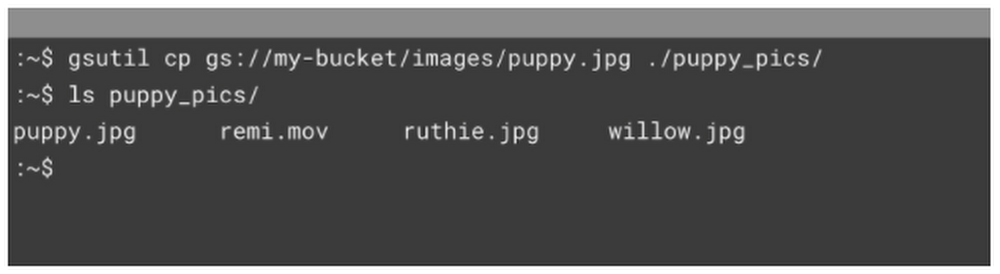
Prefer to listen rather than read? Check out this post on the podcast!When it comes to the cloud, there’s more than one way to serve a file. In this post, we’ll walk you through all the ways to serve data from Cloud Storage—so you can determine the best fit for your needs!You can use Cloud Storage to serve assets to your customers, and depending on your application, there are a variety of methods you might use to get that data out of a Cloud Storage bucket. In this post, we’ll cover four ways to serve those assets, but feel free to read more in the documentation, or for general, conceptual information on uploads and downloads, read this. Here we go!Client LibrariesFirst, we’ve got Client Libraries. If you need to download assets directly into your existing application, this is something for you to explore!And trust me when I say…we speak your language. With code samples in C++, C#, Go, Java, Node.js, PHP, Python, and Ruby—we’ve got you covered. Check out the documentation for more. Here’s an example of downloading from your Cloud Storage bucket using Python:gsutilUp next, you have the gsutil application. gsutil is a Python application that lets you access Cloud Storage from the command line. For our purposes, the cp command allows you to upload files from your local machine to google cloud. For example, running this command will download from a Cloud Storage bucket to a local path on your device.Additionally, gsutil comes with a plethora of options to configure to your specific use case; like the -m command, which allows for copy options to occur in parallel.REST APIsYou can also directly go to the REST APIS, using other programs like cURL to fetch your files directly and allowing the user to log in with OAuth. More on that here.Cloud ConsoleFinally, you can always access your objects right from the Cloud Console. Simply select the desired bucket, or object, and click “Download” in the handy “more actions” drop down menu. This is a great way to grab individual files when you’re debugging or going through things manually.Note: For some object types, selecting “Download” opens the object in the browser. To download these objects to your local computer, right-click on “Download” and select “Save Link As.”What’s Next?Retrieving files is really just the start, and you’ll want to make sure you’ve got a handle on controlling access – You know we’ve got another post for that, so stay tuned!Learn more about your storage options in Cloud Storage Bytes, or check out the documentationfor more information, including tutorials.Related Article5-ish ways to get your data into Cloud StorageSo you’ve created your buckets, and now you want to use the power of the cloud to serve your content. With a can-do attitude and the deta…Read Article
Quelle: Google Cloud Platform






