Preparing PostgreSQL for migration with Database Migration Service

Last November, we made relational database migration easier for MySQL users with our public preview of Database Migration Service (DMS). Today, we’ve officially made the product generally available, and bring the same easy-to-use migration functionality to PostgreSQL.The thing I’ve appreciated the most about diving deep with DMS has been that it just works. Once you get your source instance and database(s) prepared, and establish the connectivity between source and destination, doing the migration is all handled. When it’s all finished, cutting over to using your Cloud SQL instance as your application’s primary database is as simple as clicking a button in the DMS UI.Not to downplay the difficulty in database prep, or connectivity. I wrote a thorough blog post walking through the various connectivity options for DMS in great detail. Network topology can be incredibly complicated, and connecting two machines securely through the internet while serving an application with thousands or millions of users is anything but simple.Today, I want to take a moment with you to cover preparing your source PostgreSQL instance and database(s) for migration using DMS and some gotchas I found so you don’t have to.I’ll start by saying, the documentation and in-product UI guidance are both excellent for DMS. If you’re familiar with setting up replication infrastructure for PostgreSQL, you’re probably good to jump in, and check in on the documentation if needed. Having said that, it’s documentation, so here I’ll try to add a bit so it’s all in one place to get everything you need to prepare your source PostgreSQL instance and database(s).Step one, be sure your source instance version is supported. Current list of supported versions can be found on the documentation page I linked above.Next up is a schema piece: DMS doesn’t support migrating tables that don’t have a primary key. Starting a migration against a database that has tables without primary keys will still succeed, but it won’t bring over the data from a table that’s lacking a primary key, but the table will still be created. So if you want to bring the data over from a table that doesn’t have a primary key, you have a few options:You’ll have to add a primary key prior to starting the migration.You’ll need to bring the data over yourself after the initial migration. Keeping in mind of course that if you bring the data over yourself, even if you maintain the connection, DMS won’t replicate data for that table moving forward.You can export the table from the source instance and import it into the new instance.Finally, you can create a table with the same schema as the one you have that doesn’t have the primary key, give it a primary key (should use a sequence generator to autogenerate the key) and copy the source data into it. Then do the migration. DMS as part of doing the migration will create the non-PK table, it just doesn’t copy the data over. Then you can copy the data from the migrated primary key table, and finally delete the primary key table once you’ve verified the data. It sounds complicated, but it ensures you’re getting the same data at the point of migration as the rest of your data as long as you’ve got any new rows inserted into the non-primary key table also going into the primary key copy. If you’re worried about the data in that table changing during the migration, you can copy the data over right before promoting the destination instance to minimize that window.DMS relies on pglogical for the migration work. This means that the pglogical extension has to be installed on each of the databases you want to migrate. Instructions for installing pglogical on your instance and database(s) can be found here. If you’re running on Linux, the repo’s installation page is helpful. To be sure I took one for the team, I decided to see how bad it might be to migrate a PostgreSQL database installed with Homebrew from MacOS to Cloud SQL. Turns out, shockingly not too bad! Installing pglogical from source:1) Clone GitHub repo2) Run make2a) Get compilation error because postgres.h not found3) Find where Homebrew installed Postgres, find include folder, add all include folders to C_INCLUDE_PATH4) Run make again, built!5) Run sudo make install because pglogical documentation said I might need it (side note: don’t pre-optimize!)5a) Fails without any good messages6) Run make install7) Great success! Can’t quite test success yet, since now the instance and database(s) have to be configured to use pglogical and replication.The next piece is pretty straightforward if you’ve done replication in PostgreSQL before. There are some configuration variables on the instance you need to set in order for the replication to succeed. There are two main ways to change these values. You can either adjust them while the instance is running with the ALTER SYSTEM SET <variable> TO <value>; calls, or you can change them in the configuration file, posgresql.conf. Either way, you’ll need to restart the instance for the changes to take effect.If you want to change it in the configuration file, but don’t know where it lives, generally it lives in the data directory for the database. If you only have the credentials to log in to your database but don’t know where it lives, you can run SHOW data_directory once connected to the database and it’ll give you the location of the data directory.The variables you need to set are:wal_level = logical                  # Needs to be set to logicalmax_replication_slots = n    # Number varies, see here for detailsmax_wal_senders = n                   # Should be max_replication_slots plust number of actively connected replicas.max_worker_processes = n       # Should be set to how many databases that are being replicatedshared_preload_libraries = pglogicalNote that the shared_preload_libraries variable is a comma delimited list. You need to be careful when you set it to check first to see if there are other libraries that are being preloaded to include them, otherwise you could unload required libraries by your setup and cause issues with the database.Once you’ve restarted you can verify the changes by connecting and running SHOW <variable> e.g. SHOW wal_level should show logical.Quick example time:Note that these numbers are for the DMS load only. If you already have these values set for other reasons, you need to take that into account. For example, if you’ve got  max_worker_processes set to 8 to handle higher parallel querying, then you may want to add more on top  to accommodate the replication to avoid impacting performance.Case 1: You’re just doing a migration and immediately promoting the Cloud SQL instance. There aren’t any other replicas setup on the source, and you only have a single database you’re migrating over. Then you’d want to set the values to:# Technically we only need 1 for Cloud SQL subscriber and the default is# set to 10, so you could just leave it alone. This is just illustrating# that you could set it lower without any issuesmax_replication_slots = 3 # Equal to max_replication_slots + 1 because we’ll only have one # replica connected to the source instancemax_wal_senders = 4# Technically we only need 1 here because we’re only bringing over# one database, but always a good practice to have one as a buffer# just in case there’s an issue so it doesn’t rely on# only the one processor.max_worker_processes = 2Case 2: You have a setup where your on prem local instance is already set up with 5 replication slots to handle other replication you have in place, and there are 4 databases you want to migrate to the Cloud, you would want to set the variables up like:# 5 for existing subscribers + 4 for each of source databases since pglogical# requires 1 slot for each databasemax_replication_slots = 9# Equal to max_replication_slots + 6 because say we have 5 existing replicas,# and we’ll be adding one more replica for DMS doing the migrationmax_wal_senders = 15# 4 databases we’re migrating, plus and extra as a buffer just in casemax_worker_processes = 5Once you have your variables all set, if you changed them in the config file, now’s the time you need to restart your PostgreSQL instance.You can verify it worked by logging into the instance and running CREATE EXTENSION pglogical on one of the databases you’re planning on replicating over. As long as it works, you’ll need to connect to every database you want to be replicating and run that command on each one. And while you’re there on each database, you need to grant the user that you specified in the Define a source step creating the migration certain privileges. These grants need to happen on each database you’re replicating as well as the postgres database:# on all schemas (aside from the information schema and schemas starting with “pg_”) on each database to migrate, including pglogicalGRANT USAGE on SCHEMA <SCHEMA> to <USER># on all databases to get replication information from source databases.GRANT SELECT on ALL TABLES in SCHEMA pglogical to <USER># on all schemas (aside from the information schema and schemas starting with “pg_”) on each database to migrate, including pglogicalGRANT SELECT on ALL TABLES in SCHEMA <SCHEMA> to <USER># on all schemas (aside from the information schema and schemas starting with “pg_”) on each database to migrate, including pglogicalGRANT SELECT on ALL SEQUENCES in SCHEMA <SCHEMA> to <USER># We’re not handling it in this blog post, but if you happen to be trying to replicate# from RDS, it would be GRANT rds_replication TO USER.ALTER USER USER WITH REPLICATIONIf your source database is earlier than version 9.6, there’s an extra step to follow because before that, PostgreSQL didn’t have replication delay monitoring by default. This is needed because DMS uses this to be able to watch if replication lag becomes too high. I’m not going to cover it in detail here since all versions before 9.6 are currently end of life, but if you need to do this, there’s information on what you need to do here.Congratulations! Your PostgreSQL instance and database(s) are fully configured and ready for DMS! Another nicety of DMS, is when you’re all configured and ready to go, there’s a connectivity/configuration test in the UI that will tell you if everything is configured correctly or not before you hit the final “do it” button.Remember I mentioned that I cover a lot of the nitty gritty details around connectivity between your source database and the Cloud SQL instance in the blog post I linked at the top of this post. It covers MySQL there, so I’ll add a pitfall I ran into with PostgreSQL here before I leave you.Be sure to remember if you haven’t already, to enable your database to listen and accept connections from non-localhost locations. Two pieces to this, one, you need to change the listen_address variable in your postgresql.conf file. It defaults to localhost, which might work depending on how you’re managing connection to the database from your application, but won’t work for the migration. You also need to modify the pg_hba.conf file to grant your user for the migration access to your local database from the Cloud. If you don’t do either of these, DMS is really good about giving you clear error messages from the PostgreSQL instance telling you that you messed up. Ask me how I know.And there we have it. Everything in one place to get you ready to go bringing your PostgreSQL database into Cloud SQL. If you have any questions, suggestions or complaints, please reach out to me on Twitter, my DMs are open! Thanks for reading.Related ArticleMigrate your MySQL and PostgreSQL databases using Database Migration Service, now GACheck out how to migrate your on-premises databases to the cloud with Database Migration Service, now generally available for PostgreSQL …Read Article
Quelle: Google Cloud Platform

Creating an experience management (XM) data warehouse with survey responses

Organizations are realizing that experience management and analysis are important aspects of understanding needs and providing the best level of service to customers, employees, and vendors. Surveys are a powerful vehicle within the experience management space for data collection within organizations of all shapes and sizes. According to Verified Market Research, Experience Management, which includes tools like surveys, is a USD $17.5B market that is expected to grow 16.8% annually (CAGR) from 2020 to 2027 (Source). Tools like Google Forms, Survey Monkey, Qualtrics, and TypeForm allow companies to get answers fast from groups and organizations with whom they interact. The growth in technology options and the ease and effectiveness of survey platforms means that many companies create a lot of surveys. Oftentimes, these surveys are used once to solve a specific problem, the results are analyzed and shared, and then the survey and resultant data are forgotten. A natural opportunity exists for companies to instead capture and store those results in a place where they can be used for survey-over-survey analysis and comparison against other first and third party data to better understand cause and potential options for improvement.  So, what barriers exist to creating this experience management data warehouse? Surveys by nature are flexible vehicles, and many survey systems provide data in a question-answer, column-row format, or as delimited results. This data shape, while good for human consumption, is not great for wide-scale analytics, and the process for getting it to a better format can be daunting. Over the course of this blog, we’ll demonstrate how Google Cloud and Trifacta have partnered to create a design pattern to easily shape, display, and use this data.Focusing on scale and flexibilitySurvey datasets often require pivoting or parsing of data so that questions can be compared, analyzed, and augmented in a more structured format. This survey analytics pattern walks through the process for transforming the data, putting it into a data warehouse, and using that warehouse to analyze and share findings. This pattern can be extended to a variety of survey types and different iterations of the surveys, providing you with a platform that can be used to do deeper and more consistent analysis.To illustrate this pattern, we’ll leverage Google Forms as our capture mechanism (Note: although we’re using Google Forms for this example, the concepts are transferable to other survey engines that have similar export schemas). Google Forms allows users to structure questions in a variety of ways, from multiple checkboxes to a ranked list of items to a single, freeform answer, each producing slightly a different output. Based on the question category, the survey analytics pattern provides a specific approach to structure the data and load it in BigQuery tables.For example, with multiple choice questions, the results may appear as a list of values with semicolon separator (e.g. “Resp 1; Resp 4; Resp 6”). Using Google Cloud Dataprep by Trifacta, a data preparation service found on the Google Platform, we can take those values and parse the extract into a cleaner format for analysis where each response is a new row.Starting QuestionOriginal ExportTransformed Export and Results in the Data WarehouseOn the Google Cloud Platform, your experience management data warehouse will leverage three main technologies: Cloud Dataprep by Trifacta, BigQuery, and Data Studio or Looker. As mentioned above, Cloud Dataprep is the key technology involved in normalizing, cleaning and enriching data for analytic use. BigQuery, Google Cloud’s enterprise data warehouse, will store your survey data alongside other data sources to allow stakeholders to dig deeper and uncover hidden trends. With Data Studio or Looker, users can explore and visualize the data, taking immediate action on the insights they uncover. You can also take your analysis further by combining this data preparation with AI/ML to more easily identify and respond to anomalies or trends in your data (to learn more, please take a look at Google Cloud’s AI Platform and some of our AI/ML reference patterns for analytics). The benefits of an Experience Management Data Warehouse Building an experience management data warehouse is one giant step toward a culture of more robust analytics. At a high level, an experience management data warehouse allows companies to:  Compare multiple surveys or responses (without manual combination) Find new insights by isolating responses from a variety of surveys—for example, identifying a team’s satisfaction correlation to the size of teams or regions Enrich survey results with other data in your warehouse—for example, combining survey results on product usage with sales data to surface new marketing segments with high conversion probabilityRepresent and visualize the survey results in new ways using Looker, Data Studio, or another BI tool Share out survey results to a broader audience in a compelling and personalized visualization formatBuild a scalable survey practice, that allows for iterating and improving over timeApply more advanced analytics and decision making to survey data using Artificial Intelligence (AI) and Machine Learning (ML)Use cases for the survey analytics pattern So, how does this play out in the real world? Here’s a few ways companies can leverage an  experience management data warehouse. Employee Experience: An HR department might normally send out quarterly surveys to get a pulse check on the general well-being of employees. Yet with the onset of the pandemic, HR decides to send out surveys with more frequency. With the results of these employee satisfaction results in one place, this HR department can now compare satisfaction levels to pre-pandemic times, as well as isolate the surveys taken during the pandemic to see if satisfaction levels have improved over time. Product Experience: A product team sends out surveys to track the use of specific products or features. With all of these surveys stored in a data warehouse, the product team may decide to enrich this data with sales data to understand if product usage correlates with sales success. Since sales data is already stored in BigQuery, it’s easy to access and combine this data. Customer Experience: A market research team would like to better understand customer journeys. These surveys can help analysts understand user sentiment, and they can also be a lead generation source. By joining the results of the survey with other insightful datasets like CRM tools, marketers can use analytics to create targeted campaigns for users with a high propensity to buy. Get startedReady to take your surveying to the next level and build an experience management data warehouse? Get started today by visiting our Codelab, digging into the technical guide, or checking out our video walkthrough. You can access all of our patterns on our Smart Analytics Reference Patterns page.
Quelle: Google Cloud Platform

Delivering high-performing global APIs with Apigee X and Cloud CDN

Organizations are increasingly investing in digital businesses ecosystem strategies to foster innovation and operate efficiently. These ecosystems connect various stakeholders–such as partners, developers, and customers–via application programming interfaces, or APIs. APIs allow various software systems to interface, and are thus the primary mechanism of value exchange within these ecosystems.     For example, Bank BRI, one of the largest banks in Indonesia, drove over $50 million in new revenue by creating an online marketplace with more than 50 monetized open APIs that let over 70 ecosystem partners leverage the bank’s credit scoring, business assessment, and risk management capabilities. Similarly, AccuWeather, the world’s leading weather media and big data company, makes APIs available to more than 70,000 registered developers who’ve used the company’s data and functionality  to create over 30,000 apps.Scaling up digital business ecosystems can unlock new markets, grow regional partnerships, and connect distributed workforces–but all of this starts with scaling up the API program. To help customers globally scale API programs, we are pleased to bring the power of Google’s networking capabilities to API management.  Expand global reach and deliver high performance with Apigee and Cloud CDNApigee X, the latest release of Google Cloud’s full lifecycle API management platform, makes it simple and easy to apply Cloud Content Delivery Network (CDN) to APIs. Working in tandem, the two solutions let enterprises not only secure and manage their APIs but also make them available across a global ecosystem of stakeholders. Specifically, Apigee lets enterprises apply security to APIs, control how and by whom they’re used, publish them for consumption, monitor and analyze their usage, monetize them, and perform other aspects of API product management. Cloud CDN helps these APIs and the services they support to be performant, regardless of how many ecosystem participants are calling the API or where those ecosystem participants are located. Cloud CDN runs on Google Cloud’s globally-distributed edge network and lets organizations serve content globally. This reduces latency both by leveraging Google’s massive network infrastructure, which supports services such as Gmail and Google Search, and by caching content closer to the users, improving performance and availability for peak traffic seasons. Because digital assets can be served from Google’s global edge instead of an organization’s backend systems, web pages and apps can run even faster and offer a smoother experience. By caching often-accessed data at the network edge, as close to the customers and end users, as quickly as possible, Cloud CDN also helps organizations seamlessly handle seasonal spikes in traffic, such as those that may occur during the holiday or back-to-school seasons. In addition to improving ecosystem experiences and reliability, this approach to caching can also minimize web server load, compute usage, and ultimately costs.Better digital experiences lead to bigger digital ecosystemsWhether it’s interacting with customers, partners, or third-party developers, an enterprise’s ability to expand its digital ecosystem is limited by the quality of the digital experiences it creates. If apps load too slowly or services are not consistently available, ecosystem participants will leave. If APIs and the apps they power are not secure, participants will leave. Each link in the digital ecosystem value chain relies on API management and network management to keep interactions flowing–and with the combined power of Apigee X and Cloud CDN, we’re pleased to help our customers meet these challenges and expand their businesses. To try Apigee X for free, click here, and to learn more about Cloud CDN, click here. Check out our latest demo of Apigee and Cloud CDN working together in the below video.Related ArticleThe time for digital excellence is here—Introducing Apigee XApigee X, the new version of Google Cloud’s API management platform, helps enterprises accelerate from digital transformation to digital …Read Article
Quelle: Google Cloud Platform

How BigQuery helps scale and automate insights for baseball fans

When looking at data, business decision makers are often blocked by an intermediate question of “What should I take away from this data?” Beyond putting together the numbers and building the results, data analysts and data scientists play a critical role in helping answer this question.Organizations big and small depend on data analysts and data scientists to help “translate from words to numbers, and then back to words” as sports analytics pioneer Dean Oliver once said. But beyond creating tables, graphs, and even interactive dashboards for their audience, data scientists and analysts often need to be able to automate further the communication piece, delivering faster, more clear insights for the business.Data cloud solutions like BigQuery help data practitioners scale and automate their analysis and accelerate their time to insight. With BigQuery’s self-tuning, serverless infrastructure, data analysts are empowered to focus on their analytics without worrying about infrastructure management, as IT operations are automated. Enabling analysts and saving them time in this way allows shifting resources, perhaps to finding the stats or trends that may not be as easily automated, as well as building out more metrics to be made available for the automated insight generation pipeline.In a previous post, we gave an overview of how Major League Baseball (MLB) partnered with Google Cloud to scale its process of generating “game notes”—statistical insights related to players or teams involved in a particular matchup. With the 2021 MLB season upon us, we’ll go into further detail on how various BigQuery functionality comes together in the process to automate the creation of game notes from Statcast data. We’ll discuss how to go from relatively raw data in BigQuery to hundreds or thousands of insights consisting of a sentence, picture, and contextual table like the ones in the original post.While baseball serves as a fun playground, parts of the process outlined here can be used across all industries that have big data and want to turn it into timely, contextual, succinct bits of valuable information with vastly improved efficiency relying on automation. Let’s step up to the plate…Construct a Repeatable Pattern for Certain Types of InsightsBefore going into the technical aspects, it’s important to think about which forms of insights can be automated and scaled from the given data, and how. In the MLB case, “stat leaderboard”-type notes like the one above can be thought of as compositions of a few elements:A statistic of interest, e.g. number of hard-hit balls or average fastball velocity.A time span that the leaderboard covers, e.g. last 2 regular seasons or this postseason.An “entity” of interest, usually either teams or players.A “facet” of the game, representing which “side” of the ball to calculate certain stats for, e.g. hitting or pitching.A ranking qualification criteria, which represents a minimum # of opportunities for a stat to be reasonable for ranking (mostly used for player “rate” stats where a small denominator can lead to outlier results, like a .700 batting average over 10 at-bats).Putting together these pieces can give a lot of potential notes, and then we can use some “impressiveness” criteria (e.g. if the player ranks in the Top 5 or 10) and relevance criteria (e.g. is the player’s team involved in an upcoming game?) to surface interesting notes and attach them to games. Without automation, an MLB content expert could generate some of the same game notes with tools like Baseball Savant, but would have to run dozens of manual searches looking for specific players or teams, find ones that actually have that entity in the top 5 or 10, and then manually type out the note text and/or accompanying table. Even if each note only takes a few minutes to generate, that can easily add up to several hours when trying to cover multiple players across all 30 teams.Set Up Metrics Metadata in TablesIn addition to tables that hold the actual data from which insights are to be derived, it’s helpful to set up BigQuery tables that contain “metadata” about some of the composable elements that form the insights. In the MLB game notes case, one of these tables has information about each statistic (e.g. “Hard-Hit Rate”) that is considered for a game note, like its display names, definition, and whether ascending or descending ranking is “good” for that stat.Click to enlargeAnother metadata table has information about each span (e.g. “2020 postseason”) for which notes can be constructed, including relevant dates and game types.Click to enlargeThese tables are used in various pieces of the note generation process—filtering data to the correct dates by span, ranking players or teams in each stat the correct way, and having consistent text to use in both the sentences and tables that comprise the final notes.Create Views to Filter and Prepare Specific Data for Repeated UseAnother way to modularize some aspects of the insight generation process is to use BigQuery views. In some analytics workflows, views can be used to store results of certain queries that are intermediaries for multiple other steps. Since views are virtual, sitting “on top” of tables (or other views), they are always fresh with the latest data in the underlying tables. Compared to a batch-oriented ETL system (e.g. one replying on MapReduce), using BigQuery tables and views together is more efficient in modularizing intermediate data processing steps like these.In the MLB game notes code, there are views that filter pitch-level event data to specific spans, like the one below for the 2020 postseason.We also employ more complex views that get each team’s next scheduled game (so we know which games are available to “attach” notes to), the updated roster for each team (so we know which players are on which teams), and as intermediate steps in the note creation process outlined below. Big picture, views serve as versatile building blocks in various pieces of the insight generation process.Use Temporary Tables and Dynamic SQL for Intermediate OutputsEventually, the insight generation process moves to steps that can be executed with a series of SQL queries—some repetitive, but different enough that they can’t just be 1 big query, others relying on similar logic but applied to parallel tables. BigQuery features like temporary tablesand dynamic SQLare useful in executing these steps while reducing the amount of unnecessary data being stored and potentially duplicative code to manage. When going from automating notes off a few stats to a couple dozen to over one hundred, being able to add new stats or spans with minimal code changes—i.e., not one new SQL query per stat—is extremely valuable.One example incorporating both concepts from the MLB game notes generation process is the following dynamic SQL statement. This creates a temporary table SpanSituationEvents from a variable SPAN_SITUATION_EVENTS_TABLE that is a string representing the name of a specific table (or view) with pitch-level data:This piece of code is used to turn data on a set of particular table of events—think of the 2020 postseason view described above—and then instantiates it as a table that can be referred to multiple times within a script, but doesn’t need to exist outside the script (hence, temporary). Dynamic SQL allows us to use table names as variables, getting around restrictions of BigQuery parameters, which don’t allow this. Multiple SQL queries of the same form referring to different tables (in this case, different sets of MLB events) can be represented in a single pattern. This process of “using code to generate SQL” is a key technique in many data science projects, often done in Python or R. One advantage of using dynamic SQL in BigQuery—i.e. using SQL to write SQL—is that everything can be written “in one place,” without having to rely on other languages, environments, client libraries, etc.Use Scripting and Stored Procedures to Implement More Complex Business LogicAs we dive deeper into the code to generate insights, the business logic can become more intricate to generalize over different types of metrics (ratios, sums, more complex calculations) and different levels of aggregation. Instead of writing a separate query for each one of the metrics and aggregation levels under consideration, we can use BigQuery scripting and stored procedures to write SQL “templates” that keep as much as possible the same, while using variables and control flow to handle different use cases of queries with the same fundamental structure. Used in this way, stored procedures are a SQL-based way of using functional programming to modularize and string together pieces of a bigger algorithm.In the case of calculating various stats to be used in MLB game notes, there are “counting” stats that are cumulative, summing over a single field (e.g. hard-hit balls), and there are “rate” stats that involve summing a numerator and denominator (e.g. hard-hit rate) and other further filtering by a qualification criteria (e.g. minimum 75 batted balls). Stats for pitchers should be aggregated over the “pitcherId” field; stats for hitters (sometimes the same stats, just from the opposite perspective) should be aggregated over the “hitterId” field. Generalizing this format of calculation was achieved by using a large stored procedure, the beginning of which is shown below.The snippet below shows how the ENTITY_TYPE and STAT_GAME_FACET fields are used in a multi-level case statement to allow aggregation of any stat to either the team or player level, as well as from the pitching or hitting side.The actual procedure takes up a couple hundred lines of code, and makes use of dynamic SQL and temporary tables as mentioned above. It was constructed in such a way to generalize the calculation of dozens of “parallel” stat leaderboards, and enables the calculation and storage of various stat leaderboards in “long” format as opposed to “wide” format. Storing each player or team stat on its own row, as opposed to multiple stats for a given player or team on the same row (as in “traditional” sports statistics displays), enables subsequent steps like ranking and note generation to proceed more seamlessly within BigQuery (essentially, “stat leaderboard” becomes another “GROUP BY” variable).Like functions in other languages, BigQuery stored procedures can be nested and chained together, enabling the execution of complex data pipelines from directly within the data warehouse. In the MLB game notes case, a procedure called “run_stat_combo_calcs” takes a set of stat leaderboards to calculate, runs the “calc_stat_span_situation” procedure referenced above over 100 times (once per leaderboard), then passes the resulting “long” table to a function that adds all rankings and uploads the resulting table into BigQuery for additional processing.Create Contextual Ranking Info Using Arrays and StructsA long table with entities (teams or players), stats, and rankings can be joined with the metadata tables with stat/span information and the team roster view (both referenced above) to create the “sentence” piece of many game notes. An additional piece of context that can be useful—perhaps more often in sports, but not exclusive to that realm—is a table showing the entity of interest along with others around that entity in the rankings. Using a direct MLB example, if a player ranks second in a given stat, it’s interesting to see a table of who ranks first, third, maybe even the entire top five or ten.From a BigQuery standpoint, generating this part requires going back into the long leaderboard table and getting more than just the info present on the single row for one team or player—we need the other entities “around” them. The implementation to get that information from “surrounding” rows is enabled by using BigQuery’s array functionality, including arrays of structs. To demonstrate with some stripped down “pseudo-code” from the game notes generation process:This query aggregates to 1 row per stat leaderboard (e.g. hard-hit ball leaders on a given date), nesting the player or teams that rank in the top or bottom 5 or 10 of a given leaderboard in an array. The array is made up of structs, a record format that allows multiple fields to be stored together—in this case, each entity’s rankings, id, name, current team, and formatted stat value comprise a single record in the array. By nesting in this way, we preserve elements of each stat leaderboard that might be useful in final note generation, without aggregating them to a strictly text format that would be more difficult to work with downstream.When joining the stat leaderboard table with the array back to the table with 1 row per individual stat, we can then unnest the elements of the array and use them dynamically—specifically, we modify the leaderboard table to look different for each individual on that leaderboard. One piece in our game notes example is the highlight (via “**”) of the actual player’s row in the table since it’s his note. The same dynamic “join and unnest” can restrict the leaderboard table to a different number of rows depending on where the player in the note ranks.Putting arrays and structs together allows us to use both nested and unnested forms of the same data to add this extra context to game notes in a scalable way. Big picture, investing time to understand BigQuery’s array and struct functionality can pay off with relatively compact code to create some truly unique output.Scoring and Ranking Insights Using Different CriteriaOnce our automation to turn data into insights starts going, a new problem can emerge: too many insights, with no way to understand which are more interesting or relevant than others. If we want to condense the data to a few key messages with visuals, having too many “key” messages can be counter to the original point of extracting the top takeaways.In our MLB game notes example, there are some clear pieces within the data that can help with ranking importance—e.g. ranking 2nd in a stat with 500 qualifiers is probably more interesting than ranking 7th in a stat with 30 qualifiers. BigQuery’s rank and percentile rank functions are helpful in creating the “stat interest” score used as a major component for notes. Often, there are exogenous factors that may influence how valuable a given insight is. In scoring the quality of our MLB game notes, we also incorporated some metrics of the player or team’s popularity, for example (see the original piece for more detail). In more traditional business contexts, there may be some segments that are of greater importance than others, or certain top-level KPIs that are worthy of more focus. Therefore, improving scoring and ranking insights is likely going to be business-specific and highly dependent on user feedback.There are pieces that can be built into the insight generation code and data in BigQuery that more easily allow tweaking and understanding what leads to better insights. In the MLB case, we stored info on which stats were thought to be more important as numbers in those metadata tables referenced above (e.g. “Hard-Hit Rate” has a higher interest score than “Average HR Launch Angle”, the 2020 postseason has a higher relevance score than the 2019 season). BigQuery parameters can also be employed to allow similar scoring flexibility without having to manually modify hardcoded SQL to make changes.Putting Everything Together and Final DeliveryWhile glossing over a few pieces, we’ve covered some key details and BigQuery functionality that allow us to create insights in an automated fashion. By the end of the 2020 MLB season, we were able to generate dozens of interesting game notes per team, meaning hundreds of notes on a typical day with multiple games being played. And the system put in place allows even further scaling—if we wanted to add more stats or spans for note consideration, we could do so with fairly small additions to the metadata tables and code. The system would chug along and create even more game notes following the same pattern.The last step is to take those insights we’ve created and “deliver” them to end users in a form that is useful to them. In the MLB game notes example, we created a Data Studio dashboard that sits on top of the final BigQuery table with game notes, corresponding metadata, and score information. The dashboard shows a ranked list of notes in text form, along with the accompanying tables and note scores for a single note (see our previous post for more details). While there is some circuitousness here (wasn’t the idea to take insights out of a dashboard?), the key difference is that this dashboard contains text-based insights, not large tables of data from which users are left to draw their own conclusions. Filters allow users to focus only on specific games or players or particular types of stats. Custom note scoring is enabled using Data Studio parameters, so users can upweight or downweight different components and get a more customized ranking of insights.Other presentations or packaging of insights like game notes—PDFs, graphics, email—are of course possible, using other Google Cloud tools. Like insight scoring, a lot of this will be business- and user-specific—perhaps the “notes” are delivered by business segment on a regular basis via a scheduled report, or only insights that reach a certain threshold are delivered on a regular basis (similar to anomaly detection).The vision here was to use the creation of MLB game notes using BigQuery to illustrate how data professionals across industries might think about scaling their own processes for generating insights from data. Hopefully by showing how we automated the generation of interesting facts about baseball players on the field, we can help you have more impact in your field!Major League Baseball trademarks and copyrights are used with permission of Major League Baseball. Visit MLB.com.Related ArticleMLB uses Google Cloud Smart Analytics platform to scale data insightsLearn how Google Cloud tools were applied to Statcast data to derive insights that enable MLB broadcasters and content generators to dete…Read Article
Quelle: Google Cloud Platform

Free AI and machine learning training for fraud detection, chatbots, and more

Google Cloud is offering no-cost training opportunities to help you gain the latest AI and machine learning skills. You’ll have a chance to learn more about the new Document AI along with Explainable AI, Looker, BigQuery ML, and Dialogflow CX. Document AIThe new Document AI (DocAI) platform, a unified console for document processing, became available for preview in November. Join me on April 22 to learn how to set up the Document AI Platform, process sample documents in an AI Platform notebook, and use the Procurement DocAI solution to intelligently process your unstructured data or “dark data” such as PDFs, images and handwritten forms to reduce the manual overhead of your document workflows. Save your spot to learn about DocAI here. Can’t join on April 22? The training will be available on-demand after April 22. Explainable AIJoin Lak Lakshmanan, Google Cloud’s Director of Data Analytics and AI Solutions, on April 16 to explore Explainable AI, a set of tools and frameworks to help you understand and interpret predictions made by your machine learning models. Lak will go through a hands-on lab to teach you several canonical methods to explain predictions and illustrate how the Google Cloud AI Platform serves predictions and explanations. Reserve your seathereto learn about Explainable AI. Can’t join on April 16? The training will be available on-demand after April 16. LookerLooker is a modern business intelligence (BI) and analytics platform that is now a part of Google Cloud. If you have no machine learning experience, we recommend you check out our technical deep dive to learn how to use Looker to automate the data pipeline building process and generate deeper data insights. Sign uphereto get access. BigQuery MLBigQuery ML lets you create and execute machine learning models in BigQuery using standard SQL queries. In our “Real-time credit card fraud detection” webinar, you’ll learn how to build an end-to-end solution for real-time fraud detection. You’ll discover how trained models in BigQuery ML, predictions from Google Cloud’s AI Platform, streaming pipelines in Dataflow, notifications on Pub/Sub, and operational management in Data Studio can all come together to identify and fight credit card fraud. Registerhereto watch the webinar. To find out how to build demand forecasting models with BigQuery ML, sign uphere. In this webinar, a Google Cloud expert will walk through how to train, evaluate and forecast inventory demand on retail sales data. He’ll also demonstrate how to schedule model retraining on a regular basis so that your forecast models can stay up-to-date. Dialogflow CXUnderstand the ins and outs of Dialogflow CX, lifelike conversational AI with virtual agents (chat and voice bots), when you register here. This webinar shows you the newest ways to build intelligent virtual agents. A Google Cloud expert will demonstrate how to get these agents ready for production and improve customer experience using analytics. She’ll also share best practices for deploying prebuilt agents.We hope these training resources help you grow your AI and machine learning knowledge. Stay tuned for new learning opportunities throughout the year.Related ArticleAccelerate data science workflows with Looker, plus free training to help get startedLearn how data analysts and scientists can use Looker to help with data governance, join our training to walk through working examples of…Read Article
Quelle: Google Cloud Platform

Albertsons and Google are making grocery shopping easier with cloud technology

The past year shook all of us out of our routines as we adapted to the pandemic. Simple things like grocery shopping took on new importance and presented new challenges. Ordering groceries online became commonplace almost overnight. Making that easier was one of the goals we tackled alongside Albertsons Companies when we started working together last spring. Together with Albertsons, we want to make grocery shopping easy, exciting and friendly, building a digital experience that sets the foundation for Albertsons Cos.’ long-term strategy. Albertsons Cos. operates more than 20 grocery brands—including Albertsons, Safeway, Vons, Jewel-Osco, Shaw’s, Acme, Tom Thumb, Randalls, United Supermarkets, Pavilions, Star Market, Haggen and Carrs—serving millions of customers across the United States. Last spring, as the world was in the throes of adapting to life amid COVID-19, Albertsons Cos. and Google held a joint innovation day—all conducted virtually—to figure out what could be done to help people during the pandemic and beyond. In just one day, we came up with a litany of ideas of how technology could be implemented to make grocery shopping easier. Virtual joint innovation sparks ongoing ideasTogether, we’ve spent the last year turning many of these ideas into reality, and one of those ideas becomes available today: We’re announcing new pickup and delivery actions that share additional online information—like availability windows and order minimums—from Albertsons Cos’ stores directly on their Business Profiles on mobile Search—and coming to Google Maps later this year. This new feature joins another idea that became reality earlier this month, when Albertsons announced its use of Business Messages to help people get up-to-date information about COVID-19 vaccines at Albertsons Cos. pharmacies. And as we look to the future, the two companies are also announcing a multi-year partnership to make shopping easier and more convenient for millions of customers, coast-to-coast. Through this partnership, we’re looking to transform the grocery shopping experience far beyond the pandemic. For example, AI-powered hyperlocal information and features will make it easier to get your grocery shopping done—enabling things like personalized service, easier ordering, pickup and delivery, predictive shopping carts, and more. As we look forward to the future of grocery shopping, let’s look at some of the trends from the past year that defined how we’re thinking about the future of grocery shopping.Click to enlargeWe don’t know exactly what the future will look like, but we know that some things will be forever changed. While many of us will happily let restaurants cook our seafood again, there are things that all of us will take forward from this time. Albertsons Cos. and Google are making sure that easy grocery shopping will be one of them. Learn moreKeep up with the latest Google Cloud news on our newsroom and blog.Albertsons Companies helps customers find COVID-19 vaccines with Business MessagesConversational AI with Apigee API Management for enhancing customer experiences
Quelle: Google Cloud Platform

Take a tour of best practices for Cloud Bigtable performance and cost optimization

To serve your various application workloads, Google Cloud offers a selection of managed database options: Cloud SQL and Cloud Spanner for relational use cases, Firestore and Firebase for document data, Memorystore for in-memory data management, and Cloud Bigtable, a wide-column, NoSQL key-value database. Bigtable was designed by Google to store, analyze, and manage petabytes of data while supporting horizontal scalability to millions of requests per second at low latency. Cloud Bigtable offers Google Cloud customers this same database that has been battle tested within Google for over a decade, without the operational overhead of traditional self-managed databases. When considering the total cost of ownership, fully managed cloud databases are often far less expensive to operate than self-managed databases. Nonetheless, as your databases continue to support your growing applications, there are coincident opportunities to optimize cost. This blog provides best practices for optimizing a Cloud Bigtable deployment for cost savings. A series of options are presented and the respective tradeoffs to be considered are discussed.Before you beginWritten for developers, database administrators, and system architects who currently use Cloud Bigtable, or are considering using it, this blog will help you strike the right balance between performance and cost. The first installment in this blog series, A primer on Cloud Bigtable cost optimization, reviews the billable components of Cloud Bigtable, discusses the impact various resource changes can have on cost, and introduces the best practices that will be covered in more detail in this article.Note: This blog does not replace the public Cloud Bigtable documentation, and you should be familiar with that documentation before you read this guide. Further, this article is not intended to go into the details of optimizing a particular workload to support a business goal, but instead provides some general best practices that can be employed to balance cost and performance.Understand the current database behaviorBefore you make any changes, spend some time to observe and document the current behavior of your clusters. Use Cloud Bigtable Monitoring to document and understand the existing values and trends for these key metrics:Reads/writes per second CPU utilization Request latencyRead/write throughputDisk usageYou will want to look at the metric values at various points throughout the day, as well as the longer-term trends. To start, look at the current and previous weeks to see if the values are constant throughout the day, follow a daily cycle, or follow some other periodic pattern. Assessing longer periods of time can also provide valuable insight, as there may be monthly or seasonal patterns.Take some time to review your workload requirements, use-cases and access patterns. For instance, are they read-heavy or write-heavy? Or, are they throughput or latency sensitive? Knowledge of these constraints will help you balance performance with costs. Define minimum acceptable performance thresholds Before making any changes to your Cloud Bigtable cluster, take a moment to acknowledge the potential tradeoffs in this optimization exercise. The goal is to reduce operational costs by reducing your cluster resources, changing your instance configuration, or reducing storage requirements to the minimum resources required to serve your workload according to your performance requirements. Some resource optimization may be possible without any effect on your application performance, but more likely, cost-reducing changes will influence application performance metric values. Knowing the minimum acceptable performance thresholds for your application is important so that you know when you have reached the optimal balance of cost and performance.First, create a metric budget. Since you will use your application performance requirements to drive the database performance targets, take a moment to quantify the minimum acceptable latency and throughput metric values for each application use case. These values represent the use case metric budget total. For a given use case, you may have numerous backend services which interact with Cloud Bigtable to support your application. Use your knowledge of the respective backend services and their behaviors to allocate to each backend service a fraction of the total budget. It is likely, each use case is supported by more than one backend service, but if Cloud Bigtable is the only backend service, then the entire metric budget can be allocated to Cloud Bigtable. Now, compare the measured Cloud Bigtable metrics with the available metric budget. If the budget is greater than the metrics which you observed, there is room to reduce the resources provisioned for Cloud Bigtable without making any other changes. If there is no headroom when you compare the two, you will likely need to make architectural or application logic changes before the provisioned resources can be reduced.This diagram shows an example of the apportioned metric budget for latency for an Application, which has two use cases. Each of these use cases call backend services, which in turn use additional backend services as well as Cloud Bigtable.Notice in the examples shown in the illustration above that the budget available for the Cloud Bigtable operations is only a portion of the total service call budget. For instance, the Estimation Service has a total budget of 300ms and the component call to Cloud Bigtable Workload A has been allotted a minimum acceptable performance threshold of 150ms. As long as this database operation finishes in 150ms or less, the budget has not been exhausted. If, when reviewing your actual database metrics, you find that Cloud Bigtable Workload A is completing more quickly than this, then you have some room to maneuver in your budget that may provide an opportunity to reduce your compute costs.Four methods to balance performance and costNow that you have a better understanding of the behavior, and resource requirements for your workload, you can consider the available opportunities for cost optimization. Next, we’ll cover four potential and complementary methods to help you:Size your cluster optimallyOptimize your database performanceEvaluate your data storage usageConsider architectural alternativesMethod 1: Size clusters to an optimal cluster node countBefore you consider making any changes to your application or data serving architecture, make certain that you have optimized the number of nodes provisioned for your clusters for your current workloads.Assess observed metrics for overprovisioning signalsFor single clusters, or multi-cluster instances with single-cluster routing, the recommended maximum average CPU utilization is 70% for the cluster and 90% for the hottest node. For an instance composed of multiple clusters with multi-cluster routing, the recommended maximum average CPU utilization is 35% for the cluster and 45% for the hottest node.Compare the appropriate recommended maximum values for CPU utilization value to the metric trends you observe on your existing cluster(s). If you find a cluster with average utilization significantly lower than the recommended value, the cluster is likely underutilized and could be a good candidate for downsizing. Keep in mind that instance clusters need not have a symmetric node count; you can size each cluster in an instance according to its utilization.When you compare your observations with the recommended values, take into account the various periodic maximums you observed when assessing the cluster metrics. For example, if your cluster utilizes a peak weekday average of 55% CPU utilization, but also reaches a maximum average of 65% on the weekend, the later metric value should be used to determine the CPU headroom in your cluster.Manually optimize node count To right-size your cluster following this strategy: decrease the number of nodes slowly, and observe any change in behavior during a period of time when the cluster has reached a steady state. A good rule of thumb is to reduce the cluster node count by no more than 5% to 10% every 10 to 20 minutes. This will allow the cluster to smoothly rebalance the splits as the number of serving nodes decreases. When planning modifications to your instances, take your application traffic patterns into consideration. For instance, monitoring during off-hours may give false signals when determining the optimal node count. Traffic during the modification period should be representative of a typical application load. For example, downsizing and monitoring during off-hours may give false signals when determining the optimal node count. Keep in mind that any changes to your database instance should be complemented by active monitoring of your application behavior. As the node count decreases, you will observe a corresponding increase in average CPU increase. When it reaches the desired level, no additional nodes reduction is needed. If, during this process, the CPU value is higher than your target, you will need to increase the number of nodes in the cluster to serve the load.Use autoscaling to maintain node count at an optimal level over timeIn the case that you observed a regular daily, weekly, or seasonal pattern when assessing the metric trends, you might benefit from metric-based or schedule-based autoscaling. With a well formulated auto-scaling strategy in place, your cluster will expand when additional serving capacity is necessary and contract when need has subsided. On average, you will have a more cost efficient deployment that meets your application performance goals.Because Cloud Bigtable does not provide a native autoscaling solution just yet, you can use the Cloud Bigtable Admin API to programmatically resize your clusters. We’ve seen customers build their own autoscaler using this API. One such open source solution for Cloud Bigtable autoscaling that has been reused by numerous Google Cloud customers is available on GitHub. As you implement your auto-scaling logic, here are some helpful pointers:Scale up/down according to a measured strategy. When scaling up, consider cost. Scaling up too quickly will lead to increased costs. When scaling down, scale down gradually for optimal performance. Frequent increases and decreases in cluster node count in a short time period are cost ineffective. Since you are charged each hour for the maximum number of nodes that exist during that hour, granular up and down scaling within an hour will be cost inefficient.Autoscaling is only effective for the right workloads. There is a short lag time, on the order of minutes, after adding nodes to your cluster before they can serve traffic effectively. This means that autoscaling is not an ideal solution for addressing short-duration traffic bursts. Choose autoscaling for traffic that follows a periodic pattern. Autoscaling works well for solutions with normal, diurnal traffic patterns like scheduled batch workloads or an application where traffic patterns follow normal business hours. Autoscaling is also effective for bursty workloads. For workloads that anticipate scheduled batch workloads an autoscaling solution with scheduling capability to scale up in anticipation of the batch traffic can work wellMethod 2: Optimize database performance to lower costIf you can reduce the database CPU load by improving the performance of your application or optimizing your data schema, this will, in turn, provide the opportunity to reduce the number of cluster nodes. As discussed, this would then lower your database operational costs.Apply best practices to rowkey design to avoid hotspotsIt’s worth repeating: the most frequently experienced performance issues for Cloud Bigtable are related to rowkey design, and of those, the most common performance issues result from data access hotspots. As a reminder, a hotspot occurs when a disproportionate share of database operations interact with data in an adjacent rowkey range. Often, hotspots are caused by rowkey designs consisting of monotonically increasing values such as sequential numeric identifiers or timestamp values. Other causes include frequently updated rows, and access patterns resulting from certain batch jobs.You can use Key Visualizer to identify hotspots and hotkeys in your Cloud Bigtable clusters. This powerful monitoring tool generates visual reports for each of your tables, showing your usage based on the rowkeys that are accessed. Heatmaps provide a quick method to visually inspect table access to identify common patterns including periodic usage spikes, read or write pressure for specific hotkey ranges, and telltale signs ofsequential reads and writes.If you identify hotspots in your data access patterns, there are a few strategies to consider: Ensure that your rowkey space is well-distributedAvoid repeatedly updating the same row with new values; It is far more efficient to create new rows.Design batch jobs to access data in a well-distributed patternConsolidate datasets with similar schema and contemporaneous accessYou may be familiar with database systems where there are benefits in manually partitioning data across multiple tables, or in normalizing relational schema to create more efficient storage structures. However, in Cloud Bigtable, it can often be better to store all your data in one (no pun intended) big table. The best practice is to design your tables to consolidate datasets into larger tables in cases where they have similar schema, or they consist of data, in columns or adjacent rows, that are concurrently accessed.There are a few reasons for this strategy: Cloud Bigtable has a limit of 1,000 tables per instance. A single request to a larger table can be more efficient than concurrent requests to many smaller tables.Larger tables can take better advantage of the load-balancing features that provide the high performance of Cloud Bigtable.Further, since Key Visualizer is only available for tables with at least 30 GB of data, table consolidation might provide additional observability. Compartmentalize datasets which are not accessed togetherFor example, if you have two datasets, and one dataset is accessed less frequently than the other, designing a schema to separate these datasets on disk might be beneficial. This is especially true if the less frequently accessed dataset is much larger than the other, or if the rowkeys of the two datasets are interleaved.There are several design strategies available to compartmentalize dataset storage.If atomic row-level updates are not required, and the data is rarely accessed together, two options can be considered:Store the data in separate tables. Even if both datasets share the same rowkey space, the datasets can be separated into two separate tables. Keep the data in one table but use separate rowkey prefixes to store related data in contiguous rows, in order to separate the disparate dataset rows from each other. If you need atomic updates across datasets which share a rowkey space, you will want to keep those datasets in the same table, but each dataset can be placed in a different column family. This is especially effective if your workload concurrently ingests the disparate datasets with the shared keyspace, but reads those datasets separately.When a query uses a Cloud Bigtable Filter to ask for columns from just one family, Cloud Bigtable efficiently seeks the next row when it reaches the last of that column family’s cells. In contrast, if independently requested column sets are interleaved within a single column family, Cloud Bigtable will not be able to read the desired cells contiguously. Due to the layout of data on disk, this results in a more resource-expensive series of filtering operations to retrieve the requested cells one at a time.These schema design recommendations have the same result: The two datasets will be more addressable on disk, which makes the frequent accesses to the smaller dataset much more efficient. Further, separating data which you write together but do not read together lets Cloud Bigtable more efficiently seek the relevant blocks of the SSTable and skip past irrelevant blocks. Generally, any schema design changes made to control relative sort order can potentially help improve performance, which in turn could reduce the number of needed compute nodes, and deliver cost savings.Store many column values in a serialized data structure Each cell traversed by a read incurs a small additional overhead, and each cell returned comes with further overhead at each level of the stack. You may realize performance gains, if you store structured data in a single column as a blob rather than spreading it across a row with one value per column.There are two exceptions to this recommendation.First, if the blob is large and you frequently only want part of it, splitting up the data can result in higher data throughput. If your queries generally target disjointed subsets of the data, make a column for each respective smaller blob. If there’s some overlap, try a tiered system. For example, you might make columns A, B, and C to support queries which just want blob A, sometimes request blobs A and B or blobs B and C, but rarely require all three.Second, if you want to use Cloud Bigtable filters (see caveats above) on a portion of the data, that section will need to be in its own column.If this method fits your data and use-case, consider using the protocol buffer (Protobuf) binary format that may reduce storage overhead as well as improve performance. The tradeoff is that additional client side processing will be required to decode the protobuf to extract data values. (Check out the post on the two sides of this tradeoff and potential cost optimization for more detail.) Consider use of timestamps as part of the rowkeyIf you are keeping multiple versions of your data, consider adding timestamps at the end of your rowkey instead of keeping multiple timestamped cells of a column in a row. This changes the disk sort order from (row, column, timestamp) to (row, timestamp, column). In the former case, the cell timestamp is assigned as part of the row mutation, and is a final part of the cell identifier. In the latter case, the data timestamp is explicitly added to the rowkey. This latter rowkey design is much more efficient if you want to retrieve many columns per row but only a single timestamp or limited range of timestamps. This approach is complementary to the previous serialized structure recommendation: if you collect multiple timestamped cells for each column, an equivalent serialized data structure design will require the timestamp to be promoted to the rowkey. If you cannot store all columns together in a serialized structure, storing values in individual columns will still provide benefits if you read columns in a manner well-suited to this pattern.If you frequently add new timestamped data for an entity in order to persist a time series, this design is most advantageous. However, if you only keep a few versions for historical purposes, intrinsic Cloud Bigtable timestamped cells will be preferable, as these timestamps are obtained and applied to the data automatically, and will not have a detrimental performance impact. Keep in mind, if you only have one column, the two sort orders are equivalent.Consider client filtering logic over complex query filter predicatesThe Cloud Bigtable API has a rich, chainable, filtering mechanism which can be very useful when searching a large dataset for a small subset of results. However, if your query is not very selective in the range of rowkeys requested, it is likely more efficient to return all the data as fast as possible and filter in your application. To justify the increased processing cost, only queries with a selective result set should be written with server-side filtering.Utilize garbage-collection policies to automatically minimize row sizeWhile Cloud Bigtable can support rows with data up to 256MB in size, performance may be impacted if you store data in excess of 100 MB per row. Since large rows negatively affect performance, you will want to prevent unbounded row growth. You could explicitly delete the data by removing unneeded cells, column families or rows, however this process would either have to be performed manually or would require automation, management, and monitoring.Alternatively, you can set a garbage-collection policy to automatically mark cells for deletion at the next compaction, which typically takes a few days but might take up to a week. You can set policies, by column family, to remove cells that exceed either a fixed number of versions, or an age-based expiration, commonly known as a time to live (TTL). It is also possible to apply one of each policy type and define the mechanism of combined application: either the intersection (both) or the union (either) of the rules.There are some subtleties on the exact timing of when data is removed from query results that are worth reviewing: explicit deletes, those that are performed by the Cloud Bigtable Data API DeleteFromRow Mutation, are immediately omitted, whereas the specific moment a garbage collected cell is excluded cannot be guaranteed.Once you have assessed your requirements for data retention, and understand the growth patterns for your various datasets, you can develop a strategy for garbage-collection that will ensure row sizes do not have an adverse effect on performance by exceeding the recommended maximum size.Method 3: Evaluate data storage for cost saving opportunitiesWhile more likely that Cloud Bigtable nodes account for a large proportion of your monthly spend, you should also evaluate your storage for cost reduction prospects. As separate line items, you are billed for the storage used by Cloud Bigtable’s internal representation on disk, and for the compressed storage required to retain any active table backups.There are several active and passive methods at your disposal to control data storage costs.Utilize garbage-collection policies to remove data automaticallyAs discussed above, the use of garbage-collection policies can simplify dataset pruning. In the same way that you might choose to control the size of rows to ensure proper performance, you can also set policies to remove data to control data storage costs. Garbage collection allows you to save money by removing data that is no longer required or used. This is especially true if you are using the SSD storage type.In the case that you want to apply garbage-collection policies to serve both this purpose and the one earlier discussed you can use a policy based on multiple criteria: either a union policy or a nested policy with both an intersection and a union. To take an extreme example, imagine you have a column that stores values of approximately 10 MB, so you would need to make sure that no more than ten versions are held to keep the row size below 100 MB. There is business value in keeping these 10 versions for the short term, but in the long term, in order to control the amount of data storage, you only need to keep a few versions. In this case you could set such a policy: (maxage=7d and maxversions=2) or maxversions=10. This garbage collection policy would removes cells in the column family that meet either of the following conditions:Older than the 10 most recent cellsMore than seven days old and older than the two most recent cellsA final note on garbage-collection policies: do take into consideration that you will continue to be charged for storage of expired or obsolete data until compaction occurs (when garbage-collection happens) and the data is physically removed. This process typically will occur within a few days but might require up to a week. Choose a cost-aware backup plan Database backups are an essential aspect of a backup and recovery strategy. With Cloud Bigtable managed table backups, you can protect your data against operator error and application data corruption scenarios. Cloud Bigtable backups are handled entirely by the Cloud Bigtable service, and you are only charged for storage during the retention period. Since there is no processing cost to create or restore a backup, they are less expensive than external backups that export, and import data using separately provisioned services. Table backups are stored with the cluster where the backup was initiated and include, with some minor caveats, all the data that was in the table at backup creation time. When a backup is created, a user-defined expiration date is defined. While this date can be up to 30 days after the backup is created, the retention period should be carefully considered so that you do not keep it longer than necessary. You can establish a retention period according to your requirements for backup redundancy and table backup frequency. The latter should reflect the amount of acceptable data loss: the recovery point objective (RPO) of your backup strategy.For example, if you have a table with an RPO of one hour, you can configure a schedule to create a new table backup every hour. You could set the backup expiration to the 30 day maximum, however this setting would, depending on the size of the table, incur a significant cost. Depending on your business requirements, this cost might not provide a correlative value. Alternatively, based on your backup retention policy, you could choose to set a much shorter backup expiration period: for example, four hours. In this hypothetical example, you could recover your table within the required RPO of less than one hour, yet at any point in time you would only retain four or five table backups. This is in comparison to 720 backups, if backup expiration was set to 30 days. Provision with HDD storageWhen a Cloud Bigtable instance is created, you must choose between SSD or HDD storage. SSD nodes are significantly faster with more predictable performance, but come at a premium cost and lower storage capacity per node. Our general recommendation is: choose SSD storage when in doubt. However, an instance with HDD storage can provide significant cost savings for workloads of a suitable use case. Signs that your use case may be a good fit for HDD instance storage include:Your use case has large storage requirements (greater than 10 TB) especially relative to the anticipated read throughput. For example, a time series database for classes of data, such as archival data, that are infrequently read Your use case data access traffic is largely composed of writes, and predominantly scan reads. HDD storage provides reasonable performance for sequential reads and writes, but only supports a small fraction of the random read rows per second provided by SSD storage.Your use case is not latency sensitive. For example, batch workloads that drive internal analytics workflows. That being said, this choice must be made judiciously. HDD instances can be more expensive than SSD instances if, due to the differing characteristics of the storage media, your cluster becomes disk I/O bound. In this circumstance, an SSD instance could serve the same amount of traffic with fewer nodes than an HDD instance. Moreover, the instance store type cannot be changed after creation time; to switch between SSD and HDD storage types, you would need to create a new instance and migrate the data. Review the Cloud Bigtable documentation for a more thorough discussion of the tradeoffs between SSD and HDD storage types. Method 4: Consider architectural changes to lower database load Depending on your workload, you might be able to make some architectural changes to reduce the load on the database, which would allow you to decrease the number of nodes in your cluster. Fewer nodes will result in a lower cluster cost.Add a capacity cacheCloud Bigtable is often selected for its low latency in serving read requests. One of the reasons it works great for these types of workloads is that Cloud Bigtable provides a Block Cache that caches SSTables blocks that were read from Colossus, the underlying distributed file system. Nonetheless, there are certain data access patterns, such as when you have rows with a frequently read column containing a small value, and an infrequently read column containing a large value, where additional cost and performance optimization can be achieved by introducing a capacity cache to your architecture. In such an architecture, you provision a caching infrastructure that is queried by your application, before a read operation is sent to Cloud Bigtable. If the desired result is present in the caching layer, also known as a cache-hit, Cloud Bigtable does not need to be consulted. This use of a caching layer is known as the cache-aside pattern.Cloud Memorystore offers both Redis and Memcached as managed cache offerings. Memcached is typically chosen for Cloud Bigtable workloads given its distributed architecture. Check out this tutorial for an example of how to modify your application logic to add a Memcached cache layer in front of Cloud Bigtable. If a high cache hit ratio can be maintained, this type of architecture offers two notable optimization options. First, it might allow you to downsize your Cloud Bigtable cluster node count. If the cache is able to serve a sizable portion of read traffic, the Cloud Bigtable cluster can be provisioned with a lower read capacity. This is especially true if the request profile follows a power law probability distribution: one where a small number of rowkeys represents a significant proportion of the requests.Second, as discussed above, if you have a very large dataset, you could consider provisioning a Cloud Bigtable instance with HDDs rather than SSDs. For large data volumes, the HDD storage type for Cloud Bigtable might be significantly less expensive than the SSD storage type. SSD backed Cloud Bigtable clusters have significantly higher point read capacity than the HDD equivalents, but the same write capacity. If less read capacity is needed because of the capacity cache, an HDD instance could be utilized while still maintaining the same write throughput. These optimizations do come with a risk if a high cache hit ratio cannot be maintained due to a change in the query distribution, or if there is any downtime in the caching layer. In these instances, an increased amount of traffic will be passed to Cloud Bigtable. If Cloud Bigtable does not have the necessary read capacity, your application performance may suffer: request latency will increase and request throughput will be limited. In such a situation, having an auto-scaling solution in place can provide some safeguard, however choosing this architecture should be undertaken only once the failure state risks have been assessed. What’s nextCloud Bigtable is a powerful fully managed cloud database that supports low-latency operations and provides linear scalability to petabytes of data storage and compute resources. As discussed in the first part of this series, the cost of operating a Cloud Bigtable instance is related to the reserved and consumed resources. An overprovisioned Cloud Bigtable instance will incur higher cost than one that is tuned to specific requirements of your workload; however, you’ll need some time to observe the database to determine the appropriate metrics targets. A Cloud Bigtable instance that is tuned to best utilize the provisioned compute resources will be more cost-optimized.In the next post in this series, you will learn more about certain under-the-hood aspects of Cloud Bigtable that will help shed some light on why various optimizations have a direct correlation to cost reduction. Until then, you can:Learn more about Cloud Bigtable performance. Explore the Key Visualizer diagnostic tool for Cloud Bigtable.Understand more about Cloud Bigtable garbage-collection.While there have been many improvements and optimizations to the design since publication, the original Cloud Bigtable Whitepaper remains a useful resource.Related ArticleA primer on Cloud Bigtable cost optimizationCheck out how to understand resources that contribute to costs and how to think about cost optimization for the Cloud Bigtable database.Read Article
Quelle: Google Cloud Platform

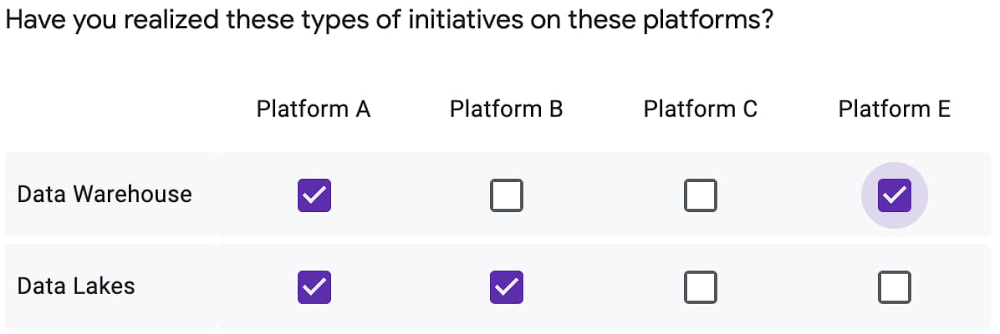
Cloud SQL for SQL Server—now with Active Directory authentication

Windows Authentication is now supported on Cloud SQL for SQL Server. We’ve launched seamless integration with Google Cloud’s Managed Service for Microsoft Active Directory (AD), now in public preview. This capability is a critical requirement to simplify identity management and streamline the migration of existing SQL Server workloads that rely on AD for access control. This release is the latest milestone in Google Cloud’s ongoing commitment to enterprise customers to meet you where you are. We are focused on offering low-effort, highly compatible, lift-and-shift destinations in the cloud. Google Cloud provides a complete portfolio of services to support your organization’s Microsoft and .NET workloads, and the integration between these two services makes it simpler than ever to set up a compatible environment for your business-critical databases.  Since its initial release just last year, Cloud SQL for SQL Server has provided a managed database solution that reduces customers’ operational toil and risk while maintaining compatibility and providing a flexible and high-performing platform. AD integration complements these benefits by ensuring continued security and compliance for your organization’s workloads. For customers utilizing AD on-premises, you can easily set up Google Cloud’s Managed Service for Microsoft Active Directory in a trust relationship with your existing AD deployment. This will allow you to continue using your existing identities for Cloud SQL for SQL Server as well as any workloads that may not yet be migrated to the cloud.Setting up Windows AuthenticationGetting started with a new Cloud SQL for SQL Server instance just takes a few quick steps, or you can enable Windows Authentication on any existing instances as well. Just make sure you meet the prerequisites outlined here, then proceed with the following steps.1. Go to the Cloud SQL Instances page in the Google Cloud Console.2. Click Create instance.3. Click Choose SQL Server.4. Enter a name for the instance. Do not include sensitive or personally identifiable information in your instance name; it is externally visible. You do not need to include the project ID in the instance name. This is created automatically where appropriate (for example, in the log files).5. Enter the password for the ‘sqlserver’ user.6. Set the region for your instance. See Best practices for integrating with Managed Microsoft AD.7. Under Configuration options, set your desired options (but wait until the next step for the authentication options).8. Click Authentication. The dropdown menu for joining a managed Active Directory domain lists any Managed Microsoft AD domains that previously were added in your project.9. From the dropdown menu for joining a managed Active Directory domain, select a domain.10. When you are finished selecting your configuration options, click Create. Cloud SQL automatically creates a Per-Product, Per-Project Service account for you. If the account doesn’t have the appropriate role, you are prompted to grant the managedidentities.sqlintegrator role.Getting startedWindows Authentication for Cloud SQL for SQL Server is available in preview for all customers today!  Learn more and get started.
Quelle: Google Cloud Platform

Auto Trader: Charting the road from Oracle to PostgreSQL

Editor’s note: We’re hearing today from Auto Trader, UK’s largest online automotive marketplace. Auto Trader aims to improve the process of buying and selling vehicles in the UK, providing a platform for consumers to connect with retailers and manufacturers. Here’s how Auto Trader used Google’s Cloud SQL on their database migration journey from on-premises into the cloud. You could say innovation is in our DNA at Auto Trader—we’ve spent nearly 40 years growing and evolving our business solutions alongside our customers. Established as a print magazine in 1977, Auto Trader went completely digital in 2013 and has since become one of the leading digital brands in the UK. Currently, Auto Trader brings in around 50 million cross-platform impressions a month and holds a 75% share of all minutes spent on automotive classified platforms. As we’ve grown, we found ourselves needing to move faster. Over the years we had invested a lot in our on-premises infrastructure and as we started shifting to the cloud we had made significant strides in ensuring our estate was cloud-native. Still, there were capabilities that were becoming increasingly difficult to realize without a significant overhaul. In 2018, we decided to move to Google Cloud, adopting Google Kubernetes Engine (GKE) as we felt we could unlock some of our development goals faster by leveraging these solutions. For our team, this meant focusing more on the services and databases rather than the day-to-day building and management of the infrastructure. From proprietary to open sourceHistorically, we had a massive on-premises Oracle database where we consolidated all of our services—around 200 in total. While this worked well for monolithic application development, it became clear we needed to break up these large databases into smaller chunks, more tightly integrated with their owning service. Our long-term vision has always been to be more database-agnostic to avoid getting locked into a single vendor. As a result, we already had a very low PL/SQL footprint. Google Cloud SQL was a natural fit for us and now sits at the heart of our data store strategy.Cloud SQL’s fully managed services took away the headache of database maintenance that would typically take up a lot of our energy. We could rely on Google to deal with the behind-the-scenes management of upgrades, backups, patches, or failures, enabling our data engineers to invest more time in learning and performance tuning.To date, we have migrated around 65% of our Oracle footprint to Cloud SQL, with approximately 2TB (13% of pre-migration size) of data still left to shift across several services. Migrating and moving off of our Oracle footprint remains a strategic priority for us in 2021.Cloud SQL’s fully managed services took away the headache of database maintenance that would typically take up a lot of our energy.Transforming mindset with migrationOur long-term goal is to move away from consolidated database architecture where services have to share a database engine. A service should only be able to access its own data stores, and not the databases of other services. All other access should be through a service layer.Auto Trader was well-positioned for migration, with over 60% of our services already “cloud native,” running on our private cloud prior to moving to GKE clusters. The remaining services were re-engineered for the cloud, removing dependencies on local stateful storage and ensuring horizontal scalability. We have a clear set of rules around how services of any tier or criticality need to run in our cloud environment. Thus far, we have 14 MySQL-backed instances supporting 63 services and 11 PostgreSQL instances running 17 services. These instances support our critical Vehicle Data Service, which contains details on every vehicle and power our inventory service. What’s impressive is that we’ve seen strong performance improvements since we migrated. We also recently migrated our registration and single sign-on service to Postgres with very little fuss or drama, and have since scaled resources on the Cloud SQL instance for this service with ease within a five-minute window.As part of this migration, we’re also trying to change behavior for our users. We restrict direct programmatic access for anything other than the owning service to the Cloud SQL databases to help avoid unknown external dependencies, something which has caused us pain historically while on Oracle.Instead, we now facilitate access to data through Google’s data cloud, which is centered around moving data from operational data stores, usually in Cloud SQL databases, using Kafka as the stream processing framework to land data in BigQuery, Google Cloud’s enterprise data warehouse. The source data stored in BigQuery is then processed using a tool called dbt (data build tool) to clean and join to other useful datasets and stored back into BigQuery. Looker, which is our business intelligence (BI) tool, is then connected to BigQuery to allow colleagues to explore, analyse and share business insights.Cloud SQL delivers speed, freedom, and innovationMoving to Cloud SQL has significantly impacted the way our teams work and has helped us create a seamless development experience.For instance, it has removed the burden of maintenance from our team. We used to schedule maintenance outside of business hours, which would take away the database engineer for days at a time. Adding memory and CPU and generally scaling up instances has become a non-event and allows us to move at a much faster pace from the point of decision making to actioning. Cloud SQL is much easier to manage and the team no longer needs to worry about spending hours on maintenance patches, which has improved overall team productivity.Moving to Cloud SQL has significantly impacted the way our teams work and has helped us create a seamless development experience.Cloud SQL has also changed how we provision new instances for developers. Before we migrated, we couldn’t even offer developers the option of having their own instance. They had to use a consolidated instance, regardless of what else was running on it. Now, we can provision a new dedicated instance in under an hour with a couple of lines of Terraform code. Developers have their own space and freedom to work without the risk of impacting other services. We are also able to troubleshoot issues more quickly and can even link developers directly to our Grafana dashboard to give them better visibility.Since modernizing to GKE, Istio and Cloud SQL, Auto Trader’s release cadence has improved by over 140% (year over year), enabling an impressive peak of 458 releases to production in a single day. Auto Trader’s fast-paced delivery platform managed over 36,000 releases in a year with an improved success rate of 99.87%, and it continues to grow.To find out more about how Auto Trader improved visibility, agility, and security by migrating to Google Cloud, make sure to read the Auto Trader UK case study.
Quelle: Google Cloud Platform

How sweet it is: Using Cloud AI to whip up new treats with Mars Maltesers

Google Cloud AI is baked into our work with customers all over the world. We’ve partnered with organizations to use AI to make new predictions, automate business processes, forecast flooding and even combat climate change and chronic diseases. And sometimes, we even get to help our customers use AI to invent new things—tasty new things. When legendary confectionery manufacturer Mars, Inc. approached us for a Maltesers + AI kitchen collaboration, we couldn’t resist. Maltesers are a popular British candy made by Mars. They have an airy malted milk center with a delicious chocolate coating. We saw this opportunity as a way to partner with a storied and innovative company like Mars and also a chance to showcase the magic that can happen when AI and humans work together. Good AI, or good design for that matter, happens when human designers consider the capabilities of humans and technology, and strike the delicate balance between the two. In our case, our AI pastry chef offered a helpful assist to its creator—our very own amateur baker and ML engineer extraordinaire, Sara Robinson!Hunkered down in 2020, Sara and millions of others started baking. And, like a good dough, that trend continues to rise. According to Google Search Trends, in 2021 baking was searched 44% more compared to the same time last year. Sara hopped on the home baking trend to investigate the relationship between AI and baking.AI + Google Search trends create a quirky dessertThis time around, Sara trained a new ML model to generate recipes for cookies, cakes, scones, traybakes, and any hy-bread of these. Armed with a dataset of tried-and-true recipes, Sara set out to the kitchen to find ways to infuse her own creativity and Mars’ Maltesers into the model’s creation. After hours of model training and baking experiments, Sara cleverly combined chopped and whole Maltesers with her model’s AI-optimized cake and cookie recipes to create a brand new dessert. But the team didn’t want to stop there. Our recipe needed a creative twist to top it off. We searched for something savory, creamy, and UK-inspired that we could use to balance the sweet, crunchy Maltesers. Enter, Marmite-infused buttercream! With some help from Google Search Trends, we discovered that one of the top searched questions recently regarding “sweet and salty” was “Is Marmite sweet or savory?” A popular savory spread in the UK, we decided to incorporate Marmite into our recipe. Sara headed back into the kitchen and whipped up a Marmite-infused buttercream topping. Yum! So, how exactly did Sara build the model? She started by thinking more deeply about baking as an exact science. Building a sweet model with TensorFlow and Cloud AIOur goal for the project was to build a model that could provide the foundation for us to create a new recipe featuring Maltesers and Marmite. To develop a model that could produce a recipe, Sara wondered: what if the model took a type of baked good as input, and produced the amounts of the different ingredients needed to bake it? Since Maltesers are primarily sold in the UK, we wanted the recipe to use ingredients common to British baking, like self-raising flour, caster sugar, and golden syrup. To account for this, Sara used a dataset of British recipes to create the model. The dataset consisted of four categories of popular British baked goods: biscuits (that’s cookies if you’re reading this in the US), cakes, scones, and traybakes. To create a cake recipe, for example, the model inputs and outputs would look like the following:Sara looked to Google Cloud for the tooling to build this model, starting with Cloud AI Platform Notebooks for feature engineering and model development. Working in AI Platform Notebooks helped her identify areas where data preprocessing was needed. After visualizing the data and generating statistics on it, she realized she’d need to scale the model inputs so that all ingredient amounts fell within a standard range. With data preprocessing complete, it was time to feed the data to a model. To build the model, Sara used TensorFlow’s Keras API. Rather than using trial and error to determine the optimal model architecture, she made use of AI Platform Hyperparameter Tuning, a service for running multiple training job trials to optimize a model’s hyperparameters. Once she found the ideal combination of hyperparameters, she deployed the model using AI Platform Prediction.AI and human creativity: better together The deployed model returns a list of ingredient amounts. If you’ve ever baked something, you know that this is far from a finished recipe. To complete the recipe, we needed to turn ingredient amounts into recipe steps, and find a creative way to incorporate both Maltesers and Marmite.Our model was pretty good at predicting recipes for each of the distinct baked goods, but, thanks to the magic of its architecture, could also generate hybrids! The model’s best recipes were for biscuits and cake, which sparked the idea: what would happen if you combine two ML-generated recipes into a single dessert? The end result was a ML-generated cake batter sitting atop an ML-generated cookie.We wanted the recipe to feature Mars’ Maltesers, and since the model outputs only included basic baking ingredients, deciding how to add Maltesers to the cake and biscuit recipes was up to us. Maltesers are delicious and versatile, so we decided to incorporate them in a few different ways. We chopped and incorporated them into the batter, and three whole Maltesers are hidden between the cake and biscuit:Finally, to top off the dessert, Sara wanted to find a tasty way to include the salty addition of Marmite. After a few trials, she landed on a frosting combination that paired Marmite with a buttercream base and golden syrup (a popular ingredient in the UK). The final product features this sweet and salty frosting, made even better with extra Maltesers for garnish:Digital experimentation is encouraged and embraced at Mars. “The ease and speed of bringing this idea to life has already sparked multiple ideas around the endless possibilities of how AI can bring innovation to the kitchen by creating a foundation for recipe development,” said Sam Chang, Global Head of Data Science & Advanced Analytics at Mars Wrigley. “We have long looked for ways to connect consumers with their favourite brands. By collaborating with the Cloud AI team, we discovered new avenues to inspire more creative cooking moments at home,” said Christine Cruz-Clarke, Marketing Director at Mars Wrigley UK.Want to start baking? The only thing left to do is bake! If you want to make Maltesers® AI Cakes (4d6172730a) at home, the recipe is below. And if making cake dough, cookie dough, and frosting sounds like a daunting task, you can make and enjoy any of these three components on their own (even the frosting, we won’t judge). When you make this, we’d love to see your creations. Share photos on Twitter or Instagram using the hashtag #BakeAgainstTheMachine.Click to downloadRelated ArticleBaking recipes made by AIIn this post, we’ll show you how to build an explainable machine learning model that analyzes baking recipes, and we’ll even use it to co…Read Article
Quelle: Google Cloud Platform