Have budget notifications come to your favorite comms channels

TL;DR – Rather than wait for budget alert emails, you can use programmatic budget notifications to send budget updates to your favorite comms channels, like Slack (as well as anything else you can code).Even more options for visibility with Budgets fits well into the inform phase of the FinOps lifecycleThe last post introduced programmatic budget notifications and we saw a simple example of printing out some information. Since we can respond to the budget notification with code, a whole world of possibilities is available including third party integrations.Slack is a popular communication platform for teams, so it’s an ideal candidate for sending budget information and keeping your team informed of the status of your budgets. In this post, we’ll go over the steps to send your budget notifications to Slack.Disclaimer: These instructions work at the time of writing, but Slack may change things.Configuring SlackHere’s what we’re working towards:Cost and Forecast threshold are undefined because a threshold hasn’t been hit yet on this budget, so those parameters won’t come over in the messageThis is a message posted by a bot (gcp_cost_management_bot) that prints out a bunch of the different budget notification details. There’s not too much more to do here than the last post, but first we need to set up a Slack bot.You’ll need to create a Slack account and workspace (but not a Cloud Monitoring one) if you don’t already have one. I’ll leave that part of the explanation up to them but once you’re done, head over to https://api.slack.com/apps. The first thing you’ll want to do is make a new app.Consider a name like “Budget Alert Bot”, or maybe even “Budget Defender Superhero”. You can name it whatever you want, I’m not your bossThere are a lot of other things you can configure about your bot once you’ve created your app, but there’s two key pieces of information we need to get this working, an OAuth Token and a channel.To get the OAuth Token, look for the menu option labelled “OAuth & Permissions”. Once you’re there, find the section for Bot Token Scopes and click “Add an OAuth Scope”. The scope needed to send messages is called “chat:write” so type that in and add it.You can do all kinds of fancy things with bots, but I’m a fan of keeping it simpleThen, scroll back up and look for “Install App to Workspace”, which will direct you to a permission screen where you authorize the bot to post messages. After you do that, you’ll see an OAuth Access Token that you should copy and write down, since we’ll need it later.You didn’t think I was gonna just give you my OAuth Token, did you?With that safely stored away, the only thing you need is a channel that you want to send messages to. I’ve used a channel called “budget-alerts” (don’t include the #) but I’d suggest using a new channel rather than an existing one at least to start!Note: You’ll also need to go to your channel and run a command to invite the bot into the channel where you want it to post. You’ll want to update the bot name based on the name you provided./invite @budget_alert_botBack to the cloud!Now that we have the token and channel, head back to the Google Cloud Console and create a new Google Cloud Function. If you followed the steps from the last post, you can leave your logger bot or shut it down, since Pub/Sub allows multiple subscribers to a topic. Choose a name like “budget-notification-slack” and make sure to choose the same Pub/Sub topic. If you want a refresher on creating a function, the last post has a bit more information.Once again, we’ll use Python 3.7, but this time we’ll change the code. By default, you’ll have two files on the left, main.py and requirements.txt. I won’t go into any Python specifics here but click on requirements.txt and add this line of code:slackclient==2.7.2Here’s a picture to make sure everything is good:Google Cloud Functions takes care of a lot of dependencies automatically, but we need to manually add SlackAfter that, click on main.py and use this code (or grab it from here):That’s not too much code, but let’s break down a few important bits:Note: If you don’t update this part of the code yourself, it won’t work.Right after the imports, these two lines are the ones you’ll need to update with those values you securely saved before. Both are strings that you need to replace, and it should be pretty clear which value goes where. Note that the CHANNEL variable can be the name of your channel (like “budget-alerts”) or the channel ID (like C0123456789). We also set up the Slack client with the bot access token.This is the start of the function called “notify_slack”, and then we grab the data that was passed in as the message Pub/Sub gets from the budget.Note: You’ll also need to change the entry point of the function from “hello_pubsub” to “notify_slack” since that’s the actual function we want to be called. If you don’t change the entry point, it won’t work.In that previous post, we went over the message Pub/Sub gets from the budget, and what it sends over to the subscribers. Well, it’s a bit more complicated than I explained before (sorry). The full message is actually made up of two parts, attributes and data. You can read the full spec here, but we’re basically just grabbing the attributes (JSON) and data (Base64-encoded) so we can use them for their valuable data.budget_notification_text = f'{notification_attr}, {notification_data}’This line simply grabs the values from both the attributes and the data and puts them into a string. Yes, it’ll be messy but it’s just our starting point for now.And finally, here’s where we try to post the message to Slack, specifying the channel and the actual message. Pretty straightforward.So, that’s all the code we need! Make sure to replace the bot token, channel name, and function entry point as described above and deploy that function!Functions can take a bit to deploy, so feel free to make yourself another cup of tea while you waitOnce the function is up and running, we can move on to testing it!The proof is in the notificationSimilar to when we tested our logger function, we can send a test message using Pub/Sub or just wait for a budget notification. I’m terribly impatient, so let’s send a test message. Head to the Pub/Sub page, click on your topic, and then click publish message. We can use the same test body:But we can also add some attributes to reflect what a real notification might look like. Two important attributes are the billing account’s ID and the budget’s ID, both of which are unique.As you can guess, those aren’t my actual unique IDsOnce you send the message, check your Slack channel and you should see something like this:Hurrah, it’s the test data we sent!Wrapping things upAs you should see, the test message came through and the data was sent into a message from the bot! Of course, if you wait for a while, you’ll also see an actual budget notification message with real data come through and posted to Slack.You may notice that the bot message doesn’t match the first image way back up at the top (these blog posts sure are long). That’s because you can update the code to do more than just dump out the entire object, you can format a message specific to the data and formatting that makes the most sense for you. This post is long enough so I’ll leave it as an exercise to you! If you want to see more examples, check out the documentation.Related ArticleCosts meet code with programmatic budget notificationsTL;DR – More than just alerts, budgets can also send notifications to Pub/Sub. Once they’re in Pub/Sub, you can hook up all kinds of serv…Read Article
Quelle: Google Cloud Platform

New whitepaper: Scaling certificate management with Certificate Authority Service

As Google Cloud’s Certificate Authority Service (CAS) approaches general availability, we want to help customers understand the service better. Customers have asked us how CAS fits into our larger security story and how CAS works for various use cases; today we are releasing a white paper about CAS to answer those questions and more.“Scaling certificate management with Google Certificate Authority Service”, written by Andrew Lance of Sidechain and Anton Chuvakin and Anoosh Saboori of Google Cloud, focuses on CAS as a modern certificate authority service and showcases key use cases for CAS.The digital world has experienced unprecedented growth and interconnectivity over the past few years. A perfect storm of new conditions has achieved almost a flywheel effect, with the advent of many technological innovations. The concurrent rise of cloud computing, emergence of 5G, and proliferation of Internet-of-things (IoT) smart devices has created immense market opportunities for digital products that interconnect our lives and workplaces. Critical to this explosion of connected devices and software-defined-everything is the ability for these interconnected devices to verify their identity with each other.Google has introduced Certificate Authority Service (CAS) to address these and many other challenges that organizations face as they use digital certificates in this new age. CAS is not only a cloud-ready platform for hyperscaling certificate management; it is also aligned with the development methodologies of cloud-native applications, as well as fully API-enabled.Here are our favorite quotes from the paper:“The hyperscale growth of digital infrastructures have expanded not only from the data center to the cloud, but have embraced sophisticated multi-cloud strategies, and hybrid strategies that seamlessly integrate clouds and on-premise workloads. Digital certificates underlie the system integrity of all of it, the scale of which has become frighteningly massive.” This reminds us that digital certificates are not about “IT plumbing”; they underpin the entire digital economy.“Traditional certificate management systems – often referred to as Certificate Authorities (CA’s) –  are not equipped to handle these new demands. […] It is very typical that certificate requests are manual, often requiring days if not weeks turnaround time. […] New demands being placed on digital certificates and PKI systems are often at-odds with these traditional deployments.” This means that both legacy tools and traditional processes around certificates do not fit today’s demands.“As more organizations are developing applications and technology infrastructure cloud-first, it simply doesn’t make sense to keep tying back to on-premise infrastructure like certificate authorities.”  “Containers make deploying application components easy and fast. […] Things get complicated when adding certificates. Certificate renewal usually happens at a different cadence than application updates, and traditional CA systems are managed by completely different teams requiring lengthy manual requests to fulfill certificate issuance. [Google] CAS, on the other hand, can enable developers to securely manage certificates within their containerized applications through automation and standardized API’s.” Containers are one of the best example environments where Google CAS shines.“Many smaller vendors in the IoT space are now seeing the need for PKI and certificate management as standards body’s such as the Wireless Power Consortium now require authentication frameworks that involve certificate-based identities and other security requirements. Many smaller companies do not have the skillsets or other resources to manage their own traditional PKI infrastructure. CAS is a service that enables smaller engineering-centric organizations to manage certificates much easier than traditional CA’s would be.” As we said in our blogs, IoT is another area where Google CAS works well.“Many IT organizations are also establishing a “zero trust” model for network-based security, all of which relies on the concept of trusted identity rooted in digital certificates. IT teams are now establishing trusted identities for applications, operating systems, smartphones and other BYOD devices, and workstations. […] CAS offers an intuitive service for IT teams to scale their efforts with zero trust models.” Read “Scaling certificate management with Google Certificate Authority Service”, and sign up for CAS here.Related ArticleStrengthen zero trust access with the Google Cloud CA serviceCertificate Authority Service, a highly scalable and available service that simplifies and automates the management and deployment of pri…Read Article
Quelle: Google Cloud Platform

Troubleshoot BigQuery performance with these dashboards

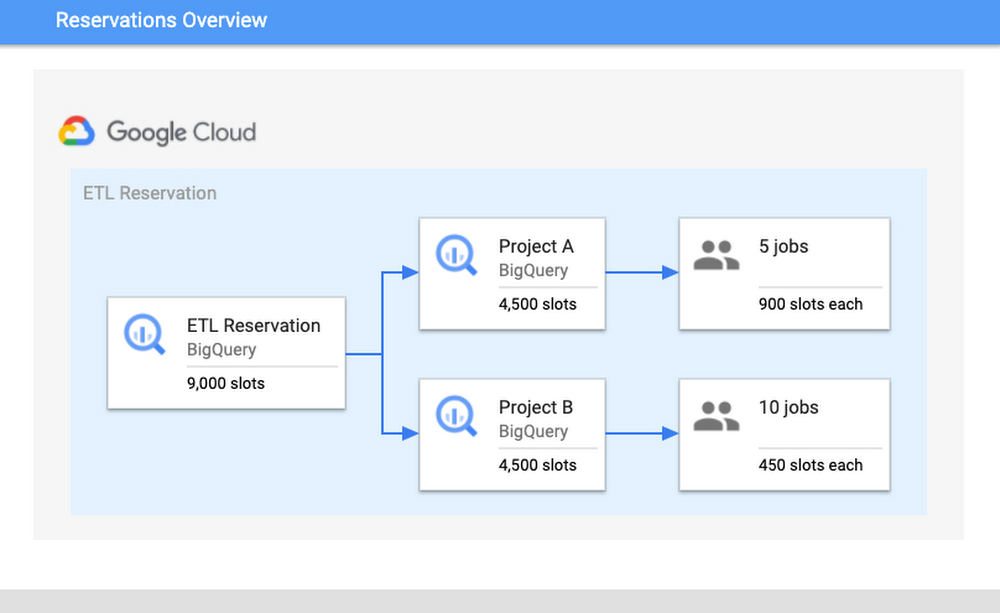
BigQuery is Google’s flagship data analytics offering, enabling companies of all sizes to execute analytical workloads. To get the most out of BigQuery, it’s important to understand and monitor your workloads to keep your applications running reliably. Luckily, with Google’s INFORMATION_SCHEMA views, monitoring your organization’s use at scale has never been easier. Today, we’ll walk through how to monitor your BigQuery reservation and optimize performance. Understanding Workloads and ReservationsOur first step is to analyze your organization-wide historical slot utilization. With reservations, you can allocate capacity, or slots, to designated groups of GCP projects in your organization. When organizing projects, consider grouping them according to workloads, teams, or departments. We encourage you to isolate these groups of projects, or specific workloads, in separate reservations. This will help with monitoring and overall resource planning to track trends in growth. In practice, this might look like the following: break out business units, like marketing or finance, and separate known, persistent workloads like ETL pipelines from more ad-hoc workloads like dashboarding. Isolating workloads like this means that any burst in resource usage from one reservation will be unable to adversely impact another reservation; a sudden surge from a dashboarding task won’t interfere with ETL schedules. This will minimize any disruptions caused by unanticipated spikes, as well as allow reservations to meet their SLOs so that jobs can complete on time.How Scheduling WorksTo better understand why isolation matters, it’s important to understand BigQuery’s Scheduler. BigQuery uses a notion of fairness for allocating slots. First, BigQuery assigns slots at the reservation level. From within a reservation, slots are then assigned equally amongst all active projects, where active signifies a project that is currently executing a query. From within each active project, slots are then allocated to all running jobs to ensure that each job is able to make forward progress.Consider the following scenario: there is a reservation “ETL” that has 9,000 slots, which contains Project A and Project B. Project A is currently running five jobs and Project B is running ten jobs. Assuming that all jobs require maximum slots to complete their jobs, then each project would get 4,500 slots each. The five jobs in Project A would receive 900 slots each and the ten jobs in Project B would receive 450 slots. These per-job slot allocations are recomputed constantly, depending on each job’s need and current state in order to make progress.Once you have optimized your isolation configuration, the next step is to examine your usage and configure your slot allocation. A high slot utilization implies good cost-efficiency; this means that the resources that you’re paying for are not sitting idle. However, you don’t want to get too close to 100% utilization. Operating too close to 100% leaves you without a buffer for potential spikes in usage. If a spike does occur and drive you over 100%, it can cause resource competition and general slowness for your users. Improving and monitoring query performanceTo monitor performance, we’ll walk through common root causes, signals to look for, as well potential steps for mitigation. Our goal for the sake of this example will be increased performance for your queries.We’ll start by comparing the data from the INFORMATION_SCHEMA views. Specifically, to understand differences in query performance, we will take two similar queries and compare their INFORMATION_SCHEMA job data. Note: it’s important that these jobs are similar and are expected to generate comparable output. This might mean comparing the same job executed at hour A vs. hour B or the same job that read in partitions from date A vs. date B. The data from these views displays various job statistics that affect query performance. By understanding how the statistics from these fields varied between different runs, we can identify the potential root causes for slowness, and steps for mitigation. The table below summarizes the top key indicators and the corresponding root cause.Job Comparison DashboardWe’ll begin by navigating to our public dashboard, which shows Google’s test INFORMATION_SCHEMA data to compare the performance of jobs. Let’s walk through each of these root causes and learn how to diagnose them by using the Systems Tables dashboard. To begin, we’ll enter both a slow and fast job ID to compare job statistics.1. Slot ContentionBackgroundSlot contention can occur when the demand for slots is higher than the allocated amount for the reservation. Since projects/jobs share slots equally inside of a reservation, this means that if more projects/jobs are active, then each project/job will receive less slots. To diagnose slot contention, you can use the INFORMATION_SCHEMA timeline views to analyze concurrency at both the project-level and the job-level.MonitoringWe’ll look at a few different scenarios for this use case: first, we’ll verify that the “total_slot_ms” varied between the queries. If one job ran slower and used significantly less slots than the other, then this usually means it had access to less resources because it was competing against other active jobs. To verify this assumption, we’ll need to dive into concurrency:1. Concurrent Projects: If the job is inside of a reservation, we’ll use the JOBS_BY_ORGANIZATION timeline view to compute the active number of projects during both the slow and fast queries. Query jobs will slow down as the number of active projects across the reservation increases. Represented as an equation, if there are Y projects in a reservation, each project receives 1/Y of the reservation’s total slots. This is due to the BigQuery fair scheduling algorithm described above.In the graph above, we can see that when the job on the left began, there were three total active projects at the same time, competing for the reservation’s 35 slots. In this scenario, each project received 1/3 of the reservation’s 35 slots, or about 12 slots.  However, in the graph on the right, we can see that there was only one active project, meaning that specific job received all 35 slots.2. Concurrent Jobs: Similarly, we can also use the JOBS_BY_PROJECT timeline view to understand the behavior inside of the project itself. If the number of concurrent jobs is high, this means all of the jobs are competing for resources at the same time. Since the demand is high, there are less available slot resources for each job, meaning that the query may take slower than usual to complete.In the graph above, you can see that the slow query, on the left, was competing with between 20 and 100 other jobs over the course execution. However, the fast job, on the right, was only competing with between four and 26 other jobs over its execution. This shows that the volume of active jobs at the same time as the job on the left was likely the reason for the slow speed and long duration.3. Lastly, we can also try to understand if idle slots were used. Idle slots are an optional configuration for reservations. If you enable them, you allow any available slots to be shared between reservations, so that unused slots are not wasted by non-active reservations. If a job had access to idle slots when it first ran, it likely would have executed faster than without them, as the extra idle slots, coupled with the reservation’s normal allocation, gave it more resources to execute. Unfortunately, we can’t view this today in INFORMATION_SCHEMA. However, we can make a best guess about if idle slots were available by look at the reservation’s utilization percentage during execution; if utilization for the reservation was greater than 100%, this means that it must have borrowed slots from another reservation.In the graph above, you can see both the organization and reservation’s capacity, as well as the amount of slots used by the reservation. In this case, the jobs in the same reservation on the left used 1,055 slots, which is more than its capacity of 100.Because the organization has a capacity of 1,000, and the reservation only has 100, it must have used 900 remaining idle slots from another reservation in the organization. Note: in rare cases, an organization may use more than its purchased capacity in the event of migrations within the data center or extra on-demand slots being used by projects within the organization.Mitigation OptionsIf the root cause is slot contention, then this means you need a way to give your job access to more slots. You have a few options to do so:1. Purchase more slots: This is the simplest option. You can purchase a new commitment for slots in the reservation, which will guarantee that there are more resources. You can purchase this in annual, monthly, or flex increments depending on your forecasting needs.2. Reallocate slot proportions per reservation: If buying more total slots is not an option for your organization, you can reallocate your current slots between reservations based on priority. This might mean reassigning a certain amount of slots from reservation A to reservation B. Allocating these slots to reservation B’s assignment will help jobs in reservation B complete faster than before as it now has increased capacity, and reservation A’s will likely complete slower.3. Reschedule jobs to minimize concurrent jobs: If you cannot move the resources between reservations, then you may be able to adjust the timing of jobs to maximize the utilization of your reservation over time. Move non-urgent jobs to off-peak hours, such as weekends or overnight. If you can spread the load over different times of day, this will reduce the competition for slots at peak hours. You can examine the Hourly Utilization report to better understand trends.In this view, you can see that the reservation is active between 4PM-8AM UTC on both January 27 and January 30. However, the hours between 8AM-4PM UTC are less utilized and therefore can be considered “off peak”. It would be beneficial to try to reschedule the jobs to be between 8AM-4PM to allow for more distributed resource usage.2. Changes in Data ShapeBackgroundAnother potential reason for unexpected changes in duration could be the underlying data itself. This can happen in two ways: either the underlying source tables contain more data than prior runs, or intermediate subqueries may result in more data being processed as the query executes.MonitoringFirst, you can check if the “total bytes processed” field increased from changes in the query. If this increased from the fast job to the slow job, then this means the job had to process more than usual. We can confirm the root cause in two ways:1. If it increased, then this means overall the query had more data to analyze. Verify that the query text itself did not change; if a JOIN moved, or if a WHERE clause updated its filtering, this can mean more data to read.In the job stages as a percentage of job time view, we can analyze the shape of the input data and compare it between queries. For example, we can compare the “input” percentage between the slow and fast job, which indicates how much data was ingested. If we examine stage 2 input, we see it took about 25% of processing time in the job on top. However, in the job on the bottom, it took about 1-2% of processing  time. This indicates that the source table ingested at stage 2 likely grew, and could explain why the job was slower.2. We should also analyze the size of the source tables for the query. We’ll view the referenced_tables field as this will show all source tables used by the query. We will compare the size of each source data at the time of the query. If the size increased significantly, then this is likely a reason for slowness.In this example, we can see that the amount of bytes processed increased significantly between jobs. This is likely the reason for slowness. We can additionally verify this with the fact that total_slot_ms increased, meaning that it had more slots available and still took longer.Mitigation Options1. Clustering: Depending on your query, you may be able to use clustering to help improve the performance. Clustering will help queries that use filtering and aggregation, as clustering sorts similar columns together. This will reduce the amount of data scanned, but will only show large performance improvements for tables greater than a gigabyte. 2. Minimize input data: In order to mitigate this, try to find out if there is any way to optimize the query text to read only the required data. Some options to do this include filtering early, such as adding WHERE statements in the beginning of the query to filter out unnecessary records or modify the SELECT statement to only include the needed columns, rather than a SELECT *.3. Denormalize your data: if your data involves parent-child or other hierarchical relationships, try to use nested and repeated fields in your schema. This allows BigQuery to parallelize execution and complete faster.3. Increased Shuffle MemoryBackgroundWhile jobs use slots for the compute resources, they also use shuffle memory to keep track of the job’s state to transition data between execution stages as the query progresses. This shared state ultimately allows for parallel processing and optimizations of your query. Your shuffle memory is correlated to the amount of slots available in a reservation.Because shuffle is an in-memory operation, there is only a finite amount of memory available for each stage of the query. If there is too much data being processed at any point in time, such as a large join, or if there is a high data skew between joins, it’s possible that a stage can become too intensive and exceed its shuffle memory quota. At this point, shuffle bytes will spill to disk, which causes queries to slow down.MonitoringTo diagnose this, you should look at two different metrics: both the shuffle memory consumed by the job as well as the slots used. Your shuffle memory quota is tied to your slot capacity, so a stable amount of slots alongside an increase in the amount of shuffle spilled to disk would indicate that this could be the root cause.Compare the aggregate shuffle_output_bytes_spilled_to_disk from the TIMELINE view. An increase in bytes spilled to disk suggests that the jobs are stuck, rather than running fast enough to complete on time.In this example, you can see that the amount of data spilled to disk is significantly higher for the slow query. Additionally, the total slots have increased as well, meaning that it had more resources available and still took longer to complete.Mitigation OptionsAn increase of bytes spilled to disk means that BigQuery is having trouble maintaining state between query execution stages. Because of this, you should try to optimize the query plan itself so that less bytes are passed between stages.1. Filter data early: Reduce the amount of data ingested by the query by filtering early with WHERE clauses and before joining tables. Additionally, ensure that you are not using SELECT *, and are only selecting the necessary columns.2. Use partitioned tables over sharded tables: If you’re using sharded tables, try to use partitioned tables instead. Sharded tables require BigQuery to maintain a copy of the schema and metadata, in addition to maintaining state, which can decrease performance.3. Increase slots: Because the amount of shuffle memory is correlated to the amount of slots, increasing the amount of slots can help alleviate the amount of memory spilled to disk. As mentioned in the Slot Contention mitigation steps, you can do so via purchasing a new commitment or reallocating more slots to this particular reservation.4. Rewrite the query: Because the job cannot maintain the state of data between stages, your other option is to rewrite the query to improve performance. This might mean trying to optimize against SQL anti-patterns by reducing the number of subqueries or eliminating CROSS JOINs. Additionally, you can consider breaking the query up into numerous chained queries and storing the output data between queries into temporary tables.4. Priority ModeBackgroundIn BigQuery, queries can execute in either one of two methods of priority: interactive or batch. By default, BigQuery executes jobs in interactive mode, meaning that it executes as soon as resources are available. Monitoring1. You can find your mode by inspecting the priority column of the job. A job may run slower as a batch job than as an interactive job.2. If both jobs were run in batch mode, compare the state over time. It’s possible that one job was queuing in the PENDING state for a long time, meaning that there weren’t resources available to run at creation time. You can verify this by looking at the Creation (s) time in the table, as this displays how long it was queued before starting.Mitigation1. Understand the relative priorities and SLOs for the jobs. If your organization has less critical jobs, try to run them in batch mode, so that you can let more critical jobs finish first. The batch jobs may queue up and wait to run until interactive jobs finish and/or idle slots are available.2. Identify the concurrency quota difference between batch and interactive jobs. Batch and interactive jobs have different concurrency quotas. By default, projects are limited to 100 concurrent interactive queries. You can contact your sales team or support to look into raising this limit, if necessary. Batch jobs will also be queued, as necessary, to ensure that interactive jobs finish before the 6-hour timeout window.3. Similar to the mitigations presented in slot contention, you can consider either purchasing more slots for the reservation or rescheduling your job at off-peak hours when there is less demand for resources.As you can see, there are many ways to troubleshoot your query jobs based on the data from INFORMATION_SCHEMA. Try it out yourself here with any two job IDs.
Quelle: Google Cloud Platform

New this month: Data champions, a key analyst report & features you’re going to want to check out!

Thank you, thank you, thank you! We want to start off this month’s post with an extreme sense of gratitude for the work our customers and partners are doing to innovate with Google Cloud’s Smart Analytics Platform. Your success and enthusiasm was felt in many ways this past month. BigQuery Omni was shortlisted by CRN asone of the10 hottest Google Cloud Tools to watch in 2021 and Google BigQuery was named aLeader in The Forrester Wave™: Cloud Data Warehouse, Q1 2021 report.We were also thrilled to see Forrester give BigQuery a score of 5 out of 5 across 19 different criteria, including Data Lake Integration, Data Ingestion, High Availability, Performance, and ML/Data Science features. We hope you’ll share this free report with your teams and colleagues!If you can’t wait for May, we suggest joining us this week to learn about Rackspace’s data modernization journey at the company’s Strategies Series event. Juan Riojas, the firm’s Chief Data Officer, will explain how Rackspace leveraged Google Cloud solutions to improve customer experience, reduce churn, and save $1.2 million by consolidating 74 operational data sources, four data warehouses, one data lake, and 12 years of on-premises history.Leaders come in all sizesIn last month’s data analytics post, you read about Verizon Media’s journey and how they picked BigQuery for scale, performance and cost. In March, we shared how companies like Veolia, Vodafone and PwC innovate with data using Google Cloud’s Smart Analytics Platform. We’re delighted to see companies of all sizes benefit from the value of our platform. Take a look at the story of leading decentralized video streaming platform Theta Labs, for instance, which required scalable, reliable, and secure infrastructure to reach more users and avoid hitting VM caps that previously caused issues. They turned to Google Cloud’s databases and analytics products, such as BigQuery, Dataflow, Pub/Sub and Firestore, saving hours or even days of engineering time. And they experienced a return on investment almost immediately—their migration took less than six months to complete. Another great example is Keap, a technology and services company that helps small businesses accelerate growth with an all-in-one customer relationship management (CRM), sales, and marketing automation solution. Rajesh Bhatia, the company’s Chief Technology Officer, wrote a great post about how moving to Google Cloud helped Keap overcome scalability issues and bring always-on, mission-critical services to its users while freeing up time and resources. The company assessed other public cloud providers but Google Cloud stood out for going above and beyond other providers in helping us identify our path to successful migration.In addition to providing great details behind Keap’s technological modernization, Rajesh also gives us a peek into the cultural benefits experienced as part of its transformation. For instance, you’ll learn how their data team transformed from a cost center into a team focused on revenue-generating opportunities by providing embedded analytics to customers.Keap helps small business customers think big and we are proud to be part of their journey!Leaders come in all industriesWe’re also proud to observe the rapid pace at which customers operate their digital transformation across many industries. For example, the telecommunication industry is experiencing ongoing, massive transformation. According to a new study by Analysys Mason, telecommunications information is growing at 20% CAGR, and network data traffic is expected to reach 13 zettabytes by 2025. During March, we learned how our partnership with Amdocs is helping telecommunications leaders use analytics and AI to make decisions in real time, whether to find anomalies, understand unseen correlations, or predict future trends.We see the same thing happening in financial services, online business, and retailers, where businesses are built on reliable and trusted relationships. Quantiphi, an award-winning Google Cloud Premier Partner, has recognized the importance of helping their clients build and maintain real-time prediction models at scale to address business challenges like credit card fraud. Global losses from payment fraud have tripled in the past 10 years, and according to Merchant Savvy, payment fraud is expected to continue increasing with a projected cost of $40.62 billion in 2027—25% higher than in 2020.That’s why we developed a smart analytics design pattern, together with Quantiphi, enabling companies to build a scalable real-time fraud detection solution in just one hour using serverless, no-ops products from Google Cloud. The solution leverages Dataflow’s real-time data processing capabilities to store transactions in Firestore, our flexible, scalable and serverless NoSQL cloud database. It also combines with BigQuery, our extensible and adaptable data warehouse, allowing you to leverage BigQuery ML’s built-in machine learning capabilities and the AI Platform’s real-time inference.These resources are available to you and your team at no cost to set up fraud notifications. You can watch the tutorial below to learn how to build the solution as well as dashboards to monitor the performance of the entire fraud detection pipeline. How to build a serverless real-time credit card fraud detection solutionThis is a step-by-step video that explores the credit card fraud detection pattern in this and helps walk you through the entire process of building such a system in your organization.You can also play with this interactive Data Studio dashboard to see the result of our analysis using the sample data used as part of this solution.Finally, if you are currently a BigQuery reservation customer and looking to run real-time monitoring and troubleshooting of your BigQuery environments, you’ll be pleased to hear that our team just released Resource Charts for BigQuery Administrator. Resources Charts provide a native, out-of-the-box experience, making it easy to understand historical patterns across slot consumption, job concurrency, and job performance and take action to ensure your BigQuery environment continues running smoothly. And guess what? We also have public Data Studio dashboard templates available so you can see how this functionality might look at your company. Whether you’re in financial services, telecommunications, retail, manufacturing, or any other industry, we offer a plethora of free and self-serve solutions to help you tackle various other business issues beyond real-time credit card fraud detection. The most popular include predicting customer lifetime value, determining propensity to purchase, building product recommendation systems, solving anomaly detection, and demand forecasting.Data Champions: Speed is the name of the game!And if all of this is not cool enough, allow us to share our favorite story from this month! The Golden State Warriors (GSW) share how they used BigQuery to reduce their data integration times from multiple days to less than an hour, enabling analysts to explore more data, build accessible knowledge, and promote a more effective environment to support analytical ideation and hypothesis testing. Starting with data ingestion from an alternative cloud into BigQuery, the Golden State Warriors’ strategy team achieved phenomenal results with a combination of open source technology and Google Cloud’s fully-managed services:The team parallelized data ingestion at breakneck speed with Apache Beam, a parallel processing tool, and Cloud Dataflow, Google Cloud’s fully-managed service for stream and batch data processing.Using Cloud Composer, Google Cloud’s fully managed workflow orchestration tool built on Apache Airflow, the team built out fully integrated, continuously updating data pipelines. This allowed them to bring more than a dozen different data sources into their BigQuery data warehouse, while also building out long-term storage within Cloud Storage and logging exports with Cloud Pub/Sub.Watch the video below to see key “Data Champions” in GSW, including Head Coach Steve Kerr, chime in on the importance of data and how their team uses intelligent technologies to better serve the needs of coaches, front office, staff, players and fans. Golden State Warriors | The Draft and the Data, presented by Google CloudWe smiled when Mike Brown, assistant coach, looked at the camera and asked: “BigQuery, what is it?” and further answers his question by saying “it’s faster than a falcon”. The Golden State Warriors (GSW) is a great example of an organization that moves fast in an industry where speed is the name of the game!It’s delightful to see the Golden State Warriors and many others validate our approach and our commitment to an open ecosystem. Other notable March features and announcementsWe’re also excited to announce the release of an open source connector to read streams of messages from Pub/Sub Lite into Apache Spark. For those of you who aren’t familiar, Pub/Sub Lite is a scalable, managed messaging service for Spark users on Google Cloud Platform looking for an exceptionally low-cost ingestion solution. This connector allows you to use Pub/Sub Lite as a replayable source for Apache Spark’s Structured Streaming processing engine with exactly-once guarantees and ~100ms processing latencies. You can read more about it in our announcement blog here.We also announced the general availability of Dataproc Metastore. A fully managed, serverless technical metadata repository based on the Apache Hive metastore. Enterprises building and migrating open source data lakes to Google Cloud now have a central and persistent metastore for their open source data analytics frameworks. This no hassle setup solution allows enterprises to migrate their open source metadata without having to worry about the overhead of setting up highly available architectures, backups, and performing maintenance tasks. Finally, if you’re wondering what Cloud Composer does and haven’t had time to research it, we recommend you watch the “Cloud Composer in a minute” video we just produced to guide you and your team. Cloud Composer in a minute
Quelle: Google Cloud Platform

Unlock geospatial insights with Data Studio and BigQuery GIS

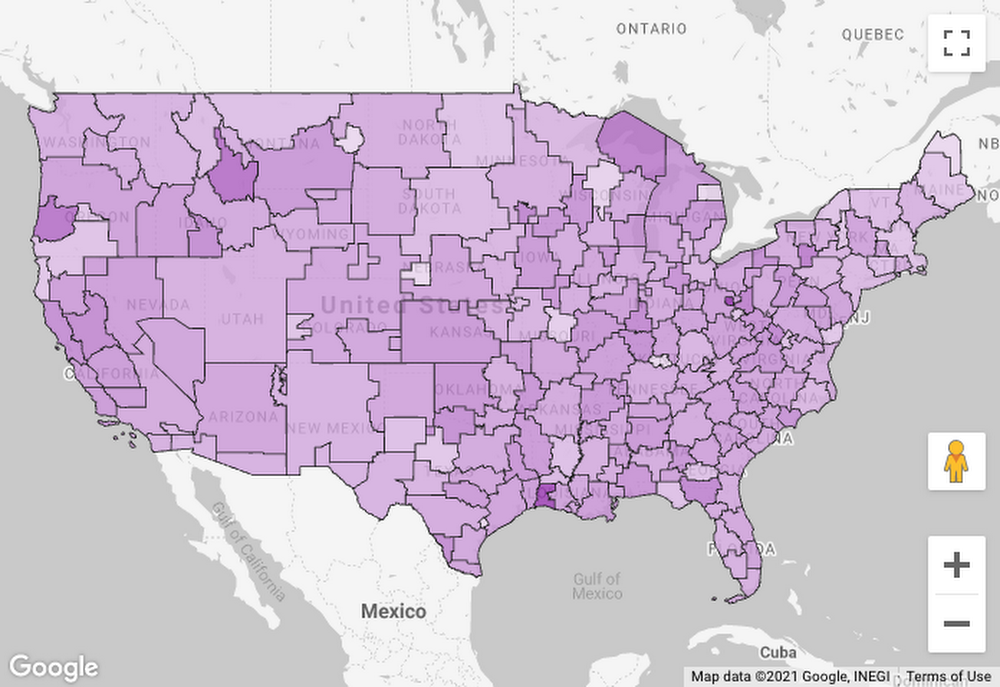
Chances are, your data contains information about geographic locations in some form, whether it’s addresses, postal codes, GPS coordinates, or regions that are meaningful to your business. Are you putting this data to work to understand your key metrics from every angle? In the past, you might’ve needed specialized Geographic Information System (GIS) software, but today, these capabilities are built into Google BigQuery. You can store locations, routes, and boundaries with geospatial data types and manipulate them with geospatial functions. Ultimately, helping people explore this data and spot geospatial patterns requires visualizing it on a map. To that end, we’re excited to announce new enhancements to Data Studio, including support for choropleth maps of BigQuery GEOGRAPHY polygons, so you can easily visualize BigQuery GIS data in a Google Maps-based interface.Google Maps in Data StudioData Studio is a no-cost, self-serve reporting and data visualization service from Google Marketing Platform that connects to BigQuery and hundreds of other data sources. With it, you can visually explore your data and design and share beautiful, interactive reports. With the addition in the past year of a Google Maps-based visualization, you can visualize and interact with your geographic data just as you do with Google Maps: pan around, zoom in, even pop into Street View.Don’t have geographic coordinates in your data? No problem: Data Studio recognizes countries, states/provinces, Designated Market Areas (DMAs), cities, postal codes, addresses, and other supported geographic field types. For example, even if all you have are DMA codes and metrics from Google Ads, you can visualize click-through rate by DMA:Click-through rate by Designated Market AreaVisualize BigQuery GEOGRAPHY polygonsBut what if you want to visualize boundaries beyond the most commonly used ones? What if there are different boundaries that are important in your industry or business? What if you’ve done an analysis that groups locations into clusters and drawn boundaries around them?With support for BigQuery GEOGRAPHY polygons in Data Studio, you can now visualize arbitrary polygons in a choropleth map. When you connect to BigQuery data that contains GEOGRAPHY fields, you’ll see them recognized as geospatial data:To visualize this data, add a Google Maps “filled map” visualization:Then, for the Geospatial field, simply choose the field with geospatial data:You can group by a location dimension and color by a dimension or metric. To learn more, check out this step-by-step walkthrough.Let’s take a look at a few examples of this feature in action. We’ll use data from BigQuery Public Datasets, which contain several datasets with geospatial data.Mapping census tractsSuppose we want to visualize rent affordability in different areas of the United States. We can get data about the percentage of income spent on rent from the U.S. Census Bureau’s American Community Survey dataset. We could visualize this metric on a map by state, county, metro area, or zip code, but it can vary quite a bit even within the same zip code. To understand it at a more detailed level, we might want to visualize census tracts. Thankfully, census tract boundaries are available in the U.S. Boundaries dataset. By joining these datasets and visualizing in Data Studio, we can understand rent affordability at a deeper level:Rent affordability by census tract in the Seattle, Washington areaHere, we’re seeing census tracts in the Seattle area, with the least affordable areas in orange. Two areas stand out for very different reasons: the University District (cheaper rent, but many students with low or no income) and Medina (high incomes, but multi-million dollar lakefront houses).Here’s the query to get this data:Mapping New York City taxi zonesNext, suppose we’re analyzing New York City taxi trips and want to understand how tipping varies by pickup location. New York City is divided into taxi zones, whose boundaries are available in the dataset. Using Data Studio, we can visualize the median tip percentage by taxi zone in the Brooklyn and Queens boroughs:Median tip percentage by New York City taxi zoneThe map helps us see a clear geospatial pattern: passengers picked up in the zones nearer to Manhattan tend to tip more.Here’s the query to get this data:While this example involves taxi zones, there are many specialized boundaries that exist across various sectors and businesses: electoral districts, school districts, hospital referral regions, and flood risk zones, for instance.Clustering severe stormsFinally, suppose we want to understand where in the U.S. different types of severe storms tend to occur. Rather than visualize the individual storms, we want to visualize “clusters” of many storms within a given area. BigQuery’s geospatial functions come in handy here: We can assign storms to clusters using the ST_CLUSTERDBSCAN function and draw boundaries around them using the ST_CONVEXHULL function. Then we can visualize these polygons in Data Studio:Clusters of severe storms, and most common storm typeThe map helps us see how the frequency and type of severe storms vary from west to east, from flooding in the Bay Area, to hail storms in the Great Plains, to thunderstorms in the Midwest and East Coast. (If you’d prefer to avoid severe storms altogether, you might want to live in the Pacific Northwest, where drizzle is frequent but severe storms are rare.)Here’s the query to get this data:Try it outReady to try it out for yourself? Check out this step-by-step walkthrough of visualizing BigQuery polygons in Data Studio. Explore the BigQuery Public Datasets or try it with your own data. If your geospatial data isn’t already in BigQuery, you might want to learn more about BigQuery GIS or loading geospatial data into BigQuery using FME.
Quelle: Google Cloud Platform

Why Google Cloud is the ideal platform for Block.one and other DLT companies

Late last year, Google Cloud joined the EOS community, a leading open-source platform for blockchain innovation and performance, and is taking steps to support the EOS Public Blockchain by becoming a block producer (BP). At the time, we outlined how our planned participation underscores the importance of blockchain to the future of business, government, and society. Today, I want to outline why Google Cloud is uniquely positioned to be an excellent partner for Block.one and other distributed ledger technology (DLT) companies.We’ve recently seen an unprecedented rate of digital transformation across all industries, as a huge proportion of the economy has moved online. New startups, along with legacy businesses reimagining themselves as software companies, are in aggregate anticipated to account for thirty percent of economic activity by 2025, up from one percent today.As this digital transformation takes hold, businesses increasingly need to build integrated service networks with strong requirements for trust and coordination. This is what a DLT can provide. The EOSIO protocol, developed by Block.one and the basis for the EOS Public Blockchain, is an example of such a DLT. It’s built for speed, scale, and low-cost transactions—all of which make EOSIO an attractive platform upon which to build networked applications. This is where Google Cloud comes in. We are uniquely qualified to help Block.one and other companies develop and operate their DLT networks. A number of our products are well-suited to DLT applications, whether it is the scalability and reliability of our network, our innovation in Confidential Computing, or our leadership in AI/ML and data analytics. Confidential ComputingConfidential Computing is an emerging technology that encrypts data in-use—while it is being processed. Confidential Computing environments keep data encrypted in memory and elsewhere outside of the CPUs. Along with Google Cloud’s advanced capabilities around data in-transit and at-rest, Confidential Computing adds a “third pillar” to encryption by encrypting data while in-use. Confidential Computing is available in nine Google Cloud regions and will continue to extend to a broader set of the regions to support customers like Block.one. Confidential Computing leverages the secure encrypted virtualization supported by 2nd Gen AMD EPYC™ CPUs, ensuring data will stay private and encrypted while it is used, indexed, queried, or trained on. Confidential VMs followed by Confidential GKE Nodes are the first two products in Google Cloud’s Confidential Computing portfolio. Confidential VMs and Confidential GKE Nodes offer the cryptographic level of isolation while giving customers an easy-to-use solution that doesn’t require changing code in apps or compromising on performance. Computing directly on encrypted data is a must-have for the custody and handling of digital assets, and it creates exciting new possibilities, such as machine learning on private data, decentralized exchange of assets, and preventing collusion, exfiltration, and contamination of the network by rogue peers.AI and Data AnalyticsGoogle Cloud’s leading Cloud AI services, and the smart analytics services upon which they are built, enable businesses to get more value out of their data. The broad applicability of this pattern is evident from its many and varied use cases, such as AI for trade finance and decision support for advertising. DLT data on open networks are inherently public and can thus be indexed and made searchable, as we’ve demonstrated and continue to do for Bitcoin, Ethereum, and a number of other public DLTs, and our partners have followed our lead by ETL of DLT data into BigQuery.Perhaps more importantly, exciting new opportunities emerge by combining Cloud AI with Confidential Computing. For example, by executing DLT smart contracts within a trusted execution environment, machine learning accelerators such as Cloud TPU can be used for DLT coprocessing. In addition to computing capabilities, the trustworthiness of APIs can also be ensured and this allows external data to be used in smart contracts. We’ve previously written about the possibilities of building DLT/cloud hybrid applications.Network Performance and SecurityGoogle Cloud’s low-latency premium network tier allows peers to synchronize more quickly, enabling the higher transaction throughputs. Our network also peers directly with many ISPs, meaning that there’s less lag when customers interact with their digital assets, critical to real-world use cases such as retail point-of-sale and gaming. Google’s systems are designed for security and reliability on a global scale. When DLT customers are selecting a cloud platform, a huge part of what they’re looking for is infrastructure. Our infrastructure doesn’t rely on any single technology to make it secure. Our stack builds security through progressive layers that deliver defense in depth. From the physical premises to the purpose-built servers, networking equipment and custom security chips, to the low-level software stack running on every machine, our entire hardware infrastructure is controlled, secured, built and hardened by Google. Learn more and get involvedDevelopers, you can learn more about projects built with EOSIO on Google Cloud in the EOSIO Beyond Blockchain Hackathon—submissions are open until April 6, 2021. Or get building right away by learning how to build with EOSIO. Keep up with Google’s latest EOS block producer activities at https://dlt.withgoogle.com/eos.
Quelle: Google Cloud Platform

Analyze your GKE and GCE logging usage data easier with new dashboards

System and application logs provide crucial data for operators and developers to troubleshoot and keep applications healthy. Google Cloud automatically captures log data for its services and makes it available in Cloud Logging and Cloud Monitoring. As you add more services to your fleet, tasks such as determining a budget for storing logs data and performing granular cross-project analysis can become challenging. That’s why today we’re proud to announce a set of open source JSON dashboards that can be imported into Cloud Monitoring to help you quickly analyze logging volumes, logs-based metrics and information about your logging exports across multiple projects. The dashboards we are releasing today include:Logging management dashboardGKE logging usageGCE logging usageCloud SQL logging usageLogging Management dashboardThe Logs Storage section of the Cloud Console provides a summary of logging usage data for an individual project including the current total logging volume, previous billed volume and a projected volume estimate for the current month.Categories in the Logs Storage summaryWhile this aggregate level is sufficient for those who just need a high-level view of their usage, you may need to analyze logging usage data across multiple projects or investigate your logging data at a more granular level. The Logging Management dashboard provides that aggregation for any projects included in your Cloud Monitoring Workspace so you are not limited to analyzing just one project at a time.A view of the Logging Management dashboard in Cloud Monitoring, providing aggregated logs metricsUsing standard filters that are available in Cloud Monitoring, you can refine the data to do a more granular analysis, such as display a specific project, log name or log severity. For example, errors tend to provide the most critical signals for applications, and filtering the charts to include just error logs may help identify specific projects and resources to investigate.A filtered view of the ingested error logs in the Logging Management dashboard Logging Usage – Kubernetes dashboardThe Logging usage dashboard for GKE provides an aggregated view of logging metrics for any GKE clusters running in projects included in your Cloud Monitoring Workspace. The views are grouped by cluster, container, pod and namespace.A view of a subset of the tables available in the GKE logging usage dashboard in Cloud Monitoring  Using this dashboard, you can filter the dashboard by resource to understand the logging metrics for the specific Kubernetes resource. For example, filtering by cluster_name scopes all the charts in the dashboard to the Kubernetes containers, pods and namespaces running in the selected GKE cluster.A view of logging metrics at the cluster levelBy expanding the chart legend, you can also filter the chart to the selected resources. In the example below, the volume of logs ingested is displayed specifically for the selected resource in the specific Pod.Logging metrics for just one resource displayed at the pod levelThe logging usage dashboard is a logging management complement to the GKE Dashboard in Cloud Monitoring, which we rolled out last year. The GKE Dashboard provides detailed information about metrics and error logs to use for troubleshooting your services.Logging usage- GCE & other dashboardsThe github repo includes other dashboards built specifically for services like Compute Engine and Cloud SQL. A top-level view of the tables available in the GCE logging usage dashboardSet alerts and customize furtherWhile you can analyze important usage metrics for Cloud Logging projects in aggregate or filter to specific logs, to take full advantage of the capabilities of Cloud Monitoring, you can also set proactive alerts on the underlying metrics in the dashboards. Alerts can be set on any metric, such as logging usage volumes or errors, so you are notified when they exceed your specified threshold.  Additionally, any of the dashboards can be further customized with our new Monitoring Dashboard builder and if you’re willing to share what you’ve created, send us a pull request against the Monitoring dashboard samples github repo.Learn more about Cloud LoggingGet started today with the Log Explorer, learn more about Cloud Logging with our qwiklab quest and join us in our discussion forum. As always, we welcome your feedback.
Quelle: Google Cloud Platform

Speeding up small queries in BigQuery with BI Engine

A quick and easy way to speed up small queries in BigQuery (such as to populate interactive applications or dashboards) is to use BI Engine. The New York Times, for example,uses the SQL interface to BI Engine to speed up their Data Reporting Engine.The queriesTo Illustrate, I’ll use three representative queries on tables between 100 MB and 3 GB — tables that are typically considered smallish by BigQuery standards. Because BigQuery is a columnar database, I’m reporting only the size of the columns that the query needs to read.The first involves processing about 400 MB data to find the average cost of a Medicare claim:The second processes a larger table (3GB) to find the average tip for a Chicago taxi based on payment type:The third processes a smaller table (100 MB) to find the most polluted sites:Measuring query performanceTo measure the query performance, I’ll run any given query 5 times, taking care to turn off the cache:The code prints out the total resources consumed (slot-milliseconds) and the total time taken by the query on the server.If you are on a flat-rate pricing (most enterprise customers are), the slot-milliseconds reflects how long your slots are getting used. So, this is a reflection of the cost of the query to you.The time elapsed is the time spent in computing the results. Note that the server_time is the time taken to process the request (I don’t measure the network roundtrip time because it’s going to be the same whether or not you use BI Engine).I first ran the three queries without BI Engine (see my notebook in GitHub).Turning on BI EngineI then went to the BigQuery web console and created a 10 GB BI Engine reservation (monthly cost: $300):Why did I pick 10 GB?One of the key ways that BI Engine speeds up queries on small tables is that it caches the tables in memory. It also does other speedups, but this is the main one. So, you want to provide it enough memory to comfortably hold the tables you will be querying. BI Engine will automatically manage the memory for you.In my case, the Chicago taxicab query involves 3GB, so I used 10 GB. For the other two queries, 1 GB would have been enough. You can go up to 100 GB, something I’d recommend if you have many concurrent queries on small tables. You might be able to get away with less because BI Engine stores data compressed, but it’s better to provide some extra room.You can turn on BI Engine from a script using the Reservations API. Note, however, that it takes a few minutes for the memory to become available, so this is something you should consider doing for a few hours at least, not on a per-query basis.Turning on BI EngineHere’s how the 3 queries compared with and without BI Engine:As you can see, I got cost improvements of 8x to 20x and timing improvements of about 2x. Note that some BI Engine capacity is included at no extra cost when you purchase a flat rate reservation–for example, you get 50 GB of BI Engine included for free with a 1000-slot annual commitment. At $30-$300/month, additional BI Engine capacity is a very cost-effective way to make your BigQuery reservations go further, and get a speedup too. Enjoy!Next stepsTry it out.My code is on GitHub.For more about BI Engine and how to enroll for the preview, see this blog post.You can get the full speedup in your applications provided you are using the query() method in the BigQuery Client API [the insertJob() methods are also accelerated, but not as much]. So, check your code.To learn more about BigQuery,read my book.Note: The SQL interface to BI Engine is in preview at the time of writing (April 2021). Use this enrollment form to turn this on in your account. Thanks to Mosha Pasumansky and the BI Engine team for helpful discussions.Related Article[New blog series] BigQuery explained: An overviewOur new blog series provides an overview of what’s possible with BigQuery.Read Article
Quelle: Google Cloud Platform

How reCAPTCHA Enterprise protected customers during the holidays

Every business had to adapt to a new reality in 2020, and make online business their primary channel. But as online business increased, so did web-based attacks. In research commissioned by Forrester consulting, 84% of companies have seen an increase in bot attacks. 71% of organizations have seen an increase in the amount of successful attacks. 65% of businesses have experienced more frequent attacks and greater revenue loss due to bot attacks. With online fraud expected to only increase, the security of web pages has never been more important.Online fraud and abuse impacts various industries differently, ranging from inventory problems to account access difficulties. Attack methods also vary; some businesses have to deal with frequent credential stuffing or payment fraud attacks, and some are more subject to account takeovers to spam logins. Credential stuffing is one of the most common attacks our customers face, due to a spike in the availability of usernames and passwords from a wide range of successful breaches, and the ease of scripting these kinds of attacks. Account takeovers are another common attack type, as billions of account records have been leaked over the last several years from breaches, and these credentials have been posted and sold on the dark web. While the attacks are varied, they all share the same end result: damage to your business, customers, and bottom line.Successful online businesses require successful online security The more digital an organization becomes, the more its success is tied to its ability to understand and manage online attacks. And though the 2020 holiday season unleashed more online attacks than ever before, customers using reCAPTCHA Enterprise were prepared. Any organization that conducts business online can be susceptible to online fraud. But this susceptibility can be mitigated by reCAPTCHA Enterprise, which is particularly helpful for businesses in the retail, gaming, media, entertainment, software and internet industries. reCAPTCHA Enterprise customers create, sell, offer or manage everything from smart home devices, to office supplies, to software, online marketplaces, social media, and streaming services. And all of them face a myriad of automated attacks that, unless properly defended, could weaken their businesses.For example, retailers need protection from bots putting inventory in their shopping carts, thereby decreasing the amount of inventory available to legitimate customers. They are sometimes faced with malicious attempts to identify missing start/expiry dates and security codes for stolen payment card data, by bots that test different values and personal information at checkout. Gaming, media, and entertainment customers are challenged by bad actors trying to log in into a legitimate customer’s account with stolen credentials. Event companies deal with automated scalping, with bots buying up tickets and then reselling them later at a profit. And many vendors are challenged by repeated attempts to use a coupon number, voucher code or discount token on web pages during payment. Halting 2020 holiday hacksThe most common attacks our customers experienced this holiday season were credential stuffing, followed by scraping, card fraud, and account takeovers.In a credential stuffing attack, bots list stolen credentials against an application’s authentication mechanisms to identify whether users have reused the same login credentials. The stolen usernames (often email addresses) and password pairs could have been sourced directly from another application by the attacker, purchased in a criminal marketplace, or obtained from publicly available breach data dumps. reCAPTCHA Enterprise detects and stops credential stuffing attacks by recognizing bot behavior and introducing friction into the bot’s attempt at an attack—alerting that an attack is taking place, and implementing a response like two-factor authentication to defeat the attempt while letting valid users through the website. In a scraping attack, large volumes of data are extracted from web pages and applications. Scraping can be used to collect personal data from social media accounts, which malicious actors use to create applications for loans, credit cards, or other forms of identification. Scraping can also be used to collect legitimate information about products or services, and then create fake products and services and trick buyers into purchasing them. reCAPTCHA Enterprise uses an adaptive risk analysis engine to keep malicious software from engaging in abusive activities on your site. Another type of fraud that has been prominent in the last year is card cracking. Fraudsters often use automated tools to verify stolen credit cards before they’re sold or used. reCAPTCHA uses machine learning models that analyze site-specific behavior to recognize patterns of legitimate and fraudulent transactions and detect this type of abuse. reCAPTCHA Enterprise returns a score based on interactions with your websites, with 1.0 being a likely good interaction and 0.0 being a likely abusive action. This can reduce the transaction costs of such abuse, and prevent larger scale attacks resulting from the use of stolen payment mechanisms.Sometimes, a bad actor will use a stolen or leaked credential to log in and access a legitimate user’s account, in an attack called an account takeover. Account takeovers are typically followed by the attacker transferring money, buying a gift card or making purchases with the user’s account. The reCAPTCHA Enterprise API risk score gives you the granularity and flexibility to protect your webpages in the way that makes the most sense to your business; you can decide which action to take based on that score. There’s no one-size-fits-all approach to managing risk, so you should have the levels of protection for different web pages. A suspected fraudulent request on a login page could force a two-factor authorization challenge, while you could just block the request on a less valuable webpage.reCAPTCHA Enterprise is built to help mitigate fraudulent online activity for your enterprise, with technology that has helped defend millions of websites for over a decade. The number and types of attacks your business will experience will only increase over time, so it’s important to remember that the success of your business is dependent on how well you can protect against these attacks. To protect your business from online fraud and abuse, get started with reCAPTCHA Enterprise today.
Quelle: Google Cloud Platform

Spring forward with BigQuery user-friendly SQL

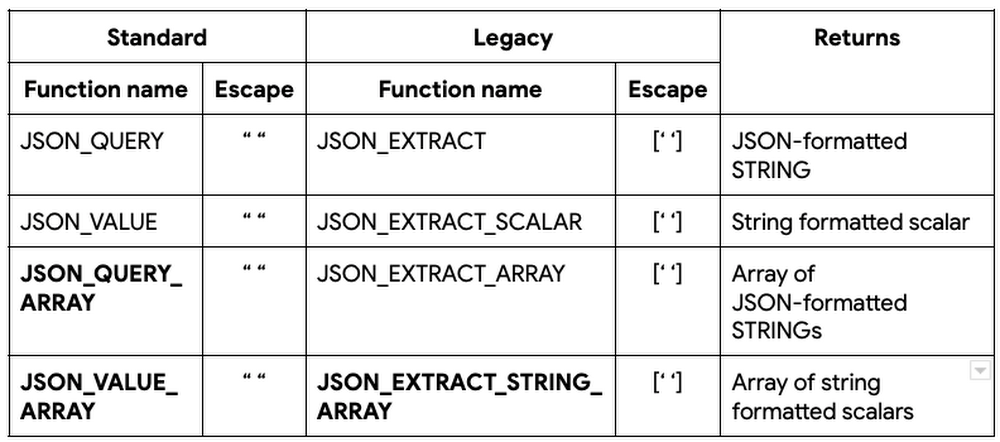
image 2Image 1image 3Spring is here. Clocks move forward. The Sakura (cherry blossom) festival in Japan marks the celebration of the new season. In India, the holi festival of colors ushers in the new harvest season. It’s a time for renewal and new ways of doing things. This month, we are pleased to debut our newest set of SQL features in BigQuery to help our analysts and data engineers spring forward. It’s time to set aside the old ways of doing things and instead look at these new ways of storing and analyzing all your data using BigQuery SQL.Bigger dataHigher precision and more flexible functions to manage your ever-expanding data in BigQueryBIGNUMERIC data type (GA)We live in an era where intelligent devices and systems ranging from driverless vehicles to global stock and currency trading systems to high speed 5G networks are driving nearly all aspects of modern life. These systems rely on large amounts of precision data to perform real time analysis. To support these analytics, BigQuery is pleased to announce the general availability of BIGNUMERIC data type which supports 76 digits of precision and 38 digits of scale. Similar to NUMERIC, this new data type is available  in all aspects of BigQuery from clustering to BI Engine and is also supported in the JDBC/ODBC drivers and client libraries.Here is an example that demonstrates the additional precision and scale using BIGNUMERIC applied to the various powers of e, Euler’s number and the base of natural logarithms.  DocumentationAs an aside, did you know that the world record, as of December 5, 2020, for the maximum number of digits to represent e stands at 10π trillion digits?JSON extraction functions (GA)As customers analyze different types of data, both structured and semi-structured, within BigQuery, JavaScript Object Notation (JSON) has emerged as the de facto standard for semi-structured data. JSON provides the flexibility of storing schemaless data in tables without requiring the specification of data types with associated precision for columns. As new elements are added, the JSON document can be extended to add new key-value pairs without requiring schema changes.BigQuery has long supported JSON data and JSON functions to query and transform JSON data before they became a part of the ANSI SQL standard in 2016. JSON extraction functions typically take two parameters: JSON field, which contains the JSON document and JSONPath, which points to the specific element or array of elements that need to be extracted. If JSONPath references an element or elements containing reserved characters, such as dot(.), dollar($) or star(*) characters, they need to be escaped so that they can be treated as strings instead of being interpreted as JSONPath expressions. To support escaping, BigQuery supports two types of JSON extraction functions: Standard and Legacy. The Standard (ANSI compliant and recommended) way of escaping these reserved characters is by enclosing the reserved characters in double quotes (” “). The Legacy (pre-ANSI) way is to enclose them in square brackets and single quotes ([‘ ‘]).Here’s a quick summary of existing and the new (highlighted in bold) JSON extraction functions: DocumentationTABLESAMPLE clause (preview)With the convergence into and growth of all types of data within BigQuery, customers want to maintain control over query costs especially when analysts and data scientists are performing ad hoc analysis of data in large tables. We are pleased to introduce the TABLESAMPLE clause in queries which allows users to sample a subset of the data, specified as a percentage of a table, instead of querying the entire data from large tables. This SQL clause can sample data from native BigQuery tables or external tables, stored in storage buckets in Google Cloud Storage, by randomly selecting a percentage of data blocks from the table and reading all of the rows in the selected blocks, lowering query costs when trying ad hoc queries. DocumentationAgile schemaMore commands and capabilities in SQL to allow you to evolve your data as your analytics needs change.Dataset (SCHEMA) operations (GA)In BigQuery, a dataset is the top level container entity that contains the data and program objects, such as tables, views, procedures. Creating, maintaining and dropping these datasets have been supported thus far in BigQuery using API, cli and UI. Today, we’re pleased to offer full SQL support (CREATE, ALTER and DROP) for dataset operations using SCHEMA, the ANSI standard keyword for the collection of logical objects in a database or a data warehouse. These operations greatly simplify data administrators’ ability to provision and manage schema across their BigQuery projects. Documentation for CREATE, ALTER and DROP SCHEMA syntaxObject creation DDL from INFORMATION_SCHEMA (preview)Data administrators provision empty copies of production datasets to allow loading of fictitious data so that developers can test out new capabilities before they are added to production datasets; new hires can train themselves on production-like datasets with test data. To help data administrators generate the data definition language (DDL) for objects, the TABLES view in INFORMATION_SCHEMA in BigQuery now has a new column called DDL which contains the exact object creation DDL for every table, view and materialized view within the dataset. In combination with dynamic SQL, data administrators can quickly generate and execute the creation DDL commands for a specific object or all objects of  particular type, e.g. MATERIALIZED VIEW or all data objects within a specified dataset with a single SQL statement without having to manually reconstruct all options and elements associated with the schema object(s). DocumentationDROP COLUMN support (preview)In October 2020, BigQuery introduced ADD COLUMN support in SQL to allow users to add columns using SQL to existing tables. As data engineers and analysts expand their tables to support new data, some columns may become obsolete and need to be removed from the tables. BigQuery now supports the DROP COLUMN clause as a part of the ALTER TABLE command to allow users to remove one or more of these columns. During the Preview period, note that there are certain restrictions on DROP COLUMN operations that will remain in effect. See Documentation for more details.Longer column names (GA)BigQuery now allows you to have longer column names upto 300 characters within tables, views and materialized views instead of the previous limit of 128 characters. DocumentationStorage insightsStorage usage analysis for partitioned and unpartitioned tablesINFORMATION_SCHEMA.PARTITIONS view for tables (preview)Customers store their analytical data in tables within BigQuery and use the flexible partitioning schemes on large tables in BigQuery to organize their data for improved query efficiency. To provide data engineers with better insight on storage and the record count for tables, partitioned and unpartitioned, we are pleased to introduce PARTITIONS view as a part of BigQuery INFORMATION_SCHEMA. This view provides up-to-date information on tables or partitions of a table, such as the size of the table (logical and billable bytes), number of rows, the last time the table (or partition) was updated and whether the specific table (or partition) or is active or has aged out into cheaper long term storage. Partition entries for tables are identified by their PARTITION_ID while unpartitioned tables have a single NULL entry for PARTITION_ID.Querying INFORMATION_SCHEMA views is more cost-efficient compared to querying base tables. Thus, the PARTITIONS view can be used in conjunction with queries to filter the query to specific partitions, e.g. finding data in the most recently updated partition or the maximum value of a partition key, as shown in the example below. DocumentationWe hope these new capabilities put a spring in the step of our BigQuery users as we continue to work hard to bring you more user-friendly SQL. To learn more about BigQuery, visit our website, and get started immediately with the free BigQuery Sandbox.Related ArticleBigQuery explained: Querying your dataLearn how to query datasets in BigQuery using SQL, save and share queries, and create views and materialized views.Read Article
Quelle: Google Cloud Platform