Bigtable vs. BigQuery: What’s the difference?

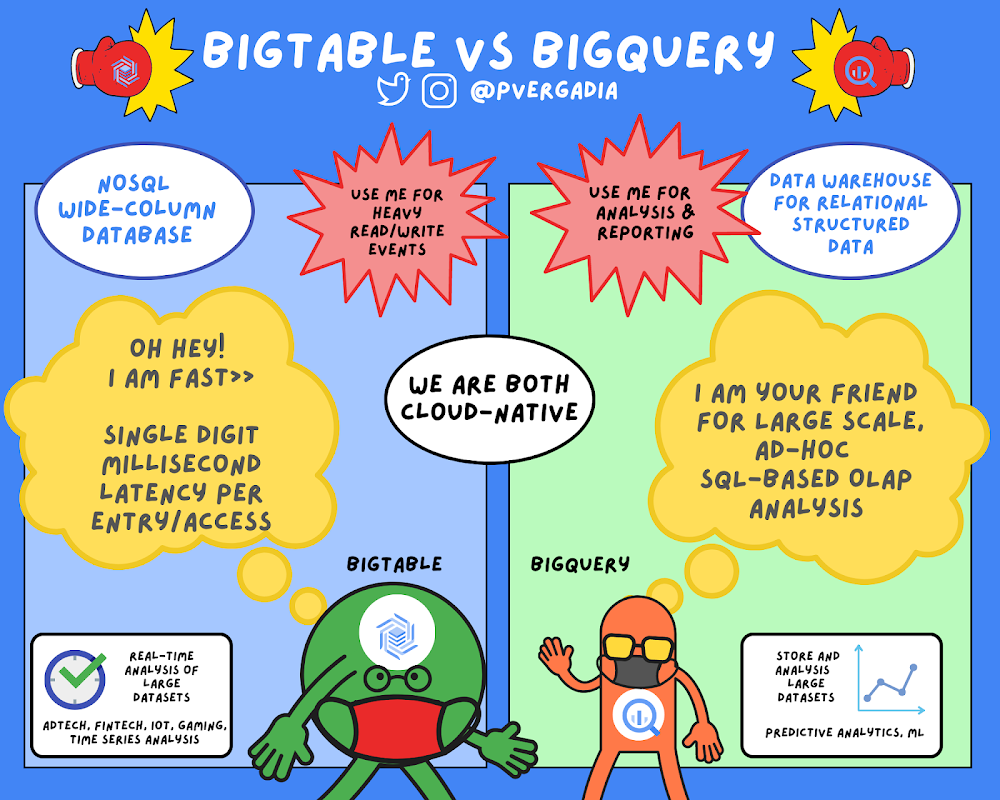
Many people wonder if they should use BigQuery or Bigtable. While these two services have a number of similarities, including “Big” in their names, they support very different use cases in your big data ecosystem.At a high level,Bigtable is a NoSQL wide-column database. It’s optimized for low latency, large numbers of reads and writes, and maintaining performance at scale. Bigtable use cases are of a certain scale or throughput with strict latency requirements, such as IoT, AdTech, FinTech, and so on. If high throughput and low latency at scale are not priorities for you, then another NoSQL database like Firestore might be a better fit.Bigtable is a NoSQL wide-column database optimized for heavy reads and writes.On the other hand, BigQuery is an enterprise data warehouse for large amounts of relational structured data. It is optimized for large-scale, ad-hoc SQL-based analysis and reporting, which makes it best suited for gaining organizational insights. You can even use BigQuery to analyze data from Cloud Bigtable.BigQuery is an enterprise data warehouse for large amounts of relational structured data.(Click to enlarge)Characteristics of Cloud BigtableBigtable is a NoSQL database that is designed to support large, scalable applications. Use Bigtable when you are making any application that needs to scale in a big way in terms of reads and writes per second. Bigtable throughput can be adjusted by adding/removing nodes — each node provides up to 10,000 queries per second (read and write). You can use Bigtable as the storage engine for large-scale, low-latency applications as well as throughput-intensive data processing and analytics. It offers high availability with an SLA of 99.5% for zonal instances. It’s strongly consistent in a single cluster; replication adds eventual consistency across two clusters, and increases SLA to 99.99%.Cloud Bigtable is a key-value store that is designed as a sparsely populated table. It can scale to billions of rows and thousands of columns, enabling you to store terabytes or even petabytes of data. This design also helps store large amounts of data per row or per item, making it great for machine learning predictions. It is an ideal data source for MapReduce-style operations and integrates easily with existing big data tools such as Hadoop, Dataflow, and Dataproc. It also supports the open-source HBase API standard to easily integrate with the Apache ecosystem.For a real world example, see how Ricardo, the largest online marketplace in Switzerland benchmarked and came to a conclusion that Bigtable is much more easier to manage and more cost-effective than self-managed Cassandra.  Characteristics of BigQueryBigQuery is a petabyte-scale data warehouse designed to ingest, store, analyze, and visualize data with ease. Typically, you’ll collect large amounts of data from across your databases and other third-party systems to answer specific questions. You can ingest this data into BigQuery by uploading it in a batch or by streaming data directly to enable real-time insights. BigQuery supports a standard SQL dialect that is ANSI-compliant, so if you already know SQL, you are all set. It is safe to say that you would serve an application that uses Bigtable as the database but most of the times you wouldn’t have applications performing BigQuery queries. Cloud Bigtable shines in the serving path and BigQuery shines in analytics.Once your data is in BigQuery, you can start performing queries on it. BigQuery is a great choice when your queries require you to scan a large table or you need to look across the entire dataset. This can include queries such as sums, averages, counts, groupings or even queries for creating machine learning models. Typical BigQuery use cases include large-scale storage and analysis or online analytical processing (OLAP)For a real-world example, see how Verizon Media used BigQuery for a Media Analytics Pipeline migrating massive Hadoop and enterprise data warehouse (EDW) workloads to Google Cloud’s BigQuery and Looker.Common characteristicsBigQuery and Bigtable are both cloud-native and they both feature unique, industry-leading SLAs. Because updates and upgrades happen transparently behind the scenes, you don’t have to worry about maintenance windows or planning downtime for either service. In addition, they offer unlimited scale, automatic sharding, and automatic failure recovery (with replication). For fast transactions and faster querying, both BigQuery and Bigtable separate processing and storage, which helps maximize throughput.ConclusionIf this has piqued your interest and you are excited to learn about the upcoming innovations to support your data strategy join us in the Data Cloud Summit on May 26th. For more information on BigQuery and Bigtable, check out the individual GCP sketchnotes on thecloudgirl.dev. For similar cloud content, follow me on Twitter @pvergadiaRelated ArticleSpring forward with BigQuery user-friendly SQLThe newest set of user-friendly SQL features in BigQuery are designed to enable you to load and query more data with greater precision, a…Read Article
Quelle: Google Cloud Platform
Google Cloud blog 101: Full list of topics, links, and resources

Curious to know the latest news, updates, and resources across the full range of Google Cloud products and services? Here’s a resource list that gives you instant access to our blog channels that cover everything under the sun (or cloud).Solutions & TechnologiesAI & Machine LearningAPI ManagementApplication DevelopmentBusiness Application PlatformCloud MigrationComplianceComputeContainers & KubernetesCost ManagementData AnalyticsDatabasesDevOps & SREHPCHybrid & MulticloudIdentity & SecurityInfrastructureManagement ToolsNetworkingNo-code DevelopmentOpen SourceProductivity & CollaborationSAP on Google CloudServerlessStorage & Data TransferProducts & ServicesGoogle Cloud PlatformGoogle WorkspaceAnthosBigQueryGoogle Kubernetes Engine (GKE)IndustriesConsumer Packaged GoodsEducationHealthcare & Life SciencesGamingManufacturingMedia & EntertainmentPublic SectorRetailSupply Chain & LogisticsTelecommunicationsGetting startedDevelopers & PractitionersTraining and CertificationsPublic DatasetsWho we work withCustomersPartnersStartupsGetting to know us betterInside Google CloudGoogle Cloud in Asia PacificGoogle Cloud in EuropeGoogle Cloud NextRegionsEventsPerspectivesResearchSustainabilitySystemsLooking for even more on Google Cloud? Our head of DevRel Greg Wilson put together a comprehensive list which collects resources around the web. Find it here: A giant list of Google Cloud resources.Related ArticleWhat’s new with Google CloudFind our newest updates, announcements, resources, events, learning opportunities, and more in one handy location.Read Article
Quelle: Google Cloud Platform

Tracking index backfill operation progress in Cloud Spanner

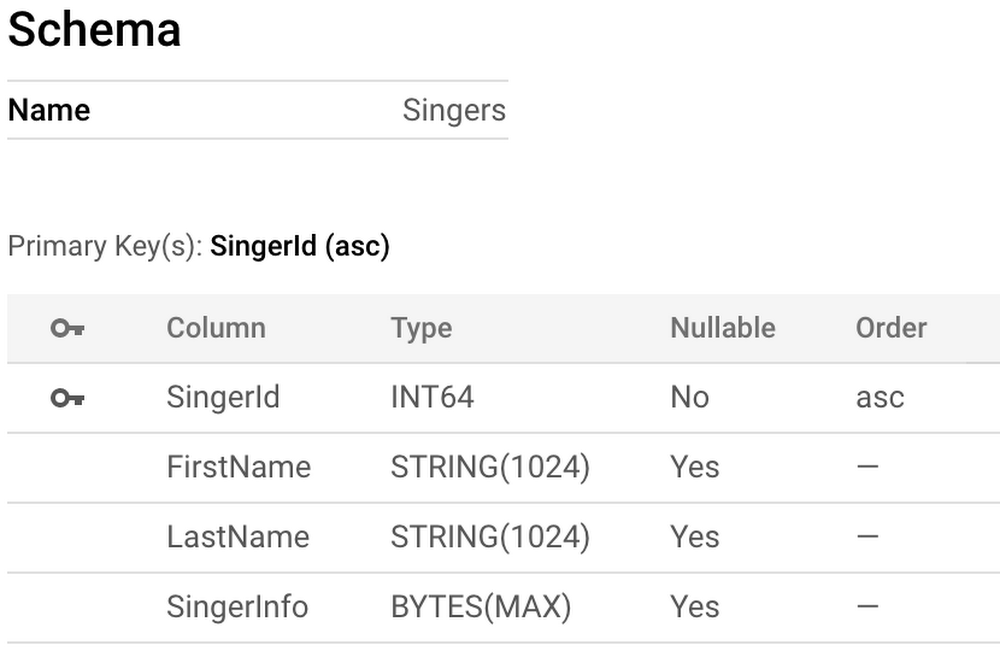
One of the cool things about Google Cloud Spanner, a horizontally scalable relational database, is that you can do an online schema update. Your database is never down for schema update operations. Cloud Spanner continues to serve data during ongoing schema updates. Imagine your application is querying data from a large table in the Cloud Spanner database and you want to add a secondary index on a column to make the data lookup more efficient. Cloud Spanner automatically starts backfilling, or populating, the index to reflect an up-to-date view of the data being indexed. Depending on the size of the dataset, load on the instance etc, it can take several minutes to many hours for that index backfill to complete. While the database continues to serve the traffic, you may want to check the progress of index backfill to plan for deploying application changes that rely on the new indexes once the backfill is complete.Here is some good news for you. Cloud Spanner now provides an ability to track the progress of index backfill. Let us dive deep to understand how you can use the index backfill progress reporting feature. Index CreationSuppose you want to speed up the queries against an example Singers table, and we realize that it is common for queries to also specify both the FirstName and LastName. The schema for the Singers table is shown below:This problem could be solved by creating a secondary index that contains the FirstName and LastName as part of the index key. Let us say you issue the following index creation statement for the index SingersByFirstLastNames through the GCP Console:This statement will trigger the index backfill operation for a non-interleaved index. The primary key for the secondary index will now contain SingerId, FirstName, and LastName. Once the schema update operation is initiated, you go back to the Indexes tab, and see a spinning wheel next to the SingerByFirstLastNames index. A few minutes go by, and you are confused as to when the SingerByFirstLastNames index will be available to use for your queries. How can you understand how much progress has been made on the creation of the secondary index?Tracking Index Backfill ProgressYou can use gcloud command line tool, REST API, or RPC API to monitor the Index Backfill progress. We are also in the process of adding support for this fieldThe next steps will be to monitor the progress of index backfill, and this will be done using the gcloud command in our example. You can view the progress of the index backfill using the OPERATION_ID. If you don’t have the OPERATION_ID, find it by using gcloud spanner operations list:Output of the “operations list” command:To track the progress of the secondary index backfill operation, use gcloud spanner operations describe:Output of the “operations describe” command when the index backfill has not completed:Here you can observe that the Index Backfill process triggered due to the Index Creation statement has progressed 64%. Once the process is completed, output of the “operations describe” command shows the progress percent as 100% as shown below.The “progress” array is where you will find information related to the progress of the index backfill operation. It contains the “startTime”, “progressPercent”, and “endTime” when available for each schema change statement. This example shows only one index creation statement for simplicity, but there can be multiple schema change statements per schema update operation. For more information on interpreting the index backfill progress for multi-statement schema change operations, please refer to the official documentation. You can then periodically track the progress made on the secondary index backfill operation by invoking the “gcloud spanner operations describe” command until the operation is complete.SummaryNew introspection feature “Index Backfill progress reporting” helps you to get visibility into the progress of the index backfill long-running operation. Similarly you can also get visibility into the progress of Backup/Restore operations as described in official documentation.ReferencesManaging Long-Running OperationsSecondary Indexes DocumentationRelated ArticleIntroducing request priorities for Cloud Spanner APIsToday we’re happy to announce that you can now specify request priorities for some Cloud Spanner APIs. By assigning a HIGH, MEDIUM, or LO…Read Article
Quelle: Google Cloud Platform
5 cheat sheets to help you get started on your Google Cloud journey

Sometimes a picture is worth a thousand words, and that’s where these cheat sheets come in handy. Cloud Developer Advocate Priyanka Vergadia has built a number of guides that help developers visually navigate critical decisions, whether it’s determining the best way to move to the cloud, or deciding on the best storage options. Below are five of her top cheat sheets in one handy location.Google Cloud migration made easyMigration to cloud is the first step to digital transformation because it offers a quick, simple path to cost savings and enhanced flexibility. Read the blog to learn about migrating on-premises or public cloud hosted infrastructure into Google Cloud, or click the image below.Click to enlargeMigrating Apache Hadoop to Dataproc: A decision treeAre you using the Apache Hadoop and Spark ecosystem and looking to simplify resource management? You may want to consider Dataproc. Read the blog post to learn four scenarios for migrating Apache Hadoop clusters to Google Cloud, or click the image below.Click to enlargeGoogle Cloud VMware Engine cheat sheetIf you’ve got VMware workloads and are considering modernizing in the cloud for increased agility and reduced total cost of ownership, VMware Engine may be the service for you. Read the blog post, or expand the image below to learn the benefits, features, and use cases for VMware Engine.Click to enlargeGoogle Cloud block storage optionsGoogle Cloud offers two options for block storage: Persistent Disks and Local SSD. This cheat sheet helps you choose the right one for your app. Read the blog, or click the image below.Click to enlargeGoogle Cloud products in 4 words or lessGoogle Cloud offers lots of products to support a wide variety of use cases. But how do you even know where to start? This list—originally kicked off by Google Cloud’s head of DevRel Greg Wilson—makes it easy to familiarize yourself with the Google Cloud ecosystem so you can quickly get up to speed, choosing the ones you want to dive in deep with documentation or other available resources. To get started, read the blog, visit the GitHub page, or click the image below.Click to enlargeLearn moreWe hope these cheat sheets help make navigating the cloud easier than ever. For more Google Cloud tips and best practices, check out our Tech blog.Related Article13 sample architectures to kickstart your Google Cloud journeyThe 13 most popular application architectures on Google Cloud, and how to get started.Read Article
Quelle: Google Cloud Platform

In case you missed it: All our free Google Cloud training opportunities from Q1

No-cost training opportunities remain a core part of how we help you build your cloud knowledge and showcase your cloud competencies. Since January, we’ve introduced a number of opportunities for you to grow your skills, and we wanted to bring them together into one handy resource so you don’t miss out.Join the Google Cloud 30-day challenge 2021We kicked off the new year with our new skills challenge, offering four initial cloud skills tracks: Getting Started, Data Analytics, Kubernetes (previously titled Hybrid and Multicloud), and Machine Learning (ML) and Artificial Intelligence (AI). Learn more in our blog post, or register for the skills challenge today to get 30 days free access to Google Cloud labs.Don’t know where to start with Google Cloud? We can help.Our Google Cloud OnBoard events are a great way to get an introduction from experts on the core components of Google Cloud, as well as an overview of how our tools impact the entire cloud computing landscape. Read more details or watch the training on demand.Learn how to accelerate data science workflows with LookerLooker, the modern business intelligence (BI) and analytics platform that is now a part of Google Cloud, is more than a BI reporting tool. It’s a full-fledged data application and visualization platform that allows users to curate and publish data. And it integrates with a wide range of endpoints in many different formats, ranging from CSV, JSON, and Excel files to SaaS and in-house built custom applications. Our recent blog post dives into how data analysts and data scientists can use Looker to help with data governance. And for a demonstration of real-life examples of how to use Looker to automate and productionalize data science workflows, watch this on-demand training.Earn the new ‘Optimize Costs for Google Kubernetes Engine’ Skills BadgeWe introduced a new skills badge that tests your ability to run a GKE cluster, ensuring it’s optimized to run an application with all its many microservices and that it can autoscale appropriately to handle both traffic spikes and traffic lulls (where you’ll want to save on your infrastructure costs). Learn more in this blog post or watch this on-demand training to take your first step towards learning how to optimize GKE costs and earning your skill badge.Looking aheadThis year is only getting started when it comes to learning opportunities. April alone included free AI and machine learning training for fraud detection, chatbots, and more. Check back regularly for the latest updates.Related ArticleFree AI and machine learning training for fraud detection, chatbots, and moreThese no-cost training opportunities can help you gain the latest AI and machine learning skills from Google Cloud.Read Article
Quelle: Google Cloud Platform

Predictable serverless deployments with Terraform

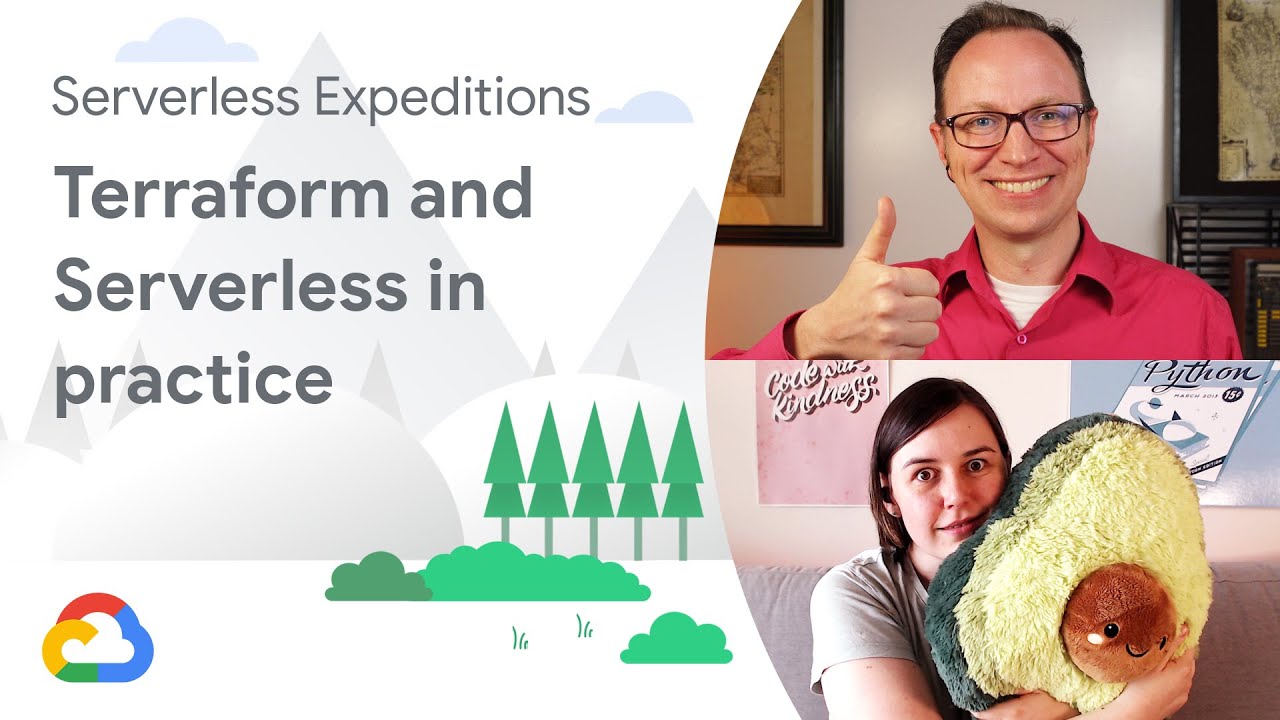
As a software developer, you want your code to reliably work. If your code is deployed in any sort of complex architecture, your code may be correct, but a misconfigured deployment could mean the entire system doesn’t work. The ability to reliably deploy complex infrastructure is essential. Having detailed documentation is useful, but just one misconfiguration can cause many issues. In these cases, consider Infrastructure as Code as a way to achieve reliably, repeatable deployments. One tool that’s widely used right now is Terraform, which supports many major cloud platforms, including Google Cloud. Here’s a short example of how Terraform can help: consider the following gcloud command: $ gsutil mb gs://my-new-bucketThis command will create a new storage bucket for you, but if you run it again, you get an error message that the bucket already exists! You could add manual checks around this command to ask if the bucket already exists, and create it if it doesn’t, but when you start adding these checks around all your scripts, it gets complex and unmaintainable.Replacing fallible shell with reliable TerraformWith Terraform, you describe your desired state—in this case, a bucket exists in your project—and Terraform will take the steps required to make sure that state is met. If the bucket already exists, Terraform will take no action. But if the bucket doesn’t exist, Terraform will take the steps required to create it.You write Terraform manifests in HCL—Hashicorp Configuration Language—which allows for such complexity like variables and calculated fields. Terraform will also work out the dependency graph itself, when working with multiple resources. Some resources have to be created before others. And some resources create data that will be used by other resources. For example, if you have a Cloud Run service that relies on that cloud storage bucket, the bucket has to exist first; and Terraform will work that out. If you have, say, a deployment of 5 cloud functions that are independent of each other, terraform will run those creations in parallel; which will be much faster than creating each one of those one by one. This technology also isn’t limited to just serverless products. With the Google Terraform provider you can deploy virtual machines, networking, and other complex infrastructure that would be downright annoying and frustrating to have to manually deploy over and over again.If you want to use Terraform to provision a development environment, consider what should be different compared to your production setup. You may want to add some variables to say, create a smaller Cloud SQL instance rather than a production-spec one, but with Terraform you can easily create duplicate setups. Be aware of the limitationsInfrastructure as Code is good for infrastructure and deploying existing assets, like containers and compiled code. There are other tools that you use to build your containers, and Terraform is not one of those tools. Terraform can be the replacement for the manual deployment after your containers are built, in that existing setup. Alternatively,  it can be integrated into your existing automation, for example as a step in your Cloud Build configuration.  This works well if you are doing in-house development with continuous deployments. Check out “Managing infrastructure as code with Terraform, Cloud Build, and GitOps” for an example of how to implement this configuration. For complex deployments, consider using Terraform. Not only will your deployments get more reliable, you can store your live infrastructure configuration settings along with your code in source control.Terraform in practiceFor an example deployment, follow Katie and Martin as they deploy a sample cat identification service, with Terraform: The application demonstrated in this video and post is available on GitHub in the Serverless-Expeditions repo under the terraform-serverless folder. In this video, we deploy a Cloud Function and Cloud Run service, together with a Cloud Storage bucket, and various IAM configurations, to get the project up and running swiftly. We then look around the Google Cloud project to see what was created, and try making some changes that are then re-asserted by Terraform. Finally, we destroy all the Terraform created resources, and re-create them again, restoring the application. Learn more: https://cloud.google.com/solutions/managing-infrastructure-as-codehttps://registry.terraform.io/providers/hashicorp/google/latest/docs Check out more Serverless Expeditions Serverless Expeditions is a fun and cheeky video series that looks at what serverless means and how to build serverless apps with Google Cloud. Follow these hosts on Twitter at @glasnt and @martinomander.Related ArticleA new Terraform module for serverless load balancingWith the new optimized Terraform load balancing module, you can now set up load balancing for serverless applications on Cloud Run, App E…Read Article
Quelle: Google Cloud Platform

A Google Cloud block storage options cheat sheet

“Where do virtual machines store data so they can access it when they restart?”—We need storage that is persistent in nature. That’s where Persistent Disks come in. Persistent Disk is a high performance block storage service that uses solid state drive (SSD) or hard disk drive (HDD) disks. These disks store data in blocks and are attached to compute. In Google Cloud it means they are attached to Compute Engine or Kubernetes Engine. You can attach multiple persistent disks to Compute Engine or GKE simultaneously and can configure quick, automatic, incremental backups or resize storage on the fly without disrupting your application. Types of Block StorageYou can choose the best Persistent Disk option for you based on your  cost and performance requirements. Standard PD is HDD and provides standard throughput. Because it is the most cost effective option, it is best used for cost-sensitive applications and scale out analytics with Hadoop and Kafka. Balanced PD is SSD and is the best price per GB option. This makes it a good fit for common workloads such as line of business apps, boot disks, and web serving. Performance PD is SSD and provides the best price per IOPS (input/output operations per second). It is best suited for performance sensitive applications such as databases, caches, and scale out analytics. Extreme PD is SSD optimized for applications with uncompromising performance requirements. These could include SAP HANA, Oracle, and the largest in-memory databases.Local SSD is recommended if your apps need really low latency. It is best for hot caches that offer best performance for analytics, media rendering, and other use cases that might require scratch space. How to pick block storage based on availability needsYou can also choose a Persistent Disk based on the availability needs of your app. Use Local SSD if you just need ephemeral storage for a stateless app that manages the replication at the application level or database layer. For most workloads you would be fine with Persistent Disk; it is durable and supports automated snapshots. But, if your app demands even higher availability and is mission critical then there is an option to use a regional persistent disk, which is replicated across zones for near zero Recovery Point Objective (RPO) and Recovery Time Objective (RTO) values. ConclusionWhatever your application use case maybe, if you are using a virtual machine or a Google Kubernetes Engine instance then you will be making a block storage choice. Use the pointers in this post to help you identify the option that works best for your use case. For a more in-depth look into Persistent Disk check out the documentation.  For more #GCPSketchnote, follow the GitHub repo. For similar cloud content follow me on Twitter @pvergadia and keep an eye out on thecloudgirl.dev.
Quelle: Google Cloud Platform

Announcing Google Cloud 2021 Summits [frequently updated]

There are a lot of great things happening at Google Cloud, and we’re delighted to share new product announcements, customer perspectives, interactive demos, and more through Google Cloud Summit series, a collection of digital events taking place over the coming months.Join us to learn more about how Google Cloud is transforming businesses in various industries, including Financial Services, Manufacturing & Supply Chain, and Retail & Consumer Goods. We’ll also be highlighting the latest innovations in data, artificial intelligence (AI) and machine learning (ML), security and more. The summits kick off in May with the Google Data Cloud Summit (May 26 | Global) and Financial Services Summit (May 27 | Global & EMEA), with more to follow. Content will be available for on-demand viewing immediately following the live broadcast of each event. Data Cloud Summit | May 26, 2021At this half-day event, you’ll learn how leading companies like PayPal, Workday, Equifax, Zebra Technologies, Commonwealth Care Alliance and many others are driving competitive differentiation using Google Cloud technologies to build their data clouds and transform data into value that drives innovation. Join our keynote with Google Cloud VP and General Manager for Databases, Data Analytics, and Looker, Gerrit Kazmaier and Zebra Technologies CEO Anders Gustafsson, as they discuss how to drive transformation with a unified data cloud strategy. Don’t miss the major product announcements across AI, ML, databases, and analytics. And learn how customers are using these technologies to build applications with BigQuery, Cloud Spanner, Looker, AI Platform, and more.Get the latest on data-driven industry trends from technology experts and join our customer-led sessions. Dive deeper with live Q&As and interactive demos to explore how data can help you make smarter business decisions and solve your organization’s most complex challenges.Register nowFinancial Services Summit | May 27, 2021In this 2 hour event, you will learn how Google Cloud is helping financial institutions including PayPal, Global Payments, HSBC, Credit Suisse, and more unlock new possibilities and accelerate business through innovation and better customer experiences. Hear from CEO Thomas Kurian and VP of Financial Services Solutions Derek White as they share how Google Cloud for Financial Services helps companies on their transformation cloud journeys. Attend sessions focused on banking, capital markets, insurance, and payments—and hear from our customers as they share their experiences. Join us to explore compelling topics that are influencing financial services today, as our financial industry experts and thought leaders dive into trending topics including sustainability, the future of home buying, embedded finance, dynamic pricing for insurance, managing transaction surges in payments, the market data revolution, and more. Register now: Global & EMEAMore information to comeCheck back on this blog post, we’ll be adding more information on future events in the coming weeks, including the Google Cloud ML Practitioner Summit, Digital Manufacturer Summit and more. Bookmark this page to easily find updates as news develops, and don’t forget to register today at no cost by visiting the Summit series website.Related ArticleSave the date for Google Cloud Next ‘21: October 12-14, 2021Join us and learn how the most successful companies have transformed their businesses with Google Cloud. Sign-up at g.co/cloudnext for up…Read Article
Quelle: Google Cloud Platform

Shifting gears: How mixi expanded from mobile games to bicycle racing with TIPSTAR

How do you reinvent entertainment for a completely new audience? For Japanese social network giant mixi, the challenge was to take the successes they’ve had with mobile games like Monster Strike, now with more than over 54 million worldwide users, and apply it to broadcasting Keirin bicycle races. As Koki Kimura, president of mixi, explains TIPSTAR’s vision: “We released the social sports betting app TIPSTAR to provide entertainment in a way that utilizes our IT and communication expertise. By providing an innovative and accessible way to enjoy Keirin, we were able to acquire a wider range of users across our user base. We plan to further expand this service with Google Cloud and expect it to grow even larger.”Since its launch, TIPSTAR’s original live streamed racing broadcasts—with commentators who offer predictions to inform users’ bets on the races—has successfully expanded interest in the sport to a whole new audience. While traditional Keirin races are typically watched by older men, TIPSTAR was able to reach a broader audience, including women and users in their 20s and 30s. Mixi’s insight into their customer base helped generate this new set of users. For the technology that underpins the platform they use to bring their app to users, as with Monster Strike, mixi turned to Google Cloud.Shifting gears from mobile gaming to live-streamed racingGoogle Kubernetes Engine (GKE) had been essential to the success of Monster Strike. So it was mixi’s first choice when it was time to start developing TIPSTAR. “I chose Google Cloud from among the many cloud platforms because I wanted to use GKE first and foremost,” says Product Development Group Manager Yoshiteru Kawamata at mixi. This time, their implementation included Cloud Storage, Cloud Logging for log storage and analysis, and BigQuery for data analytics. “One of the biggest changes I made,” says Kawamata, “was the adoption of Cloud Spanner. The main reason is that it is maintenance-free and eliminates the potential for downtime.” Spanner offers up to 99.999% availability with zero downtime for planned maintenance and schema changes. It is easy to scale with solutions like adding simple nodes as needed, and even ultimately a lower price point. This meant mixi could let TIPSTAR grow organically, scaling when needed rather than needing to start with a massive growth plan, all while minimizing downtime and other growing pains.”About six months later I made a big infrastructure update,” says Kawamata. “As a result, my engineers have been able to shift from operating infrastructure to developing new solutions using Spanner and GKE. This made me very happy.”Crossing the finish lineWhile smooth development and scalability for future growth were important, mixi had new concerns as part of their new app service, including handling monetary transactions. To ensure that this functionality was secure and user-friendly, mixi turned to Google Cloud’s Customer Experience Team and the Premium Support offering for guidance. “As a member of the team, our technical account manager was able to provide us in-depth support, from architecture review to helping us adjust resources from service design to release,” says Kawamata. A named TAM is an included feature of Premium Support and provides customers with relevant information and suggestions as needed.mixi also continues to take advantage of other Google Cloud resources such as the Advanced Solutions Lab, which teaches teams to apply AI and machine learning through classroom training by certified instructors and hands-on learning via Qwiklabs. With this training and support, mixi is set to continue to chart a path so that TIPSTAR and future mixi projects continue to grow.Related Articlemixi accelerates AI adoption with help from Google Cloud Advanced Solutions LabAdvice from a customer, mixi, on how Advanced Solutions Lab can help your businessRead Article
Quelle: Google Cloud Platform

Understanding the value of managed database services

Organizations are increasingly short on time, talent, and resources to manage and tune databases to suit their needs. For this reason, many businesses are turning to fully managed database services to help them build and scale their infrastructure to keep up with the data-driven demands of today’s always-on world.Cloud SQL offers industry-standard relational databases and manages common database administration tasks for MySQL, PostgreSQL, and SQL Server. Using Cloud SQL enables businesses to spend less time managing their database infrastructure, and more time focusing on their applications.Thousands of customers, large and small, trust Cloud SQL with their databases—and they have made it one of the fastest-growing services in Google Cloud. We often hear from customers that Cloud SQL helps free up time previously spent on database administration. Cloud SQL is one of our fully managed cloud services. Managed services can generally free up time and resources for your organization.What is a managed database?A managed database is an on-demand cloud computing service, which includes everything you need to run your databases. Below is a diagram of the typical technology stack needed to run a database deployment:Building, running, and maintaining infrastructure means less time working on creating value in your app. Every layer of the stack requires attention—hardware, OS, database. And don’t forget monitoring.With a managed database service, none of this is your responsibility. Instead, the cloud provider is responsible for looking after and maintaining infrastructure, patches, and other maintenance tasks that would normally consume a significant amount of your time and resources.Benefits of a managed database like Cloud SQLWhy are managed databases so popular? Here are just a few reasons:Self-service improves developer velocityManual database provisioning is a slow process, making it difficult to scale resources on the fly. With Cloud SQL, developers can easily automate the process to create, modify, clone, and replicate database servers. Powerful and intuitive interfaces make these tasks simple to use and automate.Google SRE teams have your back 24 x 365Google wrote the book (or should we say books) on Site Reliability Engineering, and Cloud SQL delivers round-the-clock SRE support and multiple layers of protection to ensure a reliable and secure service.  Automated tasks save time while keeping data secureMaintenance to deliver new feature updates and security is a part of everyday database management—but it’s also time-consuming. Cloud SQL automates tasks for HA, backup, disaster recovery, security patching and upgrades. Your deployments can run smoothly and securely. Organization policies provide safety guardrailsDevelopment always wants to run faster, but security and compliance teams can struggle to keep up. Cloud SQL organization policies provide centralized, programmatic control over your organization’s cloud resources without slowing innovation. More “yes,” less “no”With more scale, more user demands, and changing business needs, there’s always pressure to deliver more, faster. By moving to Google’s managed Cloud SQL services, teams can say yes to more, without increasing headcount. Flexible pay-as-you-go optionsProvision your databases based on your current usage patterns, with the ability to increase or decrease your footprint and costs on-demand. Advanced security and reliability The hardware is controlled, built, and hardened by Google. There are no trust assumptions between services. All identities, users, and services are strongly authenticated. Data stored on our infrastructure is automatically encrypted at rest. Communications over the Internet to our cloud services are encrypted. The scale of Google’s infrastructure allows it to absorb many Denial of Service attacks, and Google Cloud’s SRE teams are on-call 24 x 365, helping detect threats and respond to incidents. A super fast, high-performing global network Google’s network uniquely provides global connectivity with its system of high-capacity fiber optic cables that encircle the globe. This enables simple and robust cross-regional operations and redundancy, without the need to set up dedicated connections between Google Cloud regions. With this network, our database services can create resources in different regions, simplifying how applications provide great experiences to customers, no matter where they are on the globe.Optimal integrations with popular tools and Google Cloud services Databases need ecosystems. Google provides extensive support for dozens of Google Cloud services, the most popular ORMs, tools, libraries, and frameworks. This includes robust integrations with Google Kubernetes Engine (GKE), direct queries from BigQuery, and multiple data integration services, such as Cloud Dataflow, Data Fusion, Pub/Sub, and more.Economic advantages of managed databasesAccording to Research Vice President Carl Olofson, IDC has conducted a number of business value studies focused on the experience of enterprises moving databases from an environment they have configured and managed themselves to managed database cloud services. In these, we compared total hardware, software, and staff time costs for the self-managed database versus the total staff time and subscription cost of the managed cloud database service over five years. We have certain outcomes that are consistent, regardless of the database brand or cloud service provider: enterprises generally experience a ROI in excess of 400% over five years, the payback period is less than a year, users experienced better and more consistent database performance, unplanned downtime was drastically reduced, resulting in significant avoidance of costs due to data unavailability, and the greater security afforded by the cloud environment and the regular application of security patches to DBMS code resulted in substantial peace of mind, the benefit of which cannot be quantified.How does Cloud SQL work?With Cloud SQL, you can create an instance and configure it with the right combination of vCPU cores and RAM for your workload—and the rest is automated. Cloud SQL automatically ensures your databases are reliable, secure, and scalable so that your business continues to run without disruption. Flexible instance shapes allow you to optimize the balance of compute, storage, and memory for each deployment. The underlying Google Cloud infrastructure is highly optimized for predictable, high performance operations with edition-agnostic capabilities such as storage-based HA—and run according to our SRE principles. First, Cloud SQL manages installation and ensures the database is kept up-to-date with automated upgrades and patching. We also protect your data with automatic, regularly scheduled backups that are retained for up to a year. From there, we offer options, such as high availability (HA), including health checks and automatic failover, using synchronous replication for cross-region replication for disaster recovery.Cloud SQL wraps this technology stack in powerful and intuitive interfaces that make sense for developers and operations teams: API, CLI, and UI. Your teams can easily provision databases in minutes. The entire stack is also monitored so you can quickly find the root cause when a problem occurs. Managed databases can open up new possibilities for teams within an organization.Migrating to a managed databaseMaking the decision to migrate from on-premises to a managed database solution can be risky. While managed services can reduce the stress of deploying and maintaining a database, you also need to trust that your applications will continue to run and that you can continue to use the same tools and skill sets. Cloud SQL removes that risk, allowing you to get started fast with minimal-downtime migrations using our Database Migration Service. Here’s why:Keep running as usual. You get the familiar MySQL, PostgreSQL, and SQL Server engines you’re used to with no additional modifications and automatic access to the latest enhancements.Seamlessly integrate with your preferred tools. Connect to your Cloud SQL instances with common database administration and reporting tools, such as MySQL Workbench, Toad SQL, and SQuirrel SQL, and pgAdmin.No disruption or surprises. Easily migrate your databases and get started with a few clicks using the native Database Migration Service for zero-downtime migrations.If you’re interested in learning more about Cloud SQL (and the rest of our data storage, management, and analytics platform), join the upcoming Data Cloud Summit.Related ArticleMigrate your MySQL and PostgreSQL databases using Database Migration Service, now GACheck out how to migrate your on-premises databases to the cloud with Database Migration Service, now generally available for PostgreSQL …Read Article
Quelle: Google Cloud Platform



