The new Google Cloud region in Warsaw is open

Since Google opened its first office in Poland over 15 years ago, we have been supporting the country’s growing digital economy, providing our partners and customers with cutting-edge technology, knowledge and global insights. With our announcement of a strategic partnership with Poland’s Domestic Cloud Provider in September 2019, we further committed to bring the power of Google Cloud to support the rapid growth, entrepreneurial spirit and passion for innovation of Polish businesses.Now, as Poland looks towards economic recovery, enterprises and public organizations of all sizes are taking advantage of new cloud technologies, and we are delivering on our commitment. To support customers in Poland and Central and Eastern Europe (CEE), we’re excited to announce that our new Google Cloud region in Warsaw is now open.Designed to help Polish and CEE companies build highly available applications for their customers, the Warsaw region is our first Google Cloud region in Poland and seventh to open in Europe. What customers and partners are sayingNavigating this past year has been a challenge for companies as they grapple with changing customers demands and greater economic uncertainty. And we’ve been fortunate to partner with and serve people, companies, and government institutions around the world to help them adapt. The Google Cloud region in Warsaw will help our customers in CEE adapt to new requirements, new opportunities and new ways of working.  “We want to build the bank of the future, and to do that, we need the most innovative technology. By choosing Google Cloud, we believe we will have access to the tools we need, now and in the years to come.”—Adam Marciniak, CIO PKO Bank Polski “Google Cloud really helped us to make better use of their products and save money. As a result, we were able to dramatically increase our CPU and memory usage while keeping costs flat. We delivered a stable service to more customers without having to pass the cost on to them.”—Lenka Gondová, Chief Information Security Officer, Exponea“We have ambitious plans for the next few years, so we have decided to engage with Google Cloud as an experienced partner who provides us with both the know-how and the infrastructure and tools we need to build and maintain our ecommerce sites.”—Arkadiusz Ruciński, Omnichannel Director, LPP“We double in size every year, and our previous infrastructure providers couldn’t keep up. It became really hard to maintain hundreds of dedicated servers. As our stack grew, we decided to deploy our service to Google Cloud as the most effective and efficient way to support our business model.”—Paweł Sobkowiak, CTO, Booksy“We are seeing even more benefits from Anthos as our use evolves. The biggest advantage so far has been increased engagement among our staff. Teams are working passionately to achieve as much as possible because they can now focus on their core responsibilities rather than infrastructure management. That’s a testament to the power of Anthos and the value of the Accenture partnership.”—Monika Nowak-Toporowicz, Chief Technology and Innovation Officer, UPC PolskaA global network of regionsWarsaw joins the existing 24 Google Cloud regions connected via our high-performance network, helping customers better serve their users and customers throughout the globe. Learn more about Google Cloud locations.With this new region, Google Cloud customers operating in Poland and the wider CEE will benefit from low latency and high performance of their cloud-based workloads and data. Designed for high availability, the region opens with three availability zones to protect against service disruptions, and offers a portfolio of key products, including Compute Engine, App Engine, Google Kubernetes Engine, Cloud Bigtable, Cloud Spanner, and BigQuery.Helping customers build their transformation cloudsGoogle Cloud is here to support Polish businesses, helping them get smarter with data, deploy faster, connect more easily with people and customers throughout the globe, and protect everything that matters to their businesses. The cloud region in Warsaw offers new technology and tools that can be a catalyst for this change. Google Cloud will also support our customers with people and education programs. We have already trained thousands of IT specialists in Poland, helping both large enterprises and medium-sized companies get access to experts in cloud technologies. And since last year, as part of our local Grow with Google programme, we offer all SMBs in Poland free support in starting their cloud journey. Our ongoing commitment to Poland goes beyond our newest Cloud region. Google Cloud’s engineering center in Warsaw is a leading cloud technology hub in Europe and continues to grow each year, employing highly-skilled specialists that work on our global cloud computing solutions. We are also expanding our office in Wrocław, hiring experts to help companies migrate to cloud.  In Poland and across Central and Eastern Europe, we’re proud to support businesses in every industry, from retail and banking, to manufacturing and public sector helping them recover, grow and thrive. And we are very excited to see how our partners and customers will use the power of the new Google Cloud region in Warsaw to accelerate their digital transformation.
Quelle: Google Cloud Platform
Never forget there's a human behind every financial services product

With brand experience increasingly online and digital-native players entering the market, financial services institutions (FSIs) will need to adopt a human-centric design philosophy to remain relevant and build stronger ties with their customers. Financial services providers must keep the customer in mind as they design their product offerings. This is especially critical in Asia-Pacific, where more consumers are coming online and online sectors are seeing robust growth.In Southeast Asia alone, at least 40 million people connected to the internet for the first time in 2020 and one in three digital services are consumed by new users, according to the2020 eConomy SEA report released by Temasek Holdings, Google, and Bain & Company. The region’s online population has hit 400 million, and seven internet economy sectors, including digital financial services and e-commerce, will clock more than $100 billion in gross merchandise volume.Fuelled in part by the COVID-19 outbreak, the growth momentum is expected to continue with 90% of new online consumers indicating plans to continue using such services post-pandemic. In Southeast Asia, digital payments are expected to surpass US$1.2 trillion in gross transaction value by 2025, according to the e-Conomy SEA 2020 report. Adoption of online remittance services also climbed two-fold since safe distancing measures kicked into place, with online value predicted to account for up to 40% of the total value of these payment services by 2025.What customers expect from their financial services providersWith customers heading toward online platforms, traditional FSIs in the region that fail to transform quickly to ride the wave will be left behind and risk losing their foothold against their digital-savvy neobank competitors. As it is, 71% of Singapore consumers experience at least one pain point with their bank today. And amongst those with three or more pain points, 77% express an interest in opening a digital bank account, according to aPwC survey.Consumers want personalized, real-time engagements and FSIs need to understand their customers’ requirements to differentiate their brand experience and build loyalty.This can be particularly challenging in Asia, where customer segments are widely diverse. Online users speak multiple languages, live in developed or developing nations, and reside in communities that are either largely unbanked or highly tapped financially.FSIs will have to identify their targeted customer segments and figure out solutions they should offer to address these consumers’ different requirements, such as those living in rural areas versus those living in urbanized cities.It means they will require tools powered by artificial intelligence (AI) and data analysis to understand their customers’ needs and improve service experience accordingly. At the same time, they will need to drive down operational costs.Chatting up to better customer satisfactionThese shifts in consumer needs prompted insurance companyFWD Group to develop an AI chatbot with the aim to enhance customer service delivery, reduce operational spend, and drive its Asian expansion. It was critical that the chatbot, dubbed Enzo, had the ability to establish a more sophisticated understanding of human intent—the customers’ main objective when they key in a question or request.To achieve this, FWD tapped Google’s AI-powered contact center solutionDialogflow as well as machine learning text analysis toolNatural Language to create Enzo.Dialogflow, in particular, proved essential as it could interpret human intent in several languages, including slang. This was important since FWD had plans to expand its presence across Southeast Asia and the versatile language support would enable the company to do so more rapidly.Within two months of Enzo’s introduction in the Philippines, the chatbot had handled queries from more than 4,000 customers, bumping up FWD’s previous response capacity by 7%. Enzo also registered a customer rating of 4.5 stars out of 5, which was equivalent to the company’s live chat service rating. In addition, the insurance company is using Google’s Cloud Vision AI andAutoML to power its KYC (Know Your Customer) identity verification, enabling it to quickly determine the validity of a customer’s ID. The AI tools have improved FWD’s operational efficiencies by 20% and reduced identity verification costs by half.Forward-looking FSIs such as FWD have achieved strong business results primarily because they realize customers should be at the center of everything they do. For FWD, the ability to dynamically translate and analyze their customer interactions as well as understand the context of what they actually need, regardless of language, has proven especially valuable in this region.This type of customer understanding will go a long way towards creating stronger brand awareness and loyalty, particularly as digital transactions mean less human contact, and FSI customers increasingly use multiple service providers for their daily banking needs.Adopting human-centric design thinking ensures products and services will actually be relevant and beneficial to the customers they are designed to serve. It also empowers banks to differentiate the human experience in every interaction they facilitate.When an individual applies for a home loan, they do not simply want a loan; their ultimate objective here is to own a home. So rather than focus on providing a home loan, banks instead need to think about how to build their loan offerings around the customer’s desire to buy a house. And technology offerings are already emerging to make this easy for financial institutions, such as Google Cloud’s Lending DocAI. By tapping data and infusing machine learning to understand context, as well as adopting more agile practices, FSIs not only ensure they remain competitive against their digital-native counterparts and amid changing consumer expectations, but create more genuine and enduring bonds with customers.Learn more about Google Cloud for financial services.Related ArticleNew white paper: Strengthening operational resilience in financial services by migrating to Google CloudLearn how migrating to Google Cloud can play a critical role in strengthening operational resilience in the financial services sector.Read Article
Quelle: Google Cloud Platform

Churn prediction for game developers using Google Analytics 4 (GA4) and BigQuery ML

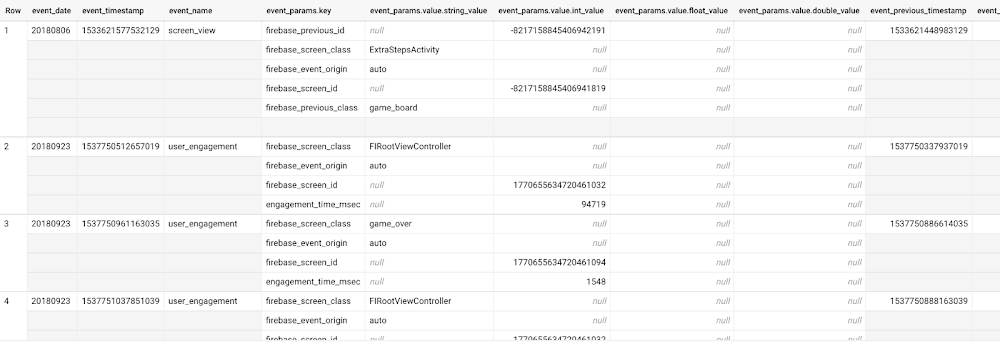
User retention can be a major challenge for mobile game developers. According to the Mobile Gaming Industry Analysis in 2019, most mobile games only see a 25% retention rate for users after the first day. To retain a larger percentage of users after their first use of an app, developers can take steps to motivate and incentivize certain users to return. But to do so, developers need to identify the propensity of any specific user returning after the first 24 hours. In this blog post, we will discuss how you can use BigQuery ML to run propensity models on Google Analytics 4 data from your gaming app to determine the likelihood of specific users returning to your app.You can also use the same end-to-end solution approach in other types of apps using Google Analytics for Firebase as well as apps and websites using Google Analytics 4. To try out the steps in this blogpost or to implement the solution for your own data, you can use this Jupyter Notebook. Using this blog post and the accompanying Jupyter Notebook, you’ll learn how to:Explore the BigQuery export dataset for Google Analytics 4Prepare the training data using demographic and behavioural attributesTrain propensity models using BigQuery MLEvaluate BigQuery ML modelsMake predictions using the BigQuery ML modelsImplement model insights in practical implementationsGoogle Analytics 4 (GA4) properties unify app and website measurement on a single platform and are now default in Google Analytics. Any business that wants to measure their website, app, or both, can use GA4 for a more complete view of how customers engage with their business. With the launch of Google Analytics 4, BigQuery export of Google Analytics data is now available to all users. If you are already using a Google Analytics 4 property, you can follow this guide to set up exporting your GA data to BigQuery.Once you have set up the BigQuery export, you can explore the data in BigQuery. Google Analytics 4 uses an event-based measurement model. Each row in the data is an event with additional parameters and properties. The Schema for BigQuery Export can help you to understand the structure of the data.  In this blogpost, we use the public sample export data from an actual mobile game app called “Flood It!” (Android, iOS) to build a churn prediction model. But you can use data from your own app or website. Here’s what the data looks like. Each row in the dataset is a unique event, which can contain nested fields for event parameters.This dataset contains 5.7M events from over 15k users.Our goal is to use BigQuery ML on the sample app dataset to predict propensity to user churn or not churn based on users’ demographics and activities within the first 24 hours of app installation.In the following sections, we’ll cover how to:Pre-process the raw event data from GA4Identify users & the label featureProcess demographic featuresProcess behavioral featuresTrain classification model using BigQuery MLEvaluate the model using BigQueryMLMake predictions using BigQuery MLUtilize predictions for activationPre-process the raw event dataYou cannot simply use raw event data to train a machine learning model as it would not be in the right shape and format to use as training data. So in this section, we’ll go through how to pre-process the raw data into an appropriate format to use as training data for classification models.This is what the training data should look like for our use case at the end of this section:Notice that in this training data, each row represents a unique user with a distinct user ID (user_pseudo_id). Identify users & the label featureWe first filtered the dataset to remove users who were unlikely to return the app anyway. We defined these ‘bounced’ users as ones who spent less than 10 mins with the app. Then we labeled all remaining users:churned: No event data for the user after 24 hours of first engaging with the app.returned: The user has at least one event record after 24 hours of first engaging with the app.For your use case, you can have a different definition of bounce and churning. Also you can even try to predict something else other than churning, e.g.:whether a user is likely to spend money on in-game currency likelihood of completing n-number of game levelslikelihood of spending n amount of time in-game etc.In such cases, label each record accordingly so that whatever you are trying to predict can be identified from the label column.From our dataset, we found that ~41% users (5,557) bounced. However, from the remaining users (8,031),  ~23% (1,883) churned after 24 hours:To create these bounced and churned columns, we used the following snippet of SQL code. You can view the Jupyter Notebook for the full query used for materializing the bounced and churned labels. Process demographic featuresNext, we added features both for demographic data and for behavioral data spanning across multiple columns. Having a combination of both demographic data and behavioral data helps to create a more predictive model. We used the following fields for each user as demographic features:geo.countrydevice.operating_systemdevice.languageA user might have multiple unique values in these fields — for example if a user uses the app from two different devices. To simplify, we used the values from the very first user engagement event.Process behavioral featuresThere is additional demographic information present in the GA4 export dataset, e.g. app_info, device, event_params, geo etc. You may also send demographic information to Google Analytics through each hit via user_properties. Furthermore, if you have first-party data on your own system, you can join that with the GA4 export data based on user_ids. To extract user behavior from the data, we looked into the user’s activities within the first 24 hours of first user engagement. In addition to the events automatically collected by Google Analytics, there are also the recommended events for games that can be explored to analyze user behavior. For our use case, to predict user churn, we counted the number of times the follow events were collected for a user within 24 hours of first user engagement: user_engagementlevel_start_quickplaylevel_end_quickplaylevel_complete_quickplaylevel_reset_quickplaypost_scorespend_virtual_currencyad_rewardchallenge_a_friendcompleted_5_levelsuse_extra_stepsThe following query shows how these features were calculated:View the notebook for the query used to aggregate and extract the behavioral data. You can use different sets of events for your use case. To view the complete list of events, use the following query:After this we combined the features to ensure our training dataset reflects the intended structure. We had the following columns in our table:User ID:user_pseudo_idLabel:churnedDemographic featurescountrydevice_osdevice_languageBehavioral featurescnt_user_engagementcnt_level_start_quickplaycnt_level_end_quickplaycnt_level_complete_quickplaycnt_level_reset_quickplaycnt_post_scorecnt_spend_virtual_currencycnt_ad_rewardcnt_challenge_a_friendcnt_completed_5_levelscnt_use_extra_stepsuser_first_engagementAt this point, the dataset was ready to train the classification machine learning model in BigQuery ML. Once trained, the model will output a propensity score between churn (churned=1) or return (churned=0) indicating the probability of a user churning based on the training data.Train classification model When using the CREATE MODEL statement, BigQuery ML automatically splits the data between training and test. Thus the model can be evaluated immediately after training (see the documentation for more information).For the ML model, we can choose among the following classification algorithms where each type has its own pros and cons:Often logistic regression is used as a starting point because it is the fastest to train. The query below shows how we trained the logistic regression classification models in BigQuery ML.We extracted month, julianday, and dayofweek  from datetimes/timestamps as one simple example of additional feature preprocessing before training. Using TRANSFORM() in your CREATE MODEL query allows the model to remember the extracted values. Thus, when making predictions using the model later on, these values won’t have to be extracted again. View the notebook for the example queries to train other types of models (XGBoost, deep neural network, AutoML Tables).Evaluate modelOnce the model finished training, we ran ML.EVALUATE to generate precision, recall, accuracy and f1_score for the model:The optional THRESHOLD parameter can be used to modify the default classification threshold of 0.5. For more information on these metrics, you can read through the definitions on precision and recall, accuracy, f1-score, log_loss and roc_auc. Comparing the resulting evaluation metrics can help to decide among multiple models.Furthermore, we used a confusion matrix to inspect how well the model predicted the labels, compared to the actual labels. The confusion matrix is created using the default threshold of 0.5, which you may want to adjust to optimize for recall, precision, or a balance (more information here).This table can be interpreted in the following way:Make predictions using BigQuery MLOnce the ideal model was available, we ran ML.PREDICT to make predictions. For propensity modeling, the most important output is the probability of a behavior occurring. The following query returns the probability that the user will return after 24 hrs. The higher the probability and closer it is to 1, the more likely the user is predicted to return, and the closer it is to 0, the more likely the user is predicted to churn.Utilize predictions for activationOnce the model predictions are available for your users, you can activate this insight in different ways. In our analysis, we used user_pseudo_id as the user identifier. However, ideally, your app should send back the user_id from your app to Google Analytics. In addition to using first-party data for model predictions, this will also let you join back the predictions from the model into your own data.You can import the model predictions back into Google Analytics as a user attribute. This can be done using the Data Import feature for Google Analytics 4. Based on the prediction values you can Create and edit audiences and also do Audience targeting. For example, an audience can be users with prediction probability between 0.4 and 0.7, to represent users who are predicted to be “on the fence” between churning and returning.For Firebase Apps, you can use the Import segments feature. You can tailor user experience by targeting your identified users through Firebase services such as Remote Config, Cloud Messaging, and In-App Messaging. This will involve importing the segment data from BigQuery into Firebase. After that you can send notifications to the users, configure the app for them, or follow the user journeys across devices.Run targeted marketing campaigns via CRMs like Salesforce, e.g. send out reminder emails.You can find all of the code used in this blogpost in the Github repository:https://github.com/GoogleCloudPlatform/analytics-componentized-patterns/tree/master/gaming/propensity-model/bqmlWhat’s next? Continuous model evaluation and re-trainingAs you collect more data from your users, you may want to regularly evaluate your model on fresh data and re-train the model if you notice that the model quality is decaying.Continuous evaluation—the process of ensuring a production machine learning model is still performing well on new data—is an essential part in any ML workflow. Performing continuous evaluation can help you catch model drift, a phenomenon that occurs when the data used to train your model no longer reflects the current environment. To learn more about how to do continuous model evaluation and re-train models, you can read the blogpost: Continuous model evaluation with BigQuery ML, Stored Procedures, and Cloud SchedulerMore resourcesIf you’d like to learn more about any of the topics covered in this post, check out these resources:BigQuery export of Google Analytics dataBigQuery ML quickstartEvents automatically collected by Google Analytics 4Qwiklabs: Create ML models with BigQuery MLOr learn more about how you can use BigQuery ML to easily build other machine learning solutions:How to build demand forecasting models with BigQuery MLHow to build a recommendation system on e-commerce data using BigQuery MLLet us know what you thought of this post, and if you have topics you’d like to see covered in the future! You can find us on Twitter at @polonglin and @_mkazi_.Thanks to reviewers: Abhishek Kashyap, Breen Baker, David Sabater Dinter.Related ArticleHow to build demand forecasting models with BigQuery MLWith BigQuery ML, you can train and deploy machine learning models using SQL. With the fully managed, scalable infrastructure of BigQuery…Read Article
Quelle: Google Cloud Platform

Broadcom improves customer threat protection with flexible data management

Editor’s note: Today we’re hearing from Padmanabh Dabke, Senior Director of Data Analytics and Zander Lichstein, Technical Director and Architect for GCP Migration at Broadcom. They share how Google Cloud helped them modernize their data analytics infrastructure to simplify their operations, lower support and infrastructure costs and greatly improve the robustness of their data analytics ecosystem. Broadcom Inc. is best known as a global technology leader that designs and manufactures semiconductor and infrastructure software solutions. With the acquisition of Symantec in 2019, Broadcom expanded their footprint of mission critical infrastructure software. Symantec, as a division of Broadcom, has security products that protect millions of customers around the world through software installed on desktops, mobile devices, email servers, network devices, and cloud workloads. All of this activity generates billions and billions of interesting events per day.  We have dozens of teams and hundreds of systems which, together, provide protection, detection, exoneration, and intelligence, all of which requires handling a massive amount of data in our data lake.   Broadcom’s Security Technology and Response (STAR) team leverages this data lake to provide threat protection and analytics applications. The team needed a more flexible way to manage data systems while eliminating resource contention and enabling cost accountability between teams.Our data lake has served us well but as our business has grown so have our technology requirements. We needed to modernize the legacy implementation of the data lake and analytics applications built on top. Its monolithic architecture made it difficult to operate and severely limited the choices available to individual application developers. We chose Google Cloud to speed up this transformation. In spite of the complexity and scale of our systems, the move to Google Cloud took less than a year and was completely seamless for our customers. Our architectural optimizations, coupled with Google Cloud’s platform capabilities simplified our operational model, lowered support and infrastructure costs, and greatly improved the robustness of our data analytics ecosystem. We’ve reduced the number of issues being reported on the data lake, translating to a reduction of 25% in monthly support calls from internal Symantec researchers related to resource allocation and noisy neighbor issues.Where does our data come from and how do we use it?Providing threat protection requires a giant feedback loop. As we detect and block cyber attacks in the field, those systems send us telemetry and samples: the type of threats, where they came from, and the damage they tried to cause. We sift through the telemetry to decide what’s bad, what’s good, what needs to be blocked, which websites are safe or unsafe, and convert those opinions into new protection which is then pushed back out to our customers. And the cycle repeats.In the early days, this was all done by people—experts mailing floppy disks around. But these days the number of threats and the amount of data are so overwhelming that we must use machine learning (ML) and automation to handle the vast majority of the analysis. This allows our people to focus on handling the newest and most dangerous threats. These new technologies are then introduced into the field to continue the cycle.Shortcomings of the legacy data platformOur legacy data platform had evolved from an on-prem solution, and was built as a single, massive, relatively inflexible multi-tenant system. It worked well when there was a big infrastructure team that maintained it but failed to take advantage of many capabilities built into Google Cloud. The design also introduced a number of obvious limitations, and even encouraged bad habits from our application teams. Accountability was challenging, changes and upgrades were painful, and performance ultimately suffered. We’d built the ecosystem on top of a specific vendor’s Apache Hadoop stack. We were always limited by their point of view, and had to coordinate all of our upgrade cycles across our user base. Our data platform needed a transformation. We wanted to move away from a centralized platform to a cloud-based data lake that was decentralized, easy to operate, and cost-effective. We also wanted to implement a number of architectural transformations like Infrastructure as Code (IaC) and containerization. “Divide and Conquer” with ephemeral clustersWhen we built our data platform on Google Cloud, we went from a big, centrally managed, multi-tenant Hadoop cluster to running most of our applications on smaller, ephemeral Dataproc clusters. We realized that most of our applications follow the same execution pattern. They wake up periodically, operate on the most recent telemetry for a certain time window, and they generate analytical results that are either consumed by other applications or pushed directly to our security engines in the field. The new design obviated the need to centrally plan the collective capacity of a common cluster by guessing individual application requirements. It also meant that the application developers were free to choose their compute, storage, and software stack within the platform as they seemed fit, clearly a win-win for both sides. After the migration, we also switched to using Google Cloud and open-source solutions in our stack. The decentralized cloud-based architecture of our data lake provides users with access to shared data in Cloud Storage, metadata services via a shared Hive Metastore, job orchestration services via Cloud Composer, and authorization via IAM and Apache Ranger. We have a few use cases where we employ Cloud SQL and Bigtable. We had a few critical systems based on HBase which we were able to easily migrate to Bigtable. Performance has improved, and it’s obviously much easier to maintain. For containerized workloads we use Google Kubernetes Engine (GKE), and to store our secrets we use Secret Manager. Some of our team members also use Cloud Scheduler and Cloud Functions. Teaming up for speedSTAR has a large footprint on Google Cloud with a diverse set of applications and over 200 data analytics team members. We needed a partner with in-depth understanding of the technology stack and our security requirements. Google Cloud’s support accelerated what would otherwise have been a slow migration. Right from the start of our migration project, their professional services organization (PSO) team worked like an extension of our core team, participating in our daily stand-ups and providing the necessary support. The Google Cloud PSO team also helped us quickly and securely set up IaC (infrastructure as code). Some of our bleeding edge requirements even made their way to Google Cloud’s own roadmap, so it was a true partnership. Previously, it took almost an entire year to coordinate just a single major-version upgrade of our data lake.  With this Google Cloud transformation we can do much more in the same time, it only took about a year to not only move and re-architect the data lake and its applications, but also to migrate and optimize dozens of other similarly complex and mission-critical backend systems. It was a massive effort, but overall, it went smoothly, and the Google Cloud team was there to work with us on any specific obstacles. A cloud data lake for smoother sailingMoving the data lake from this monolithic implementation to Google Cloud allowed the team to deliver a platform focused entirely on enabling app teams to do their jobs. This gives our engineers more flexibility in how they develop their systems while providing cost accountability, allowing app-specific performance optimization, and completely eliminating resource contention between teams.Having distributed control allows teams to do more, make their own decisions, and has proven to be much more cost-effective. Because users run their own persistent or ephemeral clusters, their compute resources are decoupled from the core data platform compute resources and users can scale on their own. The same applies to user-specific storage needs.We now also have portability across cloud providers to avoid vendor lock-in, and we like the flexibility and availability of Google Cloud-specific operators in Composer, which allow us to submit and run jobs across Dataproc or on an external GKE cluster.We’re at a great place after our migration. Processes are stable and our data lake customers are happy. Application owners can self-manage their systems. All issues around scale have been removed. On top of these benefits, we’re now taking a post-migration pass at our processes to optimize some of our costs. With our new data lake built on Google Cloud, we’re excited about the opportunities that have opened up for us. Now we don’t need to spend a lot of time on managing our data and can devote more of our resources to innovation. Learn more about Broadcom. Or check out our recent blog exploring how to migrate Apache Hadoop to Dataproc.
Quelle: Google Cloud Platform

Continuous migration to Cloud SQL for terabyte-scale databases with minimal downtime

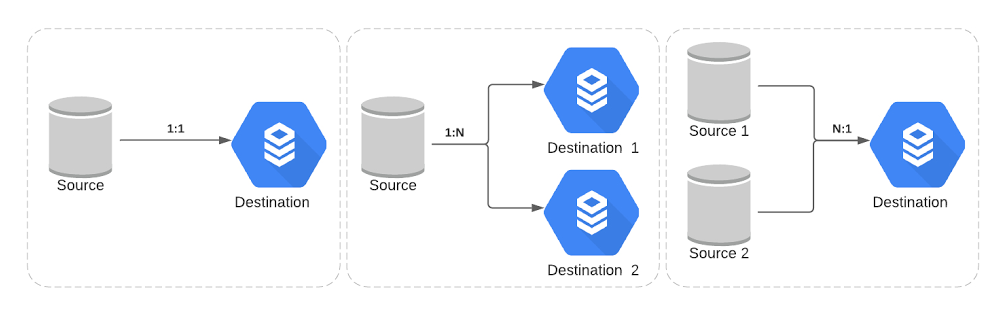
When Broadcom completed its Symantec Enterprise Security Business acquisition in late 2019, the company made a strategic decision to move its Symantec workloads to Google Cloud, including its Symantec Endpoint Security Complete product. This is the cloud-managed SaaS version of Symantec’s endpoint protection, which provides protection, detection and response capabilities against advanced threats at scale across traditional and mobile endpoints.To move the workloads without user disruption, Broadcom needed to migrate terabytes of data, across multiple databases, to Google Cloud. In this blog, we’ll explore several approaches to continuously migrating terabyte-scale data to Cloud SQL and how Broadcom planned and executed this large migration while keeping their downtime minimal.Broadcom’s data migration requirementsTerabyte scale: The primary requirement was to migrate 40+ MySQL databases with a total size of more than 10 TB. Minimal downtime: The database cutover downtime needed to be less than 10 minutes due to SLA requirements.Granular schema selection: There was also a need for replication pipeline filters to selectively include and exclude tables and/or databases. Multi-source and multi-destination: Traditional single source and single destination replication scenarios didn’t suffice here—see some of Broadcom’s complex scenarios below:How to set up continuous data migration Below are the steps that Broadcom followed to migrate databases onto Google Cloud:Step 1: One-time dump and restoreBroadcom leveraged the mydumper/myloader tool for the initial snapshot over the native mysqldump, as this tool provided support for multithreaded parallel dumps and restores.Step 2: Continuous replication pipelineGoogle offers two approaches to achieve continuous replication for data migration:Approach A: Database Migration ServiceGoogle recently launched this managed service to migrate data to Cloud SQL from an external source, such as on-premises or another cloud provider. It streamlines the networking workflow, manages the initial snapshot and ongoing replication, and provides the status of the migration operation. Approach B: External Server ReplicationThis process enables data from the source database server—the primary— to be continuously copied to another database—the secondary. Check out Best Practices for Migrating to Cloud SQL for MySQL video for more information.How Broadcom migrated databasesTo handle Broadcom’s unique requirements and to give a finer level of control during the data migration, Broadcom and Google Cloud’s Professional Services team jointly decided on approach B, augmented with a set of custom set of wrapped stored procedures.Here’s a look at the solution diagram highlighting the process for data migration:These are the steps followed for the data migration at Broadcom:Clone the source database Take Dump of a source database and upload it to Google Cloud StorageProvision compute instances and install tools such as mydumper, Cloud Storage clientInitiate parallel dump operation using mydumperEncrypt dump and upload to Cloud Storage bucketProvision the Cloud SQL and Restore the dumpProvision compute instances and install tools such as myloaderDownload dump from Google Cloud Storage bucket and decrypt itInitiate parallel restore operation using myloaderConfigure External Server Replication using the Stored Procedure Update Cloud SQL configuration to be read-replica Set up external primary replication pipeline along with table and/or database level filters Configure optimized parameter for replicationDatabase CutoverPassivate upstream services traffic to the database to allow read replica lag to catch upWhen replication lag is zero, promote the Cloud SQL read replica to master and cut over the upstream traffic from the original source to the Cloud SQL instanceSome additional data security and integrity considerations for the data migration:Communication between source to destination should be over a private network through VPC peering for ongoing replication traffic, so that none of traffic leaves the private VPC boundary.Data at rest and in transit should be encrypted with support for TLS/SSL.Large-scale migration requires full automation for repeated reliability and can be achieved via Ansible automation framework. Also, automate data integrity checks between source and destination databases.Ability to detect and recover from failure point in restoration and replication.Learn more about Cloud SQL.Related ArticlePreparing your MySQL database for migration with Database Migration ServiceRecently, we announced the new Database Migration Service (DMS) to make it easier to migrate databases to Google Cloud. DMS is an easy-to…Read Article
Quelle: Google Cloud Platform

Optimizing object storage costs in Google Cloud: location and classes

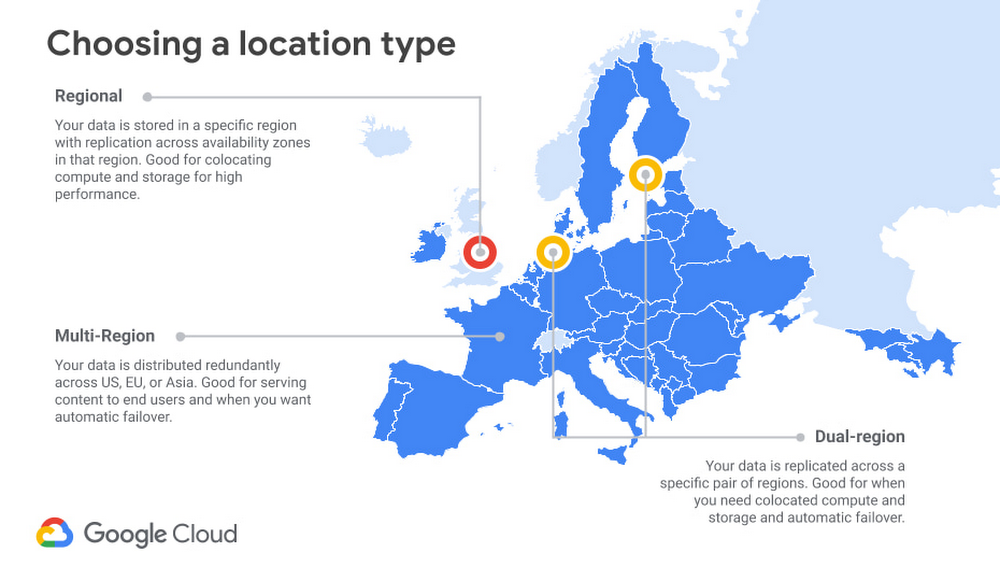
Storage is a critical component of any cloud-based infrastructure. Without a place to store and serve your data, databases won’t work, compute can’t run, and networks have nowhere to put the data they’re carrying. Storage is one of the top three cloud expenses for many customers, and most companies’ storage needs are only growing. It’s no surprise that customers ask us how to optimize their storage costs. The vast majority of cloud storage environments use object storage, as opposed to the file or block storage used in most on-prem environments. Google Cloud’s object storage offering, Cloud Storage, is good for bulk storage of large amounts of data. Object storage is inherently “unstructured” (key-value pairs, with very large values), but the files stored within may be binary data, text data, or even specialized data formats like Apache Parquet or Avro. At a penny or less per gigabyte, object storage is the cheapest and most scalable solution for the bulk of your data. But even though object storage pricing is low, costs can add up. For an organization with many workloads running, and changing needs over time, it can be challenging to optimize cloud storage needs (and costs) for each new or newly migrated application.You can save on cloud storage in a number of ways. How you do so depends on a range of factors, including your data lifecycle needs, retrieval patterns, governance requirements, and more. This blog is the first in a series on how to save money on object storage in Google Cloud. We’ll start by focusing on two of the biggest decisions you can make, namely, the Google Cloud regions where you store the data, and the storage class options that you can select.Start with the right configurationYour first opportunity to save on object storage is when you initially set up the bucket. Setting up storage is easy, but there are a few key decisions to make. Some of those choices, like storage location, become difficult and time consuming to change as the amount of data you are storing increases, so it is important to make the right decision for your needs.LocationChoosing a storage location is about balancing between cost, performance, and availability, with regional storage costing the least, and increasing for dual- or multi-region configurations.In general, regional storage has the lowest availability, because it is limited to, as the name implies, a single region. The data is still highly available. With single region storage, data is redundantly stored across multiple zones in the region (see this page for more about Google Cloud regions and zones). Google Cloud’s systems are designed to isolate failures within a zone. Dual-region and multi-region storage provide even greater availability, since there are now multiple regions (with multiple zones in each) that can serve requests, providing access to data even upon the unlikely event of a region-wide outage.In terms of performance, picking a location for your storage is a complex topic. In general, pinning your data to a region (either by selecting regional or dual-region locations) will offer important performance gains when readers and writers are co-located in the same region. For example, if your workloads are hosted in a single Google Cloud region, you may want to ensure that your object storage is located in the same region to minimize the number of network hops. Alternately, if you have on-premises workloads using Cloud Storage for reads and writes, you may want to use a dedicated regional interconnect to reduce your overall bandwidth consumption and to improve performance. Multi-region storage, conversely, will normally offer good performance for directly serving traffic to a very large geographic area, such as Europe or North America, with or without Cloud CDN. Many applications, particularly consumer-facing applications, will need to account for “last mile” latency between the cloud region and the end-user. In these situations, architects may find more value in multi-region storage, which offers very high availability and cost savings over dual-region storage. As to cost, regional storage is the lowest priced option. Dual-regions are the most expensive, as they are effectively two regional buckets with shared metadata, plus the attendant location pinning and high performance. Multi-regions are priced in the middle, as Google is able to store data more economically by retaining the flexibility of choosing where to place the data. Roughly, for every $1 of regional storage, expect to pay ~$1.30 for multi-region, and ~$2 for dual-region storage of any given class.Since these are significant multipliers, it’s important to think strategically about location for your Cloud Storage buckets. Some services create buckets in the US multi-region by default, but don’t blindly accept the default. Consider your performance and availability requirements, and don’t pay for more geo-redundancy and availability than you need.Storage classOnce you’ve picked a location for your Cloud Storage buckets, you need to choose a default storage class. Google Cloud offers four classes: Standard, Nearline, Coldline, and Archive. Each class is ideal for a different data retrieval profile, and the default class will automatically apply to all writes without a class specified. For greater precision, storage class can be defined on each individual object in the bucket. At the object level, storage class can be changed either by rewriting the object or using Object Lifecycle Management. (We’ll talk more about lifecycle management in a future blog in this series.)Storage pricing is for on-demand usage, but there’s still an implicit “contract” in the price that helps you get the best deal for your use case. In the case of “hot” or “standard” storage, the contract has a higher per-GB monthly storage price, but there are no additional per-GB fees for retrieval or early deletion. For “cooler” storage classes, your monthly per-GB storage costs can be much lower, and you will need to consider per-GB fees for retrieval and for early deletion. Your goal is to choose a default storage class which will generate the lowest total cost for your use case most of the time. A long-term view (or forecast) is important.To start, the guidelines we give in our documentation are safe bets:Standard: Access regularly, no retention minimum. This is “hot” data.Nearline: Access less than once a month, retain for more than a month.Coldline: Access less than once a quarter, retain for more than a quarter.Archive: Access less than once a year, retain for more than a year.But what if your data access retrievals vary? Many Cloud Storage users retain data for more than a year (if not indefinitely), so we won’t complicate the analysis with early deletion costs. (In other words, this analysis assumes you will retain all data for more than a year.) However, for retrieval costs, if you have a borderline case, a mixture of cases that you can’t easily predict, or just want to be more precise, you can use the following formula to find the breakeven point for access frequency between two storage classes.Where: hs = Gigabyte-month storage cost for the “hotter” classcs = Gigabyte-month storage cost for the “colder” classcr = Gigabyte retrieval cost for the “colder” class(hs – cs) / cr  = Portion of data read each month at the breakeven pointFor example, consider Standard vs Nearline Regional storage in us-central1 (prices as of January, 2021):(0.02GB/m – 0.01GB/m) / 0.01GB = 1.0/m = 100% per monthThis means that you could read up to 100% of the amount of data you store in Nearline once each month and still break even. Keep in mind, however, two caveats to this calculation:Repeat reads also count. If you read 1% of your data 100 times in the month, that would be just like reading 100% of the data exactly once. This calculation assumes larger (10s of MBs or greater) average object size. If you have very small files, operations costs will impact the calculation. Nonetheless, if you’re reading any less than 100% of the amount you stored and don’t have tiny objects (more on that below), you could likely save money just by using Nearline storage.For a visualization of this trend across all our storage classes, here’s a chart showing storage and retention costs for us-central1 (Iowa) Regional storage classes. These trends will be similar in all locations, but the “Best Rate” inflection points will differ.Assuming, again, that you plan to keep your data for one year or longer, you want your storage class selections to follow the “Best Rate” dotted line shown above. In this case, the inflection points for data read exactly once per month are at about 10%, 60%, and 100% for Archive, Coldline, and Nearline, respectively. Another way to think about this is that if you access less than 10% of your data or less exactly once per month, Archive is the most cost-effective option. If you access between 10% and 60% of your data exactly once per month, Coldline is the cost-optimized choice. And if you expect to access between 60% and 100% of your data exactly once per month, Nearline is the lowest-cost storage class. Standard storage will be the best option if you access 100% of your data or more exactly once per month; this makes it a good choice if you have frequently accessed data with many repeat reads.ConclusionObject storage plays a significant role in cloud applications, and enterprises with large cloud storage footprints must keep an eye on their object storage costs. Google’s object storage offering, Cloud Storage, offers many different avenues to help customers optimize their storage costs. In this blog, the first of a series, we shared some guidance on two of the most important avenues: storage location and storage class. Storage location and storage class are defined at the creation of your bucket, and each option offers different tradeoffs. Our guidance above is designed to help you make the right choice for your storage requirements.For more information about Cloud Storage and how to get started, see our how-to guides, and stay tuned for additional blog posts on optimizing object storage costs for retrieval patterns and lifecycle management.
Quelle: Google Cloud Platform

Reclaim time and talent with AppSheet Automation

Digital transformation has been an enterprise priority for years, butrecent Google Cloud research reinforces that the mandate is more pressing today than ever, with most companies increasing their technology investments over the last year.  While there are many dependencies shaping the future of work, the challenge is to leverage technology to support shifting work cultures. Automation is the rallying point for this goal. According to research firm Forrester, “Automation has been a major force reshaping work since long before the pandemic; now, it’s taking on a new urgency in the context of business risk and resiliency…  As we emerge from the crisis, firms will look to automation as a way to mitigate the risks that future crises pose to the supply and productivity of human workers.”1Last fall, we announced early access for AppSheet Automation, a significant addition to AppSheet, our no-code development platform, that leverages Google AI to make it easier to automate business processes. Today, as part of our mission to further support the future of work, we are making AppSheet Automation generally available (GA). AppSheet Automation empowers even those without coding skills to reshape their own work with powerful new features including smarter extraction of structured data from documents and compatibility with a wider range of data sources like Google Workspace Sheets and Drive.AppSheet Automation eliminates busyworkBy making it easier to automate business processes, AppSheet Automation helps enterprises reduce IT backlogs and save money, while addressing possibly the most pervasive talent headache of all: busywork associated with manual tasks. A recent survey of AppSheet Automation early adopters found that 64% of those leveraging AppSheet Automation were able to focus on high-impact work rather than manual tasks. By harnessing the power of automation, talent can reclaim lost time while providing more space for high impact work. Manually entering receipt data or tracking down paper copies is time consuming, for example. But with AppSheet Automation’s Intelligent Document Processing feature, these tasks no longer need to be inefficient. Unstructured data such as invoices, receipts, and W-9s can be automatically extracted from documents, all thanks to Google Cloud’s Document AI. Process automations such as these help organizations to reclaim time and talent spent on repetitive tasks, empowering a company’s talent to spend more time on strategic and impactful work.Extract unstructured data with Intelligent Document ProcessingGrowing adoption of AppSheet Automation Enterprise customers from around the world in a variety of industries are already using Google Cloud’s no-code application development platform, AppSheet, to empower their employees to build powerful business applications. Globe Telecom, a leading full-service telecommunications company in the Philippines, has built more than 50 business apps, within 8 weeks, with AppSheet, for example. “We’ve always been on the lookout for grassroots innovations among our employees at Globe. It is something that we’re very keen on cultivating for our people. AppSheet gave us this flexibility – the perfect tool to mine these innovative minds. It allows us to quickly execute and transform how business is done and improve how we serve our customers,” said Carlo Malana, Chief Information Officer at Globe. Similarly EBSCO, one of the largest privately held, family-owned companies in the United States, has been working to discover how the union of no-code app development and smarter automation capabilities can increase workforce efficiency. They have been using AppSheet Automation for tasks ranging from auto-ingesting W9s during employee onboarding to eliminating process gaps. “AppSheet Automation lays the groundwork for many automation projects to come, which will increase the speed of deployment, as well as provide better insight into automation processes, as the build process forces you to visually lay it out,” said Matthew Brown, IT Architect at EBSCO.Improving workforce collaboration with AppSheet AutomationWith this GA announcement, we are extending AppSheet Automation’s data source eventing support beyond Salesforce to also include Google Workspace Sheets and Drive, which will make collaboration even easier while keeping IT governance and security top of mind.Looking ahead, we’re also building the ability to embed rich AppSheet views in Gmail to perform approvals on the go. This will allow users to perform process approvals without having to leave their current interface and helps save time.A look towards the future with app views accessible within GmailAs automation extends the power of no-code, organizations around the globe will find new and creative ways to engage with their workforce. Technologies such as AppSheet empower the people working within today’s highly distracted business landscape, helping them to spend more time on the work that matters and to do things they couldn’t do before. We believe this human-centric approach, which balances the needs of line-of-business workers with required IT governance and security, is important to supporting enterprises to become both more empathetic and efficient, and we’re thrilled to see how you use AppSheet’s new automation features. Ready to join the conversation? Start building for free and join our AppSheet Creator Community to engage with Creators from around the world. 1. Forrester Research, The COVID-19 Crisis Will Accelerate Enterprise Automation Plans, May 5, 2020
Quelle: Google Cloud Platform

Introducing SAP Integration with Cloud Data Fusion

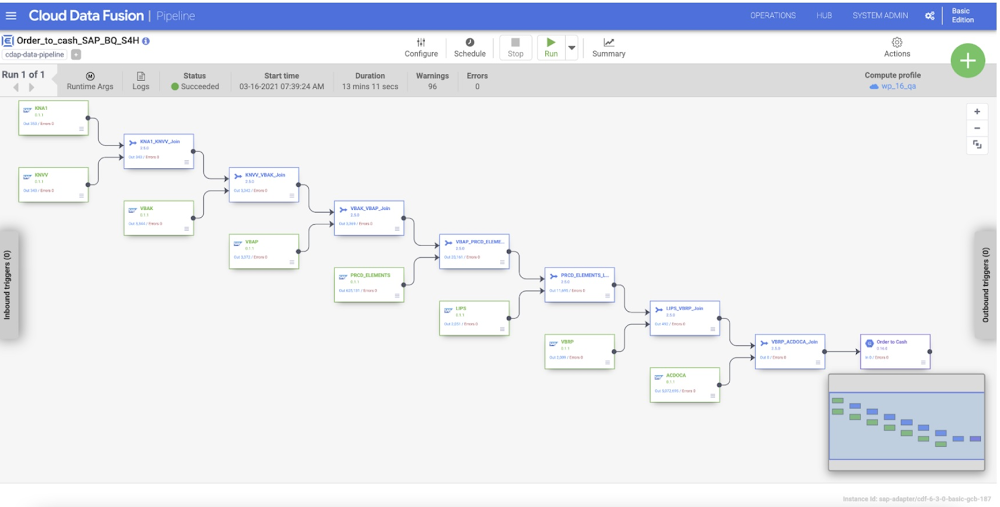
Businesses today have a growing demand for data analysis and insight-based action. More often than not, the valuable data driving these actions is in mission critical operational systems. Among all the applications that are in the market today, SAP is the leading provider of ERP software and Google Cloud is introducing integration with SAP to help unlock the value of SAP data quickly and easily. Google Cloud native data integration platform Cloud Data Fusion now offers the capability to seamlessly get data out of SAP Business Suite, SAP ERP and S/4HANA. Cloud Data Fusion is a fully managed, cloud-native data integration and ingestion service that helps ETL developers, data engineers and business analysts efficiently build and manage ETL/ELT pipelines that accelerate the building of data warehouses, data marts, and data lakes on BigQuery or operational reporting systems on CloudSQL, Spanner or other systems. To simplify the unlocking of SAP data, today we’re announcing the public launch of the SAP Table Batch Source. With this capability, you can now use Cloud Data Fusion to easily integrate SAP application data to gain invaluable insights via Looker. You can also leverage the best in class machine learning products on Google Cloud to help you gain insight into your business by combining SAP data with other datasets. Some examples include running machine learning on IoT data joined with ERP transactional data to do predictive maintenance, application to application integration with SAP and CloudSQL based applications, fraud detection, spend analytics, demand forecasting etc.Let’s take a closer look at the benefits of the SAP Table Batch Source in Cloud Data Fusion:Developer ProductivityAs Cloud Data Fusion is a complete, visual environment, users can use the Pipeline Studio to quickly design pipelines that read from SAP ECC or S/4HANA. With Data Fusion’s prebuilt transformations, you can easily join data from SAP and non SAP systems, and perform complex transformations like data cleansing, aggregations, data preparation, and lookups to rapidly get insights from the data. Time to ValueIn traditional approaches, users are forced to define models on data warehousing systems. In Cloud Data Fusion, this is automatically performed for the users when using BigQuery. After you design and execute a data pipeline that writes to BigQuery, Data Fusion auto generates the schema in BigQuery for you. As users don’t need to pre build models, you get insight into your data faster, which results in improved productivity  for your organization.Performance and ScalabilityCloud Data Fusion scales horizontally to  execute pipelines. Users can leverage the ephemeral clusters or dedicated clusters to run the pipelines. The SAP Batch Source plugin automatically tunes the data pipelines for optimal performance when it extracts data from your SAP systems, based on both SAP application server resources and Cloud Data Fusion runtime resources. If parallelism is misconfigured, a failsafe mechanism in the plugin prevents any issues in your source system.How does SAP Table Batch Source work?Transfer full table data from SAP to BigQuery or other systemsIn the Pipeline Studio, you can add multiple SAP source tables to a data pipeline, and then join the other SAP source tables with joiner transformations. As the joiner is executed in the Cloud Data Fusion processing layer, there is no additional impact on the SAP system.  For example, To create a Customer Master data mart, you can join all relevant tables from SAP using the plugin, and then build complex pipelines for that data in Cloud Data Fusion’s Pipeline Studio. Extract table records in parallelTo extract records in parallel, you can configure the SAP Table Batch Source plugin using the Number of Splits to Generate property. If this property is left blank, the system determines the appropriate value for optimal performance. Extract records based on conditionsThe SAP Table Batch source plugin allows you to specify filter conditions by using the property Filter Options.  You specify the conditions in OpenSQL syntax. The plugin uses the SQL WHERE clause to filter the tables. Records can be extracted based on conditions like certain columns having a defined set of values or a range of values.  You can also specify complex conditions that combine multiple conditions with AND or OR clauses (e.g. TIMESTAMP >= ‘ 20210130100000′ AND TIMESTAMP <= ‘ 20210226000000′).Limit the number of records to be extractedUsers can also limit the number for records extracted from the specified table by using the property Number of Rows to Fetch. This is particularly useful in development and testing scenarios.Maximizing the returns on dataWith Google Cloud Platform, you can already scale and process huge amounts of social, operational, transaction and IoT data to extract value and gain rapid insights. Cloud Data Fusion provides many connectors to existing enterprise applications and data warehouses. With the native capabilities to unlock SAP data with Cloud Data Fusion into BigQuery, you can now go a step further and get more by driving rapid and intelligent decision making.Ready to try out the SAP Table Batch connector? Create a new instance of Data Fusion and deploy the SAP plugin from the Hub. Please refer to the SAP Table Batch Source user guide for additional details. To learn more about how leading companies are powering innovation with our data solutions including data integration, check out Google Cloud’s Data Cloud Summit on May 26th.
Quelle: Google Cloud Platform

Introducing Cloud CISO perspectives

Since I joined Google Cloud as Chief Information Security Officer three short months ago, I’ve seen firsthand the unique point of view we have to improve security for our customers and society at large through the cloud. I started in this new role as the security industry was rattled by a major breach impacting the software supply chain, and I was reminded of one of the reasons I joined Google – the opportunity to push the industry forward in addressing challenging security issues and helping lay the foundation for a more secure future. Today, I’m excited to begin a new blog series that we will use to share our perspectives on the biggest announcements and trends in cybersecurity from Google Cloud and from across the industry – whether it’s conference highlights, new research or achievements from our Google-wide security teams. My hope is this series serves as your one-stop-shop to learn about our most important security updates and why they matter straight from a CISO’s perspective. Thoughts from around the industryGlobal Supply Chains in the Era of COVID-19 – Last month, I participated in a Council on Foreign Relations panel about the supply chain risks brought on by the COVID-19 pandemic. One of the biggest takeaways is the need for organizations and governments to discuss the ongoing steady state of risk management of supply chains as they exist today, such as risk mapping across a global supply chain. Just as physical supply chains have to prepare for natural risks, every supply chain has a digital element that could be disrupted and requires thinking through cyber prevention measures. IDC Multicloud Paper – We supported IDC in their work to investigate how multicloud can help regulated organizations mitigate risks of using a single cloud vendor. The paper looks at different approaches to multi-vendor and hybrid clouds taken by European organizations and how these strategies can help organizations address concentration risk and vendor-lock in, improve their compliance posture and demonstrate an exit strategy.Operational resilience is a key area of focus for financial services firms, and regulators around the world have been evolving their guidance on the use of outsourcers, including cloud service providers, in this context. We’ve worked closely with our FSI customers in this area and as a result produced a new paper on how migrating to cloud can help ensure the operational resilience required by customers, shareholders and regulators.#ShareTheMicInCyber – We celebrated an important industry effort called  #ShareTheMicInCyber for Women’s History Month, co-founded by one of our very own Googlers Camille Stewart. The benefits of DEI apply in all domains, but especially cyber, where we’ve learned first hand that diverse security teams are more innovative, produce better products and enhance our ability to defend against cyber threats. Google security corner Spectre proof-of-concept – Google’s security team published results from recent research on the exploitability of Spectre against web users. The research presented proof-of-concept (PoC) written in JavaScript which could leak information from a browser’s memory. There is immense value in sharing these types of findings with the security community. Additionally the team’s work highlighted protections available to web authors and best practices for enabling them in web applications, based on our experience across Google.Open Source Security – We continue to see tremendous activity and support for the work of the Open Source Security Foundation that Google helped establish. Membership is open to all to help drive security on many critical projects. Learn how to get involved here. We also welcomed the announcement of sigstore, a new project in the Linux Foundation that aims to improve software supply chain integrity and verification.Google Cloud security highlights Our Cloud security teams have been busy this quarter. We hit major milestones with product announcements like BeyondCorp Enterprise, Risk Protection Program and launched our new Google Cloud Security podcast. Here are some of my biggest takeaways:BeyondCorp Enterprise – Earlier this year, we announced our comprehensive zero-trust offering, BeyondCorp Enterprise, that brings our modern, proven BeyondCorp technology to organizations so they can get started on their own zero trust journey. Trusted Cloud- We outlined our vision to deliver a truly trusted Cloud built on three pillars: transparency and sovereignty, zero trust, and shared fate.Risk Protection Program – Google Cloud announced a partnership with two leading insurers to provide specialized cybersecurity insurance coverage for Google Cloud customers who adhere to specific security best practices and provide automated documentation of their security posture through our platform.Active Assist account security recommendations – Active Assist provides recommendations for our users on how to optimize their cloud deployments. We launched a new “Account security” recommender that will automatically detect when a user with elevated permissions, such as a Project Owner is not using strong authentication. They will see a notification prompting them to enable their phone as a phishing-resistant second factor, helping to further protect their account. New Security Best Practices documentation – We released two new comprehensive papers: A CISO’s Guide to Cloud Security Transformation and updated our Google Cloud security foundations guide.Over the next few months, we’ll be busy working on a number of new papers on cloud risk management for Risk and Compliance Officers and Heads of IT Audit as well some pieces on reimagining the Security Operations Center of the future. Thanks for checking out our first post in a series of many. I look forward to sharing more CISO perspectives with you soon.
Quelle: Google Cloud Platform

From the kitchen to the Maison to low orbit: 3 surprising Google Cloud stories from this week

A new era of cloud computing is upon us, and organizations of all shapes and sizes are building their transformation clouds to create what’s next. You can see this manifesting everywhere—including in a few places you might not immediately expect. Back in December, we published a story about using Google Cloud AI to create baking recipes. This resulted in Mars, Inc. approaching us for a Maltesers + AI kitchen collaboration featuring our very own Sara Robinson, co-author of our original blog post. Maltesers are a popular British candy made by Mars that have an airy malted milk center with a delicious chocolate coating. We saw this opportunity as a way to partner with a storied and innovative company like Mars and also a chance to showcase the magic that can happen when AI and humans work together. Find out what happened, and even try the recipe.Maison Cartier is globally renowned for the timeless design of its jewelry and watchmaking creations. And while it prides itself on the vastness of its collection, manually browsing its catalog to find specific models, or comparing several models at once, could sometimes take quite some time for a sales associate at one of the Maison’s 265 boutiques. This was not ideal for a brand that is known for its swift and efficient client service. Thus, in 2020, Cartier turned to Google Cloud and its advanced AI and machine learning capabilities for a solution. This week, we shared how we helped the Maison create an app that enables boutique teams to take a picture of a desired watch model (or use any existing photo of it as reference) and quickly find its equivalent product page online. Learn how they did it.Satellites play a critical role in our daily lives, whether its studying the Earth’s weather and environment, helping people and things communicate in remote locations, or monitoring critical infrastructure. Many new satellites are launched into low Earth orbit (LEO), which requires a worldwide network of antennas to operate. Ground Station-as-a-Service (GSaaS) companies such as Leaf Space give satellite operators the ability to lease time on a ground network, and when a satellite is within its field of view, use Leaf Space’s antennas and other equipment to communicate between the satellite and ground. Leaf Space built their GSaaS solution on Google Cloud, and you can learn the nitty gritty on how they did it in this blog post.Leaf Space Control CenterThat’s a wrap for this week. Stay tuned for more transformation cloud stories in the weeks ahead.Related ArticleThis bears repeating: Introducing the Echo subsea cableThe new Echo subsea cable will run from the U.S. to Singapore with a stop-over in Guam, and with plans to land in Indonesia.Read Article
Quelle: Google Cloud Platform