How to automate with AppSheet Automation

AppSheet Automation is now generally available, and in this article, we’ll explore how you can build your first automation bot, all without writing a single line of code. This brief tutorial, using the use case of onboarding new employees, will explain how you can automate the process with AppSheet Automation. This same framework could be applied to any use case that involves auto-generating an email when a new entry is added to your data source; be it engaging new subscribers to your side hustle blog, or to schedule an email for a recent work order request.  Before you begin, you will need an app in which to frame your automation. You can use one you’ve already built or you can get started with this sample app (Select “Copy and customize” option, choose a name for your app). Automating any process within your application, in this case onboarding new employees, involves three simple steps.1. Creating a bot 2. Configuring the event and process3. Testing your botWe’ve included a video below that explains exactly what these components are and how they work together.Step 1: Creating a botFollow the steps below to create a new bot:1. From the AppSheet UI, click on “Automation” from the left menu, navigate to the Bots tab and click on + New Bot. 2. Type ”employee send email” into the dialog, which will trigger suggested bots to appear, as shown in the image below.3. Select the highlighted suggestion above “When a new New Employees record is created, send an email” (Click on Create a custom bot if you don’t see any suggestions and follow along instructions on the video to manually create your bot).4. At this point a completely implemented bot is ready to get to work. Let’s tweak some settings so it sends the email to the right email address.Step 2: Configuring the event and processA bot has two main components: An event (when something happens) and a process (perform a sequence of tasks). Event:1. Click on the event and its definition should render in the settings pane to the right.2. If it looks like this (below) you are good to go to the next step.Process:1. Click on the “send an email” step in the process and its definition should render in the settings pane to the right.2. Click on the “Go to: Task” link at the bottom of the settings pane to navigate to the task definition.3. You can leverage the full expressive power of the platform to customize and format the email content including using templates. Refer to the table below for the rest of the task configuration:Your task should now look like this:4. Click Save to save all your changes.5. Let go ahead and deploy your app. Click on the blue “Not Deployed” icon on the top left of your screen and go through the deployment wizard to deploy your app. Your app should show the green “Deployed” state as follows:6. You are all done configuring your bot.Step 3: See your bot in actionNow that you are done building the bot, let’s take it for a spin. 1. Click the mobile device icon on the top left of the right hand pane to see the “New Employees” view (alternatively you can navigate from the left hand menu to UX → Primary Views → New Employees)2. Click on the big blue  “+” icon to create a new employees record. Add employee details (make sure to add your own email address) → Click Save → This new record should sync automatically (if not click on the red  icon on the top right to perform a sync.)3. You should get an welcome email to the email address you entered in the previous step. Note – In addition to adding employees via the app, you can also configure this bot to send an email  if data in the underlying sheet is updated directly. To do that you will need to ensure that Sheets is configured correctly for external eventing. This video will take you through that process. Congratulations! You have just created and enabled your very first bot, without writing a single line of code . From here, just ensure your application has been deployed, and your bots will do the rest while you reclaim your time. If you run into any issues building your automation bot, check out our help articles or ask a question on the AppSheet Community.Ready to use AppSheet Automation? Get started now.Related ArticleReclaim time and talent with AppSheet AutomationAppSheet Automation, a significant addition to AppSheet, our no-code development platform, leverages Google AI to empower even those with…Read Article
Quelle: Google Cloud Platform

Creating safer cloud journeys with new security features and guidance for Google Cloud and Workspace

One of the core benefits of using cloud technology to help modernize your security program is the ever-growing set of provider capabilities that you can use to protect your users, applications, and data. As part of our commitment to be our customers’ most Trusted Cloud, we’re constantly adding new security features to Google Cloud and Google Workspace, as well as helpful guidance on how to solve security challenges and improve your security posture with the help of our tools. We’ve got a bundle of new security features, whitepapers and demos to announce today, which can all help to create safer cloud journeys with Google:  Customize your application’s authentication flows using Identity PlatformIdentity Platform is our customer identity and access management solution that allows you to add IAM functionality to your applications. We are excited to announce the general availability of blocking functions, a feature that allows you to customize your application’s identity flows. Blocking functions work as a hook and trigger system, allowing you to set hooks for certain user authentication events using Node.js code in Google Cloud Functions and trigger functions in response to these events.Here are few examples of situations where blocking functions are particularly useful: Your application allows email/password based self-registration for users, but you want to block users with bad email domains from signing up to your app. When a user signs-up or signs-in to your application, you want to assign them a role such as `admin` or `premium_user` and use it to control privileged access to your appYou want to use additional information found in the OAuth token issued by the federation Identity Provider (ID, Access, and Refresh tokens) for additional access enforcement to your database, such as country code, geo-location or other such claims about the userUpdate or enrich the user profile with additional information you progressively profiled from the user, such as their phone number, location, language preference etc., and save them to the user record in the Identity Platform database.Blocking functions run synchronously and will block the underlying events from completing until the function responds—allowing you  to modify authentication events in real-time.Configuring blocking functions in Identity PlatformLearn more about Identity Platform and blocking functions by visiting the documentation page.Cloud DLP Sensitive Document AnalysisSometimes just knowing the format of a piece of data can tell us that the document it’s part of is sensitive; source code, account numbers, or financial documents for example. Cloud Data Loss Prevention (DLP) now offers a new set of AI/ML powered document classifiers that can help you identify sensitive document types; sensitive document infoTypes.Findings from sensitive document infoTypesUsed alone or in combination with personally identifiable information (PII) or enterprise credentials and secrets inspection, this new feature of Cloud DLP can help you discover, better understand, and protect your sensitive data. See the DLP product page and review our DLP UI demo to learn more and get started. Cloud EKM supports additional services (Cloud SQL, GKE and others)In early 2020 we launched Cloud External Key Manager (Cloud EKM), the industry’s leading Hold-Your-Own-Key (HYOK) product. Using Cloud EKM, the keys used to protect your data stored and processed in Google Cloud are completely hosted and managed outside of Google Cloud infrastructure. Cloud EKM initially launched with support for BigQuery and GCE/PD;  we’re excited to expand support for Cloud SQL, GKE, Dataflow Shuffle, and Secret Manager, with CMEK support currently in beta.  Cloud Spanner is now also supported by CMEK. You can now have even more control over how you protect your data-at-rest in those services.  See the Cloud EKM documentation for more information.VPC-SC directional policies As organizations plan cloud migrations, they often find that familiar security strategies, such as using firewalls to segment applications aren’t applicable when those apps are re-architected to take advantage of managed cloud services like databases or storage buckets. With VPC Service Controls (VPC-SC), administrators can define a security perimeter around Google-managed services to control communication to and between those services. Using VPC-SC, you can isolate your production GCP resources from unauthorized VPC networks or the internet, and isolate both production GCP resources and production VPC networks from unauthorized GCP resources. But what if you need to transfer data between isolated environments that you’ve set up? VPC-SC directional policies is a new secure data exchange feature that allows you to configure efficient, private, and secure data exchange between isolated environments. Policies can be applied on ingress or egress from a VPC Service Controls perimeter and can be configured for existing perimeters or included when a new perimeter is created. It further improves context-based access control for GCP resources where context can include network origin (IP address or VPC network), identity type (service account or user), identity, and device attributes.With VPC-SC directional policies, you can:Efficiently exchange data across organizations with fine-grained direction controls to minimize data exfiltration risks. Constrain identity types or identities that can be used given a source network, IP address or device for both ingress and egressEnsure that clients in less privileged segments do not have access to GCP resources in more privileged segments; while allowing access in the other direction. Check out the documentation to see how to take advantage of this new capability.New whitepapers on Certificate Authority (CAS) and External Key Manager (EKM)We continue to provide documentation to help customers and prospects understand how to use our cloud security services and how to simplify deployment for real-world use cases. Today we are releasing two new whitepapers about our Certificate Authority Service that serve those needs.“Scaling certificate management with Google Certificate Authority Service” (written by Andrew Lance of Sidechain, Anton Chuvakin and Anoosh Saboori of Google Cloud) focuses on CAS as a modern certificate authority service and showcases key use cases for CAS. “How to deploy a secure and reliable public key infrastructure with Google Cloud Certificate Authority Service” (written by Mark Cooper of PKI Solutions and Anoosh Saboori of Google Cloud ) covers security and architectural recommendations to organizations for the use of the Google CAS and describes critical concepts to securing and deploying a PKI based on CAS.Also, as we shared in our blog “The cloud trust paradox: To trust cloud computing more, you need the ability to trust it less” and then in “The cloud trust paradox: 3 scenarios where keeping encryption keys off the cloud may be necessary”, we’ve been working on letting customers use Google Cloud without trusting us with their encryption keys. To help further this initiative, we are releasing a new resource focused on Cloud External Key Manager (Cloud EKM), our technology for Hold Your Own Key (HYOK). The whitepaper is focused on the origin of the idea, the functionality, architecture and use cases for Cloud EKM. It is written by Andrew Lance of Sidechain, and Anton Chuvakin of Google Cloud.Enhancements to Vault for Google WorkspaceGoogle Vault is a powerful information governance and eDiscovery tool for Google Workspace. Vault got a new look late last year, with a redesigned interface that makes it easier and faster to navigate through the tool. Some enhancements that can help you be more productive in Vault include new sortable, filterable tables for custom retention rules, holds, and search results, and step-by-step flows with added tooltips when you set up retention rules and holds.Custom rules are now listed in a sortable, filterable tableNext, Vault now supports Google Voice data, which means you can use Vault to retain, hold, search, and export Google Voice data including text messages, call logs, voicemails, and voicemail transcripts. By expanding Vault’s coverage to Google Voice, customers can use Vault’s information governance, eDiscovery, and auditing capabilities to help meet their regulatory and legal obligations for that data.Creating a custom retention rule for Google Voice in the new Vault interfaceNew Google Cloud Security Showcase videosThe Google Cloud Security Showcase is a video resource that’s focused on solving security problems and helping you create a safer cloud deployment. With more than 50 step-by-step videos on specific security challenges or use cases, there’s something for every security professional. We’ve added 4 new use-case based videos this month:These announcements show how we continue to work to be your most Trusted Cloud. To learn more about Google Cloud’s security vision and understand how to implement cutting-edge security technology in your organization, tune into the latest installment of our Google Cloud Security Talks on May 12th.
Quelle: Google Cloud Platform

Agent installation options for Google Cloud VMs

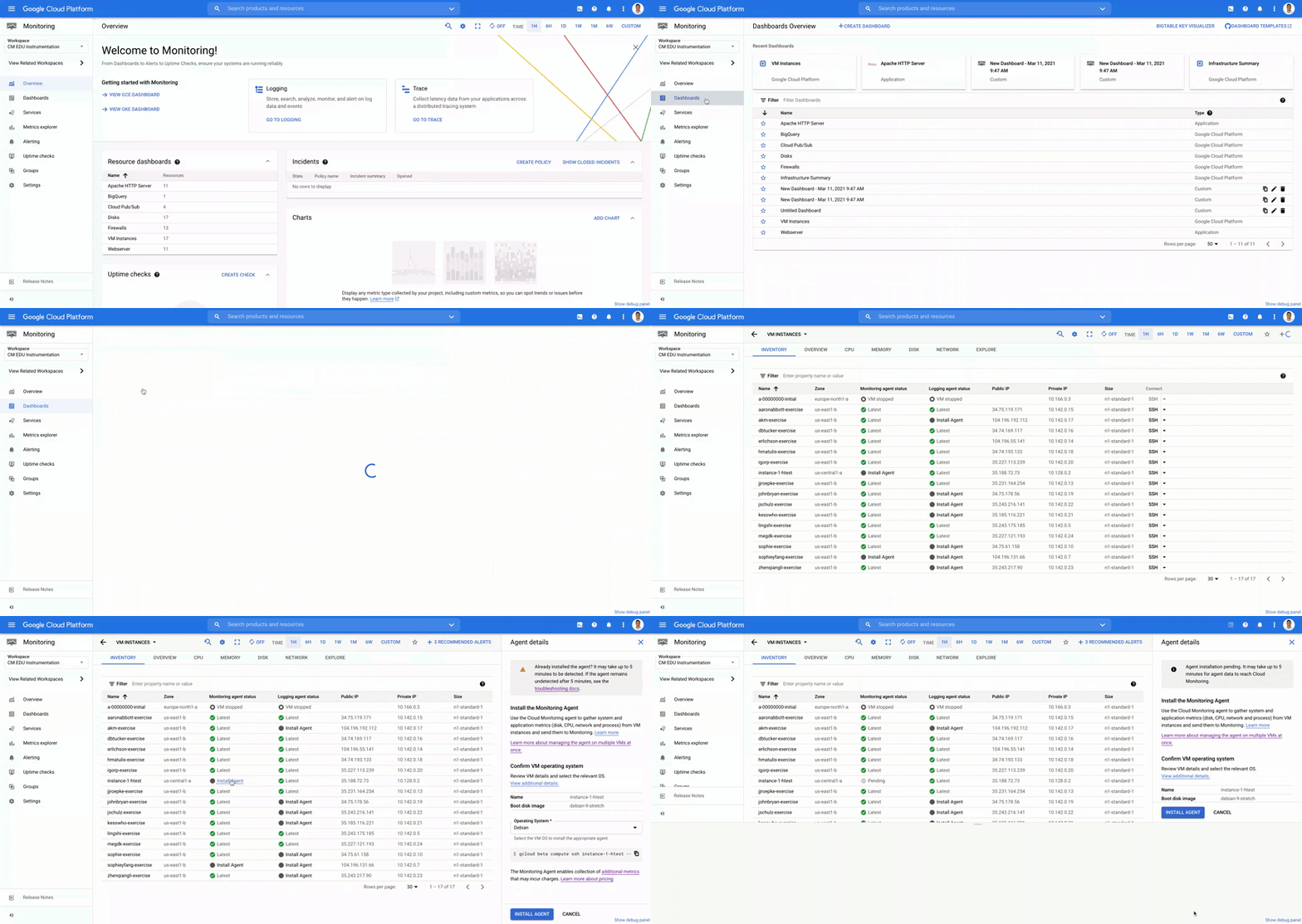
Site Reliability Engineering (SRE) and Operations teams responsible for operating virtual machines (VMs) are always looking for ways to provide a more stable, more scalable environment for their development partners. Part of providing that stable experience is having telemetry data (metrics, logs and traces) from systems and applications so you can monitor and troubleshoot effectively. Many Google Cloud services, including VMs, provide basic system metrics out of the box, without the need to install an agent. However, if you want in-depth metrics about your VMs or application telemetry, installing an agent is necessary.Agent installation options for Google Cloud VMsChoosing the right solution for installing agents on your VMs can save you a lot of time and effort. Google Cloud’s operations suite has created options ranging from one VM at a time, all the way to programmatic fleet installations. We know you’re overloaded with tools, so the options we present below leverage both the Google Cloud and third party tools which are likely already in use in your organization today.Before you begin installing agents, you have to determine which Google Cloud agent fits your needs. The Ops Agent is a single agent for both logs and metrics, targeted toward specialized high throughput logging workloads. Compared with the standard logging-only agent, you can capture more data and avoid OutofMemory errors. As of today, the Ops Agent is in preview, so be sure to confirm which agent will work best for your environment. If the Ops Agent doesn’t meet your needs, you should use the standard Logging and Monitoring agents.Single VM via the VM Instances dashboardIf you have only a small handful of VMs that need monitoring and logging, and you have determined that the standard Cloud Monitoring and Logging agents are your best options, you can use the VM Instances dashboard in Cloud Monitoring to begin the installation process. This dashboard provides a list of all VMs in your workspace and displays whether or not agents are installed on each VM. If agents are not installed, you can use the ‘Install Agent’ walk through to complete a simple installation flow. If agents are installed but they are out of date, you can click on “Learn more” and follow the linked instructions to upgrade the agent. The VM Instances dashboard in Cloud Monitoring, showing all VMs and the status of their agentsSingle VM via Google Compute Engine in-contextFrom the VM Instances page in Compute Engine, you can see important monitoring information about each of your VMs without having to navigate to Cloud Monitoring and you can also install the monitoring agent.The VM Instances dashboard in Compute Engine where you can deploy agentsMulti-VM with GCP Tooling (Agent Policies)If you are responsible for operating a fleet of hundreds or thousands of VMs, walking through a UI-based prompt for each machine does not scale. For those who do not prefer to use a third party configuration management or provisioning tools such as Ansible or Terraform, we provide a built-in option to programmatically manage the installation and management of your agents called Agent Policies, which is currently in preview.    With one command, you can create a policy that governs new and existing VMs to ensure proper installation and optional auto-upgrade of the Ops Agent, the standard Logging agent, or the standard Monitoring agent on VMs that meet your specified criteria.Example of an Agent Policy with gcloud commands on VMs with Debian operating systemsMulti-VM with Ansible and TerraformUsing AnsibleAdministrators, SRE and IT managers spend enough time learning new tools. Therefore, if your organization already uses the configuration management/automation capabilities of the open source tool Ansible, we want to make sure you can use it to install agents for Cloud Logging and Cloud Monitoring.    Using the Ansible Role, you can install and configure the agent(s) across your fleet of Linux and Windows VMs. For more information, refer to the Ansible Role for Cloud Ops documentation.Example playbook for installing the Ops Agent with AnsibleOther popular configuration management tool integrations such as Chef and Puppet are coming in the middle of this year.Using TerraformIf you are already using Terraform, the open-source provisioning management/infrastructure-as-code tool, you can use the Terraform module to install and configure our agents on your VMs. For more information, refer to the Terraform Agent Policy documentation.Sample module to install Ops Agent on all CentOS 8 VMs with two labels “env=prod” and “app=myproduct”Get started todayWhether you are managing a handful of VMs or an entire fleet, ensuring robust observability data is available from systems and applications is key to effective monitoring and troubleshooting. With the VM Instances dashboard in Cloud Monitoring, Agent Policies, or use of open source tooling such as Ansible and Terraform, you have many options to install agents on your Google Cloud VMs. While Google Cloud’s operations suite services like Cloud Logging and Cloud Monitoring have some VM metrics available out of the box, installing the Ops Agent or the Cloud Monitoring and Cloud Loggingagents allows you to gather the data that will help you operate your infrastructure and applications at their most optimal levels.  Related ArticleRead Article
Quelle: Google Cloud Platform

Google’s research & data insights solution makes next-generation research accessible

In order to be successful, research needs to be replicable, so scientists can build on past work and insights. However, an article in Nature warned that as much as 50% of published drug development research could not be reproduced in subsequent trials. As a result, promising drug candidates sometimes led to disappointment, as well as wasted time and money, when key findings could not be replicated. The shift to cloud computing helps solve this problem because it allows researchers to use open-source tools that work across platforms. As demand for cloud computing rises, our customers have asked us for more ready-made solutions to assure reproducibility of results by their collaborators, regardless of the platform they are using. They asked for secure and effective collaboration tools as well as faster time-to-insight from any type of data.We listened. Google’s new research and data insights solution includes three sets of functionalities to address these key challenges. Each can be activated on demand and may be eligible for subscription pricing. “HPC in a box” offers abstract complexity to run high performance computing (HPC) workloads by automatically managing your cluster in the most effective manner. It integrates seamlessly with some of the industry’s most-used schedulers like Slurm and PBS. It makes it easier than ever to answer bigger questions faster by accessing Google’s fast, powerful hardware like TPUs and GPUs, all for one predictable flat fee for eligible workloads. Healthcare Innovation Hub provides healthcare-specific functionality to help ingest, aggregate, and de-identify any type of healthcare data in its original format. It unlocks cross-modality analysis and collaboration and empowers researchers with harmonization tools to overcome healthcare interoperability issues. Google Cloud Real-World Insights (formerly FDA MyStudies) accelerates and streamlines drug development and clinical trials to address urgent medical challenges with reproducible results.The solution enables researchers to ask new questions, get answers more quickly, and work more collaboratively–with no wait times or down times. Institutions can scale to more ambitious projects and generate actionable, real-time insights from any data source–all while staying within budget.Many top research centers have already found it faster and more cost effective to shift from downloading and storing data on their own servers to storing and analyzing data on Google Cloud. Here are some of the real-world projects already yielding breakthroughs:Clemson analyzed 8,500 hours of traffic camera feeds with 2.1M vCPUs in three hours to improve evacuation routes for disaster planning.The Colorado Center for Personalized Medicine saved $2.9M by building their Compass data warehouse on Google Cloud rather than on on-prem.The Broad Institute slashed costs of genomic sequencing by 90% with Google Cloud.Our partners, such as Atos, Burwood, Omnibond, Mavenwave, Quantiphi, and Deloitte, can help you first design and develop, then install and implement your own solution, including training. To assess your institution’s needs and develop a customized plan for your next-generation research solution with research and insights, contact our sales team.
Quelle: Google Cloud Platform

How capital markets can prepare for the future with AI

Editor’s note: This post originally appeared on Forbes BrandVoice.In capital markets, the stakes have been raised for participants to establish value, win loyalty, and expand their share of wallet. An organization’s data analytics capabilities, combined with artificial intelligence and machine learning, can open new opportunities in these areas. But many organizations are still using data strategies from the past, which limits their ability to harness data to its full potential and make the right business decisions. Without the ability to accurately predict business outcomes with the help of AI, market makers are left to rely on hunches and educated decision-making when predicting the unknown.Firms are increasingly recognizing the benefits of technology, and partnering with modern tech providers is key to realizing those benefits. But challenges still exist for firms looking to deploy ML at scale. Below, we’ll look at some of those challenges, along with tools and best practices that can help capital markets firms adopt and benefit from AI and ML strategies. Challenges in the data-to-ML journeyAt a high level, the challenges faced in capital markets when performing AI are similar to other industries. The first set of challenges comes with the data itself. Unstructured data accounts for 90% of enterprise data, and many enterprises face the limitations of on-premises and legacy applications that don’t work well with newer cloud-based tools. Also, a high number of data silos spread across capital markets are common due to growth through acquisitions—a time-consuming distraction that limits efficiency and decision-making. Data science is not hamstrung by the velocity of messages, nor the volume, but by the huge variety of disparate data sources.Other challenges include the views and varying levels of resistance regarding the value of data by various stakeholders within the enterprise; the restrictions of regulatory environments; and the limited cloud skills of an enterprise’s IT teams. ML operations can also be challenging as firms enter this emerging technology area.Adopting and benefiting from AI and ML strategies: Tools and best practices1. Before you perfect AI, get good at analyticsEffective AI and ML depend upon a strong and flexible data analytics platform, which first may need some rearchitecting of its infrastructure. Without a strong core data infrastructure, it’s hard to perform data science in production. With enterprises that have adopted traditional data analytics platforms that live on local servers, challenges abound—and the blue dollar costs (those charged back within the company) go far beyond software licensing. These enterprises have to expend costs and resources on monitoring, performance tuning, upgrading, resource provisioning, and scalability. Business-critical data sources may not be easily accessible by data scientists, blocking business-critical decision-making. All of these obstacles leave less time and room for gleaning analysis and insights from the data.With a serverless, cloud-based data analytics model, the vast majority of infrastructure maintenance and patching is handled by the cloud provider. This enables your data team to devote more time and resources to analysis and insights. Highly performant and integrated cloud technologies can help enterprises overcome data silos, establish a single code base, and contribute to a more collaborative workplace culture. They can also be designed to provide more real-time insights—an invaluable building block of ML and AI. In short, effective core data infrastructure is a competitive advantage over other organizations that remain stuck in silos and servers. 2. Get started by prioritizing a business goalIn the past several years alone, a number of common use cases for AI have arisen in the capital markets sector. Here are some specific examples, and how AI can help:Dynamically learn how best to place orders across venues with algorithmic execution.Recognize potential triggers for unscheduled events with predictive data analytics to forecast events.Generate multi-dimensional risk and exposure data analytics with real-time risk analysis.Use ML to help gain insight into the selection process via algorithms for asset selection. Determine client needs/opportunities using social media sentiment analysis. Build systems that can respond to client inquiries via speech-to-text natural language processing. Extract key data from unstructured or semistructured documents with natural language document analysis services. Generate performance and financial data commentary reporting with natural language generation for document writing. Identify complex trading patterns in large datasets with market abuse and financial crime surveillance. Though it’s tempting to focus exclusively on the benefits that tech can bring to data analytics, the immediate opportunity for how enterprises can fully benefit from AI rests in how humans and AI can work together. ML-based data analytics is more powerful when paired with human judgment and intuition. Recent advancements in tech have made computers faster, data storage cheaper, and access to algorithms more democratized.But human experience and judgment can contribute to and expand upon accurate, insightful data analysis, whether that be in medicine or in financial markets. Model explainability and fairness are concrete examples of where human experience is critical to successful AI (more on that below). When designing an AI system for use cases like the ones listed above, don’t divorce it from the benefits of human wisdom. 3. Structure your team for better data decisionsFinding, retrieving, and preprocessing data can be the most time-consuming part of building ML models. Over 80% of model building effort goes here. This challenge is not unique to financial services, but addressing this challenge is a necessary prerequisite for ML, and affords a competitive advantage. Structuring your organization and internal teams to tackle this challenge will increase your odds for success, but will require some planning and careful thought. Simply put, the purpose of a data science team is to facilitate better decision-making using data. Keep this in mind when deciding how to best structure your data science and AI/ML teams, as well as who they’ll be reporting to. It’s also important to consider where your organization currently sits in its data and AI journeys. Consider culture, size, and the ways the company has grown. Is your enterprise centralized or decentralized? Is it federated? Do you employ consultants?When defining team roles, consider how your flow of data is structured, and where those roles would be of most efficient use. Also, don’t limit yourself—different roles don’t necessarily require different employees. People can perform different roles, as long as the roles are clearly defined. 4. Understand the concepts of explainability and fairnessThere are two important considerations to keep in mind when structuring your organization for data analysis and AI. The first is explainability. We want AI systems to produce results as expected, with transparent explanations and reasons for the decisions they make. This is known as explainability, a high priority here at Google, as well as a growing area of concern for enterprises when it comes to designing their AI systems. Explainability increases trust in the decisions of AI systems, and a number of best practices have evolved to ensure that trust. These include closely auditing your work and data science processes; monitoring what’s called “model drift” (also referred to as “concept drift”); including accuracy metrics; and ensuring reproducibility of features. Fairness is another important topic in AI. An algorithm is said to show fairness if its results are independent of certain variables, especially those that may be considered sensitive. These include individual traits that shouldn’t correlate with the outcome, like ethnicity, gender, sexual orientation, or disability. An accurate model may learn or even amplify problematic pre-existing biases in the data based on those traits. Identifying appropriate fairness criteria for a system requires accounting for UX, cultural, social, historical, political, legal, and ethical considerations, several of which may have tradeoffs. Best practices for fairness include: Designing your model using concrete goals.Monitoring goals through time for your system to work fairly across anticipated use cases—in a number of different languages, for example, or in a range of different age groups.Using representative datasets to train and test your model.Using a diverse set of testers.Thinking about the model’s performance across different sub groups.Building your roadmap for the future with AI/ML Capital markets’ rich history of using cutting-edge technology now includes AI to open new opportunities in the sector. Foresight and planning will ensure the best results from ML and AI—they shouldn’t be an afterthought for your organization. That means building a strong core infrastructure for data analysis first, planning the structure of internal teams that will use data and AI, and using flexible, cloud-based tools to optimize results.When introducing new AI/ML strategies, IT leaders must ensure that they integrate and fit with existing modernization efforts, as opposed to being a bolt-on afterthought. This will lead to a true integration of AI/ML and business.Related ArticleFive habits of highly effective capital markets firms who run in the cloudLearn how capital markets firms are innovating in the cloud, taking inspiration from technology companies and focusing on collaboration.Read Article
Quelle: Google Cloud Platform

How to transfer your data to Google Cloud

So you’ve decided to migrate your business to the cloud—good call!Now, comes the question of transferring the data. Here’s what you need to know about transferring your data to Google Cloud, and what tools are available.Any number of factors can motivate your need to move data into Google Cloud, including data center migration, machine learning, content storage and delivery, and backup and archival requirements. When moving data between locations it’s important to think about reliability, predictability, scalability, security, and manageability. Google Cloud provides four major transfer solutions that meet these requirements across a variety of use cases.(Click to enlarge)Google Cloud Data Transfer OptionsYou can get your data into Google Cloud using any of four major approaches:Cloud Storage transfer tools—These tools help you upload data directly from your computer into Google Cloud Storage. You would typically use this option for small transfers up to a few TBs. These include the Google Cloud Console UI, the JSON API, and the GSUTIL command line interface.  GSUTIL is an open-source command-line utility for scripted transfers from your shell. It also enables you to manage GCS buckets.  It can operate in rsync mode for incremental copies and streaming mode for pushing script output – for large multi-threaded/multi-processing data moves.  Use it in place of the UNIX cp (copy) command, which is not multithreaded.Storage Transfer Service—This service enables you to quickly import online data into Cloud Storage from other clouds, from on-premises sources, or from one bucket to another within Google Cloud. You can set up recurring transfer jobs to save time and resources and it can scale to 10’s of Gbps. To automate creation and management of transfer jobs you can use the storage transfer API or client libraries in the language of your choice. As compared to GSUTIL, Storage Transfer Service is a managed solution which handles retries and provides detailed transfer logging. The data transfer is fast since the data moves over high bandwidth network pipes. The on-premise transfer service minimizes the transfer time by utilizing the maximum available bandwidth and by applying performance optimizations. Transfer Appliance—This is a great option if you want to migrate a large dataset and don’t have lots of bandwidth to spare. Transfer Appliance enables seamless, secure, and speedy data transfer to Google Cloud. For example, a 1 PB data transfer can be completed in just over 40 days using the Transfer Appliance, as compared the three years it would take to complete an online data transfer over a typical network (100 Mbps). Transfer Appliance is a physical box that comes in two form factors: TA40 (40TB) and TA300 (300TB). The process is simple. First, you order the appliance through the Cloud Console.  Once it is shipped to you, you copy your data to the appliance (via a file copy over NFS), where the data is encrypted and secured. Finally, you ship the appliance back to Google for data transfer into your GCS bucket and the data is erased from the appliance. Transfer appliance is highly performant because it uses all solid state drives, minimal software and multiple network connectivity options.BigQuery Data Transfer Service—With this option your analytics team can lay the foundation for a BigQuery data warehouse without writing a single line of code. It automates data movement into BigQuery on a scheduled, managed basis. It supports several third-party sources along with transfers from Google SaaS apps, external cloud storage providers. and data warehouses such as Teradata and Amazon Redshift. Once that data is in. you can use it right inside BigQuery for analytics, machine learning, or just warehousing. ConclusionWhatever your use case for data transfer may be, getting it done fast, reliably, securely, and consistently is important. And, no matter how much data you have to move, where it’s located, or how much bandwidth you have, there is an option that can work for you. For a more in-depth look check out the documentation.For more #GCPSketchnote, follow the GitHub repo. For similar cloud content follow me on twitter @pvergadia and keep an eye out on thecloudgirl.dev.Related Article5 cheat sheets to help you get started on your Google Cloud journeyWhether you need to determine the best way to move to the cloud, or decide on the best storage option, we’ve built a number of cheat shee…Read Article
Quelle: Google Cloud Platform
Google Cloud announces new region to support growing customer base in Israel

Google has long looked to Israel for globally impactful technologies including popular Search features, Waze, Live Caption, Duplex and flood forecasting. At our Decode with Google 15RAEL event last week, we celebrated 15 years of Google innovation in Israel and our longstanding support of the country’s vibrant startup ecosystem. Over the years, we’ve expanded our enterprise investments in the country, too. In addition to our over a decade long investment in the space, Google has acquired Israeli-based companies like Alooma, Elastifile and Velostrata, and Uri Frank joined Google Cloud last month to lead our server chip design team from our offices in Tel Aviv and Haifa. As we continue to meet growing demand for cloud services in Israel, we’re excited to announce that a new Google Cloud region is coming to Israel to make it easier for customers to serve their own users faster, more reliably and securely.Our global network of Google Cloud regions are the foundation of the cloud infrastructure we’re building to support our customers. With cloud’s 25 regions and 76 zones around the world, we deliver high-performance, low-latency services and products for Google Cloud’s enterprise and public sector customers. With each new Google Cloud region, customers get access to secure infrastructure, smarter analytics tools, an open platform and the cleanest cloud in the industry. Having a region in Israel will help accelerate innovation for customers of all sizes, including PayBox, a digital wallet application owned by Discount Bank, one of Israel’s largest banks. “When we acquired PayBox, our goal was to improve the security and the user experience for its products, but we also wanted to keep the startup’s agility and innovation. Google Cloud has enabled us to do just that,” said Sarit Beck-Barkai, Managing Director of PayBox at Discount Bank.“We are very excited that leading vendors like Google are investing and launching a local cloud region in Israel. This will make a significant change in the technology landscape of the public-sector, enterprise and SMB markets in Israel. Matrix is proud to be a major part of the transition to the cloud,” said Moti Gutman, CEO at Matrix, technology services company and Google Cloud partner. “In the last year, Panorays more than tripled its customer base and scaled its infrastructure, practically at the click of a button. Google Cloud made it easy for us to scale without worrying about DevOps, which meant that our engineers could focus on developing new and better features for our customers. The new region launching in Israel will allow us to serve our local customer base even better, as we’ll be able to experience higher availability and deploy resources in specific regions, thus reducing latency.” said Demi Ben-Ari, Co-founder and CTO, Panorays, a third-party security platform and Google Cloud customer.”This new cloud region will provide even better access and growth potential for our mutual customers with tech hubs in the region. We are serving hyper growth companies who need Google Cloud’s services and will benefit greatly from this regional presence,” said Yoav Toussia-Cohen, CEO of DoiT International.When it launches, the Israel region will deliver a comprehensive portfolio of Google Cloud products to private and public sector organizations locally. We look forward to welcoming you to the Israel region, and we’re excited to support your growing business on our platform. Learn more about our global cloud infrastructure, including new and upcoming regions, here.Related ArticleThe past, present and future of custom compute at GoogleTo meet users’ performance needs at low power, we’re doubling down on custom chips that use System on a Chip (SoC) designs.Read Article
Quelle: Google Cloud Platform

Turbocharge workloads with new multi-instance NVIDIA GPUs on GKE

Developers and data scientists are increasingly turning to Google Kubernetes Engine (GKE) to run demanding workloads such as machine learning, visualization/rendering and high-performance computing, leveraging GKE’s support for NVIDIA GPUs. GKE brings the flexibility, autoscaling and management simplicity, while GPUs bring superior processing power. Today, we are launching support for multi-instance GPUs in GKE (currently in Preview), which will help you drive better value from your GPU investments.Open-source Kubernetes allocates one full GPU per container—even if the container only needs a fraction of the GPU for its workload. This can lead to wasted resources and cost overruns, especially if you are using the latest generation of powerful GPUs. This is of particular concern for inference workloads, which process only a handful of samples in real-time (in contrast, training workloads process millions of samples in large batches). Thus, for inference and other lightweight GPU workloads, GPU sharing is essential to improve utilization and lower costs. With the launch of multi-instance GPUs in GKE, now you can partition a single NVIDIA A100 GPU into up to seven instances that each have their own high-bandwidth memory, cache and compute cores.   Each instance can be allocated to one container, for a maximum of seven containers per one NVIDIA A100 GPU. Further, multi-instance GPUs provide hardware isolation between containers, and consistent and predictable QoS for all containers running on the GPU. Add to that the fact that A2 VMs, Google Cloud’s largest GPU-based Compute Engine instances, support up to 16 A100 GPUs per instance. That means you can have up to 112 schedulable GPU instances per node, where each can run one independent workload. By leveraging GKE’s industry-leading auto-scaling and auto-provisioning capabilities, multi-instance GPUs can be automatically scaled up or down, offering superior performance at lower costs. For CUDA® applications, multi-instance GPUs are largely transparent. Each GPU instance appears as a regular GPU resource, and the programming model remains unchanged, making multi-instance GPUs easy and convenient to use.What customers are sayingEarly adopters of multi-instance GPU nodes are using the technology to turbocharge their use of GKE for demanding workloads. Betterview, a provider of property insight and workflow tools for the insurance sector, uses GKE and NVIDIA GPUs to process aerial imagery.”The multi-instance GPU architecture with A100s evolves working with GPUs in Kubernetes/GKE. By reducing the number of configuration hoops one has to jump through to attach a GPU to a resource, Google Cloud and NVIDIA have taken a needed leap to lower the barrier to deploying machine learning at scale. Alongside reduced configuration complexity, NVIDIA’s sheer GPU inference performance with the A100 is blazing fast. Partnering with Google Cloud has given us many exceptional options to deploy AI in the way that works best for us.” -Jason Janofsky, VP Engineering & CTO, BetterviewCreating multi-instance GPU partitionsThe A100 GPU consists of seven compute units and eight memory units, which can be partitioned into GPU instances of varying sizes, providing the flexibility and choice you need to scale your workloads. For example, you can create two multi-instance GPU instances with 20GB of memory each, three instances with 10GB, or seven with 5GB. The GPU partition instances use the following syntax: [compute]g.[memory]gb. For example, a GPU partition size 1g.5gb refers to a GPU instance with one compute unit (1/7th of streaming multiprocessors on the GPU), and 1 memory unit (5GB). The partition size for A100 GPUs can be specified through the GKE cluster or node pool API. Deploying containers on a multi-instance GPU nodeYou can deploy up to one container per multi-instance GPU instance on a node. With a partition size of 1g.5gb, there are seven multi-instance GPU partitions available on the node with one A100 GPU. As a result, you can deploy up to seven containers that request GPUs on this node. Each node is labeled with the size of it’s available GPU partitions. This labeling allows workloads to request the right sized GPU instances through node selectors or node affinity. Getting started Now, with multi-instance GPUs on GKE, you can easily match your workload acceleration needs with right sized resources. Moreover, you can exploit the power of GKE to automatically scale the infrastructure to efficiently serve your acceleration needs while delivering a better user experience and minimizing the operational costs. Get started today!Related ArticleA2 VMs now GA—the largest GPU cloud instances with NVIDIA A100 GPUsA2 VMs with NVIDIA A100 GPUs are now generally available for your most demanding workloads including machine learning and HPC.Read Article
Quelle: Google Cloud Platform

Choose the best way to use and authenticate service accounts on Google Cloud

A fundamental security premise is to verify the identity of a user before determining if they are permitted to access a resource or service. This process is known as authentication. But authentication is necessary for more than just human users. When one application needs to talk to another, we need to authenticate its identity as well. In the cloud, this is most frequently accomplished through a service account.Service accounts represent non-human users and on Google Cloud are managed by Cloud Identity and Access Management (IAM). They are intended for scenarios where an application needs to access resources or perform actions under its own identity. For example, an application that runs on a VM instance might need access to a Cloud Storage bucket that is configured to store its data. Unlike normal users, service accounts cannot authenticate using a password or single sign-on (SSO). There are a variety of authentication methods that service accounts can employ instead, and it’s important to use the right one based on your needs. The following guidelines can help make sure you choose the best way to authenticate service accounts. Only use service accounts where appropriateBefore you jump to the conclusion that you need a service account, ask yourself whether the application is acting on its own behalf or on the end user’s behalf:An application that continuously gathers metrics and stores them in a Cloud Storage bucket acts on its own behalf—it’s a background job that runs unattended, with no end user involved.An application that lets a user access their personal documents is not acting on its own behalf, but on behalf of the end user.Whenever an application is acting on behalf of an end user, using a service account might not be the right choice. Instead, it’s better to use an OAuth consent flow to request the end user’s consent, and then let the application act under their identity. By using OAuth, you ensure that:End users can review which resources they are about to grant the application access to, and can explicitly express or deny their consent.Users can revoke their consent on their My Account page at any time.No service account gets unfettered access to user data.During your daily work, you might use tools such as gcloud, gsutil or terraform. It’s you who runs these tools, so the tools should also use your credentials. Instead of using a service account key to run these tools, let them use your credentials by running gcloud auth login (for gcloud and gsutil) or gcloud auth application-default login (for terraform and other third-party tools). Limiting the use of service accounts and service account keys to situations in which they’re absolutely necessary keeps user data more secure, reduces the chance of unauthorized activity, and makes it easier to use audit logs to determine which users performed certain operations.Use attached service accounts when possibleFor applications deployed on Google Cloud that need to use a service account, attach the service account to the underlying compute resource. By attaching a service account, you enable the application to obtain tokens for the service account and to use these tokens to access Google Cloud APIs and resources.To obtain access tokens in the application, use the Google Cloud client libraries if possible. The client libraries automatically detect if the application is running on a compute resource with an attached service account.In situations where using the client libraries is not practical, adjust your application to programmatically obtain tokens from the metadata server. Compute resources that support access to the metadata server include:Cloud Run Cloud FunctionsCompute EngineAppEngine second-genAppEngine Flex  For a full list of compute resources that let you attach a service account, see Managing service account impersonation.Use Workload Identity to attach service accounts to Kubernetes podsIf you use Google Kubernetes Engine (GKE) you might be running a combination of different applications on a single GKE cluster. The individual applications are likely to differ in which resources and APIs they need access to. If you attach a service account to a GKE cluster or one of its node pools, then by default, all pods running on the cluster or node pool can impersonate the service account. Sharing a single service account across different applications makes it difficult to assign the right set of privileges to the service account:If you only grant access to resources that all applications require, then some applications might fail to work because they lack access to certain resources.If you grant access to all resources that any particular application needs, then you might be over-granting access.A better approach to manage resource access in a GKE environment is to use Workload Identity, which lets you associate service accounts with individual pods:Do not attach service accounts to GKE clusters or node pools.In Cloud IAM, create a dedicated service account for each Kubernetes pod that requires access to Google APIs or resources. In GKE, create a Kubernetes service account for each Kubernetes pod that requires access to Google APIs or resources and attach it to the pod.Use Workload Identity to create a mapping between the service accounts and their corresponding Kubernetes service accounts.Use Workload Identity federation to use services accounts for applications not running on Google CloudIf your application runs on-premises or on another cloud provider, then you cannot attach a service account to the underlying compute resources. However, the application might have access to environment-specific credentials such as:AWS temporary credentialsAzure AD access tokensOpenID access tokens or ID tokens issued by an on-premises identity provider like AD FS or KeyCloakIf your application has access to one of these credentials and needs access to Google Cloud APIs or resources, use workload identity federation.Workload identity federation lets you create a one-way trust relationship between a Google Cloud project and an external identity provider. Once you’ve established that trust, applications can use credentials issued by the trusted identity provider to impersonate a service account by following a three-step process:Obtain a credential from the trusted identity provider, for example an OpenID Connect ID token.Use the STS API to exchange the credential against a short-lived Google STS token.Use the STS token to authenticate to the IAM Credentials API and obtain short-lived Google access tokens for a service account.By using workload identity federation, you can let applications use the native authentication mechanisms that the external environment provides, and you avoid having to store and manage service account keys.Use service account keys only if there is no viable alternativeOccasionally, you might encounter a situation where attaching a service account is not possible, and using Workload Identity or Workload Identity federation aren’t viable options either. For example, one of your on-premises applications might need access to Google Cloud resources, but your on-premises identity provider isn’t compatible with OpenID Connect (or SAML 2.0, which we’ll soon add support for), and therefore cannot be used for Workload Identity federation.In situations where other authentication approaches are not viable (and only in those situations), create a service account key for the application. A service account key lets an application authenticate as a service account, similar to how a user might authenticate with a username and password. Service account keys must be kept secret and protected from unauthorized access, so store them in a secure location such as a key vault and rotate them frequently.As an organization administrator you might want to control which users in your organization can use service account keys. This can be done using the service account key organization policies.Decision timeAuthenticating with service accounts is powerful, but it’s by no means the only way to do so, and should only be used if other approaches aren’t a good fit. If you’re still unsure about which authentication approach is best for your application, consult the following flowchart:For more details on using and securing service accounts, see Best practices for using and managing service accounts and Best practices for securing service accounts in our product documentation.Related ArticleRead Article
Quelle: Google Cloud Platform

SRE at Google: Our complete list of CRE life lessons

In 2016 we announced a new discipline at Google, Customer Reliability Engineering, an offshoot of Site Reliability Engineering (SRE). Our goal with CRE was (and still is) to create a shared operational fate between Google and our Google Cloud customers, to give you more control over the critical applications you’re entrusting to us. Since then, here on the Google Cloud blog, we’ve published a wealth of resources to help you take the best practices we’ve learned from SRE teams at Google and apply them in your own environments. Below is the complete list of CRE life lessons posts we’ve published in the past five years in one convenient location.Common pitfallsKnow thy enemy: How to prioritize and communicate risksHow to avoid a self-inflicted DDoS AttackUsing load shedding to survive a success disasterService-level metricsAvailable . . . or not? That is the questionSLOs, SLIs, SLAs, oh myBuilding good SLOsConsequences of SLO violationsAn example escalation policyApplying the escalation policyDefining SLOs for services with dependenciesTune up your SLI metricsLearning—and teaching—the art of service-level objectivesUsing deemed SLIs to measure customer reliabilityReleasesReliable releases and rollbacksHow release canaries can save your baconSRE supportWhy should your app get SRE support?How SREs find the landmines in a serviceMaking the most of an SRE service takeoverDark launchesWhat is a dark launch, and what does it do for me?The practicalities of dark launchingPostmortemsFearless shared postmortemsGetting the most out of shared postmortemsError BudgetsGood housekeeping for error budgetsUnderstanding error budget overspendProduction IncidentsShrinking the impact of production incidents using SRE principlesShrinking the time to mitigate production incidentsWe still have plenty more articles to come, so keep your eye on our DevOps & SRE channel. You can also check out sre.google or read our SRE books online.
Quelle: Google Cloud Platform






