La que nos une: Univision partners with Google Cloud to transform media experiences

The past year has given everyone lots to think about—about our priorities as people and as businesses. As the world retreated behind closed doors, we saw how shared interests and experiences can bring us together. As the world grappled with a common enemy, we witnessed just how differently individuals, communities and indeed entire countries can experience a situation. And as we faced seemingly unending obstacles to making it through the pandemic, we saw how making smart decisions based on data can drive meaningful solutions—fast.That’s why we here at Google Cloud are so proud to partner Univision, the country’s leading Spanish-language content and media company. By partnering with Google Cloud, Univision will be able to accelerate growth across its portfolio of properties, deliver an enhanced user experience for Spanish-speaking audiences and provide the enterprise solutions needed to create the Spanish-language media company of the future.According to Instituto Cervantes, there are over 580 million Spanish language speakers worldwide. Those viewers, like people everywhere, are avid consumers of streaming content. In Q4 of 2020 alone, viewing time for that content increased by 44%1, and in 2020, from 50%2 more sources. With that surge in demand, Univision needed a cloud provider whose infrastructure could reach Hispanic viewers around the world. With two-plus decades spent building out its network and data centers, as well as global content-delivery capabilities, Google Cloud has the infrastructure Univision needs to reach viewers across the Spanish-speaking world.At the same time, with such a diverse audience for their content, Univision needs to target that content to viewers’ specific preferences. By applying Google Cloud’s artificial intelligence (AI) and machine learning (ML) technology across its content, Univision intends to personalize content based on shows users have previously watched, enhancing their engagement and viewing experience. And as Univision transforms the user experience, it can use Google Cloud’s data and analytics suite to garner deeper insights into its audience and forge stronger relationships with them on an individual basis. With Looker and BigQuery, Univision employees will have access to real-time data to help them make business decisions about programming.Univision will also migrate video distribution and production operations to Google Cloud, where we’ll help them streamline media workflows and develop innovative new capabilities. Meanwhile, Google Cloud’s tight business and technical integration with other Google services will help ensure Univision reaches viewers on the device of their choice, wherever they are in the world. For example, in the coming years, Univision will expand its global YouTube partnership and will integrate with entertainment features on Google Search that help people better discover TV shows and movies. The company will also use Google Ad Manager for global ad decisioning and Google’s Dynamic Ad Insertion for PrendeTV and future video-on-demand offerings. Finally, Univision will distribute its content and services on Google Play across Android phones and tablets, as well as Google TV and other Android TV OS devices.We’re thrilled to partner with Univision to help them reach the Spanish-speaking world with their content. With our cloud portfolio, we can help them reach individual viewers around the world, with personalized content that they can consume however they see fit. Best of all, together, we can help them achieve this vision fast, leveraging established cloud, content delivery, and data analytics technologies. You can learn more about the partnership here.1. https://pages.conviva.com/rs/138-XJA-134/images/RPT_Conviva_SoS_Q4_2020.pdf2. https://hubresearchllc.com/reports/Related ArticleHelping media companies navigate the new streaming normalAs media and entertainment companies evolve their future plans as a result of COVID-19, they should keep new audience behaviors top of mi…Read Article
Quelle: Google Cloud Platform

Build security into Google Cloud deployments with our updated security foundations blueprint

At Google, we’re committed to delivering the industry’s most trusted cloud. To earn customer trust, we strive to operate in a shared-fate model for risk management in conjunction with our customers. We believe that it’s our responsibility to be active partners as our customers securely deploy on our platform, not simply delineate where our responsibility ends. Toward this goal, we have launched an updated version of our Google Cloud security foundations guide and corresponding Terraform blueprint scripts. In these resources, we provide opinionated step-by-step guidance for creating a secured landing zone into which you can configure and deploy your Google Cloud workloads. We highlight key decision points and areas of focus, and provide both background considerations and discussions of the tradeoffs and motivations for each of the decisions we’ve made. We recognize that these choices might not match every individual company’s requirements and business context; customers are free to adopt and modify the guidance we provide.  This new version enhances and expands the initial guide and blueprint we launched back in August 2020 to incorporate practitioner feedback and account for additional threat models. In this latest version, we have extended our guidance for networking and key management; and added new guidance for secured CICD (Continuous Integration and Continuous Deployment). We review the guide and corresponding blueprints regularly as we continue to update best practices to include new product capabilities. Since its release, the guide has been the most frequently accessed content in our best practices center. We’re committed to keeping it up-to-date, comprehensive, and relevant to meet your security needs.“The security foundations guide and Terraform blueprint have enabled customers to accelerate their onboarding to Google Cloud and enabled us to assist clients in adopting security leading practices to operate their environments and workloads.” – Arun Perinkolam, Principal and US Google Cloud Security Practice & Alliance Leader, Deloitte & Touche LLPWho can use the security foundations blueprintThe guide and Terraform blueprint can be useful to all of the following roles in your organization:The security leader that wants to understand Google’s key principles for cloud security and how to apply and implement them to help secure their own organization’s deployment.The security practitioner that needs detailed instructions on how to apply security best practices when setting up, configuring, deploying, and operating a security-centric infrastructure landing zone that’s ready to deploy your workloads and applications.The security engineer that needs to configure and operate multiple security controls to correctly interact with one another.The business leader that needs to quickly identify the skills their teams need to meet the organization’s security, risk, and compliance needs on Google Cloud. In this role, you also need to be able to share Google’s security reference documentation with your risk and compliance teams.The Risk and Compliance officer that needs to understand the controls available on Google Cloud to meet their business requirements and how those controls can be automatically deployed. You also need visibility into control drift and areas that need additional attention to meet the regulatory needs of your business.All of these roles can use this document as a reference guide. You can also use the provided Terraform scripts to automate, experiment, test, and accelerate your own live deployments, modifying them to meet your specific and unique needs.Create a better starting point for complianceIf your business operates under specific compliance and regulatory frameworks, you need to know whether your configuration and use of Google Cloud services meets those requirements. This guide provides a proven blueprint and starting point to do so.After you’ve deployed the security foundations blueprint as a landing zone, Security Command Center Premium provides you a dashboard overview and downloadable compliance reports of your starting posture for the CIS 1.0, PCI-DSS 3.2.1, NIST-800-53 andISO/IEC 27001 frameworks at the organization, folder, or project level.Implement key security principlesIn addition to following compliance and regulatory requirements, you need to protect your infrastructure and applications.The security foundation guide and blueprint and the associated automation scripts help you adopt three security principles that are core to Google Cloud’s own security strategy:Executing defense in depth, at scale, by default.Adopting the BeyondProd approach to infrastructure and application security.De-risking cloud adoption by moving toward a shared fate relationship.Defense in depth, at scale, by defaultA core principle for how Google secures its own infrastructure dictates that there should never be just one barrier between an attacker and a target of interest. This is what we mean by defense in depth. Adding to this core principle, security should be scalable and all possible measures should be enabled by default.The security foundations guide and blueprint embody these principles. Data is protected by default through multiple layered defenses using policy and controls that are configured across networking, encryption, IAM, detection, logging, and monitoring services.BeyondProdIn 2019, we published documentation on BeyondProd, Google’s approach to native cloud security. This was motivated by the same insights that drove our BeyondCorp effort in 2014, because it had become clear to us that a perimeter-based security model wasn’t secure enough. BeyondProd does for workloads and service identities what BeyondCorp did for workstations and users. In the conventional network-centric model, once an attacker breaches the perimeter, they have free movement within the system. Instead, the BeyondProd approach uses a zero-trust model by default. It decomposes historically large monolithic applications into microservices, thus increasing segmentation and isolation and limiting the impacted area, while also creating operational efficiencies and scalability.The security foundations guide and blueprint jumpstart your ability to adopt the BeyondProd model. Security controls are designed into and integrated throughout each step of the blueprint architecture and deployment. Logical control points like organization policies provide you with consistent, default preventive policy enforcement at build and deploy time. Centralized and unified visibility through Security Command Center Premium provides unified monitoring and detection across all the resources and projects in your organization during run time.Shared fateTo move from shared responsibility to shared fate, we believe that it’s our responsibility to be active partners with you in deploying and running securely on our platform. This means providing holistic capabilities throughout your Day 0 to Day N journey, at:Design and build time: Supported security foundations and posture blueprints that encode best practices by default for your infrastructure and applications.Deploy time: “Guard rails” though services like organization policies and Assured Workloads that enforce your declarative security constraints.Run time: Visibility, monitoring, alerting, and corrective-action features through services like Security Command Center Premium.Together, these integrated services reduce your risk by starting and keeping you in a more trusted posture with better quantified and understood risks. This improved risk posture can then allow you to take advantage of risk protection services, thus de-risking and ultimately accelerating your ability to migrate and transform in the cloud.What’s included in the Google Cloud security foundations guide and the blueprintThe Google Cloud security foundations guide is organized into sections that cover the following:The foundation security modelFoundation designThe example.com sample that expresses the opinionated organization structureResource deploymentAuthentication and authorizationNetworkingKey and secret managementLoggingDetective controlsBillingCreating and deploying secured applicationsGeneral security guidance The foundation reference organization structureUpdates from version #1This updated guide and the accompanying repository of Terraform blueprint scripts adds best practice guidance for four main areas: Enhanced descriptions of the foundation (Section 5.6), infrastructure (Section 5.7), and application (Section 5.8) deployment pipelines.Additional network security guidance with new alternative hub-and-spoke network architecture (Section 7.2) and hierarchical firewalls (Section 7.7).New guidance about key and secret management (Section 8).A new creation and deployment process for secured applications (Section 12). We update this blueprint to stay current with new product capabilities, customer feedback, and the needs of and changes to the security landscape.To get started building and running your own landing zone, read the Google Cloud security foundations guide, and then try out the Terraform blueprint template either at the organization level or the folder level.Our ever-expanding portfolio of blueprints is available on our Google Cloud security best practices center to help you build security into your Google Cloud deployments from the start and help make you safer with Google.
Quelle: Google Cloud Platform

Sign here! Creating a policy contract with Configuration as Data

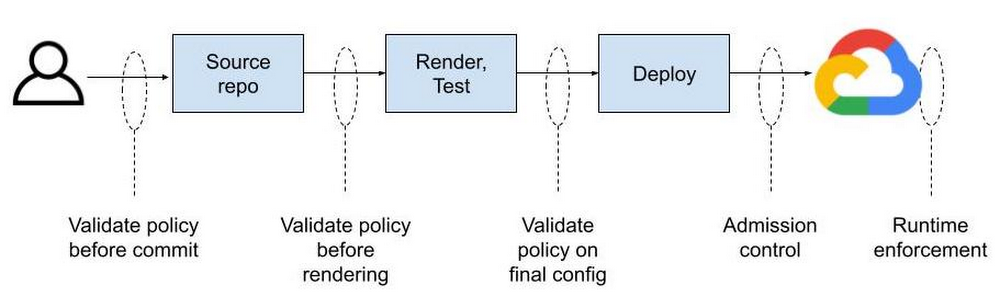
Configuration as Data is an emerging cloud infrastructure management paradigm that allows developers to declare the desired state of their applications and infrastructure, without specifying the precise actions or steps for how to achieve it. However, declaring a configuration is only half the battle: you also want policy that defines how a configuration is to be used. Configuration as Data enables a normalized policy contract across all your cloud resources. That contract, knowing how your deployment will operate, can be inspected and enforced throughout a CI/CD pipeline, from upstream in your development environment to deployment time, and ongoing in the live runtime environment. This consistency is possible by expressing configuration as data throughout the development and operations lifecycle.Config Connector is the tool that allows you to express configuration as data in Google Cloud. In this model, configuration is what you want to deploy, such as “a storage bucket named my-bucket with a standard storage class and uniform access control.” Policy, meanwhile, typically specifies what you’re allowed to deploy, usually in conformance with your organization’s compliance needs. For example, “all resources must be deployed in Google Cloud’s LONDON region.” When each stage in your pipeline treats configuration as data, you can use any tool or language to manipulate configuration as data, knowing they will interoperate and that policy can be consistently enforced at any or all stages. And while a policy engine won’t be able to understand every tool, it can validate the data generated by each tool. It’s just like data in a database can be inspected by anyone who knows the schema regardless of the tool that wrote into the database.Contrast that with pipelines today, where policy is manually validated, hard coded in scripts within the pipeline logic itself, or post-processed on raw deployment artifacts after rendering configuration templates into specific instances. In each case, policy is siloed—you can’t take the same policy and apply it anywhere in your pipeline because formats differ from tool to tool. Helm, for example, contains code specific to its own format.1Terraform HCL may then deploy the Helm chart.2The HCL becomes a JSON plan, where the deployment-ready configuration may be validated before being applied to the live environment.3These examples show three disparate data formats across two different tools representing different portions of a desired end state. Add in Python scripting, gcloud CLI, or kubectl commands and you start approaching ten different formats—all for the same deployment!  Reliably enforcing a policy contract requires you to inject tool- and format-specific validation logic on case-by-case basis. If you decide to move a config step from Python to Terraform or from Terraform to kubectl, you’ll need to re-evaluate your contract and probably re-implement some of that policy validation. Why don’t these tools work together cleanly? Why does policy validation change depending on the development tools you’re using? Each tool can do a good job enforcing policy within itself. As long as you use that tool everywhere, things will probably work ok. But we all know that’s not how development works. People tend to choose tools that fit their needs and figure out integration later on.A Rosetta Stone for policy contractsImagine that everyone is defining their configuration as data, while using tools and formats of their choice. Terraform or Python for orchestration. Helm for application packaging. Java or Go for data transformation and validation. Once the data format is understood (because it is open source and extensible), your pipeline becomes a bus that anyone can push configuration onto and pull configuration from.Policies can be automatically validated at commit or build time using custom and off-the-shelf functions that operate on YAML. You can manage commit and merge permissions separately for config and policy to separate these distinct concerns. You can have folders and unique permissions for org-wide policy, team-wide policy, or app-specific policy. Therein lies the dream. The most common way to generate configuration is to simply write a YAML file describing how Kubernetes should create a resource for you. The resulting YAML file is then stored in a git repository where it can be versioned and picked up by another tool and applied to a Kubernetes cluster. Policies can be enforced on the git repo side to limit who can push changes to the repository and ultimately reference them at deploy time.For most users this is not where policy enforcement ends. While code reviews can catch a lot of things, it’s considered best practice to “trust but verify” at all layers in the stack. That’s where admission controllers come in, which can be considered to be the last mile of policy enforcement. Gatekeeper serves as an admission controller inside of a Kubernetes cluster. Only configurations that meet defined constraints will be admitted to the live cloud environment.Let’s tie these concepts together with an example. Imagine you want to enable users to create Cloud Storage buckets, but you don’t want them doing so using the Google Cloud Console or the gcloud command line tool. You want all users to declare what they want and push those changes to a git repository for review before the underlying Cloud Storage buckets are created with Config Connector. Essentially you want users to be able to submit a YAML file that looks like this:This creates a storage bucket in a default location. There is one problem with this: users can create buckets in any location even if company policy dictates otherwise. Sure, you can catch people using forbidden bucket locations during code review, but that’s prone to human error.This is where Gatekeeper comes in. You want the ability to limit which Cloud Storage bucket location can be used. Ideally you can write policies that look like this:The above StorageBucketAllowedLocation policy rejects StorageBucket objects with the spec.location field set to any value other than one of the Cloud Storage multi-region locations: ASIA, EU, US. You decide where to validate policy without being limited by your tool of choice and anywhere in your pipeline.Now you have the last stage of your configuration pipeline. Testing the contractHow does this work in practice? Let’s say someone managed to check in StorageBucket resource with the following config:Our policy would reject the bucket because an empty location is not allowed. What happens if configuration was set to a Cloud Storage location not allowed by the policy, US-WEST1 for example?Ideally you would catch this during the code review process before the config is committed to a git repo, but as mentioned above, that’s error prone. Luckily, the configuration will fail because the allowmultiregions policy constraint only allows multi-region bucket locations including ASIA, EU, and US, and will reject the configuration. So, now, if you set location to “US” you can deploy the Cloud Storage bucket. You can also apply this type of location policy or any other like it to all of your resource types—Redis instances, Compute Engine virtual machines, even Google Kubernetes Engine (GKE) clusters. Beyond admission control, you can apply the same constraint anywhere in your pipeline, by ”shifting left” policy validation at any stage. One contract to rule them allWhen config is managed in silos—whether across many tools, pipelines, graphical interfaces, and command lines—you can’t inject logic without building bespoke tools for every interface. You may be able to define policies built for your front-end tools and hope nothing changes on the backend. Or you can wait until deployment time to scan for deviations and hope nothing appears during crunch time. Compare that with configuration as data contracts, which are transparent and normalized across resource types, which has facilitated a rich ecosystem of tooling built around Kubernetes with varied syntax (YAML, JSON) and languages including Ruby, Typescript, Go, Jinja, Mustache, Jsonnet, Starlark, and many others. This isn’t possible without a data model. Configuration-as-Data-inspired tools such as Config Connector and Gatekeeper let you enforce policy and governance as natural parts of your existing git-based workflow rather than creating manual processes and approvals. Configuration as data normalizes your contract across resource types and even cloud providers. You don’t need to reverse engineer scripts and code paths to know if your contract is being met—just look at the data.1. https://github.com/helm/charts/blob/master/stable/jenkins/templates/jenkins-master-deployment.yaml2. https://medium.com/swlh/deploying-helm-charts-w-terraform-58bd3a690e553. https://github.com/hashicorp/terraform-getting-started-gcp-cloud-shell/blob/master/tutorial/cloudshell_tutorial.mdRelated ArticleI do declare! Infrastructure automation with Configuration as DataConfiguration as Data enables operational consistency, security, and velocity on Google Cloud with products like Config Connector.Read Article
Quelle: Google Cloud Platform
Introducing new connectors for Workflows

Workflows is a service to orchestrate not only Google Cloud services, such as Cloud Functions,  Cloud Run, or machine learning APIs, but also external services. As you might expect from an orchestrator, Workflows allows you to define the flow of your business logic, as steps, in a YAML or JSON definition language, and provides an execution API and UI to trigger workflow executions. You can read more about the benefits of Workflows in our previous article.We are happy to announce new connectors for Workflows, which simplify calling Google Cloud services and APIs. The first documented connectors offered in preview when Workflows was launched in General Availability were:Cloud TasksCompute EngineFirestorePub/SubSecret ManagerThe newly unveiled connectors are:BigQueryCloud BuildCloud FunctionsCloud SchedulerGoogle Kubernetes EngineCloud Natural Language APIDataflowCloud SQLCloud StorageStorage Transfer ServiceCloud TranslationWorkflows & Workflow ExecutionsIn addition to simplifying Google Cloud service calls (no need to manually tweak the URLs to call) from workflow steps, connectors also handle errors and retries, so you don’t have to do it yourself. Furthermore, they take care of APIs with long-running operations, polling the service for a result when it’s ready, with a back-off approach, again so you don’t have to handle this yourself.Let’s take a look at some concrete examples on how connectors help. Creating a Compute Engine VM with a REST API callImagine you want to create a Compute Engine Virtual Machine (VM) in a specified project and zone. You can do this by crafting an HTTP POST request with the proper URL, body, and OAuth2 authentication using the Compute Engine API’s instances.insert method as shown in create-vm.yaml:This works but it is quite error prone to construct the right URL with the right parameters and authentication mechanism. You also need to poll the instance status to make sure it’s running before concluding the workflow:Note that even the HTTP GET call above could fail and it’d be better to wrap the call in a retry logic. Creating a Compute Engine VM with the Workflows compute connectorIn contrast, let’s now create the same VM with the compute connector dedicated to Compute Engine as shows in create-vm-connector.yaml:The overall structure and syntax is pretty similar, but this time, we didn’t have to craft the URL ourselves, nor did we have to specify the authentication method. Although it’s invisible in this YAML declaration, error handling and retry logic are handled by Workflows directly, unlike the first example where you have to handle it yourself.Transparent waiting for long-running operationsSome operations from cloud services are not instantaneous and can take a while to execute. A synchronous call to such operations will return immediately with an object that indicates the status of that long-running operation. From a workflow execution, you might want to call a long-running operation and move to the next step only when that operation has finished. In the standard REST approach, you have to check at regular intervals if the operation has terminated or not. To save you from the tedious work of iterating and waiting, connectors take care of this for you! Let’s illustrate this with another example with Compute Engine. Stopping a VM can take a while. A request to the Compute Engine REST API to stop a VM returns an object with a status field that indicates whether the operation has completed or not.The Workflows compute connector and its instances.stop operation will appropriately wait for the stop of the VM — no need for you  to keep checking its status until the VM stops. It greatly simplifies your workflow definition as shown in create-stop-vm-connector.yaml.Note that we still use the instances.get operation in a subworkflow to check that the VM is indeed TERMINATED but this is nice-to-have as instances.stop already waits for the VM to stop before returning.In connector, users can set a timeout field, which is the total wait time for this connector call. All of the retries and polling logic is hidden. Now, compare this to stop-vm.yaml where the workflow stops the VM without the connector. You can see that the YAML is longer and the logic is more complicated with HTTP retry policy for the stop call and also the polling logic to make sure the VM is actually stopped.Increased reliability through connector retriesEven the best services can have momentary outages due to traffic spikes or network issues. Google Cloud Pub/Sub has an SLA of 99.95, which means no more than 43s of downtime per day on average, or under 22 minutes per month. Of course, most products routinely outperform their SLAs by a healthy margin. What if you want strong assurances your workflow won’t fail if products remain within their SLAs? Since Workflows connectors retry operations over a period of several minutes, even if there is an outage of several minutes, the operation will succeed and so will the workflow.Let’s connect!To learn more about connectors, have a look at some of our workflows-samples repo, which show you how to interact with Compute Engine, Cloud Pub/Sub, Cloud Firestore, and Cloud Tasks. You can find the samples described in this blog post in workflows-demos/connector-compute. This is the initial set of connectors; there are many more Google Cloud products for which we will be creating dedicated connectors. We’d love to hear your thoughts about which connectors we should prioritize and focus on next (fill this form to tell us). Don’t hesitate to let us know via Twitter to @meteatamel and @glaforge!Related ArticleChoosing the right orchestrator in Google CloudThere are a few tools available for orchestration in Google Cloud—some better suited for microservices and API calls, others for ETL work…Read Article
Quelle: Google Cloud Platform
How to use multi-VPC networking in Google Cloud VMware Engine

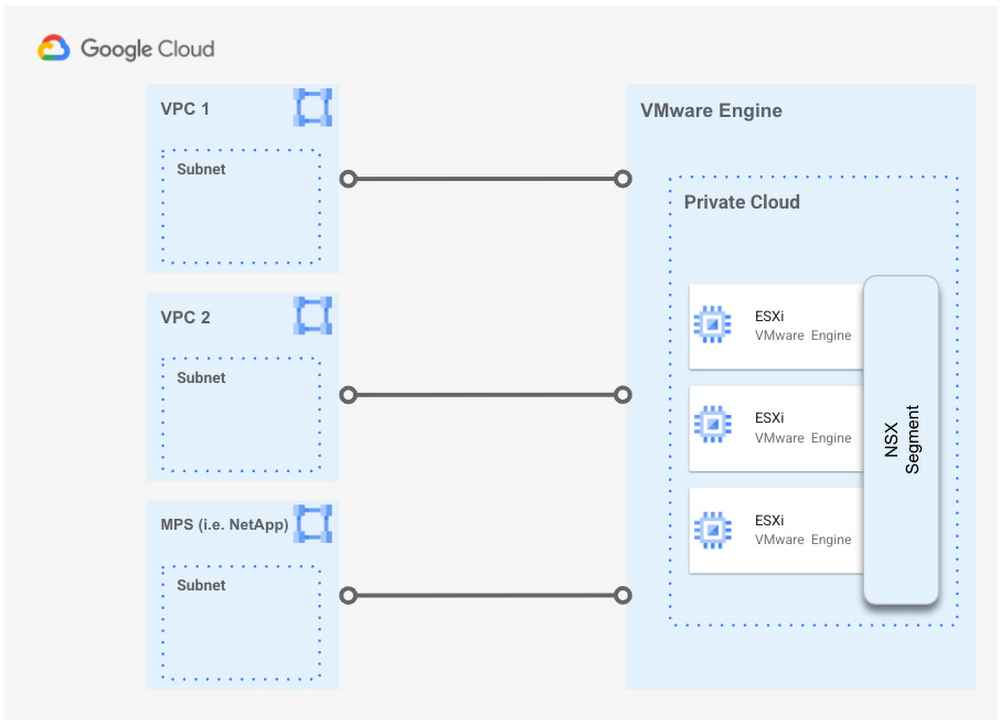
Not too long ago, we wrote about some key new capabilities in Google Cloud VMware Engine. One of the new main innovations we announced was multi-VPC connectivity, or the ability to connect the same VMware Private Cloud (that’s the name we use at Google to describe what VMware calls a Software Defined Datacenter, or SDDC) to multiple Virtual Private Clouds (VPCs) inside a customer’s organization. In today’s post, we explore in more detail the benefits and use cases that this feature enables.Because of this new feature, Google Cloud VMware Engine now supports connecting a Private Cloud to multiple customer VPCs (one-to-many). Previously, this was not possible, as the relationship between a VPC and a Private Cloud was unique (one-to-one).This unique feature also allows you to establish connectivity between Google Cloud VMware Engine and our Managed Partner Services (MPS), such as NetApp Cloud Volumes for high performance file storage , with more solutions to be added in the future. For more details please check out this link.As of this writing, the maximum number of VPCs that can be associated with a single Private Cloud is three. If a Private Cloud leverages regional Internet access and/or Public IP Service, then the maximum number of customer VPCs that it can connect to is reduced to two.Use casesYou have separate dev/test and production VPCs (including Shared VPCs), or separate business units, that require access to the same Google Cloud VMware Engine Private Cloud.A Google Cloud VMware Engine Private Cloud needs to access an existing VPC (including a Shared VPC) and a third-party managed service, such as NetApp Cloud Volumes.A Virtual Desktop Infrastructure (VDI) farm hosted in Google Cloud VMware Engine needs to access an external storage service and Compute Engine resources.Benefits and differentiatorsCurrent customers and brownfield deployments in Google Cloud are not required to change their existing architectures to access the same VMware Private Cloud. You can access and retain existing storage management mechanisms such as NetApp Cloud Volumes Service (CVS) from within the guest OS.If for some reason you can’t implement, or do not want to implement, a VPN or a multi-NIC network virtual appliance to connect VPCs together, but instead want to use VPC peering, now you can do that. A Google Cloud VMware Engine Private Cloud can connect to these VPCs without any issues; just set up the private connection between the VPC and the Private Cloud.Google Cloud is the only cloud service provider that provides peering from a single Private Cloud to multiple VPCs.Google Cloud is the only cloud service provider that provides service-level access to the NetApp Cloud Volumes service.How to configure multi-VPC connectivityIf you have already connected a VPC in your Project to a Google Cloud VMware Engine Private Cloud, the process to add another connection from the same Private Cloud to a new VPC is very simple. To configure multi-VPC connectivity, do the following:From the new VPC, create a new Private Service Access connection, just like you did for the original VPC.An Administrator with the appropriate permissions can then access the Google Cloud VMware Engine portal and navigate to Network > Private Connection > Add Private Connection, where they can fill out the following information for the same Private Cloud referenced above:Service: VPC Network (or NetApp Cloud Volumes if connecting to this third-party service).Region: Region where the Private Cloud is locatedPeer Project ID and Number: The Project that contains the new VPC that the service will be connecting to. Peer VPC ID: The new VPC you want to connect to your existing Private Cloud.Tenant Project ID: The Google-managed project ID, which can be found after creating the Private Service Access connection to the service, as described here.And that’s it! Just remember the current limits when leveraging this feature: a maximum of three (3) peered VPCs per Private Cloud, or two (2) if using the regional Google Cloud VMware Engine Internet Service or Public IP Service. Multi-VPC connectivity enables a variety of use cases and networking architectures not possible before, and can be combined at the same time with other capabilities of Google Cloud VMware Engine.For more information about the end-to-end networking capabilities and services available in Google Cloud VMware Engine, please refer to the Private Cloud Networking for Google Cloud VMware Engine whitepaper, which includes details about network flows, configuration options and the differentiated benefits of running your VMware workloads in Google Cloud.Be sure to join our product team and specialists for a free half-day VMUG virtual event on Thursday May 11th. We’ll showcase what’s new, dive into how Google Cloud VMware Engine works, and provide a sneak peak at what’s coming later in the year.Related ArticleNew in Google Cloud VMware Engine: improved reach, networking and scaleThe latest version of Google Cloud VMware Engine is chock full of new features and integrations, including enhanced networking capabilities.Read Article
Quelle: Google Cloud Platform
This week on the Google Cloud blog: April 25, 2021

Here’s a round-up of the key stories we published the week of April 25, 2021.Colossus under the hood: a peek into Google’s scalable storage systemGet a deeper look at the storage infrastructure behind your VMs, specifically the Colossus file system, and how it helps enable massive scalability and data durability for Google services as well as your applications. Read more.Related ArticleColossus under the hood: a peek into Google’s scalable storage systemAn overview of Colossus, the file system that underpins Google Cloud’s storage offerings.Read Article5 resources to help you get started with SRESite reliability engineering (SRE) is an essential part of engineering at Google—it’s a mindset, and a set of practices, metrics, and prescriptive ways to ensure systems reliability. But not everyone knows the best places to start to implement SRE in their own organizations. Here are our top resources at Google Cloud for getting started. Read more.Related Article5 resources to help you get started with SREHere are our top five Google Cloud resources for getting started on your SRE journey.Read ArticleData analytics and intelligence tools to play a key role post-COVIDA recent Google-commissioned study by IDG highlights the role of data analytics and intelligent solutions when it comes to helping businesses separate from their competition. The survey of 2,000 IT leaders across the globe reinforces the notion that the ability to derive insights from data will go a long way towards determining which companies win in this new era. Read more.Related ArticleData analytics and intelligence tools to play a key role post-COVIDA recent Google-commissioned study by IDG highlighted the role of data analytics and intelligent solutions when it comes to helping busin…Read ArticleCurious about Google Cloud Bare Metal Solution? Start here.There are many workloads that are easy to lift and shift to the cloud, but there are also specialized workloads (such as Oracle) that are difficult to migrate to a cloud environment due to complicated licensing, hardware, and support requirements. Bare Metal Solution provides a path to modernize these applications. But where do you even start? This post shows you how. Read more.Related ArticleCurious about Google Cloud Bare Metal Solution? Start here.Bare Metal solution helps you modernize your specialized Oracle workloads by providing an easier and a faster migration path while mainta…Read ArticleThe 5 benefits of Cloud SQL [infographic]Tired of spending too much time on database maintenance? You’re not alone. Lots of businesses are turning to fully managed database services to help build and scale infrastructure quickly, freeing up time and resources to spend on innovation instead. Here’s an infographic that breaks down how Cloud SQL can help in five ways. Read more.Related ArticleThe 5 benefits of Cloud SQL [infographic]Check out this infographic on the 5 benefits of Cloud SQL, Google Cloud’s managed database service for MySQL, PostgreSQL and SQL Server.Read ArticleBigtable vs. BigQuery: What’s the difference?Many people wonder if they should use BigQuery or Bigtable. While these two services have a number of similarities, including “big” in their names, they support very different use cases in your big data ecosystem. Here’s a breakdown of when you would use each. Read more.Related ArticleBigtable vs. BigQuery: What’s the difference?Bigtable vs BigQuery? What’s the difference? In this blog, you’ll get a side-by-side view of Google BigQuery and Google Cloud Bigtable.Read ArticleFaster, cheaper, greener? Pick the Google Cloud region that’s right for youOur newGoogle Cloud region picker helps customers assess key inputs like price, latency to their end users, and carbon footprint as they choose which Google Cloud region to run on. Read more.Related ArticleFaster, cheaper, greener? Pick the Google Cloud region that’s right for youNew Google Cloud region picker makes it easy for you to take advantage of our greenest data centers.Read ArticleFour consecutive years of 100% renewable energy—and what’s nextIn 2020 Google again matched 100 percent of its global electricity use with purchases of renewable energy. We were the first company of our size to achieve this milestone back in 2017, and we’ve repeated the accomplishment in every year since. All told, we’ve signed agreements to buy power from more than 50 renewable energy projects, with a combined capacity of 5.5 gigawatts—about the same as a million solar rooftops. Read more.Related ArticleFour consecutive years of 100% renewable energy—and what’s nextFor the fourth consecutive year, Google has matched 100% of its global electricity use with renewable energy—but that’s just the beginning.Read ArticleCustomers cut document processing time and costs with DocAI solutions, now generally availableThe latest releases of Document (Doc) AI platform, Lending DocAI and Procurement DocAI, built on decades of AI innovation at Google, bring powerful and useful solutions to lending, insurance, public sector, and other industries. Read more.Related ArticleCustomers cut document processing time and costs with DocAI solutions, now generally availableDocument AI platform, Lending DocAI and Procurement DocAI are generally available.Read ArticleMaking meetings more immersive, inclusive, and productive with Google MeetWe announced new innovations in Google Meet that deepen the meeting experience, regardless of how and where people participate. Specifically, we introduced a refreshed user interface (UI), enhanced reliability features powered by the latest Google AI, and tools that make meetings more engaging—even fun—for everyone involved. Read more.Related ArticleMaking meetings more immersive, inclusive, and productive with Google MeetWe’re adding new features to Google Meet to make meetings more immersive, inclusive, and productive.Read ArticleIntroducing PHP on Cloud FunctionsWe brought support for PHP, a popular general-purpose programming language, to Cloud Functions. With the Functions Framework for PHP, you can write idiomatic PHP functions to build business-critical applications and integration layers. Read more.Related ArticleIntroducing PHP on Cloud FunctionsYou can now write Cloud Functions in PHP using the Functions Framework for PHP.Read ArticleAll the posts from the weekColossus under the hood: a peek into Google’s scalable storage systemHow ShareChat built scalable data-driven social media with Google CloudThe 5 benefits of Cloud SQL [infographic]Bigtable vs. BigQuery: What’s the difference?Accelerate your Google Cloud transformation with new NetApp solutionsFaster, cheaper, greener? Pick the Google Cloud region that’s right for youOptimize your user experience with these Place Autocomplete tipsWhat no-code automation looks like with AppSheetFour consecutive years of 100% renewable energy—and what’s nextHow Lumiata democratizes AI in healthcare with Google CloudCustomers cut document processing time and costs with DocAI solutions, now generally availableMaking meetings more immersive, inclusive, and productive with Google MeetNew Redis Enterprise for Anthos and GKESolving for more sustainable and resilient value chainsChoosing the right orchestrator in Google CloudGetty Images supports its workforce with Chrome Browser Cloud ManagementMonitor applications on GKE Autopilot with the GKE DashboardBetter protect your web apps and APIs against threats and fraud with Google Cloud3 keys to multicloud success you’ll find in Anthos 1.7Part 2: Hackathons aren’t just for programmers anymore [also read part one]Earning customer trust through a pandemic: delivering our 2020 CCAG pooled auditCloud Spanner launches customer-managed encryption keys and Access ApprovalContributing to a sustainable future with Chrome OS and partnersGo is powering enterprise developers: Developer survey resultsTrack changes in SQL Server on Google Cloud using Change Data CaptureWhitepaper: Hold your own key with Google Cloud External Key ManagerIntroducing PHP on Cloud FunctionsData analytics and intelligence tools to play a key role post-COVIDWhen to use NoSQL: Bigtable powers personalization at scale5 resources to help you get started with SRECurious about Google Cloud Bare Metal Solution? Start here.Earth Week in the cloud
Quelle: Google Cloud Platform

Earth Week in the cloud

Although Earth Day was April 22, at Google Cloud we take sustainability seriously so we celebrated Earth Day all week long. We didn’t want you to miss a thing, so we’re recapping all our news from Earth Week in one handy location.Faster, cheaper, greener? Pick the Google Cloud region that’s right for youWhen it comes to sustainability, we get more done when we move together. That’s why Google Cloud partners with nonprofits, research organizations, governments, and businesses to build technology and tools to accelerate meaningful change. To help our customers do this, last month we shared the average hourly Carbon Free Energy Percentage (CFE%) for the majority of our Google Cloud regions. On Monday, we shared a new tool leveraging this data—a Google Cloud region picker—that helps customers assess key inputs like price, latency to their end users and carbon footprint, as they choose which Google Cloud region to run on. Read more.Related ArticleFaster, cheaper, greener? Pick the Google Cloud region that’s right for youNew Google Cloud region picker makes it easy for you to take advantage of our greenest data centers.Read ArticleFour consecutive years of 100% renewable energy—and what’s nextOn Tuesday, we announced that in 2020 Google again matched 100 percent of its global electricity use with purchases of renewable energy. We were the first company of our size to achieve this milestone back in 2017, and we’ve repeated the accomplishment in every year since. All told, we’ve signed agreements to buy power from more than 50 renewable energy projects, with a combined capacity of 5.5 gigawatts—about the same as a million solar rooftops. Read more.Related ArticleFour consecutive years of 100% renewable energy—and what’s nextFor the fourth consecutive year, Google has matched 100% of its global electricity use with renewable energy—but that’s just the beginning.Read ArticleSolving for more sustainable and resilient value chainsGlobal supply chains are also subject to environmental risks. In 2020, over 8,000 suppliers disclosing through CDP, a global disclosure system for environmental impacts, reported that US$1.26 trillion of revenue is likely to be at risk over the next five years due to climate change, deforestation, and water insecurity.On Thursday, we shared how we’re working to help organizations digitally transform their supply chains with sustainability in mind. With better insights from data, they can automate processes more intelligently. With smarter ML models, they can optimize systems and routing. With an open platform, they can integrate partner solutions. And they can connect their workforce in real time to collaborate up and down the value chain. Read more.Related ArticleSolving for more sustainable and resilient value chainsImproved visibility and insights—and the flexibility to adopt new business models—are key to building more sustainable supply chains.Read ArticleContributing to a sustainable future with Chrome OS and partnersGoogle’s sustainability initiatives extend all the way from our data centers to our endpoints. That’s why Chrome OS also provides sustainable computing software and hardware through our ecosystem of partners and customers committed to driving systemic change. On Friday, we shared how Chrome OS was born in the cloud and introduced a modern, more sustainable way of computing. Many partners and customers have adopted Chrome OS with specific sustainability goals in mind, and we’re sharing their stories to inspire others. Read more.Related ArticleContributing to a sustainable future with Chrome OS and partnersHow Chrome OS and partners are contributing to a sustainable futureRead ArticleEvery day is Earth DayAlthough today marks the close of Earth Week, our passion for sustainability never waivers. As we continue to operate the cleanest cloud in the industry, we’re working with a growing group of cloud customers focused on reducing the carbon impact of their operations. Learn more at https://cloud.google.com/sustainability.Related ArticleHow carbon-free is your cloud? New data lets you knowA Google Cloud region’s Carbon-Free Energy percentage (CFE%) lets you choose where best to run your workloads to meet your sustainability…Read ArticleFurther readingFaster, cheaper, greener? Pick the Google Cloud region that’s right for youFour consecutive years of 100% renewable energy—and what’s nextSolving for more sustainable and resilient value chainsContributing to a sustainable future with Chrome OS and partnersHow we’re working with governments on climate goalsHow carbon-free is your cloud? New data lets you knowA timely new approach to certifying clean energy
Quelle: Google Cloud Platform

Introducing PHP on Cloud Functions

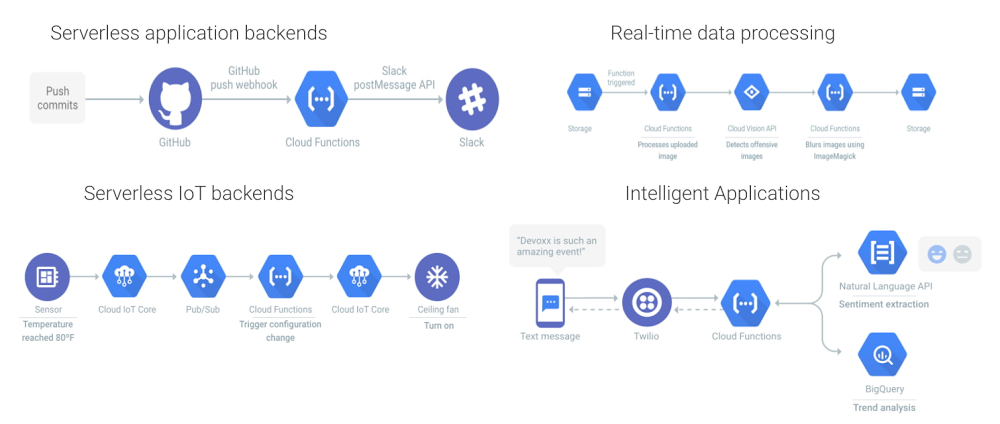
Cloud Functions, Google Cloud’s Function as a Service (FaaS) offering, is a lightweight, easy-to-use compute platform for creating single-purpose, stand-alone functions that respond to events, without having to manage a server or runtime environment. Cloud Functions is a great fit for serverless, application, mobile or IoT backends, real-time data processing systems, video, image and sentiment analysis, and even things like chatbots and virtual assistants.Today we’re bringing support for PHP, a popular general-purpose programming language, to Cloud Functions. With the Functions Framework for PHP, you can write idiomatic PHP functions to build business-critical applications and integration layers. And with Cloud Functions for PHP, now available in Preview, you can deploy functions in a fully managed PHP 7.4 environment, complete with access to resources in a private VPC network. PHP functions scale automatically based on your load. You can write HTTP functions to respond to HTTP events, and CloudEvent functions to process events sourced from external and internal services including Pub/Sub, Cloud Storage and Firestore.Click to enlargeYou can develop functions using the Functions Framework for PHP, an open source functions-as-a-service framework for writing portable PHP functions. With the Functions Framework you can develop, test, and run your functions locally and deploy them to Cloud Functions or another PHP hosting environment.Writing PHP functionsThe Functions Framework for PHP supports HTTP functions and CloudEvent functions. A HTTP function is similar to a Webhook, whereas a CloudEvent function responds to Google services, such as Pub/Sub, Cloud Storage and Firestore, using CNCF CloudEvents.Here’s an example of a very simple HTTP function:Here’s an example of a very simple CloudEvent function working with Pub/Sub:LoggingCloud functions on PHP supports logging through Cloud Logging, so information and error messages should be logged using Cloud Logging client library or using stderr, which will then be visible in the Logging UI.Using PHP librariesThe PHP Functions Framework fits comfortably with popular PHP development processes and tools. Include a composer.json file in your deployment, and those packages will be installed and the autoloader will be registered. Include a php.ini file, and your custom configuration will be loaded and extensions enabled. See dynamically loadable extensions for a complete list.Try Cloud Functions for PHP todayCloud Functions for PHP is ready for you to try today. Read the Quickstart guide, try one of our many Cloud Functions tutorials, and do it all with a Google Cloud free trial. If you want to dive a little bit deeper into the technical details, you can take a look at the PHP Functions Framework on GitHub and potentially even contribute. We’re looking forward to seeing all the PHP functions you write!Useful linksQuickstart guideCloud Functions tutorialsPHP Functions FrameworkRelated ArticleIntroducing Ruby on Google Cloud FunctionsWith Cloud Functions support for Rub Functions Framework, you can write idiomatic Ruby functions and deploy them in a fully managed Ruby …Read Article
Quelle: Google Cloud Platform
Data analytics and intelligence tools to play a key role post-COVID

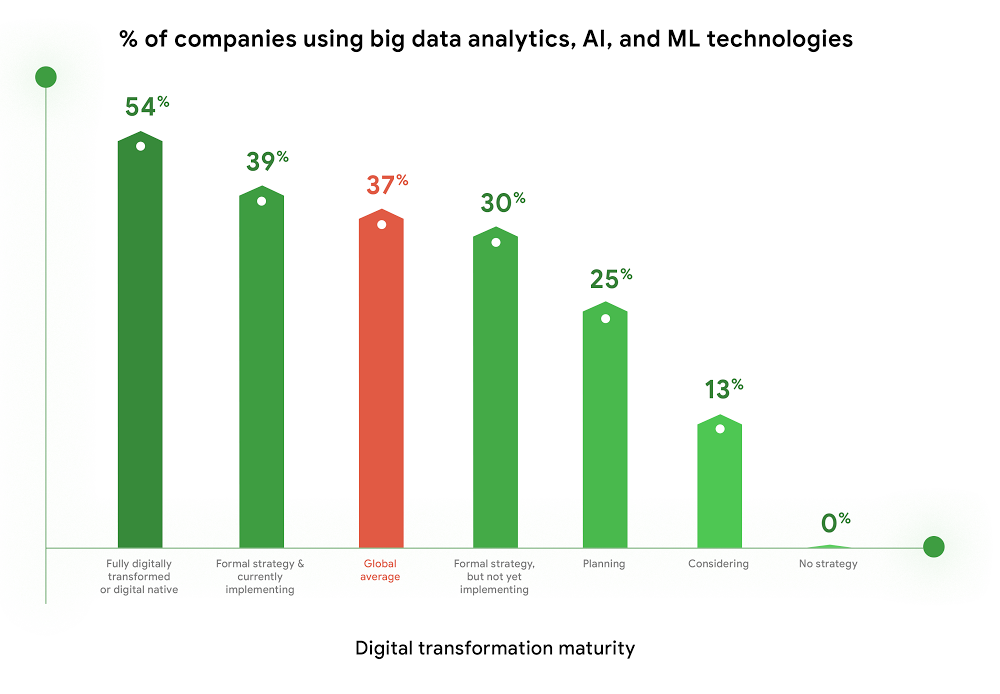
As we think about economic recovery from COVID-19—both inside Google and outside through working with Google Cloud customers—we’ve made many important observations. Among them is the recognition that the ways software developers and IT practitioners work together will shift in the post COVID-19 world. Our economic recovery today will look different than past recoveries, and on a fundamental level, the way we innovate will be different than it’s ever been before.Right now, we’re entering a new phase of cloud computing, where businesses have shifted from making tactical infrastructure decisions, to making larger IT decisions with an eye towards enabling transformation throughout the company. Data, and what we can do with that data, is key to this transformation. And how companies put data in the hands of every employee to help catalyze transformation and solve the most important and impactful opportunities in their industries is at the core.  A recent Google-commissioned study by IDG highlighted the role of data analytics and intelligent solutions when it comes to helping businesses separate from their competition. The survey of 2,000 IT leaders across the globe reinforced the notion that the ability to derive insights from data will go a long way towards determining which companies win in this new era.Data analytics and intelligence were prioritized during COVID-19The results of the IDG study show a separation amongst those organizations that embrace the capabilities of today’s data analytics and AI/ML tools and those that do not. When COVID-19 hit, many organizations cancelled IT initiatives, with 55% of respondents delaying or cancelling at least one technology project. However, 32% of respondents accelerated or introduced initiatives around building out or improving the use of data analytics and intelligence. IT leaders realize how critical data is to their future success, even when resources are scarce.Digital-focused companies are faster to embrace advanced intelligence toolsFurthermore, enthusiasm for big data analytics, AI, and ML technologies is highest among companies who are further along in their digital transformation journeys. Fifty-four percent of companies who identify as “Fully digitally transformed” or “Digital native” are using or considering using these tools, vs. the global average of 37%. And, these same organizations are embracing the promise of AI more than their peers. Forty-eight percent felt that “Embedded AI across our full stack of cloud solutions will be critical” vs 39% of digital conservatives. These companies realize these digital tools enable them to be more resilient, agile, and prepared for whatever the future brings.Click to enlargeCompanies are turning to cloud to maximize insights from dataAs companies tap into the promise of data analytics and AI/ML, they are turning to cloud for help. When considering which cloud providers to work with, 78% of respondents said big data analysis is a “must have” or a “major consideration,” which placed this capability at the top of the list of consideration factors. This is not surprising, as cloud solutions address the most common pain points and barriers to innovation. Three of the respondents’ top four areas impeding innovation are addressed by cloud: Insufficient IT & developer skill sets (1st), security risks and concerns (2nd), and legacy systems and technologies (4th). Plus, cloud makes it easier to quickly launch a project, scale up or scale down, and pay for only what you use.Click to enlargeCOVID-19 changed the very nature of business, and of IT. It forced IT leaders to decide where to put their scarce resources and big data analytics and AI/ML were, understandably, at the top of the list. To learn more about the findings, download the IDG report “No turning back: How the pandemic reshaped digital business agendas.”Related ArticleRead ArticleInterested in how Google Cloud’s leading data cloud technologies help you become smarter and make better decisions?From customer segmentation to inventory management, Google Cloud’s ML and advanced analytics capabilities make it easy to maximize the insights you derive from your data. Our database solutions are easy to use from development to production, so you can build and deploy apps faster. They also ensure that your mission critical workloads run at the highest levels of availability, scale, and security. Our smart analytics solutions allow companies to democratize access to all of their business data and our unified platform makes it easy for our customers to get the most from their structured or unstructured data, regardless of where the data is stored.With our dedicated AI solutions portfolio, Google helps businesses commit to business outcomes: saving calls, improving customer experiences, helping prevent fraud, and increasing manufacturing efficiency—all in ways that make us a strategic partner on innovation, not just a technology vendor.Related ArticleRead Article
Quelle: Google Cloud Platform
When to use NoSQL: Bigtable powers personalization at scale

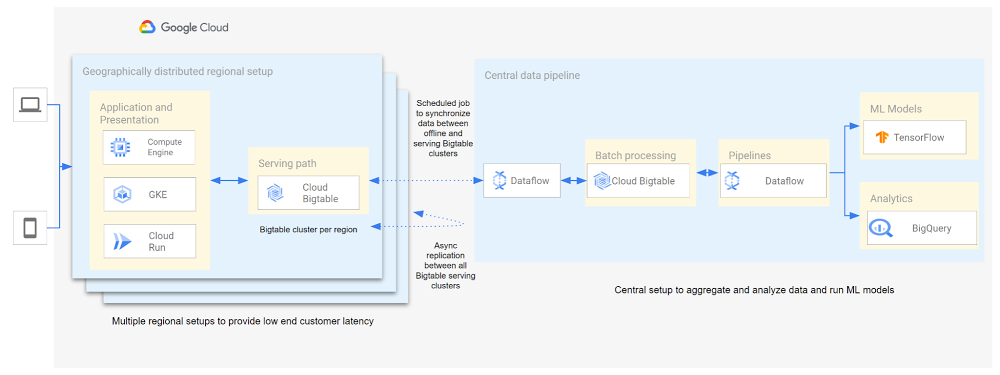
Customer expectations have shifted as a result of evolving needs. Across industries, customers expect that you treat them as individuals, and demonstrate how well you understand and serve their unique needs. This concept—personalization—is the idea that you’re delivering a tailored experience to each customer corresponding to their needs and preferences; you’re setting up a process to create individualized interactions that improves the customer’s experience. According to Salesforce, 84% of consumers say being treated like a person, not a number, is very important to winning their business. Entire industries are undergoing digital transformation to better serve their customers through personalized experiences. For example, retailers are improving engagement and conversion with personalized content, offers, and product recommendations. Advertising technology organizations are increasing the relevance and effectiveness of their ads using customer insights like their specific interests, purchasing intent, and buying behavior. Digital music services are helping their customers discover and enjoy new music, playlists, and podcasts based on their listening behavior and interests. As customers want more and more personalization, modern technology is making it possible for many more businesses to achieve this. In this post, we’ll look at some common challenges to implementing personalization capabilities and how to solve them with transformative database technologies like Google Cloud’s Bigtable. Bigtable powers core Google services such as Google Maps that supports more than a billion users, and its petabyte scale, high availability, high throughput, and price-performance advantages help you deliver personalization at scale.  Challenges with personalization Data is at the heart of personalization. To deliver personalization at scale, an application needs to store, manage, and access large volumes of data (a combination of customer-specific data and anonymized aggregate data across customers) to develop a deep understanding of the behavior, needs, and preferences of each customer. Your database needs to very quickly write large volumes of data concurrently for all active customers. You need to continuously capture data on customer behavior because each step potentially informs the next, e.g., adding an item to a shopping cart can be used to trigger new recommendations for related or complementary products. Much of this data needed for personalization is semi-structured and sparse, and therefore requires a database with a flexible data model. Personalization at scale requires large volumes of data to be read in near real-time so that it can be in the critical serving path to deliver a seamless user experience, often with a total application latency of less than 100ms. This means your requests to the database need to return results with latencies of single-digit milliseconds. You need to ensure that application latencies do not degrade as you onboard more customers. Data needs to be organized efficiently and integrated with other tools so that you can run deep analytical queries and use machine learning (ML) models to develop personalized recommendations, and store the aggregates in your operational database for serving your customers. You also need the ability to run large batch reads for analytics without affecting the serving performance of your application. In addition, you need to ensure that your database costs do not explode with the popularity of your application. Your database needs to consistently deliver low total cost of ownership (TCO), and high price-performance as your data volumes and throughput needs grow. Your database needs to scale seamlessly and linearly to deliver consistent, predictable performance to all users around the world. Additionally, your database needs to be easy to manage, so that you can focus on your application instead of managing the complexity of your database.Why a NoSQL database is the right fit for personalization Every database reflects a set of engineering tradeoffs. When relational databases were designed 40 years ago, storage, compute, and memory were thousands of times more expensive than they are today. Databases were deployed on a single server to a relatively small number of concurrent users, whose access to the systems tended to be during normal business hours when users had network access. Relational databases were designed with these resources, costs, and use in mind. They work very hard to be storage and memory efficient, and assume a single server for deployments. As the costs of storage, memory, and compute decreased, and as data and workloads grew to exceed the capacity of commodity hardware, engineers began to reconsider these tradeoffs with different goals in mind. New types of databases later emerged that assumed distributed architectures so they could be easier to scale, especially with cloud infrastructure. With this approach the tradeoff in turn was to forego the sophistication of SQL and much of the data integrity and transactional capabilities developed in relational systems. These systems are commonly called NoSQL databases.Traditional relational databases assume a fixed schema that will change infrequently over time. While this predictability of data structure allows for many optimizations, it also makes it difficult and cumbersome to add new and varying data elements in your application. NoSQL databases, such as key value stores and document databases, relax the rigidity of the schema and allow for data structures to evolve much more easily over time. Flexible data models speed the pace of innovation in your application, and increase your ability to iterate on your ML models, which is essential for personalization. In addition, the scalability of systems like Cloud Bigtable allow you to deliver personalization to millions of concurrent users while you continue to evolve how you personalize experiences for your customers.How Cloud Bigtable enables personalization at scaleCloud Bigtable supports personalization at scale with its ability to handle millions of requests per second, cost-effectively store petabytes of data1, and deliver consistent single-digit millisecond latencies for reads and writes. Bigtable delivers a unique mix of high performance and low operating cost to reduce your TCO. We’ve heard from Spotify, Segment, and Algolia about how they’vebuilt personalized experiences for their customers with Bigtable. Check out this presentation to hear Peter Sobot of Spotify describe how they use Bigtable for personalization. Let’s imagine a scenario where your application takes off like a rocketship, and grows to 250 million users. Let’s assume a peak 1.75 million concurrent users of your application2, with each user sending two requests per minute to your database. This will drive 3.5 million requests per minute to your database, or approximately 58.3K requests per second. Pricing for Bigtable to run this workload will start at under $400 per day3.Bigtable scales throughput linearly with additional nodes. With separation of compute and storage, Bigtable automatically configures throughput by adjusting the association of nodes and data to provide consistent performance. When a node is experiencing heavy load, Bigtable automatically moves some of the traffic to a node with lower load to improve the overall performance. Bigtable also supports cross-region replication, with local writes in each region. This allows you to manage your data near your customers’ geographic locations, reducing network latency and bringing predictable, low-latency reads and writes to your customers in different regions around the world. Bigtable is a NoSQL database developed and operated by Google Cloud. Bigtable provides a column family data model that allows you to flexibly store varying data elements for customers associated with their behavior and preferences, store a very large number of such data elements across your customers, and quickly iterate on your application. Bigtable supports trillions of rows with millions of columns. Each row in Bigtable supports up to 256 MB of data, so that you can easily store all personalized data for a customer in a single row. Bigtable tables are sparse, and there is no storage penalty for a column that is not used in a row; you only pay for the columns that store values.BigQuery ML allows you to create and run ML models directly in BigQuery to develop personalization recommendations that you can bring back to Bigtable. You can easily pipe Bigtable data into BigQuery to run deep analytical queries and develop recommendations. These aggregates, like computed recommendations, are brought back to Bigtable so your application can serve those recommendations to users with low latency and massive scale. Bigtable integrates with the Apache Beam ecosystem and Dataflow to make it easier for you to process and analyze your data. With application profiles and replication in Bigtable, you can isolate your workloads so that batch reads do not slow down your serving workload that has a mix of reads and writes. This enables your application to perform near real-time reads at scale to develop and train machine learning models in TensorFlow for personalization. Bigtable gives you the right operational data platform to develop personalization recommendations offline or in real-time, and serve them to your customers.Click to enlargeHere’s a look at conceptual schema examples for personalization in ecommerce:Click to enlargeAnd here’s a quick overview of what personalization use cases require, and how Bigtable addresses them.Click to enlargeBigtable is fully managed to free you from the complexity of managing your database, so that you can focus on delivering a deeply personalized experience to your customers. Learn more about Bigtable.1. Storage pricing (HDD) starts at $0.026 per GB/mo (us-central1)2. Assumes application is used 24 hours a day, average user session is 5 minutes (Android app average), and daily peak is 2x the average. (250 million / (24 hours / 5 minutes) *2 = 1,736,111 peak concurrent users (us-central1 region)3. Cloud Bigtable pricing for us-central1 region. Assumes 25 TB SSD storage (100 KB per user, for 250 million users) per month, 10 compute nodes per month (with no replication), includes data backup. Bigtable pricing details.Related ArticleA primer on Cloud Bigtable cost optimizationCheck out how to understand resources that contribute to costs and how to think about cost optimization for the Cloud Bigtable database.Read Article
Quelle: Google Cloud Platform






