Woolaroo app uses Vision AI to help preserve native languages

One of the most vibrant elements of culture is the use of native languages and the time-honored tradition of storytelling. Anthropologists and linguists have been vocal on the role that language plays in the preservation of culture and how it contributes to the appreciation of heritage. Unfortunately, of the more than 7,000 languages that are spoken around the globe, nearly 3,000  are at risk of disappearing. In fact, it’s estimated that on average a language becomes extinct every fourteen days. Google Arts & Culture realized that with some creative technology and partnering with language organisations, we could help create an interactive and educational tool to help promote them.Enter Woolaroo, an open-source photo-translation platform powered by machine learning and image recognition. The application was built on Google Cloud to encourage users to explore endangered languages around the world. Users are able to take a picture of an object in real-time, and the application returns the word in its native language, along with its pronunciation. Woolaroo was created with the philosophy that learning languages is greatly enhanced through engagement and context. By seeing an object in its environment, it’s easier to retain the information and then use it more naturally in conversation. With the help of Googlers, Woolaroo was launched in 10 languages, including Calabrian Greek, Louisiana Creole, Maori and Yiddish. During the conception stage of the app, teams from Partner Innovation and Google Arts & Culture put out an open call to the rest of Google to see what lesser-known languages our employees spoke. They then worked with the individuals that responded to develop dictionaries that were reviewed by partner institutions to ensure translations were correct and consistent. Woolaroo uses Google Cloud Vision API, which derives insights from images using AutoML or pre-trained models to quickly classify images into millions of predefined categories. This makes AI accessible and useful to more people as AutoML automates the training of these machine learning models.Our team at Google Arts & Culture creates immersive experiences for people to learn about art, history, culture and more. We are committed to supporting the preservation of heritage and cultural landmarks – including spoken language – through the use of modern technology. The magic of Woolaroo is that it is open source, which means any person or organisation can use it to build something for their own endangered language. To learn about the efforts Google Arts & Culture is involved in, download the Google Arts & Culture app or visit our blog.
Quelle: Google Cloud Platform

Databricks on Google Cloud is now generally available

Google Cloud and Databricks announced a new partnership to deliver Databricks at global scale on Google Cloud. Enterprises can deploy or migrate Databricks Lakehouse to Google Cloud to combine the benefits of an open data cloud platform with greater analytics flexibility, unified infrastructure management, and optimized performance. And we are excited to announce that this partnership, which we announced in February, is fully available to the public today! With the general availability of Databricks on Google Cloud, those customers that were part of our extended public preview can now leverage a fully publicly generally available solution. And for those customers who were waiting for a publically available solution, they can now deploy Databricks via our Marketplace. The Google Cloud Marketplace enables customers to explore, launch, and manage production-grade solutions in just a few clicks.On top of the solution being generally available, we are also excited to announce that Databricks on Google Cloud is also now available in new regions in Europe, the Middle East, and Asia as we continue to extend the regional availability in North America.Start seeing results in your organization todayCustomers are already seeing great results from this solution. Here is what Harish Kumar, the Global Data Science Director at Reckitt, had to say at the Databricks on Google Cloud launch event:“Databricks on Google Cloud simplifies the process of driving any number of use cases on a scalable compute platform – there is no need to rebuild the architecture and we can reuse our datasets, we can reuse our PySpark scripts, we can reuse our modules – and hence reduce the planning cycles that are needed to deliver a solution for each business question or problem statement that we use.”What this launch means for usersOpennessOur partnership provides enterprises with an open approach that enables greater flexibility for data management and analytics strategies, which builds upon Google’s ongoing commitment to an open cloud. This openness ensures customers have interoperability and portability, including those that want to use multiple public clouds and open source technology, like Kubernetes, MLflow, Apache Spark, and Delta Lake for their analytics applications. FlexibilityIntegrations with Google Cloud Storage, Pub/Sub, BigQuery, Looker, and Google Kubernetes Engine allow Databricks users to quickly flip between services within Google Console to unify the experience and build the analytics applications they need to move the business forward.Data can be messy, siloed, and slow, and requires many departments across organizations to collaborate, including IT, analytics, and business users. With deep integrations between Google Cloud’s data analytics services and Databricks, enterprises can now store, process, and analyze any type or volume of data. SecurityGoogle Cloud’s security model, world-scale infrastructure, and unique capability to innovate will help keep your organization secure and compliant. Databricks on Google Cloud enables customers to rapidly provision Databricks on Google Cloud’s global network, with advanced security and data protection controls required for highly-regulated industries. Data analytics partnershipsOur joint partners and systems integrators in the analytics ecosystem are committed to ensuring seamless deployments, integrations, and expertise with Databricks on Google Cloud, including Accenture, Cognizant, Collibra, Confluent, Deloitte, Fishtown Analytics, Fivetran, Immuta, Informatica, Infoworks, Insight, MongoDB, Privacera, Qlik, SoftServe, Slalom, Tableau, TCS and Trifacta among others.Get started TodayWe’re looking forward to helping customers discover Databricks on Google Cloud and put all of these capabilities to work. Get started by exploring Databricks on Google Cloud or access it through the Google Cloud console.
Quelle: Google Cloud Platform

Retire your tech debt: Move vSphere 5.5+ to Google Cloud VMware Engine

It can happen so easily. You get a little behind on your payments. Then you start falling farther and farther behind until it becomes almost impossible to dig yourself out of debt. Tech debt, that is. IT incurs a lot of tech debt when it comes to keeping up infrastructure; most IT departments are already running as lean as they possibly can. Many VMware shops are in a particularly tough spot, especially if they’re still running on vSphere 5.5. If that describes you, it’s time to ask yourself how you intend to get out of this tech debt? General support for vSphere 5.5 ended back in September 2018, and technical guidance one year later. General support for 6.0 ended in March 2020, support for 6.5 ends November 15 of this year, and even the end of general support for vSphere 6.7 is only a couple of years away (November, 2022)! If you’re still running vSphere 5.5, moving to vSphere 7.0 is the right thing to do.But doing so is hard if you’ve fallen into a deep tech-debt hole.Traditionally, it means moving all your outdated vSphere systems through all the interim releases until you’ve migrated all your systems to the latest version. That involves upgrading hardware, software, and licenses, as well as all the additional work that goes along with the upgrades. Then, as soon as you’re done, the next upgrade cycle is already upon you. Making the task even more daunting, VMware HCX—the company’s application mobility service—will also stop supporting 5.5 soon, making migration even more complicated.If this paints an unsightly picture, don’t despair. You have the opportunity, right now, to easily retire your technical debt and be debt-free from here on out by migrating to Google Cloud VMware Engine. And you can migrate before you have to upgrade to the next vSphere release just to get migration support. Not only will you still be able to migrate to vSphere 7 using HCX, but even better, you don’t have to do the digging yourself.The cloud breaks the cycle of debtIf the effort and resources required to move was too steep a price before, now it’s a viable option with Google Cloud VMware Engine. With cloud-based infrastructure, you can not only migrate to the latest release of vSphere, but you can also take your workload—lock, stock, and barrel—out of your data center and put it into Google Cloud. Moving to Google Cloud VMware Engine makes the migration task fast and simple. Never again will you have to deal with spreadsheets to track how many watts of cooling you need for your data center, buy additional equipment, or manage upgrades.Migrating to the cloud is also the first step toward getting out of the business of managing your data center and into embracing an OpEx subscription model. And you can begin moving workloads to the cloud in increments, without having to worry about all the nuances — it’s all done for you.Work in a familiar environment and expand your toolsetOne of the biggest benefits of Google Cloud VMware Engine is that it offers the same, familiar VMware experience you have now. All the applications running on vSphere 5.5 can immediately run on a private cloud in Google Cloud VMware Engine with no changes. You’ll now be running on the latest release of vSphere 7, and when VMware releases patches, updates, and upgrades, Google Cloud keeps the infrastructure up to date for you. And as a VMware administrator, you can use the same tools that you’re familiar with on-premises.Migration doesn’t have to be a long, arduous processGoogle Cloud VMware Engine allows you to leverage your existing virtualized infrastructure to make migration fast and easy. Use familiar VMware tools to migrate your on-premises vSphere applications to vSphere in your own private cloud while maintaining continuity with all your existing tools, policies, and processes. It takes only a few clicks (see our demo video). Make sure you have your prerequisites, enable the Google Cloud VMware Engine API, and follow these 10 steps:Enable the VMware Engine node quota and assign at least three nodes to create your private cloud.Set your roles and permissions.Access the Google Cloud VMware Engine portal.Click ‘Create a private cloud’. This is fast — only about 30 minutes.Select the number of nodes (a minimum of three).Enter a CIDR range for the VMware management network.Enter a CIDR range for the HCX deployment network.Review your settings.Click Create.Connect an on-prem network to your VMware Engine private cloud or connect using a point-to-site VPN connection. Google Cloud VMware Engine supports multi-region networking with VPC global routing, which allows VPC subnets to be deployed in any region worldwide, greatly simplifying networking.When you use VMware HCX to migrate VMs from your on-premises environment to Google Cloud VMware Engine, VMware HCX abstracts vSphere resources running both on-prem and in the cloud and presents them to applications as one continuous resource to create a hybrid infrastructure.By partnering with Google Cloud, you can erase your tech debt and get out of the time-consuming, resource-draining business of data center management. Then, once your VMware-based workloads are running on Google Cloud VMware Engine, you can start modernizing your applications with Google Cloud services, including AI/ML, low-cost storage, and disaster recovery solutions. Check out the variety of pricing options for the service, from pre-pay with discounts up to 50% to pay-as-you-go and annual commitments.Related ArticleZero-footprint DR solution with Google Cloud VMware Engine and ActifioLearn how to use Actifio data management software plus Google Cloud VMware Engine to create a dynamic, low-cost DR site in the cloud.Read Article
Quelle: Google Cloud Platform

Diving into your documents with DocAI

We recently announced the GA of the Document AI Platform, Google’s solution for automating and validating documents to streamline  document workflows. Important business data is not always readily available in computer-readable formats. This is what we consider dark formats such as pdfs, handwritten forms and images. The platform is a console for document processing where customers can quickly access all parsers, tools, and solutions. Workflow solutions, built on our specialized parsers with models for common enterprise document types such tax forms, invoices, receipts and more, Lending DocAI and Procurement DocAI are now also in GA.So why use it? Your business is most likely sitting on a treasure trove of unstructured data, or maybe you have document workflows that require several manual steps. DocAI can help you programmatically extract data for gathering insights with data analytics and help automate tedious and error-prone tasks. Use one of our client libraries to ingest your documents and produce structured data in our new unified document format.Unified document formatThe unified document format (document.proto) is the protocol used to represent all metadata about a document in a standardized, universal format. It is an efficient, standoff format—where the content is kept separate from the annotations. This gives full flexibility to losslessly represent any annotation or attribute of a document or its content whether annotated by humans or an algorithm.It was created to make building document-based workflow applications easy across tools, components, platforms, and languages inside and outside of DocAI. It is a protocol buffer based format, allowing efficient, flexible encodings—typically binary or json.The format currently allows the representation of rich OCR representations as well as extracted entities so let’s dive in.Document representation – read itThe form parsers return the raw representation of the document content. In many documents, the layout structure is often as important as the actual text. The layout elements include several types such as tokens, lines, paragraphs, blocks, form fields, tables and visual elements. The format allows the representation of rich OCR representations in a hierarchical structure. You can use the layout bounding poly coordinates to detect and highlight the tokens in a UI.We’ve drafted a set of notebooks to help you quickly get started with the service. I’ll walk through a sample document with our general specialized form parser notebook.Extracted data – understand itHere is where the core of the structured data appears. If you’re processing a generic form, DocAI will extract the relevant key value pairs. If you’re using one of our specialized parsers for a form type such as an invoice, receipt, utility statement, etc. the data extracted will be merged into a predefined schema. To help you with your document processing journey we also provide tools for classification and splitting multi-page, multi-form packets. You could imagine the use case of needing to classify and split individual forms in a large mortgage packet such as W2s, W9s, payslips, etc. The classifier will label the document/entity type and the splitter will intelligently understand where the logical boundaries of the different form types start and end.ExtractionNot only do you get the “question and answers” from your document, you also get entity normalization and confidence scores. In our specialized parsers, if a certain field is a monetary or date type, the API will also provide an appropriate entity type. This makes it much easier when integrating with other systems or a database with strict schema types.For data assurance, we provide a score between 0 and 1 on the platform’s confidence for that entity. We are able to inspect the confidence scores for both the keys and the associated values on a generic form.We understand that accuracy is critical for business processes so you can use Human-in-the-Loop AI to incorporate a customizable human review workflow with trusted reviewers within their own or partner organizations. You can configure the human review to trigger if the whole document or specific fields do not meet confidence score at your choosing. Including human participation in ML processes allows AI and humans to work together for the best possible results for customers.Last but not least, making it useful is up to you! We hope we have inspired you to try out Document AI in your app or service. By using the platform you can build tools that reduce manual steps to prevent human errors, integrate other Google services for robust data processing or track documents changes for an audit. You can head over to the DocAI Platform in the Google Cloud console or try out one or our codelabs.Related ArticleCustomers cut document processing time and costs with DocAI solutions, now generally availableDocument AI platform, Lending DocAI and Procurement DocAI are generally available.Read Article
Quelle: Google Cloud Platform

Debugging your Proxyless gRPC service mesh

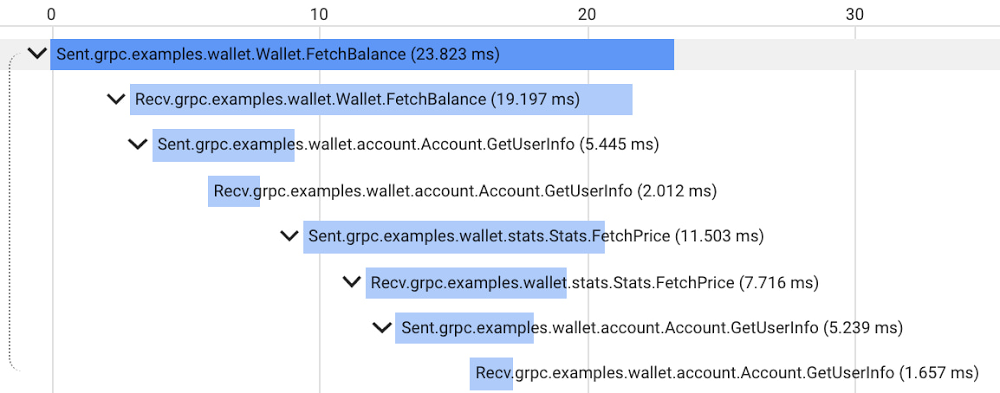
Proxyless gRPC applications in a service mesh now support many of the same features as deployments with a sidecar Envoy proxy, but in the past it has been difficult to get application-level insight into problems with specific nodes in the mesh. Today, we are happy to announce new tools, examples, and documentation to make it easier to debug your Proxyless gRPC applications. Proxyless gRPC now includes an admin API to allow live debugging of nodes in your mesh, and support for the xDS CSDS protocol to dive deeper into per-node control plane configurations to identify and resolve any issues. Further, we provide documentation and sample code illustrating how to add OpenCesus instrumentation to your gRPC clients and servers to send metric and tracing data to Cloud Monitoring and Cloud Trace.As a network library, gRPC provides some predefined admin services to make debugging easier. For example, there is a channel tracing service named Channelz (see gRPC blog). With Channelz, you can access the metrics about the requests going through each channel, like how many RPCs have been sent, how many succeeded or failed, and much more. Each existing admin service is packaged as a separate library, and the documentation of the predefined admin services is usually scattered. It can be time consuming to get the dependency management, module initialization, and library import right for each one of them. Recently, gRPC introduced admin interface APIs, which provide a convenient way to create a gRPC server to expose admin services. With this, any new admin services that you may add in the future are automatically available via the admin interface just by upgrading your gRPC version.Debugging a large service mesh can be a complex task. Unexpected routing behaviors could be due to a misconfiguration, unhealthy backends or issues in the control or data plane. As part of the admin interface API, gRPC can now expose the xDS configuration, the service mesh configuration that Traffic Director, our fully-managed service mesh, sends to gRPC applications. This configuration is exposed via the CSDS service, which you can easily start by using the admin interface APIs. Our grpcdebug CLI tool prints human-readable output based on the information it fetches from a target gRPC application.You can now also instrument gRPC C++, Go, and Java clients and servers with the OpenCensus library to send metrics and tracing to Cloud Monitoring and Cloud Trace. While gRPC’s OpenCensus integration has been available for a long time, our user guide and example code demonstrate clearly how to configure OpenCensus instrumentation in the context of a service mesh and ensure that traces are compatible across both Proxyless gRPC and Envoy-sidecar applications. After instrumenting your Proxyless gRPC application, you’ll be able to view traces such as the following example of our gRPC Wallet mesh:For more information about using gRPC with Traffic Director and these new features, see the following links:Traffic Director with proxyless gRPC services overviewRelated ArticleTraffic Director and gRPC—proxyless services for your service meshWith the addition of xDS API support, you can now use Traffic Director with proxyless gRPC services.Read Article
Quelle: Google Cloud Platform

New blueprint helps secure confidential data in AI Platform Notebooks

Core to Google Cloud’s efforts to be the industry’s most Trusted Cloud is our belief in shared fate – taking an active stake to help customers achieve better security outcomes on our platforms. To make it easier to build security into deployments, we provide opinionated guidance for customers in the form of security blueprints. We recently released our updated Google Cloud security foundations guide and deployable blueprint to help our customers build security into their starting point on Google Cloud. Today, we’re adding to our portfolio of blueprints with the publication of our Protecting confidential data in AI Platform Notebooks blueprint guide and deployable blueprint, which can help you apply data governance and security policies that protect your AI Platform Notebooks containing confidential data.Security and privacy are particularly important when it comes to AI, because confidential data is often at the heart of AI and ML projects. This blog post focuses on securing the following high level notebook flow at all relevant security layers.AI Platform Notebooks offer an integrated and secure JupyterLab environment for enterprises. Data science practitioners in enterprises use AI Platform Notebooks to experiment, develop code, and deploy models. With a few clicks, you can easily get started with a Notebook running alongside popular deep learning frameworks (TensorFlow Enterprise, PyTorch, RAPIDS and many others). Today AI Platform Notebooks can be run on Deep Learning Virtual Machines or Deep Learning Containers.Enterprise customers, particularly those in highly regulated industries like financial services and healthcare and life sciences, may want to run their JupyterLab Notebooks in a secure perimeter, and control access to the notebooks and data. AI Platform Notebooks were built from the ground up with such customers in mind, with security and access control as the pillars of the service. Recently, we announced the general availability of several security features, including VPC Service Controls (VPC-SC), customer managed encryption keys (CMEK), and more for AI Platform Notebooks. However, security is more than just features; practices and processes are just as important. Let’s walk through the blueprint, which serves as a step-by-step guide to help secure your data and the Notebooks environment.AI Platform Notebooks support popular Google Cloud Platform enterprise security architectures through VPC-SC, shared VPC, and private IP controls. You can run a Shielded VM as your compute instance for AI Platform Notebooks, and encrypt your data on disk with CMEK. You can choose between two predefined user access modes to AI Platform Notebooks: single-user or via a service account. You can also customize access based on your Cloud Identity and Access Management (IAM) configuration. Let’s take a closer look at these security features in the context of AI Platform Notebooks.Compute Engine securityAI Platform Notebooks with Shielded VM supports a set of security controls that help defend against rootkits and bootkits. Available in Notebooks API and DLVM Debian 10 images, this functionality helps you protect enterprise workloads from threats like remote attacks, privilege escalation, and malicious insiders. This feature leverages advanced platform security capabilities such as secure and measured boot, a virtual trusted platform module (vTPM), UEFI firmware, and integrity monitoring. On a Shielded VM Notebook instance, Compute Engine enables the virtual Trusted Platform Module (vTPM) and integrity monitoring options by default. In addition to this functionality, Notebooks API provides an upgrade endpoint which allows you to perform operating system updates to the latest DLVM image, either manually or automatically via auto-upgrade.Data encryptionWhen you enable CMEK for an AI Platform Notebooks instance, the key that you designate, rather than a key managed by Google, is used to encrypt data on the boot and data disks of the VM. In general, CMEK is most useful if you need full control over the keys used to encrypt your data. With CMEK, you can manage your keys within Cloud KMS. For example, you can rotate or disable a key, or you can set up a rotation schedule using the Cloud KMS API.Data exfiltration mitigationVPC Service Controls (VPC-SC) improves your ability to mitigate the risk of data exfiltration from Google Cloud services such as Cloud Storage and BigQuery. AI Platform Notebooks supports VPC-SC, which prevents reading data from or copying data to a resource outside the perimeter using service operations, such as copying to a public Cloud Storage bucket using the “gsutil cp” command or to a permanent external BigQuery table using the “bq mk” command.Access control and audit loggingAI Platform Notebooks has a specific set of Identity and Access Management (IAM) roles. Each predefined role contains a set of permissions. When you add a new member to a project, you can use an IAM policy to give that member one or more IAM roles. Each IAM role contains permissions that grant the member access to specific resources. AI Platform Notebooks IAM permissions are used to manage Notebook instances; you can create, delete, and modify AI Platform Notebooks instances via Notebooks API. (To configure JupyterLab access, please refer to this troubleshooting resource.)AI Platform Notebooks writes Admin Activity audit logs, which record operations that modify the configuration or metadata of a resource.With these security features in mind, let’s take a look at a few use cases where AI Platform Notebooks can be particularly useful:Customers want the same security measures and controls they apply to their IT infrastructure applied to their data and notebook instances.Customers want uniform security policies that can be easily applied when their data science teams access data.Customers want to tune sensitive data access for specific individuals or teams, and prevent broader access to that data.AI Platform Notebook Security Best PracticesGoogle Cloud provides features and products that address security concerns at multiple layers including network, endpoint, application, data, and user access. Although every organization is unique, many of our customers have common requirements when it comes to securing their Cloud environments, including notebooks deployments. The new Protecting confidential data in AI Platform Notebooks blueprint guide can help you set up security controls and mitigate data exfiltration when using AI Platform Notebooks by: Helping you implement a set of best practices based on common customer inputs.Minimizing time to deployment by using a declarative configuration with Terraform.Allowing for reproducibility by leveraging the Google Cloud security foundations blueprint.The blueprint deploys the following architecture:The above diagram illustrates an architecture for implementing security with the following approach:Gather resources around common contexts as early as possible.Apply least-privilege principles when setting up authorization policies.Create network boundaries that only allow for necessary communications.Protect sensitive information at the data and software level.1. Gather resources around common contexts as early as possibleWith Google Cloud, you can gather resources that share a common theme using a resource hierarchy that you can customize. The Google Cloud security foundations blueprint sets a default organization’s hierarchy. The blueprint adds a folder and projects related to handling sensitive production data while using AI Platform Notebooks.A “trusted” folder under the “production” folder contains three projects organized according to its logical application:“trusted-kms” gathers resources such as keys and secrets that protect data.“trusted-data” gathers sensitive data.“trusted-analytics” gathers resources such as notebooks that access data.Grouping resources around a common context allows for high level resource management and provides the following advantages compared to setting rules at the resource level:Helps reduce the risk of security breach. You can apply security rules to a desired entity and propagate them to lower levels via policy inheritance across your data hierarchy.Ensure that administrators have to actively create bridges between resources. By default, projects are sandboxed environments of resources.Facilitate future organizational changes. Setting rules at a high level helps move groups of resources closer together.The blueprint does the following to facilitate the least-privileged approach to security:Sets specific policies at the trusted folder level.Creates identities and authorization roles at the project level.Reuses existing shared VPC environments and adds rules at a multiple-project level.2. Create network boundaries that only allow for necessary communications.Google Cloud provides VPCs for defining networks of resources. The previous sections cover the separation of functions through projects. VPCs belong to projects, so by default, resources from a VPC can not communicate with resources in another VPC.An administrator must now allow or block network communications:With the internet: Instances in Google can have internal and external IP addresses. The blueprint sets a default policy for forbidding the use of external IP addresses at the trusted folder level.With Google APIs: Without external IP addresses, instances cannot access the public endpoints of Cloud Storage and BigQuery. The blueprint sets private connectivity to Google APIs at the VPC level to allow notebooks communication with those services.Within boundaries: Limits environments such as BigQuery or Cloud Storage that notebooks have access to. The blueprint sets VPC Service Controls to create trusted perimeters, within which only resources in certain projects can access certain services based on access policies for user/device clients.Between resources: The blueprint creates notebooks using an existing shared VPC. The shared VPC should have restrictive firewall rules to limit the protocols that instances can use to communicate with each other.The blueprint uses Google Cloud’s network features to set the minimum required network paths as follows:Enables users to access Google Cloud endpoints through allowlisted devices.Allows for the creation of SSH tunnels for users to access notebook instances.Connects instances to Google services through private connections within an authorized perimeter.3. Apply least-privilege principles when setting up authorization policies.Google Cloud provides a default Cloud IAM setup to make the platform onboarding easier. For production environments, we recommend ignoring most of those default resources. Use Cloud IAM to create your custom identities and authorization rules based on your requirements. Google Cloud provides features to implement the least-privileged principle while setting up a separation of duties:Custom roles provide a way to group a minimum set of permissions for restricting access. This ensures that a role allows identities to only perform the tasks expected of them.Service accounts can represent an instance identity and act on behalf of trusted users. This allows for consistent behavior and limits user actions outside of those computing resources.Logical identity groups based on user persona simplifies management by limiting the number of lone and possibly forgotten identities.Cloud IAM policies link roles and identities. This provides users with the means to do their job while mitigating the risk of unauthorized actions.For example, the blueprint:Creates a service account with enough roles to run jobs and act as an identity for notebook instances in the trusted-analytics project.Assigns roles to a pre-created group of trusted scientists to allow them to use notebooks to interact with data.Creates a custom role in the trusted-data project with view-only access to sensitive information in BigQuery, without being allowed to modify or export the data.Binds the custom role to relevant user groups and services accounts so they can interact with data in the trusted-data project.Through Terraform, the blueprint creates the following flow:Add users from the trusted_scientists variable to the pre-created trusted-data-scientists Google Groups.Sets a policy for identities in the trusted-data-scientists group to use the service account sa_p_notebook_compute.Creates an individual notebook instance per trusted user and leverages the sa_p_notebook_compute service account as an identity for the instances.With this setup, users can access confidential data in the trusted-data project through the service account, which acts as an identity for instances in the trusted-analytics project. Note: All trusted users can access all confidential data. Setting narrower permissions is out of scope for this blueprint. Narrower permissions can be set by creating multiple service accounts and limiting their data access at the required level (a specific column, for example), then assigning each service account to the relevant group of identities.4. Protect sensitive information at the data and software level.Google Cloud provides default features to protect data at rest, and additional security features for creating a notebook.The blueprint encrypts data at rest using keys, and shows how to:Create highly available customer-manager keys in your own project.Limit key access to select identities.Use keys to protect data from BigQuery, Cloud Storage and AI Platform Notebooks in other projects within the relevant perimeter.For more details, see the key management section of the blueprint guide.AI Platform Notebooks leverage Jupyter notebooks set up on Compute Engine instances. When creating a notebook, the blueprint uses AI Platform Notebooks customization features to:Set additional security parameters, such as preventing “sudo”.Limit access to external sources when calling deployment scripts.Modify the Jupyter setup to mitigate the risk of file downloads from the Jupyterlab UI.For more details, see the AI Platform Notebooks security controls section of the blueprint guide.To learn more about protecting your confidential data while better enabling your data scientists, read the guide: Protecting confidential data in AI Platform Notebooks. We hope that this blueprint, as well as our ever-expanding portfolio of blueprints available on our Google Cloud security best practices center, helps you build security into your Google Cloud deployments from the start, and helps make you safer with Google.Related ArticleBuild security into Google Cloud deployments with our updated security foundations blueprintGet step by step guidance for creating a secured environment with Google Cloud with the security foundations guide and Terraform blueprin…Read Article
Quelle: Google Cloud Platform

OpenTelemetry Trace 1.0 is now available

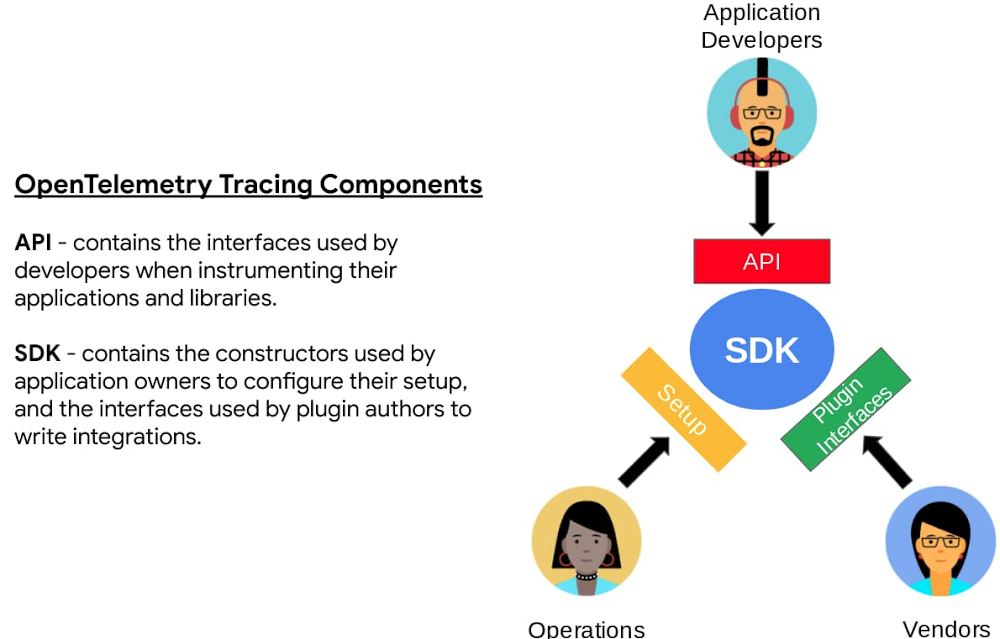
For decades, application development and operations teams have struggled with the best way to generate, collect, and analyze telemetry data from systems and apps. In 2010, we discussed our approach to telemetry and tracing in the Dapper papers, which eventually spawned the open-source OpenCensus project, which merged with OpenTracing to become OpenTelemetry. OpenTelemetry provides a single, open-source standard and a set of technologies to capture and export metrics, traces, and logs (in the future) from your applications and infrastructure. OpenTelemetry, which is now the second most active CNCF open-source project behind only Kubernetes, makes it easy to create and collect telemetry data from your services and software, then forward them to a variety of analysis tools. OpenTelemetry is 100% free and open source, and is adopted and supported by industry leaders in the observability space.OpenTelemetry has reached a key milestone: the OpenTelemetry Tracing Specification has reached version 1.0. API and SDK release candidates are available for Java, Erlang, Python, Go, Node.js, and .Net. Additional languages will follow over the next few weeks. Now that Trace has reached 1.0 status, customers can deploy OpenTelemetry Trace with confidence.Tracing stability is only the first step towards having one observability framework for trace, metrics, and logs. The top hyperscale cloud providers, application performance monitoring (APM), monitoring, logging and trace companies have partnered on OpenTelemetry to provide a unified, open-source approach that will greatly simplify the collection of telemetry data from any environment, including on-premises and multi-cloud, for all customers. One agent will work across all major hyperscale clouds, APM, logging, metrics, and trace products.How is Google using OpenTelemetry?At Google, respect and commitment to our users is always at the forefront of everything we do. To that end, we are fully embracing the OpenTelemetry standard to ensure that you get the best use of the information collected from any of our cloud-native products. We are working to implement OpenTelemetry libraries as out-of-the-box features in some of our most popular cloud products, for example the new Cloud SQL Insights. Insights provides database metrics and traces by honoring the propagated trace-id from the instrumented upstream application and appending spans that are representative of your query plan. These spans can be routed to your backend of choice via the Google Cloud Trace API. This makes it easy to do end-to-end tracing in your existing tools and provides a full-stack view of your environments from the application through to the database.OpenTelemetry, Google Cloud and our partnersWe believe that a healthy observability ecosystem serves our customers well and this is reflected in our continued commitment to open-source initiatives. Here are some of the partners who are fully supporting the OpenTelemetry rollout, which will enable them to build differentiated solutions for mutual customers. Cisco AppDynamics“AppDynamics is committed to OpenTelemetry standards to accelerate full-stack observability. Digital has an ever growing impact on our lives, and we believe the future is to make end-to-end telemetry gathering easier in order to enable a full view of the digital environment’s health and behavior.” – Abhi Madhugiri, Director, Global Strategic Alliances, Cisco AppDynamicsDatadog“As early contributors to OpenTelemetry, we are extremely pleased to see this major milestone and to work with customers instrumenting critical, production services. Bringing together end-to-end traces, metrics, and logs is necessary to make your applications, infrastructure, and third-party services entirely observable. With this 1.0 release for Tracing, Metrics and Logs on the horizon, OpenTelemetry holds incredible promise as an open, community-driven source of instrumentation for any engineering team.” – Michael Gerstenhaber, Sr Director of Product Management, DatadogDynatrace“As one of the core contributors to OpenTelemetry, Dynatrace sees great value collaborating on the open standard with other industry leaders to provide more visibility into cloud-native software stacks. Dynatrace combines OpenTelemetry and broad observability and user experience data, with automation and intelligence to help teams tame cloud-native environments, save time, and focus on activities that create customer value.” – Alois Reitbauer, VP, Chief Technology Strategist, DynatraceNew Relic“At New Relic, we strongly believe that the future of instrumentation is open and therefore we are glad to see the strong momentum behind OpenTelemetry. We are excited to continue contributing to the project as it marches towards GA as we are seeing rapidly growing demand for our OpenTelemetry solution among our customer base.”  – Ramon Guiu, vice president of product management, New Relic.Splunk“Over the past two years, OpenTelemetry has grown from a proposal between two open-source communities to the north star for the collection of distributed traces and other signals. OpenTelemetry is championed by cloud platforms, has become the recommendation of many observability vendors to their customers, and now has the second highest number of contributors across all CNCF projects. Google and Splunk have been behind OpenTelemetry since day one, and the 1.0 release of tracing means that GCP and Splunk Observability Cloud customers can take advantage of OpenTelemetry’s broad set of integrations, powerful SDKs, and easy-to-use Collector, with a robust support path backing them up.” – Morgan McClean – co-founder of OpenCensus & OpenTelemetry and Director of Product Management, SplunkWhat’s next?We are excited to see the rollout of the other specifications from the OpenTelemetry community and will continue to work to enable integrations with our Google Cloud products. Our hope is that the broader developer community joins us in embracing this unique step change in collecting telemetry data. We are pleased to see the adoption and support of the committee by other leading cloud providers and observability vendors. Get started with OpenTelemetry todayTo learn more about OpenTelemetry, review the OpenTelemetry specification and start exporting traces to Google Cloud Trace.Related ArticleDatabase observability for developers: introducing Cloud SQL InsightsNew Insights tool helps developers quickly understand and resolve database performance issues on Cloud SQL.Read Article
Quelle: Google Cloud Platform

Southwire powers digital transformation with its SAP cloud migration

“Talk about tough times, right?”That’s how Dan Stuart, Senior Vice President of IT Services at Southwire Company, refers to the months following a December 2019 ransomware event, and the COVID crisis that began in spring of 2020. Those events hit just as the company was preparing for an overhaul of their SAP environment. This comprehensive plan included three key elements. First, the company wanted to upgrade their SAP ECC environment to take advantage of the latest functionality available for this critical ERP system. Second, Southwire aimed to deploy SAP Business Warehouse on SAP HANA to accelerate vital reporting for all business users. Third, the company wanted to upgrade to the latest version of SAP Process Orchestration—an essential component that touches key manufacturing interfaces in all Southwire facilities. Southwire had looked at multiple options for the upgrades, including remaining entirely on-premises, colocation, and full cloud migration. “Going to the cloud seemed a lot more compelling,” says Joe Schleupner, Southwire’s Senior Director of PMO & ITS planning and implementation. “We were going to the cloud eventually, so why take these intermediary steps? Let’s just get it done.”After looking at several options, Southwire decided to migrate to Google Cloud. “We wanted to be on a platform for SAP that was flexible, scalable, and secure; that we could count on to get up and running quickly,” says Stuart. “We chose Google Cloud not only for those reasons, but also because we recognize that Google has other assets that we may be able to take advantage of down the line, such as technologies like artificial intelligence (AI).” More stability, less worryAs one of the leading manufacturers of wire and cable used in the transmission and distribution of electricity, Southwire aids the delivery of power to millions of people worldwide. They have more than 30 manufacturing facilities across the United States running 24/7. Any downtime directly affects productivity and revenue. With help from Google Cloud and their implementation partner NIMBL, Southwire completed the SAP migration to Google Cloud over a planned maintenance weekend on July 4th.The migration itself, while complex, went quickly and smoothly. “Just moving to the cloud was quite a feat because we were dealing with so much data, but in total the SAP system was down for only ~16 hours,” says Schleupner.“As a project manager, I always felt that Google Cloud had my back” Schleupner says. The Process Orchestration (PO) migration was of particular concern, considering that it controlled all of Southwire’s manufacturing interfaces across the entire company. “Every critical piece of information that goes from SAP down to the manufacturing system goes through that system,” says Schleupner.Even after migrating, Southwire discovered that making changes to the system was fast, easy, and resulted in no downtime. Normally, certain types of changes would have involved taking down SAP for at least an hour.The Southwire team also appreciates the fact that the modern cloud architecture means spending less time on routine infrastructure maintenance. “It’s one less thing for me to worry about,” Stuart says, “I can focus on the business side of the house and move the technology and responsibilities to what we do within the Google Cloud Platform.”What comes next?While the cloud migration will increase stability, uptime, performance, and security, there is much more to come. Southwire is currently working on a disaster recovery implementation for their SAP environment on Google Cloud. Stuart and Schleupner are excited about where Google Cloud can further take Southwire. They are considering an SAP Hybris e-commerce implementation as well as connected factory and/or factory automation initiatives that can take advantage of artificial intelligence and machine learning. To Stuart and Schleupner,the migration of Southwire’s SAP environment to Google Cloud, as important as it was, really represents the first step in the company’s tech evolution. Now that much of the heavy lifting is complete, Southwire’s digital transformation can begin in earnest. “There’s no shortage of areas where I think Google Cloud will come into play,” Stuart says, “and we intend to look at these things with an open mind to understand how we can leverage current investments to take our organization where we want to go.”Learn more about Southwire’s SAP on Google Cloud deploymentand how Google Cloud can transform the way you work with your SAP enterprise applications. Visit cloud.google.com/solutions/sap.Related ArticleSAP on Google Cloud: 2 analyst studies reveal quantifiable business benefits and ROIFrom uptime and infrastructure to efficiency and productivity—both Forrester and IDC identified major benefits to companies that have mad…Read Article
Quelle: Google Cloud Platform
Include Cloud Spanner databases in your CI/CD process with the Liquibase extension

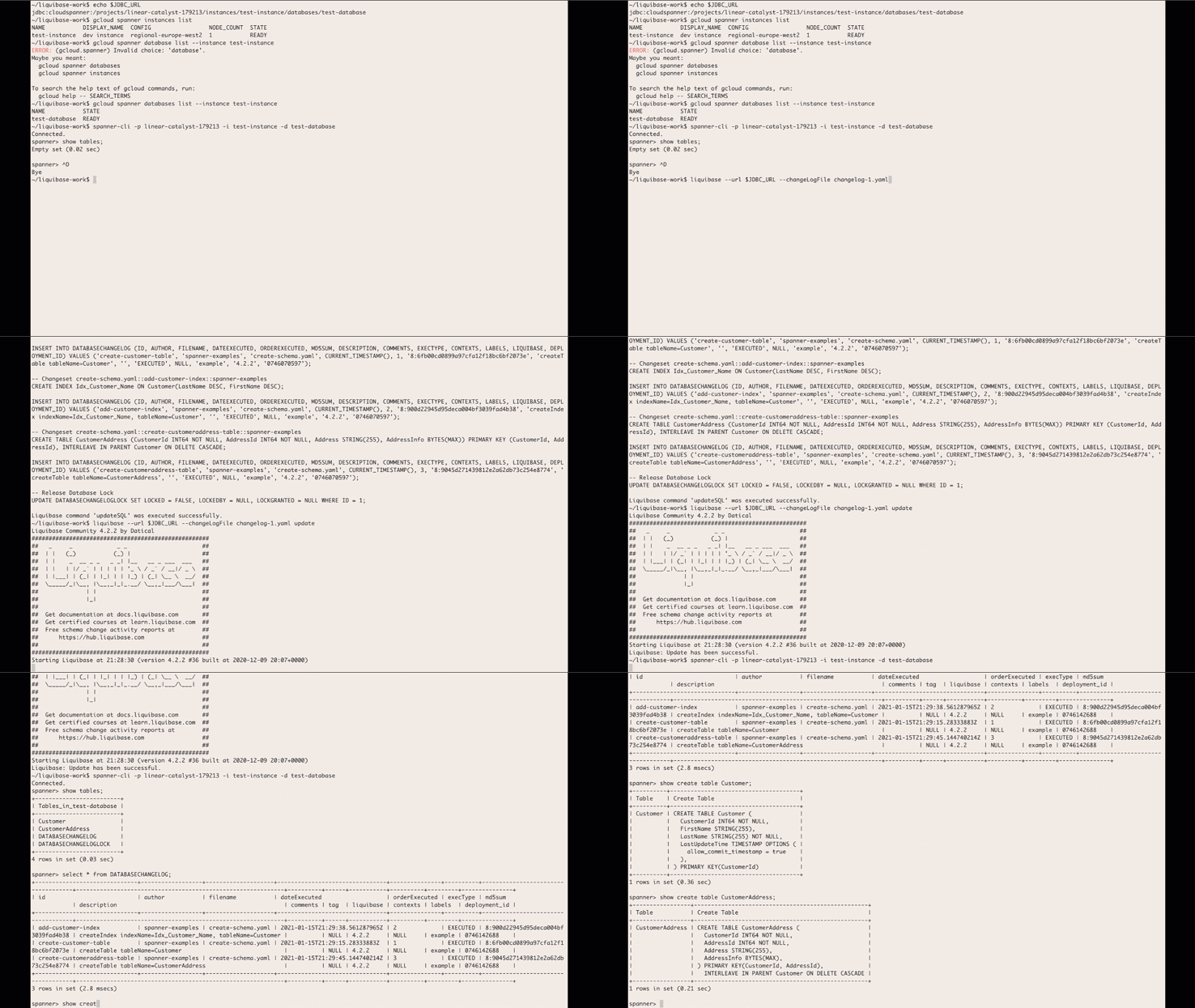
In February, we announced the beta version of the Liquibase Cloud Spanner extension that allows developers to use Liquibase’s open-source database library to manage and automate schema changes in Cloud Spanner. We’re happy to share that the Liquibase Cloud Spanner extension is now GA.What is Liquibase?Liquibase, an open-source library that works with a wide variety of databases, can be used for tracking, managing, and automating database schema changes. By providing the ability to integrate databases into your CI/CD process, Liquibase helps you more fully adopt DevOps practices. It supports SQL as well as declarative formats such as XML, YAML, and JSON. Liquibase includes support for reviewing changes before applying them, incrementally applying needed changes to different databases in different environments, and rolling back changes.When you use Liquibase, every database schema change you make is called a changeset, and all of the changesets are tracked in changelogs. These changesets and changelogs make it possible to do version control on your database and make it easier to integrate database schema migrations with your CI/CD process.What are the supported features of the Liquibase Cloud Spanner extension?The Cloud Spanner Liquibase extension allows you to use Liquibase to target Cloud Spanner databases. The extension supports most of the available features of both Liquibase and Cloud Spanner and supports most DML and DDL commands. The following Liquibase ChangeTypes are supported by the extension:createTable, dropTable, addColumn, modifyDataType, addNotNullConstraint, dropColumn, createIndex, dropIndex, addForeignKeyConstraint, dropForeignKeyConstraint, dropAllForeignKeyConstraints, addLookupTableThe following data DML ChangeTypes are supported by the extension:insert, update, loadData, loadUpdateDataBest practices and limitationsWhile the Cloud Spanner Liquibase extension supports as many of the features of Cloud Spanner and Liquibase as possible, there are some features that cannot be supported or can only be supported through custom SQL changes. To use Liquibase effectively with Spanner, review this summary of best practices and limitations. See this page for the full list of limitations.Use ModifySql commands for Cloud Spanner features without a corresponding Liquibase change typeThere are some Cloud Spanner features that don’t have a corresponding change type in Liquibase. Support for these features can be accomplished by adding a ModifySql command to your change set to modify the generated SQL.DDL limits and best practices for schema updatesCloud Spanner recommends some best practices for schema updates including limiting the frequency of schema updates and considering the impact of large scale schema changes. One approach is to apply a small number of change sets. Alternatively, you can use SQL change and batch the DDL using batch statements.Liquibase change types with limited or no Cloud Spanner supportThere are some change types that Liquibase supports that either aren’t supported by Cloud Spanner or have certain limitations. For example, addPrimaryKey and dropPrimaryKey are not supported, because Cloud Spanner requires all tables to have a primary key. The primary key has to be defined when the table is created, and can’t be added or dropped later.For a full list of these change types and potential workarounds, see this section of the documentation.Database features that aren’t supported by Cloud SpannerThere are some database features that are not supported by Spanner. If you try to use any of the following through Liquibase, an error will occur:Auto increment columnsSequencesDefault value definition for a columnUnique constraints (use UNIQUE INDEX instead)Stored proceduresViewsTable and column remarksHow to get startedUsing Cloud Spanner and Liquibase together allows you to integrate database schema migrations in your CI/CD pipelines. If you’re ready to try out the Cloud Spanner Liquibase extension for yourself, download the latest release here. Then, head over to the Liquibase with Cloud Spanner integration guide, which will walk you through how to create a changelog, how to run the changelog with Liquibase, and how to verify the changes. You can use the Liquibase extension with your actual Spanner instances or with the emulator.For even more information and additional changelog examples, visit the liquibase-spanner GitHub repository. We would love to hear your feedback, so please share any suggestions, issues, or questions in the issue tracker.Related ArticleOpening the door to more dev tools for Cloud SpannerLearn how to integrate a graphical database development tool with cloud databases like Cloud Spanner with the JDBC driver.Read Article
Quelle: Google Cloud Platform
Cloud computing 101: Frequently asked questions

There are a number of terms and concepts in cloud computing, and not everyone is familiar with all of them. To help, we’ve put together a list of common questions, and the meanings of a few of those acronyms. You can find all these, and many more, in our learning resources.What are containers?Containers are packages of software that contain all of the necessary elements to run in any environment. In this way, containers virtualize the operating system and run anywhere, from a private data center to the public cloud or even on a developer’s personal laptop. Containerization allows development teams to move fast, deploy software efficiently, and operate at an unprecedented scale. Read more.Containers vs. VMs: What’s the difference?You might already be familiar with VMs: a guest operating system such as Linux or Windows runs on top of a host operating system with access to the underlying hardware. Containers are often compared to virtual machines (VMs). Like virtual machines, containers allow you to package your application together with libraries and other dependencies, providing isolated environments for running your software services. However, the similarities end here as containers offer a far more lightweight unit for developers and IT Ops teams to work with, carrying a myriad of benefits. Containers are much more lightweight than VMs, virtualize at the OS level while VMs virtualize at the hardware level, and share the OS kernel and use a fraction of the memory VMs require. Read more.What is Kubernetes?With the widespread adoption of containers among organizations, Kubernetes, the container-centric management software, has become the de facto standard to deploy and operate containerized applications. Google Cloud is the birthplace of Kubernetes—originally developed at Google and released as open source in 2014. Kubernetes builds on 15 years of running Google’s containerized workloads and the valuable contributions from the open source community. Inspired by Google’s internal cluster management system, Borg, Kubernetes makes everything associated with deploying and managing your application easier. Providing automated container orchestration, Kubernetes improves your reliability and reduces the time and resources attributed to daily operations. Read more.What is microservices architecture?Microservices architecture (often shortened to microservices) refers to an architectural style for developing applications. Microservices allow a large application to be separated into smaller independent parts, with each part having its own realm of responsibility. To serve a single user request, a microservices-based application can call on many internal microservices to compose its response. Containers are a well-suited microservices architecture example, since they let you focus on developing the services without worrying about the dependencies. Modern cloud-native applications are usually built as microservices using containers. Read more.What is ETL?ETL stands for extract, transform, and load and is a traditionally accepted way for organizations to combine data from multiple systems into a single database, data store, data warehouse, or data lake. ETL can be used to store legacy data, or—as is more typical today—aggregate data to analyze and drive business decisions. Organizations have been using ETL for decades. But what’s new is that both the sources of data, as well as the target databases, are now moving to the cloud. Additionally, we’re seeing the emergence of streaming ETL pipelines, which are now unified alongside batch pipelines—that is, pipelines handling continuous streams of data in real time versus data handled in aggregate batches. Some enterprises run continuous streaming processes with batch backfill or reprocessing pipelines woven into the mix. Read more.What is a data lake?A data lake is a centralized repository designed to store, process, and secure large amounts of structured, semistructured, and unstructured data. It can store data in its native format and process any variety of it, ignoring size limits. Read more.What is a data warehouse?Data-driven companies require robust solutions for managing and analyzing large quantities of data across their organizations. These systems must be scalable, reliable, and secure enough for regulated industries, as well as flexible enough to support a wide variety of data types and use cases. The requirements go way beyond the capabilities of any traditional database. That’s where the data warehouse comes in. A data warehouse is an enterprise system used for the analysis and reporting of structured and semi-structured data from multiple sources, such as point-of-sale transactions, marketing automation, customer relationship management, and more. A data warehouse is suited for ad hoc analysis as well custom reporting and can store both current and historical data in one place. It is designed to give a long-range view of data over time, making it a primary component of business intelligence. Read more.What is streaming analytics?Streaming analytics is the processing and analyzing of data records continuously rather than in batches. Generally, streaming analytics is useful for the types of data sources that send data in small sizes (often in kilobytes) in a continuous flow as the data is generated. Read more.What is machine learning (ML)?Today’s enterprises are bombarded with data. To drive better business decisions, they have to make sense of it. But the sheer volume coupled with complexity makes data difficult to analyze using traditional tools. Building, testing, iterating, and deploying analytical models for identifying patterns and insights in data eats up employees’ time. Then after being deployed, such models also have to be monitored and continually adjusted as the market situation or the data itself changes. Machine learning is the solution. Machine learning allows businesses to enable the data to teach the system how to solve the problem at hand with machine learning algorithms—and how to get better over time. Read more.What is natural language processing (NLP)?Natural language processing (NLP) uses machine learning to reveal the structure and meaning of text. With natural language processing applications, organizations can analyze text and extract information about people, places, and events to better understand social media sentiment and customer conversations. Read more.Learn moreThis is just a sampling of frequently asked questions about cloud computing. To learn more, visit our resources page at cloud.google.com/learn.Related ArticleRead Article
Quelle: Google Cloud Platform






