New this month: Data lakes, speed at scale, and SAP data

As you’ve probably noticed by now, our team is all about our customers. Earlier in the year, the New York Times shared how their data analytics team went from staying up until three in the morning trying to keep their legacy system running to relaxing while eating ice cream after theirmigration over to Google Cloud. We also explored the details of why Verizon Media picked BigQuery for scale, performance and cost. And who could forget the awesome story of how the Golden State Warriors transform on-court data into competitive advantage, pulling raw data from AWS into Google Cloud for fast analytics.Leaders in industry show us the way!In April, we highlighted the best practices two incredible organizations are using to turn data into value at an incredible pace. Carrefour, a leading global retailer with over 12,000 stores in over 30 countries, published an outstanding set of best practices on their corporate blogdescribing how Google Cloud fueled the company’s digital transformation. Yann Barraud, the company’s Head of Data Platforms, revealed how they managed to migrate a 700TB data lake to Google Cloud in just a few months without any service interruption—and it’s already scaling again with more than 2TB of new data each day. In addition, the total cost of ownership is lower than before despite serving more than 80 applications and executing 100 million API calls per month.You might also enjoy hearing how the team at Broadcom modernized their data lake with Dataproc, Cloud SQL and Bigtable, migrating around 80 applications with a data pipeline that receives telemetry data from millions of devices around the world. The move increased the company’s enterprise agility and translated to a reduction of 25% in monthly support calls.Watch a quick interview below with the team that made it happen:Broadcom rethinks their cybersecurity data lake with Google CloudBroadcom got rid of their “noisy neighbor” problem for their security analytics team by moving to Google Cloud. This move reduced their data lake support issues by 25%.If you like hearing data analytics success stories, you should check out how online food delivery network Delivery Hero turned to Google BigQuery to improve data accessibility and sharing across 174 datasets and 2.7 petabytes of data.And you’ll love reading this Forbes piece about how Zulily established a set of data-driven basics to guide them to business success. These principles help remind data science and engineering teams that ultimately technology is meant to serve customer needs. If it’s failing to do that—it’s time to question why you’ve got it. One of our final favorite stories from this past month kicked off with the opening day of Major League Baseball’s 2021 season. MLB’s data cloud does more than provide insights that increase viewership and sell jerseys—it’s about bringing fans a richer appreciation for the game with applications like their baseball metrics platform Statcast, which is built on Google Cloud.  Statcast uses cameras to collect data on everything from pitch speed to ball trajectories to player poses. This data then gets fed into the Statcast data pipeline in real time and turned into on-screen analytics that announcers use as part of their in-game commentary. Want to get a taste for what that looks like? Check out the video below:Funny baseball moments of 2020 (Statcast style!)Check out some of the funniest moments of the 2020 season, analyzed by Statcast and presented by @Google Cloud​!And that’s just a few of the many incredible journeys we witness every month. Join us on May 26th, 2021 for the Data Cloud Summit to hear more about how leading companies like Equifax, PayPal, Rackspace, Keybank, Deutsche Bank, and many more are using Google Cloud to transform their organizations. You’ll also hear the latest updates (and a few surprises) from our data management, data analytics, and business intelligence product teams about where we’re headed in the future. Be sure to save your seat for freenow! The need for speed, intelligence, and engagementIn case you missed it, we also had a great webinar with FaceIT last month. As the world’s biggest independent competitive gaming platform, FaceIT has more than 18 million users that compete in over 20 million game sessions each month.  During the webinar, Director of Data & Analytics Maria Laura Scuri talked with us about how her team leveraged BigQuery BI Engine to create better gaming experiences.  Here are the main takeaways from our conversation, along with some of the latest innovations from Google Cloud and Looker that customers are using to build better data experiences:Speed is key for succeeding with data.High throughput is critical when it comes to streaming data in real time. We introduced a new streaming API for ingesting data into BigQuery. The BigQuery Storage Write API not only includes stream-level transactions and automatic schema update detection but it also comes with a very cost-effective pricing model of $0.025 per GB with the first 2 TB per month free.Engagement drives rich customer experiences. According to the Mobile Gaming Analysis in 2019, most mobile games only see a 25% retention rate for users after the first day. Machine learning is a game changer for understanding the likelihood of specific users returning to applications or websites. This developer tutorial takes you through how to run propensity models for churn prediction using a BigQuery ML, Firebase, and Google Analytics. Intelligent data services deliver new avenues for enriching data experiences.Enabling business users to easily transform data based on their needs not only reduces load on IT teams, it puts powerful insights right where they need to be to deliver the most value. Our newest solution uses Google Cloud Dataprep to help teams enrich survey data, find new insights, and visualize results with Looker, Data Studio, or another BI tool. BigQuery Pushdown for Trifacta data prep flows allows teams to use intelligent technology to execute transforms natively inside BigQuery, yielding up to 20X faster job executions and significant cost savings.  Another exciting announcement from April was our new support for choropleth maps of BigQuery GEOGRAPHY polygons. Now, you can use Data Studio to visualize BigQuery GIS data in a Google Maps-based interface. You can play with it today for free using our BigQuery free trialand any of our public datasets.   This quick tutorial will show you how to visualize the affordability of rental properties in Washington state on a map. Give it a spin and let us know what you think!More for your SAP dataWe know that many of you want to do more with SAP data. That’s why we created the SAP Table Batch Source for Cloud Data Fusion, our fully managed, cloud-native data integration service. This new capability allows you to seamlessly integrate data from SAP Business Suite, SAP ERP and S/4HANA with the Google data platform, including  BigQuery, Cloud SQL, and Spanner. With the SAP Table Batch Source, you can leverage best-in-class machine learning capabilities and combine SAP data with other datasets. One awesome example is running machine learning on IoT data joined with ERP transactional data to do predictive maintenance, run application to application integration with SAP and Cloud SQL-based applications, fraud detection, spend analytics, demand forecasting, and more.For more details about the benefits of the SAP Table Batch Source in Cloud Data Fusion, I highly recommend reading the introduction blog post. At Google Cloud, we’re always striving to enable you to do more with data, regardless of where the data is stored and how you’d like to visualize it. And expect more to come in the future—our work is far from done. If you want to hear more about what’s coming next, don’t forget to join us on May 26th, 2021 for the Data Cloud Summit to hear from leading companies about how Google Cloud is helping transform their organizations. I hope to see you there!Related ArticleRead Article
Quelle: Google Cloud Platform

Google Cloud and Seagate: Transforming hard-disk drive maintenance with predictive ML

Data centers may be in the midst of a flash revolution, but managing hard disk drives (HDDs) is still paramount. According to IDC, stored data will increase 17.8% by 2024 with HDD as the main storage technology. At Google Cloud, we know first-hand how critical it is to manage HDDs in operations and preemptively identify potential failures. We are responsible for running some of the largest data centers in the world—any misses in identifying these failures at the right time can potentially cause serious outages across our many products and services. In the past, When a disk was flagged for a problem, the main option was to repair the problem on site using software. But this procedure was expensive and time-consuming. It required draining the data from the drive, isolating the drive, running diagnostics, and then re-introducing it to traffic.That’s why we teamed up with Seagate, our HDD original equipment manufacturer (OEM) partner for Google’s data centers, to find a way to predict frequent HDD problems. Together, we developed a machine learning (ML) system, built on top of Google Cloud, to forecast the probability of a recurring failing disk—a disk that fails or has experienced three or more problems in 30 days.Let’s take a peek. Managing disks by the millions is hard workThere are millions of disks deployed in operation that generate terabytes (TBs) of raw telemetry data. This includes billions of rows of hourly SMART(Self-Monitoring, Analysis and Reporting Technology) data and host metadata, such as repair logs, Online Vendor Diagnostics (OVD) or Field Accessible Reliability Metrics (FARM) logs, and manufacturing data about each disk drive.That’s hundreds of parameters and factors that must be tracked and monitored across every single HDD. When you consider the number of drives in an enterprise data center today, it’s practically impossible to monitor all these devices based on human power alone. To help solve this issue, we created a machine learning system to predict HDD health in our data centers.Reducing risk and costs with a predictive maintenance systemOur Google Cloud AI Services team (Professional Services), along with Accenture, helped Seagate build a proof of concept based on the two most common drive types. The ML system was built on the following Google Cloud products and services:Terraform helped us configure our infrastructure and manage resources on Google Cloud.Google internal technologies enabled us to migrate data files to Google Cloud. BigQuery andDataflow allowed us to build highly scalable data pipelines to ingest, load, transform, and store TB of data, including raw HDD health data, features (used for training and prediction), labels, prediction results, and metadata. We built, trained, and deployed our time-series forecasting ML model using:AI Platform Notebooks for experimentationAutoML Tables for ML model experimentation and developmentCustom Transformer-based Tensorflow model trained on Cloud AI Platform. UI views in Data Studio and BigQuery made it easy to share results for executives, managers, and analysts.Composer, Cloud Functions, and our Cloud operations suite provided end-to-end automation and monitoring.In the past, when we flagged a disk problem, the main fix was to repair the disk on site using software. But this procedure was expensive and time-consuming. It required draining the data from the drive, isolating the drive, running diagnostics, and then re-introducing it to traffic.”End-to-end automated MLOps using Google Cloud products from data ingestion to model training, validation and deployment added significant value to the project.” according to Vamsi Paladugu, Director of Data and Analytics at Seagate. Vamsi also added, “Automated implementation of infrastructure as code using Terraform and DevOps processes, aligning with Seagate security policies and flawless execution of the design and setup of the infrastructure is commendable.”Now, when an HDD is flagged for repair, the model takes any data about that disk before repair (i.e. SMART data and OVD logs) and uses it to predict the probability of recurring failures.Data is critical—build a strong data pipeline Making device data useful through infrastructure and advanced analytics tools is a critical component of any predictive maintenance strategy. Every disk has to continuously measure hundreds of different performance and health characteristics that can be used to monitor and predict its future health. To be successful, we needed to build a data pipeline that was both scalable and reliable for both batch and streaming data processes for a variety of different data sources, including:SMART system indicators from storage devices to detect and anticipate imminent hardware failures.Host data, such as notifications about failures, collected from a host system made up of multiple drives. HDD logs (OVD and FARM data) and disk repair logs. Manufacturing data for each drive, such as model type and batch number. Important note: We do not share user data at any time during this process. With so much raw data, we needed to extract the right features to ensure the accuracy and performance of our ML models. AutoML Tables made this process easy with automatic feature engineering. All we had to do was use our data pipeline to convert the raw data into AutoML input format. BigQuery made it easy to execute simple transformations, such as pivoting rows to columns, joining normalized tables, and defining labels, for petabytes of data in just a few seconds. From there, the data was imported directly into AutoML Tables for training and serving our ML models.Choosing the right approach — two models put to the testOnce we had our pipeline, it was time to build our model. We pursued two approaches to build our time-series forecasting model: an AutoML Tables classifier and a custom deep Transformer-based model.The AutoML model extracted different aggregates of time-series features, such as the minimum, maximum, and average read error rates. These were then concatenated with features that were not time-series, such as drive model type. We used a time-based split to create our training, validation, and testing subsets. AutoML Tables makes it easy to import the data, generate statistics, train different models, tune hyperparameter configurations, and deliver model performance metrics. It also offers an API to easily perform and batch online predictions. For comparison, we created a custom Transformer-based model from scratch using Tensorflow. The Transformer model didn’t require feature engineering or creating feature aggregates. Instead, raw time series data was fed directly into the model and positional encoding was used to track the relative order. Features that were not time-series were fed into a deep neural network (DNN). Outputs from both the model and the DNN were then concatenated and a sigmoid layer was used to predict the label. So, which model worked better? The AutoML model generated better results, outperforming the custom transformer model or statistical model system. After we deployed the model, we stored our forecasts in our database and compared the predictions with actual drive repair logs after 30 days. Our AutoML model achieved a precision of 98% with a recall of 35% compared to precision of 70-80% and recall of 20-25% from custom ML model). We were also able to explain the mode by identifying the top reasons behind the recurring failures and enabling ground teams to take proactive actions to reduce failures in operations before they happened.Our top takeaway: MLOps is the key to successful productionThe final ingredient to ensure you can deploy robust, repeatable machine learning pipelines is MLOps. Google Cloud offers multiple options to help you implement MLOps, using automation to support an end-to-end lifecycle that can add significant value to your projects. For this project, we used Terraform to define and provision our infrastructure and GitLab for source control versioning and CI/CD pipeline implementation.Our repository contains two branches for development and production, which corresponds to an environment in Google Cloud. Here is our high-level system design of the model pipeline for training and serving:Click to enlargeWe used Cloud Composer, our fully managed workflow orchestration service, to orchestrate all the data, training, and serving pipelines we mentioned above. After an ML engineer has evaluated the performance-trained model, they can trigger an activation pipeline that promotes the model to production by simply appending an entry in a metadata table.”Google’s MLOps environment allowed us to create a seamless soup-to-nuts experience, from data ingestion all the way to easy to monitor executive dashboards.” said Elias Glavinas, Seagate’s Director of Quality Data Analytics, Tools & Automation. Elias also noted, “AutoML Tables, specifically, proved to be a substantial time and resource saver on the data science side, offering auto feature engineering and hyperparameter tuning, with model prediction results that matched or exceeded our data scientists’ manual efforts. Add to that the capability for easy and automated model retraining and deployment, and this turned out to be a very successful project.”What’s coming nextThe business case for using an ML-based system to predict HDD failure is only getting stronger. When engineers have a larger window to identify failing disks, not only can they reduce costs but they can also prevent problems before they impact end users. We already have plans to expand the system to support all Seagate drives—and we can’t wait to see how this will benefit our OEMs and our customers! AcknowledgementsWe’d like to give thanks to Anuradha Bajpai, Kingsley Madikaegbu, and Prathap Parvathareddy for implementing the GCP infrastructure and building critical data ingestion segments. We’d like to give special thanks to Chris Donaghue, Karl Smayling, Kaushal Upadhyaya, Michael McElarney, Priya Bajaj, Radha Ramachandran, Rahul Parashar, Sheldon Logan, Timothy Ma and Tony Oliveri for their support and guidance throughout the project. We are grateful to Seagate team (Ed Yasutake, Alan Tsang, John Sosa-Trustham, Kathryn Plath and Michael Renella) and our partner team from Accenture (Aaron Little, Divya Monisha, Karol Stuart, Olufemi Adebiyi, Patrizio Guagliardo, Sneha Soni, Suresh Vadali, Venkatesh Rao and Vivian Li) who partnered with us in delivering this successful project.Related ArticleKey requirements for an MLOps foundationMLOps aims to unify ML system development with ML system operations and these Google Cloud tools help.Read Article
Quelle: Google Cloud Platform
SRE fundamentals 2021: SLIs vs. SLAs. vs SLOs

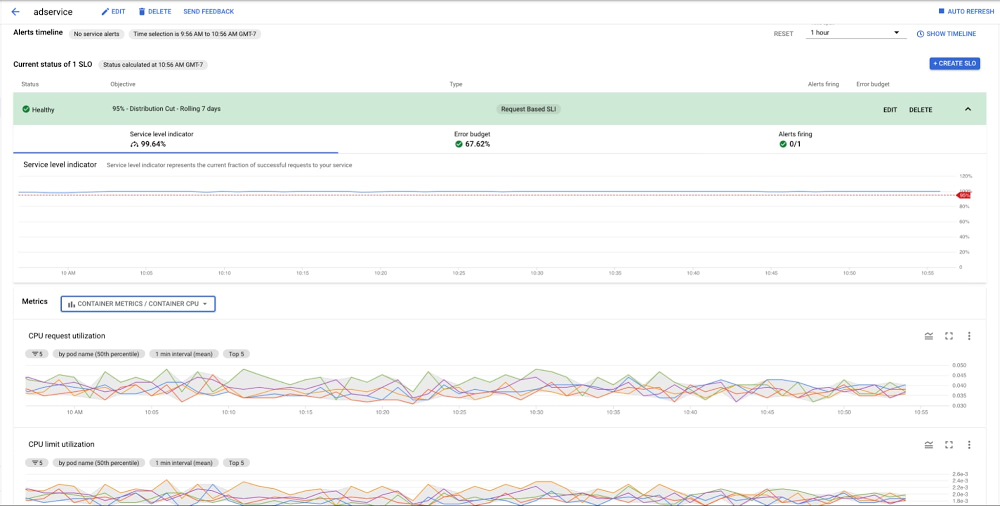
A big part of ensuring the availability of your applications is establishing and monitoring service-level metrics—something that our Site Reliability Engineering (SRE) team does every day here at Google Cloud. The end goal of our SRE principles is to improve services and in turn the user experience.The concept of SRE starts with the idea that metrics should be closely tied to business objectives. In addition to business-level SLAs, we also use SLOs and SLIs in SRE planning and practice. Defining the terms of site reliability engineeringThese tools aren’t just useful abstractions. Without them, you won’t know if your system is reliable, available, or even useful. If the tools don’t tie back to your business objectives, then you’ll be missing data on whether your choices are helping or hurting your business.As a refresher, here’s a look at SLOs, SLAs, and SLIS, as discussed by our Customer Reliability Engineering team in their blog post, SLOs, SLIs, SLAs, oh my – CRE life lessons.1. Service-Level Objective (SLO)SRE begins with the idea that availability is a prerequisite for success. An unavailable system can’t perform its function and will fail by default. Availability, in SRE terms, defines whether a system is able to fulfill its intended function at a point in time. In addition to its use as a reporting tool, the historical availability measurement can also describe the probability that your system will perform as expected in the future.When we set out to define the terms of SRE, we wanted to set a precise numerical target for system availability. We term this target the availability Service-Level Objective (SLO) of our system. Any future discussion about whether the system is running reliably and if any design or architectural changes to it are needed must be framed in terms of our system continuing to meet this SLO.Keep in mind that the more reliable the service, the more it costs to operate. Define the lowest level of reliability that is acceptable for users of each service, then state that as your SLO. Every service should have an availability SLO—without it, your team and your stakeholders can’t make principled judgments about whether your service needs to be made more reliable (increasing cost and slowing development) or less reliable (allowing greater velocity of development). Excessive availability has become the expectation, which can lead to problems. Don’t make your system overly reliable if the user experience doesn’t necessitate it, and especially if you don’t intend to commit to always reaching that level. You can learn more about this by participating in The Art of SLOs training. Within Google Cloud, we implement periodic downtime in some services to prevent a service from being overly available. You could also try experimenting with occasional planned-downtime exercises with front-end servers, as we did with one of our internal systems. We found that these exercises can uncover services that are using those servers inappropriately. With that information, you can then move workloads to a more suitable place and keep servers at the right availability level.2. Service-Level Agreement (SLA)At Google Cloud, we distinguish between an SLO and a Service-Level Agreement (SLA). An SLA normally involves a promise to a service user that the service availability SLO should meet a certain level over a certain period. Failing to do so then results in some kind of penalty. This might be a partial refund of the service subscription fee paid by customers for that period, or additional subscription time added for free. Going out of SLO will hurt the service team, so they will push hard to stay within SLO. If you’re charging your customers money, you’ll probably need an SLA.Because of this, and because of the principle that availability shouldn’t be much better than the SLO, the availability SLO in the SLA is normally a looser objective than the internal availability SLO. This might be expressed in availability numbers: for instance, an availability SLO of 99.9% over one month, with an internal availability SLO of 99.95%. Alternatively, the SLA might only specify a subset of the metrics that make up the internal SLO.If you have an SLO in your SLA that is different from your internal SLO (as it almost always is), it’s important for your monitoring to explicitly measure SLO compliance. You want to be able to view your system’s availability over the SLA calendar period, and quickly see if it appears to be in danger of going out of SLO. You’ll also need a precise measurement of compliance, usually from logs analysis. Since we have an extra set of obligations (described in the SLA) to paying customers, we need to measure queries received from them separately from other queries. This is another benefit of establishing an SLA—it’s an unambiguous way to prioritize traffic.When you define your SLA’s availability SLO, be careful about which queries you count as legitimate. For example, if a customer goes over quota because they released a buggy version of their mobile client, you may consider excluding all “out of quota” response codes from your SLA accounting.3. Service-Level Indicator (SLI)Our Service-Level Indicator (SLI) is a direct measurement of a service’s behavior, defined as the frequency of successful probes of our system. When we evaluate whether our system has been running within SLO for the past week, we look at the SLI to get the service availability percentage. If it goes below the specified SLO, we have a problem and may need to make the system more available in some way, such as by running a second instance of the service in a different city and load-balancing between the two. If you want to know how reliable your service is, you must be able to measure the rates of successful and unsuccessful queries as your SLIs.If you’re building a system from scratch, make sure that SLIs and SLOs are part of your system requirements. If you already have a production system but don’t have them clearly defined, then that’s your highest priority work.Cloud Monitoring provides predefined dashboards for the Google Cloud services that you use. These dashboards require no setup or configuration effort. Learn how to set SLOs in Cloud Monitoring here.Learn more about these concepts in our practical guide to setting SLOs, and make use of our shared training materials to teach others in your organization.Related ArticleMeeting reliability challenges with SRE principlesFollowing SRE principles can help you build reliable production systems. When getting started, you may encounter three common challenges….Read Article
Quelle: Google Cloud Platform

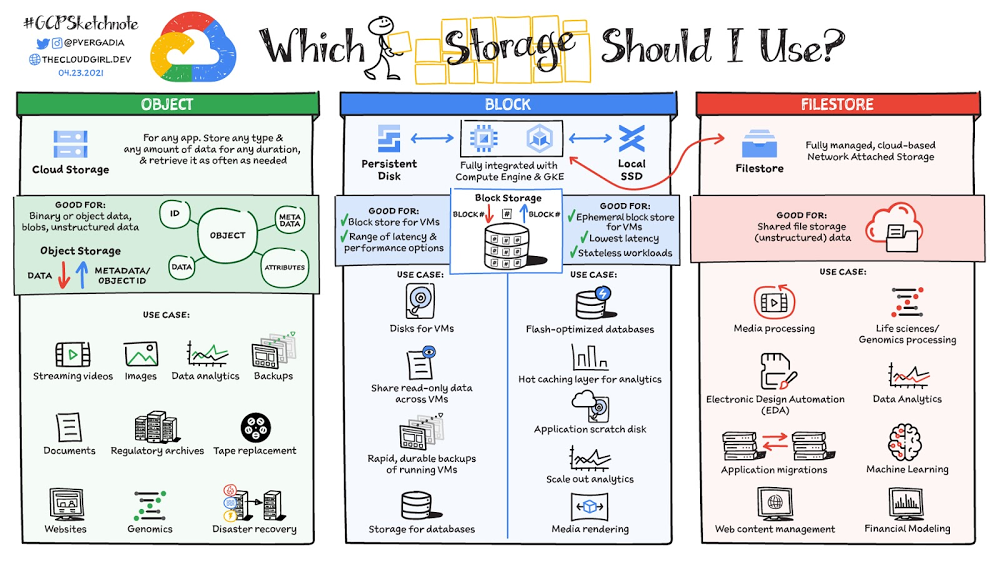
A map of storage options in Google Cloud

Where should your application store data?Of course, the choice depends on the use case. This post covers the different storage options available within Google Cloud across three storage types: object storage, block storage, and file storage. It also covers the use cases that are best suited for each storage option.(Click to enlarge)Object storage—Cloud StorageCloud Storage is an object store for binary and object data, blobs, and unstructured data. You would typically use it for any app, any type of data that you need to store, for any duration. You can add data to it or retrieve data from it as often as you need. The objects stored have an ID, metadata, attributes, and the actual data. The metadata could include all sorts of things about security classification of the file, the applications that can access it, and similar information. Object store use cases include applications that need data to be highly available and highly durable, such as streaming videos, serving images and documents, and websites. It is also used for storing large amounts of data for use cases such as genomics and data analytics. You can also use it for storing backups and archives for compliance with regulatory requirements. Or, use it to replace old physical tape records and move them over to cloud storage. It is also widely used for disaster recovery because it takes practically no time to switch to a backup bucket to recover from a disaster. There are 4 storage classes that are based on budget, availability and access frequency.1. Standard buckets for high-performance, frequent access and highest availability:    – Regional / dual-regional locations for data accessed frequently / high throughput needs    – Multi-region for serving content globally2. Nearline for data access less than once a month access3. Coldline for data accessed roughly less than once a quarter4. Archive for data that you want to put away for years It costs a bit more to use standard storage because it allows for automatic redundancy and frequent access options. Nearline, coldline and archive storage offer 99% availability and cost significantly less. Block storage—Persistent Disk and Local SSDPersistent Disk and Local SSD are block storage options. They are integrated with Compute Engine virtual machines and Kubernetes Engine. With block storage, files are split into evenly sized blocks of data, each with its own address but with no additional information (metadata) to provide more context for what that block of data is. Block storage can be directly accessed by the operating system as a mounted drive volume. Persistent Disk is a block store for VMs that offers a range of latency and performance options. I have covered persistent disk in detail in this article. The use cases of Persistent Disk include disks for VMs and shared read-only data across multiple VMs. It is also used for rapid, durable backups of running VMs. Because of the high-performance options available, Persistent Disk is also a good storage option for databases. Local SSD is also block storage but it is ephemeral in nature, and therefore typically used for stateless workloads that require the lowest available latencies. The use cases include flash optimized databases, host caching layers for analytics, or scratch disks for any application, as well as scale out analytics and media rendering. File storage—Filestore Now, Filestore! As fully managed Network Attached Storage (NAS), Filestore provides a cloud-based shared file system for unstructured data. It offers really low latency and provides concurrent access to tens of thousands of clients with scalable and predictable performance up to hundreds of thousands of IOPS, tens of GB/s of throughput, and hundreds of TBs. You can scale capacity up and down on-demand. Typical use cases of Filestore include high performance computing (HPC), media processing, electronics design automation (EDA), application migrations, web content management, life science data analytics, and more! ConclusionThat was a quick overview of different storage options in Google Cloud. For a more in-depth look into each of these storage options check out this cloud storage options page or this video

13 best practices for user account, authentication, and password management, 2021 edition

Updated for 2021: This post includes updated best practices including the latest from Google’s Best Practices for Password Management whitepapers for both users and system designers.Account management, authentication and password management can be tricky. Often, account management is a dark corner that isn’t a top priority for developers or product managers. The resulting experience often falls short of what some of your users would expect for data security and user experience.Fortunately, Google Cloud brings several tools to help you make good decisions around the creation, secure handling and authentication of user accounts (in this context, anyone who identifies themselves to your system—customers or internal users). Whether you’re responsible for a website hosted in Google Kubernetes Engine, an API on Apigee, an app using Firebase, or other service with authenticated users, this post lays out the best practices to follow to ensure you have a safe, scalable, usable account authentication system.1. Hash those passwordsMy most important rule for account management is to safely store sensitive user information, including their password. You must treat this data as sacred and handle it appropriately.Do not store plaintext passwords under any circumstances. Your service should instead store a cryptographically strong hash of the password that cannot be reversed—created with Argon2id, or Scrypt. The hash should be salted with a value unique to that specific login credential. Do not use deprecated hashing technologies such as MD5, SHA1 and under no circumstances should you use reversible encryption or try to invent your own hashing algorithm. Use a pepper that is not stored in the database to further protect the data in case of a breach. Consider the advantages of iteratively re-hashing the password multiple times.Design your system assuming it will be compromised eventually. Ask yourself “If my database were exfiltrated today, would my users’ safety and security be in peril on my service or other services they use?” As well as “What can we do to mitigate the potential for damage in the event of a leak?”Another point: If you could possibly produce a user’s password in plaintext at any time outside of immediately after them providing it to you, there’s a problem with your implementation.If your system requires detection of near-duplicate passwords, such as changing “Password” to “pAssword1″, save the hashes of common variants you wish to ban with all letters normalized and converted to lowercase. This can be done when a password is created or upon successful login for pre-existing accounts. When the user creates a new password, generate the same type of variants and compare the hashes to those from the previous passwords. Use the same level of hashing security as with the actual password. 2. Allow for third-party identity providers if possibleThird-party identity providers enable you to rely on a trusted external service to authenticate a user’s identity. Google, Facebook, and Twitter are commonly used providers.You can implement external identity providers alongside your existing internal authentication system using a platform such as Identity Platform. There are a number of benefits that come with Identity Platform, including simpler administration, a smaller attack surface, and a multi-platform SDK. We’ll touch on more benefits throughout this list.3. Separate the concept of user identity and user accountYour users are not an email address. They’re not a phone number. They’re not even a unique username. Any of these authentication factors should be mutable without changing the content or personally identifiable information (PII) in the account. Your users are the multi-dimensional culmination of their unique, personalized data and experience within your service, not the sum of their credentials. A well-designed user management system has low coupling and high cohesion between different parts of a user’s profile.Keeping the concepts of user account and credentials separate will greatly simplify the process of implementing third-party identity providers, allowing users to change their username, and linking multiple identities to a single user account. In practical terms, it may be helpful to have an abstract internal global identifier for every user and associate their profile and one or more sets of authentication datavia that ID as opposed to piling it all in a single record.4. Allow multiple identities to link to a single user accountA user who authenticates to your service using their username and password one week might choose Google Sign-In the next without understanding that this could create a duplicate account. Similarly, a user may have very good reason to link multiple email addresses to your service. If you’ve properly separated user identity and authentication, it will be a simple process to link several authentication methods to a single user.Your backend will need to account for the possibility that a user gets part or all the way through the signup process before they realize they’re using a new third-party identity not linked to their existing account in your system. This is most simply achieved by asking the user to provide a common identifying detail, such as email address, phone, or username. If that data matches an existing user in your system, require them to also authenticate with a known identity provider and link the new ID to their existing account.5. Don’t block long or complex passwordsNIST publishes guidelines on password complexity and strength. Since you are (or will be very soon) using a strong cryptographic hash for password storage, a lot of problems are solved for you. Hashes will always produce a fixed-length output no matter the input length, so your users should be able to use passwords as long as they like. If you must cap password length, do so based on the limits of your infrastructure; often this is a matter of memory usage (memory used per login operation * potential concurrent logins per machine), or more likely—the maximum POST size allowable by your servers. We’re talking numbers from hundreds of KB to over 1MB. Seriously. Your application should already be hardened to prevent abuse from large inputs. This doesn’t create new opportunities for abuse if you employ controls to prevent credential stuffing and hash the input as soon as possible to free up memory.Your hashed passwords will likely already consist of a small set of ASCII characters. If not, you can easily convert a binary hash to Base64. With that in mind, you should allow your users to use literally any characters they wish in their password. If someone wants a password made of Klingon, Emoji, and ASCII art with whitespace on both ends, you should have no technical reason to deny them. Just make sure to perform Unicode normalization to ensure cross-platform compatibility. See our system designers whitepaper (PDF) for more information on Unicode and supported characters in passwords.Any user attempting to use an extreme password is probably following password best practices (PDF) including using a password manager, which allows the entry of complex passwords even on limited mobile device keyboards. If a user can input the string in the first place (i.e., the HTML specification for password input disallows line feed and carriage return), the password should be acceptable.6. Don’t impose unreasonable rules for usernamesIt’s not unreasonable for a site or service to require usernames longer than two or three characters, block hidden characters, and prevent whitespace at the beginning and end of a username. However, some sites go overboard with requirements such as a minimum length of eight characters or by blocking any characters outside of 7-bit ASCII letters and numbers.A site with tight restrictions on usernames may offer some shortcuts to developers, but it does so at the expense of users and extreme cases will deter some users.There are some cases where the best approach is to assign usernames. If that’s the case for your service, ensure the assigned username is user-friendly insofar as they need to recall and communicate it. Alphanumeric generated IDs should avoid visually ambiguous symbols such as “Il1O0.” You’re also advised to perform a dictionary scan on any randomly generated string to ensure there are no unintended messages embedded in the username. These same guidelines apply to auto-generated passwords.7. Validate the user’s identityIf you ask a user for contact information, you should validate that contact as soon as possible. Send a validation code or link to the email address or phone number. Otherwise, users may make a typo in their contact info and then spend considerable time using your service only to find there is no account matching their info the next time they attempt login. These accounts are often orphaned and unrecoverable without manual intervention. Worse still, the contact info may belong to someone else, handing full control of the account to a third party.8. Allow users to change their usernameIt’s surprisingly common in legacy systems or any platform that provides email accounts not to allow users to change their username. There are very good reasons not to automatically release usernames for reuse, but long-term users of your system will eventually come up with significant reasons to use a different username and they likely won’t want to create a new account.You can honor your users’ desire to change their usernames by allowing aliases and letting your users choose the primary alias. You can apply any business rules you need on top of this functionality. Some orgs might limit the number of username changes per year or prevent a user from displaying or being contacted via anything but their primary username. Email address providers are advised to never re-issue email addresses, but they could alias an old email address to a new one. A progressive email address provider might even allow users to bring their own domain name and have any address they wish.If you are working with a legacy architecture, this best practice can be very difficult to meet. Even companies like Google have technical hurdles that make this more difficult than it would seem. When designing new systems, make every effort to separate the concept of user identity and user account and allow multiple identities to link to a single user account and this will be a much smaller problem. Whether you are working on existing or greenfield code, choose the right rules for your organization with an emphasis on allowing your users to grow and change over time.9. Let your users delete their accountsA surprising number of services have no self-service means for a user to delete their account and associated PII. Depending on the nature of your service, this may or may not include public content they created such as posts and uploads. There are a number of good reasons for a user to close an account permanently and delete all their PII . These concerns need to be balanced against your user experience, security, and compliance needs. Many if not most systems operate under some sort of regulatory control (such as PCI or GDPR), which provides specific guidelines on data retention for at least some user data. A common solution to avoid compliance concerns and limit data breach potential is to let users schedule their account for automatic future deletion.In some circumstances, you may be legally required to comply with a user’s request to delete their PII in a timely manner. You also greatly increase your exposure in the event of a data breach where the data from “closed” accounts is leaked.10. Make a conscious decision on session lengthAn often overlooked aspect of security and authentication is session length. Google puts a lot of effort into ensuring users are who they say they are and will double-check based on certain events or behaviors. Users can take steps to increase their security even further.Your service may have good reason to keep a session open indefinitely for non-critical analytics purposes, but there should be thresholds after which you ask for password, 2nd factor, or other user verification.Consider how long a user should be able to be inactive before re-authenticating. Verify user identity in all active sessions if someone performs a password reset. Prompt for authentication or 2nd factor if a user changes core aspects of their profile or when they’re performing a sensitive action. Re-authenticate if the user’s location changes significantly in a short period of time. Consider whether it makes sense to disallow logging in from more than one device or location at a time.When your service does expire a user session or requires re-authentication, prompt the user in real time or provide a mechanism to preserve any activity they have not saved since they were last authenticated. It’s very frustrating for a user to take a long time to fill out a form, only to  find all their input has been lost and they must log in again.11. Use 2-Step VerificationConsider the practical impact on a user of having their account stolen when choosing 2-Step Verification (also known as two-factor authentication, MFA, or 2FA) methods. Time-based one-time passwords (TOTP), email verification codes, or “magic links” are consumer-friendly and relatively secure. SMS 2FA auth has been deprecated by NIST due to multiple weaknesses, but it may be the most secure option your users will accept for what they consider a trivial service.Offer the most secure 2FA auth you reasonably can. Hardware 2FA such as the Titan Security Key are ideal if feasible for your application. Even if a TOTP library is unavailable for your application, email verification or 2FA provided by third-party identity providers is a simple means to boost your security without great expense or effort. Just remember that your user accounts are only as secure as the weakest 2FA or account recovery method.12. Make user IDs case-insensitiveYour users don’t care and may not even remember the exact case of their username. Usernames should be fully case-insensitive. It’s trivial to store usernames and email addresses in all lowercase and transform any input to lowercase before comparing. Make sure to specify a locale or employ Unicode normalization on any transformations.Smartphones represent an ever-increasing percentage of user devices. Most of them offer autocorrect and automatic capitalization of plain-text fields. Preventing this behavior at the UI level might not be desirable or completely effective, and your service should be robust enough to handle an email address or username that was unintentionally auto-capitalized.13. Build a secure auth systemIf you’re using a service like Identity Platform, a lot of security concerns are handled for you automatically. However, your service will always need to be engineered properly to prevent abuse. Core considerations include implementing a password reset instead of password retrieval, detailed account activity logging, rate-limiting login attempts to prevent credential stuffing, locking out accounts after too many unsuccessful login attempts, and requiring two-factor authentication for unrecognized devices or accounts that have been idle for extended periods. There are many more aspects to a secure authentication system, so please see the further reading section below for links to more information. Further readingThere are a number of excellent resources available to guide you through the process of developing, updating, or migrating your account and authentication management system. I recommend the following as a starting place:Our Modern Password Security for System Designers whitepaper (PDF)The related Modern password security for users whitepaper (PDF)NIST 800-063B covers Authentication and Lifecycle Management OWASP continually updates their Password Storage Cheat Sheet OWASP goes into even more detail with the Authentication Cheat SheetGoogle Cloud Identity Platform is a multi-protocol customer identity and access management solution, with robust authentication featuresGoogle’s Firebase Authentication site has a rich library of guides, reference materials and sample codeRelated ArticleCybersecurity Awareness Month—New security announcements for Google CloudToday’s announcements include new security features, whitepapers that explore our encryption capabilities, and use-case demos to help dep…Read Article
Quelle: Google Cloud Platform

PyTorch on Google Cloud: How To train PyTorch models on AI Platform

PyTorch is an open source machine learning and deep learning library, primarily developed by Facebook, used in a widening range of use cases for automating machine learning tasks at scale such as image recognition, natural language processing, translation, recommender systems and more. PyTorch has been predominantly used in research and in recent years it has gained tremendous traction in the industry as well due to its ease of use and deployment. Google Cloud AI Platform is a fully managed end-to-end platform for data science and machine learning on Google Cloud. Leveraging Google’s expertise in AI, AI Platform offers a flexible, scalable and reliable platform to run your machine learning workloads. AI Platform has built-in support for PyTorch through Deep Learning Containers that are performance optimized, compatibility tested and ready to deploy. In this new series of blog posts, PyTorch on Google Cloud, we aim to share how to build, train and deploy PyTorch models at scale and how to create reproducible machine learning pipelines on Google Cloud.Why PyTorch on Google Cloud AI Platform?Cloud AI Platform provides flexible and scalable hardware and secured infrastructure to train and deploy PyTorch based deep learning models.Flexibility: AI Platform Notebooks and AI Platform Training gives  flexibility to design your compute resources to match any workload while the platform manages the bulk of the dependencies, networking and monitoring under the hood. Spend your time building models, not worrying about infrastructure.Scalability: Run your experiments with AI Platform Notebooks using pre-built PyTorch containers or custom containers and scale your code with high availability using AI Platform Training by training models on GPUs or TPUs. Security: AI Platform leverages the same global scale technical infrastructure designed to provide security through the entire information processing lifecycle at Google.Support: AI Platform collaborates closely with PyTorch and NVIDIA to ensure top-notch compatibility between AI Platform and NVIDIA GPUs including PyTorch framework support.Here is a quick reference of support for PyTorch on Google Cloud(Click to enlarge)In this post, we will cover:Setting up a PyTorch development environment on JupyterLab notebooks with AI Platform NotebooksBuilding a sentiment classification model using PyTorch and training on AI Platform TrainingYou can find the accompanying code for this blog post on the GitHub repository and the Jupyter Notebook.Let’s get started!Use case and datasetIn this article we will  fine tune a transformer model (BERT-base) from Huggingface Transformers Library for a sentiment analysis task using PyTorch. BERT (Bidirectional Encoder Representations from Transformers) is a Transformer model pre-trained on a large corpus of unlabeled text in a self-supervised fashion. We will begin experimentation with the IMDB sentiment classification dataset on AI Platform Notebooks. We recommend using an AI Platform Notebook instance with limited compute for development and experimentation purposes. Once we are satisfied with the local experiment on the notebook, we show how you can submit the same Jupyter notebook to the AI Platform Training service to scale the training with bigger GPU shapes. AI Platform Training service optimizes the training pipeline by spinning up infrastructure for the training job and spinning it down after the training is complete, without you having to manage the infrastructure.In upcoming posts, we will show how you can deploy and serve these PyTorch models on AI Platform Prediction service.  Creating a development environment on AI Platform NotebooksWe will be working with JupyterLab notebooks as a development environment on AI Platform Notebooks. Before you begin, you must set up a project on Google Cloud Platform with the AI Platform Notebooks API enabled. Please note that you will be charged when you create an AI Platform Notebook instance. You pay only for the time your notebook instance is up and running. You can choose to stop the instance which will save your work and only charge for the boot disk storage until you restart the instance. Please delete the instance after you are done.You can create an AI Platform Notebooks instance:Using thepre-built PyTorch image from AI Platform Deep Learning VM (DLVM) Image or Using a custom container with your own packagesCreating a Notebook instance with the pre-built PyTorch DLVM imageAI Platform Notebooks instances are AI Platform Deep Learning VM Image instances with JupyterLab notebook environments enabled and ready for use. AI Platform Notebooks offers PyTorch image family supporting multiple PyTorch versions. You can create a new notebook instance from Google Cloud Console or command line interface (CLI). We will use the gcloud CLI to create the Notebook instance on NVIDIA Tesla T4 GPU. From Cloud Shell or any terminal where Cloud SDK is installed, run the following command to create a new notebook instance:To interact with the new notebook instance, go to the AI Platform Notebooks page in the Google Cloud Console and click the “OPEN JUPYTERLAB” link next to the new instance, which becomes active when it’s ready to use.Most of the libraries needed for experimenting with PyTorch have already been installed on the new instance with the pre-built PyTorch DLVM image. To install additional dependencies, run %pip install <package-name> from the notebook cells. For the sentiment classification use case, we will be installing additional packages such as Hugging Face transformers and datasets libraries.Notebook instance with custom containerAn alternative to installing dependencies with pip in the Notebook instance is to package the dependencies inside a Docker container image derived from AI Platform Deep Learning Container images and create a custom container. You can use this custom container for creating AI Platform Notebooks instances or AI Platform Training jobs. Here is an example to create a Notebook instance using a custom container.1. Create a Dockerfile with one of the AI Platform Deep Learning Container images as base image (here we are using PyTorch 1.7 GPU image) and run/install packages or frameworks you need. For the sentiment classification use case include transformers and datasets.2.  Build image from Dockerfile using Cloud Build from terminal or Cloud Shell and get the image location gcr.io/{project_id}/{image_name}3.  Create a notebook instance with the custom image created in step #2 using the command line.Training a PyTorch model on AI Platform trainingAfter creating the AI Platform Notebooks instance, you can start with your experiments. Let’s look into the model specifics for the use case.The model specificsFor analyzing sentiments of the movie reviews in IMDB dataset, we will be fine-tuning a pre-trained BERT model from Hugging Face. Fine-tuning involves taking a model that has already been trained for a given task and then tweaking the model for another similar task. Specifically, the tweaking involves replicating all the layers in the pre-trained model including weights and parameters, except the output layer. Then adding a new output classifier layer that predicts labels for the current task. The final step is to train the output layer from scratch, while the parameters of all layers from the pre-trained model are frozen. This allows learning from the pre-trained representations and “fine-tuning” the higher-order feature representations more relevant for the concrete task, such as analyzing sentiments in this case. For the scenario here analyzing sentiments, the pre-trained BERT model already encodes a lot of information about the language as the model was trained on a large corpus of English data in a self-supervised fashion. Now we only need to slightly tune them using their outputs as features for the sentiment classification task. This means quicker development iteration on a much smaller dataset, instead of training a specific Natural Language Processing (NLP) model with a larger training dataset.Pretrained Model with classification layer: The Blue-box indicates the pre-trained BERT Encoder module. Output of the encoder is pooled into linear layer with number of outputs same as the number of target labels (classes).For training the sentiment classification model, we will:Preprocess and transform (tokenize) the reviews dataLoad the pre-trained BERT model and add the sequence classification head for sentiment analysisFine-tune the BERT model for sentence classificationFollowing is the snippet of code to preprocess the data and fine-tune a pre-trained BERT model. Please refer to the Jupyter Notebook for complete code and detailed explanation of these tasks.In the snippet above, notice that the encoder (also referred to as the base model) weights are not frozen. This is why a very small learning rate (2e-5) is chosen to avoid loss of pre-trained representations. Learning rate and other hyperparameters are captured under the TrainingArguments object. During the training, we are only capturing accuracy metrics. You can modify the compute_metrics function to capture and report other metrics.We will explore integration with Cloud AI Platform Hyperparameter Tuning Service in the next post of this series.Training the model on Cloud AI PlatformWhile you can do local experimentation on your AI Platform Notebooks instance, for larger datasets or models often a vertically scaled compute resource or horizontally distributed training is required. The most effective way to perform this task is AI Platform Training service. AI Platform Training takes care of creating designated compute resources required for the task, performs the training task, and also ensures deletion of compute resources once the training job is finished.Before running the training application with AI Platform Training, the training application code with required dependencies must be packaged and uploaded into a Google Cloud Storage bucket that your Google Cloud project can access. There are two ways to package the application and run on AI Platform Training:Package application and Python dependencies manually using Python setup toolsUse custom containers to package dependencies using Docker containersYou can structure your training code in any way you prefer. Please refer to the GitHub repository or Jupyter Notebook for our recommended approach on structuring training code. Using Python packaging to build manuallyFor this sentiment classification task, we have to package the training code with standard Python dependencies – transformers, datasets and tqdm – in the setup.py file. The find_packages() function inside setup.py includes the training code in the package as dependencies.Now, you can submit the training job to Cloud AI Platform Training using the gcloud command from Cloud Shell or terminal with gcloud SDK installed. gcloud ai-platform jobs submit training command stages the training application on GCS bucket and submits the training job. We are attaching 2 NVIDIA Tesla T4 GPUs to the training job for accelerating the training.  Training with custom containersTo create a training job with a custom container, you have to define a Dockerfile to install the dependencies required for the training job. Then, you build and test your Docker image locally to verify it before using it with AI Platform Training.Before submitting the training job, you need to push the image to Google Cloud Container Registry and then submit the training job to Cloud AI Platform Training using the gcloud ai-platform jobs submit training command.Once the job is submitted, you can monitor the status and progress of training job either in Google Cloud Console or using gcloud commands as shown below:You can also monitor the job status and view the job logs from the Google AI Platform Jobs console.Let’s run prediction calls on the trained model locally with a few examples (refer to the notebook for the complete code). The next post in this series will show you how to deploy this model on AI Platform Prediction service.Cleaning up the Notebook environmentAfter you are done experimenting, you can either stop or delete the AI Notebook instance. Delete the AI Notebook instance to prevent any further charges. If you want to save your work, you can choose to stop the instance instead.What’s next?In this article, we explored Cloud AI Platform Notebooks as a fully customizable IDE for PyTorch model development. We then trained the model on Cloud AI Platform Training service, a fully managed service for training machine learning models at scale.ReferencesIntroduction to AI Platform NotebooksGetting started with PyTorch | AI Platform TrainingConfiguring distributed training for PyTorch | AI Platform TrainingGitHub repository with code and accompanying notebookIn the next installments of this series, we will examine hyperparameter tuning on Cloud AI Platform and deploying PyTorch models on AI Platform Prediction service. We encourage you to explore the Cloud AI Platform features we have examined. Stay tuned. Thank you for reading! Have a question or want to chat? Find authors here – Rajesh [Twitter | LinkedIn] and Vaibhav [LinkedIn].Thanks to Amy Unruh and Karl Weinmeister for helping and reviewing the post.
Quelle: Google Cloud Platform

Scheduling Cloud Bigtable Backups

Cloud Bigtable backups let you save a copy of a table’s schema and data, then restore from the backup to a new table at a later time. In this tutorial, you’ll learn how to create backups at regularly scheduled intervals (such as daily or weekly) using the Cloud Bigtable Scheduled Backups example.This example uses Cloud Scheduler to periodically send backup creation requests as Pub/Sub messages. The Pub/Sub messages trigger a Cloud Function which initiates a backup using the Cloud Bigtable Java client library. The function could be adapted to any of the clients that are supported in Cloud Functions.This solution uses the following Google Cloud services:Cloud Scheduler to trigger tasks with a cron-based scheduleCloud Pub/Sub to pass the message request from Cloud Scheduler to Cloud FunctionsCloud Functions to initiate an operation for creating a Cloud Bigtable backupCloud Logging to create logs-based metricsCloud Monitoring to create alerts based on conditions of the logs-based metricsSystem ArchitectureCostsThis tutorial uses billable components of Google Cloud, including the following:Cloud SchedulerCloud FunctionsCloud Bigtable backupsUse the pricing calculator to generate a cost estimate based on your projected usage.Before you beginBefore proceeding with the tutorial, ensure the following:A Cloud Bigtable table exists in the same Google Cloud project. Please check Cloud Bigtable documentation if needed.Google Cloud SDK is installedAPIs and IAM Roles SetupThe diagram below focuses on the actions flow between human roles and APIs.IAM Roles for AdministratorsThe administrator should be granted specific roles to deploy the services needed for the solution.RolePurposeroles/bigtable.adminCloud Bigtable administratorroles/cloudfunctions.adminDeploy and manage Cloud Functionsroles/deploymentmanager.editorDeploy monitoring metricsroles/pubsub.editorCreate and manage Pub/Sub topicsroles/cloudscheduler.adminSet up a schedule in Cloud Schedulerroles/appengine.appAdminUse Cloud Scheduler to deploy a cron serviceroles/monitoring.adminSet up alerting policies for failure notificationsroles/logging.adminAdd log based user metrics to track failuresThe administrator also needs to be assigned a custom role that has the following permissions:appengine.applications.create – for Cloud Scheduler to create an App Engine appserviceusage.services.use – for Cloud Scheduler to use the App Engine appService Account for Cloud FunctionsCloud Functions calls the Cloud Bigtable API to create a backup, and the Cloud function gets triggered when a message arrives on the Pub/Sub topic. For successful execution, the Cloud Function should be able to consume from the Pub/Sub topic and have permissions to create Cloud Bigtable backups. To accomplish this, perform the following steps:Create a service account (e.g. cbt-scheduled-backups@iam.gserviceaccount.com).Create a custom role with the following permissions:bigtable.backups.createbigtable.backups.deletebigtable.backups.getbigtable.backups.listbigtable.backups.restorebigtable.backups.updatebigtable.instances.getbigtable.tables.createbigtable.tables.readRowsAssign the custom role and roles/pubsub.subscriber to the service account. This allows Cloud Functions to read messages from the Pub/Sub topic and initiate a `create backup` request.Add the administrator as a member of the service account with role roles/iam.serviceAccountUser. This allows the administrator to deploy Cloud Functions.Creating Scheduled BackupsCreate a Pub/Sub topicCreate a Cloud Pub/Sub topic cloud-bigtable-scheduled-backups that serves as the target of the Cloud Scheduler job and triggers the Cloud function. For example:gcloud pubsub topics create cloud-bigtable-scheduled-backups –project <project-id>Then go to the Pub/Sub UI and verify that you can see the newly created topic:Deploy a function to Cloud FunctionsCreate and deploy a Cloud Function cbt-create-backup-function, which is called whenever a Pub/Sub message arrives in cloud-bigtable-scheduled-backups topic. The deploy-backup-function function in the script scheduled_backups.sh wraps the gcloud function to do that../scripts/scheduled_backups.sh deploy-backup-functionGo to the Cloud Functions UI to view the function. The function subscribes to the Pub/Sub topic cloud-bigtable-scheduled-backups.Deploying scheduled jobs using Cloud SchedulerNote: To use Cloud Scheduler, you must create an App Engine app. This can be done explicitly before the next step or indirectly when running the next step.Now we need to deploy the scheduled backup configuration to Cloud Scheduler. The configuration includes the time schedule of the cron job and the Pub/Sub topic name and message. This is also wrapped under a function in the script, and the configurations can be specified in the properties file../scripts/scheduled_backups.sh create-scheduleThe job is now visible in the Cloud Scheduler UI:Email notification of backup failuresTo get email notifications on backup creation failures, follow these steps:Follow this guide to add your email address as a notification channel.2. Create and deploy a custom metrics configuration file to filter logs generated by Cloud Functions, Cloud Scheduler, and Cloud Bigtable. We use Deployment Manager to create custom metrics. The example file can be found in ./config/metrics.yaml. Deploy the custom metrics in Cloud Logging:./scripts/scheduled_backups.sh add-metricsAfter this, you should see two user-defined metrics under Logs-based Metrics in Cloud Logging.3. From there, you can choose an Aggregrator, such as sum or mean, for the target metric, then define a condition that triggers an alert. For example, you can choose the following:Condition triggers if: Any time series violatesCondition: is aboveThreshold: 0For: 1 minute4. Add the notification channels you just created to the alerting policies. Whenever the condition breaks, you will receive an email notification.ConsiderationsTo use Cloud Scheduler, you must create an App Engine app. Once you set a zone for the App Engine app, you cannot change it. Your Cloud Scheduler job must run in the same zone as your App Engine app.Learn MoreTo get started, create a Cloud Bigtable instance or try it out with Cloud Bigtable Qwiklab.Check out this Github sample for details about this Scheduled Backup tool.Learn more about the managed backups feature of Cloud Bigtable.
Quelle: Google Cloud Platform

Customers handle up to 28% more concurrent chats with Agent Assist for Chat

Contact Center AI (CCAI) brings Google’s innovation in conversational AI to solve the most challenging customer service needs while lowering operational costs. More than a thousand customers have deployed CCAI and are steadily turning it on to power their production contact centers.Today, we’re excited to announce that we’ve made CCAI even stronger with Agent Assist for Chat, now in public preview.Agent Assist provides your human agents with continuous support during their calls and now chats by identifying the customers’ intent and providing them with real-time recommendations such as articles and FAQs as well as responses to customer messages to more effectively resolve the conversation.Customers using Agent Assist for Chat have been able to manage up to 28% more conversations concurrently, while also driving up customer satisfaction by 10%. Additionally, we’ve seen them respond up to 15% faster to chats, reducing chat abandonment rates and solving more customer problems.Agent Assist provides two key components to help agents manage conversations better: Smart Reply provides response suggestions to agents so they can quickly and appropriately respond to customer messages. These suggestions can be taken from your top performing agents as well as modified even further to ensure suggestions properly reflect the tone and voice of your brand. Agent Assist learns when and what recommendations to make by building a custom model that’s trained on your (and only your) data.Knowledge Assist unlocks the power of your knowledge base to provide articles and FAQ suggestions to agents in real-time as the conversation progresses. When using Knowledge Assist, agents no longer need to make the customer wait while they navigate multiple applications and data to find the resolution to the customer’s issue — the answer is delivered right to them.  “We’ve been very impressed by the chat capabilities of Agent Assist,” said Chris Smith, Vice President of Digital Service at Optus, one of the largest telecommunications companies in AustraliaOptus has been using CCAI Dialogflow CX to send queries to virtual agents and sees great potential to use Agent Assist to provide recommendations to their customer support representatives. They expect Agent Assist to help minimize repetitive tasks by providing response and typeahead suggestions, helping improve the efficiency of their agents and the quality and consistency of service they provide.Another customer, LoveHolidays, is using Agent Assist to support their agents and customers in the travel industry. “Agent Assist has been a beneficial aid to agents and our customers alike… It gives us the power to flex our contact center staff levels in hours not weeks,” said Eugene Neale, Director of CX Engineering & Business IT at LoveHolidaysAnalysts say online chat is becoming one of the most popular ways to reach out to businesses for customer support. IDC research finds that single-function contact centers worldwide are increasingly rare — in 2020, although phone/voice is still responsible for most interactions (at around 18%); email is responsible for around 13% of interactions, and live chat (without automation) is responsible for around 8% of interactions, according to IDC, Toward the AI-Powered Contact Center, Doc # EUR147017320, December 2020.Deploying CCAI with Agent Assist for ChatAs part of Google’s Contact Center AI suite, Agent Assist provides a seamless handoff from chats managed by your Dialogflow CX virtual agents. If a conversation or customer requires a live agent, Agent Assist will help your team pick it up quickly and drive it to a satisfying resolution. Historically, when managers saw contact center volumes increase they had two choices: allow customers to wait longer to speak to someone (lowering customer satisfaction) or bring on more agents (increasing cost to serve).  Deploying CCAI provides contact center leaders with a third choice: equip agents with tools like, Agent Assist for Chat, to efficiently manage customer interactions while maintaining high quality service.Global CCAI partners support Agent Assist for ChatAgent Assist for Chat is a set of public APIs that your engineering team can integrate directly into an agent desktop to control the agent experience from end-to-end. For a more out-of-the-box solution, we have partnered with LivePerson and 247.ai to build Agent Assist directly into their agent desktops.“Integrating our Conversational Cloud directly with Agent Assist means agents can leverage cutting-edge productivity AI to build even further on the massive ROI of conversational commerce, from reduced agent effort and time-to-respond to increased customer satisfaction and revenue,” said Alex Spinelli, CTO of LivePerson. More Agent Assist resourcesTo learn more, check out the Agent Assist webpage. Give Agent Assist a try by training a model and then testing it using the Agent Assist simulator.Related ArticleRespond to customers faster and more accurately with Dialogflow CXNew Dialogflow CX Virtual Agents can jumpstart your contact center operational efficiency goals, drive CSAT up and take care of your huma…Read Article
Quelle: Google Cloud Platform

What you can learn in our Q2 2021 Google Cloud Security Talks on May 12th

Join us for our second Google Cloud Security Talks of 2021, a live online event on May 12th where we’ll help you navigate the latest developments in cloud security.We’ll share expert insights into how we’re working to be your most trusted cloud by covering the following topics:Sunil Potti and Rob Sadowski will kick off Security Talks on May 12th.Following this will be a panel discussion on how organizations are using Confidential Computing with Harold Giménez (HashiCorp), Morgan Akers (JP Morgan Chase), Nelly Porter & Sam Lugani.Andy Wen and Neil Kumaran will discuss our use of machine learning/AI to stop online abuse. You will learn about COVID-19-related phishing and malware threats we’ve blocked in Gmail.A roundtable on new innovations that are making network security in the cloud even more powerful at protecting users from cyber attacks with Peter Blum, Matt Svensson (BetterCloud), and Gregory Lebovitz.Andy Chang will present on creating a secured landing zone for your organization on Google Cloud.We will look at strengthening the security of federated identity to your Google Cloud deployment, with Diego Zavala and Sriram Karra. Jian Zhen and Kiran Nair will do a deep dive into how you can leverage the Chrome browser and the new BeyondCorp Enterprise protected profile for Zero Trust access. Finally, Brad Meador and Chad Tyler will present on Google Workspace Security along with use-case based demos.We look forward to sharing our latest security insights and solutions with you. Sign-up now to reserve your virtual seat.Related ArticleWhat you can learn in our Q1 2021 Google Cloud Security TalksOur latest installment of our Google Cloud Security Talks, a live online event on March 3rd, will help you navigate the latest thinking i…Read Article
Quelle: Google Cloud Platform

A handy new Google Cloud, AWS, and Azure product map

Any craftsman will tell you that choosing the right tool for the job is essential for getting it done right. Cloud technologies are no different. Many cloud professionals look for the best products across vendors, but they remember ‘best’ is always subjective. It depends on highly-individualized criteria like language support, compatibility with existing tools, portability/openness, and cost. For others, the reality is as simple as choosing a product based on their team’s skill set and their existing tech stack. I understand that choice, since it’s much easier to learn how to use a new tool than to get people to change a process or domain knowledge. Teams often seek to match tools to their process. They may start by asking: Are we a cloud-native, Kubernetes shop? Do we only program in Go, Python, or Java and want a better serverless hosting solution? Are we .NET all the way? Or, are we looking for the best stream data processing compatible with a managed Hadoop service? No matter what the decision, choosing can be critical, optimally with a full understanding of what tools are available, how they relate to each other, and what similar offerings exist. Your experience with one provider or another is another factor, along with your long-range plan to incorporate such things as new security strategies, better automation, or artificial intelligence.While you might not know every product mapping across providers, you probably have the foundational knowledge to understand which product categories are the most relevant to you, whether that’s managed Kubernetes, block storage, API management, or messaging services. A new product map for side-by-side comparisons Google continuously aims to organize the world’s information and make it universally accessible and useful. That’s why we just published a handy product map showcasing similar offerings between Google Cloud, AWS, and Azure. You can easily filter the list by product name or other common keywords. The hope is that this table can make it easier for you to quickly find similar products from each provider. You decide which product makes sense for your landscape and can best match your skills or goals.One thing this comparison makes evident is how much Google Cloud’s product offerings have grown and diversified in recent years. For example, Anthos, our managed application platform for application modernization, hybrid, and multicloud, has matured quickly, and now includes support for products for running on AWS, Azure, Bare Metal, and VMWare. We have also been recognized in recent Gartner reports, in which Google was named a Leader in the 2020 Gartner Magic Quadrant for Cloud Infrastructure and Platform Services and in the 2021 Gartner Magic Quadrant for Cloud AI Developer Services. Meanwhile Forrester named Google as a Leader in The Forrester Wave(TM): Public Cloud Development And Infrastructure Platforms, North America, Q1 2020. How to get more out of your cloud infrastructureBecause cloud providers work to differentiate their offerings, no two products are ever exactly the same. But many products do share a lot in common. If you search for the names of AWS or Azure products you already know and love, you may find a Google Cloud offering better tailored to your needs. If you are already using Google Cloud, you may find new Google Cloud products and capabilities you haven’t yet encountered.  The only advice I have is to dig in a little deeper when something catches your eye. Anthos, for example, is a managed application platform allowing you to modernize applications faster and establish operational consistency across them using Google Cloud services and engineering best practices. Beyond that, you’ll learn that Anthos is a suite of products that enables you to run Kubernetes clusters anywhere, in cloud and on-premises, and on bare metal servers. It also offers automated policy and security using Anthos Config Management, and a fully-managed service mesh with built-in visibility. Filters are always a good ideaYou can also filter by product name, characteristic, or keyword, for example, “compute”, “containers”, “CI/CD”, “SQL”, “Kubernetes”, or “no equivalent”.Some Google Cloud services are listed without any equivalent product mappings in AWS or Azure. This includes Anthos clusters on AWS, Anthos on bare metal, Anthos clusters on VMWare, Network Intelligence Center, Network Service Tiers, VPC Service Controls, Google Analytics, and Firebase Performance Monitoring. This doesn’t mean these are Google Cloud’s only unique products, but it does point out a few areas where the AWS and Azure portfolio differ. By clicking on linked product pages, you can discover more details around a product’s supported languages, APIs, design, and underlying infrastructure to determine how they compare to AWS and Azure’s options.You might notice multiple entries for products whose features map to more than one AWS or Azure offering. For example, the Google Cloud SDK includes tools and libraries for interacting with many of our products and services, and maps to both AWS CLI and AWS SDKs. You’ll find Pub/Sub, our messaging and ingestion product for event-driven systems and streaming analytics, which can map to Amazon SNS, SGQS, or Kinesis. We hope this comparison helps you evaluate and get started on Google Cloud. Our philosophy is that developers should have the freedom to run their applications in any cloud and environment to support their existing environment, skills, and requirements. Our job is to give you the information and tools to streamline your decision-making process, experimentation/testing, and ability to get up and running quickly. Other handy resourcesAs they say, the best way to get started is to kick the tires, so get started on Google Cloud using a free trial. You can come in and test your projects out for free with $300 in credit with access to 20+products, and 100+ Marketplace free trials.If you want a quick way to understand every Google Cloud product and service, check out our dictionary describing each one in 4 words or less, and well as our videos series explaining each in under 2 minutes. Let me know what you think of our new resources! You can find me on Twitter at @stephr_wong.Related ArticleBack by popular demand: Google Cloud products in 4 words or less (2021 edition)If you are just getting started, the 4 words or less developer’s cheat sheet is a great resource that gives you a quick overview of all t…Read Article
Quelle: Google Cloud Platform





