Enhance DDoS protection & get predictable pricing with new Cloud Armor service

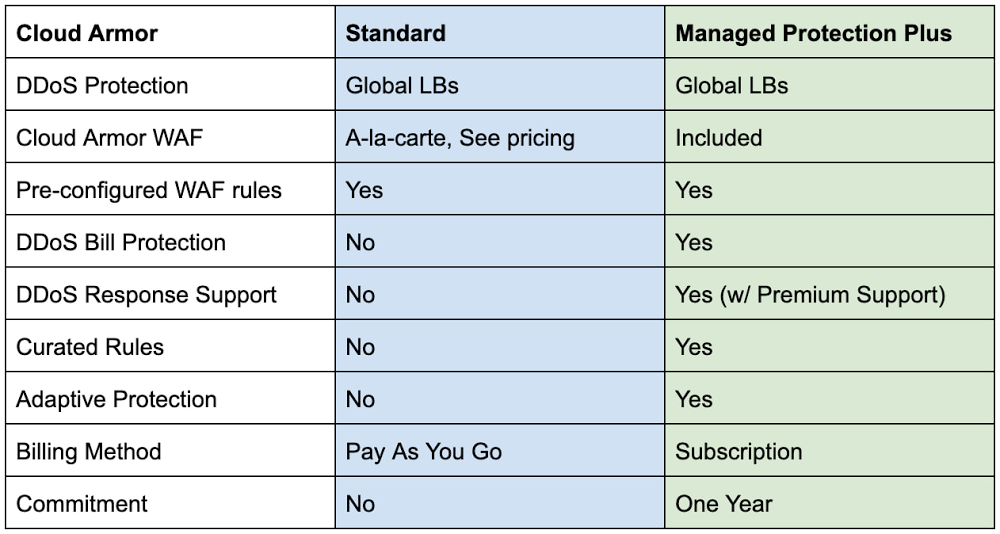
Securing websites and applications is a constant challenge for most organizations. To make it easier, we have introduced new capabilities within Cloud Armor over the past year that can help protect your applications. Today, we are announcing the general availability of Google Cloud Armor Managed Protection Plus. Cloud Armor, our Distributed Denial of Service (DDoS) protection and Web-Application Firewall (WAF) service on Google Cloud, leverages the same infrastructure, network, and technology that has protected Google’s internet-facing properties from some of the largest attacks ever reported. These same tools protect customers’ infrastructure from DDoS attacks, which are increasing in both magnitude and complexity every year. Deployed at the very edge of our network, Cloud Armor absorbs malicious network- and protocol-based volumetric attacks, while mitigating the OWASP Top 10 risks and maintaining the availability of protected services. Managed Protection Plus OverviewCloud Armor Managed Protection Plus is a managed application protection service that bundles advanced DDoS protection capabilities, WAF capabilities, ML-based Adaptive Protection, efficient pricing, bill protection and access to Google’s DDoS response support service into an enterprise-friendly subscription.Cloud Armor L3/L4 DDoS ProtectionAll Cloud Armor customers (Standard & Managed Protection Plus) receive the same in-line, always-on DDoS protection. This protection is deeply integrated into the Global Load Balancers sitting at Google Cloud’s edge. These capabilities defend target workloads from network- and protocol-based volumetric attacks (L3/L4 DDoS). This is the same protection and mitigation infrastructure that was used to protect against the 2.54 Tbps DDoS attack we shared last year.Malformed traffic targeting your globally load-balanced endpoints (HTTP/S LB, TCP Proxy, SSL Proxy) is automatically absorbed or dropped without impacting any well-formed requests heading to a protected service. Cloud Armor stops common attacks such as UDP-based amplification or reflection attacks as well TCP floods such as SYN-Flood. Cloud Armor Web-Application Firewall (WAF)Cloud Armor WAF protects their internet-facing applications from common attack types and enforce IP, Geo, and layer 7 filtering policies at the edge of Google’s network. Users can easily deploy pre-configured WAF rules to mitigate the OWASP Top 10 web vulnerability risks and can use the extensive custom rules language to configure security policies.Managed Protection Plus CapabilitiesAdaptive Protection Cloud Armor Adaptive Protection (currently in Preview) is a machine learning-powered service that detects layer 7 attacks and protects your applications and services from them. Adaptive Protection automatically learns what normal traffic patterns look like on a per-application/service basis. Because it is always monitoring, Adaptive Protection quickly identifies and analyzes suspicious traffic and provides customized, narrowly tailored rules that mitigate  ongoing attacks in near real-time. Curated RulesCloud Armor’s curated rules simplify the deployment of effective access controls in front of your applications. A range of named rules let you filter traffic based on threat intelligence data maintained, and regularly updated, by Google on behalf of Managed Protection Plus subscribers. For example, today’s curated rules include Named IP Lists containing IP ranges of third party proxies from Cloudflare, Imperva, or Fastly that users may deploy upstream of their Google Cloud endpoints. Future Capabilities Managed Protection Plus will continue to expand the breadth and depth of protection over time. This will include additional protection capabilities for subscribers, visibility into DDoS attacks and on-going mitigations, as well as access to Google’s threat intelligence.Managed Protection Plus ServicesDDoS Response SupportCustomers that come under attack can engage support to get rapid help from Google’s DDoS response team. Our team can help assess, advise, and assist in mitigating the attack. DDoS response support is available 24/7, and is staffed by a global team of DDoS and networking experts that protect Google’s own services as well as those of other Google Cloud customers. Response team members have a wide range of tactics and tools at their fingertips, including custom mitigations deployed across Google Cloud’s networking infrastructure. DDoS Bill ProtectionBill protection offers peace of mind and predictability by alleviating much of the financial impact of a DDoS attack. Subscribers that see their Google Cloud networking bill spike as a result of a DDoS attack will be able to open a claim to receive a credit in the amount of the bill spike. Not only does this service ensure that costs remain predictable in the face of DDoS attacks, it also decreases the incentive for attackers to target their victim’s infrastructure bill in the hopes of making it too expensive to operate.Managed Protection Plus brings to bear to the full scale of Google’s global network, machine learning capabilities, and unique experience and expertise. Subscribers can operate internet-facing services and workloads safely, and respond quickly and effectively to targeted or distributed attacks. Subscribe today by navigating to the Managed Protection tab in the console and click the subscribe button.Related ArticleExponential growth in DDoS attack volumesHow Google prepares for and protects against the largest volumetric DDoS attacks.Read Article
Quelle: Google Cloud Platform
Deliver zero trust on unmanaged devices with new BeyondCorp Enterprise protected profiles

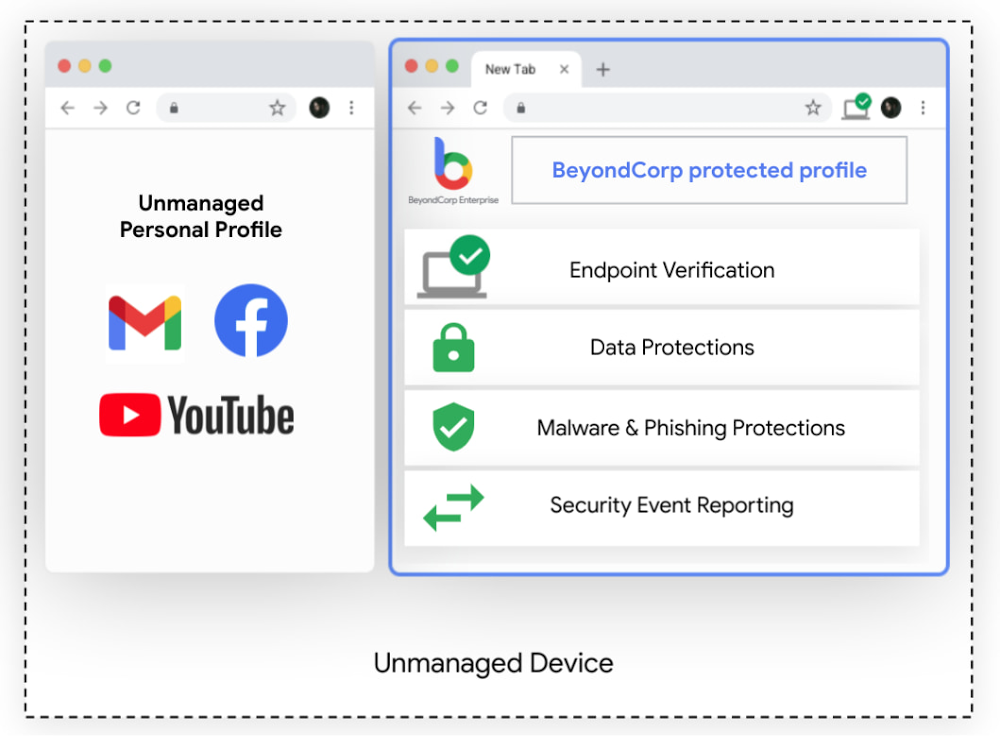
Modern enterprises rely on vast and complex networks of technologies and skillsets to accomplish their goals. Markets are global, workers are remote, and information needs to be accessible anywhere, while remaining secure. This increasing complexity has led many enterprises to adopt a zero trust approach to security and deploy Google’s BeyondCorp Enterprise, which provides customers with simple and secure access to applications and cloud resources with integrated threat and data protection. To help BeyondCorp Enterprise customers account for the global, mobile nature of work, we’re excited to unveil a new feature, the protected profile. Protected profiles enable users to securely access corporate resources from an unmanaged device with the same threat and data protections available in BeyondCorp Enterprise–all from the Chrome Browser. Building the Trusted CloudSome of your employees may not actually be employed directly by your organization, but instead are part of your extended workforce, contracted to serve in roles such as project support, advisory services, specialty freelance jobs, or temporary and seasonal help. You still need to know that these workers have secure and appropriate access to the applications and resources they need to do their work. This can be a challenging task. IT administrators often lack the ability to install security software or agents, let alone manage devices for an extended workforce. Similarly, VPNs for these groups can be costly, cumbersome, and unnecessary when users may only need access to a handful of apps. Worse, granting non-employees broad access to the corporate network presents significant security risks. Still, the job remains to ensure these workers can be productive.At Google, our trusted cloud vision means security technologies are engineered into our platforms and products for all who use them, whether they are your own employees, your extended workforce, or your partners. With zero trust as a central pillar of this vision, customers can operate with confidence that threats from ransomware, account takeovers, phishing, and even more advanced attacks are minimized, detectable, and recoverable.Enable BeyondCorp Enterprise on unmanaged devices with protected profilesProtected profiles utilize Chrome to deploy policies and protections to users, delivering access, threat and data protection to an unmanaged device, as if it were corporate-managed. Profiles are already an existing feature in Chrome, used across enterprises and personal devices for keeping things like bookmarks, history, passwords, and other settings separate from other users. Now, corporate access policies and protection from malicious websites, phishing, and data loss can be applied to profiles through BeyondCorp Enterprise so organizations can protect data and users against threats, and provide information to inform access decisions directly from the browser, while keeping work and personal profiles separate.Click to enlargeProtected profiles are great for the extended workforce and contractors using unmanaged devices, but they are also ideal for frontline workers sharing devices. In healthcare, for instance, doctors and nurses doing rounds may share a common computer in each wing. In retail, store clerks frequently share tablets and will sign in and out at shift change. In these cases, logging in from protected profiles ensures access to permitted applications based on user profiles, and prohibits access to resources that are considered out of scope. Data leakage policies can be used to detect, monitor and prevent loss of customer information.The simplicity of this solution and our agentless approach with Chrome is ideal for all end users, as they can securely and productively work and access resources as they normally would on a managed device. Admins can easily create granular policies and deploy them for specific user groups or activities without disrupting operations. BeyondCorp Enterprise can also generate reports that provide visibility into security events, helping to surface and address potential security risks.Click to enlargeInterested in learning more?If you’d like to learn more about BeyondCorp Enterprise or to speak with someone on our team, please visit our product page. To learn more about the new protected profiles feature, be sure to check out the BeyondCorp Enterprise session featured in the May 2021 Google Cloud Security Talks and read our white paper. Related ArticleBeyondCorp Enterprise: Introducing a safer era of computingThe GA of Google’s comprehensive zero trust product offering, BeyondCorp Enterprise, brings this modern, proven technology to organizatio…Read Article
Quelle: Google Cloud Platform

Deploying multi-YAML Workflows definitions with Terraform

I’m a big fan of using Workflows to orchestrate and automate services running on Google Cloud and beyond. In Workflows, you can define a workflow in a YAML or JSON file and deploy it using gcloud or using Google Cloud Console. These approaches work but a more declarative and arguably better approach is to use Terraform. Let’s see how to use Terraform to define and deploy workflows and explore options for keeping Terraform configuration files more manageable. Single Terraform fileTerraform has a google_workflows_workflow resource to define and deploy workflows. For step-by-step instructions, see our basic Terraform sample, which shows how to define a workflow in main.tf and how to deploy it using Terraform.Let’s take a closer look at how the Workflows resource is defined in Terraform:You can see that everything about the workflow, such as name, region, service account, and even the workflow definition itself are defined in this single file. While this is workable for simple workflow definitions, it’s hardly maintainable for larger workflows. Importing a Workflow definition fileA better approach is to keep the workflow definition in a separate YAML file and import that into Terraform. The templatefile function of Terraform makes this possible — and in fact very easy to do. In the Terraform with imported YAML sample, you can see how to import an external workflows.yaml file into your Terraform definition:Importing multiple Workflow definition filesImporting the workflow YAML file is a step in the right direction, but in large workflow definitions, you often have a main workflow calling multiple subworkflows. Workflows doesn’t currently support importing or merging workflow and subworkflow definitions. You end up with a single workflow definition file for the main workflow and all the subworkflows. This is not maintainable. Ideally, you’d have each subworkflow in its own file and have the main workflow simply refer to them. Thankfully, this is easy to do in Terraform. In the Workflows Terraform with multiple external YAMLs sample, you can see how to import an external workflows.yaml file for the main workflow and a subworkflow.yaml file for the subworkflow into your Terraform definition:This is more maintainable for sure! One minor issue is that all YAMLs do end up getting merged and deployed as a single YAM to Workflows. When you debug your workflows and subworkflows, you might get confused with line numbers of your subworkflows. This wraps up our discussion of Workflows and Terraform. You can check out our workflows-demos repo for all the source code for Terraform samples and more. Thanks to Jamie Thomson for the template file idea on Terraform. Please reach out to me on Twitter @meteatamel for any questions or feedback.Related ArticleBetter service orchestration with WorkflowsWorkflows is a service to orchestrate not only Google Cloud services such as Cloud Functions and Cloud Run, but also external services.Read Article
Quelle: Google Cloud Platform

Innovating and experimenting in EMEA’s Public Sector: Lessons from 2020–2021

By now, we’ve answered the question of whether public sector agencies can innovate, transform, and operate with a remote workforce. They can do so quite well. Government organisations worldwide have been using technology to manage remote work challenges and continue to provide services to constituents. In my role as a Customer Engineer for Google Cloud in EMEA, I see opportunities to innovate by using technology and want to share how government agencies across Europe embraced new methods to gain efficiencies and tremendous cost savings.Transformation is happening nowPublic Sector organizations and Google alike changed the way they provided services. At Google, for example, Google Meet hosted 1 trillion minutes of video calls during 2020, and usage increased exponentially from previous levels. We saw many public sector customers change the way they operated to continue providing services to their constituents:The UK’sNational Institute for Health Research built a digital hub on Google Workspace, allowing users to continue to work without pause. The use of Google Meet went up by 379% within two months of quarantine, and users shared and collaborated on documents more frequently, with Drive usage increasing by 198%.Instead of relying on legacy on-premises solutions, the city ofTrondheim in Norwayturned to Google Cloud and Google Workspace to help city employees work together and stay connected in these difficult times. Google Meet also allows the city to continue governmental meetings and keep classes running in schools.Over in the United States, the Illinois Department of Employment Security deployed Google Cloud Contact Center AI when the volume of requests for help spiked to 11 times the normal amount. It took only four weeks to roll out a system that supports millions of people. The virtual agent answered 3.2 million inquiries in its first two weeks, helping the state pay unemployment benefits on time to 99.99% of claimants.Keep the momentum going: Empower, automate, experimentThere are a few things public sector agencies can do to keep the momentum going and take advantage of technological innovation.Enable remote lifelong learning: Google has a wide variety of lifelong learningresources, including numerous training materials—such as ITcertificates—withspecific EMEA programmes. As the pandemic accelerates changes in how and where we work, many of us will need to upgrade our skills or even change careers. The new Google Career Certificates enable people to become job-ready for growing career areas, such as IT Support, Project Management, UX Design, and Data Analytics, and are available online on Coursera.Increase efficiency with virtual agents and AI:Artificial intelligence capabilities can save time and increase productivity for government employees and the public. For example,Rhode Island’s government is harnessing the power of artificial intelligence (AI) and machine learning (ML) to connect the state’s workforce with pathways to new careers. Conversational technologies likeGoogle Cloud Contact Center AI help governments handle large volumes of inbound interactions with constituents. Similarly, automating the manual processing of documents (images, PDFs, and more) with Google’sDocument AI saves time, increases efficiency, and frees employees to perform more meaningful work. Google helps with all kinds of government forms, including specialised content extraction forprocurement documents.Innovate in healthcare technology:Moorfield’s Eye Hospital uses Google Cloud’s AutoML to allow clinicians, without prior experience in coding or deep learning, to develop models that accurately detect common diseases from medical images. Johns Hopkins uses AI algorithms to improve treatments instroke survivors, reducing the time needed to evaluate brain scans from 5 hours to 30 seconds. With the help of Google Cloud’s AutoML, AI, and analytics tools, Emory University can better predict the likelihood ofsepsis in patients. TheETH Zurich and theWellcome Sanger Research Institute are using Google Cloud’s multi-cloud solution, Anthos, to help researchers collaborate and share their analyses more effectively.Make data-driven decisions: During the pandemic, public sector agencies have been usingsentiment analysis and mobility data to inform government policy. In particular, public health agencies can use this technology to evaluate the acceptance of COVID-19 vaccines.Experimentation has provided great benefits over the past 12 months. I’m excited to work with the Public Sector to continue experimentation and sustain improvements in efficiency and cost reduction—the innovations that drive growth. Public sector agencies have the opportunity to try many low cost and low commitment experiments that will save money and increase efficiency. The key is to keep moving forward and not let the pace of innovation slow down as things begin to return to normal.If you work for any public sector organisation, we welcome you to sign up to Google Cloud’s publicsector community and talk with other public sector technologists about how they are building innovation.
Quelle: Google Cloud Platform

Congrats, you bought Anthos! Now what?

What’s the first thing you do when you get something new? It depends, right? When I bought a new mobile phone, I jumped in to reload my favorite apps and explore the new features. After I got a kitchen remodeled, I looked around and wondered what to do next. Organize things? Cook something? Learn to cook something? Buying Anthos is more like the latter than the former—there are so many possibilities that it can be hard to know where to start. But once you have your new application platform in place, there are some things you can do to immediately get value and gain momentum. Here are six things to get you started. 1. Deliver a series of workshops for your teamsIf you work in a platform team, part of your job is to enable and empower users of your platform. You can’t assume that if you build it, they will come. Rather, you need to invest heavily in helping internal teams understand when, and how, to use the platform.To get your developers on track, you might start by sharing a link to the Anthos Developer Sandbox. Or take a step back and coordinate training seminars on topics such as containerization, Kubernetes, and Google Cloud. Check out the coursework we propose for Anthos and application modernization. And there’s terrific content for Google Cloud, Kubernetes, and distributed systems on platforms like Pluralsight and Coursera. Then go ahead and assemble a similar program for architects and system administrators. You can also encourage folks to apply to the exclusive Anthos Fellows program.Just don’t be passive and leave it up to each individual or team to learn Anthos. Get engaged! Build a program and explain why you’ve chosen Anthos, and what fundamentals each team should learn to get the most out of it. In all of the above, your Google team is here to help you establish a plan. Our pre-sales and post-sales teams are ready and willing to help with workshops and co-design (and delivery!) of training.2. Develop an operational runbookThis should have happened during the pilot phase, but just in case it didn’t, you need to make a concerted effort to document and exercise your common operational use cases. This might include provisioning user clusters, patching clusters, installing an upgrade, or creating a sandbox environment. Part of this documentation might even include your operational use cases from your traditional deployment platform, and translating that to Anthos operational motions.Your Google Cloud team will happily collaborate with you on this work to ensure you’ve got a rock solid process for building and managing your Anthos clusters on-premises and in the public cloud of your choice.3. Choose base policies to apply to user clustersOne of the most powerful (and underrated) parts of Anthos is its declarative configuration management and policy. As you create more and more distributed infrastructure, the only sensible way to keep it all under control is through centralized automation. With Anthos Config Management (ACM) you can create and deploy policies and configurations that apply to your clusters from a well-defined source of truth. Based on the OPA Gatekeeper open-source project, Anthos Config Management provides more than forty unique, built-in policies to keep your clusters safe. These policies cover things like AppArmor policies used by containers, restricting host file system access, privileged container restrictions, and more.Apply base policies, create your own, and then confidently scale out your infrastructure without worrying about noncompliance. This is a great opportunity to work with security teams towards an improved, centralized security posture.4. Connect Anthos to your app deployment pipelinesMake it easy for your teams to deploy to Anthos! Because Anthos exposes the standard Kubernetes API to your team, it’s straightforward to deploy your own container images or Helm charts, from the CI/CD tool of your choice.Cloud Build is a powerful service for deploying your software, and with the new Connect gateway for Anthos, you can deploy to any Anthos connected cluster. Regardless of which CI/CD tool you prefer, make the effort to configure access for your teams, and offer up some sample pipelines that they can use to deploy their workloads.5. Migrate a few workloads from your existing platformsSpeaking of workloads, as soon as you get Anthos in place it’s time to get something running on the platform. First, migrate at least two applications from your legacy application platform, evaluating whether you can move these apps without refactoring them. Anthos adds the most value when it helps you replace existing platforms and consolidate your control plane across clouds.Don’t stop there. We also offer the kf interface to make it easy to redirect any Cloud Foundry applications to Anthos. With rich support for the Cloud Foundry API, kf makes it possible to keep the dev experience you’re familiar with, while running on a modern, cloud-native stack.Additionally, grab a handful of apps that currently live on virtual machines. With the powerful Migrate for Anthos functionality, you can yank those apps—Linux or Windows, stateful or stateless—from the current host, and run them in a denser, more agile environment.6. Sketch out your roadmap for advanced featuresI think it’s a mistake to gold-plate a platform before seeing how your team wants to take advantage of it. Give them a minimum viable platform, learn, and iterate. Eventually though, you’ll want to figure out your more advanced implementation roadmap with the help of your developers and architects. Do devs want to hide more of Kubernetes and focus on their “inner loop”? Install Cloud Run for Anthos. Are they looking to strip network libraries from their code and focus on business logic? Configure Anthos Service Mesh. Maybe they want to bring together Windows and Linux workloads under one management layer? Deploy Windows-based node pools on GKE. Could your developers be exploring AI/ML in their applications? Deploy Hybrid AI components into your Anthos clusters.When you adopt any application platform, you’re making an investment. An important one. Anthos is an investment in your organization. To ensure you’re building momentum as you start your journey, start with these steps listed above. Check out the recent blog post on Anthos 1.7 release, where we discuss new features that customers tell us will drive business agility and efficiency in the multicloud world. And don’t forget to work with your Google team to initiate an ongoing rhythm with the Anthos product management team. We’re here to help.
Quelle: Google Cloud Platform

How does Anthos simplify hybrid & multicloud deployments?

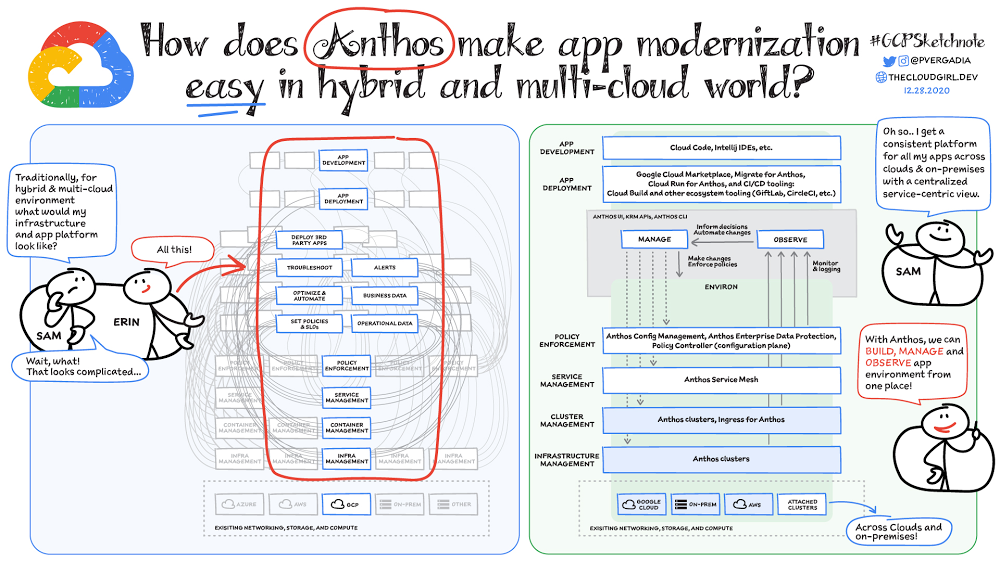
Most enterprises have applications in disparate locations—in their own data centers, in multiple public clouds, and at the edge. These apps run on different proprietary technology stacks, which reduces developer velocity, wastes computing resources, and hinders scalability. How can you consistently secure and operate existing apps, while developing and deploying new apps across hybrid and multicloud environments? How can you get centralized visibility and management of the resources? Well, that is why Anthos exists!This post explores why traditional hybrid and multicloud deployments are difficult, and then shows how Anthos makes it easy to manage applications across multiple environments. (Click to enlarge)Why is traditional hybrid and multicloud difficult?In hybrid and multicloud environments, you need to manage infrastructure. Let’s say you use containers on the clouds, and you develop apps using services on Google Cloud and AWS. Regardless of environment, you will need policy enforcement across your IT footprint. To manage your apps across the environment, you need monitoring and logging systems. You need to integrate that data into meaningful categories, like business data, operational data, and alerts.Digging further, you might use operational data and alerts to inform optimizations, implement automations, and set policies or SLOs. You might use business data to do all those things, and to deploy third-party apps. Then, to actually enact the changes you decide to implement, you need to act on different parts of the system. That means digging into each tool for policy enforcement, securing services, orchestrating containers, and managing infrastructure. Don’t forget, all of this work is in addition to what it takes to develop and deploy your own apps.(Click to enlarge)Now, consider repeating this set of tasks across a hybrid and multicloud landscape. It becomes very complex, very quickly. Your platform admins, SREs,  and DevOps teams who are responsible for security and efficiency have to do manual, cluster-by-cluster management, data collection, and information synthesis. With this complexity, it’s hard to stay current, to understand business implications, and to ensure compliance (not to mention the difficulty of onboarding a new hire). Anthos helps solve these challenges!How does Anthos make hybrid and multicloud easy?With Anthos, you get a consistent way to manage your infrastructure, with similar infrastructure management, container management, service management, and policy enforcement across your landscape.As a result, you have observability across all your platforms in one place, including access to business information, alerts, and operations information. With this information you might decide to optimize, automate, and set policies or SLOs. Digging deeper into Anthos EnvironsYou may have different regions that need different policies, and also have different development, staging, or production environments that need different permissions. Some parts of your work may need more security. That’s where environs come in! Environs are a way to create logical sets of underlying Kubernetes clusters, regardless of which platform those clusters live on. By considering, grouping, and managing sets of clusters as logical environs, you can think about and work with your applications at the right level of detail for what you need to do, be it acquiring business insights over the entire system, updating settings for a dev environment, or troubleshooting data for a specific cluster. Using environs, each part of the functional stack can take declarative direction about configuration, compliance, and more.(Click to enlarge)Modernize application developmentAnthos also helps modernize application development because it uses environs to enforce policies and processes, and abstracts away the cluster and container management from application teams. Anthos enables you to easily abstract away infrastructure from application teams, making it easy for them to incorporate a wide variety of CI/CD solutions on top of environs.  It lets you view and manage your applications at the right level of detail, be it business insights for services across the entire system, or troubleshooting data for a specific cluster. Anthos also works with container-based tools like buildpacks to simplify the packaging process. It offers Migrate for Anthos to take those applications out of the VMs and move them to a more modern hosting environment. What’s in it for platform administrators? Anthos provides platform administrators a single place to monitor and manage their landscape, with policy control and marketplace access. This reduces person-hours needed for management, enforcement, discovery, and communication. Anthos also provides administrators an out-of-the-box structured view of their entire system, including services, clusters, and more, so they can improve security, use resources more efficiently, and demonstrate measurable success. Administrators also save time and effort by managing declaratively, and they can communicate the success, cost savings, and efficiency of the platforms without needing to manually combine data. Interested in getting started with Anthos? Check out the free on-demand training here and my YouTube series. For more resources, you can also read the Anthos ebook at no cost. For more #GCPSketchnote and similar cloud content, follow me on twitter @pvergadia and keep an eye out on thecloudgirl.devRelated ArticleWhat are my hybrid and multicloud deployment options with Anthos?Anthos is a managed application platform that extends Google Cloud services and engineering practices to your environments so you can mo…Read Article
Quelle: Google Cloud Platform

How reCAPTCHA Enterprise protects unemployment and COVID-19 vaccination portals

More people than ever have been conducting more of their lives online due to the COVID-19 pandemic. This creates a new landscape for fraudsters to create and release new attacks. Researchcommissioned by Forrester Consulting showed 84% of companies have seen an increase in bot attacks. 71% of organizations have seen an increase in the amount of successful attacks. 65% of businesses have experienced more frequent attacks and greater revenue loss due to bot attacks. With so many people visiting government websites to learn more about the COVID-19 vaccine, make vaccine appointments, or file for unemployment, these web pages have become prime targets for bot attacks and other abusive activities. But reCAPTCHA Enterprise has helped state governments protect COVID-19 vaccine registration portals and unemployment claims portals from abusive activities.Assisting with unemployment claims during COVID-19Alongside the wave of unemployment claims caused by COVID-19, many state government agencies, such as Wisconsin’s Workforce Development, have seen an increase in attempted malicious bot logins on their external websites. Many states have had malicious actors visit unemployment claims portals and enter stolen credentials to file fraudulent unemployment claims. Because many unemployment claims portals are mandated to pay a recipient within 2 weeks, the claims portal processes this fraudulent information and bad actors receive unemployment checks weeks before their false claims are recognized. By then, the fraudsters have their money and have repeated this process using other stolen credentials.reCAPTCHA Enterprise helps state governments reduce false claims by preventing adversaries from automatically reusing credentials on unemployment claims portals. reCAPTCHA Enterprise’s scale and speed to determine fraudster behavior across the Internet helped some of the largest states in the United States, such as Texas. Registering for the COVID-19 Vaccine and accessing state-sponsored resourcesSeveral states, such as Pennsylvania, are challenged by web traffic that fluctuates based on the COVID-19 Vaccine Phase. For example, during Phase 1, there was a large increase in web traffic from both humans and bots because of the demand for the very few available vaccination slots. As more states move into Phase 2 and Phase 3, and the vaccine is more widely available, traffic is increasing because bad actors know more people are coming to these websites to register to be vaccinated. reCAPTCHA Enterprise was implemented to stop bad actors from scripting bots to book vaccine appointments and then sell those appointment slots on another website for profit. These fake web pages are falsely promoted as websites where people can register for the vaccine. Vaccine appointments are not the only government system from which fraudsters try to profit. Transportation and social service departments also face frequent attacks, wherein fraudsters try to profit by booking and then selling appointments with those organizations. Fending off these attacks was made easier thanks to reCAPTCHA Enterprise, a frictionless fraud detection service that leverages our experience from more than a decade of defending the internet and data for our network of more than 5 million sites. The reCAPTCHA Enterprise platform can understand fraudulent behavior, introduce friction to block bots from booking appointments, and allow legitimate users to access the vaccine portals and other state portals. Because reCAPTCHA Enterprise does not require end users to complete captcha challenges, several state governments installed reCAPTCHA Enterprise across search, login, and registration web pages. State governments are also placing reCAPTCHA Enterprise on webpages where end users can access healthcare, receive assistance for housing or food, register motor vehicles, or propose legislation. With reCAPTCHA Enterprise on more pages, it becomes more difficult for malicious software or bots to carry out their attacks against different pages, but not for end users to browse, login into accounts, book appointments, or apply for resources. Because reCAPTCHA Enterprise requires no action from end users to stop fraud, state governments implemented reCAPTCHA Enterprise on all points of interaction on their webpages to ensure maximum security without impacting the user experience. Providing security everywhere and pricing for allMany state governments are familiar with buying cloud services in a pay-as-you-go model. reCAPTCHA Enterprise eased the purchasing process by providing state governments with predictable, scalable, and customizable pricing. State governments know up front how much they can expect to pay each month based on the number of assessments reCAPTCHA Enterprise performs. reCAPTCHA Enterprise’s flexible pricing model keeps pace with the natural fluctuations of visitors to vaccination registration and unemployment claims. reCAPTCHA Enterprise has a dedicated sales team that can tailor pricing to your specific use cases so both your webpages and budget are not compromised. reCAPTCHA Enterprise has helped many state governments serve their constituents by making it easier to get vaccinated and collect unemployment. It helps constituents take advantage of public services and makes it more difficult for fraudsters to manipulate and interfere with them. To start protecting your web pages from credential stuffing and other attacks, get started with reCAPTCHA Enterprise today.
Quelle: Google Cloud Platform

Scheduling Cloud SQL exports using Cloud Functions and Cloud Scheduler

Cloud SQL offers an easy way to perform a database export for any of your databases right from the Cloud Console. Database export files are saved to Google Cloud Storage and can be used via the Cloud SQL import process to be recreated as new databases.Creating a one-time export file is good but setting up an automated process to do this weekly is even better. This blog post will walk through the steps required to schedule a weekly export of a Cloud SQL database to Cloud Storage. I’ll use a SQL Server instance for this example but the overall approach will also work for MySQL and PostgreSQL databases in Cloud SQL.First you will need to create a SQL Server instance in Cloud SQL which you can do from the Google Cloud Console.For the full details on creating the SQL Server instance and connecting to it using Azure Data Studio see my previous post: Try out SQL Server on Google Cloud at your own paceCreate database and tableWe’ll start by creating a new database on our SQL Server instance. With Azure Data Studio connected to your SQL Server instance, right click the server in Azure Data Studio and select “New Query”.Enter the following SQL statements to create a new database and a new table containing data to work with:and click the “Run” button.Create a bucket in Google Cloud StorageNow let’s begin the process of scheduling a weekly export of that database to Cloud Storage. We’ll start by creating a Cloud Storage bucket that will contain our database export files. Go to the Cloud Storage section of the Cloud Console and click “CREATE BUCKET” button. Enter a “Name” for your bucket and click the “CREATE” button.Okay, now that we’ve got a bucket to save our export files to, we need to give our Cloud SQL instance access to write files to that bucket. We can do that by granting the Service Account of our Cloud SQL instance permission to create objects in the new bucket. First we need to copy the service account address from the Cloud SQL instance details page. Go to the Cloud SQL instances page and select your instance. Then on the details page, scroll down and copy the “Service account”.With the “Service account” on your clipboard, go back to your bucket in Cloud Storage and click its “Permissions” tab.Click the “Add” button to add permissions to the Cloud Storage bucket.Add the copied “Service account” and select “Cloud Storage – Storage Object Admin” for the “Role”. Click the “Save” button.Now since we will be exporting a Cloud SQL export file every week, let’s be frugal and use Cloud Storage Object Lifecycle Management to change the storage class of these export files over time so that their storage price costs less. We can do that by selecting the “Lifecycle” tab for our Cloud Storage bucket.We’re going to set three Lifecycle rules for the bucket so that export files over a month old are converted to “Nearline” storage, export files over three months old are converted to “Coldline” storage, and files over a year old will be converted to the most affordable “Archive” storage class. By taking the few extra steps to do this we’ll significantly reduce the cost of storage for the export files over time.Click the “ADD A RULE” button and add a rule to change the storage class of objects older than 30 days to Nearline storage.Again, click the “ADD A RULE” button and add a rule to change the storage class of objects older than 90 days to Coldline storage.Click the “ADD A RULE” button one more time to add a rule to change the storage class of objects older than 365 days to Archive storage.Once you’ve added the 3 rules, the Lifecycle settings for the bucket should look something like this:Create Cloud Function to export a Cloud SQL databaseWith a Cloud Storage bucket ready to accept export files, we’ll now move on to creating a Cloud Function that can call the export method for a Cloud SQL database.Start this step in the Cloud Functions section of the Cloud Console. Click the “CREATE FUNCTION” button to start the creation process. Enter the following information:Specify an Function name:Example: export-cloud-sql-dbSelect a Region where the Function will run:Example: us-west2For Trigger type select “Cloud Pub/Sub”. We’ll create a new Pub/Sub Topic named “DatabaseMgmt” to be used for Cloud SQL instance management. Within the “Select a Cloud Pub/Sub Topic” drop-down menu, click the “CREATE A TOPIC” button. In the “Create a Topic” dialog window that appears, enter “DatabaseMgmt” as the “Topic ID” and click the “CREATE TOPIC” button. Then click the “SAVE” button to set “Cloud Pub/Sub” as the “Trigger” for the Cloud Function.Next, expand the “Runtime, Build and Connector Settings” section and click “Connections”.For “Ingress settings”, select “Allow internal traffic only”.For “Egress settings”, click the “CREATE A CONNECTOR” button. This opens an additional browser tab and starts the flow for “Serverless VPC access” in the Networking section of the Cloud Console. The first time this is done in a GCP project, you will be redirected to a screen where you have to enable the “Serverless VPC access API”. Enable it and continue with the process of creating the VPC connector. Below is an example of the completed form used to create a VPC connector:For “Name” enter: “cloud-sql-db-mgmt”For “Region” select: “us-west2”In the “Network” drop-down menu, select “default”.For “Subnet” select “Custom IP Range” and enter “10.8.0.0” as the “IP range”.Then click the “CREATE” button and wait for a minute or so for the Serverless VPC access connector to be created. Once the connector has been created, go back to the other browser tab where the Cloud Function creation form is still open. Now we can enter “cloud-sql-db-mgmt” as the “VPC connector” in the “Egress settings” section.Also under “Egress settings” select the “Route all traffic through the VPC connector” option.With all those values entered, the completed “Configuration” section of the “Create function” form should look something like the following:Click the “NEXT” button at the bottom of the “Create function” form to move on to the next step where we enter the code that will power the function.Now in the “Code” step of the “Create function” form, select “Go 1.13” as the “Runtime” and enter “ProcessPubSub” as the code “Entry point”.Then copy and paste the following code into the code section of the “Source code — Inline Editor”:The completed “Code” section of the “Create function” form should look something like this:Click the “DEPLOY” button to deploy the Function. The deployment process will take a couple of minutes to complete.Grant Permission for the Cloud Function to access Cloud SQL exportThe final setup step to enable our Cloud Function to be fully functional is to grant the necessary permission to allow the Cloud Function Service account to run Cloud SQL Admin methods (like database export and import operations).Go to the IAM section of the Cloud Console, which is where permissions for service accounts are managed. Find the service account used by Cloud Functions which is the “App Engine default service account”. It has the suffix: “@appspot.gserviceaccount.com”. Click the Edit icon for the account which looks like a pencil.In the “Edit permissions” dialog window, click the “ADD ANOTHER ROLE” button. Select the “Cloud SQL Admin” role to be added and click the “SAVE” button.Test out the Cloud FunctionSweet! Our Function is now complete and ready for testing. We can test out the Cloud Function by posting a message to the Pub/Sub Topic to trigger its call of the Cloud SQL export operation.Go to the Cloud Pub/Sub section of the Cloud Console. Select the “DatabaseMgmt” Topic. Click the “PUBLISH MESSAGE” button.Enter the following JSON formatted text into the “Message” input area of the “Message body” section of the “Publish message” form. Be sure and replace the values for “<your-instance-name>”, “<your-project-id>” and “<your-gcs-bucket>” with the values that you chose when you created those resources:The Pub/Sub message to be published should look something like this:Click the “PUBLISH” button to publish the message, which should trigger the Cloud Function. We can confirm that everything works as expected by viewing the Cloud Storage bucket specified in the message body. There should now be a file in it named something like “ export-demo-2021–04–16–1459–40.gz”.Create Cloud Scheduler Job to trigger the Cloud Function once a weekExcellent! Now that we’ve confirmed our Cloud Function is working as expected, let’s use Cloud Scheduler to create a job that triggers the Cloud Function once a week. Go to the Cloud Scheduler section of the Cloud Console and click the “SCHEDULE A JOB” button.Enter a “Name” for the scheduled job:Example: export-cloud-sql-databaseEnter a “Description” for the scheduled job:Example: Trigger Cloud Function to export Cloud SQL DatabaseFor the “Frequency” of when the job should be run, enter “0 9 * * 5” which schedules the job to be run once a week every Friday at 9:00 am. You should set the frequency to be a schedule that is best for your needs. For more details about setting the frequency see the Cloud Scheduler documentation.Under the “Configure the Job’s Target” section, select the “Target type” to be “Pub/Sub”.For the “Topic” specify “DatabaseMgmt”, the Pub/Sub topic created in an earlier step.For the “Message body” enter the same JSON message you used when you tested the Cloud Function earlier in this post. Be sure and replace the values for “<your-instance-name>”, “<your-project-id>” and “<your-gcs-bucket>” with the values that you chose when you created those resources.The completed “Create a job” form should look something like this:With all that information supplied, click the “CREATE” button to create the Cloud Scheduler job. After the job creation completes you’ll see the job list displayed which includes a handy “RUN NOW” button to test out the scheduled job immediately.Go ahead and click the “RUN NOW” button to see a new export file get created in your Cloud Storage bucket while you experience the pleasant gratification of all your good work to set up automated exports of your Cloud SQL database. Well done!Next stepsNow, read more about exporting data in Cloud SQL and create a SQL Server instance in Cloud SQL which you can do from the Google Cloud Console.
Quelle: Google Cloud Platform

Reinventing the future with a transformation cloud

Looking back on the past year, I see challenges—but also reinvention. Reinvention in how children are educated. Reinvention in how medical professionals provide care. Reinvention in how customers purchase products. This reinvention was made possible by all of the IT leaders around the world who had a vision about what could be possible with technology.Technology has allowed people to work and complete critical activities safely outside of their standard locations. But, it has also enabled transformation in ways we have not seen before: in how people collaborate, in how businesses operate, and most important to me, in how organizations innovate.Rethinking what it means to transformThe leading indicator for organizations that are accelerating their innovation during this time is how they are thinking about transformation. Instead of asking infrastructure questions about where their apps and services should run, they are asking transformation questions about how to build an environment that enables every person, process, and technology to adapt in order to bring the highest level of innovation to the business. Innovative companies have moved beyond migrating their data centers to the cloud, changing not only where their business is done but, more importantly, how it is done. For example, Papa John’s recently announced they are building a digital platform that looks at real-time data across the business to improve its loyalty programs, website, and customer and partner experiences. Albertsons Companies is transforming itself by reinventing grocery shopping, both the digital and physical aisle, through shoppable maps, AI-powered conversational commerce, and predictive grocery list building. Airbus is reimagining their work environment to embrace the hybrid work reality. And Siemens is partnering with Google Cloud to reinvent industrial manufacturing with AI to empower employees, automate mundane tasks, and improve product quality.  Here, transformation is made possible with technologies that enable new innovations for their customers versus decisions about where infrastructure should be run. And this aligns with a recent study by Forrester that states the top two IT initiatives for the next 12 months are to increase innovation and to invest in technology that helps employees do their jobs better.1Some of the best conversations I’ve had with customers are focused on how to:Accelerate transformation while also maintaining the freedom to adapt to market needs.Make every employee—data scientists to sales associates—smarter with real-time data to make the best decisions.Bring people together and enable them to communicate, collaborate, and share with each other when they can not meet in person.Protect everything that matters to us—our people, our customers, our data, our customers’ data, and each transaction we undertake.This new customer thinking is driving new technology requirements—requirements that can be solved through a transformation cloud. A transformation cloud accelerates an organization’s digital transformation through app and infrastructure modernization, data democratization, people connections, and trusted transactions. The result is an organization – and its workers –  that can take advantage of all of the benefits of cloud computing to drive innovation.The new requirements for innovationOrganizations want to work with multiple cloud providers to choose the best technology for each of their apps and services while also mitigating against inevitable cloud outages and vendor lock in. They value the flexibility of open source based solutions and look to our multicloud platforms like Google Kubernetes Engine and Anthos to instill freedom in how they innovate and drive differentiated customer experiences. It is no surprise that, in a recent Google-commissioned IDG research study, 78% of Global IT leaders stated that multi/hybrid cloud support is a major consideration when selecting a cloud provider and 74% preferred open source cloud solutions.2 Customers like MLB, DenizBank, and Macquarie Bank understand the necessity of a multicloud strategy and are taking advantage of Google Cloud’s open, hybrid architecture to give them the maximum flexibility to run their business how and where they want.These organizations also want to use data to better understand their customers, enhance their products, and improve inventory accuracy in order to make real-time decisions—and bring it together into a cohesive data cloud. They value how analytics solutions democratize access to data for all employees and how embedded AI helps them predict and automate the future. The Forrester study mentioned above also shows that companies focused on improving their use of data for better decision-making, are taking actions to improve data self-service capabilities and make access to data and insights more democratic.3 Customers like Twitter, PayPal, The Home Depot, HSBC, and Stanford Medicine, unify their data across their organizations to power deeper AI-driven business insights, make better real-time decisions, and build and run their data-driven applications. And while technology is driving many of the transformations we see, so are an organization’s people. Workers are finding new ways to strengthen human connections, deepen their impact, and serve customers while transforming how work happens—as shown in the fact that 59% of organizations in the IDG study accelerated or newly introduced remote working and collaboration capabilities in 2020.4 Customers like Kia Motors, Cambridge Health Alliance, and PwC are using Google Workspace to enable teams of all sizes to connect, create,  collaborate, and to drive innovation from any device, and any location.Finally, the innovation that we see in every digital transaction is matched with new ways to protect and secure the business. Organizations want to protect their employees, customers, and partners against emerging threats, analyze massive amounts of data to secure infrastructure, and build a long term strategy for strategic governance of their assets regardless of their location. Getting this right is essential as organizations see security as a top pain point impeding innovation.5 Customers like Equifax and Evernote are using Google Cloud’s secure platform and security products to extend customer confidence anywhere their systems may operate.Google Cloud technologies are already powering customers’ transformation cloudsSupporting our customers’ reinventions are our top priority and we believe that together, we can pave the way for what is next. With our investments in multicloud and AI/ML, to sustainable infrastructure, industry solutions, and technology that improves our communities, such as COVID-19 vaccine distribution, we are proud that our customers trust Google Cloud solutions to digitally transform their business.We have lots more to tell you about in the coming months, starting with our Data Cloud Summit on May 26th. Between this event, and the multiple other events we have this summer, you will learn about how our industry leadership and collaboration with our partners are enabling our customers to build powerful transformation clouds to support their continued reinvention.1. Forrester Analytics Business Technographics® Priorities And Journey Survey, 20212. IDG Communications, Inc: “No Turning Back: How the Pandemic Has Reshaped Digital Business Agendas”, 20213. Of the companies that prioritize data in decision making, 37% are improving data self-service capabilities and 30% are making access to data and insights more democratic (Forrester Analytics Business Technographics® Priorities And Journey Survey, 2021)4. IDG Communications, Inc, “No Turning Back: How the Pandemic Has Reshaped Digital Business Agendas”, 20215. 33% of organizations stated Security risks & concerns as a top pain point impeding innovation (IDG Communications, Inc, “No Turning Back: How the Pandemic Has Reshaped Digital Business Agendas”, 2021)Related ArticleNew research on how COVID-19 changed the nature of ITTo learn more about the impact of COVID-19 and the resulting implications to IT, Google commissioned a study by IDG to better understand …Read Article
Quelle: Google Cloud Platform

Browse and query Cloud Spanner databases from Visual Studio Code

Visual Studio Code is one of the most widely-used IDEs, due in part to the variety of extensions that are available to developers. For developers who are building applications that interact with Cloud Spanner, we’re excited to announce the Google Cloud Spanner driver for the popular SQLTools extension for VS Code. The SQLTools extension works with a variety of SQL drivers and allows developers to manage database connections, execute and generate queries, and more from within VS Code. By using the Cloud Spanner driver with SQLTools, developers can browse tables and execute queries, DDL statements, and DML statements on Cloud Spanner databases without having to leave the IDE.In this post, we’ll walk through the process of installing the extension, connecting to a Cloud Spanner database, and using SQLTools with the database.PrerequisitesBefore you get started, you’ll need to have a Google Cloud Platform project with a Cloud Spanner instance and a database. This codelab will walk you through the process if you haven’t used Cloud Spanner before. Alternatively, you can use the emulator. You’ll also need to have VS Code installed on your computer.InstallationTo install the Cloud Spanner driver for SQLTools, click on the Extensions icon in VS Code, search for “cloud spanner driver”, and install the extension called Google Cloud Spanner Driver. Alternatively, you can install the Cloud Spanner driver for SQLTools from the Visual Studio Marketplace.Once the extension is installed, you’ll see a database icon for SQLTools, as highlighted by the red rectangle in the image below, show up in VS Code. Click this database icon to access the extension.Connecting to a Cloud Spanner databaseWith the extension installed, click the Add New Connection icon in SQLTools to open the Connection Assistant and choose Google Cloud Spanner Driver. You can connect either to a Spanner instance on Google Cloud or to an emulator instance. Configuring a connection using the emulatorThe Cloud SDK offers a local, in-memory emulator that you can use while developing and testing. To use the SQLTools extension with the emulator, you must first start the emulator. Then, in the Connection Settings step, enter values for Connection name, Google Cloud Project ID, Spanner Instance ID, andSpanner Database ID. Select the checkbox next to Connect to emulator. When you use this setting, the instance and database you specified will be automatically created for you in the emulator if they do not already exist.Configuring a connection to a Cloud Spanner database on Google CloudIf you are connecting to a Cloud Spanner database running on Google Cloud, you’ll need to provide the Google Cloud Project ID, Spanner Instance ID, and Spanner Database ID. You can enter any value you like for theConnection name. You’ll also need to specify your credentials in one of two ways: enter the absolute path to your credential key file in the Connection Assistant or set the GOOGLE_ACCOUNT_CREDENTIALS environment variable to the path to your credential key file. If you are using the GOOGLE_ACCOUNT_CREDENTIALS environment variable, note that if VS Code was already running before you set the environment variable, then you will need to restart VS Code. Your service account will need to be granted appropriate permissions for interacting with Cloud Spanner. For more information about credentials, see the documentation on creating service accounts and service account keys. You can find a list of Cloud Spanner roles in this table.Testing and establishing connectionsOnce you’ve entered the connection settings information, you can click TEST CONNECTION to make sure the connection is successful, and then click SAVE CONNECTION.On the final step of the Connection Assistant, click CONNECT NOW.Browsing database tablesIn the Connections section of SQLTools, you can view the tables in your database. In the screenshot below, you can see the columns in the comments table.Right-clicking on a table name provides options such as showing table records or generating an insert query.Executing queries and statementsThe Cloud Spanner driver supports executing queries, DDL statements, and DML statements. If you execute multiple statements in a single script, each statement will be executed in a separate transaction. Note that the extension is intended for use during development and testing, not for administration of production database environments.Queries use single-use read-only transactions, while DML statements use read-write transactions. Make sure that the service account you’re using has the necessary permissions to execute the queries or statements. For more information on types of transactions, see the documentation. Next stepsInteracting with your Cloud Spanner databases from within your IDE can make your development process more efficient and reduce the need to switch between multiple tools and interfaces. Ready to try it yourself? Install the Cloud Spanner driver for SQLTools and start exploring and interacting with your Cloud Spanner databases from within VS Code. If you have suggestions or issues, you can raise them in the issue tracker or for questions or comments, feel free to reach out to me on Twitter. We would love to hear your feedback.Related ArticleInclude Cloud Spanner databases in your CI/CD process with the Liquibase extensionIn February, we announced the beta version of the Liquibase Cloud Spanner extension that allows developers to use Liquibase’s open-source…Read Article
Quelle: Google Cloud Platform




