Have a cool summer with BigQuery user-friendly SQL

With summer just around the corner, things are really heating up. But you’re in luck because this month BigQuery is supplying a cooler full of ice cold refreshments with this release of user-friendly SQL capabilities. We are pleased to announce three categories of BigQuery user-friendly SQL launches: Powerful Analytics Features, Flexible Schema Handling, and New Geospatial Tools.Powerful Analytics FeaturesThese powerful SQL analytics features provide greater flexibility to analysts for organizing, filtering, and rendering data in BigQuery than ever before. You can enable spreadsheet-like functionality on summarized data using PIVOT and UNPIVOT and filter irrelevant data in analytic functions using QUALIFY.Through this section, we will become familiar with these new features through examples using the BigQuery Public dataset, usa_names.PIVOT/UNPIVOT (Preview)One of the most time-consuming tasks for data analytics practitioners is wrangling data into the right shape. SQL is great for wrangling data, but sometimes you want to reformat a table as you would in a spreadsheet, pivoting rows and columns interchangeably. To support this use case, we are pleased to introduce PIVOT and UNPIVOT operators in BigQuery. PIVOT creates columns from unique values in rows by aggregating values, and UNPIVOT reverses this action.The example below uses PIVOT on bigquery-public-data.usa_names.usa_1910_current to show the number of males and females born each year, representing each gender as a column. Then UNPIVOT reverses this action.QUALIFY (Preview)More advanced users of SQL know the power of analytic functions (aka window functions). These functions compute values over a group of rows, returning a single result for each row. For example, customers use analytic functions to compute a grand total, subtotal, moving average, rank, and more. With the announcement of support for QUALIFY, BigQuery users can now filter on the results of analytic functions by using the QUALIFY clause. QUALIFY belongs in the family of query clauses used for filtering along with WHERE and HAVING. The WHERE clause is used to filter individual rows in a query. The HAVING clause is used to filter aggregate rows in a result set after aggregate functions and GROUP BY clauses. The QUALIFY clause is used to filter results of analytic functions. To show the utility of QUALIFY, the example below uses QUALIFY to return the top 3 female names from each year in the last decade using from bigquery-public-data.usa_names.usa_1910_current. Flexible Schema HandlingNew SQL for administrators and data engineers enables table renaming for data pipeline processes, as well as flexible column management.Table Rename (GA)In data pipeline processes, tables are often created and then renamed so that they can make way for the next iteration of the pipeline run. To accomplish this, customers need a mechanism by which they can create a table and then subsequently rename it. Now if customers want to change this name using SQL, they can. Using the simple syntax that ALTER TABLE RENAME TO provides, customers will be able to rename a table after creation to clear the way for the next iteration of tables in the data pipeline.DROP NOT NULL constraints on a column (GA)While BigQuery has historically provided many tools available in the UI, CLI and APIs, we know that many administrators prefer interfacing with the database using SQL. BigQuery recently released DDL statements which enable data administrators to provision and manage datasets and tables, greatly simplifying provisioning and management. Today, we continue the next addition in this line of releases by announcing ALTER COLUMN DROP NOT NULL constraint on a column:ALTER COLUMN DROP NOT NULL allows the administrator to remove the NOT NULL constraint from a column in BigQuery.CREATE VIEW with column list (GA)Views are used ubiquitously by BigQuery customers to capture business logic. Oftentimes, BigQuery users have business requirements to assign aliases to columns in views. Now BigQuery supports doing so upon view creation in a column name list format with the release of CREATE VIEW with column list syntax.New Geospatial ToolsST_POINTN, ST_STARTPOINT, and ST_ENDPOINTGeospatial data is incredibly valuable to data analytics customers dealing with data from the physical world. BigQuery has very strong geospatial function support to help customers process marketing data, track storms, or manage self-driving cars. Particularly for analyzing vehicle or location tracking data, we’re thrilled to provide three new functions to allow users to easily extract or filter on key points:  ST_POINTNST_STARTPOINTST_ENDPOINTFor example, when working with vehicle histories,  ST_POINTN, ST_STARTPOINT, and ST_ENDPOINT allow users to extract elements such as the start and the end of a trip. For identifying origin-destination pairs these functions will make that task much easier.As sure as a hot summer day pairs well with an ice-cold beverage, these new user-friendly SQL features in BigQuery pair well with your data analytics workflows. To learn more about BigQuery, visit our website, and get started immediately with the free BigQuery Sandbox.
Quelle: Google Cloud Platform

Simplifying API operations with AI as you scale your API programs

APIs are the backbone of digital transformation. Via APIs, you can securely share data and functionality with developers both inside and outside of your organizational boundaries, letting you build applications faster, seamlessly connect and interact with partners, and drive new business revenue. Because APIs encompass business-critical information, any downtime or performance degradation can lead to significant loss in revenue, customers, and brand value. Therefore, there’s mounting pressure on operations teams to ensure that APIs are always available and performing as expected. If the APIs go down, so too do the services that fuel customer experiences and on which the organization relies for collaboration and business processes.However, as you build and scale your API programs, it becomes practically impossible for API operators to manually monitor and manage all your APIs. To help, we brought the power of industry-leading AI and ML technologies to API operations via Apigee X, a major release of our API management platform. Apigee X seamlessly weaves together Google Cloud’s expertise in AI, security and networking to help you efficiently build and manage APIs at scale. Put your API data into actionApigee applies machine learning to your API metadata and provides you the required tools that simplify various aspects of API operations. A great example of AI for APIs is anomaly detection: AI-powered rules trigger alerts based on a set of predefined conditions that are determined by applying Google’s industry-leading machine learning models to your historical API data.Auto-thresholds adjust the monitoring criteria of your APIs and set them to pattern-based values. Reduce overhead results because operators don’t have to manually monitor anomalies or adjust the monitoring thresholds on APIs.“By applying AI and ML models to our historical API data, these advanced features are able to alert us about scenarios we haven’t thought of. Such automation capabilities significantly reduce our upfront efforts. And from a security perspective, the actionable insights help us ensure that our proxies are exposed only over secure HTTPs ports and adhere to compliance requirements. We’re also able to closely monitor user activity and quickly pull out reports during audits.” – Adam Brancato, Sr. Manager, Global Technology and Security at CitrixAs our customers scale their API programs, they find it extremely useful to harness AI-powered capabilities.  In our recent State of the API Economy 2021 report, we found a 230% increase in enterprises’ use of anomaly detection, bot protection, and security analytics features.To learn more about Apigee X, and see AI and machine learning in action, check out this video, and to try Apigee X for free, click here.Related ArticleThe time for digital excellence is here—Introducing Apigee XApigee X, the new version of Google Cloud’s API management platform, helps enterprises accelerate from digital transformation to digital …Read Article
Quelle: Google Cloud Platform

VM Manager simplifies compliance with OS configuration management Preview

OS configuration management is an important way that administrators of large fleets of virtual machines (VMs) can automate and centralize the deployment, configuration, maintenance and reporting of software configurations of those VM instances. You can install security and monitoring agents to make sure all VM are secured and protected, bootstrap management tools or ensure OS compliance across your fleet. In January, we introduced VM Manager, a suite of infrastructure management tools to simplify and automate the maintenance of large fleets of Compute Engine VMs, including OS patch, OS inventory, and OS configuration management. The first version of OS configuration management helps install and maintain agents and operating system (OS) software configurations at scale, and is currently used in production by hundreds of customers. Today, we are excited to introduce OS configuration management (Preview) with enhanced features and capabilities. What’s new?OS configuration management introduces a new UI (in addition to the API and gcloud command-line), providing an at-a-glance compliance view for your VM fleet and the ability to drill down and find the root cause for non-compliant VMs in seconds. The new UI provides a guided wizard-based experience to create and apply policy assignments to managing VM fleets at scale.  In the new version we have also improved reliability with independent zonal services—a user-controlled safe rollout process for deploying policies. If new policies are not working as expected, you can stop the process without impacting all VMs.  Finally, OS configuration management introduces multiple new functional capabilities: dry-run (compliance only) reporting mode; the ability to define, validate and enforce compliance for custom resources periodically; as well as options to exclude or include certain VMs, for example Google Kubernetes Engine (GKE) nodes, based on labels. For more information see OS configuration management overview.VM Manager uses the OS Config agent to manage VMs. Today, the OS Config agent is pre-installed for all Compute Engine public OS images (Windows, Debian, CentOS, RHEL, Ubuntu, SLES, and Container-Optimized OS) and can be activated with one click across all your VM instances. Once VM Manager is enabled, it automatically activates agents for newly created VMs, making sure the whole fleet is under control. For OS configuration management (Beta) usersAll existing guest policies will continue to work without any changes. We’ll continue to support OS configuration management (beta release) at the same level as before. A comparison document is available to help you to understand the differences between OS configuration management Preview and Beta to guide you on which version to use. Get started todayGeneral Availability of OS configuration management is planned for later this year. To learn more about all the new features of OS configuration management, see the OS configuration management documentation.To learn more about VM Manager, visit the documentation, or watch our Google Cloud Next ‘20: OnAir session, Managing Large Compute Engine VM Fleets.Related ArticleIntroducing VM Manager: Operate large Compute Engine fleets with easeThe new VM Manager simplifies infrastructure and compliance management for the largest of Compute Engine VM fleets.Read Article
Quelle: Google Cloud Platform

Best practices to protect your organization against ransomware threats

Ransomware, a form of malware that encrypts a user’s or organization’s most important files or data rendering them unreadable, isn’t a novel threat in the world of computer security. These destructive, financially-motivated attacks where cybercriminals demand payment to decrypt data and restore access have been studied and documented for many years. Today’s reality shows us that these attacks have become more pervasive, impacting essential services like healthcareor pumping gasoline. Yet despite attempts to stop this threat, ransomware continues to impact organizations across all industries, significantly disrupting business processes and critical national infrastructure services and leaving many organizations looking to better protect themselves. Organizations that continue to rely on legacy systems are especially vulnerable to ransomware threats, as these systems may not be regularly patched and maintained. For more than 20 years Google has been operating securely in the cloud, using our modern technology stack to provide a more defensible environment that we can protect at scale. We strive to make our security innovations available in our platforms and products for customers to use as well. This underpins our work to be the industry’s most trusted cloud, and while the threat of ransomware isn’t new, our responsibility to help protect you from existing or emerging threats never changes. In this post, we share guidance on how organizations can increase their resilience to ransomware and how some of our Cloud products and services can help.Develop a comprehensive, defensive security posture to protect against ransomwareRobust protection against ransomware (and many other threats) requires multiple layers of defense. The National Institute of Standards and Technology (NIST) outlines five main functions in the Cybersecurity Framework that serve as the primary pillars for a successful and comprehensive cybersecurity program in any public or private sector organization. Below are the recommendations from NIST and examples of how our Cloud technologies can help address ransomware threats:Pillar #1 – Identify: Develop an understanding of what cybersecurity risks you need to manage for the scope of your assets, systems, data, people, and capabilities. In the case of ransomware, this covers which systems or processes are most likely to be targeted in a ransomware attack, and what the business impact would be if specific systems were rendered inoperable. This will help prioritize and focus efforts to manage risks. Our CISO Guide to Security Transformation whitepaper outlines steps for a risk-informed, rather than risk-avoidance, approach to security with the cloud. A risk-informed approach can help you address the most important security risks, instead of addressing the risks that you already know how to mitigate. Cloud service providers make this risk-informed approach easier and more efficient for you by developing and maintaining many of the controls and tools that you need to mitigate modern security threats. Services like Cloud Asset Inventory provide a mechanism to discover, monitor, and analyze all your assets in one place for tasks like IT ops, security analytics, auditing, and governance. Pillar #2 – Protect: Create safeguards to ensure delivery of critical services and business processes to limit or contain the impact of a potential cybersecurity incident or attack. In the case of ransomware, these safeguards may include frameworks like zero trust that protect and strongly authenticate user access and device integrity, segment environments, authenticate executables, reduce phishing risk, filter spam and malware, integrate endpoint protection, patch consistently and provide continuous controls assurance. Some examples of products and strategies to involve in this step include: A cloud-native, inherently secure email platform: Email is at the heart of many ransomware attacks. It can be exploited to phish credentials for illegitimate network access and/or to distribute ransomware binaries directly. Advanced phishing and malware protection in Gmail provides controls to quarantine emails, defends against anomalous attachment types, and protects from inbound spoofing emails. Security Sandbox detects the presence of previously unknown malware in attachments. As a result, Gmail prevents more than 99.9 percent of spam, phishing, and malware from reaching users’ inboxes. Unlike frequently-exploited legacy on-premises email systems, Gmail is continually and automatically updated with the latest security improvements and protections to help keep your organization’s email safe.Strong protection against account takeovers: Compromised accounts allow ransomware operators to gain a foothold in victim organizations, perform reconnaissance, get unauthorized access to data and install malicious binaries. Google’s Advanced Protection Program provides the strongest defense against account takeovers and has yet to see a user that participates in the program be successfully phished. Further, Google Cloud employs many layers of machine learning systems for anomaly detection to differentiate between safe and anomalous user activity across browsers, devices, application logins, and other usage events.  Zero trust access controls that limit attacker access and lateral movement: BeyondCorp Enterprise provides a turnkey solution for implementing zero trust access to your key business applications and resources. In a zero trust access model, authorized users are granted point-in-time access to individual apps, not the entire corporate network, and permissions are continuously evaluated to determine if access is still valid. This prevents the lateral movement across the network that ransomware attackers rely on to hunt for sensitive data and spread infections. BeyondCorp’s protections can even be applied to RDP access to resources, one of the most common ways that ransomware attackers gain and maintain access to insecure legacy Windows Server environments. Enterprise threat protections for Chrome: Leveraging Google Safe Browsing technology, Chrome warns users of millions of malware downloads each week. Threat protection in BeyondCorp Enterprise delivered through Chrome can prevent infections from previously unknown malware including ransomware, with real-time URL checks and deep scanning of files.Malicious download warnings to alert users in ChromeEndpoints designed for security: Chromebooks are designed to protect against phishing and ransomware attacks with a low on-device footprint, read-only, constantly invisibly updating Operating System, sandboxing, verified boot, Safe Browsing and Titan-C security chips. Rollout of ChromeOS devices for users who work primarily in a browser can reduce an organization’s attack surface, such as relying too much on legacy Windows devices, which have been found to often be vulnerable to attacks.Pillar #3 – Detect: Define continuous ways to monitor your organization and identify potential cybersecurity events or incidents. In the case of ransomware, this may include watching for intrusion attempts, deploying Data Loss Prevention (DLP) solutions to detect exfiltration of sensitive data from your organization, and scanning for early signs of ransomware execution and propagation.  The ability to spot and stop malicious activity associated with ransomware as early as possible is key to preventing business disruptions. Chronicle is a threat detection solution that identifies threats, including ransomware, at unparalleled speed and scale. Google Cloud Threat Intelligence for Chronicle surfaces highly actionable threats based on Google’s collective insight and research into Internet-based threats. Threat Intel for Chronicle allows you to focus on real threats in the environment and accelerate your response time.DLP technologies are also useful in helping detect data that could be appealing to ransomware operators. With data discovery capabilities like Cloud DLP, you can detect sensitive data that’s accessible to the public when it should not be and detect access credentials in exposed code. Pillar #4 – Respond: Activate an incident response program within your organization that can help contain the impact of a security (in this case, ransomware) event.  During a ransomware attack or security incident, it’s critical to secure your communications both internally to your teams and externally to your partners and customers. Many organizations with legacy Office deployments have shifted to Google Workspace because it offers a more standardized and secure online collaboration suite, and in the event of a security incident, a new instance can quickly be stood up to provide a separate, secure environment for response actions.Pillar #5 – Recover: Build a cyber resilience program and back-up strategy to prepare for how you can restore core systems or assets affected by a security (in this case, ransomware) incident. This is a critical function for supporting recovery timelines and lessening the impact of a cyber event so you can get back to operating your business. Immediately after a ransomware attack, a safe point-in-time backup image that is known not to be infected must be identified. Actifio GO provides scalable and efficient incremental data protection and a unique near-instant recovery capability for data. This near-instant recovery facilitates identifying a clean restore point quickly, enabling resumption of business functions rapidly. Actifio GO is infrastructure-agnostic and can protect applications on-premises and in the cloud. In Google Workspace, if files on your computer were infected with malware but you sync them to Google Drive, you may be able to recover those files. Additionally, ensuring that you have a strong risk transfer program in place, like our Risk Protection Program, is a critical element of a comprehensive approach to managing cyber risk. Key ransomware prevention and mitigation considerations for business and IT leadersAs you plan for a comprehensive defense posture against ransomware threats, here are some key questions to consider:Does your organization have a ransomware plan, and what does it entail? Remember to demand a strong partnership with your cloud providers based on a shared understanding of risk and security objectives. How are you defending your organization’s data, systems and employees against malware? Are your organization’s systems up to date and patched continuously? Are you watching for data exfiltration or other irregularities? What is your comprehensive zero trust approach, especially strongly authenticating my employees when they access information? Are you taking the right back ups to high assurance immutable locations and testing that they are working properly? This should include testing that does a periodic restore of key assets and data. What drills are you conducting to battle-test your organization’s risk management and response to cyber events or incidents? Ransomware attacks will continue to evolve Recently, ransomware groups have evolved their tactics to include stealing data prior to it being encrypted, with the threat of extorting this data through leaks. Additionally, some ransomware operators have used the threat of distributed-denial-of-service (DDoS) attacks against victim organizations as an attempt to further compel them to pay ransoms. DDoS attacks can also serve as a distraction, occupying security teams while attackers seek to accomplish other objectives such as data exfiltration or encryption of business-critical data. By deploying Google Cloud Armor — which can scale to absorb massive DDoS attacks— you can help protect services deployed in Google Cloud, other clouds, or on-premise against DDoS attacks.Protecting against ransomware is a critical issue for all organizations, and these questions and best practices are only the start of building a mature and resilient cybersecurity posture.  It’s important to remember that you can’t focus on a single piece of defense; you need a comprehensive cybersecurity program that enables you to identify, prevent, detect, respond, and recover from threats. Above all, you need a range of solutions from a battle-tested and highly-resilient cloud platform that works across these elements in an integrated way with your business. To learn more about how Google Cloud can help you implement a comprehensive cybersecurity program to protect against threats like ransomware and more, visit our Google Cloud Security Best Practices Center.
Quelle: Google Cloud Platform

Anthos in depth: All the posts in our hybrid and multicloud development series

Every company is trying to get better business outcomes through software. We created Kubernetes to maximize productivity of our own developers, and open sourced it to help others achieve the same. To make Kubernetes more production ready, we created Google Kubernetes Engine (GKE) as the best way to consume Kubernetes as a reliable, secure and fully managed service. A few years later we introduced Anthos, a managed platform designed to simplify the management of Kubernetes clusters on any public or private cloud by extending a GKE-like experience along with our best open-source frameworks, with a Google Cloud backed control plane for consistent management of services in distributed environments.Anthos extends Google Cloud services and engineering practices to your environments so you can modernize apps faster and establish operational consistency across them. It can be used for all application deployments, both legacy as well as cloud-native, running on your existing virtual machines (VMs) and bare metal servers, while offering a service-centric view of all your environments. But what does that mean for your business, and how can Anthos be used to support your IT strategy? Over the last year, we created a series of blog posts to help you get started and get the most from Anthos. We’ve pulled them together here so you can read all the posts in one place or bookmark them for later.How Anthos supports your multicloud needs from day oneMost enterprises that run in the cloud have already spent a significant amount of effort automating, operationalizing, and securing their environment. Many have spent years investing in a single cloud provider. Yet today, the ability to run workloads on multiple cloud providers is becoming increasingly important.In this post, you’ll learn more about how Anthos makes multicloud easier with a consistent development experience regardless of the environment and by helping you consolidate operations across on-premises, Google Cloud, and other public clouds (starting with AWS).Related ArticleHow Anthos supports your multicloud needs from day oneAnthos features and capabilities make multicloud not only possible, but desirable.Read Article3 keys to multicloud success you’ll find in Anthos 1.7Beyond simply letting you run apps in on-prem and in different clouds, we’ve noticed that successful multicloud implementations share characteristics that enable higher-level benefits for both developers and operators. To do multicloud right, you need to: Establish a strong “anchor” to a single cloud provider Create a consistent operator experienceStandardize software deployment for developers We recently released Anthos 1.7, our run-anywhere Kubernetes platform that’s connected to Google Cloud, delivering an array of capabilities that make multicloud more accessible and sustainable. Read this post to get a deeper look at how our latest Anthos release tracks to a successful multicloud deployment.Related Article3 keys to multicloud success you’ll find in Anthos 1.7The new Anthos 1.7 lets you do a whole lot more than just run in multiple clouds.Read ArticleAnthos in depth: Application modernization isn’t easy, but we can make it easierMigrating and modernizing your application and moving to the cloud can be a really fun and interesting challenge. You can learn a lot through looking at solutions and architectures. But, If anyone tells you that migrating applications is “easy,” you probably stop listening immediately. The tools might be easy to use, but application migration is never instant, never just a clean one-and-done kind of adventure. It can be daunting to even know what tools to try out. We can make it easier for you and help you experiment. In this post, we cover the top four Google Cloud tips on how to make your migration journey a bit easier that you (probably) didn’t know about.Related ArticleApplication modernization isn’t easy. But we can make it easier.Migrating and modernizing applications and moving to the cloud can be a fun and interesting challenge, but it’s seldom “easy”. Here are f…Read ArticleAnthos on bare metal, now GA, puts you back in controlAnthos on bare metal opens up new possibilities for how you run your workloads, and where. Some of you want to run Anthos on your existing virtualized infrastructure, but others want to eliminate the dependency on a hypervisor layer, to modernize applications while reducing costs. For example, you may consider migrating VM-based apps to containers, and you might decide to run them at the edge on resource-constrained hardware.This in-depth post explores the Anthos bare-metal deployment option and how it enables you to modernize your applications while reducing costs, improving performance, and unlocking new use cases for edge computing. Let’s dive into the specifics of Anthos on bare metal and also share technical details for how to get started.Related ArticleAnthos on bare metal, now GA, puts you back in controlRunning Anthos on bare metal removes the overhead of a hypervisor layer, bringing new kinds of applications to the platform.Read ArticleHands-on with Anthos on bare metalAnthos on bare metal is a deployment option to run Anthos on physical servers, deployed on an operating system provided by you, without a hypervisor layer. Anthos on bare metal will ship with built-in networking, lifecycle management, diagnostics, health checks, logging, and monitoring. Additionally it will support CentOS, Red Hat Enterprise Linux (RHEL), and Ubuntu—all validated by Google.In this technical blog post, learn how to install Anthos on bare metal (ABM), covering the necessary prerequisites, the installation process, and using Google Cloud operations capabilities to inspect the health of the deployed cluster.Related ArticleHands-on with Anthos on bare metalIn this blog post I take you through my experience of deploying Anthos on Bare Metal in my home lab.Read ArticleAnthos in depth: Toward a service-based architectureIn theory, service-based architectures like microservices increase development release velocity with minimum disruption. But in practice, teams often face unforeseen challenges with complexity and operational efficiency that pressure them to adopt modern deployment and management practices better suited to these architectures. Read this post to get a deeper look at how Anthos Service Mesh can help you better understand your services, set high-level policies to control services, and secure inter-service communication without making changes to existing application code.Related ArticleAnthos in depth: Toward a service-based architectureExploring how Anthos Service Mesh improves security, visibility and traffic management.Read ArticleAnthos in depth: Transforming your legacy Java applicationsLegacy applications are holding back business initiatives and the business processes that rely on them. While new apps may be cloud-native, most existing applications are still large monolithic apps—and the majority of those are written in Java. To help, Google Cloud has developed guidelines for modernizing Java applications to deliver immediate operational cost savings, reduced dependencies on proprietary software, and increased delivery speed. Read this post to understand why Anthos is a key part of that path and how it can be used to modernize existing Java apps with containerized microservices alongside VMs.Related ArticleAnthos in depth: Transforming your legacy Java applicationsHow to modernize legacy Java applications with AnthosRead ArticleCongrats, you bought Anthos! Now what?With so many possibilities with Anthos, it might be challenging to know where to start. Don’t worry, we’ve got you covered. Once you have your new application platform in place, there are some things you can do to immediately get value and gain momentum. This post provides our top six suggestions for how to hit the ground running day one with Anthos.Related ArticleCongrats, you bought Anthos! Now what?Deploying a new cloud application platform like Anthos is a big step. Here are some things you can do to help jumpstart adoption.Read ArticleGetting startedAnthos helps companies reap the full benefits of the latest cloud-native technologies like Kubernetes, serverless, and service mesh—without being held back by legacy investments or fear of vendor lock-in. Learn more about how Anthos can help you on your modernization journey by downloading the Anthos under the hood ebook, or get started now in the Anthos Sandbox.Related ArticleIntroducing the Anthos Developer Sandbox—free with a Google accountThe new Anthos Developer Sandbox spins up all the tools you need to learn how to develop for the Anthos platform.Read Article
Quelle: Google Cloud Platform

Keep your budgets flexible with configurable budget periods

TL;DR – Automation makes managing budgets easier and the Budget API now supports configurable budget time periods for even more flexibility!As if I wasn’t going to re-use this template for a terrible Python jokeEven though we just walked through some of the basics of using the Budget API, there’s a new feature that’s worth checking out: the ability to set custom time periods on budgets. Here’s a refresher on how budgets work if you’d like one. By default, budgets work on a monthly basis, so they reset on the first of each month. This is pretty convenient for most use cases, but might not work for you if your finances work on different periods. Regardless of what your timing needs are, let’s look at two new ways to work with your budgets!Calendar periodsWith this new update, you can change the general time period that a budget looks at. There are three options here:Monthly: the default for budgets, starting on the first day of each month and ending on the last day of each month (January 1st through January 31st, for example)Quarterly: an even split of the year into four quarters starting on January 1st, April 1st, July 1st, and October 1stYearly: the whole year, starting with January 1stSince budgets are typically repeated, these new options give you additional options for what the time period should look like. Each budget has its own period that it covers, so you can mix budgets of different time periods together for more customizable reporting!These time periods also affect the budget amounts (more info under the Amount section here) if you’re using the dynamic “last period’s spend” rather than a fixed amount. So, if you’re working with a quarterly budget and it’s currently Q2 (April 1 – June 30th), the last period’s spend amount would be based on Q1 (January 1st – March 31st). This works the same way for yearly budgets, so you can easily track your spending year over year. Let’s see what this looks like using the API!Here’s our new function for creating a budget (and here’s a link to the documentation if you want to see more information about the different properties):Adding a calendar period is pretty straightforward, since it’s just passing an ENUM into the budget filter. Here’s the part where the filter is set:andNow we can pass in budgets.CalendarPeriod.MONTH (or .YEAR or .QUARTER) in order to set the calendar period for this budget. We’ve also updated the function that lists budgets to include more information about the budget, so if we create a new budget and list it:The output will look like this:Custom periodsPicking the calendar periods is great, but what if you need something a bit more custom? For example, maybe you want to set a budget for that ever-popular holiday season, or for a week where you’re rolling out a new product? Custom periods (as the name might imply) can help you with those by giving you the option to set custom start and end dates. So if you’re rolling out that new product on August 18th, you could create a budget with a start date of 2021-08-15 and an end date of 2021-08-25 (or whatever else you want) to track spending during just that period. Combined with all the other filters, there’s quite a bit of granularity!These custom period budgets work a bit differently than the typical calendar period budgets, though:Custom period budgets do not repeat. These budgets are only useful for the time period specified so you’ll have to create multiple budgets to cover each of the time periods you want to know more aboutSince they don’t repeat, you can’t use the “last period’s spend” setting for amount, which makes sense because there’s no last period!The start date must be after January 1st 2017. I’m not really sure who this would affect but now you knowAnd the end date is actually optional. If you don’t provide one, the budget will track all the usage after the start date with no end in sightWith all of that out of the way, let’s look at how to actually create these custom period budgets! The same create_budget function works, and here’s the part that actually sets the start and end dates:Since a budget can’t have a calendar period and a custom period, this will create the budget with one or the other and pass in the properties through the budget filter. So when we run the code:The output will be:One more thingIt’s worth noting that any budgets created with a custom time period won’t show up in the UI. For now, these budgets will have to be managed through the API only. This code should hopefully help you get started with managing them and getting ready for when they’ll be available in the console at some point in the near futureTM. Also here’s the updated list_budget code:In the meantime, you can check out the client library and the documentation for more details. Happy budgeting!Related ArticleAutomate your budgeting with the Billing Budgets APIBudgets are ideal for visibility into your costs but they can become tedious to manually update. Using the Billing Budgets API you can au…Read Article
Quelle: Google Cloud Platform

Google Cloud’s contribution to an environment of trust and transparency in Europe

Google Cloud’s industry-leading controls, contractual commitments, and accountability tools have helped organizations across Europe meet stringent data protection regulatory requirements for years. This commitment to supporting the  compliance efforts of European companies has earned us the trust of businesses like retailers, manufacturers and financial services providers.As part of our continued efforts to uphold that trust, Google Cloud was one of the first cloud providers to support and adopt the EU GDPR Cloud Code of Conduct(CoC). The CoC is a mechanism for cloud providers to demonstrate how they offer sufficient guarantees to implement appropriate technical and organizational measures as data processors under the GDPR.  Today the Belgian Data Protection Authority, based on a positive opinion by the European Data Protection Board (EDPB), approved the CoC, a product of years of constructive collaboration between the cloud computing community, the European Commission, and European data protection authorities. We are proud to say that Google Cloud Platform and  Google Workspace already adhere to these provisions. This is the first European code approved under the GDPR; it is excellent news for the industry to have a new transparency and accountability tool that helps promote trust in the cloud. In addition to the CoC, Google Cloud has already been certified against internationally-recognized privacy standards such as ISO/IEC 27001, ISO/IEC 27017, ISO/IEC 27018 and ISO/IEC 27701. These certifications provide independent validation of our ongoing dedication to world-class security and privacy.This initiative reaffirms Google Cloud’s commitment to help our customers navigate their compliance journey when using our services. To learn more about how Google Cloud can help organizations with their compliance efforts, visit our Cloud Compliance resource center.
Quelle: Google Cloud Platform

Forrester names Google Cloud a Leader in Unstructured Data Security Platforms

As organizations expand their use of cloud computing services, more of their sensitive data inevitably moves to and lives in the cloud. Much of this sensitive data is unstructured and can be challenging to secure. Despite this potential challenge, the usefulness of cloud for data storage and processing is too big for most organizations to ignore and has in turn led to data sprawl, where their sensitive data is spread over many resources, both in the cloud and on-premise. Addressing data sprawl requires solutions that can discover, manage, and secure sensitive data, especially unstructured data, as it spreads.To help organizations confidently move their sensitive data to the cloud, Google Cloud works diligently to earn and maintain customer trust. Control and transparency are pillars of our approach to offering a trusted cloud. Therefore, we’ve been expanding our capabilities to act on unstructured data as sprawl increases.Given the importance of these capabilities to our strategy, we are happy to announce today that Forrester Research has named Google Cloud a Leader in The Forrester Wave™: Unstructured Data Security Platforms, Q2 2021 report, and rated Google Cloud highest in the current offering category among the providers evaluated.The report evaluates the 11 most significant providers with platform solutions to secure and protect unstructured data, spanning from cloud providers to data security-focused vendors. The report notes that “Google offers breadth and depth with built-in data security in the cloud. Google Cloud Platform, Google Workspace, and BeyondCorp Enterprise have underlying data security products and features for protecting customer data.”Google Cloud tools focused on protecting unstructured data were developed and battle-tested internally at Google to alleviate some of our own data security challenges. This brings the best of Google security to the organizations utilizing Google Cloud and our security tools. The report highlights that “Google productizes capabilities originally developed to secure its own business, and brings a disciplined approach to product enhancements for enterprise requirements. It serves a wide range of enterprise and mid-market, with a focus on emphasizing data protection needs by industry. ”Google Cloud’s data security strategy focuses on meeting customers wherever they are in their cloud migration journey. The report highlights that “Google further enables a Zero Trust approach with third-party integrations through its BeyondCorp Alliance of partners in device management, endpoint security and gateways.”Google Cloud received the highest possible score in sixteen criteria, in total receiving the most 5 out of 5 ratings among all vendors assessed. These criteria include: Data Intelligence, Access Control, Deletion, Obfuscation-Scope, Obfuscation-Key Management, Deployment, Security and Risk, APIs and Integration, Data Security Platform Vision, Data Security Execution Roadmap, Performance, Planned Enhancements, Zero Trust Enabling Partner Ecosystem, Diversity, Equity and Inclusion, Installed Base, and Revenue. Notably, Google Cloud received the highest possible score in the Obfuscation criteria. Obfuscation can help protect sensitive data, like personally identifiable information (PII), which is critical to many enterprise workflows. Cloud DLP helps customers inspect and mask this sensitive data with techniques like redaction, bucketing, and tokenization, which help strike the balance between risk and utility. This is especially crucial when dealing with unstructured or free-text workloads, in which it can be challenging to know what data to redact. More than 150 detectors combine to power Cloud DLP’s masking, which can be deployed in data migrations and business workloads like real-time data collection and processing. For Obfuscation specifically, the report mentioned that Google “takes a broad view of DLP, which includes in-line redaction of sensitive elements in unstructured data and DLP APIs that extend support to additional data types like images or other media.”We are honored to be a Leader in The Forrester Wave™ Unstructured Data Security Platforms Q2 2021 report, and look forward to continuing to innovate and partner with you on ways to make your digital transformation journey safer as we work to become your most trusted Cloud.A copy of the full report can be viewed here.
Quelle: Google Cloud Platform

Datasets for Google Cloud: Introducing our new reference architecture

We are so excited by the announcement of Datasets for Google Cloud. In this blog post, I’d like to share more details about the new reference architecture that we built for a more streamlined data onboarding process for the Google Cloud Public Datasets Program.Data onboarding: Enhancing the developer experienceFor us, data onboarding isn’t only about pulling, transforming, and storing data from pre-existing sources into their desired destinations. It’s also about making the resulting data easier for analysis, and providing a better experience for developers tasked with building and maintaining data pipelines. The developer experience plays an increasingly vital role in the productivity of data engineering teams as they scale their efforts to hundreds or even thousands of data pipelines.Our team uses Cloud Composer to manage and monitor data pipelines in a centralized and standardized way. Every data pipeline is represented as a directed acyclic graph (DAG), and every node (also known as a task) in a DAG is represented by an Apache Airflow operator. Each operator performs a single action: from simple actions such as transferring data to and from Cloud Storage, to more complex operations such as using a Google Kubernetes Engine cluster to apply custom data transforms on large datasets. The ability for data engineers to monitor the states of DAG executions and to visualize them as graphs of operations greatly improves comprehensibility and maintainability.There are many components of a Cloud Composer environment that engineers must constantly manage to keep its pipelines operating like well-oiled machines: writing DAGs in a consistent and predictable manner; declaring, setting, and importing Airflow variables; and actuating other cloud resources that every pipeline relies on. Our new reference architecture aims to simplify all the work mentioned by using YAML configuration files to unify control of these components.The benefits of open sourceWe have proudly made the decision to open source the new reference architecture for our public datasets. It can be found on GitHub under the Google Cloud Platform organization.Open sourcing the data pipeline architecture that powers all of Google Cloud Public Datasets helps in three ways. First, it gives transparency to data consumers such as analysts and researchers about where the data was sourced and how it was derived. Second, it opens up the program to communities interested in making their datasets publicly available on Google Cloud. And third, it lets others use the architecture in their own way—for example, by using a private fork to onboard their own datasets for commercial use in their own Google Cloud accounts.A framework for data engineeringOne way to think of the new reference architecture is through an analogy with web frameworks. We think of web frameworks as tools to help with much of the heavy lifting required when building web applications. In the same way, our new reference architecture helps reduce overhead when developing and maintaining data pipelines. Maxime Beauchemin, the creator of Airflow, coined the term Meta Data Engineering in his talk Advanced Data Engineering Patterns with Apache Airflow. Meta Data Engineering revolves around the concept of providing layers of abstraction on top of data engineering overhead. Being able to dynamically generate data pipelines based on a set of rules and conventions is one concrete way to accomplish such a concept. The new reference architecture does this, and our goal is for data engineering to adopt the benefits that web frameworks did for software engineering.ConclusionAs we ramp up our efforts in migrating hundreds of our existing data pipelines to Google Cloud, we will keep expanding the space of possible reference patterns that this architecture can support. On top of that, we also plan to integrate the architecture with documentation sets such as data descriptions, policies, and example use cases. Including these will add greater value to the datasets—imagine bundling up data analysis and visualization as part of the onboarding process.We’re only scratching the surface when it comes to what the new reference architecture can potentially unlock for Datasets on Google Cloud. We invite everyone who’s interested in collaborating with us in three ways by opening an issue on GitHub: send data onboarding requests, file a bug, or help us develop new features.Related ArticleDiscover datasets to enrich your analytics and AI initiativesDiscover and access datasets and pre-built dataset solutions from Google, or public and commercial data providersRead Article
Quelle: Google Cloud Platform

Transforming your business with the data cloud

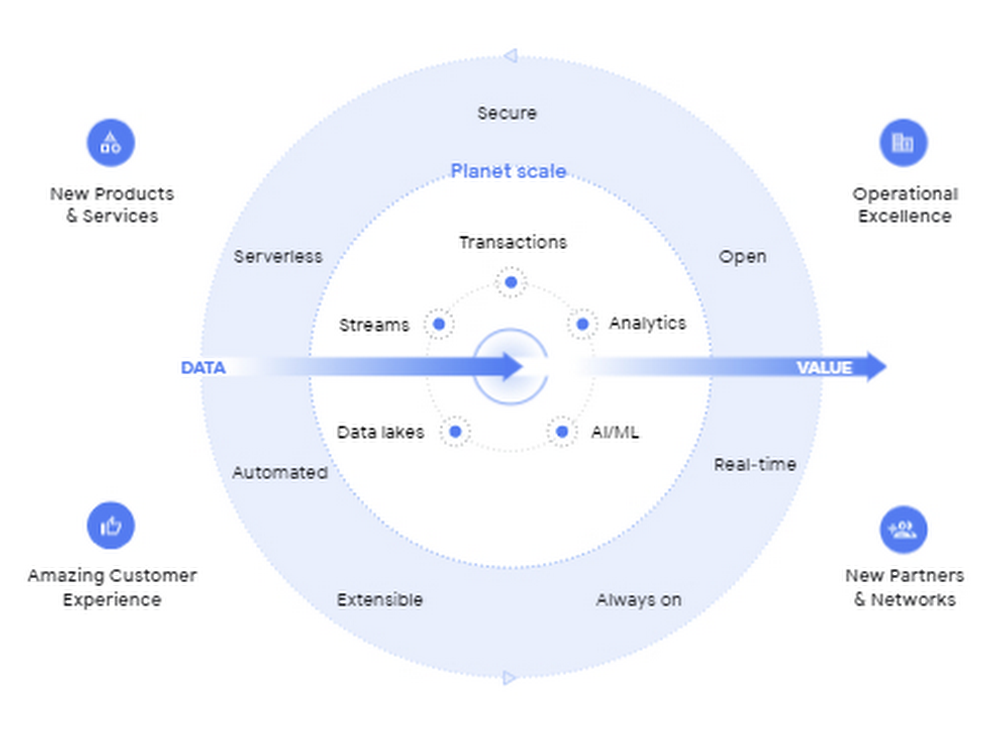
I’m so excited to be part of Google Cloud. Data has been a longstanding part of my career and it is at the heart of business transformation. Many companies have mastered the ability to collect data and have mechanisms in place to draw on some of it to solve business problems.  But most data collected piles up and is never put to a useful purpose. Accessing it and mining it for helpful insights is practically impossible at many companies. It’s always stuck in hard to reach places, fragmented across departments and unavailable when you need it the most.  Our mission at Google Cloud is to accelerate your ability to digitally transform your business with data. Solving data challenges is in our DNA, and over the last two decades we’ve been in a unique position to help our customers get the most out of data to drive real business value.  Google products are used and loved by billions of people across the globe. These products bring together the complex web of disconnected, disparate, and rapidly changing data that makes up the internet. When you get an answer in milliseconds from google.com via a simple search bar, you know we have this down to a science. Google Cloud brings this expertise in data and software together for businesses of all sizes so that you can gain advantage from your data. We call this the data cloud. Enter the data cloudA data cloud offers a comprehensive and proven approach to cloud and embraces the full data lifecycle, from the systems that run your business, where data is born, to analytics that support decision making, to AI and machine learning (ML) that predict and automate the future. A data cloud allows you a way to securely unify data across your entire organization, so you can break down silos, increase agility, innovate faster, get value from your data, and support business transformation. This is the heart of the data cloud.Why a data cloud is essentialBuilding a data cloud using Google Cloud’s technologies helps organizations accelerate business transformation by giving everyone access to the right information at the right time so that they can act more intelligently based on it.Since I’ve joined Google, I’ve been not only inspired by the work that the team has done to build products with a user-first mindset, but our customers have been an inspiration to each of us in what’s possible. The Home Depot built a data cloud using Google Cloud technologies to help keep 50,000+ items stocked at over 2,000 locations. They’re making their 400,000+ associates smarter by giving them visibility into the things each customer needs, like item location within a local store. By leveraging BigQuery, their query performance dropped from hours and days to seconds and minutes. The Home Depot also uses Cloud SQL, Spanner, and Bigtable for their operational use cases and AI to help locate goods using their mobile apps for in-store navigation. Major League Baseball (MLB) is reimagining the fan experience with their data cloud. To build engagement with today’s fans, drive engagement with future generations, and lay the groundwork for future innovation, MLB consolidated its infrastructure and migrated to Google Cloud’s Anthos, Google Kubernetes Engine, Cloud SQL, and BigQuery. MLB tracks every moment of every game for an audience on seven continents with Cloud SQL,  this valuable data to drive deeper engagement with fans.Vodafoneis using their data cloud to offer their customers new, personalized products and services across multiple markets. By identifying more than 700 use cases to deliver new products and services, Vodafone can support fact-based decision-making, reduce costs, remove duplication of data sources, and simplify operations.  With Google Cloud,  Vodafone’s operating companies in multiple countries can access improved data analytics, intelligence, and machine-learning capabilities. Here are four reasons why customers trust  Google Cloud to build their data cloud strategy: First, Google  delivers insights at planet scale  Customers often gravitate to Google Cloud for our specific data tools that were built for Google’s internal data needs and are unmatched for speed, scale, security, and capability for any size organization. BigQuery is the leading solution for analytics and allows you to run analytics at scale with a 99.99% SLA and up to 34% lower TCO than cloud data warehouse alternatives. Spanner provides unlimited scale, global consistency across regions, and high availability up to 99.999%, at a TCO that is 78% lower compared to on-prem databases and 37% lower than other cloud options. Firestore continues to see rapid adoption with over 2M databases created to power mobile, web, and IoT applications across customer environments. And finally Looker, an API for all your data, offers a single shared place for people and apps to interact with it, no matter the cloud environment. Second, Google’s AI helps your business be more intelligentGoogle was built on pioneering AI research and the principle of making the world’s information useful to people and businesses everywhere. AI powers some of Google’s most popular products, such as Search, Maps, Ads, and YouTube. We have leveraged this expertise to deliver a new, unified AI platform that gives every data scientist, data analyst, and ML engineer access to the same AI toolkit Google uses. Automated machine learning, accelerated experimentation and custom training, and more deployed models than any other platform enable your entire data team to drive business outcomes at any scale. Third, Google is the open data platform Google Cloud’s open platform gives customers maximum flexibility for managing transactional, analytical, and AI-based applications. Customers can choose from a wide range of transactional, processing, and analytics engines, open source tools, open APIs, and ML services to eliminate lock-in. This includes choice of deployment across multi-cloud and hybrid environments and easy interoperability with existing partner solutions and investments. With BigQuery Omni, organizations can choose to deploy their data warehousing solution to work natively with AWS or with Azure (coming soon). Looker supports 50+ distinct SQL dialects across multiple clouds and our database services like Cloud SQL, one of the fastest growing services at Google Cloud, offers familiar open source MySQL and PostgreSQL standard connection drivers, so you can work with your preferred tools and stay up-to-date with the latest community enhancements. In addition, Google offers an unrivaled developer community across the fields of AI, machine learning, mobile, application development, microservices, and access to third party solutions and open source systems. Fourth, Google offers a trusted platform for your data needsCustomers can take advantage of the same secure-by-design infrastructure, built-in data protection, and global network that Google uses to ensure compliance, redundancy, and reliability. All of Google’s data is encrypted in transit and at rest, by default. Google offers industry-leading reliability across regions so you’re always up and running. Spanner offers a 99.999% SLA and BigQuery offers a 99.99% SLA. For BI and embedded analytics, Looker supports data governance via a semantic layer that organizes your data and stores your business logic centrally, delivering consistent and trusted KPIs. And finally, our multi-layered security approach across hardware, services, user identity, storage, internet communication and operations provides peace of mind that your data is protected.Learn more at Data Cloud SummitWe are committed to helping you build a data cloud that gives you deep insights into your business and process automation. Join me as I welcome Anders Gustafsson, CEO of Zebra and Gil Perez, CIO of Deutsche Bank at the Data Cloud Summit on May 26, 2021 to learn and share new ways to use data for good. I can’t wait to hear what you accomplish.Related ArticleRead Article
Quelle: Google Cloud Platform