Follow your org’s app dev best practices with Cloud Code custom samples

As an engineering leader, it can be difficult to disseminate best practices to developers in your organization. This is critical, however, as these best practices can be used as a starting point to accelerate the time-to-market for your team’s ideas. Today, we are excited to introduce custom samples in Cloud Code, our family of IDE plugins, helping you easily distribute your best practices directly to your developers’ environments. Cloud Code helps developers increase their productivity by providing them with:An easy way to run, debug, and update their apps locallyYAML authoring supportExplorers to navigate Kubernetes and Cloud Run appsThese helpful and intuitive Cloud Code features help improve day-to-day workflows for enterprise developers. Cloud Code is available for VS Code, JetBrains IDEs (IntelliJ, PyCharm, etc), and Cloud Shell Editor. And with new custom samples, developers can quickly access your enterprise’s best code samples via a versioned Git repository directly from their IDEs. For example, one team may have a set of best practices for standing up a REST API using a specific set of libraries and frameworks, complete with integrated logging and monitoring systems and optimized security settings. They’ve gotten things just right to integrate with your logging and monitoring systems and security posture. Putting that code in the custom samples repository can make it easy for all other teams to access this code, right from their IDEs, and alleviate the challenge of recreating something another team has already mastered.Three steps to custom samples Setting up a custom samples repository is a straightforward process.1. Create a repository with a configuration file that maps out which folders within your repo contain samples, and gives them a name and description.2. Add the repo as a sample source within your preferred IDE and pick from one of the samples.1 add repo.jpg2 add repo.jpg3 add repo.jpg4 add repo.jpg3. Reload your IDE and get right to coding and building from your company’s recommended starting point!With custom samples, your developers now have the ability to access code samples that are created and maintained by your organization, right from Cloud Code. All they need to do is configure Cloud Code within their preferred IDE to retrieve your enterprise specific starter samples from a source code repository, then they can quickly get started developing with your company’s requirements configured for them.Getting started today with custom samplesWith Cloud Code custom samples, you can keep developers focused on coding knowing that your organization’s requirements are top of mind. We’ve created a custom sample repo of our own where we’ve aggregated some of our favorite Google Cloud sample apps. It provides an example of how to configure a custom sample repo using our recommended best practices. It can also be used to integrate a new set of samples into Cloud Code for you to explore. Check out the example repo here.Try out this feature using our Cloud Shell tutorial below, which gives you a tour of adding a custom sample repo to your IDE and then creating a new app from one of the samples.Visit the documentation pages here:VS CodeIntelliJCloud Shell EditorRelated ArticleCloud Code makes YAML easy for hundreds of popular Kubernetes CRDsCloud Code makes working with Kubernetes YAML easy thanks to expanded support for CRDs.Read Article
Quelle: Google Cloud Platform

Google Cloud Research Innovators drive scientific advances on the cloud

In the past, it was rare for an astrophysicist to use the same tools as a molecular biologist. But the growth of scientific data and the shift to cloud computing is driving a convergence of computational tools and methods. Techniques such as computer vision can be applied across data as different as satellite imagery and pathology slides. As new discoveries increasingly depend on large-scale data analysis, researchers benefit from sharing technology expertise across otherwise unrelated disciplines.To encourage the cross-pollination essential to scientific advances, Google Cloud announced the Research Innovators program. Although these researchers come from the physical, social, and biological sciences, they all share one thing in common—they’re leveraging the cloud to make scientific breakthroughs. As a result, the program supports a global community of researchers using Google Cloud to solve the impossible and includes world-renowned experts who will collaborate across various scientific domains and create real world solutions, open source projects, and technical documentation—all with expanded support from Google and exclusive access to Google programs and technical resources.Today, we’re excited to announce our inaugural cohort of 31 Google Cloud Research Innovators, spanning 30 institutions and eight countries across both industry and academia. Their projects can be advanced rapidly by cloud-native technologies developed to address needs outside of research. For example, Dr. Benedikt Riedel and the IceCube Collaboration are investigating using Cloud Pub/Sub messaging to reliably perform distributed calculations while taking advantage of preemptible VMs to reduce cost in the field of multi-messenger astrophysics. Similarly, Dr. Teodora Szasz and the MiiE (Messages, Identity, and Inclusion in Education) Lab are using Vision AI to measure the representation of race and gender in children’s books through images and text. This can expand our understanding about diversity in content and can help us overcome the structural inequality that pervades society and our daily lives. Cloud technologies are accelerating sciences from solar to cellular scales.The range and scale of these projects show how cloud computing offers scientists more than just efficiency, compute power, and speed; these innovative researchers are using the cloud to ask new questions and imagine new solutions that they never could have envisioned before. To get started with Google Cloud, apply for free credits towards your research.Related ArticleGoogle Cloud initiatives offer researchers critical support during the pandemicOur new initiatives offer crucial support to overburdened researchers in these difficult times.Read Article
Quelle: Google Cloud Platform

Take control of your firewall rules with Firewall Insights

Corporate firewalls typically include a massive number of rules, which accumulate over time as new workloads are added. When rules stack up piecemeal like this, misconfigurations occur that, at best, create headaches for security administrators, and at worst, create vulnerabilities that lead to security breaches.  To address this, we have introduced the Firewall Insightsmodule in our Network Intelligence Center, which provides a single console for managing Google Cloud network visibility, monitoring and troubleshooting. What are Firewall insights?Historically, there hasn’t been an easy way to deal with the accumulation of complicated firewall rules. That was until we created Firewall Insights, which provides metrics reports and insight reports. These two reports contain information about firewall usage and the impact of various firewall rules on your VPC network. Even better, these insights and metrics are integrated into your Google Cloud Console for the VPC firewall and are also available via APIs.You can use metrics reports to verify that firewall rules are being used appropriately and as intended. This report can uncover leftover rules from the past that are not actively used, review that the firewall rules allow or deny what is intended, perform live debugging of connections dropped, and leverage Cloud Monitoring to discover malicious attempts to access your network. You can use insight reports to identify firewall misconfigurations, detect security attacks, and optimize and tighten your security rules.Let’s take a look at how these reports work.Metrics Report, a deeper diveMetrics insights analyzes your VPC firewalls usage by tracking metrics such as firewall hit counts and last used.  Let’s check this out with an example:When you navigate to your VPC network and click on Firewall, ensure that you have selected Logs, Hit count and also Last hit in the column display options:Figure 1.1 – VPC Firewall rules filter optionsAfter this is enabled, now you should be able to see your VPC firewall rules with the hit count and last hit metrics. In the image below you can see that if logs are not enabled for rules, hit count and last hit metrics will not be collected. If logs are enabled, these details are collected, and shown in the VPC firewalls console.Figure 1.2 – VPC Firewall rules with hit count, last hit and logsAs you can see in Figure 1.2, each firewall rule which has logging enabled will show hit counts, so based on the example above, the rule “uc1-db4-deny-http”  has been hit 109,154 times, the last time being 2021-03-10 (13:10:00). If you want to dive even deeper, you can click on the hit count and this will bring you to the logs viewer page where you can expand these logs and analyze all the details:Figure 1.3 – Logs viewerIn order to enable logs for a particular firewall rule, you can edit it and turn logs on. By default, metadata is added in firewall logs. If you want to reduce the log size, you can do so by excluding these additional fields. Excluding these metadata fields will not impact the functionality of Firewall Insights.Figure 1.4 – Enabling logs and metadata for a VPC firewall ruleFrom the “Firewall” page, you can also multi-select a group of firewall rules and turn on all logs at once.Firewall rule usage metrics are accurate only for the period of time during which Firewall Rules Logging is enabled.Insights Report, a deeper diveInsights Report provides an intelligent analysis of the configuration of your firewalls. A report can contain one or more insights. We will see examples now about the different insight reports which include:Shadowed firewall rulesAllow rules with no hit in the last six weeksDeny rules with hits in the last 24 hoursBy definition, a shadowed rule is a VPC firewall rule that is completely overshadowed by one or more firewall rules with higher or equal priority. We call that shadowing rules. Let’s see an example on how to find shadowed rules:Let’s say that you try to use ping between two VMs but it fails. Let’s take a look at the firewall rules applied to the VM:Figure 1.5 – Firewall rules enforced on a VMIf we look closely, we can see that there are two rules with the same target tag, and those are almost identical except their source IP range. The IP range of the deny rule “uc1-app2-deny-all” includes the IP range of the rule allow “uc1-app2-allow-app1”. Therefore, we can see that “uc1-app2-allow-app1” is shadowed by “uc1-app2-deny-all”, and the ping between these VMs failed due to that.To avoid such incidents in the future, Firewall Insights provides you with a convenient list of rules overshadowed by other firewall rules.To see shadowed rules, you can click on the column selector, and add “Insights” to the firewall and route details:Figure 1.6 – Add Insights to the firewall rules enforced on a VMOnce this is applied, you will be able to see shadowed rules here:Figure 1.7 – Insights enabled for firewall rules enforced on a VMAlternatively, you can navigate to Network Intelligence > Firewall Insights, where we will see the shadowed rule report:Figure 1.8 – Shadowed rulesIf we click on the insight we will get more details:Figure 1.9 – Shadowed firewall rules detailGoing back to the firewall insights card (Figure 1.8), we can also identify that “uc1-db4-allow-app3” is shadowed by a combination of two rules and if we clicked on the insight this would provide all the details.From the Firewall Insights dashboard, let’s move on to “allow rules with no hit”, where we can see firewall rules that have not logged any hits in the past six weeks. Such rules could be as a result of a misconfiguration, or leftover rules from past deployments. Tighten your security boundaries by identifying and removing such rules. If we go back to Network Intelligence > Firewall Insights, we can see allow rules with no hit:Figure 1.10 – Allow rules with no hitWe can drill down to view the full list of rules with no hit. We can see, for instance, one of the rules, the bottom one “uc2-app1-allow-internet”, might be a leftover rule to allow internet access from a past deployment, which means it has little likelihood of being hit in the future. So you may want to consider removing it from the rule set:Figure 1.10 – Allow rules with no hit detailClick on the firewall rule to review all the details, and take a look at the prediction, which is made based on the hit pattern that we saw for similar rules in the same organization:Figure 1.11 – Allow rules with no hit insight detailsLet’s go back to the Firewall Insights dashboard and move on to the last category, “deny rules with hits in the last 24 hours”, which help you capture the traffic blocked by deny rules. These traffic types could indicate external attacks into your VPC network, or compromised VM instances attempting to send traffic out of your network. Let’s examine future hit prediction on a firewall rule. Navigate to Network Intelligence > Firewall Insights and take a look at the deny rules with hits card:Figure 1.12 – Deny rules with no hitIf your click on the “uc4-web-deny-web” rule, you can see the hit count monitoring, and if you click on the hit number we can dive deeper in the logs:Figure 1.13 – Deny rules with no hit detailFigure 1.13 – Deny rules with no hit logs viewer detailThese tips should help you effectively leverage Firewall Insights to gain better control over a massive firewall rule set. Automate shadowed rule detection, quickly troubleshoot misconfigured rules, effortlessly pinpoint the overgranting rules hidden in the rule set, and identify the failed attempts to break into your network that were rejected by your firewall rules. To learn more about Firewall Insights, please refer to our documentation. Additionally, to see how we’re advancing intelligent automation in network security, check our recent blog post.Related ArticleHow we’re advancing intelligent automation in network securityWe’re announcing four new capabilities to help customers protect their users, data, and applications in the cloud.Read Article
Quelle: Google Cloud Platform

Improving NCCL performance for cloud ML applications

The cloud is a great option for training deep neural networks because it offers the ability to scale on demand for specialized machine learning (ML) hardware, which provides increased agility. In addition, the cloud makes it easy to get started, and it provides pay-as-you-go usage models. Cloud also brings the latest GPU technologies to customers as and when it’s developed.A key barrier to adopting deep neural networks on large datasets is the time and resources required to train them. Since using deep learning models in production requires frequent retraining, minimizing training time becomes critical. Also, to drive higher prediction accuracy, models are getting larger and more complex, thus needing a high volume of compute and storage resources. Price to performance still remains a concern for customers, and optimizing inter-node latency is crucial for effective use of cloud for deep learning workloads. ML frameworks (such as TensorFlow or PyTorch) use NCCL libraries for distributed inter-node GPU communications. The NVIDIA Collective Communication Library (NCCL) is a commonly-used communication library that provides multi-GPU and multi-node communication integral for neural networks to converge quickly. NCCL also provides routines such as all-gather, all-reduce, broadcast, reduce, reduce-scatter, and point-to-point send and receive. Routines are optimized to achieve high bandwidth and low latency within a node and over the network across nodes.Reducing NCCL message latency is one vital element of delivering high application performance and scalability. We recently introduced several features and tunings that make it easy to run NCCL workloads and achieve optimal performance on Google Cloud. Collectively referred to as ‘best practices,’ these updates reduce NCCL latency and benefit applications that depend on small messages and collective operations.  This blog post demonstrates how to optimize GCP infrastructure to minimize deep learning training times. To achieve this, we’ll look at distributed/multi-node synchronous training using NCCL.Achieve optimal NCCL performance in Google Cloud1. Use latest DLVM with NCCL Fast SocketTo maximize NCCL collective communication performance for distributed ML training, we have designed a communication library called NCCL Fast Socket. Developed as an NCCL transport plugin, NCCL Fast Socket introduces optimizations that significantly improve NCCL performance on Google Cloud. The optimizations include:Use of multiple network flows to achieve maximum throughput. NCCL Fast Socket introduces additional optimizations over NCCL’s built-in multi-stream support, including better overlapping of multiple communication requests.Dynamic load balancing of multiple network flows. NCCL can adapt to changing network and host conditions. With this optimization, straggler network flows will not significantly slow down the entire NCCL collective operation.Integration with Google Cloud’s Andromeda virtual network stack. This increases overall network throughput by avoiding contentions in both Andromeda and guest virtual machines (VMs).Most importantly, the core NCCL library can  dynamically load NCCL Fast Socket at run time. Hence, Google Cloud users can take advantage of NCCL Fast Socket without changing or recompiling their applications, ML frameworks (such as TensorFlow or PyTorch), or even the NCCL library itself.Currently, the latest Deep Learning VM (DLVM) image release includes NCCL Fast Socket. It’s activated automatically when you use the NCCL library included in DLVM. You can also manually install NCCL Fast Socket by following the instructions here.2. Use gVNICTo achieve better network throughput in NCCL, be sure to enable Google Virtual NICs (gVNICs) when creating VM instances. For VMs with high performance and high network throughput requirements—such as those with GPUs and used for distributed ML training—we recommend using gVNIC as the default network interface. Currently, gVNIC can support network throughput up to 100 Gbps which provides a significant performance boost to NCCL. For detailed instructions on how to use gVNICs, please refer to the gVNIC guide. DLVM also provides images that support gVNIC out of the box.3. Maximize available bandwidthWithin a VM, GPU communication can take advantage of NVIDIA NVLink, which can achieve higher throughput than networking between VMs. Therefore, we recommend packing as many GPUs as possible in a single VM to maximize the usage of NVLink bandwidth. When working with multiple VMs, we recommend using high vCPU count (96) to maximize available networking bandwidth. Find more information on the network bandwidth and GPUsdocumentation page.4. Use compact placement policiesCertain GPU VM types (such as N1) can support compact placement policies. AllocatingVMs close to each other results in improved network performance and less interference. Because distributed training can be latency sensitive, be sure to use a VM type that supports compact placements. You can find more information on the placement policy documentation page.Examples of improved performance data:NCCL Fast Socket improves performance for both NCCL collective operations and distributed training of ML models. We show some examples below which compare NCCL Fast Socket with stock NCCL. (In our tests, NCCL Fast Socket used the same number of network flows and helper threads.) We used the gVNIC driver version v1.0.0.NCCL All_ReduceAll_Reduce is one of the most important collective operations in NCCL. It’sused frequently for gradient aggregation in distributed training of ML models. In the figure, we show the performance of NCCL All_Reduce tests with 16 NVIDIA V100 GPUs on two VMs. From the figure, we can see that NCCL Fast socket improves All_Reduce performance significantly and consistently across a range of message sizes. (Higher bars indicate better performance in the figure.)BERT-LargeWe also tested performance improvement of NCCL Fast Socket on a TensorFlow model: BERT-Large. We conducted the test using 64 NVIDIA V100 GPUs on eight VMs. We can see that the use of NCCL Fast Socket increases the training speed of BERT-Large significantly (by around 30%).NCCL applications on Google Cloud is now faster and easier to run Running NCCL applications on Google Cloud has never been easier. Applying these best practices (including using NCCL Fast Socket) can improve application performance. To simplify deployment of NCCL Fast Socket, we included it in the DLVM images to get the best out-of-the-box performance for your NCCL workloads on Google Cloud.To learn more, visit our documentation on using higher network bandwidth speeds with Fast Socket.Special thanks to Chang Lan and Soroush Radpour for their contributions.Related ArticleRead Article
Quelle: Google Cloud Platform

Google Cloud unveils Vertex AI, one platform, every ML tool you need

Today at Google I/O, we announced the general availability of Vertex AI, a managed machine learning (ML) platform that allows companies to accelerate the deployment and maintenance of artificial intelligence (AI) models. Vertex AI requires nearly 80% fewer lines of code to train a model versus competitive platforms1, enabling data scientists and ML engineers across all levels of expertise the ability to implement Machine Learning Operations (MLOps) to efficiently build and manage ML projects throughout the entire development lifecycle. Today, data scientists grapple with the challenge of manually piecing together ML point solutions, creating a lag time in model development and experimentation, resulting in very few models making it into production. To tackle these challenges, Vertex AI brings together the Google Cloud services for building ML under one unified UI and API, to simplify the process of building, training, and deploying machine learning models at scale. In this single environment, customers can move models from experimentation to production faster, more efficiently discover patterns and anomalies, make better predictions and decisions, and generally be more agile in the face of shifting market dynamics.Through decades of innovation and strategic investment in AI at Google, the company has learned important lessons on how to build, deploy, and maintain ML models in production. Those insights and engineering have been baked into the foundation and design of Vertex AI, and will be continuously enriched by the new innovation coming out of Google Research. Now, for the first time, with Vertex AI, data science and ML engineering teams can:Access the AI toolkit used internally to power Google that includes computer vision, language, conversation and structured data, continuously enhanced by Google Research.Deploy more, useful AI applications, faster with new MLOps features like Vertex Vizier, which increases the rate of experimentation, the fully managed Vertex Feature Store to help practitioners serve, share, and reuse ML features, and Vertex Experiments to accelerate the deployment of models into production with faster model selection. If your data needs to stay on device or on-site, Vertex ML Edge Manager can deploy and monitor models on the edge with automated processes and flexible APIs.Manage models with confidence by removing the complexity of self-service model maintenance and repeatability with MLOps tools like Vertex Model Monitoring, Vertex ML Metadata and Vertex Pipelines to streamline the end-to-end ML workflow.“We had two guiding lights while building Vertex AI: get data scientists and engineers out of the orchestration weeds, and create an industry-wide shift that would make everyone get serious about moving AI out of pilot purgatory and into full-scale production,” said Andrew Moore, vice president and general manager of Cloud AI and Industry Solutions at Google Cloud. “We are very proud of what we came up with in this platform, as it enables serious deployments for a new generation of AI that will empower data scientists and engineers to do fulfilling and creative work.”“Enterprise data science practitioners hoping to put AI to work across the enterprise aren’t looking to wrangle tooling. Rather, they want tooling that can tame the ML lifecycle. Unfortunately, that is no small order,” said Bradley Shimmin, chief analyst for AI Platforms, Analytics and Data Management at Omdia. “It takes a supportive infrastructure capable of unifying the user experience, plying AI itself as a supportive guide, and putting data at the very heart of the process — all while encouraging the flexible adoption of diverse technologies.”ModiFace uses Vertex AI to revolutionize the beauty industryModiFace, a part of L’Oréal, is a global market leader in augmented reality and artificial intelligence for the beauty industry. ModiFace creates new services for consumers to try beauty products such as hair color, makeup and nail color, virtually, in real-time. ModiFace is using Vertex AI platform to train its AI models for all of its new services. For example, ModiFace’s skin diagnostic is trained on thousands of images from L’Oréal’s Research & Innovation, the company’s dedicated research arm. Bringing together L’Oréal’s scientific research combined with ModiFace’s AI algorithm, this service allows people to obtain a highly precise tailor-made skincare routine.“We provide an immersive and personalized experience for people to purchase with confidence whether it’s a virtual try-on at web check out, or helping to understand what brand product is right for each individual,” said Jeff Houghton, chief operating officer at ModiFace, part of L’Oréal. “With more and more of our users looking for information at home, on their phone, or at any other touchpoint, Vertex AI allowed us to create technology that is incredibly close to actually trying the product in real life.”Essence is built for the algorithmic age with help of Vertex AI Essence, a global data and measurement-driven media agency that is part of WPP, is extending the value of AI models made by its data scientists by integrating their workflows with developers using Vertex AI. Historically, AI models created by data scientists remain unchanged once created, but this way of operating has evolved with the digital world as human behaviors and channel content is constantly changing. With Vertex AI, developers and data analysts can update models regularly to meet these fast-changing business needs. “At Essence, we are measured by our ability to keep pace with our clients’ rapidly evolving needs,” said Mark Bulling, SVP, Product Innovation at Essence. “Vertex AI gives our data scientists the ability to quickly create new models based on the change in environment while also letting our developers and data analysts maintain models in order to scale and innovate. The MLOps capabilities in Vertex AI mean we can stay ahead of our clients’ expectations.” A unified data science and ML platform for all skill levelsMLOps lifecycleOne of the biggest challenges we hear from customers is finding the talent to work on machine learning projects. Nearly two in five companies cite a lack of technical expertise as a major roadblock to using AI technologies. Vertex AI is a single platform with every tool you need, allowing you to manage your data, prototype, experiment, deploy models, interpret models, and monitor them in production without requiring formal ML training. This means your data scientists don’t need to be ML engineers.  With Vertex AI, they have the ability to move fast, but with a safety net that their work is always something they are able to launch.  The platform assists with responsible deployment and ensures you move faster from testing and model management to production and ultimately to driving business results. “Within Sabre’s Travel AI technology, Google’s Vertex AI gives our technologists the tools they need to quickly experiment and deploy intelligent products across the travel ecosystem. This advancement proves how the power of the partnership between our teams helps accelerate Sabre’s vision for the future of personalized travel,” said Sundar Narasimhan, SVP and President, Sabre Labs and Product Strategy. “As Iron Mountain provides more sophisticated technology and digital transformation services to our customers, having a consolidated platform like Vertex AI will enable us to streamline building and running ML pipelines and simplify MLOps for our AI/ML teams,” said Narasimha Goli, Vice President Innovation, Global Digital Solutions, Iron Mountain.Getting started with Vertex AITo learn more about how to get started on the platform, check out our ML on GCP best practices, this practitioners guide to MLOps whitepaper, and sign up to attend our Applied ML Summit for data scientists and ML engineers on June 10th. We can’t wait to partner with you to apply groundbreaking machine learning technology to grow your skills, career and business. For additional support getting started on Vertex AI, Accenture and Deloitte have created design workshops, proof of value projects, and operational pilots to help you get up and running on the platform.1. Google Cloud internal research, May, 2021Related ArticleAnnouncing our new Professional Machine Learning Engineer certificationLearn about the Google Cloud Professional Machine Learning Engineer certification.Read Article
Quelle: Google Cloud Platform

How insurers can use severe storm data for dynamic pricing

It may be surprising to know that U.S. natural catastrophe economic losses totaled $119 billion in 2020, and 75% (or $89.4B) of those economic losses were caused by severe storms and cyclones. In the insurance industry, data is everything. Insurers use data to influence underwriting, rating, pricing, forms, marketing, and even claims handling. When fueled by good data, risk assessments become more accurate and produce better business results. To make this possible, the industry is increasingly turning to predictive analytics, which uses data, statistical algorithms, and machine learning (ML) techniques to predict future outcomes based on historical data. Insurance firms also integrate external data sources with their own existing data to generate more insight into claimants and damages. Google Cloud Public Datasetsoffers more than 100 high-demand public datasets through BigQuery that helps insurers in these sorts of data “mashups.” One particular dataset that insurers find very useful is Severe Storm Event Details from the U.S. National Oceanic and Atmospheric Administration (NOAA). As part of the Google Cloud Public Datasets program and NOAA’s Public Data Program, this severe storm data contains various types of storm reports by state, county, and event type—from 1950 to the present—with regular updates. Similar NOAA datasets within the Google Cloud Public Datasets program include the Significant Earthquake Database, Global Hurricane Tracks, and the Global Historical Tsunami Database.  In this post, we’ll explore how to apply storm event data for insurance pricing purposes using a few common data science tools—Python Notebook and BigQuery—to drive better insights for insurers.Predicting outcomes with severe storm datasetsFor property insurers, common determinants of insurance pricing include home condition, assessor and neighborhood data, and cost-to-replace. But macro forces such as natural disasters—like regional hurricanes, flash floods, and thunderstorms—can also significantly contribute to the risk profile of the insured. Insurance companies can leverage severe weather data for dynamic pricing of premiums by analyzing the severity of those events in terms of past damage done to property and crops, for example. It’s important to set the premium correctly, however, considering the risks involved. Insurance companies now run sophisticated statistical models, taking into account various factors—many of which can change over time. After all, without accurate data, poor predictions can lead to business losses, particularly at scale.  The Severe Storm Event Details database includes information about a storm event’s location, azimuth (an angle measurement used in celestial coordination), distance, impact, and severity, including the cost of damages to property and crops. It documents:The occurrence of storms and other significant weather events of sufficient intensity to cause loss of life, injuries, significant property damage, and/or disruption to commerce.Rare, unusual weather events that generate media attention, such as snow flurries in South Florida or the San Diego coastal area.Other significant weather events, such as record maximum or minimum temperatures or precipitation that occur in connection with another event.Data about a specific event is added to the dataset within 120 days to allow time for damage assessments and other analysis.Damage caused by the storms in the past five years by stateDriving business insights with BigQuery and notebooksGoogle Cloud’s BigQuery provides easy access to this data in multiple ways. For example, you can query directly within BigQuery and perform analysis using SQL. Another popular option in the data science and analyst community is to access BigQuery from within the Notebook environment to intersperse Python code and SQL text, and then perform ad hoc experimentation. This uses the powerful BigQuery compute to query and process huge amounts of data without having to perform the complex transformations within the memory in Pandas, for example.In this Python notebook, we have shown how the severe storm data can be used to generate risk profiles of various zip codes based on the severity of those events as measured by the damage incurred. The severe storm dataset is queried to retrieve a smaller dataset into the notebook, which is then explored and visualized using Python. Here’s a look at the risk profiles of the zip codes:Clusters of Zip codes by number of storms and damage cost.Another Google Cloud resource for insurers is BigQuery ML, which allows them to create and execute machine learning models on their data using standard SQL queries. In this notebook, with a K-Means Clustering algorithm, we have used BigQuery ML to generate different clusters of zip codes in the top five states impacted by severe storms. These clusters show different levels of impact by the storms, indicating different risk groups. The example notebook is a reference guide to enable analysts to easily incorporate and leverage public datasets to augment their analysis and streamline the journey to business insights. Instead of having to figure out how to access and use this data yourself, the public datasets, coupled with BigQuery and other solutions, provide a well-lit path to insights, leaving you more time to focus on your own business solutions.Making an impact with big dataGoogle Cloud’s Public Datasets is just one resource within the broader Google Cloud ecosystem that provides data science teams within the financial services with flexible tools to gather deeper insights for growth. The severe storm dataset is a part of our environmental, social, and governance (ESG) efforts to organize information about our planet and make it actionable through technology, helping people make a positive impact together. To learn more about this public dataset collaboration between Google Cloud and NOAA, attend theDynamic Pricing in Insurance: Leveraging Datasets To Predict Risk and Price session at the Google Cloud Financial Services Summit on May 27. You can also check out ourrecent blog and explore more aboutBigQuery andBigQuery ML.Related ArticleNOAA and Google Cloud: A data match made in the cloudSee how you can use NOAA’s environmental datasets on Google Cloud to explore environmental and historical data, including whale calls, sa…Read Article
Quelle: Google Cloud Platform

Lower development costs: schedule Cloud SQL instances to start and stop

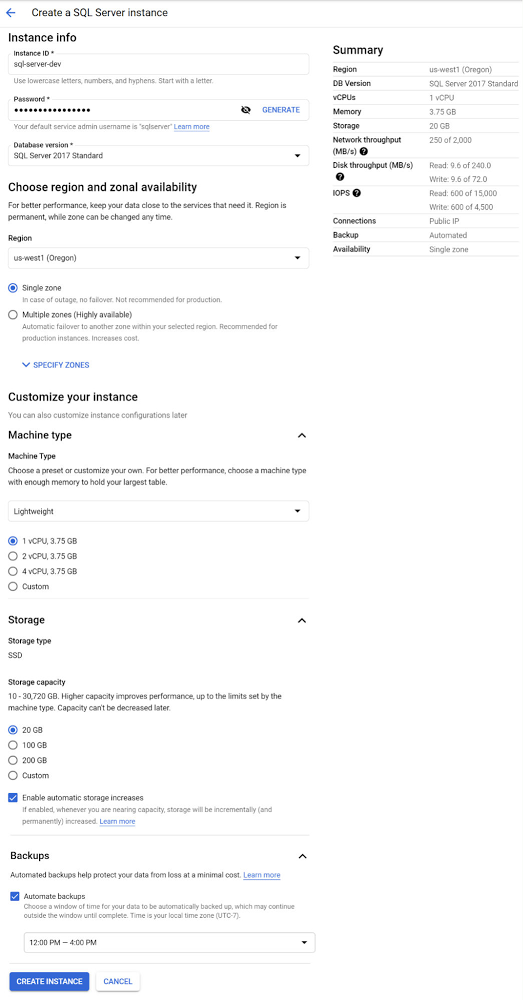
When you’re using a Cloud SQL instance as a development server you likely don’t need to have it running constantly. If so, you can greatly reduce the cost of using Cloud SQL by scheduling your development server to start every morning when your work day starts and stop it each evening when you’re done with your development work. Configuring your instances to run this way can save you up to 75% of the cost to run an instance per week versus having it continuously running. This blog post will walk you through the steps to configure your Cloud SQL instance to start and stop each workday using Cloud Functions, Cloud Pub/Sub, and Cloud Scheduler.I’ll be demonstrating this process using a SQL Server instance but the overall approach will also work for MySQL or PostgreSQL instances running in Cloud SQL.Create a Google Cloud Platform projectTo get started, we’ll need a Google Cloud Platform project. If you already have a project, you can skip this step. Follow the documentation for creating and managing projects to create a new project.Create a SQL Server instanceOnce your project is created click the Cloud Console’s left-menu and select “SQL” to open the Cloud SQL section. We can now create our instance.Click the “CREATE INSTANCE” button and select the “Choose SQL Server” option.Enter a valid Instance IDExample: sql-server-devEnter a password for the “sqlserver” user or click the “Generate” button.For “Database version” select “SQL Server 2017 Standard”.Select a “Region” where the instance should be located like “us-west1″.For the Region’s zone, since the instance is for development and we’re optimizing for the lowest cost, select “Single zone”.Under “Customize your instance” click “Show configuration options” to configure a low cost development instance.Click and expand the “Machine type” section and select a “Lightweight” machine type which has 1 vCPU and 3.75 GB of RAM.Click and expand the “Storage” section and select the minimum option of “20 GB”.Click and expand the “Backups” section and select “12:00 PM to 4:00 PM” as the window for automatic backups. Backup operations can only be done while the instance is running so this selection needs to be within the timeframe of 9:00 AM to 5:00 PM when our instance will be running.With all of that information provided the create instance form should look something like this:Click “CREATE INSTANCE” to complete the process of creating the instance.Create a Cloud Function to Start or Stop a Cloud SQL instanceWith your Cloud SQL instance created, the next step is to create a Cloud Function that will start or stop the instance. Go to the Cloud Functions section of the Cloud Console and click the “CREATE FUNCTION” button.Enter the following information:Specify a Function name:Example: start-or-stop-cloud-sql-instanceSelect a Region where the Function will run:Example: us-west2For Trigger type select “Cloud Pub/Sub”. We’ll create a new Pub/Sub Topic named “InstanceMgmt” to be used for Cloud SQL instance management. Within the “Select a Cloud Pub/Sub Topic” drop-down menu, click the “CREATE A TOPIC” button. In the “Create a Topic” dialog window that appears, enter “InstanceMgmt” as the “Topic ID” and click the “CREATE TOPIC” button. Then click the “SAVE” button to set “Cloud Pub/Sub” as the “Trigger” for the Cloud Function.With all those values entered, the completed “Configuration” section of the “Create function” form should look something like the following:Click the “NEXT” button at the bottom of the “Create function” form to move on to the next step where we enter the code that will power the function.Now in the “Code” step of the “Create function” form, select “Go 1.13” as the “Runtime” and enter “ProcessPubSub” as the code “Entry point”.Then copy and paste the following code into the code section of the “Source code — Inline Editor”:The completed “Code” section of the “Create function” form should look something like this:Click the “DEPLOY” button to deploy the Function. It will take a minute or two for the deployment process to complete.Grant Permission for the Cloud Function to Start or Stop Cloud SQL instancesNext we need to grant our Cloud Function’s Service account  permission to run Cloud SQL Admin methods like “Patch”; used to start or stop instances.Go to the IAM section of the Cloud Console and find the service account used by Cloud Functions named “App Engine default service account”. It has the suffix: “@appspot.gserviceaccount.com”. Click its pencil icon to edit it.In the “Edit permissions” dialog window, click the “ADD ANOTHER ROLE” button. Select the “Cloud SQL Admin” role to be added and click the “SAVE” button.Verify that the Cloud Function works as expectedExcellent! We’re now ready to test out our Cloud Function. We can do so by posting a message to our Pub/Sub topic which is set as the trigger for our function. First we’ll test out stopping the instance. Go to the Pub/Sub section of the Cloud Console and select the “InstanceMgmt” Topic. Click the “PUBLISH MESSAGE” button and paste in the following JSON message, replacing <your-project-id> with your actual Project ID.The Pub/Sub message to be published should look something like this:Drum roll… click the “PUBLISH” button to publish the message which will trigger our Cloud Function and stop the instance. Going back to your Cloud SQL instance details you should see that your instance is now stopped:Now let’s publish another Pub/Sub message to start the instance. Go to the Pub/Sub section of the Cloud Console and select the “InstanceMgmt” Topic. Click the “PUBLISH MESSAGE” button and paste in the following JSON message (this time with “start” as the Action). Be sure and replace <your-project-id> with your actual Project ID.Click the “PUBLISH” button to publish the message which will trigger our Cloud Function and restart the instance.Back on the Cloud SQL instance details page you should see that your instance has been restarted after 2-3 minutes:Create Cloud Scheduler Jobs to trigger the Cloud Function Great! Now that we’ve confirmed that the Cloud Function is working correctly, the final step is to create a couple of Cloud Scheduler jobs that will start and stop the instance automatically. Go to the Cloud Scheduler section of the Cloud Console and click the “SCHEDULE A JOB” button.Enter a “Name” for the scheduled job:Example: start-cloud-sql-dev-instanceEnter a “Description” for the scheduled job:Example: Trigger Cloud Function to start Cloud SQL development instanceFor the “Frequency” of when the job should be run, enter “0 9 * * 1-5” which schedules the job to be run at 9:00 am every day Monday-Friday.Select your timezone from the Timezone selector.Under the “Configure the Job’s Target” section, select the “Target type” to be “Pub/Sub” and for the “Topic” specify “InstanceMgmt”.For the “Message body” enter the same “start” JSON message you used when you tested the Cloud Function earlier in this post. Don’t forget to replace <your-project-id> with your actual Project ID.The completed “Create a job” form should look something like this:With all that information supplied, click the “CREATE” button to create the “start” Cloud Scheduler job. Now we’ve got a scheduled job that will start our Cloud SQL instance every weekday at 9:00 am. The only thing left to do is to create one more scheduled job to stop the instance every weekday evening. Click the Cloud Scheduler “SCHEDULE A JOB” button again to create it. Enter a “Name” for the scheduled job:Example: stop-cloud-sql-dev-instanceEnter a “Description” for the scheduled job:Example: Trigger Cloud Function to stop Cloud SQL development instanceFor the “Frequency” of when the job should be run, enter “0 17 * * 1-5” which schedules the job to be run at 5:00 pm every day Monday-Friday. See the Cloud Scheduler documentation for more information on setting frequency.Select your timezone from the Timezone selector.Under the “Configure the Job’s Target” section, select the “Target type” to be “Pub/Sub” and for the “Topic” specify “InstanceMgmt”.For the “Message body” enter the same “stop” JSON message you used when you tested the Cloud Function earlier in this post. Don’t forget to replace <your-project-id> with your actual Project ID.With all that information supplied, click the “CREATE” button to create the “stop” Cloud Scheduler job. After the job creation completes you’ll see the job list with the “start” and “stop” jobs you’ve just created.Now it’s time to take a second and appreciate the smart steps you’ve just performed to ensure that your development database will only be running when you need it … then bask in the glory of having set up an extremely cost efficient Cloud SQL instance for the development of your next project. Great job!Next stepsUse the Cloud Console to see the current state of your Cloud SQL instance and to create more instances.Related ArticleScheduling Cloud SQL exports using Cloud Functions and Cloud SchedulerLearn the steps required to schedule a weekly export of a Cloud SQL database to Cloud StorageRead Article
Quelle: Google Cloud Platform

Meet the inspiring folks behind Google Cloud Public Sector

At Google Cloud, being a strategic partner is part of our DNA. Whether it’s listening closely to our customers, helping to build team skills for innovation or simply being there (since we know the cloud is 24/7), we get excited about working hands-on with customers to deliver new solutions. As we look to solve decades-old challenges with new technologies in workforce productivity, cybersecurity, and artificial intelligence/machine learning, we know that we are only as good as the people behind the technology. Today, we’re proud to spotlight a few of the inspiring folks behind Google Cloud Public Sector and celebrate their recognition in the industry. Melissa Adamson, Head of Government Channels at Google Cloud, has been named to the highly respected Women of the Channel list for 2021. This annual list recognizes the unique strengths, leadership and achievements of female leaders in the IT channel. The women honored this year pushed forward with comprehensive business plans, marketing initiatives and innovative ideas to support their partners and customers.Melissa was brought on to build the Public Sector channel from scratch. The initial focus was building the channel for the US government team and has since expanded to include education, Canada and Latin America.Having a career background at both Microsoft and Accenture, Melissa leveraged her extensive professional network to build the organic partnerships needed to accelerate the Public Sector partner ecosystem. This helped her drive two key wins (US Postal Service and PTO) and personally recruit top cloud partners in the industry. Melissa loves card games and is learning a new language.Todd Schoeder, Director of Global Public Sector Digital Strategy, was recently featured in the “Top 20 Cloud Executives to Watch in 2021” by Wash Exec. Recognized for his work in helping customers navigate through the impact of COVID-19 and developing innovative solutions to meet mission challenges, he says: “New partnerships are required to solve for the problems of the future. Challenges that were previously thought of as insurmountable, too risky or expensive, are actually quite the opposite — as long as you have the right partner that is working in your best interest with you.”Josh Marcuse, Head of Strategy & Innovation, received his second Wash100 Award for leading a digital transformation team that works to drive the development of public sector solutions, including cyber defense, smart cities, and public health.Josh has launched services to support collaborative team operations including Workspace for Government and an artificial intelligence-based customer service platform to support remote work needs. His work also includes leading Google Cloud’s partnerships with organizations to improve data sharing in the public health community, contact tracing activities, and supporting research efforts across national laboratories. Like Melissa, Josh was brought on to build a new team dedicated to strategy and innovation. This team’s purpose is to bring an intense focus to public sector mission outcomes and the public servants who own them. Josh spent a decade pushing digital modernization and workforce transformation at the U.S. Department of Defense, and co-founded the Federal Innovation Council at the Partnership for Public Service, and now brings that domain expertise to supporting government workers who are driving digital transformation.Join us in celebrating these folks for their leadership and contributions!
Quelle: Google Cloud Platform

How to do network traffic analysis with VPC Flow Logs on Google Cloud

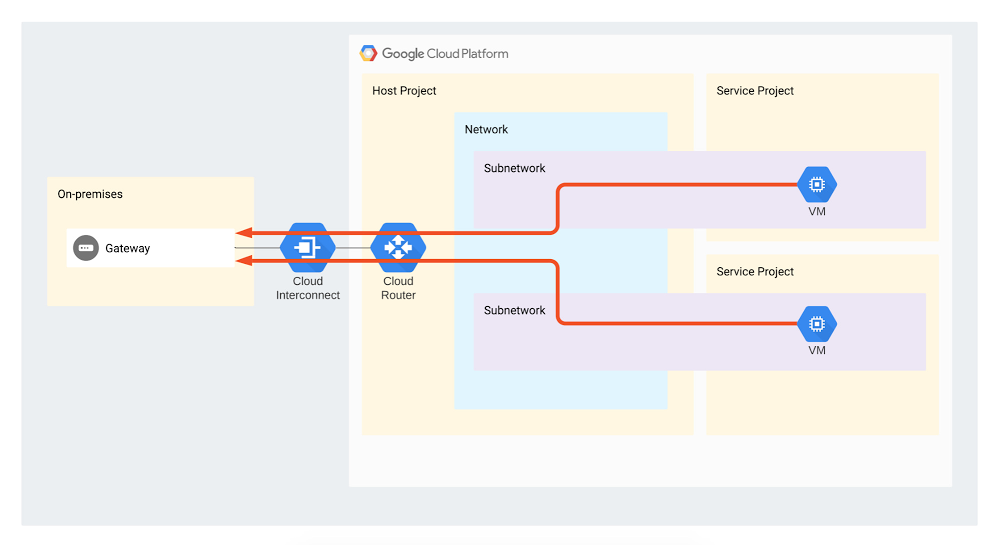
Network traffic analysis is one of the core ways an organization can understand how workloads are performing, optimize network behavior and costs, and conduct troubleshooting—a must when running mission-critical applications in production. VPC Flow Logs is one such enterprise-grade network traffic analysis tool, providing information about TCP and UDP traffic flow to and from VM instances on Google Cloud, including the instances used as Google Kubernetes Engine (GKE) nodes. You can view VPC Flow Logs in Cloud Logging, export them to third-party tools or to BigQuery for further analysis. But as it happens with powerful tools, VPC Flow Logs users sometimes don’t know where to start. To help, we created a set of guides to help you use VPC Flow Logs to answer common questions about your network. This post outlines a set of open-source tools from Google Cloud Professional Services that provide export, analytics and reporting capabilities for multiple use-cases: Estimating the cost of your VPC Flow Logs and optimizing costs Enforcing that flow logs be generated across your organization, to comply with security policiesExporting to BigQuery and performing analytics, e.g., doing cost analysis by identifying top talkers in your environment and understanding Interconnect utilization by different projectsAll of these tools and tutorials are available on GitHub. Let’s take a closer look at each of these use cases.1. Estimate the cost of your VPC Flow Logs and optimize log volume Before you commit to using VPC Flow Logs, it’s a good idea to get a sense of how large your environment might get, so as not to get caught off guard by the cost. You can estimate the size of VPC Flow Logs prior to enabling logging in your environment using the Pricing Calculator to generate a cost estimate based on your projected usage. You can view the estimated logs size generated per day via the subnet editing interface in the Cloud Console. If you want to estimate costs prior to enabling Flow Logs on multiple subnets, projects or an entire workspace, this Cloud Monitoring sample dashboard can estimate the size of your flow logs based on your traffic volume and log usage.  If needed, you can reduce the size of your VPC Flow Logs using a different sampling rate. This has a relatively low impact on the accuracy of your results, especially when looking at traffic statistics such as top talkers. You can also filter logs according to your needs, further reducing log volume. 2. Enforce Flow Logs use across your organization VPC Flow Logs provide auditing capabilities for the network, which is required for security and compliance purposes (many organizations mandate that VPC Flow Logs be enabled across the entire organization). To help, we created a script which uses Cloud Functions to enforce VPC Flow Logs in all the networks under a particular folder. The cloud function listens on a Pub/Sub topic for notifications about changes in subnets.You can find an overview and Terraform code here.3. Perform analyticsIf you want to perform cost analysis on your VPC Flow Logs, we also created a tutorial and Terraform code that show you how to easily export VPC Flow Logs into BigQuery and run analytics on them. Specifically, these scripts answer two different questions:Understand Interconnect utilization by different projects This Terraform code and tutorial describe and provide a mechanism for analyzing VPC Flow Logs to estimate Interconnect attachment usage by different projects. They are intended to be used by the network administrator who administers the landing zone (an environment that’s been provisioned and prepared to host workloads in Google Cloud).VPC Flow Logs capture different flows to and from VMs, but this script focuses only on egress traffic flowing through the Interconnect (as shown by red arrows on the diagram). The reason the script only focuses on egress is because you are only billed for traffic from the VPC towards the Interconnect (unless there is a resource that is processing ingress traffic, such as a load balancer).Click to enlargeIdentify top talkers This Terraform code lets you analyze VPC Flow Logs to identify top talker subnets to configurable IP address ranges such as on-prem, internet, specific addresses and more.Get started todayOf course, these are just a few use cases for this tool, which range from security use-cases to performing cost breakdowns and estimates. If you want to request a specific capability, do feel free to contact us and ask. The same goes for any specific analytics that you’ve created for VPC Flow Logs—we’d be thrilled for you to contribute them to this repository. To learn more, check out the VPC Flow Logs documentation.We’d like to thank the many Google Cloud folks who have made this possible: Alfonso Palacios, Anastasiia Manokhina, Andras Gyomrey, Charles Baer, Ephi Sachs, Gaspar Chilingarov, and Xiang Shen.
Quelle: Google Cloud Platform

API design 101: Links to our most popular posts

APIs play a critical role in helping software connect and communicate, as well as making the lives of developers a little easier. Over the years we’ve published a number of posts to help developers design APIs to get the most from them. Below is a list of our most popular API design posts you can read now or bookmark for later.Getting started with API designAPI Web Design: The Missing Link: Best Practices for Crafting Interfaces that Developers Love [ebook]APIs 101: Everything you need to know about API designDesigning and managing APIs: Best practices & common pitfallsAPI Design Guide [documentation]Different approaches: REST, RPC, and GraphQLUnderstanding gRPC, OpenAPI and REST and when to use them in API designREST vs RPC: What problems are you trying to solve with your APIs?GraphQL: Building a consistent approach for the API consumerWhy your APIs should be entity-orientedBest practicesWhy you should use links, not keys, to represent relationships in APIsNames vs identifiers in URLs: Which should you use in your API design?The false dichotomy of stability vs human-centric URL design in web APIsAPI Design: Which version of versioning is right for you?API versioning best practices: When you need versioning and when you don’tSolving SEO problems with API design, part 1Solving SEO problems with API design, part 2Want to keep reading? Find more of our API related content on the Cloud blog here.Related ArticleHow to develop secure and scalable serverless APIsBuilding your RESTful APIs on top of a serverless platform like Cloud Run or Cloud Functions can improve performance and reduce costs.Read Article
Quelle: Google Cloud Platform