Introducing Analytics Hub: secure and scalable sharing for data and analytics

Customers tell us that sharing and exchanging data with other organizations is a critical element of their analytics strategy, but it’s hamstrung by unreliable data and processes, and only getting harder with security threats and privacy regulations on the rise. Furthermore, traditional data sharing techniques use batch data pipelines that are expensive to run, create late arriving data, and can break with any changes to the source data. They also create multiple copies of data, which brings unnecessary costs and can bypass data governance processes. These techniques do not offer features for data monetization, such as managing subscriptions and entitlements. Altogether, these challenges mean that organizations are unable to realize the full potential of transforming their business with shared data.To address these limitations, we are introducing Analytics Hub, a new fully managed service, available in Q3, in preview, that helps you unlock the value of data sharing, leading to new insights and increased business value. With Analytics Hub you get:A rich data ecosystem by publishing and subscribing to analytics-ready datasets. Control and monitoring over how your data is being used, because data is shared in one place.A self-service way to access valuable and trusted data assets, including data provided by Google. For example, a unique dataset from Google Search Trends will be available, that you can query and combine with your own data.An easy way to monetize your data assets without the overhead of building and managing the infrastructure. Built on a decade of cross-organizational sharingWhile Analytics Hub is a new service, it builds on BigQuery, Google’s petabyte-scale, serverless cloud data warehouse. BigQuery’s unique architecture provides separation between compute and storage, enabling data publishers to share data with as many subscribers as you want without having to make multiple copies of your data. With BigQuery, there are no servers to deploy or manage, which means that data consumers get immediate value from shared data. Data can be provided and consumed in real-time using the streaming capabilities of BigQuery and you can leverage the built in machine learning, geospatial, and natural language capabilities of BigQuery or take advantage of the native business intelligence support with tools like Looker, Google Sheets, and Data Studio.BigQuery has had cross-organizational, in-place data sharing capabilities since it was introduced in 2010. We took a look at usage metrics in BigQuery and found that over a 7 day period in April, we had over 3,000 different organizations sharing over 200 petabytes of data. These numbers don’t include data sharing between departments within the same organization.As you can see, data sharing in BigQuery is already popular. But we want to make it easier and even more scalable.Raising the bar on data sharing To make data sharing easier and more scalable in BigQuery, Analytics Hub introduces the  concepts of shared datasets and exchanges. As a data publisher, you create shared datasets that contain the views of data that you want to deliver to your subscribers. Next, you create exchanges, which are used to organize and secure shared datasets. By default, exchanges are completely private, which means that only the users and groups that you give access to can view or subscribe to the data. You can also create internal exchanges or leverage public exchanges provided by Google. Finally, you publish shared datasets into an exchange to make them available to subscribers. Data subscribers search through the datasets that are available across all exchanges for which they have access and subscribe to relevant datasets. This creates a linked dataset in their project that they can query and join with their own data. Subscribers pay for the queries that they run against the data while the publisher pays for the storage of the data. Data providers can add new data, new tables, or new columns to the shared dataset and these will be immediately available to subscribers. In addition, the publisher can track subscribers, disable subscriptions, and see aggregated usage information for the shared data. Analytics Hub makes it easy for you to publish, discover, and subscribe to valuable datasets that you can combine with your own data to derive unique insights. Here are some types of data that will be available through Analytics Hub:Public datasets: Easy access to the existing repository of over 200 public datasets, including data about weather and climate, cryptocurrency, healthcare and life sciences, and transportation. Google datasets: Unique, freely-available datasets from Google. One example of this is the COVID-19 community mobility dataset. Another example is the forthcoming Google Trends dataset, which will provide the top 25 search terms and top 25 rising search terms over a 5 year window in 210 distinct locations in the US. Trends data can be used by everyone in the organization to gain insights into what customers care about.Commercial (paid for) datasets: We are working with leading commercial data providers to bring their data products to Analytics Hub. If you are interested in delivering your data via Analytics Hub, we’re also introducing Data Gravity, an initiative that provides storage benefits and new distribution paths for data published through Analytics Hub. Internal datasets: We know that data sharing can be challenging in larger organizations. Analytics Hub can be used for internal data, for example, to share standardized customer demographics with your sales engineering and data science teams.Customers and partners using Analytics Hub“Google Search Trends data has always been an important tool for our WPP agency data teams. At WPP we believe that data variety is a superpower which is why we are excited to use the new Trends dataset availability within BigQuery, plus the launch of Analytics Hub. The best creativity in the world is informed by data insights, and influenced by what people search for, so the operational efficiencies we’ll gain via the Analytics Hub and the insights we can drive with Trends data are just phenomenal.”—Di Mayze Global Head of Data and AI, WPP“Equifax Ignite is our shared data analytics environment within our Equifax data fabric. We are excited to partner with Google to leverage Analytics Hub and BigQuery to deliver data to over 400 statisticians and data modelers as well as securely sharing data with our partner financial institutions.” —Kumar Menon, SVP Data Fabric and Decision Science, Equifax”The flow of data and insights between our teams at Deloitte and our clients is paramount for building truly transformational data cultures. With its purpose-built architecture for secure data exchanges and sharing analytics resources, Google Cloud’s Analytics Hub can help provide significant operational efficiencies for how Deloitte teams support our clients’ data-driven initiatives within their industry ecosystems. It will also help minimize the worries about scale, privacy and security, or the administrative burden associated with each.” —Navin Warerkar, Managing Director, Deloitte Consulting LLP, and US Google Cloud Data & Analytics GTM Lead”Crux Informatics is proud to partner with Google to support the launch of Analytics Hub, removing friction for those who need access to analytics-ready data. With thousands of datasets from over 140 sources, Crux Informatics will accelerate access to data on Analytics Hub and together provide a more efficient and cost effective solution to deliver datasets in Google Cloud’s ecosystem.” —Will Freiberg, CEO, Crux InformaticsNext steps for Analytics HubThis is just the beginning for Analytics Hub. As we get to preview and general availability, we will be adding additional capabilities, including workflows for publishing and subscribing, publishing analytics assets (Looker Blocks, Data Studio reports, Connected Google Sheets) along with the shared data, the ability for data publishers to specify query restrictions on the usage of their data, and making it easy for data publishers to create sandbox environments for subscribers to work with their data, even if they are not yet on Google Cloud. We will provide features in Analytics Hub for monetization of data, including managing subscriptions, data entitlements, and billing.Please sign up for the preview, which is scheduled to be available in the third quarter of 2021. In the meantime, you can learn more about BigQuery and how to leverage its built-in data sharing capabilities. Please go to g.co/cloud/analytics-hub to register your interest in Analytics Hub.Related ArticleTransforming your business with the data cloudAccelerate your business transformation with the data cloud.Read Article
Quelle: Google Cloud Platform
Migrate from Oracle to PostgreSQL with minimal downtime with Datastream

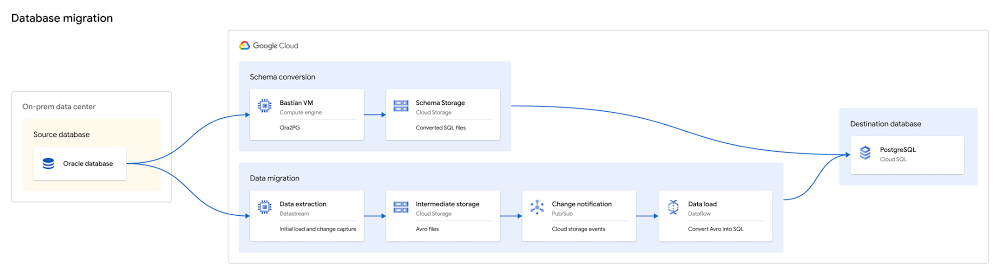
One of the biggest obstacles faced by enterprises pursuing digital transformation is the challenge of migrating off of legacy databases. These databases are typically locked into on-premises data centers, expensive to upgrade and difficult to maintain. We want to make it easier. To that end, we’ve built an open source toolkit that can help you migrate Oracle databases into Cloud SQL for PostgreSQL, and do so with minimal downtime and friction.Click to enlargeThe Oracle to Postgres toolkit uses a mix of existing open source and Google Cloud services, and our own Google-built tooling to support the process of converting schema, setting up low-latency, ongoing data replication, and finally performing migration validation from Oracle to Cloud SQL for PostgreSQL.Migrations are a multi-step process, and can be complex and iterative. We have worked to simplify them, and created a detailed process with stages that are well-documented and easy to run.The stages of a database migration typically include:Deploying and preparing resources, where required resources are deployed and the docker images are built that will be used during the subsequent stages.Converting the schema with Ora2Pg, which is often an iterative process of converting, rebuilding, reviewing, and revising the schema until it aligns with your needs.Continuously migrating the data, which leverages Datastream and Dataflow.Datastream ingests the data from Oracle by reading the log using LogMiner, then stages the data in Google Cloud Storage. As new files are written, a Pub/Sub notification is emitted, and the files are picked up by Dataflow using a custom template to load the data into Cloud SQL for PostgreSQL. This allows you to migrate your data in a consistent fashion using CDC for low downtime.Validating the data migration, which can be used to ensure all data was migrated correctly and it is safe to begin using the destination database. It can also be used to ensure downstream objects (like views or PL/SQL) have been translated correctly.Cutting over to use PostgreSQL, where the application switches from reading Oracle to Postgres.Following these steps will help to ensure a reliable migration with minimal business impact.Since the process of migration tends to be iterative, try migrating a single table or single schema in a test environment before approaching production. You can also use the toolkit to migrate partial databases. For instance, you can migrate one specific application’s schema, while leaving the remainder of your application in Oracle.This post will walk you through each stage in more detail, outlining the process and considerations we recommend for the best results.Deploying and Preparing ResourcesInstalling the Oracle to Postgres toolkit requires a VM with Docker installed. The VM will be used as a bastion and will require access to the Oracle and PostgreSQL databases. This bastion will be used to deploy resources, run Ora2Pg, and run data validation queries.The toolkit will deploy a number of resources used in the migration process. It will also build several Docker images which are used to run Dataflow, Datastream, Ora2Pg, and Data Validation.The Google Cloud resources which are deployed initially are:Any required APIs for Datastream, Dataflow, Cloud Storage, and Pub/Sub which are currently disabled are enabledA Cloud SQL for PostgreSQL destination instanceA Cloud Storage bucket to stage the data as it is transferred between Datastream and DataflowA Pub/Sub topic and subscription setup with Cloud Storage notifications to notify on the availability new filesThe migration preparation steps are:Docker images are built forOra2PgData validationDatastream managementConnectivity is tested to both the Oracle DB and the Cloud SQL for PostgreSQL instanceBefore you begin, ensure that the database you’d like to migrate is compatible with the usage of Datastream. Converting schemas with Ora2Pg Migrating your schema can be a complex process and may sometimes involve manual adjustment to fix issues originating from usage of non-standard Oracle features. Since the process is often iterative, we have divided this into two stages, one to build the desired PostgreSQL schema and a second to apply the schema.The toolkit defines a base Ora2pg configuration file which you may wish to build on. The features selected by default align with the data migration template as well, particularly regarding the use of Oracle’s ROWID feature to reliably replicate tables to PostgreSQL, and the default naming conventions from Ora2Pg (that is, changing all names to lowercase). These options should not be adjusted if you intend to use the Data Migration Dataflow template, as it assumes they have been used.The Oracle ROWID feature, which maintains a consistent and unique identifier per row, is used in the migration as a default replacement for primary keys, in the event that the table does not have a primary key. This is required for data migration using the toolkit, though the field can be removed after the migration is finished if the field is not required by the application. The design converts an Oracle ROWID value into an integer, and then the column is defined as a sequence in PostgreSQL. This allows you to continue to use the original ROWID field as a primary key in PostgreSQL even after the migration is complete.The final stage of the Ora2Pg template applies the desired SQL files which were built in the previous step to PostgresQL. To run this multiple times as you iterate, make sure to clear previous schema iterations from PostgreSQL before re-applying. Since the goal of the migration toolkit is to support migration of Oracle tables and data to PostgreSQL, it does not convert or create all Oracle objects by default. However, Ora2Pg does support a much broader set of object conversions. In the event that you’d like to convert additional objects beyond tables and their data, the docker image can be used to convert any Ora2Pg supported types; however, this is likely to require varying degrees of manual fixes depending on the complexity of your Oracle database. Please refer to the Ora2Pg documentation for support in these steps.Continuously migrating the dataThe data migration phase will require deploying two resources for replication, Datastream and Dataflow. A Datastream stream that pulls the desired data from Oracle is created, and the initial table snapshots (“backfills”) will begin replicating as soon as the stream is started. This will load all the data into Cloud Storage, then leveragingDataflow and the Oracle to PostgreSQL template to replicate from Cloud Storage into PostgreSQL.Datastream utilizes LogMiner for CDC replication of all changes for the selected tables from Oracle, and aligns backfills and ongoing changes automatically. The advantage of the fact that this pipeline buffers data in Cloud Storage is that it allows for easy redeployment in the event that you’d like to re-run the migration, if, say, a PostgreSQL schema changes, without requiring you to re-run backfills against Oracle.The Dataflow job is customized with a pre-built, Datastream-aware template to ensure consistent, low-latency replication between Oracle and Cloud SQL for PostgreSQL. The template uses Dataflow’s stateful API to track and consistently enforce order at a primary key granularity. As mentioned above, this leverages the Oracle ROWID for tables which do not have a primary key, for reliable replication of all desired tables. This ensures the template can scale to any desired number of PostgreSQL writers, to maintain low latency replication at scale, without losing consistent order. During the initial replication (“backfill”), it’s a best-practice to monitor and consider scaling up PostgreSQL resources if replication speeds are running slower than expected, as this phase in the pipeline has the greatest likelihood of being a bottleneck. Replication speeds can be verified using the events per second metric in the Dataflow job.Note that DDL changes on the source are not supported during migration runtime, so ensure your source schema can be stable for the duration of the migration run.Validating the data migrationDue to the inherent complexity of heterogeneous migrations, it is highly recommended to use the data validation portion of the toolkit as you prepare to complete the migration. This is to ensure that the data was replicated reliably across all tables, that the PostgreSQL instance is in a good state and ready for cutover, and to validate complex views or PL/SQL logic in the event that you used Ora2Pg to migrate additional Oracle objects beyond tables (though outside the scope of this post).We provide validation tooling which is created from the latest version of our open source Data Validator. The tool allows you to run a variety of high-value validations, including schema (column type matching), row count, and more complex aggregations.After Datastream reports that backfills are complete, an initial validation can ensure that tables look correct and that no errors which resulted in data gaps have occurred. Later in the migration process, you can build filtered validations or validate a specific subset of data for pre-cutover validation. Note that since this type of validation is run once you’ve stopped replicating from source to destination, it’s important that it runs faster than the backfill validation to minimize downtime. For this reason, it gives a variety of options to filter or limit the number of tables validated to run more quickly while still giving high confidence of the integrity of the migration.If you’ve re-written PL/SQL as part of your migration, we encourage more complex validation usage. For example, using `–sum “*”` in a validation will ensure that the values in all numeric columns add up to the same value. You can also group on a key (like a date/timestamp column) to validate slices of the tables. These will help ensure the table is not just valid, but is also accurate after SQL conversion occurs.Cutting over to use PostgreSQLThe final step in the migration is the cutover stage, when your application begins to use the destination Cloud SQL for PostgreSQL instance as its system of record. Since the time of cutover is preceded by database downtime, this should be scheduled in advance if it can cause a business disruption. As part of the process of preparing for cutover, it’s a best practice to validate that your application has been updated to be able to read from and write to PostgreSQL, and the user has all the permissions required before the final cutover occurs.The process of cutover is:Check if there are any open transactions on Oracle and ensure that the replication lag is minimal When there are no outstanding transactions, stop writes to the Oracle database – downtime beginsEnsure all outstanding changes are applied to the Cloud SQL for PostgreSQL instanceRun any final validations with the Data ValidatorPoint the application at the PostgreSQL instanceAs mentioned above, running final validations will add downtime, but is recommended as a way to ensure a smooth migration. Preparing Data Validations beforehand and timing their execution accordingly will allow you to balance downtime with confidence in the migration result.Get started todayYou can get started today with migrating your Oracle databases to Cloud SQL for PostgreSQL with the Oracle to PostgreSQL toolkit. You can find much more detail on running the toolkit in the Oracle to PostgreSQL Tutorial, or in our Oracle to PostgreSQL Toolkit repository.
Quelle: Google Cloud Platform

Network Connectivity Center: Expanding SD-WAN’s reach with new partners

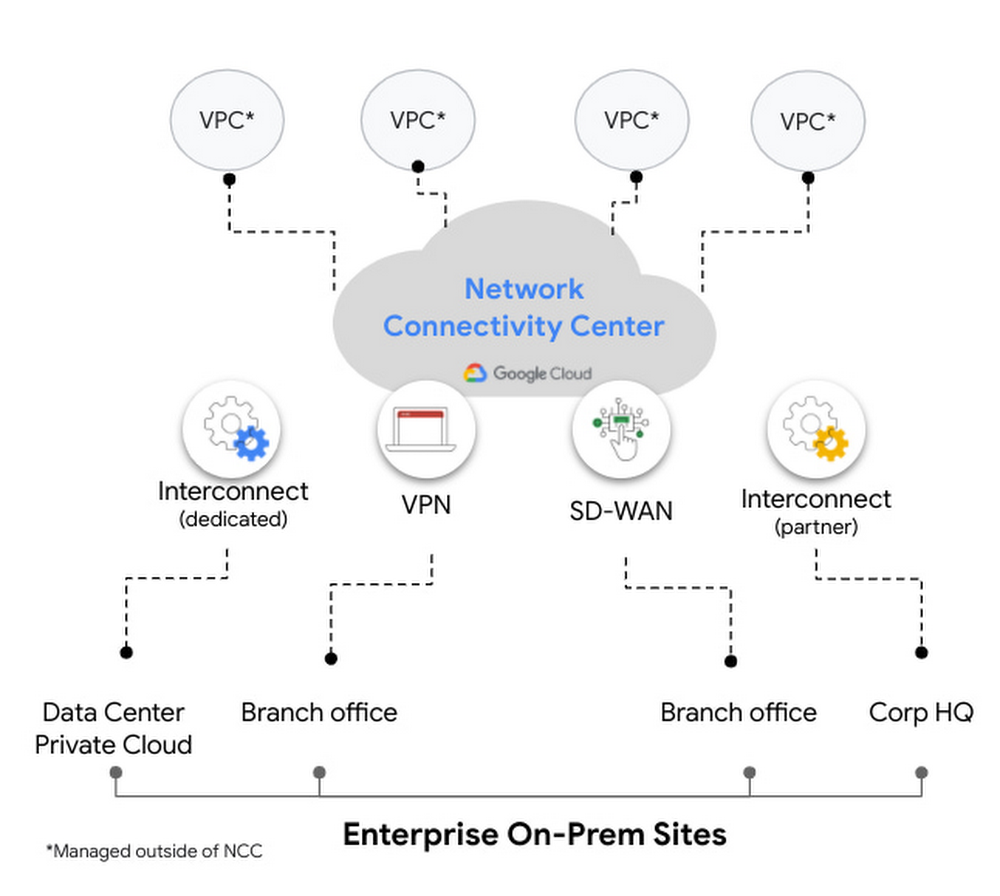
Last month, we announced the preview launch of Network Connectivity Center, a new solution designed to simplify on-prem and cloud connectivity to Google Cloud. Today, we are excited to announce integrations with Fortinet, Palo Alto Networks, Versa Networks and VMware, allowing enterprises to embrace the power of automation and simplify their networking deployments even further. Network Connectivity Center lets administrators to easily create, manage and connect heterogeneous on-premises and cloud networks to Google Cloud resources such as VPCs, which leverage Google’s global network infrastructure. The solution provides a centralized management model that allows connectivity between on-prem locations and to application workloads in Google Cloud via multiple hybrid connectivity types such as Cloud VPN, Cloud Interconnect and third-party router appliances such as SD-WAN VMs or any other type of network virtual appliance. Network Connectivity Center is a globally available resource that enables global connectivity, allowing third-party virtual appliances to easily connect with VPCs using standard BGP, enabling dynamic route exchange and simplifying the overall network architecture and connectivity model. Network Connectivity Center can also allow dynamic route exchange between customer sites, for site-to-site connectivity.Developing a WAN architecture to connect multiple on-prem locations with each other and to cloud VPCs can be cumbersome. Our partners’ integrations with Network Connectivity Center make for a more unified customer experience, reducing the operational overhead of manually deploying various resources with automated workflows. Read on for more details about these integrations from Fortinet, Palo Alto Networks, Versa Networks and VMware:Fortinet Fortinet Secure SD-WAN and Adaptive Cloud Security empowers organizations to secure any application on any cloud and to deliver applications with a seamless, secure, and superior quality of experience (QoE) to its users. Fortinet’s FortiGate Secure SD-WAN integration with Google Cloud Network Connectivity Center allows customers to more effectively interconnect applications and workloads running on Google Cloud for hybrid cloud and multi cloud deployments. The result is an even more simplified, automated, and operationally efficient cloud on-ramp experience—all with the industry-best security intelligence and protection from FortiGuard Labs. More here. Palo Alto NetworksPalo Alto Networks Prisma SD-WAN is one of the industry’s first next-generation SD-WAN that is application-defined, autonomous, and cloud-delivered.  With the integration of Prisma SD-WAN, organizations can seamlessly connect branches including remote offices, small sites, and large corporate offices to multi-cloud. This turnkey integration expands our strategic partnership, allowing organizations to simplify and further automate branch-to-cloud connectivity with our unique API-based CloudBlades platform without any service disruptions. In addition, organizations can gain deep application intelligence and visibility while extending Prisma Access capabilities, our cloud-delivered security platform, to Google Cloud and ensure security and optimal branch-to-branch connectivity. Together, Prisma SD-WAN combined with Prisma Access that leverages Google Cloud becomes one of the industry’s most comprehensive SASE solutions. More here.Palo Alto Networks VM-Series Virtual Next-Generation Firewalls integrate with Network Connectivity Center to deliver streamlined connectivity with best-in-class enterprise security. With Network Connectivity Center, VM-Series firewalls can be deployed to provide horizontal scale, cross-region redundancy, and active-active high availability with session synchronization. More here.Versa NetworksIntegrating Network Connectivity Center with Versa Secure SD-WAN from Versa SASE delivers reliable, enterprise-grade connectivity for branch users to on-prem and cloud workloads. Versa Secure SD-WAN provides network SLA monitoring, Deep Packet Inspection, video and voice performance analytics, and Forward Error Correction to overcome underperforming links and deliver an optimal and consistent user experience.By deploying Versa Secure SD-WAN with Network Connectivity Center, customers can achieve reliable end-to-end connectivity—from users located in branch and remote locations to the on-prem and cloud applications. The Versa Secure SD-WAN solution offers end-to-end QoS that allows for complete performance visibility across the network, thereby delivering significant savings for an organization’s total consumption costs. More here.VMwareVMware SD-WAN™, a cloud-hosted networking service of VMware SASE, delivers secure, reliable, efficient and agile access when using Google Cloud Network Connectivity Center. This combined solution enables organizations—across all industries and around the globe—to gain simple-to-deploy, high-performance connectivity for branch office locations, data centers, cloud destinations and remote workers. VMware SD-WAN breaks down barriers to workload migration resulting from poor user experience pegged to WAN conditions.By combining the flexibility of SD-WAN and on-demand nature of cloud, enterprises can now more easily access their Google Cloud workloads from their SD-WAN connected sites globally based on business needs in an agile manner via Network Connectivity Center SD-WAN partner integrations. More here. Global connectivity made easyTo learn more about Google Cloud Network Connectivity Center and get started, check out our documentation pages.Related ArticleIntroducing Network Connectivity Center: A revolution in simplifying on-prem and cloud networkingWith Network Connectivity Center, you can connect and manage VPNs, interconnects, third-party routers and SD-WAN across on-prem and cloud…Read Article
Quelle: Google Cloud Platform

Real-time Change Data Capture for data replication into BigQuery

Businesses hoping to make timely, data-driven decisions know that the value of their data may degrade over time and can be perishable. This has created a growing demand to analyze and build insights from data the moment it becomes available, in real-time. Many will find that the operational and transactional data fuelling their business is often stored in relational databases, which work well for processing transactions, but aren’t designed or optimized for running real-time analytics at scale.Traditional approaches to solving this challenge include replicating data from one source to another in scheduled bulk loads of entire, frequently large, datasets. This is often costly, strenuous on production systems, and can become a bottleneck to making timely and accurate decisions.So, how can you run real-time analytics against operational and transactional data?You can achieve this with a technique for data integration known as Change Data Capture (CDC). CDC identifies and captures changes in source databases (updates, inserts and deletes). This allows you to process only the data that has changed, at the moment it changes. CDC delivers a low-latency, near real-time, and cost-effective solution for data acquisition, replication, storage and analysis. CDC can replicate transactional data into data warehouses, unlocking the potential to analyze the freshest data for operational reporting, streaming analytics, cache invalidation, event-driven architectures, and more. However, implementing CDC solutions can be complex, require expensive licenses, and be heavily reliant on niche technical expertise. In this blog, we’ll explore how you can take advantage of a completely cloud-native, end-to-end solution to this problem. Replicating operational data into BigQuery with real-time CDCBigQuery is Google Cloud’s data warehouse which offers a serverless and cost-effective way to store large amounts of data, it is uniquely optimized for large-scale analytics. While BigQuery is a great solution for operational analytics, one of the biggest challenges is bringing in data in a reliable, timely, and easy-to-use manner. There have been scattered solutions in this area, but they have largely placed the burden of integration on customers.The launch of Datastream, our new, serverless CDC and replication service, solves many of these challenges. Datastream synchronizes data across heterogeneous databases, applications, and storage systems with minimal latency. It supports data replication for a variety of use cases, including real-time analytics. Datastream integrates with our Data and Analytics services allowing you to create simple, end-to-end, cloud-native solutions that replicate your changed data into BigQuery:Cloud Data Fusion is Google Cloud’s integration service for building ETL and ELT data pipelines. Data Fusion already supports the replication of data from SQL Server and MySQL to BigQuery through an easy-to-use, wizard-driven experience. Data Fusion now integrates with Datastream to support Oracle as a data source, without the need for expensive licenses or agents.Dataflow is our fully managed service for unified stream and batch data processing. Dataflow’s integration with Datastream includes the launch of three new templates that replicate data to BigQuery, Cloud Spanner and Cloud SQL for PostgreSQL. You can also extend and customize the Dataflow templates that ingest and process changed data from Datastream sources. This is key if you need to do transformations or enrichments with data from another source before storing it in Google Cloud.Let’s dive into an example and explore how you can use these integrations:Imagine that you are running a business, FastFresh, that offers same day delivery of  fresh food to homes across London. To sell all your produce and minimize food waste, you want to build real-time reports to understand whether you have a surplus of produce and should apply discounts before the end of the day. Your operational data, such as produce inventory, is stored in Oracle and is being continuously updated as customers purchase goods. You want to replicate this data into BigQuery so you can run analysis and generate these real-time reports.Replicating data from Oracle to BigQuery with Data Fusion and DatastreamData Fusion is completely code-free and is the perfect solution for those wanting to build a simple, end-to-end replication pipeline using one service. Data Fusion is built with data democratization in mind – a guided replication wizard  invites not just data scientists and analysts, but also business users and database administrators to take ownership of their data pipeline creation and information management. To synchronize your inventory data from Oracle to BigQuery you just need to follow the wizard to set up your data sources and destinations. You can select the tables, columns and change operations (update, inserts or deletes) that you want to synchronize. This granular level of control allows you to capture only the data that you actually need replicated, minimizing redundancy, latency and cost:Data Fusion will generate a feasibility assessment before beginning the replication process, giving you the opportunity to fix any problems before starting replication, fast-tracking your journey to building a production-ready pipeline.Finally, you can use the monitoring dashboard to visualize your streams performance and events, enabling you to build a holistic oversight of your pipeline and spot any bottlenecks or unexpected behavior in real time:Replicating your operational data into BigQuery, Spanner or Cloud SQL with Dataflow TemplatesIf you need to replicate data to targets other than BigQuery, or you are a data engineer wanting to build and manage your own change data capture jobs, you’ll want to use a combination of Datastream and Dataflow for replication. To streamline this integration, we’ve launched three new pre-built streaming templates in Dataflow’s interface:Datastream to BigQueryDatastream to Cloud SpannerDatastream to Cloud SQL for PostgreSQLThese templates offer a lightweight and simple replication solution that doesn’t require expertise in Java or Python.  You first create a Datastream stream to synchronize your changed data to a Cloud Storage bucket. You can create multiple streams across multiple sources that replicate into the same bucket. This means you can stream change data from multiple sources into BigQuery with a single Dataflow job, reducing the number of pipelines you need to manage. Datastream normalizes data types across sources, allowing for easy, source-agnostic downstream processing in Dataflow.Next, you create a Dataflow job from one of our new streaming templates – Datastream to BigQuery, for our use case. All you have to do is specify the streaming source bucket and the staging and replication datasets in BigQuery.  And that’s it! Your job will begin with minimal start up time and changed data will be replicated to BigQuery. In a subsequent blog post, we’ll share tips on how to enrich your Dataflow CDC jobs on the fly.Reap the rewards: Analyzing your operational data in BigQueryNow that your operational data is being replicated to BigQuery, you can take full advantage of its cost-effective storage and analytical prowess. BigQuery scales serverlessly and allows you to run queries over  petabytes of data in a matter of seconds to build the real time insights. You can create materialized viewsover your replicated tables to boost performance and efficiency or take advantage of BQML to create and execute ML models for say, demand forecasting or recommendations. In our use case, we wanted to create dashboards to monitor stock inventory in real-time. Connecting your BigQuery data to business intelligence services like Looker allows you to build sophisticated, real-time reporting platforms.Both Data Fusion and Dataflow (using Datastream-specific templates) replicate data to storage solutions in Google Cloud. Here’s a table that can help you make the right decision for your use case and organization: When should I use Cloud Data Fusion or Dataflow templates?Beyond replication: processing and enriching your changed data before synchronizing to your target destinationTemplates and code-free solutions are great for replicating your data as it is. But what if you wanted to enrich or process your data as it arrives, before storing it in BigQuery?  For example, when a customer scans their membership card before making a purchase, we may want to enrich the changed data by looking up their membership details from an external service before storing this into BigQuery. This is exactly the type of business case Dataflow is built to solve! You can extend and customize the Dataflow templates that ingest and process changed data from Datastream sources. Stay tuned for our next blog in this series as we explore enriching your changed data in more detail!In the meantime, check out our Datastream announcement blog post and start replicating your operational data into BigQuery with Dataflow or Data Fusion.
Quelle: Google Cloud Platform

Roostify simplifies mortgage processing with Lending DocAI

The home lending journey entails processing an immense number of documents daily from hundreds of thousands of borrowers. Currently, home lending document processing relies on some outdated digital models and a high dependency on manual labor, resulting in slow processing times and higher origination costs. Scaling a business that sorts through millions of documents daily, while increasing efficacy and accuracy, is no small feat. When it comes to applying for a mortgage loan, consumers expect a digital experience that’s as good as the in-person one. Roostify simplifies the home lending journey for lenders and their customers.No time to spare: Overcoming document processing challenges with AIRoostify provides enterprise cloud applications for mortgage and home lenders. In order to empower its customers to deliver a better, more personalized lending experience, they needed to automate and scale their in-house document parsing functionality.As a key component of its document intelligence service, Roostify is leveraging Google Cloud’s Lending DocAI machine learning platform to automate processing documents required during a home loan application process, such as tax returns or bank statements with multi-language support. This partnership delivers data capture at scale, enabling Roostify customers to automatically identify document types from the uploaded file and to extract relevant entities such as wages, tax liabilities, names, and ID numbers for further processing, and make things move faster in the cumbersome lending process. Roostify’s solutions leverage Google Cloud’s Lending DocAI, which is built on the recently announced Document AI platform, a unified console for document processing. Customers can easily create and customize all the specialized parsers (e.g., mortgage lending documents and tax returns parsers) on the platform without the need to perform additional data mapping or training. All Google Cloud’s specialized parsers are fine-tuned to achieve industry-leading accuracy, helping customers and partners confidently unlock insights from documents with machine learning. Learn more about the solution from the GA launch blog and the overview video.Integrating Lending DocAI’s intelligent document processing capabilities into the Roostify platform means more innovation for their customers and tangible results: faster loan processing times, fewer document intake errors, and lower origination costs. Additional support in Google Lending DAI for other languages and more documents like global Know Your Customer (KYC) documents or payroll reports is in the near future.Full integration of AI solutionsWorking together with Roostify’s platform team, we were able to help them solve their document processing challenge through integration of various GCP products such as Lending DocAI (LDAI), Data Loss Prevention (DLP) for redacting sensitive data, BigQuery for data warehousing and analytics, and Firestore for API status. To make it very safe and secure, all data was encrypted end-to-end at Rest and in Transit. LDAI won’t require any training data to process. It is an easy plug and play API.Here is a sneak peek in the high level deployment architecture for LDAI in Roostify environment:Here are the steps for processing data:Receives document processing request from the client.API Function directs requests to the pre-processing service. For Async requests a processing ID is generated and returned to the caller.Pre-processing service sends the request for further processing (Long/short PDF conversion), calling other microservices and receives back the responses. Any error in the response received is then sent to the response processing service. If the response is synchronous, the pre-processing service directs it to the LDAI Invoker service. If the response is asynchronous, the pre-processing service feeds it into the Cloud Pub/Sub service.Cloud Pub/Sub service feeds the response back to the LDAI Invoker service.LDAI Invoker service routes the request to the Google LDAI API for classification if there are multiple pages in the document.Document will be split based on LDAI response and then saved in a GCS bucket for temporary storage.LDAI entity interface for single page processing and then LDAI Invoker sends LDAI results to LDAI Response ProcessingIf a request is a synchronous request the LDAI Response Processor sends results to the API Function so that it can complete the synchronous call and respond to the rConnect caller.If the request is an asynchronous request the LDAI Response Processor will respond to the caller’s webhook and complete the transaction.Finally, Data stored in the GCP bucket will be deleted.All the responses that come from the LDAI API can optionally feed into BigQuery via the Response Processor, after parsing it through Data Loss Prevention (DLP) API to redact the PII/sensitive information.  Throughout the processing of both asynchronous and synchronous requests all transactions are logged using Cloud Logging.  For asynchronous transactions, the state is maintained throughout the process using Cloud Firestore.Roostify currently uses this technology to power two different solutions: Roostify Document Intelligence and Roostify Beyond™. Roostify Document Intelligence is a real-time document capture, classification, and data extraction solution built for home lenders. It ingests documents uploaded by borrowers and loan officers, identifies the relevant documents, and extracts and classifies key information. Roostify Document Intelligence is available as a standalone API service to any home lender with any digital lending infrastructure already in place. Roostify Beyond™ is a robust suite of AI-powered solutions that enables home lenders to create intelligent experiences from start to close. It combines powerful data, insightful analytics, and meaningful visualization to streamline the underwriting process. Roostify Beyond™ is currently available only to Roostify customers as part of an Early Adopter program and will be rolled out to the market later this year.Lenders can set the desired field confidence level. An extracted field that does not meet the set field confidence will display a warning indicator to borrowers asking them to validate the uploaded document.If the Beyond algorithms aren’t sure about the document (i.e., with lower confidence in the classification result than that set by the admin), the user sees a message asking them to validate the task.Through this partnership, Roostify has enabled its customers to adopt a data-first approach to their home lending processes, which will lead to improved user experiences and significantly reduced loan processing times.Fast track end-to-end deployment with Google Cloud AI Services (AIS)Google AIS (Professional Services Organization), in collaboration with our partner Quantiphi, helped Roostify deploy this system into production and fast-tracked the development multifold to generate the final business value.The partnership between Google Cloud and Roostify is just one of the latest examples of how we’re providing AI-powered solutions to solve business problems.Related ArticleLending DocAI fast tracks the home loan processLending DocAI fast tracks the home loan process for borrowers and lendersRead Article
Quelle: Google Cloud Platform

What is Compute Engine? Use cases, security, pricing and more

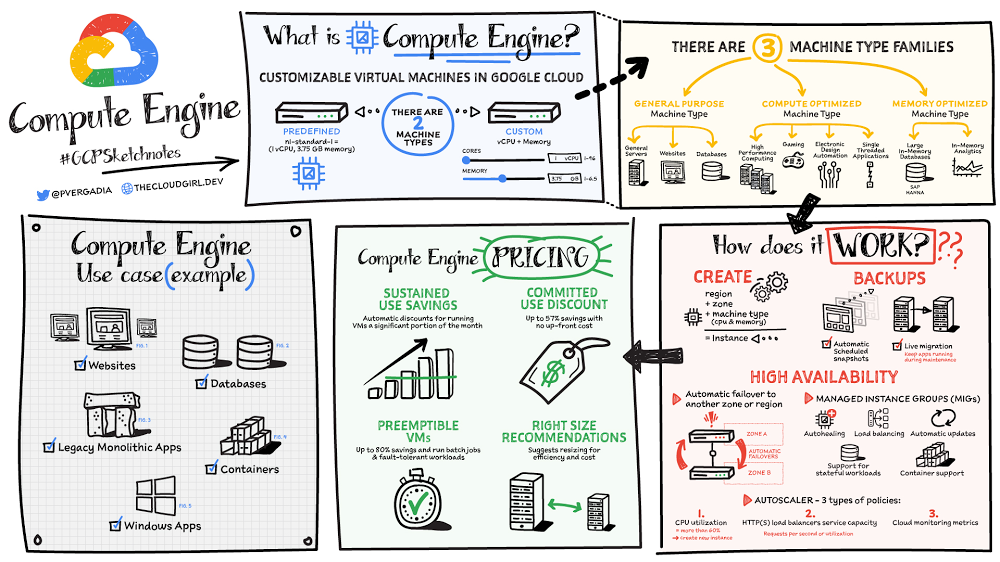
Compute Engine is a customizable compute service that lets you create and run virtual machines on Google’s infrastructure. You can create a Virtual Machine (VM) that fits your needs. Predefined machine types are pre-built and ready-to-go configurations of VMs with specific amounts of vCPU and memory to start running apps quickly. With Custom Machine Types, you can create virtual machines with the optimal amount of CPU and memory for your workloads. This allows you to tailor your infrastructure to your workload. If requirements change, using the stop/start feature you can move your workload to a smaller or larger Custom Machine Type instance, or to a predefined configuration.Click to enlargeMachine typesIn Compute Engine, machine types are grouped and curated by families for different workloads. You can choose from general-purpose, memory-optimized, compute-optimized and accelerator-optimized families. General-purpose machines are used for Day-to-day computing at a lower cost and for balanced price/performance across a wide range of VM shapes. The use cases that best fit here are web serving, app serving, back office applications, databases, cache, media-streaming, microservices, virtual desktops, development environments.Memory-Optimized machine are recommended for ultra high-memory workloads such as in-memory analytics and large in-memory databases such as SAP HANA Compute-Optimized machines are recommended for ultra high performance workloads such as High Performance Computing (HPC), Electronic Design Automation (EDA), gaming, video transcoding, single-threaded applications.Accelerator-Optimized machines are optimized for high performance computing workloads such as Machine learning (ML), Massive parallelized computations and High Performance Computing (HPC)How does it work?You can create a VM instance using a boot disk image, a boot disk snapshot, or a container image. The image can be a public operating system (OS) image or a custom one. Depending on where your users are you can define the zone you want the virtual machine to be created in. By default all traffic from the internet is blocked by the firewall and you can enable the HTTP(s) traffic if needed. Use snapshot schedules (hourly, daily, or weekly) as a best practice to back up your Compute Engine workloads. Compute Engine offers live migration by default to keep your virtual machine instances running even when software or hardware update occurs. Your running instances are migrated to another host in the same zone instead of requiring your VMs to be rebooted. AvailabilityFor High Availability (HA) Compute Engine offers automatic failover to other regions or zones in event of a failure. Managed instance groups (MIGs) help keep the instances running by automatically replicating instances from a predefined image. They also provide application based autohealing health checks. If an application is not responding on a VM, the auto healer automatically recreates that VM for you. Regional MIGs let you spread app load across multiple zones. This replication protects against zonal failures. MIGs work with load balancing services to distribute traffic across all of the instances in the group. Compute Engine offers autoscaling to automatically add or remove VM instances from a managed instance group based on increases or decreases in load. Autoscaling lets your apps gracefully handle increases in traffic, and it reduces cost when the need for resources is lower. You define the autoscaling policy for automatic scaling based on the measured load, CPU utilization, requests per second or other metrics.Active Assist’s new feature, predictive autoscaling, helps improve response times for your applications–When you enable predictive autoscaling, Compute Engine forecasts future load based on your Managed Instance Group’s (MIG) history and scales it out in advance of predicted load, so that new instances are ready to serve when the load arrives. Without predictive autoscaling, an autoscaler can only scale a group reactively, based on observed changes in load in real time. With predictive autoscaling enabled, the autoscaler works with real-time data as well as with historical data to cover both the current and forecasted load. That makes predictive autoscaling ideal for those apps with long initialization times and whose workloads vary predictably with daily or weekly cycles. For more information, see How predictive autoscaling works or check if predictive autoscaling is suitable for your workload, and to learn more about other intelligent features, check out Active Assist.PricingYou pay for what you use. But you can save cost by taking advantage of some discounts! Sustained use saving are automatic discounts applied for running instances for a significant portion of the month. If you know your usage upfront, you can take advantage of committed use discounts which can lead up to significant savings without any upfront cost. And by using short lived preemptive instances you can save up to 80%, they are great for batch jobs and fault tolerant workloads. You can also optimize resource utilization with automatic recommendations. For example if you are using a bigger instance for a workload that can run on a smaller instance you can save costs applying these recommendations.SecurityCompute Engine provides you default hardware security. Using Identity and Access Management (IAM)you just have to ensure that proper permissions are given to control access to your VM resources. All the other basic security principles apply, if the resources are not related and don’t require network communication amongst themselves, consider hosting them on different VPC networks. By default, users in a project can create persistent disks or copy images using any of the public images or any images that project members can access through IAM roles. You may want to restrict your project members so that they can create boot disks only from images that contain approved software that meet your policy or security requirements. You can define an organization policy that only allows Compute Engine VMs to be created from approved images. This can be done by using the Trusted Images Policy to enforce images that can be used in your organization. By default all VM families are Shielded VMs. Shielded VMs are virtual machine instances that are hardened with a set of easily configurable security features to ensure that when your VM boots, it’s running a verified bootloader and kernel — is the default for everyone using Compute Engine, at no additional charge. For more details on Shielded VMs refer to the documentation here.For additional security, you also have the option to use Confidential VM to encrypt your data in use, while it’s being processed in Compute Engine. For more details on Confidential VM refer to the documentation here.Use casesThere are many use cases Compute Engine can serve in addition to running websites and databases. You can also migrate your existing systems onto Google Cloud, with Migrate for Compute Engine, enabling you to run stateful workloads in the cloud within minutes rather than days or weeks. Windows, Oracle or VMware applications have solution sets enabling a smooth transition to Google Cloud. To run windows applications either bring your own license leveraging Sole-tenant nodes or using the included licenced images. ConclusionWhatever your application use case may be, from legacy enterprise applications to digital native applications, Compute Engine’s families will fit it. For a more in-depth look into Compute Engine check out the documentation. For more #GCPSketchnote, follow the GitHub repo. For similar cloud content follow me on Twitter @pvergadia and keep an eye out on thecloudgirl.devRelated ArticleHow does Anthos simplify hybrid & multicloud deployments?If you’re an enterprise, chances are you have networking, storage, and compute on multiple clouds and in your own data center. How can yo…Read Article
Quelle: Google Cloud Platform
What is Vertex AI? Developer advocates share more

With so much data at our fingertips, many organizations are utilizing machine learning to generate insightful predictions and improve their apps. But most teams have varying levels of machine learning expertise, ranging from novice all the way to experts. To accelerate AI innovation, you need a platform that can help you build expertise for those novice users, and provide a flexible environment for those experts. This is where Vertex AI comes in. Announced last week, Vertex AI unifies Google Cloud’s existing ML offerings into a single environment for efficiently building and managing the lifecycle of ML projects. It provides tools for every step of the machine learning workflow across different model types, for varying levels of machine learning expertise.In this video, we’ll show how Vertex AI supports your entire ML workflow—from data management all the way to predictions.If you enjoyed this video, keep an eye out for more AI Simplified episodes where we’ll dive much deeper into Vertex AI, including managing different datasets and building end-to-end machine learning workflows.
Quelle: Google Cloud Platform

Four steps to jumpstarting your SRE practice

A few months ago, we wrote about how the first step to implementing Site Reliability Engineering (SRE) in an organization is getting leadership on board. So, let’s assume that you’ve gone ahead and done that. Now what? What are some concrete steps you can take to get the SRE ball rolling? In this blog post, we’ll take a look at what you as an IT leader can do to fast-track SRE within your team. Step 1: Start small and iterate “Rome wasn’t built in a day,” the saying goes, but you do need to start somewhere. When it comes to implementing SRE principles, the approach that I (and my team) found to be the most effective is to start with a proof of concept, learn from our mistakes, and iterate!Start by identifying a relevant application and/or team There are many factors that go into choosing a specific team or application for your SRE proof of concept. Most of the time, though, this is a strategic decision for the organization, which is outside the scope of this article. Possible candidates can be a team shifting from traditional operations or DevOps to SRE, or a need to increase reliability to a business-critical product. No matter the reason, it’s crucial to select an application that is:Critical to the business. Your customers should care deeply about its uptime and reliability. Currently in development. Pick an application in which the business is actively investing resources. In a perfect world, the application provides data and metrics regarding its behaviour. Conversely, stay away from proprietary software. If the application wasn’t built by you, it’s not a good candidate for SRE! You need the ability to make strategic decisions about—and engineering changes to—the application as needed. Pro tip: In general, if you have workloads both on-premises and in the cloud, try to start with the cloud-based app. If your engineers come from a traditional operations environment, changing their thinking away from ‘bare metal’ and infrastructure metrics will be easier for a cloud-based app, as managed infrastructure turns practitioners into users and forces them to consume it like developers (APIs, infrastructure as code, etc.)Remember: Set realistic goals. Discouraging your team with unrealistic expectations early on will have a negative effect on the initiative. Step 2: Empower your teamsImplementing SRE principles requires fostering a learning culture, and in that regard, team enablement means both training them, i.e., in regards to knowledge, as well as empowering them.Building a training program is a topic in and of itself, but it’s important to think about an enablement strategy at an early stage. Especially in large organizations, you need to address topics like internal upskilling, hiring and scaling the team as well as onboarding and creating a learning community. Your enablement strategy should also accommodate employees at different levels and in different functions. For example, higher leadership’s training will look very different from practitioners’ training. Leadership’s education should be sufficient to get buy-in and to be able to make organizational decisions. To drive change in the entire organization, additional training to leadership on cultural concepts and practices might be required.Related ArticleRead ArticleWhen it comes to engineering leadership and/or middle management (managers that manage managers), training should be a combination of  high-level cultural concepts to help foster the required culture, and technical SRE practices that are deep enough to understand prioritization, resource allocation, process creation, and future needs.When it comes to practitioners, ideally you want the entire organization to be aligned both from a knowledge perspective as well as culturally. But as we’ve mentioned earlier, it’s best to start simple, with just one team.The starting point for those teams should be to understand reliability and key concepts like SLAs, SLOs, SLIs and error budgets. These are important because SRE is focused on the customer experience. Measuring whether systems meet customer expectations requires a shift in mindset and can take time.Related ArticleRead ArticleAfter identifying your first application and/or the team responsible for it, it’s time to identify the app’s user journeys, the set of interactions a user has with a service to achieve a single goal—for example, a single click or a multi-step pipeline, and rank them according to business impact. The most critical ones are called Critical User Journeys (CUJ), and these are where you should start  drafting SLO/SLIs.Pro tip: There are some general technical practices that can help you embrace SRE faster. For example, using less repos rather than more can help you reduce silos within the organization and better utilize resources. Likewise, prioritizing automatic processes and self-healing systems can benefit reliability, but also team satisfaction, helping the organization retain talent.Related ArticleRead ArticleFinal note: Similar to the way that you make architecture decisions, your chosen technology, solutions and implementation tools should enable you to do what you are trying to do and not vice versa. Step 3: Scale those learnings After you establish these SRE practices with one or a few teams, the next step is to think about building an SRE community and formalized processes across the organization. In some organizations, you can do this in parallel to the end of step 2, and in some organizations, only after you have a few successful implementations under your belt.In this phase, you’ll probably want to address community, culture, enablement and processes. You will need to address them all, especially as they are intertwined, but which one you prioritize will depend on your organization.Creating an SRE community in the organization is important both from a learning perspective, but also to establish a knowledge base of best practices, train subject-matter experts, help create needed guardrails, and align processes. Building a community goes hand in hand with fostering an empowered culture and training teams. The idea is that early adopters are ambassadors for SRE who share their learnings and train other teams in the organization. It is also useful to identify potential ambassadors or champions in individual development teams who are passionate about SRE and will help with the adoption of those practices.It is also crucial to create repeatable trainings for each functional role, including onboarding sessions. Onboarding new team members is a critical aspect of training and fostering an empowered SRE culture. Therefore it is vital to be mindful about your onboarding process and make sure that the knowledge is not lost when team members change roles.Related ArticleRead ArticleDuring this phase, you also want to foster an org-wide culture that promotes psychological safety, accepts failure as normal and enables the team to learn from mistakes. For that, leadership must model the desired culture and promote transparency. Finally, having structured and formalized processes can help reduce the stress around emergency response—especially being on-call. Processes can also provide clarity and make teams more collaborative and effective. In order to have the most impact, start by prioritizing the most painful areas under your team’s remit—for example, clean up noisy alerts to avoid (or address) alert fatigue, automate your change management processes and involve only the necessary people to save team bandwidth. Team members shouldn’t work on software engineering projects while doing on-call incident management, and vice-versa. Make sure they have enough bandwidth to do both, separately.  Similar to other areas, you want to use data to drive your decisions.  As such, identify where your teams spend the most time, and for how long. If you find that it is challenging to collect this kind of data, be it quantitative or qualitative, a good starting point is often your emergency response processes, as those have a direct impact on the business, especially around the escalation process, incident management and related policies. Pro tip: All the above practices contribute to reducing silos and align goals across the organization; those should include also your vendors and engineering partners. To that end, make sure your contracts with them capture those goals as well.Step 4: Embody a data-driven mindsetStarting the SRE journey can take time, even if you’re just implementing it for one team. Two quick wins that you can start with that will make a positive impact are collecting data and doing blameless postmortems.In SRE we try to be as data-driven as possible, so creating a measurement culture in your organization is crucial. When prioritizing data collection, ideally look for data that represents the customer experience. Collecting that data will help you identify your gaps and help you prioritize according to business needs and by extension your customer expectations.Related ArticleRead ArticleAnother thing that you can do is run or improve postmortems, which are an essential way of learning from failure and fostering a strong SRE culture. From our experience, even organizations that do run postmortems can benefit from them much more with a few minor improvements. It is important to remember that postmortems should be blameless in order to make the team feel safe to share and learn from failures. And to make tomorrow better than today, i.e., not repeat the same problems, it’s important that postmortems include action items and are assigned to an owner. Creating a shared repository for postmortems can have a tremendous impact on the team: it increases transparency, reduces silos, and contributes to the learning culture. It also shows the team that the organization “practices what it preaches.” Implementing a repository can be as easy as creating a shared drive.Pro tip: Postmortems should be blameless and actionable.Related ArticleRead ArticleOn the SRE fast trackOf course, no two organizations are alike, and no two SRE teams are either. But by following these steps, you can help get your team on the path to SRE success faster. To learn more about developing an effective SRE practice, check out the following resources. Collection of SRE Public resourcesGoogle Professional Services SRE packagesRelated ArticleWith SRE, failing to plan is planning to failThe process of becoming a successful Site Reliability Engineering shop starts well before you take your first class or read your first ma…Read Article
Quelle: Google Cloud Platform
Google Cloud launches from Google I/O 2021

And that’s a wrap for Google I/O 2021! Its virtual nature this year surely didn’t stop its viral nature, as we saw over 215,000 registrants, over 235 sessions, 186,565 badges earned, and dozens of workshops and AMAs. Viewers from around the world once again tuned in to learn about the latest launches from Google, including Android, WearOS, Flutter, and TensorFlow. Developers came to sharpen their skills by learning the newest tools, APIs, and improved experiences to help them build.Google Cloud has become a big part of the excitement as it unveiled a number of major launches around AI, Google Workspace, and sustainability, including a new unified AI platform, rich collaborative experiences, and breakthroughs in carbon-aware computing. If you couldn’t make it and want a quick list of the best cloud sessions, check out my cloud developer’s guide to I/O. To get to the heart of Google Cloud I/O announcements, read on. Vertex AIOne of the most notable Google Cloud launches was the general availability of Vertex AI. It’s a managed unified machine learning (ML) platform that allows companies to accelerate deployment and maintenance of artificial intelligence (AI) platforms. Google Cloud has been leading with its AI Platform and AutoML products, like AutoML Vision, Tables, and Natural Language because we offer an end-to-end ML lifecycle, but we understand that you don’t want to have separate experiences for the AutoML training path and the custom AI Platform path.Vertex AI unifies our existing offerings into a single experience for experimentation, versioning, and deploying ML/AI models into production environments. You can seamlessly manage and deploy your models through a new workflow (UI, API, and SDKs) for AI Platform Training, AI Platform Prediction, AutoML Tables, AutoML Vision, AutoML Video Intelligence, AutoML Natural Language, Explainable AI, and Data Labeling. Each of these services are now features of Vertex AI, the evolution of AI Platform (unified). ML Ops includedBeing an emerging field, MLOps is rapidly gaining momentum amongst the community because it provides an end-to-end machine learning development process to design, build and manage reproducible, testable, and evolvable ML-powered software. Vertex AI includes new MLOps features, including:Vertex Experiments to track, analyze and discover ML experiments for faster model selection.Vertex Vizier, which provides optimized values for hyperparameters to maximise models’ predictive accuracy.Vertex Pipelines, which streamlines building and running ML pipelines to simplify MLOps.Explainable AI gives you detailed model evaluation metrics and feature attributions so you know how important each input feature is to your prediction. End-to-end ML lifecycleYou can use Vertex AI to manage the following stages in the ML workflow:Define and upload a dataset.Train an ML model on your data either using AutoML or custom training on different machine types and GPUs. Get model evaluation and tuning hyperparameters for custom models.Use data labeling jobs that let you request human labeling for custom ML model datasets. Upload and store your model in Vertex AI.Deploy your trained model and get an endpoint for serving predictions.Send prediction requests to your endpoint.Specify a prediction traffic split in your endpoint.Manage your models and endpoints.To interact with Vertex AI you can use:Notebooks prepackaged with JupyterLab and deep learning packages.The Google Cloud Console the UI to work with your ML resources and get logging and monitoring.Cloud client libraries for an optimized developer experience for a set of languages, or the Google API Client Libraries to access the Vertex AI API by using other languages like Dart.Or the REST API for managing jobs, models, endpoints, and predictions. You have one experience and interface to use both AutoML or create custom models, a shared infrastructure, data modeling, UX, and API layer, and have the ability to quickly move between data science and production. You get both the notebook-based development version and a hosted cloud production version. For ML novices, AutoML gives you explainability and automatic provisioning but then, as you become more experienced, you’re able to manage constraints and make your own fine-grained decisions using the rest of Vertex AI all from one place. Where to get startedListen to the GCP Podcast, where I invite our AI executives to talk about responsible AI and how you can use Vertex AI to implement more inclusive and accurate ML practices. Check out the docs for Vertex AI tutorials on training image data, doing custom training, and bringing in structured data, and get code samples for Python, Java, Node.js and more. And join us for the digital Applied ML Summit at g.co/appliedmlsummit on June 10th for Vertex AI technical tutorials and interactive sessions with leading innovators and Kaggle Grandmasters.Google WorkspaceSmart canvasGoogle Workspace announced smart canvas—a new product experience that delivers the next evolution of collaboration for Google Workspace. You’ll see enhancements throughout the rest of the year for apps like Docs, Sheets, and Slides—to make them more flexible, interactive, and intelligent. Feature highlightsNew interactive building blocks—smart chips, templates, and checklists—will connect people, content, and events into one seamless experience.When you @ mention a person in a document, a smart chip shows you additional information like the person’s location, job title, and contact information. Checklists are available on web and mobile, and you’ll soon be able to assign checklist action items to other people, which show up in Google Tasks.More assisted analysis functionality in our Sheets web experience, with formula suggestions that make it easier for everyone to derive insights from data. Present your content to a Google Meet call on the web directly from the Doc, Sheet, or Slide where you’re already working with your team. Live translations of captions will be available in Google Meet in five languages.Additional control over the Meet experience, including more space to see people and content, plus the ability to pin and unpin content and video feeds. And to help with meeting fatigue, you can now turn off your self-feed entirely.IntegrationsWith the recent GA release of AppSheet Automation, you can integrate Google Workspace data sources. Looking ahead, the team is working on additional APIs so you can bring information from third-party tools directly into smart canvas elements like smart chips, checklists, and table templates.Google Workspace SecurityTo ensure admins get the necessary controls and capabilities to protect their users and organizations against security threats and abuse, Google Workspace came out with new advanced security features.Alert CenterGoogle Workspace’s Alert Center gives you actionable, real-time alerts and security insights about security-related activity in your domain. Now the Alert Center is enriched with VirusTotal threat context and reputation data.You get a unified view of critical alerts through:Indicators of compromise: See threat relationships with other artifacts to map out threat campaigns and pinpoint malicious network infrastructure.Threat graph: Visualize threat relationships graphically to make quick and accurate determinations for any alerts you study. Multi-angular detections: Get enhanced reputation information via crowdsourcing of YARA, SIGMA, and intrusion detection system rules. Restricting access to Google Workspace resourcesAdmins also get enhancements for restricting Google Workspace resource access: Blocking all OAuth 2.0 API access with app access controlNew context-aware access for Google mobile and desktop apps Block all third-party API access to Google Workspace and end-user dataAs an admin, you can choose to trust, limit, or block access to Google Workspace data to keep users and organizations safe from abuse and security threats. Check out the Google Cloud Security Talks for our breakdowns of new security features and research projects. Read the official blog post to learn about additional features in the new Workspace security bundle. Sustainability This was a big year for sustainability at Google. Back in 2007, we were the first major company to become carbon-neutral, and we’ve been matching 100% of our annual electricity use with renewable energy purchases since 2017. And now, we’re building on our progress with a new goal: By 2030, we plan to completely decarbonize our electricity use for every hour of every day. One way we can do this is by adjusting our operations in real time so that we get the most out of the clean energy that’s already available. Carbon-aware computingOur newest milestone in carbon-intelligent computing means Google can now shift moveable compute tasks between different data centers, based on regional hourly carbon-free energy availability. Shifting compute tasks across location is a logical progression of our first step in carbon-aware computing, which was to shift compute across time. By enabling our data centers to shift flexible tasks to different times of the day, we were able to use more electricity when carbon-free energy sources like solar and wind are plentiful. Now, we’re also able to shift more electricity use to where carbon-free energy is available.How it worksThe amount of computing going on at any given data center varies across the world, increasing or decreasing throughout the day. Our carbon-intelligent platform uses day-ahead predictions of how heavily a given grid will be relying on carbon-intensive energy in order to shift computing across the globe, favoring regions where there’s more carbon-free electricity. What this means for youGoogle’s global carbon-intelligent computing platform will increasingly reserve and use hourly compute capacity on the most clean grids available worldwide for compute jobs, starting with our multimedia processing efforts like YouTube uploads, Photos, and Drive.As Google Cloud developers, you can prioritize cleaner grids, and maximize the proportion of carbon-free energy that powers your apps by choosing regions based on their carbon-free energy (CFE) scores.To learn more, tune in to the livestream of our carbon-aware computing workshop on June 17 at 8:00 a.m PT. And for more information on our journey towards 24/7 carbon-free energy by 2030, read CEO Sundar Pichai’s latest blog. Next-generation geothermal technologyAs part of achieving our goal of running our operations on carbon-free energy around the clock, we announced a first-of-its-kind next-generation geothermal power project. As an “always on” carbon-free resource, it will soon begin adding carbon-free energy to the electric grid that serves our data centers and infrastructure throughout Nevada, including our Cloud region in Las Vegas.  Google is partnering with Fervo to develop AI and machine learning that could boost the productivity of next-generation geothermal as a renewable energy source. By using advanced drilling, fiber-optic sensing, and analytics techniques, next-generation geothermal can unlock an entirely new class of resource. The partnership will make it more effective at responding to demand, while also filling in the gaps left by variable renewable energy sources.How it worksUsing fiber-optic cables inside wells, Fervo can gather real-time data on flow, temperature, and performance of the geothermal resource. This data allows Fervo to identify precisely where the best resources exist, making it possible to control flow at various depths. Coupled with AI and machine learning development, these capabilities can increase productivity and unlock flexible geothermal power in a range of new places. What this means for youThis project brings our data centers and cloud region in Nevada closer to round-the-clock clean energy and sets the stage for next-generation geothermal to play a role as a firm and flexible carbon-free energy source that can increasingly replace carbon-emitting fossil fuels. As we increase the carbon-free energy percentages for our Google Cloud regions, you can directly leverage these advancements to meet your own organizational sustainability goals. Phew – and those were just the Cloud announcement highlights from Google I/O 2021. We saw exciting launches around developer-centric and unified ML experiences with Vertex AI, a multitude of more flexible and secure Workspace features, and incredible progress towards a carbon-free future at our data centers. There were many more key moments that I encourage you to view on demand, including AI and serverless demo derbies, full stack development on Cloud Run, and workshops on how to solve everyday problems using machine learning. Check out my blog post to learn more and the Google I/O site for access to sessions, AMAs, and more.Got thoughts about the latest Google Cloud launches? Connect with me online @stephr_wong.Related ArticleThe cloud developer’s guide to Google I/O 2021Learn about the most exciting cloud developer sessions, workshops, and meetups at Google I/O 2021.Read Article
Quelle: Google Cloud Platform

U.S. Navy Technology with Google Cloud and STS Jumpstart Expansion Across DoD and Beyond

The U.S. Navy spends billions annually to fight rust and corrosion on its ships. Of course, this is to be expected given its vessels are largely made of steel. However, inspections of ships, aircraft and vehicles are a time-consuming and critical part of keeping the U.S. Navy at top performance.  To address this issue, Google Cloud and Simple Technology Solutions (STS)—a Google Cloud partner and 8a HUBZone small business specializing in cloud solutions for the federal government—successfully completed the first phase of its project to help identify rust and corrosion in hard-to-reach places of ships, funded by the Department of Navy (DON) Small Business Innovation Research program. With the successful completion of phase one, STS and Google Cloud teams are now kicking off its second phase. In the first phase, STS built a corrosion detection and analysis solution using Google Cloud’s artificial intelligence/machine learning (AI/ML) platform. Leveraging Google’s native computer-vision capabilities and commercial drones, the team successfully identified “corrosion of interest” in aerial images of vessels, with confidence scores of more than 90% with very few false positives. This was an engineering feat that required complex integration between emerging software and hardware technologies.  Phase two of the project aims to achieve the same corrosion detection capability across any required platform. As such, the solution will be expanded to include aircraft, buildings, bridges, and other infrastructure across the Department of Defense (DoD), and other commercial verticals, like oil and gas, construction, and maritime shipping.  With commercialization and speed-to-market being the priority, STS will also add a front-end user interface (UI) to the solution in phase two. The UI will include interactive 3D models of the platform to map detection of severe corrosion to the exact location on the vessel or aircraft. This will allow inspectors to use the solution independently in the field and best prioritize where they spend their time.  “The objective for the project was not only intended for ships, aircraft, or vehicles, but also to truly transcend all forms of corrosion across industries,” said Steve McKee, lead for DON’s Naval Enterprise Sustainment Technology Team. “The corrosion problem is not unique to the Navy, or to the Department of Defense. There are ramifications for the defense industry, maritime shipping, aviation, mining, and more. There are countless sectors for which this solution will have a resounding impact. We believe the entire defense ecosystem will benefit.” Expanding AI / ML platform detection and analysis capabilities is a complex engineering challenge and will require extensive new data collection, expanded sensor capabilities, and new algorithms, including: New data collection: STS is partnering with DroneUp, a commercial drone flight services company, to collect new platform corrosion images using semi-autonomous drones. In addition to automating data collection, DroneUp will show the interiors of vessels and tanks—not just the exterior. Several groups within the Department of the Navy, the Department of the Air Force, and other federal agencies are contributing a trove of corrosion data across platforms to expedite training the new models. This collaboration is a testament to the pervasiveness of the corrosion detection and inspection challenges. Expanded sensor capabilities:Images and RGB color model and camera sensors data are not sufficient to detect corrosion on all platforms. For example, infrared or multi-spectral sensors are required for aircraft, as thick coats of paint typically cover the corrosion, making it invisible to the naked eye. Similarly, submarines and ships have anechoic tiles, or surfaces that are coated in rubber. An “ecosystem of sensor data” is required to achieve platform agnosticism and maximize commercialization potential.  New algorithms: New data technologies and models will be developed corresponding to the various  sensor inputs and then fused with the solution. The existing model will also be enhanced to include a categorization schema to prioritize inspector activities. This application of AI / ML combined with drone imagery showcases one of the many possibilities for this technology across the DoD and beyond. As this collaboration continues to phase two, Google Cloud and STS will continue to work toward ways to further expand this corrosion detection model, and ultimately improve the process for corrosion across all types of infrastructure. To learn more about our solutions for the Federal Government, visit cloud.google.com/solutions/federal-government. 
Quelle: Google Cloud Platform






