PedidosYa: BigQuery reduced our total cost per query by 5x

Editor’s note: PedidosYa is the market leader for online food ordering in Latin America, serving 15 markets and over 400 cities. It’s also one of the largest brands within the German multinational company Delivery Hero SE. With over 20 million app downloads, PedidosYa provides the best online delivery experience through 71,000+ online partners, including restaurants, shops, drugstores, and specialized markets. Having constant access to fresh customer data is a key requirement for PedidosYa to improve and innovate our customer’s experience. Our internal stakeholders also require faster insights to drive agile business decisions. Back in early 2020, PedidosYa’s leadership tasked the data team to make the impossible possible. Our team’s mission was to democratize data by providing universal and secure access while creating a comprehensive information ecosystem across PedidosYa. We also had to achieve this goal while keeping costs under control— even during the migration stage and removing operational bottlenecks. Challenges with legacy cloud infrastructurePedidosYa first built its data platform on top of AWS. Our data warehouse ran on Redshift, and our data lake was in S3. We used Presto and Hue as the user interfaces for our data analysts. However, maintaining this infrastructure was a daunting task. Our legacy platform couldn’t keep up with the increasing analytics demands. For example, the data stored on S3 complemented by Presto/Hue required high operational overhead. This was because Presto and our IAM (identity access management) didn’t integrate well in our legacy ecosystem. Managing individual users and mapping IAM roles with groups and Kerberos was operationally time-consuming and costly. Further, sharding access on the S3 files was far too complicated to enable seamless ACLs (access control lists).  There were also challenges with workload management. Our data warehouse had batch data loaded overnight. If one analyst scheduled a query to run during the overnight ETL (extract, transform, load) workload, it would disrupt the current ETL task. This could stop the entire data pipeline. We’d have to wait until data engineers intervened with a manual fix.It was also difficult to understand whether a query error was due to performance issues or platform resource exhaustion. This lack of clarity affected our data analysts’ ability to autonomously improve querying efficiency. Data team members needed to manually inspect personal queries looking for performance issues. Also,  the current architecture was prone to a ‘tragedy of the commons’ situation; it was seen as an unlimited and free resource. As a result, it was impossible to disentangle the infrastructure from different stakeholder teams, as all had very different needs. The decision to modernize our data warehouseGiven the growing challenges from our legacy platform, our tech team decided to transform our analytics environment with a modern data warehouse. They required the following key criteria from their next data platform: Scalability – The ability to grow with elastic infrastructure.Cost control – Cost management and transparency. These factors promote efficiency and ownership—both key aspects of data democratization.Metadata management – Intuitive data platform focusing on users’ previous SQL knowledge. Plus, being able to enrich the informational ecosystem with metadata,  to diminish data gatekeepers.Ease of management – The team needed to reduce operational costs with a serverless solution. Data engineers wanted to focus on their key roles rather than acting as database administrators and infrastructure engineers. The team also wanted much higher availability, and to reduce the impact of maintenance windows and vacuum/analysis.Data governance and access rights – With a growing employee base with varying data access requirements, the team needed a simple yet comprehensive solution to understand and track user access to data.Migrating to Google CloudAfter exploring other alternatives, we concluded Google Cloud had an answer to each of our decision drivers. Google Cloud’s serverless, managed, and integrated data platform, coupled with its seamless integration across open-source solutions, was the perfect answer for our organization. In particular, the natural integration with Airflow as a job orchestrator and Kubernetes for flexible on-demand infrastructure was key.  We  used Dataflow together with Pub/Sub and Cloud Functions for our data ingestion requirements, which has made our deployment process with Terraform seamless. Because we set up everything in our environment programmatically, operation time has diminished. Google Cloud reduced the deployment process from about 16 hours in our legacy platform to 4 hours.  This is partly due to the friendliness of automating the deployment (such as schema check, load test, table creation, build.) process with Terraform, Cloud Functions, Pub/Sub, Dataflow, and BigQuery on GCP. Input messages processed with Dataflow allow us to abstract and plan the schema changes according to the needs of the functional team. For example, schema changes raise an alarm, and then we can modify the raw layer table schema. By doing this, we ensure that backend modifications that we don’t control do not affect upper layers.A key reason why we picked Google Cloud was because of its advanced cost and workload management coupled with its transparent log analytics. This information gives us a complete view into any query performance issues to make improvements on the fly. Further, we achieved a significant amount of cost savings by consolidating multiple tools to BigQuery.With BigQuery, we’ve been able to reduce our total cost per query by 5x.This was due to a number of reasons:Automating pipeline deployment made it much simpler to maintain the data processing processes. Analysts are conscious about what queries they’re running, resulting in running better, more optimized queries. Analysts use a Data Studio dashboard to see their queries and all the associated costs. As a result, there’s a lot more transparency for each persona. With these changes, we can easily manage and assign costs associated with each workload with their own cost centers using specific Google Cloud projects.Change management is always challenging. However, BigQuery is intuitive and doesn’t have a steep learning curve from Hue/Hive on SQL basics. BigQuery also allowed the team to expand its capabilities and enabled them to properly work with nested structures, avoiding unnecessary joins and improving query efficiency. Additionally, we now use Data Catalog as our unique point of truth for metadata management. This allows our team to break the data access barriers and enable federation of data across the organization. By using Airflow to orchestrate everything, we keep track of every data stream. With this information, each end user can see their regularly used data entities’ status via the dashboard. This also adds transparency to our everyday data processes.Finally, with Google Cloud’s IAM rules applied across the different products, data sharing and access is close to a noOps experience. We have programmatically implemented access according to roles and level access within the company. This allows certain pre-validated roles to view more sensitive information. These solutions help drive a more automated data governance experience. Up next: Google Cloud AI/MLThe new stack based on BigQuery has created significant productivity gains. Freed from the burden of operational management, PedidosYa’s data team can now focus on adding value through data tools and products.  Our data engineers are better equipped to integrate constantly changing transactional and operational data.The dataOps team can automate the infrastructure and provide autonomy to the end user.Our data quality team can focus on bringing added value to data stakeholders. Data scientists and data analytics can spend more time analyzing data and less time asking data gatekeepers for data access.PedidosYa can now democratize data access with a well-governed architecture. We are still at the beginning of our journey, but we are closer to achieving our vision of building a data-driven organization. Up next: expanding our artificial intelligence and machine learning capabilities.Tune in to Google Cloud’s Applied ML Summit on June 10th, 2021, or listen on-demand later, to learn how to apply groundbreaking machine learning technology in your projects.Related ArticleTransforming your business with the data cloudAccelerate your business transformation with the data cloud.Read Article
Quelle: Google Cloud Platform
New Cloud TPU VMs make training your ML models on TPUs easier than ever

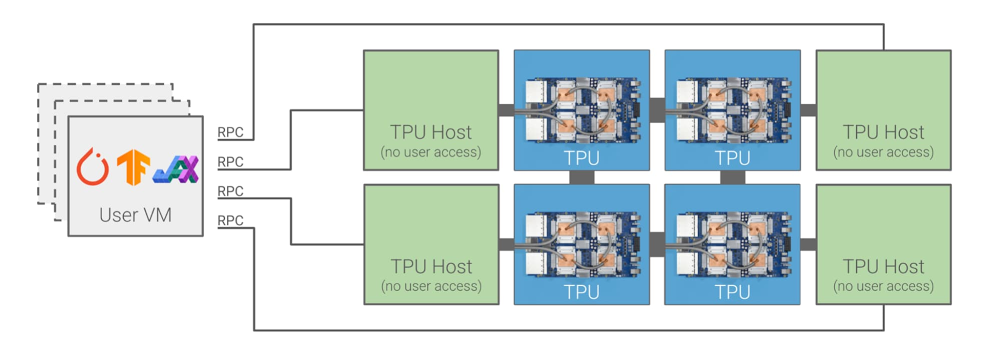
Today, we’re excited to announce new Cloud TPU VMs, which make it easier than ever before to use our industry-leading TPU hardware by providing direct access to TPU host machines, offering a new and improved user experience to develop and deploy TensorFlow, PyTorch, and JAX on Cloud TPUs. Instead of accessing Cloud TPUs remotely over the network, Cloud TPU VMs let you set up your own interactive development environment on each TPU host machine.Now you can write and debug an ML model line-by-line using a single TPU VM, then scale it up on a Cloud TPU Pod slice to take advantage of the super-fast TPU interconnect. You have root access to every TPU VM you create, so you can install and run any code you wish in a tight loop with your TPU accelerators. You can use local storage, execute custom code in your input pipelines, and more easily integrate Cloud TPUs into your research and production workflows.In addition to Cloud TPU integrations with TensorFlow, PyTorch, and JAX, and you can even write your own integrations via a new libtpu shared library on the VM. “Direct access to TPU VMs has completely changed what we’re capable of building on TPUs and has dramatically improved the developer experience and model performance.”— Aidan Gomez, co-founder and CEO, CohereA closer look at the new Cloud TPU architectureUntil now, you could only access Cloud TPUs remotely. You would typically create one or more VMs that would then communicate with Cloud TPU host machines over the network using gRPC:By contrast, Cloud TPU VMs run on the TPU host machines that are directly attached to TPU accelerators, as shown below:This new Cloud TPU system architecture is simpler and more flexible. In addition to major usability benefits, you may also achieve performance gains because your code no longer needs to make round trips across the datacenter network to reach the TPUs. Furthermore, you may also see significant cost savings: If you previously needed a fleet of powerful Compute Engine VMs to feed data to remote hosts in a Cloud TPU Pod slice, you can now run that data processing directly on the Cloud TPU hosts and eliminate the need for the additional Compute Engine VMs.What customers are sayingEarly access customers have been using Cloud TPU VMs since last October, and several teams of researchers and engineers have used them intensively since then. Here’s what they have to say:Alex Barron is a Lead Machine Learning Engineer at Gridspace. Gridspace provides an out-of-the-box product for observing, analyzing and automating 100% of voice calls in real time. The company’s software powers voice operations at USAA, Bloomberg and Square, among other leading companies.“At Gridspace we’ve been using JAX and Cloud TPU VMs to train massive speech and language models. These models power advanced analytics and automation capabilities inside our largest contact center customers. We saw an immediate 2x speed up over the previous Cloud TPU offering for training runs on the same size TPU and were able to scale to a 32-host v3-256 with no code changes. We’ve been incredibly satisfied with the power and ease of use of Cloud TPU VMs and we look forward to continuing to use them in the future.”— Alex BarronJames Townsend is a researcher at the UCL Queen Square Institute of Neurology in London. His team has been using JAX on Cloud TPU VMs to apply deep learning to medical imaging.“Google Cloud TPU VMs enabled us to radically scale up our research with minimal implementation complexity. There is a low-friction pathway, from implementing a model and debugging on a single TPU device, up to multi-device and multi-host (pod scale) training. This ease-of-use, at this scale, is unique, and is a game changer for us in terms of research possibilities. I’m really excited to see the impact this work can have.”— James TownsendPatrick von Platen is a Research Engineer at Hugging Face. Hugging Face is an open-source provider of natural language processing (NLP) technologies and creator of the popular Transformers library. With Hugging Face, researchers and engineers can leverage state-of-the-art NLP models with just a couple lines of code.”At Hugging Face we’ve recently integrated JAX alongside TensorFlow and PyTorch into our Transformers library. This has enabled the NLP community to efficiently train popular NLP models, such as BERT, on Cloud TPU VMs. Using a single v3-8, it is now possible to pre-train a base-sized BERT model in less than a day using a batch size of up to 2048. At Hugging Face, we believe that providing easy access to Cloud TPU VMs will make pre-training of large language models possible for a much wider spectrum of the NLP community, including small start-ups as well as educational institutions.”— Patrick von PlatenBen Wang is an independent researcher who works on Transformer-based models for language and multimodal applications. He has published open-source code for training large-scale transformers on Cloud TPU VMs and for orchestrating training over several Cloud TPU VMs with Ray.“JAX on Cloud TPU VMs enables high-performance direct access to TPUs along with the flexibility to build unconventional training setups, such as pipeline parallel training across preemptible TPU pod slices using Ray.”— Ben WangKeno Fischer is a core developer of the Julia programming language and co-founder of Julia Computing, where he leads a team applying machine learning to scientific modeling and simulation. He is the author of significant parts of the Julia compiler, including Julia’s original TPU backend.“The new TPU VM offering is a massive step forward for the usability of TPUs on the cloud. By being able to take direct advantage of the TPU hardware, we are no longer limited by the bandwidth and latency constraints of an intermediate network connection. This is of critical importance in our work where machine learning models are often directly coupled to scientific simulations running on the host machine.” — Keno Fischer The Julia team is working on a second-generation Cloud TPU integration using the new libtpu shared library. Please sign up here to receive updates.And finally, Shrestha Basu Mallick is a Product Manager on the Sandbox@Alphabet team, which has successfully adapted TPUs for classical simulations of quantum computers and to perform large-scale quantum chemistry computations. “Thanks to Google Cloud TPU VMs, and the ability to seamlessly scale from 1 to 2048 TPU cores, our team has built one of the most powerful classical simulators of quantum circuits. The simulator is capable of evolving a wavefunction of 40 qubits, which entails manipulating one trillion complex amplitudes! Also, TPU scalability has been key to enabling our team to perform quantum chemistry computations of huge molecules, with up to 500,000 orbitals. We are very excited about Cloud TPUs.”— Shrestha Basu MallickPricing and availabilityCloud TPU VMs are now available via preview in the us-central1 and europe-west4 regions. You can use single Cloud TPU devices as well as Cloud TPU Pod slices, and you can choose TPU v2 or TPU v3 accelerator hardware. Cloud TPU VMs are available for as little as $1.35 per hour per TPU host machine with our preemptible offerings. You can find additional pricing information here.Get started todayYou can get up and running quickly and start training ML models using JAX, PyTorch, and TensorFlow using Cloud TPUs and Cloud TPU Pods in any of our available regions. Check out our documentation to get started:JAX quickstartPyTorch quickstartTensorFlow quickstart
Quelle: Google Cloud Platform

6 businesses transforming with SAP on Google Cloud

Thousands of organizations globally rely on SAP for their most mission critical workloads. And for many Google Cloud customers, part of a broader digital transformation journey has included accelerating the migration of these essential SAP workloads to Google Cloud. These customers seek greater agility, elasticity, and uptime on a truly flexible cloud that includes the benefits of cutting edge AI, ML, and analytics capabilities. It’s why we’ve worked hard to bring our customers a wealth of options to fit their needs, including SAP-certified hardware options and Google Cloud for SAP RISE. We’ve also helped them understand the economic advantages of SAP on Google Cloud, including the significant migration assistance and incentives that are part of our Cloud Acceleration Program. Below, we’ve shared just a few examples of customers that have chosen Google Cloud to run their SAP workloads, and the benefits they’re seeing.Southwire: More stability, less worry with SAP on Google CloudFollowing a December 2019 ransomware event and the COVID-19 pandemic that began in spring of 2020, Southwire was preparing for an overhaul of their SAP ECC environment to take advantage of the latest functionality available for this critical ERP system. They also aimed to deploy SAP Business Warehouse on SAP HANA to accelerate vital reporting for all business users, and the company wanted to upgrade to the latest version of SAP Process Orchestration—an essential component that touches key manufacturing interfaces in all Southwire facilities. Southwire had looked at multiple options for the upgrades, including remaining entirely on-premises and colocation, but ultimately decided to migrate to Google Cloud. “We wanted to be on a platform for SAP that was flexible, scalable, and secure; that we could count on to get up and running quickly,” says Dan Stuart, Senior Vice President of IT Services. “We chose Google Cloud not only for those reasons, but also because we recognize that Google has other assets that we may be able to take advantage of down the line, such as technologies like artificial intelligence (AI).” Read more.Related ArticleSouthwire powers digital transformation with its SAP cloud migrationSouthwire migrated its SAP environment to Google Cloud for flexibility, scalability, and security, and for the potential to take advantag…Read ArticlePega: Optimizing business operations with SAP on Google CloudFor Pegasystems, a leading provider of cloud software for customer engagement and intelligent automation, it’s important to maintain smooth operations at all times. This includes getting the best performance from its SAP applications. But with its core SAP systems in a traditional data center, the IT department found it was spending too much time on day-to-day maintenance and less on strategic projects that generated value for the company. In 2020, Pega chose to deploy its SAP environment, including SAP ERP Central Component (ECC) and SAP HANA data warehousing, to Google Cloud. The move has helped Pega overcome many of the challenges it faced with the previous deployment. It also made Pega’s SAP systems more reliable and offered powerful new data capabilities to support the business in making the right decisions. Read more.Related ArticlePega: Optimizing business operations with SAP on Google CloudPegasystems deployed its SAP environment to Google Cloud to make its systems more reliable and take advantage of powerful new data capabi…Read ArticleCasa dos Ventos: Advancing its sustainability mission with SAP S/4HANA on Google CloudCasa dos Ventos has been on a path of steady growth—the company now represents about 30% of all wind farms in operation or under construction in Brazil. But growth on this scale generates more than energy: It produces vast amounts of data that needs to be processed and analyzed consistently to study wind behavior, control turbines, and forecast power production and climate, to name just a few examples. With the company’s continued expansion, it became clear that its on-premises infrastructure no longer had the capacity to process, orchestrate, and analyze such massive amounts of data. To keep pace with its growing number of projects, the company needed a solution that would centralize its workflows while providing scalability and flexibility. As a result, it decided to adopt SAP as a business-management solution and host its SAP S/4HANA environment on Google Cloud. When the migration was complete, the time needed to predict the amount of energy generated by a specific project went from 15 days to just one day. Thanks to the new cloud infrastructure and scalable services, the company was also able to process 20 years of data in less than two hours during its weekly data processes. Read more.Related ArticleCasa dos Ventos advances sustainability mission with SAP S/4HANA on Google CloudThanks to its new cloud infrastructure and scalable services with Google Cloud, Casa dos Ventos was also able to process 20 years of data…Read ArticleFFF Enterprises: 7x performance with SAP on Google CloudWhen there’s a patient waiting for a product at the end of each transaction, there’s far more at stake than just the performance of your ERP system. That’s why FFF Enterprises, Inc. (FFF)—a leading supplier of critical and preventive care medications including the essential medications that help to reduce the effects of COVID-19—chose to migrate its core SAP enterprise applications to Google Cloud. “We’re 100% dependent on the ERP system,” says Brian Wemple, SAP Technical Manager at FFF. “It runs the business by integrating with our e-commerce systems; our pick, pack and ship; and our business intelligence. It has to be always available and always accurate.” After running SAP on legacy infrastructure for some time and experiencing core switch outages, server outages, multiprotocol label switching (MPLS) edge router outages, and other issues, FFF knew it needed to revisit its technology infrastructure. “We’ve experienced an 80% improvement in the speed of our SAP environment at a lower monthly cost than we saw with our previous provider,” Wemple says about the migration to Google Cloud. “Our SAP applications are so much more reliable than they were previously. We’ve had no outages since we’ve gone live—that’s just a perfect situation for us.” Read more.Related ArticleHealthcare distributor FFF Enterprises improves performance 7x with SAP on Google CloudFFF Enterprises has seen an 80% improvement in the speed of its SAP environment at a lower monthly cost on Google Cloud.Read ArticleRodan + Fields: Achieving business continuity for retail workloadsSince its founding in 2002, Rodan + Fields, one of the leading skincare brands in the U.S., has been delighting customers worldwide with its innovative product portfolio. Recently, however, after taking stock of its pre-existing IT infrastructure, Rodan + Fields realized it needed a more modern, scalable solution—one that could keep pace with the company’s growth while simplifying management of critical SAP workloads and delivering access to cutting-edge IT services. Ensuring business continuity was a top priority driving the company’s move to Google Cloud. Rodan + Fields needed an infrastructure solution that would protect against unpredictable, potentially catastrophic business disruptions, such as user error, malicious activities, natural disasters.By shifting its SAP workloads to Google Cloud, Rodan + Fields is enjoying the benefits of modern, scalable infrastructure, while also protecting its business with a robust business continuity strategy. To support a peak in user access, Rodan + Fields was able to scale Hybris infrastructure by 10X in 10 minutes, supporting millions in additional revenue. In addition, as of the date of this blog publication, Rodan + Fields has experienced zero unplanned ERP outages in the year since the company migrated to running production on Google Cloud. Read more.Related ArticleRodan + Fields achieve business continuity for retail workloads with SAP on Google CloudLearn how Rodan + Fields designed and implemented a cloud-native, automated resilience strategy for their SAP workloads on Google Cloud.Read ArticleRémy Cointreau: Driving customer centricity with SAP on Google CloudImagine the challenge of supply chain planning and meeting changing consumer needs when you have products that can take up to one-hundred years to produce. That’s the case for Rémy Cointreau, a family-owned maker of fine spirits whose roots go back to 1724. With rapidly evolving consumer expectations and heavy competition from premium beverage brands, Rémy Cointreau set out on a strategy to put the customer at the center of their business. To make this a reality, Rémy Cointreau realized all elements of its business would need to be more agile. It needed more flexibility in its SAP systems, which drive Finance, Manufacturing and Supply Chain, and easy access to valuable SAP system data for business decision making and innovative customer approaches. Working with long-time partner oXya, Rémy Cointreau unified to one SAP system and migrated to S/4HANA on Google Cloud. While the environment is still new, Rémy Cointreau already sees big steps towards greater agility with Google Cloud. For instance, Google Cloud makes it much faster and easier to adjust the technical operating environment. If a team wants to start performing a new resource-heavy analysis, Rémy Cointreau can expand capacity to meet demands within minutes. The team can also roll back capacity so that it is only using the resources it needs. Read more.Related ArticleRémy Cointreau drives customer centricity with SAP on Google CloudRémy Cointreau moved to Google Cloud to gain flexibility in its SAP systems and gain easy access to valuable data for business decision m…Read ArticleGoogle Cloud is a great place to run SAPAs SAP customers begin and continue their cloud journeys, Google Cloud is committed to being there to simplify and optimize their move and ensure they have ready access to critical cloud-native technologies. To see more work that we’ve done with SAP and SAP customers, visit our solution site, and check out our customer video testimonials.Related ArticleCloud Acceleration Program: More reasons for SAP customers to migrate to Google CloudCloud Acceleration Program (CAP) offers solutions from both Google Cloud and partners to simplify cloud migrations. Here’s what customers…Read Article
Quelle: Google Cloud Platform

Anthos 101 learning series: All the videos in one place

Do you need to develop, run and secure applications across your hybrid and multicloud environments? Look no further than Anthos, our managed application platform that extends Google Cloud services and engineering practices to your environments so you can modernize apps faster and establish operational consistency across them. To help you get started, we created the Anthos 101 video learning series. It’s a great starting point for understanding the basics of Anthos—and you can watch the whole series in less than an hour.Let’s dive in.1. What is Anthos?Discover what Anthos is and how it helps enterprises manage their applications. You’ll learn about the different tools Anthos offers—like the ability to create environs and platform administrators—to help you modernize and manage your application infrastructure.2. How to get started with Anthos on Google CloudReady to get started with Anthos? In this lesson, you’ll create your own Anthos deployment. You’ll learn about the different tools on the Anthos dashboard—like the Service Mesh card and Cluster Status cards—plus how to deploy and alter Google Kubernetes Engine (GKE) clusters and Anthos Service mesh via Google Compute Engine.3. How to modernize and run Windows apps in AnthosRunning a Windows application that’s in need of modernization? In this lesson, you’ll discover how you can create and deploy a Windows-based application on Anthos, allowing you to modernize existing workloads and manage your application seamlessly. You’ll even learn to do this without requiring access to source code, re-writing, or re-architecting your existing application.4. How to build modern CI/CD with AnthosContinuous integration? Continuous delivery? These are two things that developers need to think about with container adoption for hybrid or multicloud environments. Learn how Anthos helps you increase your development velocity without compromising the security of your application.5. How to adopt a multi-cluster strategy for your applications in AnthosThere are a number of use cases that might require a multi-cluster strategy, such as maintaining multiple clusters on the cloud and in your own data center. In this lesson, learn the different tools that Anthos offers—such as GKE, Anthos Config Management, and Anthos Service Mesh—to help deploy and manage multiple clusters.6. How to improve observability using golden signals in AnthosObservability is important in application development, but without the right tools monitoring your services can be time consuming. In this episode, learn more how Anthos Service Mesh can help you monitor and manage the four Golden Signals—latency, traffic, errors, and saturation—for your application.7. How to modernize legacy Java apps with AnthosLooking to modernize legacy Java applications? In this lesson, you’ll learn the three categories of Java applications and their unique paths for modernization via Anthos. This can help you reduce your dependency on high-cost proprietary software, decrease operational overhead, and increase software delivery speed.8. How to apply a zero trust model for your deployments using AnthosIt’s time to rethink traditional security models when it comes to network observability and consistency for IAM permissions. In this lesson, learn how you can adopt a zero trust posture with Anthos. This allows you to better secure your network, detect underlying network compromises, and ensure workloads are secure before deployment.9. How to go beyond business continuity with AnthosSometimes a business continuity plan that only covers traditional backup and disaster recovery methods simply isn’t enough. In this lesson, learn how Anthos helps resolve issues like data redundancy, scaling without code changes, implementing measurable SLOs, and much more. You’ll also discover how Anthos can help you manage your application beyond the confines of traditional backup and disaster recovery approaches.10. How to simplify identity with AnthosManaging identities across hybrid and multicloud environments can be troublesome and hard to keep track of. Luckily, Anthos is capable of simplifying identity management for users and workloads. In this lesson, you’ll learn how Anthos can extend and enable existing capabilities, while allowing you to manage IAM permissions across multiple Anthos and GKE environments.11. How to optimize costs with AnthosLearn how you can optimize costs with Anthos through greater observability, improving existing operations, and many other practices.Keep learningThis is just a starting point for learning about Anthos. To deepen your knowledge, check out our free on-demand training: Getting started with Anthos. Or, you can download our Anthos Under the Hood ebook, or get hands-on right now with the Anthos sandbox.Related ArticleHow does Anthos simplify hybrid & multicloud deployments?If you’re an enterprise, chances are you have networking, storage, and compute on multiple clouds and in your own data center. How can yo…Read Article
Quelle: Google Cloud Platform
Never miss a tapeout: Faster chip design with Google Cloud

Cloud offers a proven way to accelerate end-to-end chip design flows. In a previous blog, we demonstrated the inherent elasticity of the cloud, showcasing how front-end simulation workloads can scale with access to more compute resources. Another benefit of the cloud is access to a powerful, modern and global infrastructure. On-prem environments do a fantastic job of meeting sustained demand but Electronic Design Automation (EDA) tooling upgrades happen much more frequently (every six to nine months) than typical on-prem data center infrastructure upgrades (every three to five years). What this means is that your EDA tool can provide much better performance if given access to the right infrastructure. This is especially useful in certain phases of the design process.Take for example, a physical verification workload. Physical verification is typically the last step in the chip design process. In simplified terms, the process consists of verifying design rule checks (or DRCs) against the process design kit (PDK) provided by the foundry. It ensures that the layout produced from the physical synthesis process is ready for handoff to a foundry (in-house or otherwise) for manufacturing. Physical verification workloads tend to require machines with large memories (1TB+) for advanced nodes. Having access to such compute resources enables more physical verification to run in parallel, increasing your confidence in the design that is being taped out (i.e., sent to manufacturing).At the other end of the spectrum are functional verification workloads. Unlike the physical verification process described above, functional verification is normally performed in the early stages of design and typically requires machines with much less memory. Furthermore, functional verification (dynamic verification in particular) accounts for the most time (translating directly to the availability of compute) in the design cycle. Verifying faster, an ambition for most design teams, is often tied to availability of right-sized compute resources. The intermittent and varied infrastructure requirements for verification (both functional and physical) can be a problem for organizations with on-prem data centers. On-prem data centers are optimized for maximizing utilization—this does not directly address access to right-sized compute to deliver the best tool performance. Even if the IT and Computer Aided Design (CAD) departments choose to provision additional suitable hardware, the process of provisioning, acquiring and setting up new hardware on-prem typically takes months for even the most modern organizations. A “hybrid” flow that enables use of on-prem clusters most of the time, but provides seamless access to cloud resources as needed would be ideal.Hybrid chip design in actionYou can improve a typical verification workflow simply by utilizing a hybrid environment that provides instantaneous access to better compute. To illustrate, we chose a front-end simulation workflow, and designed an environment that replicates on-prem and cloud clusters. We also took a few more liberties to simplify the environment (described below). The simplified setup is provided in a GitHub repository for you to try out.In any hybrid chip design flow, there are a few key considerations:Connectivity between on-prem infrastructure and the cloud: Establishing connectivity to the cloud is one of the most foundational aspects of the flow. Over the years, this has also become a very well-understood field, and secure, high availability connectivity is a reality in most setups. In our tutorial, we represent both on-prem and cloud clusters as two different networks in the cloud where all traffic is allowed to pass between these networks. While this is not a real-world network configuration, it is sufficient to demonstrate the basic connectivity model.Connection to license server: Most chip design flows utilize tools from EDA vendors. Such tools are typically licensed, and you need a license server with valid licenses to operate the tool. License servers may remain on-prem in the hybrid flow, so long as latency to the license server is acceptable. You can also install license servers in the cloud on a Compute Engine VM (particularly sole-tenant nodes) for lower latency. Check with your EDA vendors to understand if you can rehost your license services in the cloud.In our tutorial, we use an open source tool (Icarus Verilog Simulator) and therefore, do not need a license server.Identifying data sources and syncing data: There are three important aspects in running EDA jobs: the EDA tools themselves, the infrastructure where the tools run, and the data sources for the tool run. Tools don’t change much, and can be installed on cloud infrastructure. Data sources, on the other hand, are primarily created on-prem and updated regularly. These could be SystemVerilog files that describe the design, the testbenches or the layout files. It is important to sync data between on-prem and cloud to maintain parity. Furthermore, in production environments, it’s also important to maintain a high-performance syncing mechanism.In our tutorial, we create a file system hierarchy in the cloud that is similar to one you’d find on-prem. We transfer the latest input files before invoking the tool.Workload scheduler configuration and job submission transparency: Most environments that leverage batch jobs use job schedulers to access a compute farm. An ideal environment finds the balance between cost and performance, and builds parameters in the system to enable predictive (and prescriptive) wrappers to job schedulers (see picture below).In our tutorial, we use the open-source SLURM job scheduler and an auto-scaling cluster. For simplicity, the tutorial does not include a job submission agent.Other cloud-native batch processing environments such as Cloud Run can also provide further options for workload management.Our on-prem network is called ‘onprem’ and the cloud cluster is called ‘burst’. Characteristics of the on-prem and burst clusters are specified below:Once set up, we ran the OpenPiton regression for single and two-tile configurations. You can see the results below:Regressions run on “burst” clusters were on average 30% faster than on “onprem”, delivering faster verification sign-off and physical verification turnaround times. You can find details about the commands we used in the repository. Hybrid solutions for faster time to marketOf course, on-prem data centers will continue to play a pivotal role in chip design. However, things have changed. Cloud-based, high performance compute has proved itself to be a viable and proven technology for extending on-prem data centers during the chip design process. Companies that successfully leverage hybrid chip design flows will be able to better address the fluctuating needs of their engineering teams. To learn more about silicon design on Google Cloud, read our whitepaper “Using Google Cloud to accelerate your chip design process”.Related ArticleScale your EDA flows: How Google Cloud enables faster verificationGoogle Cloud compute infrastructure can speed up HPC workloads such as EDA.Read Article
Quelle: Google Cloud Platform
Analyze your logs easier with log field analytics

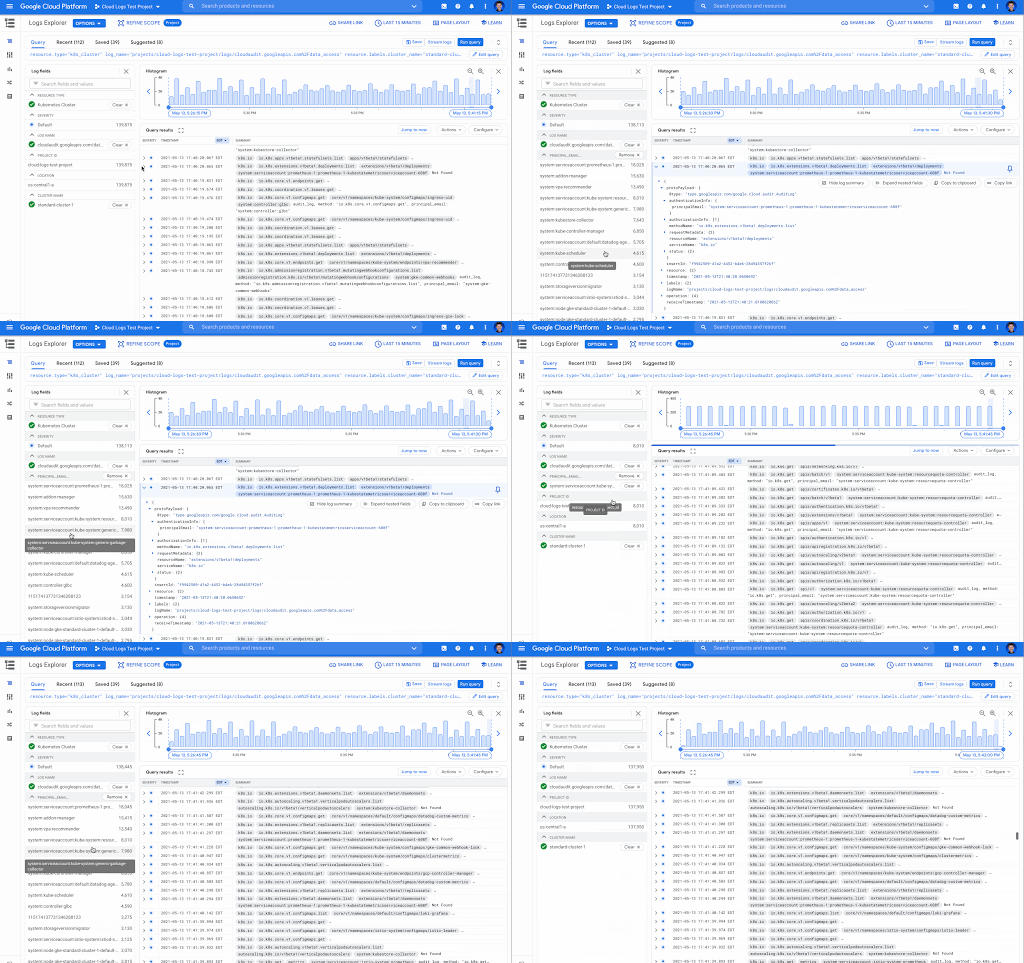
We know that developers or operators troubleshooting applications and systems have a lot of data to sort through while getting to the root cause of issues. Often there are fields like error response codes that are critical for finding answers and resolving those issues. Today, we’re proud to announce log field analytics in Cloud Logging, a new way to search, filter and understand the structure of your logs so you can find answers faster and easier than ever before.Log field analyticsLast year we launched Logs Explorer to make it faster to find and analyze your logs, with features like the Log fields pane and the histogram, as well as saved and shared queries. In Logs Explorer, the Log fields pane and histogram both provide useful information to help analyze your logs. With the Log fields pane, each resource type, which maps to a specific Google Cloud service like BigQuery or Google Kubernetes Engine (GKE), includes a set of default fields and values found in the logs loaded in Logs Explorer. The Log fields pane includes the name of the log field, a list of values and an aggregated count of the number of logs that fall in that category. Let’s look at these key terms more closely: a log field – These are the specific fields in your logs. All logs in Cloud Logging use the LogEntry message format. For example, the logName field is present in all logs in Cloud Logging. When you write logs, you also include textPayload, jsonPayload or protoPayload fields such as jsonPayload.http_req_status.a log field value –  The value of a specific log field. For example, for a log entry with the jsonPayload.http_req_status field, some example values could be a “200”, “404” or “500”.Now you can gain insight into the full list of values for selected log fields and a count of how many logs match the value with log field analytics. You can analyze application or system logs using fields in the jsonPayload or protoPayloads of your log entries and then easily refine your query by selecting the field values to drill down into the matching logs. A view of the Logs fields pane in Cloud LoggingBetter troubleshooting by analyzing log valuesLog field analytics make it easy to quickly spot unexpected values. By adding a field to the Log fields pane, you can view all values that appear in logs and then select any of the values to filter the logs by those values. In this example ecommerce application, we’ve added the jsonPayload.http_req_path field, and now it is possible to look at the request paths over time. In the screenshot below, it’s easy to see that there are several unexpected values that would indicate a problem such as “/products/error” and “products/incorrectproduct”. Next to those values are the aggregated number of matching log entries. These values can help you narrow your troubleshooting or analysis. Aggregated Logs field showing number of entries for each http_req_path log value (notice /products/error and /products/incorrectproduct)Filter using field values The field value selection in the Log fields pane can be used to refine your query so you can see just the logs that contain the selected value. In our example above using the jsonPayload.http_req_path field, it’s possible to select a specific value, “/cart” in this case, and view the logs broken down by severity. Aggregated number of logs entries for a selected http_req_path (notice /cart has been selected)Better understand your audit logsUsing log field analytics, you can easily find values in audit logs for Google Cloud services. For example, you may want to identify the accounts that are making data access requests for a particular GKE cluster. If you add the protoPayload.authenticationInfo.principalEmail field as a custom field to the Log fields pane, you get both a list of the accounts making the requests and the number of log entries for each of the account values.The Log fields pane displaying the number of log entries for each principalEmail valueGet started todayLog field analytics, Log fields, and the Histogram are features that we’ve recently added to Logs Explorer and they’re ready for you to get started with today. But we’re not stopping there! Please join us in our discussion forum for more information about what is coming next and to provide feedback on your experiences using Cloud Logging.If you would like to learn more about Cloud Logging, you can also visit our qwiklab quest for a guided walk through of the capabilities.Related ArticleTroubleshooting your apps with Cloud Logging just got a lot easierLearn how to use the Logs Explorer feature in Cloud Logging to troubleshoot your applicationsRead Article
Quelle: Google Cloud Platform
The State & Local Government tech tightrope: Balancing COVID-19 impacts and the road ahead

State and local government (SLG) agencies are reeling from a combination of unbudgeted COVID-related expenses and reduced tax revenue caused by unemployment and business closures. Any way you look at it, the situation is challenging. To understand how SLG agencies are coping, Google Cloud collaborated with MeriTalk to survey 200 SLG IT and program managers, uncovering some revealing trends in SLG technology innovation. Unsurprisingly,approximately 84% of SLG organizations report making budgetary tradeoffs to bridge funding the gaps the ongoing pandemic has created. However, researchers discovered a silver lining: The pandemic has also been a catalyst to modernize the legacy infrastructure in states and cities. The majority of survey respondents (88%) reported that their agency made greater modernization progress this past year than in the prior 10 years.Walking a tightrope between innovation and budget pressureAccording to 89% of state and local leaders, now is the time to invest in technology modernization. But 80% are experiencing a funding gap due to unbudgeted expenses related to the pandemic and declining tax revenue, which makes finding that balance between innovation and budget a serious challenge.Some agencies are achieving the impossible, though. For example, theCity of Pittsburgh Department of Innovation and Performance is working with Google Cloud to migrate  and modernize its legacy IT infrastructure. By decommissioning their data center and moving to Google Cloud, the city can build new data analytics tools to drive smart city initiatives and create entirely new applications to improve digital service delivery for its residents. As a result, the city will save costs, abandon its brittle legacy IT structure, and create a cloud-based technology platform for the future—becoming the region’s leader in cloud-native software development.Google Cloud is enabling the city’s IT team by curating and delivering our certification training at no cost. The program includes live training sessions as well as on-demand training. Bridging funding gapsIn their drive to modernization, many SLG leaders are turning to grants as an important source of funding. Approximately 84% of those surveyed report making tradeoffs to bridge funding gaps, such as moving resources away from operations and maintenance (37%), increasing reliance on pandemic-related funding (31%), and delaying internal modernization efforts to enable remote work for employees (29%). One way that states are dealing with this tension between budget gaps and the need for innovation is to turn to Google Cloud for cost savings and improved capabilities.For example, Google Cloud is helping the State ofWest Virginia innovate and enhance IT security despite decreased state funding. The state entered a multi-year agreement to ensure full access to enterprise-level Google Workspace capabilities for 25,000 state employees, keeping the state at the forefront of technology advancements at a projected cost savings of $11.5 million.Similarly, Google Cloud helped build theRhode Island Virtual Career Center to help the state’s constituents get back to work. Using familiar productivity tools within Google Workspace, employees can access new career opportunities quickly, while employers can reach more candidates. Skipper, the CareerCompass RI bot, uses data and machine learning to connect Rhode Islanders with potential new career paths and reskilling opportunities.Enhancing servicesGoogle Cloud is also helping agencies enhance services, including working with the State ofIllinois to get unemployment funding to constituents in need.The state is usingContact Center AI to rapidly deploy virtual agents that help more than 1 million out of work citizens file unemployment claims faster. Capable of engaging in human-like conversations, these intelligent agents provide constituents with 24/7 access and enable government employees to focus on more complex, mission-critical tasks—such as combating fraud. In summer 2020, the virtual agents handled more than 140,000 phone and web inquiries per day, including 40,000 after-hours calls every night. The state anticipates an estimated annual savings of $100 million from the solution, which was deployed in just two weeks.Working with Google, Ohio also uncovered $2 billion in fraudulent unemployment claims. We will continue to partner with the state to find fraudulent claims, and prioritize the processing of legitimate claims. Focusing on cybersecurityDespite expanding security threats topping NASCIO’s list of 2021 State CIO priorities, more than one in three IT managers (35%) say their organization reduces security measures to expedite timelines. Partnering with Google Cloud has enabled many agencies to enhance their security measures while modernizing and staying within budget, investing in support for remote work devices, digital services for residents, and cybersecurity.NYC Cyber Command works with city agencies to ensure systems are designed, built, and operated in a highly secure manner. NYC3 followed a cloud-first strategy using the Google Cloud Platform. The virtual operations demanded by the pandemic have increased the importance of security and compliance in SLG. Google Cloud is committed to act as asecurity transformation partner and be the trusted cloud for public sector agencies. Finally, to strengthen public and private partnerships, SLG organizations told MeriTalk that they need vendor partners to support modernization efforts for flexibility and collaboration (46%), need innovation-focused leadership groups to help balance technology needs with budget constraints (41%), and they expect significant returns on investments in cloud computing (38%), and data management/analytics (33%).Google Cloud is helping SLG customers across the country invest in innovation to walk the tech tightrope—balancing innovation and budgets—and helping to build a more resilient future. Visit the State and Local Government solutions page to learn more.Related ArticleHow Cloud Technology Can Help Support Economic RecoveryAs new COVID-19 relief dollars flow into state and local budgets, agency leaders can embrace cloud technology to help deliver critical se…Read Article
Quelle: Google Cloud Platform

Integrating Eventarc and Workflows

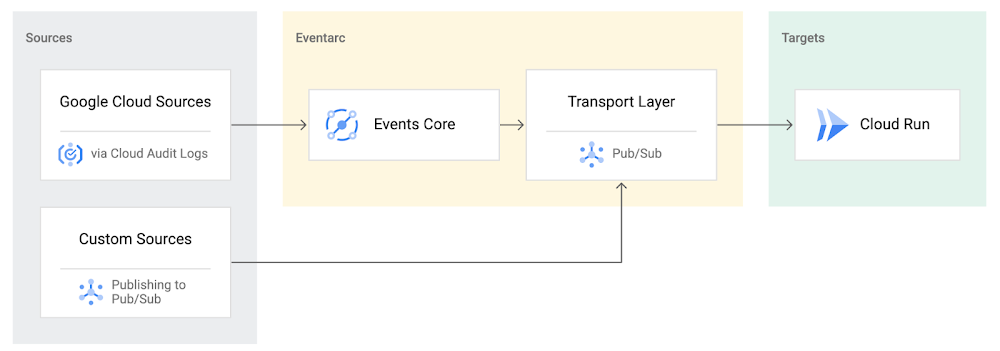
I previously talked about Eventarc for choreographed (event-driven) Cloud Run services and introduced Workflows for orchestrated services.Eventarc and Workflows are very useful in strictly choreographed or orchestrated architectures. However, you sometimes need a hybrid architecture that combines choreography and orchestration. For example, imagine a use case where a message to a Pub/Sub topic triggers an automated infrastructure workflow or where a file upload to a Cloud Storage bucket triggers an image processing workflow. In these use cases, the trigger is an event but the actual work is done as an orchestrated workflow.How do you implement these hybrid architectures in Google Cloud? The answer lies in Eventarc and Workflows integration. Eventarc triggersTo recap, an Eventarc trigger enables you to read events from Google Cloud sources via Audit Logs and custom sources via Pub/Sub and direct them to Cloud Run services:One limitation of Eventarc is that it currently only supports Cloud Run as targets. This will change in the future with more supported event targets. It’d be nice to have a future Eventarc trigger to route events from different sources to Workflows directly. In absence of such a Workflows enabled trigger today, you need to do a little bit of work to connect Eventarc to Workflows. Specifically, you need to use a Cloud Run service as a proxy in the middle to execute the workflow. Let’s take a look at a couple of concrete examples.Eventarc Pub/Sub + Workflows integrationIn the first example, imagine you want a Pub/Sub message to trigger a workflow. Define and deploy a workflowFirst, define a workflow that you want to execute. Here’s a sample workflows.yaml that simply decodes and logs the Pub/Sub message body:Deploy a Cloud Run service to execute the workflowNext, you need a Cloud Run service to execute this workflow. Workflows has an execution API and client libraries that you can use for your favorite language. Here’s an example of the execution code from a Node app.js file. It simply passes the received HTTP request headers and body to the workflow and executes it:Deploy the Cloud Run service with the Workflows name and region passed as environment variables:Connect a Pub/Sub topic to the Cloud Run serviceWith Cloud Run and Workflows connected, the next step is to connect a Pub/Sub topic to the Cloud Run service by creating an Eventarc Pub/Sub trigger:This creates a Pub/Sub topic under the covers that you can access with:Trigger the workflowNow that all the wiring is done, you can trigger the workflow by simply sending a Pub/Sub message to the topic created by Eventarc:gcloud pubsub topics publish ${TOPIC_ID} –message=”Hello there”In a few seconds, you should see the message in Workflows logs, confirming that the Pub/Sub message triggered the execution of the workflow:Eventarc Audit Log-Storage + Workflows integrationIn the second example, imagine you want a file creation event in a Cloud Storage bucket to trigger a workflow. The steps are similar to the Pub/Sub example with a few differences.Define and deploy a workflowAs an example, you can use this workflow.yaml that logs the bucket and file names:Deploy a Cloud Run service to execute the workflowIn the Cloud Run service, you read the CloudEvent from Eventarc and extract the bucket and file name in app.js using the CloudEvent SDK and the Google Event library:Executing the workflow is similar to the Pub/Sub example, except you don’t pass in the whole HTTP request but rather just the bucket and file name to the workflow:Connect Cloud Storage events to the Cloud Run serviceTo connect Cloud Storage events to the Cloud Run service, create an Eventarc Audit Logs trigger with the service and method names for Cloud Storage:Trigger the workflowFinally, you can trigger the workflow by creating and uploading a file to the bucket:In a few seconds, you should see the workflow log the bucket and object name.ConclusionIn this blog post, I showed you how to trigger a workflow with two different event types from Eventarc. It’s certainly possible to do the opposite, namely, trigger a Cloud Run service via Eventarc with a Pub/Sub message (see connector_publish_pubsub.workflows.yaml) from Workflows or a file upload to a bucket from Workflows. All the code mentioned in this blog post is in eventarc-workflows-integration. Feel free to reach out to me on Twitter @meteatamel for any questions or feedback.Related ArticleBetter service orchestration with WorkflowsWorkflows is a service to orchestrate not only Google Cloud services such as Cloud Functions and Cloud Run, but also external services.Read Article
Quelle: Google Cloud Platform

Cloud AI in the developer community

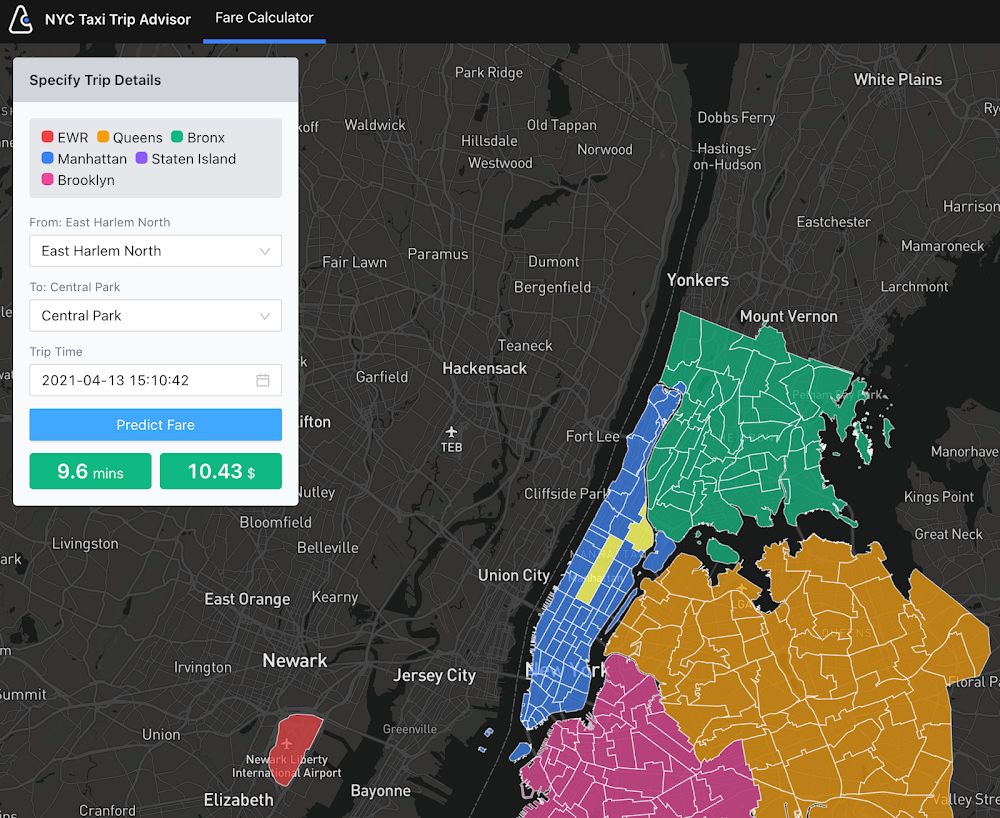
Editor’s note: This post features third party projects built with AI Platform. At Google I/O on May 18, 2021 Google Cloud announced Vertex AI, a unified UI for the entire ML workflow, which includes equivalent functionality from the AI Platform and new MLOps services. Most of the sample code and materials introduced in this post will also be applicable to Vertex AI products.Do you know Google Developers Experts (GDEs)? The GDE program is a network of highly experienced technology experts, influencers and thought leaders who are passionate in sharing their knowledge and experiences with fellow developers. Among the many GDEs specialized in various Google technologies, ML (Machine Learning) GDEs have been very active across the globe hence we would like to share some of the great demos, samples and blog posts these ML GDEs have recently published for learning Cloud AI technologies. If you are interested in becoming an ML GDE, please check the bottom of this article to apply.Try the live demo: and learn how to train and serve scikit-learn modelsVictor Dibia created a great live demo NYC Taxi Trip Advisor with Cloud AI tools. Anyone can try it out. With this demo, you can choose a starting point and destination point (e.g. from JFK Airport to Central Park) so the tool shows a predicted trip time and fare using a multitask ML model (sklearn)Live demo: NYC Taxi Trip AdvisorOn the Notebooks published on the GitHub repo, Victor explains how he designed the demo with Vertex AI Notebooks, Prediction and App Engine, including the process for downloading the training data, preprocessing, training of the ML models (Random Forest and MLP) with scikit-learn, deploying to Prediction and serving with App Engine. The repo will be improved to further fine tune the user experience and the underlying ML models (e.g. use of a bayesian prediction model that allows for principled measures of uncertainty).Systems architectureVisual sanity checks on the MLP model predictions.AutoML + Notebooks + BigQuery = a fast, quick and efficient MLMinori Matsuda published a blog post Empowering Google Cloud AI Platform Notebooks by powerful AutoML where he explains how you can integrate Vertex AI Notebooks and AutoML Tables with BigQuery by using New York City taxi trips public dataset. He says: “Combining these, we can quickly implement efficient iterations of feature engineering, modeling, evaluation, and prediction to increase the accuracy.”In the post, Minori explains how AutoML technology works, using Model Search Google published recently. “The article says the concept of model search uses greedy beam-search the multiple trainers (even try RNNs such as LSTM), tunes the depth of the layers and the connection, and eventually does ensembles. It creates a model written in TensorFlow finally”. Minori actually tries out the framework and shows how it works with a video:Model Search trial by Minori MatsudaAlso, Minori points out that one of the easiest ways to create an AutoML model from the dataset on BigQuery is to use BigQuery ML on Vertex AI Notebooks.Creating an AutoML Tables model from BigQuery ML on Vertex AI NotebooksThis is a great example of an integrated solution you can compose with the powerful platform and services on Google Cloud.Video tutorials on Google Cloud AI platform and services Srivatsan Srinivasan has been posting a great series of videos on YouTube: Artificial Intelligence on Google Cloud Platform with sample code. One of those videos features a telecom churn prediction use case where he trains a XGBoost model and deploys it to Vertex AI Prediction.This is not only a sample code, but a great online learning content. The video includes introductions to the following concepts:Google Cloud Vertex AI OverviewCreating Cloud AI Notebook InstanceDeveloping Your First ML Model on Google CloudCreating Custom Predictor for InferenceBundling Dependency for DeploymentDeploying model on Vertex AI predictionCloud StorageFeature importance with the XGBoost modelIn addition to Google cloud AI platform and AI platform prediction, the video tutorial covers:Deploying model on Google Cloud Run, App Engine and GKEBigQuery MLCloud AutoML VisionSpeech to TextMLOps on Google CloudDistributed Training in TensorFlow with AI Platform and DockerLast April, Sayak Paul posted a full-fledged content Distributed Training in TensorFlow with AI Platform & Docker. He starts with: “Operating with a Jupyter Notebook environment can get very challenging if you are working your way through large-scale training workflows as is common in deep learning.” He uses AI Platform and Docker for solving this problem by providing a training workflow that is fully managed by a secure and reliable service with high availability.Sayak says: “While developing this workflow, I considered the following aspects for services I used to develop the workflow:” The service should automatically provision and deprovision the resources we would ask it to configure allowing us to only get charged for what’s been truly consumed.The service should also be very flexible. It must not introduce too much technical debt into our existing pipelines.In this post, he explains the end-to-end processes starting from designing the data pipeline that takes images for cats and dogs and converts to TFRecord stored on Cloud Storage.Data pipeline with TensorFlowAlso, his published repository contains the all code required for implementing the workflow, with rich documentation explaining how those files are organized and packaged in a Docker container to be submitted to AI Platform Training.Dockerfile for the container packagingTraining logs on Cloud LoggingIf you are a TensorFlow user, Sayak’s post could be the best way to learn what benefit you can get from the AI Platform and how to get started with the actual sample code.SNS curation with AI Platform + GKEChansung Park’s project Curated Personal Newsletter is a great sample with an actual demo app and the source code that aims for “collecting all the posts from one’s SNS wall (including personal note/shared/retweeted), then it will send an automatically curated periodic newsletter”.The system combines AI Platform Training and Prediction with Google Kubernetes Engine for building an end-to-end MLOps pipelines for continuous training and deployment whenever a new version of data or code for a model is integrated.Systems ArchitectureAlthough the project is still in development, it is a useful example as an end-to-end ML pipeline built with various Google Cloud services. Chansung also published a great write up on MLOps in Google Cloud which also helps understanding how you can build a production ML pipeline with various Cloud AI tools. Next stepsIf you are interested in joining the community nearby you, please check Google Cloud community page and find relevant information on meetups, tutorials and discussions.If you share the same passion in sharing your Cloud AI knowledge and experiences with fellow developers and interested in joining this ML GDE network, please check the GDE Program website, watch this ML GDE Program intro video and send an email to cloudai-gde@google.com with your intro and relevant activity information. Related ArticleGoogle Cloud unveils Vertex AI, one platform, every ML tool you needGoogle Cloud launches Vertex AI, a managed platform for experimentation, versioning and deploying ML models into production.Read Article
Quelle: Google Cloud Platform

New Google Cloud innovations to unify your data cloud

Every company in every industry is on a journey to become more data-driven whether that’s providing great digital experiences to customers, or driving operational excellence through AI, or detecting hidden patterns in data to improve decision making. To help with this transformation, we are excited to announce new products and services designed to fully unify your databases, analytics and AI in an open data cloud, so that you can get the most value from your data.Here are some of our latest innovations to help your organization succeed in today’s data-driven world:  Centrally manage, monitor and govern your data across data lakes, data warehouses and data marts, and make this data securely accessible to a variety of analytics and data science tools from a single view with Dataplex. Learn more here. Move and synchronize data between heterogeneous databases, storage and applications reliably to support real-time analytics, database replication and event-driven architectures with Datastream, our serverless change data capture (CDC) and replication service, available in preview. Learn more here.Access and share valuable datasets and analytics assets (think BigQuery ML models, Looker Blocks, data quality recipes, etc.) across any organizational boundary with Analytics Hub, a fully-managed service built on BigQuery that allows you to efficiently and securely create data sharing ecosystems with governance in mind. Sign up for the Analytics Hub product preview to learn more and check out this blog post.Speed up your rate of experimentation with AI projects and accelerate time to business value with Vertex AI, our comprehensive AI platform that gives data scientists and machine learning (ML) engineers a way to simplify the process of building, training, and deploying ML models at scale. Learn more here.Multi-cloud investments with Anthos, BigQuery Omni, Looker, and our flexible data platform are helping organizations accelerate decision making regardless of their cloud strategy.Customers leading data-driven transformationEver-changing consumer expectations and increased data complexity has made business decision-making much harder. As a result, an insight gap to realize value from data continues to grow with increased data silos across the business and increased risk of security. Digital transformation leaders are digging out of this complexity and offering increased value to their customers by leveraging an open data cloud. Carrefourhad less than 5% of its apps running in the cloud in 2018. By the end of 2020, more than 25% of its applications (approximately 800!) are cloud-based. Its 700TB data lake moved from on-premise to Google Cloud in only a few months and without any service interruption and now scales to 2TB+ per day. Using BigQuery, its data scientists can access larger amounts of data and spend most of their time on model development. And Carrefour is using Looker to provide data-based insights to its suppliers to optimize the collaboration.One of the largest transportation logistics companies in North America, JB Hunt, will use Google’s data cloud to better predict outcomes, empower users, and make informed decisions. Real-time data is a cornerstone in the $1 trillion logistics industry, as customers have increased expectations for faster services and more transparency on their shipments. And Etsyhas helped its community of sellers turn their ideas into successful businesses. The company has adapted its marketplace on which creators are connected with millions of buyers. Etsy achieved scale with better search and smarter recommendations that have helped grow buyer retention and business revenue, all while improving the sustainability of its business. More data cloud innovationsIn addition to the new products above, we are excited to announce updates to BigQuery, Dataflow, Looker, and Spanner technologies. BigQuery Omni for Azure, now in preview, builds on our commitment to multi-cloud  by giving you a way to analyze data across public clouds from a single pane of glass. We believe in flexibility when it comes to analytics and this announcement, along with last year’s introduction of BigQuery Omni for AWS, helps you access and securely analyze data across Google Cloud, AWS, and Azure. Join our session Unlock Innovation and Flexibility with a MultiCloud Strategy to learn how customers like Electronic Arts are developing applications and analyzing data residing across multiple clouds with BigQuery Omni, Looker, and Apigee to innovate faster.Looker hosted on Microsoft Azure, now generally available, adds Azure to our range of hosting options. With Looker, data teams can connect to data located on the cloud (or clouds) of their choice with support for more than 60 distinct database dialects, host Looker where it makes sense for their data strategy (Google Cloud, AWS, Azure and self-hosted), and deliver data and insights to where they add the most value. Dataflow Prime brings resource utilization, radical simplicity and integrated ML to streaming ETL and continuous analytics use cases. Dataflow Prime, with innovations in vertical autoscaling, right fitting and proactive diagnostics, removes the operational toil associated with infrastructure sizing and provisioning, tuning, and debugging performance and data freshness problems. Dataflow Prime provides ML integration, an open framework and APIs and unified batch and streaming data processing for real-time applications. For more information, check out this blog post.And we’re making Cloud Spanner, our fully managed relational database that supports strong consistency and infinite scale, accessible to more customers by lowering the entry price by 90%. We’re also offering more granular instance sizing (coming soon) while providing the same scale and reliability, opening up Spanner to more workloads. In addition, BigQuery federation to Spanner is coming soon, which lets users query transactional data residing in Spanner, from BigQuery, for richer, real-time insights. And Key Visualizer, available now in public preview, provides interactive monitoring, which allows developers to quickly identify trends and usage patterns in Spanner for improved decision making. Finally, we’re announcing that Bigtable joins Firestore and Spanner with industry leading 99.999% availability SLA. For more information, check out this blog post.Lastly, BigQuery ML Anomaly Detection provides a way to more easily detect problematic data patterns for a variety of use cases, including bank fraud detection and manufacturing defect analysis.Data analytics partner ecosystem, powered by BigQuery Google Cloud has a thriving partner ecosystem for data analytics and we’re looking at new ways of celebrating those partners who are building data-driven applications and delivering new analytics services to their customers, all powered by BigQuery. Partners such as Quantum Metric, Shape Security, and Trax are leveraging processing, collection, storage, and analytics on BigQuery to solve their customer challenges for customer analytics, security, and data exchanges. Reach out to us through our Partner Advantage Program to learn more about how you can use BigQuery to power your applications. And watch keynote and strategy presentations on-demand at the Data Cloud Summit, to learn and share new ways we can all use data for good.
Quelle: Google Cloud Platform




