New Cloud Asset Inventory capabilities help assess your Google Cloud environment

Businesses that operate in complex cloud environments, large fleets, or sophisticated security operations all require visibility into their cloud assets in order to keep their teams nimble and their data secure. Cloud Asset Inventory (CAI) helps these teams understand their Google Cloud  and Anthos environments by providing complete visibility, real-time monitoring, and powerful asset analysis capabilities. Today, Cloud Asset Inventory gets four new capabilities that help you understand your environment more clearly and easily than ever before.New user interface eases asset and insight discovery Cloud Asset Inventory console preview is now publicly available for GCP and Anthos customers. This preview provides insights into your cloud footprint, history and details of resource usage with powerful filtering and search capabilities. For example, you can view your global distribution of resources and policies, how your GCE VM footprint has been changing over time, as well as full metadata and change history for all your assets. The CAI console can be filtered at the organization, folder, or project-level, so each user can view the resources they have permissions for down to project level granularity.Asset discovery and Datadog integrationA new asset list service in CAI provides quick and comprehensive asset discovery, including asset history, without needing to export the data to a storage destination. Datadog, a leading multi-cloud monitoring and security service provider, relies on deep integration with CAI for service and asset discovery. Datadog has been piloting and taking full advantage of the newly released asset list service. Datadog Product Manager, Steve Harrington, commented: “Google’s new Cloud Asset Inventory API provides us with an immensely valuable, single source of truth for determining the resources present in a given GCP environment. Along with its rich metadata, this enables us to enhance multiple aspects of our integration with GCP, including streamlined metric collection and ingestion of custom labels. We plan to continue building around Cloud Asset Inventory in the future to improve existing features, and are envisioning ways it could help us provide entirely new insights to our customers.”Answer “who can access what resources?”Determining authoritative answers to security-related questions like “Who can read data from my storage bucket that contains PII?” or “Does a terminated employee still have any remaining access to my system?” can be difficult and time consuming. This is why access management and identity certification is one of the top security priorities for enterprises running workloads in the cloud. To help alleviate this challenge, the new Policy Analyzer capability in CAI thoroughly analyzes the relationship between IAM policies and resources. The analysis includes powerful and efficient group expansion, service account impersonation, conditional access analysis, resource expansion, and more. You can even export the results to a BigQuery table or Cloud Storage bucket for further analysis and record keeping. CAI’s enhanced UI makes it even easier for you to build your own flexible queries and quickly get to a comprehensive answer.Create asset posture visibility Cloud Asset Inventory now provides seven types of Asset Insights through the Active Assist platform. These new asset insights help proactively detect anomalies within your organization’s IAM policies, which may be opportunities to improve your security posture. The insights can be aggregated at the Organization, Folder or Project level. The seven new Asset Insights include: External members in IAM policies. External users that impersonate your service accounts.External members as policy editors.External users who can view cloud storage buckets.Terminated users/groups that are still in IAM policiesIAM policies containing all users or all authenticated users.Projects with only terminated users as owners.As a Google Cloud customer you can get started and use all the recently released capabilities and features immediately; check out our documentation to see how. We’d love to hear your feedback; email us with any questions or concerns!Related ArticleKeep a better eye on your Google Cloud environmentThe fully managed metadata inventory service from Google Cloud — Cloud Asset Inventory — can help manage all your cloud assets.Read Article
Quelle: Google Cloud Platform

Introducing container-native Cloud DNS: Global DNS for Kubernetes

Kubernetes networking almost always starts with a DNS request. DNS has broad impacts on your application and cluster performance, scalability, and resilience. That is why we are excited to announce the release of container-native Cloud DNS—the native integration of Cloud DNS with Google Kubernetes Engine (GKE) to provide in-cluster Service DNS resolution with Cloud DNS, our scalable and full-featured DNS service. Several new capabilities are introduced when using Cloud DNS as the cluster DNS provider:Managed DNS that removes the need for in-cluster DNS PodsDNS resolution local to every GKE node for high throughput, horizontally scalable DNS performanceMulti-regional, cross-cluster service discovery for GKE ServicesIntegration with Google Cloud’s operations suite for DNS monitoring and loggingContainer-native Cloud DNS lowers the operational burden on the cluster administrator by obviating the need for clusters to allocate resources for managing DNS. It also scales transparently—you no longer need to worry about bottlenecks due to increased demand for name resolutions. It provides capabilities for public and private DNS resolution for GKE applications outside of the cluster. This flexibility opens up many service discovery use-cases which reduce friction introduced by cluster boundaries.Finally, existing tooling, monitoring, and logging for Cloud DNS can be extended for all DNS resolution inside GKE as well without separate monitoring systems for containers and VMs. All in all, Cloud DNS provides a highly-available, globally distributed DNS infrastructure, managed entirely by GoogleWith Cloud DNS, every new Service creates a DNS record that can be resolved locally on the GKE node using the Cloud DNS dataplane. Cloud DNS local caching and resolution ensures that DNS requests don’t need to go across the network, improving performance dramatically.Click to enlargeCluster-scope DNSWith a new mode of operation called cluster-scope DNS, each GKE cluster gets its own private DNS zone. You can only resolve Services within the scope of this DNS zone, and VMs or Pods outside the cluster have no visibility to the DNS records of that cluster. This allows GKE clusters using kube-dns to transparently migrate to Cloud DNS without having to make application changes. The records are automatically synced between Cloud DNS with the ClusterIP or Pod IPs depending on the type of Service:Click to enlargeVPC-scope DNSThanks to its global, multi-regional scale, Cloud DNS enables a new mode of operation in GKE called VPC-scope DNS. This enables GKE DNS records to be resolvable within the entire VPC for truly global, multi-cluster service discovery.With the new ability to customize the cluster DNS domain, GKE can now provide unique domains for each cluster, allowing them to be uniquely resolved from a GKE cluster in a different region, a VM that isn’t part of GKE, or even an on-premises client that has access across a VPN.Click to enlargeVPC-scope DNS creates a single service discovery domain across all your GKE clusters and clients in the network. This seamless service discovery is completely automatic and can easily be enabled on a per-cluster basis.Between global service discovery, local DNS resolution on every node, and integration with Google Cloud’s operations suite and observability, container-native Cloud DNS vastly improves the operator experience while greatly improving application performance. Give it a try today and see for yourself how much your team can benefit!Related ArticleGKE best practices: Exposing GKE applications through Ingress and ServicesWe’ll walk through the different factors you should consider when exposing applications on GKE, explain how they impact application expos…Read Article
Quelle: Google Cloud Platform

Google Cloud VMware Engine now HIPAA compliant

We are excited to announce that as of April 1, 2021, Google Cloud VMware Engineis covered under the Google Cloud Business Associate Agreement (BAA), meaning it has achieved HIPAA compliance. Healthcare organizations can now migrate and run their HIPAA-compliant VMware workloads in a fully compatible VMware Cloud Verified stack running natively in Google Cloud with Google Cloud VMware Engine, without changes or re-architecture to tools, processes, or applications.Healthcare organizations increasingly use cloud platforms to personalize patient care, analyze large datasets more effectively, enhance research and development collaboration, and share medical knowledge. Leveraging cloud platforms can also help healthcare organizations increase the privacy and security of information systems, including protected health information (PHI), and, as a result, better comply with applicable laws and regulations while reducing the burden of compliance. For PHI, the Health Insurance Portability and Accountability Act of 1996 (HIPAA) set standards in the United States to protect individually identifiable health information. HIPAA applies to health plans, most healthcare providers, and healthcare clearinghouses that manage PHI electronically, and to persons or entities that perform certain functions on their behalf. With Google Cloud, organizations can leverage solutions that enable secure, continuous patient care and data-driven clinical and operational decisions with ease, while being empowered with collaboration and productivity tools. Further, Google Cloud Platform supports HIPAA compliance. We offer HIPAA-regulated customers the same products at the same pricing that is available to all customers, unlike many other cloud providers. For healthcare organizations that leverage VMware on-premises, having a consistent, cloud-integrated platform that provides seamless access to native cloud services unlocks the opportunity to extend, migrate, and modernize healthcare IT infrastructure and applications in a fast, low-risk manner at their own pace. This is especially important for mission-critical healthcare provider workloads, where having a low-risk way to adopt the cloud is important. Google Cloud VMware Engine offers that solution. By achieving coverage under Google Cloud’s BAA, Google Cloud VMware Engine enables healthcare organizations to realize the benefits of cloud computing and stay on track with their HIPAA compliance efforts without additional complexity. This is very relevant in hybrid scenarios, where customers would like to leverage other native cloud services such as analytics and big data processing, without having to enter into multiple BAAs.Google Cloud VMware Engine offers dedicated, isolated software-defined datacenter environments with fully redundant and dedicated 100 Gbps networking that are suitable for healthcare organizations to run applications storing and processing PHI data. Customers have the ability to encrypt their virtual storage area network (vSAN) using an external key management server. Healthcare customers can run their workloads in a native VMware environment—vSphere, vCenter, vSAN, NSX-T, and HCX—while benefiting from Google Cloud’s highly performant infrastructure to meet the needs of their workloads. Customers can connect their VMware applications to native Google Cloud services such as BigQuery and artificial intelligence (AI) to derive new insights from existing data and quickly make informed decisions. Protecting against and mitigating the impact of ransomware attacks is top-of-mind for Healthcare organizations. This requires building a cyber resilience program and back-up strategy to prepare for how users can restore core systems or assets affected by a security (in this case, ransomware) incident. This is a critical function for supporting recovery timelines and lessening the impact of a cyber event so organizations can get back to operating their business.  Google Cloud VMware Engine in combination with Google Cloud first party solutions such as Actifio Go, or partner solutions such as NetApp CVO can provide an efficient way to recover incremental point-in-time backups along with on-demand provisioning of new compute to  recover both data and infrastructure from Ransomware attacks quickly and efficiently. Healthcare customers can also use Google Cloud VMware Engine as a disaster recovery (DR) target for their on-premises VMware workloads. Healthcare organizations also need a business continuity plan for their mission critical applications. When a disaster occurs, hospitals need their data protected so they can quickly get back to treating patients. It is a HIPAA requirement that healthcare organizations must be able to recover from a natural disaster. Google Cloud VMware Engine offers a like-for-like cost-effective DR target for these customers. The DR environment can be operated without new training using the same tools as their on-premises deployment. Google Cloud VMware Engine is currently available in 12 regions across the globe including three regions in the US, which means our regional and multi-national customers can take advantage of this service for geographic diversification as well. If you are interested in understanding more and taking advantage of Google Cloud VMware Engine, contact your Google sales team now.For details, see HIPAA compliance on Google Cloud Platform.Note: This post has been contributed to by Manish Lohani, Product Management, Google Cloud and Wade Holmes, Solution Management, Google CloudRelated ArticleNew in Google Cloud VMware Engine: improved reach, networking and scaleThe latest version of Google Cloud VMware Engine is chock full of new features and integrations, including enhanced networking capabilities.Read Article
Quelle: Google Cloud Platform
How BIG is Cloud Bigtable?

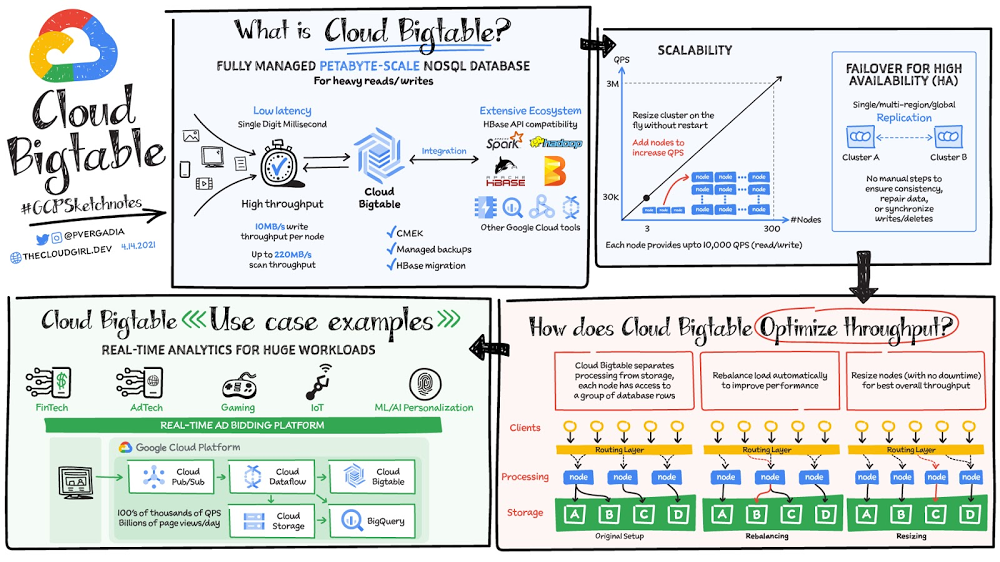
“Building an application that needs low latency and high throughput?”—You need a database that can scale for a large number of reads and writes. Cloud Bigtable is designed to handle just that. Cloud Bigtable is a fully managed wide-column NoSQL database that scales to petabyte-scale. It’s optimized for low latency, large numbers of reads and writes, and maintaining performance at scale. It offers really low latency of the order of single-digit milliseconds. It is an ideal data source for time series and MapReduce-style operations. Bigtable supports the open-source HBase API standard to easily integrate with the Apache ecosystem including HBase, Beam, Hadoop and Spark. It also integrates with Google Cloud ecosystem including Memorystore, BigQuery, Dataproc, Dataflow and more. Click to enlargeSome Cloud Bigtable FeaturesData is by default encrypted with Google managed encryption keys but, for specific compliance and regulatory requirements if customers need to manage their own keys, customer managed encryption keys (CMEK) are also supported.Bigtable backups let you save a copy of a table’s schema and data, then restore from the backup to a new table at a later time. Backups can help you recover from application-level data corruption or from operator errors such as accidentally deleting a table.Scale and High Availability (HA)How BIG is Bigtable? Overall,  Bigtable has nearly 10 Exabytes of data under management. It delivers highly predictable performance that is linearly scalable. Throughput can be adjusted by adding/removing nodes — each node provides up to 10,000 operations per second (read and write). You can use Bigtable as the storage engine for large-scale, low-latency applications as well as throughput-intensive data processing and analytics. It offers high availability with an SLA of 99.5% for zonal instances. It’s strongly consistent in a single cluster; replication between clusters adds eventual consistency. If you leverage Bigtable’s multi cluster routing across two clusters, the  SLA increases to 99.99% and if that routing policy is utilized across clusters in 3 different regions you get a 99.999% uptime SLA.Replication for Cloud Bigtable enables you to increase the availability and durability of your data by copying it across multiple regions or multiple zones within the same region. To use replication in a Bigtable instance, just create an instance with more than 1 cluster or add clusters to an existing instance. Bigtable supports up to 4 replicated clusters located in Google Cloud zones where Bigtable is available. Placing clusters in different zones or regions enables you to access your data even if one zone or region becomes unavailable. Bigtable treats each cluster in your instance as a primary cluster, so you can perform reads and writes in each cluster. You can also set up your instance so that requests from different types of applications are routed to different clusters. The data and changes to data are synchronized automatically across clusters. How does it optimize throughputThrough separation of processing and storage, Cloud Bigtable is able to automatically configure throughput by adjusting the association of nodes and data. In the rebalancing example, if Node A is experiencing a heavy load, the routing layer can move some of the traffic to a less heavily loaded node, improving overall performance. Resizing comes into play when a node is added to again ensure a balanced load across nodes, ensuring best overall throughput.Click to enlargeChoice of app profile and traffic routing can also affect performance. An app profile with multi-cluster routing automatically routes requests to the closest cluster in an instance from the perspective of the application, and the writes are then replicated to the other clusters in the instance. This automatic choice of the shortest distance results in the lowest possible latency. An app profile that uses single-cluster routing can be optimal for certain use cases, like separating workloads or to have read-after-write semantics on a single cluster, but it will not reduce latency in the way multi-cluster routing does.Replication can improve read throughput, especially when you use multi-cluster routing. And it can reduce read latency by placing your data geographically closer to your users.  Write throughput does not increase with replication because write to one cluster must be replicated to all other clusters in the instance. Resulting in each cluster spending the CPU resources to pull changes from the other clusters.ConclusionBigtable is a database of choice for use cases that require a specific amount of  scale or throughput with strict latency requirements, such as IoT, AdTech, FinTech, gaming and ML based personalizations. You can ingest 100s of thousands of events per second from websites or IoT devices through Pub/Sub, process them in Dataflow and send them to Cloud Bigtable. For a more in-depth look into Cloud Bigtable check out the documentation or join the upcoming webinar with our experts Build high-throughput, low-latency apps with Cloud Bigtable.For more #GCPSketchnote, follow the GitHub repo. For similar cloud content follow me on Twitter @pvergadia and keep an eye out on thecloudgirl.dev.Related ArticleBigtable vs. BigQuery: What’s the difference?Bigtable vs BigQuery? What’s the difference? In this blog, you’ll get a side-by-side view of Google BigQuery and Google Cloud Bigtable.Read Article
Quelle: Google Cloud Platform

Intro to Kf: Cloud Foundry apps on Kubernetes

While many companies are writing brand-new Kubernetes-based applications, it’s still quite common to find companies who want to migrate existing workloads. A common source platform for these applications is Cloud Foundry. However, getting an existing Cloud Foundry application running on Kubernetes can be non-trivial, especially if you want to avoid making code changes in your applications, or taking on big process changes across teams. That is, if you’re not using Kf to do a lot of that heavy lifting for you. Kf is a Google Cloud service that allows you to easily move existing Cloud Foundry workloads to Kubernetes with minimal disruption to your existing processes. Kf features a command line interface (CLI) also named kf, that replaces the existing Cloud Foundry cf command line utility. The kf CLI implements the most commonly used cf functionality, including the ability to manage bindings, services, apps, routes and more. For example, to deploy an existing application you would simply issue the kf push command. On the server side Kf is built on several open source technologies. In some cases these technologies are also the Google Cloud implementation. For instance GKE is our managed Kubernetes offering,  and provides the platform for managing and running the applications. Routing and ingress is handled by Anthos Service Mesh, Google Cloud’s managed Istio-based service mesh. Finally, Tekton provides on-cluster build functionality for Kf. Developers don’t have to worry about any of those technologies, as Kf abstracts them away.Kf primitives such as spaces, bindings and services are implemented as custom Kubernetes resources and controllers. The custom resources effectively serve as the Kf API and are used by the kf CLI to interact with the system. The controllers use Kf’s CRDs to orchestrate the other components in the system.The beauty of this approach is that developers who are familiar with existing workflows can largely replicate those workflows with the kf CLI. On the other hand, platform operators who are more familiar with Kubernetes can use kubectl to interact with the CRDs and controllers. For instance if you wanted to list the apps running on your Kf cluster you could issue either of the following commands:Notice that CF / Kf spaces get mapped one to one to Kubernetes namespaces.To get a list of all the custom resources you can examine the api-resources in the kf.dev API group.With Kf developers can continue to work with a familiar interface and platform operators can use declarative Kubernetes practices and tooling such as Anthos Config Management to manage the cluster. It’s really the best of both worlds if you’re looking to manage your existing Cloud Foundry applications on Kubernetes. If you’d like to learn more about Kf check out the video I just released on YouTube.  It reviews some of the concepts discussed here, and includes a short demo. If you’d like to get hands on, try the quick start. And, of course, you can always read the documentation.Related ArticleApplication modernization isn’t easy. But we can make it easier.Migrating and modernizing applications and moving to the cloud can be a fun and interesting challenge, but it’s seldom “easy”. Here are f…Read Article
Quelle: Google Cloud Platform

One click retail: How Marxent uses Google Cloud to power self-service 3D shopping apps

As ecommerce for home goods exploded in popularity during COVID, furniture and DIY retailers looked to find new ways to grow online transaction sizes to in-store levels. Shopping for furniture and home improvement projects has always been challenging online. Furniture, kitchen cabinets, fixtures, and appliances become a part of daily life, are challenging to return, and have a low purchase frequency. Once a shopper makes a decision, they tend to live with it for many years. These are visual, tactile, decisions that require measurements, style choices, budgeting, an understanding of available products, and an involved consideration processes. During the pandemic, retailers turned to 3D to enhance these virtual shopping experiences. Inspiration and visualization cultivate confidenceOur 3D Room Commerce company, Marxentoffers 3D visualization and configuration solutions that help retailers sell complex, configurable products online through consumer-facing 3D design and visualization apps. The Marxent 3D Room Planner with HD Renders helps shoppers to visualize how furniture or kitchen cabinet configurations will look in the specific floorplan of their home. Founded in 2011, Marxent envisions a world where buying a dining table or remodeling an entire kitchen is as easy as buying a car from Carvana or ordering dinner through  Bite Squad. Our 3D apps create a streamlined inspiration to transaction to advocacy model that cultivates shopper confidence and allows retailers to sell the whole room, not just individual items. Using Google Cloud as a foundation, we help some of the largest retail and home goods companies in the world provide exceptional customer journeys. We trust Google Cloud because our clients trust us to make it faster and easier for shoppers to buy semi-custom, configurable projects.Embracing the power of 3D to super-charge ecommerce It’s inarguable: e-commerce is on the rise. More people than ever before are shopping online for furniture, kitchen cabinets, decking, and other large-scale configurable products. Customers who design with a retailer, usually buy from them. When shoppers visit stores and showrooms, they find inspiration in merchandised scenes that illustrate how products like sofas, chairs, rugs and lamps work together to accomplish a look. Skilled sales people make suggestions and offer advice on how to put pieces together. They may even work up a quick floor plan to show how multiple items work together in a room. In store, the inspiration phase is intimately tied to consideration and, ultimately, to driving transactions.By contrast, online shoppers typically start home projects by seeking inspiration and ideas from Pinterest, Instagram and unbranded online image searches. Once they have formed their style preferences, shoppers keep searching to compare products across multiple retailers, plan their project, and put together a final budget. To own the whole project sale, retailers need to own the entire inspiration to transaction to advocacy journey. With both online and in-store applications, Retailers leverage Marxent’s 3D Room Planner app to build shopper confidence, capture the whole room sale and win the customer over.PRE-RENDERED MID-POLY 3D SCENEClick to enlargePOST-RENDERED MID-POLY 3D SCENE – This is a slightly different angle of the same room that has been rendered into a “Raw Render” (rendered in under 2 minutes).Click to enlargeThrough Marxent’s 3D Room Commerce solution, users experience a cyclical inspiration to transaction to advocacy journey. It starts with shoppers viewing inspirational images and media online. Using Marxent’s applications, they can design directly from inspirational images to create a custom, configured space without any product catalog knowledge. Shoppers can visualize the products they love together and in the context of their own floor plan instead of navigating product pages and wondering if items will work together. Then, they can add the whole room to a shopping cart with a single click. While this virtual experience does lead to a transaction, it also allows users to save, collaborate on, and share the spaces they’ve created. They become advocates by sharing their projects on social media, starting the inspirational content cycle again. Putting an end to manual operationsTo deliver renders at scale, Marxent needed to update their cloud render solution. Initially, our 3D Art team operated a manual on-premise render fleet. However, this required many hours of manual setup, configuration, and operation. We also had to manage expensive graphics servers—bare metal, CPUs, GPUs, RAM, HDD, and more. The only solution was to automate the 3D rendering process and empower end-users to rapidly create their own 3D room renders. When we were evaluating new solutions, we saw distinct advantages in the Google Cloud Platform that would help them safely and securely scale their business, while strengthening their partnerships with end customers. For example, in moving to Google Cloud, we could automate and scale our rendering process without having to manage fleets of physical servers. We also viewed the platform as an asset due to Google’s secure-by-design infrastructure, agility, data analytics capabilities, and potential for joining the Marketplace.Creating magical customer experiences that inspire purchaseTo provide our customers and shoppers with contextual experiences, Marxent’s applications use mid-poly 3D models that balance speed and realism. These models provide a latency-free, real-time design experience that can be rendered into scenes that are realistic enough to be perceived as photos on social media. The complex process of rendering these images requires a combination of efficiency, speed, analytics, and consistent performance that Google Cloud provides. When configured with powerful and speedy gaming GPUs, Marxent can provide fast rendering that meets customers and shopper demands. Here’s a look at our HD Renders application.Click to enlargeBefore a user can request an HD Render, they must create a room in the Marxent 3D Room Planner. Once requested, Marxent pulls the saved project from the database and kicks off the process with Cloud Pub/Sub. The project loads into a gaming GPU, using the same platform code running when the user first creates the room in the application. It boots up the app in the cloud to load the room.The code then scours the space and prepares it for rendering, adjusting texture formats, and adding in lighting. After going through the render engine, the project automatically uploads to Cloud Storage. Finally, the user receives a link to the final product. Throughout, Cloud Pub/Sub handles messages ensuring the right event processes are happening, such as rendering success or failure.Using this process, it’s possible to create dozens of images out of a single scene, trading products in and out of a floor plan by leveraging a complete catalog of content geometries and covers, textures, and finishes.Utilizing Google Cloud throughout the buying journey Today, Marxent’s applications power world-class retailers with AR, VR, and 3D commerce experiences. We use cutting-edge graphics hardware to create renderings in less than 2 minutes per screenshot, often much faster. We’re also saving money as we no longer have to manage expensive servers or purchase expensive hardware upfront. Our clients are happier because we have passed on the cost savings to them while now having limitless scaling capabilities to meet demand.By partnering with Google Cloud, Marxent can confidently offer our customers secure applications built on infrastructure with advanced security tools that support compliance and data confidentiality. Backed by a globally consistent platform, we can also help brands build reliable purchasing experiences across customer touchpoints—without fear of downtime during peak sales periods. This strategic partnership has allowed us to provide a best-in-breed, customer-first experience that our customers demand while providing the reliability that our partners expect.With customers demanding seamless shopping experiences, Marxent’s 3D technologies open doors to new, easier, more convenient, and more satisfying shopping experiences that empower consumers to buy the right products the first time. If you want to learn more about how Google Cloud can help your startup, visit our Startup Program application page here and sign up for our monthly startup newsletter to get a peek at our community activities, digital events, special offers, and more.Related ArticleGoogle Cloud EMEA Retail & Consumer Goods Summit: The Future of RetailJoin us at the Google Cloud Retail & Consumer Goods Summit and learn how combining technology and business insights can solve retail chal…Read Article
Quelle: Google Cloud Platform

AI Simplified: Managing ML data sets with Vertex AI

At Google I/O this year, we introduced Vertex AI to bring together all our ML offerings into a single environment that lets you build and manage the lifecycle of ML projects. In a previous post, we gave you an overview of Vertex AI, sharing how it supports your entire ML workflow—from data management all the way to predictions. Today, we’ll talk a little about how to manage ML datasets with Vertex AI.Many enterprises want to use data to make meaningful predictions that can bolster their business or help them venture into new markets. This often requires using custom machine learning models—something not every business knows how to create or use. This is where Vertex AI can help. Vertex AI provides tools for every step of the machine learning workflow—from managing data sets to different ways of training the model, evaluating, deploying, and making predictions. It also supports varying levels of ML expertise, so you don’t need to be an ML expert to use Vertex AI.Types of data you can use in Vertex AIDatasets are the first step of the machine learning lifecycle—to get started you need data, and lots of it. Vertex AI currently supports managed datasets forfour data types—image, tabular, text, and videos. ImageImage datasets let you do:Image classification—Identifying items within an image.Object detection—Identifying the location of an item in an imageImage segmentation—Assigning labels to pixel level regions in an image.To ensure your model performs well in production, use training images similar to what your users will send. For example, if users are likely to send low quality images, be sure to have blurry and low resolution images in your data set. Don’t forget to include different angles, backgrounds, and resolutions. We recommend you include at least 1,000 images per label (item you want to identify), but you can always get started with 10 per label. The more examples you provide, the better your model will be.TabularTabular datasets enable you to do:Regression—Predicting a numerical value.Classification—Predicting a category associated with a particular example.Forecasting—Predicting the likelihood of sudden events or demands.Tabular data sets support hundreds of columns and millions of rows. TextWith text datasets, you can do:Classification—Assigning one or more labels to an entire document.Entity extraction—Identifying custom text entities within a document, like “too expensive” or “great value”.Sentiment analysis—Identifying the overall sentiment expressed in a block of text, for example, if a customer was happy or upset or frustrated.VideoVideo datasets enable:Classification—Labeling entire videos, shots, or frames.Action recognition—Identifying clips video clips where specific actions occur.Object tracking—Tracking specific objects in a video.Creating and managing datasets in Vertex AINow that we’ve covered the different types of data you can use, let’s shift to creating and managing those datasets. In the Cloud Console, go to Vertex AI dashboard page and click Datasets, then click Create Project.Say you want to classify items within a set of photos. Create an image dataset and select image classification. You can import files directly from your computer, which will be stored in Cloud Storage. Then, you’ll need to add the corresponding labels (items you want to identify) for your images. If you already have labels, you can use the Import File option to import a CSV with your image URLs and their labels. If your data is not labeled and you would like human help to label it, you can use the Vertex AI data labeling service. Once the files are uploaded, you can create labels and assign them to the images. You can also analyze the images in the data set, the number of images per label, and a few other properties. Depending on the type of data you use, your options might vary slightly. For example, if you want to use tabular data, you could upload a CSV file from your computer, use one from Cloud Storage, or select a table from BigQuery directly. Once you select the table, the data is available for analysis.More to comeThis concludes our overview of creating and managing datasets in Vertex AI. In a future installment, we’ll go over the next phase of the machine learning workflow: building and training ML models. If you enjoyed this post, keep an eye out for more AI Simplified episodes on YouTube. In the meantime, here’s where you can learn more about Vertex AI.Related ArticleWhat is Vertex AI? Developer advocates share moreDeveloper Advocates Priyanka Vergadia and Sara Robinson explain how Vertex AI supports your entire ML workflow—from data management all t…Read Article
Quelle: Google Cloud Platform

What’s next for SAP on Google Cloud—at SAPPHIRE NOW and beyond

The past year has been a period of rapid change for most businesses. The COVID pandemic, growing focus on sustainability, supply-chain disruptions, and other crises challenged all of us to adapt, evolve, and step up the pace of innovation.Today, we can see the results everywhere: a rapid transformation of the workplace, a raised bar for digital customer experiences, and a greater emphasis on deriving value from businesses’ IT investments. For businesses running SAP—more than 90 percent of Forbes Global 2000 companies—this has meant accelerating their investments in the cloud in both large-scale and incremental ways.We are excited to strengthen our strategic relationship with Google Cloud to empower our employees with cloud productivity solutions, and to ensure that our most critical business systems and applications are delivered securely, efficiently, and sustainably,” said Dani Brown, senior vice president and CIO at Whirlpool Corporation.We’re proud that Google Cloud is supporting many of these businesses like Whirlpool Corporation, including bringing Vodafone’s SAP environment into the cloud, and significantly scaling other SAP customers’ core SAP workloads, as well as helping to modernize ERP systems with SAP on Google Cloud, and more.As SAP’s SAPPHIRE conference begins this week, we believe businesses have a more significant opportunity than ever to build for their next decade of growth and beyond. Here are several ways we’re working together with our customers, SAP, and our partners to support this transformation.Supporting ‘RISE with SAP’Google Cloud is partnering with SAP on its ‘RISE’ initiative, launched earlier this year to help accelerate customers’ business transformations with SAP in the cloud. We’re closely aligned with SAP’s approach, and we’re delighted to work together to make it very simple for customers to move applications and systems into the cloud while minimizing risk and cost, and creating fast time-to-value.By providing a streamlined path to SAP in the cloud—whether in a private cloud or hybrid environment, or a full-scale cloud migration—we’re helping customers more quickly benefit from flexible and scalable cloud infrastructure, leading AI, ML, and analytics capabilities, Live Migration capabilities to eliminate downtime, and services such as our Cloud Acceleration Program (CAP). CAP provides SAP customers with solutions from both Google Cloud and our partners to simplify migrations. Google Cloud also offers financial incentives to defray infrastructure costs and help customers ensure that duplicate costs are not incurred during migration.Turning SAP data into valuable insightsOrganizations’ business systems like SAP typically contain vast troves of valuable data, which often goes untapped. Today, we offer connectors that enable customers to very easily bring data from SAP Enterprise applications, SAP HANA, and from other sources into BigQuery which helps them collect, integrate, analyze, and manage data across single or mult-icloud environments. Bringing this data onto Google Cloud, and into BigQuery enables customers to not only store and gain rapid insights on large volumes of live data but also visualize insights in Looker to ultimately inform important business decisions. “We’re more efficient with our SAP data because, now, we’re leveraging BigQuery as our enterprise data warehouse,” says Sam Moses, Vice President of Corporate Systems at The Home Depot. “On top of that, now we have better and faster access from a data and analytic standpoint, so our business can make decisions just a lot faster.”Learn more about The Home Depot at SAPPHIRE in our fireside chat with Sam Moses and Abdul Razack, Vice President, Solutions Engineering, Technology Solutions and Strategy at Google Cloud. BigQuery makes SAP data smarter and more valuableFor more advanced analytics needs, many of our SAP customers derive extraordinary benefits from smart analytics—working with BigQuery’s AI and ML capabilities, discovering the power of predictive analytics, and processing multi-petabyte datasets faster than previously possible. “We now have at our fingertips a lot of new technologies such as BigQuery, that we’ve never been exposed to” says Joe Schleupner, senior director of PMO & ITS planning and implementation at Southwire. “We’re able to rapidly detect patterns, gather insights from our data, come up with new solutions, and figure out the art of the possible.”One of our top priorities is to give customers the tools they need to get their SAP data into BigQuery. Whether that data lives in Google Cloud, on premises, or in another public cloud, customers can easily import data into BigQuery through Google Cloud’s BigQuery connector for SAP enabling near-real time analysis of their data sets. This connector will give our SAP customers a faster and more reliable source of data-driven insights and lay the foundation for smarter business decisions.Innovating our technology and expanding our work with partnersGoogle Cloud continues to build new capabilities and features to enable SAP customers to digitally transform on a smarter cloud.  We’re also working harder than ever with our ecosystem of partners, to help customers’ SAP environments scale, unlock new sources of value, and stay secure on Google Cloud. Persistent disk balances storage cost and performanceGoogle Cloud’s new Balanced Persistent Disk (PD) offering allows SAP customers to balance SSD-based PD cost and performance by running business-critical application servers at a nearly 60 percent lower cost per GB than the SSD storage required to run a production HANA system. And all Google Cloud SSD storage now supports read/write parity, so that storage engineers no longer have to calculate differences between read IOPS and write IOPS when provisioning SAP storage infrastructure.The largest compute configurations to help scale HANANew compute families for SAP customers running HANA OLTP and OLAP environments are making it easier to scale without sacrificing cost or performance. These options include 12-TB scale-out solutions  and 18-TB and 24-TB scale-up solutions, and 6TB VM and 12TB OLAP solutions—all of which offer affordable and practical paths to long-term growth.Apigee gives SAP customers a secure API onramp to enable reliable digital experiencesOur Apigee API management solution gives SAP customers a reliable and scalable way to manage API-based integration with their SAP systems and get value from business data to meet the new and changing demands of the digital economy. Apigee API managementallows customers to monitor and monetize APIs which can be beneficial for federated or shared services business environments. Lastly, Apigee API Management abstracts SAP interfaces to enable a seamless migration of the underlying SAP system to the cloud without disrupting the surrounding systems that rely on SAP data.  Actifio creates a safer migration path for SAP customersLate in 2020, Google Cloud announced the acquisition of Actifio, a leader in backup and disaster recovery (DR) for SAP environments to help SAP customers move faster and reduce risk during the migration process. We’re using Actifio to power our new SAP Migration Quickstart offering. We work with customers to generate a production-like copy of their SAP environment with Actifio and migrate this snapshot from their on-prem environment to Google Cloud.Our SAP partners are stepping up and standing outNow more than ever, our partners are stepping up at critical points in the cloud journey to solve implementation challenges, promote interoperability and integration with SAP, and find faster routes to ROI with Google Cloud.Making a difference with Smart Analytics: A number of Google Cloud partners, including Informatica, Qlik, Datavard and SoftwareAG continue to raise the bar on innovation, flexibility, and performance with Google Cloud’s analytics platforms. They’re also showing how data analytics can make a difference far beyond a company’s balance sheet. We see this, for instance, in Qlik’s efforts to help its customers use SAP data and Google Cloud analytics to support environmental sustainability initiatives.Unlocking new sources of value within SAP: Since being selected as Google Cloud’s Information Management (IM) solution, OpenText has proven its value for SAP customers. For example, it manages unstructured document data bringing that information directly to the users in any SAP Business process. It also transforms unstructured document data into a rich, new source of analytical value and drives big efficiency gains, cost savings, and reducing risks. By doing this, OpenText is giving our SAP customers some powerful new ways to become intelligent enterprises.Join us on the journey aheadThere’s so much more to come from SAP and Google Cloud. Join us in our virtual booth this week at SAPPHIRE (register here first) to see Google Cloud’s continued commitment to simplifying and optimizing customers’ journeys to the cloud, and to take a dive deeper into why Google Cloud gives SAP customers a level of performance, reliability, and value that puts them at an advantage. Learn more about SAP on Google Cloud and hear more from customers about their SAP on Google Cloud deployments.Related Article6 businesses transforming with SAP on Google CloudBusinesses globally are running SAP on Google Cloud to take advantage of greater agility, uptime, and access to cutting edge smart analyt…Read Article
Quelle: Google Cloud Platform

Node, Python and Java repositories now available in Artifact Registry

As a developer, you need a secure place to store all your stuff: container images of course, but also language packages that can enable code reuse across multiple applications. Today, we’re pleased to announce support for Node.js, Python and Java repositories for Artifact Registry in Preview. With today’s announcement, you can not only use Artifact Registry to secure and distribute container images, but also manage and secure your other software artifacts. At the same time, the Artifact Registry managed service provides advantages over on-premises registries. As a fully serverless platform, it scales based on demand, so you only pay for what you actually use. Enterprise security features such as VPC-SC, CMEK, and granular IAM ensure you get greater control and security features for both container and non-container artifacts. You can also connect to tools you are already using as a part of a CI/CD workflow. Let’s take a closer look at the features you’ll find in Artifact Registry, giving you a fully-managed tool to store, manage, and secure all your artifacts. Expanded repository formatsWith support for new repository formats, you can streamline and get a consistent view across all your artifacts. Now, supported artifacts include:Java packages  (using the Maven repository format)Node.js packages (using the npm repository format)Python packages (using the PyPI repository format)In addition to existing container images and Helm charts (using the Docker repository format). Easy integration with your CI/CD toolchainYou can also integrate Artifact Registry, including the new repository formats, with Google Cloud’s build and runtime services or your existing build system. The following are just some of the use cases that are made possible by this integration:Deployment to Google Kubernetes Engine (GKE), Cloud Run, Compute Engine and other runtime services CI/CD with Cloud Build, with automatic vulnerability scanning for OCI images Compatibility with Jenkins, Circle CI, TeamCity and other CI tools Native support for Binary Authorization to ensure only approved artifact images are deployedStorage and management of artifacts in a variety of formatsStreamlined authentication and access control across repositories using Google Cloud IAMA more secure software supply chainStoring trusted artifacts in private repositories is a key part of a secure software supply chain and helps mitigate the risks associated with using artifacts directly from public repositories. With Artifact Registry, you can:Scan container images for vulnerabilitiesProtect repositories via a security perimeter (VPC-SC support)Configure access control at the repository level using Cloud IAMUse customer managed encryption keys (CMEK) instead of the default Google-managed encryptionUse Cloud Audit Logging to track and review repository usageOptimize your infrastructure and maintain data complianceArtifact Registry provides regional support, enabling you to manage and host artifacts in the regions where your deployments occur, reducing latency and cost. By implementing regional repositories, you can also comply with your local data sovereignty and security requirements.Get started todayThese new features are available to all Artifact Registry customers. Pricing for language packages is the same as container pricing; see the pricing documentation for details.To get started using Node.js, Python and Java repositories, try the quickstarts in the Artifact Registry documentation.Node.js Quickstart GuidePython Quickstart GuideJava Quickstart GuideVideo Overview: using Maven in Artifact RegistryRelated ArticleHow we’re helping to reshape the software supply chain ecosystem securelyWe’re sharing some of the security best practices we employ and investments we make in secure software development and supply chain risk …Read Article
Quelle: Google Cloud Platform

Google Dataflow is a Leader in The 2021 Forrester Wave™: Streaming Analytics

We are excited to announce that Google has been named a Leader in The Forrester Wave™: Streaming Analytics, Q2 2021 report. Thank you to our strong community of customers and partners for working with us to deliver a customer focused product. We believe Forrester’s recognition is an acknowledgement of our leadership across an integrated set of capabilities that rely on data to drive transformation. We were also honored to be named a leader in The Forrester Wave™: Cloud Data Warehouse, Q1 2021. Forrester gave Dataflow a score of 5 out of 5 across 12 different criteria and according to the report: “Google Cloud Dataflow has strengths in data sequencing, advanced analytics, performance, and high-availability. Google Dataflow’s sweet spot is for enterprises that have a preponderance of real-time data generated on Google Cloud Platform or wish to simplify all data processing by using a single platform that unifies both streaming and batch jobs.” Harnessing the power of real-time dataThe speed with which businesses are able to respond to change is the difference between those that successfully navigate the future and those that get left behind. In order to accelerate their digital transformation, reimagine their business and leverage the power of real-time data,  today’s data leaders require a streaming analytics platform that provides both depth and breadth.  Cloud Pub/Sub and Cloud Dataflow, based on more than a decade of experience in internet scale systems for Google’s own needs, provide customers with a reliable, scalable, performant platform. In addition, we’ve designed these products for ease of use to make streaming analytics accessible to more users, which is why customers such as Sky and others from across all industries use Dataflow to run streaming analytics workloads.5 out of 5 across key streaming analytics criteriaWhile Forrester gave Dataflow a score of 5 out of 5 in 12 criteria, the product achieved the highest possible scores in areas that are top of mind for our customers.We continue to be focused on solving problems that matter to you. For example, just in the last month we announced Dataflow Prime and  Auto Sharding for BigQuery – two new auto tuning capabilities that bring efficiency and simplicity to your streaming pipelines. Dataflow achieves highest score possible in strategy With Google, organizations gain an industry leading product and a partner that has the vision and strategy to help you tackle new business challenges and provide delightful experiences to your customers.In summary, we are honored to be a Leader in The Forrester Wave™, Streaming Analytics, and look forward to continuing to innovate and partner with you on your digital transformation journey. Download the full report: The Forrester Wave™: Streaming Analytics, Q2 2021 and check out these smart analytics reference patterns. To learn more about Dataflow, visit our website and get to know the product by taking an interactive tutorial. You can also watch recordings from the Data Cloud Summit event (May 2021), where we provided an in-depth view of new product innovations in Dataflow and other data analytics products.Related ArticleGartner 2020 Magic Quadrant for Cloud Database Management Systems names Google a LeaderGartner’s first-ever database management systems (DBMS) Magic Quadrant (MQ) names Google Cloud a Leader.Read Article
Quelle: Google Cloud Platform

