How Zebra Technologies manages security & risk using Security Command Center

Zebra Technologies enables businesses around the world to gain a performance edge – our products, software, services, analytics and solutions are used principally in the manufacturing, retail, healthcare, transportation & logistics and public sectors. With more than 10,000 partners across 100 countries, our businesses and workflows operate across the interconnected world. Many of these workflows run through Google Cloud, where we host environments for both our own enterprise use and for our customer solutions. As CISO for Zebra, it’s my team’s responsibility to keep our organization’s network and data secure. We must ensure the confidentiality, integrity, and availability of all our assets and data. Google Cloud’s Security Command Center (SCC) supports our approach to protecting our technology environment.Adopting a cloud-native security approachSecuring our environment at all times is of utmost importance. As a security-conscious organization, we run best-of-breed security technologies in our environment. During our cloud transformation, we found security visibility gaps that our existing tools did not address when it came to our cloud assets and infrastructure. We needed to augment the capabilities we had with our cloud-agnostic security stack by adding cloud-native security tools that could provide a holistic view of our Google Cloud assets. That’s when we found Security Command Center. SCC’s cloud-native, platform-level integration with Google Cloud provides real-time visibility into our assets. It gives us the ability to see resources that are currently deployed, their attributes, and changes to those resources in real-time. For instance, SCC gives visibility into how many projects are new, what resources like Compute Engine, Cloud Storage buckets are deployed, what images are running on our containers, and security findings in our firewall configurations.At Zebra, the infosec team partners with product and security solution teams to manage risk, and to provide technology platforms that detect and respond to threats in our environment. We use SCC across our teams to monitor our Google Cloud environment, quickly discover misconfigurations, and detect and respond to the threats. We were also looking for new ways to get additional vulnerability information provided by vulnerability scanners into the hands of the development and support teams. Security Command Center emerged as a means to communicate that information through a common user interface. SCC’s third-party integration capabilities enabled us to provide findings from our vulnerability scanner into the same user interface in Security Command Center for our development and support teams to assess risk and drive resolution. The compliance benchmarks views that were provided out-of-the-box by Security Command Center revealed how we stacked up against key industry standards, and showed best practices to take corrective action. Operationalizing with Security Command Center PremiumWe run a 24/7 infosec operation that monitors and responds to threats across our environment. We use SCC for critical detection and response both in our Security Operations Center (SOC) and in our Vulnerability Management functions. SCC helps us identify threats such as potential malware infections, data exfiltration, cryptomining activity, brute force SSH attacks, and more. We particularly like SCC’s container security capabilities that enable us to detect top attack techniques that foreclose adversarial pathways for container threats. We’ve also integrated Security Command Center into our Security Incident and Event Management (SIEM) tool to ensure threat detections that are surfaced by Security Command Center get an immediate response. The integration capabilities provided by SCC allow us to seamlessly embed it into our SOC design, where we triage and respond to events. Being able to act from the platform in the same manner and in the same timeframe as detections from our other tools allows us to respond effectively using the same standard processes. Our SOC team has seen great value in how SCC allows us to directly pivot from a finding to detailed logs, which has helped us to significantly reduce triage time.We have a dedicated Vulnerability Management function that addresses misconfiguration risks in our resources, and vulnerabilities in our applications. Our Vulnerability Management team uses information presented in SCC’s dashboards to assess potential configuration risks and work with the asset owners to drive resolution. SCC helped us to address what needed to be fixed, especially as new resources are coming onboard into our environment we were able to detect if those assets had mis-configurations or violated any compliance controls. This team uses third-party tools to scan for known common vulnerability exposures (CVEs). We liked how SCC integrates with third-party vulnerability tools, so we can use SCC as a single pane of glass for our vulnerability information. For instance, we can use SCC to identify critical assets that have misconfigurations or vulnerabilities, assess the severity in one view so that we can immediately act to fix the issue. Before deploying SCC, we relied on spreadsheets or other mechanisms to share this information. Now, all security vulnerability findings exist in a unified view. All relevant information is available for our teams to digest and address from the same place. We also engage our engineering development teams to take certain ownership for addressing the security findings for the assets in their line of business. This is what the industry refers to as “shift left” security. We have multiple development teams at Zebra, and believe they should have the power to address security findings within their teams. SCC’s granular access control (scoped view) capability enables us to provide asset visibility and security findings in real-time based on roles and responsibilities. This ensures individual teams can only see the assets and findings for which they are responsible. This helps us limit sensitive information to those who have a need to know, and helps those individual teams to take action quickly as they are not overwhelmed or distracted by security findings that are not under their ownership. It also helps us reduce security risk and achieve compliance goals by limiting access as needed within our organization. In addition, this scoped view capability has created operational efficiencies in how we addressed our asset misconfigurations and vulnerability findings.Securing the future together with Google CloudSecurity Command Center has become integral to our security fabric thanks to its native platform-level integration with Google Cloud, as well as its ease of use. Overall, Security Command Center helps us continuously monitor our Google Cloud environment to provide real-time visibility and a prioritized view of security findings so that we can quickly respond and take action. Both Zebra and Google have a shared goal to keep cloud environments secure. With the help of Google Cloud and Security Command Center, Zebra Technologies improved our overall security posture and workload protection. It also helped us enhance our collaboration between the development teams and security teams as well as manage and lower the company’s security risk. Google Cloud blog note:Security Command Center is a native security and risk management platform for Google Cloud. Security Command Center Premium tier provides built-in services that enable you to gain visibility into your cloud assets, discover misconfigurations and vulnerabilities in your resources, detect threats targeting your assets, and help maintain compliance based on industry standards and benchmarks. To enable a Premium subscription, contact your Google Cloud Platform sales team. You can learn more about Security Command Center and how it can help with your security operations using our product documentation.Related ArticleSecurity Command Center now supports CIS 1.1 benchmarks and granular access controlApply fine-grained access control and compare your security posture against industry best practices with new Security Command Center capa…Read Article
Quelle: Google Cloud Platform
How BBVA is using Cloud SQL for it’s next generation IT initiatives

Editor’s note: Today we’re hearing from Gerardo Mongelli de Borja, Diego Garcia Teba and Víctor Armingol Guisado – Google Cloud Architects at BBVA. They share how Google Cloud fits into their multi cloud strategy and how their team provides Google Cloud services to stakeholders in BBVA.Banco Bilbao Vizcaya Argentaria, S.A. (BBVA) is a Spanish multinational financial services company and one of the largest financial institutions in the world. Based in Madrid and Bilbao, Spain, BBVA has been engaged in digital transformation on a multi-cloud architecture which started nine years ago. Services like Cloud SQL and other solutions from Google Cloud have played instrumental roles in our transformation.Financial institutions aren’t typically known for their quick embrace of new technology, but our willingness to try and benefit from new Google Cloud solutions has helped us carve a trailblazing path of digital adoption and innovation not only within the Spanish banking sector, but within the European and the Americas sectors as well. How we started on Google CloudWe began building on Google Cloud by deploying a social network service on Google App Engine with Firestore (back then Datastore). This proved to be an incredibly flexible solution that provided such short delivery times that we decided to integrate our organization’s intranet on the same system. From that point forward, BBVA stakeholders requested a number of internal employee-related applications, and we developed them using the same App Engine/Firestore system. Since then, BBVA has further extended its cloud adoption. We established a global architectural department whose main purpose was to build an internal cloud called Ether Cloud Services (ECS). 90 to 95 percent of our current Google Cloud services were born in the cloud, and to avoid vendor lock-in, we’ve designed and built a multi-cloud architecture, with our entire ECS spanning over Google Cloud, AWS, and Azure.  To better iterate on our long-term plans, our section of the engineering team was moved within the architectural department and tasked with building an integration architecture for Google Cloud. This internal team provides the solutions and archetypes that allow the rest of BBVA to build their services on top of Google Cloud, following our established patterns. Cloud SQL fits our strategy for effective managed servicesOver those nine years, our database architecture has transformed as well, and we’ve tested various services within Google Cloud to determine which best suited our needs and our roadmap, starting with Datastore and later moving to Cloud SQL as we explored relational database engines. We also used Bigtable upon its release, and more recently, we’ve been using Firestore.BBVA prioritizes managed services where available for their speed, ease of maintenance, and centralized control features. The fully managed relational database service provided by Cloud SQL fits perfectly within our internal strategy. Any time there’s a management application with a use case for a transactional relational database, we consider the option of Cloud SQL. For most initiatives, we use MySQL, since people often have experience working with it. PostgreSQL is also used for more specific use cases such as global deployments, which are typically regional in Europe or the U.S. and provide service to Mexico and other American countries.How BBVA approaches new initiativesWhenever there’s a business requirement within BBVA, the solution architecture department first jumps in and analyzes our overall technology stack and the initiative requirements. When a Google Cloud use case arises—and that’s mainly on internal employee-activity applications—we pull from many of the Google Cloud solutions, deciding which tools can be used within the organization.The internal application examples include paycheck portals, internal directories, and internet applications like procurement, project control, and management control, all developed within BBVA. For example, we have many WordPress apps within the organization that use Cloud SQL. Most of the applications are built on top of our base stack of App Engine with Datastore. From there, if the initiative needs relational data coverage, we propose Cloud SQL as a solution. If the internal stakeholders need to install their own third-party product, we may suggest using Compute Engine, Cloud Run, or Google Kubernetes Engine GKE)Because the Google stack is so deep and diverse, our internal Google Cloud team often fields internal questions about how to use a service, such as how to integrate Dataflow with an external cloud. So then solution architects often come to us to ask for a proof of concept, or an investigation, which leads to a new integration. Having that in mind, when an initiative brings its own use case, the solution architecture department sets up the solution, and turns to us to set up the whole Google Cloud environment. Part of our job is to provide daily support to such tasks. We set up the project, we set up the Cloud Identity and Access Management (Cloud IAM) roles, and all the permissions. More specifically for Cloud SQL, we set up the database itself according to their needs. We give them a root user with a generated root password, and we provide initial guidelines on how to start using Cloud SQL. For example, we try to avoid direct external connections, since we want to avoid IP whitelisting, so we recommend using Cloud SQL Proxy for their direct connections. From time to time, we monitor their use and consumption, the billing for those projects, and whether they have the proper sizing for Cloud SQL databases. As part of our constant monitoring work on initiatives, we continue to benchmark Cloud SQL against other databases within Google Cloud like Datastore and MySQL in order to recommend the best option for each use case. Using Cloud Composer, we also provide backup systems for individual databases to comply with legal standards. For example, we might need a full backup for the last ten years, or one backup for a week, or the last 30 full logical backups.  We have many IT silos within BBVA. Different teams try to tackle a problem with a solution they arrange themselves. So as part of our digital transformation, we may offer these teams the option to put their information on a database type of their choice so long as it’s within Google Cloud. That way, they get the features they need, and we get the control we need. Using Cloud SQL to solve shadow ITOne of the next big things for us to solve is Shadow IT. Cloud SQL allows us to give project owners, solution architects and other groups in general, a way to create resources in a secure, controlled and approved way while at the same time giving them the freedom and flexibility to spin up resources without us having to be a bottleneck in the process. This allows us to apply best practices, keep things secure and in compliance, out of the box monitoring and alarms and gives us better visibility into BBVA’s database inventory on GCP.Google Cloud supports our multi-cloud strategyThe full integration of Google Cloud solutions feels natural and intuitive, and makes it so easy to work with its various tools, such as SQL Proxy orIdentity Aware Proxy (IAP). Everything is connected and easy to use. And when we find a solution that works for a use case, we reproduce that solution over and over within the organization. In addition to Cloud SQL, we’re super fans of Firebase, and we have an explosion of use cases within BBVA that are being handled well with this solution. We’re currently migrating toMemorystore for Redis to change our applications from Google App Engine version one to version two. As our embrace of the full Google Cloud stack of products shows, we’ve found them to be instrumental and effective solutions in our digital transformation, offering security, scalability, and fully managed services that perform across our multi-cloud architecture, and allow us to focus on new initiatives and meeting the needs of our future roadmap. Learn more about BBVA. To further explore the benefits to your organization of a multi-cloud strategy, check out our recent blog.Related ArticleThe 5 benefits of Cloud SQL [infographic]Check out this infographic on the 5 benefits of Cloud SQL, Google Cloud’s managed database service for MySQL, PostgreSQL and SQL Server.Read Article
Quelle: Google Cloud Platform
How Anthos clusters on AWS delivers on the promise of multicloud

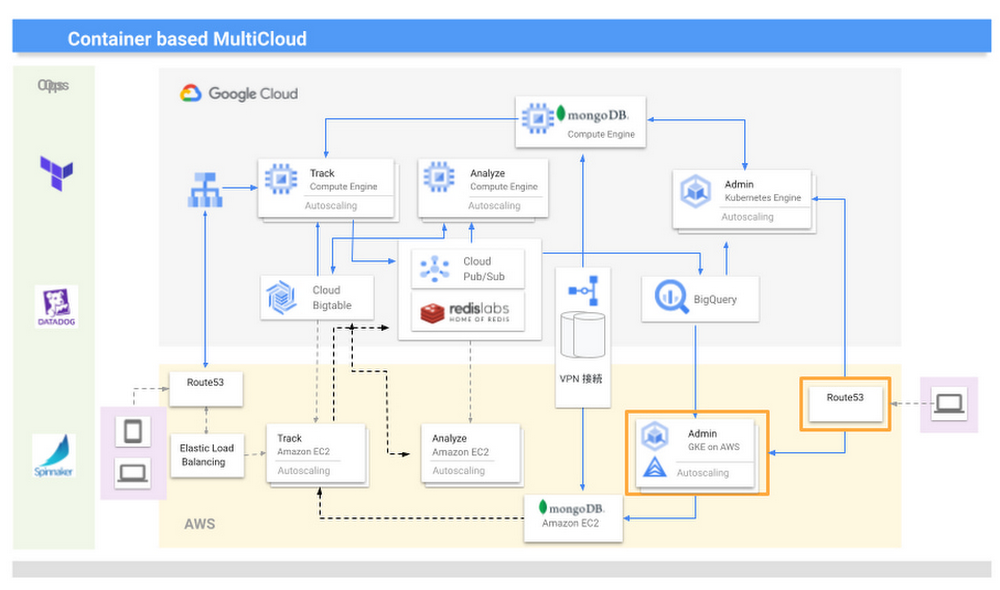
Editor’s note: Today’s post comes from Naohiko Takemura, Head of Engineering, and Kosukex Oya, Engineer, both from Japanese customer experience platform PLAID. The company runs its platform in a multicloud environment through Anthos clusters on AWS and shares more on its experiences and best practices. At PLAID, our mission is to maximize the value of people through data, and we are developing a range of products that focus on improving customer experience. Our core product is a customer experience platform, KARTE, that can analyze the behavior and emotions of website visitors and application users, enabling businesses to deliver relevant communications in real time. We make KARTE available as a service to functions such as human resources and industries such as real estate and finance, and run the platform in a multicloud environment to achieve high-speed response and meet availability requirements. This is where Anthos comes in.We introduced KARTE in 2015 and updated the system configuration in line with the addition of new functions and the need to increase scale. Our multicloud configuration is optimized through Anthos clusters on AWS, which give us access to the capabilities of Google Kubernetes Engine (GKE). KARTE runs in two groups of server instances in each cloud; one group runs the management screens used by clients, and the other provides content for visitors to our website. In Google Cloud, the management system runs in GKE and content is delivered through Compute Engine.We initially developed and operated the core of our services on another provider and from 2016 began to transition to Google Cloud due to its strong data processing capabilities. The products that handled big data, such as Cloud Bigtable and BigQuery, were attractive because they could handle data in real time and were compatible with KARTE. Now most functions, including peripheral aspects, run in Google Cloud, because we thought if we built a system centered on these products, it would become efficient to build other parts on Google Cloud.While we considered migrating everything to Google Cloud, we decided to leverage its strengths alongside those of our existing provider, AWS. We felt a multicloud approach could create more opportunities and deliver higher growth than a mono-cloud environment.  We completed our move to a multicloud environment in 2017 and found that by building systems with almost the same content on two cloud services to leverage the strengths of each, we could reduce costs and improve performance and availability.However, as KARTE grew, and the content of the service increased in complexity, we began to experience new problems. The increased load on the system due to an influx of in-house engineers from 2018 onwards impacted the scalability and development speeds of our  conventional monolithic architecture running in virtual machines. We opted for an approach based on microservices and containerization, excluding the components that enabled real-time analysis as these had been modernized since initially being deployed in 2016, and the management screens, as the infrastructure running these did not require crisp tuning. Our key priority was to improve the ability of our engineers to deliver quickly.From 2019, we turned to promoting microservices that make full use of container technology. When deciding to move from a target built on virtual machines to containerization, we evaluated the ease of use of GKE and decided to build in Google Cloud. At the same time, the number of systems with strict service level obligations was increasing, so to ensure higher availability, we considered running these in a multi cloud environment. The announcement of Anthos clusters on AWS at Google Cloud Next ‘19 in San Francisco provided an answer.We had been wondering how to achieve the equivalent smooth operation of GKE in our AWS environment, and welcomed the Anthos clusters on AWS announcement. We consulted with a Google Cloud customer engineer through an early access program and quickly gained an opportunity to work with this version of Anthos. This allowed us to provide feedback and requests for improvement, and this paved the way for us to implement the product to take advantage of its functionality and future enhancements. With Google Cloud, we have been able to continue to interact closely with the development team to understand and provide input into the product roadmap.We are now realizing the benefits of multicloud, including faster development speeds and higher availability. For businesses in general, we recommend they take a thoughtful approach to multicloud—while for us, multicloud is a useful mechanism that enables us to provide large-scale data analysis in real time, other businesses should consider whether multicloud is right for them and if so, the role of a technology like Anthos. They should also start small before ramping up.  Moving forward, we are keen to see what other products Google Cloud is creating that can help drive our business to a higher level.Related Article3 keys to multicloud success you’ll find in Anthos 1.7The new Anthos 1.7 lets you do a whole lot more than just run in multiple clouds.Read Article
Quelle: Google Cloud Platform

How to detect machine-learned anomalies in real-time foreign exchange data

Let’s say you are a quantitative trader with access to real-time foreign exchange (forex) price data from your favorite market data provider. Perhaps you have adata partner subscription, or you’re using a synthetic data generator to prove value first. You know there must be thousands of other quants out there with your same goal. How will you differentiate your anomaly detector?What if, instead of training an anomaly detector on raw forex price data, you detected anomalies in an indicator that already provides generally agreed buy and sell signals? Relative Strength Index (RSI) is one such indicator; it is often said that RSI going above 70 is a sell signal, and RSI going below 30 is a buy signal. As this is just a simplified rule, it means there could be times when the signal is inaccurate, such as a currency market correction, making it a prime opportunity for an anomaly detector.This gives us the following high level components:Of course, we want each of these components to handle data in real time, and scale elastically as needed. Dataflow pipelines and Pub/Sub are the perfect services for this. All we need to do is write our components on top of the Apache Beam sdk, and they’ll have the benefit of distributed, resilient and scalable compute.Luckily for us, there are some great existing Google plugins for Apache Beam. Namely, a Dataflow time-series sample library that includes RSI calculations, and a lot of other useful time series metrics; and a connector for using AI Platform or Vertex AI inference within a Dataflow pipeline. Let’s update our diagram to match, where the solid arrows represent Pub/Sub topics.The Dataflow time-series sample library also provides us with gap-filling capabilities, which means we can rely on having contiguous data once the flow reaches our machine learning (ML) model. This lets us implement quite complex ML models, and means we have one less edge case to worry about.So far we’ve only talked about the real time data flow, but for visualization and continuous retraining of our ML model, we’re going to want historical data as well. Let’s use BigQuery as our data warehouse, and Dataflow to plumb Pub/Sub into it. As this plumbing job is embarrassingly parallelizable, we wrote our pipeline to be generic across data types and share the same Dataflow job, such that compute resources can be shared. This results in efficiencies of scale both in cost savings and time required to scale-up.Data ModelingLet’s discuss data formats a bit further here. An important aspect of running any data engineering project at scale is flexibility, interoperability and ease of debugging. As such, we opted to use flat JSON structures for each of our data types, because they are human readable and ubiquitously understood by tooling. As BigQuery understands them too, it’s easy to jump into the BigQuery console and confirm each component of the project is working as expected.(synthetic data)As you can see, the Dataflow sample library is able to generate many more metrics than RSI. It supports generating two types of metrics across time series windows, metrics which can be calculated on unordered windows, and metrics which require ordered windows, which the library refers to as Type 1 metrics and Type 2 metrics, respectively. Unordered metrics have a many-to-one relationship, which can help reduce the size of your data by reducing the frequency of points through time. Ordered metrics run on the outputs of the unordered metrics, and help to spread information through the time domain without loss in resolution. Be sure to check out the Dataflow sample library documentation for a comprehensive list of metrics supported out of the box.As our output is going to be interpreted by our human quant, let’s use the unordered metrics to reduce the time resolution of our flow of real time data to one per second, or one hertz. If our output was being passed into an automated trading algorithm, we might choose a higher frequency. The decision for the size of our ordered metrics window is a little more difficult, but broadly determines the amount of time-steps our ML model will have for context, and therefore the window of time for which our anomaly detection will be relevant. We at least need it to be larger than our end-to-end latency, to ensure our quant will have time to act. Let’s set it to five minutes.Data VisualizationBefore we dive into our ML model, let’s work on visualization to give us a more intuitive feel for what’s happening with the metrics, and confirm everything we’ve got so far is working. We use the Grafana helm chart with the BigQuery plugin on a Google Kubernetes Engine (GKE) Autopilot cluster. The visualisation setup is entirely config-driven and provides out-of-the-box scaling, and GKE gives us a place to host some other components later on.GKE Autopilot has Workload Identity enabled by default, which means we don’t need to worry about passing around secrets for BigQuery access, and can instead just create a GCP service account that has read access to BigQuery and assign it to our deployment through the linked Kubernetes service account.That’s it! We can now create some panels in a Grafana dashboard and see the gap filling and metrics working in real time.(synthetic data)Building and deploying the Machine Learning ModelOk, ML time. As we alluded to earlier, we want to continuously retrain our ML model as new data becomes available, to ensure it remains up to date with the current trend of the market. TensorFlow Extended (TFX) is a platform for creating end-to-end machine learning pipelines in production, and eases the process around building a reusable training pipeline. It also has extensions for publishing to AI Platform or Vertex AI, and it can use Dataflow runners, which makes it a good fit for our architecture. The TFX pipeline still needs an orchestrator, so we can host that in a Kubernetes job, and if we wrap it in a scheduled job, then our retraining happens on a schedule too!TFX requires our data be in the tf.Example format. The Dataflow sample library can output tf.Examples directly, but this tightly couples our two pipelines together. If we want to be able to run multiple ML models in parallel, or train new models on existing historical data, we need our pipelines to only be loosely coupled. Another option is to use the default TFX BigQuery adaptor, but this restricts us to each row in BigQuery mapping to exactly one ML sample, meaning we can’t use recurrent networks. As neither of the out-of-the-box solutions met our requirements, we decided to write a custom TFX component that did what we needed. Our custom TFX BigQuery adaptor enables us to keep our standard JSON data format in BigQuery and train recurrent networks, and it keeps our pipelines loosely coupled! We need the windowing logic to be the same for both training and inference time, so we built our custom TFX component using standard Beam components, such that the same code can be imported in both pipelines.With our custom generator done, we can start designing our anomaly detection model. An autoencoder utilising long-short-term-memory (LSTM) is a good fit for our time-series use case. The autoencoder will try to reconstruct the sample input data, and we can then measure how close it gets. That difference is known as thereconstruction error. If there is a large enough error, we call that sample an anomaly. To learn more about autoencoders, please consider reading chapter 14 from Deep Learning by Ian Goodfellow, Yoshua Bengio, and Aaron Courville.Our model uses simple moving average, exponential moving average, standard deviation, and log returns as input and output features. For both the encoder and decoder subnetworks, we have 2 layers of 30 time step LSTMs, with 32 and 16 neurons, respectively.In our training pipeline, we include z score scaling as a preprocessing transformer – which is usually a good idea when it comes to ML. However, there’s a nuance to using an autoencoder for anomaly detection. We need not only the output of the model, but also the input, in order to calculate the reconstruction error. We’re able to do this by using model serving functions to ensure our model returns both the output and preprocessed input as part of its response. As TFX has out-of-the-box support for pushing trained models to AI Platform, all we need to do is configure the pusher, and our (re)training component is complete.Detecting Anomalies in real timeNow that we have our model in Google Cloud AI Platform, we need our inference pipeline to call to it in real time. As our data is using standard JSON, we can easily apply our RSI rule of thumb inline, ensuring our model only runs when needed. Using the reconstructed output from AI Platform, we are then able to calculate the reconstruction error. We choose to stream this directly into Pub/Sub to enable us to dynamically apply an anomaly threshold when visualising, but if you had a static threshold you could apply it here too.SummaryHere’s what the wider architecture looks like now:More importantly though, does it fit for our use case? We can plot the reconstruction error of our anomaly detector against the standard RSI buy/sell signal, and see when our model is telling us that perhaps we shouldn’t blindly trust our rule of thumb. Go get ‘em, quant!In terms of next steps, there are many things you could do to extend or adapt what we’ve covered. You might want to explore with multi-currency models, where you could detect when the price action of correlated currencies is unexpected, or you could connect all of the Pub/Sub topics to a visualization tool to provide a real-time dashboard.Give it a tryTo finish it all off, and to enable you to clone the repo and set everything up in your own environment, we include a data synthesizer to generate forex data without needing access to a real exchange. As you might have guessed, we host this on our GKE cluster as well. There are a lot of other moving parts – TFX uses a SQL database and all of the application code is packaged into a docker image and deployed along with the infra using Terraform and cloud build.But if you’re interested in those nitty gritty details, head over to the repo and get cloning!Feel free to reach out to our teams at Google Cloud and Kasna for help in making this pattern work best for your company.
Quelle: Google Cloud Platform

Hola, South America! Announcing the Firmina subsea cable

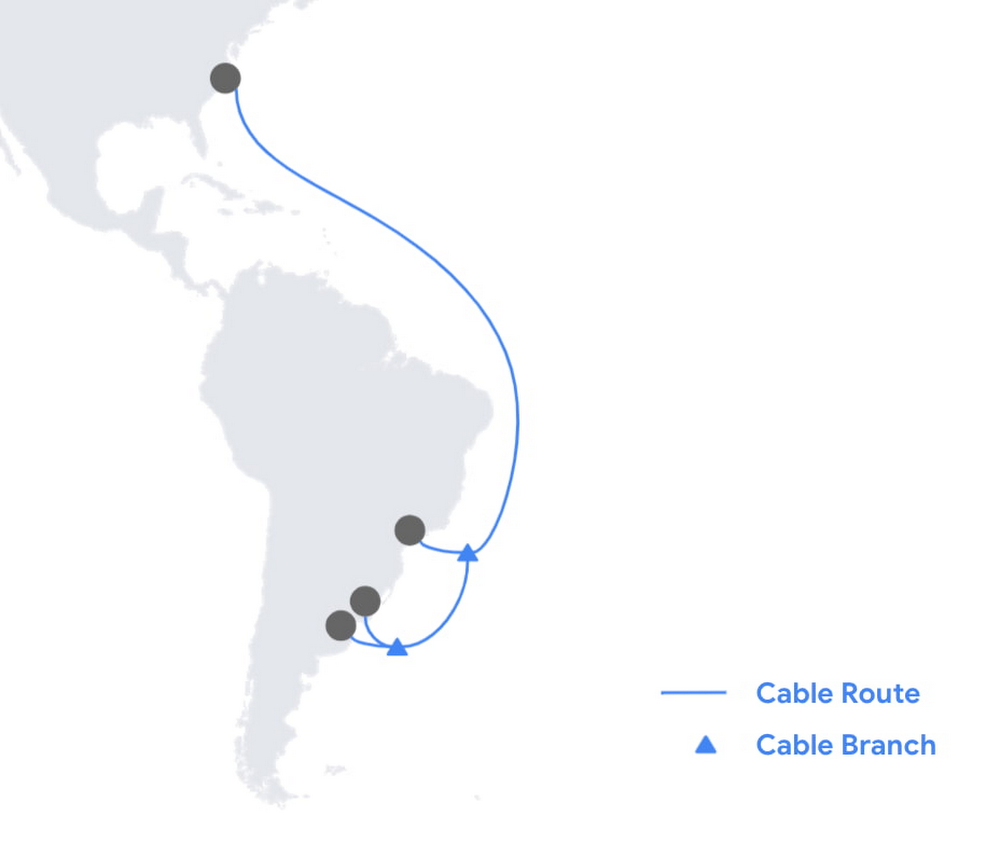
Today, we’re announcing Firmina, an open subsea cable being built by Google that will run from the East Coast of the United States to Las Toninas, Argentina, with additional landings in Praia Grande, Brazil, and Punta del Este, Uruguay. Firmina will be the longest cable in the world capable of running entirely from a single power source at one end of the cable if its other power source(s) become temporarily unavailable—a resilience boost at a time when reliable connectivity is more important than ever. As people and businesses have come to depend on digital services for many aspects of their lives, Firmina will improve access to Google services for users in South America. With 12 fiber pairs, the cable will carry traffic quickly and securely between North and South America, giving users fast, low-latency access to Google products such as Search, Gmail and YouTube, as well as Google Cloud services.Single-end power source capability is important for reliability, a key priority for Google’s network. With submarine cables, data travels as pulses of light inside the cable’s optical fibers. That light signal is amplified every 100 km with a high-voltage electrical current supplied at landing stations in each country. While shorter cable systems can enjoy the higher availability of power feeding from a single end, longer cables with large fiber-pair counts make this harder to do. Firmina breaks this barrier—connecting North to South America, the cable will be the longest ever to feature single-end power feeding capability. Achieving this record-breaking, highly-resilient design is accomplished by supplying the cable with a voltage 20% higher than with previous systems.Celebrating the world’s visionariesWe sought to honor a luminary who worked to advance human understanding and social justice. The cable is named after Maria Firmina dos Reis (1825 – 1917), a Brazilian abolitionist and author whose 1859 novel, Úrsula, depicted life for Afro-Brazilians under slavery. A mixed-race woman and intellectual, Firmina is considered Brazil’s first novelist. With this cable, we’re thrilled to draw attention to her pioneering work and spirit. You can learn more about Firmina in this Google Doodle.Including Firmina, we now have investments in 16 subsea cables, such as Dunant, Equiano and Grace Hopper, and consortium cables like Echo, JGA, INDIGO, and Havfrue. We’re continuing our work of building out a robust global network and infrastructure, which includes Google data centers and Google Cloud regions around the world. Learn more about our infrastructure.Related ArticleThe Dunant subsea cable, connecting the US and mainland Europe, is ready for serviceThe Dunant submarine cable system, crossing the Atlantic Ocean between Virginia Beach in the U.S. and Saint-Hilaire-de-Riez on the French…Read Article
Quelle: Google Cloud Platform

New research reveals what’s needed for AI acceleration in manufacturing

While the promise of artificial intelligence transforming the manufacturing industry is not new, long-ongoing experimentation hasn’t yet led to widespread business benefits. Manufacturers remain in “pilot purgatory,” as Gartner reports that only 21% of companies in the industry have active AI initiatives in production. However, new research from Google Cloud reveals that the COVID-19 pandemic may have spurred a significant increase in the use of AI and other digital enablers among manufacturers. According to our data—which polled more than 1,000 senior manufacturing executives across seven countries—76% have turned to digital enablers and disruptive technologies due to the pandemic such as data and analytics, cloud, and artificial intelligence (AI). And 66% of manufacturers who use AI in their day-to-day operations report that their reliance on AI is increasing.Click to enlargeThe top three sub-sectors deploying AI to assist in day-to-day operations are automotive/OEMs (76%), automotive suppliers (68%), and heavy machinery (67%).Click to enlargeIn fact, Bryan Goodman, Director of Artificial Intelligence and Cloud, Ford Global Data & Insight and Analytics shares, “Our new relationship with Google will supercharge our efforts to democratize AI across our business, from the plant floor to vehicles to dealerships. We used to count the number of AI and machine learning projects at Ford. Now it’s so commonplace that it’s like asking how many people are using math. This includes an AI ecosystem that is fueled by data, and that powers a ‘digital network flywheel.’”Moving from edge cases to mainstream business needsWhy are manufacturers now turning to AI in increasing numbers? Our research shows that companies who currently use AI in day-to-day operations are looking for assistance with business continuity (38%), helping make employees more efficient (38%), and to be helpful for employees overall (34%). It’s clear that AI/ML technology can augment manufacturing employees’ efforts, whether by providing prescriptive analytics like real-time guidance and training, flagging safety hazards, or detecting potential defects on the assembly line.Click to enlargeIn terms of specific AI use cases called out by the research, two main areas emerged: quality control and supply chain optimization. In the quality control category, 39% of surveyed manufacturers who use AI in their day-to-day operations use it for quality inspection and 35% for product and/or production line quality checks. At Google Cloud, we often speak with manufacturers about AI for visual inspection of finished products. Using AI vision, production line workers can spend less time on repetitive product inspections and can instead focus on more complex tasks, such as root cause analysis. In the supply chain optimization category, manufacturers said they tapped AI for supply chain management (36%), risk management (36%), and inventory management (34%).Click to enlargeIn our day-to-day work, we’re seeing many manufacturers rethink their supply chains and operating models to better accommodate for the increased volatility that has been brought about by the pandemic and support the secular trend of consumers asking for increasingly individualized products. We’ll share more on deglobalization in the third installment of our manufacturing insights series.AI use differs by geography, but not for the reasons you may thinkThe extent to which AI is already being used today varies quite strongly between geographies, according to our research. While 80% and 79% of manufacturers in Italy and Germany respectively report using AI in day-to-day operations, that percentage plummets in the United States (64%), Japan (50%) and Korea (39%).Click to enlargeIt’s tempting to state this disparity is due to an “AI talent gap.” Although the most common barrier, just a quarter (23%) of manufacturers surveyed believe they don’t have the talent to properly leverage AI. Cost, too, does not appear to be a roadblock (21% of those surveyed). Rather, from our observations, the missing link appears to be having the right technology platform and tools to manage a production-grade AI pipeline. This is obviously the focus of our efforts and others in the space, as we believe the cloud can truly help the industry make a step change.Looking ahead: The Golden Age of AI for manufacturingThe key to widespread adoption of AI lies in its ease of deployment and use. As AI becomes more pervasive in solving real-world problems for manufacturers, we see the industry moving away from “pilot purgatory” to the “golden age of AI.” The manufacturing industry is no stranger to innovation, from the days of mass production, to lean manufacturing, six sigma and, more recently, enterprise resource planning. AI promises to bring even more innovation to the forefront. To learn more about these findings and more, download our infographic here and our full report here. Research methodologyThe survey was conducted online by The Harris Poll on behalf of Google Cloud, from October 15 – November 4, 2020, among 1,154 senior manufacturing executives in France (n=150), Germany (n=200), Italy (n=154), Japan (n=150), South Korea (n=150), the UK (n=150), and the U.S. (n=200) who are employed full-time at a company with more than 500 employees, and who work in the manufacturing industry with a title of director level or higher. The data in each country were weighted by number of employees to bring them into line with actual company size proportions in the population. A global post-weight was applied to ensure equal weight of each country in the global total.Related ArticleCOVID-19 reshapes manufacturing landscape, new Google Cloud findings showAccording to our new research released today, manufacturers around the world have started to revamp their operating models and supply cha…Read Article
Quelle: Google Cloud Platform

NCR and Google Cloud are helping grocers rapidly reinvent the retail experience

In recent years, the grocery industry has had to shift to facilitate a wider variety of checkout journeys for customers. This has meant ensuring a richer transaction mix, including mobile shopping, online shopping, in-store checkout, cashierless checkout or any combination thereof like buy online, pickup in store (BOPIS).  What’s more, in the past year and a half alone grocers have had to enable consumers new ways to shop for essentials. This has included needing to rapidly integrate or build on-demand delivery apps, offer curbside pickup with near-instant fulfillment as well as support touchless and cashless checkout experiences. Searches on Google Maps for retailers in the US with curbside pickup options have increased by 9000% since March 2020, and we believe these trends from 2020 will continue to define the future of grocery shopping.The future of grocery will require agility and opennessFirstly, the need to rapidly adapt to changing consumer habits will be the new normal. Grocers will increasingly look to digitally transform legacy retail systems and modernize point of sale (POS) platforms to deliver and scale omnichannel experiences as quickly as possible. This necessitates a more agile and open architectural approach to technology – one built on microservices and leverages APIs so that new applications and experiences can be built, integrated and delivered faster.Automation and data-driven retailing will be table stakesIn order for retailers to blend what they’re offering in the store with digital experiences more efficiently, they will also need to automate more. For example, with automation and business intelligence, grocers can take labor that might have been tied up with tender operations and checkout and redistribute those resources to restocking shelves, curbside pick-up or improving customer experiences. Automation and access to real-time in-store inventory & supply chain data can also help grocers avoid the supply chain challenges seen in the early days of COVID-19. Grocers will need to find ways to leverage automation to ingest, organize, and analyze data from physical store networks, digital channels, distribution centers to better forecast demand and manage future fluctuations.How NCR and Google Cloud are helping grocers adapt to disruption with operational agilityHelping grocers improve operational agility to address changing consumer shopping habits and to thrive during times of disruption is something that NCR and Google Cloud have teamed up to do. NCR has over 135 years of experience in retail, having invented the cash register and are continuing to help grocers innovate. NCR Emerald builds upon the company’s leadership in POS software and has turned it into a unified platform that helps grocers operate the entire store from front to back. The solution supports cashier-led checkout, self-checkout, integrated payments, merchandising, and enables regional managers and corporate employees access to the analytics and tools needed to optimize loyalty programs and promotions.NCR has invested in a comprehensive, agile, and API-led retail architecture that lets grocers continually innovate and design new experiences as customers and the industry evolve. By running Emerald on Google Cloud, NCR can offer the solution on a subscription basis, helping grocers lower upfront capital expenditures and ensuring scalability. What’s more, NCR can tap into Google Cloud’s strength in data, analytics, and openness to deliver three key imperatives. Let’s take a look at each of these below.Run the way grocers need to while leveraging Google Cloud as a single source of logicTraditionally the POS system lived in the store. If disaster strikes, people still need access to food and essentials so the grocery store still needs to operate. It hardly gets more mission-critical than that. NCR Emerald is built on microservices, leveraging Kubernetes for front-of-house compute, and VMs (See graphic 1 below). This makes it easy to support lightweight clients accessible by store employees via any range of mobile devices, computer terminals, self-service kiosks, peripheral devices like receipt printers as well as legacy applications.What’s unique is that because Emerald runs on Google Cloud, it supports all those in-store and digital touchpoints mentioned above, but also allows grocers to run lean. Emerald leverages Google Cloud as a single source of truth and operates a lot of what it does out of logic. Every sales transaction coming from every channel, including e-commerce, can be logged via NCR’s Hosted Service and centralized in BigQuery and Bigtable as a transaction data master. This enables the grocer to manage any transactional use case very consistently, whether it e supporting customers who want to purchase in one store and return in another, offering digital receipts or the ability to exchange online purchases in store. Emerald on Google Cloud can help retailers extend capabilities through the power of the cloud but not need to live exclusively in the cloud. In other words, the solution allows grocers the ability to run the way they need to.Enable data-driven and real-time decision making for grocersStore managers, regional managers, category managers, and others all require different cuts of the data to do their jobs effectively. However, data silos persist and how data is formatted and arranged can still remain pretty static. Therefore allowing users with different roles the ability to view and analyze that data quickly and in different ways continues to be a challenge. As mentioned above, Emerald leverages Google Cloud data management solutions as the central repository for transactional, behavioral, and merchandising data. Every transaction from every store and every channel can be stored via NCR Hosted Service on BigQuery and Bigtable. NCR Analytics then harnesses the advanced analytical and data visualization capabilities of Looker to help grocers get a consolidated view of their business across all channels and then allow employees to slice and dice the data they way they need to. NCR Analytics also leverages the power of Google Cloud AI and machine learning to add another level of intelligence to the retailer’s data. For example, store managers can visualize how well they’re using their real estate and see how productive lanes 1-3 are compared with 7-10 or compare self-service versus manned lanes. By mapping to the retailer’s own catalog, they can also break down category-level performance and trends.NCR Analytics takes advantage of Google Cloud’s data pipeline to reduce processing time, with scaling and resource management provided out of the box. By letting the cloud store and process the data, NCR is providing the ability for retailers to analyze their data in near real-time across all platforms – a real game changer in the grocery business.Open APIs let grocers continually enrich the retail experienceFinally, Emerald is built on an API-first architecture managed through Apigee. It uses the power of Apigee as an open API platform to expose how Emerald can work with other NCR applications like loyalty and promotions, and third party applications like mobile ordering and order delivery to enrich the grocery experience for employees and customers. Every API that Emerald uses is available on Apigee, allowing them to share code samples and giving developers the ability to run scripts. This approach can allow retailers the ability to innovate in a fraction of the time and cost, speeding up 3rd party integrations up front and as businesses grow. Take, for example, Northgate Market, a chain of 40 stores in California, that were able to transform its digital operations and enable experiences that set it apart from competitors – quickly and simply with Emerald. It took less than 6 months to go from contract to live deployment in the first store. Since then, Northgate Market has been able to extend their intelligence by leveraging the power of Looker and NCR Analytics.Learn more about how NCR has been able to leverage an open, cloud-enabled architecture to help customers innovate across the retail, hospitality, and banking industries on the webinar “Role of APIs in Digital Transformation”. You can also learn more about how Northgate uses e-commerce to transform customer experience and gain consumer insights.Related ArticleAlbertsons and Google are making grocery shopping easier with cloud technologySee how grocery store chain Albertsons is working on new cloud technology to make online ordering and shopping easier — from the officia…Read Article
Quelle: Google Cloud Platform
Multi-Project Cloud Monitoring made easier

Customers need scale and flexibility from their cloud and this extends into supporting services such as monitoring and logging. Google Cloud’s Monitoring and Logging observability services are built on the same platforms used by all of Google that handle over 16 million metrics queries per second, 2.5 exabytes of logs per month, and over 14 quadrillion metric points on disk, as of 2020. However, you let us know through consistent feedback that the previous construct of Workspaces for Cloud Monitoring was not providing the flexibility needed for your larger scale projects.Cloud Operation’s New Approach to Multi-Project MonitoringWe’re happy to announce a new model for multi-project monitoring, which replaces the concept of Workspaces. This overhaul is geared toward maximizing the flexibility you have to manage your monitoring environments by introducing Metrics Scopes. Starting today you can associate your Google Cloud projects with multiple Metrics Scopes! Like Workspaces, Metrics Scopes will still be used to store all of the configuration content for dashboards, alerting policies, uptime checks, notification channels, and group definitions. However there is no limit to the number of Metrics Scopes to which you can associate a project. Prior to this change, a project could only be scoped with a single Workspace. Now, there are virtually unlimited possibilities for how you can set up multi-project monitoring. This unlocks a large variety of options, from more granular permissions to mission-focused configurations. At its most simple implementation though: operators/SREs can now create org-wide Metrics Scopes with monitoring configurations focused on infrastructure health. And developers can leverage Metrics Scopes built on a subset of their organization’s projects that allow them to focus on their application’s performance.How it worksWhen you have a collection of projects, Metrics Scopes enable you to view each project’s metrics in isolation as well as in combination with metrics stored by other projects. The Metrics Scope is hosted by a scoping project. This scoping project is the Cloud project that is selected in the Cloud Console project picker.ExampleIn this example, Project-SRE is the name of a scoping project to monitor your fleet. You added two developer teams’ projects: Project-Dev-1 and Project-Dev-2, to Project-SRE’s Metrics Scope. If you select Project-SRE with the Cloud Console project picker and then go to the Monitoring page, you view the metrics for all three projects: Metrics from all the projects are visible by using the scoping project Project-SRE, a project that was created specifically to monitor the fleet. It has a Metrics Scope of 3.If you select Project-Dev-1 with the Cloud Console project picker and then go to the Monitoring page, you view the Metrics Scope for Project-Dev-1 and you can only see the metrics for that project:Only metrics from the Developer’s project are visible by using the scoping project Project-Dev-1. It has a Metrics Scope of 1.What else is new?Metrics Scopes can now monitor up to 375 projects (up from 100).New projects automatically start working in Cloud Monitoring without the previous 60-second Workspace creation process.If you want to monitor more than one project simply add it to your Metrics Scope:Adding more than one project to a Metrics ScopeNavigationMentioned earlier, the Project Picker in the Cloud Console can be used to navigate between Metrics Scopes in Cloud Monitoring:A view of the Project Picker in the Cloud Console which can be used to navigate between Metrics ScopesThis is now consistent with many other services across Google Cloud. Specifically, you can see how the project picker stays consistent when navigating from Cloud Monitoring to Cloud Logging:The Project Picker stays consistent as you are navigating multiple servicesAdditionally, to make your navigation between Metrics Scopes easy we’ve added the new Metrics Scope Tab and Panel in the UI:Metrics Scopes panel in the Cloud Console UIComing SoonThe Metrics Scope API is coming within the next quarter! This API will enable you to programmatically manage your monitoring configurations and Metrics Scopes.Current Workspaces usersIf you are already using Workspaces in Cloud Monitoring you may have noticed that they converted to Metrics Scopes weeks ago. There is no additional action required and you can start taking advantage of the additional features of Metrics Scopes today.Get StartedCompanies that are digitally native or in the process of digital transformation have placed an increased operational role on developers and this often creates overlapping sets of responsibilities with Operations and SRE teams. Now multiple developer teams can focus on optimizing the performance of their applications while operators can take a fleet-wide view when maintaining and improving the performance of all of the infrastructure under their purview.For information on configuring a Metrics Scope to include metrics for multiple projects, see Viewing metrics for multiple projects.Related ArticleRead Article
Quelle: Google Cloud Platform

Build a platform with KRM: Part 1 – What’s in a platform?

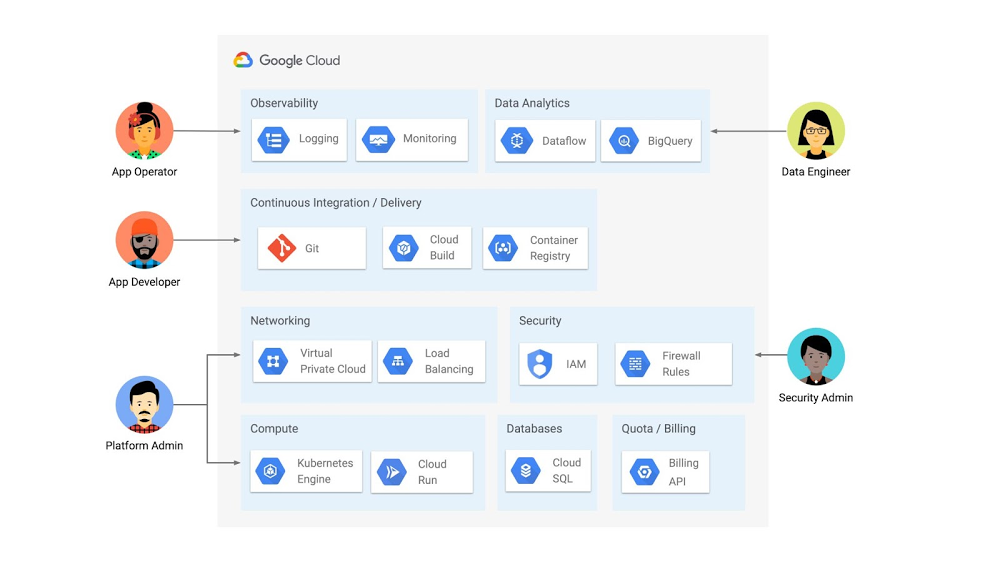
This is the first post in a multi-part series on building developer platforms with the Kubernetes Resource Model (KRM). In today’s digital world, it’s more important than ever for organizations to quickly develop and land features, scale up, recover fast during outages, and do all this in a secure, compliant way. If you’re a developer, system admin, or security admin, you know that it takes a lot to make all that happen, including a culture of collaboration and trust between engineering and ops teams. But building culture isn’t just about communication and shared values— it’s also about tools. When application developers have the tools and agency to code, with enough abstraction to focus on building features, they can build fast without getting bogged down in infrastructure. When security admins have streamlined processes for creating and auditing policies, engineering teams can keep building without waiting for security reviews. And when service operators have powerful, cross-environment automation at their disposal, they can support a growing business with new engineering teams – without having to add more IT staff. Said another way: to deliver high-quality code fast and safely, you need a good developer platform.What is a platform? It’s the layers of technology that make software delivery possible, from Git repositories and test servers, to firewall rules and CI/CD pipelines, to specialized tools for analytics and monitoring, to the production infrastructure that runs the software itself.  An organization’s platform needs depend on a variety of factors, such as industry vertical, size, and security requirements. Some organizations can get by with a fully-managed Platform as a Service (PaaS) like Google App Engine, and others prefer to build their platform in-house. At Google Cloud, we serve lots of customers who fall somewhere in the middle: they want more customization (and less lock-in) than what’s provided by an all-in-one PaaS, but they have neither the time nor resources to build their own platform from scratch. These customers may come to Google Cloud with established tech preferences and goals. For example, they may want to adopt Serverless but not Service Mesh, or vice versa. An organization in this category might turn to a provider like Google Cloud to use a combination of hosted infrastructure and services, as shown in the diagram below.(Click to enlarge)But a platform isn’t just a combination of products. It’s the APIs, UIs, and command-line tools you use to interact with those products, the integrations and glue between them, and the configuration that allows you to create environments in a repeatable way. If you’ve ever tried to interact with lots of resources at once, or manage them on behalf of engineering teams, you know that there’s a lot to keep track of. So what else goes into a platform? For starters, a platform should be human-friendly, with abstractions depending on the user. In the diagram above, for example, the app developer focuses on writing and committing source code. Any lower-level infrastructure access can be limited to what they care about: for instance, spinning up a development environment. A platform should also be scalable: additional resources should be able to be “stamped out” in an automated, repeatable way. A platform should be extensible, allowing an org to add new products to that diagram as their business and technology needs evolve. Finally, a platform needs to be secure, compliant to industry- and location-specific regulations. So how do you get from a collection of infrastructure to a well-abstracted, scalable, extensible, secure, platform? You’ll see that one product icon in that diagram is Google Kubernetes Engine (GKE), a container orchestration tool based on the open-source Kubernetes project. While Kubernetes is first and foremost a “compute” tool, that’s not all it can do. Kubernetes is unique because of its declarative design, allowing developers to declare their intent and let the Kubernetes control plane take action to “make it so.” The Kubernetes Resource Model (KRM) is the declarative format you use to talk to the Kubernetes API. Often, KRM is expressed as YAML, like the file shown below.If you’ve ever run “kubectl apply” on a Deployment resource like the one above, you know that Kubernetes takes care of deploying the containers inside Pods, scheduling them onto Nodes in your cluster. And you know that if you try to manually delete the Pods, the Kubernetes control plane will bring them back up- it still knows about your intent, that you want three copies of your “helloworld” container. The job of Kubernetes is to reconcile your intent with the running state of its resources- not just once, but continuously.  So how does this relate to platforms, and to the other products in that diagram? Because deploying and scaling containers is only the beginning of what the Kubernetes control plane can do. While Kubernetes has a core set of APIs, it is also extensible, allowing developers and providers to build Kubernetes controllers for their own resources, even resources that live outside of the cluster. In fact, nearly every Google Cloud product in the diagram above— from Cloud SQL, to IAM, to Firewall Rules — can be managed with Kubernetes-style YAML. This allows organizations to simplify the management of those different platform pieces, using one configuration language, and one reconciliation engine. And because KRM is based on OpenAPI, developers can abstract KRM for developers, and build tools and UIs on top.Further, because KRM is typically expressed in a YAML file, users can store their KRM in Git and sync it down to multiple clusters at once, allowing for easy scaling, as well as repeatability, reliability, and increased control. With KRM tools, you can make sure that your security policies are always present on your clusters, even if they get manually deleted. In short, Kubernetes is not just the “compute” block in a platform diagram – it can also be the powerful declarative control plane that manages large swaths of your platform. Ultimately, KRM can get you several big steps closer to a developer platform that helps you deliver software fast, and securely. The rest of this series will use concrete examples, with accompanying demos, to show you how to build a platform with the Kubernetes Resource Model. Head over to the GitHub repository to follow Part 1 – Setup, which will spin up a sample GKE environment in your Google Cloud project. And stay tuned for Part 2, where we’ll dive into how the Kubernetes Resource Model works.Related ArticleI do declare! Infrastructure automation with Configuration as DataConfiguration as Data enables operational consistency, security, and velocity on Google Cloud with products like Config Connector.Read Article
Quelle: Google Cloud Platform

Supporting business transformation for German retailers with SAP on Google Cloud

The retail industry is rapidly evolving, with customers demanding exceptional digital experiences, and retailers adjusting their businesses to be more efficient. With many retailers relying on SAP for critical business functions like digital transactions, finance, supply chains and more, this shift has led them to look for ways to modernize these systems, deliver them on highly scalable infrastructure, and extract more value out of the data from within them.  I’m proud that we are helping German retailers successfully migrate business-critical SAP systems onto Google Cloud, minimizing risk and downtime and ultimately helping them build a foundation for future growth. Our work with retailers like OTTO Group, one of the world’s largest ecommerce businesses, MediaMarktSaturn, the large consumer electronics retailer, and METRO, the wholesale retailer with operations across Europe, demonstrates our deep partnership with SAP to support customers’ digital transformations.Helping OTTO Group IT run SAP on secure, sustainable infrastructureOTTO, a leading online-retailer and services group in Germany and one of the world’s largest ecommerce companies, migrated their SAP workloads to Google Cloud in order to modernize their SAP landscape and build a more agile environment that would enable them to quickly scale up or down according to business needs. OTTO, which consistently balances the sustainable use of resources and climate-neutral action with economic growth, is also able to leverage Google Cloud’s clean infrastructure to deliver the bulk of its internal SAP environment, ensuring the company’s business systems are running on secure, sustainable infrastructure. Since 2017, Google has matched 100% of its global electricity use with purchases of renewable energy every year, and is now building on that progress with a new goal of running entirely on carbon-free energy at all times by 2030. With Google Cloud, OTTO has told us they have access to better means of automation and improved network capability compared to what they had with their previous provider. Through this cloud migration, OTTO Group IT is providing modern and flexibly scalable SAP systems to their internal customers.Powering MediaMarktSaturn’s online ecommerce experience For MediaMarktSaturn, SAP is critical to the smooth day-to-day running of its business, so the company was keen to ensure maximum availability and stability with a cloud environment. After a thorough examination of its business needs and hands-on support from Google Cloud’s teams, MediaMarktSaturn elected to migrate its SAP HANA database onto Google Cloud, enabling a performance increase of four times compared to its previous on-premises installations.The SAP suite is critical for the ecommerce platform to run smoothly on a day-to-day basis. By migrating to Google Cloud, the retailer is providing even more support and maximum availability for its customers. With Google Cloud’s industry-specific expertise, MediaMarktSaturn’s customers have access to a reliable and stable ecommerce platform, so they can browse for products online from wherever they are. Transforming METRO’s business by running SAP workloads in the cloud With more than 97,000 employees in 34 countries, Germany’s METRO is one of the world’s largest B2B wholesalers. Previously, METRO relied on unique finance systems that were different in each country,  and updates or system testing required substantial coordination across numerous teams, which was both time-consuming and costly. To address these pain points, METRO is moving away from on premise deployments and is now migrating its SAP S/4HANA finance systems to Google Cloud to support everything from classical role-based accounting to the use of cognitive tools. Now, internal METRO teams can work seamlessly across operations, enhancing the services they provide to customers by addressing demands in real time. To read more about how SAP on Google Cloud drives agility, efficiency, and innovation for our customers, visit our solutions page here.Related ArticleTransforming the consumer goods industry with SAP on Google CloudCPG companies are increasingly turning to the cloud because of the unmatched agility, security, scale, and flexibility it offers, and are…Read Article
Quelle: Google Cloud Platform




