Cloud SQL extends PostgreSQL 9.6 version support beyond end-of-life

Our mission with Cloud SQL for PostgreSQL is compatibility; we want our users to be able to run their applications unchanged while using Cloud SQL for PostgreSQL as their relational database management system (RDBMS). Thefinal release for PostgreSQL 9.6 is slated for November 11th, 2021. This is a good time to consider upgrading to a more recent version of PostgreSQL. Cloud SQL for PostgreSQL strives to maintain compatibility with the latest releases, and currently supports 10, 11, 12 and 13. You can find more information in the release notes. We realize, however, that your timelines may not allow you to upgrade before this final release date for 9.6, and there may be concerns on supportability moving forward.For these reasons, Cloud SQL will continue to support the final release of PostgreSQL 9.6 for at least one year after the general availability of Cloud SQL for PostgreSQL in-place major version upgrade. The final update for PostgreSQL 9.6 will come in November 2021, and Cloud SQL will make it available shortly after, and support it as is. While we won’t be able to provide patches, we will provide platform-level support. We hope this will give you peace of mind as you contemplate your upgrade options.In order to provide simple upgrade paths, we are working on features like support for Cloud SQL to Cloud SQL in the database migration service (DMS) and in-place major version upgrades for Cloud SQL for PostgreSQL.Read more about PostgreSQL versions on Cloud SQL here.Related ArticleMigrate your MySQL and PostgreSQL databases using Database Migration Service, now GACheck out how to migrate your on-premises databases to the cloud with Database Migration Service, now generally available for PostgreSQL …Read Article
Quelle: Google Cloud Platform

Learn Cloud Functions in a snap!

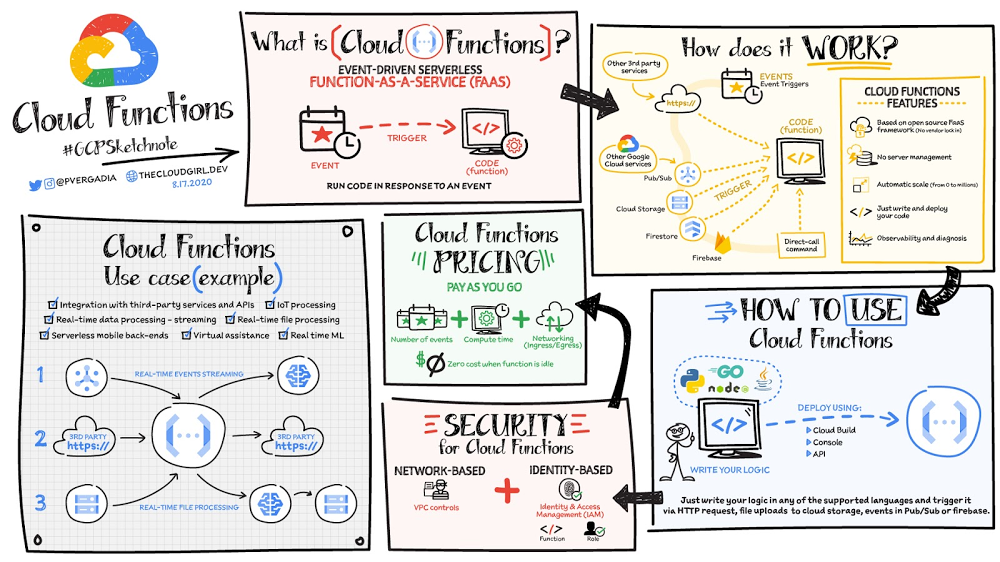
Cloud Functions is a fully managed event-driven serverless function-as-a-service (FaaS). It is a small piece of code that runs in response to an event. Because it is fully managed, developers can just write the code and deploy it without worrying about managing the servers or scaling up/down with traffic spikes. It is also fully integrated with Cloud Operations for observability and diagnosis. Cloud Functions is based on an open source FaaS framework which makes it easy to migrate and debug locally. Click to enlargeTo use Cloud Functions, just write the logic in any of the supported languages (Go, Python, Java, Node.js, PHP, Ruby, .NET), deploy it using the console, API or Cloud SDK and then trigger it via HTTP(s) request from any service, for example: file uploads to Cloud Storage, events in Pub/Sub or Firebase, or even direct call via Command Line Interface CLI. There is a generous free tier and the pricing is based on number of events, compute time, memory and ingress/egress requests and costs nothing if the function is idle. For security, using Identity and Access Management IAM you can define which services or personnel can access the function and using the VPC controls you can define network based access. Cloud Functions use casesSome Cloud Functions use cases include:Integration with third-party services and APIsAsynchronous workloads like lightweight ETLLightweight APIs and webhooksIoT processing and update of the sensors/devices in the fieldReal-time file processing for use cases such as media transcoding or resizing as soon as the file is uploaded in Google Cloud Storage.Real-time ML solutions for use cases such as media translation or image recognition for files uploaded in GCS.Backend for chat applications and mobile apps.Firebase Functions and Cloud Functions, are they different? If you are a Firebase developer, you’d probably use Firebase Functions. Those are created from the Firebase dashboard / website. Both Cloud Functions and Firebase Functions can do the same things, they just have slightly different signatures and slightly different ways of deploying. Firebase Functions have a local emulator, which Cloud Functions uses the Functions Framework.For a more in-depth look into Cloud Functions check out the documentation.  Once you’ve got your Function up and running, check out some tips and tricks.For more #GCPSketchnote, follow the GitHub repo. For similar cloud content follow me on Twitter @pvergadia and keep an eye out on thecloudgirl.devRelated Article5 cheat sheets to help you get started on your Google Cloud journeyWhether you need to determine the best way to move to the cloud, or decide on the best storage option, we’ve built a number of cheat shee…Read Article
Quelle: Google Cloud Platform

Orchestrating your data workloads in Google Cloud

At its core, Data and Analytics allows us to make impactful decisions by deriving insights from our data. In the pursuit of making data meaningful, data scientists and engineers are often tasked with building end-to-end workflows to ingest, process and analyze data. These workflows will usually involve multiple tasks, or services that need to be executed in a particular order. How do you know if and when the execution of a task has completed successfully, what should happen if one of the services in the workflow fails? You can imagine that as your workloads scale and become more complex these questions become more urgent and harder to solve.This is where orchestration comes in! Orchestration is the automation, management and coordination of workflows. In this blog I’ll discuss how you can orchestrate your data workflows in Google Cloud. Let’s start with an exampleLet’s imagine that you have data across multiple buckets in Google Cloud Storage that you need to extract and transform before loading into, say, BigQuery, Google Cloud’s Data Warehouse. To do this, you could build data pipelines in Dataflow, Data Fusion, or Dataproc (our managed offering of Beam, CDAP and Spark respectively).So where does orchestration come in? Let’s say we want to:Run the data pipeline that will transform our data every day at midnight.Validate that the data exists in Cloud Storage before running the pipeline.Execute a BigQuery job to create a View of the newly processed data.Delete the Cloud Storage bucket once the pipeline is complete.If any of the above fails, you want to be notified via slack. This process needs to be coordinated as part of a wider workflow; it needs to be orchestrated.It’s key to understand that orchestration is not about transforming or processing the data directly, but supporting and coordinating the services that do.Which tool should I use?Google Cloud Platform has a number of tools that can help you orchestrate your workflows in the Cloud, check out our first blog in this series, Choosing the right orchestrator, for a more in depth comparison of these products. Cloud Composer is your best bet when it comes to orchestrating your data driven (particularly ETL/ELT) workloads. Cloud Composer is our fully managed orchestration tool used to author, schedule and monitor workflows. It is built on the popular and ever-growing open source Apache Airflow project. The end goal is to build a workflow made up of tasks, your workflow is configured by creating a Directed Acyclic Graph (DAG) in python. A DAG is a one-direction flow of tasks with no cycles and each task is responsible for a discrete unit of work:If your workflows are held together by a handful of cron jobs or ad hoc scripts with loose dependencies that only a handful of people know how to manage then you’ll appreciate the nature of DAGs. Your workflow can be simplified, centralized and collaborative by having your entire task execution in a central tool that everyone can contribute to, and track in the Airflow UI. Why use Composer for orchestrating my data workflows?Composer can support a whole range of different use cases but the majority of users are data engineers who are building workflows to orchestrate their data pipelines. They’ve chosen Composer because it helps overcome some of the challenges commonly faced when managing data workflows.Being able to coordinate and interface with multiple services is paramount to any ETL or ELT workflow and engineers need to be able to do this reliably and securely. Thankfully, there are hundreds of operators and sensors that allow you to communicate with services across multiple cloud environments without having to write and maintain lots of code to call APIs directly. As workflows scale in complexity, having sophisticated task management becomes more important.You can parallelize and branch tasks based on the state of previous tasks. It has built-in scheduling and features to handle unexpected behavior – for example, sending an email or notification on failure. Composer takes the Airflow experience for engineers up a level by creating and maintaining the Airflow environment for you, taking care of the infrastructure needed to get your DAGs up and running.  Not having to focus on infrastructure management in addition to being able to automate and delegate the repetitive tasks to Composer, means data engineers get time back to focus on actually building data pipelines and workflows.Can I use Composer to process and transform my data?Composer is not a data processing tool and shouldn’t be used to directly transform and process big data. It is not designed to pass large amounts of data from one task to the next and doesn’t have any sophisticated data processing parallelism or aggregation that is fundamental to handling big data. Composer is also better suited to orchestrating batch workloads over those that require super low latency as it can take a few seconds to start one task once another has finished. But what about those data transfer operators?It’s worth pointing out there are some transfer operators, like the Google Cloud Storage to BigQuery operator, that transfers data from one source to another.So isn’t Composer being used here to transfer data? Not quite – under the hood Composer is just making a call to the BigQuery API to transfer the data, no data is downloaded, or transferred between the Composer workers – this is all delegated to BigQuery resources.So how does Composer compare to Dataflow or DataFusion?Services like Data Fusion, Dataflow and Dataproc are great for ingesting, processing and transforming your data. These services are designed to operate directly on big data and can build both batch and real time pipelines that support the performant aggregation (shuffling, grouping) and scaling of data. This is where you should build your data pipelines and you can use Composer to manage the execution of these services as part of a wider workflow.Let’s revisit our example with ComposerYou would first create DAG with tasks for each stage of your workflow. We’ll assume our data pipeline is in Dataflow:These tasks will execute one after the other and if any of the tasks fail an error notification will be posted on Slack, you can easily set up your Slack connection in the Airflow UI. As part of the DAG, you can define a schedule interval, in this case we simply wanted it to execute every day at midnight:We can easily create these tasks using the Cloud Storage, BigQuery, Dataflow and Slack operators. Here is a snippet of the Cloud Storage sensor that simply checks for the existence of a file in a Google Cloud Storage bucket:You can check out a code sample for this DAG here.Once your DAG is complete, you just upload it to Google Cloud Storage so it can be executed from the Airflow UI. From here, it’s easy for your team to trigger, track and monitor the progress of your Composer workflow:The ability to host your data on the cloud has encouraged data driven workloads to evolve and scale faster than ever. Data orchestration is becoming increasingly more important as engineers aspire to simplify and centralize the management of their tasks and services. By having Composer orchestrate these workflows and manage the underlying resources on their behalf, data engineers can focus their efforts on the more creative aspects of data engineering.Want to learn more?Register for our upcoming Open Source Live event focussed on Airflow or check out these tutorials and code samples to get started with Composer!Related ArticleChoosing the right orchestrator in Google CloudThere are a few tools available for orchestration in Google Cloud—some better suited for microservices and API calls, others for ETL work…Read Article
Quelle: Google Cloud Platform

From multiple clouds to multicloud: Key factors that influence success

As your organization evolves, the cloud can be a powerful tool to drive growth, improve efficiency, and reduce costs. In fact, the cloud is so powerful that most organizations find themselves running on multiple clouds—a full 92% of enterprises surveyed by Flexera1 reported adopting a deliberate multicloud strategy in some way, shape, or form: on one or more public clouds, on-premises data centers (or private clouds)—and let’s not forget the edge locations. Multicloud, in short, is very much the reality for today’s enterprises. The problem is that cloud platforms each come with their own proprietary approach to management. This creates inconsistency in operations, making it hard and more expensive to maintain security and compliance across environments. It also hampers developer productivity, places a strain on precious talent, and adds to overall costs. Can you get the advantages of using distinct cloud providers while minimizing the complexity and cost?Have no fear–there’s good news. Running on multiple clouds doesn’t have to be hard. It doesn’t have to be expensive. It doesn’t have to be a burden on your operations teams. Done right, you can go from running on multiple clouds out of necessity, to turning those multicloud assets into a net positive for your developers, your platform administrators, and your organization’s bottom line. To show you how, first, let’s recap why organizations tend to find themselves running on multiple clouds. Then, we’ll walk through a few ways Google is bringing cloud services like Anthos, Looker, BigQuery Omni, Apigee API management, and others to multicloud environments in way that positions your organization to take advantage of everything the cloud has to offer. Why do organizations run on multiple clouds?For many organizations, working with multiple cloud providers is about selecting best-of-breed capabilities. For example, one provider may have broader compute options, another may specialize in data analytics and AI services, and another may support legacy environments. The decision to run on multiple clouds is often made in the boardroom. Sometimes it’s a business decision to avoid cloud provider lock-in, to comply with regulations that aim to avoid over-reliance on a single cloud infrastructure, or to satisfy geography-specific consumer protection laws e.g., GDPR, the California Consumer Privacy Act and GAIA-X. Companies also find themselves running on multiple clouds over time, say, as the result of an acquisition. Faced with workloads that are already running effectively on the non-preferred cloud, organizations sometimes come to the conclusion that they are not worth re-platforming.Regardless of the road you took to running on multiple clouds, you need to make it work well, minimizing complexity, keeping costs low, and enabling staff, rather than creating extra work for them. You want a platform to simplify and enhance your multicloud assets, and you need tools that are multicloud-ready. Here are just a few of the ways Google can help you succeed in your multicloud journey.From containers to a modern open cloudWhen operating in multiple cloud environments, organizations often start by looking for consistency and portability, turning to containers to re-package their workloads into a portable format that can run on multiple clouds, while standardizing skills and processes for platform teams. Google created Kubernetes to manage large fleets of our own containers, and open sourced it to help others achieve the same. Then, to make it easier for organizations to run Kubernetes, we created Google Kubernetes Engine (GKE), a reliable, secure and fully managed service. A few years later we introduced Anthos, a secure managed platform designed to simplify the management of Kubernetes clusters on any public or private cloud by extending a GKE-like experience along with our best open-source frameworks, with a Google Cloud-backed control plane for consistent management of services in distributed environments.Today, multicloud organizations can leverage our full open cloud approach, which uses open-source technologies to let them deploy—and, if desired, migrate—critical workloads running on both VMs and containers and reimagine them in a modern microservices-based architecture. Anthos can also help you to leverage consistent Google Cloud services in other clouds. For example, we introduced Apigee hybrid to give you the flexibility to deploy API runtimes in a hybrid environment while using cloud-based Apigee capabilities such as developer portals, API monitoring and analytics. Apigee hybrid exposes trusted data residing across clouds through APIs to support faster app builds. We also brought hybrid AI capabilities to Anthos, designed to let you use our differentiated AI technologies wherever your workloads reside. By bringing AI on-prem, you can now run your AI workloads near your data, all while keeping them safe. In addition, hybrid AI simplifies the development process by providing easy access to best-in-class AI technology on-prem. The first of our hybrid AI offerings, Speech-to-Text On-Prem, is now generally available on Anthos through the Google Cloud Marketplace, and going forward, we are committed to bringing additional Google Cloud services, development tooling, and engineering practices to other environments for a truly consistent multicloud experience.Uncover new insights with a multicloud data analytics platformIf you want to make the best decisions for your business, you need access to your data and the ability to quickly derive insights from it, often in real time. That doesn’t change when your data is in multiple clouds. Unfortunately, the cost of moving data between cloud providers isn’t sustainable for many businesses, and it’s still difficult to analyze and act on data across clouds. We want you to be able to take advantage of our analytics, artificial intelligence, and machine learning capabilities regardless of where your data resides. A data cloud allows you to securely unify data across your entire organization, so you can break down silos, increase agility, innovate faster, get more value from your data, and support business transformation.To better serve customers across multiple environments, last year we launched BigQuery Omni, a new way of analyzing data stored in multiple public clouds that’s made possible by BigQuery’s separation of compute and storage. While competitors require you to move or copy your data from one public cloud to another—and charge high egress fees in the process—BigQuery Omni does not. And because BigQuery Omni is powered by Anthos, you can query data without having to manage the underlying infrastructure. With BigQuery Omni for Azure, now in public preview, we’re enabling more organizations to analyze data across public clouds from a single pane of glass. This, along with BigQuery Omni for AWS, helps customers access and securely analyze data across Google Cloud, AWS, and Azure.Then there’s Looker, a unified business intelligence and embedded analytics platform across your multicloud ecosystem. Looker’s in-database architecture supports a wide range of databases and SQL dialects. Using Looker, you can directly query data stored across multiple clouds to deliver governed real-time data at web scale where and when it’s needed, whether that’s through BI reports and dashboards, embedded analytics, automated data-driven workflows or completely custom data app experiences. This is why we’re excited to announce the continued expansion of Looker’s multicloud support, now including Looker hosted on Azure and support for more than 60 distinct database dialects. Now, you can host your Looker instance on the leading cloud provider of your choice: Google Cloud, AWS or Azure. Build cloud-native apps across clouds, at scaleIn an ideal world, development teams would not need to worry about the details of their specific platforms. They could modernize their existing apps, build cloud-native microservices, and deploy to any cloud platform for consistent service delivery anywhere. Additionally, they’d be able to manage all their clusters with a single pane of glass from the infrastructure layer through to service performance and topology—all in a uniform way. For many organizations, multicloud is only worth it if it can effectively address these needs. Anthos gives you the ability to run Kubernetes anywhere: private clouds and Google Cloud, but also Azure, and AWS. And no matter where you are running, Google Cloud’s suite of development tools are able to seamlessly integrate into your environment, making it easier for developers and operators to build, deploy and manage applications. For example, developers can write Kubernetes applications within their preferred IDE with Cloud Code.Secure your apps and data wherever they are When you’re running in several environments, you really can’t overlook security. Google Cloud solutions aim to secure everything in your multicloud environment, from the user to the network to the app to your data. We also provide threat detection and investigation across these surfaces, even for organizations that do not run their systems in our cloud. Our trusted cloud enables your digital transformation while also supporting your risk, security, compliance and privacy transformation. Our platform also delivers transparency and ensures digital sovereignty across data, operations, and software. We provide a secure foundation that you can verify and independently control, enabling you to move from your own data centers to the cloud while maintaining control over data location and operations—all while ensuring compliance with local regulations. Get started on your multicloud journeySome cloud providers dismiss customers who see multicloud as their path forward and don’t offer their cloud services where the customer needs them to be. That’s not our approach. Our goal is to support you regardless of where your data resides or where your applications run. If you’re ready to take your cloud deployment to the next level, check out our whitepaper, 5 ways Google can help you succeed in a hybrid and multicloud world. Or reach out to us and see if Google Cloud multicloud technologies can be what takes you there.1. Gartner Research
Quelle: Google Cloud Platform
New training helps you get started with GKE—for free!

Kubernetes adoption continues to grow unabated across all industries. This fall, 91% of IT and security professionals reported that their businesses are using Kubernetes for container orchestration. Now, technical professionals are faced with figuring out how to make the most of Kubernetes.For many businesses, a cloud provider’s managed Kubernetes service offers a more convenient on-ramp than going it alone with an open-source distribution. Google Kubernetes Engine (GKE) provides easier “one-click” cluster deployment, as well as the convenience of utilizing the assortment of products and tooling available in the cloud. Training and documentation available from Google Cloud can also help ease the transition as companies go through their modernization journeys. But there’s simply a lot to learn, and it can be tough to know where to begin.On June 22, Google Cloud will offer a no-cost, half-day training, Cloud OnBoard: Getting Started with Google Kubernetes Engine. In this training event, I’ll walk you through what you need to get started with adopting and managing GKE. The event will have four main sections: Introduction to Building with Kubernetes, Create and Configure GKE Clusters, Deploy and Scale in Kubernetes, and Securing GKE for Your Google Cloud Platform Access. Below is a brief overview of the topics you need to know about when learning how to use GKE as well as what you can expect from the Cloud OnBoard:Why Kubernetes?The first section, Introduction to Building with Kubernetes, we’ll go over the benefits of building with Kubernetes for your business. It will explore the challenges businesses face when modernizing their applications and when adopting cloud-native technologies and architectures such as microservices.How to create GKE clustersIn the second section, Create and Configure GKE Clusters, we’ll begin with the basics. I’ll demonstrate how to spin up a cluster using the gcloud command-line interface (CLI) and go into the capabilities of the Cloud SDK. Then, we’ll cover configuration and cluster management basics. This section will also cover the differences between GKE Standard mode and the new GKE Autopilot mode. We’ll also explore an example of a company that might choose GKE Autopilot mode for their needs.Running apps and services in GKEIn the third section, Deploy and Scale Apps in Kubernetes, we’ll go over general basics around running workloads in Kubernetes. You’ll learn the essentials you’ll need for deploying and scaling your applications. We’ll explore Kubernetes workload and service types, workload autoscaling capabilities, and how to create your first apps and services to run in GKE.Security for GKEAfter learning the basics of why, how, and what you’ll be using to run your workloads, the last key fundamental topic this training will cover is how to secure GKE and securely access Google Cloud services. Working in the cloud provides you with many tools to help run your business more securely, but that also means there’s a lot to learn about what those tools do and how they factor into the architectures you’ll build with GKE. We’ll go over the key security features and capabilities of Google Cloud and how to use them to help run your GKE clusters securely. You can check out our GKE Hardening Guide before watching my demo for this section, to get an even better understanding of GKE security. Ready to get started with GKE? Sign up here to reserve your seat forCloud OnBoard: Getting Started with Google Kubernetes Engineon June 22.Related ArticleIn case you missed it: All our free Google Cloud training opportunities from Q1Since January, we’ve introduced a number of no-cost training opportunities to help you grow your cloud skills. We’ve brought them togethe…Read Article
Quelle: Google Cloud Platform

How to get the most from Cloud SQL for SQL Server

At Google Cloud, we believe moving to the cloud shouldn’t have to mean starting over from scratch. That’s why we’re on a mission to give you choices for how you run your enterprise workloads, including migrating and modernizing your Windows workloads. In 2019, we launched Cloud SQL for Microsoft SQL Server so you can bring your existing, on-premises SQL Server databases and applications with you to the cloud. Our fully managed relational service, Cloud SQL, is an essential part of how we help enterprises  focus on innovation, not only on infrastructure. In this post, we’ll explore some best practices for leveraging Cloud SQL for SQL Server, so you can better understand when and how to utilize our SQL Server managed offering. We’ll cover:Provisioning Cloud SQL for SQL ServerConnecting your data to your analytics Ensuring your data is secureUnderstanding high availabilityIf you’re looking for other database solutions for your data, read more about Google Cloud’s managed database services. As you start setting up your deployments, there are several key considerations you should keep in mind: 1. Provisioning your SQL Server instanceWe offer the same standardized machine types for Cloud SQL for SQL Server as PostgreSQL and MySQL, allowing you to take advantage of the full breadth and capability of the resources for instances up to 96 vCPU cores, 624 GB of RAM, and 30 terabyte SSD. One unique benefit is that Cloud SQL for SQL Server only runs on SSD—there’s no HDD option. We’ve found that there’s increased resiliency and fewer issues with offering a single option. You can initiate the creation of a machine or modify an existing instance the same way you would any other Cloud SQL instance using the console, gcloud commands, or our API.  To seed your instance with data, Cloud SQL lets you import native backup (BAK) files so you can see your data offline. If you’d like to bring in data actively with minimal disruption, choose transactional replication to set up Cloud SQL as a subscriber.Once your Cloud SQL instance is running, you can set additional parameters and settings. For example, we recommend autoscaling your storage instead of pre-provisioning all the storage you need. Cloud SQL allows you to enable an automatic storage increase setting on the disk, so you don’t have to worry about having the correct allocation for project growth in the future. You can also use database flags for many SP_configure settings, including adjusting SQL Server parameters, adjusting options, and configuring and tuning an instance. This also includes setting a collation type to define the default sorting rules, case, and accent sensitivity for your databases. To get the most from your high availability (HA) configurations, and take full advantage of Cloud SQL’s 99.95% service-level agreement (SLA), select a regional availability and configure maintenance windows based on the best times to make any changes. We do our best to minimize disruptions by scheduling maintenance as quickly and as infrequently as possible, but our main priority is ensuring our service is secure and highly available. We get a lot of questions about the best way to utilize automatic backups for disaster recovery or restoring to other instances in other clouds or on-premises. By default, automatic backups run daily at the time you set. These are only storage snapshots of the persistent disk, which have no impact on Cloud SQL performance as it doesn’t leverage the database engine. For more frequent backups, set up manual backups using APIs or gcloud commands. However, you’ll need to manage the retention of those backups yourself, so we suggest leveraging manual backups in conjunction with automatic ones.Related ArticleRead Article2. Understanding high availability configurationsIn simple terms, the high availability configuration provides data redundancy. If a zone or instance becomes unavailable, your data will still be available to clients. How does this work? A Cloud SQL instance configured for HA (also known as a regional instance), is located in a primary and secondary zone and contains both a primary instance and a standby instance. Unlike SQL Server replication, Cloud SQL uses regional persistent disks (RePDs) to reduce downtime. Using synchronous replication to each zone’s persistent disk, all writes to your primary instance are synced to the standby instance. If a primary instance is unresponsive for approximately 60 seconds or a zone fails, the HA configuration switches over to the standby instance under the same IP and keeps your data available to applications. Another advantage is that high availability, or regional instances, only incur cost for a single license for the active resource. If you’d like to learn more, read about licensing pricing here. 3. Keeping security top of mindAt Google Cloud, ensuring security continues to be a top priority. That’s why we offer several cloud-wide platform features and differentiated security capabilities that ensure all of our products and services, including Cloud SQL, are as consistent and secure as possible. Google Cloud encrypts all your at-rest data by default. Data in transit is encrypted when data moves outside of Google’s network, but might not always be encrypted by default within. You can use SSL/TLS certificates to keep data secure when connecting to an instance using its public IP, and there are also additional security measures you can apply. You can also use customer-managed encryption keys (CMEK) as part of Cloud Key Management, allowing you to add your own cryptographic keys for data at rest in Cloud SQL. You have three connectivity options in Cloud SQL: Private IP—This is the easiest and most secure way to connect and access your Cloud SQL instance in your SQL Server database. You can set this as part of your VPC or peer-to-VPC networks.Public IP (with Cloud SQL Proxy)—If you’re coming from a different environment or cloud and need to use a public IP, we recommend using Cloud SQL Proxy whenever possible. Cloud SQL Proxy manages your SSL connectivity and settings without requiring you to authorize other networks.Public IP—If you prefer manual management options, we offer public IP addresses for your Cloud SQL instance. However, we strongly recommend following security best practices to avoid additional risk and exposure to threats.Our final tip deals with login credentials: Cloud SQL for SQL Server provides a default SQL Server user to help ensure the service’s integrity and security. If you would like to grant additional privileges beyond what is issued by default, you can  use explicit syntax. You can also create more SQL Server users if you prefer to manage data access that way. 4. Transforming your SQL Server data into valuable insightsOne of the most common requests we hear from our SQL Server customers is that they want to use analytics services, such as SQL Server Recording Studio, Analytics Studio, and Integration Services.  To help customers use their preferred services, we recommend running them separately in Compute Engine and then connecting them to your Cloud SQL instance. Your native tools, such as Query Optimizer or other Microsoft products can also be adopted for use in Cloud SQL by connecting them directly in your instance.Cloud SQL also lets you bring your data into other services in Google Cloud’s robust analytics ecosystem if you want to modernize your stack. For instance, a standard JDBC connection can join common services like Dataflow or Cloud Data Fusion, letting you create more complex pipelines for data transformation and data analytics purposes.To learn more about best practices for Cloud SQL for SQL Server check out the documentation here.Related ArticleUnderstanding the value of managed database servicesFully managed, relational cloud database services like Cloud SQL offload common database administration tasks for MySQL, PostgreSQL and S…Read Article
Quelle: Google Cloud Platform

Expanding access to quantum today for a better tomorrow

The next technological revolution is quantum computing. It has nearly limitless potential to enable transformative breakthroughs in human health and longevity, climate change and energy production, artificial intelligence, and more. But quantum computing can’t change the world unless we empower users from all walks of life with quick and easy access to the technology.That’s why we’re excited to announce that quantum computers from IonQ, a leader in trapped-ion quantum computing, are now available from Google Cloud Marketplace. Developers, researchers, and enterprises alike can now access IonQ’s high-fidelity, 11-qubit system via Google Cloud in just a few clicks, with billing and provisioning handled via their existing Google Cloud accounts.Read on for our conversation with IonQ CEO & President, Peter Chapman and Google Cloud Technical Director for HPC and Quantum Computing, Kevin Kissell. Q: Peter, Kevin, let’s start with the news of the day.  How did this integration come about between IonQ and Google Cloud?Kevin Kissell: Quantum computing is still a nascent field. There are many possible futures, and having more people and companies using quantum tools can only help to propel all of quantum computing forward. Here at Google, we work across a huge spectrum of different clients with different needs. Our implementation focus at Google has been on building a specific class of hardware for those needs, but we understand that we should also bring other compelling tech providers onto our platform because the inherent value of using the cloud is freedom of choice. And for me, IonQ was the obvious first team I wanted to bring on.Peter Chapman: IonQ’s focus is on building the best hardware in quantum computing just as much as it is on ensuring democratized access to quantum systems, and the cloud is a natural fit for us in terms of making our hardware widely available. We are incredibly excited about the future quantum can bring, but to make it real we need to enable better and more widespread access. We are humbled to offer the first quantum computers available on Google Cloud Marketplace.Q: More broadly, what should this integration signal to the world?Peter: This goes back to why we started pursuing cloud partnerships in the first place. Making quantum computers easily available to anyone via the cloud demonstrates that quantum is real because now anyone can run a quantum program with a few minutes and a credit card. This democratization of access is core to realizing the promise of quantum. I’d like to think a kid in a garage somewhere will come up with the killer application for quantum. But in order for them to do so, they need access. Many users across academia, industry, and commerce already have a Google Cloud account, so together, IonQ and Google Cloud are expanding streamlined access to quantum in a big way.Kevin: It’s no longer a question of whether, or even really when, quantum will happen. We’re now at the “how” and “how much” stage. I like that IonQ’s next-gen systems can make some experiments possible that weren’t before. There are aspects of quantum processor topology that will be exploreable by putting different kinds of quantum machines on Google Cloud, allowing people to develop the appropriate solutions and applications for those. Q: Let’s take a step back. What is quantum computing, and how did you each get into this field? Peter: There are aspects of quantum for which we don’t even have agreement on words to describe them. So I’ll use an analogy. Remember, this is an analogy; it’s not exactly what’s happening at a mathematical level, but it’s a reasonable way to think about it: when a regular computer tries to solve a maze, it will attempt every possible route in sequential order until it arrives at the correct solution. Think about arriving at an intersection in a maze where you can either go forward, left or right. You choose to go right, resulting in a dead end, so you backtrack to the intersection and go left. If that’s also a dead end, you backtrack and go forwards at the intersection this time, until the next intersection. And so on. A regular computer can solve a maze with even millions of possible routes in a few seconds. But once the maze reaches a certain size, a regular computer either can’t solve it or can’t solve it in a useful time-frame. A quantum computer could calculate every possible route simultaneously, no matter how many routes there are, thereby always arriving at the solution faster than existing computers. Now, think of all those routes in the maze as variables. Some of our greatest challenges simply involve many more variables than today’s computers can handle, which is why quantum computers are expected to drive so much benefit. Kevin: My own training and experience actually isn’t in quantum, it’s in CPU architecture and computer design. In 2006 the International Symposium on Computer Architecture was my favorite technical conference. I really didn’t know anything about quantum back then, but they had a session on it that year that I decided to attend, and I was fascinated. My approach is centered around building machines to solve problems for us humans, and that quantum workshop showed me that quantum opens the door to a much wider realm of possibilities for doing so. Fast forward to today, and I’m in this role as a sort of bridge between the classical and the quantum worlds. Q: What excites you about quantum computing, and what’s the first thing each of you will do when we have a “real” quantum computer at your disposal?Kevin: My background is creating machines that solve computational problems, and in this field, we’ve figured out many tricks to scale today’s supercomputers to address big problems. But there are hard technological limitations—there’s only so much parallelism you can extract from an algorithm. It almost sounds like a cliché, but we’re running up against the limits of Moore’s law. So as a computer architect, I’m looking at all kinds of technologies to get out of this box, including artificial intelligence, quantum computing and more. Now think about societal problems, like climate change. Using today’s technology, we would need more rare earth minerals than we know how to find, to convert every existing vehicle to an electric vehicle. We need better batteries, and with quantum electrochemistry, we might find them. That might be the first set of problems I’d want to see run, once we’ve got a big enough quantum machine—it will take a lot of qubits—but we’re still identifying new potential quantum applications, and we may find lower-hanging fruit.Peter: The promise of quantum is what’s exciting. At IonQ, we talked about if quantum computers could do anything to help with COVID-19—and while quantum computers aren’t yet powerful enough—the promise of quantum computers is that that will soon change. We all have this pressing, visceral urge to solve Covid, but we should have that same desire for curing cancer, eradicating poverty and hunger, fixing climate change, and much more. And probably only a quantum computer can tackle those problems. So I feel an urgency to create ever more powerful quantum computers, because people are suffering from problems that quantum may be able to address. I’ve also always been interested in artificial intelligence, so with a true quantum computer, that’s something I would personally want to experiment with. Q: What advice would you give to someone thinking about entering the quantum field?Kevin: Right now, the growth of the quantum field is limited by the workforce. There simply are not enough people who’ve done the work to progress the field yet. You have to be patient and you have to be committed to the long-haul. The fruits of your labor may feel very far away, but don’t forget that quantum computing is the most impactful field in computer science today.Peter: For many years, I worked for pioneering inventor and futurist, Ray Kurzweil. We were focused on predicting the future—figuring out when technology would come into play and when was the right moment to best take advantage of it. It gave me excellent training for thinking about quantum computing, and I want anyone who’s considering the field to know that quantum is coming more quickly than you think—and that it will change the world. Those who saw the vision of computers and contributed to making them a reality in the early days wound up doing very well. And I think we’re in that same kind of stage today for quantum, which is exciting for anyone considering a career in this space. To get started using IonQ’s trapped-ion quantum computing, read more here.To start or ramp up your own cloud research, we offer research credits to academics using Google Cloud for qualifying projects in eligible countries. You can find our application form on Google Cloud’s website or contact our sales team.Related ArticleNew Cloud TPU VMs make training your ML models on TPUs easier than everNew Cloud TPU VMs let you run TensorFlow, PyTorch, and JAX workloads on TPU host machines, improving performance and usability, and reduc…Read Article
Quelle: Google Cloud Platform

Build a platform with KRM: Part 2 – How the Kubernetes resource model works

This is part 2 in a multi-part series on building developer platforms with the Kubernetes Resource Model (KRM). In Part 1, we learned about some characteristics of a good developer platform, from friendly abstractions to extensibility and security. This post will introduce the Kubernetes Resource Model (KRM), and will discuss how Kubernetes’ declarative, always-reconciling design can provide a stable base layer for a developer platform. To understand how KRM works, let’s start by learning a bit about how Kubernetes works. Kubernetes is an open-source container orchestration engine that allows you to treat multiple servers (Nodes) as one big computer, or Cluster. Kubernetes auto-schedules your containers to run on any Nodes that have room. All your Kubernetes Nodes get their instructions from the Kubernetes control plane. And the Kubernetes control plane gets its instructions from you, the user. Google Kubernetes Engine (GKE) is Google’s managed Kubernetes product, and its architecture is shown below. In the blue “zonal control plane” area, you’ll see that the GKE control plane consists of several workloads— resource controllers, a scheduler, and backend storage — and all arrows point back to the API Server.source – GKE DocumentationAll about the APIThe Kubernetes API Server is the central, most important part about a cluster because it’s the source of truth for both the desired and actual state of your cluster’s resources. Let’s unpack that by exploring how, exactly, to run containers on a Kubernetes cluster. The way you configure most things in Kubernetes is with a declarative configuration file, expressed in a Kubernetes-readable format called the Kubernetes Resource Model (KRM). KRM is a way to state what you want to run on your cluster— it allows you to express your desired state. KRM is often expressed as YAML. For example, if I want to run a “hello-world” web server on my cluster, I’ll write a YAML file representing a Kubernetes Deployment, set to run the hello-world container image.Here, I’m writing down my desired state for the hello-world web server, providing the image I want to run on my Nodes, along with the number of replicas, or copies, of that container I want (3). You’ll also see other fields like “apiVersion,” “kind,” “metadata,” and “spec.” These are standard fields of all resources using the Kubernetes Resource Model, and we’ll see more of this later in the series. After I define my desired state as a Kubernetes resource in a YAML file, I can “apply” the resource file to my cluster. There are several ways to do this. One easy way is with the kubectl command-line tool, which can send a local file to a remote Kubernetes API server. When you apply a KRM resource to a Kubernetes cluster using `kubectl apply -f <filename>`, that resource gets validated and then stored in the Kubernetes API Server’s backing store, etcd. The life of a Kubernetes resource Once a Kubernetes resource lands in etcd, things get interesting. The Kubernetes control plane sees the new desired state, and it gets working to have the running state match what’s in our Deployment YAML. The resource controllers, running in the Kubernetes control plane, poll the APIServer every few seconds, checking to see if they need to take any action. Kubernetes Deployments have their own resource controller, containing logic for what to do with a Deployment resource, like marking containers as “need to schedule these to Nodes!” That resource controller will then update your KRM resource in the API Server. Then, the Pod scheduler, also polling the API Server, will see that there is a Deployment (hello-world) that has Pods (containers) in need of scheduling. And the scheduler will update your KRM resource such that each Pod has a specific Node assignment within the cluster.From there, each of your cluster’s Nodes, also polling the API Server, will check if there are any Pods assigned specifically to them. If so, they will run the Pod’s containers as instructed.  Notice how all the Kubernetes components get their instructions from the desired state, stored in the APIServer. That desired state comes from you, and from any other external actor on the cluster, but it also comes from the Kubernetes cluster itself. By marking Pods as “to be scheduled,” the Deployment controller is requesting something from the scheduler; by assigning Pods to Nodes, the scheduler is requesting something from the Nodes. At no point in the life of a Kubernetes resource are there imperative calls (“run this” or “update that”)— everything is declarative (“this is a Pod. and it’s assigned to this Node”).And this deployment process isn’t one-and-done. If you try to delete a running Pod from your cluster, the Deployment resource controller will notice, and it will schedule a new Pod to be created. Then, the Pod scheduler will assign it to a Node that has room for it, and so on. In this way, Kubernetes is working constantly to reconcile the desired state with the running state. This declarative, self-healing model applies to the rest of the Kubernetes APIs, too, from networking resources, to storage, to configuration, all of which have their own resource controllers. Further, the Kubernetes API is extensible. Anyone can write a custom controller and resource definition for Kubernetes, even for resources that run outside the cluster entirely, like cloud-hosted databases. We’ll explore this more later on in the series. KRM and GitOps: A dynamic duoOne benefit of defining your configuration as data in YAML files is that you can commit those resources to Github, and create CI/CD pipelines around them. This operating model — where configuration lives in Github, and automation deploys it — is called GitOps, a term coined by WeaveWorks. In a GitOps model, rather than running “kubectl apply -f” on your resource files, you set up a Continuous Deployment pipeline to run that command on your behalf. This way, any new KRM committed to Git is automatically deployed as part of CI/CD, helping you avoid human error. The GitOps model can also help you audit exactly what you’re deploying to your clusters, and roll your configuration back to the “last working commit” during outages. Let’s see GitOps and KRM in action with a sample application.Cymbal Bank is a retail banking web application, written in Java and Python, that allows users to deposit funds into their accounts, and send money to their contacts. The application is backed by two SQL databases, both running in Google Cloud. Like the hello-world Deployment we just saw, each Cymbal Bank service — the frontend, and each of the five backends — has their own Kubernetes Deployment: We also define other Kubernetes resources for each workload, like Services for routing between Pods in the cluster.When we commit all these YAML files to a Git repository, we can set up a Google Cloud Build pipeline to auto-deploy these resources to GKE. This build is triggered on any Git push to the main branch of our configuration repo, and it simply runs “kubectl apply -f” on the production cluster, to deploy the latest resources to the Kubernetes API Server. Once this pipeline runs, we can see the output of the kubectl apply -f commands on all the Cymbal Bank KRM resources. Now that the Continuous Deployment pipeline is complete, a new version of the Cymbal Bank app is now running in production! Want to set this up yourself? Check out the Part 2 demo to use KRM to deploy Cymbal Bank to your GKE environment.In the next post, we’ll build on this GitOps setup by taking on the role of a Cymbal Bank application developer, taking a new feature from development to production using KRM.Related ArticleBuild a platform with KRM: Part 1 – What’s in a platform?Building an extensible, secure developer platform is hard. This post introduces how to use Kubernetes and its declarative resource model …Read Article
Quelle: Google Cloud Platform

Up or out—or both: A simple framework for plotting your cloud migration

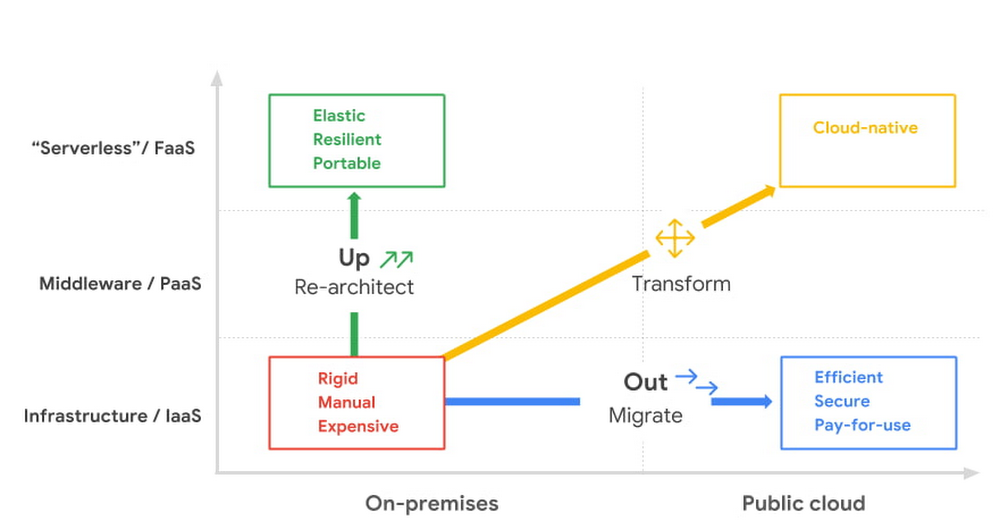
In times of significant disruption, organizations are faced with three choices: Retrench within legacy solutions, pause and do nothing while waiting for more data or different circumstances, or press ahead, potentially even accelerating to realize the desired outcome. In such an environment, it is critical to ensure you’re delivering the greatest possible impact to the business. In Google Cloud’s Office of the CTO, or OCTO, we have the privilege of co-innovating with customers to explore what’s possible and how we can re-imagine and solve their most strategic challenges. These collaborative innovation engagements are often core to critical transformational projects, which often include the rehosting, evolution, and at times re-architecture of existing business solutions. We are happy to offer this brand new white paper, where we have distilled the conversations we’ve had with CIOs, CTOs, and their technical staff into several frameworks that can help cut through the hype and the technical complexity, to help devise the strategy that empowers both the business and IT. We called one such framework “up or out.” (And we don’t mean some consulting firm’s hard-nosed career philosophy.) One model that we found can help enterprises chart their cloud adoption journey delineates cloud migration along two axes—up and out, and we’ll cover this in much greater detail in the white paper itself.Click to enlargeAs you can see, there isn’t a single path to the cloud—not for individual enterprises and not even for individual applications. The up or out framework can help an IT organization and its leadership characterize how they can best benefit from migrating their services or workloads. The framework acts as a general pattern that highlights the continuum of approaches to explore, and you can learn all about it by downloading this detailed white paper.Or, if you’re really ready to jump start your migration today, you can take advantage of our current offer by signing up for a free discovery and assessment.
Quelle: Google Cloud Platform

2 ways to migrate your SAP HANA database to Google Cloud

Many of the world’s leading companies run on SAP—and deploying it on Google Cloud extends the benefits of SAP even further. Migrating your current SAP S/4HANA deployment to Google Cloud—whether it resides on your company’s on-premises servers or another cloud service—provides your organization with a flexible virtualized architecture that lets you scale your environment to match your workloads, so you pay only for the compute and storage capacity you need at any given moment. Google Cloud includes built-in features, such as Compute Engine live migration and automatic restart, that minimize downtime for infrastructure maintenance. And it allows you to integrate your SAP data with multiple data sources and process it using Google Cloud technology such as BigQuery to drive data analytics.SAP server-side architecture consists of two layers: the SAP HANA database, and the Netweaver application layer. In this blog post, we’ll look at the options and steps for moving the database layer to Google Cloud as a lift and shift or rehost, a straightforward approach that entails moving your current SAP environment unchanged onto Google Cloud.Deploying an SAP HANA system on Google CloudGoogle Cloud offers SAP-certified virtual machines (VMs) optimized for SAP products, including SAP HANA and SAP HANA Enterprise Cloud, as well as dedicated servers for SAP HANA for environments greater than 12TB. (For a complete list of VM and hardware options, visit theCertified and Supported SAP HANA Hardware Directory.)Before proceeding with a rehost migration to Google Cloud, your current (source) environment and Google Cloud (target) environments should meet these specifications:Prerequisites:  The configuration of the Google Cloud environment (i.e., VM  resources, SSD storage capacity) should be identical to that of the source environment. If the underlying hardware is different, however, you must use Option 2 for your migration, detailed below.Both environments should be running the same operating system (SUSE or RHEL Linux).The HANA version, instance number, and system ID (SID) should be identical.Schema names must remain the same.Establishing the network connection between the on-premises environment and Google Cloud will be required in this phase to support rehost of the SAP application.you can use Cloud VPN or Dedicated Interconnect. Learn more about Dedicated Interconnect and Cloud VPN.Note: Depending on your internet connection and bandwidth requirements, we recommend using a Dedicated Interconnect over Cloud VPN for production environments. We offer a number of automated processes to accelerate your cloud journey. To deploy the SAP HANA system on Google Cloud, you can use theGoogle Cloud Deployment manager or Terraform and Ansible scripts available on GitHub with configuration file templates to define your installation. For more details, see theGoogle Cloud SAP HANA Planning Guide.Note: To deploy SAP HANA on Google Cloud machine types that are certified by SAP for production, please review theCertification for SAP HANA on Google Cloud page. Moving an SAP HANA Database to Google CloudThere are two different options you can use to rehost your SAP HANA database to Google Cloud, and each has pros and cons that you should consider when deciding on your approach.Option 1: Asynchronous replication uses SAP’s built-in replication tool to provide continuous data replication from the source system (also known as the primary system) to the destination or secondary system—in this case residing on Google Cloud. It’s best for mission-critical applications for which minimum downtime is a high priority, and for large databases. In addition, the high level of automation means that the process requires less manual intervention. Here’s where you can learn more on HANA Asynchronous Replication.Option 2: Backup and restore relies on SAP’s backup utility to create an image of the database that is then transferred to Google Cloud, where it is restored in the new environment. Downtime for this method varies by database size, so large databases may require more downtime via this method vs. asynchronous replication. It also involves more manual tasks. However, it requires fewer resources to perform, making it an attractive option for less urgent use cases. Here’s where you can learn more on SAP HANA database Backup and restore.Click to enlargeHow to migrate the SAP HANA database to Google Cloud using Asynchronous ReplicationClick to enlargeCreate and configure Dedicated Interconnect or Cloud VPN between the current environment and Google Cloud.Set up SAP HANA asynchronous replication. You can configure system replication using SAP HANA Cockpit, SAP HANA Studio, or hdbnsutil. See Setting Up SAP HANA System Replication in the SAP HANA Administration Guide.Be sure to use the same instance number and HANA SID in the template as the primary instance.Configure the Google Cloud instance as the secondary node for using HANA Asynchronous replication.Perform data validation once full data replication is completed to the SAP HANA database in Google Cloud. To learn more: HANA System Replication overview.  Perform an SAP HANA takeover on your standby database. This switches your active system from the current primary system onto the secondary system on Google Cloud. Once the takeover command runs, the system on Google Cloud becomes the new primary system.To learn more: HANA Takeover. How to migrate the SAP HANA database to Google Cloud using Backup and RestoreClick to enlargeCreate a full backup of your SAP HANA database in your current environment.Create a new storage bucket in your Google Cloud environment. VisitCreating Storage Buckets in the Google Cloud Storage documentation. Download and install gsutil onto the source environment and run it to upload the HANA backup to the Google Cloud storage bucket. To install gsutil utility on any computer or server, visit Install gsutil in the Google Cloud Storage documentation.Note: You can run parallel multi thread/multi processing in gsutil to copy large files more quickly.Recover the HANA database on Google Cloud using SAP’s RECOVER DATABASE statement. SeeRECOVER DATABASE Statement (Backup and Recovery) in the SAP HANA SQL Reference Guide for SAP HANA Platform.Note: BackInt agent is an integrated SAP interface tool used for HANA database on Google Cloud.Backint agent for SAP HANA can be used to store and retrieve backups directly from Google Cloud Storage. It is supported and certified by SAP on Google Cloud. To learn more:  SAP HANA Backint Agent on Google Cloud. In summary, we recommend using Asynchronous Replication (Option 1) for mission-critical applications that require the lowest downtime window. For all other applications, we recommend Backup and Restore (Option 2), as this approach requires fewer resources. It’s also a great way to implement the backup and restore functionality on Google Cloud.A rehost migration is the most straightforward path to getting your SAP on HANA system up and running on Google Cloud. And the sooner you migrate, the sooner you can take advantage of the many benefits Google Cloud brings to your SAP solution. For more information on the different migration options please review: SAP on Google Cloud: Migration strategies. Learn more about deploying SAP on Google Cloud. Technical resources can be found here.Related Article9 ways to back up your SAP systems in Google CloudBackup and storage design should be part of any business continuity plan. This post explains Google Cloud’s multiple cloud-based backup s…Read Article
Quelle: Google Cloud Platform